What's inside
- Key Takeaways
- Quick Picks
- How Did We Choose These NETGEAR WiFi Range Extenders?
- What Do NETGEAR’s EX, EAX and Nighthawk Names Actually Mean?
- How Do the Six NETGEAR Extenders Compare?
- When Should a NETGEAR Household Skip Extenders and Buy Orbi or Mesh Instead?
- How Long Will a NETGEAR Extender Stay Supported and Useful?
- How Do You Set Up a NETGEAR Extender for the Best Result?
- What Mistakes Do NETGEAR Extender Buyers Make?
- Final Recommendation
- Frequently Asked Questions
- Related Guides
As an Amazon Associate I earn from qualifying purchases. This post may contain affiliate links at no extra cost to you.
widgetverdict.com is reader-supported. When you buy through links on our site, we may earn an affiliate commission.
Where to buy: NETGEAR sells its extender line through Amazon, and the six listings linked below are the exact models this guide compares — note the model numbers carefully, because NETGEAR’s range spans near-identical plugs separated by a single letter, and the EX and EAX prefixes mark genuinely different generations of hardware.
Shoppers looking for the best netgear wifi range extenders usually arrive with one of two loyalties: a Nighthawk router already running the house, or a household that has simply always bought the brand with the networking pedigree. NETGEAR rewards that loyalty with the deepest single-brand extender catalogue in the business — and punishes the casual shopper with a model range that spans compact WiFi 5 plugs, mesh-branded desktop units and a WiFi 7 Nighthawk flagship, all wearing similar names and similar promises. This guide exists to sort that catalogue into a decision.
The sorting principle is generation and ambition. At the top sits the Nighthawk EXS27, NETGEAR’s WiFi 7 extender, maker-rated for up to 1,500 square feet at a 5 Gbps class with a 2.5G Ethernet port. Below it, the EAX17 and EAX10 bring the Nighthawk extender line’s WiFi 6 designs to two coverage sizes. The EX6400 and EX5000 serve the compact-plug mainstream at two power levels, and the EX7000 — the desktop unit NETGEAR calls a mesh range extender — covers the largest stated area of the six with a different physical philosophy entirely. Every figure quoted is the maker’s, from its own listings, and every pick works with any router, NETGEAR or otherwise, as the listings state.
One brand-wide honesty applies to all six: NETGEAR’s coverage and device figures are laboratory-framed ceilings like every maker’s, and the extender laws from our general guide — placement by signal strength, the halfway rule, the wired-port trick — govern NETGEAR hardware exactly as they govern everyone else’s. What the brand genuinely adds is range depth, support longevity and, in the Nighthawk line, app-managed polish. Buy the generation your router and rooms justify, place it like the guide below teaches, and the badge on the box will have been the least important part of the decision.
Key Takeaways
- The EXS27 is NETGEAR’s WiFi 7 flagship extender: maker-rated up to 1,500 sq ft, 5 Gbps class, 45 devices, with a 2.5G Ethernet port.
- The EAX17 and EAX10 are the WiFi 6 Nighthawk choices, maker-rated at 3 Gbps/1,500 sq ft and 1.4 Gbps/1,100 sq ft respectively.
- The EX6400 is the strongest compact plug: up to 2,100 sq ft and 1.9 Gbps per the maker, with 35 devices.
- The EX7000 desktop “mesh” extender claims the widest coverage here — up to 2,100 sq.ft. and 35 devices in AC1900 form.
- Every pick is listed by NETGEAR as working with any router; you do not need a NETGEAR router to use one.
- All figures are manufacturer ceilings; placement and your walls will negotiate the real result.
Quick Picks
| Pick | Badge | Why it earns its place |
|---|---|---|
| NETGEAR Nighthawk WiFi 7 Extender EXS27 | Best flagship | WiFi 7 at a maker-stated 5 Gbps class, up to 1,500 sq ft, 45 devices, 2.5G Ethernet. |
| NETGEAR WiFi Extender EX5000 | Best simple plug | The compact mainstream plug: fifteen hundred square feet, 1.2 Gbps class, 25 devices per maker. |
| NETGEAR WiFi Extender EX6400 | Best compact power | The stronger plug: twenty-one hundred square feet, 1.9 Gbps class, 35 devices per maker. |
| NETGEAR Nighthawk WiFi Extender EAX17 | Best WiFi 6 Nighthawk | WiFi 6 at a maker-stated 3 Gbps class, fifteen hundred square feet, 20 devices, 1G Ethernet. |
| NETGEAR Nighthawk WiFi Extender EAX10 | Best small-home Nighthawk | The compact WiFi 6 option: 1.4 Gbps class, up to 1,100 sq ft, 15 devices per maker. |
| NETGEAR WiFi Mesh Range Extender EX7000 | Widest stated coverage | Desktop AC1900 unit with coverage up to 2,100 sq.ft. and 35 devices per maker. |
How Did We Choose These NETGEAR WiFi Range Extenders?
Within a single brand, the choosing problem changes shape: instead of comparing ecosystems, we compared generations, form factors and honesty of positioning across NETGEAR’s own catalogue. The six picks were selected to give every plausible NETGEAR buyer a distinct answer rather than six shades of the same plug. The WiFi 7 flagship for the household modernising now; two WiFi 6 Nighthawk units for the mainstream at two sizes; two compact EX plugs for the value-and-simplicity heartland; and the desktop EX7000 for the buyer whose problem is area and wired devices rather than pocketability.
Every figure in this guide is attributed to NETGEAR’s own listings — coverage in square feet, speed classes, device counts, port speeds — and is framed as the maker states it. That discipline matters doubly in a brand guide, because brand-loyal readers are the most likely to take a familiar badge’s numbers at face value. The numbers are useful for comparing NETGEAR against NETGEAR, which is the comparison this guide actually performs; they are not promises about your walls, and the placement sections treat them accordingly.
We weighted the ownership layer that brand buyers are really purchasing: setup through NETGEAR’s assistant and app flows, firmware support from a maker that maintains its catalogue for years, and documentation deep enough that a problem at 11 p.m. has usually been solved by someone before you. That layer is the rational core of brand loyalty in networking, and it is why a guide devoted to one maker is a legitimate exercise rather than an advertisement — provided the guide keeps the maker’s claims labelled, which this one does at every appearance.
Compatibility was checked as the listings state it: these extenders are sold as working with any router, and the guide takes NETGEAR at its word while noting the one soft advantage of staying in-brand — a Nighthawk router and a Nighthawk extender share an app world and a support vocabulary, which smooths setup and troubleshooting even though the radio link itself is brand-blind. Readers with another maker’s router lose nothing technical by choosing from this list.
What Do NETGEAR’s EX, EAX and Nighthawk Names Actually Mean?
The prefixes are a rough map of the catalogue’s generations and ambitions. The EX line is the classic extender family: compact wall-plug units, mostly WiFi 5-era designs like the EX5000 and EX6400, built for simplicity and broad compatibility. The EAX line is the Nighthawk extender family in WiFi 6 form — the EAX10 and EAX17 — with app-managed setup and the Nighthawk name’s performance positioning. The EXS27 extends that flagship line into WiFi 7. The EX7000 sits apart as a desktop unit, larger and more port-rich, which NETGEAR markets with mesh language because it is designed to blanket a wide area as a single powerful node.
Speed classes decode similarly. The figures in the listings — 1.2 Gbps for the EX5000, 1.9 for the EX6400, 3 for the EAX17, 5 for the EXS27 — are the sums of the units’ theoretical band maximums, useful as size labels within the range and meaningless as predictions for any single device. A buyer comparing the EX5000 and EX6400 is really comparing coverage ambition and device headroom; a buyer comparing the EAX17 and EXS27 is comparing WiFi generations and port speed. Read the class as the unit’s weight division, not its promised punch.
Device counts follow the same grammar. Fifteen devices on the EAX10 describes a small flat’s realistic population; forty-five on the EXS27 describes a gadget-dense household’s. These are connection ceilings from the maker, and the sensible use is matching the ceiling to your own inventory with headroom to spare — not treating the larger number as a quality score. A household of twelve devices gains nothing from a 45-device ceiling it will never approach, and loses nothing by choosing the smaller, cheaper unit honestly sized to its life.
Coverage figures complete the map, and they reward a sceptical eye within the brand as much as across brands. The EX6400’s maker-rated 2,100 square feet exceeds the WiFi 7 flagship’s 1,500 — a reminder that coverage claims blend radio design, antenna arrangement and marketing era into a number that does not rank the units by modernity. The flagship’s case rests on its WiFi 7 radios, its 2.5G port and its device headroom, not on winning the square-foot column. Buyers who internalise that paragraph can shop this catalogue by fit instead of by the largest digit, which is the entire skill brand guides exist to teach.
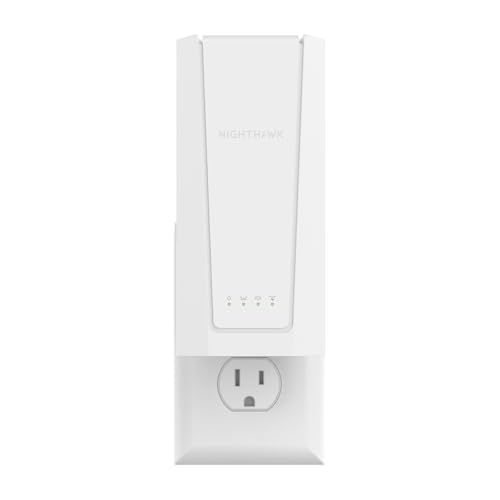
NETGEAR Nighthawk WiFi 7 Extender EXS27 — Best flagship
The EXS27 is NETGEAR’s extender flagship and reads like one: a Nighthawk WiFi 7 unit that its maker rates for up to 1,500 square feet at a 5 Gbps class, supporting 45 devices, with a 2.5G Ethernet port and the brand’s easy-setup positioning. Every element is aimed at the household whose network is modernising — a WiFi 7 router newly installed, a device inventory that keeps growing, and one or two rooms that the new router still cannot reach. For that household, this is the extender that matches the rest of the chain instead of anchoring it to an older standard.
The 2.5G port is the specification with the longest shadow. In ordinary extender duty it gives a wired television, console or desktop a feed faster than gigabit — headroom those devices will not trouble today. In access-point duty, if a cable ever reaches the unit, it lets the EXS27 accept a faster wired feed than any gigabit-port rival in this guide, which converts the flagship from a repeater into infrastructure. Flagships earn their price in such second acts, and NETGEAR has clearly designed this one with the house’s next five years open on the desk.
WiFi 7 honesty applies as it does everywhere in this series: the standard’s benefits flower among WiFi 7 devices and routers, and the structural extender hop remains beneath them. What the EXS27 buys today is the strongest current radios doing the repeating, the deepest device headroom in NETGEAR’s extender line, and freedom from revisiting this purchase when the household’s router completes its own WiFi 7 migration. Bought before that migration with no plan for it, the premium is speculation; bought as part of it, the premium is simply sequencing.
Placement and setup follow the Nighthawk pattern: the app-guided flow, the signal feedback during positioning, and the halfway discipline this guide’s setup section teaches. Forty-five devices of maker-rated headroom will not rescue a flagship plugged into a dead room, and NETGEAR’s own setup guidance will tell you so if you let it. The best hardware in the catalogue, placed by the book, is the complete proposition — and it is a genuinely strong one.
- Standard: WiFi 7, Nighthawk line
- Maker figures: up to 1,500 sq ft, 5 Gbps class, 45 devices
- Port: 2.5G Ethernet
- Compatibility: any router, per the maker
Strengths
- WiFi 7 radios with the deepest device headroom in the line
- 2.5G Ethernet port future-proofs wired and AP duties
- Nighthawk app polish and NETGEAR support depth
Trade-offs
- Flagship premium awaits a WiFi 7 household to justify it
- Maker coverage figure is mid-pack despite the flagship badge
- Still an extender: a wired route beats it where one exists
Best for: WiFi 7 households extending a Nighthawk-grade network into its last weak rooms.
Not suited for: older-router homes paying flagship prices for standards they cannot use yet.

NETGEAR WiFi Extender EX5000 — Best simple plug
The EX5000 is NETGEAR’s mainstream plug distilled: a compact unit the maker rates for up to 1,500 square feet at the 1.2 Gbps class with 25 devices, sold on easy setup and compatibility with any router. It is the extender a household buys when the problem is one room, the budget is ordinary, and the brand preference is for a name that will still have a support page when the unit is middle-aged. In a catalogue of flagships and desktops, that ordinariness is a deliberate and honourable position.
Its natural territory is the flat and the smaller house: the bedroom behind the bathroom’s plumbing, the study at the wrong end of the hallway, the kitchen where the smart display keeps dropping. The compact plug form serves that territory well, living in the halfway socket without furniture or ceremony, and NETGEAR’s setup flow — the assistant that walks the network selection and placement — is designed for owners who will never open a networking forum and should not have to.
The 25-device maker ceiling deserves its calm reading: phones, laptops, a television or two, the speaker and plug population of an ordinary home fit inside it, and the household that exceeds it is usually the household that should be reading the EAX or EXS sections instead. Similarly, the 1.2 Gbps class is a size label for a unit whose real job is steadiness in one adopted room, not throughput heroics. Judged against its own brief — one room, rescued simply, by a supported brand — the EX5000 is complete.
Against its own sibling, the EX6400 below, the choice is ambition: more stated coverage, more devices, a higher class, for more money. Households whose weak territory is plural, or whose device count is climbing, should pay the difference without regret. Households with the single defined room the EX5000 was drawn for should keep the change and spend the placement effort instead, which will do more for their evenings than the upgrade would.
- Form: compact wall-plug design
- Maker figures: fifteen hundred square feet, 1.2 Gbps class, 25 devices
- Compatibility: any router, per the maker
- Setup: easy set up positioning
Strengths
- Compact plug form with NETGEAR’s guided easy setup
- Maker ratings honestly sized to flats and smaller homes
- Works with any router, including provider-supplied units
Trade-offs
- WiFi 5-era design without the newer lines’ scheduling polish
- 25-device maker ceiling suits ordinary, not dense, households
- Single-room brief; larger weak territory wants its sibling
Best for: flats and smaller homes rescuing one room with a supported, simple plug.
Not suited for: device-dense households or multi-room weak territory.

NETGEAR WiFi Extender EX6400 — Best compact power
The EX6400 is the compact plug with its ambitions raised: NETGEAR rates it for up to 2,100 square feet at the 1.9 Gbps class with 35 devices, in the same tidy wall-plug form as its smaller sibling. That combination — the strongest stated coverage of any plug in this guide, without surrendering the plug’s simplicity — makes it the pick for the household whose weak territory is a wing rather than a room, but whose appetite for networking projects remains firmly at the plug-it-in level.
The step up from the EX5000 is worth itemising, because it is the comparison most NETGEAR shoppers actually face. More stated coverage for the larger or more divided floor plan; ten more devices of maker-rated headroom for the household whose inventory is growing; a higher speed class whose real meaning is stronger radios doing the repeating. None of it changes the category’s laws — the halfway rule still governs, the repeated network still behaves like one — but within those laws, the EX6400 is simply the more capable instrument, and houses at the larger end of the plug’s natural range will feel the difference in the far rooms.
Its era should be noted without drama: this is a WiFi 5-generation design, long established, with the documentation and ownership history that longevity brings. Households whose router is also of that generation are matched perfectly. Households on WiFi 6 or 7 routers can still use it — the listings promise any-router working — but they should know the repeated territory will cruise at the extender’s standard, and weigh the EAX line if that territory hosts the house’s busiest devices.
Buy the EX6400 when the floor plan is the argument: the long flat, the house with the weak far wing, the property whose single extender must genuinely cover. It is the plug form taken as far as the plug form sensibly goes, from the maker that defined the form — and for a large share of NETGEAR’s audience, it is the correct final answer rather than a stepping stone.
- Form: compact wall-plug design
- Maker figures: twenty-one hundred square feet, 1.9 Gbps class, 35 devices
- Compatibility: works with any router per maker
- Setup: easy set up positioning
Strengths
- Strongest stated coverage of the compact plugs here
- 35-device maker headroom suits growing households
- Same simple plug form and guided setup as its sibling
Trade-offs
- WiFi 5-generation radios behind the EAX and EXS lines
- Stated coverage remains a maker ceiling, not a floor-plan promise
- No flagship port speeds for wired duties
Best for: larger flats and houses with a weak wing, wanting plug simplicity with real coverage ambition.
Not suited for: WiFi 7 households seeking generation-matched hardware.

NETGEAR Nighthawk WiFi Extender EAX17 — Best WiFi 6 Nighthawk
The EAX17 is the considered mainstream of the Nighthawk extender line: WiFi 6 radios at a maker-stated 3 Gbps class, coverage rated up to 1,500 square feet, 20 devices, and a gigabit Ethernet port. That specification describes a deliberate balance — current-standard radios and app-managed Nighthawk polish, sized for the ordinary busy household rather than for the device-drenched one — and it is likely the correct NETGEAR extender for the largest number of readers of this guide.
WiFi 6 is where its value concentrates. The standard’s scheduling discipline is the difference between an extender that feels calm at 8 p.m. and one that feels haunted, because the evening household is a crowd of small devices negotiating for airtime around the streams and calls that matter. The EAX17 brings that discipline to the adopted rooms, along with the Nighthawk app’s setup guidance and device visibility, which together make the unit feel like part of a managed household network rather than a peripheral plugged into its edge.
The 20-device maker figure is the specification to read with care, because it is lower than several rivals’ in this guide while the unit’s real-world composure may be higher. Device ceilings count connections held; the EAX17’s WiFi 6 scheduling governs how gracefully those connections share. A household near twenty devices with heavy simultaneous use should still consider the EXS27’s headroom — but a household of fifteen busy devices will be served by this unit with a composure the raw count does not capture. Numbers in this catalogue are dialects; this guide translates rather than merely repeats.
The gigabit port completes the mainstream brief: a wired seat for the adopted room’s most important device, or the access-point graduation if a cable ever arrives. Against the EXS27, the EAX17 surrenders WiFi 7, port speed and device ceiling, and keeps everything the present-day WiFi 6 household can actually spend. That is not a compromise position; for most NETGEAR buyers, it is the optimum.
- Standard: WiFi 6, Nighthawk line
- Maker figures: fifteen hundred square feet, 3 Gbps class, 20 devices
- Port: 1G Ethernet
- Compatibility: works with any router per maker
Strengths
- WiFi 6 scheduling composure for busy evening households
- Nighthawk app management and guided placement
- Gigabit port for the adopted room’s key wired device
Trade-offs
- 20-device maker ceiling is modest on paper
- No WiFi 7 or 2.5G port for future-proofing
- Premium over the EX plugs buys polish some homes will not feel
Best for: WiFi 6 households wanting the balanced Nighthawk extender for ordinary busy rooms.
Not suited for: device inventories already past twenty and climbing steeply.
NETGEAR Nighthawk WiFi Extender EAX10 — Best small-home Nighthawk
The EAX10 is the Nighthawk line sized for the smaller home: WiFi 6 at a maker-stated 1.4 Gbps class, coverage up to 1,100 square feet, 15 devices, and a gigabit Ethernet port. It exists because the flagship logic — biggest coverage, deepest headroom — mis-serves the flat and the compact house, whose weak territory is one room and whose device inventory can be counted without a spreadsheet. For that household, the EAX10 delivers the current standard and the Nighthawk app experience at the line’s most accessible position.
Eleven hundred square feet of maker-rated coverage is a flat’s whole world or a small house’s problem half, and fifteen devices is that same household’s honest inventory: two phones, two laptops, a television, a console, a speaker, a scattering of smart things. Specifications sized to a life, rather than to a showroom, age gracefully — the unit is never straining at its ceilings, and its WiFi 6 composure is spent on the traffic the household actually generates at the hours it generates it.
The gigabit port matters disproportionately at this size, because the small home’s adopted room is usually its everything room — desk, television and console in one — and the port lets the most demanding of those devices wire itself to the extender and retire from the wireless negotiation entirely. A small household that wires its television into the EAX10 and lets the WiFi serve the portable devices has, in miniature, the architecture this whole series of guides recommends at every scale.
Choose the EAX10 over its larger sibling when the inventory and the floor plan both say small; choose the EAX17 when either says otherwise. NETGEAR’s line is built as exactly that staircase, and climbing one step too high costs money without buying calm, while climbing one too low costs calm without saving much money. The honest inventory — count the devices, pace the rooms — is the entire decision procedure, and it takes five minutes.
- Standard: WiFi 6, Nighthawk line
- Maker figures: up to 1,100 sq ft, 1.4 Gbps class, 15 devices
- Port: 1G Ethernet
- Compatibility: works with any router per maker
Strengths
- Right-sized WiFi 6 Nighthawk for flats and compact homes
- Gigabit port serves the everything-room’s key device
- Most accessible entry to the current-standard Nighthawk line
Trade-offs
- 15-device and 1,100 sq ft maker ceilings are deliberately small
- Growing households will outgrow it sooner than its sibling
- No flagship headroom in reserve
Best for: flats and compact homes with one weak room and an honest, countable device list.
Not suited for: larger houses or inventories already approaching the ceilings.
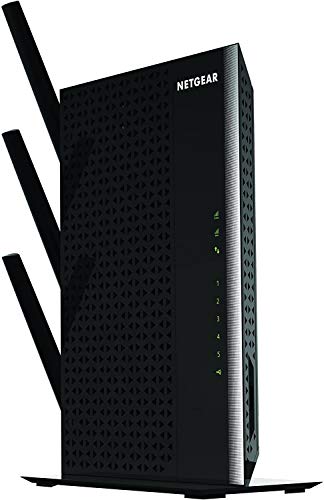
NETGEAR WiFi Mesh Range Extender EX7000 — Widest stated coverage
The EX7000 is the catalogue’s different animal: a desktop unit, AC1900 dual band, which NETGEAR markets as a mesh range extender with coverage up to 2,100 square feet and 35 devices in its maker figures. The mesh wording deserves the precision our mesh guide teaches: this is a powerful single extender designed to blanket a wide area under the network’s identity, not a node of a NETGEAR mesh system in the governed sense — it does not join a Nighthawk mesh map the way an Orbi satellite joins Orbi. Read correctly, it is the widest-stated-coverage single box in this guide, in a form that sits on a surface and means it.
The desktop form is the point. Freed from the wall socket, the EX7000 can occupy the position the house actually wants — the sideboard at the junction of the weak wing, the desk in the adopted room’s doorway — with a fuller antenna arrangement than any plug can carry and room for the wired duties a plug cannot host. Households whose ideal extender position has no socket, or whose adopted room wants a small wired cluster served from the extender, are this unit’s natural constituency, and no plug in the catalogue serves them as directly.
Its AC1900 generation places it in the established rather than the current-standard tier, alongside the EX plugs, and its long tenure in the catalogue brings the usual dividends of maturity: deep documentation, a vast ownership history, behaviour that surprises nobody. For a household whose router is of a similar generation, the match is exact. For a WiFi 6 or 7 household, the repeated territory will run at the EX7000’s standard — perfectly serviceable for the rooms extenders usually adopt, and a consideration if those rooms host the house’s most demanding work.
Buy the EX7000 for area and position freedom: the wide weak wing, the socket-less ideal spot, the room that wants wired seats as well as coverage. It is the catalogue’s reminder that the best extender is sometimes not the newest or the smallest, but the one shaped like the problem — and this problem, the broad and awkward territory, is one it has been solving for years.
- Form: desktop unit, not a wall plug
- Class: AC1900 dual band per maker
- Maker figures: coverage up to 2,100 sq.ft. and 35 devices
- Positioning: NETGEAR’s mesh-branded range extender
Strengths
- Widest stated coverage in the guide, in a position-free desktop form
- Fuller antenna arrangement than any wall plug can carry
- Mature, deeply documented design with a long ownership history
Trade-offs
- AC1900 generation behind the WiFi 6 and 7 lines
- “Mesh” in its branding means blanket coverage, not a governed mesh node
- Desktop form needs a surface and a power lead
Best for: wide weak wings and rooms wanting a powerful desktop extender with wired duties.
Not suited for: buyers expecting a true mesh-system node, or socket-only installations.
How Do the Six NETGEAR Extenders Compare?
| Pick | Badge |
|---|---|
| NETGEAR Nighthawk WiFi 7 Extender EXS27 | Best flagship |
| NETGEAR WiFi Extender EX5000 | Best simple plug |
| NETGEAR WiFi Extender EX6400 | Best compact power |
| NETGEAR Nighthawk WiFi Extender EAX17 | Best WiFi 6 Nighthawk |
| NETGEAR Nighthawk WiFi Extender EAX10 | Best small-home Nighthawk |
| NETGEAR WiFi Mesh Range Extender EX7000 | Widest stated coverage |
The catalogue resolves into three staircases. By generation: the EX plugs and the EX7000 desktop belong to the established WiFi 5-era tier, the EAX pair to WiFi 6, the EXS27 to WiFi 7 — and the right tier is the one your router already speaks, since the repeated territory inherits the extender’s standard. By form: plugs for simplicity and socket positions, the desktop for position freedom and wired duties. By size: the EAX10 and EX5000 for the honest small household, the EAX17 and EX6400 for the mainstream, the EXS27 and EX7000 for the ambitious. A buyer who can place their house on those three staircases has already made the decision; the table merely confirms it.
Notice, once more, that the largest coverage figure and the flagship badge sit on different rows. That is not an inconsistency to be explained away but the catalogue’s most useful lesson: coverage claims, speed classes and device ceilings measure different virtues from different eras of the range, and no single column ranks the six. Fit — of generation, form and size to your house — is the ranking. NETGEAR built a deep catalogue precisely so that fit exists for almost every house; the shopper’s job is to refuse the rows that do not fit, however impressive their largest number looks.
When Should a NETGEAR Household Skip Extenders and Buy Orbi or Mesh Instead?
NETGEAR itself sells the alternative, which makes the question easy to ask honestly inside a brand guide. The extender route suits the house with a defined weak territory and a router worth keeping. The mesh route — NETGEAR’s Orbi being the house brand — suits the house whose weakness is general, whose occupants roam with laptops expecting calls to survive the journey, or whose router is due for replacement anyway, making the extender a polish on a retiring foundation. The deciding evidence is the map: one or two named rooms argue for this guide; a shrug at the whole floor plan argues for a system.
Cost compounds the argument over time. A household that buys an extender this year, a second next year for the new weak room, and a third when the router dies has often spent a mesh system’s price for a patchwork of separately managed networks. The catalogue in this guide is deep enough to make that slow overpayment comfortable, which is precisely why the disciplined buyer counts weak rooms before choosing the first unit. Two rooms is the extender ceiling for most houses; the third room is the house asking for governance.
There is also a generational moment when the routes cross. A household replacing an ageing router today should price the mesh system first, because the new router decision locks the extender decision behind it — an extender bought to match the old router’s standard becomes the map’s oldest citizen the day the new system arrives. Readers in that exact season are the ones this guide most wants to slow down: the correct order is router or system first, extender second, node decisions last, and NETGEAR’s own catalogue will still be there, in the same depth, when the order has been honoured.
None of this diminishes the six picks for the houses they fit. The single weak wing behind a strong Nighthawk router is a real and common geography, and an EAX17 placed by the book solves it for years at a fraction of a system’s price. Brand loyalty, properly understood, is not buying everything the brand sells; it is knowing which of the brand’s answers matches the question your house is asking — and NETGEAR, to its credit, sells honest versions of both answers.
How Long Will a NETGEAR Extender Stay Supported and Useful?
Networking hardware ages on two clocks. The radio clock ticks with the WiFi standards: a unit bought in its standard’s mainstream years remains a sensible citizen of home networks for a long span, because routers, phones and laptops carry older standards gracefully and the adopted room’s workload rarely chases the frontier. The support clock ticks with the maker’s firmware and documentation commitment — and it is here that an established catalogue earns its keep, because a unit whose maker still publishes updates and keeps its guides alive remains safe and comprehensible years after a discontinued label has gone silent.
That dual ageing explains this guide’s calm about the established EX line. A WiFi 5-era plug in a WiFi 5-era household is not obsolete; it is matched. It becomes a poor purchase only when bought into a household whose standard has already moved on, where the repeated territory would cruise below the rest of the house’s network. The buyer’s task is alignment, not novelty: read the router’s generation, read the room’s workload, and buy the extender whose two clocks both have years left in your specific house.
Practical longevity habits are the same as in every guide in this series. Register or note the model number where a future you can find it. Accept firmware updates when the app offers them. Keep the unit’s socket and vents dust-light, because always-on electronics in hallway sockets live humble lives and die of neglect more often than of ambition. And keep the box through the return window — the one period in which the house itself gets to vote on the purchase with full authority.
How Do You Set Up a NETGEAR Extender for the Best Result?
Pair beside the router first, as with every extender in this series: the setup conversation between the unit and the router belongs in easy radio conditions, and NETGEAR’s assistant or app flow will complete fastest there. Accept the firmware update if one is offered before moving the unit — extender firmware from a maker of NETGEAR’s scale fixes real behaviour, and starting life current is free. Note the network name the setup creates or clones, so the household’s devices can be pointed deliberately rather than discovered accidentally.
Then place by signal, using the feedback NETGEAR builds for exactly this moment: the unit’s indicators and the setup flow’s guidance report whether the chosen socket hears the router well enough to be worth repeating. The halfway position that feedback endorses — strong router signal, meaningful step toward the weak territory — is worth more than any model step in the catalogue. A EX5000 placed by that feedback will out-serve an EXS27 placed by hope in the dead room, and NETGEAR’s own tooling is designed to stop you making the second purchase’s mistake.
Finish with the adopted room’s real evening: the stream, the call, the download, at the household’s busy hour. Wire the room’s most demanding device into the unit’s Ethernet port where one is fitted — the EAX and EXS picks carry theirs for this — and compare the room’s behaviour against the week before. If a wing still sulks, move the unit one socket toward the router and retest before concluding anything about the model. Placement iteration inside the return window is the ownership pattern this catalogue rewards.
What Mistakes Do NETGEAR Extender Buyers Make?
Shopping by the largest number leads the list, in this catalogue more than most, because NETGEAR prints several different numbers and each crowns a different winner. The household that buys the EX6400 for its coverage figure when its real need was WiFi 6 composure, or the EXS27 for its flagship badge when its router speaks an older standard, has spent against the wrong virtue. Name your need first — generation, territory, device count, wired duties — and let exactly one row of the table answer it.
Model-number confusion is the second, peculiarly NETGEAR mistake: EX and EAX and EXS prefixes, and digits that do not rank the units in the order intuition expects. The EAX10 is not a lesser EX1000; the EX7000 is not seven times anything. Buy by the decoded specification, as this guide’s naming section lays out, and confirm the model number at the listing before ordering — returns data in this category is full of near-miss twins.
The third mistake is assuming a NETGEAR extender requires a NETGEAR router, or the reverse — that another brand’s router somehow unlocks less of the unit. The listings promise any-router working, and the radio link honours it. What brand-matching buys is app familiarity and support vocabulary, which are real but secondary. Buy the extender your house needs; let the router you already own be a bystander to the decision.
A note for the household that games or streams in the adopted room, since NETGEAR’s catalogue invites the question of whether a bigger extender fixes a twitchy connection. The gaming guide in this series gives the full honest treatment — every extender adds a hop a wire does not have, and placement outranks specifications — and it applies to these six without exception. What the stronger NETGEAR units buy the player is composure under the household’s evening load and, on the EAX and EXS picks, a proper Ethernet port for the console. Buy them for those reasons, place them by signal, wire the machine in, and they will serve a gaming room as well as extender physics allows any brand to serve it.
Finally, a word about buying NETGEAR extenders second-hand or from marketplace sellers, because a deep catalogue breeds a deep used market. The model number is the whole contract: confirm it character by character against the listing you intended, since the EX and EAX families contain near-twins at very different values, and confirm the unit has been reset by its previous owner so your setup assistant meets a blank slate rather than a stranger’s network. Bought carefully, a used EAX unit is this category’s quiet bargain; bought by the badge alone, it is how households end up owning the wrong generation with no return window to save them.
There is a reason this brand guide can be written at this length without running out of honest things to say: NETGEAR’s extender catalogue is a small history of home networking itself, from the plug that rescued the first generation of streaming households to a WiFi 7 flagship repeating for devices that did not exist when the line began. Households tend to live inside one chapter of that history at a time. The work of this guide — and, frankly, the work of buying networking well — is knowing which chapter your house is in, and refusing to pay for the chapters on either side of it.
If the decision still feels tangled after the staircases and the tables, reduce it to the three questions that actually decide it. What standard does your router speak? That sets the generation. How large and how populated is the weak territory? That sets the size. Does the adopted room want a wired device served? That sets the port requirement and sometimes the form. Three answers, honestly given, point at one row of the Quick Picks table every time — and a decision that survives being reduced to three questions is a decision you can stop second-guessing and start installing.
Final Recommendation
Match the staircase to the house. WiFi 7 households take the EXS27 and settle the question for years. The WiFi 6 mainstream takes the EAX17, or the EAX10 when the floor plan and the inventory honestly say small. Plug-simple households take the EX5000 for the single room or the EX6400 for the wing, and the household whose problem is broad territory with wired duties takes the desktop EX7000 and places it like furniture that happens to radiate. Every one of those is a good purchase in its house and a mediocre one in the wrong house — which is why this guide spent its length on fit, placement and the maker’s numbers translated, rather than on crowning the badge.
Keep the receipt and the box until the adopted room has survived its busiest week, and let that week — not the setup afternoon, not the speed test in the doorway — cast the deciding vote. A NETGEAR unit that passes the household’s real evenings has earned its socket for years; one that fails them has given you information worth more than its price, provided the return window is still open to act on it.
One last constituency deserves direct address: the gift buyer, purchasing for a parent’s house or a student’s first flat, who wants the box that will simply work and keep working without a support hotline staffed by the recipient’s relatives. That buyer should take the EX5000 or the EAX10, sized by the home, and value the guided setup and the maker’s documentation above every specification in this guide — because the true product, in that purchase, is the absence of a phone call in November asking why the bedroom internet is broken again.
And when the installation settles — as, placed by the book, it usually does within the first evening — take the small trouble to note the model number and the chosen socket somewhere the household keeps such things. Extenders are bought rarely and troubleshot suddenly, usually years later, by someone standing in the hallway with a phone. The note that says “EAX17, landing socket, installed for the back bedrooms” turns that future evening from an investigation into a two-minute check, and it is the cheapest support contract in this entire catalogue.
That note-keeping habit, multiplied across a household’s networking, is what separates the homes whose technology feels mysteriously reliable from the homes where every fault begins with archaeology. The extender itself asks for almost nothing after its first week; give it the sentence of documentation it deserves, and it will repay the sentence every year it serves.
Choose well, place it once, write the note, and then forget the extender exists — which is, in the end, the entire ambition every unit in this catalogue shares, from the humblest plug in the hallway to the flagship repeating beneath a WiFi 7 router.
Households that follow that sequence — choose by fit, install by signal, document by habit — rarely think about their extender again, and when they do, it is usually while recommending the same model to a neighbour standing in the same hallway with the same problem.
Frequently Asked Questions
Do NETGEAR extenders work with non-NETGEAR routers?
Yes — the listings for the picks in this guide state that they work with any router, and the connection they make is a standard WiFi link that does not inspect the router’s badge. Owners of provider-supplied routers and other brands lose nothing technical. What a NETGEAR router adds is familiarity: the same app family and support language across router and extender, which smooths setup and troubleshooting without changing the radio result.
What is the difference between the EX and EAX extender lines?
Generation and positioning. The EX models in this guide — the EX5000 and EX6400 — are the classic compact plug line, built in the WiFi 5 era for simplicity and broad compatibility. The EAX models — the EAX10 and EAX17 — are the Nighthawk extender family in WiFi 6 form, with app-managed setup and current-standard scheduling. The EXS27 carries the flagship line into WiFi 7. Choose by the standard your router speaks and the size of your household, not by the letters alone.
Is the EX7000 a true mesh node?
No, and its branding should be read carefully. NETGEAR markets the EX7000 as a mesh range extender because it blankets a wide area — up to 2,100 square feet in the maker’s figures — as a single powerful unit. It does not join a governed mesh system as a satellite the way a node joins its own ecosystem, which is the subject of our mesh extenders guide. Bought as a powerful desktop extender, it is excellent; bought expecting mesh governance, it will disappoint through a misunderstanding its name invites.
Which NETGEAR extender is best for a large house?
It depends on what “large” is doing to you. For wide weak territory served from one position, the EX6400’s stated coverage and the EX7000’s desktop power are the catalogue’s answers. For a large house whose problem is several separate weak rooms, no single extender of any brand is the honest answer — that house wants a mesh system, and our mesh guide covers the ecosystems. One strong unit per wing, placed by signal, is the extender-shaped compromise if mesh is refused.
Why does my NETGEAR extender show a different network name?
Extenders commonly broadcast the router’s name with a distinguishing suffix, so devices and owners can tell which signal they are joining. Many setups can be adjusted to clone the original name exactly, which modern phones handle smoothly. A separate name is not a fault; it explains why a phone may cling to the router’s weakening signal as you cross the house, and a quick WiFi toggle in the in-between rooms is the ordinary cure. Stationary devices in the adopted room are unaffected either way.
Should I buy the WiFi 7 EXS27 if my router is older?
Only if a router upgrade is genuinely planned. The EXS27 will work with your existing router, as its listing promises, but its WiFi 7 virtues wait for WiFi 7 company, and its premium buys headroom you cannot spend yet. The EAX17 delivers the present-day experience for a WiFi 6 household at a lower position in the catalogue, and the EX plugs serve older-standard homes honestly. Match the extender to the network you have and the one you have actually scheduled — not the one you idly imagine.
Can I use two different NETGEAR extenders in one house?
Yes. Place each within strong range of the router rather than chaining one off the other, give each its own weak territory to adopt, and expect each to behave as its own repeated network unless your setup clones names consistently. Mixed generations are fine, with each territory running at its own extender’s standard. If the plan grows to a third unit, treat that as the house requesting a mesh system and price one before buying — the catalogue will forgive you, and so will your evenings.
Does the Nighthawk app manage these extenders?
The Nighthawk-line extenders in this guide — the EAX pair and the EXS27 — are built for app-managed setup and monitoring in NETGEAR’s app world, while the classic EX plugs lean on the setup assistant flow. Either way, the functions that matter are present across the line: guided network joining, placement feedback, and firmware updating. Check the specific model’s listing for its exact management route before buying if app control is a priority for your household.
Related Guides
- Best WiFi Boosters and Extenders
- Best Long Range Outdoor WiFi Extenders
- Best Powerline WiFi Range Extenders



[…] Best Netgear WiFi Range Extenders […]