What's inside
- Where to Buy
- Key Takeaways
- Quick Picks
- How We Chose These Picks
- Comparison
- How to Choose a Monitor in the 28-Inch Class
- What Happened to the 28-Inch Monitor?
- Is 4K at 27 Inches Too Dense, or Just Right?
- When Does the QHD Model in a 4K Class Make Sense?
- Common Mistakes When Buying in This Size Class
- Final Recommendation
- Frequently Asked Questions
- Related Guides
As an Amazon Associate I earn from qualifying purchases. This post may contain affiliate links at no extra cost to you.
[SITE_DOMAIN] is reader-supported. When you buy through links on our site, we may earn an affiliate commission.
Where to Buy
Honesty begins with the shopping itself: of the six listings below, exactly one describes a true 28-inch panel. The Z-Edge 28-inch 4K Monitor is that one, so check price on Amazon there if the exact size is the point of the search. The rest are the 27-inch class that replaced it, each linked to its listing: the LG 27US500-W for the calm 4K desk, the Samsung ViewFinity S7 27-inch for the high-resolution office, the MSI MAG 272URDFA for speed at 320Hz, the LG 27U631A-B as the QHD exception, and the Samsung Odyssey 27-inch 4K for the gaming desk — its page carrying the live figure like the rest.
This guide owes its readers a correction before it owes them a ranking, so here it is in the opening paragraphs where corrections belong. Shoppers searching for the best 28 inch computer monitors are looking for a size the market has quietly retired. In the current listings, only one panel in this guide — the Z-Edge U28I4K — is a genuine 28-inch screen. The other five are 27-inch models, and they are not substitutes smuggled in to fill a page: the 27-inch class is what replaced the 28-inch class on the market’s shelves, absorbing its role, its price band and its buyers. A guide that pretended otherwise, rounding five 27-inch panels up to the search term, would be lying with arithmetic.
So the honest shape of the category is this: one true 28-inch survivor, a 4K IPS panel aimed at designers and business, and around it the 27-inch succession in its several forms — two calm 4K office panels from LG and Samsung, a 320Hz gaming outlier from MSI, a QHD value model from LG that trades resolution for accessibility, and Samsung’s 4K Odyssey for the gaming desk. The inch of difference between the Z-Edge and the rest is real but small; what actually divides these six is resolution discipline, refresh and intent, and the reviews judge them on those terms while never letting the reader forget which size is which.
Specifications come from listing titles only, as always here, and the titles in this set are mostly generous — resolution, refresh, brightness and gamut are usually in print. Where a title falls silent, the Samsung ViewFinity S7’s refresh rate being the notable case, the spec box records the silence in the standard words. Model codes appear throughout, because in a category where a single inch is the whole premise, exact identity is not pedantry; it is the product.
There is a human story inside the size drift worth pausing over — carefully, and without nostalgia doing the arithmetic. The 28-inch desk was the professional’s desk for years: big enough for two documents, gentle enough in density for unaided eyes, serious without being theatrical. Its disappearance from the shelves was not announced; buyers simply noticed, one upgrade at a time, that the familiar diagonal had become a special order. This guide treats that noticing with respect, gives the survivor its full review, and then does the practical work of showing where the size’s virtues actually live now.
Key Takeaways
- Only the Z-Edge U28I4K is a true 28-inch panel; the other five picks are the 27-inch class that replaced 28 inches on the market.
- Five picks are 4K UHD at 3840 x 2160; the LG 27U631A-B is the QHD exception at 2560 x 1440.
- Refresh spans the full spectrum of modern desks: 60Hz on the LG 27US500-W, 100Hz on the QHD LG, 144Hz on the Z-Edge and the Odyssey, 320Hz on the MSI.
- The Samsung ViewFinity S7 title states no refresh rate, recorded as not stated rather than assumed.
- Colour claims divide the set: DCI-P3 90% on the LG 27US500-W, sRGB 99% on the QHD LG, HDR400 language on the Samsung Odyssey.
Quick Picks
| Pick | Badge | Why it earns a place |
|---|---|---|
| Z-Edge 28″ 4K Monitor U28I4K | The true 28-inch panel | 28-inch IPS at 3840 x 2160 and 144Hz, with 300 cd/m² brightness and an ultra-thin bezel. |
| LG 27US500-W | The calm 4K desk | 27-inch UltraFine IPS 4K at 60Hz with HDR10, DCI-P3 90% and flicker-safe reading comfort. |
| Samsung ViewFinity S7 27″ | The high-resolution office | 4K UHD IPS with HDR10, Eye Saver Mode and Samsung Display Manager, model LS27H70DEANXZA. |
| MSI MAG 272URDFA | 4K at full speed | 27-inch UHD at 320Hz with FreeSync Premium, 0.5ms response and even a VGA port. |
| LG 27U631A-B | The QHD exception | 27-inch IPS QHD at 100Hz with USB-C 15W, sRGB 99% and LG Switch window zoning. |
| Samsung Odyssey 27″ 4K | The gaming 4K | UHD at 144Hz on Fast IPS, with G-Sync compatibility, FreeSync Premium and HDR400 colours. |
How We Chose These Picks
The selection began with the premise audit described above: every candidate claiming the 28-inch neighbourhood had its size read from its own title, and the audit’s result shaped the whole guide — one genuine 28-inch panel, and the 27-inch class admitted openly as the succession rather than disguised as the thing searched for. Readers who need exactly 28 inches for a fitted space, a matched pair or a mounting constraint have their answer in the first review and can stop there with the guide’s blessing.
For the remaining places, the test was succession-worthiness: if the 27-inch class has truly replaced the 28, its representatives should cover the roles the older size served. They do, in this selection, with room to spare — the office 4K desk twice over, the creative-leaning 4K desk, the gaming desk at two speeds, and the QHD desk for the machine that cannot drive 4K with grace. A 27-inch class that could not cover those roles would not have replaced anything; it would merely have been cheaper, and the guide would have said so.
Title discipline did the usual grading. Refresh is claimed where printed — 320Hz on the MSI is a real printed figure, however startling — and withheld where absent, which is why the ViewFinity S7’s spec box carries the not-stated line for refresh. Brightness appears only on the Z-Edge and the LG 27US500-W, both at the 300 mark, because only their titles print it. Nothing in the reviews is borrowed between the two Samsungs or the two LGs, however tempting family resemblance makes it.
The final filter was the ordinary desk’s future. These panels will outlive the machines beneath them, so connection standards mattered — DisplayPort and HDMI in current forms across the set, USB-C on one LG, even a VGA port on the MSI for the legacy machine in the corner. A size class may retire; a well-connected panel simply moves to the next desk, and every pick here is equipped to do exactly that.

Z-Edge 28″ 4K Monitor U28I4K — The true 28-inch panel
Here is the guide’s reason for existing, in its own title’s words: a 4K monitor, Z-Edge, 28-inch IPS, UHD 3840 x 2160, 300 cd/m² of brightness, a 144Hz refresh rate and 1ms MPRT response, model U28I4K, with an ultra-thin bezel, framed for designers and business. Every element of that sentence earns its place. The 28 inches are real — the only real ones in this guide — and they give the 4K grid a fraction more breathing room than the 27-inch panels below, rendering the interface a touch larger at native scale, which is precisely the quality that made this size beloved of the design-and-business desk in the first place.
The specification around the size is more modern than the size’s history suggests. A 144Hz refresh on a 4K IPS panel aimed at designers is a genuinely contemporary combination — the size class may be a survivor, but nothing about its motion is dated — and 1ms MPRT language plus the stated brightness complete a title that hides nothing important. The ultra-thin bezel suits the multi-monitor arrangements business desks favour, where two or three panels meet and the seam between them is the whole aesthetic question.
Who should buy the one true 28? The fitted-desk owner whose space, mount or matched pair specifies the size exactly; the designer who wants 4K at the slightly gentler density this diagonal gives it; and the buyer who simply prefers their product to be the thing it is called. That last reason is more respectable than it sounds — categories retire for commercial reasons, not technical ones, and a panel that persists in an unfashionable size often persists because a loyal professional readership keeps ordering it.
The cautions are the honest ones of any smaller-name product in a giants’ category: the title names no adaptive sync, no HDR tier and no specific inputs, so the spec box records those silences and the buyer with a console or a sync-dependent card should verify connections on the listing against the U28I4K code. What the title does promise — size, resolution, panel, brightness, refresh — is the core of the product, promised in full.
- Size and resolution: 28-inch IPS, UHD 3840 x 2160
- Brightness: 300 cd/m²
- Refresh rate: 144Hz, 1ms MPRT
- Design: ultra-thin bezel, model U28I4K
- Framing: for designer and business use
- Inputs: Not stated in the listing title — verify with the manufacturer documentation
- Adaptive sync: Not stated in the listing title — verify with the manufacturer documentation
Strengths
- The only genuine 28-inch panel in the current listings gathered here.
- 4K IPS at 144Hz is a thoroughly modern specification behind the classic size.
- Brightness is printed at 300 cd/m², evidence several larger brands omit.
Trade-offs
- Inputs and sync go unstated in the title and need listing verification.
- No HDR tier is claimed in the title.
- The size class’s rarity means fewer sibling models to cross-shop.
Best for: a design or business desk that wants a true 28-inch 4K panel at a gentler density than the 27-inch class offers. Not suited for: a sync-dependent gaming setup, because the title names no adaptive sync technology to build the purchase on.
A word about buying a niche size in a mainstream age, because it cuts both ways and the Z-Edge buyer should hear both. The risk is real: accessories, matched pairs and replacement units grow scarcer as a class thins, and a buyer planning a triple-panel array should secure the units together rather than assume a later match. The reward is equally real: niche professional products are usually specified by people who know their readership precisely, and this title — brightness printed, refresh modern, bezel honest — reads like exactly that kind of specification.
Verify the connections on the listing before ordering — the one errand this review assigns — matching the U28I4K code exactly, then set the panel at its native 3840 x 2160 and resist scaling it for the first week. Owners of 28-inch panels tend to be lifers, and the first week’s task is simply to confirm that the size still feels like home: the interface at its natural scale, the desk at its accustomed proportions, the category’s quiet survivor doing its work.
The selection held one more discipline worth stating: no 27-inch pick was admitted merely for being excellent in some unrelated category. Each had to be a plausible heir — a panel the former 28-inch buyer could adopt without changing how the desk works. That is why there is no curved gaming exotic here, no portable screen, no television in monitor’s clothing. The succession on trial in these reviews is a working succession, and the six below are its witnesses, each testifying to a different part of the old size’s estate.
LG 27US500-W — The calm 4K desk
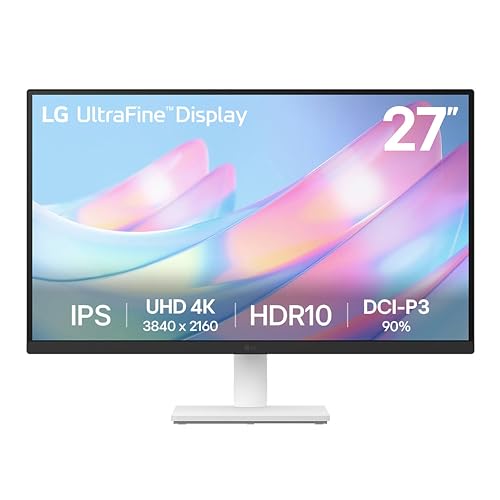
LG’s 27US500-W is the 27-inch succession in its most settled form: a 27-inch UltraFine IPS 4K UHD monitor at 3840 x 2160, refreshing at 60Hz with 5ms response, HDR10, 300 nits typical brightness, DCI-P3 90% typical colour, LG Switch, Flicker Safe and Reader Mode, over HDMI and DisplayPort, on a tilt stand, in white. Read the refresh figure without flinching — 60Hz is a deliberate specification for a desk whose motions are documents, photographs and video, and LG prints it in a title that hides nothing else either. This is the panel for the reader who has stopped pretending their screen life is faster than it is.
The colour figure deserves attention, because DCI-P3 90% at this end of the market is a real claim: the standard space covered completely and a meaningful step into the cinema space beyond it, enough for photography at the serious-amateur level and for video that looks rich rather than merely bright. HDR10 serves the streamed evening. The comfort pair — Flicker Safe backlighting and Reader Mode — addresses the long day’s two physical taxes, and LG Switch zones the 4K canvas so its density becomes workspace rather than a magnifying exercise.
Density is the honest conversation at 4K on 27 inches. Text and interface elements render small at native scale and exquisite under scaling; most owners settle on a scaled setting that trades some canvas for legibility and never look back. The 5ms response and 60Hz ceiling mark the gaming boundary plainly: casual play is fine, competitive play belongs to the MSI and the Odyssey below. A buyer whose evenings are strategy, story and simulation will find nothing missing here at all.
Suits the photograph-tending home office, the reader, the white-desk aesthetic that the finish openly courts, and the professional whose deliverables are documents and images rather than frame rates. It is the succession’s argument that 27 inches at 4K, calmly specified, is where the old 28-inch desk actually went — and standing in front of one, the argument is persuasive.
- Size and resolution: 27-inch UltraFine IPS 4K UHD, 3840 x 2160
- Refresh rate: 60Hz, 5ms
- Brightness: 300 nits (Typ.)
- Colour: DCI-P3 90% (Typ.), HDR10
- Features: LG Switch, Flicker Safe, Reader Mode
- Inputs: HDMI, DisplayPort
- Stand: tilt
- Finish: white
Strengths
- DCI-P3 90% colour and HDR10 lift it above the plain office class.
- Flicker Safe and Reader Mode serve the long reading day directly.
- Brightness and colour are both printed with typical-value honesty.
Trade-offs
- 60Hz and 5ms mark it as a work panel, not a gaming one.
- Tilt is the only stand adjustment stated.
- No USB-C input is named for laptop docking.
Best for: a reading-and-photography home office that wants 4K density and honest colour at a settled pace. Not suited for: competitive gaming evenings, because the panel’s stated ceiling is 60Hz with 5ms response.
The white finish deserves its sentence too, because desk colour is a decision households feel daily and reviewers rarely honour. A white 4K panel in a bright room recedes; the screen becomes a window in the wall rather than a slab on the desk, and for the home office that doubles as a guest room that recession is worth real money. LG clearly knows its buyer here — the whole title, from the calm refresh to the reading features, describes a screen for a room that has other purposes — and the review respects the coherence of that vision.
Spend the first evening on the scaling decision and make it once, deliberately: try native for an hour of real documents, then the scaled setting for an hour, and keep the one the eyes vote for. The 27US500-W’s whole character is calm, and a scaling setting chosen in haste is the one source of friction its owners report — a friction entirely within the buyer’s gift to avoid on day one.

Samsung ViewFinity S7 27″ — The high-resolution office
Samsung’s ViewFinity line is the company’s productivity flagship family, and the S7 S70H states its office creed in the title: a 27-inch high-resolution monitor at 4K UHD 3840 x 2160, IPS, HDR10, Eye Saver Mode, HDMI and DisplayPort, and Samsung Display Manager, under the model code LS27H70DEANXZA. One figure is missing from that creed, and this guide flags it in the first paragraph rather than the last: no refresh rate is printed. The spec box records it with the standard not-stated wording, and the buyer for whom refresh matters should confirm it on the listing against the model code. Everything else an office needs is present and accounted for.
What the title does promise composes the modern knowledge-work desk exactly. 4K IPS density for documents that stay crisp through a long day; HDR10 for the video that punctuates it; Eye Saver Mode for the evening hour when the screen is the room’s brightest object; and Display Manager, Samsung’s window-organisation software, which is the unglamorous feature that decides whether a 4K canvas becomes productivity or merely acreage. Offices standardise on such panels because the specification is complete where the work is, and the ViewFinity name has become shorthand for that completeness.
The S7’s natural reader is the professional equipping a serious home office or the small firm buying several identical desks. Against the LG 27US500-W it trades printed colour percentages and brightness for Samsung’s software and line heritage; against the Z-Edge it trades the true 28 inches for the succession’s mainstream support. None of those trades is a defeat. They are the ordinary geometry of a mature category, in which the remaining differences between good products are ecosystems and emphases rather than capabilities.
The refresh silence deserves one more sentence of fairness: an office panel’s refresh is the figure its buyers least often query, which is presumably why the title spends its words elsewhere. But this guide’s rule does not grade on a curve — unstated is unstated, the box says so, and the gamer reading this guide by mistake should take the hint and continue to the MSI and the Odyssey, whose titles print their speeds in large and unmistakable figures.
- Size and resolution: 27-inch, 4K UHD 3840 x 2160
- Panel: IPS
- HDR: HDR10
- Features: Eye Saver Mode, Samsung Display Manager
- Inputs: HDMI, DisplayPort
- Model: LS27H70DEANXZA
- Refresh rate: Not stated in the listing title — verify with the manufacturer documentation
- Stand adjustment: Not stated in the listing title — verify with the manufacturer documentation
Strengths
- 4K IPS with HDR10 is the complete modern office canvas.
- Display Manager turns the density into organised workspace.
- Eye Saver Mode addresses the long day’s final hours directly.
Trade-offs
- The refresh rate is not printed and must be confirmed on the listing.
- No colour percentage or brightness figure is stated in the title.
- Stand adjustments are not described in the title.
Best for: a professional home office or small firm standardising on 4K IPS panels with proper window management. Not suited for: any purchase where refresh rate is a deciding figure, because the title leaves that figure for the listing page to supply.
Firms standardising on the S7 should notice the fleet logic in its title: a full model code, standard connections, a named software layer and no exotic claims anywhere. Any unit can replace any other on any desk without the room changing character, and the new starter’s screen behaves like the director’s. Consumer reviews rarely praise that consistency because individuals buy one panel; the ViewFinity line is plainly designed by people who expect it bought by the dozen, and the home buyer inherits the discipline as reliability.
Let Display Manager earn its place in the first week: zone the canvas for the real applications — document centre, reference right, communications in the corner — and save the layout before the habits form without it. A 4K office panel’s productivity is mostly software-deep, and the S7 ships its answer in the title; owners who skip it own a very sharp, very disorganised desk, which is a waste of a ViewFinity.

MSI MAG 272URDFA — 4K at full speed
Every category needs one product that makes the reviewer check the title twice, and MSI’s MAG 272URDFA E16 is this guide’s: a 27-inch gaming and office monitor at 3840 x 2160 UHD, running 320Hz, with AMD FreeSync Premium, HDR Ready, HDMI and — remarkably — a VGA port, VESA mounting, tilt and 0.5ms response. Three hundred and twenty hertz at 4K. The figure is printed, so this guide prints it too, with the context it deserves: sustaining anything near that rate at UHD resolution is the preserve of flagship graphics hardware and lighter titles, and the panel’s realistic life for most owners will be lived at the rates their cards can feed, with FreeSync Premium smoothing the journey.
Why does such a panel belong in a guide about a retired size? Because it demonstrates what the succession actually did with the inheritance. The 28-inch class topped out as a business tool; the 27-inch class that replaced it now spans from the 60Hz reading desk above to this — the same diagonal territory carrying a specification from competitive gaming’s frontier. A buyer who last shopped when 28 inches was the professional’s choice will find the neighbourhood transformed, and the MSI is the transformation’s loudest exhibit.
The supporting details keep one foot in the office the title also claims: VESA mounting for the arm-equipped desk, tilt for the stand, HDR Ready as the title’s own modest phrasing — credited at face value, neither inflated into a certification nor dismissed. The VGA port is the title’s most charming line, a connection to the legacy machine that every long-lived office accumulates; nobody will game over it, and somebody, someday, will be quietly grateful it exists when an old tower must be coaxed back to life.
Suits the enthusiast whose hardware can feed it, the future-proofing buyer who purchases ceilings rather than current needs, and the office-gaming hybrid desk that wants one panel to be ready for both. Its honest asterisk is arithmetic: the gap between 320Hz printed and the rate a given card sustains at 4K is the buyer’s to calculate, from their own library, before the panel’s speed becomes its price’s justification.
- Size and resolution: 27-inch, 3840 x 2160 UHD
- Refresh rate: 320Hz, 0.5ms
- Adaptive sync: AMD FreeSync Premium
- HDR: HDR Ready, as stated in title
- Inputs: HDMI, VGA port
- Mounting: VESA
- Stand: tilt
- Model: MAG 272URDFA E16
Strengths
- 320Hz at UHD is the fastest printed specification in this guide by a wide margin.
- FreeSync Premium is named, so the sync claim is verifiable.
- VESA mounting and even VGA give it unusual desk-to-desk adaptability.
Trade-offs
- Feeding 320Hz at 4K exceeds most graphics cards’ real output in modern titles.
- HDR is claimed as Ready, without a certification tier in the title.
- Tilt is the only stand adjustment stated.
Best for: an enthusiast gaming-and-office desk with flagship graphics hardware that wants its 4K panel’s ceiling as high as the category offers. Not suited for: a mid-range graphics card’s desk, because the card will live far below the panel’s 320Hz ceiling and the premium will go largely unvisited.
The MSI also poses a useful question about how specifications should be read in an age of frontier numbers. A printed 320Hz is not a promise that every game will run there; it is a statement of the panel’s ceiling, in the same family as a car’s top speed, and it should be valued the way ceilings are valued — for the headroom, the engineering margin and the future machine that will use more of it. Read that way, the figure is neither a trick nor a necessity, and the buyer who understands ceilings will get exactly the pleasure this panel intends.
Be honest in the first week’s settings: set the refresh the card can actually sustain in the library’s main title, confirm it in the monitor’s information screen, and let FreeSync govern the variation. The MSI’s ceiling will still be there for the lighter games and the next graphics card — which is the correct way to own a frontier specification, as headroom with a future rather than as a number to apologise for.

LG 27U631A-B — The QHD exception
One pick in this guide declines the 4K premise altogether, and it earns its place by the same logic that admitted the 27-inch class: it is what a large share of the size’s buyers actually purchase. The LG 27U631A-B is a 27-inch IPS QHD monitor at 2560 x 1440, 100Hz, HDR10, with USB Type-C at 15W, 5ms response, LG Switch, Reader Mode, Flicker Safe, sRGB 99% typical colour, Dynamic Action Sync, HDMI and a tilt stand. In a line-up of 4K panels it is the pressure valve — the screen for the laptop or older tower that would rather run a slightly softer grid beautifully than a 4K grid badly.
The specification is coherent once its reader is pictured. QHD at 27 inches is the density neighbouring guides on this site call the dual-purpose sweet spot: text crisp at native scale with no scaling negotiations, games and video fluid at 100Hz, and a graphics load any modern integrated chip can carry. sRGB 99% covers the standard colour world completely. The comfort trio — Reader Mode, Flicker Safe, LG Switch — repeats the calm LG formula from the 27US500-W review, aimed here at the mixed home desk rather than the photography one.
USB-C appears with a figure that must be read carefully: 15W, the same peripheral-level delivery as the ultrawide flagship in the neighbouring guide, suitable for a phone rather than for charging the laptop that drives the panel. The title prints it, the review honours it, and the laptop household should plan its charging accordingly. Dynamic Action Sync is LG’s gaming latency language, present in the title and credited as such; combined with 100Hz it makes the QHD panel a respectable casual gaming screen, the only one besides the MSI and Odyssey with any evening ambition at all.
Suits the household replacing an ageing screen on an ageing machine, the second desk, the student room, and the buyer who has done the 4K arithmetic against their own hardware and chosen honesty. It is also, quietly, the easiest recommendation in the guide to live with: nothing it promises needs a settings expedition to unlock, and nothing it omits will surprise its intended reader.
- Size and resolution: 27-inch IPS QHD, 2560 x 1440
- Refresh rate: 100Hz, 5ms
- Colour: sRGB 99% (Typ.), HDR10
- Features: LG Switch, Reader Mode, Flicker Safe, Dynamic Action Sync
- Inputs: HDMI, USB Type-C 15W
- Stand: tilt
Strengths
- QHD at native scale suits older machines and integrated graphics completely.
- 100Hz gives the mixed desk genuinely smooth motion.
- The comfort features and sRGB 99% cover work and casual play without fuss.
Trade-offs
- It is not a 4K panel, in a guide where five of six are.
- USB-C delivery is 15W, short of laptop charging.
- Tilt is the only stand adjustment stated.
Best for: a mixed home desk on a modest machine that wants the 27-inch size with a grid its hardware can drive at full smoothness. Not suited for: a desk bought specifically for 4K detail, because this panel’s stated resolution is 2560 x 1440 and no setting changes that.
There is also a household-economics case for the QHD pick that deserves stating plainly. A monitor is often bought in the same season as the machine beneath it, and a household that funds a modest computer and a flagship 4K panel has divided its budget against itself: the screen will spend years displaying a struggling machine’s compromises. The 27U631A-B restores the balance — a good panel matched to a modest machine outperforms, in lived experience, a great panel starved by one — and its presence in this guide is the arithmetic of whole desks rather than single products.
Let this LG be the low-maintenance purchase it wants to be: native resolution, 100Hz confirmed in the settings, zones laid out in LG Switch, and then no further ceremony. Its owners’ satisfaction tends to arrive as an absence — no scaling quarrels, no fan-noise from a straining graphics chip, no evening spent in menus — and a screen that produces contentment by subtraction has understood its household perfectly.

Samsung Odyssey 27″ 4K — The gaming 4K
Samsung’s Odyssey line closes the guide with the gaming desk’s version of the succession: a 27-inch Odyssey 4K UHD gaming monitor at 144Hz with 1ms response, Fast IPS, G-Sync compatibility and FreeSync Premium both named, HDR400 colours, Black Equalizer and an adjustable stand. The dual sync naming is the headline for the two graphics tribes — a title that speaks to NVIDIA and AMD households in the same sentence — and 144Hz at 4K is the rate a strong modern card can genuinely sustain in a wide library, which makes this panel the speed pick for buyers who did the MSI’s arithmetic and preferred a ceiling they will actually visit.
Fast IPS keeps the colour behaviour honest at the angles of a shared room, where gaming panels have not always bothered. HDR400 language — the title’s own phrasing, credited as a colour claim rather than inflated into a certification lecture — widens the streamed and cinematic side of the desk’s life. Black Equalizer, Samsung’s dark-scene tool carried over from the line’s other models in this batch, serves the competitive corner of the library. The adjustable stand is stated without enumeration, so the spec box credits adjustability and leaves its exact repertoire to the listing.
Against the guide’s other 4K panels, the Odyssey’s identity is clear: it is the one whose evenings lead. The office day is served — 4K density is 4K density, whatever the badge — but no reader modes, eye-saver branding or window software appear in its title, and a documents-first buyer should notice their absence and choose the ViewFinity or the LG 27US500-W accordingly. Specialisation is not a flaw; unrecognised specialisation is, and Samsung’s title makes its allegiance impossible to miss.
Suits the gaming household that has arrived at 4K hardware, the console-and-PC desk that values the dual sync welcome, and the buyer who wants the succession’s size with a famous gaming line’s full wardrobe. It is the natural final review in this guide because it completes the succession’s range: the size that began as a business tool now ends, in its 27-inch heirs, as everything from a reading desk to this.
- Size and resolution: 27-inch, 4K UHD
- Panel: Fast IPS
- Refresh rate: 144Hz, 1ms
- Adaptive sync: G-Sync Compatible and FreeSync Premium named in title
- HDR: HDR400 colours, as stated in title
- Features: Black Equalizer
- Stand: adjustable — details: Not stated in the listing title — verify with the manufacturer documentation
Strengths
- 144Hz at 4K is a ceiling strong graphics cards can actually sustain.
- Both sync families are named, welcoming either graphics household.
- Fast IPS keeps gaming colour honest from shared-room angles.
Trade-offs
- No work-comfort features are named in the title.
- The stand’s specific adjustments are not enumerated.
- Brightness and gamut percentages are not stated in the title.
Best for: a gaming-led desk with 4K-capable hardware that wants dual sync welcome and a sustainable 144Hz ceiling. Not suited for: a documents-first office, because the title names no reader, eye-saver or window-management features for the long working day.
The Odyssey’s restraint in its title is worth a final nod. Samsung could have padded the specification with comfort language; instead it printed speed, sync, panel and stand, and trusted its reader to know which desk that describes. In a guide that has spent six reviews grading evidence, that economy is its own credential. The gaming household is not asked to decode anything — the panel is fast, doubly synced and adjustable, and the documents-first household is equally clearly directed elsewhere on this page.
Confirm the delivered refresh at native 4K in the graphics settings on day one, choose the sync mode matching the household’s card, and play the library’s most demanding title before judging the panel’s ceiling. The Odyssey’s promise is a rate its owners can reach; the first week’s pleasure is discovering how much of the library suddenly runs at the speed the desk was built for.
Comparison
| Pick | Size | Resolution | Refresh | Notable from title |
|---|---|---|---|---|
| Z-Edge U28I4K | 28″ | 3840 x 2160 | 144Hz | IPS, 300 cd/m², ultra-thin bezel |
| LG 27US500-W | 27″ | 3840 x 2160 | 60Hz | DCI-P3 90%, HDR10, Flicker Safe |
| Samsung ViewFinity S7 | 27″ | 3840 x 2160 | Not stated in the listing title | IPS, HDR10, Display Manager |
| MSI MAG 272URDFA | 27″ | 3840 x 2160 | 320Hz | FreeSync Premium, 0.5ms, VGA port |
| LG 27U631A-B | 27″ | 2560 x 1440 | 100Hz | sRGB 99%, USB-C 15W, LG Switch |
| Samsung Odyssey 27″ | 27″ | 4K UHD | 144Hz | Fast IPS, G-Sync Compatible, FreeSync Premium |
The size column is the table’s conscience: one 28 and five 27s, printed without rounding, because a comparison that fudged its founding measurement would deserve no trust in its finer ones. Read the rest of the grid by intent. The refresh column runs from an unstated office figure to 320Hz of gaming frontier, the resolution column holds five 4K panels against a single deliberate QHD, and no row wins more than two columns — the signature of a mature class dividing its buyers by purpose rather than by quality.
Notice, finally, what the succession did to value. The 27-inch class covers every role the 28-inch desk once monopolised and several it never attempted, at every temperament from the reading chair to the ranked ladder. The Z-Edge’s row is not a museum piece among them; at 144Hz with printed brightness it competes in the present tense. But the table as a whole explains the market’s decision, and a buyer who reads it honestly can make theirs.
A final practical note applies to every row of that table: keep the purchase paperwork with the panel. A size class in transition generates more listing revisions than a settled one — a suffix changes, a figure moves — and the buyer who saved the listing page and the model code owns the evidence of what was actually promised. That habit, recommended throughout this site’s monitor guides, matters most exactly here, where an inch of diagonal is the difference between the product searched for and the product delivered.
How to Choose a Monitor in the 28-Inch Class
Decide first whether the inch itself is a requirement or a habit. A fitted alcove, a matched existing panel, a mount rated for an exact size — those are requirements, and they end the search at the Z-Edge, the one true 28-inch listing here. Everything else is habit, and habit should be priced: if the 27-inch succession offers the same resolution with better support, broader choice and a longer future, the rational buyer takes the inch’s small loss and banks the rest. Sentiment for a size is a legitimate reason to buy it; pretending the succession does not exist is not a reason at all.
Resolution comes second, and at this size it means 4K for most. Five of the six titles work at 3840 x 2160, where the density rewards inspection work, photography and the sheer pleasure of fine text under scaling. The QHD exception earns its place for the machine that cannot drive 4K — integrated graphics, an older laptop, a second desk — and for the reader who prefers native-scale interface elements without any scaling setting at all. The wrong purchase in this class is 4K bought for a machine that will render it at a stutter, or QHD bought for a machine that deserved better.
Refresh third, matched to the evenings as honestly as the days. The spectrum here is the widest in any of this site’s monitor guides — an unstated office figure, 60Hz, 100Hz, two kinds of 144Hz and a 320Hz frontier — and the correct point on it is set by the library and the card, not by the brochure’s altitude. Most desks will live contentedly at the two 144Hz panels or below; the MSI exists for the minority whose hardware and habits justify it, and its review says so in plain words.
Close with the working details the titles divide on: window software for the 4K canvas, comfort modes for the long day, sync naming for the gaming card, a stand or a VESA mount for the posture. A monitor in this class is a five-to-ten-year fixture of the room; the hour spent matching its printed claims to the household’s actual life is the best-returning hour in the whole purchase.
Before the buying advice, one clarification about density that ties the whole guide together. The move from 28 inches to 27 at the same 4K resolution changed the picture less than the spec sheets imply: the grid is identical, the desk footprint nearly so, and only the scale of the interface shifted, by an amount a scaling setting can reproduce or remove at will. Readers mourning the old size are usually mourning a working scale they had tuned over years — and that scale is recoverable on any panel in this guide within one evening of settings, which is the most comforting sentence this correction has to offer.
What Happened to the 28-Inch Monitor?
The panel industry consolidated around the sizes it could make most efficiently, and 27 inches won the territory that 28 once held — close enough in the hand and on the desk that buyers stopped insisting on the difference, different enough in the factory that makers stopped offering both. The result is the landscape this guide opened with: a single true 28-inch listing, the Z-Edge, persisting for the design-and-business readership that kept ordering it, surrounded by a 27-inch class that inherited everything else. Nothing about the change was a judgement on quality; the surviving 28 is a thoroughly modern panel, and the heirs are excellent. It was a judgement on manufacturing arithmetic, and the desk simply lives with its consequences.
Is 4K at 27 Inches Too Dense, or Just Right?
Just right, with one setting’s help. At native scale a 27-inch 4K panel renders interface elements small enough to strain some readers, which is why nearly every owner runs the operating system’s scaling and receives, in exchange, text and images of a fineness no lesser grid can draw. The density is not wasted under scaling — it is spent on smoothness, the curves of letters and the gradients of photographs — and the canvas remains larger in effect than any QHD panel’s. Readers who refuse scaling on principle are the honest exception, and the guide has a panel for them too: the QHD LG, native and legible, or the true 28-inch Z-Edge, whose extra inch softens the same equation in the other direction.
When Does the QHD Model in a 4K Class Make Sense?
When the machine says so. A laptop with integrated graphics, an older tower, a mini PC — each will drive 2560 x 1440 at a smooth 100Hz long after 4K has reduced it to compromise, and a panel matched to the machine’s real strength looks better in motion than a denser panel being underfed. It also makes sense when the desk is a second desk, where the main screen already carries the household’s 4K duties, and when the reader simply prefers the native-scale interface. The LG 27U631A-B is in this guide because those households are numerous, and because a buying guide that only serves the flagship machine is a brochure, not a guide.
Ergonomics deserve their paragraph in a size guide, because density and posture are secretly the same subject. A denser panel invites the reader closer; a closer seat shortens the comfortable session; and a stand that cannot raise the screen to the new distance’s eye level turns a resolution upgrade into a neck complaint. The picks here divide between tilt-only stands and fuller adjustment, and the buyer migrating from a 28-inch panel at a familiar height should measure that height before ordering, not after the new screen arrives at the wrong one.
Common Mistakes When Buying in This Size Class
Ordering a 27-inch panel while believing it is a 28 is the founding mistake, and the market’s quiet size drift makes it an easy one: search results blur the classes, thumbnails carry no scale, and a listing’s headline number is the only witness that matters. Read the size in the title, match the model code, and let the purchase be the size on the document rather than the size in the search bar. The reverse error — dismissing the true 28 because the class is rare — costs the fitted desk its one correct answer.
Buying resolution the machine cannot feed runs second. A 4K panel on integrated graphics that stutters through window drags will be blamed on the panel, the brand and the guide, in that order, when the arithmetic was available before ordering. Match the grid to the graphics hardware’s demonstrated strength, and remember the QHD pick exists precisely as the honourable alternative.
The third mistake is refresh vanity at both ends: the gamer who buys the 60Hz reading panel because the colour figure charmed them, and the document worker who buys 320Hz because the number felt like quality. Each will spend years in the wrong product. The titles in this guide state their temperaments with unusual clarity — the discipline is simply to believe them, and to buy the panel whose printed personality matches the household’s actual evenings.
Final Recommendation
If the inch is the requirement, the search ends where it began: the Z-Edge U28I4K, the one true 28-inch panel in the current listings, thoroughly modern behind its classic size. For the 27-inch succession, the calm desks divide between the LG 27US500-W’s printed colour and comfort and the Samsung ViewFinity S7’s office system, subject to confirming the Samsung’s refresh on its listing. Players should take the Samsung Odyssey for its sustainable 144Hz and dual sync welcome, the MSI for the frontier its hardware can feed, and households on modest machines should take the LG 27U631A-B without a whisper of apology. The size retired; the desk did not — buy the panel whose printed claims match the life in front of it, and the missing inch will never be missed.
One sentence of perspective before the questions: an inch of diagonal has never made a desk productive or a player faster. The panels above earn their places on resolution, motion, comfort and honesty, and the size — stated exactly, neither rounded nor mourned — is simply the frame those virtues arrive in.
Frequently Asked Questions
Are 28-inch monitors still being made?
Barely, on the evidence of the current listings: this guide found exactly one true 28-inch panel, the Z-Edge U28I4K, among the class’s serious offerings. The size persists as a niche for design and business buyers rather than as a mainstream class. Shoppers who need the exact diagonal should buy while the niche is served and verify the size in the listing title and model code, since search results freely mix the 27-inch succession into the same pages.
How much difference does one inch make at 4K?
Less than the number suggests and more than nothing. Spread across the diagonal, the Z-Edge’s extra inch lowers the pixel density slightly against the 27-inch 4K panels, so interface elements render a touch larger at native scale — a difference readers feel as comfort rather than measure as specification. In footprint the two classes are near-identical citizens of the same desks. Buyers choosing between them should let resolution support, features and availability decide, with the inch as the tiebreak it honestly is.
Which of these monitors is best for gaming?
By printed specification, the MSI MAG 272URDFA, whose 320Hz at UHD with FreeSync Premium is the category’s frontier — provided the graphics card can feed it. For strong but ordinary hardware, the Samsung Odyssey’s 144Hz at 4K with both sync families named is the sustainable summit, and it is the recommendation most gaming desks should take home. The Z-Edge’s 144Hz makes it a capable casual gaming panel for its design-and-business readership.
Why does one pick have no refresh rate listed?
Because Samsung’s ViewFinity S7 title does not print one, and this guide reports titles rather than reputations. The figure exists on the listing page, where buyers for whom it matters should confirm it against the model code LS27H70DEANXZA before ordering. The omission is noted in the review, the spec box and the comparison table in the standard not-stated wording — the same treatment any title’s silence receives here, whatever the brand.
Is QHD a mistake in a 4K guide?
No — it is the guide keeping faith with its readers’ machines. The LG 27U631A-B is included openly as the QHD exception, for the laptops and older systems that run 2560 x 1440 smoothly and 4K poorly, and for readers who prefer a native-scale interface. It is never described as anything but QHD, and buyers whose hardware supports 4K should choose from the five panels that provide it.
Should I match a new panel to an existing 28-inch one as a pair?
Only with the Z-Edge, and only after verifying the existing panel’s true diagonal from its own model code rather than from memory — many a supposed 28-inch veteran turns out, on inspection, to be a 27-inch panel wearing a generous bezel. Where the pair is genuine, matched size and resolution make the seam between screens nearly invisible in daily use. Where it is not, a clean break — the new panel as the main screen, the old one retired to secondary duties — serves the desk better than a forced marriage of near-misses.
Related Guides
The size question settled, the neighbouring guides cover what to pair with the panel. Households equipping the machine underneath it should compare the shortlist of the best affordable laptops for home use with screens and ports that suit a big external display. Those buying for a working seat rather than a family desk will find their field in our roundup of the best affordable laptops for work, chosen for docking and durability. And students setting up a first serious desk should finish with the best affordable laptops college students can pair with a dorm-room monitor.


