What's inside
- Where to Buy
- Key Takeaways
- Quick Picks
- How We Chose These Picks
- Comparison
- How to Choose a 43-Inch 4K Screen
- Is a 43-Inch Screen Too Big for a Desk?
- Should You Buy a Smart Monitor or a Television at This Size?
- What Are Signage Panels Doing in Search Results for Monitors?
- Common Mistakes When Buying a 43-Inch 4K Screen
- Final Recommendation
- Frequently Asked Questions
- Related Guides
As an Amazon Associate I earn from qualifying purchases. This post may contain affiliate links at no extra cost to you.
widgetverdict.com is reader-supported. When you buy through links on our site, we may earn an affiliate commission.
Where to Buy
Four of the six screens below carry Amazon listings linked from their names; the final two are commercial signage panels covered as prose-only context, with no buying link, for reasons their reviews explain. Start with the Gigabyte AORUS FV43U if a true gaming monitor at this size is the goal, and check price on Amazon from its page. The Samsung M70B 43-inch is the smart-monitor route, so open its listing to see the current figure. Its successor, the Samsung M70D 43-inch, arrives here as a bundle listing, and its page is where the package and its cost are spelled out. The Samsung M70H 43-inch is a television-class panel by its own title, listed with its live number on Amazon. The Samsung QET and the LG UH5N-E close the guide as signage panels discussed in prose, the kind of hardware a buyer sources through commercial channels rather than a desk-monitor listing.
Assembling a guide to the best 43 inch 4k monitors means admitting, in the first paragraph, how thin and strange this category is. Forty-three inches is where the monitor market and the television market overlap and argue, and the six products below map that argument honestly. One is a genuine gaming monitor built at TV scale. Three are Samsung smart monitors, a hybrid species that streams like a television and docks like a display, with the newest of them described by its own title as a Smart TV outright. The final two are not desk monitors at all: they are commercial signage panels, included as prose-only entries because buyers cross-shopping this size will meet them in search results and deserve a clear account of what they are.
That honesty shapes the whole guide. The signage panels get no buying links, no image markers and no pretence that they belong on a desk; they get a fair description of the jobs they were built for — shop floors, lobbies, menu boards, information displays — so a reader can recognise the species and either pursue it deliberately through commercial channels or set it aside with understanding rather than suspicion. Likewise, the Samsung M70H is framed throughout as what its title declares: a television-class panel with smart TV identity, which some buyers at this size genuinely want and others should walk past with their eyes open.
Size itself needs a practical word before the reviews. A 43-inch 4K screen at desk distance is a wall you sit close to: magnificent for flight decks, racing cockpits, sprawling timelines and shared viewing, punishing for ordinary text work unless the desk is deep and the seating distance honest. Every pick here shares the 4K grid, so the density question answers itself — the same pixels, spread over a television’s canvas — and the real decisions become refresh rate, panel purpose and whether the screen’s brain is a monitor’s, a smart platform’s or a signage player’s. Read the reviews in that spirit.
Key Takeaways
- Only one pick is a purpose-built gaming monitor: the Gigabyte AORUS FV43U, at 144Hz with HDMI 2.1 ports printed in its title.
- Three picks are Samsung smart monitors — the M70B, M70D and M70H — blending monitor connections with streaming TV platforms.
- The M70H’s title calls it a Smart TV with Mini LED; this guide frames it as a TV-class panel, not a desktop monitor.
- Two picks are commercial signage panels covered prose-only: the Samsung QET and the LG UH5N-E, built for business displays rather than desks.
- Refresh rates divide the linked set sharply: 144Hz on the Gigabyte, 60Hz on the M70B, and a DLG 120Hz motion claim on the M70H.
Quick Picks
| Pick | Badge | Why it earns a place |
|---|---|---|
| Gigabyte AORUS FV43U | The true gaming monitor | 43-inch 4K at 144Hz and 1ms, with two HDMI 2.1 ports and 96% DCI-P3. |
| Samsung M70B 43-inch | Smart monitor all-rounder | 4K with USB-C, streaming TV features and Alexa built in. |
| Samsung M70D 43-inch | Smart monitor bundle | The M7 formula with speakers and USB-C, sold here as a bundle package. |
| Samsung M70H 43-inch | TV-class Mini LED panel | A 4K Smart TV panel with Mini LED and Samsung Vision AI Companion. |
| Samsung QET 43-inch | Signage panel (prose-only) | A commercial LFD display with an integrated signage player. |
| LG 43UH5N-E | Commercial panel (prose-only) | A UHD 4K commercial monitor built for business installations. |
How We Chose These Picks
The category was mapped before it was judged. A search at this size returns four species wearing one label — gaming monitors, smart monitors, televisions and signage — and a guide that ranked them as though they were one species would mislead every reader who trusted it. The selection therefore keeps the species visible: one gaming monitor as the category’s reference point, the Samsung smart-monitor line in three generations because it dominates what households actually buy at this size, and the two signage panels as clearly marked prose-only context. The reader’s first decision is which species they are shopping for; the reviews exist to make that decision informed.
Within the linked four, evidence was read the usual way: every claim traced to its title, every silence recorded. Refresh rates, port counts and colour figures vary wildly across the four, from the Gigabyte’s fully itemised gaming specification to the M70D bundle title, which spends its words on the package around the panel rather than the panel itself. Those differences in evidence are part of the review content, not an embarrassment to be smoothed over, because at this size a buyer is often choosing between a specification and a platform, and should know which currency each product trades in.
The signage pair passed a different test: relevance. Both are 43-inch 4K-class commercial panels that a size-led search will surface, both come from the display industry’s serious makers, and both would be genuine bargains of confusion if a guide pretended they were desk monitors. They are covered with the same care as the linked picks — strengths, trade-offs, a verdict — minus the commerce, because their honest function in this guide is educational. A reader who turns out to need a lobby display will find them introduced properly; a reader who needs a desk screen will know exactly why to keep scrolling upward.
Balance, finally, meant refusing to pad the set with televisions pretending to be monitors beyond the one Samsung whose title declares its TV identity in the open. The M70H earns its place by that declaration and by the Mini LED panel behind it; other TV-class products without a monitor story were left out. What remains is a small, strange, honest line-up — which is to say, an accurate portrait of the 43-inch 4K shelf as it actually stands.

Gigabyte AORUS FV43U — The true gaming monitor
The FV43U is the reference point for this entire category: a 43-inch gaming monitor that happens to be television-sized, rather than a television borrowing gaming language. Its title is a complete gaming specification — 144Hz at 2160p, HBR3, NVIDIA G-SYNC Compatible branding, an exclusive built-in ANC feature, a 3840×2160 display, a 1ms response time, HDR, 96% DCI-P3 colour, one DisplayPort 1.4, two HDMI 2.1 ports, two USB 3.0 ports and one USB-C. Read that list slowly, because no other title in this guide itemises its intentions at this level, and every item on it answers a question a serious buyer was about to ask.
The port inventory is the heart of the proposition. Two HDMI 2.1 inputs mean a console and a second high-bandwidth source can both live on the panel at its richest modes, DisplayPort 1.4 serves the PC, and the USB ports plus USB-C turn the screen into a modest hub for the peripherals a big-format desk accumulates. At 43 inches, a screen is a room’s centre, and Gigabyte has wired it like one. The 96% DCI-P3 figure gives the colour story a number, the 1ms response and 144Hz rate give the motion story its credentials, and the HDR claim, while unbadged in the title, completes a specification that never once asks to be taken on faith.
The built-in ANC feature — active noise cancellation, by the ordinary reading of the term in gaming hardware, aimed at the audio path — is the title’s one flourish that a careful review should report without embroidering, since the listing does not elaborate it here. Its presence signals the intended seat: a player in a headset, in front of a very large screen, in a room where the game is the event. That seat is the FV43U’s natural home, whether the rig is a racing cockpit, a flight setup or a desk deep enough to hold a monitor that thinks it is a cinema.
It suits the big-format gamer first and the media-room desk second, and it suits ordinary office work only for owners who have measured their distance and made peace with the geometry. Its demands are space, depth and a graphics source worthy of the panel; its gift is the only specification in this guide that never apologises. Buyers whose hearts are set on smart TV platforms should read the Samsung reviews for a different philosophy; buyers who want a monitor, at scale, with the ports and pace of a monitor, have exactly one candidate here and it is a strong one.
- Size and resolution: 43 inches, 3840×2160 (2160p)
- Refresh rate: 144Hz
- Response time: 1ms
- Colour: 96% DCI-P3
- HDR: stated in the listing title
- Sync branding: NVIDIA G-SYNC Compatible
- Inputs: 1x DisplayPort 1.4, 2x HDMI 2.1, 2x USB 3.0, 1x USB-C
- Features: HBR3, exclusive built-in ANC
- Panel type: Not stated in the listing title — verify with the manufacturer documentation
Strengths
- The only true gaming-monitor specification at this size here.
- Two HDMI 2.1 ports plus DisplayPort serve console and PC fully.
- 96% DCI-P3 and 1ms response complete a documented package.
Trade-offs
- 43 inches demands a deep desk or a dedicated rig.
- No smart TV platform is claimed in the title.
- Panel type is not stated in the listing title.
Best for: a big-format gaming rig or media desk that needs a real monitor’s ports and a 144Hz 4K panel at 43 inches. Not suited for: a shallow desk under a metre deep, where a 43-inch screen sits close enough to turn ordinary text work into a head-turning exercise.
Plan the installation before the celebration. A panel of this size is a two-person lift and a wall-or-furniture decision, so settle the mount or the stand position, the cable runs to both HDMI sources and the seating distance before the box is opened. Then configure each source’s output deliberately, because a screen with this much bandwidth on offer will happily run for months at a lesser mode if nobody checks the negotiation. Judged in its intended seat, the FV43U is the screen the rest of this category is implicitly compared against, and it wears that burden easily.
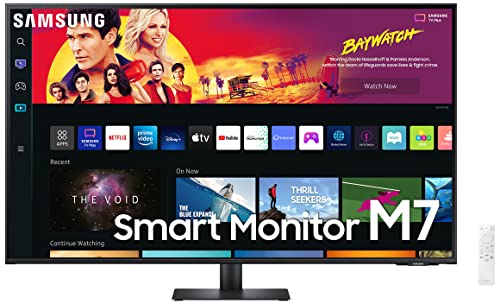
Samsung M70B 43-inch — Smart monitor all-rounder
Samsung’s M70B represents the species that actually dominates this size in homes: the smart monitor, a screen with a television’s streaming brain and a monitor’s connections. Its title describes a 43-inch M70B series panel in 4K UHD with USB-C, billed as a Smart Monitor and Streaming TV, with a 4ms response figure, a 60Hz refresh rate, HDR10, wireless display support, gaming and IoT hubs, Alexa built in, and a 2022 date under the model code LS43BM702UNXZA. Every clause of that is a household feature rather than a specification flex, which is precisely the product’s philosophy: this screen is bought to be the room’s display for everything, not the rig’s display for one thing.
The USB-C connection is what keeps the M70B a monitor and not merely a small television. A laptop can dock to it for work hours, the streaming platform takes over for the evening, and the wireless display support lets phones and tablets throw content at the big screen without a cable ceremony. The gaming and IoT hubs named in the title extend the same logic: Samsung imagines this panel as the household’s display hub, aggregating sources rather than specialising in one. For a studio flat, a spare room or a family den, that aggregation is not a compromise — it is the entire requirement, stated in one product.
The gaming numbers must be read at their actual size. Sixty hertz and 4ms describe a panel for casual and cinematic play, cloud gaming and console sessions at standard rates, not for the high-refresh pursuit the Gigabyte serves. HDR10 is a streaming-friendly badge rather than a grading claim. None of that diminishes the M70B; it defines its honest constituency, which is large. The buyer who needs one screen to be office by day, cinema by night and console on weekends, at a size that fills a small room, will find this title answering in complete sentences.
It suits the one-screen household and the hybrid room above all, and it suits them at a scale where a 27-inch monitor would feel like a porthole. Its limits are the specialist’s limits in reverse: no high refresh, no itemised colour figure, no gaming-port inventory in the title, and a 2022 vintage that places it a generation behind its own successor below. Buyers who recognise their room in this review should also read the M70D’s, because the choice between the generations is the closest decision this guide offers.
- Size and class: 43 inches, 4K UHD
- Type stated in title: Smart Monitor & Streaming TV
- Refresh rate: 60Hz
- Response time: 4ms
- HDR: HDR10
- Connection: USB-C
- Features: Wireless Display, Gaming Hub, IoT Hub, Alexa Built-in
- Model code: LS43BM702UNXZA, 2022
- Colour gamut: Not stated in the listing title — verify with the manufacturer documentation
Strengths
- Streaming platform and USB-C docking in one 43-inch screen.
- Wireless display and IoT hub suit a whole household’s sources.
- Alexa built in serves a hands-free living-room setup.
Trade-offs
- 60Hz caps gaming at standard refresh rates.
- No colour gamut figure is printed in the listing title.
- The 2022 vintage trails its own successor generation.
Best for: a one-screen room — studio, den or spare room — where one 43-inch panel must dock a laptop by day and stream like a TV by night. Not suited for: a high-refresh gaming desk, because a 60Hz ceiling cannot follow the Gigabyte’s 144Hz pace or a modern console’s performance modes.
Set the M70B up as the room’s hub from the first evening: sign the streaming services in once, pair the laptop over USB-C, connect the wireless display path from the household’s phones, and arrange the sources in the order the room actually uses them. A smart monitor’s value is the absence of friction across a week of small moments, and that value is built during setup, not discovered later. Keep the model code noted, as Samsung’s M-series naming makes neighbouring models easy to confuse when a question arises years from now.

Samsung M70D 43-inch — Smart monitor bundle
The M70D arrives in this guide wearing an unusual costume: its listing title describes a bundle. The panel at its centre is identified as the Samsung LS43DM702U, a 43-inch Smart Monitor M7 in 4K UHD with streaming TV, speakers and USB-C — and around that identification the title wraps an editing software bundle and a two-year protection pack from a named provider. A careful review separates the two layers. The monitor is the M7 formula a generation on from the M70B: smart platform, speakers now stated outright, USB-C for the working day. The bundle is a purchasing arrangement, valuable or not depending on whether the household will use the software and the cover, and it should be priced as packaging rather than mistaken for panel specification.
That separation matters because the title spends its specification budget on the bundle, leaving the panel’s own numbers largely unstated. No refresh rate is printed, no response figure, no HDR badge, no gamut — a striking contrast with the Gigabyte’s itemised inventory and even with the M70B’s fuller title a generation earlier. The spec box below therefore carries several not-stated lines, and the honest advice follows from them: a buyer choosing between this and its predecessor should confirm the panel’s core figures on the listing page against the code LS43DM702U, because the title alone will not arbitrate the generational question it raises.
What the title does establish is the product’s centre of gravity. Speakers are named, which the M70B’s title never managed, and for the one-screen room that omission corrected is a daily convenience: calls, streams and casual video all gain sound without a soundbar negotiation. Streaming TV and USB-C repeat the family formula. The M7 line’s promise was never specification drama; it is the quiet claim that one screen can be a room’s whole display life, and the M70D’s title, for all its bundle noise, keeps that promise legible underneath.
It suits the buyer who wants the newer M7 generation with speakers built in, who values the bundled software and protection on their own merits, and who is willing to do the listing-page reading this title makes necessary. It does not suit the specification-first shopper, who will find the Gigabyte’s title a feast and this one a menu written by the packaging department. Neither reaction is wrong; they are the two temperaments this entire category exists to separate, and the M70D is their clearest meeting point.
- Size and class: 43 inches, 4K UHD
- Type stated in title: Smart Monitor M7 (M70D) with Streaming TV
- Audio: Speakers stated in the listing title
- Connection: USB-C
- Model code: LS43DM702U
- Bundle stated in title: editing software bundle, 2 Year CPS Enhanced Protection Pack
- Refresh rate: Not stated in the listing title — verify with the manufacturer documentation
- HDR badge: Not stated in the listing title — verify with the manufacturer documentation
- Colour gamut: Not stated in the listing title — verify with the manufacturer documentation
Strengths
- Speakers are built in, correcting the M70B title’s omission.
- The M7 smart platform and USB-C cover work and streaming.
- The bundle adds software and two-year protection in one purchase.
Trade-offs
- The title prints almost no panel specifications.
- Bundle value depends on using the included software and cover.
- Generational gains over the M70B need listing-page confirmation.
Best for: a one-screen room that wants the newer M7 with built-in speakers and values the bundled software and protection as part of the deal. Not suited for: a side-by-side specification comparison, because this title documents its packaging more thoroughly than its panel.
Read the bundle as a checklist before valuing it: name the software, imagine the month you would actually open it, and read the protection pack’s terms as the contract they are. Then do the panel homework the title deferred — refresh, HDR, ports — against the model code, and let those confirmed figures, not the bundle’s warmth, decide between this and the M70B. A bundle should sweeten a decision the panel already earned; when it is asked to substitute for one, the return window becomes the real protection plan.

Samsung M70H 43-inch — TV-class Mini LED panel
The M70H requires the guide’s plainest framing, so here it is: by its own title, this product is a television. The listing describes a Samsung 43-inch class M70H series with Mini LED, 4K, Smart TV identity and a 2026 model year, carrying a Samsung Vision AI Companion, a Mini LED Processor 4K, Pure Spectrum Color language, endless free content, and a Motion Xcelerator with DLG 120Hz claim. It sits in a monitor guide because buyers at this size will meet it on the same shelf and because its panel technology is genuinely interesting — but it will be reviewed as what it declares itself to be, a TV-class panel, and any reader who needs a desktop monitor’s manners should carry that framing into every line that follows.
Mini LED is the substantive story. As a backlight technology it promises finer light control than conventional LED panels, and in a television built for film and streaming that promise translates to the contrast-rich viewing the product is plainly aimed at. The Vision AI Companion and the free-content language describe a smart TV platform’s ambitions, not a monitor’s: this screen expects to be watched, talked to and fed by its own services, with a computer or console as one source among several rather than as the centre of its existence. Pure Spectrum Color is the title’s colour phrase, printed here as the manufacturer’s language without a gamut percentage to weigh.
The DLG 120Hz claim deserves the same careful reading this guide gave dual modes elsewhere. It is presented as part of a motion feature — Motion Xcelerator plus DLG 120Hz — rather than as a plain panel refresh specification of the Gigabyte’s kind, and a buyer whose plan depends on high-refresh behaviour should confirm exactly what the figure means for their source and resolution on the listing page. Television motion language and monitor refresh language are neighbouring dialects, not the same tongue, and at 43 inches the cost of confusing them is a large, heavy misunderstanding delivered to the door.
It suits the buyer who came to this size wanting a television with ambitions: a media room, a bedroom cinema, a console corner where the panel’s own platform is the main event and a PC visit is an occasional guest. It does not suit the desk worker, the colour-measured editor or anyone whose day is text at close range, and its review declines to pretend otherwise. Within its declared species it may be excellent; the guide’s duty is to make sure it is bought as that species, by someone whose room will reward exactly what it is.
- Size and class: 43 inches, 4K
- Type stated in title: Smart TV (M70H Series), 2026 Model
- Backlight: Mini LED, Mini LED Processor 4K
- Platform: Samsung Vision AI Companion, Endless Free Content
- Colour language in title: Pure Spectrum Color
- Motion claim: Motion Xcelerator + DLG 120Hz
- Native refresh specification: Not stated in the listing title — verify with the manufacturer documentation
- Monitor inputs inventory: Not stated in the listing title — verify with the manufacturer documentation
- Colour gamut percentage: Not stated in the listing title — verify with the manufacturer documentation
Strengths
- Mini LED backlighting suits film and streaming contrast.
- A full smart TV platform with an AI companion built in.
- The newest model year in this guide, dated 2026.
Trade-offs
- It is a TV-class panel, not a desktop monitor.
- The 120Hz figure is a motion-feature claim needing confirmation.
- No monitor-style port or gamut inventory is printed.
Best for: a media room or console corner that wants a 43-inch Mini LED Smart TV as the room’s main screen. Not suited for: a desk used for text work eight hours a day, because a TV-class panel’s platform, tuning and ergonomics are built for viewing distance rather than reading distance.
Judge this panel the way its maker intends: from the viewing seat, with film and streamed content, in the room’s evening light. Confirm the motion claim’s meaning for your console before ordering if high-refresh play is part of the plan, and count the inputs your sources need against the listing rather than against a monitor’s habits. Bought as a television, on a television’s terms, the M70H can be judged fairly and may well delight; bought as a monitor by mistake, it would be this guide’s fault for not speaking plainly, which is why this review has.
Samsung QET 43-inch — Signage panel (prose-only)
The Samsung QET changes the subject entirely, and its review begins by changing the vocabulary: this is an LFD — a large format display — built for commercial signage. Its title describes a 43-inch QET series display with an integrated MagicInfo Lite Player, a Crystal 4K Processor and UHD resolution, an 8ms response time, 300-nit brightness, a Home UI, built-in speakers and the model code LH43QETELGCXZA. Every phrase in that sentence belongs to the world of shop floors, hotel lobbies, café menu boards and office information screens, where a display’s job is to show scheduled content reliably to people who are standing up and walking past.
The integrated player is the tell. A signage display with a player built in does not need a computer attached; it stores and schedules its content internally, which is why businesses deploy them in fleets and manage them as infrastructure. Brightness at a stated 300 nit is specified for indoor commercial light rather than for a sunlit window, the 8ms response is a signage-appropriate figure nobody will ever game on, and the built-in speakers exist for ambient audio and announcements. Judged as a desk monitor this specification looks eccentric; judged as signage it is coherent, complete and professional.
Why does it occupy space in a monitor guide at all? Because a buyer searching by size and resolution will meet it, sometimes at a tempting position in the results, and may mistake its 4K UHD panel and famous maker for a desk bargain. The differences that matter — a signage operating model, commercial content management, ergonomics and inputs chosen for installations rather than for a chair — are invisible in a thumbnail. This prose-only entry exists to make them visible, with no buying link attached, because the guide’s commercial links should only ever point at products it is actually recommending for the reader’s stated purpose.
If your purpose is in fact signage — a business display, a community board, a waiting-room screen — then the QET deserves pursuit through Samsung’s commercial channels, where its management tools and support model live, rather than through a consumer monitor listing. If your purpose is a desk, let this entry do its other job: cross the species off your list with understanding, and return to the linked picks above, where every product was chosen to sit in front of a seated human being.
- Size and class: 43 inches, UHD Resolution
- Type stated in title: QET Series LFD Display (commercial signage)
- Player: Integrated MagicInfo Lite Player
- Processor: Crystal 4K Processor
- Response time: 8ms
- Brightness: 300 nit
- Features: Home UI, Built-in Speakers
- Model code: LH43QETELGCXZA
- Desk-monitor ergonomics: Not stated in the listing title — verify with the manufacturer documentation
Strengths
- An integrated signage player removes the need for a PC.
- Commercial design suits scheduled public content.
- Built-in speakers cover ambient and announcement audio.
Trade-offs
- It is built for signage, not for a desk or a chair.
- 300-nit brightness targets indoor commercial spaces.
- Its management model assumes business deployment.
Best for: a business, venue or community space that needs a 43-inch UHD signage display with a player built in. Not suited for: any desk, gaming rig or home office, because this panel’s entire design — player, brightness, management — serves standing audiences in commercial rooms.
Treat this entry as a signpost rather than a destination. If it has clarified what signage hardware is, it has done the work it was included to do, and the reader who needed a monitor can leave it behind without a second thought. The reader who needed signage has been given the correct vocabulary — LFD, integrated player, commercial channel — with which to continue the search in the places where such equipment is properly sold and supported.
LG 43UH5N-E — Commercial panel (prose-only)
LG’s 43UH5N-E is the second signage entry, and its title is the briefest in the guide: a 43-inch UHD 4K commercial monitor under the model code 43UH5N-E. That is nearly the whole of the printed evidence — size class, resolution class, commercial identity, model name — and this review will build only on those stones. It is a panel from LG’s commercial display world, the UH5N-E line, built for business installations where screens run as information infrastructure: reception areas, meeting-room corridors, retail walls and public information points.
A word of data hygiene belongs in this review, because it teaches the guide’s whole method in miniature. Commercial listings for panels of this class sometimes carry garbled fragments in their titles — stray figures and broken phrases pasted from spec sheets — and a careful buyer should ignore any fragment that contradicts the product’s own identity as a 43-inch commercial display, verifying real specifications through LG’s commercial documentation for the exact model code. What this guide prints about the UH5N-E is confined to what is solid: the size class, the UHD 4K class, the commercial purpose and the name. Everything else a buyer needs — brightness, operating hours, inputs, management — belongs to the manufacturer’s commercial literature, consulted directly.
The commercial identity itself is the meaningful content. A panel built for business installations is engineered around duty cycles, remote management and mounting standards that a desk never asks about, and its absence from this guide’s buying links is a classification, not a criticism. In its own world it may be exactly the right tool; in a home office it would be a fish on a bicycle, impressive and misplaced. Readers cross-shopping by size alone are the audience for this entry, and its message to them is the same as its Samsung counterpart’s, in a second manufacturer’s accent: the word commercial in a title is a species label, and species determine everything.
Businesses equipping a space should pursue the UH5N-E through LG’s commercial channels, where the full specification, the warranty model and the management story are documented for the exact code. Desk shoppers should note the name, understand the category, and return to the four linked picks, in the confidence that they now know what the fifth and sixth entries in a size-led search actually are — knowledge that will serve them in every future search where a commercial panel wanders into consumer results wearing a tempting size and a famous badge.
- Size and class: 43 inches, UHD 4K
- Type stated in title: Commercial Monitor
- Model code: 43UH5N-E
- Brightness: Not stated in the listing title — verify with the manufacturer documentation
- Inputs: Not stated in the listing title — verify with the manufacturer documentation
- Desk stand: Not stated in the listing title — verify with the manufacturer documentation
Strengths
- A purpose-built commercial panel from a major display maker.
- UHD 4K class suits detailed public information content.
- Business-channel support matches installation use.
Trade-offs
- It is an installation panel, not a desk monitor.
- Its title states almost no specifications.
- Consumer buyers get no buying link here by design.
Best for: a business installation — lobby, corridor, retail or information point — that needs a 43-inch UHD 4K commercial display sourced through LG’s commercial channel. Not suited for: a home desk of any kind, because a commercial installation panel’s ergonomics, management and support all assume a wall and a facilities team, not a chair and a laptop.
Let this final review close the category’s lesson. Size and resolution, the two facts every title in this guide shares, turned out to be the least informative facts in it; species, platform and purpose decided everything that matters. A reader who finishes the guide able to sort a shelf of 43-inch screens into monitors, smart monitors, televisions and signage at a glance has gained something more durable than a product recommendation — and the two prose-only entries, which sold nothing, may have contributed the most to it.
Comparison
| Pick | Species | Resolution | Refresh / Motion | Notable from title |
|---|---|---|---|---|
| Gigabyte AORUS FV43U | Gaming monitor | 3840×2160 | 144Hz | 2x HDMI 2.1, DP 1.4, 96% DCI-P3, 1ms |
| Samsung M70B | Smart monitor | 4K UHD | 60Hz | USB-C, HDR10, Alexa, wireless display |
| Samsung M70D | Smart monitor bundle | 4K UHD | Not stated in the listing title | Speakers, USB-C, software and protection bundle |
| Samsung M70H | Smart TV panel | 4K | DLG 120Hz motion claim | Mini LED, Vision AI Companion |
| Samsung QET | Signage (prose-only) | UHD | 8ms response | MagicInfo Lite Player, 300 nit |
| LG 43UH5N-E | Commercial (prose-only) | UHD 4K | Not stated in the listing title | Commercial monitor, model 43UH5N-E |
The species column is the table. Read it first and the rest becomes commentary: one monitor built for a seated player, two smart monitors built for a room’s whole life, one television built for watching, and two commercial panels built for standing audiences. Refresh figures, port counts and HDR badges only acquire meaning inside their species, and the buyer who compares a signage panel’s brightness against a gaming monitor’s refresh rate has made a category error no table can rescue.
Within the linked four, the genuine contest is philosophy. Gigabyte sells specification: every number printed, every port counted. Samsung sells platform across three generations, from the M70B’s household hub to the M70H’s television ambitions. Choose the philosophy that matches the room, then verify the individual product’s gaps — the M70D’s unstated panel figures above all — against its model code before ordering.
How to Choose a 43-Inch 4K Screen
Name your species before your specifications. Sit with the question of what this screen is for — a desk, a rig, a room’s whole entertainment life, a television’s job, a business’s wall — and let the answer eliminate most of this guide instantly. The 43-inch shelf punishes species confusion more than any other size, because all four species share a diagonal and a resolution while sharing almost nothing else. A buyer who begins with refresh rates and ends with a signage panel has not made a small mistake; they have bought infrastructure for a lobby and put it in a study.
Measure the geometry next, with a tape and with honesty. Forty-three inches at 4K wants distance: a deep desk, a wall mount that buys back the desk’s depth, or a viewing seat across a small room. At reading distance the panel’s edges leave the comfortable field of view and text work becomes a neck exercise, while at cockpit or cinema distance the same panel becomes the most immersive object in the house. The Gigabyte’s buyers and the M70H’s buyers are often separated by nothing but this measurement, taken or skipped.
Then read the title of your chosen species the way this guide has modelled throughout: ports counted, rates classified as panel specifications or motion features, colour claims weighed as percentages or as poetry. The FV43U prints everything; the M70D prints almost nothing about its panel; the M70H prints a television’s vocabulary. Each of those evidence profiles is acceptable for the right buyer and treacherous for the wrong one, and the listing page for the exact model code is where the gaps close.
Finish with the installation plan, because at this size logistics are part of the product. Delivery access, a two-person lift, a mount rated for the weight, cable runs that reach without tension — a 43-inch screen that cannot get into the room gracefully will not live there happily either. The households that adore their giant panels are, without exception, the ones that planned the doorway before they planned the picture settings.
Sound completes the room’s inventory, and at this size it stops being an afterthought. Only the M70D among the linked four states speakers outright, while the signage pair carry them for announcements and ambient audio, and the Gigabyte’s title spends its audio words on a noise-cancelling feature for the player’s own headset world. A media room that expects the panel to sing should plan its soundbar or speaker set with the same deliberation as the screen, because a 43-inch picture with laptop-class sound is a cinema with the volume of a phone call, and the mismatch will be noticed every single evening.
Is a 43-Inch Screen Too Big for a Desk?
For a shallow desk and a word processor, yes, and no specification can argue otherwise. The panel’s width pushes its edges outside the glance zone, its height fills the vertical field entirely, and the reader’s neck becomes the pointing device. Owners who try it anyway usually respond by pushing the screen back until the desk’s depth runs out, then by quietly shopping for a wall mount, which is the market’s way of revealing that the correct answer was a room decision all along.
For a deep desk, a cockpit or a creation suite, the same size becomes the point. Flight and racing rigs use the panel as a windscreen. Video editors gain a programme monitor that clients can actually see. Developers with many windows gain a wall of panes at readable sizes, since 4K across 43 inches renders interface elements at roughly the scale of a smaller 1080p-era desk, only with four times the room. The question is never the diagonal; it is the distance, the content and the chair, in that order.
A middle path deserves naming for the undecided: mount the panel on the wall behind the desk. The mount returns the desk’s surface, buys the distance the size demands, and turns a marginal geometry into a comfortable one for the price of four bolts and an honest afternoon. Many of the happiest 43-inch desks in the world are, on inspection, small televisions’ worth of glass floating exactly where a wall made room for them.
Should You Buy a Smart Monitor or a Television at This Size?
The smart monitor species — Samsung’s M70B and M70D here — exists for rooms that work. Its defining trick is the double life: a USB-C connection that docks a laptop properly, a monitor’s posture on a desk, and a streaming platform that takes over when the work ends. A household whose 43-inch screen must earn its place from nine to five and entertain from seven to eleven is describing a smart monitor whether it knows the term or not, and the species deserves its dominance of this size class.
The television — the M70H’s declared species — wins when watching is the whole job. Its panel technology, its platform and its motion language are all tuned for an audience in a seat across the room, and it makes no promise to be a desk’s citizen. Console corners and media rooms should buy the television proudly and skip the monitor compromises. The error is only ever the mismatch: a television bought for a desk, or a smart monitor bought to be a cinema, each disappointing an owner who asked it to be the other thing.
Price the platform honestly in either direction. A smart monitor’s streaming brain and a television’s alike will age on a software clock faster than the panel ages on a hardware one, and both can be outlived by a small streaming stick when that day comes. Buy the panel and the connections for the decade; rent the platform, mentally, for the years it stays current. That accounting keeps a 43-inch purchase sane in a category designed to blur it.
What Are Signage Panels Doing in Search Results for Monitors?
They are there because search engines sort by size, resolution and maker, and on those three facts a signage panel and a desk monitor are twins. The Samsung QET and the LG UH5N-E in this guide are professional equipment for public spaces, with integrated players, commercial management and installation ergonomics, sold through business channels to facilities buyers. They surface in consumer results as an accident of taxonomy, and every year some number of households order one by mistake, seduced by a famous badge and a big diagonal.
The defences are vocabulary and attention. Learn the species labels — LFD, signage, commercial display, digital signage player — and treat them the way a naturalist treats a warning colour. Check whether a title talks about desks, chairs and laptops or about players, scheduling and venues. And when a deal on a 43-inch 4K panel from a great maker looks strangely positioned, read the title once more for the word commercial, because that single word explains the price, the ports and the destiny of the product more completely than any review can.
None of this makes signage panels lesser objects. In their own rooms they are the professional standard, engineered for duties a desk monitor would fail within a season. The guide includes them with respect and without links, which is the correct etiquette for introducing two species that share a shelf and nothing else: acknowledge them accurately, praise them in their place, and never, ever sell them as pets.
Common Mistakes When Buying a 43-Inch 4K Screen
Buying by diagonal alone. At 43 inches, one label covers gaming monitors, smart monitors, televisions and signage. The species decision precedes every other decision in this guide.
Mistaking a signage panel for a desk bargain. An integrated player and a commercial title mean business infrastructure. The QET and the UH5N-E are excellent at their jobs and wrong for yours if yours involves a chair.
Reading a TV motion claim as a monitor refresh rate. The M70H’s DLG 120Hz language belongs to a motion feature. Confirm what it means for your source before building a gaming plan on it.
Skipping the doorway measurement. A 43-inch box is furniture-scale. Measure the route from street to desk before ordering, and arrange a second pair of hands.
Trusting a bundle title to describe a panel. The M70D’s title documents its packaging more than its screen. Verify the panel’s figures against its model code, separately, every time.
Final Recommendation
For a gaming rig or a serious media desk, the Gigabyte AORUS FV43U is this category’s one complete monitor: 144Hz, 1ms, two HDMI 2.1 ports and a printed colour figure at full 43-inch scale. For a one-screen room that must work and stream in equal measure, choose between the Samsung M70B’s fuller title and the M70D’s newer generation with speakers and a bundle, after confirming the D’s panel figures on its listing. For a room that simply wants a television, buy the M70H as the Mini LED Smart TV it declares itself to be. And for a wall that needs signage, pursue the QET or the UH5N-E through commercial channels, with this guide’s blessing and without its links.
None of that planning is wasted effort, because a screen at this scale becomes part of the room’s architecture, closer to a window than to a gadget, and architecture repays the hour spent measuring it.
Let the last word belong to the tape measure: at forty-three inches, the right screen is the one whose species matches your room and whose distance matches your chair — buy that one, from these six or from the shelf beyond them, and the biggest screen you have ever owned will feel, within a week, like the size your room was always missing.
Frequently Asked Questions
Is a 43-inch 4K monitor good for gaming?
The Gigabyte FV43U is built for exactly that, with 144Hz, a 1ms response figure and two HDMI 2.1 ports in its title. The smart monitors here serve casual and standard-rate play instead, and the M70H’s motion claim needs confirming before it anchors a gaming plan.
What is the difference between a smart monitor and a TV at this size?
A smart monitor adds a streaming platform to a monitor’s connections and desk posture — USB-C docking on both Samsung M models here. A TV-class panel like the M70H is tuned and platformed for viewing across a room. The double life is the smart monitor’s whole argument.
Can I use a signage display as a home monitor?
It would be a category error. The QET and the UH5N-E are commercial panels with integrated players and installation design, covered here prose-only so buyers can recognise the species and shop for it properly through business channels if signage is the actual need.
Do I need HDMI 2.1 on a 43-inch screen?
For high-refresh 4K gaming sources, it is the connection that carries the richest modes, and the Gigabyte prints two such ports. For streaming and standard-rate console play, the smart monitors’ connections serve perfectly well.
Why does the M70D review talk about its bundle so much?
Because its listing title does. The bundle — software and a protection pack — is part of that listing’s offer, while the panel’s own figures go largely unstated and must be confirmed against the model code LS43DM702U.
Which pick suits a home office?
A deep-desk office can use the smart monitors’ USB-C docking happily, with the M70B the more documented of the pair. Shallow desks should reconsider the size itself; no pick in this guide can repeal the geometry of 43 inches at close range.
Related Guides
A 43-inch screen usually anchors a room with other equipment in it, and the neighbouring guides supply the rest. The office side of the room is covered by the best home printers with low ink cost, for households that print daily. Teams standardising on a single printer brand will find their argument in the best brother color laser printers for colour documents at volume. And the paper-heavy desk’s other candidate is compared in the best hp laser jet printers, from compact home models to office workhorses.


