What's inside
- Where to Buy
- Key Takeaways
- Quick Picks
- How We Chose These Picks
- Comparison
- How to Choose an HP LaserJet
- Why Do HP’s LaserJet Titles Print So Few Numbers?
- Pro or Enterprise: Which LaserJet Tier Matches Your Office?
- When Does a Home Office Need Colour Toner Instead of Ink?
- How Long Should a LaserJet Serve Before Replacement Crosses Your Mind?
- Common Mistakes When Buying an HP LaserJet
- Final Recommendation
- Frequently Asked Questions
- Related Guides
As an Amazon Associate I earn from qualifying purchases. This post may contain affiliate links at no extra cost to you.
widgetverdict.com is reader-supported. When you buy through links on our site, we may earn an affiliate commission.
Where to Buy
HP’s LaserJet family divides by colour and by ambition, and the six listings below map both axes. Colour shoppers open the HP Color LaserJet Pro MFP 3301sdw first — the all-in-one of the pair — and check price on Amazon there before comparing its print-only sibling, the Color LaserJet Pro 3201dw. Monochrome buyers have four doors: the compact wireless LaserJet M110w, the Ethernet-equipped LaserJet Pro 4001dn, the two-sided LaserJet Pro M404dn with its W1A53A model code printed in its title, and the LaserJet Enterprise M406dn at the departmental end. Each name links to its own listing; with HP’s numbering, the code on the page is the identity, so match it character for character.
Searchers after the best hp laser jet printers are usually fleeing ink — its smudging, its drying, its cartridge arithmetic — and arriving at the oldest name in laser printing. The LaserJet line carries that heritage in its titles, which are strikingly terse by modern standards: colour or monochrome, wireless or Ethernet, duplex or not, Pro or Enterprise. HP prints almost no numbers in these six titles at all. No pages per minute, no tray capacities, no resolutions. This guide treats that terseness as the fact it is: the reviews below build only on the words HP chose to print, and the spec boxes record the silences in the standard wording rather than filling them from the line’s reputation.
That discipline matters more with HP than with most brands, because LaserJet model numbers form long dynasties in which a digit’s difference quietly changes the machine. A buyer armed with reputation and a similar-looking code can order a printer missing the one feature — duplex, Ethernet, a second function — that their office actually needed. The antidote is boring and complete: read the title, match the code, confirm the unstated on the listing page.
None of this should read as a complaint about the machines themselves. The LaserJet line’s longevity is earned: toner output that survives handling, machines that wait patiently between jobs, and a range deep enough to put a correctly shaped printer in a one-person studio and a department corridor alike. The terseness of the titles is a quirk of how the line is sold, not a defect in what it sells — and a guide’s job is to translate that quirk for buyers who shop the modern way, by comparison, rather than by catalogue code.
Key Takeaways
- Two picks print in colour: the Color LaserJet Pro MFP 3301sdw, an all-in-one, and the Color LaserJet Pro 3201dw, a single-function printer — both state wireless and duplex.
- Four picks are monochrome: the M110w, the Pro 4001dn, the Pro M404dn and the Enterprise M406dn.
- Duplex or two-sided printing is stated on five of the six titles; the compact M110w’s title is the exception.
- Ethernet is stated on the three dn-suffixed monochrome models — 4001dn, M404dn and M406dn — and on no other title here.
- No title in this set prints a numeric speed, capacity or resolution; every figure of that kind is recorded as not stated rather than borrowed from the LaserJet name.
Quick Picks
| Pick | Badge | Why it earns a place |
|---|---|---|
| HP Color LaserJet Pro MFP 3301sdw | Colour all-in-one | Colour printing with all-in-one functions, wireless connection and duplex stated. |
| HP LaserJet Pro 4001dn | Wired monochrome Pro | Fast black-and-white positioning with mobile printing and Ethernet connectivity stated. |
| HP LaserJet M110w | The compact wireless mono | Monochrome laser printing with mobile and wireless printing in the set’s smallest brief. |
| HP LaserJet Pro M404dn | Two-sided office classic | Built-in Ethernet and two-sided printing stated, with Works with Alexa in the title. |
| HP LaserJet Enterprise M406dn | The Enterprise step | Enterprise-tier monochrome with duplex, automatic two-sided printing and Ethernet stated. |
| HP Color LaserJet Pro 3201dw | Colour, print only | Colour laser printing for the home office, wireless and duplex, single function by design. |
How We Chose These Picks
The set had to span the two decisions every LaserJet buyer actually faces. The first is colour: two of the six print in colour, four in monochrome, mirroring how the line itself divides between offices whose documents carry charts and branding and offices whose pages are text from margin to margin. The second is tier: the Pro name covers the small-office heartland, the plain LaserJet badge covers the compact end, and one Enterprise model represents the departmental tier where machines serve floors rather than desks.
Function coverage came next. Only one title in this set claims all-in-one status — the colour MFP 3301sdw — and that scarcity is reported rather than disguised: HP’s LaserJet heartland is print-first, and a buyer who needs scanning should know that five of these six titles describe printers, full stop. Within the print-first majority, the guide separates by the stated connection and paper handling: wireless models for flexible rooms, Ethernet models for wired offices, duplex stated nearly everywhere except the smallest machine.
Evidence discipline ran hardest on numbers, because there are none. HP’s titles here repeat qualitative phrases — fast black-and-white printing appears across the monochrome set — and this guide quotes that positioning as positioning, never as a speed. A reader who needs pages per minute must take the model code to the listing page; a guide that invented figures from the dynasty’s general reputation would be laundering folklore into specification, and the spec boxes below refuse to do it, line by line.
Finally, the six had to be genuinely orderable as distinct machines rather than regional echoes of one another. Each carries its own code and its own combination of the four variables the titles actually trade in — colour, function, connection, duplex — and the comparison table at the end is built from exactly those variables, because they are the ones a buyer can verify from the manufacturer’s own words before spending anything.

HP Color LaserJet Pro MFP 3301sdw — Colour all-in-one
The letters MFP do the heavy lifting in this title: multifunction printer. The 3301sdw is the set’s colour all-in-one — a Color LaserJet Pro with wireless connection and duplex printing stated, wrapped around the scan-and-copy heart that the MFP badge promises. In a guide where five of six titles describe print-only machines, that badge is the single most consequential word on the page, and buyers who need a scanner should let it steer them here before any other consideration.
Colour is the second half of its brief. An office whose documents include charts, branded headers, colour-coded drafts and the occasional presentation handout needs colour that arrives dry and stays put, and a Pro-tier colour machine with duplex stated is built for exactly that output: two-sided colour documents, printed wirelessly from the mixed devices a small office actually owns. The title keeps its promises short — colour, wireless, all-in-one, duplex — and each of the four is a load-bearing fact rather than decoration.
Who it suits follows directly. The small office or home practice that prints in colour and scans in earnest: contracts digitised, forms copied, documents leaving on both sides of the sheet. It is the one machine in this set that can stand alone as an office’s entire paper department. Buyers who never scan should notice what they would be paying for and look at the 3201dw below, which keeps the colour and the duplex while dropping the multifunction brief entirely.
Its silences are the family silences: no speed, no capacity, no resolution appears in the title, so none is quoted. An office with a hard pages-per-minute requirement must confirm it on the listing against the full model code. What the title does state is a complete shape — colour, multifunction, wireless, two-sided — and for most small offices that shape, rather than any single number, is what the working week actually feels.
There is a consolidation argument worth making plainly. Desks accumulate devices the way kitchens accumulate gadgets, and an all-in-one retires a separate scanner and the cable tangle that came with it. The 3301sdw’s proposition is that one Pro colour machine, wirelessly shared, can absorb an office’s whole document cycle. Offices drowning in single-purpose hardware will recognise the appeal immediately; offices that already own a good scanner should bank the difference and buy print-only.
Colour duplex deserves one more sentence of its own, because it is rarer in practice than in brochures. Two-sided colour documents — the report read in a meeting, the proposal left with a client — are where a colour laser stops being a colour printer and becomes a publishing tool, and the duplex line in this title is what licenses that use without a manual page-turning ritual. Offices whose colour work is one-sided by nature, like labels and covers, will weigh it less; offices producing documents will weigh it first.
- Type: Colour LaserJet Pro MFP, all-in-one
- Colour: Colour printer, as stated in the listing title
- Connectivity: Wireless stated
- Duplex: Stated in the listing title
- Print speed: Not stated in the listing title — verify with the manufacturer documentation
- Paper capacity: Not stated in the listing title — verify with the manufacturer documentation
- Resolution: Not stated in the listing title — verify with the manufacturer documentation
Strengths
- The only all-in-one title in this set — the scan-and-copy brief lives here.
- Colour printing with duplex stated covers client-facing documents fully.
- Wireless connection suits a mixed-device small office.
Trade-offs
- No numeric speed is stated in the title.
- Buyers who never scan pay for a multifunction brief they will not use.
- No Ethernet connection is named in the title.
Best for: a small office that prints in colour and scans documents as part of its weekly routine. Not suited for: a purchasing rule that requires a verified pages-per-minute figure at shortlist stage, because this title states no numeric speed at all.
Place this machine at the centre of an office’s paper life and its title starts to read like a rota: colour documents out, paper documents in, copies made standing at the machine, everything two-sided by default. That centrality is the MFP bargain. A print-only machine is a destination for files; an all-in-one is a workplace — and the 3301sdw is the only pick in this guide selling the workplace rather than the destination.

HP LaserJet Pro 4001dn — Wired monochrome Pro
Monochrome is a discipline, and the 4001dn’s title states it proudly: a LaserJet Pro for fast black-and-white printing, with mobile printing and Ethernet connectivity. The dn suffix has long been HP’s shorthand for duplex networking, and the title’s own words support the wired half of that reading directly — Ethernet is printed in the title, one of only three titles in this set that name it. Offices with a network point and a monochrome workload are this machine’s home ground.
The fast-printing claim appears twice in the title, as positioning rather than measurement, and this guide reports it exactly that way. HP is telling the buyer where this model sits in its own range — a Pro machine pitched on pace — without printing a number, and the honest response is to note the pitch and verify the figure on the listing if pace is a contractual matter. What can be said from the title alone is that black-and-white is the entire brief: no colour hardware to maintain, no colour toner to stock, one job done at Pro tier.
Mobile printing, also stated, is the modern counterweight to the Ethernet port. The wired connection anchors the machine to the office network; mobile printing lets the phones and tablets that wander that office send it work. Together they describe how documents actually move in a small business now — born on any device, printed at the shared machine, collected on the way past. A Pro monochrome printer that covers both ends of that journey covers the job.
Who it suits: the office that prints text at volume and prints it wired — invoices, statements, letters, reports — where colour would be an ornament and wireless a convenience rather than a need. Its title does not claim duplex in so many words beyond the family shorthand of its suffix, nor all-in-one functions, nor wireless; the spec box records the functions as the title states them and flags the rest for listing confirmation. Buyers should treat that precision as a feature of this guide, not a gap in it.
There is an economy of focus in a monochrome Pro that deserves respect. Every component in the machine serves one output — black text on white paper, the document type that still carries most of the world’s business. Offices that have audited their own printing and found it ninety percent text are not settling when they buy monochrome; they are specialising, and the 4001dn’s title is written for exactly that audited decision.
- Type: LaserJet Pro monochrome laser printer
- Output: Black-and-white printing, positioned as fast in the listing title
- Connectivity: Ethernet connectivity and mobile printing stated
- Colour: Monochrome — no colour printing claimed
- Duplex: Not stated in the listing title — verify with the manufacturer documentation
- Print speed (numeric): Not stated in the listing title — verify with the manufacturer documentation
- Paper capacity: Not stated in the listing title — verify with the manufacturer documentation
Strengths
- Ethernet connectivity is stated — a wired office anchor.
- Mobile printing covers the phones and tablets that share the office.
- A monochrome-only brief means one toner story to manage.
Trade-offs
- No colour output of any kind — charts print in grey.
- Speed is positioned as fast but never numbered in the title.
- Duplex is not stated in the title’s own words.
Best for: a wired small office printing black-and-white documents as its daily staple. Not suited for: an office that prints colour charts or branded documents even monthly, because this title claims monochrome output only.
Judge the 4001dn by the pile it exists to move: the morning’s invoices, the afternoon’s letters, the report that is forty pages of text and proud of it. A machine specified for that pile, anchored by Ethernet and fed by every device in the building, is infrastructure in the best sense — noticed only when absent. Offices shopping for exactly that invisibility will find this title’s short list of promises precisely long enough.
HP LaserJet M110w — The compact wireless mono
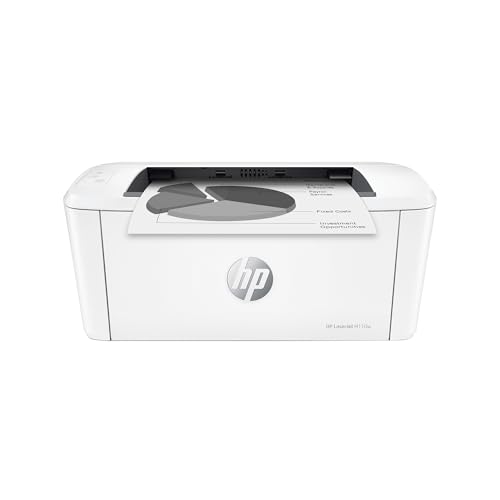
Every family needs its smallest member, and the M110w is this set’s. The title is the briefest here — monochrome laser printer, fast black-and-white printing, mobile printing, wireless printing, fast printing — and its shape tells the story: this is the LaserJet for a single desk, a small room, a person whose printing life is letters, forms and documents rather than departmental volume. Wireless is its stated connection, the only one named, which fits a machine meant to live wherever its owner works.
Mobile printing shares top billing in the title, and on a personal machine that emphasis is right. The documents a solo user prints increasingly begin on a phone — the attachment, the boarding document, the form from a message thread — and a printer that accepts them wirelessly without a computer intermediary matches the actual workflow of a one-person office. The M110w’s title describes a machine that joins a person’s devices rather than a building’s network.
The absences define its tier honestly. No duplex is stated, so two-sided printing should be treated as unconfirmed until the listing says otherwise. No Ethernet is named. No numeric speed appears, despite the title’s twice-repeated fast — a repetition this guide reads as HP’s positioning of the little machine within its own family, not as a measurement. Buyers graduating from inkjet will still find laser output transformative at any of the family’s paces: dry pages, sharp text, a machine ready after weeks idle.
Who it suits is the solo professional, the student with serious document needs, the home office in a spare corner where a full Pro machine would crowd the desk and the budget alike. It also suits the second-printer role in a larger home — the dedicated monochrome box beside the person who prints the household’s paperwork, leaving a colour machine elsewhere to handle photographs and projects.
Small laser printers earn a particular loyalty, because they solve the two failures that drive people out of inkjets: the dried cartridge discovered at the deadline, and the smeared page. A toner machine that sits patiently for a month and then prints a perfect letter is a different species of household object. The M110w’s title promises that species at its most compact and wireless — the LaserJet idea reduced to the size of the need.
Idle tolerance is the trait to underline, because solo printing is bursty by nature. A personal inkjet punished its owner for every quiet fortnight with clogged nozzles and cleaning cycles; a small laser simply waits, toner being a dry powder with no interest in the calendar. For the freelancer whose printing arrives in deadline-shaped bursts separated by silence, that patience is not a minor convenience — it is the difference between a tool and a pet, and the M110w’s whole compact proposition rests on it.
- Type: Monochrome laser printer
- Output: Black-and-white printing, positioned as fast in the listing title
- Connectivity: Wireless printing and mobile printing stated
- Duplex: Not stated in the listing title — verify with the manufacturer documentation
- Ethernet: Not stated in the listing title — verify with the manufacturer documentation
- Print speed (numeric): Not stated in the listing title — verify with the manufacturer documentation
- Paper capacity: Not stated in the listing title — verify with the manufacturer documentation
Strengths
- Wireless and mobile printing suit a one-person, phone-first workflow.
- A monochrome laser brief keeps running simple: one toner, sharp text.
- The set’s compact personal tier — a LaserJet sized for a single desk.
Trade-offs
- No duplex printing is stated in the title.
- No Ethernet connection is named.
- Fast is claimed twice but never numbered.
Best for: a solo desk printing letters and forms wirelessly from a phone and a laptop. Not suited for: an office needing two-sided printing as a stated guarantee, because this title never claims duplex — five other titles in this guide do.
Think of the M110w as the answer to a specific recurring evening: a document must be printed tonight, at home, by a person whose patience for printer drama is gone. Wireless, mobile-fed, monochrome and ready — the title’s short list is calibrated to that evening. Buyers whose printing life is a series of such evenings, rather than a department’s daily volume, are this machine’s natural owners, and they rarely regret choosing the small LaserJet that simply always works.

HP LaserJet Pro M404dn — Two-sided office classic
The M404dn carries the most old-school title in the set, complete with its model code in parentheses — W1A53A — printed like a part number on a purchase order. That is a clue to its natural habitat: the administered office, where equipment is ordered by code and expected to serve for years. The stated facts are built-in Ethernet and two-sided printing on a monochrome Pro machine, with Works with Alexa claimed at the end like a nod to the present day.
Two-sided printing stated in plain words matters, because it is the feature offices feel in their paper budget every single month. Reports, drafts and internal documents printed duplex halve the paper drawer and the archive shelf alike. Combined with Ethernet — the machine as a fixed citizen of the office network, at a fixed address, findable by every desk — the title describes the classic shared monochrome printer: wired, two-sided, unglamorous, indispensable.
Alexa compatibility is the title’s one flourish, and it deserves a measured reading. Voice control of a printer is a convenience for starting and checking jobs in a busy room; it is not a reason to buy an office laser, and this guide weighs it accordingly — noted, because HP stated it, and ranked below the Ethernet port and the duplex hardware that will shape every working day of the machine’s life.
Who it suits: the established small office replacing a departed workhorse, the department corner printer, the practice whose network is wired and whose documents are two-sided by policy. Its title states no wireless and no mobile printing, so a phone-first workplace should confirm those on the listing or look to the siblings that state them. No numeric speed is printed either — the Pro badge carries the pace implication, and the listing carries the figure.
Longevity is the unspoken argument of a machine like this. Offices buy the M404dn class expecting half a decade of unremarkable service, during which the printer’s highest achievement is never being discussed. Built-in Ethernet and automatic two-sided habits are the specifications of that unremarkability — nothing to configure monthly, nothing to reload by hand — and buyers who have managed an office’s printing recognise them as the two lines that matter most in the whole title.
- Type: LaserJet Pro monochrome printer
- Model code: W1A53A, as printed in the listing title
- Connectivity: Built-in Ethernet stated
- Duplex: 2-sided printing stated
- Voice: Works with Alexa, per the listing title
- Wireless: Not stated in the listing title — verify with the manufacturer documentation
- Print speed (numeric): Not stated in the listing title — verify with the manufacturer documentation
Strengths
- Built-in Ethernet makes it a fixed, findable citizen of a wired network.
- Two-sided printing is stated in plain words — a monthly paper saving.
- The model code is printed in the title, easing administered purchasing.
Trade-offs
- No wireless or mobile printing is stated in the title.
- Monochrome only — no colour work of any kind.
- No numeric speed is printed in the title.
Best for: an administered office standardising on a wired, two-sided monochrome printer. Not suited for: a phone-first workplace that needs mobile printing stated, because this title names Ethernet and Alexa but no mobile printing at all.
There is a reason machines of this stamp anchor so many offices: their specification reads like a maintenance contract with boredom. Ethernet that never renegotiates, duplex that never asks for help, monochrome output that never surprises. The M404dn’s title will not thrill anyone, and that is its credential — the offices that buy it are purchasing the absence of printer conversations for the next several years.

HP LaserJet Enterprise M406dn — The Enterprise step
One word lifts this machine out of the Pro heartland: Enterprise. The M406dn’s title otherwise reads as the complete monochrome checklist — laser printer, duplex, fast black-and-white printing, automatic two-sided printing, Ethernet connectivity — and the tier word is the differentiator. In HP’s own language, Enterprise is the departmental shelf: machines specified for shared floors, managed fleets and workloads that treat a single office’s volume as a warm-up.
This guide is careful with that word, because the title states the tier and the paper handling, and nothing more specific. No fleet-management, security or capacity claims are printed, so none are made here; buyers administering a fleet should take the model code to the listing and the manufacturer’s documentation, where Enterprise specifications properly live. What the title alone justifies is a positioning statement: among these six, this is the monochrome machine HP aims above the small office.
The duplex point is stated twice in the title, once as duplex and once as automatic two-sided printing — a redundancy worth reading as emphasis. In a departmental setting, two-sided output is policy, not preference: paper budgets and archive space are managed at scale, and a machine that duplexes by default enforces the policy without a single reminder email. Ethernet completes the departmental picture, the fixed network citizen serving a floor of desks.
Who it suits is the organisation whose printer serves a department rather than a desk: the shared corridor machine, the floor’s document station, the workload measured in reams. A small office should pause before stepping up — Enterprise tier buys headroom and management depth that a five-person team may never touch, and the Pro models in this guide state much the same paper handling for the smaller stage. Buy the tier your headcount justifies.
There is also a signalling function in an Enterprise purchase that honest guides should name. Departments buy the tier partly for the machine and partly for the support relationship and standardisation it implies — one code, one toner story, one behaviour across every floor. The M406dn’s title, terse as it is, is written for the purchase-order world where that standardisation is the actual product, and its stated duplex and Ethernet are the working facts underneath the badge.
- Type: LaserJet Enterprise monochrome laser printer
- Duplex: Duplex and automatic two-sided printing both stated
- Output: Black-and-white printing, positioned as fast in the listing title
- Connectivity: Ethernet connectivity stated
- Print speed (numeric): Not stated in the listing title — verify with the manufacturer documentation
- Paper capacity: Not stated in the listing title — verify with the manufacturer documentation
- Wireless: Not stated in the listing title — verify with the manufacturer documentation
Strengths
- The Enterprise tier is the departmental step in HP’s own stated hierarchy.
- Automatic two-sided printing is stated twice over — duplex as policy.
- Ethernet connectivity anchors it as a shared floor machine.
Trade-offs
- The title states no fleet, security or capacity specifics behind the tier.
- Monochrome only, like the other dn models here.
- No wireless or mobile printing is stated in the title.
Best for: a department standardising on one wired monochrome machine for a floor of desks. Not suited for: a five-person office expecting itemised Enterprise features from the title, because the listing title states the tier and the paper handling — and no specifics beyond them.
Stand in a department corridor at nine in the morning and the Enterprise proposition explains itself: a queue of unrelated jobs from unrelated desks, all of them text, all of them two-sided, none of them waiting on a machine that was specified for a smaller life. The M406dn’s title promises that corridor exactly what it needs — duplex, Ethernet, monochrome pace — and leaves the rest to the documentation its administrators will actually read.

HP Color LaserJet Pro 3201dw — Colour, print only
The longest title in the set belongs to the colour print-only machine, and its length is mostly honesty. The 3201dw is a colour laser printer — wireless, duplex, for the home office, for colour documents, with mobile compatibility — and then, in words manufacturers often bury, the title states printer only and single function. HP is telling the buyer exactly what is not in the box: no scanner, no copier. In a category that loves implication, that plainness deserves the opening paragraph of its own review.
Single function, chosen knowingly, is a legitimate specialisation. The home office that scans twice a year from a phone app does not need a scanner lid taking desk depth every day; it needs colour documents printed dry and sharp, two-sided when they are long, sent wirelessly or from a phone. The title’s home-office framing and colour-documents pitch describe that desk precisely — proposals, reports, charts and handouts with colour that behaves like print rather than ink.
Wireless and mobile compatibility are both stated, which separates this machine from the wired monochrome dn models: it joins a home network the way home devices do, and accepts work from the phone in its owner’s pocket. Duplex is stated as well, so the colour home office gets its two-sided habit without stepping up to the all-in-one. The Pro badge places it in the small-office heartland rather than the personal tier, a positioning the title asserts and this guide reports.
Who it suits: the colour-printing home professional whose scanning life is already handled, the small practice whose documents face clients, the household office that wants one excellent verb — print — in colour. Who it does not suit is equally clear from the title’s own candour: anyone whose week includes digitising paper should take the MFP 3301sdw above, which is the same colour Pro idea with the multifunction heart this model proudly lacks.
There is a discipline in a range that sells the same engine two ways, and the 3201dw is the disciplined half of the pair. It asks the buyer a single question — do you scan? — and charges only for the answer given. Buyers who answer honestly save money and desk; buyers who flatter themselves discover the truth at the first contract that needs digitising, which is why this guide puts the two colour Pros side by side and lets the titles cross-examine the reader.
- Type: Colour LaserJet Pro printer — printer only, single function, as stated in the listing title
- Colour: Colour laser printing for colour documents stated
- Connectivity: Wireless and mobile compatibility stated
- Duplex: Stated in the listing title
- Intended use: Home office, per the listing title
- Scan and copy: Not offered — single function stated in the listing title
- Print speed (numeric): Not stated in the listing title — verify with the manufacturer documentation
Strengths
- Colour printing with duplex stated, without paying for a scanner.
- Wireless and mobile compatibility suit the home office’s devices.
- The title states its single-function nature plainly — no surprises.
Trade-offs
- No scan or copy at all — single function is the whole design.
- No Ethernet connection is named in the title.
- No numeric speed is printed in the title.
Best for: a home office printing colour documents daily and scanning almost never. Not suited for: an office that digitises signed paperwork weekly, because this title states single function in its own words — the MFP 3301sdw is the colour pick with the scanner.
Close the set with the thought this machine embodies: the best printer for a desk is the one whose function list matches the desk’s actual week, no longer and no shorter. The 3201dw’s title reads like a job description with one verb, and for the colour-printing, rarely-scanning home office, that single verb — done wirelessly, two-sided, in dry toner colour — is the whole requirement, honestly stated and completely met.
Comparison
| Pick | Colour | Functions | Connectivity stated | Duplex stated |
|---|---|---|---|---|
| HP Color LaserJet Pro MFP 3301sdw | Colour | All-in-one | Wireless | Yes |
| HP LaserJet Pro 4001dn | Monochrome | Ethernet, mobile | Not stated in the listing title | |
| HP LaserJet M110w | Monochrome | Wireless, mobile | Not stated in the listing title | |
| HP LaserJet Pro M404dn | Monochrome | Ethernet | Yes — 2-sided printing | |
| HP LaserJet Enterprise M406dn | Monochrome | Ethernet | Yes — automatic two-sided | |
| HP Color LaserJet Pro 3201dw | Colour | Print only, single function | Wireless, mobile | Yes |
The table is deliberately built from the only four variables these titles trade in, because they are the variables a buyer can verify from HP’s own words. Colour splits the set two against four. Functions isolate a single all-in-one. Connectivity divides the room into wireless machines and Ethernet machines with almost no overlap, and duplex is stated nearly everywhere except the two titles where this table honestly records silence.
What the table cannot show is equally instructive: pace, capacity and resolution columns would be empty from top to bottom, because no title here prints them. A comparison that filled those columns from general knowledge would look more useful and be less true. Take the model code of your shortlisted machine to its listing, and let the manufacturer’s page supply the numbers this guide has refused to invent.
How to Choose an HP LaserJet
Decide colour by audit, not by aspiration. Print a mental month: if colour appears in client-facing documents, charts or branded material more than occasionally, the two colour Pros are your shortlist, and the scan question divides them. If the month is text from end to end, monochrome is not a compromise but a specialisation, and four machines open up.
Decide function with the same honesty. Scanning is the dividing line of this entire guide — one title states all-in-one, one states single function in so many words, and the rest describe printers. A buyer who digitises paper weekly has exactly one destination here. A buyer who does not should refuse to pay for lids and feeders they will open twice a year.
Let the building choose the connection. Wired offices with network points should shortlist the Ethernet titles — 4001dn, M404dn, M406dn — and treat wireless as the bonus it is in that setting. Homes and flexible rooms should invert the logic: the wireless titles, 3301sdw, M110w and 3201dw, with mobile printing stated on two of them, match how documents actually arrive in a house.
Finish with tier and duplex together. Duplex is stated on five titles and should be treated as a requirement for any office printing long documents, which makes the M110w’s silence a genuine decision point for its otherwise appealing compact brief. Tier — personal, Pro, Enterprise — should follow headcount: the machine’s stated class should match the number of people whose deadlines depend on it, no higher out of vanity, no lower out of false economy.
One practical step closes the process: before ordering, write down the four answers — colour or mono, scan or print-only, wired or wireless, duplex required or not — and hold them against the comparison table above. In this set, those four answers identify a single machine almost every time, because the six were chosen to occupy distinct intersections of exactly those variables. If two machines survive your answers, the tie-breaker is constituency: buy for the number of people who will actually queue at the tray.
Why Do HP’s LaserJet Titles Print So Few Numbers?
Read these six titles together and a philosophy emerges: HP sells this line on structure rather than statistics. Colour or mono, Pro or Enterprise, wired or wireless, duplex or not — the titles read like configuration codes because, historically, that is how LaserJets were bought: by administrators who held the full specification in a catalogue and ordered the configuration by name. The consumer habit of comparing headline numbers belongs to a different shelf, and this line has never fully adopted it.
For the modern buyer, the practical consequence is a two-step purchase. The title performs the shortlisting — it narrows six machines to the one or two whose configuration matches the office — and the listing page performs the verification, supplying the numeric specification the title withholds. This guide is built to be the honest first step of that pair: it will tell you which LaserJet shape fits your office, and it will not pretend the title said more than it did.
There is a defensive virtue in the arrangement. Numbers printed in titles age, vary by region and get quoted against the wrong suffix; configuration facts — duplex stated, Ethernet stated, single function stated — are stable properties of the exact model code. A buyer who chooses on configuration and verifies numbers at the listing is using the line the way its own naming invites, and is far less likely to be ambushed by a digit’s difference.
Pro or Enterprise: Which LaserJet Tier Matches Your Office?
The titles state three tiers across this set: the plain LaserJet badge on the compact M110w, Pro on four machines, and Enterprise on the M406dn. Read as HP’s own map, the tiers describe constituency more than quality. The personal machine serves a desk. Pro serves the small office — shared by a team, expected to handle its whole document load. Enterprise serves the department, where the printer is one unit in a managed fleet and its users may never know its name, only its corridor.
Matching tier to constituency is mostly a headcount exercise with a volume shadow. A team of six gains nothing from the Enterprise badge that the Pro titles here do not already state — duplex, Ethernet, monochrome pace — and loses nothing but the premium. A department of sixty gains standardisation from the Enterprise tier that no Pro feature list can substitute for. The stated paper handling across the dn models is similar enough that constituency, honestly counted, should cast the vote.
The failure mode to avoid is buying tier as insurance. Headroom feels prudent and bills like prudence, but an under-taxed departmental machine in a small office is simply an expensive printer, while an over-taxed Pro on a department floor is a queue with a toner cartridge. Count the people, estimate the reams, and let the tier follow — the titles give you the vocabulary; the arithmetic is yours.
When Does a Home Office Need Colour Toner Instead of Ink?
When its documents leave the building. Colour inkjet output is a fine servant inside a home — photographs, school projects, the colourful draft — but colour that must survive handling, filing, posting and the occasional coffee ring belongs to toner, which sits dry on the page and does not smear under a highlighter. The two colour Pros in this guide are pitched at exactly that outward-facing work: proposals, reports and handouts whose colour is part of their credibility.
Volume writes the second half of the answer. A home office printing colour documents weekly feels inkjet cartridge costs as a recurring tax, while one printing colour twice a year will never recoup a colour laser’s shelf price. The honest threshold is rhythm: colour as a habit argues for toner, colour as an event argues for ink or for the print shop on the corner, and no title in this guide can make that judgement for the reader’s own calendar.
The two colour picks divide the toner answer by a single question — scanning. The MFP 3301sdw absorbs the whole document cycle; the 3201dw prints only, and says so in its title with unusual candour. A home office choosing colour toner should answer the scan question before comparing anything else, because in this corner of the LaserJet range it is the only fork that cannot be retraced later.
How Long Should a LaserJet Serve Before Replacement Crosses Your Mind?
Longer than almost any other device on the desk, and the titles in this guide hint at why: nothing in them is fashionable. Duplex, Ethernet, monochrome output and a model code printed like a part number are specifications that do not date, because the documents they serve do not date either. Letters, invoices and reports in ten years will look much like letters, invoices and reports today, and a machine bought against that stability can be planned as furniture rather than as electronics.
The practical consequence is a buying style: purchase the configuration generously and the consumables calmly. A LaserJet’s life is a long sequence of toner cycles punctuated by nothing much, provided the original choice covered the office’s real connections and paper habits. The expensive LaserJet mistake is rarely mechanical; it is configurational — the wireless model bought for a wired office, the single-function machine bought by secret scanners — discovered in month two and paid for monthly until replacement.
Replacement, when it comes, should be triggered by the office changing rather than the machine failing: a move to colour documents, a department outgrowing a Pro, a network rebuilt around wireless. Each of those triggers is visible in this guide’s comparison table as a column, which is the right way to think about the purchase — you are not buying this year’s printer, you are buying the answer to four stable questions, and the answers will hold for as long as the office that asked them does.
Common Mistakes When Buying an HP LaserJet
Ordering by a similar model code. LaserJet codes differ by digits that change colour, function and connection. The code on the listing is the machine; a near-match is a different printer.
Assuming fast means a number you can plan around. These titles position several models as fast without printing a figure. If pace is contractual, verify it on the listing for the exact code.
Buying the all-in-one out of habit. Five of these six titles describe printers, and one colour model states single function outright. Scan needs are real or they are not — the title will tell you which machine agrees.
Treating duplex as universal. Five titles state it; the compact M110w’s does not, and the 4001dn’s title does not claim it in words. Long-document offices should buy duplex as a stated fact, not an assumption.
Skipping the network question. Ethernet lives on three titles, wireless on three others, with the M404dn notably wired in its title. Match the machine to the building’s actual connections before the box arrives.
Final Recommendation
Colour offices should start at the fork: the MFP 3301sdw if scanning is part of the week, the 3201dw if printing is the whole job — both wireless, both duplex, divided by one honest question. Monochrome offices on wired networks should compare the Pro 4001dn and the M404dn on their stated connections and two-sided habits, and step up to the Enterprise M406dn only when a department, not a desk, is doing the buying. The M110w stands apart as the personal LaserJet: wireless, mobile-fed, sized for one person’s documents.
If this guide leaves a single habit behind, let it be code-matching: say the full model code aloud at the listing page before paying, because in the LaserJet dynasty the code is the contract — and every stated fact in these reviews is attached to one.
Frequently Asked Questions
Which of these LaserJets prints in colour?
Two: the Color LaserJet Pro MFP 3301sdw and the Color LaserJet Pro 3201dw. The other four titles — 4001dn, M110w, M404dn and M406dn — describe monochrome machines for black-and-white printing.
Which HP LaserJet here scans and copies?
Only the Color LaserJet Pro MFP 3301sdw carries the all-in-one MFP brief in its title. At the other extreme, the Color LaserJet Pro 3201dw states printer only and single function in its own words. The remaining titles describe printers.
Do any of these titles state a print speed?
None states a numeric speed. Several monochrome titles use the phrase fast black-and-white printing, which this guide reports as positioning. Buyers who need pages per minute should verify the figure on the listing page for the exact model code.
Which models state Ethernet for a wired office?
Three: the LaserJet Pro 4001dn, the LaserJet Pro M404dn with built-in Ethernet, and the LaserJet Enterprise M406dn. The other three titles state wireless connections instead.
What separates Pro from Enterprise in this set?
Constituency, as the titles frame it. Pro models serve the small office; the single Enterprise model, the M406dn, is the departmental tier. Their stated paper handling overlaps — duplex and Ethernet appear across both — so headcount and fleet standardisation should decide.
What does the dn in a model name usually signal?
In HP’s naming tradition the suffix points to duplex and networking, and the titles here support the networking half in words — Ethernet is stated on the 4001dn, the M404dn and the Enterprise M406dn. Duplex is stated outright on the M404dn and M406dn titles; the 4001dn’s title does not claim it in words, so this guide records it as not stated there and advises confirming on the listing. Treat the suffix as a clue and the title as the evidence.
Is the M110w suitable for two-sided printing?
Its title does not state duplex printing, so this guide records it as not stated. Buyers who need two-sided output as a certainty should choose one of the five titles that state it, or confirm the M110w’s capability on its listing page before ordering.
Related Guides
Laser shoppers comparing dynasties should cross the aisle to the best Epson WorkForce printers, where high-volume inkjet all-in-ones make their case for the same small offices. Organisations printing for a congregation — bulletins, orders of service, the occasional banner — have their own dedicated shortlist in the best printers for churches, including tabloid machines for 11×17 bulletins. And buyers whose first question is not speed but stamina should finish with the best high-yield laser printers built around large paper capacity and low-cost monochrome printing, where the toner cartridge itself becomes the specification that matters.


