What's inside
- Where to Buy
- Key Takeaways
- Quick Picks
- How We Chose These Picks
- Comparison
- How to Choose a Printer for a Church
- Why Does Tabloid Size Matter So Much for a Church Bulletin?
- Who Actually Prints in a Church Office, and Why Does It Change the Choice?
- Toner or Tank: Which Running-Cost Story Fits a Congregation?
- Common Mistakes When Buying a Printer for a Church
- Final Recommendation
- Frequently Asked Questions
- Related Guides
As an Amazon Associate I earn from qualifying purchases. This post may contain affiliate links at no extra cost to you.
widgetverdict.com is reader-supported. When you buy through links on our site, we may earn an affiliate commission.
Where to Buy
A church office prints like a small publisher with a weekly deadline, and the six listings below cover its whole catalogue. Start with the two tabloid machines, because they answer the question ordinary printers cannot: the Xerox VersaLink C7025, whose title states tabloid size outright, and the HP Color LaserJet CP5225n, the set’s other 11 x 17 colour machine — open either listing to check price on Amazon. Volume monochrome lives at the Brother Professional Laser All-in-One with its stated 50 ppm, and at the HP LaserJet Enterprise M611dn. Colour for everyday office documents comes from the HP Color LaserJet Enterprise M554dn, while the Epson EcoTank Pro ET-5850 represents the tank alternative for colour-heavy weeks. Match each model code on its listing page; church budgets are approved by committees, and committees deserve exact codes.
Congregations searching for the best printers for churches are solving a peculiar workload, and it helps to name it before choosing hardware. Every week, without exception, there is an order of service or bulletin that must exist in a fixed quantity by a fixed hour. Around that immovable core orbit newsletters, hymn sheets, children’s ministry handouts, committee papers, posters for the hall, and the occasional banner-sized announcement. The printer that serves a church is therefore part office machine, part parish press — judged on whether Sunday’s pile is ready on Saturday, every Saturday, by whoever the rota provides.
Two of these six machines print at tabloid size, 11 x 17 inches, and that is not an extravagance. A tabloid sheet folded once becomes a four-page bulletin — cover, two inside pages, back page — from a single pass through the machine, which is how generations of church bulletins have actually been made. The same sheet, unfolded, is a poster or a small banner for the noticeboard and the fete. The reviews below give those two machines their full explanation, and give the other four — two Enterprise HP lasers, a 50 ppm Brother all-in-one, and a supertank Epson — the roles they genuinely play in a parish office.
One evidence rule governs the whole guide: duty and speed figures appear only where a title prints them. Two titles state a pace — 50 ppm on the Brother, 20 ppm on the Xerox — and the rest state none, so none is invented for them. Churches buy printers on trust and keep them for a decade; a guide serving them should be at least as careful as their treasurers.
Finally, a note about scale, because congregations vary more than offices do. A church plant of forty people and a cathedral office are both churches, and this set is deliberately wide enough to contain both: the cathedral’s print station and the chapel’s single all-in-one are different rows of the same table. Read for your own congregation’s size, not for the average of the set — the average church does not exist, and its printer should not be bought.
Key Takeaways
- Two picks print tabloid 11 x 17: the Xerox VersaLink C7025, whose title states tabloid size and 20 ppm, and the HP Color LaserJet CP5225n — the folded-bulletin and poster machines.
- The Brother Professional all-in-one states the guide’s fastest speed: 50 ppm monochrome, with scanner, copier, dual-band Wi-Fi and auto two-sided printing.
- The Epson EcoTank Pro ET-5850 is the tank representative — a supertank all-in-one with scanner, copier, fax and Ethernet for colour-heavy ministry printing.
- The two HP Enterprise machines split the office load: the M554dn for colour documents, the M611dn for monochrome volume, both with duplex stated.
- Four of six titles state no speed at all; this guide quotes pace only for the Brother and the Xerox, exactly as their titles print it.
Quick Picks
| Pick | Badge | Why it earns a place |
|---|---|---|
| HP Color LaserJet Enterprise M554dn | Colour for the office | Enterprise colour laser with duplex stated, print-only and focused on documents. |
| HP LaserJet Enterprise M611dn | Monochrome volume | Enterprise black-and-white machine with automatic two-sided printing and Ethernet stated. |
| Brother Professional Laser All-in-One | Fastest stated pace | 50 ppm monochrome with scanner and copier, dual-band Wi-Fi and auto two-sided print. |
| HP Color LaserJet CP5225n | Tabloid colour, print only | The 11 x 17 colour machine for folded bulletins, posters and banners, single function by design. |
| Xerox VersaLink C7025 | Tabloid multifunction | Tabloid-size colour copier at a stated 20 ppm, with two trays, a stand, USB printing and scan-to destinations. |
| Epson EcoTank Pro ET-5850 | The tank alternative | Supertank colour all-in-one with scanner, copier, fax and Ethernet — refillable ink for colour weeks. |
How We Chose These Picks
The shortlist began with the bulletin, because the bulletin is the deadline everything else orbits. A church printer must produce a fixed quantity of a folded document every week, on time, usually under volunteer power. That single requirement explains the shape of this set: tabloid capability for the folded format, duplex for the two-sided reality of orders of service, and at least one machine fast enough, on stated figures, to treat a hundred bulletins as a coffee-length job rather than a Saturday.
Roles were assigned next, the way a parish office actually divides its printing. Colour documents — newsletters, certificates, the illustrated pages of a children’s curriculum — need a colour office machine, represented here by the Enterprise M554dn. Monochrome volume — the weekly black-and-white bulk — is split between the HP M611dn’s Enterprise brief and the Brother’s stated 50 ppm all-in-one. Colour at volume with low running anxiety is the tank machine’s parish, and the ET-5850 carries it as this set’s only supertank.
The tabloid pair was chosen as a pair deliberately, because they answer the same need at different levels of machinery. The Xerox is a multifunction copier on a stand with two trays — a print station. The HP CP5225n is a single-function printer — a press. A large parish with a print room and a small chapel office with a corner are both churches, and a guide that offered only one tabloid shape would abandon one of them.
Evidence discipline closed the selection. Speeds are quoted for two machines only, because only two titles print them. Capacities and duty figures are quoted nowhere, because no title in this set prints them — a notable silence that the spec boxes record honestly rather than fill from institutional reputation. What every title does state — colour or mono, functions, duplex, connection — is exactly what the comparison table is built from.
A word about combinations, because committees think in them. Few entries in this guide are rivals in the simple sense; they are more like members of a staff team, and the realistic purchase for a medium parish is two of them — a tabloid press and a monochrome engine, or a tank all-in-one and a tabloid press. The reviews are written so that each machine’s stated strengths can be read as a job description in such a team, with its stated limits marking exactly where a colleague needs to stand.

HP Color LaserJet Enterprise M554dn — Colour for the office
The M554dn is the parish office’s colour document machine, and its title is a model of HP Enterprise terseness: colour laser printer, duplex, printer for office, colour documents, mobile compatibility, print only, single function, ideal for office use. Read it as a job description. This machine prints colour documents — newsletters with photographs, certificates with seals, curriculum pages with illustrations — and it does nothing else, because in an office with other machines for scanning, printing colour well is a complete vocation.
Single function, stated twice in the title, deserves the same respectful reading it received in this guide’s HP chapter: it is a specialisation, not an omission. A church office that already owns a scanner or a copier gains a dedicated colour press whose whole maintenance story is toner and paper for colour work. The bulletin team’s colour pages, the Christmas service sheets with their artwork, the annual report with its charts — these are the jobs the M554dn exists to make routine.
Duplex is stated, which matters more in church printing than almost anywhere: orders of service are two-sided by nature, and a colour machine that prints both sides automatically halves the paper handling on the most handled document of the week. Mobile compatibility, also stated, covers the modern parish reality — the minister printing from a phone, the administrator sending a corrected page from home the night before.
Its silences are the Enterprise family’s: no speed, no capacity, no paper-size claim appears in the title, so the spec box records them as not stated. A parish whose colour volume is heavy enough to plan around pace should verify the figure on the listing against the model code. Who it suits is the church office with a division of labour — this machine for colour, others for bulk and scanning — and the treasurer who prefers each machine’s job to be exactly as wide as its title.
There is a steadiness to a single-function Enterprise colour machine that suits congregational life. It will not be borrowed for scanning, will not be mid-copy when the colour run is due, and its output — dry toner colour that survives being folded into hymn books and carried home in coat pockets — matches the physical life of church paper, which is handled more, kept longer and read more closely than most office documents ever are.
- Type: HP Color LaserJet Enterprise printer — print only, single function, as stated in the listing title
- Colour: Colour laser printing for colour documents stated
- Duplex: Stated in the listing title
- Mobile: Mobile compatibility stated
- Intended use: Office use, per the listing title
- Print speed: Not stated in the listing title — verify with the manufacturer documentation
- Paper capacity: Not stated in the listing title — verify with the manufacturer documentation
- Maximum paper size: Not stated in the listing title — verify with the manufacturer documentation
Strengths
- Dedicated colour printing at Enterprise tier for office documents.
- Duplex stated — two-sided orders of service without manual turning.
- Mobile compatibility covers printing from phones and home.
Trade-offs
- Print only — no scan or copy in its stated brief.
- No speed or capacity figure is printed in the title.
- Standard office sizes are its world; tabloid work belongs to the pair below.
Best for: a church office that prints colour newsletters, certificates and service artwork weekly. Not suited for: a one-machine parish office needing to scan and copy at the same device, because this title states print only and single function in its own words.
Judge this machine on the colour pile: the illustrated newsletter run, the baptism certificates, the poster proofs checked at office size before the tabloid machines take the final. A dedicated colour printer keeps that pile moving without queuing behind the week’s monochrome bulk — and in a parish office, where the same two people often do everything, a machine that never has to be waited for is a form of kindness.

HP LaserJet Enterprise M611dn — Monochrome volume
If the M554dn is the colour specialist, the M611dn is the parish’s black-and-white engine room. Its title states the Enterprise monochrome checklist in full: laser printer, duplex, fast black-and-white printing, automatic two-sided printing, Ethernet connectivity. The fast claim is HP’s positioning rather than a printed figure — this guide quotes it as such — and the rest of the title describes a wired, two-sided, single-minded machine for the document type that fills most of a church’s paper budget: text.
Consider what monochrome volume means in a congregation. The weekly order of service in most churches is black text on white or cream paper. Add hymn sheets for the choir, committee minutes, giving statements, study guides and the photocopied rotas on the noticeboard, and the parish’s true printing profile emerges: overwhelmingly monochrome, relentlessly weekly, and intolerant of delay. A machine specified exactly for that profile — Enterprise tier, Ethernet-anchored, duplex by default — is not a compromise purchase. It is the correct one.
Automatic two-sided printing, stated twice in the title’s phrasing, is the paper budget’s best friend. Churches print on both sides by tradition as much as by economy — the folded bulletin assumes it — and a machine that duplexes without asking turns that tradition into a default rather than a weekly act of will. Ethernet completes the picture: a fixed machine on the office network, findable by the administrator’s desk and the minister’s laptop alike, indifferent to Wi-Fi weather in a thick-walled old building.
Who it suits is the medium-to-large parish whose weekly monochrome run is measured in hundreds of pages and whose office is wired. Its title states no wireless, no mobile printing, no colour and no scan functions — the spec box records the shape honestly — so a small chapel needing an all-in-one should look at the Brother below, which states the full function set and the fastest pace in this guide.
There is a theology of enough in this machine that treasurers will appreciate. Churches are stewards of other people’s giving, and a printer purchase that matches the actual document profile — black text, two sides, wired, weekly — honours that stewardship better than a colourful flagship bought for the one Sunday a year it would be fully used. The M611dn’s title reads like a steward wrote it, and parishes run by stewards will recognise their machine.
- Type: HP LaserJet Enterprise monochrome laser printer
- Duplex: Duplex and automatic two-sided printing both stated
- Output: Black-and-white printing, positioned as fast in the listing title
- Connectivity: Ethernet connectivity stated
- Print speed (numeric): Not stated in the listing title — verify with the manufacturer documentation
- Colour: Monochrome — no colour printing claimed
- Scan and copy: Not stated in the listing title — verify with the manufacturer documentation
- Wireless: Not stated in the listing title — verify with the manufacturer documentation
Strengths
- Enterprise monochrome brief matched exactly to the weekly text bulk.
- Automatic two-sided printing stated — the paper budget’s default setting.
- Ethernet anchoring suits thick-walled buildings and fixed offices.
Trade-offs
- No colour output — illustrated pages go to another machine.
- Speed is positioned as fast but never numbered in the title.
- No scan or copy function is stated.
Best for: a parish printing hundreds of two-sided monochrome pages every week on a wired network. Not suited for: a small chapel needing one machine that also scans and copies, because no such functions appear in this title — the Brother below states them all.
Run the Saturday test against this machine: the service sheets for two services, the choir’s hymns, the notices, all text, all two-sided, all needed by five o’clock. An Enterprise monochrome engine treats that pile as its ordinary morning. Churches do not need their volume printer to be versatile; they need it to be inevitable — and inevitability, in a title, looks exactly like duplex, Ethernet and nothing extraneous.

Brother Professional Laser All-in-One — Fastest stated pace
The only title in this guide that prints a headline speed belongs to Brother: high-speed 50 ppm monochrome printing, stated in words, on a professional laser all-in-one with scanner and copier, wireless network ready, dual-band Wi-Fi and auto two-sided print. Fifty pages per minute is a planning number a parish can build a Saturday around — a hundred two-sided bulletins become a task measured in minutes of machine time, and the rota volunteer running it can be trained in one visit.
The all-in-one functions are the second half of its parish value. A church office scans constantly in small ways: the signed form for the diocese, the photograph for the newsletter, the historic document a family lends for an anniversary. A machine that prints the week’s bulk at a stated 50 ppm and also stands ready as the office scanner and copier consolidates the whole paper ministry into one footprint — the consolidation a small church office feels every single week, in rooms where a second machine would have nowhere to sit.
Dual-band Wi-Fi, stated in the title, matters in church buildings more than in modern offices. Parish offices sit in old halls, annexes and converted rooms where the network is whatever reaches; a machine that can join either band has two chances to be reachable, and wireless readiness frees it from the one corner with a network point. Auto two-sided print keeps the bulletin habit automatic. The title’s professional framing is Brother’s own, and the stated figures beneath it justify the word without this guide adding any of its own.
Its boundaries are colour and format: this is a monochrome machine, and no tabloid capability is claimed, so illustrated colour work and 11 x 17 bulletins belong to other picks in this set. No paper capacity is stated either. Who it suits is the busy parish office that wants one machine for the weekly monochrome bulk plus the office’s scanning and copying — the closest thing in this guide to a single answer, for churches whose colour needs are modest or met elsewhere.
Speed deserves one pastoral sentence. Volunteer time is the scarcest resource in most congregations, scarcer than money, and every minute a stated 50 ppm removes from the Saturday printing rota is a minute returned to people who give their time freely. Machines in churches should be evaluated partly in volunteer-minutes, and by that measure this Brother’s headline figure is not a luxury specification — it is a roster kindness printed in its title.
- Type: Brother professional laser all-in-one with scanner and copier (MFC-L5915DW)
- Speed: High-speed 50 ppm monochrome printing, as stated in the listing title
- Duplex: Auto 2-sided print stated
- Connectivity: Wireless network ready, dual-band Wi-Fi stated
- Colour: Monochrome — no colour printing claimed
- Paper capacity: Not stated in the listing title — verify with the manufacturer documentation
- Maximum paper size: Not stated in the listing title — verify with the manufacturer documentation
Strengths
- A stated 50 ppm is the fastest pace printed anywhere in this guide.
- Scanner and copier join the print engine in one footprint.
- Dual-band Wi-Fi suits old buildings with difficult networks.
Trade-offs
- Monochrome only — colour ministry printing needs a second machine.
- No tabloid capability is claimed for folded 11 x 17 bulletins.
- No paper capacity is stated in the title.
Best for: a busy parish office printing the weekly monochrome bulk and scanning at one machine. Not suited for: a church whose bulletin is a folded tabloid sheet, because no 11 x 17 capability appears in this title — the Xerox and the CP5225n carry that format.
Every parish office has a person who prints, and this machine is built to honour that person’s Saturday. Fifty stated pages a minute, copies without a computer, scans without a second device, two-sided by default — the title reads like it was written after watching a volunteer work. Churches choosing a single workhorse for the ordinary week, in black and white, will find the strongest stated case in this guide right here.
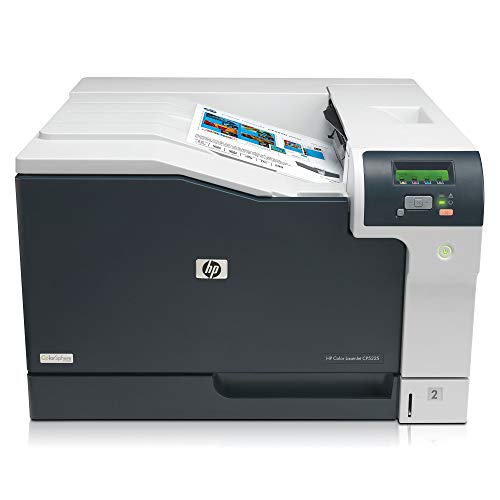
HP Color LaserJet CP5225n — Tabloid colour, print only
The CP5225n is this set’s press: a colour laser printer for the office, print only and single function by its title’s own declaration, whose parish role is the big sheet. This is the tabloid-class machine — the 11 x 17 page that folds into a four-page bulletin and unfolds into a poster — in a simpler, printer-only form than the Xerox below. Where the VersaLink is a print station with a scanner and a stand, the CP5225n is a press with a tray: it exists to put colour onto large paper, and its title’s brevity is the sound of a machine with one job.
The folded bulletin deserves its full explanation here, because it justifies the entire tabloid category. Print a tabloid sheet on both sides, fold it once, and the result is a booklet: the cover with the church’s name and the service title, two inside pages for the order of service and notices, and a back page for the week ahead. No stapling gymnastics, no collating of separate leaves, no trimming. Generations of church secretaries have produced Sunday’s bulletin exactly this way, and a tabloid colour printer is the machine that keeps the tradition in-house and in colour.
The same sheet serves the rest of the parish calendar unfolded. Posters for the fete and the concert, the banner across the hall noticeboard, the large-print order of service for members who need it — a genuine accessibility gift that only a big sheet can give — and table plans for the harvest supper. A church that owns tabloid colour owns its own noticeboard, and notices, in congregational life, are a ministry of their own.
Its stated boundaries are clear: print only, single function, no scan or copy, and the title prints no speed and no dimensions — the spec box records the tabloid role this guide assigns it while flagging the exact maximum sheet for confirmation on the listing against the model code. Who it suits is the parish that already has its scanning and everyday printing covered and needs the big colour page added to the office — the classic second machine, bought for the one capability nothing else in the room can imitate.
Longevity flatters this kind of machine. A single-function tabloid printer has one mechanism to maintain and one job to be ready for, and its busiest hours — bulletin day, poster day — are predictable a year in advance. Parishes keep such presses for a very long time, and the CP5225n’s unfussy title, unchanged in spirit across its long career, describes exactly the sort of machine that becomes part of a building’s furniture and its congregation’s habits.
- Type: HP Color LaserJet Professional printer — printer only, single function, as stated in the listing title
- Colour: Colour laser printing for office documents stated
- Role in this guide: Tabloid (11 x 17) colour printing for folded bulletins, posters and banners
- Exact maximum sheet size: Not stated in the listing title — verify with the manufacturer documentation
- Print speed: Not stated in the listing title — verify with the manufacturer documentation
- Scan and copy: Not offered — single function stated in the listing title
- Duplex: Not stated in the listing title — verify with the manufacturer documentation
Strengths
- Tabloid colour turns one folded sheet into a four-page bulletin.
- Single-function focus keeps the big-page press simple to run.
- Large-print service sheets become possible — an accessibility gain.
Trade-offs
- Print only — scanning and copying live on other machines.
- The title states no speed and prints no sheet dimension.
- Duplex is not stated in the title, though folded bulletins assume two-sided output — verify on the listing.
Best for: a parish adding tabloid colour for bulletins and posters to an office already equipped for scanning. Not suited for: a church buying its only printer, because this title states single function — a one-machine office needs the Brother’s or the Epson’s all-in-one set.
Stand at the noticeboard on a Monday and the case for this machine is pinned all over it: the poster that was printed in-house on Saturday, in colour, at the size the board was built for. Congregations communicate in paper at a scale offices never attempt, and the CP5225n is the pick in this guide that treats that scale as the main event rather than an edge case.

Xerox VersaLink C7025 — Tabloid multifunction
The largest machine in this guide announces its size in its title: a tabloid-size colour laser multifunction copier, at a stated 20 ppm, with copy, print and scan, print from USB, scan to email, folder and network, two trays and a stand. Every phrase in that list answers a parish-office reality. This is not a printer that sits on a desk; it is a print station that stands in the room, and churches with a print corner, a rota and a weekly bulletin at 11 x 17 will recognise their workstation in its description.
Twenty pages per minute at tabloid size is a different quantity from twenty at letter size — each pass carries twice the page — and for the folded-bulletin workflow it means the week’s run is a short, supervised job rather than an occupation. Two trays let the station hold tabloid stock and letter stock simultaneously, so the bulletin paper and the office paper coexist without a weekly tray-swapping ritual, and the stand puts the whole apparatus at working height with its supplies beneath.
The scanning destinations in the title deserve attention, because they describe how a modern parish office actually files. Scan to email for the signed form that must reach the diocese today; scan to folder or network for the archive; print from USB for the visiting preacher or the volunteer who arrives with the file on a stick and no network login. A multifunction machine at the centre of a church office is a communications hub, and this title itemises the hub’s routes with unusual completeness.
Its costs are presence and commitment. A copier on a stand occupies floor, wants a considered position in the office, and represents the largest single decision in this guide — a parish should buy it the way it buys an organ, expecting a decade. Who it suits is the medium-to-large congregation whose bulletin is tabloid, whose office serves several ministries from one station, and whose print volume justifies a machine that is furniture. Small chapels should take the CP5225n’s press-only route to the same folded page.
There is a communal dimension to a machine like this that offices rarely discuss. The print station becomes a gathering point — the place where the bulletin team assembles, where ministries queue their posters, where the week’s paper life is visible in one room. Churches run on such gathering points. A VersaLink-class station, chosen well, becomes part of how a congregation organises its common life, which is a return no specification sheet can promise and every parish administrator will recognise.
- Type: Xerox VersaLink tabloid-size colour laser multifunction copier
- Format: Tabloid-size, as stated in the listing title
- Speed: 20 ppm, as stated in the listing title
- Functions: Copy, print, scan
- Scan destinations: Email, folder and network stated; print from USB stated
- Paper handling: 2 trays and stand, as stated in the listing title
- Duplex: Not stated in the listing title — verify with the manufacturer documentation
- Paper capacity per tray: Not stated in the listing title — verify with the manufacturer documentation
Strengths
- Tabloid multifunction: the folded bulletin and the poster from one station.
- Two trays hold tabloid and letter stock side by side.
- Scan to email, folder and network, plus USB printing, cover volunteer workflows.
Trade-offs
- A stand-mounted copier is a floor decision, not a desk decision.
- Its stated 20 ppm is a tabloid pace — read it at tabloid size, not letter.
- Duplex is not stated in the title despite the folded-bulletin workflow.
Best for: a medium-to-large congregation running a tabloid bulletin from a dedicated print station. Not suited for: a small chapel office with no floor space for a stand-mounted copier, because this machine’s title includes the stand as part of the machine.
Picture the parish office this machine creates: tabloid stock in one tray, letter in the other, the bulletin file arriving by USB or network, copies scanned straight to the administrator’s email, and the whole week’s paper produced from one standing-height station. That is not a printer purchase; it is the furnishing of a ministry — and for the congregation whose numbers support it, the VersaLink’s title describes the furnishing completely.

Epson EcoTank Pro ET-5850 — The tank alternative
Every guide needs its dissenter, and the ET-5850 dissents from toner itself. It is a wireless colour all-in-one supertank printer — refillable reservoirs instead of cartridges — with scanner, copier, fax and Ethernet, in a white finish. In a set of five toner machines, it represents the other running-cost philosophy: ink bought in bottles, levels visible on the machine, and colour printing whose marginal cost stops frightening the person approving the children’s ministry handouts.
The parish case for a tank machine is written in colour volume. Churches print colour in bursts of generosity — the illustrated curriculum, the photo-filled newsletter, the holiday service sheets, the banner trial prints — and cartridge or toner economics can make a treasurer flinch at exactly the material that serves the congregation most warmly. A supertank changes the emotional arithmetic of pressing print on a forty-copy colour run: the ink is already in the reservoirs, bought by volume, and the machine’s Ethernet and fax complete an office specification rather than a home one.
The function set is the fullest stated in this guide alongside the Brother’s: print implied by its class, with scanner, copier and fax itemised and Ethernet for the wired office. Fax, notably, survives here as it does across Epson’s office line — useful in parishes whose diocesan or denominational offices still keep the number. Its title states no speed and no capacity, so none is quoted; a parish planning around pace should verify on the listing, and should weigh the Brother’s stated 50 ppm honestly against the tank’s running-cost story.
Who it suits is the colour-generous congregation: the church school and children’s ministry with weekly illustrated printing, the parish whose newsletter is a photo magazine in miniature, the office that wants one all-in-one for colour work and scanning alike. Who it does not suit is the bulletin-at-tabloid parish — no wide format is claimed in its title — or the monochrome bulk office, where the Enterprise HP and the Brother state the sterner specifications.
There is a stewardship argument unique to this pick. A supertank’s ink is bought rarely, in full view, at bottle prices — a purchasing rhythm a church council can understand and approve without a spreadsheet. Combined with the visible levels that end surprise shortages before a Sunday, the ET-5850 offers the parish office something the toner machines promise differently: calm. For a colour-heavy ministry, calm is a specification.
- Type: Epson EcoTank Pro wireless colour all-in-one supertank printer, white
- Ink system: Refillable supertank — cartridge-free class
- Functions: Scanner, copier and fax stated, with Ethernet
- Connectivity: Wireless and Ethernet stated
- Print speed: Not stated in the listing title — verify with the manufacturer documentation
- Paper capacity: Not stated in the listing title — verify with the manufacturer documentation
- Maximum paper size: Not stated in the listing title — verify with the manufacturer documentation
Strengths
- Supertank ink suits colour-heavy ministry printing without cartridge anxiety.
- Scanner, copier and fax are all stated, with Ethernet for the office.
- Visible ink levels end the pre-Sunday surprise shortage.
Trade-offs
- No tabloid capability is claimed — folded 11 x 17 bulletins belong elsewhere.
- No print speed is stated in the title.
- Its inkjet-supertank route will not satisfy a parish committed to toner.
Best for: a congregation whose children’s ministry and newsletters print illustrated colour every week. Not suited for: a parish whose bulletin is a folded tabloid sheet, because no 11 x 17 capability appears in this title.
End the set with the image this machine makes possible: the children’s page printed in full colour for every child, not rationed to a display copy; the newsletter’s photographs printed as photographs; the extra trial poster run approved without a meeting. Generosity in print is a real feature of congregational life, and the ET-5850’s tank is the technology in this guide that prices generosity within a parish’s reach.
Comparison
| Pick | Colour | Functions | Stated speed | Format note |
|---|---|---|---|---|
| HP Color LaserJet Enterprise M554dn | Colour | Print only | Not stated in the listing title | Office documents |
| HP LaserJet Enterprise M611dn | Monochrome | Not stated in the listing title | Two-sided text volume | |
| Brother Professional All-in-One | Monochrome | Print, scan, copy | 50 ppm | Office sizes |
| HP Color LaserJet CP5225n | Colour | Print only | Not stated in the listing title | Tabloid 11 x 17 class |
| Xerox VersaLink C7025 | Colour | Copy, print, scan | 20 ppm | Tabloid-size, stated |
| Epson EcoTank Pro ET-5850 | Colour | Print, scan, copy, fax | Not stated in the listing title | Supertank colour |
Read this table as a parish org chart rather than a league table. Two machines own the big sheet, two own the Enterprise office load, one owns stated pace with a scanner attached, and one owns the ink supply itself. A congregation’s real answer is often two rows of this table — a tabloid press beside a monochrome engine, or a tank all-in-one carrying a small parish alone — and the table is drawn so those partnerships are easy to see.
The speed column’s emptiness is the table’s honesty lesson. Four titles print no pace, so four cells record the silence, and a committee comparing these machines should treat any unstated figure offered elsewhere with the suspicion this guide has modelled. The two stated speeds, meanwhile, are not comparable to each other naively: the Brother’s 50 ppm is a letter-size monochrome pace, the Xerox’s 20 ppm a tabloid colour one, and the work each describes per minute differs by design.
How to Choose a Printer for a Church
Start with the bulletin, in its actual physical form. Measure it. If Sunday’s document is a folded tabloid sheet, the choice narrows instantly to the two 11 x 17 machines, and the remaining question is machinery level — the Xerox’s multifunction station or the HP’s print-only press. If the bulletin is a letter-size leaflet, the tabloid pair become poster luxuries and the office machines take over the argument.
Count the week’s pages next, split by colour. Parishes consistently discover their printing is more monochrome than they remembered and more colour than they budgeted. The monochrome bulk points to the Brother’s stated pace or the HP M611dn’s Enterprise brief; the colour share decides between the M554dn’s toner focus and the ET-5850’s tank economics. Bring real counts to the committee — a month of Sundays, tallied — because printer purchases fail on imagined workloads.
Weigh the operators third. Church printing is volunteer printing, and a machine’s true interface is whoever the rota provides at 9 a.m. on a Saturday. All-in-one completeness, wireless reach into old buildings, USB printing for the volunteer with a stick and no login — these stated features in the titles above are volunteer features, and they deserve weight out of proportion to their specification glamour.
Finish with the decade view. Churches keep printers longer than offices do, through building works, staff changes and three generations of laptops. Connections stated in these titles — Ethernet on the HP and Epson office machines, dual-band Wi-Fi on the Brother, USB on the Xerox — are the machine’s chances of still joining the network in year nine. Buy the connections as carefully as the print engine; the engine will outlast several networks if it is allowed to.
Why Does Tabloid Size Matter So Much for a Church Bulletin?
Because of the fold. A tabloid sheet carries four letter-size pages in a single piece of paper — front cover, two inside pages, back page — so one printed, folded sheet is a complete bulletin with no collating, no stapling of separate leaves and no trimming. The order of service, the readings, the notices and the week ahead arrange themselves across the fold the way congregations have read them for generations, and the person producing them handles half the sheets a letter-size booklet would require.
Unfolded, the same capability serves the rest of parish communication at its natural scale. Posters that read across a hall, banners for the noticeboard, large-print service sheets for members with failing sight — an accessibility provision that deserves naming plainly, because only a big sheet can print a big font across a full service — and table plans, certificates and displays all live at tabloid size. A church with an 11 x 17 machine owns its visual voice in a way a letter-only church rents from the print shop.
The two tabloid picks divide the commitment. The Xerox builds the station around the size — trays for both stocks, a stand, scanning to the office’s destinations. The HP CP5225n offers the size as a press, print only, for the parish whose other functions are covered. Either way, the fold is the feature: committees evaluating tabloid machines should fold a sample sheet at the meeting and let the object make the argument.
Who Actually Prints in a Church Office, and Why Does It Change the Choice?
Almost never a print professional. The parish administrator if the church is fortunate, the minister if it is not, and a rota of volunteers whose technical confidence varies by generation and by week. That operator profile reshapes what a good church printer is: not the machine with the deepest menu, but the one whose ordinary jobs — this week’s bulletin, fifty copies, two-sided — can be started by whoever Saturday provides, with the instructions taped to the wall beside it.
Stated features in these titles map onto that reality more than their office framing suggests. Print from USB on the Xerox serves the volunteer who arrives with a file and no credentials. Dual-band Wi-Fi on the Brother serves the building whose network reaches the office on one band only. Mobile compatibility on the HP colour machine serves the minister correcting a page from home. Scan to email on the Xerox serves the administrator who is the office, filing from the machine because there is no one to hand paper to.
The buying consequence is a test committees rarely run: the Saturday test. Before approving a machine, describe its three commonest jobs to the least technical person on the rota and ask whether the description sounds survivable. Churches are communities before they are organisations, and a printer that only the administrator can operate is a single point of failure wearing a specification sheet. Choose the machine the whole rota can run.
Toner or Tank: Which Running-Cost Story Fits a Congregation?
The five toner machines in this guide offer the classic institutional bargain: dry, durable pages, machines that wait patiently between Sundays, and a consumable routine of cartridges that a treasurer can budget as a line item. Toner suits the parish whose printing is mostly text and whose colour is occasional and formal — the profile of the Enterprise pair and the Brother in this set, each specified for exactly that discipline.
The ET-5850’s supertank offers the other bargain: ink bought by volume in bottles, levels visible at a glance, and a marginal cost per colour page low enough to change what a ministry dares to print. Its parish is the colour-generous one — children’s work, illustrated newsletters, photo pages — where the cost of colour is currently a creative constraint. Neither bargain is superior in the abstract; they price different ministries differently.
Committees should decide with their own last quarter in front of them: pages by colour, pages by size, and the occasions when cost changed a decision — the newsletter that went black-and-white, the curriculum printed single-sided to save toner. Those occasions are the true specification. A congregation that finds them frequent is a tank congregation; one that finds them rare should buy toner and spend the difference on paper.
Common Mistakes When Buying a Printer for a Church
Buying letter size for a tabloid bulletin. If Sunday’s document is a folded 11 x 17 sheet, no letter-size machine, however fast, can produce it. Measure the bulletin before the meeting, not after the purchase.
Planning around unstated speeds. Four of these six titles print no pace. A rota built on an assumed figure collapses on the first big Saturday; the stated speeds here are the Brother’s 50 ppm and the Xerox’s tabloid 20 ppm.
Forgetting the volunteers. A machine only one person can operate fails every time that person is away. USB printing, wireless reach and all-in-one simplicity are rota features, not luxuries.
Buying one machine to do two parishes’ jobs. Tabloid colour, monochrome bulk and illustrated ministry printing are three workloads. Several churches will honestly need two rows of this guide’s table, and a committee that admits it buys better than one that doesn’t.
Ignoring the building. Thick walls, distant offices and elderly wiring are church realities. Ethernet stated in a title, or dual-band Wi-Fi, can matter more than any engine specification once the machine meets the building.
Final Recommendation
Tabloid-bulletin churches should choose between the two big-sheet machines by machinery level: the Xerox VersaLink C7025 as the complete print station — tabloid, two trays, scanning to email and network, at a stated 20 ppm — or the HP CP5225n as the press-only route to the same folded page. Letter-size parishes with a wired office should pair the HP M611dn’s monochrome Enterprise brief with the M554dn’s colour where the budget allows, or take the Brother all-in-one as the single stated-speed answer at 50 ppm with scanning included. Colour-generous ministries should give the Epson ET-5850’s supertank a full hearing before defaulting to toner.
For the committee’s minutes, one sentence will do: buy for the bulletin you actually fold, the pages you actually counted, and the volunteers who will actually stand at the machine — and the printer chosen on those three facts will still be serving the congregation when the next committee inherits it.
Frequently Asked Questions
What size paper does a church bulletin usually need?
The classic folded bulletin is a tabloid sheet — 11 x 17 inches — folded once to make four letter-size pages. Two picks here serve that format: the Xerox VersaLink C7025, whose title states tabloid size, and the HP Color LaserJet CP5225n. Churches using letter-size leaflets are served by the other four.
Which printer here is fastest?
On stated figures, the Brother Professional all-in-one, whose title prints high-speed 50 ppm monochrome printing. The Xerox states 20 ppm at tabloid size. The other four titles state no speed, and this guide quotes none for them.
Can one printer cover a whole church office?
For many small parishes, yes: the Brother pairs its stated 50 ppm with scanner and copier, and the Epson ET-5850 pairs a supertank with scanner, copier, fax and Ethernet. What neither covers is tabloid — a folded 11 x 17 bulletin still requires one of the two big-sheet machines.
Why include an ink tank printer among laser machines?
Because colour volume changes the economics. The ET-5850’s refillable supertank suits ministries printing illustrated colour weekly — children’s materials and photo newsletters — where cartridge or toner costs constrain what gets printed. It is this set’s representative of the tank philosophy.
What does scan to email or network mean on the Xerox?
Its title states scan to email, folder and network, plus print from USB. In parish terms: signed forms reach the diocese from the machine, archives file themselves to the office network, and a volunteer can print from a USB stick without a network login.
Where should the church printer live?
Where the rota can reach it and the paper can be stored beside it. A tabloid machine like the Xerox is a floor decision — its title includes a stand — while the desk machines in this guide belong in the parish office near the administrator’s computer. What every placement shares is a stock of the right paper within arm’s reach: tabloid sheets beside the tabloid machines, letter stock beside the rest, because a printer separated from its paper by a staircase will be blamed for delays that are really geography.
Should a church buy for its busiest season?
Buy for the ordinary week, sized with headroom. Christmas and Easter multiply pages, but a machine bought for two Sundays will be oversized for fifty. The stated speeds and the tabloid capability in this guide describe weekly fitness; seasonal peaks can be scheduled across days in a way a weekly deadline cannot.
Related Guides
Parishes whose printing outgrows the office and becomes a programme should continue to the best high-yield laser printers, where low-cost monochrome and large paper capacity carry institutional volume. The room at the centre of church life has its own technology guide in the best long-throw projectors for large rooms, auditoriums and venue installations. And congregations equipping a hall or sanctuary for presentations and events will find the natural companion in the best commercial laser projectors for large venues and professional installations, chosen with the same title-by-title care as the printers above.


