What's inside
- Key Takeaways
- Quick Picks
- What makes a slim drive good at being carried?
- How do the six slim drives compare side by side?
- How should a slim drive fit into a sane backup routine?
- Which connector generation should your bag standardise on?
- What mistakes do slim-drive owners keep making?
- Slim drive or flash drive or cloud — which travelling copy should you choose?
- How do you carry a slim drive so it survives the year?
- Which slim drive fits which carrier?
- What should the first evening with a slim drive include?
- How does a slim drive age, and what should year three look like?
- Final Recommendation
- Frequently Asked Questions
- Related Guides
As an Amazon Associate I earn from qualifying purchases. This post may contain affiliate links at no extra cost to you.
widgetverdict.com is reader-supported. When you buy through links on our site, we may earn an affiliate commission.
Where to buy: the six slim drives below each link to the Amazon listing checked for this guide; check the connector in the listing photographs against the cable you intend to use, because in this category the difference between generations is quite literally the shape of the hole in the drive.
Slim is a promise about the bag, not about the specification sheet. The best external slim hard drives belong to the 2.5-inch portable class: drives thin enough to share a laptop sleeve with the laptop, light enough to be forgotten in a jacket of the everyday carry, and powered entirely through their cable so no brick competes for the café table’s one free socket. They are the drives that actually get carried, and a drive that gets carried is the only kind that can hold the current copy of your work when the day goes sideways.
This category rewards honesty about generations, so here it is at the start. The class’s founding design, Seagate’s Backup Plus Slim, is an older drive built around the Micro-B USB connector that preceded today’s ports — a fine drive with an ageing doorway, and this guide says so in its section rather than letting the famous name coast. At the other end of the shelf, UnionSine appears twice as the budget marque: a younger brand selling genuinely slim drives at the value end, positioned in this guide with its track record stated plainly rather than borrowed from its neighbours. Between those poles sit Toshiba’s deliberately basic Canvio, Seagate’s current plain Portable, and Western Digital’s My Passport with its software and password protection.
Capacity in this class clusters at two terabytes, with one four-terabyte exception, and that clustering is itself information: slim drives are for the working set — the documents, the photo library in progress, the project files in flight — not for the vault. Owners who understand that buy a slim drive for motion and keep the archive at home. Owners who expect a pocket drive to be the archive end up with a very thin single point of failure, and the how-to section of this guide addresses where the second copy lives.
Every pick runs from bus power, every pick speaks to both Windows and Mac households in its title or its class’s ordinary terms, and none of them will survive being sat on — slim is a shape, not an armour standard, and the DJ-grade rugged drives live in a different guide. Within those honest fences, the six below divide by connector generation, brand temperament and one doubled capacity, and the sections that follow take them in that spirit.
Key Takeaways
- Slim means the 2.5-inch portable class: sleeve-friendly, bus-powered, and built to be carried daily rather than admired.
- The Backup Plus Slim is the class’s classic design on an older Micro-B connector — still serviceable, no longer the modern doorway.
- Toshiba’s Canvio Basics is the deliberately plain option: storage without software ambitions.
- UnionSine is the budget marque in this list, included twice and positioned honestly as such.
- The My Passport is the slim pick with backup software and password protection named in its title.
- Four terabytes in a slim shell — the larger UnionSine — suits the working set that outgrew two, not a lifetime archive.
Quick Picks
| Pick | Badge | Why it earns its place |
|---|---|---|
| Seagate Backup Plus Slim 2TB | The original slim, ageing gracefully | The design that named the class, on the older Micro-B connection its era used. |
| Toshiba Canvio Basics 2TB Portable Hard Drive | The no-nonsense basic | Plain portable storage from a major maker, with nothing extra to manage. |
| UnionSine Ultra Slim 2TB Portable Hard Drive | The budget slim | Ultra-slim positioning at the value end, from a younger brand stated as such. |
| Seagate Portable 2TB Hard Drive | The current everyday Seagate | The modern plain portable: plug-and-play storage for both major platforms. |
| WD My Passport 2TB Portable Hard Drive | The protected slim | Backup software and password protection in the slim class’s mainstream shell. |
| UnionSine Ultra Slim 4TB Portable Hard Drive | The big budget slim | Four terabytes in the ultra-slim class for working sets that outgrew two. |
What makes a slim drive good at being carried?
We judged this class by the physics of everyday carry rather than by benchmark charts. A slim drive’s real specifications are the ones the titles cannot print: whether it disappears into the sleeve you already own, whether its cable is the one your other devices also use, whether it mounts without ceremony on the machine in front of you, and whether you would notice its absence before you noticed its presence. On those terms, connector generation matters more than any transfer figure, because the cable you must carry specially for one device is the cable that gets left behind in a hotel room.
Listing titles were read with the same strictness as everywhere in this batch. Where a title names software, protection or a bundled extra, the pick below credits it; where a title is silent, the pick is presented as plain storage, which in this class is often a virtue. Brand temperament was weighed openly: the three established makers bring long portable lineages, while UnionSine’s two entries are judged as what they declare themselves to be — ultra-slim value drives — with the advice that a younger brand’s drive should hold working copies, not sole copies, until it has earned an owner’s trust across a year of Tuesdays.
Capacity expectations were set by the class’s purpose. Two terabytes carries a professional’s working set with room to breathe; four carries the photographer or video hobbyist whose working set is the hobby. Anything beyond belongs to the desktop class, and the guide’s final sections keep returning slim drives to their proper office: motion, convenience, and the current copy — never the only copy.
Seagate Backup Plus Slim 2TB — The original slim, ageing gracefully
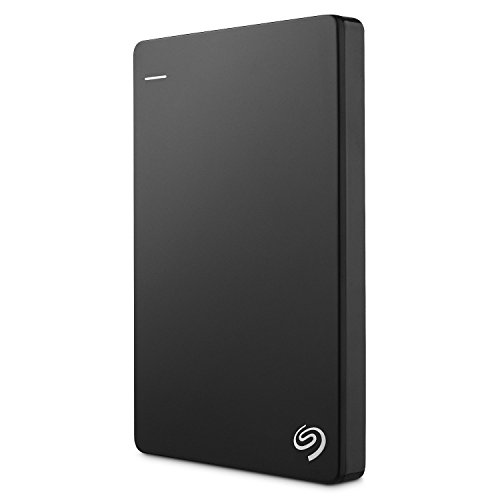
Every category has a founding object, and for slim portable drives it is this one: the Backup Plus Slim defined the expectation that two terabytes could ride in a shirt-pocket silhouette, and its name still functions as the class’s shorthand years later. Its title bundles two months of an Adobe photography plan, a period detail that dates the design as surely as a coin in a photograph — which brings us, without evasion, to the connector. This drive belongs to the Micro-B generation: the wide, flat USB plug that portable drives used before the industry moved on. It works perfectly. It also means a dedicated cable, a connector modern laptops increasingly meet through adapters, and a doorway that belongs to an earlier era of the category it created.
Who should still buy it? The owner whose machines and cables already live in that generation, whose desk drawer holds Micro-B leads the way other drawers hold pens, and who values the proven design over port novelty. In a household standardised on current connectors, the honest recommendation is to let the classic retire with honours and choose a successor below. Sentiment is a poor cable standard.
Treated as what it is — the elder statesman, fully capable within its generation — the Backup Plus Slim remains a sensible drive: two terabytes, plug-and-play manners, a silhouette that taught the market what slim meant. Buy it with your eyes open about its doorway and it will not surprise you; buy it expecting the present day in a famous box and the first cable hunt will teach the lesson less kindly.
There is one more constituency for the classic worth naming: the second-machine household. A slim drive that serves the older laptop, the children’s homework machine or the media PC under the television — hardware from the same era as the drive itself — never meets the connector mismatch at all, and in that company the Backup Plus Slim’s long-proven design is simply the right tool wearing the right cable. Products outlive their launches by finding the rooms where their assumptions still hold; this one has several such rooms left, provided nobody asks it to pretend the calendar stopped.
- Capacity: 2TB
- Doorway: USB 3.0 in the Micro-B form this design’s generation used
- Bundled extra named in the title: two months of Adobe CC Photography
- Compatibility in the title: PC, laptop and Mac
Strengths
- The proven founding design of the slim class, with a long service history behind it.
- Two terabytes in the silhouette that defined portable expectations.
- Suits households whose cables and machines already live in its generation.
Trade-offs
- The Micro-B connector is the older standard; modern rigs will adapt or abstain.
- Its bundled software extra is a period piece, not a reason to buy in the present tense.
- Newer picks below offer the same capacity with the current generation’s doorway.
Best for: owners standardised on its connector generation who want the class’s classic design. Not suited for: an all-modern laptop bag, where its cable becomes the one special object you must never lose — the Canvio and the current Seagate Portable exist for that bag. Check your own cable drawer before the listing; the drawer decides this one.

Toshiba Canvio Basics 2TB Portable Hard Drive — The no-nonsense basic
The Canvio Basics makes the shortest pitch in this guide and may be the most honest one: a portable external hard drive, USB 3.0, black, two terabytes. Toshiba has sold the Basics line for years on exactly that proposition — the drive as appliance. There is no software suite courting you, no protection feature asking for a password ceremony, no bundled subscription. You plug it in, it becomes storage, and the relationship stays at that temperature for the life of the product, which is precisely the relationship most slim-drive buyers are actually seeking.
That plainness has a specific professional audience: the person who manages their own backups with their own tools and resents bundled software volunteering for the job, the IT-adjacent buyer equipping a small team with identical drives, and the gift buyer who needs storage that will not interrogate its recipient. A Basics drive in a laptop bag is infrastructure, and infrastructure’s highest praise is that nobody has thought about it since March.
Its limits are the mirror of its virtues. Owners who want the drive itself to maintain the backup routine should look at the My Passport’s software pitch instead; owners who want a statement object should look anywhere else at all. The Canvio is for people who find both of those desires faintly embarrassing, and there are enough of them to keep this line in production year after year.
Its fleet quality deserves a further sentence, because identical plainness scales. A tutor issuing drives to a class, a small studio standardising on one model for project handovers, a family buying three at once for three laptops — all benefit from a drive with no accounts, no per-unit software personality and no learning curve beyond a cable. When one is lost, its replacement is a non-event; when one is handed over, nothing about it needs explaining. Product designers rarely get thanked for restraint, but the Basics line’s whole career is that thank-you, delivered quietly and repeatedly.
- Capacity: 2TB
- Plugs in over USB 3.0, as its title states
- Pitch in the title: portable external hard drive, Basics line
- Model reference in the title: HDTB520XK3AA
Strengths
- Deliberately plain: no bundled software layer to manage or dismiss.
- A major maker’s appliance-grade approach to portable storage.
- The natural fleet drive for small teams and uncomplicated gifts.
Trade-offs
- No backup software or password protection is named in its title.
- Its restraint will bore buyers who enjoy a feature list.
- Working-set capacity only; the archive still belongs at home.
Best for: self-sufficient owners who run their own backup tools and want storage without ceremony. Not suited for: anyone hoping the drive will automate their routine for them — that request is the My Passport’s entire personality, two picks below. Verify the listing, then enjoy owning the least demanding object in your bag.

UnionSine Ultra Slim 2TB Portable Hard Drive — The budget slim
UnionSine is the name in this list without the decades, and this guide’s treatment of it is deliberately two-handed. On one hand: the drive declares an ultra-slim design, USB 3.0, and compatibility spanning PC, Mac, laptops and games consoles, which is the full slim-class brief at the value end of the shelf, and dismissing it for its youth alone would be snobbery rather than judgement. On the other hand: a younger brand has a shorter public record of how its drives age, how its support answers, and how its warranties behave in year three, and a careful buyer prices that uncertainty into the role they assign the drive.
That role, assigned honestly, is the working copy. The UnionSine as the bag drive — the current project set, the travelling photo library, the copy that exists so the home archive can stay home — is a rational purchase, because everything on it also lives somewhere else by design. The UnionSine as the sole repository of a family’s photographs would be the same hardware making a different and worse argument. Slim drives in general should hold copies; a budget slim should hold copies with the discipline actually practised.
Within that fence, its appeal is genuine. The ultra-slim pitch is the class’s whole point, its console compatibility gives it a second life as game storage when the laptop years end, and its price class — described qualitatively, as this guide’s rules require — lets a buyer own the two-copy system for what one premium drive might cost. Judge it as a system component and it earns its place; judge it as a vault and you have misunderstood both the drive and the category.
The first month with a budget drive is also its audition, and owners should run it as one deliberately. Put it through the real routine immediately — the full working set copied, verified, carried for a fortnight, synced back — rather than letting it idle in a drawer until the week it is suddenly load-bearing. A drive that passes its audition becomes a trusted component with a known personality; a drive that falters does so while returns are simple and the home copy is untouched. That audition habit, incidentally, is good practice for every pick in this guide, but it is the making of the value picks in particular.
- Capacity: 2TB
- Design pitch in the title: ultra slim
- Interface per its title: USB 3.0
- Compatibility named in the title: PC, Mac, laptop, PS4, Xbox One and Xbox 360
Strengths
- The slim-class brief at the value end, enabling a genuine two-copy system.
- Broad stated compatibility, including a second career as console storage.
- Ultra-slim design serves the everyday-carry purpose without compromise theatre.
Trade-offs
- A younger brand’s long-term record is necessarily thinner than the majors’.
- It should hold working copies, never the only copy of anything precious.
- Support and warranty experiences are less documented than the big names’.
Best for: value-minded carriers who practise the two-copy rule and want the bag drive to be the expendable half. Not suited for: sole-copy storage of irreplaceable material, where the established makers’ records justify their position. Read the current listing with the working-copy role in mind and it will make its own case.

Seagate Portable 2TB Hard Drive — The current everyday Seagate
If the Backup Plus Slim is Seagate’s past in this class, the plainly named Seagate Portable is its present: everyday storage, plug-and-play backup, Windows and macOS compatibility, and a one-year warranty stated in the title. The pitch could hardly be more direct, and in the slim class directness is a design philosophy — this is the drive for the person who typed the category into a search box wanting a competent object from a known maker, current in its connections and unencumbered by a concept.
Its natural habitat is the generalist bag: the consultant’s working files, the student’s everything, the family drive that ferries photographs between households and serves as the laptop’s overflow during term time. Two terabytes is the class’s working size and the Portable wears it without pretending to be a vault, a games drive or a media server. Owners graduating from a full internal drive will find the ceremony refreshingly absent: connect, copy, carry on.
Read its title once more for what it does not claim, because the omissions draw its borders cleanly. No armour, so the bag’s padded pocket is its protection. No password or software suite, so your own tools run the routine. No bundled extras asking for accounts. What remains is the slim class’s core transaction, executed by its most established name — which is why, for a buyer who wants the present-day default and no argument, this pick is very hard to walk past.
It also makes the best household spare, a role worth planning rather than improvising. The drive kept in the drawer against the day a laptop dies, a relative’s machine fills, or a project must change hands physically is a drive whose value is realised in other people’s emergencies, and for that office plainness and platform breadth beat every feature in this guide. Label the spare with its purpose and its date, test it when the household’s other drives get their seasonal check, and it will be ready on the one afternoon a year when readiness is the whole story.
- Capacity: 2TB
- Hookup stated in the title: USB 3.0
- Compatibility in the title: Windows and macOS
- Warranty stated in the title: one year
Strengths
- The current-generation default from the class’s most established maker.
- Plug-and-play manners across both major platforms.
- An honestly stated warranty in the title itself.
Trade-offs
- No armour and no protection features are claimed; the bag must provide the care.
- Backup routine is yours to run, unautomated by bundled software.
- Two terabytes serves the working set, not the household archive.
Best for: generalists who want the modern, mainstream slim drive with no concept attached. Not suited for: owners who want the drive to encrypt and schedule for them — that is the My Passport’s department, immediately below. Check the listing and let the default be the default.

WD My Passport 2TB Portable Hard Drive — The protected slim
The My Passport is the slim class’s full-service citizen. Its title names backup software and password protection in the same breath as its two terabytes, which reframes the purchase: this is not merely a place to put files but a small system for keeping them — the routine automated, the contents guarded. For the professional whose bag drive holds client work, the student whose thesis lives in the everyday carry, or anyone whose laptop bag has ever been left in a taxi, that combination answers anxieties the plainer picks politely decline to discuss.
The password protection earns the usual careful paragraph. Enabled thoughtfully — with the credential recorded in the owner’s password manager or paperwork, never trusted to memory alone — it converts a lost drive from a data incident into a hardware inconvenience. Enabled carelessly, it converts a forgotten password into a locked archive with the same finality. The feature is genuinely valuable and genuinely double-edged, and the My Passport’s buyer should be the kind of person who finds that trade interesting rather than annoying.
Against the Canvio’s appliance plainness and the Seagate Portable’s directness, the My Passport is the pick for owners who want the drive to participate. It asks a little more setup on the first evening and returns a little more service every week after, which is the classic shape of a tool bought for a working life rather than for a single transfer.
The ransomware defence named in its sibling’s larger listing points at the anxiety this model family trades on, and it deserves a level-headed sentence here: backup software that keeps its own copies, on a drive that is not permanently mounted as an ordinary folder, raises the effort an attack must spend to reach your travelling edition. It is not immunity and this guide will not call it that. It is one more locked door in a house that should have several — the home copy, the cloud copy for the precious few files, and a drive whose routine was designed by people who think about locked doors professionally.
- Capacity: 2TB
- Named in the title: backup software and password protection
- Compatibility in the title: USB 3.1 and USB 3.0
- Model reference in the title: WDBYVG0020BBK-WESN
Strengths
- Automated backup software maintains the routine owners otherwise skip.
- Password protection suits client work and a bag that travels in public.
- Mainstream slim shell keeps the everyday-carry virtues intact.
Trade-offs
- The protection is only as good as the owner’s credential records.
- Software participation means setup and occasional attention the plain drives never ask for.
- Still a working-set capacity; protection is not the same as archive depth.
Best for: professionals and students whose carried drive holds work that deserves a guard and a routine. Not suited for: the owner who wants storage with zero administration, for whom the Canvio’s silence is the entire point. Set it up properly on day one — the listing first, the password records second — and it will repay the evening weekly.
UnionSine Ultra Slim 4TB Portable Hard Drive — The big budget slim
The second UnionSine in this guide exists for the buyer whose working set has honestly outgrown two terabytes: the photographer whose current year will not fit the standard slim, the video hobbyist carrying project media between machines, the field researcher whose datasets travel. Four terabytes in the ultra-slim class, over USB 3.0, with the same broad console-and-computer compatibility as its smaller sibling — the brief is coherent, and so is this guide’s counsel, repeated from the two-terabyte entry because it matters more at this size: a budget brand’s drive should carry working copies inside a system, never the only copy of the material it holds.
At four terabytes the temptation to consolidate must be named and resisted. A slim drive this large invites its owner to pour the archive into the bag and retire the home copy, which converts a convenience into a concentration — one pocket-sized object between the family’s history and every bus seat, café table and rainy platform in its future. Keep the home copy. Let this drive be the travelling edition of a library that also exists somewhere stationary, and its size becomes pure pleasure: the whole working world, carried flat.
Judged inside that discipline, the big UnionSine is the class’s capacity bargain, and its console compatibility again promises a second career when its laptop years end. Buyers whose working sets are genuinely this large and whose copy discipline is genuinely practised will find it the most enabling pick on the page; buyers still building the discipline should start with the two-terabyte sibling and let their habits grow into the size.
Field workers make the clearest case for it. The researcher returning from a site with the season’s measurements, the location scout carrying reference libraries for three productions, the trainer whose course materials include hours of demonstration video — each has a working set that is genuinely a library, and each works where the home base cannot follow. For them the four-terabyte slim is not an indulgence but the difference between carrying the work and carrying an apology for the work. The discipline still applies — the home copy waits, current and verified — but the travelling edition, for once, is allowed to be complete.
- Capacity: 4TB, the largest in this guide
- Design pitch in the title: ultra slim
- Runs over USB 3.0, per the title wording
- Compatibility named in the title: PC, Mac, laptop, PS4, Xbox One and Xbox 360
Strengths
- Double the class’s standard capacity without leaving the slim silhouette’s idea.
- Serves photo and video working sets that two terabytes genuinely cannot.
- Console compatibility promises a useful second career for the drive.
Trade-offs
- The bigger it is, the more dangerous the sole-copy temptation becomes.
- The younger brand’s long record is, again, shorter than the majors’.
- Four terabytes of working set still is not an archive strategy by itself.
Best for: carriers with honestly oversized working sets and a practised two-copy habit. Not suited for: consolidating a household’s only archive into a pocket — keep the home copy and let this be its travelling edition. Confirm the current listing, then carry the library flat and whole.
How do the six slim drives compare side by side?
| Drive | Capacity | Distinguishing note from its title | Temperament |
|---|---|---|---|
| Seagate Backup Plus Slim | 2TB | Adobe bundle; Micro-B generation design | The classic |
| Toshiba Canvio Basics | 2TB | Basics line, no extras named | The appliance |
| UnionSine Ultra Slim 2TB | 2TB | Ultra slim; console compatibility | The budget carry |
| Seagate Portable | 2TB | One-year warranty stated | The current default |
| WD My Passport | 2TB | Backup software; password protection | The guarded system |
| UnionSine Ultra Slim 4TB | 4TB | Ultra slim; console compatibility | The big budget carry |
How should a slim drive fit into a sane backup routine?
Give the slim drive the role it was shaped for: the travelling copy. The home base — a desktop drive, a network location, or a cloud folder for the most precious material — holds the stationary edition of the library, and the slim drive carries the working edition into the world. Sync them on a rhythm tied to your week rather than your memory: the evening the laptop comes home from a trip, the Friday the project folder closes. A sync that belongs to the calendar happens; a sync that belongs to good intentions competes with everything else in life and loses.
Verify like you mean it, in miniature. After each sync, open two files from the slim drive — one old, one added that day — because a copy you have never opened is a hope rather than a backup. Keep the drive’s folder structure identical to the home base’s, so a file’s address is the same in both editions and a stressed midnight search behaves identically in either place. And label the slim drive with its role and its owner’s name, on the shell, because slim drives are the most borrowed, lent and left-behind objects in personal computing, and a label is the entire difference between a drive that comes home and a drive that becomes a story.
Retire it gracefully when its behaviour changes. A slim drive that mounts reluctantly or asks to be repaired by the operating system has begun a conversation; answer it by promoting its contents to a fresh drive that week, not by negotiating through a season of warnings. The class’s affordability is part of its safety design — replacement is a routine purchase, not a financial event — and owners who treat it that way never have to learn what their travelling copy was worth by losing it.
Which connector generation should your bag standardise on?
Look in your own cable drawer before reading any product page, because the drawer is the specification that matters. A household whose laptops, phones and tablets have converged on the current small oval connector gains real convenience from keeping the drive in the same family: one cable type in the bag, borrowed freely between devices, replaced at any airport. A household still running the previous generation’s ports loses nothing by matching the drive to them instead — the Backup Plus Slim’s generation served faithfully for a decade — provided the choice is made deliberately rather than discovered at a hotel desk.
The failure mode to avoid is the mixed bag with no plan: a drive whose cable is unique in the luggage, an adapter that lives nowhere in particular, and a working set stranded behind a missing two-inch piece of plastic. Whichever generation you choose, buy the spare cable in the same transaction and store it in a different pocket from the primary. It is the least exciting sentence in this guide and, across a year of travel, very likely the most valuable one.
What mistakes do slim-drive owners keep making?
Theft of opportunity is the first, and it is really a labelling failure: the unmarked slim drive left in a café, a lecture hall or a client’s meeting room has no way home. Name and contact on the shell — or, for the My Passport, the password protection doing sterner duty — converts most losses into returns. The second mistake is the sole-copy promotion, in which the travelling drive gradually becomes the archive because it is always within reach, until the day it is within nobody’s reach. The home copy exists to prevent exactly that promotion; keep it current and the slim drive stays a convenience instead of becoming a liability.
Third comes connector surprise, prosecuted in the section above: the famous-name drive bought for a modern bag, discovered to speak an older cable language at the first hotel desk. Fourth, the full-drive shrug — a slim drive run at its absolute brim, where copies slow, syncs fail for want of working room, and the owner concludes the hardware is tired when the filing was. Close a working set at nine-tenths, retire the oldest projects to the home base, and the little drive will feel quick and willing for years.
Slim drive or flash drive or cloud — which travelling copy should you choose?
The slim hard drive’s rivals for the travelling-copy role deserve their honest hearing. A pocket flash drive wins on size and indifference to handling, and for a working set measured in gigabytes it is the correct tool full stop. Cloud storage wins on geography — the copy that is everywhere at once — and for documents in active collaboration nothing else competes. The slim hard drive wins the territory between those virtues: working sets measured in hundreds of gigabytes or terabytes, places with poor connectivity, files too large or too numerous for a sync folder’s patience, and owners who want the travelling edition to be a complete, browsable library rather than a selection.
Most mature setups use all three without finding the arrangement extravagant: cloud for the live documents, flash for the week’s hand-carried essentials, and the slim drive as the library that travels whole. Each layer covers the others’ characteristic failures — the café with no signal, the flash drive in the wrong jacket, the account locked at the border of a deadline — and the slim drive’s part in that trio is the one this guide’s picks were chosen for. Ask which layer a new purchase strengthens, rather than which product wins an imaginary duel, and the slim drive’s place in a thoughtful kit explains itself.
How do you carry a slim drive so it survives the year?
The padded pocket is the whole doctrine, and everything else is commentary. A slim drive carried loose among keys, coins and chargers accumulates the kind of cosmetic violence that eventually stops being cosmetic; the same drive in a small padded pouch, cable coiled beside it rather than wrapped tightly around its shell, will look and behave like new after years of bags. Keep the pouch in the same bag compartment every day, because a drive with a fixed address is a drive whose absence gets noticed before the train leaves, not after it arrives.
Temperature and patience finish the doctrine. A drive that has spent the night in a cold car deserves a few minutes at room temperature before it is asked to spin for a large copy; a drive that has just finished a long transfer deserves its proper ejection and a breath before the pouch. None of this is fragility — the class is built for travel — but machinery remembers how it was treated in aggregate, and the owners whose slim drives reach old age are, without exception, the owners whose routines were a little kinder than the minimum. Slim is a shape that invites carelessness; the professionals who carry these drives for a living decline the invitation.
Which slim drive fits which carrier?
The student’s drive lives the hardest social life in this guide: borrowed, lent, carried to libraries and laundrettes, asked to hold coursework, a photo library, three friends’ film projects and the entire media collection of a corridor. For that life the Canvio’s fleet plainness and the Seagate Portable’s directness are the honest recommendations, in whichever order the local shop’s shelf presents them, because a student drive’s survival strategy is replaceability plus the cloud copy of the coursework itself. The My Passport enters the student’s story at thesis time, when the carried material suddenly becomes singular, and its protection and routine stop looking like features and start looking like supervision the student no longer has to supply personally.
The professional’s calculus runs the other way: the drive is a business tool whose failure would be billed in reputation. Client material argues for the My Passport’s password as a matter of hygiene, the consultant’s multi-client bag argues for one drive per major client in the plain Seagate or Toshiba pattern — labelled, separated, never commingled — and the photographer’s working year argues for the big UnionSine with the home archive behind it. Notice that every one of those professional patterns buys discipline before it buys hardware; the picks serve the patterns, and a professional without a pattern should fix that first, in the backup section’s terms, before choosing among six good drives.
The family drive is the third pattern: one slim drive as the household’s travelling memory, ferried between relatives, loaded with the photographs everyone wants and the documents everyone eventually needs. For that office, capacity honesty and platform breadth matter most, the label should carry a name and a phone number in large letters, and the home copy — the relative with the desktop drive, appointed archivist by acclamation — is the institution that makes the travelling edition safe to love. Families that appoint the archivist keep their photographs; families that assume someone is the archivist discover, at a funeral or a wedding, that nobody was.
What should the first evening with a slim drive include?
Thirty unhurried minutes, spent once, that the drive will repay for years. Name the volume for its role rather than its brand — Travelling Library teaches everyone who mounts it how to treat it — and build the folder skeleton before the first file lands, because structure imposed on an empty drive survives while structure promised to a full one never arrives. Copy the working set, verify by opening files from three different folders, and set the sync appointment in the calendar while the intention is warm, with the home base’s location written in the same entry.
Finish with the physical rituals: the label on the shell with name and contact, the pouch assigned, the spare cable ordered or located, and — for the My Passport — the password recorded in its proper home before the drive leaves the desk. Owners who perform this small ceremony describe their drives differently afterwards; the object has been commissioned, like a tool entered in a register, and commissioned tools get maintained. The drive does not know any of this happened, of course. The owner does, and ownership, in the end, is the component every storage system actually runs on.
How does a slim drive age, and what should year three look like?
A well-kept slim drive ages quietly. Its copies stay quick enough for the working set, its mounting stays instant, and the only visible change is the label’s handwriting fading — which is itself a maintenance item, renewed during the same seasonal check that verifies its contents. The seasonal check deserves its own description because it is the slim class’s whole longevity programme: power the drive, let it mount, verify a sample of files against the home base, confirm the free space still leaves the working set room to grow, and note the date somewhere durable. Ten minutes, twice a year, and the drive’s health is a matter of record rather than of vibes.
Year three is also when the honest owner reassesses the drive’s office. A working set that has doubled may promote the four-terabyte pattern into the bag and retire this drive to spare duty; a drive that has begun asking for repairs gets replaced before its behaviour becomes an incident, with its contents promoted in a calm, verified move. The class’s economics make both decisions easy, and that ease is a design virtue buyers underrate at purchase time: the slim drive is the rare piece of technology whose succession plan can be a single unhurried evening, provided the home copy was kept. Provided the home copy was kept — the clause on which, as this guide has insisted from its first page, the entire category’s happiness depends.
Final Recommendation
Most carriers should start with the Seagate Portable as the current default or the Toshiba Canvio Basics where appliance plainness is the whole desire, and choose the WD My Passport when the carried material deserves backup automation and a password between it and the world. Honour the Backup Plus Slim as the classic it is — and buy it only when your cables already live in its generation. Give the UnionSine pair their honest roles: the two-terabyte as the value bag drive inside a two-copy system, the four-terabyte as the travelling edition of a library that also lives at home. A slim drive’s entire virtue is that it is with you; choose the one whose connector, temperament and record suit the life it will actually be carried through.
Then commission it properly on the first evening — named, labelled, pouched, synced and entered in the calendar — and let it disappear into your working life the way the best tools do. The measure of a slim drive is never the day it arrives; it is the ordinary Tuesday, two years from now, when the laptop stays home, the bag is across town, and everything you need is riding flat in the pouch, current to the last sync, exactly where you knew it would be.
Buy the drive that fits the bag you already own, the connector your drawer already speaks and the routine you will actually keep — and if two picks still tie after those tests, let the tie be broken by the copy rule: the one that leaves enough in the budget for the home base it must be twinned with is the right one, because in this category the system has always mattered more than the shell.
Carry it well, sync it faithfully on schedule, verify it twice a year, and let it be the most boring important object you own.
Frequently Asked Questions
What does slim actually mean for a portable hard drive?
It describes the 2.5-inch portable class: thin, light, bus-powered drives designed to share a laptop sleeve or a jacket pocket. Slim is a carry standard, not a performance or ruggedness standard — these drives trade the desktop class’s capacity and the rugged class’s armour for the ability to be present everywhere.
Is the Backup Plus Slim too old to buy?
Not too old — honestly dated. Its design comes from the Micro-B connector generation, and it remains a capable two-terabyte drive for households whose cables and machines live in that world. A modern all-USB-C bag will feel its age at the first cable hunt, which is why this guide steers that bag toward the current Seagate Portable instead.
Are budget-brand slim drives like UnionSine a false economy?
Only when they are assigned the wrong job. As the travelling working copy inside a two-copy system, a value slim drive is rational — everything on it exists elsewhere. As the sole home of irreplaceable material, any slim drive is a risk and a younger brand’s thinner long-term record sharpens it. The economy is in the role, not the badge.
Do I need the My Passport’s password protection?
If the carried drive holds client work, unpublished material or a life’s documents, protection converts a lost bag into a hardware problem instead of a privacy incident — provided the password is recorded somewhere responsible. If the drive carries only copies of public or trivial material, the plainer picks spare you the ceremony honestly.
How long should a slim drive stay in service?
Until its behaviour changes: reluctant mounting, repair prompts, new noises or sync failures are retirement notices at any age, while a quiet drive with verified copies can serve for years. The class’s modest cost is part of the safety model — replacing early is cheap insurance compared with nursing a suspect drive through another season of travel.
Can a slim drive work with a games console as well as a laptop?
The UnionSine titles name console compatibility explicitly, and slim drives generally can serve as console storage within each platform’s own rules — remembering that current-generation console games store on external drives rather than playing from them. As with laptops, format is destiny: a drive formatted for a console is that console’s drive until it is wiped for other duty.
Should I format the drive differently for a mixed Windows and Mac household?
Decide before the first copy, because reformatting erases. A household that genuinely moves the drive between both platforms should choose the cross-platform format both can read and write, accepting its file-size limits for very large individual files, or keep the drive native to one platform and let the other machine visit through the network. What matters is that the choice is written on the label alongside the role, so the next person to borrow the drive learns its expectations from the shell rather than from an error dialogue at midnight.
Is a slim hard drive a good gift?
One of the better technology gifts, precisely because it asks nothing of the recipient’s expertise: every pick here mounts on both major platforms and becomes useful within a minute of unwrapping. Choose the plain Canvio or Seagate Portable for a recipient who should never be interrogated by their own present, the My Passport for a student or professional whose work deserves the guard, and include the one accessory that multiplies the gift’s lifespan — a small padded pouch that costs almost nothing and quietly decides how the drive’s next five years go.
My slim drive is nearly full. Should I delete, or buy the next size up?
First ask what filled it. If the answer is finished projects and old media, the home base is their proper home and the slim drive should be pruned back to the working set it was bought to carry — deletion by relocation, with the archive copy verified before anything leaves the bag. If the working set itself has honestly grown past the shell, that is the four-terabyte pick’s exact brief, and the two-terabyte drive graduates to being the household spare rather than being nursed at its brim through another year.


