What's inside
- Key Takeaways
- Quick Picks
- How did we shortlist drives for a mirrored array?
- Why does CMR matter so much when a mirror rebuilds?
- How much mirrored capacity do you actually need?
- How do the six mirrored pairs compare side by side?
- What actually happens on the day one mirrored drive dies?
- How do you set up a RAID 1 mirror without wasting the pair?
- Should the mirror live in a NAS enclosure or inside a desktop PC?
- What mistakes quietly ruin mirrored arrays?
- Final Recommendation
- Frequently Asked Questions
- Related Guides
As an Amazon Associate I earn from qualifying purchases. This post may contain affiliate links at no extra cost to you.
widgetverdict.com is reader-supported. When you buy through links on our site, we may earn an affiliate commission.
Where to buy: each of the six NAS drives below is linked to its checked Amazon listing; buy mirrored pairs from the same listing where you can, so both halves of the mirror arrive as the same model revision.
A RAID 1 mirror is the simplest serious storage arrangement there is: two drives, one dataset, written twice. Choosing the best hard drives for raid 1 setup work is therefore less about chasing a single hero drive and more about picking a model you are happy to own twice, because every capacity figure in this guide gets halved the moment the mirror is built. Four terabytes on the box becomes two usable terabytes in the array, and that arithmetic should shape the whole purchase.
Two rules govern everything that follows. First, a mirror should be built from two identical drives — same model, same capacity, ideally bought together — because mismatched partners force the array to run at the pace and size of the weaker half. Second, every drive here records with CMR, conventional magnetic recording. That second point is not a preference; it is the filter that removed some very popular desktop drives from contention, and the buying-guide section below explains why shingled drives behave so badly when a mirror has to rebuild.
One sentence belongs at the top rather than buried in the FAQ, because misunderstanding it causes real data loss: RAID is not a backup. A mirror protects you against one drive dying on a Tuesday night. It does nothing at all against deletion, ransomware, a stolen NAS, a flooded room or a controller fault that corrupts both copies at once, since the mirror faithfully duplicates mistakes the instant they happen. Keep a separate backup of anything irreplaceable, on a different device, ideally in a different place.
Who is this guide for? Owners of two-bay and larger enclosures who want the array to survive a dead drive without drama, and who are willing to trade half their headline capacity for that calm. It is not written for enterprise racks with dozens of bays, where different product tiers and service contracts apply, nor for anyone hoping a mirror will make backups unnecessary — it will not, and the picks below were chosen with that boundary kept firmly in view. Within those lines, the six models divide cleanly by size and by temperament, and the sections that follow take each in turn.
Key Takeaways
- Buy mirrored pairs of the same model and capacity; the array inherits the smaller, slower partner’s limits.
- Every pick here is CMR, because shingled drives can stall painfully during a mirror rebuild.
- Usable space is half the headline capacity, so size the pair for the library you expect in three years.
- A mirror guards against a single drive failure only; it never replaces a separate backup.
- Slower 5400 RPM NAS drives run cooler and quieter in small enclosures; 7200 RPM pairs rebuild faster.
- Rescue and recovery services differ by line, so check what each listing title actually promises.
Quick Picks
| Pick | Badge | Why it earns its place |
|---|---|---|
| Seagate IronWolf 4TB NAS Hard Drive | The balanced mirror default | CMR, NAS-tuned and bundled with Rescue Services at the size most home mirrors need. |
| WD Red Plus 4TB NAS Hard Drive | The quiet alternative pair | A 5400 RPM CMR drive with a generous cache for enclosures that live near people. |
| Seagate IronWolf Pro 4TB NAS Hard Drive | The faster Pro mirror | 7200 RPM platters and a data recovery service for mirrors that cannot sit idle during rebuilds. |
| WD Red Plus 8TB NAS Hard Drive | The roomy Red Plus pair | Eight terabytes per drive for media libraries that outgrew the four-terabyte class. |
| Seagate IronWolf 8TB NAS Hard Drive | The sensor-rich eight | Rotational vibration sensors and an all-CMR design rated by its maker for round-the-clock NAS duty. |
| WD Red Pro 8TB NAS Hard Drive | The heavy-duty Red Pro | The fastest-spinning eight-terabyte option here, aimed at busier multi-user enclosures. |
How did we shortlist drives for a mirrored array?
The first pass was a recording-technology pass, and it was ruthless. Any drive whose listing or documentation pointed to shingled magnetic recording was removed, whatever its price or popularity, because a RAID 1 rebuild is precisely the workload where shingled drives suffer most: the array copies every sector from the surviving partner while the new drive’s overlapping tracks force constant rewriting behind the scenes. Rebuilds that should take hours can stretch far longer, and the surviving drive spends that whole window under sustained load with no redundancy left. CMR drives write tracks independently, so a rebuild is a plain, predictable sequential copy.
Survivors were then sorted by the realities of mirrored ownership. Both halves must match, so models sold in stable, long-running revisions scored well. NAS-specific firmware mattered because desktop firmware can drop a drive out of an array during a long error-recovery pause, exactly when the mirror can least afford it. Rotational speed split the field into a cooler, quieter 5400 RPM group and a quicker 7200 RPM group. Finally, each line’s recovery offering was read straight from its listing title, because the difference between a bundled rescue service and none at all only becomes visible on the worst day of the array’s life.
Workload honesty also shaped the shortlist. NAS families publish annual workload figures and design their bearings, motors and firmware around continuous spinning, while desktop lines assume a machine that sleeps at night. A mirror never sleeps: even an idle array wakes to scrub data, serve a backup window or answer a phone backing up its photographs at midnight. Drives designed for that rhythm were the only ones considered, and the two spindle classes were kept deliberately separate so that a quiet household and a busy studio are not forced into the same answer.
Why does CMR matter so much when a mirror rebuilds?
Picture the rebuild itself. One drive has failed. You slide in its replacement, and the NAS begins copying the entire contents of the survivor onto the blank drive, sector by sector, while your household or small office keeps reading and writing files on top of that traffic. On a CMR drive this is heavy but orderly work. On a shingled drive, writing into tracks that overlap like roof tiles means each write can force the drive to rewrite neighbouring data it has already laid down, and under a full-surface sequential copy that housekeeping multiplies until throughput collapses in waves. The array still finishes, eventually, but the window in which a second failure would destroy everything stretches from hours into something far more uncomfortable.
This is why the familiar BarraCuda desktop line, a perfectly reasonable choice for a single-drive PC, is deliberately absent from this guide. Its larger capacities use shingled recording, and a buying decision that is harmless in a desktop becomes a liability in a mirror. The same logic explains why every pick below comes from a NAS family — IronWolf, IronWolf Pro, Red Plus or Red Pro — where CMR is the stated design and the firmware expects to live inside an array, tolerate vibration from a neighbouring drive, and stay powered around the clock.
Capacity planning deserves the same unsentimental treatment. In RAID 1 you pay for two drives and keep the capacity of one, so the honest question is not how much data you hold today but how fast it grows. Photo libraries and video projects grow in jumps, not trickles. Buying the eight-terabyte pair now is usually cheaper than buying the four-terabyte pair twice, once today and again when the first mirror fills and the whole array must be migrated under time pressure.
How much mirrored capacity do you actually need?
Start by measuring the dataset honestly, which almost nobody does. Open the folder tree you intend to protect and read its real size, then look at how much it grew over the last year — most photo and video libraries grow by a fifth to a third annually once a household starts shooting in high resolution by default. Multiply today’s size by the growth you expect across the next three years, because a mirror is a three-to-five-year commitment, and then halve nothing: the figure you just calculated is the usable capacity the pair must provide, which means it is also the capacity printed on each box, since both drives carry the same data.
Worked plainly: a household holding 1.6 terabytes of photos, documents and rips today, growing at a quarter per year, needs roughly three usable terabytes within three years and will feel cramped inside a four-terabyte mirror soon after. That household should buy the eight-terabyte pair now and enjoy the empty space. A household holding six hundred gigabytes of documents and scans, growing slowly, will die of old age before it fills a four-terabyte mirror, and the money saved belongs in the separate backup instead. The wrong purchase in this category is almost never the slow drive; it is the small pair bought optimistically and replaced under pressure.
One more sizing trap hides in how enclosures report space. A mirror built from two drives sold as four terabytes presents somewhat less than that in the binary counting your operating system uses, and prudent owners keep a fifth of the volume empty so the filesystem stays healthy and the next migration stays optional. Count that headroom in the plan from the start rather than discovering it during a holiday photo import.
There is a historical footnote that explains why this guide checks recording method so carefully. Some years ago, shingled drives were quietly sold inside NAS product lines without clear labelling, and owners discovered the substitution only when rebuilds slowed to a crawl. The industry now labels CMR plainly — as every title in this guide does — but the episode left a permanent lesson for mirror builders: verify the recording method from the listing itself, in writing, before the pair goes into the enclosure, not from a forum thread after the array is built.

Seagate IronWolf 4TB NAS Hard Drive — The balanced mirror default
For a two-bay home NAS holding family photos, documents and a modest media library, a matched pair of these is the combination we would hand to a friend without caveats. The listing title states the essentials plainly: CMR recording, a 3.5 inch SATA 6Gb/s interface, 5400 RPM platters and a 64MB cache, wrapped in Seagate’s NAS positioning with Rescue Services attached. Nothing in that specification reaches for drama, and for mirror duty that restraint is the point. Both drives spin at a speed that keeps a small enclosure cool, the firmware is built for arrays rather than desktops, and the recording method will not turn a rebuild into a weekend project.
The 5400 RPM spindle deserves a defence, because buyers often treat rotational speed as a proxy for quality. Inside a mirror that mostly serves sequential reads and writes over a home network, the network itself is usually the ceiling, not the platter. What the slower spindle buys instead is lower heat in a cramped two-bay box, less vibration transmitted between two drives sitting centimetres apart, and a quieter room if the NAS lives near a desk or television. Where this drive does ask for patience is the rebuild: copying four terabytes at mirror-rebuild pace is an overnight job, and planning for that — starting it in the evening, leaving the NAS alone — is part of owning the setup.
Rescue Services in the title is worth pausing on. It signals that Seagate attaches a data-recovery offering to this line, which matters differently in a mirror than in a single drive. If one half of your pair dies, the survivor still holds everything, so recovery is a comfort rather than a lifeline. If the enclosure itself fails or both drives are damaged in the same incident, that bundled service may be the difference between a painful bill and a covered attempt. Read the listing’s own terms for what the service includes rather than assuming, and remember it still sits behind the real protection: a backup held somewhere else.
There is a quieter virtue worth naming: maturity. This capacity point in the IronWolf line has been sold in volume for years, which means enclosure compatibility lists know it, firmware behaviour inside popular two-bay boxes is well documented by other owners, and replacement stock is easy to find. For a component whose entire job is to be boring for half a decade, that track record is a feature no benchmark captures. First-time mirror builders, especially, benefit from hardware whose surprises have already happened to somebody else.
- Capacity: 4TB per drive, sold as a single unit — order two for a mirror
- Recording: CMR across the whole surface, as the title confirms
- Size and connection: full 3.5 inch bay format, SATA 6Gb/s
- Spindle speed: 5400 RPM
- Cache: 64MB
- Recovery offering: Rescue Services named in the listing title
- Model reference: ST4000VNZ06/006
- Workload rating in terabytes per year: the title is silent on this figure, so consult Seagate’s documentation for the model before deploying it in a busy array
Strengths
- CMR recording keeps mirror rebuilds predictable instead of shingled and stuttering.
- 5400 RPM running suits compact enclosures where heat and noise accumulate quickly.
- Rescue Services are attached to the line, softening the worst failure scenarios.
Trade-offs
- The 64MB cache is the smallest buffer in this guide, though mirrors rarely expose it.
- Rebuilds at this spindle speed are slow; a failed partner means an overnight copy.
- Four terabytes mirrored yields two usable, which growing video libraries can outgrow.
Best for: a two-bay home NAS mirroring photos, documents and a moderate media collection for a family that would rather rehearse a drive swap once than improvise it during a real failure, and that values a named recovery service standing behind the pair. Not suited for: a scratch mirror feeding video editors who need fast rebuilds and sustained multi-stream writes. If that profile sounds like yours, check the current listing for the IronWolf 4TB and remember to put two in the basket, not one.

WD Red Plus 4TB NAS Hard Drive — The quiet alternative pair
Western Digital’s answer at this size pairs the same headline recipe — 4TB, 5400 RPM, SATA 6 Gb/s, CMR — with a 256 MB cache, four times the buffer of the IronWolf above. In a mirrored pair serving a household, that cache difference rarely shows up as a dramatic speed gap, because the network and the workload set the pace. Where it can help is under mixed traffic: several family members streaming, a backup job writing, and a photo app indexing all at once, with the drive juggling small requests rather than one clean sequential stream. The Red Plus line exists precisely for that always-on, multi-client pattern, and its firmware is tuned to stay in an array instead of timing out during error recovery the way desktop firmware can.
Choosing between this and the IronWolf 4TB is mostly a question of allegiance and of which recovery story you prefer, since the mechanical fundamentals are close. What should not happen is mixing them inside one mirror. A Red Plus paired with an IronWolf forces the array to reconcile two firmware personalities, two vibration behaviours and two failure styles, and while the mirror will usually still work, you have given up the clean predictability that identical twins provide. Pick a camp, buy two, and keep a note of the model number somewhere you will find it in four years when one half needs replacing with the closest possible match.
The model code in the title, WD40EFPX, is worth recording for exactly that reason. NAS drive lines run for years but revisions do change, and when replacement day arrives, matching the code on the surviving drive’s label to the listing is the fastest way to confirm you are buying the same animal. Owners of small enclosures in living spaces will also appreciate what the 5400 RPM class means acoustically: two of these seeking at once is a murmur rather than a clatter, which matters more than benchmark charts admit when the NAS sits under a television.
Owners migrating from a single external drive often ask whether the Red Plus pair will feel slower than the desktop drive they are leaving. For the reads that dominate home use — opening documents, streaming a film, browsing photographs — it will not, because the old drive was never the bottleneck either. What changes is behaviour under failure drills and heavy simultaneous writes, and there the NAS tuning shows its value quietly: the array stays responsive and, more importantly, stays assembled, instead of shedding a drive at the worst moment.
- Capacity: 4TB per drive — a mirror needs two
- How it records: CMR, confirmed by the title wording
- Bay fit: standard 3.5 inch, connecting over SATA 6 Gb/s
- How fast it spins: 5400 RPM
- Cache: 256 MB
- Model reference: WD40EFPX
- Bundled recovery service: the title names none for this model, so check Western Digital’s documentation if recovery cover matters to your plan
Strengths
- A 256 MB cache helps when several household clients hit the mirror at once.
- Red Plus firmware is built for always-on array life rather than desktop duty.
- Quiet, cool running suits NAS enclosures placed in living rooms and studies.
Trade-offs
- No recovery service is advertised in the title, unlike the Seagate opposite number.
- Same slow-rebuild reality as any 5400 RPM four-terabyte mirror partner.
- Matching a replacement years later depends on the line staying in production.
Best for: a household mirror in a living space, where low noise and multi-client manners matter daily. Not suited for: buyers who want a bundled recovery service named on the listing itself. Households matching that description can look over the Red Plus 4TB listing and order the pair together so both drives share a production batch.
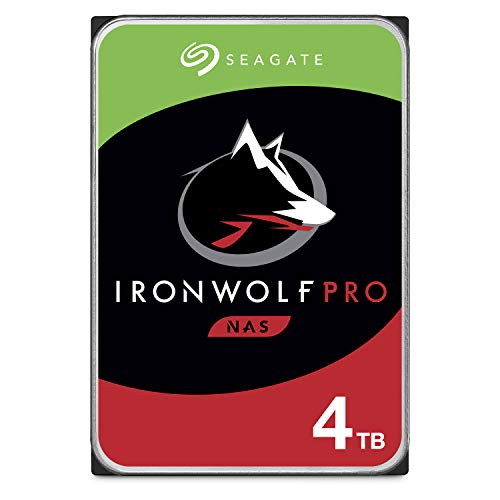
Seagate IronWolf Pro 4TB NAS Hard Drive — The faster Pro mirror
Step up to the Pro tier and the specification changes character: 7200 RPM platters, a 128MB cache, and a data recovery service named in the title alongside the RAID and network-attached-storage positioning. In a mirror, the headline benefit of the faster spindle is not everyday file serving — a home network hides that difference — but rebuild time and responsiveness under load. When one half of the pair has been replaced and the array is copying four terabytes back into redundancy, a 7200 RPM mechanism simply finishes sooner, shrinking the anxious window in which the surviving drive stands alone. For a small business whose NAS holds client work, that shorter window is a rational thing to pay for.
The costs of that speed are physical. Two 7200 RPM drives in a compact enclosure produce more heat and more vibration than their 5400 RPM cousins, and they draw more power across years of continuous spinning. None of that is a defect; it is a placement instruction. Give a Pro pair an enclosure with honest airflow, do not seal it in a cupboard, and expect to hear it in a quiet room. Owners who treat the NAS as infrastructure in a utility space will never notice. Owners whose NAS lives beside the sofa might, which is why this guide keeps both spindle classes rather than declaring one universally better.
The recovery service in the title also reads differently at Pro level. A business mirror that loses both drives to a power event or a stolen enclosure is facing lost billable work, and a manufacturer recovery attempt bundled with the drive is a meaningful last resort — never a plan, always a parachute. Pair it with the discipline the Pro badge implies: monitored drive health, email alerts from the NAS enabled, and a spare-drive fund so a failing partner is replaced at the first SMART warning rather than after the funeral.
Consider also who else leans on this tier. Small creative studios mirroring project drives, clinics and practices with modest imaging archives, and retailers whose point-of-sale records must survive a dead disk all shop in this Pro class, because the support posture around it assumes the data earns money. A home user buying into the same tier inherits that posture — the recovery service, the array-first firmware, the faster heal — at a scale their enclosure can actually use.
- Capacity: 4TB per drive — order two matching units
- Chassis and port: 3.5 inch drive on a SATA 6Gb/s link
- Platter speed: 7200 RPM
- Cache: 128MB
- Recovery offering: data recovery service named in the listing title
- Packaging note: frustration free packaging, per the title
- Model reference: ST4000NEZ01
- Recording method: the Pro line is CMR by design; the title for this listing does not spell the letters out, so confirm in Seagate’s documentation if you want it in writing
Strengths
- Faster rebuilds shorten the period when the mirror has no redundancy.
- Pro positioning suits small-business enclosures with several daily users.
- A data recovery service is attached, named directly in the listing title.
Trade-offs
- More heat, noise and power draw than the 5400 RPM pairs in this guide.
- Everyday home file serving will not feel faster over a typical network.
- Four terabytes still halves to two usable, which busy offices can outgrow.
Best for: a small-office mirror where rebuild downtime and multi-user responsiveness carry real costs. Not suited for: a silent living-room enclosure or a cupboard with no airflow. If the office case fits, review the IronWolf Pro 4TB listing and budget for the matched second drive at the same time.

WD Red Plus 8TB NAS Hard Drive — The roomy Red Plus pair
Doubling capacity changes the emotional register of a mirror. With eight terabytes per drive, the pair stops being a place you curate and becomes a place you simply keep things: the full photo archive rather than the recent years, complete machine backups for every computer in the house, a media library that no longer needs pruning each spring. The specification in the title mirrors the smaller Red Plus — 5400 RPM, SATA 6 Gb/s, CMR, a 256 MB cache — so the ownership experience stays calm and cool while the room to grow doubles. For many households this is the size where a RAID 1 setup stops needing supervision.
The trade that grows with capacity is rebuild exposure. A mirror built from eight-terabyte drives must copy eight terabytes to heal, and at 5400 RPM that is a long, sustained operation measured in many hours, during which the surviving drive works hard and alone. This is not an argument against the size; it is an argument for pairing the purchase with monitoring. Turn on the NAS’s drive-health alerts, schedule regular data scrubbing if your enclosure offers it, and treat any reallocated-sector warning as a prompt to order the replacement that week. Big mirrors reward attentive owners and punish the set-and-forget instinct more than small ones do.
There is also a purchasing subtlety unique to large mirrored pairs: buy both drives at once, from the same listing, as this guide keeps repeating, because an eight-terabyte line bought two years apart may arrive with different internal revisions under the same shelf name. The model code WD80EFAX in the title gives you the string to match on the day a replacement is needed. Keep the invoice and the code together; future you, standing in front of a degraded array, will be grateful for the thirty seconds it saves.
The psychological effect of the big pair deserves a mention, because it changes behaviour for the better. When space is scarce, households defer backups, prune archives aggressively and postpone the digitising projects that preserve family history. When eight mirrored terabytes sit mostly empty, the backup schedule simply runs, the scanner gets used, and the old camcorder tapes finally get captured. Capacity bought ahead of need is one of the few storage purchases that reliably pays for itself in habits rather than benchmarks.
- Capacity: 8TB per drive, halving to eight usable terabytes in the mirror
- Recording approach: CMR from the first track to the last, per the title
- Mounting: 3.5 inch bay, SATA 6 Gb/s cabling
- Spindle pace: 5400 RPM
- Model reference: WD80EFAX
- Buffer memory: 256 MB
- Recovery service: none is named in this title; look to Western Digital’s own documentation if bundled recovery is a requirement for you
Strengths
- Eight usable mirrored terabytes end most household capacity anxiety.
- Cool, quiet 5400 RPM running suits always-on home enclosures.
- CMR recording keeps the long rebuild a steady copy rather than a stall-prone one.
Trade-offs
- Healing a failed partner means copying eight terabytes at modest spindle speed.
- Buying the pair at once is a larger single outlay than the four-terabyte options.
- No recovery service is advertised in the listing title for this model.
Best for: media-heavy households and home offices whose archives grow faster than they prune. Not suited for: anyone unwilling to monitor drive health across very long rebuild windows. If the growth pattern sounds familiar, check the Red Plus 8TB listing and plan the pair as one purchase, not two separate ones.

Seagate IronWolf 8TB NAS Hard Drive — The sensor-rich eight
Seagate’s eight-terabyte IronWolf carries the most informative title in this guide, and nearly every phrase in it speaks to mirror duty. It declares itself a 24/7 NAS-optimised drive, all-CMR, fitted with rotational vibration sensors for multi-bay use, rated by its maker at a 180TB per year workload, and backed by a three-year warranty plus three years of Rescue cover. The vibration sensors are the detail mirror builders should care about most: two or more drives spinning in one small chassis excite each other, and sensors that let the drive compensate protect both performance and longevity in exactly the environment a RAID 1 pair creates.
AgileArray, the firmware umbrella named in the title, is Seagate’s label for the bundle of behaviours an array wants: error recovery timed so the controller does not eject a busy drive, power management suited to always-on enclosures, and vibration handling for neighbouring spindles. In daily use none of this announces itself, which is the point. The mirror simply stays a mirror — no mysterious dropouts during a long backup, no drive vanishing from the array because it paused too long over a difficult sector. Buyers comparing this drive with the Red Plus 8TB are really choosing between two mature interpretations of the same job, and the Rescue cover plus the stated workload figure are the visible separators.
That 180TB per year figure deserves a plain reading. It is the maker’s stated annual workload for the drive, a ceiling to compare against your own habits rather than a promise of immortality. A home mirror writing nightly backups and serving media sits far below it. A mirror used as scratch space for constant video ingest might approach it, and in that case the Pro tier above — or the Red Pro below — is the more honest tool. Knowing which side of the line your household falls on is worth more than any single specification in this section.
Multi-bay owners should note how naturally this drive scales beyond a simple pair. The same sensors and firmware that steady a two-drive mirror keep behaving in a four-bay enclosure, so a household that starts with RAID 1 here can later add a second mirrored pair in the same box without changing drive families or relearning a new model’s quirks. That continuity — one model code, one behaviour profile, one recovery story across the whole enclosure — is worth real money to anyone who has ever administered a mixed fleet of disks.
- Capacity: 8TB per drive — two required for the mirror
- Recording method: all-CMR, stated in the listing title
- Interface: SATA 6 Gb/s
- Duty positioning: 24/7 NAS-optimised, with AgileArray firmware named in the title
- Vibration handling: rotational vibration sensors for multi-bay enclosures
- Maker’s workload figure: 180TB per year, per the title
- Cover named in the title: three-year warranty plus three-year Rescue
- Model reference: ST8000VNZ04
- Rotational speed: the title for this listing does not state RPM, so verify the figure in Seagate’s documentation if spindle speed drives your decision
Strengths
- Vibration sensors directly address the multi-drive environment a mirror creates.
- Rescue cover and warranty length are both stated plainly in the title.
- A published workload figure lets heavy writers check the drive against their habits.
Trade-offs
- The title leaves rotational speed unstated, an odd gap for spec-led buyers.
- Eight-terabyte rebuilds are long regardless of firmware sophistication.
- Feature-rich NAS tuning is wasted if the pair ends up in a basic USB dock.
Best for: multi-bay home and small-office mirrors where vibration, uptime and bundled Rescue cover all count. Not suited for: a single-drive desktop role, where its array tuning buys nothing. For the multi-bay case, read through the IronWolf 8TB listing and note the model code before ordering the pair.

WD Red Pro 8TB NAS Hard Drive — The heavy-duty Red Pro
The Red Pro closes the guide at the demanding end: eight terabytes, 7200 RPM, CMR recording and a 256 MB cache, positioned by Western Digital for NAS environments busier than a typical home. In a mirror, that combination answers a specific fear — the long heal. When a partner drive fails in a working studio or a busy office NAS, the array limps until the copy completes, and this is the pick that completes it fastest among the eight-terabyte options here. Sustained multi-user writes also sit more comfortably on the faster spindle, so a mirror that doubles as a shared project drive, rather than a quiet archive, is the natural home for a Pro pair.
Everything said about the IronWolf Pro’s physical costs applies here with interest. Heat output in a sealed cabinet, seek noise in a quiet room, and power draw across years of spinning are the standing charges for 7200 RPM ownership at this capacity. The sensible deployment is an enclosure with real ventilation in a room where machines are allowed to sound like machines. Deployed there, the Red Pro pair is arguably the most businesslike mirror in the guide: big, quick to heal, and built around CMR with a cache sized for several simultaneous clients.
One discipline matters more with this drive than any other in the list, and it is the discipline of the cold spare. A Pro-grade mirror usually protects work other people depend on, so the time to discover that replacements ship slowly is not the day the array degrades. Many owners of mirrors at this level keep a third identical drive on the shelf, bought with the pair, so the heal begins within the hour. That raises the true cost of the setup, and it is better to reckon with it now, while choosing, than to learn it during an outage.
Finally, think about the exit. Drives at this tier eventually leave service not because they failed but because the enclosure moved up a size class, and a matched Pro pair with a known history resells or redeploys into a backup role far more gracefully than a random single disk. Studios routinely cascade retired mirror pairs into offsite backup duty, where their matched wear and documented health make them trustworthy for years more. Buying the pair as a documented set preserves that second career.
- Capacity: 8TB per drive — the mirror keeps eight terabytes usable
- Recording technology: CMR, named outright in the title
- Physical fit: 3.5 inch, SATA 6 Gb/s interface
- Spindle rating: 7200 RPM
- Model code to match on reorder: WD8005FFBX
- Buffer: 256 MB
- Recovery service: the title advertises none, so consult Western Digital’s documentation if a bundled recovery attempt is part of your requirement
Strengths
- The fastest heal available among this guide’s eight-terabyte mirrored pairs.
- Large cache and fast spindle suit mirrors serving several active users.
- CMR recording throughout, with Pro positioning for demanding NAS duty.
Trade-offs
- Heat and noise rule out quiet rooms and unventilated cupboards.
- A shelf spare, wise at this level, raises the real cost of the setup.
- No bundled recovery service is named in the listing title.
Best for: studio and office mirrors where a degraded array slows paid work until it heals. Not suited for: a silent bedroom enclosure or a casual archive that is read once a month. Where the workload justifies it, examine the Red Pro 8TB listing and consider ordering the shelf spare in the same transaction.
How do the six mirrored pairs compare side by side?
| Drive | Capacity per drive | Speed | Cache | Recovery in title |
|---|---|---|---|---|
| Seagate IronWolf 4TB | 4TB | 5400 RPM | 64MB | Rescue Services |
| WD Red Plus 4TB | 4TB | 5400 RPM | 256 MB | None named |
| Seagate IronWolf Pro 4TB | 4TB | 7200 RPM | 128MB | Data recovery service |
| WD Red Plus 8TB | 8TB | 5400 RPM | 256 MB | None named |
| Seagate IronWolf 8TB | 8TB | Not stated in title | Not stated in title | Three-year Rescue |
| WD Red Pro 8TB | 8TB | 7200 RPM | 256 MB | None named |
Read the table as two decisions stacked. The first is capacity, and it is permanent in a way the other is not: you can tolerate a slower rebuild, but you cannot stretch a full mirror. The second is temperament — the cool, quiet 5400 RPM pairs for homes, the faster 7200 RPM pairs for workplaces that feel downtime. Recovery cover, where the title names it, is a tiebreaker between near-equals rather than a reason to choose the wrong size.
What actually happens on the day one mirrored drive dies?
It is worth walking through the event in advance, because the reality is calmer than the imagination. Usually the first sign is not silence but a notification: the enclosure emails or pings your phone to say the array is degraded and names the bay whose drive has failed or started reporting errors. Your files remain available. Work continues. The mirror has done its one job — it has converted a potential catastrophe into a shopping task with a deadline measured in days rather than minutes.
The deadline is real, though. Until the replacement is installed and the rebuild completes, the surviving drive is a single point of failure carrying the whole dataset, and it is also the drive that has lived the same life as the one that just died: same power events, same heat, same years of spinning. Treat the interval accordingly. Order the matched replacement the same day, avoid heavy elective workloads like a full-library reorganisation while degraded, and make sure the separate backup is current before the rebuild begins, because the rebuild itself is the hardest work the survivor will ever do.
When the new drive goes in, the enclosure should begin resyncing automatically; confirm that it has, watch the progress estimate, and resist the urge to reboot anything mid-copy. Once the array reports healthy again, check the failed drive’s fate calmly: if it is under warranty, the maker’s support process starts with the model code and serial you recorded at installation. Then update the recipe card with the new drive’s details and date. Owners who have rehearsed this sequence once, as the setup section recommends, tend to describe their first real failure with a shrug — which is precisely the emotional outcome a mirror is bought to produce.
How do you set up a RAID 1 mirror without wasting the pair?
Begin before the drives arrive: decide what the mirror is for and what it is not for. Write down the dataset it will hold, confirm that a separate backup exists for the irreplaceable parts, and check that your enclosure or motherboard actually offers a RAID 1 mode rather than assuming. When the pair arrives, install both drives, enter the enclosure’s storage manager, and choose mirroring explicitly — some devices default to a striped or single-volume layout that delivers the opposite of protection. Let the initial synchronisation finish completely before loading your data onto the volume, however long the progress bar takes.
Then rehearse the bad day while it is still free. Pull one drive (with the enclosure powered down, unless yours explicitly supports hot swapping) and confirm the volume still serves its files in degraded mode. Reinsert, let the mirror heal, and only then call the setup finished. Finish by enabling every health alert the enclosure offers and scheduling a recurring scrub or consistency check. A mirror you have watched survive a rehearsal is a tool; a mirror you merely believe in is a hope.
After the rehearsal, write the recovery recipe down where a stressed future version of you can find it: which bay holds which drive, the exact model code to reorder, where the enclosure’s admin password lives, and the order of operations for swapping a failed partner. Stick a dated label on each drive’s tray with its install date and position. These clerical habits sound beneath the technology, yet every experienced NAS owner has a story about a degraded array and a household where nobody could remember which disk was which. The recipe card turns that story into a ten-minute errand.
Should the mirror live in a NAS enclosure or inside a desktop PC?
Both homes work, and the drives in this guide carry NAS tuning that serves either, but the ownership experience differs. A dedicated two-bay NAS keeps the mirror independent of any one computer: it serves every device in the house, runs its own scrubbing and alerting, sips power, and keeps protecting files while your desktop is off, asleep or being repaired. Its cost is the enclosure itself and one more device to administer. A mirror built inside a desktop, using the motherboard’s RAID mode or the operating system’s storage tools, costs nothing extra and suits a single workstation whose projects live and die on that machine — a video editor’s project volume is the classic example.
Choose by asking who needs the data when the main computer is unavailable. If the answer is anyone — a partner’s laptop, a television, a phone on the sofa — the enclosure earns its shelf space. If the honest answer is nobody, the in-PC mirror is the leaner tool, with two cautions: confirm the motherboard or software mode truly mirrors rather than stripes, and remember that a desktop that is switched off protects nothing, serves nothing and sends no alerts. Either way, the separate backup rule does not change, and neither does the matched-pair rule; the enclosure question is about access and uptime, not about how the mirror itself behaves.
What mistakes quietly ruin mirrored arrays?
The classic error is buying one drive now and a partner later, which invites mismatched revisions and an array sized by the smaller unit. Close behind it is treating the mirror as the backup and cancelling the offsite copy, right up until a deletion or a theft takes both halves together. A third mistake is reaching for cheap desktop drives — often shingled — because the mirror will hide their behaviour on day one; it will not hide it on rebuild day. Owners also neglect alerts, so a partner fails silently in March and the survivor fails loudly in June, converting a protected event into a total loss. Finally, many people fill a mirror past ninety percent and then wonder why performance sags and the next capacity upgrade becomes an emergency migration instead of a planned one.
Two further habits deserve naming. The first is ignoring firmware and enclosure updates for years, then applying a stack of them the same week a drive starts warning — change one variable at a time on a system whose job is stability. The second is placing the NAS where heat, dust and vibration conspire: on top of a subwoofer, inside a sealed media cabinet, beside a radiator. Drives rarely die dramatically; they die of environment, slowly, and a mirror halves the odds only when both halves are not being cooked by the same bad shelf.
Final Recommendation
Most households should start with the IronWolf 4TB pair or its Red Plus equivalent, choosing Seagate for the named Rescue cover and Western Digital for the larger cache and quiet manners, then jump straight to the eight-terabyte versions of the same lines if the archive already strains at four. Workplaces that feel a degraded array in their deadlines should pay for the Pro tier’s faster heal. Whatever pair you choose, buy it as a pair, rehearse its failure, and keep a separate backup — because the mirror’s job is to survive a dead drive, and it was never hired to do anything more. That is the honest shape of the best hard drives for raid 1 setup work: two identical CMR drives, watched properly, inside a plan that also includes a copy somewhere else.
Frequently Asked Questions
Does RAID 1 mean my data is backed up?
No. Mirroring duplicates everything instantly, including deletions, corruption and encrypted files from an attack, and both drives usually share one enclosure, one power supply and one room. It protects against a single drive’s mechanical death and nothing else, so keep a separate backup on different hardware for anything you cannot replace.
Can I mirror two drives of different sizes or brands?
The array will generally build, but it shrinks to the smaller drive and runs with mixed firmware behaviour, and rebuild timings become harder to predict. For a setup whose entire purpose is predictability, matched pairs of the same model are worth the small extra effort at purchase time.
Why were popular desktop drives left out of this guide?
Because many large desktop drives record with shingled magnetic recording, which is acceptable for ordinary single-drive use but can slow a mirror rebuild dramatically as overlapping tracks are rewritten under load. Every pick here is CMR, so a rebuild stays a steady sequential copy.
How long does a mirror take to rebuild after a failure?
Plan on hours, scaled by capacity and spindle speed: a four-terabyte pair is typically an overnight job, and eight-terabyte pairs take longer still, especially at 5400 RPM. During the rebuild the array still serves files, but it has no redundancy until the copy completes. Keep the enclosure ventilated and otherwise leave it alone; pausing the copy to reorganise the library only stretches the window you are trying to close.
Do both drives in the mirror need to be the same age?
Ideally, yes, and that is another argument for buying the pair together. Two drives installed on the same day share power history, heat exposure and workload, so their behaviour stays comparable and health reports are easy to interpret side by side. When a replacement joins an older survivor, note the difference in your records and expect the veteran, not the newcomer, to be the next one that asks for attention.
Should I buy a third drive as a spare?
For a mirror holding work other people depend on, yes — a shelf spare bought with the pair starts the heal immediately and guarantees a model match. For a home archive with a solid separate backup, ordering a replacement at the first health warning is a reasonable compromise.
Is 5400 RPM too slow for a home NAS mirror?
Rarely. A home network is usually the bottleneck for file serving and streaming, while the slower spindle repays you in lower heat, less noise and gentler vibration between the paired drives. Rotational speed matters most during rebuilds and under several simultaneous heavy users.


