What's inside
- Where to Buy
- Key Takeaways
- Quick Picks
- How We Chose These Picks
- Comparison
- How to Choose a Brother Colour Laser
- Does the LED Inside a Brother Colour Printer Change What You Should Buy?
- Which Brother Colour Printer Suits a Shared Office Network?
- How Should a Small Business Weigh Toner Against Speed?
- What Does Colour Toner Change About Everyday Office Documents?
- Common Mistakes When Buying a Brother Colour Laser
- Final Recommendation
- Frequently Asked Questions
- Related Guides
As an Amazon Associate I earn from qualifying purchases. This post may contain affiliate links at no extra cost to you.
widgetverdict.com is reader-supported. When you buy through links on our site, we may earn an affiliate commission.
Where to Buy
Brother’s colour range splits cleanly into office all-in-ones and compact print-only machines, and the six listings below cover both halves. The Brother MFC-L3780CDW tops the set with the only stated speed of 31 ppm — open its Amazon page to check price on Amazon against the rest. Its smaller sibling, the MFC-L3720CDW, keeps fax in the title for offices that still need it. Print-only shoppers start at the HL-L3270CDW, a compact 25 ppm machine bundled with a printer cable, or the HL-L3290CDW, which adds scan and copy to the compact frame. Business buyers read the MFC-L8930CDW listing for its security framing, while the HL-L3295CDW closes the set with NFC, Ethernet and a stated Refresh trial. Match the full model code on whichever listing you open; Brother’s suffixes differ by a digit and a feature set.
People hunting for the best brother color laser printers usually want two things that inkjets rarely deliver together: colour documents that come out dry, sharp and identical on page forty as on page one, and a machine that treats a deadline as a routine event. Brother’s digital colour range is built around that pairing. One naming honesty note belongs at the top of this guide: Brother’s colour machines in this class use LED print technology rather than a scanning laser beam, and Brother sells them as digital colour printers — the output role is the laser role, crisp toner text and graphics at office pace, even though the light source differs. That distinction changes nothing about how the six below should be chosen, but a buyer deserves it stated once, plainly.
What separates these six is not colour — every title promises it — but shape and workflow. Three are MFC all-in-ones with scan and copy; three are HL print-focused machines, one of which adds scan and copy of its own. Speeds are stated on only two titles, paper capacity on two, and fax survives on exactly one. The reviews keep those boundaries visible, because in a range this tightly related, the stated differences are the purchase.
A final framing before the picks: colour laser ownership is a long relationship with toner. The machine is bought once; the cartridges return for years, and the titles here handle that future differently — one business model positions itself on low-cost printing, one compact model builds replenishment into its pitch, and the rest leave the subject to the listing page. Readers choosing between near-identical model numbers will find that the toner story, more than any single job’s speed, is what they are still living with in year four.
Key Takeaways
- The MFC-L3780CDW states the guide’s fastest speed at 31 ppm, plus single-pass duplex copy and scan, dual-band Wi-Fi, Gigabit Ethernet and NFC.
- Only two titles print a paper capacity — both 250 sheets, on the MFC-L3720CDW and the HL-L3270CDW.
- Fax appears in exactly one title: the MFC-L3720CDW, the pick for offices where fax never died.
- The MFC-L8930CDW is the business entry, with low-cost printing and advanced security features stated in its title.
- The HL-L3295CDW states a two-month Refresh subscription trial and Dash Replenishment readiness — toner logistics the other titles do not claim.
Quick Picks
| Pick | Badge | Why it earns a place |
|---|---|---|
| Brother MFC-L3780CDW | Fastest stated speed | 31 ppm with single-pass duplex copy and scan, dual-band Wi-Fi, Gigabit Ethernet and NFC. |
| Brother MFC-L3720CDW | The fax-keeping all-in-one | Colour print, scan, copy and fax with auto duplex and a stated 250-sheet capacity. |
| Brother HL-L3270CDW | Compact 25 ppm printer | Auto two-sided printing at 600 x 2400 dpi, NFC and a 250-sheet tray in a compact body. |
| Brother HL-L3290CDW | Compact with scan and copy | Print, scan and copy with duplex at 600×2400 dpi in Brother’s compact wireless frame. |
| Brother MFC-L8930CDW | The business machine | Duplex print, scan and copy with low-cost printing and advanced security features stated. |
| Brother HL-L3295CDW | Toner on autopilot | Duplex, NFC, mobile and Ethernet printing, with a stated two-month Refresh trial. |
How We Chose These Picks
The shortlist began with Brother’s own division of labour. The MFC line carries the all-in-one flag — print, scan, copy and sometimes fax behind one control panel — while the HL line is print-first, smaller on the desk and cheaper to house. A guide that listed only one family would misrepresent how Brother actually sells colour toner printing, so three MFC and three HL machines were chosen, and each review states plainly which side of that divide its machine sits on.
Stated evidence did the ranking inside each family. Speed appears in this guide only where a title prints it: 31 ppm on the flagship MFC, 25 ppm on the compact HL-L3270CDW. Paper capacity is likewise quoted only on the two titles that state 250 sheets. Features like NFC, Gigabit Ethernet and single-pass duplex scanning are credited strictly to the titles that name them. Where a Brother title is terse — and the business model’s title is the tersest here — the review says what is stated and stops there, rather than borrowing specifications from a sibling with a similar number.
Workflow coverage shaped the final six. One pick had to keep fax alive for the offices that still receive orders and referrals through it. One had to answer the security question that business buyers ask and home buyers rarely do. One had to address toner logistics head-on, because a colour laser’s running story is written in its cartridges, and the HL-L3295CDW’s title is the only one here that talks about replenishment at all. A range guide earns its keep by mapping those diverging needs onto diverging machines.
The LED point was weighed and set in its proper place: noted once, in the open, and then left alone. Brother’s digital colour engines produce the output this category is bought for, and no pick below gains or loses its place because of the light source inside it. What decided places was the evidence in the titles — speed, capacity, connectivity, functions — weighed against the desks those machines will actually sit on.

Brother MFC-L3780CDW — Fastest stated speed
The flagship of this set announces itself with the guide’s richest title. Thirty-one pages per minute is the fastest stated speed here, and it arrives with the feature that separates serious all-in-ones from patient ones: single-pass duplex copy and scan, meaning two-sided originals are captured in one pass rather than being flipped and fed again. For an office that digitises contracts, intake forms or double-sided records, that single phrase in the title describes minutes saved every single day.
Connectivity is stated with unusual completeness. Dual-band Wi-Fi covers the wireless office, Gigabit Ethernet covers the wired one, and an NFC reader lets a badge-tap or phone-tap start a job at the machine. Works with Alexa is claimed as well, for whatever voice control is worth in a print room. Read together, the title describes a machine designed to be shared: many users, many devices, no single cable or network band acting as a bottleneck.
Who it suits is the small office or busy home practice whose printer is infrastructure — the machine several people depend on, where a slow scan queue becomes everyone’s problem. The all-in-one functions cover the document life of such a place end to end. Its absences are worth naming too: the title states no paper capacity, and no fax is claimed, so a buyer whose office runs on either should confirm the first on the listing and look at the L3720CDW for the second.
There is a temperament to a machine specified like this. It assumes the printer will be asked for things constantly and by people in a hurry, and it answers with speed at every stage — printing, scanning both sides at once, joining whichever network the building runs. Offices grow into that kind of headroom gratefully. A quiet one-person desk may never tax it, which is the only real argument against buying the flagship: unused capacity is still capacity you carried up the stairs.
Consider also what the NFC reader quietly replaces. In shared offices, the friction is rarely printing itself; it is authentication, drivers and the visitor whose laptop has never met the printer. A tap at the machine collapses that ceremony into a gesture. Combined with dual-band Wi-Fi — which lets the printer join the less crowded band in a dense building — the title describes a machine engineered to be reachable, and reachability, multiplied by every employee and every day, is a real component of office speed that no ppm figure captures.
- Type: Wireless digital colour all-in-one printer
- Speed: 31 ppm, as stated in the listing title
- Scanning: Single-pass duplex copy and scan stated
- Connectivity: Dual-band Wi-Fi, Gigabit Ethernet, NFC reader
- Voice: Works with Alexa, per the listing title
- Paper capacity: Not stated in the listing title — verify with the manufacturer documentation
- Fax: Not stated in the listing title — verify with the manufacturer documentation
Strengths
- 31 ppm is the fastest speed stated anywhere in this guide.
- Single-pass duplex scanning captures two-sided originals in one pass.
- Dual-band Wi-Fi, Gigabit Ethernet and NFC cover every way an office connects.
Trade-offs
- No paper capacity is stated in the title.
- No fax function is claimed in the title.
- Its capacity headroom is wasted on a one-person, low-volume desk.
Best for: a shared small office digitising two-sided documents daily. Not suited for: an office that runs on fax, because this title claims no fax function at all — the L3720CDW below is the Brother here that states one.
Judge this machine by a Monday morning. The weekend’s forms are scanned two-sided in a single pass, the print queue drains at the stated pace, a visitor’s laptop joins over Wi-Fi while the wired desktops print through Ethernet, and nobody’s job waits on anybody else’s. That choreography — many people, one machine, no queue drama — is what the L3780CDW’s title is really selling, and offices that recognise their Mondays in that description will not regret buying the headroom.

Brother MFC-L3720CDW — The fax-keeping all-in-one
Four functions share this title, and the fourth is the one vanishing from the category: fax. The MFC-L3720CDW is a wireless colour laser all-in-one with scanner, copier and fax, auto duplex printing and a stated 250-sheet capacity. For the surgeries, legal offices, agencies and trades businesses whose counterparties still fax — and they exist in stubborn numbers — that one word in the title is the entire shortlist. A machine without it is not a cheaper alternative; it is a different machine.
The rest of the stated package is the classic mid-range MFC recipe. Auto duplex handles two-sided output without manual reloading. The 250-sheet capacity is one of only two stated capacities in this guide, and it translates into a paper routine measured in weeks rather than days for a small office. Wireless colour printing covers the modern side of the desk while the fax modem covers the traditional side, and scan and copy fill the space between.
Silences in this title are instructive. No print speed is printed, so this guide quotes none — an office for whom speed is the first question should compare the L3780CDW’s stated 31 ppm and decide which stated fact matters more, pace or fax. No NFC and no Ethernet are named either; connectivity in the title is wireless alone. None of that diminishes the machine; it defines the trade Brother is offering at this step of the range.
Suits the established small office best: the practice with a fax number printed on its letterhead, a paper tray that should not need weekly attention, and documents that leave on both sides of the sheet. It also suits the home office of someone whose industry never got the message that fax ended — because for their clients, it plainly did not. Buy the machine your counterparties require, not the one a trend piece recommends.
Paper capacity deserves its own arithmetic while this pick is on the table. A stated 250 sheets is half a ream: for an office printing thirty pages a day, that is a refill rhythm of roughly weekly-to-fortnightly rather than every other morning, and each avoided refill is an avoided interruption standing at the machine with a paper wrapper. Capacity figures rarely headline a buying decision, yet they quietly govern how a printer feels to live with — present when needed, invisible the rest of the time — and this title is one of only two in the guide that lets a buyer do that arithmetic at all.
- Type: Wireless colour laser printer, scanner, copier, fax
- Functions: Print, scan, copy, fax
- Duplex: Auto duplex stated
- Paper capacity: 250-sheet capacity, as stated in the listing title
- Print speed: Not stated in the listing title — verify with the manufacturer documentation
- NFC: Not stated in the listing title — verify with the manufacturer documentation
- Ethernet: Not stated in the listing title — verify with the manufacturer documentation
Strengths
- Fax is stated — the only title in this guide that keeps it.
- A 250-sheet stated capacity stretches the paper routine to weeks.
- Auto duplex printing is stated for two-sided documents.
Trade-offs
- No print speed is printed in the title.
- Connectivity is stated as wireless only — no Ethernet or NFC named.
- Buyers who never fax pay for a function they will never open.
Best for: a small office whose clients and agencies still send and receive faxes weekly. Not suited for: a speed-first buyer comparing pages per minute, because this listing’s title states no print speed to compare.
There is a dignity in a machine that keeps an old promise while doing modern work. The L3720CDW will spend most of its life printing colour documents wirelessly like any contemporary all-in-one — and then, twice a month, it will do the one thing no app on the desk can do, and justify its exact place in the range. Offices that need that moment should not apologise for it or work around it with services and subscriptions; they should buy the Brother whose title still prints the word.

Brother HL-L3270CDW — Compact 25 ppm printer
The HL line strips the colour laser down to its essence, and the L3270CDW’s title is the most numerically complete of the print-only set: compact wireless digital colour printing, NFC, built-in wireless, auto two-sided printing, 25 ppm, 600 x 2400 dpi resolution and a 250-sheet tray, bundled with a JAWFOAL printer cable and Works with Alexa. For a single user or a small team that prints and only prints, that is a specification with no wasted words.
Twenty-five pages per minute in a compact body is the combination to notice. Small printers are often slow printers, excused by their footprint; this title refuses the excuse. The stated resolution frames the output promise — crisp text and clean graphics for documents, charts and handouts — and the 250-sheet tray means the compact machine does not need compact feeding habits. Auto two-sided printing keeps paper use honest on long drafts.
NFC in a print-only machine deserves its sentence. Tap-to-print from a phone at the machine suits the way documents actually arrive now — in messages and mail apps, on the device in a pocket — and a compact printer near the door of a home office becomes a household printing post that guests and family can use without accounts or drivers. The bundled cable covers the oldest connection of all, a small courtesy for the desktop that has not moved in a decade.
What it does not do is stated by its family name: no scan, no copy, no fax appear in the title, because the HL brief is printing alone. Suits the focused desk — the writer, analyst or administrator whose documents are born digital and only ever need to leave as paper. A household that scans even monthly should step up to an MFC or the L3290CDW below, which adds scan and copy to a similar compact idea.
- Type: Compact wireless digital colour printer
- Speed: 25 ppm, as stated in the listing title
- Resolution: 600 x 2400 dpi, as stated in the listing title
- Duplex: Auto 2-sided printing stated
- Paper capacity: 250-sheet, as stated in the listing title
- Connectivity: Built-in wireless, NFC, Works with Alexa
- Bundle: JAWFOAL printer cable included, per the listing title
- Scan and copy: Not stated in the listing title — verify with the manufacturer documentation
Strengths
- 25 ppm in a compact body refuses the slow-small-printer compromise.
- A stated 250-sheet tray matches machines a class larger.
- NFC tap-to-print suits phone-first document habits.
Trade-offs
- No scan or copy function is stated — printing is the whole brief.
- No Ethernet connection is named in the title.
- The resolution figure serves documents, not photographic ambitions.
Best for: a single focused desk printing colour documents daily at a stated 25 ppm. Not suited for: a household that scans forms or copies documents even occasionally, because no scan or copy function appears in this title.
Compact machines live or die by whether they are still on the desk in year three, and this one’s stated numbers argue it will be. A tray that holds a ream’s worth of paper in two loads, speed that does not punish a long report, and two-sided printing that halves the paper bill — that is a full-size work ethic in a body that fits the small office’s spare corner. The L3270CDW is the guide’s reminder that print-only, done completely, is a specialisation rather than a compromise.
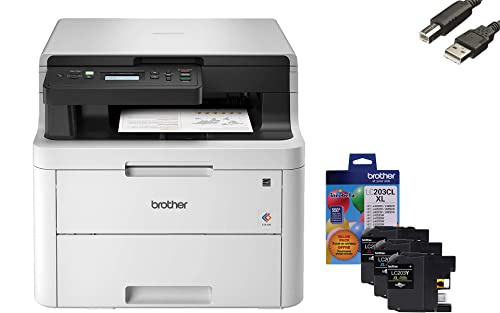
Brother HL-L3290CDW — Compact with scan and copy
Brother files this machine under HL, yet its title reads like an MFC’s: wireless compact digital colour laser all-in-one, with print, scan and copy, duplex printing at 600×2400 dpi and Works with Alexa, bundled with a JAWFOAL printer cable. That family-crossing is exactly its appeal. Buyers who want the compact HL footprint but cannot surrender the scanner — the form, the licence, the child’s drawing — get both in one stated package.
Scan and copy change what a compact printer is for. Print-only machines serve documents born on screens; adding a scanner admits the paper world — the signed page that must become a PDF, the certificate that needs a copy before it is posted. For a home office, that admission is often the difference between the printer handling the whole job and the printer handling most of it while a phone app fakes the rest. The L3290CDW’s title closes that gap in a body that still calls itself compact.
The stated resolution matches its HL sibling at 600×2400 dpi, and duplex printing is claimed in the same breath. What the title withholds is pace and capacity: no pages-per-minute figure and no sheet count are printed, so neither is quoted here. A buyer choosing between this and the L3270CDW is choosing between stated speed and tray numbers on one side, and stated scan-and-copy functions on the other — a clean, honest fork that the titles themselves draw.
Suits the home office that prints in colour, scans in bursts and copies occasionally, all from a desk too small for a full MFC. It also suits the household upgrading from an inkjet all-in-one that wants to keep the three-function habit while gaining toner output: dry pages, sharp text, no smudge on the highlighter pass. The bundle’s cable, like its sibling’s, keeps a wired desktop in the family without a second purchase.
- Type: Wireless compact digital colour laser all-in-one
- Functions: Print, scan, copy
- Resolution: 600×2400 dpi, as stated in the listing title
- Duplex: Duplex printing stated
- Voice: Works with Alexa, per the listing title
- Bundle: JAWFOAL printer cable included, per the listing title
- Print speed: Not stated in the listing title — verify with the manufacturer documentation
- Paper capacity: Not stated in the listing title — verify with the manufacturer documentation
Strengths
- Scan and copy join print in a compact HL footprint.
- Duplex printing at a stated 600×2400 dpi covers documents completely.
- Alexa compatibility and a bundled cable widen how it connects.
Trade-offs
- No print speed is printed in the title.
- No paper capacity is printed in the title.
- No fax is claimed, unlike the MFC-L3720CDW.
Best for: a compact home office that prints in colour and scans paper documents weekly. Not suited for: a shortlist scored on stated speed, because this title prints no ppm figure to set against the 31 and 25 claimed by its siblings.
Think of this model as the range’s diplomat. It refuses to make the buyer choose between Brother’s two philosophies — compact print focus versus all-in-one completeness — and instead states a compact machine with the three functions most desks actually use. Fax households and speed counters have their own picks in this guide; the L3290CDW serves the large, quiet middle whose requirement list reads exactly like its title.
The copy function earns a defence of its own, because it is the one buyers most often dismiss and then miss. Copying is printing’s unplanned sibling: the form that must be duplicated before posting, the page a colleague needs in hand during a call, the receipt copied for an expenses envelope. A machine that copies without involving a computer collapses those errands into a walk to the corner of the room. Stated alongside scan and duplex in a compact body, it completes a small office’s paper toolkit in a way a print-only box, however quick, structurally cannot.

Brother MFC-L8930CDW — The business machine
Brother writes this title in a different register: business colour laser all-in-one, duplex print, scan and copy, low-cost printing, advanced security features. No speed, no capacity, no resolution — the numbers give way to the two concerns that dominate business purchasing committees, which are what the machine costs to run and whether it can be trusted on a network with client data flowing through it. That editorial choice in the title is itself information about who this printer is for.
Advanced security features, stated without elaboration, speak to a real anxiety. A printer is a networked computer with a hard-working memory, and in a business it touches contracts, invoices and personal data daily. A title that puts security in the headline is addressing the buyer who must answer for that — the office manager, the compliance-minded partner — and this guide credits the claim exactly as stated, no more specifically than Brother chose to state it. Buyers who need particular protocols named should confirm them on the listing against the model code.
Low-cost printing is the second stated pillar, and in a colour laser context it is a toner story: a business model positioned around the price of the pages it produces across years of volume. The title offers no yield figures, so none are quoted — the claim stands as Brother’s positioning of this machine within its own range, to be weighed on the listing page where consumable details live. Duplex print, scan and copy complete a title that assumes its reader already knows the all-in-one basics.
Suits the business that prints client-facing colour at volume and answers for its network: the agency, the clinic’s back office, the firm whose printer sits on the same network as its files. It is the least home-shaped machine in this guide, deliberately. A household gains little from security framing it will never configure, and pays for a business build it will never tax — the home picks above and below exist for them.
- Type: Business colour laser all-in-one printer
- Functions: Duplex print, scan, copy
- Running-cost positioning: Low-cost printing, as stated in the listing title
- Security: Advanced security features, as stated in the listing title
- Print speed: Not stated in the listing title — verify with the manufacturer documentation
- Paper capacity: Not stated in the listing title — verify with the manufacturer documentation
- Fax: Not stated in the listing title — verify with the manufacturer documentation
Strengths
- Advanced security features are stated for network-conscious businesses.
- Low-cost printing is the title’s stated running-cost positioning.
- Duplex print, scan and copy cover the business document cycle.
Trade-offs
- The title states no speed, capacity or resolution figures at all.
- Security claims are stated generally; specific protocols need listing confirmation.
- Its business framing is surplus on a household desk.
Best for: a business printing client documents on a shared network it must keep secure. Not suited for: a purchasing process scored on stated pages per minute, because this title prints no speed figure — the L3780CDW’s 31 ppm is the stated pace in this guide.
Every range has a machine bought by a different conversation — not which printer is fastest, but which printer the business can defend: to its clients, its insurer, its own partners. The L8930CDW’s title is written for that conversation, leading with cost of ownership and security rather than pace. Businesses that recognise the conversation will find their pick here; everyone else is better served by the siblings whose titles argue in numbers.
Duplex across all three functions is the quiet workhorse claim in this title. Duplex print halves paper on reports; duplex-minded scanning and copying keep two-sided originals intact as two-sided copies, which is how board packs, contracts and case files actually circulate. A business all-in-one is judged less by any single job than by whether the whole document cycle — receive, copy, file, send — can happen at one machine without a workaround, and the functions stated here describe exactly that closed loop.

Brother HL-L3295CDW — Toner on autopilot
The last Brother in the set is the only one whose title talks about what happens after the purchase. The HL-L3295CDW is a wireless compact digital colour printer with laser-quality output, duplex, NFC, mobile and Ethernet connectivity — and, uniquely here, a stated two-month Refresh subscription trial and Amazon Dash Replenishment readiness. Brother is selling toner logistics: a machine that notices its own levels and keeps replacements flowing, for owners whose relationship with consumables should be no relationship at all.
That framing suits a particular, recognisable buyer — the one whose last printer sat idle for a week awaiting a cartridge nobody ordered. Replenishment systems exist because running dry is the most common printer failure in small offices, and it is a failure of attention, not engineering. A title that leads its connectivity list with NFC and mobile printing, then closes with replenishment, describes a machine aimed at people who print from phones, tap to start jobs, and want the toner to handle itself.
The wired option deserves its line: Ethernet is stated here, which the other compact HL titles do not claim. A small office with a wired network gets a shared colour printer that does not depend on Wi-Fi weather, while NFC and mobile cover the walk-up and phone jobs. Duplex is stated; speed and paper capacity are not, and the spec box records both silences in the standard wording rather than borrowing the L3270CDW’s numbers from across the range.
Suits the compact desk that prints steadily and forgets consumables — the studio, the shop office, the home worker whose printer must simply always be ready. The trial framing invites a test of the subscription life with a stated two months before commitment, per the title. Buyers who prefer to buy toner manually and resent subscriptions on principle should note that readiness is not obligation — but they should also recognise that this model’s title is written for the other temperament.
- Type: Wireless compact digital colour printer
- Output: Laser quality output, as described in the listing title
- Duplex: Stated in the listing title
- Connectivity: NFC, mobile and Ethernet stated
- Replenishment: 2-month Refresh subscription trial included and Dash Replenishment ready, per the listing title
- Print speed: Not stated in the listing title — verify with the manufacturer documentation
- Paper capacity: Not stated in the listing title — verify with the manufacturer documentation
Strengths
- Refresh trial and Dash readiness address toner running dry — the commonest printer failure.
- Ethernet joins NFC and mobile in a stated connectivity set the compact siblings do not match.
- Duplex printing is stated in a compact body.
Trade-offs
- No print speed is stated in the title.
- No paper capacity is stated in the title.
- Its replenishment pitch is wasted on owners who prefer manual toner buying.
Best for: a busy compact office that wants toner replenishment handled automatically. Not suited for: a paper routine planned around a guaranteed tray size, because this title prints no sheet count to plan against.
There is a philosophy of ownership in this title worth naming. Some machines are bought as tools to be managed; this one is sold as a service to be forgotten, printing in the background of a working life while its subscriptions and sensors mind the supplies. Neither philosophy is wiser — but they suit different owners, and the L3295CDW’s title is admirably clear about which owner it wants. Clarity like that, in a range of near-identical model numbers, is worth more than another digit of specification.
Ethernet in a compact machine also future-proofs the purchase in a way Wi-Fi specifications cannot. Wireless standards rotate; a wired port on the office wall will still be there in a decade, speaking to whatever network succeeds the current one. For a printer bought as a five-to-ten-year fixture, that humble socket is a longevity feature disguised as an old-fashioned one — and its presence in this title, alongside thoroughly modern NFC and mobile printing, shows Brother hedging both directions of time at once.
Comparison
| Pick | Functions | Stated speed | Stated capacity | Notable from title |
|---|---|---|---|---|
| Brother MFC-L3780CDW | Print, scan, copy | 31 ppm | Not stated in the listing title | Single-pass duplex scan, Gigabit Ethernet, NFC |
| Brother MFC-L3720CDW | Print, scan, copy, fax | Not stated in the listing title | 250-sheet | Auto duplex, fax stated |
| Brother HL-L3270CDW | 25 ppm | 250-sheet | 600 x 2400 dpi, NFC, bundled cable | |
| Brother HL-L3290CDW | Print, scan, copy | Not stated in the listing title | Not stated in the listing title | 600×2400 dpi, duplex, bundled cable |
| Brother MFC-L8930CDW | Print, scan, copy | Not stated in the listing title | Not stated in the listing title | Low-cost printing, advanced security |
| Brother HL-L3295CDW | Not stated in the listing title | Not stated in the listing title | Ethernet, Refresh trial, Dash ready |
Read the functions column first; it divides the range more honestly than any other. Fax lives in one row, scan and copy in four, pure printing in two. Then read the speed column and notice how much of it is silence: Brother states pace on two titles and leaves four unquoted, which this table reproduces rather than repairs. A buyer comparing these machines on the listing pages should hold the model codes in one hand and this table’s stated facts in the other.
The last column is where the personalities live. Security, replenishment, single-pass scanning, a bundled cable — none of these headline a specification sheet, and each of them is the deciding fact for somebody. Ranges like Brother’s are not ladders with a best rung; they are a shelf of near-siblings, each keeping one promise the others do not state.
One pattern in the table deserves a second look: the two machines with stated capacities sit in different families and at different heights of the range, which should cure any reader of assuming that a higher model number quietly includes a bigger tray. Brother’s range does not work as a staircase where each step contains the last. It works as a matrix — functions down one side, connectivity and logistics across the top — and the comparison above is drawn that way deliberately, so a buyer can locate their own intersection rather than climbing toward a flagship they may not need.
How to Choose a Brother Colour Laser
Start with functions, because they cannot be added later. Count how often the desk scans, copies and faxes in a real month. Daily scanning argues for an MFC — and two-sided originals argue for the flagship’s single-pass duplex. A fax number in active use settles the question for the L3720CDW immediately. Pure printing, honestly assessed, opens the HL range and its smaller footprints.
Move to the network next. A wired office should note how few titles state Ethernet: the flagship’s Gigabit port and the L3295CDW’s stated Ethernet are the exceptions in this set, not the rule. NFC appears on three titles and matters to phone-first workplaces. Alexa compatibility is claimed on three titles as well — a minor grace, but a stated one, and households already running voice control may as well collect it.
Then interrogate the numbers that are actually printed. Two speeds, two capacities, two resolutions: that is the complete stated arithmetic of this range, and buyers should resist importing figures from reviews of differently suffixed models. Brother’s numbering invites the error; the model code on the listing is the antidote. Where a number you need is unstated, the listing page and the manufacturer’s documentation are the only honest sources.
Finish with the toner temperament. The business model’s low-cost positioning and the L3295CDW’s replenishment framing are two different answers to the same long-term question — what will pages cost, and who will notice when toner runs low. Decide which temperament is yours before choosing the machine, because you will live with the answer for every cartridge cycle the printer ever runs.
Leave desk space in the decision until the very end, then give it its due. Colour toner machines are furniture: the MFC models anchor a print station, the HL compacts perch on a desk edge, and the wrong footprint breeds a daily irritation out of all proportion to the specification sheet. Measure the shelf, the clearance above it for a scanner lid, and the reach to the paper tray. The right Brother is the one whose stated functions fit the work and whose body fits the room — in that order, but with both tests passed.
Does the LED Inside a Brother Colour Printer Change What You Should Buy?
Brother’s colour machines in this class use LED print heads, and Brother markets them as digital colour printers; shoppers searching under the laser name find them anyway, because the job they do is the laser job. What reaches the page is toner fused to paper — dry, sharp, smudge-resistant output — and that output, not the light source, is what a buyer lives with. No pick in this guide was ranked up or down for its LED engine.
Where the distinction could matter is expectation. A buyer picturing a traditional laser mechanism should simply know what is inside the box they are ordering, which is why this guide states it once at the top and once here. Beyond that honesty point, the practical questions remain the ones the titles answer: speed where stated, functions, capacity where stated, connectivity, and the toner story each model tells.
Judge the page, in other words, and the workflow around it. An LED colour printer that scans both sides in a single pass will change an office’s week more than any mechanism distinction — and the titles in this guide are where those workflow facts are printed, in the manufacturer’s own words, for buyers to weigh.
Which Brother Colour Printer Suits a Shared Office Network?
Sharing stresses three things: joining the network, feeding many people’s jobs, and keeping the machine supplied. On joining, the flagship MFC-L3780CDW states the fullest hand — dual-band Wi-Fi plus Gigabit Ethernet plus NFC — so it can sit on whichever network the building trusts and still take tap-to-print jobs at its panel. The HL-L3295CDW is the other title here that states Ethernet, making it the wired option in a compact print-only body.
On feeding work, stated speed and scanning decide. The flagship’s 31 ppm and single-pass duplex scanning are the shared-office numbers in this guide; a machine everyone uses should not make two-sided scanning a two-pass chore. The MFC-L3720CDW answers with capacity — 250 stated sheets — and fax for the office whose sharing includes the outside world’s oldest channel.
On supply, the business MFC-L8930CDW’s low-cost positioning and the L3295CDW’s replenishment readiness speak to the two ways offices keep toner flowing: managed cost or automatic delivery. A shared machine that runs dry fails everyone at once, so the supply story deserves the same weight as the speed story when more than one person’s deadlines depend on the same tray.
How Should a Small Business Weigh Toner Against Speed?
By counting pages before afternoons. Speed is felt in minutes per job; toner cost is felt in money per thousand pages, and the two ledgers punish different mistakes. An office printing short jobs all day — labels, letters, one-page forms — barely notices the difference between the stated speeds in this guide, because most jobs finish inside the warm-up of either machine. That office should weight the toner story: the business model’s low-cost positioning, the replenishment framing on the L3295CDW.
An office printing long colour documents against deadlines lives in the other ledger. There, a stated 31 ppm against an unstated speed is a planning fact, and the flagship’s scanning pace compounds it — documents enter the system faster as well as leaving it faster. The honest method is to time your own worst week: the longest regular job, the largest scanning batch, and let those two numbers, not a brochure, decide which column of the comparison table deserves your money.
Most offices sit between the ledgers, which is why this guide keeps both visible on every pick. What it will not do is invent the missing figures — yields unstated, speeds unprinted — because a business case built on borrowed numbers collapses at the first invoice. Use the stated facts, confirm the rest on the listing, and the arithmetic you sign will be your own.
What Does Colour Toner Change About Everyday Office Documents?
Colour in a laser-class machine behaves differently from colour in an inkjet, and offices feel the difference in their hands before they see it. Toner sits on the page as a fused dry layer, so a colour chart leaves the printer dry, a highlighter passes over it without smearing the text beneath, and a document filed for a year reads as crisply as the day it printed. For handouts, invoices with colour coding, training material and client-facing reports, that dry permanence is the practical argument underneath every title in this guide.
Consistency is the second change. A forty-page colour document from a toner machine comes out uniform — page forty carries the same flat colour fields as page one — because the process does not depend on liquid ink behaviour. Offices printing branded material notice this first: the logo block, the coloured heading band and the chart palette hold steady across the run, which is precisely the steadiness that makes a small business look established on paper.
The honest boundary is photography. None of the six titles here claims photo printing as a purpose; their stated resolutions and positioning describe documents, graphics and charts. A household whose colour printing is mostly photographs belongs in the tank-printer guide linked at the foot of this page. A desk whose colour is diagrams, highlights and letterheads is exactly where these Brother machines earn their trays — and knowing which side of that boundary your printing lives on decides whether any machine in this range fits the desk at all.
Common Mistakes When Buying a Brother Colour Laser
Assuming every MFC faxes. One title in this guide states fax — the MFC-L3720CDW. Offices that need it should treat silence in the other titles as absence until the listing proves otherwise.
Importing specifications from a sibling model. Brother’s model codes differ by digits that change speed, capacity and connectivity. The 25 ppm and 250-sheet figures belong to the titles that print them, not to the range at large.
Buying an all-in-one for a print-only desk. Scanners that never scan are desk area spent for nothing. The HL machines exist for honestly print-only work, in smaller bodies.
Ignoring the toner plan. A colour laser’s life is a sequence of cartridge decisions. Low-cost positioning and replenishment readiness are stated in two titles here precisely because the manufacturers expect the question.
Skipping the network inventory. Ethernet is stated on only two of these six titles. A wired office that assumes it is universal will discover the assumption at installation, which is the most expensive place to discover anything.
Final Recommendation
For a shared office, the MFC-L3780CDW is the complete stated package: the fastest speed in the guide at 31 ppm, single-pass duplex scanning, and every connection an office can offer it. Fax-dependent offices should take the MFC-L3720CDW and its stated 250-sheet tray without a backward glance. Print-only desks split by temperament — the HL-L3270CDW for stated speed and capacity, the HL-L3295CDW for Ethernet and toner that orders itself. The HL-L3290CDW serves the compact desk that also scans, and the MFC-L8930CDW serves the business whose first questions are cost per page and network security.
This range rewards the buyer who reads titles the way Brother wrote them — as six different promises sharing a surname — so let the stated fact your office cannot live without cast the deciding vote, and the machine that made that promise in print will be the one on your network.
Frequently Asked Questions
Are Brother colour laser printers actually laser printers?
Brother’s colour machines in this class use LED print technology and are sold as digital colour printers. The output is toner on paper — the dry, sharp pages buyers seek from the laser category — and this guide notes the LED point openly while ranking the machines on their stated speeds, functions and connectivity.
Which Brother colour printer here still faxes?
The MFC-L3720CDW. Its title lists printer, scanner, copier and fax together, and it is the only one of the six that does. The other titles are silent on fax, so their spec boxes record it as not stated.
What is the fastest stated speed in this range?
Thirty-one pages per minute, printed in the MFC-L3780CDW’s title. The HL-L3270CDW states 25 ppm. The remaining four titles print no speed, and this guide quotes none for them.
Which picks scan and copy as well as print?
Four titles state the trio: the MFC-L3780CDW, the MFC-L3720CDW, the MFC-L8930CDW and — despite its HL badge — the HL-L3290CDW. The HL-L3270CDW and HL-L3295CDW are presented in their titles as printers.
What does single-pass duplex scanning mean on the flagship?
It means two-sided originals are captured in a single pass through the scanner, as the MFC-L3780CDW’s title states, rather than being flipped and fed a second time. Offices digitising contracts and forms feel that difference daily.
Does a compact HL model belong in an office, or only at home?
Both, and the titles show why. The HL-L3270CDW states a 250-sheet tray and 25 ppm — figures that would not embarrass a departmental machine — inside a compact body, while the HL-L3295CDW adds stated Ethernet for a wired office network. Compact in this range describes the footprint, not the work rate. The real dividing line is functions: offices that scan and copy daily belong with the MFC models or the HL-L3290CDW, whatever their size.
Which Brother here helps with toner replenishment?
The HL-L3295CDW’s title states a two-month Refresh subscription trial and Amazon Dash Replenishment readiness. The MFC-L8930CDW approaches the same worry from the other side, with low-cost printing stated as its positioning.
Related Guides
Colour toner is one branch of the laser family tree; the trunk belongs to HP’s long-running line, surveyed in the best HP LaserJet printers, from compact monochrome machines to colour all-in-ones. Buyers whose documents lean toward high-volume inkjet rather than toner should cross to the best Epson WorkForce printers built for small offices that print all day. And organisations whose printing serves a congregation — bulletins, banners and weekly orders of service — will find their own dedicated shortlist in the best printers for churches, including the tabloid machines that print an 11×17 bulletin in one pass.


