What's inside
- Key Takeaways
- Quick Picks
- How We Chose These Picks
- What Does Inverting a Layout Actually Change Inside the Case?
- How Is a Reversible Layout Different From a Fixed Inverted One?
- Which Desk Situations Call for Which Mechanism?
- Each Layout, Taken on Its Own Terms
- How Do You Build in a Mirrored or Reversible Case Without Regretting It?
- What Happens to Noise and Dust When a Layout Flips?
- Which Components Care Most About the Orientation Change?
- How Should You Light and Present a Build Whose Display Side Moved?
- A Brief Word on Resale, Rooms, and Second Thoughts
- Mechanisms Side by Side — Which Picks Truly Mirror an Interior?
- Where Do Buyers of Flipped Layouts Usually Go Wrong?
- Final Recommendation
- Frequently Asked Questions
- Related Guides
As an Amazon Associate I earn from qualifying purchases. This post may contain affiliate links at no extra cost to you.
widgetverdict.com is reader-supported. When you buy through links on our site, we may earn an affiliate commission.
Where to buy: flipping a layout is a claim that deserves checking at the listing, so each pick below links to the page where its title states — or pointedly does not state — how its interior is arranged; two picks print the word “Inverted” in their titles, one says “Reversible,” one rotates its slots instead, and two make no inversion claim in their titles at all.
The best inverted gaming pc cases exist because of a stubbornly ordinary problem: the tower sits on the wrong side of the desk. A conventional case displays its components through a left-side panel, which suits a machine standing to your right. Put that machine on your left — because the wall, the window, or the room’s only sensible socket says so — and the glass faces the wall while the plain steel side greets the room. Inverting the layout mirrors the interior, moving the display side to the right panel so a left-side desk finally gets its showcase. Everything else in this guide is a variation on that single mirror.
But “variation” is doing heavy work in that sentence, and this guide separates the variations with care, because the six picks do not share one mechanism. The be quiet! Light Base 900 DX and Light Base 600 LX state an inverted and horizontal layout in their titles outright. The MONTECH HS01 PRO describes its layout as reversible — a design that can be reconfigured rather than a fixed mirror. The Thermaltake Tower 600 takes a third road: a vertical tower whose PCI-e slots rotate, reorienting the graphics card rather than the whole interior. The SSUPD Xhuttle pursues vertical GPU airflow in a dual-chamber panoramic shell without the word “inverted” appearing in its title, and the be quiet! Silent Base 802 is a conventional-layout flagship whose title makes no inversion claim either. Five different answers, one search phrase.
That spread is not a flaw in the roundup; it is the roundup’s subject. Buyers searching this phrase usually hold one of three needs: a fixed mirror for a left-side desk, a layout they can change their mind about later, or a graphics card that stands upright and breathes vertically. Each pick below is graded against the need its mechanism actually serves, and the comparison table records the mechanism in words a buyer can check against the listing title in seconds.
Key Takeaways
- The Light Base 900 DX and Light Base 600 LX are the fixed-mirror picks — both titles promise an inverted layout that can also run horizontally.
- The MONTECH HS01 PRO is the reconfigurable pick: its title says reversible, which suits builders who may move desks or change their minds.
- The Tower 600 does not mirror an interior at all — its rotational PCI-e slots stand the graphics card upright inside a vertical tower format.
- The SSUPD Xhuttle’s title claims vertical GPU airflow and a dual-chamber panoramic design, not inversion; judge it as a vertical-airflow case.
- The Silent Base 802 earns its place on silence and cooling support — extra thick insulation mats and room for 420mm water cooling — not on any layout claim.
Quick Picks
| Pick | Badge | Why it earns its place |
|---|---|---|
| SSUPD Xhuttle ATX Mid Tower (Vertical GPU Design) | Vertical airflow, not a mirror | A dual-chamber panoramic case that stands its cooling path upright, with three 120mm ARGB reverse fans and an RGB strip included. |
| be quiet! Silent Base 802 PC Case (Black) | The quiet conventional tower | Extra thick insulation mats, three installed fans, a fan controller, and support for water cooling up to 420mm in a standard layout. |
| be quiet! Light Base 900 DX PC Case (Black) | Fixed inversion, flagship glass | Fully windowed front and side, a dual-chamber interior, E-ATX support, and a title that promises inverted and horizontal layouts. |
| MONTECH HS01 PRO ATX Mid-Tower Case | Reversible layout, airflow first | Five ARGB PWM fans, mesh panel, 420mm of graphics card support, and a layout the title describes as reversible. |
| be quiet! Light Base 600 LX PC Case (Black) | Fixed inversion, fan bundle included | The 900 DX’s inverted-and-horizontal promise in a mid tower that ships with four Light Wings LX 120mm PWM fans. |
| Thermaltake Tower 600 Mid-Tower Case (Hydrangea Blue) | Rotational slots, vertical tower | Three tempered glass panels and rotational PCI-e slots inside a tower format finished in Hydrangea Blue. |
How We Chose These Picks
The selection began with the listing titles treated as legal documents. A pick could only be described with a mechanism its title actually names: inverted, reversible, rotational, or — in two cases — none of the above. That discipline sounds pedantic until you picture the buyer whose desk demands a mirrored interior opening a box that merely stands its graphics card upright. The Tower 600 is a fine case; it is not a mirrored case, and this guide will not let the shared search phrase pretend otherwise.
Beyond mechanism, the filters were gaming substance and spread. Graphics card support, radiator support, included fans, and panel construction were taken from the titles alone. Where a title leaves a mechanism or a figure unstated, the spec box says so in that pick’s own words, because a roundup about layout honesty cannot afford quiet assumptions. The six that survived cover the fixed mirror at two sizes, the reversible compromise, the rotational tower, the vertical-airflow design, and the insulated conventional tower for buyers who discover, mid-search, that silence mattered more than mirroring.
One editorial judgement to declare: we did not penalise the two non-inverting picks for failing a test they never entered. They are here because real searches for this phrase end at these products constantly, and a guide that omitted them would leave buyers to discover the distinction alone, at the listing, after the money moved.
What Does Inverting a Layout Actually Change Inside the Case?
Picture a standard tower as a room: motherboard on the right wall as you face the glass, graphics card hanging horizontally beneath the processor, power supply in the cellar, drives tucked wherever the architect found a corner. Inversion rebuilds that room as its mirror image. The board moves to the opposite wall, the card hangs — or rather rises — on the other side, and the window panel swaps sides with it. The components are identical; their geography is reflected, and the practical consequence is purely about which side of the tower becomes the display side.
Secondary consequences follow the mirror around. Cable runs that were short become long and vice versa, because ports and headers have traded walls. Airflow paths reflect too: an intake that drew from the front-bottom may now feed a layout where the card sits higher in the path. None of this makes an inverted build better or worse in the abstract — it makes it suited to the desk it will actually live on, which is the only suitability that matters at 1 a.m. with a finished build and a wall in the wrong place.
The horizontal option in the Light Base titles adds a further wrinkle worth understanding: those cases can also lie the layout down, presenting the build from above like a test bench under glass. A case that inverts and flattens is really selling layout as a variable — the interior becomes furniture you arrange, rather than a decision the manufacturer made for you in a factory far away.
How Is a Reversible Layout Different From a Fixed Inverted One?
A fixed inverted case is born mirrored and stays mirrored. Its panels, mounts, and feet assume the reflection, and converting it back to a conventional layout is somewhere between unsupported and impossible. That permanence is fine — even desirable — when the desk arrangement is permanent. The Light Base pair are designed in this spirit, with the horizontal mode as their sanctioned alternative posture.
A reversible case, as the HS01 PRO’s title describes it, treats orientation as a configuration. Panels and internals are arranged so the builder can assemble the mirror or the original, and — within the patience limits of anyone who has rebuilt a PC — change the decision when the room changes. The premium this buys is optionality: the case survives a house move, a desk swap, or a change of heart. The cost is that reversibility is engineering spent on flexibility rather than on any single optimised posture.
Rotational designs sidestep the question entirely. The Tower 600 keeps its tower geography and rotates the expansion slots, so the graphics card presents vertically and its fans face the glass. Buyers drawn to inversion by photographs of upright cards often want exactly this and nothing more — no mirrored motherboard, no swapped panels, just a card standing at attention. Naming which of the three mechanisms you actually want is the highest-value sentence in this entire guide, and it costs one honest moment with your desk.
Which Desk Situations Call for Which Mechanism?
The left-side desk is the fixed mirror’s home ground: tower on the left, owner determined to see the build, no appetite for rearranging furniture around a computer. Choose the 900 DX if the build is large and glass-led, the 600 LX if the same promise in a mid tower with fans included fits the plan better. Both state their inversion in the title, which is the assurance this purchase turns on.
The undecided room — renters, students, anyone whose next desk is unknowable — is the reversible case’s natural habitat, and the HS01 PRO adds a mesh-front airflow argument on top of the flexibility. The display-desk, where the PC is furniture first and the card is the artwork, belongs to the Tower 600’s rotation or the Xhuttle’s vertical airflow, depending on whether the tower silhouette or the panoramic chamber appeals more. And the Silent Base 802 waits for the buyer who realises, somewhere in this taxonomy, that their actual problem was never orientation — it was the noise of the machine they already own, arriving through a thin panel at head height.
Each Layout, Taken on Its Own Terms

SSUPD Xhuttle ATX Mid Tower (Vertical GPU Design) — Vertical airflow, not a mirror
The Xhuttle opens this guide as its most instructive pick, because everything about its presentation whispers “inverted” while its title says something more precise. Read the words SSUPD actually chose: a dual-chamber design, panoramic tempered glass, vertical GPU airflow, three 120mm ARGB reverse fans included, and an RGB strip. The claim is about the direction air and graphics card point — upward, in a chimney of glass — and about nothing being mirrored. A buyer who needs the motherboard on the opposite wall will not find that promise here, and this guide will not lend it.
Judged on its stated terms, the design coheres. Vertical GPU airflow exploits the oldest fact in cooling — heat rises — by aligning the case’s main path with it, and the reverse fans keep the intake faces presentable against the panoramic glass, since a reverse-rotor fan shows its finished side even while pulling air inward. The dual-chamber layout hides the power supply and its cabling behind the display, so the vertical card performs in an uncluttered hall. As a piece of desk theatre with a thermal argument attached, it is the most distinctive object in this roundup.
The cautions are about homework. SSUPD is a specialist name, the title publishes no radiator dimension or card-length ceiling, and the vertical arrangement makes card thickness and cooler choice worth verifying against the maker’s drawings. Buyers whose desks need the mirror should keep reading; buyers who wanted the photograph — card upright, glass everywhere, air rising — may already be home.
- Layout, as the title words it: dual-chamber design with vertical GPU airflow
- Inversion status: the word “inverted” appears nowhere in this pick’s listing title — its orientation claim is the vertical airflow path, so treat any mirroring as unconfirmed by the listing and check SSUPD’s documentation if a mirrored interior is your requirement
- Fans named in the title: three 120mm ARGB reverse fans, plus an RGB strip
- Panels named in the title: panoramic tempered glass
- Form named in the title: ATX mid tower, black
Strengths
- The vertical airflow path works with convection instead of against it, inside a fully glazed chamber.
- Three reverse fans and a light strip arrive fitted, so the showcase runs on day one.
- The dual-chamber split keeps supply cabling out of the photograph entirely.
Trade-offs
- It does not claim a mirrored interior, so a left-side desk needing a true inversion is not served by it.
- Radiator and card dimensions are absent from the title, adding a measurement step before ordering parts.
- Vertical card mounting makes cooler thickness a fitment question rather than an assumption.
Best for: a builder whose goal is the upright-card panoramic look with an airflow story that makes physical sense. Not suited for: a left-side desk that specifically needs the motherboard mirrored to the opposite panel, because this title promises vertical airflow and says nothing about inversion.

be quiet! Silent Base 802 PC Case (Black) — The quiet conventional tower
The Silent Base 802 is the control group of this experiment: a full-featured ATX midi tower in a conventional layout, included because a meaningful share of buyers searching for inverted cases are really shopping for a better case and land here for its other virtues. Those virtues are stated plainly in its title — extra thick insulation mats, three installed fans, an I/O panel with a fan controller, USB 3.2 Gen. 2 Type C, and support for water cooling up to 420mm. Silence and headroom, not reflection.
The insulation is the headline. be quiet! built its name on the proposition that a gaming PC need not announce itself across a room, and thick mats on the panels are the unglamorous, effective way to keep fan and coil noise inside the box. The fan controller on the I/O panel extends the philosophy to the user’s fingertips: cooling can be run at the pace the moment requires rather than the pace the hardware defaults to. For a machine that lives beside a desk in a shared room, those two features together are worth more than any orientation trick.
What the 802 does not do must be said with the same clarity: its title claims no inverted layout, and the interior follows the conventional arrangement. A buyer whose desk geometry demands the mirror should treat this pick as the guide’s honest detour — the case to choose if, on reflection, quiet mattered more than reflection. Everyone else gets a benchmark for what the inverting picks trade away or must match.
- Layout, as the title words it: conventional ATX midi tower arrangement
- Inversion status: be quiet!’s listing title for the 802 mentions no inverted configuration at all, so plan on the standard orientation unless the manufacturer’s own manual for this model tells you otherwise
- Fans named in the title: three installed
- Acoustic provision named in the title: extra thick insulation mats
- Cooling support named in the title: water cooling up to 420mm
- Front panel named in the title: I/O panel with fan controller and USB 3.2 Gen. 2 Type C
Strengths
- Genuine acoustic engineering — thick insulation plus a manual fan controller — rather than a silence slogan.
- 420mm-class water cooling support gives large loops a home without case modding.
- Three fans installed and a current-generation Type-C port make it complete at unboxing.
Trade-offs
- No inversion is claimed in the title, so the left-side-desk problem remains unsolved by this pick.
- Insulated panels trade a measure of passive heat escape for quiet, placing more duty on the fan setup.
- Its sober black midi-tower looks will not satisfy a builder shopping for a glass centrepiece.
Best for: a power user in a shared or quiet room whose current case is simply too loud, and whose desk suits a standard orientation. Not suited for: a build that must display through the right-hand panel, since nothing in this listing’s title offers a mirrored layout.

be quiet! Light Base 900 DX PC Case (Black) — Fixed inversion, flagship glass
Here is the guide’s unambiguous article. The Light Base 900 DX prints its promise in the title: an inverted and horizontal layout, customisable, in a fully windowed dual-chamber mid tower with E-ATX motherboard compatibility and an ARGB LED strip. If the search phrase brought you here for a mirror, this pick and its smaller sibling are the two listings that actually sign for one.
The inversion is paired with presentation at flagship scale. Fully windowed front and side panels turn the mirrored interior into the room’s exhibit — which is, of course, the entire reason to invert: the build moves to the left of the desk and keeps its audience. The dual-chamber layout keeps the power supply’s clutter on the dark side of the wall, and E-ATX support means the mirror does not demand a smaller board as its price. The horizontal alternative is the party trick with a practical core: laid down, the same build presents from above, a posture that suits bench-style desks and anyone who tinkers often enough to value top-down access.
Consider the commitments before celebrating. A fully windowed case inverts the usual privacy: cable work that a steel panel would forgive is on permanent display, twice over, front and side. The title names no included fan count and no radiator figure, so the cooling budget needs the manufacturer’s page open in a second tab. And a layout this configurable rewards builders who read manuals — the inversion is customisable, which means it is also the owner’s job to configure.
- Layout, as the title words it: inverted and horizontal layout, customisable
- Board support named in the title: E-ATX compatible
- Panels named in the title: fully windowed front and side
- Layout named in the title: dual chamber
- Lighting named in the title: ARGB LED strip
- Radiator support: this listing’s title publishes no radiator dimension for the 900 DX, so loop builders should take sizes from be quiet!’s specification sheet
Strengths
- The inversion is stated in the title — the exact assurance a left-side desk purchase depends on.
- E-ATX support means the mirror accommodates large boards rather than taxing them.
- The horizontal mode gives the same hardware a second, genuinely different presentation.
Trade-offs
- Windowed front and side leave cable discipline nowhere to hide, in either orientation.
- Included fans are not enumerated in the title, so the cooling bill is not fully knowable from the listing alone.
- Configurability cuts both ways: the layout you want is available, and assembling it is your responsibility.
Best for: a left-side desk running a large board, where the mirrored showcase is the requirement and the glass is the reward. Not suited for: a builder who wants the fans and radiator sizes settled by the listing title itself, because this title spends its words on layout and leaves cooling figures to the manual.

MONTECH HS01 PRO ATX Mid-Tower Case — Reversible layout, airflow first
The HS01 PRO chooses the flexible word. Its title says “Reversible Layout,” and the distinction from the Light Base pair’s “Inverted” is the product: this case is built to be assembled in the orientation that suits the room, and reassembled when the room changes. Around that promise, MONTECH wraps the most airflow-forward specification in the guide — five ARGB PWM fans included, a mesh panel, support for graphics cards up to 420mm, and 360mm radiator support.
The supporting details read like a checklist of current builder preferences: back-connect motherboard support for the cableless look, a USB-C port, and tool-free panels that make the reversible promise plausible in practice — a layout you can change is worth little if changing it requires an afternoon of screws. The mesh panel matters in a guide full of glass: it is the one pick here whose front face breathes freely, which suits sustained gaming loads in warm rooms better than any window.
Reversibility’s honest price is that neither orientation is the case’s single native posture, and builders who know their desk is permanent may prefer the Light Base pair’s committed design. The title also leaves the inversion vocabulary deliberately at “reversible,” so a buyer who needs a guaranteed mirror out of the box should understand they are buying the ability to build one. For the renter, the student, and the chronic furniture rearranger, that ability is the most future-proof sentence in this guide.
- Layout, as the title words it: reversible layout
- Fans named in the title: five ARGB PWM fans
- Graphics card support named in the title: 420mm
- Radiator support named in the title: 360mm
- Panels named in the title: mesh panel, tool-free panels
- Connectivity named in the title: USB-C, with back-connect motherboard support
Strengths
- Orientation becomes a reversible decision, which no fixed case in this guide can offer.
- Five included fans plus a mesh face give it the strongest out-of-box airflow story here.
- Tool-free panels make the headline flexibility something an owner might actually use.
Trade-offs
- Reversible is not identical to a dedicated inverted design; the mirror is a configuration, not the factory posture.
- The mesh-forward face shows less of the build than the glass picks, which matters to showcase builders.
- Radiator support tops out at the 360mm figure stated in the title, below the 420mm class claimed elsewhere in this guide.
Best for: a gamer whose living situation changes — moves, dorms, rearranged rooms — and who wants airflow to survive every orientation. Not suited for: a permanent installation where a fixed, factory-mirrored interior is preferred over a configurable one.
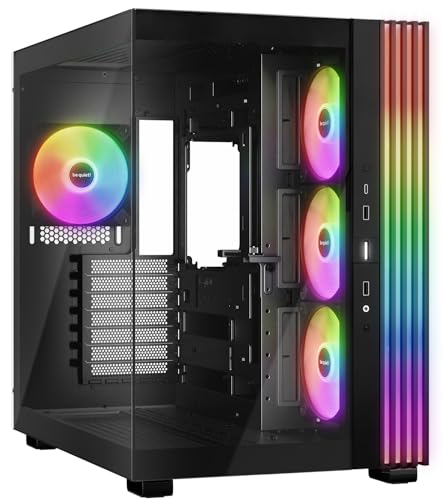
be quiet! Light Base 600 LX PC Case (Black) — Fixed inversion, fan bundle included
The 600 LX carries the same contractual sentence as its larger sibling — “Inverted and Horizontal Layout Customizable,” printed in the title — and adds the thing the 900 DX’s title leaves out: fans, named and counted. Four Light Wings LX 120mm PWM fans ship with this mid tower, which means the inverted showcase it promises can actually breathe on the day it is built, lit by the same ARGB LED strip and framed by the same fully windowed front and side.
The dual-chamber layout repeats here, keeping the supply and its wiring behind the partition while the mirrored board faces the room. For most gaming builds — one card, one board of ordinary dimensions, a desk on the left that has waited long enough — the 600 LX is the complete sentence: mirror promised, glass fitted, fans included. The 900 DX remains the answer when the board is E-ATX or the presentation must be flagship scale; the 600 LX is the answer when the build is a gaming PC rather than a workstation wearing lights.
Its gaps mirror its sibling’s: the title publishes no radiator dimension, and the fully windowed presentation demands cable care in two directions at once. Buyers should also note what the fan bundle does not settle — four 120mm fans is a working set, and a very hot card may still argue for additions that the title does not enumerate. None of that dilutes the central fact: this is one of only two listings in the guide whose title signs for an inverted layout, and it signs with fans in the box.
- Layout, as the title words it: inverted and horizontal layout, customizable
- Fans named in the title: four Light Wings LX 120mm PWM fans
- Panels named in the title: fully windowed front and side
- Layout named in the title: dual chamber
- Lighting named in the title: ARGB LED strip
- Radiator support: the listing title for the 600 LX states no radiator size, so confirm loop fitment on be quiet!’s product page before committing to a radiator
Strengths
- A title-stated inverted layout with the fans included — the most complete mirror package in this guide.
- Light Wings fans carry the brand’s acoustic brief into a showcase case.
- The horizontal alternative posture is retained from the larger model.
Trade-offs
- Board support is not spelled out in the title the way the 900 DX spells out E-ATX, so large-board builders must verify.
- No radiator figure appears in the title, leaving liquid plans one document short.
- Windowed front and side make the inverted build a permanent exhibition of your cable standards.
Best for: a left-side gaming desk that wants the inverted layout promised in writing and a working fan set in the same box. Not suited for: an E-ATX workstation build, where the title’s silence on board size points you toward the 900 DX instead.

Thermaltake Tower 600 Mid-Tower Case (Hydrangea Blue) — Rotational slots, vertical tower
The Tower 600 closes the guide with the third mechanism, and its title is admirably specific about it: rotational PCI-e slots. Inside this vertical tower — three tempered glass panels, hidden-connector motherboard support, finished in a Hydrangea Blue that no other pick dares — the expansion slots rotate, letting the graphics card stand and face the glass. Nothing is mirrored. The motherboard keeps its conventional orientation; the card alone changes its posture, and for a large share of buyers enchanted by “inverted” product photography, the card’s posture was the enchantment all along.
The tower format itself is the other half of the appeal. A vertical footprint suits desks where a long mid-tower sprawls — beside a monitor rather than beneath it — and three glass panels wrap the view around the corner of the build. Hidden-connector support keeps the rotated card’s stage free of cable crossings, which matters when the whole point is an unobstructed look at the hardware. The colour deserves its sentence too: Hydrangea Blue is a genuine aesthetic commitment, and in a category of black boxes it may be the deciding fact for the desk it will live on.
Thermaltake’s three-year warranty is stated in the title, a small reassurance the other listings do not print. Against that, the title offers no fan count and no radiator or card-length figures, so the thermal plan needs the manufacturer’s documentation — and the recurring reminder applies: a buyer needing the motherboard itself mirrored to the opposite wall should choose a Light Base, because rotation is not reflection, however handsome the result.
- Layout, as the title words it: rotational PCI-e slots inside a vertical mid-tower format
- Inversion status: the title describes slot rotation rather than an inverted interior, so read this as a reoriented graphics card in a conventionally arranged tower
- Panels named in the title: three tempered glass panels
- Board support named in the title: hidden-connector motherboard support
- Finish named in the title: Hydrangea Blue
- Warranty named in the title: three years
Strengths
- Rotational slots deliver the upright-card presentation without rebuilding the interior as a mirror.
- Three glass panels and a distinctive colour make it the boldest desk object in the guide.
- Hidden-connector support keeps the rotated card’s display free of cable clutter.
Trade-offs
- The motherboard is not inverted — a true left-panel mirror requirement sends you to the Light Base pair.
- Fan counts and cooling dimensions are absent from the title, so the parts list needs a documentation pass.
- A blue tower commits the whole desk palette; it will not quietly blend with every setup.
Best for: a showcase build that wants its graphics card standing upright in a compact vertical footprint, in a colour with opinions. Not suited for: a desk that needs the display panel on the opposite side of a mirrored interior, because this tower rotates slots rather than reflecting the layout.
How Do You Build in a Mirrored or Reversible Case Without Regretting It?
Dry-fit the orientation before a single screw turns. Stand the empty case where it will live, sit in the chair it will serve, and confirm that the glass faces you, the front panel buttons fall to a natural hand, and the rear ports leave a cable path that does not cross a walkway. This sounds theatrical until the first builder finishes a mirrored build, lifts it into place, and discovers the display side greeting a bookcase. Every mechanism in this guide — mirror, reversible, rotational — rewards the same five minutes of pantomime.
Read the layout pages of the manual before the parts come out of their boxes. A customisable inversion, like the Light Base pair’s, involves panel and mount decisions that are easy in an empty case and miserable in a populated one; a reversible build like the HS01 PRO’s asks the same courtesy. Decide the posture, configure the shell, and only then introduce components. Builders who treat orientation as step one finish in an evening; builders who treat it as a finishing touch sometimes finish twice.
Route cables for the orientation you chose, not the one the diagrams assume by default. Mirrored interiors relocate headers and grommets, so the tidy path is the one you trace with your own hand along the actual tray. Keep the rear panel’s future in mind as well: an inverted build whose ports face a wall needs slack planned at build time, because the first peripheral swap will otherwise require moving furniture to reach a USB socket.
Finish with a thermal soak before the panels go on for good. Run the build under load with the case open, note where the card’s exhaust travels in its new geography, and adjust a fan direction while adjustment is still free. Vertical designs like the Xhuttle and rotated designs like the Tower 600 make this step more interesting, not less necessary — a card standing upright exhausts into a different neighbour than the one it had lying down.
What Happens to Noise and Dust When a Layout Flips?
Orientation changes which panel faces your ears, and panels are not acoustically equal. A glass display side aimed at the user presents fan noise more directly than the insulated steel it replaced, which is why the Silent Base 802’s conventional sobriety keeps its defenders: its mats face the room in the standard arrangement, doing their quiet work where the listener sits. Mirrored showcase builds answer with fan quality and curves instead — the Light Wings fans in the 600 LX exist precisely because a windowed case cannot hide loud cooling behind insulation.
Dust follows the intakes, and intakes move when layouts do. An inverted or vertical design may draw air from a direction the room keeps dirtier — nearer the floor, nearer a pet’s highway, nearer the radiator’s convection column of lint. None of this is a reason to avoid a flip; it is a reason to place the finished machine thoughtfully and to learn where its filters live during the first month rather than the first thermal incident. A case whose panels come off without tools, as the HS01 PRO’s title promises, quietly wins this long game, because maintenance that is easy is maintenance that happens.
Which Components Care Most About the Orientation Change?
The graphics card cares first. In a mirrored interior it hangs from the opposite side, and in rotational or vertical designs it stands — either way, its cooler faces a new direction and its weight loads the slot and any support differently. Long, heavy cards deserve the anti-sag conversation in every orientation, and builders moving a card from a conventional case into a flipped one should inspect its cooler shroud for the fan clearance the new geography assumes. The card also becomes the display in glass builds, so its own aesthetics — an afterthought in a steel case — suddenly join the parts list.
The power supply cares second, quietly. Its intake and exhaust were designed around a cellar position; inverted and chambered layouts relocate it behind walls and ducts, which is generally healthy for component temperatures and occasionally awkward for the supply’s own breathing. The chambered picks here — the Xhuttle and both Light Base models — isolate the supply deliberately, and that isolation is a feature to use, not a space to stuff with spare cables until the partition bulges.
Storage and cabling care third, in the currency of reach. Drive mounts move when interiors mirror, and a cable set that reached gracefully in the old case may fall short in the new geography by a centimetre that feels personally insulting. Builders transplanting a working system into an inverted case should budget an hour and possibly a longer lead or two, rather than discovering the shortfall with the build in pieces across the desk. New builds dodge the issue entirely by planning runs against the chosen layout from the start — one more argument for deciding the mechanism before deciding anything else.
How Should You Light and Present a Build Whose Display Side Moved?
A mirrored or vertical build rearranges the audience’s sightlines, and lighting that flattered the old orientation can glare or vanish in the new one. The ARGB strips built into both Light Base models and the Xhuttle exist to wash the chamber evenly rather than spotlight one component, which is the right instinct behind glass: light the room, not the actor. Builders adding their own strips should place them along the panel edges of the new display side and test the effect from the chair, in the evening, with the room lights at the level they will actually be when the machine is admired.
Component choice joins the presentation whether the builder invites it or not. A graphics card displayed upright or mirrored shows its shroud and backplate to the room, so the card’s own finish becomes part of the case decision — a plain industrial shroud reads as deliberate minimalism in one build and as a missed opportunity in another. Memory with lighting, a cooler with a considered face, cables in a consistent colour: in a conventional steel case these are private pleasures, while in the windowed picks here they are the exhibit itself. Budget a thought, if not money, for that shift.
The horizontal mode of the Light Base pair deserves a presenter’s note of its own. Laid flat, the build is viewed from above like a museum piece under a vitrine, and dust settles on the upward glass with an honesty that vertical panels avoid. Owners who choose the flat posture should expect to wipe the top panel the way one wipes a coffee table — briefly, often, and without resentment, because the view is worth it.
A Brief Word on Resale, Rooms, and Second Thoughts
Layout choices outlive the enthusiasm that made them, so a moment of actuarial thinking belongs in this guide. Fixed mirrors serve one desk geometry superbly and another not at all; if your housing is stable and your desk is a fixture, that specialisation is a bargain. If your life involves landlords, semesters, or a partner with strong opinions about furniture, the reversible HS01 PRO is the pick whose value survives rearrangement, because its orientation is a setting rather than an identity. Rotational and vertical designs sit between the poles — their appeal is presentational, and presentation travels with the machine to any room with a flat surface.
Second thoughts are cheapest before the parts move. Every pick here can be evaluated against a photograph of your actual desk, taken from your actual chair, with the tower’s intended spot marked by a shoebox of similar size. It is a ridiculous exercise that has prevented more bad purchases than any benchmark: if the shoebox’s display side faces a wall, no specification in this guide will save the build’s looks, and the mechanism — not the model — is what needs to change.
Mechanisms Side by Side — Which Picks Truly Mirror an Interior?
| Pick | Mechanism in the title’s words | Included fans per title | Cooling figure per title |
|---|---|---|---|
| SSUPD Xhuttle | Vertical GPU airflow, dual-chamber | Three 120mm ARGB reverse fans | None stated |
| be quiet! Silent Base 802 | No layout claim — conventional tower | Three installed | Water cooling up to 420mm |
| be quiet! Light Base 900 DX | Inverted and horizontal layout | Not enumerated | None stated |
| MONTECH HS01 PRO | Reversible layout | Five ARGB PWM fans | 360mm radiator, 420mm card support |
| be quiet! Light Base 600 LX | Inverted and horizontal layout | Four Light Wings LX 120mm PWM | None stated |
| Thermaltake Tower 600 | Rotational PCI-e slots | Not enumerated | None stated |
The first column of mechanisms is the shopping decision; everything else is refinement. Two picks mirror, one reverses, one rotates, one stands its airflow upright, and one declines the whole conversation in favour of quiet. A buyer who reads only that column will buy correctly; a buyer who reads only the search phrase will buy eventually — after a return.
Where Do Buyers of Flipped Layouts Usually Go Wrong?
The signature mistake is treating every upright or windowed case as inverted. Vertical cards, panoramic glass, and dual chambers all photograph like inversions, and none of them move the motherboard to the other wall. The Xhuttle and Tower 600 in this guide are the standing proof: excellent cases, honestly titled, and neither one mirrored. The defence costs nothing — find the layout sentence in the listing title and believe exactly what it says, no more.
The second mistake is inverting for a desk that does not need it. A mirrored interior on a right-side desk displays the build to the wall and the steel to the room, which is the original problem wearing a new coat. Sketch the room first: tower position, viewing angle, where a human actually sits. The third mistake is forgetting the cables after the flip — ports that faced the room may now face the wall, and a build that needs its rear panel accessed weekly will punish a thoughtless orientation every single week.
A related slip is assuming the included fans of a conventional case and a mirrored case do equivalent work. Orientation changes which fans are visible, which are muffled by panels, and which paths the air must turn through; a fan set that was generous in a steel tower can feel merely adequate behind glass on the far side of a mirror. Judge each pick’s cooling as a system in its own posture, using the figures its title provides and the manual for everything beyond them.
Fourth, glass-heavy inverted cases seduce buyers into under-fanning them. Two of the true mirrors here do not enumerate included fans in their titles; a showcase that cannot breathe becomes a terrarium with a frame-rate problem. Budget the cooling as part of the mirror’s price, and the layout will reward you for years.
Final Recommendation
Decide the mechanism before the model. If the desk demands a genuine mirror, the Light Base 600 LX is the complete package for a gaming build — inversion promised in the title, four Light Wings fans in the box — while the Light Base 900 DX serves larger boards and grander glass. If your address or your mind may change, the HS01 PRO’s reversibility, mesh face, and five fans make it the flexible gamer’s pick. If the photograph you fell for was really an upright card, the Tower 600 rotates one into view inside a blue tower, and the Xhuttle builds an entire vertical-airflow chamber around the idea. And if this taxonomy taught you that noise was the true complaint, the Silent Base 802 has been waiting patiently with its insulation mats. The mirror is a means; the desk is the end — buy for the room the machine will actually live in, and the layout will never feel like a compromise again. One last encouragement for the hesitant: orientation is the rare PC decision that can be rehearsed with a cardboard box and five honest minutes, so rehearse it, believe the listing titles, and let the mechanism you truly need select its own model from the six above.
Frequently Asked Questions
Does an inverted layout affect cooling performance?
It rearranges the cooling geography rather than improving or harming it by decree. Components trade positions, so intake paths, exhaust routes, and cable obstructions all move with the mirror; a thoughtfully routed inverted build cools like its conventional twin, and a careless one suffocates in either orientation. The picks that state their cooling figures in the title — the HS01 PRO’s 360mm radiator support, the 802’s 420mm water cooling room — give planners firmer ground than the glass-led mirrors, whose loop dimensions live in their manuals.
Can I invert a conventional case myself by flipping it over?
Builders have tried, and the results explain why purpose-built cases exist. Feet, front panels, power supply orientation, and drive mounts all assume a floor; a flipped tower puts its intake against the desk, its buttons underneath, and its supply breathing its own exhaust. The reversible and inverted designs in this guide relocate those details deliberately. Treat orientation as architecture, not as a party trick performed on finished hardware.
What is the difference between the Light Base 900 DX and the 600 LX?
Scale and stated board support. The 900 DX’s title claims E-ATX compatibility and flagship dual-chamber glass; the 600 LX’s title instead enumerates its four included Light Wings LX fans. Both promise the inverted and horizontal layout in the same words. A large-board build leans to the 900 DX; a standard gaming build that values a fitted fan set leans to the 600 LX.
Is the Tower 600 a good choice if I might want a mirrored layout later?
No — rotation and reflection are different hardware commitments, and the Tower 600’s rotational slots cannot grow into a mirrored interior later. If a future mirror is a real possibility, the HS01 PRO’s reversible layout is the pick designed for undecided futures. Buy the mechanism your uncertainty actually needs.
Do inverted cases cost more to build in than conventional ones?
The case itself is only part of the ledger. Fully windowed mirrors tend to need deliberate cable work and, in the Light Base 900 DX’s case, a fan plan the title does not enumerate. None of the six picks demands exotic parts — boards, cards, and coolers carry over — but showcase orientations reward the small extras: tidy cabling, considered lighting, and fans enough for the glass. Budget those, and the mirror holds no surprises.
Does the horizontal mode of the Light Base cases suit everyday gaming?
It suits desks that can spare the footprint a laid-down tower claims, and owners who enjoy the bench-style view enough to keep its upward glass clean. Cooling in the horizontal posture follows the case’s own fan arrangement rather than convection’s preferences, so builders should treat the mode as a presentation choice to be thermally verified with a soak test, exactly as with any orientation experiment. As a party trick it is unbeatable; as a daily posture it is a lifestyle decision, and the cases’ ability to return to vertical or inverted duty is what makes trying it low-risk.
Will a mirrored layout change which side my cables exit?
Yes, and it deserves a thought before the build rather than after. Mirroring moves the motherboard’s rear cluster to the opposite end of the case’s geography, so display leads, network cable, and USB runs may leave toward a different wall or across a different stretch of desk. Measure the runs in the new orientation the way you would for a new room — because, from the cables’ perspective, it is one. The dry-fit rehearsal described earlier in this guide exists largely to catch this.
Are inverted cases harder to sell or hand down later?
Slightly more specialised, which cuts both ways. A mirrored case suits fewer desks, so its second-hand audience is narrower; within that audience, a clean Light Base or a tidy reversible MONTECH is exactly what someone with a left-side desk has been hunting, and genuinely reversible designs like the HS01 PRO sidestep the issue entirely by suiting both orientations. Conventional picks like the Silent Base 802 remain the easiest hardware in this guide to pass along, because they ask nothing of the next owner’s room.
What single check prevents the most disappointing purchase in this category?
Reading the layout sentence of the listing title aloud and matching it to your desk’s demand, word for word. “Inverted” means the interior is mirrored. “Reversible” means you can build the mirror. “Rotational” means the card stands up. Silence means none of those is promised. Every disappointment this category produces begins with a buyer upgrading one of those sentences in their head; every satisfied owner simply believed the title the first time.
Related Guides
Orientation settled, the next questions are capacity and placement: the best multi-gpu pc cases guide covers towers and frames built around several graphics cards, the best wall-mountable pc cases roundup takes the build off the desk entirely, and the best silent pc cases with great airflow collection tackles the noise-versus-breathing balance for machines that stay put.


