What's inside
- Key Takeaways
- Quick Picks
- Why is one brand allowed to dominate a guide like this?
- What makes a case a console case rather than a small tower?
- How much PC can a console case honestly hold?
- The six console cases, taken one by one
- Console cases at a glance: formats, cooling and character
- How do you build a console PC that stays cool and quiet in a cabinet?
- What do console-case buyers most often get wrong?
- How does living-room gaming change what a case must do?
- What is the upgrade path of a console PC?
- How should a console PC share the cabinet with consoles and receivers?
- What does the second year of a console PC teach its owner?
- How do these cases handle a television that keeps getting bigger?
- Final Recommendation
- Frequently Asked Questions
- Related Guides
As an Amazon Associate I earn from qualifying purchases. This post may contain affiliate links at no extra cost to you.
widgetverdict.com is reader-supported. When you buy through links on our site, we may earn an affiliate commission.
Where to buy: these cases are available through their Amazon listings; before ordering, measure your media shelf’s depth and ventilation with the same care you would give a receiver or a console, because a PC in the living room lives by hi-fi rules now.
The best console pc cases are the horizontal, living-room-shaped PCs: low, wide, designed to sit on a media shelf where a games console or an amplifier would sit, and to be looked at from a sofa rather than admired through a window at a desk. And the first honest thing to say about this class is that SilverStone dominates it. Five of the six picks in this guide are SilverStone cases, and that is not a shortlist failure — it is the market’s actual shape. SilverStone has spent two decades building home theatre PC cases while other makers visited the category occasionally, and on Amazon its Grandia, Milo and retro lines are, for most buyers, the category. The sixth pick, a Goodisory aluminium mini-ITX case, is here because it serves a narrower niche the SilverStone range does not aim at. Pretending a brand diversity exists that the shelves do not would make a prettier table and a worse guide.
What defines the class is the negotiation with the television. A console-style case must fit the shelf’s depth, breathe in a cabinet’s still air, keep its fans beneath the notice of a film’s quiet scenes, and present a face that belongs beside a receiver. Motherboard formats divide the picks: full ATX in the Grandia designs, Micro-ATX alongside it in the GD09, Mini-ITX in the Milo and the Goodisory, where the small board is the price of the slim silhouette.
Cooling is the class’s permanent tax. A tower moves air vertically with gravity’s help and a shelf case cannot; a console case in a closed cabinet is a PC in a warm cupboard, and every design here is an answer to that geometry. Builders should read the picks with their own cabinet in mind — open shelf, glass-fronted unit, or the enclosed cupboard that will need its door’s honesty assessed. The furniture questions matter too, and the guides to best computer desks with hutch and best floating desks cover the rooms these machines graduate to when the living room arrangement changes.
Key Takeaways
- SilverStone dominates this class on Amazon — five of six picks — because it has specialised in HTPC cases for two decades.
- Formats split by shelf: ATX in the GD09, GD06, Grandia 11 and FLP01; Mini-ITX in the Milo ML05 and the Goodisory SR01.
- The Grandia 11 is the performance option, with 240mm radiator support in a compact ATX HTPC case.
- The Milo ML05 is the slim, silent-leaning option for a Mini-ITX media build that must disappear beside the television.
- The FLP01 brings retro desktop styling to the console shelf — the same case anchors this series’ retro guide.
- The Goodisory SR01 is the outlier: an aluminium Mini-ITX case aimed at soft-router and multi-COM-port duties, not gaming.
Quick Picks
| Pick | Badge | Why it earns its place |
|---|---|---|
| SilverStone GD09 HTPC Case | The classic Grandia | An ATX and Micro-ATX home theatre case with a faux aluminium front that reads as hi-fi equipment. |
| SilverStone Milo ML05 Slim HTPC Case | The slim silent one | A slim Mini-ITX HTPC case in black, built to sit quietly and thinly in a media unit. |
| SilverStone Grandia 11 HTPC Case | The compact performer | A compact ATX HTPC case with 240mm radiator support for a living-room build with real power. |
| SilverStone GD06 HTPC Case | The classic desktop | A classic HTPC desktop case with two front USB 3.0 ports and the Grandia line’s traditional proportions. |
| SilverStone FLP01 Retro Style HTPC Case | The retro console | A retro-styled ATX desktop HTPC case with USB Type-C, styled after the home computers of the CD-ROM era. |
| Goodisory SR01 Aluminium Mini-ITX HTPC Case | The router niche | An aluminium Mini-ITX case with support for six COM ports, aimed at soft-router and specialist duties. |
Why is one brand allowed to dominate a guide like this?
Because the alternative is lying by arrangement. A guide that forced brand balance onto this category would demote better cases to make room for weaker ones from makers who dabble in HTPC between gaming towers, and the reader buying for a living room would pay for the guide’s cosmetics. SilverStone’s dominance is itself the useful information: it tells you the category is a specialism, that the specialist’s designs embody two decades of shelf-depth, airflow and front-panel lessons, and that choosing within the SilverStone range — by format, size and cooling ambition — is the real decision for most buyers.
Dominance has a practical dividend too. A maker with a deep HTPC catalogue keeps manuals, accessories and replacement parts alive for its older models, and a case bought for a ten-year living-room life benefits from that continuity. The Goodisory earns its place without disturbing the pattern: it is not a rival HTPC flagship but a specialist tool for the soft-router niche, included so that readers building a network appliance rather than a media PC can see their option named honestly.
What makes a case a console case rather than a small tower?
Orientation and audience. A console case lies horizontal, sized against hi-fi separates and games consoles, and it is designed to be seen from across a room at sofa height: the front panel is a face, not a vent with ambitions. Its interior is arranged for a shelf’s constraints — short card lengths in the slim designs, low coolers, power supplies chosen for the space — and its cooling assumes still room air rather than a desk’s open convection.
The test is the shelf. If a case fits a media unit’s depth with its cables bent behind it, sits at a height the unit’s shelves allow, and looks at home beside a receiver, it belongs to this class whatever its spec sheet calls it. If it needs the floor, a desk, or a window to show itself off, it belongs to another guide — and readers whose build outgrows the shelf entirely will find the tower world in the desk-setup guides linked from this article, including best electric stand up desks for the room the PC moves to next.
How much PC can a console case honestly hold?
More than its silhouette suggests, less than a tower promises. The ATX Grandia designs take full-size boards and, in the Grandia 11’s case, a 240mm radiator — a specification that moves a serious gaming build into the living room without apology. The slim Mini-ITX cases trade that ceiling for thinness: a media build, a streaming box, a modest gaming machine built around efficient components, all entirely viable, provided the graphics card’s length and the cooler’s height are checked against the case’s figures in SilverStone’s documentation rather than assumed from the photographs.
Heat is the binding constraint, and it binds harder inside furniture. An open shelf forgives; a closed cabinet taxes; a cabinet with a glass door and no rear opening is a slow oven wearing a media unit’s clothes. Honest console building starts with the cabinet’s ventilation, adds components whose heat the space can shed, and only then chooses among these six. The order matters, because reversing it produces the class’s characteristic failure: a powerful PC that throttles during the film’s climax and roars during its quiet scenes.
The six console cases, taken one by one

SilverStone GD09 HTPC Case — The classic Grandia
The GD09 is the Grandia idea in its settled form: a home theatre case for ATX and Micro-ATX boards, fronted in faux aluminium so that it sits beside a receiver without looking like a computer that wandered in. That front panel is doing the class’s essential work — the GD09’s owner will look at it from a sofa for years, across thousands of hours of film and sport, and a face that belongs in the rack is worth more than any internal flourish. Inside, the Grandia layout is the product of a line that has been refined across generations, which shows in the unglamorous places: drive arrangements, cable paths and panel fit that a first-generation design gets wrong.
The title is brief — the model code SST-GD09B, the board support, the front’s description — and the build figures live in SilverStone’s documentation, where a living-room builder should confirm graphics card length, cooler height and drive counts against their parts list. The GD09’s natural build is the full-size media PC: a proper board, a real graphics card for the television’s gaming, storage for a local library, all inside a case that a hi-fi rack accepts as one of its own.
Between the GD09 and the older GD06 below, the choice is generational: the GD09 is the more recent expression of the same idea, and buyers choosing between them should compare the documentation for their specific card and cooler rather than assume the newer number settles everything. Current pricing for the GD09 sits on its Amazon listing.
- Motherboard support: ATX and Micro-ATX, per the listing title
- Front: faux aluminium design, as the title states
- Model: SST-GD09B
- Format: horizontal HTPC desktop
- Card and cooler clearances: the title does not publish them — SilverStone’s documentation carries the figures
- Colour: black, per the model code and listing
Strengths
- The hi-fi face: faux aluminium that belongs in a rack of audio equipment.
- Full ATX support gives the living-room build a real motherboard choice.
- A mature Grandia layout, refined across the line’s generations.
Trade-offs
- Build figures require the documentation — the title is a postcard, not a spec sheet.
- Full-size HTPC depth needs a media unit that can honestly house it.
- Its classic design makes no concession to the window-and-lighting fashion.
Best for: a full-size media and living-room gaming PC that must look like hi-fi equipment.
Not suited for: a shallow media shelf, or a showcase build that wants its components visible.

SilverStone Milo ML05 Slim HTPC Case — The slim silent one
The Milo ML05 is the case for the shelf where depth and height are rationed: a slim Mini-ITX HTPC case in black, whose title adds the word silent to its description of itself. Slim is the operative specification. A case this thin disappears into a media unit the way a Blu-ray player did, and for a streaming and playback build — network media, broadcast catch-up, music duty — thinness plus quiet is the whole brief, delivered without a wasted centimetre.
Mini-ITX is the format tax, and it should be paid knowingly: one board size, a small power supply format in cases of this class, a graphics card chosen from the short and low-profile end of the market or omitted for integrated graphics entirely. The ML05’s builds are therefore planned backwards from the shelf: measure the unit, confirm the card and cooler against SilverStone’s documentation, and spec the machine the case can cool in still cabinet air. Within those rails, a Milo build is one of the most civilised PCs a living room can host — present at the screen, absent to the ear.
The design’s age is worth a word, because it cuts in the buyer’s favour: the ML05 has been in the catalogue long enough for its documentation, its build reports and its quirks to be common knowledge in the HTPC community, and a slim build planned from that record holds few surprises. Its Amazon listing carries the current price and the exact internal dimensions that slim building lives by.
- Motherboard support: Mini-ITX, per the listing title
- Profile: slim HTPC format, as the title states
- Model: SST-ML05B, Milo line
- Finish: black
- Design intent named in the title: silent HTPC use
- Card, cooler and PSU figures: the title does not publish them — SilverStone’s documentation is essential reading at this size
Strengths
- The slimmest silhouette here — it occupies a media shelf like a player, not a PC.
- Silent intent suits film and music rooms where the PC must not be heard.
- A long-catalogue design with a deep public record of builds and clearances.
Trade-offs
- Mini-ITX only — the board, card and cooler choices all narrow.
- Slim cases shed heat reluctantly; hot components are out of its brief.
- No room to grow: the build it fits is the build it keeps.
Best for: a streaming, playback and music PC that must vanish into a media unit.
Not suited for: a powerful gaming build, or a builder who upgrades components yearly.
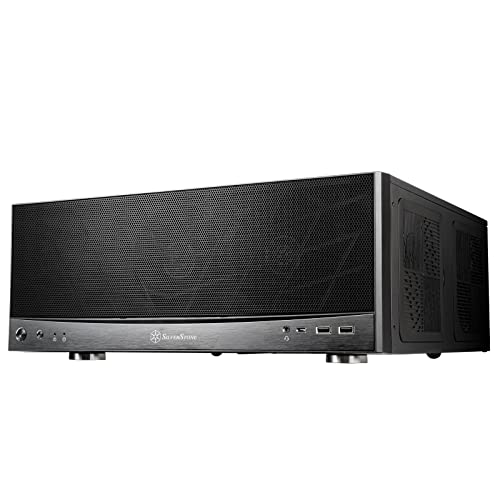
SilverStone Grandia 11 HTPC Case — The compact performer
The Grandia 11 is SilverStone’s answer to the buyer who refuses the class’s usual compromise: a compact ATX HTPC case with 240mm radiator support. The radiator figure is the headline because it changes what a living-room PC can be — liquid cooling for a genuinely powerful processor, in a case that still presents a hi-fi face to the room and fits the shelf’s geometry. Compact ATX is the second half of the trick: full-size board support without the full-size footprint of the older Grandia designs.
A radiator in a console case also answers the class’s noise problem from the performance end: a 240mm radiator lets its fans turn slowly, and slow fans are what a film’s dialogue scenes demand. The build this case invites — strong CPU, a graphics card chosen against the documented clearances, liquid cooling above — is the living-room machine that plays modern games on the big screen without sounding like it is trying. That is a real and growing constituency, and the Grandia 11 is the pick in this guide aimed squarely at it.
The cautions are the performance builder’s usual ones, translated to shelf scale: confirm the graphics card’s length and the radiator’s exact mounting against SilverStone’s documentation, plan the cabinet’s ventilation as part of the cooling system rather than as an afterthought, and remember that a powerful PC in a closed unit still lives in a warm cupboard whatever its case can do. Pricing for the Grandia 11 is on its Amazon listing.
- Motherboard support: ATX, per the listing title
- Cooling support: 240mm radiator support, as the title states
- Model: SST-GD11B, Grandia line
- Format: compact ATX HTPC
- Card clearances: the title does not publish them — check SilverStone’s documentation against your card
- Finish: black, per the model code
Strengths
- Radiator support brings genuine performance cooling to the console format.
- Compact ATX sizing fits shelves the older full-size Grandia designs strain.
- The natural choice for a living-room gaming PC with real power.
Trade-offs
- Performance in a cabinet still depends on the cabinet’s ventilation.
- Card length must be verified — compact ATX is not a promise to every flagship.
- Liquid cooling adds a pump whose placement and speed need the usual care.
Best for: a living-room gaming build that wants tower-class power in a hi-fi shape.
Not suited for: a closed, unventilated cabinet, or a silent-room purist running only playback.

SilverStone GD06 HTPC Case — The classic desktop
The GD06 is the elder of the Grandia pair here, a classic HTPC desktop whose title mentions the detail that dates it pleasantly: two front USB 3.0 ports. In a category where designs churn slowly, the GD06’s longevity is a credential — a case that remains in the catalogue because the shelf it fits and the builds it hosts have not changed as fast as the components inside them. Its proportions are the traditional Grandia ones: a desktop deep enough for a serious build, faced for the rack.
Choosing the GD06 over the GD09 is a matter of specifics rather than hierarchy. Both are ATX-class Grandia desktops; the documentation for each — card lengths, cooler heights, drive arrangements, fan provisions — is where a particular parts list finds its answer, and a buyer with an existing board and card should run those numbers for both before the generational instinct spends their money. The GD06 also suits the buyer who values a known quantity: its build record in the community is long, and long records are a form of specification no title can print.
Front USB 3.0, rather than the Type-C of the newer designs, is the honest limitation to name: a controller dongle, a headset receiver or a phone cable will use those ports daily, and they serve well, but the buyer whose peripherals have moved to Type-C should count the FLP01 and Grandia 11’s newer connectivity into the comparison. The GD06’s Amazon listing carries its current price.
- Format: classic HTPC desktop, Grandia line
- Front connectivity: two front USB 3.0 ports, per the listing title
- Model: GD06B
- Finish: black
- Board support and clearances: the title does not enumerate them — SilverStone’s documentation holds the build figures
- Catalogue position: the line’s long-serving classic design
Strengths
- A proven, long-catalogue design with a deep public build record.
- Traditional Grandia proportions host a serious full-size build.
- Front ports are placed and specced for daily living-room use.
Trade-offs
- Front connectivity is USB 3.0 rather than the Type-C of newer rivals.
- Its classic depth needs a media unit of traditional proportions.
- Newer Grandia designs refine details this generation settled earlier.
Best for: a traditional full-size HTPC build valuing a proven design and a long record.
Not suited for: a household whose peripherals have standardised on front Type-C.

SilverStone FLP01 Retro Style HTPC Case — The retro console
The FLP01 appears in this guide for the same reason it anchors the retro one: it is a horizontal ATX desktop whose styling quotes the home computers of the early CD-ROM years, and a console shelf is one of the two places that silhouette naturally lives. Under a television, the FLP01 does something no black box can — it makes the PC a piece of the room’s character, an object guests ask about, in a space where every other component strives to be invisible. Its title confirms the essentials: HTPC ATX desktop, retro style, USB Type-C.
Function follows the format’s rules. An ATX board in a desktop case gives the living-room build real component choice; the horizontal layout suits a shelf or a position beneath the screen; and the Type-C port is the modern concession placed exactly where a controller or headset dongle wants it. Cooling obeys desktop physics — less vertical assistance, tighter cooler clearances than a tower — and the title publishes no clearance figures, so a build hotter than a sensible media-and-gaming specification should be planned from SilverStone’s documentation with care.
Buyers torn between this guide and the retro one should know the FLP01 is the same case wearing both hats, and that is a compliment to its design rather than a duplication in this series: it is simultaneously the most convincing new retro case and a first-rank console case, because the living room and the retro desk were always the same furniture problem viewed from different decades. Its current price is on the FLP01’s Amazon listing.
- Format: ATX desktop HTPC, horizontal
- Styling: retro style, per the listing title
- Connectivity: USB Type-C named in the title
- Model: SST-FLP01W
- Clearances: the title does not publish them — SilverStone’s documentation carries the build figures
- Audience: living-room builds that want character as well as capacity
Strengths
- A silhouette with genuine period character — the console shelf’s only conversation piece.
- Full ATX support in a desktop format that fits under a screen.
- Modern front Type-C keeps the retro face honest about the present.
Trade-offs
- Desktop cooling limits the hottest gaming builds.
- The styling is a commitment every guest will have an opinion about.
- Clearance figures require the documentation before a card is chosen.
Best for: a living-room build that wants the PC to have a personality, in period dress.
Not suited for: a minimalist media unit where the PC is meant to disappear entirely.

Goodisory SR01 Aluminium Mini-ITX HTPC Case — The router niche
The Goodisory SR01 is in this guide under honest labelling: its title describes an aluminium Mini-ITX HTPC case for soft-router duty, with support for six COM ports, in silver. Six serial ports is a specification that tells its own story — this is a case for a network appliance, an industrial-control box, a specialist machine whose home may be a shelf but whose job is infrastructure. It is not a gaming console rival, and including it as one would repeat the category error this guide has avoided throughout.
Why include it at all? Because console-case searches catch the network builders too — people housing a small, always-on, shelf-shaped PC — and the SR01 is the clean answer to their version of the question. Aluminium construction suits an always-on appliance’s heat, Mini-ITX is the soft-router board format, and the COM-port provision serves the legacy-hardware duties that keep such machines employed in workshops, labs and small-business networks long after media PCs have been replaced twice.
For a media build, the Milo ML05 is the SilverStone answer at this size and the SR01 should not displace it in that buyer’s thinking. For the router and appliance builder, the reverse holds, and the SR01’s specialism is exactly its value. The title publishes no cooling or clearance figures, so Goodisory’s documentation is the planning source, and its Amazon listing carries the current price.
- Motherboard support: Mini-ITX, per the listing title
- Material: aluminium, as the title states
- Specialist provision: support for 6 COM ports, per the title
- Intended duty named in the title: soft router computer
- Finish: silver (the title’s spelling is the maker’s own)
- Cooling figures: the title does not publish them — Goodisory’s documentation is the source to check
Strengths
- Purpose-built for soft-router and appliance duty, with serial provision media cases ignore.
- Aluminium construction suits an always-on machine’s thermal life.
- The only non-SilverStone pick here, included for a niche the dominant range does not serve.
Trade-offs
- Not a gaming or media-first design — its specialism is the point and the limit.
- Mini-ITX confines it to small-board builds by design.
- Its documentation and community record are thinner than the SilverStone catalogue’s.
Best for: a soft-router, network appliance or serial-heavy specialist build in a shelf format.
Not suited for: a living-room gaming PC, or a media build better served by the Milo.
Console cases at a glance: formats, cooling and character
| Case | Board format | Cooling note | Character |
|---|---|---|---|
| SilverStone GD09 | ATX / Micro-ATX | See maker figures | Hi-fi faced classic |
| SilverStone Milo ML05 | Mini-ITX | Slim, silent-leaning | The disappearing act |
| SilverStone Grandia 11 | ATX | 240mm radiator support | Compact performer |
| SilverStone GD06 | ATX class | See maker figures | Long-serving classic |
| SilverStone FLP01 | ATX | Desktop layout limits | Retro conversation piece |
| Goodisory SR01 | Mini-ITX | Aluminium appliance build | Router specialist |
Five rows of one brand is the table this category honestly produces, and the differences that matter run down the columns rather than across the logos: board format first, because it decides the build’s ceiling; cooling second, because the cabinet will audit it; character last, because the room must live with the face. A buyer who works down those columns in order will land on the right case in this table with very little drama.
How do you build a console PC that stays cool and quiet in a cabinet?
Ventilate the cabinet before blaming the case. A rear panel removed or drilled, a door left open under gaming load, a small cabinet fan exhausting the unit’s warm air — these furniture decisions decide more degrees than any case choice. Inside the case, prefer components whose heat you have summed honestly, set fan curves for the room’s quiet scenes rather than for benchmark pride, and keep the intake path as the makers drew it: console cases route air through specific panels, and a storage box parked against the intake is a cooling decision made by accident.
Storage and cabling deserve their sentences. Local media storage inside the case adds heat and, if it spins, noise; a network library elsewhere in the house keeps the console PC cooler and quieter, at the cost of depending on the network. Cables behind a media unit live in a warm, dark tangle that nobody wants to revisit, so label them at build time and leave the HDMI and power runs with enough slack to pull the case forward for service without unplugging the television’s whole world. If the machine will sit on a wall-mounted shelf arrangement, weigh the shelf’s rating against the finished PC with the same suspicion you would give any wall fixing.
What do console-case buyers most often get wrong?
They measure the shelf’s width and forget its depth with cables. A case that fits the unit bare will not fit it with an HDMI lead, a power cable and an antenna bent behind — allow the connectors their inches or the case will live pulled forward like a book half off a shelf. They buy the graphics card by performance alone and meet the case’s length limit at build time, in the living room, with the television’s evening already planned. And they close the cabinet door on a gaming build and then review the case for the noise of its own rescue fans.
The quieter error is choosing the slim case for a growing build. The Milo’s thinness is a commitment: the machine it hosts is finished when it is built. Buyers whose living-room PC is a hobby in motion should take the Grandia 11’s headroom and forgive its extra shelf presence, because a console case outgrown in a year is the most expensive kind there is.
How does living-room gaming change what a case must do?
The sofa is a different workstation. Input comes from a controller or a wireless keyboard on a cushion, the screen is three metres away and measured in feet rather than inches, and the PC’s user interface must survive being read across a room. The case’s part in that experience is to be forgotten at exactly the moments a desk PC is allowed to be present: the loading screen’s pause, the film’s quiet passage, the menu’s hover. A console case that hums through those moments fails its room in a way no benchmark records, which is why this guide weights fitted design and fan behaviour over raw specification in every pick.
Session shape differs too. Living-room PCs wake for an evening and sleep for a day, where desk machines idle through working hours. Wake behaviour — how fast the machine is ready, how it behaves on a television’s input switching, whether its fans announce the wake across the room — becomes part of the case’s effective quality through the components it encourages: sensible storage, a power supply that behaves at standby, a front panel whose lights can be forgiven in a dark room. None of these appear in a title, and all of them are discoverable in the makers’ documentation and the community’s build records, which for the SilverStone range are unusually deep.
What is the upgrade path of a console PC?
Slower and more deliberate than a tower’s, and the case choice should admit it from the start. Graphics cards grow longer and hotter by generation, and a console case bought at its clearance limit is a case the next card will not enter. The Grandia 11’s radiator room and the GD09’s full-size layout are, in this light, not performance luxuries but time machines: they buy the build a second and third component generation inside the same shelf furniture. The Milo’s buyer makes the opposite trade knowingly — the slim build is finished at birth, and its upgrade is replacement, planned as calmly as the original purchase.
Storage is the friendliest upgrade a console PC offers, because media libraries grow in one direction and modern storage shrinks in physical size as it grows in capacity. A build that begins with a modest drive can absorb its library’s decade without opening the case’s cooling assumptions. Memory and processors, by contrast, are effectively fixed by the board the case’s format chose, which returns the decision to the format question this guide keeps asking: buy the format for the machine’s whole life, not for its first configuration.
How should a console PC share the cabinet with consoles and receivers?
Diplomatically, and with a thermometer’s honesty. Each device in a media unit adds its heat to a shared air supply, and the receiver that runs warm, the console that exhausts sideways and the PC that intakes from the front are participants in one thermal system whether their owners planned it or not. Space the heat producers apart where the shelves allow, give the PC the unit’s best-ventilated bay rather than its most convenient one, and resist stacking anything on a case whose top panel is part of its breathing — the desktop-format picks in particular move air in ways a stack of game cases will silently veto.
Remote and controller receivers deserve their own planning: a dongle buried behind a closed cabinet door serves nobody, and the front ports on these cases — the GD06’s USB pair, the FLP01’s Type-C — earn their keep as the visible, reachable connection points of the whole unit. A small, deliberate USB hub at the unit’s edge is the unglamorous accessory that most living-room builds eventually adopt, and planning its cable run at build time saves the annual excavation behind the television that otherwise becomes the household’s least-loved ritual.
What does the second year of a console PC teach its owner?
That dust respects no furniture. A media unit is a low, warm, still environment, and a console case’s intakes gather the room’s dust at exactly the rate its fans invite. The second year’s lesson is a cleaning rhythm — intakes vacuumed when the unit’s other equipment is dusted, the case pulled forward on its planned cable slack twice a year — and owners who built that slack in at the start perform it without resentment, while owners who did not, postpone it until the fans report the neglect. Every case in this guide rewards the rhythm equally; none of them can substitute for it.
The second lesson is about light. Front-panel LEDs that seemed tasteful in the shop become, in a darkened room during a film, the brightest object in the owner’s peripheral vision. The mature console build tames them — in settings where the design allows, with a strip of discretion where it does not — and judges a case partly by how gracefully it can go dark. SilverStone’s hi-fi heritage shows here: equipment designed for racks learned long ago that a living room at night is a cinema, and a power light is a guest that should keep its voice down.
How do these cases handle a television that keeps getting bigger?
Indifferently, which is their strength. A console case’s contract is with the shelf, not the screen, and televisions may grow above it for a decade without the case’s job changing — until the day the screen’s growth rearranges the unit itself, pushing the PC from the centre shelf to a side bay with different air. Builders planning around a television upgrade should therefore favour the case whose cooling does not depend on one blessed position: the designs here with breathing room in their specification, the Grandia 11 above all, tolerate re-homing better than a slim build tuned to a single shelf’s microclimate.
Resolution growth matters more subtly. Each television generation asks the graphics card for more, and the card asks the case for cooling and length in return. The console builder’s version of future-proofing is not a bigger power supply; it is clearance — card length unspent, radiator room unclaimed, a board format with a generation left in it. Read that way, the table earlier in this guide is a table of futures as much as of formats, and the cheapest future is the one bought with the case.
Final Recommendation
Start inside the SilverStone range, because that is where this category lives: the Grandia 11 for a living-room build with real gaming power, the GD09 for the classic full-size media PC, the GD06 where a proven design and a traditional rack decide, the Milo ML05 where the PC must slim down and shut up, and the FLP01 where the machine is allowed a personality. Step outside the range only for the Goodisory’s specialist reason — a router or appliance build — which is the one job here the dominant maker does not claim. Measure the shelf, ventilate the cabinet, and the console PC will do what towers cannot: disappear into the room’s evening while outperforming the console it replaced.
Frequently Asked Questions
Why does SilverStone make so many of these cases?
Because HTPC is its specialism of two decades, while most case makers treat the living room as a sideline to gaming towers. Specialism compounds: shelf dimensions, front-panel design, airflow in still air and long-lived documentation all improve with each generation, which is why this guide’s honest shortlist is five-sixths one brand.
Can a console PC replace a games console entirely?
For many households, yes — a Grandia 11-class build plays the same screens’ worth of games with a wider library, and the PC’s other duties come free. The console’s remaining advantages are simplicity and the sofa-first interface, both of which a well-planned HTPC narrows with a controller and a front-end, but neither of which a case alone can confer.
Will a PC in a closed media cabinet overheat?
It will run hot enough to get loud, which in this class amounts to the same failure. Ventilate the cabinet, choose components for the space, and treat a glass-doored unventilated unit as an open-shelf requirement rather than a suggestion. The case cannot repeal the cabinet’s physics.
Mini-ITX or ATX for a living-room build?
ATX if the shelf allows it and the build may grow — the Grandia designs exist for that buyer. Mini-ITX if thinness and silence lead and the build’s shape is settled — the Milo’s buyer. The board format is really a decision about the machine’s future, taken at the case stage because the case enforces it.
How quiet is a console PC during a film?
As quiet as its fan curves and its cabinet let it be. A playback build in a Milo or a gently tuned Grandia is effectively inaudible from a sofa at film volumes. A gaming build under load will be heard in quiet scenes unless its cooling was planned for them — radiator room and lazy curves are the tools, and both are in this guide’s picks.
What should I measure before ordering any of these?
The shelf’s width, its depth plus cable bend, the shelf height above the case, and the cabinet’s ventilation path. Then the components: graphics card length, cooler height, and the power supply format the case expects. Both lists live partly in the makers’ documentation, and an hour with them is the difference between a build and a return.
Can a console PC be my only gaming machine and my work PC?
Yes, if the room’s double life is planned rather than improvised. A Grandia-class build has the power for both; the work half needs a chair, a desk-height surface for long sessions and a monitor arrangement the television may or may not provide. Many owners run the living-room PC as the entertainment machine and keep work elsewhere for exactly this ergonomic reason — the case can serve both masters, but the sofa cannot.
Is a horizontal case worse for a graphics card?
Not inherently — the card breathes sideways instead of upward, and a case designed for the orientation routes its air accordingly. The constraints are length and the air available in the cabinet, both of which are documentation questions rather than orientation verdicts. Cards that sag in towers, incidentally, rest level in a desktop case, which their connectors quietly appreciate.
What is the best first upgrade for a console build?
Ventilation for the cabinet, then storage, then everything else. The cabinet’s air decides the machine’s noise more than any component swap, and it is usually the cheapest item on the list. Storage follows because libraries grow; the graphics card, the upgrade everyone imagines first, should wait until the cabinet and the clearances have been audited, so the new card enters a home prepared for it.
Do I need a special power supply for these cases?
Some slim designs expect a compact supply format, and the documentation for the specific case is the authority — the Milo-class builds in particular should have their supply format confirmed before any part is ordered. The full-size Grandia designs are more forgiving. Treat the power supply as part of the case decision, not as a component carried over on assumption.
How do I keep a console PC’s fans from intruding on quiet film scenes?
Give the build a quiet profile and use it. Most living-room machines can hold a fan curve for playback — fans at their floor, components sipping power — that is entirely separate from the gaming curve, and switching between them can ride on the same software that switches the television’s picture mode. The hardware half of the answer is headroom: a case and cooler combination that treats playback as a light load, which every pick here does, rather than as a small version of gaming.
What if my media unit is shallower than these cases?
Then the shelf, not the catalogue, must change — or the PC must live elsewhere in the room. A case pulled forward to fit its cables is a case mis-homed, and the honest alternatives are a unit deep enough for the class, an open shelf or stand beside it, or a tower in the room’s corner cabled to the television. The Milo’s slimness buys centimetres, not miracles, and measuring before ordering is the whole of the law here.
Are these cases suitable for a child’s room or a dorm?
Surprisingly well, because the format is furniture-shaped and the footprint is a shelf’s rather than a floor’s. A Milo or GD06 build on a dorm shelf gives a student a full PC without surrendering the floor to a tower, and the horizontal case doubles as the monitor’s stand in the desktop arrangement, returning desk depth the room never had. Heat and noise discipline apply exactly as in the living room — the audience is closer, if anything.
How long should a console case serve?
As long as the shelf does, if the format was bought with headroom. The case is the least perishable part of a living-room PC — boards, cards and drives will cycle through it — and the SilverStone catalogue’s continuity means a Grandia bought today has a documentation and parts ecosystem that ages slowly. Buy the format for two component generations and the case becomes the room’s constant, outlasting the television it serves at least once.
What is the simplest mistake-free first console build?
A playback-first machine in the Milo ML05 or a modest full-size build in the GD09, with components chosen from the documented clearances, integrated or low-profile graphics, and storage on the network rather than in the case. It asks little of the cabinet, teaches the builder the class’s disciplines at low stakes, and leaves the performance questions — radiators, long cards, cabinet surgery — for the second build that the first one’s success tends to inspire.
Does a console PC need a keyboard on the coffee table?
Less often than newcomers fear. A controller covers the gaming and media front-ends, a phone or tablet covers the searching, and the keyboard’s appearances shrink to setup, troubleshooting and the occasional password typed at arm’s length. A compact wireless board that lives in the unit’s drawer — the kind of storage the furniture guides in this series keep recommending — completes the arrangement, and the coffee table stays a table.
What separates a good HTPC front panel from a poor one?
Restraint and reach. Restraint, because the panel is furniture: a door or a clean face, lights that dim, nothing that glows like a gaming rig at midnight. Reach, because the ports and the power button are the parts of the PC the household touches daily, and they should be findable by hand in a dark room without a torch. The Grandia faces were designed by a maker that learned both lessons in public, across generations, and it shows in the small things a title cannot list.
Should the console PC wake the whole entertainment system?
It can be taught to, through the television’s own control standards, and a living-room build that wakes the screen and the receiver with one controller press has crossed the threshold from computer to appliance in the household’s mind. The case plays a small part — a power button that can be found and a standby behaviour set in the system’s settings — but the effect is disproportionate: machines that join the room’s rituals get used, and machines that demand a keyboard and a settings menu get replaced by the console they were meant to retire.
One measurement to rule the purchase?
The cabinet’s internal depth, taken with the door closed and the cables’ bend included. Width is generous in most units, height is visible at a glance, but depth is where console builds go to be returned. Write it on the same note as the graphics card’s length, and let those two numbers, compared honestly, choose among the half-dozen cases here before any question of style is entertained.
What about streaming sticks and mini PCs — is a console case overkill?
For pure streaming, a stick is the rational tool and this guide will not pretend otherwise. The console PC earns its shelf when the household wants one machine to stream, play a real games library, hold a local collection, and run the software a stick cannot — emulation, media servers, the odd productivity duty on the big screen. Overkill is a property of the job list, not of the case, and the buyer whose list stops at streaming should let the stick keep its HDMI port with this guide’s blessing.
How do I audition a console build before committing the room to it?
Run the loudest thing you own for half an hour with the cabinet arranged exactly as it will live, and sit where the household sits. Then run the quietest scene you own and listen again from the same chair. Those two auditions, separated by the machine reaching its working temperature, tell you more than any specification in this guide — and they are cheapest in the first week, while the build can still be re-planned rather than merely regretted.
A last word on the remote control?
Choose one the whole household can operate without instruction, and let it, rather than a keyboard, be the machine’s public face. The console PC that a family can drive is the one that survives; the one that needs its builder present becomes a hobby with a television attached.
Related Guides
For the rooms and furniture around a living-room PC, see best computer desks with hutch, best electric stand up desks and best floating desks.


