What's inside
- Key Takeaways
- Quick Picks
- How We Chose These Picks
- What Actually Limits a Graphics Card Inside a Mini-ITX Case?
- How Should You Match a Card to the Games You Actually Play?
- Side-by-Side: How the Six Cards Differ Where It Counts
- Which Fitting Mistakes Ruin Small-Build Card Purchases?
- How Do You Install a Card in a Case With No Spare Room?
- How Does Cooling Behaviour Change When a Case Shrinks Around the Card?
- What Should You Know About Drivers, Longevity and Buying Older Compact Cards?
- Which Small Builds Suit Which Card on This Page?
- How Do You Read a Small-Card Listing Without Being Misled by It?
- What Happens After the Build: Living With a Compact Card
- Why Do Builders Choose Mini-ITX at All, and What Does That Choice Ask of the Card?
- A Short Word on Noise, Because Small Cases Sit Close to Their Owners
- Final Recommendation
- Frequently Asked Questions
- Related Guides
As an Amazon Associate I earn from qualifying purchases. This post may contain affiliate links at no extra cost to you.
[widgetverdict.com] is reader-supported. When you buy through links on our site, we may earn an affiliate commission.
Where to buy: all six cards below link to checked Amazon listings, and every model was chosen because its physical envelope, not just its chipset, suits a Mini-ITX enclosure where the graphics card bay is measured in millimetres rather than generous tower clearances.
Finding the best graphics cards for mini itx builds starts with a tape measure, because a Mini-ITX case imposes three separate limits that a normal mid-tower never mentions. Card length decides whether the card physically enters the chassis at all, since many ITX cases stop accepting cards somewhere around the length of the motherboard itself. Card height decides whether a tall full-height bracket or an oversized cooler shroud fouls the side panel, and low-profile designs exist precisely for cases whose expansion area is half the usual height. Slot thickness decides what else survives, because a two-slot card in a case with exactly two slots leaves nothing beside it and can press its fans against a perforated panel with almost no breathing room.
This shortlist therefore treats fit as the first specification and gaming pace as the second. At the top sit two current-generation cards that genuinely play modern games, the maxsun RTX 3050 6GB and the PowerColor RX 6500 XT ITX, both shaped deliberately for small enclosures. Below them sit three compact RX 550 cards and an older GTX 1060 Mini ITX that reward buyers whose cases or budgets rule out newer silicon, plus a GT 610 that belongs only in the narrowest display-driving role. Read the fit guidance before the performance guidance: in an ITX build the wrong two centimetres matter more than a few frames per second.
Key Takeaways
- The maxsun RTX 3050 6GB is the strongest current option here, pairing modern features with a slim low-profile shape.
- PowerColor built the RX 6500 XT ITX specifically for this form factor, and its single-fan short board is the easiest gaming fit.
- Three RX 550 variants cover tight cases and light gaming, but they differ in bracket, outputs and intended chassis.
- The GTX 1060 Mini ITX OC 6GB remains capable at 1080p yet belongs to an older generation with older display standards.
- The GT 610 adds a basic display output to a tiny system; it is not a gaming card in any honest sense.
- Measure length, height and slot clearance in your exact case before ordering any card on this page.
Quick Picks
| Pick | Badge | Why it earns its place |
|---|---|---|
| maxsun RTX 3050 6GB | Strongest current ITX fit | Modern RTX silicon in a slim low-profile body for cases that reject standard cards. |
| PowerColor RX 6500 XT ITX | Purpose-built ITX gaming | A short single-fan board designed around Mini-ITX dimensions from the outset. |
| 51RISC Radeon RX 550 Low Profile | Low-profile all-rounder | Half-height GDDR5 card aimed at small desktops and Mini PCs needing several displays. |
| Gigabyte GTX 1060 Mini ITX OC 6GB | Older but genuinely quick | Six gigabytes and a compact single-fan cooler for 1080p play in short bays. |
| MAXSUN RX 550 4GB Low Profile | SFF and HTPC friendly | Low-profile GDDR5 card with HDMI and DisplayPort for living-room and office minis. |
| GeForce GT 610 2GB Low Profile | Basic display only | An entry-level output card for tiny systems that simply need another screen attached. |
How We Chose These Picks
Fit evidence came first, and it had to appear in the listing itself rather than in hopeful assumptions about a chipset. Cards earned places when their titles or designs declared a small-form-factor, low-profile, slim or ITX intent, because those words correspond to real bracket heights and board lengths that determine whether a side panel closes. A powerful card that only fits after removing a drive cage or bending a front-panel cable is not a Mini-ITX recommendation, however attractive its benchmarks look in a tower review.
Within the cards that fit, we separated genuine gaming silicon from display adapters. The RTX 3050, RX 6500 XT and GTX 1060 can drive modern games at sensible settings, while the RX 550 trio occupy the lighter ground of esports titles, older libraries and everyday acceleration, and the GT 610 sits below even that line. Memory type mattered in that ranking: GDDR6 and GDDR5 cards were credited properly, while the DDR3 memory on the GT 610 is one reason its role is stated so plainly throughout this guide.
Outputs and slot behaviour completed the picture. HDMI 2.1 and DisplayPort 1.4a on the maxsun card suit newer monitors and televisions, DisplayPort on the RX 550 cards keeps multi-monitor desks viable, and the VGA port on the GT 610 serves legacy screens that modern cards have abandoned. We also favoured cards that draw their power modestly, since ITX cases usually house small power supplies and offer little spare cabling room for elaborate connectors.

maxsun RTX 3050 6GB — Strongest current ITX fit
The maxsun RTX 3050 6GB is the card in this group that removes the usual small-case compromise, because it brings a current NVIDIA architecture, 6GB of GDDR6 memory and a slim low-profile body into the same product. Its listing describes the card explicitly for mini and small-form-factor systems, and the output set of HDMI 2.1 plus DisplayPort 1.4a is the most modern here, which matters when an ITX machine doubles as a living-room PC connected to a recent television.
In games, the RTX 3050 tier is the entry point to features that older compact cards simply lack, including hardware ray tracing at modest settings and AI-assisted upscaling that helps a small machine hold comfortable frame rates at 1080p. Six gigabytes of memory is the honest boundary of that promise: recent blockbusters need texture settings managed with care, and 1440p belongs to larger cards in larger cases. For the esports titles, indie games and slightly older AAA libraries that dominate most small builds, though, this is real gaming hardware rather than a display placeholder.
Thermally, a slim card in an ITX case lives or dies by the airflow path around it, and this design asks the builder to help it. Leave the intake side unobstructed, avoid packing cables against the fan, and prefer cases whose side panel is vented beside the graphics card. Given that modest cooperation, the card rewards the smallest builds on this page with the highest ceiling, and it is the default recommendation whenever the case measurements accept it.
- Memory: 6GB GDDR6
- Form: slim low profile, small form factor
- Interface: PCI Express 4.0
- Outputs: HDMI 2.1 and DisplayPort 1.4a
Strengths
- Current-generation features reach a genuinely tiny enclosure
- HDMI 2.1 suits modern televisions and high-refresh displays
- GDDR6 memory keeps pace with its GPU at 1080p
Trade-offs
- Six gigabytes limits texture headroom in the newest games
- Slim coolers depend heavily on case ventilation
- Ray tracing is usable only with restrained settings
Best for: builders of compact gaming PCs who want modern features without enlarging the case
Skip it if: your case cannot ventilate a gaming card at all, or your target is high-refresh 1440p play
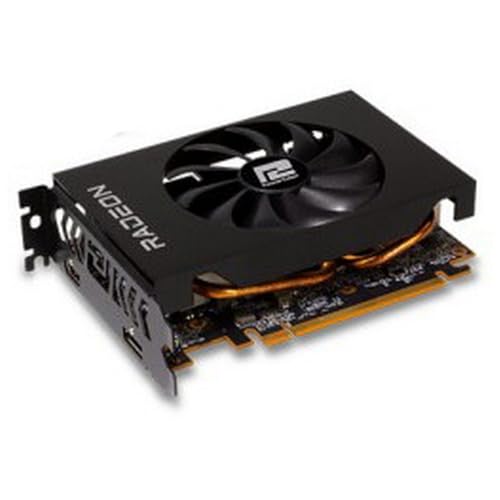
PowerColor RX 6500 XT ITX — Purpose-built ITX gaming
PowerColor put the letters ITX in this card’s name because the board was shortened for exactly the enclosures this guide is about, and that design intent shows in the single-fan layout that keeps length close to the motherboard’s own footprint. The RX 6500 XT carries 4GB of GDDR6 memory and AMD’s RDNA 2 architecture, a combination aimed squarely at 1080p gaming rather than at the display-only duties handled further down this list.
Played honestly, this card is an esports and mainstream-gaming pick. Competitive shooters, racing games and the enormous back catalogue of last-generation titles run well, and FidelityFX upscaling options in supported games extend its reach. The constraints deserve equal clarity: four gigabytes of memory forces texture discipline in recent releases, and the card’s media engine is leaner than the larger Radeons, so streamers who rely on GPU encoding should look at the RTX 3050 above instead.
For a builder choosing between this and a low-profile RX 550, the difference is not subtle. The 6500 XT is several performance classes higher and turns a Mini-ITX box into a machine that can host game night without apologies, provided the case gives its single fan a supply of cool air. It is the most straightforward gaming recommendation here for AMD-leaning builds and for anyone whose case length limit rules out even modest dual-fan cards.
- Memory: 4GB GDDR6
- Form: ITX short board, single fan
- Architecture: AMD RDNA 2
- Target resolution: 1080p gaming
Strengths
- Short board fits cases that reject standard-length cards
- GDDR6 memory and modern architecture deliver real 1080p pace
- Single-fan design keeps slot demands simple
Trade-offs
- Four gigabytes requires texture compromises in new releases
- Encoding features trail the NVIDIA alternative here
- Needs a case with a credible intake path
Best for: Mini-ITX gamers whose cases impose a strict card-length ceiling
Skip it if: you plan to stream with GPU encoding or chase maximum textures in brand-new games

51RISC Radeon RX 550 Low Profile — Low-profile all-rounder
The 51RISC Radeon RX 550 Low Profile approaches the ITX problem from the height direction rather than the length direction, using a half-height design for cases whose expansion area is too shallow for a full-height bracket. Its listing pairs 4GB of GDDR5 memory with small-form-factor and Mini PC language, and it advertises 4K display support, which describes output capability for desktop work rather than a promise of 4K gaming.
As a daily card, the RX 550 handles the jobs that make a tiny PC feel complete: several monitors for office work, smooth video playback, photo editing at hobby level and light games whose demands were set years ago. Esports titles at reduced settings and older strategy or role-playing games sit within its reach. Modern shooters at native resolution do not, and buyers should hold that line firmly when setting expectations for a household or office mini.
Where this card earns its place over the MAXSUN RX 550 further down is emphasis. The 51RISC pitch leans toward gaming-flavoured small desktops and Mini PCs that need a low-profile card with real GDDR5 memory rather than the DDR3 parts bin. Confirm the bracket arrangement in the listing photos against your case before ordering, because low-profile ownership is a game of millimetres and included brackets.
- Memory: 4GB GDDR5
- Form: low profile, small form factor
- Display role: multi-monitor desktop and 4K output
- GPU class: Radeon RX 550
Strengths
- Half-height shape opens cases closed to full-height cards
- GDDR5 memory keeps light gaming respectable
- Sensible fit for Mini PCs needing extra displays
Trade-offs
- RX 550 pace is light gaming only
- Bracket details must be checked against the exact case
- No modern upscaling or ray-tracing features
Best for: owners of half-height Mini PCs who want light gaming plus multi-monitor ability
Skip it if: your games are current AAA releases or your case already accepts a full gaming card

Gigabyte GTX 1060 Mini ITX OC 6GB — Older but genuinely quick
Gigabyte’s GTX 1060 Mini ITX OC 6GB is the veteran of this shortlist, a card from the era when the Mini ITX naming convention was established by exactly this kind of short, single-fan design. The important detail is the suffix: this is the 6GB GDDR5 version, materially stronger than the cut-down 3GB variant that shared its name, and that memory capacity is why the card remains usable long after many contemporaries faded.
At 1080p, a GTX 1060 still plays a wide library convincingly. The generation before current ray-tracing hardware is its natural home, and plenty of modern titles run acceptably once settings acknowledge the card’s age. What it cannot offer is the feature set newer buyers may assume: no hardware ray tracing worth enabling, no AI upscaling of the modern kind, and display standards from its period rather than the HDMI 2.1 found on the maxsun card at the top of this guide.
Buy it with clear eyes and it makes sense in a specific situation: a short-bay ITX case, a library weighted toward established games, and a preference for proven silicon with six gigabytes over newer cards carrying less memory. Check the power connector requirement against your small power supply before ordering, because cards of this generation were less shy about supplemental power than the slot-powered designs elsewhere here.
- Memory: 6GB GDDR5
- Form: Mini ITX, single fan, factory overclock
- Model code: GV-N1060IXOC-6GD
- Generation: Pascal-era GeForce GTX
Strengths
- Six gigabytes outlasts many newer budget cards
- Short board was designed for ITX enclosures
- Broad driver support across a huge game library
Trade-offs
- No modern ray tracing or AI upscaling
- Older display standards than the newest picks
- Power draw needs checking against small PSUs
Best for: ITX builders with older game libraries who value memory capacity and a short board
Skip it if: you want current features or the lowest possible power consumption

MAXSUN RX 550 4GB Low Profile — SFF and HTPC friendly
MAXSUN’s RX 550 low-profile card is pitched at the small-form-factor and home-theatre end of the ITX world, and its output pairing of HDMI plus DisplayPort reflects that dual life. A living-room mini can drive a television over HDMI while a desk-bound small desktop uses DisplayPort for a monitor, and the 4GB of GDDR5 memory on a 128-bit interface gives the card more substance than the DDR3 display adapters that crowd this corner of the market.
Performance expectations should be set by the RX 550’s class rather than by the word gaming in its title. It accelerates desktop work, handles video comfortably, plays light and older games, and gives an ageing small PC a modern-feeling display setup. It will not rescue a build intended for current demanding titles, and no settings menu can change that; the RTX 3050 and RX 6500 XT above exist for readers with those ambitions.
Its appeal against the 51RISC card is a matter of presentation and outputs rather than raw silicon, since both share the RX 550 foundation. Buyers choosing between them should compare bracket inclusions, the exact port arrangement photographed in each listing, and which card’s dimensions sit more comfortably in their specific chassis. In half-height cases either can be the card that finally lets the side panel close.
- Memory: 4GB GDDR5, 128-bit
- Form: low profile, ITX and SFF oriented
- Outputs: HDMI and DisplayPort
- Interface: PCI Express x16 3.0
Strengths
- DisplayPort plus HDMI covers desk and television setups
- GDDR5 memory beats DDR3 rivals in this size class
- Low-profile shape suits HTPC enclosures
Trade-offs
- Light gaming is the ceiling
- Shares its GPU class with a near-identical rival here
- Half-height bracket fit must be verified per case
Best for: HTPC and small-desktop owners wanting modern outputs in a half-height card
Skip it if: gaming is the primary purpose of the build

GeForce GT 610 2GB Low Profile — Basic display only
The GeForce GT 610 2GB Low Profile is included so that readers with the humblest requirement can find it honestly labelled: this card exists to put a picture on a screen. Its DDR3 memory, entry-level positioning and PCI Express 1.1 interface all belong to an earlier era, and its listing aims it at SFF and HTPC systems that need an HDMI or VGA output their motherboard lacks.
There are legitimate jobs here. A tiny office machine driving a single monitor, a legacy display that only accepts VGA, a diagnostic bench PC, or a home-theatre system whose needs stop at basic video output can all use a card like this, particularly when the alternative is replacing an otherwise serviceable computer. The low-profile shape fits enclosures that reject almost everything else in this guide.
What must not happen is a gaming purchase. The GT 610 cannot play modern games in any meaningful sense, struggles with anything beyond the lightest historical titles, and offers no acceleration features a current buyer would recognise. Every other card on this page is a better use of the same slot for entertainment; choose this one only when the task is a display, a spare output, or keeping an old small system useful.
- Memory: 2GB DDR3
- Form: low profile
- Outputs: HDMI and VGA
- Interface: PCI Express 1.1 x16
Strengths
- VGA output serves legacy monitors modern cards dropped
- Tiny, simple and easy to house in old SFF systems
- Adequate for basic desktop and video display
Trade-offs
- No credible gaming performance
- DDR3 memory belongs to an earlier generation
- Purchased for games, it will disappoint immediately
Best for: a small system that needs a basic or legacy display output and nothing more
Skip it if: entertainment of any kind is part of the plan
What Actually Limits a Graphics Card Inside a Mini-ITX Case?
Length is the limit builders meet first, because ITX cases route the graphics card along the motherboard’s edge and the front panel arrives quickly. Measure the bay with any front fans, radiators and cable bends included, then compare that figure against the card’s full length including its shroud, not just its circuit board. A card that technically fits but leaves the power cable crushed against the panel has not really fit; connectors need their own clearance, and top-mounted plugs behave differently from end-mounted ones in a shallow chassis.
Height and thickness cause quieter failures. Half-height cases accept only low-profile brackets, full-height ITX cases can still foul a tall cooler against a side panel, and a card that occupies two slots may sit so close to a perforated panel that its fans recycle their own exhaust. That is why the low-profile RTX 3050 and RX 550 cards in this guide matter: their value is measured partly in the air gap they preserve. When a case gives a card no intake path, even modest silicon runs hot and loud.
Power and heat form the final pair of constraints. Small power supplies in the 300-to-450-watt class are common in this form factor, and they reward slot-powered or lightly connected cards. Heat that a tower would shrug off accumulates in a ten-litre box, so a slightly slower card with a calmer cooler often delivers a better evening than a faster card throttling against a panel. Choose the card your case can feed and cool, and the performance figures in reviews start to resemble your own machine.
How Should You Match a Card to the Games You Actually Play?
Sort your library by release era and honesty will do the rest. Competitive and live-service games are usually engineered for enormous audiences on modest hardware, which is why the RX 6500 XT and RTX 3050 feel generous there, and why even an RX 550 can host a casual evening of older multiplayer titles. Story games from the last few years are the demanding end: they reward the RTX 3050’s upscaling and punish four-gigabyte cards with texture pop-in when settings are pushed carelessly.
Resolution discipline matters more in a small build than in a tower. Every card here is fundamentally a 1080p proposition for gaming, whatever its desktop output ceiling says, and a 4K television connected to an ITX living-room PC should be fed games rendered at 1080p and upscaled by the display. That single decision transforms the RTX 3050 from borderline to comfortable and keeps the GTX 1060 in respectable territory across its back catalogue.
Finally, weigh the non-gaming hours. A mini that spends weekdays driving three office monitors and weekends gaming has different priorities from a dedicated lounge machine, and the RX 550 cards earn their keep in the first life while the two leaders serve the second. The best purchase is the one whose strengths match the majority of the machine’s week, not the single most demanding hour of its year.
Side-by-Side: How the Six Cards Differ Where It Counts
| Card | Memory | Fit story | Honest role |
|---|---|---|---|
| maxsun RTX 3050 6GB | 6GB GDDR6 | Slim low profile | Modern 1080p gaming in tiny cases |
| PowerColor RX 6500 XT ITX | 4GB GDDR6 | Short ITX board | 1080p gaming where length is the limit |
| 51RISC RX 550 Low Profile | 4GB GDDR5 | Half-height | Light gaming plus multi-monitor Mini PCs |
| Gigabyte GTX 1060 Mini ITX OC | 6GB GDDR5 | Short single fan | Established 1080p library, older features |
| MAXSUN RX 550 Low Profile | 4GB GDDR5 | Half-height | HTPC and SFF display duties with light play |
| GeForce GT 610 | 2GB DDR3 | Half-height | Basic or legacy display output only |
The table compresses the guide’s central lesson: cards that share a shelf and a size class can sit four performance tiers apart. Memory type separates them as reliably as memory size, since GDDR6 and GDDR5 feed their GPUs far more effectively than the DDR3 on the GT 610. Use the table to shortlist by fit, then read the individual reviews to confirm the role matches your games, because a card chosen by dimensions alone can still be the wrong card by ambition.
Which Fitting Mistakes Ruin Small-Build Card Purchases?
The classic error is measuring the case’s advertised maximum card length and ordering a card that exactly equals it, leaving nothing for the power connector, the front-panel cables or the small bend every real installation needs. Advertised clearances assume an empty bay; your bay contains a front fan, a radiator or a wiring loom. Leave a working margin, and treat any card within a few millimetres of the limit as a card that does not fit.
Bracket confusion runs second. Low-profile cards sometimes ship with the full-height bracket fitted and the half-height bracket in the box, sometimes the reverse, and occasionally a listing photograph shows a configuration the package does not include. Read the listing’s contents description, confirm which brackets are supplied, and check that your case’s rear opening matches the card’s height before the box arrives on your doorstep.
Ignoring the power supply completes the trio. A card’s recommended wattage assumes a system around it, and ITX systems concentrate everything into a small unit that may also be ageing. Add up the build honestly, favour cards that sip rather than gulp, and never solve a missing connector with a chain of adapters inside a case where a loose cable has nowhere safe to rest.
How Do You Install a Card in a Case With No Spare Room?
Begin outside the case. Fit the correct bracket to the card on your desk, where screws are easy to see and nothing can fall onto the motherboard, and photograph the card beside a ruler if your measurements were close. Inside the case, remove the side panel and any drive tray or shroud section that crosses the card’s path, then route the display cables’ eventual path in your head before the card blocks your view of the rear panel.
Seat the card in the PCIe slot with even pressure until the latch closes, then secure the bracket screw before connecting power, because a card hanging only from its slot in a small case will sag against whatever sits beneath it. Connect the power lead with its bend planned rather than forced, and check the fan arc with a fingertip rotation of nearby cables: nothing should be able to drift into the blades when the panel goes back on.
First boot is a fitting test as much as an electrical one. Listen for fan contact, watch temperatures during a game’s opening minutes rather than at the desktop, and if the card runs far hotter than reviews suggest, suspect the intake path before suspecting the card. Many ITX builds gain more from one repositioned cable or a flipped case fan than from any software adjustment, because the hardware was never short of power, only of air.
How Does Cooling Behaviour Change When a Case Shrinks Around the Card?
A graphics card cooler is designed against an assumption that rarely survives contact with a Mini-ITX enclosure: that cool air exists somewhere nearby and that exhaust air has somewhere to go. In a tower, a card inhales from a large, mostly empty chamber and exhales into space shared with case fans that eventually move the heat outside. In a ten-litre ITX box, the same card may inhale through a perforated panel an inch from its fans, exhale directly onto a power supply shroud, and share its entire air supply with a processor cooler doing the same thing a few centimetres away. The silicon has not changed, but its environment has been replaced wholesale.
This is why two owners of the identical card can report temperatures fifteen degrees apart and both be telling the truth. The variable is the case’s breathing pattern. Cases that place the graphics card against a ventilated side panel, a layout popularised by sandwich-style ITX designs, feed the card fresh outside air and usually produce the best results for exactly the low-profile and short cards gathered in this guide. Cases that seal the card behind solid glass or aluminium and rely on a single rear exhaust ask the card to drink its own exhaust, and slim coolers with small fans suffer first and loudest under that arrangement.
Fan behaviour follows from the same physics. A small cooler has less heatsink mass, so it responds to load quickly, spinning up sooner and settling higher than a triple-fan tower card under the same game. That is not a defect to be cured but a character to be planned for: choose the card whose performance you need at a fan speed you can live with, because in a lounge or a bedroom the acoustic ceiling arrives before the thermal one. Undervolting, where a card’s software allows it, is the traditional small-build remedy, trimming heat with little performance cost, and it suits the RTX 3050 and RX 6500 XT particularly well since both have efficiency headroom at 1080p.
Cable discipline is the unglamorous half of cooling. In a tower, a stray cable is untidy; in an ITX case, a wiring loom draped across a card’s intake is a measurable temperature increase and a fan-noise complaint waiting for its first gaming session. Route display and power leads along the case edges, keep the volume directly in front of the card’s fans empty even when a storage drive would physically fit there, and resist the temptation to fill every cubic centimetre simply because the case allows it. Empty space inside a small case is not wasted space. It is the cooling system.
What Should You Know About Drivers, Longevity and Buying Older Compact Cards?
Three of the six cards in this guide belong to earlier hardware generations, and that fact carries consequences beyond raw speed that a buyer should weigh before the purchase rather than discover after it. Driver support is the largest. NVIDIA and AMD both retire architectures from their current driver branches on long cycles, and the GTX 1060’s Pascal generation and the GT 610’s far older lineage sit at very different points on that road. A card can remain perfectly functional for the games and desktop software of its era while receiving fewer optimisations, and eventually no updates, for new releases. For a machine with a fixed library that is a fair trade; for a machine expected to play whatever launches next spring, it is a slow expiry date printed in invisible ink.
Longevity also has a physical dimension in small cards. Compact coolers use small fans, and small fans that have spent years in a dusty enclosure are the component most likely to announce their age, first with a rattle at certain speeds and later with heat they can no longer clear. When buying any older-generation card, inspect what you can: fan movement should be free and quiet when spun gently by hand before installation, the heatsink fins should be clear, and the card’s gold fingers should be clean. These are thirty-second checks that separate a cared-for veteran from a card at the end of its service.
There is also the question of what an older card cannot connect to. Display standards moved quickly: the newest televisions and high-refresh monitors assume HDMI 2.1 or recent DisplayPort revisions for their headline features, and an older card may light the screen perfectly well while declining the refresh rate or variable-refresh mode the display was bought for. The GT 610’s VGA port runs this film backwards, serving screens the newest cards have abandoned. Match the card’s outputs to the display you actually own, not the display category you might own one day, because the connector panel is where generational age becomes visible every single day.
None of this makes the older picks poor purchases; it makes them purchases with a defined horizon. The GTX 1060 in this guide will play its library for years. The RX 550 cards will drive office monitors long after their gaming relevance fades, which is precisely the second career most small cards eventually serve. Buy the horizon you need, pay accordingly, and an older card is not a compromise at all. It is simply a tool bought for the years it will actually be used.
Which Small Builds Suit Which Card on This Page?
Consider the lounge build first, because it is the Mini-ITX machine most households actually assemble. It lives in or under a media unit, connects to a television, and is asked for couch gaming, streamed video and the occasional party game. For that machine the RTX 3050 leads this guide on merit: HDMI 2.1 for the television, upscaling for comfortable 1080p rendering on a large screen, and a slim shape that tolerates the shallow cabinets media furniture provides. The MAXSUN RX 550 is the lounge build’s budget understudy, entirely adequate when the machine is a video and light-gaming box rather than the household’s main gaming seat.
The desk build divides differently. A student or home-office mini spends its week on documents, calls and multiple monitors, then games in the evening. Here the RX 6500 XT’s short board suits the compact cases that fit under or beside a monitor, and its gaming pace covers the evening honestly, while the 51RISC RX 550 serves the version of this machine whose owner plays older titles and values the extra display outputs over frame rates. The deciding question is not which card is better in the abstract but which half of the machine’s week you are buying for.
The carried build, the LAN-party and travel machine, adds a constraint neither lounge nor desk imposes: the card must survive being moved. Short, light, single-fan cards with no heavy overhanging cooler travel best, because every journey tests the PCIe slot’s grip on the card. That points again to the RX 6500 XT and the GTX 1060 Mini ITX, both designed short and both light enough not to lever against their slot when the case rides in a car. A padded bag and a powered-off, fully cooled machine complete a routine that has kept small builds alive through years of events.
Finally there is the rescued build, the ageing small desktop given a second life rather than a replacement. These machines have weak power supplies, half-height brackets and processors from another era, and they are where the low-profile RX 550 cards and even the GT 610 find their honest work. The goal is not transformation but usefulness: modern outputs, smooth desktop behaviour, a second or third monitor. Judged against that goal rather than against gaming benchmarks, the cheapest cards in this guide are sometimes the most successful purchases in it.
How Do You Read a Small-Card Listing Without Being Misled by It?
Compact graphics cards are sold with some of the loosest language in the component market, because words like mini, slim and small-form-factor carry no enforced standard. One maker’s slim card is a low-profile board with a half-height bracket; another’s is a full-height card that is merely shorter than average. The defence is to read every listing as a set of physical claims and test each one. Bracket height is a claim. Board length, when given, is a claim. The photographs are claims too, and often the most honest part of the page: count the slots the cooler occupies, look at where the power connector sits, and check whether the bracket in the picture is the bracket your case needs.
Memory language needs the same scepticism. A card advertised with four gigabytes may carry GDDR5, which feeds a small GPU properly, or DDR3 and DDR4 variants that share the headline number while delivering a fraction of the bandwidth. This guide separates those cases wherever they appear, because capacity without bandwidth is a number that flatters the box and disappoints the owner. When a listing does not state the memory type plainly, treat that silence as information: sellers announce GDDR5 and GDDR6 loudly, and quiet listings usually have something quieter to sell.
Output photographs deserve a slow look as well. Two cards with the same GPU can ship with entirely different rear panels, one offering DisplayPort for a modern monitor and the other offering a legacy port mix aimed at older screens. In a small build the rear panel is not a detail, since the card may be the machine’s only display source. Confirm the exact ports, count them against your monitors, and remember that adapters solve some mismatches while creating others, particularly where variable refresh or high refresh rates are involved.
Finally, weigh the seller’s own positioning. Listings for the cards in this guide describe their intended homes in their titles: gaming PC, HTPC, small form factor, Mini PC. Those phrases are marketing, but they are also confessions, because a maker gains nothing by aiming a display adapter at gamers who will return it. When the title says entry level, believe it. When it says low profile, measure for it. The listing is trying to tell you what the card is; the skill is reading it literally rather than hopefully.
What Happens After the Build: Living With a Compact Card
Ownership of a small gaming PC has a rhythm of its own, and the graphics card sets much of it. Dust arrives faster in a compact case because the air path is short and the filters, where they exist, are small; a quarterly blast of air through the card’s heatsink and the panel perforations beside it preserves the temperatures you measured on the first week. Owners who skip this ritual meet it later as fan noise, because a clogged slim cooler compensates the only way it can. Build the habit when the machine is new and it costs two minutes four times a year.
Software settings repay a similar small investment. Cap frame rates to your display’s refresh rate in games where the card can run far beyond it, because frames the screen cannot show are heat the case must still remove. Use the upscaling options modern titles offer on the RTX 3050 and RX 6500 XT rather than brute-force rendering, and let older games on the GTX 1060 and RX 550 cards run at the settings their generation was designed for. A small build tuned with this kind of sympathy runs cooler, quieter and longer than one driven at its limits daily.
Upgrading follows a different logic from a tower, too. In a big case, a card upgrade is a purchase; in a Mini-ITX case it is a renegotiation with every dimension at once, and the used market for compact cards is correspondingly lively, since yesterday’s short card fits tomorrow’s small build just as well. This is one more argument for buying the recognised designs in this guide rather than obscure one-off boards: a card with a known name, known dimensions and a known bracket is a card the next small-build owner can evaluate in a minute.
None of these habits are burdensome, and together they explain why small builds inspire a loyalty out of proportion to their size. A Mini-ITX machine asks its owner to understand it, and rewards that understanding with a computer that disappears into a room while still playing the games the household loves. The right graphics card is the component that makes that bargain possible, which is why the measuring in this guide matters more than the benchmarking.
Why Do Builders Choose Mini-ITX at All, and What Does That Choice Ask of the Card?
Every Mini-ITX build begins with a refusal: a refusal to give a computer the footprint of a small suitcase merely because that is the shape gaming PCs have traditionally taken. The motives vary. Some builders want a machine that belongs in a living room without announcing itself. Some work at desks where the surface is shared with books, instruments or a second job entirely. Some simply enjoy the discipline of a system where every component was chosen because it earned its volume. Whatever the motive, the graphics card is where the refusal is tested hardest, because it is the largest, hottest and most power-hungry component in the machine, and the one whose standard form assumes the most space.
That test explains the shape of this entire shortlist. Notice what is absent: there are no dual-fan performance cards trimmed by optimism, no models whose smallness is a marketing adjective rather than a dimension. Every card here was designed against a constraint, whether that constraint is bracket height, board length or the thermal ceiling of a half-height chassis. The ITX ecosystem rewards that honesty, because a case designer and a card designer working to the same measurements produce machines that feel inevitable, each part sliding into the space the other left for it.
The choice also asks something of the owner that a tower never does: acceptance of a ceiling. A Mini-ITX gaming PC built around the cards in this guide is a 1080p machine with excellent manners, not a 4K showcase waiting for a bigger card. Builders who accept that ceiling at the planning stage build once and enjoy the result for years. Builders who fight it spend those years on a sequence of almost-fitting upgrades. The cards above are ranked, in the end, by how gracefully they live under that ceiling, and the best of them make it feel less like a limit than like the natural size of the hobby.
A Short Word on Noise, Because Small Cases Sit Close to Their Owners
Tower PCs traditionally live on floors and under desks, at a distance that forgives a busy cooler. Mini-ITX machines live on the desk itself, on a shelf beside the television, or in a media cabinet whose door turns it into a small echo chamber, and at those distances the graphics card’s fan is a presence in the room rather than a rumour from below. This changes how the cards in this guide should be judged. The slim coolers on the low-profile models spin small fans at higher speeds, producing a higher-pitched note that some owners find more noticeable than a larger card’s deeper hum at the same measured volume.
The practical response is to buy performance headroom you may not strictly need. A card working at sixty percent of its capacity in your favourite game is a quiet card, while a lesser card at its absolute limit is a loud one, even when both deliver the same frame rate. That is a genuine argument for the RTX 3050 over an RX 550 in a lounge build whose games the smaller card could technically run: the stronger card will run them calmly. Fan curves in the driver software complete the picture, letting owners trade a few degrees for a few decibels in exactly the proportions their room prefers.
One last fitting habit separates smooth small builds from frustrating ones: dry-fit everything before a single screw is tightened. Lay the card in place, close the panel, and look through every vent and seam for contact, cable pinch or a fan sitting flush against solid material. Panels flex, brackets vary by a fraction, and a dry fit converts those surprises into adjustments made calmly on a desk instead of discoveries made with the machine half-assembled. Ten unhurried minutes at this stage have saved more small builds than any tool in the box.
Keep the measurement notes from your build somewhere durable, too. The exact clearance figures, the bracket the card arrived with and the power connector’s position will matter the day you shop for this machine’s next card, and future you will be grateful not to reopen the case with a ruler before browsing. Small builds reward record-keeping because their margins are written in millimetres rather than in the generous centimetres tower owners enjoy.
Final Recommendation
Most readers should start with the maxsun RTX 3050 6GB if its slim shape suits the case, because it is the only card here that combines current features, six gigabytes of fast memory and genuinely compact dimensions. AMD-leaning builders and the tightest length limits point to the PowerColor RX 6500 XT ITX instead, while half-height cases without gaming ambitions are served honestly by either RX 550. The GTX 1060 remains a defensible veteran purchase, and the GT 610 should be bought only for a display. Measure twice, because in a Mini-ITX build the card you can close the case on is the fastest card you own.
Frequently Asked Questions
Will any standard-length card fit if I remove the front fan?
Sometimes, but you are trading the case’s intake airflow for length, and a longer card then sits in still air of its own making. The short and low-profile designs in this guide exist so that compromise is unnecessary, and they usually deliver a quieter machine than a full-size card wedged into a starved bay.
Is 4GB of memory enough for a Mini-ITX gaming PC?
For esports titles, older games and 1080p play with managed texture settings, yes, and the RX 6500 XT proves the point daily in small builds. For the newest releases at high settings it is a real constraint, which is why the six-gigabyte RTX 3050 and GTX 1060 in this guide carry a longer useful life for demanding libraries.
Do low-profile cards perform worse than full-height versions?
The GPU itself is usually the same silicon; the compromises live in cooling capacity and clock headroom under sustained load. In a well-ventilated small case the difference is modest, while in a sealed half-height enclosure the smaller cooler works harder. Judge by the card class first and the cooler second.
Can a Mini-ITX PC drive a 4K television?
For desktop output and video, several cards here advertise 4K display support and handle it comfortably. For gaming, render at 1080p and let the television upscale, because none of these compact cards sustains native 4K play in modern titles. The HDMI 2.1 connection on the RTX 3050 makes it the cleanest lounge pairing of the six.
What power supply does a small gaming build need?
The slot-powered and lightly connected cards in this guide were chosen partly for modest appetites, and a quality small-form-factor unit in the common 300-to-450-watt range covers most of them. Check the specific card’s connector requirement, add the rest of your system honestly, and keep headroom rather than running a small unit at its ceiling.
Should I buy the GTX 1060 or save for the RTX 3050?
If your library is established titles at 1080p and the price gap is decisive, the GTX 1060 still performs its job. If you play current releases, value upscaling, or connect to a modern television, the RTX 3050’s features repay the difference quickly. The deciding factor is the games list, not the badge on the box.
Related Guides
Length is only one axis of small-card shopping, and our companion roundup of best mini graphics cards looks at short cards for compact cases without the strict ITX fit rules applied here. Readers whose small machine earns its living in design software should continue to best cad cam graphics cards for a frank look at professional and semi-professional options. And when the budget is the tightest dimension of all, best low profile graphics cards under 60 maps what the lowest spending tier can and cannot do.
Related guides
- Best Gaming Keyboard: Six Boards From Rapid-Trigger Esports Picks to Macro Flagships
- Best 3.0 Qualcomm Quick Chargers: QC 3.0 Adapters That Still Earn Their Outlet
- Best Time Machine Compatible Hard Drives: Mac-Ready and Reformatted Picks
- Best 3D Mechanical Engineering Laptops: Certified Workstations for CAD and Simulation


