What's inside
- Key Takeaways
- Quick Picks
- How Did We Choose the Best NAS Hard Drives for Film?
- What Does a Film Library Actually Ask of a Drive?
- The Six Drives, Examined One by One
- How Do the Six Library Drives Compare?
- How Many Streams Can a Spinning Library Really Serve?
- How Should a Film Library Be Organised on the Pool?
- What Does a Filmmaker’s Ingest Day Ask of the Library?
- How Should a Household Handle Players That Cannot Play?
- How Loud Is a Library, and Where Should It Live?
- What Does the Catalogue Itself Do to the Drives?
- When Does a Library Outgrow Its Enclosure Rather Than Its Drives?
- How Should the Set Be Bought: All at Once, or Bay by Bay?
- What Does a Well-Kept Library Feel Like After a Year?
- What Backup Does a Film Library Deserve?
- Which Library Mistakes Do Owners Make at the Drive Shelf?
- Final Recommendation
- Frequently Asked Questions
- Related Guides
As an Amazon Associate I earn from qualifying purchases. This post may contain affiliate links at no extra cost to you.
widgetverdict.com is reader-supported. When you buy through links on our site, we may earn an affiliate commission.
Where to buy: all six drives below link to their Amazon listings under their full product names, and every one is a large CMR NAS drive in the twelve to thirty-two terabyte class — the sizes a serious film library actually consumes.
A film library is storage with an appetite and a memory. It grows by whole terabytes in a single weekend of shooting or ripping, it is read in long, smooth, sequential streams when the household sits down to watch, and it is expected to hold a family’s or a studio’s entire moving-image history — the 4K masters, the camera originals, the finished edits and the comfort rewatches — without ever asking anyone to delete something loved to make room for something new. The best NAS hard drives for film are therefore chosen on a different axis from ordinary file storage: capacity per bay first, calm sequential behaviour second, and the array manners to survive in a multi-bay enclosure that runs every evening of the year. All six picks here are CMR NAS drives between twelve and thirty-two terabytes, from the two families that dominate the field.
One clarification belongs at the top, because it decides budgets. A hard drive does not transcode. When a NAS converts a film on the fly for a phone, a hotel television or an older player that cannot handle the original file, that work is done by the enclosure’s processor, and no drive in this guide — however large, however fast its spindle — will rescue a NAS whose chip cannot keep up. What the drive decides is whether the library fits, whether several rooms can stream at once without the disks becoming the bottleneck, and whether the collection survives the failure of any single disk. Buy the drives for those jobs, and judge the NAS’s processor separately for the transcoding question.
Key Takeaways
- Film libraries are capacity problems wearing a storage costume: the picks run from 12TB to a 32TB flagship because bays fill faster than owners expect.
- Streaming is sequential reading, the workload spinning NAS drives are happiest doing, provided several simultaneous viewers share the set sensibly.
- Transcoding belongs to the NAS processor, not the drive — no pick here can fix a weak chip, and none should be bought to try.
- Every pick is CMR, which keeps array rebuilds predictable when a library drive eventually fails mid-collection.
- The IronWolf Pro 32TB states a 550TB/yr workload class with a five-year warranty and three-year Rescue cover in its listing — the heavy-duty end of this guide.
- Keep the library’s catalogue and the films themselves backed up on separate logic: redundancy protects uptime, not against deletion or disaster.
Quick Picks
| Pick | Badge | Why it earns its place |
|---|---|---|
| Seagate 32TB IronWolf Pro Internal NAS Hard Drive (ST32000NT000) | The flagship archive | Thirty-two all-CMR terabytes with a stated 550TB/yr workload class for libraries measured in tens of thousands of hours. |
| Seagate IronWolf Pro 24TB Enterprise NAS HDD (ST24000NT002) | The multi-room engine | Twenty-four CMR terabytes at 7200 RPM with a 512MB cache, sized for households streaming to several screens at once. |
| Western Digital 22TB WD Red Pro NAS HDD (WD221KFGX) | The Red flagship | Twenty-two terabytes of Red Pro specification for collectors who standardise on Western Digital’s Pro line. |
| Western Digital 12TB WD Red Pro NAS HDD (WD122KFBX) | The starter library | Twelve Pro terabytes for a first serious film NAS whose owner wants room to grow into the collection. |
| Seagate IronWolf 16TB NAS HDD (ST16000VN001) | The proven middle | Sixteen CMR terabytes from the standard IronWolf line that a generation of media servers already runs. |
| Seagate IronWolf Pro 14TB NAS RAID HDD (ST14000NE0008) | The fleet match | Fourteen Pro terabytes at 7,200 RPM for expanding libraries already built on this generation. |
How Did We Choose the Best NAS Hard Drives for Film?
The first filter was honest capacity. A film guide that led with four-terabyte drives would be lying about the workload: a single 4K disc rip can occupy the space of hundreds of documents, a family’s camera footage arrives in seasonal floods, and a working editor’s project folder is a library inside the library. So the floor here is twelve terabytes and the ceiling is thirty-two, with the understanding that these drives are bought in sets — the pool they form, minus whatever redundancy the owner chooses, is the library’s real size. The second filter was recording method: CMR throughout, because a library array’s rebuild day is the day a decade of collecting is at risk, and that day should be as short and predictable as engineering allows.
The third filter was class. Every pick is a NAS drive — multi-bay vibration tolerance, continuous-duty design, array-friendly error behaviour — rather than a desktop or surveillance disk pressed into library service, because a film NAS is an always-on multi-drive machine whose disks must be citizens of an enclosure, not guests. Within those filters, the list spans both manufacturers and both their standard and Pro tiers, so that the owner of an existing IronWolf fleet and the owner standardising on Red Pro each find their next drive argued on its merits.
What Does a Film Library Actually Ask of a Drive?
Less drama than most workloads, and more patience. Writing arrives in great smooth pours — a rip, a shoot ingest, a download completing — and reading leaves the same way, a film streamed start to finish at a steady, modest rate that even one drive could serve alone. The demands appear at the edges. Several rooms streaming at once turn one smooth read into several, scattered across the pool. A library manager scanning and fingerprinting ten thousand files for its catalogue makes the drives dance. A parity scrub or a rebuild turns the whole set into a construction site for a day. And the nightly backup, the media analysis, the thumbnail generation all queue politely in the small hours, so the drives of a film NAS enjoy neither a true rest nor a predictable one.
Capacity pressure is the constant underneath everything. Film collectors do not delete; they accumulate, and the honest planning unit is not the library’s size today but its size after the next format enthusiasm — the household that moves from HD to 4K multiplies its appetite per title without watching a single extra minute. This is why the guide’s centre of gravity sits at sixteen terabytes and above, and why the buying advice keeps returning to headroom: the cheapest terabyte is the one bought before the pool is full, in the drive size the set was designed around, rather than in a panic purchase the week the library software starts refusing new additions.
The Six Drives, Examined One by One
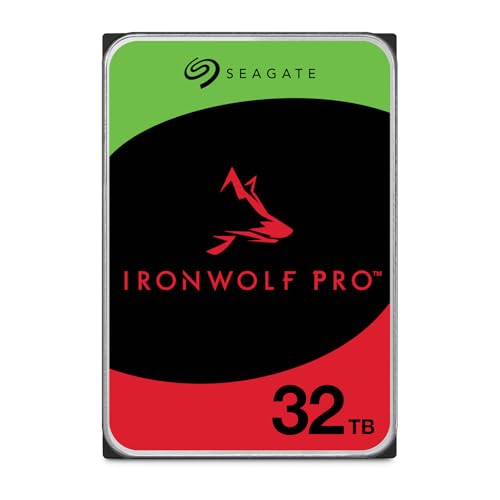
Seagate 32TB IronWolf Pro Internal NAS Hard Drive (ST32000NT000) — The flagship archive
Thirty-two terabytes in a single bay reframes what a film library can be. A four-bay NAS built on the ST32000NT000 holds a collection that would have needed a rack a decade ago — the complete works, in their best available quality, with the camera originals and the finished projects living beside the viewing library instead of exiled to a shelf of portable drives. Seagate’s listing states the flagship’s credentials plainly: all-CMR recording, AgileArray firmware, a workload class of 550TB per year, a five-year warranty and three years of Rescue cover. That workload figure matters for working archives — the studio ingest station, the family historian digitising everything — because it describes a drive specified for a life of genuine writing, not merely of holding.
The flagship discipline from elsewhere in this cluster applies undiluted: at thirty-two terabytes, a rebuild is a long, supervised event, and the array around this drive should be designed as if its owner has read the warnings — real redundancy, a matched spare, a backup of the irreplaceable originals somewhere the NAS cannot reach. Given that company, the 32TB IronWolf Pro is the drive for the collector who has stopped asking whether the library will grow and started asking only where it will live. It is also, quietly, the end of an excuse: at this density, the library’s limits are set by taste and time, not by the hardware’s hospitality.
- Capacity: 32TB
- Recording: All-CMR
- Interface: SATA
- Model: ST32000NT000
- Stated workload: 550TB/yr
- Stated cover: 5-year warranty plus 3-year Rescue
- Features: AgileArray, 24/7 professional NAS duty
Strengths
- The largest library capacity available in a single bay here.
- A stated 550TB/yr workload class for archives that are written as hard as they are read.
- Five-year warranty and Rescue cover stated in the listing itself.
Trade-offs
- A failed member at this size means the array’s longest, most carefully watched rebuild.
- Concentrates an enormous share of any collection onto each spindle.
- Its price across a full set is a commitment, not an experiment.
Best for: serious collectors and working studios building the library’s final, largest home. Not suited for: casual collections, where its scale and cost answer questions nobody asked.

Seagate IronWolf Pro 24TB Enterprise NAS HDD (ST24000NT002) — The multi-room engine
In server company this same drive is judged on array duty; in a film library it should be judged on a Friday night. Twenty-four CMR terabytes at 7200 RPM with a 512MB cache is the specification of a drive that can hold a household’s whole collection and serve it in parallel — the film in the living room, the series in the bedroom, the children’s favourite in the kitchen, each stream reading from the pool at once — without the disks becoming the reason any of them stutters. The big cache earns its keep precisely here, smoothing the scattered reads of several simultaneous viewers into something the spindles can serve gracefully.
Twenty-four terabytes also hits a sweet spot in library economics. It is large enough that a modest bay count builds a genuinely archival pool, yet each member’s failure, when it comes, removes a survivable share of a well-designed set and rebuilds in a window that can be planned rather than feared. For the household whose NAS is really a private streaming service — several people, several screens, one beloved catalogue — the ST24000NT002 is the engine room choice: Pro specification, Rescue Services behind the collection, and capacity that postpones the next expansion argument for years.
- Capacity: 24TB
- Recording: CMR
- Spindle speed: 7200 RPM
- Cache: 512MB
- Interface: SATA 6Gb/s
- Model: ST24000NT002
- Included support: Rescue Services
Strengths
- Capacity and cache sized for several simultaneous streams from one pool.
- Pro specification with Rescue Services behind the collection.
- A set of these builds an archival pool in very few bays.
Trade-offs
- Rebuilds are long and deserve supervision and a spare.
- Single-viewer households pay for parallel capacity they rarely use.
- Still bounded by the NAS processor for any transcoding the household needs.
Best for: multi-screen households and shared family libraries with heavy evening use. Not suited for: a one-television household, where the sixteen-terabyte tier serves the same films for less.

Western Digital 22TB WD Red Pro NAS HDD (WD221KFGX) — The Red flagship
Western Digital’s answer to the flagship question is the WD221KFGX: twenty-two terabytes of Red Pro — 7200 RPM, CMR recording, a 512 MB cache — for collectors whose libraries already live on Red drives and whose next expansion should speak the same language. In a film NAS the Red Pro flagship’s virtues are the quiet ones: a pool that swallows a 4K collection’s growth without monthly management, sequential manners that streaming rewards, and a specification that treats the enclosure’s other residents — parity calculations, catalogue scans, the nightly analysis jobs — as ordinary work rather than an imposition.
The two-terabyte gap to Seagate’s 24TB model is real but rarely decisive; fleets are built on ecosystems as much as on arithmetic, and a Red Pro household gains more from uniformity — one health dialect, one spare on the shelf, one replacement conversation — than from chasing the largest number across brands. Where the 22TB Red Pro earns a fresh buyer’s attention is in a new large library standardised on Western Digital from the start: it is within touching distance of the capacity ceiling, with the Pro line’s full specification, and it leaves the enclosure’s remaining bays as the collection’s future rather than its apology.
- Capacity: 22TB
- Recording: CMR
- Spindle speed: 7200 RPM
- Cache: 512 MB
- Interface: SATA 6 Gb/s
- Model: WD221KFGX
Strengths
- Near-flagship capacity with the complete Red Pro specification.
- Keeps a Western Digital library uniform in health, spares and behaviour.
- Sequential streaming manners matched to how films are actually read.
Trade-offs
- Two terabytes per bay behind the largest IronWolf Pro here.
- No bundled rescue service of the Seagate kind.
- Long rebuilds, as with every drive at this altitude.
Best for: Red Pro households expanding to flagship scale, and new large libraries standardising on Western Digital. Not suited for: IronWolf fleets, which should keep their uniformity at twenty-four terabytes instead.

Western Digital 12TB WD Red Pro NAS HDD (WD122KFBX) — The starter library
Every serious library starts with a first serious drive, and the twelve-terabyte Red Pro is this guide’s candidate for that role. WD122KFBX carries the full Pro recipe — 7200 RPM, CMR, a 512 MB cache — at the capacity where a new film NAS stops being a toy: a four-bay set of these holds a young 4K collection, a decade of family footage and the working projects, with headroom that survives the first enthusiasm. Choosing the Pro tier at the start is the decision veterans recommend, because the library will be expanded, rebuilt and relied on for years, and the drives bought first set the standard every later purchase must match.
The honest question this pick must answer is whether twelve is enough ambition. A collector arriving with an existing archive should measure it before ordering — libraries are routinely twice the size their owners guess — and a household at the beginning of a 4K transition should plan for the appetite after the transition, not before it. If the arithmetic lands anywhere near the pool a set of twelves provides, this is the balanced place to begin. If it lands beyond, begin at sixteen or twenty-two instead; the starter library’s only real failure mode is being outgrown before its drives have had time to become familiar.
- Capacity: 12TB
- Recording: CMR
- Spindle speed: 7200 RPM
- Cache: 512 MB
- Interface: SATA 6 Gb/s
- Model: WD122KFBX
Strengths
- Full Pro specification at the entry size for a serious film NAS.
- A four-bay set builds a real library with real headroom.
- Rebuilds at twelve terabytes stay within a planned evening-and-night window.
Trade-offs
- Existing large archives will outgrow it before the drives age.
- Pro pricing at the smallest capacity here is a deliberate investment.
- Households mid-transition to 4K should size for afterwards, not before.
Best for: first serious film libraries and growing family archives on the Red Pro standard. Not suited for: collectors migrating an already-large archive, who should start at the flagship tiers.

Seagate IronWolf 16TB NAS HDD (ST16000VN001) — The proven middle
Sixteen terabytes is where the standard IronWolf line tops out in this guide, and the ST16000VN001 has become a default media-server drive by the simplest route: years of uneventful service in other people’s libraries. Its specification is the familiar one — CMR recording, 7200 RPM, a 256 MB cache, Rescue Service included — and in a film NAS that translates into a drive that ingests a weekend’s rips without complaint, streams to the household’s screens without becoming the story, and asks for nothing but a scrub schedule and a cool enclosure in return. For the library that has outgrown its first enclosure and is being rebuilt at honest scale, a set of these is the choice that needs no defending at the dinner table.
It is also the natural expansion citizen for the many libraries already running its smaller siblings: same family, same health language, a capacity step that doubles an eight-terabyte set in a single renewal. The staging rule from the rest of this cluster applies — one member at a time, full resyncs between, the pool’s expansion arriving when the last smaller drive retires — and owners who follow it end with a library that grew without ever having been at risk. In a guide with a thirty-two-terabyte flagship at the top, the sixteen is the reminder that most collections are served best not by the largest drive, but by the right one, bought in a matched set, at the moment the old pool’s headroom ran out.
- Capacity: 16TB
- Recording: CMR
- Spindle speed: 7200 RPM
- Cache: 256 MB
- Interface: SATA 6GB/S
- Model: ST16000VN001
- Included support: Rescue Service
Strengths
- A long-serving media-server standard with Rescue Service included.
- The balanced capacity for libraries rebuilding at honest scale.
- Doubles eight-terabyte IronWolf sets in one staged renewal.
Trade-offs
- Standard tier, so the heaviest ingest workloads sit below the Pro specification.
- Half the flagship’s capacity per bay, which bay-poor enclosures will feel.
- Its cache is half the size of the Pro models either side of it here.
Best for: established home libraries expanding or rebuilding at the sixteen-terabyte tier. Not suited for: working studios ingesting daily, which belong on the Pro specification.

Seagate IronWolf Pro 14TB NAS RAID HDD (ST14000NE0008) — The fleet match
The fourteen-terabyte IronWolf Pro ST14000NE0008 is in this guide for the libraries that already trust it. A 7,200 RPM Pro drive specified for NAS RAID service, it belongs to the generation that powered a great many media servers’ first serious incarnation, and its continuing role is the honourable one of the matched replacement: when a member of a fourteen-terabyte set fails in year four, this is the drive that restores the pool to exactly itself, same capacity, same behaviour, same health dialect, with no stranded terabytes and no mixed-set compromises.
Fresh buyers should read its presence as a lesson rather than a recommendation to start here — new libraries should begin at sixteen terabytes or above, where the current tiers live — but existing owners should read it with relief. A library is a long commitment, and the availability of the exact drive a set was built on, years later, is what separates a platform from a purchase. Keep one on the shelf if your pool runs these, and the collection’s middle age will be as uneventful as its youth, which is the entire ambition of library storage stated in one sentence.
- Capacity: 14TB
- Spindle speed: 7,200 RPM
- Interface: SATA 6 Gb/s
- Form factor: 3.5-inch
- Model: ST14000NE0008
Strengths
- The exact matched replacement for libraries built on this Pro generation.
- Pro specification at 7,200 RPM for RAID NAS service.
- Keeps an ageing set uniform instead of forcing a mixed rebuild.
Trade-offs
- New libraries should start at the larger current tiers.
- Its value is fleet-specific; it argues weakly to a first-time buyer.
- Fourteen terabytes still means a substantial rebuild window.
Best for: owners maintaining IronWolf Pro fourteen-terabyte libraries and their spares shelves. Not suited for: a brand-new film NAS, which should be founded at sixteen terabytes or beyond.
How Do the Six Library Drives Compare?
| Drive | Capacity | Tier | Library role |
|---|---|---|---|
| IronWolf Pro ST32000NT000 | 32TB | Pro flagship | The final archive |
| IronWolf Pro ST24000NT002 | 24TB | Pro | Multi-room streaming sets |
| WD Red Pro WD221KFGX | 22TB | Red Pro | Red-standard flagship libraries |
| WD Red Pro WD122KFBX | 12TB | Red Pro | First serious libraries |
| IronWolf ST16000VN001 | 16TB | Standard | The proven middle tier |
| IronWolf Pro ST14000NE0008 | 14TB | Pro | Matched fleet replacements |
The spread tells the library story in one view: capacities from twelve to thirty-two terabytes, because collections differ by an order of magnitude and the enclosure’s bays do not multiply to compensate. What does not vary is the class — CMR, NAS-rated, array-ready — because a film library’s drives share one enclosure and one destiny. Choose the tier by the collection you honestly have plus the growth you honestly expect, and the table stops being a comparison and becomes a map.
How Many Streams Can a Spinning Library Really Serve?
More than intuition suggests, provided the streams are honest video and not a disguised stress test. A single modern film stream asks the pool for a steady, modest flow of data; a household’s worth of simultaneous viewers asks for several such flows from scattered positions on the disks, which a healthy multi-drive set handles as ordinary work — the array’s parallelism, so irrelevant to a single viewer, becomes the whole story at four. The limits arrive from elsewhere first: the enclosure’s network connection, the home’s wireless coverage in the far bedroom, and the processor’s transcoding queue when several viewers each need the film converted into something their device understands.
That last limit deserves repeating in the streaming context, because it is the one most often misdiagnosed as a drive problem. When playback stutters only on the television that needs transcoding, while the direct-play screens run flawlessly from the same pool at the same moment, the drives have already given their evidence: the storage is fine, and the processor is the queue. The cures live in the NAS’s settings and hardware — pre-transcoded versions for the needy devices, a processor tier chosen for the household’s real habits — and not in a larger drive. Buy these disks for capacity and calm; let the enclosure’s chip answer for conversion.
How Should a Film Library Be Organised on the Pool?
Organisation is a drive issue in disguise, because a library’s layout decides how its disks work. Keep the viewing library, the working projects and the archive in separate shares with separate habits: the viewing library is read-mostly and precious, the project share is written constantly and churns, the archive is written once and worshipped. That separation lets backups be designed honestly — the archive and the finished library backed up as the treasures they are, the project share backed up as the changing work it is — and it keeps a runaway project folder from silently eating the pool the films were promised.
Leave headroom as a deliberate policy, not an accident. A pool run at the brim makes every operation slower and every expansion an emergency; a pool with a fifth of its space in reserve gives the filesystem room to breathe, the owner room to reorganise, and the collection room to absorb the holiday ingest before the next drive decision is due. When the reserve starts shrinking on trend — not after one big weekend, but across a season — that is the expansion signal, delivered early enough to act on calmly: another matched drive if a bay waits, or the staged step up to the next tier from this guide if the set is full.
What Does a Filmmaker’s Ingest Day Ask of the Library?
For the working filmmaker, the library is not a cinema but a loading dock. A shooting day ends with cards full of footage that must be copied, verified and backed up before the cards can be wiped for tomorrow, and that ingest is the heaviest writing the drives will ever do: hundreds of gigabytes arriving as fast as the reader and the network allow, while the array also computes parity for every byte. The drives in this guide are specified for exactly this rhythm — the flagship IronWolf Pro’s stated 550TB/yr workload class exists for archives that are written like this weekly — and the practical habits matter as much as the specification: ingest to the array once, verify by checksum rather than by file size, and let the backup of the day’s originals complete before a single card is formatted.
The editing phase reads the library differently. Scrubbing through footage is a scattered, impatient workload — forwards, backwards, three frames at a time — and while spinning drives serve it adequately for a single editor, a cutting room with several seats will find the array’s limits in latency rather than capacity. The architecture that respects both truths is tiered in spirit even when it is simple in fact: the library on these large drives as the home of everything, the current project’s working set on fast local storage at the edit seat, and a disciplined movement of finished work back to the pool. The drives’ job is to be the place nothing is ever lost from; the workstation’s job is to be the place everything is quickly found. Confusing those jobs is how libraries end up blamed for an editing experience they were never hired to provide.
How Should a Household Handle Players That Cannot Play?
Every mature library accumulates a menagerie of screens: the new television that plays everything, the old one that plays almost nothing, the tablet that objects to the audio track, the relative’s streaming stick that negotiates like a customs officer. The naive response is to transcode everything on demand and blame the NAS when it sweats. The library-keeper’s response is curation. Keep the master file in its best form, always — the archive’s loyalty is to the future’s players, not the present’s weakest one — and let the library software maintain optimised companion versions for the devices that need them, generated in the quiet hours rather than at the moment a tired child asks for a film.
This strategy is kind to every component at once. The processor converts on its own schedule instead of at gunpoint; the drives serve direct streams, the workload they are happiest doing; and the viewing experience stops depending on a conversion race finishing before the opening credits. It also scales honestly: each new device that joins the household gets its versions made once, overnight, rather than taxing every viewing forever. The drives in this guide hold the masters and the companions alike without noticing the difference, which is the point — storage should be the layer of the system that never has to have an opinion about formats at all.
How Loud Is a Library, and Where Should It Live?
A film NAS has an acoustic problem its server cousins never face: it stores entertainment for rooms designed around listening, and it works hardest exactly when those rooms are quietest. A set of 7200 RPM drives spinning up for the evening, seeking through a catalogue scan, is audible in a silent living room in a way that no specification sheet mentions and every owner discovers. The remedies are placement and scheduling rather than different drives — the enclosure in a hallway cupboard or a ventilated cabinet rather than beside the sofa, its feet on something soft, its heavy housekeeping jobs timed for the hours when the house is awake and noisy anyway.
Heat follows the same domestic logic. The cupboard that hides the NAS from view can also cook it slowly if the door seals in the drives’ warmth, and a library’s disks, holding a decade of irreplaceable evenings, deserve moving air more than they deserve invisibility. A discreet vent, a door left ajar during a heatwave, a glance at the enclosure’s reported temperatures in midsummer — small courtesies that decide whether the matched set you bought serves its full term or retires early, one warm season at a time. The collection cannot speak for itself; its owner’s placement decisions speak for it.
What Does the Catalogue Itself Do to the Drives?
The film file is only half of a modern library; the other half is the catalogue — the posters, the metadata, the watched-state of every household member, the fingerprints the software computes so it can recognise a file, match it and resume it on another screen. That catalogue lives on the same pool and generates its own workload: scans that walk the whole collection after every addition, thumbnail and preview generation that reads beginnings of files by the thousand, integrity checks that sample the archive in the background. On a small library this housekeeping is invisible. On a flagship-tier collection it is a permanent, low-level weather system moving across the drives, and it is one more reason the pool’s disks should be NAS-class citizens rather than borrowed desktop drives that never expected company or continuity.
Owners can be kind to the weather system without surrendering to it. Let the library software keep its database and its caches on the fastest storage the enclosure offers, if it offers a choice, so the catalogue’s chatter does not compete with the films’ streaming. Schedule the deep scans for the small hours, when their seeking costs nobody a stutter. And when the collection passes a milestone — a new format adopted, a relative’s archive absorbed — expect a week of heavier housekeeping while the catalogue digests it, and do not mistake that digestion for a drive problem. The library is not misbehaving; it is learning its new shape, and the drives in this guide were chosen to let it learn without complaint.
When Does a Library Outgrow Its Enclosure Rather Than Its Drives?
There comes a point in a successful collection’s life where the bays are full, the drives are already at a flagship tier, and the pool’s reserve is shrinking on trend — and at that point the honest conversation is about the enclosure, not the disks. A larger NAS, a second unit dividing the collection by kind, or an expansion chassis each carry the library forward, and the drives in this guide travel well: standard NAS SATA models move to the successor, are rebuilt into fresh volumes there, and continue the service they began in the old box, provided the data itself is migrated by copying rather than by hoping one platform reads another’s volume structure.
The mistake to avoid is the heroic one — squeezing the old enclosure past its design with the largest drives its firmware never imagined, in trays it was never ventilated for, because the collection’s growth felt like a storage problem when it had quietly become an architecture problem. Libraries, like the households that build them, occasionally need a bigger house. Recognising the moment early, while the move can be made calmly and the old enclosure can retire with dignity as the backup target, is the final skill this guide can offer — and it is, appropriately, a skill about everything except which drive to buy.
How Should the Set Be Bought: All at Once, or Bay by Bay?
Film libraries tempt their owners into gradualism — one drive now, another at the next sale, a third when the pool complains — and gradualism has a hidden price that this guide has mentioned in other contexts and repeats here for the last time: a parity pool sizes itself to its smallest member, so a set accumulated across tiers holds its growth hostage until the smallest drive retires. The household that buys its four matched drives together, from this list’s single chosen tier, gets the whole pool it paid for from the first evening, one health dialect across every bay, and a spares decision that fits on an index card. The household that accumulates gets a smaller effective library, a longer memory for which bay holds what, and an expansion puzzle waiting at exactly the moment the collection is largest and least patient.
There is one honourable exception, and it is the staged renewal described elsewhere in this cluster: an existing healthy set being carried deliberately to a larger tier, one member at a time, with the end state designed in advance. The difference between that and gradualism is intention. The staged renewal knows its destination tier, buys only that model, and accepts the waiting as the price of spreading cost. Gradualism buys whatever the week offers and calls the result a strategy afterwards. Libraries deserve the first and are usually built by the second, which is why the collections that age gracefully tend to belong to owners who made one firm decision — tier, brand, spare — and then simply kept it, season after season, while the films piled up and the evenings took care of themselves.
What Does a Well-Kept Library Feel Like After a Year?
It feels like nothing, and that is the achievement. The films start when they are asked to start. The new additions appear in the catalogue by morning. The pool’s reserve shrinks at the pace the household’s habits predict, and the expansion decision, when it comes, arrives as a calendar note rather than a crisis. Behind that calm sits everything this guide has recommended, working without being watched: the matched CMR set bought as one decision, the spare in its bag, the scrub that runs while the house sleeps, the backup of the irreplaceable footage completing itself in the background, the health page glanced at often enough that its news is never old. None of it is exciting, and all of it is the difference between a library and a pile of files that happens to be large.
The year’s other lesson is social. A library that works becomes a household institution — the place birthdays are rewatched, the archive relatives contribute to, the collection a teenager raids the night before a film-studies essay — and institutions acquire obligations. Someone knows where the backup lives. Someone knows which drive model the set runs and where its spare sleeps. Someone has written down the one page of notes that turns a future failure from an archaeological dig into a procedure. The drives in this guide are built to be forgotten in service; the library they hold should be remembered on purpose, by name, in handwriting if necessary. That division of labour — hardware forgotten, collection remembered — is the whole philosophy of the film NAS stated as briefly as it can be, and it is available to any household willing to buy its disks as a set and its habits as a system.
What Backup Does a Film Library Deserve?
Two different answers for two different kinds of loss, because a film library holds two different kinds of treasure. The replaceable collection — the ripped discs, the purchased downloads — is protected adequately by the array’s redundancy plus a catalogue record of what the library contains, since in the worst case it can be rebuilt from the originals on the shelf. The irreplaceable collection — family footage, camera originals, finished personal projects, anything that exists nowhere else — deserves a true backup on separate media, ideally with one copy outside the building, because no arrangement of drives inside one enclosure survives the enclosure’s own disasters. Owners routinely discover they have been protecting the first kind elaborately and the second kind not at all, which is exactly backwards, and the discovery is never made at a convenient time.
Make the distinction a feature of the library’s organisation, following the share structure from the previous section, and automate the irreplaceable copy so thoroughly that it survives your own forgetfulness. Test it the way this cluster of guides keeps insisting: restore a film, play it on another device, and confirm that what returned is the collection and not merely its file names. A library is a promise a household makes to its future self; the backup is the clause that keeps the promise when the hardware’s own promises run out.
One habit deserves promotion from the maintenance sections of this cluster into the library’s own routine, because film collections are unusually good at hiding decay. A film that is never watched is never tested, and a library of ten thousand titles can carry a quietly damaged file for years before the evening it is chosen. The pool’s scheduled scrub is the answer the hardware offers — a full read of everything, checked against parity, on a calendar rather than on demand — and the library software’s own integrity sampling, where it exists, adds a second net at the file level. Enable both, schedule both for the hours the household is asleep, and read their reports with the same quarterly glance the drives’ health pages get. The collection’s promise is not merely that the films are stored, but that they are still films — playable, complete, identical to what was entrusted to the pool — and verification is the only mechanism by which that promise is ever actually kept rather than merely believed.
Which Library Mistakes Do Owners Make at the Drive Shelf?
The first is sizing by today’s collection and being outgrown by next year’s camera. The second is the mixed set — one flagship, two veterans, a bargain — which sizes the pool to its smallest member and multiplies its personalities. The third is blaming drives for a processor’s transcoding limits and upgrading the wrong component at full price. The fourth is treating the array as the backup and learning, once, what that sentence means. The fifth is the silent library: no scrubs scheduled, no health pages read, the first symptom of a tiring drive discovered by a room full of guests on the one evening the collection was the entertainment. Every one of these is a habit, not a hardware fault, and every one is cheaper to fix in advance than any drive in this guide costs.
Final Recommendation
Found a new library on the tier your honest arithmetic demands: the Red Pro 12TB for a first serious collection, the IronWolf 16TB or Red Pro 22TB for the established library rebuilding at scale, the IronWolf Pro 24TB for the multi-screen household, and the 32TB flagship for the archive that intends to end the capacity conversation for a generation. Keep an existing fourteen-terabyte Pro fleet uniform with its own matched drive rather than forcing a mixture. Whichever tier you choose, choose the whole set at once, keep its spare beside it and its irreplaceable contents backed up beyond it — so that the library’s story, years from now, is about the films it gathered and the evenings it filled, and never about the night the storage became the plot.
Frequently Asked Questions
Will a bigger drive make transcoding faster?
No. Transcoding is performed by the NAS enclosure’s processor, converting the video into a format a particular player can handle, frame by frame and at considerable computational expense, and the drive’s only role in the entire transaction is to hand over the original file at a steady, unhurried rate — a job every pick in this guide does easily, including while three other rooms are streaming from the same pool and the nightly catalogue scan is walking the shelves in the background. If transcoding is your bottleneck, the answer lives in the enclosure’s specification and settings, not in this list.
Should the whole household’s library live on one pool?
For most households, yes — one pool, one catalogue, one set of habits to maintain, one health page to glance at on a Sunday and one spare model to keep on the shelf beside the enclosure — with the shares inside it separated by kind, as the organisation section describes: the viewing library, the working projects and the deep archive each in their own territory with their own backup logic and their own growth rate. Splitting across several small enclosures multiplies the maintenance, the power draw and the number of pools that can be full at the worst moment. The exceptions are the working studio, where the edit traffic deserves its own fast home, and the household whose collection has honestly outgrown a single enclosure’s bays at flagship sizes — and both exceptions announce themselves clearly when they arrive, rather than needing to be anticipated years early.
How many terabytes does a film library really need?
Measure the collection you have — by looking at the pool’s own report, not by guessing from the shelf of discs — then plan for the format you are moving toward rather than the one you are leaving: a library rebuilt in 4K grows several times faster per title than the same viewing habits in HD, and the household camera footage that arrives each year grows with every phone upgrade the family makes, whether anybody decided it should or not. Most households that do this arithmetic honestly land on pools built from the sixteen to twenty-four-terabyte tiers in this guide.
Can several rooms stream from one set of these drives at once?
Yes — simultaneous streaming is where a multi-drive set earns its keep, with the pool’s parallelism serving each room’s steady sequential read while the catalogue, the parity layer and the evening’s other small jobs continue underneath, unnoticed by anyone holding a remote control or by anyone who has wandered into the kitchen during the film and expects it to have kept up, frame for frame and line for line, when they wander back to the sofa. In practice the household’s network and any transcoding the players demand will set the ceiling long before the drives do.
Should a film library use RAID, and which kind?
Some redundancy, certainly, because a library drive’s failure should be an errand rather than a bereavement, and because a collection assembled over a decade cannot be re-downloaded, re-ripped and re-catalogued across one bad weekend by anybody with a job, a family or a limit to their patience, however fondly they remember building it the first time and however many evenings the original project consumed. Mirroring suits two-bay libraries; parity arrangements suit larger sets, with the drive sizes here arguing for dual parity at the flagship tiers, where a single rebuild can occupy the array for the better part of a day. None of it replaces the separate backup the irreplaceable footage deserves.
Is the standard IronWolf enough, or do I need a Pro?
For a household library that streams and grows steadily, the standard IronWolf at sixteen terabytes is a proven, sufficient answer, and buying the Pro instead would purchase duty headroom the collection never calls on — money that serves the library better as the matched spare, the backup drive for the irreplaceable footage, or simply the next enclosure bay’s contribution, saved until the pool’s reserve gives the signal. Step to the Pro tiers when the library is also a working archive — daily ingest, editing projects, several demanding users — or when the stated workload class and warranty terms of the flagship models match how hard your collection actually works.
What happens when one library drive fails?
In a redundant set, the evening continues almost rudely undisturbed: the pool serves from its remaining members, the alert reaches whoever the household appointed to receive it, you fit the matched spare when the moment suits rather than at the moment of maximum drama, and the array rebuilds across the following hours while the collection stays watchable for everyone who never knew anything happened. The discipline is in the preparation — the spare bought with the set, the alerts tested, the irreplaceable originals backed up elsewhere — all of which must exist before the failure, not after it.
Related Guides
The library sits downstream of every other storage decision in this cluster. Its drives arrive by the same buying logic examined in best hard drives for surveillance video‘s neighbouring guides to continuous-duty disks, the enterprise end of that logic is laid out in best data center hard drives, and the parity arrangements that keep a collection whole through a failure are designed step by step in best hard drives for RAID 5 storage. Read together, they describe one machine at four scales — and the film library, for most households, is the scale where the machine matters most.
Related guides
- Best Gaming Keyboard: Six Boards From Rapid-Trigger Esports Picks to Macro Flagships
- Best 3.0 Qualcomm Quick Chargers: QC 3.0 Adapters That Still Earn Their Outlet
- Best Time Machine Compatible Hard Drives: Mac-Ready and Reformatted Picks
- Best 3D Mechanical Engineering Laptops: Certified Workstations for CAD and Simulation