What's inside
- Key Takeaways
- Quick Picks
- How Did We Choose the Best Silent Graphics Cards?
- What Can a Fanless Card Actually Do — and What Can It Not?
- Why Does Fanless Design Demand Low Power?
- What Should an HTPC Buyer Check Beyond the Silence?
- Where Else Does Absolute Silence Earn Its Keep?
- DDR3 or GDDR5: Does Memory Type Matter on a Card This Modest?
- The Six Silent Options, Reviewed Individually
- The Silent Lineup at a Glance
- How Do You Install a Fanless Card and Confirm the Silence Is Real?
- How Do You Build the Rest of the PC to Match a Silent Card?
- Fanless or Semi-Passive: How Do You Decide Which Silence Is Yours?
- What Mistakes Do Silent-PC Buyers Keep Making?
- Final Recommendation
- Frequently Asked Questions
- Related Guides
As an Amazon Associate I earn from qualifying purchases. This post may contain affiliate links at no extra cost to you.
widgetverdict.com is reader-supported. When you buy through links on our site, we may earn an affiliate commission.
Where to buy: the five linked cards below are Amazon listings, reached from the quick picks table and from each review heading. The sixth slot is a prose-only discussion of semi-passive gaming cards, left unlinked because it describes a class of products rather than one verified board. Check the exact model name, memory type and output set on any listing before ordering — in this quiet corner of the market, near-identical names conceal very different cards.
The best silent graphics cards begin with a truth the rest of this site rarely gets to print: these are not gaming cards, and this guide will not pretend otherwise. Every linked pick here is a fanless, low-power display card of the GT 710, GT 730 and GT 1030 class — hardware whose entire purpose is to put a picture on one or more screens while making no sound whatsoever, forever. They belong in home-theatre PCs, in office desktops in quiet rooms, in recording-studio machines, in digital signage and in the spare PC that drives a television. Modern games are not on that list, and any guide that places a fanless GT card in a gaming context without a warning is selling the silence and hiding the invoice.
With that boundary drawn, the genuine question of this guide can be asked: within the fanless class, which cards serve which silent machines best? The differences are real. Memory type matters — GDDR5 boards handle high-resolution desktops and video more gracefully than DDR3 ones. Output sets matter — a card with two HDMI ports serves a different desk than one with VGA, DVI and HDMI. Form factor matters — low-profile, single-slot designs fit the small cases silent PCs live in. And the sixth slot covers the neighbouring idea for readers whose silence has a budget for performance: semi-passive gaming cards, whose fans stop entirely at idle and light loads, discussed as a class because that is where the honest version of “silent gaming card” actually lives.
One research note for the record: power supplies dominate the search results for silent computing, and several surfaced during this guide’s preparation. They are not here, because a silent power supply — however excellent — is not a graphics card. What follows is six ways to give a PC a silent picture, five of them cards you can buy at verified listings today.
Key Takeaways
- Every linked pick is fanless — no moving parts, no fan noise, ever — and none of them is a gaming card.
- These cards serve HTPCs, quiet offices, studios and signage: display duty, done silently.
- GDDR5 models handle high-resolution desktops and video more gracefully than DDR3 models.
- Output sets differ sharply between models; match the ports to your actual screens before buying.
- All five linked cards are low-power designs that run from slot power alone.
- For silent gaming, the honest route is a semi-passive card whose fans stop at idle — covered prose-only.
- Silence is a system property: the card, the case airflow and the room must all agree to be quiet.
Quick Picks
| Pick | Badge | Why it is here |
|---|---|---|
| ASUS GeForce GT 730 2GB GDDR5 | Best All-Round Fanless Card | GDDR5 memory, passive cooling and a single-slot design from a maker that documents its low-power boards well. |
| ASUS GeForce GT 1030 Silent 2GB | Strongest Fanless Chip | The GT 1030 is the most capable silicon that exists in a truly fanless, silent retail design. |
| ZOTAC GeForce GT 730 Zone Edition 4GB | Best for Multi-Monitor Desks | ZOTAC’s Zone line is built for quiet multi-display duty, with 4GB of memory for wide desktops. |
| maxsun GeForce GT 710 2GB Fanless | Best Budget Silence | The cheapest honest way to give a small PC a silent HDMI output and a low-profile fit. |
| QTHREE GeForce GT 730 4GB | Most Outputs in the Class | Two HDMI ports plus DisplayPort and VGA — the widest output set among the fanless picks. |
| Semi-passive gaming cards (class) | The Silent-Gaming Route | Fans that stop at idle and under light loads — real gaming power, silent at rest, discussed as a class. |
How Did We Choose the Best Silent Graphics Cards?
The first filter was absolute: no fan. A card with a small fan that claims to be quiet is a different product from a card with no fan at all, and this guide’s promise is the stronger one — passive cooling only, verified from each listing’s own description. Every linked pick dissipates its heat through a heatsink alone, which is possible because every linked pick is a low-power design in the class that draws its power entirely from the motherboard slot.
Within that filter, we ranked by the things that actually differentiate silent cards. Memory type came first, because GDDR5 and DDR3 versions of nominally identical cards behave differently under a 4K desktop or multi-monitor load. Output sets came second — the silent PC is usually a specific machine with specific screens, and the right ports are a pass-or-fail property. Form factor came third: low-profile brackets and single-slot bodies decide whether the card fits the small, sealed, airflow-modest cases that silent builds favour. Board-maker documentation was the tiebreaker, since these cards live for years in machines nobody opens.
We excluded two categories on principle. Actively cooled cards marketed as “quiet” were left out of the linked picks — their silence is a claim about a fan curve, not a property of physics — and they are discussed honestly in the prose slot instead. And the many silent power supplies that crowd this search topic were excluded for the simpler reason given in the introduction: they are not graphics cards.
A word about the ages of these designs, because a buyer will notice: the fanless class is a mature, slow-moving market where the newest chip in this guide is generations old by gaming standards, and that is a property of the physics, not a failure of the catalogue. Display duty stopped needing faster chips years ago, and the class has spent the interval perfecting the things that matter to it — outputs, brackets, heatsinks, price. Judge these cards against their job and their decade, not against the gaming calendar.
What Can a Fanless Card Actually Do — and What Can It Not?
The capability list is longer than the gaming world assumes. A fanless GT-class card runs a Windows or Linux desktop at high resolutions, drives multiple monitors for office and trading desks, decodes and plays video for a home-theatre PC, handles every browser and document task ever devised, and does light photo work without complaint. For the enormous population of PCs whose graphics job is exactly that list, a fanless card is not a compromise — it is the correct component, and its silence is a daily dividend rather than a specification.
The limitation list is equally definite, and this guide prints it in the same size type. These cards do not play modern games at settings anyone would call gaming. They do not accelerate professional 3D workloads, they do not encode streams — the GT tier carries no NVENC encoder, as the streaming guide in this cluster explains at length — and they will not drive a VR headset or a high-refresh gaming monitor in any sense their makers intended. Buying one for those jobs produces a silent PC and a loud disappointment.
Between the lists sits one grey area worth honesty: very old or very light games, the classics of decades past and simple 2D titles, run on this class of hardware the way they ran when new, because they were built for it. A silent retro machine is a legitimate project. It is the modern catalogue that is out of reach, and the distinction is the age of the game, not the optimism of the buyer.
Video deserves a precision of its own inside the capability list, because it is where these cards are most often misjudged in both directions. Playing video — streamed or local, at the resolutions these cards’ outputs support — is hardware-assisted and smooth; that is a designed strength of the class, not a lucky accident. Producing video is the opposite: editing timelines will crawl and exporting will lean entirely on the CPU. The silent card is a cinema component, not a cutting-room one, and households that keep those two machines separate will find it flawless at its half of the bargain.
Why Does Fanless Design Demand Low Power?
Because heat has to go somewhere, and a heatsink without a fan can only shed what case air drifting past will carry. The physics set the product category: cards that draw slot power only, in the low tens of watts, can be cooled passively with a modest finned heatsink; cards that draw gaming power cannot, which is why no fanless gaming card exists at any price and why the semi-passive class in the sixth slot uses fans that merely rest rather than fans that are absent. Silence, at the component level, is a power budget before it is anything else.
That physics has a practical corollary for builders: the fanless card’s silence is partly the case’s responsibility. A sealed box with no airflow at all will heat-soak even a modest heatsink over a long day, while a case with one slow, large, nearly-silent case fan moving air gently past the card keeps the passive design in its comfort zone indefinitely. The purist’s fully fanless machine is achievable — these cards are its natural citizens — but it is engineered as a system, with vent placement and convection paths thought through, rather than assembled by wish.
It also explains the class’s longevity. Low power means low heat stress, no fan bearing to wear, and no moving part to fail at year six — which is why fanless cards so often outlive the machines they were bought for and get inherited by the next quiet build. In a market addicted to upgrade cycles, a component whose failure mode is “eventually, obsolescence” is a small marvel.
The same physics explains the class’s honesty problem in reverse: because a fanless card cannot hide behind a fan curve, its specification is either sufficient for the job or it is not, with no acoustic alibi. That is a cleaner kind of product to buy and to review, and it is why this guide can be so definite about what these cards will and will not do — the physics has already voted, and it does not accept appeals.
What Should an HTPC Buyer Check Beyond the Silence?
The home-theatre PC is this class’s flagship use, and it has its own checklist beyond the absence of noise. Video decode support decides which streaming services and local files play smoothly at 4K rather than taxing the CPU; the cards here span generations of decode hardware, with the GT 1030 the most modern of the fanless chips and the GT 710 the most basic. HDMI behaviour matters in the living room in a way it never does at a desk: the card must wake the television reliably, hold its resolution through the receiver, and survive the handshake negotiations that AV chains specialise in. Mature, widely deployed cards like these earn their HTPC reputations in exactly those unglamorous negotiations.
Physical fit in the living room is its own discipline. HTPC cases imitate AV equipment — low, wide, shallow — and they reward the low-profile, single-slot, short boards this guide favours, while punishing full-height cards and anything that needs a power connector the small supply does not offer. Every linked pick here runs from slot power, which quietly eliminates the most common HTPC build failure. Measure the case, confirm the bracket, and the card disappears into the rack, which is where an HTPC component belongs.
And the remote-control reality: an HTPC’s graphics card is judged by people holding a remote, not a mouse. Instant wake, a desktop that lands at the television’s native resolution every time, and video that plays without a settings expedition are the user experience. The fanless class, being simple and stable, is unusually good at being forgotten by its audience — the highest praise a living-room component can earn.
One more HTPC habit separates the happy builds from the forums: set the desktop’s scaling and the player’s output once, at the television’s native resolution, and then leave the machine alone. HTPCs suffer more from helpful tinkering — a driver update here, a resolution experiment there — than from any hardware limitation in this guide. A silent living-room PC should be an appliance, and appliances are not projects.
Where Else Does Absolute Silence Earn Its Keep?
The recording studio is the fanless card’s most demanding patron, because microphones do not forgive. A studio PC sits in the room where quiet parts are recorded, and its graphics card is one of the few components that can be made perfectly silent by specification rather than by treatment. Engineers learned long ago to specify passive or semi-passive graphics for tracking rooms, and the cards in this guide are the budget end of that professional habit — the same logic, at display-card prices, for the home studio whose owner cannot treat the room and silence the machine too.
Quiet offices and clinics form the second parish: rooms where a PC runs all day within earshot of people thinking, consulting or resting, and where a fan’s slow bearing failure becomes the room’s soundtrack for a month before anyone reports it. A fanless card deletes that entire category of complaint. Digital signage is the third: a screen in a gallery, a lobby or a place of worship, driven by a small PC that must be invisible in every sense, running a card with no moving part to fail between maintenance visits.
What unites the three is that the graphics job in each is display duty — exactly the duty this class performs — and the cost of noise is paid by other people: the vocalist, the patient, the visitor. That is why the fanless card persists in a market that mostly chases power. It is not a weak gaming card. It is the correct professional tool for rooms where silence is part of the service.
DDR3 or GDDR5: Does Memory Type Matter on a Card This Modest?
Surprisingly, yes — it is the closest thing this class has to a performance specification, and it decides real behaviour. These cards spend their lives moving desktop pixels and video frames, and both are bandwidth work: a 4K desktop refreshed continuously, a video stream decoded and displayed, several monitors’ worth of windows being dragged around. GDDR5 moves that data several times faster than DDR3, and the difference shows up exactly where a silent PC is used hardest — the big television desktop that stays fluid on the GDDR5 boards and feels a step behind on the DDR3 ones, especially with video playing in a window over other work.
DDR3’s counter-argument is capacity per coin, and the two 4GB picks in this guide make it deliberately. A sprawling multi-monitor desktop of documents and dashboards is more sensitive to running out of memory than to its speed, and 4GB of slower memory serves that desk better than 2GB of faster memory would. Neither answer is wrong; they are answers to different desks. Read your own desk honestly — one big screen doing video, or many screens doing information — and the memory question answers itself.
The buyer’s rule that survives both cases: never buy this class by chip name alone. Two cards both calling themselves GT 730 can differ in memory type, memory size, bus width and outputs — four of the five things that matter — while sharing the one thing that does not. The listing’s specification lines are the product; the badge is merely its surname.
The Six Silent Options, Reviewed Individually

ASUS GeForce GT 730 2GB GDDR5 — Best All-Round Fanless Card
ASUS’s GDDR5 version of the GT 730 is the sensible centre of the fanless class, and its specification explains why. The GDDR5 memory matters more than the modest capacity suggests: at desktop and video workloads — a 4K television as an HTPC display, a pair of office monitors, a browser full of media — memory bandwidth is what the card actually spends, and GDDR5 spends it several times faster than the DDR3 fitted to cheaper namesakes. ASUS pairs it with a passive heatsink in a single-slot design and markets the board honestly on energy efficiency, which in this class is the same thing as silence headroom.
Its natural homes are the home-theatre PC and the quiet office machine that need one dependable card rather than a collection of compromises. The output set of its generation covers the HDMI display and the legacy monitor most such machines actually own. It will not game, it will not encode, and it does not claim to — what it claims is a silent, efficient picture for years, from a maker whose low-power boards are properly documented and widely stocked. For a buyer who wants the fanless idea executed without drama, this is the default recommendation of the guide.
One more practical virtue: because ASUS sells this board in volume to system builders, its low-profile bracket and driver behaviour are the known quantities of the class, and a buyer equipping several quiet machines can standardise on it the way the workstation guide’s fleets standardise on professional boards. Consistency is a silence feature too — one card, one behaviour, no surprises per desk.
- Memory: 2GB GDDR5
- Cooling: passive heatsink, no fan
- Form factor: single-slot design
- Interface: PCIe 2.0 generation
- Fit note: confirm the passive heatsink’s height in the smallest cases
- Role: HTPC and quiet-office display duty
Strengths
- GDDR5 bandwidth suits high-resolution desktops and video.
- Single-slot passive design fits small, sealed cases.
- ASUS documentation and availability suit long service life.
Trade-offs
- 2GB is the smaller framebuffer in this guide.
- An older interface generation, adequate for display duty only.
- Not a gaming or encoding card in any configuration.
Best for: HTPCs and quiet office PCs that want the fanless idea done properly. Skip it if your desk runs three or more monitors — the ZOTAC Zone below is built for that desk.

ASUS GeForce GT 1030 Silent 2GB — Strongest Fanless Chip
The GT 1030 occupies a unique position in this guide: it is the most powerful graphics chip that the market has ever sold in a genuinely fanless retail design, and ASUS’s Silent model — the SL in its name stands for exactly that — is its canonical form. A substantial passive heatsink does the cooling, 2GB of GDDR5 does the memory work, and the outputs are HDMI and DVI. For a silent machine, this is as much graphics capability as physics currently allows without a fan entering the story.
That capability should be described precisely, because the GT 1030 attracts exaggeration. It is a fine desktop and video card with real hardware video decode of its era, comfortable at 4K desktop resolutions, and capable of the lightest legacy gaming in the grey area described earlier. It has no NVENC encoder — the point the streaming guide in this cluster makes at length — so it contributes nothing to broadcasting. And it is not a modern gaming card wearing a silent disguise. It is the ceiling of the fanless class, bought by people who want the strongest silent picture available and understand exactly what that strength is for: displays, video and desktop grace, in total quiet.
Its heatsink deserves a buyer’s glance before ordering, because the fanless GT 1030’s passive cooler is generously sized for its small chip and some variants occupy more than the slimmest slot profile. In a full or mid tower that is nothing; in the tiniest HTPC case it is the measurement that decides. Check the listing’s dimensions against the case, as with every pick here, and the strongest silent card will fit the quiet machine it was made for.
- Memory: 2GB GDDR5
- Cooling: passive heatsink, fanless Silent design
- Interface: PCIe 3.0
- Outputs: HDMI, DVI
- Role: the strongest chip in the fanless class
- Fit note: the generous heatsink deserves a dimension check
Strengths
- The most capable silicon available without a fan.
- GDDR5 memory and modern-era video decode for HTPC duty.
- ASUS’s Silent line is the reference design of the class.
Trade-offs
- No NVENC encoder — nothing to offer a streamer.
- DVI-era output set omits DisplayPort.
- Priced at the top of the fanless class it leads.
Best for: silent HTPC and desktop builds that want the class’s maximum capability. Skip it if you need DisplayPort or several monitors — the QTHREE and ZOTAC picks cover those desks.

ZOTAC GeForce GT 730 Zone Edition 4GB — Best for Multi-Monitor Desks
ZOTAC’s Zone Edition line exists for one idea — fanless cards for quiet, multi-display work — and this GT 730 is its long-serving representative: 4GB of DDR3 memory, a passive Zone heatsink, and a design brief aimed at desks where the screens multiply. The 4GB figure is the point of the card. A wide desktop spread across several monitors is a memory consumer in a way a single screen is not, and this board carries twice the framebuffer of the guide’s other GT 730 for exactly that reason, trading memory type for memory size with its eyes open.
The trade deserves its sentence: DDR3 is slower than GDDR5, and for video-heavy or high-resolution single-screen work the ASUS GDDR5 board above is the smoother card. For the Zone’s intended desk — multiple monitors of office information, dashboards, documents, monitoring walls — capacity and outputs outrank bandwidth, and the card’s decade of service in exactly that role is its evidence. It is also the oldest design in this guide, on a PCIe 2.0 interface running at x8 lanes in its listing’s own specification, which matters not at all for display duty and should matter not at all to its buyer. Buy it for the wall of screens; that is what it is for.
Signage and monitoring buyers should note its particular suitability for the always-on life: a passive card in a machine that runs around the clock has no fan bearing quietly consuming its own lifespan, which is why Zone-class cards accumulate years of continuous service in installations nobody visits. For a screen that must simply always work, that trait outranks every other line in the specification.
- Memory: 4GB DDR3
- Cooling: passive Zone Edition heatsink
- Interface: PCIe 2.0 x16 (x8 lanes)
- Form factor: full-height board
- Role: fanless multi-monitor desktops
- Fit note: full-height bracket — not for low-profile-only cases
Strengths
- 4GB framebuffer sized for wide multi-monitor desktops.
- A line designed specifically for quiet multi-display work.
- A long service record in office and signage roles.
Trade-offs
- DDR3 bandwidth trails the GDDR5 picks for video work.
- The oldest platform in this guide.
- Full-height body excludes the smallest low-profile cases.
Best for: multi-monitor office, dashboard and signage desks that prize silence. Skip it for a single 4K television — the GDDR5 boards serve that screen more gracefully.
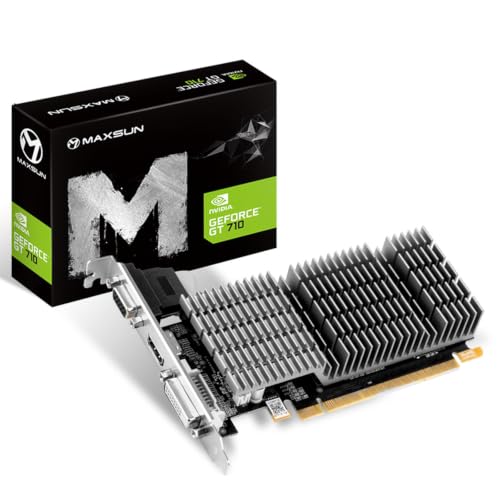
maxsun GeForce GT 710 2GB Fanless — Best Budget Silence
The maxsun GT 710 is the floor of the fanless market executed honestly: 2GB of memory, a fanless heatsink, low-profile readiness for small-form-factor machines, and an output set — VGA, DVI-D and HDMI — that reads like a census of the monitors actually standing on the world’s desks, including the old ones. Its listing advertises low power consumption, and for once the marketing phrase is the engineering truth: this class of card sips slot power and asks nothing of the power supply at all.
Its role in this guide is the rescue and the utility build. The older PC whose integrated graphics died, the small machine that needs an HDMI port it never had, the spare desktop pressed into service as a signage or kitchen screen — these are the GT 710’s natural commissions, and it performs them silently and indefinitely. Expectations should be set at the door: the GT 710 is the weakest chip in this guide, a pure display adapter for desktops and basic video, and the buyer who asks it for anything more has misread the assignment. Bought for its actual job, it is the cheapest silence in this guide and entirely sufficient.
There is an environmental footnote in this little card’s favour: a display adapter that draws a handful of watts, in a machine that runs all day as a household’s media or information screen, is among the cheapest computing that exists to operate. The budget pick is also the frugal pick, and for the always-on utility roles it serves, that arithmetic compounds quietly for years.
- Memory: 2GB
- Cooling: fanless heatsink
- Form factor: low profile ready, small-form-factor friendly
- Outputs: VGA, DVI-D, HDMI
- Role: budget display rescue and utility builds
- Fit note: low-profile bracket suits the smallest surplus PCs
Strengths
- The lowest-cost route to a silent modern display output.
- Low-profile fit suits the smallest office cases.
- Legacy VGA output serves the monitors other cards abandoned.
Trade-offs
- The weakest graphics capability in this guide.
- Basic video and desktop duty are its whole résumé.
- One monitor at a time is its comfortable arrangement.
Best for: reviving older PCs and giving small machines a silent HDMI output. Skip it for multi-monitor desks or 4K video — step up to the GT 730 GDDR5 or the GT 1030.

QTHREE GeForce GT 730 4GB — Most Outputs in the Class
The QTHREE GT 730 earns its slot on the evidence of its back panel: two HDMI ports, a DisplayPort and a VGA connector, on a low-profile fanless board with 4GB of DDR3 memory. In a class where output sets are usually a study in omission, that is a genuinely distinctive specification — this is the fanless card for the desk whose screens arrived from different decades and all expect to be driven at once, silently.
The rest of the card is the standard GT 730 bargain, stated with the guide’s usual clarity: DDR3 memory that serves desktops and documents well and high-motion video modestly, a 64-bit memory bus in its listing’s specification, PCIe x8 in a low-profile SFF-friendly body, and no pretensions toward gaming or encoding. QTHREE is a smaller maker than ASUS or ZOTAC, and the documentation and support trail is correspondingly thinner — the honest price of the distinctive output panel. For the buyer whose first requirement is literally “two HDMI, fanless, low profile,” this card is close to the only answer in the class, and it answers completely.
Its DisplayPort deserves emphasis for one specific desk: the mixed office where a modern monitor with a DisplayPort input stands beside an older HDMI screen and a legacy VGA projector connection. Most fanless cards force a choice among those; this one declines to, and for the small meeting room or the teacher’s desk, that refusal is the entire purchase justification, honestly earned.
- Memory: 4GB DDR3, 64-bit bus
- Cooling: fanless heatsink
- Form factor: low profile, SFF-friendly
- Outputs: 2x HDMI, DisplayPort, VGA
- Interface: PCIe x8
- Fit note: verify the low-profile bracket is in the box
Strengths
- The widest output set among the fanless picks.
- 4GB and low-profile fit in one board.
- Two native HDMI ports suit dual-television and mixed desks.
Trade-offs
- DDR3 bandwidth is the class’s slower tier.
- A smaller maker means thinner documentation and support.
- The GT 730’s limits on gaming and encoding apply in full.
Best for: mixed-generation multi-screen desks that need HDMI twice and silence always. Skip it if maker support matters more than ports — the ASUS and ZOTAC boards are the conservative purchases.
Semi-Passive Gaming Cards — The Silent-Gaming Route
The final slot answers the question half this guide’s readers arrived with: what if I want to game, silently? The honest product is the semi-passive gaming card — a real gaming GPU whose fans do not spin at all until the card is under genuine load, a feature the makers call 0dB or fan-stop. On the desktop, in video, in light games, such a card is exactly as silent as every fanless pick in this guide, because its fans are stationary. Under a heavy game the fans turn, audibly, because physics collects its debt — and that honesty is the difference between this class and a fantasy.
This slot is prose-only by design: it describes a buying rule rather than a board. The rule is to shop the gaming cards you would buy anyway — several in this site’s other guides carry the feature, including current ASUS Dual and TUF models whose listings state their 0dB technology outright — and to filter for fan-stop behaviour, a cooler generous enough to keep the fans slow when they do run, and a case whose airflow lets the card idle cool. In a bedroom or studio, a semi-passive card plus one slow case fan is the practical summit of silent gaming. The fanless purist’s summit is higher and emptier: total silence, and no modern games at the top of it. Choose which summit is actually yours.
A closing note on expectations for the semi-passive route: fan-stop thresholds vary by maker and model, and the temperature at which the fans wake is a specification worth reading in the listing before purchase, because a card whose fans wake during ordinary desktop work has missed the point of its own feature. The good implementations stay stopped through everything except real load — verify that yours is one of them during the return window, with your own room and your own ears as the instruments.
- Class: gaming cards with fan-stop (0dB) behaviour
- Silence: total at idle and light loads; fans run under heavy gaming
- Shopping rule: buy the gaming card you need, filtered for fan-stop
- System note: case airflow decides how long the fans can rest
- Listing status: a class discussion — no single board endorsed here
- Decision rule: fanless for display duty, semi-passive for everything else
Strengths
- Real gaming performance with genuine silence at rest.
- One card serves the desk, the video library and the games.
- The feature is widespread in current midrange boards.
Trade-offs
- Silence ends when heavy gaming begins — physics insists.
- Costs a gaming card’s money, not a display card’s.
- Depends on case airflow to keep idle temperatures fan-free.
Best for: gamers in quiet rooms who accept fans under load as the price of performance. Skip it if the requirement is silence under all conditions — that requirement is the fanless class above, with its limits accepted.
The Silent Lineup at a Glance
| Pick | Memory | Cooling | Outputs | Silent role |
|---|---|---|---|---|
| ASUS GT 730 GDDR5 | 2GB GDDR5 | Passive | HDMI-era set | All-round HTPC and office card |
| ASUS GT 1030 Silent | 2GB GDDR5 | Passive | HDMI, DVI | Strongest fanless chip |
| ZOTAC GT 730 Zone | 4GB DDR3 | Passive | Multi-display set | Wide multi-monitor desks |
| maxsun GT 710 | 2GB | Fanless | VGA, DVI-D, HDMI | Budget rescue and utility |
| QTHREE GT 730 | 4GB DDR3 | Fanless | 2x HDMI, DP, VGA | Most outputs in the class |
| Semi-passive gaming cards | Gaming class | Fans stopped at idle | Gaming class | Silent at rest, gaming under load |
How Do You Install a Fanless Card and Confirm the Silence Is Real?
Installation is the simplest in all of graphics hardware, which is part of the class’s charm. The card draws all its power from the slot, so there are no power cables to route or forget; seat it, secure the bracket — low-profile or full height, matching the case — connect the displays, and install the driver. In a small-form-factor machine, take the extra minute to route the case’s own cables clear of the heatsink’s fins: a passive cooler breathes through its surroundings, and a cable blanket laid across it is the one installation error this class cannot forgive.
Verification is equally plain and worth doing once. Run the machine through its real worst day in miniature — the 4K video, the full set of monitors, the long document session — and put a hand near the case vents after an hour. Warm is correct; the heatsink’s job is to be warm. What you are confirming is the absence of the two failure sounds this class exists to prevent: there is no fan to whine, and there should be no coil noise worth the name from a card drawing this little power. If the room is quieter than the machine’s storage and power supply, the card has done its entire job.
Then do the longevity entries in the machine’s little notebook: the card’s model, its memory type, the driver version that behaved. Fanless cards outlast the note-taking habits of their owners, and when this card is inherited by the next quiet build — as these cards so often are — the note is the difference between a five-minute transplant and an afternoon of archaeology.
How Do You Build the Rest of the PC to Match a Silent Card?
A fanless card in a loud machine is a soloist in a brass band, so the build deserves its paragraph. The usual remaining noise sources, in the order ears find them: the CPU cooler, the case fans, the power supply fan, and the mechanical hard drive. Each has a silent answer of the same philosophy as this guide’s picks — oversized coolers running slowly, large fans turning gently or not at all, a fanless or semi-passive power supply, and solid-state storage that removes the last spinning part. A machine built on that philosophy throughout is not merely quiet; it changes character, from an appliance you tolerate to furniture you forget.
Placement completes what components begin. A silent PC on a desk reflects what little sound it makes off the wall behind it; the same machine under the desk, on carpet, behind a modesty panel, disappears from the room’s soundscape entirely. Home-theatre builders learn to put the PC where the speakers are not pointing, and studio builders learn that the microphone’s position relative to the machine matters more than another decibel of component silence. Buy the quiet parts, then give them a quiet place to be quiet in.
Finally, keep the machine’s dust discipline gentle and regular. Passive heatsinks rely on open fin channels, and a silent PC in a dusty room slowly upholsters its own coolers. A soft brush and a minute of attention each season preserve the thermal headroom the whole design depends on — the cheapest maintenance in computing, for the machines that ask the least.
There is a temptation, having built one silent machine, to declare every machine in the house a candidate, and it should be resisted where the work does not suit it. The family gaming PC and the video-editing desk have jobs this class cannot do, and forcing them into silence-by-underpowering produces machines that are quiet and inadequate in equal measure. Silence is a specification like any other: glorious where it fits the work, and a strange hill to die on where it does not.
Fanless or Semi-Passive: How Do You Decide Which Silence Is Yours?
Decide by the loudest thing the machine must do, not the quietest. If the machine’s whole life is displays, documents, video and browsing, its loudest moment is still silent work, and the fanless class gives it a lifetime guarantee no fan curve can match. If the machine must occasionally render, game or compute at full stretch, its loudest moment involves real heat, and the choice is between a semi-passive card that is silent until that moment and a fanless card that simply cannot do the moment’s work at all.
There is a hybrid household pattern worth naming: the fanless card in the always-on machine, and the semi-passive card in the performance machine, each in the room where its temperament belongs. Families and studios drift into this arrangement naturally — the HTPC and the office box go fanless, the gaming and editing rig goes semi-passive — and it is worth arriving there deliberately, because it spends the silence budget exactly where ears spend their hours.
What you should not do is split the difference with a small-fan card marketed as silent. A tiny fan is the worst acoustic citizen in computing: it spins fast, it whines at a pitch rooms carry, and its bearing is the first to go. The honest silences are the two in this guide — no fan, or a fan that knows when to rest. Everything between is a compromise wearing the vocabulary of both.
What Mistakes Do Silent-PC Buyers Keep Making?
The first is the category error this guide opened with: buying a fanless display card for gaming, streaming or 3D work because the word “graphics card” promised more than the class delivers. The second is its mirror — buying a gaming card for a pure HTPC because a forum called the GT cards “too weak,” then listening to its fans narrate every film for five years. Weakness is relative to a job; for the display job, these cards are not weak at all, they are exact.
The third mistake is shopping by the badge on the chip rather than the specification on the board. GT 730s exist with GDDR5 and with DDR3, with one output and with four, in full height and low profile — the name is nearly the least informative part of the listing. Read the memory type, the output panel and the bracket, every time, because at this end of the market those three lines are the entire difference between the right card and its near-namesake.
And the quiet mistake, literally: forgetting the rest of the machine, as the build section above describes, then blaming the silent card for a PC that still hums from its power supply. Silence is a system property. The card can only hold up its end, which — being fanless — it does perfectly.
A fifth mistake is subtler and costs real money over time: buying the fanless card for a machine whose job is about to change. The office PC that becomes the streaming box, the HTPC that inherits the children’s gaming ambitions — a card bought exactly at today’s duty has no answer for tomorrow’s. Where a change of job is genuinely likely, the semi-passive class is the insurance policy; where the job is as permanent as a signage screen, the fanless card’s purity is worth more than flexibility.
Final Recommendation
For most silent builds, the ASUS GT 730 GDDR5 is the balanced default: the right memory type, a single-slot passive design, and a maker who will still document it in five years. HTPC builders wanting the class’s ceiling should take the ASUS GT 1030 Silent; multi-monitor desks belong to the ZOTAC Zone or, where the ports demand it, the QTHREE; and the maxsun GT 710 remains the honourable budget rescue. Gamers should leave the fanless class with gratitude and buy a semi-passive card instead, as the sixth slot describes.
Whichever you choose, choose it for the job the machine actually does all day, because a silent PC is the rare purchase whose success is measured in nothing happening — no whir, no whine, no reminder — just a picture on the screen and a room that stays exactly as quiet as it was before the computer arrived.
And when the card arrives, do the small verifications this guide keeps recommending: the right memory type on the box, the right outputs on the panel, the right bracket in the bag. At this end of the market the near-namesakes are endless and the returns are tedious, while the card itself, correctly chosen, will ask nothing of you again for the better part of a decade.
Frequently Asked Questions
Can a fanless graphics card play any games at all?
It can play the games of its own era and older, plus light and 2D titles — the classics a retro build exists for. It cannot play the modern catalogue in any sense the word gaming currently means, and this guide’s position is that a buyer should hear that from the guide, not discover it from the first launch screen. For modern games in a quiet room, the semi-passive class in the sixth slot is the honest route, and its fans-under-load compromise is the price physics charges for admission.
Do fanless cards overheat?
They are engineered not to, within their design conditions: low power, a heatsink sized for it, and a case that lets air drift. The failure mode appears when those conditions are violated — a sealed, airflow-free box in a hot room, or a card asked to work far beyond its class. Give the passive design the modest airflow it assumes and it will run for years without a thermal event, having no fan to fail in the first place. If you want evidence rather than reassurance, an hour of your machine’s real workload with a monitoring tool open will show the card settling at its working temperature and staying there, which is the whole design working as intended.
How many monitors can these cards drive?
It varies by model, which is why the output panel is a headline specification in every review here. The multi-monitor specialists — the ZOTAC Zone and the QTHREE with its four connectors — are built for wide desks; the single-screen HTPC picks carry the ports their job needs. Count your screens, match the connectors, and remember that adapters are a workaround, not a plan. If a fourth screen is even a rumour in your office’s future, buy the output panel for it now — these cards serve for years, and desks accumulate monitors the way desks do.
Is a GT 1030 good for streaming?
For watching streams, yes — it is a fine video card for a media PC. For broadcasting your own gameplay, no: the GT 1030 has no NVENC hardware encoder, so it cannot hardware-encode a stream at all. That distinction is the subject of this cluster’s streaming guide, and it is the single most expensive misunderstanding in this corner of the market. A silent media PC and a streaming PC are different machines that happen to share a vocabulary.
Why are there no silent gaming cards in the linked picks?
Because a truly fanless gaming card does not exist — gaming power produces heat that passive cooling cannot shed, at any price. What exists is the semi-passive class, silent at rest and honest under load, and this guide discusses it as a class rather than dressing a display card in gaming language. The distinction is the guide’s whole point.
Will a fanless card work in a PC with no case fans at all?
Yes, with the system engineered for it: a case with sensible vents, components chosen for low power throughout, and a room that is not an oven. The cards in this guide are the natural citizens of fully passive machines. What they cannot survive is being sealed into an unventilated box with hot neighbours — passive cooling moves heat into the case air, and the case must have somewhere for that air to go. Vertical mounting with the vents above the heatsink is the classic arrangement, because warm air rises and the case becomes the chimney.
Related Guides
Silence is one end of a spectrum the rest of this cluster explores at full volume. Buyers speccing a machine for work rather than quiet should compare the professional range in the best workstation graphics cards, headset owners will find the performance-first view in the best graphics cards for virtual reality, and anyone tempted to make a silent card broadcast should read the best graphics cards for streaming games before the encoder lesson is learned the expensive way.



[…] approach the same silicon from other trades. Artists building a quiet studio should start with the best silent graphics cards, readers speccing a professional seat will find the driver-and-certification view in the best […]