What's inside
- Where to Buy
- Key Takeaways
- Quick Picks
- How the Picks Were Chosen
- Side-by-Side Comparison
- How Do You Judge the Best Monitors for Mac Mini With a Camera Without Testing First?
- What Does the Mac Mini Itself Need From the Connection?
- Should Privacy Change Which Camera Monitor You Buy?
- Common Mistakes
- Frequently Asked Questions
- Final Recommendation
As an Amazon Associate I earn from qualifying purchases. This post may contain affiliate links at no extra cost to you.
[SITE_DOMAIN] is reader-supported. When you buy through links on our site, we may earn an affiliate commission at no extra cost to you. Prices and availability change; check the Amazon listing for the current details.
Where to Buy
Mac mini owners needing a camera can follow each pick to its Amazon listing to confirm the variant, full specifications and availability before ordering.
- Philips 34E1C5600HE 34-inch Curved USB-C – View on Amazon
- Samsung 34in ViewFinity S65VC Webcam – View on Amazon
- ASUS BE279QSK Webcam Monitor – View on Amazon
- ASUS BE24EQK Webcam Monitor – View on Amazon
- Thinlerain 27in 4K Webcam Monitor – View on Amazon
- CUNPU 24in Monitor with Camera – View on Amazon
The best monitors for mac mini with camera exist because of a deliberate hole in a beloved machine. The Mac mini is a superb small computer that ships with no camera, no microphone and no speakers worth the name, so every mini desk must solve the meeting problem somehow. The untidy solution is a clip-on webcam and a thicket of cables. The tidy solution, and this guide’s subject, is a monitor with the camera built in, where the lens sits at eye level inside the screen the mini already needs.
The six picks divide by ambition. Two are 34-inch ultrawides that treat the camera as one feature of a complete professional desk, microphone and KVM included. Two are ASUS business monitors that print their camera figures and serve the standard office day. Two are smaller brands whose titles out-shout the majors on megapixels and refresh rates, with the verification homework that exuberance earns. None of them is a gaming panel in disguise, a contrast with the refresh-led world of 4K 144Hz Monitors that this guide notes only in passing. Every camera in the guide is inside its monitor; that was the entry rule, not a preference.
Readers whose mini desk is really a display-matching exercise, chasing the density of an iMac panel, will find that neighbouring question answered in a companion guide on this site devoted to Retina matching. Here the panel serves the meeting first, and the specifications are read in that order: camera, microphone, connection, then screen.
Every figure comes from the verified listing title of its product. Where a title withholds its camera’s resolution, as the two ultrawides do, the review says so; where a title contradicts itself, as the final pick’s does, the review stops and settles it. A camera you will be seen through for years deserves that much scrutiny.
A note on what this guide will not do, because camera marketing invites it: it will not estimate the megapixels a title withholds, rank a microphone it cannot hear, or promise that any of these lenses flatters anyone. It reports the printed claims, flags the missing and contradictory ones, and leaves the small remainder to the documentation and the returns window, which between them settle everything a title leaves open.
Key Takeaways
- Every pick has its camera built into the monitor; no clip-ons appear in this guide.
- Only four titles print a camera figure: 2MP on both ASUS models, 3MP pop-up on the Thinlerain, 5MP pop-up on the CUNPU.
- The Philips adds a noise cancelling microphone and a four-year advance replacement warranty.
- The Samsung’s KVM lets a Mac mini and a laptop share one screen and its camera.
- The CUNPU title claims both FHD and QHD 1440P; its review treats the grid as a verification item.
- Pop-up cameras on the Thinlerain and CUNPU answer privacy concerns with hardware.
- Camera position is the category’s free virtue: a lens in the top bezel sits at eye level by construction, on every pick, at every desk, in every household.
Quick Picks
| Pick | Badge | Why it is here |
|---|---|---|
| Philips 34E1C5600HE | The ultrawide meeting kit | 34-inch UWQHD, webcam, noise cancelling mic, 65W USB-C and a four-year warranty. |
| Samsung ViewFinity S65VC | The KVM ultrawide | 34-inch curved, built-in camera, KVM switch and USB-C. |
| ASUS BE279QSK | The business classic | 27-inch FHD IPS with a printed 2MP webcam and mic array. |
| ASUS BE24EQK | The compact meeting monitor | 24-inch, the same 2MP kit, denser at the smaller size. |
| Thinlerain 27in 4K Webcam Monitor | 4K with a pop-up camera | 3840×2160 at 160Hz with a pop-up 3MP webcam. |
| CUNPU 24in Monitor with Camera | The 5MP pop-up | Highest camera figure here, 120Hz, resolution to verify. |
How the Picks Were Chosen
The gate was the guide’s title made literal: the camera had to be inside the monitor, stated in the verified listing title. That single rule reshaped the shortlist away from the general Mac monitor market, where excellent panels without cameras dominate, toward the smaller, more specialised shelf where display and meeting hardware are designed together. It also excluded the respectable alternative of a fine camera-less monitor plus a premium webcam, a fine solution that is simply a different guide.
Within the gate, the six were balanced across the real shapes of the need: ultrawide flagships for the desk that lives in meetings, business monitors for the desk that visits them, and high-claim smaller brands for the buyer who shops on figures and verifies on arrival. Camera figures were recorded exactly as printed, including their absence, because a guide that estimated megapixels would be inventing the very specification its readers came to compare.
Gaming credentials were treated as garnish rather than substance, with one eye on the neighbouring truth that a mini desk sometimes doubles as a play desk; readers whose priorities run the other way, refresh first and camera never, will find their shortlist in our survey of 5K Gaming Monitors. Here, a 160Hz figure earns a mention, never the headline.
A final inclusion note concerns the two smaller brands, admitted on the same terms as the majors and carrying their caveats in the open. Their titles print the boldest figures in the guide, a 3MP pop-up with 160Hz, a 5MP pop-up at 120Hz, and a readership that shops on figures deserves those options presented with their verification steps attached rather than excluded for respectability. The guide’s loyalty is to the reader’s process, not to any brand’s reputation.
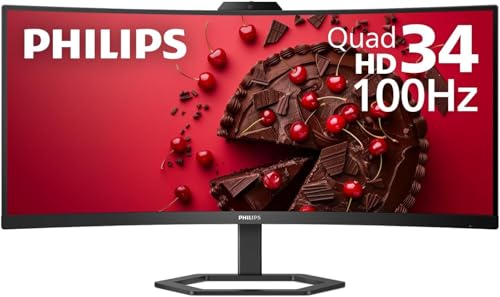
Philips 34E1C5600HE 34-inch Curved USB-C
The ultrawide with the full meeting kit
- Screen size: 34 inch, curved
- Resolution: UWQHD 3440×1440, 21:9
- Panel type: VA
- Refresh rate: 100Hz
- Camera: Built-in webcam, per the title
- Audio: Speakers and a noise cancelling microphone
- Ports: USB-C with 65W power delivery
- Stand: Height adjust
- Warranty: 4-year Advance Replacement Warranty, as stated
The Mac mini’s one structural omission is a camera, and this Philips is the most complete single purchase that corrects it. The title assembles the whole meeting kit inside one curved ultrawide: a 34-inch UWQHD panel at 3440×1440, a built-in webcam, speakers, and a noise cancelling microphone, connected to the mini over USB-C with 65 watts of power delivery riding the same ecosystem. One screen arrives, and the desk gains a display, a camera, a microphone and speakers in a single unboxing.
The noise cancelling microphone is the detail that separates a meeting monitor from a monitor with a camera bolted on. A Mac mini desk often sits in a real room, with a kettle, a corridor and a household behind the chair, and a microphone that actively suppresses that world is the difference between being heard and being understood. Philips prints the feature in the title, which suggests the company expects to be judged on call quality, not merely on possessing a camera.
The panel itself is a serious work screen: 21:9 ultrawide for side-by-side documents, a VA panel with the curve that suits the format, and 100Hz, a refresh rate that makes scrolling and window movement noticeably calmer than the 60Hz office norm without pretending to gaming credentials. Height adjustment is printed. The warranty line deserves its own emphasis: a four-year advance replacement warranty, stated in the title, is the strongest ownership promise in this guide, and advance replacement means a faulty unit is swapped before the old one returns, the service shape a work desk actually needs.
What the title does not state is the camera’s resolution, and this guide will not invent a megapixel figure for it. Buyers for whom camera sharpness is the deciding factor should confirm the sensor figure in the manufacturer documentation; buyers for whom the integrated kit, the microphone’s noise cancelling and the warranty matter most already have their evidence printed. The USB-C wattage, 65W, is more than a Mac mini requires and leaves the port’s power available for a laptop guest, a flexibility multi-machine desks quietly exploit.
There is an elegance argument for the all-in-one that goes beyond tidiness. Every separate peripheral is a cable, a driver relationship and a small daily negotiation; a camera inside the monitor is simply there, at eye level, correctly positioned by the act of positioning the screen. Video-call posture improves without a single decision being made, because the camera lives where the eyes already look.
As the opening pick, the Philips sets the guide’s standard for integration: not merely a camera present, but the full meeting apparatus, a work-grade ultrawide, and a warranty that treats the purchase as professional equipment. The picks below each emphasise a different part of that formula.
One desk-planning note is specific to curved ultrawides with cameras: the camera sits at the centre of the curve, which is also where the screen’s geometry wants your chair, so the framing discipline the curve imposes and the framing the camera rewards are the same discipline. Owners who centre themselves for the panel’s sake discover their call image has quietly become the best-framed in the meeting, a dividend no specification in the title advertises.
Strengths
- Webcam, speakers and a noise cancelling microphone form a complete meeting kit
- 34-inch UWQHD ultrawide serves documents as seriously as calls
- Four-year advance replacement warranty is the guide’s strongest ownership promise
Trade-offs
- The camera’s resolution is not stated in the title
- A 34-inch ultrawide demands a desk with genuine width
- VA panel and 100Hz aim at work, not at gaming
Best for: a meeting-heavy Mac mini desk seeking the complete camera kit inside one ultrawide
Not suited for: a compact desk seeking a screen that fits where a 34-inch curve cannot
Philips prints everything except the camera’s megapixels: Check price on Amazon for the listing, then the documentation for that one figure.

Samsung 34in ViewFinity S65VC Webcam
The KVM-equipped ultrawide for two machines
- Display size: 34 inch, curved
- Resolution class: Ultra-WQHD; exact pixel count Not stated in the listing title – verify with the manufacturer documentation
- Refresh rate: 100Hz
- Adaptive sync: AMD FreeSync
- HDR: HDR10
- Camera: Built-in camera, per the title
- Audio: Built-in speaker
- Ports: USB-C named; wattage Not stated in the listing title – verify with the manufacturer documentation
- Features: KVM switch, Eye Care
- Model code: LS34C650VANXGO
Samsung’s ViewFinity entry matches the Philips on shape, a 34-inch curved Ultra-WQHD ultrawide at 100Hz, and then adds the feature that changes its household role entirely: a KVM switch. A KVM lets two computers share one screen, one camera and the connected peripherals, switching between them at a command. On a desk where a Mac mini lives beside a work laptop, that single feature converts the monitor from the mini’s screen into the desk’s screen, with the built-in camera serving whichever machine is active.
The camera’s presence in a KVM design deserves spelling out, because it solves the two-machine desk’s most annoying problem. Separate webcams per machine, or one webcam forever being replugged, are the usual compromises; a camera inside a KVM monitor is simply inherited by whichever computer currently owns the display. The meeting joins from the laptop in the morning and from the mini in the afternoon, and the camera neither knows nor cares.
The rest of the title is professional ViewFinity fare: HDR10, AMD FreeSync for smoother motion where a source supports it, Eye Care features for long days, USB-C connectivity and a built-in speaker. Two figures are withheld and recorded as such in the spec box: the exact pixel count behind the Ultra-WQHD label, which the format strongly implies but the title does not print, and the USB-C wattage. Both belong on the documentation checklist beside the camera’s resolution, which is likewise unstated.
Eco-Packaging earns a line in the title, a small signal of Samsung’s corporate programme rather than a performance figure, and it is reported here for completeness rather than as a reason to buy. The reasons to buy are the KVM, the camera’s inheritance across machines, and the ultrawide work canvas, a combination no other pick in this guide assembles. The Philips counters with its noise cancelling microphone and its warranty; the choice between them is a choice about which desk problem, noise or multiplicity, is actually yours.
Ownership of a ViewFinity also carries the big-brand professional-line expectation, firmware attention and a service network, which matters for a screen expected to anchor a desk for years. At 34 inches curved, it asks the same desk-width question as the Philips, and the same honest answer applies: measure first, because an ultrawide that overhangs its desk is a daily irritation purchased at a premium.
In the guide’s order, this is the two-machine pick: the camera monitor for the desk where the Mac mini has company, and where the screen’s job is to serve the household’s whole computing life rather than one small aluminium box alone.
A firmware note belongs in any KVM monitor’s ownership story: the switching behaviour, the camera’s handover between machines and the USB hub’s manners are all software-mediated, and manufacturers refine them over a product’s life. Register the product, keep its firmware current, and the desk’s junction box stays polite. It is unglamorous advice that separates the households whose KVM feels magical from those whose feels temperamental.
Strengths
- KVM switch lets two machines share the screen and its built-in camera
- 34-inch curved Ultra-WQHD canvas at 100Hz matches the Philips on shape
- Eye Care and HDR10 round out a professional ViewFinity specification
Trade-offs
- Exact pixel count and USB-C wattage are not printed in the title
- Camera resolution is not stated, as on the Philips above
- The ultrawide footprint asks the same wide-desk question
Best for: a two-computer desk seeking one camera and screen shared by a mini and a laptop
Not suited for: a single-machine desk seeking a noise cancelling microphone instead of a KVM
Samsung leaves three figures to its documentation, so start at the listing: Check price on Amazon, and bring the checklist with you.

ASUS BE279QSK Webcam Monitor
The business classic at 27 inches
- Panel size: 27 inch
- Resolution: 1080P Full HD
- Panel type: IPS
- Camera: Built-in 2MP webcam, as stated
- Audio: Mic array and speakers
- Ports: HDMI, DisplayPort, VGA
- Stand: Height adjustable, frameless design
- Mounting: VESA wall mount
- Features: Eye Care, EPEAT listed
ASUS’s BE line is business hardware in the plainest, most honourable sense, and the BE279QSK is its webcam model at 27 inches: a Full HD IPS panel with a built-in 2MP webcam, a microphone array and speakers, wearing a frameless design and a height-adjustable stand. Where the ultrawides above sell immersion, this sells correctness: the right size for a standard desk, the right features for a working day of calls, and a camera figure actually printed in the title, 2MP, for buyers who were left guessing by the first two picks.
That printed 2MP figure deserves context rather than apology. A 2MP camera is a 1080p-class sensor, which matches the resolution at which video calls are actually conducted on every mainstream platform. The industry’s higher-megapixel cameras mostly exceed what the call itself transmits. For the Mac mini owner whose need is to appear clearly and be heard cleanly in meetings, the BE279QSK’s stated specification is not a compromise; it is the correct size of the thing, documented.
The microphone is an array rather than a single point, which in practice means the voice is gathered with some spatial intelligence, favouring the speaker over the room in a way a lone microphone cannot. Combined with the speakers in the same chassis, the monitor becomes the call: camera above, voices below, nothing clipped on, nothing perched. The port list even includes VGA alongside HDMI and DisplayPort, a legacy kindness for the older machine every office keeps in a corner, and a sign of the BE line’s institutional habitat.
The panel’s limits are printed as plainly as its virtues: 1080P at 27 inches is a modest density, text will not have the fineness of the 4K Thinlerain below, and no refresh figure beyond the business norm is claimed in the title, so none is recorded here. Eye Care features and an EPEAT listing speak to long days and institutional purchasing standards. This is a monitor bought by the specification of a working week, not a weekend.
For the Mac mini specifically, the fit is about honesty of scale. The mini is a small, sensible computer, and a 27-inch business monitor with its camera built in is a small, sensible completion of it: one HDMI or DisplayPort cable for the picture, the camera and audio travelling the monitor’s own connection, and a desk that looks like an office rather than a project. Households graduating from a laptop’s built-in camera will find the eye-level position and the array microphone a larger upgrade than any megapixel count.
It is the guide’s reference business pick, then: neither the biggest nor the sharpest, but the most completely aligned with the ordinary, honourable work of showing up to meetings from a tidy desk.
Longevity is the business line’s silent argument. A BE monitor is built for institutional duty cycles, desks that run all day every day, and its specification’s modesty is partly that durability wearing plain clothes. A Mac mini is itself a long-life machine, often serving five years or more, and pairing it with a monitor designed for the same horizon is a coherence the purchase price spreads thin across a great many mornings.
Strengths
- The 2MP camera figure is printed, ending the guessing the first picks required
- Microphone array and speakers complete the call kit in one chassis
- HDMI, DisplayPort and even VGA cover every machine an office keeps
Trade-offs
- 1080P at 27 inches is a modest pixel density for text work
- No refresh-rate figure is claimed in the title
- The business design makes no concession to gaming or cinema
Best for: a standard work desk seeking a documented camera and array microphone at 27 inches
Not suited for: a density-led desk seeking 4K sharpness for documents between the calls
ASUS prints the camera figure its rivals withheld, making its listing the quickest read here: Check price on Amazon.
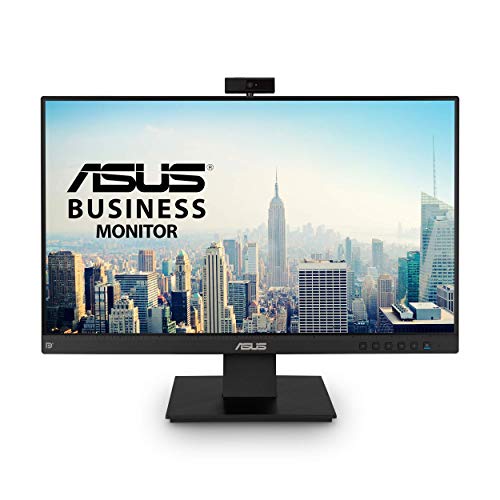
ASUS BE24EQK Webcam Monitor
The compact 24-inch meeting monitor
- Size: 24 inch
- Resolution: 1080P Full HD
- Panel type: IPS
- Camera: 2MP webcam, as stated
- Audio: Mic array and stereo speaker
- Ports: HDMI, DisplayPort, VGA
- Positioning: Video conference, per the title
- Mounting: VESA wall mount
- Features: Eye Care, EPEAT listed, ergonomic stand
The BE24EQK is the BE279QSK’s smaller sibling, and in one respect the smaller size is the smarter specification: 1080P spread across 24 inches instead of 27 produces a denser, finer picture, so the compact model’s text is sharper than its bigger brother’s even though the grid is identical. Buyers choosing between the two ASUS models are really choosing between screen presence and pixel density, and for document-heavy work the 24-inch model’s arithmetic is quietly superior.
Everything else is the family formula, faithfully kept: a built-in 2MP webcam with the figure printed, a microphone array, stereo speakers, Eye Care features, an ergonomic stand and a VESA mount, with HDMI, DisplayPort and VGA covering the port generations. The title even names its purpose outright, video conference, a directness the marketing of larger monitors rarely manages. A Mac mini paired with this screen becomes a meeting appliance of admirable simplicity.
The compact footprint is the pick’s second argument. Twenty-four inches fits the desks the ultrawides cannot: the spare-room corner, the kitchen-adjacent workspace, the second desk in a shared home. It also leaves physical and visual room for a second screen later, a growth path the 34-inch picks foreclose. Small desks are not failed big desks, and this guide treats the compact professional monitor as a first-class answer rather than a budget apology.
Its limits mirror its sibling’s: no refresh figure is printed, no USB-C is listed among the ports, so a Mac mini connection runs over HDMI or DisplayPort with the camera’s own link to confirm in the documentation, and the picture, while dense for its class, remains a 1080p picture. Buyers whose documents are dense spreadsheets will feel the grid’s ceiling; buyers whose day is calls and text will mostly feel the tidiness.
There is a deployment charm to this model that institutions understand instinctively: it is the monitor you can buy six of, for a household’s several desks or a small office’s several minis, with one specification to learn and one camera behaviour to trust. The EPEAT listing and the ergonomic stand are the paperwork of exactly that world. A single-desk household may never need that uniformity, but it costs nothing and speaks well of the product’s intended life.
As the fourth pick, the BE24EQK is the compact professional answer: the same documented camera as its sibling, in the size that fits more rooms and renders text more finely, at the natural scale of a Mac mini desk.
There is a second-desk destiny written into this model’s size that deserves a sentence: when a household’s main desk eventually upgrades, a 24-inch meeting monitor migrates gracefully, to a teenager’s study corner, a kitchen command post or a grandparent’s first computer, carrying its camera with it. Products that age into other rooms are worth more than their first assignment suggests, and compact professionals age best of all.
Strengths
- Same printed 2MP camera and mic array as the 27-inch model
- 1080P at 24 inches is denser and finer than at 27 inches
- Compact footprint suits small desks and leaves room to grow
Trade-offs
- No USB-C appears in the port list for a one-cable mini connection
- The 1080p grid still caps fine spreadsheet work
- No refresh-rate figure is stated in the title
Best for: a small-desk setup seeking the documented camera kit in its most compact form
Not suited for: a widescreen workflow seeking an ultrawide canvas for side-by-side documents
The smaller ASUS keeps the family paperwork complete, so Check price on Amazon to confirm the variant and finish the comparison.

Thinlerain 27in 4K Webcam Monitor
4K sharpness with a pop-up 3MP camera
- Display size: 27 inch
- Resolution: 4K UHD 3840×2160
- Panel type: IPS
- Refresh rate: 160Hz
- Camera: Pop-up 3MP webcam, as stated
- Audio: Speakers and microphone
- Ports: HDMI, DisplayPort, USB-C
- Mounting: VESA
- Positioning: Vertical gaming monitor, per the title; gaming, design and home office
Thinlerain is the smaller brand in this guide, and its title is the most exuberant here: a 27-inch 4K IPS panel at 160Hz, with a pop-up 3MP webcam, speakers and a microphone, over HDMI, DisplayPort and USB-C. Start with the camera, because its design is genuinely thoughtful. A pop-up webcam lives hidden inside the frame until a call summons it, which answers the privacy anxiety that built-in cameras provoke, with hardware rather than with a software promise or a strip of tape. When it rises, it is a 3MP sensor, a figure printed in the title and higher than the ASUS models’ 2MP.
The panel around that camera is, on paper, the most ambitious in the guide: full 3840×2160 at 27 inches gives the text density the ASUS business pair cannot, and 160Hz is a gaming-grade refresh rate that no other pick here approaches, the title even describing the monitor as a vertical gaming model alongside its design and home-office pitch. A Mac mini desk that games after the calls, through a connected console or a cloud service, will find this specification speaking to both halves of its day in a way the professional picks do not attempt.
The honesty ledger for a smaller brand runs as it has throughout these guides: the printed figures are aggressive and complete, ports, pixels, refresh and megapixels all present, while the long-term support depth and the real-world delivery of every claim are less proven than the majors’. No sensor details beyond the megapixel count are stated, and none are invented here; the camera should be judged on arrival, inside the returns window, against the calls it was bought for. That is a fair process, and the specification earns the chance to undergo it.
USB-C is present among the ports, though its power delivery is not stated, so a laptop-charging expectation joins the verification list; for the Mac mini itself, a desktop machine, the question is academic, and the single-cable picture connection is the point. VESA mounting is printed for arm and wall setups. The microphone is claimed without the array or noise-cancelling language of the ASUS and Philips titles, so call-audio expectations should be set by testing rather than by adjectives.
There is a particular household this pick serves better than any other in the six: the one whose Mac mini desk must be a call station at nine, a design desk at eleven and a gaming screen at eight in the evening, and which refuses to buy three monitors or to clip a camera onto any of them. The Thinlerain’s wager is that one exuberant specification can cover all three shifts, and on the printed evidence the wager is coherent.
It closes its review as the guide’s maximalist: the sharpest grid, the fastest refresh, the highest printed camera figure and the privacy-friendly pop-up design, carrying a younger brand’s caveat in plain sight. Verify it on arrival, and it may be the best-matched Mac mini monitor here.
Setup advice for the exuberant specification: on arrival, test the three shifts in order, a real call at the real hour, an hour of the documents you actually produce, and one gaming session, all inside the first days while the returns window is wide. A panel that passes its owner’s actual week has answered every question a review can pose, including the ones this one was careful not to invent answers for.
Strengths
- Pop-up 3MP camera answers privacy concerns with hardware, not promises
- 4K at 27 inches with 160Hz out-specifies every rival in this guide
- HDMI, DisplayPort and USB-C cover the mini and its guests
Trade-offs
- A smaller brand’s support depth is less proven than the majors’
- USB-C power delivery is not stated in the title
- Microphone quality is claimed without array or cancelling details
Best for: a three-shift desk seeking calls, design work and gaming from one camera monitor
Not suited for: a support-led purchase seeking a major brand’s service network behind the panel
Thinlerain prints a bold specification that deserves an in-person verdict: Check price on Amazon to see the full listing in its own words.
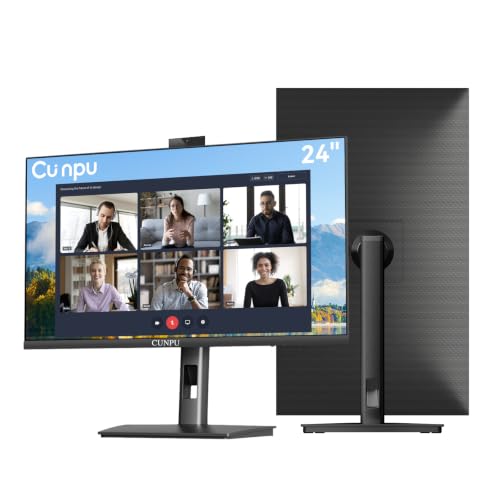
CUNPU 24in Monitor with Camera
A 5MP pop-up camera, with one title contradiction to settle
- Panel size: 24 inch
- Camera: 5MP webcam, pop-up, as stated
- Audio: Microphone and speakers
- Resolution: QHD 1440P stated in the title; the title also uses the words FHD Monitor
- Refresh rate: 120Hz
- Stand: Height adjustment, swivel and pivot
- Positioning: Video conferencing, per the title
The CUNPU closes the guide with the highest camera figure in it, a 5MP pop-up webcam, and with a contradiction this review must settle before anything else. The title calls the product an FHD monitor and also states QHD 1440P. Those cannot both describe the same grid: FHD is 1920×1080 and QHD is 2560×1440. The specific figure, 1440P, is the more credible half of the claim, since numbers are harder to write by accident than labels, but the honest position is that the manufacturer documentation must confirm the resolution before purchase, and this guide records the discrepancy rather than choosing a winner in secret.
Judged on its stated figures, the proposition is distinctive. A 24-inch panel at 1440P, if confirmed, is a genuinely fine density for documents, finer than either ASUS pick, and 120Hz is a refresh rate no other business-shaped monitor in this guide prints, giving scrolling and motion a calmness usually reserved for gaming panels. The stand is the full ergonomic set at this size, height, swivel and pivot all stated, so the compact screen can turn portrait for documents and long web pages.
The camera is the headline and it is a strong one: 5MP is the highest printed figure among the six, and the pop-up mechanism shares the Thinlerain’s hardware answer to privacy, a camera that physically disappears when the meeting ends. A microphone and speakers are included, completing the kit. For a Mac mini whose owner appears on camera daily and cares how that appearance resolves, this title’s camera-first ordering, sensor before screen in its own wording, is the correct priority list.
The caveats are the smaller-brand ones, amplified by the title’s internal disagreement. A brand whose listing contradicts itself on resolution has spent its credibility carelessly, and the buyer’s response should be procedural rather than emotional: verify the grid in the documentation, verify the camera’s behaviour on arrival, and use the returns window as the final specification check. Connection types are not detailed in the title at all, so the port list joins the same checklist.
There is nonetheless a real buyer for this panel: the camera-led purchaser, for whom the meeting image is the product and the screen its frame, and who is willing to do ten minutes of verification to obtain the highest-resolution built-in camera in the class at a compact size. That buyer exists in every video-first household, and the CUNPU, verified, serves them with a specification the majors do not currently print.
It ends the guide as its second lesson in title-reading, companion to the first guide’s lessons elsewhere: believe figures over labels, verify contradictions in the documentation, and let a strong claim earn its purchase through checks rather than through trust. The camera figure, if it delivers, is worth the homework.
A word about the pivot the stand offers, because at 24 inches it is genuinely useful rather than decorative: a portrait screen beside the mini becomes a document and reading column, with the camera’s meetings conducted in landscape on the main display the household already owns, or in portrait-aware applications on this one. Small monitors with full stands punch above their size in flexible households, and this one’s stand is the fullest in its size class here.
Strengths
- 5MP pop-up camera is the highest printed camera figure in the guide
- 120Hz refresh and a full swivel-pivot stand exceed business-monitor norms
- 1440P, if confirmed, gives the finest document density at 24 inches here
Trade-offs
- The title contradicts itself, claiming FHD and QHD 1440P in the same breath
- Connection types are not detailed in the title
- A smaller brand’s support depth is unproven beside the majors
Best for: a camera-first desk seeking the highest-resolution built-in webcam in the class
Not suited for: a paperwork purist seeking a title with no contradictions left to verify
Settle this title’s resolution argument in the documentation first: Check price on Amazon is where the investigation starts.
Side-by-Side Comparison
| Pick | Size | Resolution | Refresh rate | Camera | Audio |
|---|---|---|---|---|---|
| Philips 34E1C5600HE | 34 inch | 3440×1440 UWQHD | 100Hz | Webcam, resolution not stated | Noise cancelling mic |
| Samsung ViewFinity S65VC | 34 inch | Ultra-WQHD class | 100Hz | Camera, resolution not stated | Built-in speaker |
| ASUS BE279QSK | 27 inch | 1080P FHD | Not stated in title | 2MP webcam | Mic array |
| ASUS BE24EQK | 24 inch | 1080P FHD | Not stated in title | 2MP webcam | Mic array |
| Thinlerain 27in 4K | 27 inch | 3840×2160 | 160Hz | Pop-up 3MP webcam | Microphone |
| CUNPU 24in | 24 inch | QHD 1440P as stated; title also says FHD | 120Hz | Pop-up 5MP webcam | Microphone |
How Do You Judge the Best Monitors for Mac Mini With a Camera Without Testing First?
Begin with the figure the titles print, and understand what it buys. Camera megapixels describe the sensor’s maximum resolution; video platforms then transmit at their own ceilings, commonly at or below the 2MP class, which is why the ASUS models’ printed 2MP is a rational specification rather than a stingy one. Higher figures, the Thinlerain’s 3MP and the CUNPU’s 5MP, buy cropping room, sharper stills and headroom for platforms that accept more, advantages that are real but narrower than the numbers suggest.
Microphone quality is the unprinted half of every meeting, and the titles that address it earn their emphasis: Philips prints noise cancelling, both ASUS models print an array, and the rest claim a microphone in a word. In a quiet room all of them will serve; in a lived-in house, the cancelling and array designs are the difference between a voice and a household broadcast. If your room is noisy, weight those two titles’ microphone lines above any megapixel figure in this guide.
Position is the third judge, and the built-in camera wins it by construction. A lens inside the top bezel sits at eye level when the screen does, producing the straight-on framing that clip-on cameras achieve only when perfectly mounted and that laptop cameras, angled up from below, never do. Whatever else divides these six, all of them inherit that geometric virtue free.
Lighting, the factor no title can print, referees all of the above. A camera of any figure in a room lit from behind will silhouette its owner, and the same camera with a window or a lamp in front will look like a broadcast. Before upgrading a camera figure, upgrade the light in front of the chair; it is the cheapest image-quality purchase in this entire guide and the only one that improves every pick equally.
A last judging instrument costs nothing and outperforms every specification: the opinion of the people on the other side of your calls. After a week with a new camera monitor, ask a regular meeting partner whether anything changed. Their answer integrates lighting, lens, microphone and software in a way no figure in this guide can, and it is the review that actually follows you to work.
What Does the Mac Mini Itself Need From the Connection?
The mini is a desktop, so the power-delivery figures that dominate laptop monitor shopping matter here only for guests. What the mini needs is a clean picture connection, HDMI or USB-C or DisplayPort, all of which appear across these titles, plus a data path for the camera and microphone, which travels over USB in every design of this kind. The practical check is therefore the cable plan: one display cable, one USB link for the meeting hardware, and the desk is wired.
KVM switching, the Samsung’s headline, changes the wiring philosophy entirely for two-machine desks: the monitor becomes the junction, and each computer inherits camera, screen and peripherals when it takes its turn. Households with a work laptop beside the mini should read that feature as the pick’s whole argument. Single-machine households can safely ignore it and spend their attention on microphones and warranties instead.
Refresh rate, the specification other guides lead with, sits last here by design. The ultrawides’ 100Hz and the smaller brands’ higher figures make the desktop feel calmer and serve casual play, and the genuinely panel-led mini owner, whose real question is matching a Mac-grade display rather than joining meetings, is pointed, with respect, toward our guide to monitors for iMac 5K Retina Display Owners, where density is the headline and cameras are absent. This guide’s hierarchy, camera first, is a choice, and it is the choice its title promised.
A cable-count audit makes the wiring philosophy concrete. The simplest desks here run two cables from the monitor, picture and USB, plus power. The KVM desk runs more on day one and then never touches them again, because switching replaces swapping. The ultrawide desks add nothing at all beyond the pair, their speakers and microphones living in the same chassis. Every arrangement in this guide is defensible; the indefensible one is discovering your arrangement by accident after the furniture is placed.
Should Privacy Change Which Camera Monitor You Buy?
It should change the design you prefer, and this guide contains both philosophies. The always-present cameras in the Philips, Samsung and ASUS models rely on software control and indicator lights, the industry norm, trusted by institutions worldwide. The pop-up cameras in the Thinlerain and CUNPU models retract physically into the frame, making the camera’s inactivity visible and mechanical rather than promised. Neither position is irrational; they are different relationships with the same small lens.
The honest weighing is about daily friction. A pop-up mechanism is one more moving part, raised and lowered across years of meetings, while a fixed camera asks for trust in software and in the household’s own habits. Buyers who cover laptop cameras with tape have already voted, and should buy the pop-up designs with a clear conscience. Buyers who have never thought about it until this paragraph will likely be served by any of the six.
Whichever design earns the desk, one habit completes the privacy picture: know where the mute lives, in the meeting software and on the machine, and make it reflexive. The best camera privacy feature ever shipped is an owner who knows, without looking, whether they are currently audible.
One more privacy habit is worth the sentence it costs: when a meeting ends, let it end. Cameras built into monitors make joining effortless, and effortlessness deserves a matching discipline about leaving, muting and, on the pop-up designs, retracting. The households that love these monitors longest are the ones whose rituals around them are as automatic as the hardware itself.
Common Mistakes
Buying megapixels and ignoring the microphone. The camera decides how you look; the microphone decides whether the meeting works, and in a noisy home it decides more. The titles that print noise cancelling or an array are making the more important claim, and this guide weights them accordingly.
Assuming a built-in camera needs no data cable. The picture reaches the mini over the display connection, but the camera and microphone are USB devices living in the monitor’s frame, and they need their link. Plan the second cable, or choose the connection arrangement the documentation describes, before the desk is declared tidy.
Judging the camera by its stills resolution. Meetings are moving, compressed video judged at platform ceilings, where lighting and lens position outweigh sensor figures. A well-placed 2MP camera in a lit room will outperform a poorly placed 5MP in a dark one on every call that matters.
Skipping the title’s contradictions. The CUNPU in this guide claims two resolutions in one title, and it is certainly not the only listing in the wider market doing so. Ten minutes with the manufacturer documentation settles what the title could not, and it is always cheaper than a return.
Mounting the tidy desk and forgetting the eye-line. A camera inside a monitor frames from wherever the monitor stands, so a screen perched too high or sunk too low lends its angle to every meeting for years. Set the panel’s height for your eyes first and your posture will thank the camera, or set it for the camera and discover both were the same adjustment all along.
Declaring the desk finished before the first real meeting. Every camera monitor in this guide should be baptised by an actual working call, with the household’s real noise at its real hour, before the packaging leaves the house. Specifications survive contact with a Tuesday afternoon in varying degrees, and the returns window is the only laboratory where the experiment is free.
Frequently Asked Questions
Does a monitor’s built-in camera work with any Mac mini?
Yes, in the way USB cameras generally work with macOS: the monitor’s camera and microphone present themselves as standard devices once the USB link is connected, and meeting applications select them like any other camera. The display connection and the camera connection are separate paths, so follow the model’s documentation for its exact cabling, and every pick here will serve any mini generation with the right ports.
Is 2MP enough for professional video calls?
For the calls themselves, yes: mainstream platforms transmit at resolutions the 2MP class covers, and lighting, framing and microphone quality dominate the result at those ceilings. Higher figures buy stills quality, cropping room and future headroom. The ASUS models’ printed 2MP is the honest professional baseline; the 3MP and 5MP picks sell margin above it, not a different category of call.
Why do the two ultrawides hide their camera resolution?
Their titles spend their space on the panel, the KVM and the warranty, treating the camera as one feature among many rather than the headline. The figure exists in each manufacturer’s documentation, and a camera-led buyer should retrieve it before ordering. This guide records the absence rather than estimating, because an estimated megapixel is a small fiction with a long life.
What is a KVM switch doing on a camera monitor?
Letting two computers share the monitor, its camera and its connected peripherals, switching the whole set between machines at a command. On the Samsung here, a work laptop and the Mac mini take turns owning the screen and the webcam, which ends the replugging ritual that two-machine desks otherwise perform twice a day.
Are pop-up webcams just a gimmick?
They are a mechanical answer to a real concern: a camera that is physically retracted cannot be argued with about whether it is off. The trade is a moving part where fixed cameras have none. Buyers who value visible privacy will find the mechanism worth it; buyers who trust software indicators will find the fixed designs simpler. Both appear in this guide because both positions are reasonable.
Which pick suits a noisy household best?
On the printed evidence, the Philips: its title claims a noise cancelling microphone outright, the only cancelling claim among the six, backed by the guide’s strongest warranty. The ASUS pair’s microphone arrays are the next consideration. In a genuinely loud home, also weigh a headset for the worst hours; no monitor microphone repeals physics, and the honest guide says so.
Can I use the monitor’s camera and my own webcam together?
Nothing prevents it, and some presenters keep a second angle for demonstrations or documents. The built-in camera’s advantage is that it is always there, correctly placed and impossible to leave in a drawer at the other house. Most owners find the second camera retires itself within a month, unmissed, which is the built-in concept’s quietest victory.
Do these monitors’ speakers replace a desk audio setup?
For calls, system sounds and casual video, the built-in speakers across these six are the intended solution, and their presence in every title here is part of the category’s tidy promise. Music and film devotees will still route serious listening to dedicated speakers or headphones, as they would with any monitor, but the meeting desk the guide is building needs nothing more than what these chassis already contain.
Final Recommendation
The Mac mini’s missing camera has six good answers here, and they divide by the desk’s real problem. Noise and meetings all day point to the Philips and its cancelling microphone and warranty. Two machines point to the Samsung and its KVM. A standard office day points to the ASUS pair, 27 inches for presence, 24 for density, both with their camera figures printed. Figures-first buyers get the Thinlerain’s pop-up 3MP and 4K panel, and the CUNPU’s 5MP once its resolution contradiction is settled in the documentation.
Between those poles sit the two ultrawides, and their argument is that the camera should arrive as part of a complete professional desk rather than as the desk’s only idea. Both withhold their camera figures, and both compensate with the machinery around the camera, the microphone in one, the switching in the other, that decides how meetings actually feel at four in the afternoon of a long week.
Notice the pattern the guide has repeated in every category it covers: the titles that print their deciding figure earn the easiest purchases, and the ones that withhold it earn a ten-minute check, not a rejection. Camera monitors are young as a category, their titles are still learning what to say, and the reader who checks the one missing figure per pick will buy well from any shelf in it.
Fit the camera into the screen, the screen to the mini, and the microphone to your actual room, and the little computer on the desk becomes, at last, the complete meeting machine it always should have been.
And when the first call connects, the camera already open at eye level and the room’s noise held politely at bay, the whole category justifies itself in a single unremarkable moment: nobody, on either side of the call, in either household, at either end of the working day, in any meeting that week or the next, in any standup, review, interview or family call, on any screen, in any room, at any hour of the working week or the long holiday weekend that follows it, thinks about the camera at all.