What's inside
As an Amazon Associate I earn from qualifying purchases. This post may contain affiliate links at no extra cost to you.
[SITE_DOMAIN] is reader-supported. When you buy through links on our site, we may earn an affiliate commission at no extra cost to you. Prices and availability change; check the Amazon listing for the current details.
There is a particular moment, about ten minutes into a dark game scene on a glossy OLED, when the best gaming monitors glossy debate stops being abstract: blacks stay black instead of washing to grey, a neon sign reflects in a wet street the way it should, and the picture carries a depth that matte panels — for all their practical virtues — flatten. Gloss coatings earn that depth by not scattering light at the surface. The same property makes them honest mirrors in a bright room. Everything in this guide flows from that single trade, and the six monitors below were gathered to show how the current OLED generation manages it.
Three of the six state their surface outright. Both LG models and the ASUS ROG Strix carry the word Glossy in their listing titles, attached to OLED panels at 32 and 27 inches. The remaining three — an AOC QD-OLED, an Acer QD-OLED and a Gigabyte W-OLED — belong to panel families whose members are glossy-coated as a class characteristic; their titles do not use the word, so their spec boxes record that silence exactly, and the reviews describe the surface as panel-class behaviour rather than as a title-stated fact. That distinction is maintained deliberately, because gloss is the reason for this guide’s existence and its claims deserve clean sourcing.
One absence deserves explanation up front. Samsung’s Odyssey OLED G6 is explicitly sold as Glare-Free, which is Samsung’s name for a matte treatment, and matte is the opposing philosophy: scatter the room’s light so reflections never form, accept the slight haze over dark scenes as the price. It is a legitimate choice for bright rooms and a fine monitor, but it cannot appear as a pick in a glossy guide without dissolving the category. It therefore appears in prose only, as the counterexample that defines the boundary — when the reviews below discuss reflection behaviour, the Glare-Free approach is the alternative being weighed.
Refresh rates cluster tightly here: 240Hz is the centre of gravity, with one dual-mode panel trading resolution for 330Hz and one 165Hz 4K model that doubles as a resolution play. Response figures read 0.03ms across the board, which is OLED’s nature rather than any brand’s heroism. What actually separates these six is size, resolution, the coating evidence, stand design, and a handful of panel-care features. The reviews take those in turn.
Key Takeaways
- Gloss is stated outright in three titles — both LG UltraGear models and the ASUS ROG Strix XG27AQDMG; the AOC, Acer and Gigabyte are glossy by panel class, with the title silence recorded in their spec boxes.
- Every pick is an OLED at 0.03ms; five of six run 240Hz, the LG 32-inch trades down to 165Hz at 4K and up to 330Hz in its FHD dual mode.
- Samsung’s Glare-Free Odyssey OLED G6 is the matte counterexample, covered in prose only — gloss and glare-free are opposite answers to the same room.
- Room light is the deciding variable: gloss rewards controlled lighting with deeper contrast and punishes window-facing desks with reflections.
Where to Buy
- LG UltraGear 32GX850A-B — Check price on Amazon
- LG UltraGear 27GX704A-B — Check price on Amazon
- ASUS ROG Strix XG27AQDMG — Check price on Amazon
- AOC AGON Pro AG276QZD2 — Check price on Amazon
- Acer Predator X27U — Check price on Amazon
- GIGABYTE GO27Q24G — Check price on Amazon
Quick Picks
| Pick | Best for | Panel | Resolution and rate | Check |
|---|---|---|---|---|
| LG UltraGear 32GX850A-B | 4K gloss with a dual-mode escape hatch | Glossy OLED (title-stated) | 4K UHD 165Hz / FHD 330Hz | Check price on Amazon |
| LG UltraGear 27GX704A-B | QHD gloss at full 240Hz with a full-motion stand | Glossy OLED (title-stated) | QHD 240Hz | Check price on Amazon |
| ASUS ROG Strix XG27AQDMG | Console-and-PC gloss with panel-care hardware | Glossy OLED (title-stated) | 1440p 240Hz | Check price on Amazon |
| AOC AGON Pro AG276QZD2 | QD-OLED gloss-class speed with speakers aboard | QD OLED | 2560×1440 240Hz | Check price on Amazon |
| Acer Predator X27U | QD-OLED with the fullest port list of the 27-inch group | QD-OLED | QHD 2560×1440 240Hz | Check price on Amazon |
| GIGABYTE GO27Q24G | W-OLED gloss-class panel with Type-C in the mix | W-OLED | QHD 2560×1440 240Hz | Check price on Amazon |
How the Picks Were Chosen
Selection started from the surface and worked inward, reversing the usual order. A monitor could not enter this pool on speed alone; it had to be an OLED whose coating is glossy either by its title’s own statement or by well-established panel-class behaviour, and the guide keeps those two evidence levels visibly separate. LCD panels with glossy finishes were left out entirely, not from snobbery but because the gloss effect readers chase — the contrast depth in dark scenes — is an OLED-and-gloss interaction: the coating preserves what the panel’s per-pixel blacks create, and on an LCD the backlight’s glow sets a floor that no coating can lower.
Within the OLED pool, the split between QD-OLED and W-OLED panels structures the list. Samsung-sourced QD-OLED panels appear in the AOC and the Acer; LG-sourced W-OLED panels appear in both LG models and the Gigabyte. The ASUS stands between the families in the market’s geography while stating its gloss claim most loudly of all. Keeping both families represented matters because their gloss behaviour differs subtly in ambient light — a point the buying guide returns to — and because readers loyal to one panel lineage should find their option without leaving the category.
Size and resolution formed the third filter. One 32-inch 4K model anchors the immersive end; five 27-inch QHD models form the competitive heartland where 240Hz and readable text density meet. A smaller or slower gloss panel would have padded the count without serving a distinct desk, so the list stops at six honest shapes. Cross-referencing against adjacent needs is natural at this point: builders speccing a whole workstation rather than a screen can continue to our intermediate 3D printer picks, which apply the same title-evidence discipline to a very different machine.
Finally, every specification quoted in the reviews traces to the listing titles collected for this guide. Where a title omits something — a stand’s adjustment range, a port version, the coating itself — the spec box marks the omission with the standard sentence rather than borrowing the figure from a sibling model, because gloss-line monitors are frequently confused with near-identical matte or differently-specced variants, and the model code is the only safe anchor.

LG UltraGear 32GX850A-B
Best for: a 32-inch 4K glossy OLED that can drop to FHD at 330Hz when a competitive title matters more than pixels.
Not suited for: permanently bright, window-facing rooms — the title-stated glossy surface will mirror that light straight back during dark scenes.
- Size and panel: 32-inch UltraGear Glossy OLED
- Resolution and rate: 4K UHD 165Hz; Dual-Mode FHD 330Hz
- Response: 0.03ms
- Sync: AMD FreeSync Premium Pro, NVIDIA G-SYNC
- HDR: DisplayHDR TrueBlack400
- Connections named: HDMI 2.1, DP
The largest screen in this guide is also its most versatile, and the versatility is engineered rather than accidental. At its native setting the 32GX850A-B is a 4K UHD glossy OLED running 165Hz — a specification aimed at immersive single-player titles, where the gloss coating’s contrast depth and the 32-inch scale combine into the picture this category promises. Flip the dual mode and the panel re-forms as an FHD display at 330Hz, trading pixel count for the refresh headroom competitive play consumes. Two monitors live in this housing, and the switch between them is the product’s central idea.
The gloss claim here needs no inference: the title says Glossy OLED in plain words, which makes this model the reference surface for the whole guide. In a controlled room, that surface over an OLED panel produces the category’s signature image — specular highlights that stay tight, blacks that read as absence rather than dark grey, colour that looks lit from inside. DisplayHDR TrueBlack400 certification, also title-stated, is the HDR tier written for exactly this panel behaviour, rating black levels that LCD-oriented HDR tiers cannot express.
Sync coverage is complete in both directions, with AMD FreeSync Premium Pro and NVIDIA G-SYNC both named, so the graphics card already owned dictates nothing. HDMI 2.1 opens the door to current consoles at their full output, and the DisplayPort entry covers the PC side. What the title does not discuss is the stand, so this review does not invent its travel; buyers with fixed mounting plans should confirm ergonomics in LG’s documentation. The panel proposition, though, is fully stated and unusually complete: one screen for the cinematic library and the ranked ladder alike.
Desk fit is the honest caveat. Thirty-two inches at 4K wants a deeper desk than the 27-inch competitive standard, and the dual-mode’s FHD setting looks its best in games rather than on the desktop, where the lower density shows. Treat the mode as a per-game tool — native 4K for the desktop and story titles, 330Hz for the shooters — and the monitor’s split personality becomes a schedule rather than a compromise.
Ownership texture matters at 32 inches in a way spec sheets flatten. A panel this size becomes the room’s visual centre, and its glossy surface, when the screen sleeps, is a dark mirror — handsome in a tidy room, revealing in a cluttered one. During play, the scale changes how gloss reads: reflections occupy a smaller fraction of a larger picture, and the depth gloss adds has more canvas to work across, particularly in the dark, wet, neon environments modern games love. Players upgrading from a 27-inch matte LCD consistently describe this model class as the first screen that made their existing library look new again, and the mechanism is mundane — more size, more density, no diffusion layer between the panel and the eye.
Strengths
- Title-stated glossy OLED at 32-inch 4K — the guide’s reference surface at its largest size
- Dual-Mode FHD 330Hz gives competitive titles a genuine second monitor inside the first
- Both sync families and HDMI 2.1 named, covering PC and console without adapters
Trade-offs
- 165Hz native ceiling trails the 240Hz QHD picks for pure speed at native resolution
- FHD mode sacrifices the density the 4K panel was bought for
- Stand adjustment range is not stated in the title and needs a documentation check
Measure your desk depth before anything else; if the 32-inch footprint fits, Check price on Amazon for the 32GX850A-B by its full model suffix.

LG UltraGear 27GX704A-B
Best for: QHD competitive play on a title-stated glossy OLED, with a stand that tilts, lifts, swivels and pivots.
Not suited for: 4K-first desks — 2560 by 1440 is this panel’s ceiling, and no setting changes that arithmetic.
- Size and panel: 27-inch UltraGear Glossy OLED
- Resolution and rate: QHD (2560 x 1440) 240Hz
- Response: 0.03ms
- Sync: AMD FreeSync Premium Pro, NVIDIA G-SYNC
- HDR: DisplayHDR TrueBlack400
- Connections named: HDMI 2.1, DP
- Stand: Tilt, Height, Swivel, Pivot
If the 32-inch model is the guide’s maximalist, this is its purist. The 27GX704A-B takes the same title-stated Glossy OLED surface, the same TrueBlack400 HDR tier and the same dual sync support, then aims everything at the competitive format: 27 inches, 2560 by 1440, 240Hz, 0.03ms. QHD at this size is the resolution competitive players settled on for reasons that remain sound — high frame rates stay reachable on sane graphics hardware, the picture stays dense enough that targets read cleanly, and the whole scene fits inside focused vision without head movement.
The stand is where this model quietly out-specifies its larger sibling on paper. Tilt, height, swivel and pivot are all named in the title, the full ergonomic set, which matters more in this class than spec sheets suggest: a glossy panel’s reflection behaviour is angle-sensitive, and a stand that lets the screen tilt a few degrees can move a window reflection out of the play area entirely. Pivot adds the vertical orientation that strategy guides, chat windows and document work appreciate. Ergonomics is reflection management on a glossy monitor, and this is the best-equipped pick here for it.
Nothing in the proposition reaches beyond its brief, and that discipline is the appeal. There is no dual mode because 240Hz at native resolution already serves the speed role; there is no 4K because the frame-rate cost would betray the audience. Console players are still welcomed through HDMI 2.1, and both sync ecosystems are present, so the monitor survives a graphics-card change in either direction. For a desk whose lighting is already tamed — the precondition every glossy pick shares — this is the most direct expression of the category: gloss, OLED blacks, competitive speed, full stand, nothing else competing for attention.
One practical note follows from the panel size. At 27 inches, a glossy screen reflects a smaller window of the room than a 32-inch panel does, which makes this format slightly more forgiving in imperfect light — the reflection that exists occupies less of the picture. Combined with the stand’s tilt range, many borderline rooms that would defeat the larger LG remain workable here, provided the main light source sits behind the player rather than behind the screen.
There is also a longevity argument embedded in this specification. QHD at 240Hz sits at the point where successive generations of mid-range graphics cards remain competent, so the monitor does not become the bottleneck that forces a GPU purchase every cycle — a real consideration when the screen is meant to serve five years. The panel’s demands stay constant while hardware improves around it, which means the experience actually gets smoother over the monitor’s life as frame rates climb into the headroom the 240Hz ceiling provides. Few purchases in a gaming setup appreciate in use that way; this format does.
Strengths
- Title-stated Glossy OLED with the full 240Hz, 0.03ms competitive specification
- Four-way stand adjustment doubles as reflection control
- TrueBlack400 and both sync families match the flagship’s supporting cast
Trade-offs
- QHD ceiling excludes 4K desktop and content work
- No dual-mode trick to reach beyond 240Hz
- Gloss surface still demands the controlled room every pick here assumes
Ranked-ladder desks with the lighting already sorted will get the cleanest version of this category from the 27GX704A-B; Check price on Amazon when the stand’s full travel matches your setup plan.

ASUS ROG Strix XG27AQDMG
Best for: a PS5-and-Xbox household desk that also games on PC, wanting title-stated gloss with heat management built for long sessions.
Not suited for: colour-gamut minimalists — the 99% DCI-P3 claim and glossy surface aim at saturated, punchy presentation rather than restrained reference colour.
- Size and panel: 27-inch, Glossy OLED (title-stated)
- Resolution and rate: 1440p 240Hz
- Response: 0.03ms
- Sync: G-SYNC Compatible
- Colour: 99% DCI-P3
- Panel care: Custom Heatsink, Anti-Flicker, Uniform Brightness
- Console note: for PS5 and Xbox
ASUS writes the most gamer-fluent title in this group. The XG27AQDMG states its Glossy OLED surface, its 1440p 240Hz 0.03ms core, and then keeps going into the ownership details rival titles skip: a custom heatsink, anti-flicker behaviour, uniform brightness, a 99% DCI-P3 colour figure, and an explicit for-PS5-and-Xbox pitch. Read as a whole, the title describes a monitor designed by people thinking about hour four of a session, not minute four of a demo.
The heatsink deserves its sentence. OLED panels manage heat as part of managing brightness and longevity, and a custom heatsink is hardware-level thermal headroom — the unglamorous engineering that lets a panel sustain its performance through long evenings rather than throttling quietly. Uniform Brightness addresses a subtler OLED behaviour, the tendency of full-screen brightness to shift with content, which matters in bright game scenes and bright desktop windows alike. Anti-Flicker speaks to comfort at variable frame rates. None of these features photograph well; all of them compound over a year of use.
The console framing is equally deliberate. Naming PS5 and Xbox in the title tells a mixed household that this screen was positioned for the living-room-and-desk crossover, at the 1440p resolution consoles handle gracefully, with G-SYNC Compatible support covering the PC side of the same desk. The colour figure, 99% DCI-P3, is the widest gamut claim stated by any pick here, and on a glossy surface that saturation presents at full strength — vivid in games, and something video editors working to a reference should note is a presentation choice rather than a calibration claim. Small-room builders outfitting a combined gaming and making corner might pair this screen with the compact machines in our little 3D printer guide, where footprint discipline is the whole argument.
Against its LG rival above, the ASUS trades the fully enumerated stand and the second sync ecosystem for its thermal and brightness toolkit and the gamut figure. Which trade is right depends on the desk: a fixed, well-lit setup gains more from ASUS’s panel care, while a fussy room gains more from LG’s stand travel. Both state their gloss outright, which keeps the comparison clean.
Consider the daily texture the ASUS features create. Uniform Brightness means a bright desktop window and a dark game scene hold a steadier relationship, so the mixed-use desk stops riding the brightness keys. The heatsink’s contribution is silence about itself: no fan, no drama, just thermal mass doing its work while the panel sustains its output through a long session. Anti-flicker behaviour shows up as comfort in the variable-rate middle ground where many games actually live, between the marketing extremes. These are the features owners stop noticing after a month, which is precisely their value — the monitor disappears, and the game remains.
Strengths
- Custom heatsink and Uniform Brightness target sustained, stable performance across long sessions
- 99% DCI-P3 is the strongest colour figure stated in this group
- Explicit PS5 and Xbox positioning suits the mixed console-and-PC desk
Trade-offs
- Only G-SYNC Compatible is named; the rival LG lists both sync families
- Stand adjustments go unstated in the title
- Saturated presentation is a taste choice that reference-colour work should weigh
Households splitting one screen between a console and a PC are this model’s home turf — confirm the port layout against your machines, then Check price on Amazon.
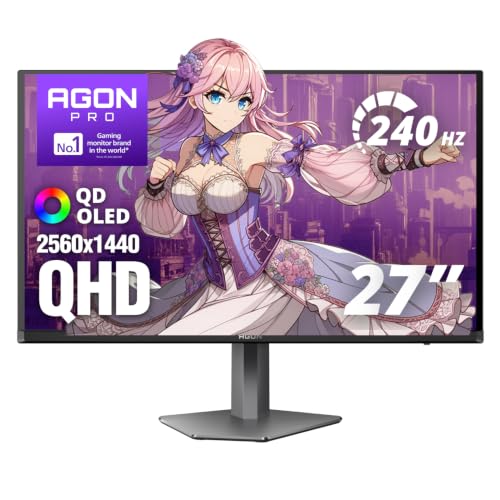
AOC AGON Pro AG276QZD2
Best for: QD-OLED speed with built-in speakers and VESA mounting, for a desk that wants sound without a separate speaker purchase on day one.
Not suited for: tidy-cable minimalists needing a fully specified stand — the title promises height adjustment only, with tilt and swivel left unstated.
- Size and panel: 27-inch QD OLED
- Resolution and rate: 2560×1440, 240Hz
- Response: 0.03ms
- HDR: HDR TrueBlack 400
- Stand and mounting: Height Adjustable, VESA Mount
- Audio: Built-in Speakers
- Surface finish: Not stated in the listing title — verify with the manufacturer documentation
The AGON Pro AG276QZD2 is the first of this guide’s panel-class gloss entries, and the distinction should be read precisely. Its title states a QD OLED panel at 27 inches, 2560 by 1440, 240Hz and 0.03ms, with HDR TrueBlack 400 — a competitive specification identical in shape to the LG and ASUS above. The word glossy does not appear, so the spec box records the silence. What places the monitor in this guide is the panel family itself: QD-OLED panels of this generation are glossy-coated as a class, presenting the deep-contrast, mirror-finish behaviour the category is about. The claim made here is therefore a class claim, labelled as one.
QD-OLED’s character in a glossy presentation is worth describing on its own terms. The technology’s colour volume at high brightness is its calling card, and a gloss surface passes that colour through undiffused, which is why QD-OLED gaming monitors have become the default recommendation for players who prioritise saturated, luminous game worlds. The same class behaviour carries the family’s known ambient-light nuance: in bright rooms, QD-OLED blacks can lift slightly toward a purple-grey where a W-OLED holds deeper, because the panel structure interacts with ambient light differently. In the controlled room this guide assumes, the effect recedes and the colour advantage leads.
AOC’s supporting choices are pragmatic. Built-in speakers spare a small desk the second purchase and the second cable, adequate for game audio cues, calls and casual video even if dedicated speakers remain the upgrade path. Height adjustment covers the ergonomic essential, and the VESA mount opens the arm-mounted route that glossy panels often benefit from, since an arm gives finer tilt control for reflection management than many stock stands. The AGON Pro name signals the competitive line, and the specification honours it — this is a speed panel with sensible furniture, wrapped around the QD-OLED gloss-class surface.
Set against the ASUS, its closest rival in shape, the AOC offers speakers and mounting clarity where the ASUS offers thermal hardware and a stated gamut figure. Set against the LG, it offers the QD-OLED colour character where the LG offers a title-stated gloss claim and a fuller stand. The three-way comparison is genuinely about priorities, and the comparison table below lines the stated facts up for exactly that judgement.
A word about value shape, without naming figures this guide does not print. QD-OLED panels of this specification have settled into a band where the AOC’s proposition — full speed, TrueBlack 400, speakers, height adjustment, VESA — reads as the efficient route into the family’s colour. The savings against feature-stacked rivals are not bought with panel compromises, because the panel core is the class standard. What is given up lives in the fine print this review has already enumerated: stand motions beyond height, a stated finish, a stated gamut percentage. Rank those three low, and the gloss-class QD-OLED experience arrives with the least ceremony in the group.
Strengths
- QD-OLED gloss-class surface with the family’s high colour volume
- Built-in speakers and VESA mounting cover small-desk practicalities directly
- Full competitive core: 240Hz, 0.03ms, TrueBlack 400
Trade-offs
- Gloss is a panel-class attribute here, not a title-stated claim
- QD-OLED blacks lift more than W-OLED under strong ambient light
- Stand beyond height adjustment is not specified in the title
Small desks that would rather skip a speaker purchase should shortlist this one early; Check price on Amazon under the AG276QZD2 code to avoid its near-name siblings.

Acer Predator X27U
Best for: a QD-OLED desk that connects everything at once — two HDMI 2.1 and two DisplayPort inputs cover PC, spare PC and both consoles without a switcher.
Not suited for: single-machine desks paying for ports they will never populate — the connection depth is this model’s premium feature.
- Size and panel: 26.5-inch QD-OLED
- Resolution and rate: QHD 2560×1440, 240Hz
- Response: 0.03ms
- Sync: AMD FreeSync Premium, NVIDIA G-Sync Compatible
- Colour: DCI-P3 99%
- Connections named: 2x HDMI 2.1, 2x DisplayPort
- Stand and audio: Ergo Stand, Speaker
- Surface finish: Not stated in the listing title — verify with the manufacturer documentation
Acer’s Predator X27U competes on completeness. The panel core matches the class — 26.5-inch QD-OLED, QHD at 240Hz, 0.03ms, DCI-P3 99% — and then the title spends its remaining words on the connection panel: two HDMI 2.1 ports and two DisplayPort inputs, four modern inputs in total, more than any rival here states. For the desk that hosts a gaming PC, a work laptop dock, a PlayStation and an Xbox in rotation, that count is not a luxury; it is the difference between reaching behind the monitor weekly and never thinking about inputs again.
Like the AOC, this is a QD-OLED gloss-class entry whose title leaves the surface unstated, and the same labelling applies: the glossy behaviour is a property of the panel family, recorded as such, with the spec box carrying the silence sentence for the finish line. In the controlled-light room, the X27U presents the QD-OLED signature — luminous colour, deep blacks, tight highlights — while its Ergo Stand and built-in speaker round out a package clearly aimed at being the only screen and the only sound source on a busy desk.
Sync support spans both ecosystems, FreeSync Premium on the AMD side and G-Sync Compatible on the NVIDIA side, so the four inputs can serve machines from either camp without a weak link. The slightly smaller 26.5-inch diagonal, shared with several panels in this class, is effectively the 27-inch format measured precisely; in practice it slightly raises pixel density at the same resolution, a small sharpness bonus that costs nothing. The Predator proposition, assembled, is the hub monitor: every machine in the room plugs into it, and the panel underneath the hub is a full-strength QD-OLED rather than a compromise made to afford the ports.
The counterweight is focus. A single-PC desk uses one DisplayPort and leaves the rest as expensive headroom, and such a desk might prefer the ASUS’s thermal kit or the LG’s stand. The X27U’s value scales with the number of machines it serves, which makes it the easiest pick here to justify or dismiss once the desk’s population is counted honestly.
The hub role also changes how the gloss question plays out. A monitor serving four machines serves four kinds of content — games, work documents, console dashboards, streamed video — and the glossy surface flatters them unevenly: games gain the most, bright documents the least, since white screens show reflections as pure light with no picture to compete. The Ergo Stand’s adjustability therefore works overtime on a hub desk, re-aiming the panel as the content changes through the day. Owners who mount the screen for one fixed purpose can discount this; owners who live the full rotation will feel the stand earn its name.
Strengths
- Four current inputs — dual HDMI 2.1 and dual DisplayPort — the deepest stated connectivity in the group
- QD-OLED gloss-class panel with DCI-P3 99% and both sync families
- Ergo Stand and speaker included for a one-purchase desk
Trade-offs
- Surface finish is panel-class knowledge, not a title claim
- Port depth is wasted on a one-machine desk
- Speaker is a convenience feature, not a replacement for dedicated audio
Count the machines on your desk first; if the answer is three or more, the X27U’s input panel settles the argument — Check price on Amazon to confirm the W1 variant.
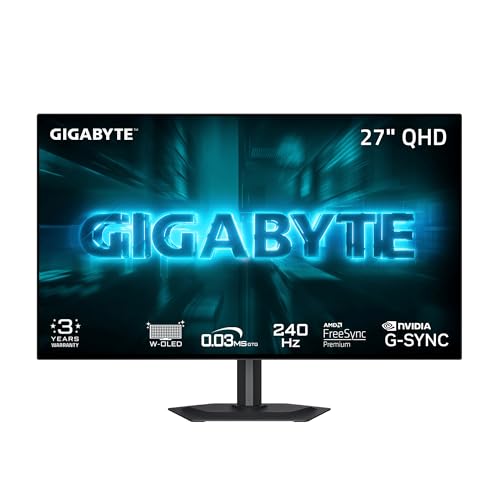
GIGABYTE GO27Q24G
Best for: a W-OLED gloss-class panel with Type-C among its inputs, suiting a desk that swaps between a gaming PC and a USB-C laptop.
Not suited for: multi-console setups — one HDMI is named in the title, so console collectors will be swapping cables or adding a switcher.
- Size and panel: 27-inch W-OLED, Black
- Resolution and rate: QHD 2560×1440, 240Hz
- Response: 0.03ms GTG
- Sync: AMD FreeSync Premium, G-SYNC Compatible
- Connections named: HDMI, DP, Type-C
- Stand: Height and Tilt Adjustable
- Surface finish: Not stated in the listing title — verify with the manufacturer documentation
Gigabyte’s entry completes the panel-family map. The GO27Q24G is a W-OLED — the LG-sourced panel lineage — at 27 inches, QHD, 240Hz and 0.03ms GTG, which puts it in the same performance envelope as the LG UltraGear above while arriving from a different brand’s design office. W-OLED gloss-class behaviour differs from QD-OLED in the ambient-light detail that matters to this guide: W-OLED panels hold their blacks more stubbornly when room light rises, a trait that makes this family the safer gloss choice for rooms that are merely dim rather than fully controlled.
The input list is the design’s signature. HDMI, DisplayPort and Type-C are all named, and the Type-C entry is the interesting one: it invites a laptop into the same screen the gaming PC uses, over the single-cable connection laptops prefer. A desk that works by day on a notebook and plays by night on a tower can live on this monitor without a dock shuffle. Height and tilt adjustment are stated for the stand — the two motions used most — and both sync families appear, FreeSync Premium and G-SYNC Compatible, so neither PC camp is a second-class citizen on the DisplayPort side.
As with the other class entries, the title does not say glossy, and the spec box says so. The guide’s claim rests on the W-OLED panel class and its established glossy presentation, labelled transparently so readers can weigh the evidence level themselves — those who want the word in writing have the two LG models and the ASUS above, all stated outright. What the Gigabyte adds to the group is the Type-C route into W-OLED gloss-class gaming at the competitive specification, plus the family’s ambient-light composure.
Its limits are the mirror of its focus. One named HDMI port constrains console households, and the title names no speakers, so audio is an external purchase. Judged as the laptop-friendly W-OLED option, though, it fills the last open seat in this lineup: every prior pick optimised for something — size, stand, thermals, speakers, ports — and this one optimises for the two-machine desk that connects over Type-C. Readers speccing the print side of a varied desk can continue to our graphic design laser printer guide, where colour discipline replaces refresh rate as the obsession.
Gigabyte’s restraint elsewhere in the title reads, on reflection, as targeting. No speaker claim, no gamut percentage, no HDR tier is recited — the title spends its words on panel, rate, sync, ports and stand, the working specification of a monitor meant to be bought by people who already know the class numbers. That terseness cuts both ways for the reader: less to verify, but also less promised, and the documentation check before purchase matters correspondingly more. What is promised, though, is coherent — a W-OLED competitive panel that a laptop can join over Type-C — and coherence, in a market of feature confetti, is its own recommendation.
Strengths
- W-OLED gloss-class panel holds blacks well as room light rises
- Type-C input welcomes the laptop alongside the gaming PC
- Height and tilt adjustment plus both sync families cover the essentials
Trade-offs
- Gloss claim rests on panel class; the title is silent on finish
- Single named HDMI limits console rotation
- No speakers are mentioned in the title
Two-machine desks built around a Type-C laptop should look here first; verify the port layout against your machines, then Check price on Amazon.
Comparison Table
| Pick | Panel and size | Resolution and rate | Gloss evidence |
|---|---|---|---|
| LG UltraGear 32GX850A-B | OLED, 32-inch | 4K UHD 165Hz / FHD 330Hz dual mode | Stated in title |
| LG UltraGear 27GX704A-B | OLED, 27-inch | QHD 240Hz | Stated in title |
| ASUS ROG Strix XG27AQDMG | OLED, 27-inch | 1440p 240Hz | Stated in title |
| AOC AGON Pro AG276QZD2 | QD OLED, 27-inch | 2560×1440 240Hz | Panel class; title silent |
| Acer Predator X27U | QD-OLED, 26.5-inch | QHD 240Hz | Panel class; title silent |
| GIGABYTE GO27Q24G | W-OLED, 27-inch | QHD 240Hz | Panel class; title silent |
How to Choose a Glossy Gaming Monitor
How much light does your room actually throw at the screen?
Audit the room before the catalogue. Sit in your chair at your usual playing hour and note every light source the screen can see: windows, ceiling fixtures, lamps behind you. A glossy panel reflects those sources as distinct images, sharp enough to read during dark scenes. If the audit finds one manageable source, a stand with good tilt range — the LG 27-inch lists all four adjustments — can angle it away. If the audit finds a wall of glass, gloss is the wrong purchase no matter how beautiful the demo looked, and the Glare-Free matte approach described in the introduction becomes the rational choice. Honesty at this step is worth more than any specification below.
QD-OLED or W-OLED gloss — does the family matter?
Both families deliver the gloss experience; they differ at the margins of light and colour. QD-OLED, in the AOC and Acer here, leans into colour volume and luminous saturation, and asks for the darker room in return, since its blacks lift sooner as ambient light climbs. W-OLED, in the LG pair and the Gigabyte, holds blacks more stubbornly in imperfect light. Fully controlled room: choose on size, ports and stand. Borderline room: the W-OLED family’s composure earns its place. Either way, the coating question and the family question are separate decisions — gloss is the surface, the family is the engine beneath it.
Is 240Hz at QHD or 165Hz at 4K the better spend?
Follow the library. Competitive titles reward frame rate and punish the rendering cost of 4K, which is why five of six picks standardise on QHD 240Hz. Cinematic and single-player libraries reward resolution and scale, which is the LG 32-inch’s home ground, with its dual mode as insurance for the occasional ranked detour. A mixed library should count hours honestly: the mode you use weekly is the monitor you bought, and the other mode is a feature you rented. Graphics hardware arbitrates ties — a card that cannot hold high rates at 4K turns the 32-inch into a 165Hz panel running below its comfort zone.
Which stand and port details change daily life?
Two lists decide whether a monitor fits a desk after the panel impresses it. The stand list: height and tilt are the daily motions, swivel serves shared screens, pivot serves vertical content, and an arm via VESA — stated on the AOC — replaces them all with finer control. The port list: count your machines, then count the inputs, and prefer the monitor whose stated connections cover the population without a switcher, whether that is the Acer’s four inputs or the Gigabyte’s Type-C welcome for a laptop. Daily friction lives in these lists, not in the headline rate.
How should the evidence level of the gloss claim affect the shortlist?
Decide what kind of proof you need before the shortlist hardens. If the finish must be guaranteed by the manufacturer’s own listing language, three picks qualify — the two LG models and the ASUS — and the choice among them runs on size, stand and thermal features. If panel-class knowledge is acceptable evidence, the field widens to all six, and QD-OLED colour or Type-C connectivity can lead instead. Neither standard is more virtuous; they are different risk postures, and naming yours in advance prevents the common drift of falling for a class-evidence monitor and then feeling misled by a silence that was disclosed all along.
Living With Gloss: Placement, Cleaning and Panel Care
Placement is the first and cheapest gloss accessory. Put the screen so that no window or lamp sits in the arc it reflects toward your eyes — typically, light sources behind the player or to the sides, never facing the panel. A few degrees of tilt, tested during the brightest hour you play, usually clears the remaining reflection. Bias lighting behind the monitor, a soft glow on the wall, raises the room’s perceived brightness without touching the screen, easing eye strain in dark scenes; it is the one lighting addition gloss owners consistently praise.
Cleaning a glossy surface is a discipline LCD owners never had to learn. Dust shows on gloss the way it shows on a phone screen, and the correct tool is a dry or barely damp microfibre cloth, moved gently, with the panel off so smudges are visible. Sprays applied directly to the screen, paper towels and household glass cleaners all risk the coating that is the entire point of the purchase. Clean less often and more carefully: a weekly microfibre pass beats a monthly aggressive one.
Panel care is the OLED half of ownership. The features named in these titles — ASUS’s custom heatsink and uniform brightness, the class-wide pixel-refresh routines in this panel generation — exist because OLEDs reward sensible habits: vary content, let the panel run its maintenance cycles, avoid parking a static bright interface on screen for days. None of this is burdensome in a gaming pattern of use, where content moves constantly. It becomes relevant for the mixed desk that games at night and holds a static work interface all day; that desk should use screen savers and taskbar hiding as routine, and will still be well served — the habits are minutes of setup, not a lifestyle.
Gloss Versus Glare-Free: The Counterexample, Taken Seriously
Because this guide argues for gloss, it owes the opposing design an honest hearing. Samsung’s Glare-Free treatment on the Odyssey OLED G6 spreads reflected light across the surface so that no distinct reflection forms. In a bright room — the room with the window wall, the overhead panels, the shared living space that cannot be rearranged around a hobby — that behaviour is not a compromise but a rescue: the picture stays watchable at noon, dark scenes carry a mild haze instead of a mirrored window, and the owner stops managing blinds like stage curtains. Gamers in such rooms who buy gloss on a reviewer’s enthusiasm end up playing only after dark, which is a poor return on a major purchase.
The physics leaves no middle product, only a decision. A surface either preserves the image’s contrast and mirrors the room, or diffuses the room and taxes the contrast. Panel makers dress the choice in brand vocabulary — Glossy, Nano Gloss, Glare-Free — but the underlying fork never moves. This guide’s six picks stand on one side of it, with their evidence levels labelled; the counterexample stands on the other, named and respected. The reader’s room, audited honestly, is the only competent judge between them, and every section above is scaffolding for that single judgement.
Common Mistakes
Judging gloss under shop lighting. Showroom brightness flatters matte and punishes gloss, reversing the verdict of a dim room at home. Decide from your own room’s audit, not from a retail wall.
Assuming every OLED title states its finish. Three of these six do; three rest on panel class. Needing the claim in writing means choosing from the stated three, and everyone should confirm the finish on the exact model code before ordering, because near-identical variants with different coatings exist in this market.
Buying the Glare-Free model for a gloss setup. Samsung’s Glare-Free treatment is matte by design. It is a good answer to a bright room and the opposite of this category; a gloss seeker who orders it by name confusion gets a fine monitor that is not the one intended.
Feeding 240Hz through an old cable or the wrong port. The panel then runs at a lower rate with no error message, and the owner blames the monitor. Use the DisplayPort or HDMI 2.1 connection the titles name, with a cable rated for it, and verify the rate in the operating system’s display settings.
Wiping the screen like a window. Household cleaners and paper towels attack the coating. Microfibre, minimal moisture, no pressure — the phone-screen routine, applied to a larger and more expensive surface.
Frequently Asked Questions
Why do glossy OLEDs look more contrasty than matte ones with the same panel?
The coating is the difference. A matte surface scatters both the picture’s light and the room’s light, which lifts perceived blacks and softens highlights. A glossy surface passes the picture’s light through cleanly and reflects room light as a distinct image instead of a general haze. In a controlled room there is little room light to reflect, so what remains is the cleaner picture: deeper blacks, tighter highlights, more saturated colour.
Is Samsung’s Odyssey OLED G6 a glossy monitor?
No — it is explicitly Glare-Free, Samsung’s matte treatment, and that is why it appears in this guide as a prose counterexample rather than a pick. For a bright room it may well be the better purchase. It simply belongs to the opposing philosophy, and a glossy guide that listed it would be misleading its readers about the one property they came for.
Does gloss make QD-OLED and W-OLED behave the same in daylight?
Not quite. Both reflect light as images, but the panels beneath respond differently to ambient light: QD-OLED blacks tend to lift sooner as the room brightens, while W-OLED holds its blacks more stubbornly. In a dark room the difference fades and colour character leads. In a borderline room, the W-OLED picks — the two LG models on stated gloss, the Gigabyte by class — are the safer gloss purchases.
Can a glossy monitor work in a room with one window?
Usually, yes, with placement. Put the window behind you or to the side rather than facing the screen, use the stand’s tilt to throw the remaining reflection below your sightline, and play dark games after the brightest hour or with the blind drawn. The failure case is a window directly behind the seating position facing the panel — that geometry mirrors the window into every dark scene, and no tilt fixes it.
What does 0.03ms actually promise?
It is the grey-to-grey response figure OLED panels achieve by their switching nature, and all six picks state it. In practice it means motion clarity is a solved problem across this entire list — pixel transitions stop being the blur source, and refresh rate plus frame rate become the limits that matter. Choose on rate, size, coating evidence and ports; response time will not separate these six.
Do glossy OLEDs need a screen protector or special film?
No — and adding one would defeat the purchase. Films and protectors sit on top of the coating the buyer paid for, reintroducing diffusion or their own reflection behaviour. The protection a glossy OLED actually needs is behavioural: microfibre cleaning, no household sprays, and sensible placement away from knocks. The surface is tougher than its mirror finish suggests, provided it is treated as a precision coating rather than as glass on a kitchen window.
Is 27 inches at QHD sharp enough on a glossy panel?
For gaming, comfortably. The gloss surface removes the diffusion layer that softens text on matte screens, so QHD at 27 inches reads crisper here than the raw pixel count suggests — user interfaces, subtitles and HUD elements all benefit. Dedicated document work at small font sizes still favours higher density, which is a workload question rather than a coating question, and it is the one scenario where the 32-inch 4K model’s desktop mode outranks the QHD five.
Will a glossy OLED show dust and fingerprints more than a matte screen?
Yes, visibly — gloss hides nothing, which is the tax on its clarity. Fingerprints appear where hands adjust the panel, and dust reads against dark scenes. The mitigation is habit rather than product: adjust the screen by its edges or stand, keep the microfibre cloth in the desk drawer rather than the cupboard, and fold the weekly wipe into the same routine as clearing the desk. Owners who adopt the habit stop noticing the tax within a month; owners who fight it with sprays and paper create the coating damage the routine exists to prevent.
Final Recommendation
Start with the room, end with the panel. If your lighting is controlled and the claim must be in writing, the LG 27GX704A-B is the purest competitive expression here — stated gloss, 240Hz, full stand — while its 32-inch sibling adds 4K scale and the 330Hz dual mode for mixed libraries, and the ASUS XG27AQDMG answers with thermal engineering and the group’s widest stated gamut. If panel-class evidence suffices, the AOC brings QD-OLED colour with speakers and VESA mounting, the Acer turns the monitor into a four-input hub, and the Gigabyte welcomes a Type-C laptop into a W-OLED setup that tolerates brighter rooms. And if the room audit fails every one of them, take the counterexample seriously: a Glare-Free matte panel in a bright room beats a glossy panel fighting its own reflection, every evening of the year.
One last discipline applies whichever name leaves with your money: verify the exact model code on the listing against the code in these reviews before paying, because this market sells near-identical monitors whose coatings, stands and port counts differ by a suffix. The gloss you auditioned in your imagination lives in a specific SKU, and the suffix is where it resides.