What's inside
- Key Takeaways
- Quick Picks
- How Did We Sort the True U Desks from the Shape-Shifters?
- Why Does the Wrap Shape Change How a Desk Day Feels?
- What Should You Measure Before a U-Shaped Desk Enters the Room?
- The Six U-Shaped Desks, Examined One by One
- Which Wing Should Hold What? A Working Layout for the Wrap
- How Does Sitting Inside a U Change Light, Sound and Screen Placement?
- How Do the Six Wraps Compare on Shape, Storage and Power?
- How Should You Assemble and Cable a U Desk Without Regretting It?
- What Does the Wrap Ask of You in Return? The Honest Costs
- What Mistakes Do Buyers Make with U-Shaped Desks?
- Final Recommendation
- Frequently Asked Questions
- Related Guides
As an Amazon Associate I earn from qualifying purchases. This post may contain affiliate links at no extra cost to you.
widgetverdict.com is reader-supported. When you buy through links on our site, we may earn an affiliate commission.
Where to buy: Amazon stocks every desk in this roundup, and each pick below links straight to its listing, where the footprint diagram and the finish options are worth a slow look before you order — a U-shaped desk is the one piece of office furniture you cannot casually return.
The best u-shaped computer desks solve a geometry problem before they solve a style one. A straight desk gives you one work face and forces everything else — the second monitor, the notebook, the printer, the paperwork that is supposedly temporary — to queue along a single line until the line runs out. A U wraps three work faces around one chair, so the screen wall sits in front of you, reference material lives on one wing, and the other wing takes the hardware and clutter that would otherwise colonise your keyboard space. You swivel instead of reaching, and nothing important ends up behind you.
That promise comes with an honest complication this guide will not gloss over: not every desk sold under the U label actually wraps you on three sides. Four of the six picks here are genuine three-sided workstations — the YITAHOME, the 71-inch Pamray, the 79-inch DWVO and the 67-inch DurayLoly. The other two are shape-shifters. The busyaeh is a reversible design whose title claims the U name while its configuration can be rebuilt as an L, and the Bestar Logan is an executive desk sold explicitly as “U or L-Shaped,” with a pedestal and hutch that belong to a different, more formal segment than the gaming-flavoured desks around it. Each pick below is described as what it actually is, because a reversible desk is a fine purchase — as long as you bought it knowing that.
Room fit is the other gatekeeper. A true U needs a footprint you can walk around, clearance for the chair to rotate inside the wrap, and a door or hallway the flat-pack panels can actually travel through. Measure the room before you fall for the largest surface here, and measure the route the boxes will take to reach it.
Key Takeaways
- Four picks are true three-sided U desks; the busyaeh is reversible and the Bestar Logan converts between U and L, so read each configuration claim literally.
- Every pick except the executive Bestar builds power or charging into the desk — outlets, a charging station, or both appear in five of the six listing titles.
- LED lighting appears on four picks, which tells you where this category’s centre of gravity sits: gaming-leaning home offices rather than boardrooms.
- Storage splits the field — fabric drawers on the DWVO and DurayLoly, three drawers plus shelves and a pegboard on the busyaeh, a pedestal on the Bestar, and none named on the YITAHOME or Pamray.
- The wrap only works if the room does: leave walking space around the outside of the U and rotation space inside it.
Quick Picks
| Pick | Badge | Why it earns its place |
|---|---|---|
| YITAHOME U-Shaped Computer Desk with Charging Station | The honest wraparound | A genuine three-sided U with a charging station and LED lights, pitched squarely at multi-monitor work. |
| Pamray 71 Inch U-Shaped Corner Desk (Marble) | Marble-finish corner U | Seventy-one inches of U-shaped corner desk with power outlets and a marble finish that reads office rather than arena. |
| busyaeh U-Shaped Gaming Desk (Black) | Reversible storage build | Three drawers, storage shelves, a hutch and a pegboard on a reversible frame — flexible, provided you know it converts. |
| DWVO U-Shaped Desk with Drawers (79 Inch) | The 79-inch expanse | The longest surface here, with drawers, a monitor stand, power outlets and LED lights in grey. |
| DurayLoly 67 Inch U-Shaped Desk | Compact U with six drawers | A smaller true U that still finds room for six fabric drawers and a multi-colour LED strip. |
| Bestar Logan 66W U or L-Shaped Executive Desk | Executive outlier | A pedestal-and-hutch executive desk in Antigua that configures as U or L — the formal option in a gaming-leaning field. |
One framing note before the detail: width figures in this category describe the longest run of the desk, not the depth of each wing, and the listing titles here mostly quote that headline span. A 79-inch U and a 67-inch U can have surprisingly similar wing depths, which is why the per-pick sections below separate the headline span from what each wing is actually asked to hold.
How Did We Sort the True U Desks from the Shape-Shifters?
We read every listing title the way a contract lawyer reads a lease — literally. When a title says “U-Shaped” and stops there, the desk is treated as a fixed three-sided workstation. When a title adds “Reversible” or spells out “U or L-Shaped,” the desk is treated as a convertible, and the review says so in plain words. That single distinction reorganised this roundup more than any other factor, because the two kinds of desk suit different buyers: a fixed U commits your room layout for years, while a reversible frame forgives a house move or a change of mind about which wall the window sits on.
Beyond shape honesty, three filters did the ranking. The first was powered convenience: in a wrap configuration you sit inside the desk, far from wall sockets on at least one side, so built-in outlets or a charging station stop being garnish and start being infrastructure. Five of the six picks clear that bar. The second was what the wings are asked to do — a wing carrying a monitor stand, drawers or shelving earns its floor space differently from a bare wing that merely extends the desktop, so storage named in the title counted heavily. The third was segment clarity. The Bestar Logan plays a different sport from the LED-lit gaming desks, and rather than penalise it for lacking lights we judged it as the executive alternative it plainly is.
What we did not reward: LED lighting as a proxy for quality, headline width quoted without a configuration story, and the word “expansive” doing the work that dimensions should do. Where a listing title stays silent — on depth, on materials, on weight capacity — the spec boxes below say so in words written for that pick, and the buying advice treats the silence as a question to resolve on the listing page before ordering.
Why Does the Wrap Shape Change How a Desk Day Feels?
On a straight desk, your work arranges itself by urgency along a line, and the line has two bad ends: the far left and the far right, where things go to be forgotten under newer things. Inside a U, work arranges itself by type across three faces. The centre face holds the screens at proper viewing distance. One wing becomes the analogue station — notebook, printed drafts, the calculator, a phone on its stand. The other wing absorbs the machine room: printer, external drives, the charging tangle, a scanner if your job still demands one. Each category gets a territory, and territories stay legible in a way a single crowded line never does.
The ergonomic dividend is rotation. Everything sits within a chair swivel, at roughly the same radius, so the reaching pattern of the day becomes a series of small turns rather than leans, stretches and the slow migration of your chair down a long desk and back. People who process paper alongside screens — accountants in home offices, teachers marking, anyone reconciling documents against a database — feel this immediately, because the document wing and the screen face are both simply there, at a turn of the shoulders.
There is also a collaboration quirk worth knowing before it surprises you. A straight desk invites a colleague or family member to pull up a chair beside you and look at the same screen; a U wraps its owner alone, and a second person ends up hovering at the open side like a visitor at a counter. For solo deep work that moat is a feature — interruptions quite literally cannot sit down — but households that regularly review things together at the desk should keep one wing’s front edge clear enough for a second chair to dock at an angle.
The cost is floor. A U claims a room’s centre or a full corner plus its surroundings, and it commits the walls around it: bookcases and doors compete with the wings. In a spare bedroom that doubles as a guest room, the wrap can quietly annex the whole space. That is why two of the six picks hedge with reversible or dual-shape designs, and why the smallest true U here, the 67-inch DurayLoly, matters more than its size suggests.
What Should You Measure Before a U-Shaped Desk Enters the Room?
Start with the room’s usable rectangle, not its brochure dimensions. Sketch the walls, mark the door swing, the radiator, the window you must not block and the socket positions, then draw the U at scale — headline width across the back, and a wing depth on each side that you take from the listing’s dimension diagram rather than assuming. The chair needs a turning circle inside the wrap; as a working rule, if you cannot rotate a dining chair freely in the marked space, the desk is too big for the room no matter how good it looks in photographs.
Then measure the delivery route. These desks arrive as flat panels, and the longest panel is usually close to the headline width. A 79-inch panel that cannot make the turn at the top of a staircase is a return waiting to happen. Check the stairwell corner, the landing and any tight door at an angle, with a tape rather than optimism.
Finally, plan the power geography before assembly, not after. Decide which wall socket feeds the desk, because once a three-sided desk is built around you, crawling behind a wing to reroute a cable means partially unbuilding your afternoon. Desks with built-in outlets still need one wall connection, and the wing nearest that socket should be the wing you assemble first and move least.
The Six U-Shaped Desks, Examined One by One

YITAHOME U-Shaped Computer Desk with Charging Station — The Honest Wraparound
YITAHOME’s listing makes the clearest promise in this roundup and then explains it in its own title: the wraparound U-shaped design offers an expansive work surface for multiple monitors, office gear and daily tasks. That is the pure form of the category — three work faces, no conversion tricks, no hutch narrowing the brief. If your mental picture of a U desk is a command position with screens ahead and working wings to both sides, this is the pick that matches the picture without footnotes.
The charging station is the detail that elevates it from shape to system. Sitting inside a wrap, you are at maximum distance from at least two walls, and a desk that builds charging into the surface acknowledges the geography instead of leaving you to drape cables across a wing. LED lights also feature in the title, which places the desk in the gaming-leaning mainstream of this category — useful ambience for evening work, irrelevant decoration for a buyer who keeps office hours, and priced into the design either way.
What the title does not offer is storage. No drawers, shelves or monitor stand are named, so the wings arrive as open surface — glorious for spreading work, demanding of discipline, because an unstructured wing becomes a horizontal filing system within a fortnight. Buyers with paperwork-heavy days should budget for a separate pedestal or choose the DWVO or DurayLoly below. The title also quotes no headline width for this model, which is unusual in this company; confirm the full footprint on the listing before assuming it is the mid-sized option its positioning suggests.
Consider how the YITAHOME behaves across a working week rather than on delivery day. The centre face takes the monitor array the title promises, and because no stand or hutch interrupts it, you choose the elevation yourself — a separate arm or riser can be added later without fighting the desk’s own furniture. The wings, being bare, become whatever the week demands: a grading pile on Monday, a soldering mat and parts trays on Thursday, cleared to nothing for a clean video backdrop on Friday. That mutability is the open U’s quiet strength, and it is why this desk suits people whose work changes shape more often than their room does.
- Configuration: fixed U-shaped wraparound, per the listing title
- Power: built-in charging station named in the title
- Lighting: LED lights included
- Storage: no drawers or shelving named in the title — plan separate storage
- Headline width: the title gives no inch figure for this model; check the listing’s dimension diagram
- Intended load: multiple monitors and office gear, per the title’s own description
Strengths
- A true three-sided wrap with no conversion caveats to decode.
- The charging station answers the U shape’s real power-distance problem.
- Open wings suit monitor-heavy setups that need unbroken surface.
Trade-offs
- No built-in storage is named, so clutter management is your problem.
- The title’s silence on headline width forces a listing check before room planning.
- LED lighting is baked in whether or not your office wants the glow.
Best for: a multi-monitor worker with a dedicated room who wants the genuine wrap and already owns separate storage. Not suited for: a paperwork-heavy desk day, because neither wing hides a single drawer to swallow it.
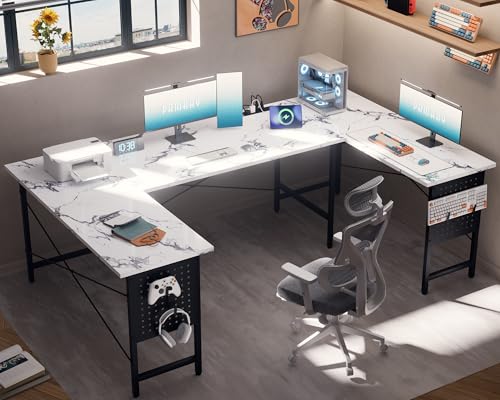
Pamray 71 Inch U-Shaped Corner Desk (Marble) — Marble-Finish Corner U
Pamray’s 71-inch entry makes a deliberate aesthetic swerve: a marble finish on a U-shaped corner desk, in a category where most surfaces are black, grey or carbon-textured. The effect it is chasing is a home office that reads as furniture rather than equipment — the desk you would leave visible on a video call background without apology. Seventy-one inches of headline span puts it in the middle of this field: materially wraparound, not the room-dominating 79-inch statement below.
Power outlets are built in, per the title, and in a corner configuration that matters in a specific way: corners are where wall sockets are scarcest relative to desk surface, because two walls meet and furniture crowds both. Bringing the outlets up onto the desk shortens every cable run your monitors and laptop need. The title pitches the desk at home office work and gaming alike, which matches its dual personality — formal finish, powered convenience, no lighting theatrics named.
The silences in this title are storage and lighting. No drawers or shelves are mentioned, so like the YITAHOME it is a surface-first desk, and no LED system is claimed, which some buyers will count as a virtue. The marble finish also deserves a practical note: light, patterned surfaces show cable shadows and coffee rings differently from black laminate, and a corner U in a bright finish becomes the visual anchor of the room — choose it because you want that, not by accident.
There is a placement subtlety the corner designation creates. A corner U asks the room for its corner — the one spot usually reserved for a bookshelf, a plant or nothing at all — and in exchange it returns the room’s centre. For flats where the office must share space with living, that trade can be the difference between a desk that dominates and a desk that settles. The marble finish reinforces the settling: pale surfaces bounce window light rather than swallowing it, so a corner that might have gone gloomy under a black gaming desk stays bright enough to work in without a lamp at noon.
- Headline span: 71 inches, per the listing title
- Configuration: U-shaped corner desk, fixed shape
- Finish: marble, per the title
- Power: built-in power outlets named in the title
- Storage: no drawers or shelves appear in the title — treat the wings as open surface
- Lighting: no LED system is claimed in the title
Strengths
- The marble finish gives a U desk a furniture-first look nothing else here attempts.
- Built-in outlets suit corner placement, where wall sockets are awkwardly shared.
- A mid-size 71-inch span wraps without annexing smaller rooms outright.
Trade-offs
- Open wings again — no drawer storage is named in the listing title.
- A bright finish will anchor the room’s look, for better or worse.
- Buyers wanting gaming lighting will find none claimed here.
Best for: a corner home office that appears on camera, where the desk must look like furniture and still power a full setup. Daily paperwork has nowhere to land here, since the 71-inch title promises power outlets and a marble finish but names neither a drawer nor a shelf.

busyaeh U-Shaped Gaming Desk (Black) — Reversible Storage Build
Here is the pick that requires the most careful reading, so let us be exact: the busyaeh’s title leads with “U-Shaped Gaming Desk” and then describes a reversible computer desk with LED lights and a charging station, finished with a hutch and pegboard. Reversible means the frame can be assembled in mirrored or alternative configurations — in practice, desks of this pattern build as an L with an return that can sit on either side, and the U claim rests on how the shelving and hutch complete the wrap. It is a legitimate, flexible design. It is not the same object as the fixed three-sided YITAHOME above, and you should buy it for its flexibility rather than for a textbook U.
Judged on its own terms, the storage story is the richest in this roundup. Three drawers, storage shelves, a hutch above and a pegboard for hanging the small tools of a desk day — headsets, cables, controllers, scissors that otherwise vanish. The pegboard in particular suits the gaming-and-making overlap buyer, the person whose desk hosts both a battlestation and a hobby bench. The charging station repeats the category’s sensible power answer, and the black finish keeps the whole assembly visually quiet despite its many parts.
The caution is assembly and expectation. A reversible frame with this many components is the longest build in the six, and the configuration decision — which side the return and shelves occupy — has to be made before the first bolt, then lived with. Photograph the room, decide the orientation against the socket wall, and only then open the boxes. Buyers who wanted a symmetric, both-wings-equal U should also note that a hutch-and-shelf wing is vertical storage, not a third work surface; the working wrap here is shallower than the fixed Us deliver.
The pegboard deserves one more moment, because it changes what a desk edge is for. On a plain desk, the vertical plane behind the surface belongs to monitors and nothing else; here, the board colonises that plane for the small, losable instruments of a desk — the headset between calls, the cable you reach for weekly, the game controller, the notebook clips. Paired with the hutch above, the busyaeh builds a wall of organised storage at the back of one wing, which is precisely where a fixed U leaves air. Buyers whose clutter is vertical rather than horizontal will find this the most sympathetic design in the six.
- Configuration: reversible desk — the title claims U-shaped while describing a reversible build; read it as convertible
- Storage: three drawers plus storage shelves, per the title
- Vertical elements: hutch and pegboard both named in the title
- Power: charging station built in
- Lighting: LED lights included
- Finish: black
Strengths
- The deepest storage system here — drawers, shelves, hutch and pegboard together.
- Reversibility forgives room changes and left-or-right layout preferences.
- The pegboard gives headsets and tools a home that is not the desktop.
Trade-offs
- It is a convertible wearing a U badge; purists wanting three equal work faces should look above.
- The most components means the longest, most decision-heavy assembly of the six.
- A hutch wing stores vertically rather than extending the work surface.
Best for: a gamer-maker whose desk must swallow gear in drawers and hang tools on a board, in a room whose layout may change. Equal wings are not on offer: one side carries shelving, a hutch and a pegboard instead of work surface, leaving screens and paper to compete on the rest.

DWVO U-Shaped Desk with Drawers (79 Inch) — The 79-Inch Expanse
Seventy-nine inches is the largest headline in this roundup, and the DWVO spends the span on the full modern checklist: drawers, power outlets, LED lights, a monitor stand and storage shelves, in grey. Its title also carries the phrase “Reversible L Shaped Desk,” which deserves the same honest unpacking as the busyaeh — yet here the primary description leads with the U shape and drawers, and the desk is sold and photographed as the wraparound. Read the configuration diagrams on the listing with care: the wings on this class of frame can be arranged to favour one side, and the buyer who plans the room around a symmetric U should confirm the built geometry matches the plan.
The monitor stand is the feature that changes daily ergonomics most. Raising the screens on a dedicated stand frees the surface beneath them — the keyboard can slide under, notebooks park there, and the centre face of the U stays a working surface instead of becoming a monitor plinth. Combined with drawers and shelving, this is the most completely appointed of the true U desks: surface, elevation, storage and power all present, nothing left to improvise.
Grey is also a considered choice in a field of black desks; it softens a very large piece of furniture, which at 79 inches needs softening. The cautions scale with the size. This desk demands the biggest room, the clearest delivery route and the most assembly patience of the fixed Us, and its LED system and full feature stack mean more cables to route neatly inside a wrap you will sit within — plan the cable paths wing by wing as you build, not once the chair is already inside.
Think about who actually fills 79 inches. The natural owner runs a genuine three-zone day: screens centre, a laptop or tablet docked on one wing for the second machine or the reference feed, and the other wing given to the physical workflow — post, parcels, a cutting mat, the scanner. At this span the wings stop being extensions and become stations, each deep enough in practice to hold its own task without borrowing from the centre. That is the threshold the DWVO crosses and the smaller Us deliberately do not: it is a two-person desk’s worth of territory arranged around one chair, and households where a partner occasionally pulls up a second chair to a wing will use every inch of it.
- Headline span: 79 inches — the largest in this roundup
- Configuration: U-shaped desk; the title also uses reversible L-shaped language, so verify the built geometry on the listing
- Storage: drawers and storage shelves both named
- Monitor support: a monitor stand is included, per the title
- Power and light: power outlets and LED lights built in
- Finish: grey
Strengths
- The most complete appointment list among the true U desks — stand, drawers, shelves, power, light.
- The monitor stand returns the centre surface to actual work.
- Grey finish takes the visual edge off a very large footprint.
Trade-offs
- The 79-inch span needs the biggest room and the clearest delivery route here.
- Title language mixes U and reversible L terms; confirm the configuration before ordering.
- More powered features mean more cables to tame inside the wrap.
Best for: a dedicated office room where one desk must do everything — screens raised, paperwork filed, peripherals shelved — at full wraparound scale. Not suited for: a spare bedroom that still hosts guests, because a built 79-inch wrap leaves that room one purpose only.
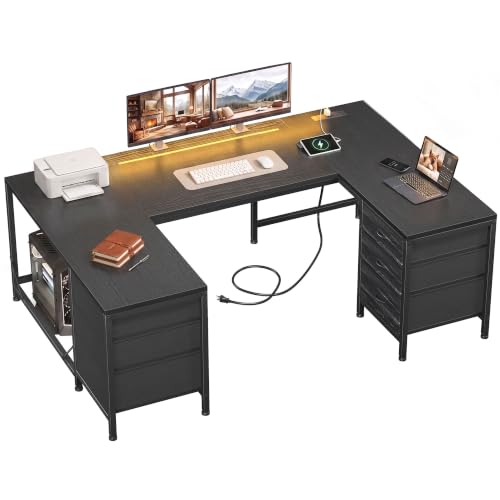
DurayLoly 67 Inch U-Shaped Desk — Compact U with Six Drawers
At 67 inches, the DurayLoly is the smallest true U in the roundup, and its title aims it at bedrooms and compact corners — a wraparound for rooms that would laugh at the DWVO. The surprise is how little it concedes. Six fabric drawers is the highest drawer count here, power outlets are built in, and a multi-colour LED strip runs the gaming brief. Where the larger desks spread storage across shelves and stands, this one concentrates it in a bank of drawers, which suits a bedroom-desk hybrid: the day’s work can be filed into fabric and the room returns to being a bedroom by evening.
Fabric drawers deserve a plain description. They are light, quiet, forgiving of overstuffing and kind to the wall behind them; they are not the place for reams of paper, heavy tools or anything you would stack by the kilo. For chargers, notebooks, craft supplies, controllers and the soft clutter of a bedroom office, they are honestly the right material, and six of them swallow a remarkable amount of life.
The compromises are the mirror of its size. Sixty-seven inches of wrap means each wing is short; a wing asked to hold a printer will hold only a printer. The multi-colour LED strip is a strip, not a zoned lighting system, and the title names no monitor stand, so screens sit on the surface and consume more of the centre face than they do on the DWVO. As the entry point to genuine U-shaped working in a small room, though, nothing else in the six makes the shape this accessible.
The bedroom framing in its title is worth taking seriously rather than as a size apology. A bedroom desk lives two lives: the working day, and the evening when the room must feel like a place to sleep rather than a satellite office. Six drawers serve the second life directly — the laptop charger, the notebooks, the controller, the paperwork all go behind fabric fronts, and the wrap reads as a tidy console instead of an abandoned workstation. The LED strip cuts both ways in this setting, energising for evening gaming and easily left off when the room is winding down. No other pick in the six was designed with that daily transformation in mind.
- Headline span: 67 inches — the most compact true U here
- Configuration: U-shaped corner desk for bedroom and home office, per the title
- Storage: six fabric drawers — the highest drawer count in the roundup
- Power: built-in power outlets
- Lighting: multi-colour LED strip lights
- Monitor stand: none is named in the listing title for this model
Strengths
- A genuine three-sided wrap that fits rooms the bigger Us cannot enter.
- Six drawers give a bedroom desk real put-away capacity.
- Power and lighting are included despite the compact brief.
Trade-offs
- Short wings each host one job, not two.
- Fabric drawers suit soft clutter, not heavy paper archives.
- No monitor stand is named, so screens consume centre surface.
Best for: a bedroom or small study that wants the wraparound working style and needs the day’s mess to disappear into drawers at night. Not suited for: a printer-plus-scanner hardware wing, since a 67-inch wrap has no wing deep enough to host both.

Bestar Logan 66W U or L-Shaped Executive Desk — Executive Outlier
Every roundup has one pick that reframes the category, and the Bestar Logan is it. This is a 66-inch-wide executive office desk with a pedestal and hutch, finished in Antigua, configurable as a U or an L — furniture from the world of corner offices and client meetings, listed alongside gaming desks with light strips. Neither world should sneer at the other; they simply optimise for different witnesses. The gaming desks are built to impress the person sitting at them. The Logan is built to impress the person sitting across from them.
The pedestal is the substantive difference. A proper pedestal means drawers engineered into the desk’s structure — the filing-and-stationery core of a traditional executive workstation — rather than fabric boxes or add-on shelves. The hutch adds enclosed vertical storage above the back run, the classic arrangement for reference binders and the objects an office displays. Configured as a U, the Logan wraps its user in that traditional arrangement; configured as an L, it retreats gracefully into rooms the full wrap would overwhelm.
Now the honest gaps, stated plainly: the title names no power outlets, no charging, no LED anything, and no monitor stand. An executive buyer wiring a modern setup into this desk will be routing cables the old way, through grommets and around the pedestal, and should plan a discreet power strip as part of the purchase. Assembly of pedestal-and-hutch furniture is also a heavier undertaking than a gaming frame. What you receive for that effort is the only desk here that would look correct with a client seated opposite — and for a home-based professional who hosts, that can be the entire argument.
One more consideration separates the Logan from the field: permanence. Gaming desks are bought as setups, upgraded and replaced as the battlestation evolves. An executive desk with a pedestal and hutch is bought as office furniture, with the expectation that it anchors the room for a decade and survives being taken seriously by removal firms. The U-or-L choice at assembly is therefore less about this year’s layout and more about not painting yourself into a corner across the desk’s long life — build it as the U while the room allows, knowing the L retreat exists if a future room demands it.
- Headline width: 66W (66 inches wide), per the listing title
- Configuration: U or L-shaped — buyer’s choice at assembly, per the title
- Storage: pedestal and hutch, both structural parts of the desk
- Finish: Antigua
- Built-in power: the title names no outlets or charging — plan external power delivery
- Lighting: no LED system is claimed in the title
Strengths
- A real pedestal and hutch — structural storage the gaming desks do not attempt.
- U-or-L flexibility at executive grade rather than gaming grade.
- The Antigua finish speaks to clients, not to a stream audience.
Trade-offs
- No powered convenience is named; modern cabling is entirely your own project.
- Pedestal-and-hutch assembly is the heaviest build in this six.
- Its formality is wasted on a room nobody visits.
Best for: a home-based professional who receives clients and wants a wraparound executive workstation with proper drawers. Not suited for: a streaming or gaming corner, where its lack of built-in power, charging and lighting leaves the whole modern checklist unanswered.
Which Wing Should Hold What? A Working Layout for the Wrap
New U owners tend to furnish the wrap by arrival order — whatever comes out of its box first claims the nearest wing — and then wonder why the shape feels no better than the straight desk it replaced. The layout that works assigns wings by frequency and by mess. Your dominant-hand side takes the high-frequency analogue work: the notebook you actually write in, the phone, the document currently being processed. Frequency belongs within the easiest swivel, and the dominant side is where your hand already wants to go.
The other wing takes the hardware and the mess: printer, scanner, external drives, the charging pile, the in-tray. This wing is visited in bursts rather than constantly, and its contents are the ones that generate cables, paper stacks and heat. Keeping them together on one side means the cable runs stay on one side too, and the inevitable sprawl of a busy week is contained in a single territory you can reset in one pass. The centre face stays sacred throughout: screens, keyboard, mouse, and nothing that is merely stored. The moment storage creeps onto the centre face, the wrap’s clarity — the thing you paid floor space for — begins to dissolve.
Two refinements separate a good wrap from a great one. First, the hutch or shelving, where a pick has it, belongs over the hardware wing, because vertical storage above the messy wing keeps the analogue wing open to the window or the room. Second, leave one deliberate empty patch — a landing zone on the analogue wing for the parcel, the borrowed book, the thing a colleague hands you mid-day. A U with no landing zone forces every arrival onto a working surface, and the territories blur within a week.
How Does Sitting Inside a U Change Light, Sound and Screen Placement?
The wrap quietly rearranges your relationship with the room’s light. On a straight desk against a wall, the window is either behind you — glaring on the screens — or behind the monitors, glaring in your eyes. Inside a U, the centre face can sit perpendicular to the window while the wings take the parallel walls, which is the orientation screen work has always wanted and straight desks rarely allow. When you plan the room, orient the centre face first and let the wings fall where they may.
Sound changes too, in a way streamers and call-heavy workers notice. Three desk surfaces around you, especially with a hutch or shelving on one wing, break up the bare-wall reflections of a typical spare room; your voice on calls picks up a little less of the room’s echo. It is not acoustic treatment and nobody should buy a desk as a microphone accessory, but the wrap’s mild deadening is a real, repeatable side effect of surrounding yourself with furniture instead of facing a flat wall.
Screen placement gains a subtler freedom: depth. The centre face of a U is rarely the constraint — the wings absorb the things that usually steal depth from a straight desk, so the monitors can sit at a proper arm’s-length viewing distance with the surface in front of them still usable. If you have spent years with screens pushed to the back edge of a shallow desk and your keyboard at the front edge with nothing between, the wrap’s centre face will feel like the first desk that was actually dimensioned for the job.
How Do the Six Wraps Compare on Shape, Storage and Power?
| Pick | Product type | Headline size | Storage named | Power |
|---|---|---|---|---|
| YITAHOME U-Shaped Desk | Desk — fixed U | Not quoted in title | None named | Charging station |
| Pamray 71 Inch Corner Desk | Desk — fixed U | 71 inches | None named | Power outlets |
| busyaeh Gaming Desk | Desk — reversible | Not quoted in title | 3 drawers, shelves, hutch, pegboard | Charging station |
| DWVO Desk with Drawers | Desk — U | 79 inches | Drawers, shelves, monitor stand | Power outlets |
| DurayLoly 67 Inch Desk | Desk — fixed U | 67 inches | 6 fabric drawers | Power outlets |
| Bestar Logan 66W | Desk — U or L executive | 66 inches wide | Pedestal, hutch | None named |
Read the table by your constraint, not by the biggest number. If the room is small, the DurayLoly’s row is the only one that fits and it still delivers drawers and power. If the work is screen-only, the YITAHOME and Pamray rows trade storage for clean surface. If the desk must impress across the room, only the Bestar row is even playing that game.
How Should You Assemble and Cable a U Desk Without Regretting It?
Build the U in the room it will live in, panel by panel, because an assembled wrap rarely fits through the doorway it entered as boxes. Lay the three runs out on the floor first, in the orientation you planned against the socket wall, and only then raise them. With reversible frames like the busyaeh, this floor rehearsal is doubly important — the mirror decision is free on the floor and expensive after the bolts.
Cable as you go, wing by wing. Fit the power feed to the desk’s built-in outlets or charging station first, then route monitor and peripheral cables along the back edge of each run while you can still walk around the outside of the shape. Once the desk is closed against the walls and the chair is inside, every cable change becomes a crouch-and-reach expedition. Leave one deliberate slack loop at the centre back for the monitor arms or stands you will inevitably adjust in the first month.
Seating deserves the same forethought as cabling. The chair inside a U works harder than any other chair in the house — it rotates constantly, rolls between wings, and its casters cross the same patch of floor hundreds of times a day. On hard floors that patch wears; on carpet it compacts into a visible track. A chair mat sized to the inside of the wrap, bought with the desk rather than after the floor complains, protects both, and it makes the swivel between wings noticeably freer. Measure the mat space from the built desk’s inner edges, because wing depths vary more between models than their headline widths suggest.
Finish with a week-one audit. Live inside the wrap for a few days, note which wing your hands actually visit, and move the storage to match — drawers and shelves earn their keep only when their contents sit where the day reaches for them. The U rewards this tuning more than any other desk shape, because everything is close enough that small misplacements are felt dozens of times a day.
What Does the Wrap Ask of You in Return? The Honest Costs
Advocacy for the U shape should come with its invoice attached. The first cost is cleaning and access: three runs of desk create corners where dust gathers beyond the reach of a casual cloth, and the wall sides of the wings are effectively sealed once the desk is built — anything dropped behind a wing stays there until the desk moves. Owners who dust weekly and retrieve dropped cables with a grabber tool will never care; owners who do neither should choose the configuration they can pull away from the wall single-handedly, which in practice means the lighter reversible frames rather than the pedestal-built Logan.
The second cost is heating and airflow, mundane but real. A wrap pushed into a corner over a radiator or across a floor vent rearranges the room’s warmth, and a PC tower parked on the hardware wing can find itself breathing the radiator’s output all winter. Walk the room’s vents and radiators into your floor sketch before the desk arrives, not after the first cold evening explains the problem.
The third cost is commitment. A straight desk can be rotated, repurposed as a dining table, or sold in an afternoon. A U is a workstation with one job, and its resale audience is other wrap believers. The reversible and U-or-L picks in this roundup — the busyaeh and the Bestar Logan — are partly insurance against that commitment, and buyers in rented homes or transitional years should weigh that insurance honestly against the fixed Us’ purity of shape.
What Mistakes Do Buyers Make with U-Shaped Desks?
The headline mistake is buying the photograph instead of the floor plan — ordering the 79-inch wrap for a room whose usable rectangle was never measured, then discovering the door, the radiator and the desk cannot coexist. The second is believing the label: assuming every “U-shaped” listing wraps three equal work faces, when reversible and hutch designs distribute their area very differently. Read the configuration diagrams, not the badge.
A third error is starving the wrap of power planning. A U desk puts its user far from walls on two sides; buyers who skip the built-in-outlet models and also skip planning a power route end up with a cable crossing the chair’s turning circle. Finally, there is the storage blind spot: choosing a bare-surface desk for the clean look, then drowning the wings in the paperwork that drawers would have swallowed. The clean look survives only if your work is genuinely paperless.
Final Recommendation
For most home offices with the room to spare, the DWVO is the complete answer — the largest true wrap, a monitor stand, drawers, shelves and power in one purchase. Where the room is smaller, the DurayLoly keeps the genuine U experience and adds the best drawer count here. Choose the YITAHOME for pure open surface around a charging station, the Pamray when the desk must look like furniture on camera, the busyaeh when flexible configuration and pegboard storage matter more than a textbook wrap, and the Bestar Logan when clients, not frame rates, are the audience. A U-shaped desk is a room decision wearing a furniture label; measure first, and the shape will repay you every working day.
Frequently Asked Questions
How much room does a U-shaped desk actually need beyond its footprint?
Plan for the footprint plus a walking margin around the outside and a chair-turning circle inside the wrap. In practice, leave enough space behind the seated position for the chair to roll back and rotate, and enough around the wings to reach cables and clean. If the room cannot offer both, a smaller U like the 67-inch DurayLoly — or an L configuration from the reversible picks — will serve you better than a large wrap shoehorned against every wall.
Is a reversible desk the same as a U-shaped desk?
No, and the distinction matters. A fixed U offers three work faces in a set geometry. A reversible desk, like the busyaeh in this roundup, can be assembled in mirrored or alternative layouts, and its U character depends on how the shelves and hutch complete the shape. Reversibility is a genuine advantage for rooms that change, but if your work needs two equal working wings, choose a fixed U and confirm the geometry in the listing’s diagrams.
Do I need built-in power outlets on a U-shaped desk?
More than on any other desk shape. The wrap places you at a distance from at least two walls, so every device cable travels further. Five of the six picks here build in outlets or a charging station for exactly that reason. If you choose the one that does not — the Bestar Logan — plan a deliberate power route and a quality strip as part of the setup rather than an afterthought trailing across the floor.
Can a U-shaped desk work in a bedroom?
Yes, at the compact end of the category. The DurayLoly was designed for it: 67 inches, six fabric drawers to absorb the day, and a footprint the title itself calls a compact corner desk. The discipline is containment — choose the pick whose storage lets the office disappear into drawers at night, and keep the guest-bed function, if any, outside the wrap’s turning circle.
What is the difference between the Bestar Logan and the gaming U desks?
Segment, mostly. The Logan is an executive desk with a pedestal and hutch in an Antigua finish, configurable as U or L, with no powered features named in its title. The gaming-leaning picks trade that formality for built-in outlets, charging and LED lighting. Neither is better in the abstract; the Logan suits a professional who hosts clients, the others suit screen-centred work and play.
How do I keep a wraparound desk from becoming three surfaces of clutter?
Assign each face a single job — screens centre, analogue work on one wing, hardware on the other — and give every category a container: drawers, a shelf, the pegboard. Clutter on a U is almost always a category without a home, not a shortage of surface. The weekly five-minute reset, returning each wing to its one job, keeps the wrap’s advantage intact.
Related Guides
Desks do not work alone, and these companion roundups cover the shapes and stations adjacent to the wrap: our guide to the best trading desks looks at multi-monitor setups built around wide surfaces and serious screen hardware, the best narrow desks roundup solves the opposite problem for tight rooms and shallow walls, and the best mid-century modern desks collection shows how much style a smaller footprint can carry.
Related guide: Best No-Assembly Computer Desks


