What's inside
- Key Takeaways
- Quick Picks
- How We Chose These Picks
- Why Does One Maker Dominate This Shelf?
- What Do the Encryption and FIPS Words Actually Mean?
- How Do the Six Drives Compare Side by Side?
- How Do You Set Up a Keypad Drive Without Locking Yourself Out?
- Who Genuinely Needs Hardware Encryption Rather Than Software?
- What Mistakes Do Encrypted Drive Buyers Keep Making?
- How Does a Keypad Drive Fit Into a Working Week?
- What Should an Organisation’s PIN Policy Actually Say?
- How Does the OSCOO’s Touchscreen Approach Compare in Daily Life?
- What Does Travelling With Encrypted Drives Look Like at Borders and Airports?
- How Should Encrypted Drives Be Retired at End of Life?
- Which Buyer Profiles Map to Which Pick, Honestly?
- How Does Hardware Encryption Behave When the Drive Meets a Locked-Down Work Machine?
- What Happens to Resale, Reuse and Handing a Drive Down?
- How Much Should the Encryption Itself Slow You Down?
- How Do You Choose a PIN That Is Both Memorable and Defensible?
- What Should a Buyer Verify in the First Week With an Encrypted Drive?
- How Does an Encrypted Drive Change the Conversation With Clients?
- What Is the Short Version for a Buyer With a Requirement in Hand?
- What Do Owners Say a Year After Switching to Hardware Encryption?
- What Is the One Thing to Do the Day the Drive Arrives?
- Final Recommendation
- Frequently Asked Questions
- Related Guides
As an Amazon Associate I earn from qualifying purchases. This post may contain affiliate links at no extra cost to you.
widgetverdict.com is reader-supported. When you buy through links on our site, we may earn an affiliate commission.
Where to buy: all six drives below carry checked Amazon listings, and with encrypted hardware the listing title matters, because the title is where the validation claims live.
Honesty first, because this category demands it: the best encrypted portable hard drives on sale today come overwhelmingly from one maker. Five of the six picks in this guide are Apricorn drives, and that is not favouritism or laziness. Hardware-encrypted portable storage, the kind unlocked by a physical keypad rather than by software on a host computer, is a narrow specialism, and Apricorn has spent years as its defining name while mainstream drive makers largely left the field to software encryption. A guide that invented variety here would be lying to you. What follows is therefore a guide to choosing within one maker’s range, plus one touchscreen SSD from OSCOO that approaches the same problem from a different direction.
The problem itself is simple to state. A portable drive concentrates a copy of your life into an object small enough to lose in a taxi. Software encryption helps only when it is set up, unlocked correctly and supported by whatever machine the drive meets next. Hardware encryption moves the lock onto the drive itself: a PIN entered on a keypad, an encryption engine that never involves the host, and data that stays scrambled if the enclosure is opened or the drive is plugged into a stranger’s computer. For professionals carrying client files, clinicians, lawyers, accountants, journalists and anyone whose lost drive would become a breach notification, that independence is the entire point.
Key Takeaways
- Five of six picks are Apricorn because hardware-encrypted portables are effectively that maker’s specialism; this guide says so rather than disguising it.
- Every Apricorn pick here states 256-bit AES XTS hardware encryption in its listing; the OSCOO pick is a touchscreen SSD with password protection.
- FIPS claims are repeated only where a listing prints them: the two Padlock Fortress drives state FIPS 140-2 Level 2 validation, and the Fortress L3 states FIPS Level 3 validation.
- Keypad drives work with any host that reads a USB drive, because unlocking never depends on installed software.
- Capacity runs from 512GB in the OSCOO SSD to 4TB in the Fortress L3; the Apricorn hard drives cover 1TB and 2TB in standard and Fortress forms.
- Encryption protects a lost drive’s contents. It does not back anything up, and a forgotten PIN can lock the owner out as completely as any thief.
Quick Picks
| Pick | Badge | Why it earns its place |
|---|---|---|
| Apricorn Aegis Padlock 2TB Encrypted Drive | The mainstream keypad drive | 256-bit AES XTS hardware encryption with a built-in keypad at the roomiest standard capacity. |
| Apricorn Aegis Padlock 1TB Encrypted Drive | The compact carry | The same Padlock idea at 1TB for professionals whose working set travels light. |
| Apricorn Aegis Padlock Fortress 2TB | The validated 2TB | FIPS 140-2 Level 2 validation stated in its listing, with PIN access and 2TB aboard. |
| Apricorn Aegis Padlock Fortress 1TB | The validated 1TB | The Fortress validation story at the smaller capacity for defined working sets. |
| Apricorn Aegis Fortress L3 4TB | The flagship vault | FIPS Level 3 validation stated in its listing and 4TB of hardware-encrypted room. |
| OSCOO Touchscreen Encrypted External SSD | The touchscreen alternative | A 512GB SSD with touchscreen password entry and speeds up to 2000MB/s for a different kind of carry. |
How We Chose These Picks
The filter for this category starts with where the encryption lives. Every pick had to encrypt in hardware on the drive itself, with unlocking that does not depend on software installed on the host, because the whole point of these products is that the drive stays locked in front of any computer it meets. Listings then had to state their security claims in words we could repeat exactly. Where a title claims a FIPS validation level, the pick sections below repeat that level and attribute it to the listing. Where a title claims only AES XTS encryption, we claim only that, and we do not borrow validation language from a drive’s bigger sibling.
Within that discipline, the five Apricorn models separate by two axes: capacity, and the Fortress line’s stated validations against the standard Padlock line’s unadorned encryption claim. The OSCOO earns its seat by being genuinely different rather than by being a sixth Apricorn: solid-state rather than spinning, touchscreen rather than keypad, and fast enough to serve as a working drive rather than purely a vault. Readers who need the category’s established keypad pattern will stay with Apricorn; readers whose threat model is a lost bag rather than a compliance audit may find the OSCOO’s speed and screen the better everyday compromise.
One more principle shaped the ordering. Compliance language is easy to inflate and hard to retract, so this guide treats every validation claim as belonging to the exact model whose listing states it. A buyer whose employer requires a stated validation level should match the requirement to the specific pick, not to the brand, because the brand sells both validated and non-validated drives on this very page.
Why Does One Maker Dominate This Shelf?
Because the engineering is awkward and the market is small. A hardware-encrypted portable needs its own keypad, its own encryption controller, tamper-aware design and an unlock flow that survives being plugged into operating systems its maker does not control. Mainstream drive companies looked at that bill, looked at the modest number of buyers who insist on it, and mostly chose software encryption instead. Apricorn chose the niche and stayed in it, which is why its Aegis lines define the category’s shape: PIN first, host second, data never exposed in plain form.
For buyers, the concentration cuts both ways. The upside is maturity: the keypad pattern has been refined across generations, documentation assumes professional use, and the product line separates cleanly into standard and validated tiers. The downside is that comparison shopping means comparing a maker against itself, which is exactly what the pick sections below do, capacity by capacity and claim by claim. The OSCOO’s presence shows the category may widen through SSDs and touchscreens, but today, a buyer who wants a keypad drive is choosing an Apricorn and then choosing a size.
What Do the Encryption and FIPS Words Actually Mean?
AES is the encryption algorithm, and 256-bit describes the key length; XTS is the mode designed for storage devices, and every Apricorn listing here states 256-bit AES XTS hardware encryption. In plain terms, the drive scrambles its contents with a key derived from your PIN, and without that PIN the platters hold noise. Hardware means the scrambling happens in the drive’s own electronics, so the host computer only ever sees an unlocked volume or nothing at all.
FIPS 140-2 is a United States government standard for cryptographic modules, and validation means a specific product was tested against it. The word that matters is specific. In this guide, the Padlock Fortress 2TB and 1TB listings state FIPS 140-2 Level 2 validation, and the Fortress L3 listing states FIPS Level 3 validation, a higher tier within that family of standards. The standard Padlock listings state no FIPS validation, so this guide claims none for them, however similar the enclosures look. If your compliance officer asks, answer with the exact model and the exact words its listing uses, and keep a screenshot of that listing with the purchase records.

Apricorn Aegis Padlock 2TB Encrypted Drive — The mainstream keypad drive
The standard Padlock at 2TB is where most buyers in this category should begin. Its listing describes a USB 3.0 portable hard drive with 256-bit AES XTS hardware encryption, model family A25-3PL256, and the defining feature needs no specification table: a physical keypad on the enclosure. You tap in a PIN before the drive presents itself to the computer, and until that moment the drive is a brick that happens to contain platters. No drivers, no management software, no dependence on whether the machine in front of you is yours, a client’s or a hotel business centre’s.
Two terabytes is the working professional’s size: a full client archive, a field research dataset, a photographer’s season, carried in a coat pocket with the lock built in. The listing states no FIPS validation for this model, and for many owners that is an acceptable, money-saving absence, because their requirement is genuine encryption against loss rather than a named validation for an auditor. Know which of those two people you are before paying for the Fortress tier below.
- Capacity: 2TB
- Connection: USB 3.0
- Encryption in listing: 256-bit AES XTS hardware encryption
- Unlock method: built-in PIN keypad
- Model family in listing: A25-3PL256-2000
Strengths
- Keypad unlocking works with any host, no software involved.
- Hardware encryption stated plainly in the listing.
- Two terabytes carries a full professional working set.
Trade-offs
- No FIPS validation is stated for this model.
- It is a spinning hard drive, so treat it with portable-disk gentleness.
- A forgotten PIN endangers your own access as surely as it blocks a thief’s.
Verdict: choose it when real hardware encryption is the requirement and no auditor has named a validation level; pass it by when the paperwork demands stated FIPS validation, which begins two picks down.
Apricorn Aegis Padlock 1TB Encrypted Drive — The compact carry
The 1TB Padlock is the same argument in a smaller size, listed with the same 256-bit AES XTS hardware encryption over USB 3.0, in the A25-3PL256 family. Its buyer is the professional whose sensitive set is defined and modest: the accountant’s client files for the current year, the consultant’s active engagements, the clinician’s travelling records. When the data that truly needs a lock fits comfortably in a terabyte, paying for two buys nothing but headroom, and smaller drives have a subtle virtue in this category: they get carried, while oversized vaults get left in the office safe where they protect nothing in transit.
Everything said about the keypad pattern applies unchanged. The PIN is entered on the drive, the host sees storage only after unlocking, and the listing makes no FIPS claim for this model either. Treat the choice between this and its 2TB sibling as a capacity question pure and simple, because Apricorn has kept the security story identical across the pair, at least in everything the listings state.
- Capacity: 1TB
- Connection: USB 3.0
- Encryption in listing: 256-bit AES XTS hardware encryption
- Unlock method: built-in PIN keypad
- Model family in listing: A25-3PL256-1000
Strengths
- Full keypad hardware encryption at the lighter capacity.
- Suits defined working sets that travel daily.
- Identical security story to the 2TB standard Padlock, per the listings.
Trade-offs
- One terabyte fills quickly if video or imaging joins the working set.
- No FIPS validation stated, same as its larger sibling.
- Spinning media still prefers a padded pocket to a loose bag.
Verdict: choose it when the locked working set is genuinely a terabyte or less; pass it by the moment the archive outgrows that, because migrating encrypted vaults mid-career is chores piled on chores.

Apricorn Aegis Padlock Fortress 2TB — The validated 2TB
The Fortress badge is Apricorn’s compliance tier, and this 2TB model’s listing states its credentials in full: FIPS 140-2 Level 2 validated, 256-bit encrypted, USB 3.0 hard drive with PIN access. That sentence is the product. The buyer here has a requirement written down somewhere, by an employer, a regulator or a client’s contract, and needs a drive whose own listing answers it. Two terabytes at this tier covers the professional archive with room to spare, and the keypad pattern remains the same host-independent ritual as the standard Padlock line.
It is worth being precise about what the validation does and does not do. It attests that this model’s cryptographic module met the stated standard when tested; it does not make the drive faster, larger or kinder to drops than its siblings. Buy it for the attestation and the audit trail it enables, keep the listing language with your compliance records, and the Fortress earns its premium in the only currency its buyers actually spend, which is answered questions from auditors.
- Capacity: 2TB
- Connection: USB 3.0
- Validation in listing: FIPS 140-2 Level 2 validated
- Encryption in listing: 256-bit, with PIN access
- Line: Aegis Padlock Fortress
Strengths
- Stated FIPS 140-2 Level 2 validation answers compliance requirements directly.
- Two terabytes at the validated tier covers most professional archives.
- PIN access keeps unlocking independent of host software.
Trade-offs
- The validation tier costs more than the standard Padlock of the same size.
- Buyers without a written requirement may be paying for an attestation nobody will request.
- Still a spinning drive inside, with a portable disk’s need for care.
Verdict: choose it when a requirement names FIPS 140-2 Level 2 and the archive is 2TB-class; pass it by if the requirement actually names Level 3, which is the L3’s stated ground.

Apricorn Aegis Padlock Fortress 1TB — The validated 1TB
Not every compliance-bound working set is large. This 1TB Fortress carries the same stated credentials as its 2TB sibling, FIPS 140-2 Level 2 validated with 256-bit encryption and PIN access over USB 3.0, in the smaller capacity. It suits the regulated professional whose travelling data is a defined case load rather than an archive: the auditor’s current engagements, the lawyer’s active matters, the researcher carrying one study’s identifiable data between sites that both demand validated hardware.
The smaller size can even be a compliance virtue. Data minimisation, carrying only what the trip requires, is a principle auditors praise, and a 1TB ceiling quietly enforces it. As with the standard line, the choice between the two Fortress capacities is a sizing question, because the listings state identical validation and encryption language for both. Buy the size that matches the case load, document the purchase against the requirement, and let the keypad become part of the travel routine.
- Capacity: 1TB
- Connection: USB 3.0
- Validation in listing: FIPS 140-2 Level 2 validated
- Encryption in listing: 256-bit, with PIN access
- Line: Aegis Padlock Fortress
Strengths
- Stated Level 2 validation in a size that enforces data minimisation.
- Same keypad independence as the rest of the Apricorn range.
- Fits defined case loads without paying for unused terabytes.
Trade-offs
- One terabyte is a hard ceiling when a project swells mid-engagement.
- The validated tier’s premium applies in full at the small size too.
- No speed advantage comes with the badge; this is about attestation.
Verdict: choose it for regulated work measured in cases rather than archives; pass it by when the case load is already pressing against a terabyte, and take the 2TB Fortress instead.
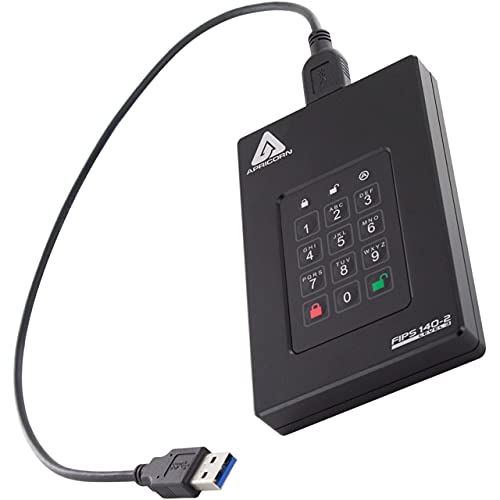
Apricorn Aegis Fortress L3 4TB — The flagship vault
The Fortress L3 is the top of Apricorn’s portable house, and its listing states the strongest claim on this page: FIPS Level 3 validated, USB 3.0, hardware encrypted, with 4TB aboard in the AFL3 line. Level 3 within the FIPS family adds physical tamper expectations beyond Level 2’s, and buyers whose requirements reach that tier usually know it from a document rather than from shopping. For them, this drive collapses a difficult procurement into a single listing: the largest hardware-encrypted portable capacity in this guide, wearing the highest stated validation here.
Four terabytes of validated storage changes what a travelling professional can carry: an entire practice’s records, a full research programme, a production’s rushes, all behind one keypad. The responsibilities scale with the capacity. A drive that holds everything is a drive whose PIN discipline, backup pairing and custody habits must be impeccable, because encryption that protects a lost drive also refuses a forgetful owner. Organisations buying the L3 should treat its setup, PIN policy and recovery arrangements as a small ceremony, documented and rehearsed, rather than an unboxing.
- Capacity: 4TB
- Connection: USB 3.0
- Validation in listing: FIPS Level 3 validated
- Encryption in listing: hardware encrypted portable drive
- Model family in listing: AFL3-4TB
Strengths
- Highest stated validation in this guide, for requirements that name Level 3.
- Four terabytes is the largest hardware-encrypted portable capacity here.
- Keypad pattern keeps unlocking host-independent even at flagship scale.
Trade-offs
- Flagship tier pricing follows the flagship claims.
- Concentrating 4TB behind one PIN demands serious custody discipline.
- Most individual buyers have no requirement that reaches this tier.
Verdict: choose it when a written requirement names Level 3 or the travelling archive is genuinely 4TB; pass it by when Level 2 language already satisfies your documents, and let the Fortress pair do the work.

OSCOO Touchscreen Encrypted External SSD — The touchscreen alternative
The OSCOO breaks this guide’s pattern in every direction at once: it is an SSD rather than a spinning drive, it unlocks through a touchscreen with password entry rather than a physical keypad, and its listing quotes speeds up to 2000MB/s that no hard drive here can approach. At 512GB it is also the smallest pick by far, and its listing describes a magnetic external solid-state design. Read it as a different philosophy of portable security: fast working storage that locks when unplugged, aimed at the individual whose fear is a lost bag on a train rather than an auditor’s checklist.
That difference must stay honest. The listing states touchscreen encryption and password protection; it states no FIPS validation and no AES key length, so this guide claims none for it. Buyers with written compliance requirements should stay with the Apricorn Fortress picks, whose listings speak that language. Buyers whose data is personal, whose work benefits from SSD pace, and who will actually use a touchscreen lock every single day may find this the encrypted drive they genuinely carry, which is its own security argument: the lock that gets used beats the stronger lock left at home.
- Capacity: 512GB
- Type in listing: external solid-state drive
- Speed in listing: up to 2000MB/s
- Unlock method in listing: touchscreen, password protection
- Design note in listing: magnetic external SSD
Strengths
- SSD pace transforms it from vault to working drive.
- Touchscreen unlocking is quick enough to use every time.
- Solid-state innards shrug off the knocks that worry spinning drives.
Trade-offs
- 512GB is a working set, not an archive.
- No FIPS validation or AES key length is stated in its listing.
- Touchscreen security has a shorter track record than the keypad pattern.
Verdict: choose it for fast, personally sensitive carry where no compliance document is involved; pass it by the moment an auditor enters the story, and return to the Fortress listings.
How Do the Six Drives Compare Side by Side?
| Drive | Capacity | Stated claim | Unlock |
|---|---|---|---|
| Apricorn Aegis Padlock 2TB | 2TB | 256-bit AES XTS hardware encryption | PIN keypad |
| Apricorn Aegis Padlock 1TB | 1TB | 256-bit AES XTS hardware encryption | PIN keypad |
| Apricorn Padlock Fortress 2TB | 2TB | FIPS 140-2 Level 2 validated | PIN access |
| Apricorn Padlock Fortress 1TB | 1TB | FIPS 140-2 Level 2 validated | PIN access |
| Apricorn Aegis Fortress L3 | 4TB | FIPS Level 3 validated | Keypad |
| OSCOO Touchscreen SSD | 512GB | Touchscreen encryption, up to 2000MB/s | Touchscreen password |
The claims column is the table’s conscience. Read across it and the guide’s rule becomes visible: words appear only where a listing put them. The two standard Padlocks promise strong encryption without a validation label; the Fortress pair and the L3 add stated validation tiers; the OSCOO promises speed and a touchscreen. A buyer who starts from their own written requirement can walk down that column and stop at the first row that answers it.
How Do You Set Up a Keypad Drive Without Locking Yourself Out?
Begin before any data moves. Set the PIN somewhere private, following the maker’s instructions, and choose a code that is memorable to you and meaningless to anyone who knows your birthday. Record it in the same place you keep other recovery secrets, sealed or in a password manager, because in this category the support desk cannot rescue a forgotten PIN by design. Then copy a small test folder across, unplug, plug into a second computer if one is available, and rehearse the unlock ritual until it is boring.
Only then should the real archive migrate. Decide which data actually needs the locked drive, because encryption earns its keep on the sensitive set, not on the family films. Finally, pair the drive with an unencrypted-at-rest backup stored safely at home or a second encrypted unit, since a locked drive that fails takes its secrets with it. Security and backup are separate systems that happen to share hardware, and confusing them is how careful people lose data carefully.
Who Genuinely Needs Hardware Encryption Rather Than Software?
The clearest cases share one trait: the drive meets computers its owner does not control. A consultant unlocking client data on a client’s machine, a professional whose laptop might be one of several, a worker whose employer’s policy forbids installing software on endpoints: all of them need the lock to live on the drive. Regulated work adds the second trait, a requirement that names a validation, which is where the Fortress listings answer. Home users encrypting against casual loss can often use the encryption built into their operating system on an ordinary drive and spend the savings on capacity.
There is also a temperament case. Some owners simply will not maintain software encryption correctly across machines and years, and for them the keypad’s bluntness is the feature: locked is locked, visibly, physically, every time the cable leaves the port. The OSCOO’s touchscreen argues the same temperament case with speed attached. Neither argument is foolish; both recognise that the best security is the kind its owner actually sustains.
What Mistakes Do Encrypted Drive Buyers Keep Making?
The first is buying a brand instead of a claim: assuming every Apricorn carries FIPS validation when the standard Padlock listings on this page state none. Match the model to the document, always. The second is treating the encrypted drive as the only copy, which converts a security tool into a single point of failure with a keypad. The third is choosing a PIN in a hurry and recording it nowhere, a mistake the drive is specifically engineered to make irreversible.
Fourth, buyers carry everything on the locked drive, including data with no sensitivity, until the vault overflows and the overflow lands on an unprotected drive in a panic. Size the sensitive set honestly. Fifth, they never test the drive on a second machine until the day a client’s computer is the only one available. Sixth, organisations hand a drive between staff without changing the PIN, quietly dissolving the custody the purchase was meant to create. Every one of these is a process error, and every one is preventable on setup day.
How Does a Keypad Drive Fit Into a Working Week?
Picture the rhythm honestly. The drive lives in a bag or a desk drawer, travels to wherever the work is, and gets unlocked a dozen times a week: PIN on the pad, a pause while the drive presents itself, files flowing, then the cable pulled and the lock restored automatically by disconnection. That last property is the pattern’s quiet genius. Software encryption depends on the owner remembering to lock; a keypad drive locks itself every time it is unplugged, which means the tired Friday-evening version of the owner is protected by the same discipline as the careful Monday-morning one.
The pattern also survives the messy realities of professional life. The drive works in front of a client’s locked-down laptop, a colleague’s machine, a replacement computer issued after a failure, because nothing about its security lives on any of them. For organisations, that independence simplifies policy enormously: the rule becomes one sentence about PIN handling rather than a matrix of approved software per operating system. When auditors ask how travelling data is protected, the answer is a physical object with a stated claim in its listing, and answers do not get cleaner than that.
What Should an Organisation’s PIN Policy Actually Say?
Four things, in plain language. First, PINs are individual: a drive handed from one staff member to another gets its PIN changed at the handover, so custody is never ambiguous. Second, PINs are never written on the drive, its case or the bag that carries it, a sentence that sounds insulting until the first lost bag proves why it exists. Third, a record of each drive’s PIN is held centrally under the same protection as other recovery secrets, because the alternative, a forgotten PIN on a drive holding the only copy of a matter, is an organisational incident. Fourth, loss of a drive is reported the day it is noticed, not the week it becomes certain, because the encryption buys time rather than absolution.
None of that policy requires any particular model, which is the point of writing it before shopping. With the policy settled, the purchase becomes the mechanical matching exercise this guide has argued for throughout: read the requirement’s validation language, find the listing that states it, choose the capacity the work needs. Organisations that shop first and write policy later tend to buy impressive drives and then improvise the discipline, and improvisation is what encryption was invented to retire.
How Does the OSCOO’s Touchscreen Approach Compare in Daily Life?
Daily life is where the touchscreen argues hardest. Unlocking through a screen is a gesture phone owners perform hundreds of times a week, so the OSCOO’s lock adds almost no friction to a working day, and its SSD pace means the drive doubles as fast working storage rather than sitting in the bag as a pure vault. For a freelancer carrying client drafts, a student carrying research, a creator carrying footage between home and studio, that combination of speed and a lock they will actually engage is a coherent product, not a compromise.
The comparison turns on documentation, as this guide keeps insisting. The Apricorn listings state their encryption in the vocabulary of standards: AES XTS key lengths, FIPS validation levels for the Fortress models. The OSCOO listing states a touchscreen, a password and a speed, and no more. A buyer whose world includes compliance vocabulary should not translate between those languages hopefully; they should buy the listing that already speaks theirs. A buyer whose world is personal has the freedom to choose by daily feel, and for that buyer the touchscreen’s ease is a legitimate deciding factor rather than a lesser one.
What Does Travelling With Encrypted Drives Look Like at Borders and Airports?
Calmly, in almost every ordinary case, and the calm is worth understanding. A hardware-encrypted drive in a bag is a common professional object; consultants, auditors and clinicians cross borders with them weekly. The drive’s protection is aimed at loss and theft, the statistically real risks of travel, and it performs that job without involving the traveller in anything more dramatic than a PIN pad. Owners should nonetheless travel with the same discipline they keep at home: the drive in hand luggage rather than checked baggage, the PIN memorised rather than written anywhere near the device, and a backup of the data existing somewhere the trip does not touch.
Organisations with staff who travel internationally should settle their expectations in policy before the trip rather than during it, including what staff should do if a device is retained or its contents are requested by an authority. That conversation belongs to employers and their advisers, and this guide’s role is narrower: to note that the hardware’s job is confidentiality against loss, that it performs that job exactly as its listings describe, and that no drive in this guide promises anything beyond that honest scope.
How Should Encrypted Drives Be Retired at End of Life?
More carefully than ordinary drives, and more easily. The ease first: data encrypted under a key the owner destroys or never shares is data that retirement cannot easily expose, so a keypad drive whose PIN is retired with it carries a smaller disposal burden than a plain drive full of client files. Organisations should still follow their own disposal policies, recording serial numbers and destruction or wiping steps, because the audit trail matters even when the cryptography is reassuring.
The care concerns the data’s other home. Before any encrypted drive leaves service, its contents must exist in their next location, verified, because the same finality that protects against thieves protects against forgetful owners. Retire the backup first, migrate second, dispose third, in that order, and keep the retired drive’s PIN record until the migration has survived its own rehearsal. The Fortress-class drives in this guide will serve for years; their retirement deserves the same ceremony as their setup.
Which Buyer Profiles Map to Which Pick, Honestly?
The travelling consultant with client files and no formal validation requirement maps to the standard Padlock, 2TB if the practice’s archive travels, 1TB if only current engagements do. The regulated professional, the auditor, the clinician, the lawyer whose contracts name a standard, maps to the Fortress pair, choosing capacity by case load and keeping the listing language in the compliance file. The organisation standardising a fleet at the highest stated tier, or the practitioner whose archive and requirement are both large, maps to the Fortress L3 and should budget for the PIN policy ceremony alongside it.
The individual without an auditor in their life, the freelancer whose laptop bag holds their livelihood, the student carrying research they cannot recreate, maps to a genuine choice: the standard Padlock for the established keypad pattern, or the OSCOO for speed and a touchscreen they will engage every time. This guide refuses to rank those temperaments against each other. It insists only on the matching discipline that runs through every section: claims from listings, capacity from data, and the PIN guarded like the archive it unlocks.
How Does Hardware Encryption Behave When the Drive Meets a Locked-Down Work Machine?
Exactly as it behaves everywhere else, which is the scenario the design was built for. Corporate and institutional computers often forbid installing software, restrict USB devices to storage class, and log everything they can. A keypad drive asks that environment for nothing beyond being recognised as storage after its owner unlocks it on the pad. No agent to install, no driver to approve, no exception ticket to file with an IT department that has never heard of your deadline. Consultants who work inside other people’s security regimes describe this as the difference between a tool and a negotiation.
There is a reciprocal courtesy worth observing: owners should tell the client’s IT contact that an encrypted drive is in use when the engagement involves their premises and their data policies. The hardware’s independence is a virtue, not a loophole, and professionals who present it openly find that security teams generally welcome a drive whose protection they can see and whose claims they can read in its listing.
What Happens to Resale, Reuse and Handing a Drive Down?
Encrypted drives have a tidier second life than plain ones, provided the handover is done properly. A drive being reassigned within an organisation should be reinitialised under the organisation’s process, issued a fresh PIN, and logged to its new custodian, so that the chain of custody the purchase created never breaks. Sold or donated outside, the same reinitialisation protects the previous owner’s data in a way that simply deleting files on a plain drive never quite guarantees, because the encryption key’s retirement is the real erasure.
Buyers of used encrypted drives should apply the mirror discipline: reinitialise before trusting, set a PIN of their own, and value the unit for its hardware rather than for any claim about its past. The listings in this guide describe new purchases, and this guide’s advice throughout assumes the clean start that a new drive provides; the second-hand market can serve experienced owners, but it is no place to learn the category.
How Much Should the Encryption Itself Slow You Down?
Barely, and any honest account should say where the friction actually lives. The encryption and decryption happen in the drive’s electronics as data passes, and for the spinning drives here the mechanics of the disk remain the slower partner by a wide margin, so the lock costs the owner no meaningful pace. The OSCOO’s listing quotes SSD speeds up to 2000MB/s alongside its touchscreen encryption, which tells the same story from the fast end: modern encryption hardware is not the bottleneck in either class.
The real costs are human and tiny: the seconds a PIN takes, the moment of remembering which drive holds what, the discipline of unplugging rather than leaving a drive unlocked and unattended on a desk. Owners sometimes cite those seconds as a reason to skip encryption entirely, and this guide’s answer is the arithmetic of the alternative: one lost unencrypted drive can cost a professional their clients’ trust in a single afternoon. Against that, a lifetime of PIN entries is a bargain measured in minutes.
How Do You Choose a PIN That Is Both Memorable and Defensible?
Avoid the biography. Birthdays, anniversaries, house numbers and graduation years are the first codes anyone who knows the owner will try, and in a professional context the people most likely to handle a lost drive may know the owner well. Prefer a number with private meaning and no public footprint: a childhood telephone number long since disconnected, the digits of a first car’s registration, a date from a private rather than a celebrated event. Length helps where the drive allows it, and the maker’s instructions should be followed on the permitted range rather than defaulting to the shortest code the pad accepts.
Whatever is chosen, the recording rule from earlier sections stands above the choosing rule: the PIN lives in the owner’s password manager or the organisation’s sealed record, never with the drive. A brilliant PIN forgotten is a locked archive; a modest PIN recorded safely is a working system. Professionals sometimes resist writing PINs down on principle, and the principle is understandable, but in this category the mathematics of human memory argue the other way, provided the record itself is protected like the secret it is.
What Should a Buyer Verify in the First Week With an Encrypted Drive?
That the ritual works everywhere it will need to. Unlock the drive on the owner’s main machine, then on a second machine of a different kind if the work involves one, because the host-independence promised by the keypad pattern should be experienced, not assumed. Copy a folder across, unplug, reconnect, and confirm the drive presents itself as locked until the PIN is entered. Then rehearse the failure etiquette: leave the drive plugged in and unattended in a safe place, return, and note that pulling the cable is the lock, so the habit to build is unplugging whenever the desk is left.
The week is also when the paperwork gets filed: the purchase record, a note of the exact claim language from the listing for compliance-bound buyers, and the PIN’s safe record. Owners who complete that small ceremony in week one rarely think about their encrypted drive again except with satisfaction, which is the correct emotional outcome for a security purchase.
How Does an Encrypted Drive Change the Conversation With Clients?
It gives the professional something concrete to say. Asked how their data travels, the owner of a keypad drive can describe an object and a practice rather than a hope: the files live on hardware-encrypted storage, unlocked by PIN on the device itself, locked automatically whenever it is disconnected. Clients in regulated industries recognise that vocabulary immediately, because it matches the language of their own compliance documents, and the Fortress owners among them can name the validation their listing states. That conversational confidence is an unlisted feature of this entire category, and for consultants it occasionally wins the engagement before the work is discussed.
The confidence must stay earned. The professional who describes the drive’s protection should also be able to describe the PIN discipline, the backup arrangement and the loss-reporting habit that surround it, because sophisticated clients ask the second question too. Hardware this honest deserves owners who are equally precise, and the pairing of the two is what actually protects the data, the practice and the reputation, in that order of fragility.
What Is the Short Version for a Buyer With a Requirement in Hand?
Read the requirement’s nouns. If it says encryption without naming a validation, the standard Padlock pair answers it, and the choice between them is capacity alone. If it names FIPS 140-2 Level 2, the Fortress pair answers it in their listings’ own words, at the same two capacities. If it names Level 3, or the travelling archive has grown to 4TB, the Fortress L3 is the only row in this guide’s table that replies. If there is no requirement at all and the buyer is an individual protecting their own livelihood, the honest choice is between the Padlock’s established keypad pattern and the OSCOO’s speed and touchscreen, made by temperament rather than by paperwork.
Every path through that paragraph ends at the same two disciplines: guard the PIN like the data depends on it, and keep a second copy of the data somewhere the encrypted drive is not. The hardware in this guide, concentrated as its manufacture honestly is, will handle everything else.
What Do Owners Say a Year After Switching to Hardware Encryption?
That the ritual disappeared into the day. The PIN entry that felt like a ceremony in week one becomes a gesture by month two, no more remarkable than unlocking a phone, and the drive’s presence in the bag stops being a decision and becomes a fact of professional life. Owners in regulated work describe a subtler benefit: audits and client questionnaires lose a question they used to dread, because the answer now has a model number and a listing’s wording behind it. Owners outside regulated work describe the simpler version, a lost-drive scare that ended as an anecdote because the found object was a locked brick to whoever picked it up.
They also, almost to a person, describe tightening the surrounding habits after the purchase rather than relaxing them: the PIN record filed properly at last, the backup of the encrypted archive finally arranged, the handover rule written down when a colleague joined. Good hardware seems to invite good process, and that invitation may be the category’s most valuable effect of all.
What Is the One Thing to Do the Day the Drive Arrives?
Set the PIN slowly, record it safely, and rehearse the unlock on a second machine before a single real file crosses over. Arrival day is when owners are most tempted to rush, the parcel open, the deadline near, the old unprotected drive still doing the job out of habit. Resist by an hour. The ceremony described in this guide, PIN, record, test copy, second-machine check, paperwork filed, converts the purchase from an object into a practice, and practices are what actually protect data across years of travel. A drive set up properly on day one tends to stay set up properly; a drive rushed into service tends to carry its first week’s improvisations for its whole career.
Final Recommendation
Start from your paperwork, or from its absence. No written requirement and a professional’s working set points to the standard Padlock, at 2TB for archives and 1TB for defined case loads, with hardware encryption stated plainly in both listings. A requirement naming FIPS 140-2 Level 2 points to the Fortress pair in the same two sizes, and one naming Level 3, or a travelling archive of 4TB, ends the discussion at the Fortress L3. The OSCOO stands apart for individuals who want SSD speed behind a touchscreen lock and owe no auditor an answer. In a category where one maker honestly dominates, the verdict is refreshingly plain: pick the claim your documents demand, pick the size your data needs, and then guard the PIN like the data depends on it, because it does.
One last word on proportion. Encryption frightens some buyers into imagining adversaries they will never meet, and bores others into skipping protection their work plainly needs. The listings in this guide offer a calmer way to decide: match the claim to the document, the capacity to the data, and the ritual to a working week you can actually imagine living. Decided that way, the purchase stops being about fear and becomes what it should be, a professional tool chosen with the same care as everything else in the bag.
There is a final, unfashionable virtue to name before the questions: boredom. Good encryption, once configured, produces no stories. Nothing is recovered dramatically, nothing is breached narrowly, and the drive’s working life is a long sequence of uneventful journeys. Professionals sometimes apologise for how dull their security arrangements sound when described, and that dullness is precisely the evidence that the arrangement works. Buy the drive that makes your data’s travels boring, and keep them that way.
Frequently Asked Questions
Why are five of the six picks from Apricorn?
Because hardware-encrypted portable drives are a niche that Apricorn specialises in while mainstream makers mostly offer software encryption instead. Rather than disguise that concentration, this guide compares the Apricorn tiers against each other and adds the OSCOO SSD as the genuinely different alternative.
Does every Apricorn drive here carry FIPS validation?
No, and the distinction matters. The Padlock Fortress 1TB and 2TB listings state FIPS 140-2 Level 2 validation, and the Fortress L3 states FIPS Level 3 validation. The standard Padlock listings state 256-bit AES XTS hardware encryption and no FIPS claim, so this guide claims none for them.
Will a keypad drive work on any computer?
That is the design’s purpose. Unlocking happens on the drive itself, so the host only needs to read a USB storage device. No software installation is part of the pattern described in these listings.
What happens if I forget the PIN?
Treat it as unrecoverable and plan accordingly on setup day. Hardware encryption that a support desk could bypass would not be worth buying, so record the PIN somewhere separate and secure from the start.
Is the OSCOO a hard drive?
No; its listing describes an external solid-state drive with touchscreen encryption and speeds up to 2000MB/s. It sits in this guide as the SSD alternative for buyers whose priority is fast, locked working storage rather than validated keypad hardware.
Does an encrypted drive replace a backup?
Never. Encryption answers the question of who can read a lost drive. Backup answers the question of what survives a failed one. The drives in this guide still need a second copy of anything that matters, stored under your own control.
Related Guides
Locked storage connects to the wider plan in these companion guides: Best External 2TB Hard Drives, Best Hard Drives for NAS Home, and Best Internal 2.5 Inch SATA Hard Drives for PS4.


