What's inside
- Key Takeaways
- Quick Picks
- How We Chose These Picks
- What Decides Speed on a 4G Router — the Tower, the Category, or the Aerial?
- Who Actually Lives on 4G — and What Do They Know That You Should?
- Which 4G Routers Fit Which Kind of Life?
- What Does the Data Plan Really Cost a Household Each Month?
- How Much Difference Does an Outdoor Aerial Really Make?
- How Do the Six Picks Compare on Modem Class and Role?
- What Should You Check Before Putting a Home on 4G?
- How Do You Set Up a 4G Router Without the Usual Tears?
- What Mistakes Do 4G Router Buyers Keep Making?
- Final Recommendation
- Frequently Asked Questions
- Related Guides
As an Amazon Associate I earn from qualifying purchases. This post may contain affiliate links at no extra cost to you.
widgetverdict.com is reader-supported. When you buy through links on our site, we may earn an affiliate commission.
Where to buy: four picks below carry verified Amazon links; two more — a modem-only Netgear and a Huawei home router — are covered in prose so their roles are described accurately without an unverified link attached.
A 4G router is a liberating piece of hardware with a simple definition that the market loves to blur: it is a router with a SIM slot, which takes a mobile data plan and turns it into a home network — Wi-Fi and Ethernet ports, your devices, no fixed line required. The best 4g routers serve the places fixed broadband forgot: the rural house at the end of a lane, the caravan that moves with the seasons, the small business that cannot afford a day offline, the rented flat where drilling for a cable is forbidden. Wherever a phone gets a signal and a landline quote gets a laugh, a SIM router is the internet.
It is worth pausing on how recently this became a mainstream purchase. A decade ago a SIM router was a curiosity for caravans; the fixed-line era’s failures — rural copper left to age, new estates waiting seasons for connections, rents that punish anyone who dares drill a wall — have since made it a first choice for addresses that appear, on a coverage map, to be perfectly well served. The hardware matured to meet that demand, and the six machines in this guide are the current shape of the answer, from the experiment-grade starter to the 5G ceiling.
Choosing one is mostly an exercise in matching three things.
The first is the LTE category of the modem inside, which sets how much speed the router can pull from the tower. The second is the antenna story — internal, detachable, or ready for an outdoor aerial — because on mobile broadband the signal is the product. The third is the honest distinction this guide maintains throughout: between a router, which creates a network, and a modem or hotspot, which merely supplies one. One pick below is a 5G device, labelled as a step-up in its heading and everywhere else; two are prose-only, including a modem that is not a router at all and is included precisely so nobody buys it by mistake.
Key Takeaways
- A 4G router needs a SIM and a data plan; the router is a one-off purchase, the data is the ongoing cost.
- LTE category matters: Cat4 suits light homes, Cat6 and above aggregate bands for meaningfully faster speeds.
- Antennas decide real-world performance — detachable or external-antenna options transform weak-signal sites.
- A modem is not a router: modem-only units like the LM1200 must be paired with a separate router.
- Check your carrier’s bands and plan terms before buying; a router cannot fix a plan that forbids router use.
Quick Picks
| Pick | Badge | Why it earns its place |
|---|---|---|
| TP-Link TL-MR150 | Rural home favourite | Cat4 SIM router with detachable antennas and a WAN failover port for fixed-line backup. |
| TP-Link TL-MR100 | Simplest starter | Plug-in-a-SIM simplicity at the friendliest tier, for light homes and temporary setups. |
| GL.iNet GL-X750V2 Spitz | Travel and VPN pick | Cat6 speed, dual-band Wi-Fi and OpenWrt flexibility for vehicles, boats and power users. |
| Netgear Nighthawk M6 | 5G step-up hotspot | A 5G battery hotspot — labelled a step-up — that also feeds a home router when docked. |
| Netgear LM1200 | Prose-only modem | Not a router at all: an LTE modem that gives an existing router a mobile connection. |
| Huawei B535 | Prose-only home router | A Cat7 home SIM router with Ethernet ports and external antenna sockets. |
How We Chose These Picks
We started with the modem, because in this category the modem is the product. Each candidate’s LTE category was recorded plainly — Cat4 models were judged as light-duty answers and never described as fast, while Cat6 and above earned their place by aggregating carrier bands, the trick that turns a mediocre rural signal into a workable one. Any model whose listing blurred its category or implied 5G it did not have was excluded on honesty grounds alone.
Antenna arrangements were scored next, and they outranked wireless specifications in our weighting, because a 4G router lives or dies by its conversation with a distant tower. Detachable antennas and external aerial sockets earned real marks; sealed units with modest internal antennas were confined to strong-signal use cases and labelled as such. We also checked the unglamorous essentials: a WAN port for failover to a fixed line where one exists, Ethernet ports for the devices that should never be wireless, and firmware that exposes APN settings — because some carriers require a manual APN, and a router that hides that field is a router that fails on those networks.
We also made one deliberate editorial decision worth declaring: signal-independent virtues were scored last. A beautiful interface cannot rescue a router deaf to its mast, and a clunky one cannot ruin a router that hears clearly — so antenna hardware and modem class were weighted above every convenience, and the convenience features you will read about in the picks are reported as what they are, the seasoning rather than the meal.
Finally, we sorted the field by role rather than by price.
A home SIM router, a travel router and a battery hotspot solve different problems that happen to share a SIM slot, and this guide keeps them in separate, clearly labelled lanes — including the prose-only modem, whose presence is a warning label as much as a recommendation. Every pick’s role is stated in its heading, so a reader in a hurry can shop by the life they actually live.
What Decides Speed on a 4G Router — the Tower, the Category, or the Aerial?
All three, in that order of sadness. The tower and your distance from it set the ceiling: a router cannot invent signal, and a home in a valley shadow will get what physics allows. What the router controls is how much of the available signal it converts into usable speed. That is where LTE category enters. A Cat4 modem listens on one band at a time with modest bandwidth; a Cat6 modem aggregates two bands simultaneously, which in real rural conditions often doubles or trebles what the same mast delivers to the same house. Higher categories aggregate more and listen wider still.
The aerial is the third lever and the one owners most often discover last. The antennas bundled with a router are designed for a windowsill in reasonable signal. A home fighting for its connection can transform it with an outdoor directional aerial aimed at the mast, connected to a router that has the sockets to accept it — which is why two picks in this guide are partly chosen for their antenna hardware. Before spending on any router, walk your home with a phone and find where the signal honestly lives; the router belongs in that room, or its aerial does.
Band support is the final technical check, and it is a local one. Carriers build their networks from different slices of spectrum in different countries and even different counties, and a router missing your carrier’s hardest-working band will perform politely and disappoint permanently. The mainstream picks in this guide cover the common bands of their home markets broadly, but “broadly” is doing work in that sentence — the specification page’s band list, compared against your carrier’s published bands, is a five-minute check that protects the entire purchase.
One more variable deserves plain words: the plan. Some data plans throttle hotspot and router usage, some deprioritise it under congestion, and some SIMs sold for tablets behave differently in a router than in the device they were priced for. Read your carrier’s terms for router use before the hardware arrives. The finest 4G router in this guide cannot repeal a contract.
Who Actually Lives on 4G — and What Do They Know That You Should?
Spend time with long-term SIM-broadband households and a pattern emerges: they stop talking about the technology within a month. The rural family streaming, schooling and working over a Cat6 router with a roof aerial does not experience “mobile broadband” as a category; they experience the internet, with the same complaints and comforts as any fibre household. The gap between that life and the frustrating version is almost never the router’s brand. It is the unglamorous trilogy of placement, aerial and plan, chosen with local knowledge.
The second thing they know is that reliability on mobile networks is a redundancy game. The households and small businesses that depend on 4G keep a second carrier’s SIM in a drawer, because masts fail and networks have maintenance nights, and a prepaid SIM from a rival network is the simplest fallback in all of connectivity. Several picks in this guide make that fallback usable in seconds — a failover WAN port, a dual-purpose SIM tray routine, a modem bridge beside the main router. Dependence done properly is engineered, not hoped for.
The third lesson is about expectations of speed tests. Mobile throughput breathes — by hour, by weather, by the school holidays — in ways fixed lines do not, and the households at peace with 4G judge it by whether the work and the evening happen, not by a number’s mood. Buy the category with that temperament and it will satisfy you for years; buy it expecting fibre’s metronome and no router in this guide, however honest, can keep that promise.
Which 4G Routers Fit Which Kind of Life?

TP-Link TL-MR150 — Rural home favourite
The TL-MR150 is the router that taught a generation of rural households that the mobile network was their broadband. Its proposition is complete and unpretentious: a SIM slot with a Cat4 modem, two detachable LTE antennas that can be swapped for higher-gain or outdoor aerials, 2.4GHz Wi-Fi for the house, and Ethernet ports for the television and desktop. In a farmhouse, a lane-end cottage or a smallholding office, that combination — especially the antennas — is exactly the difference between a connection and a rumour of one.
Its second talent is insurance. The WAN/LAN port lets the MR150 sit behind a fixed line where one exists and fail over to 4G when it drops, or run purely on mobile where none exists; small shops and home workers use it both ways. TP-Link’s setup asks for the SIM, handles most carriers’ APN automatically, and exposes the manual settings for the rest. The interface is a few generations old in style and entirely adequate in substance, like the router itself.
Set expectations by its category and its radio. Cat4 will serve browsing, streaming to a screen or two, calls and homework without drama, but a house of simultaneous heavy users will find its ceiling and should look at the Cat6 and Cat7 options in this guide. The Wi-Fi is 2.4GHz only, chosen for reach over speed — sensible at rural distances, limiting in a dense flat. Within its brief, though, the MR150 remains the default answer: the SIM router as dependable appliance, antenna sockets included.
- 4G LTE Cat4 modem with SIM slot
- Two detachable LTE antennas, upgradeable to outdoor aerials
- 2.4GHz Wi-Fi (N300 class) for long reach
- WAN/LAN port for fixed-line failover duty
- Ethernet ports for wired devices
Strengths
- Antenna flexibility that genuinely helps weak-signal homes
- Failover role makes it useful even where a fixed line exists
- Proven, widely documented setup across many carriers
Trade-offs
- Cat4 ceiling limits heavy multi-user households
- 2.4GHz-only Wi-Fi trades speed for reach
- Interface design shows its generation
Best for: rural homes and small sites needing dependable SIM broadband with antenna options. Not suited for: large, device-heavy households chasing maximum mobile speed.
The ownership experience has a rhythm worth describing. The first week is placement — router by the window that faces the mast, antennas angled, speed tests at different hours. Then, for most owners, nothing: the box simply becomes the house’s internet, rebooted occasionally, thought about rarely. That trajectory from project to furniture is the highest compliment available in this category, and the MR150 has been collecting it for years.
Its failover personality deserves one more paragraph, because it quietly doubles the router’s market. In districts where the fixed line exists but cannot be trusted — ageing copper, storm-prone poles, a business whose card machine must never decline — the MR150 sits behind the main connection with its SIM as the understudy, and the changeover when the line drops is automatic and brief. Owners in that arrangement describe the router the way one describes a generator: rarely noticed, occasionally heroic, and cheap at the price for the afternoons it saves.

TP-Link TL-MR100 — Simplest starter
If the MR150 is the rural appliance, the TL-MR100 is the starter kit: the least expensive honest way to find out whether SIM broadband works at your address. It shares the family formula — Cat4 modem, SIM slot, 2.4GHz Wi-Fi, Ethernet on the back — in a smaller, simpler package aimed at light use: a single person’s flat, a temporary site office, a holiday let, a grandparent’s house where the requirement is email, browsing and a television that streams without complaint.
Simplicity is its engineering brief and it shows in the right places. Insert SIM, power on, and for most carriers the connection simply exists; the app and web interface keep the controls a light user needs and hide the ones they do not. As a backup connection it is equally content: many owners keep an MR100 with a low-cost SIM as the household’s spare internet, brought out when the fixed line fails and the workday cannot.
The economies are plainly visible and fairly chosen. The antennas are not the upgradeable stars of its sibling, so weak-signal heroics are beyond it; the Cat4 modem and single-band Wi-Fi cap its ambitions at the light end of the market. Judge it as what it is — the reconnaissance purchase and the backup box — and the MR100 is excellent value. Ask it to be a busy family’s main connection and you have misread the label, not been misled by it.
- 4G LTE Cat4 modem with SIM slot
- 2.4GHz Wi-Fi for whole-room coverage
- Ethernet ports plus a WAN/LAN port
- Plug-and-play setup for most carriers
- Compact, low-power design
Strengths
- Lowest-cost honest entry into SIM broadband
- Genuinely simple setup for non-technical owners
- Ideal backup-connection and temporary-site router
Trade-offs
- Fixed antennas limit weak-signal rescue options
- Cat4 and single-band Wi-Fi suit light loads only
- Not a growth platform for a demanding household
Best for: light users, temporary setups and households wanting a backup connection. Not suited for: weak-signal sites or busy family networks.
There is a strategic way to buy this router that deserves recommending: as the experiment. Rather than committing a household to antennas, categories and contracts on theory, spend the small money on an MR100 and a month of data, and learn your address’s truth — which window, which hours, which carrier. The knowledge transfers to any later upgrade, and the little router retires into backup duty. Few technology purchases de-risk themselves this gracefully.
Landlords and letting agents have quietly become another of its constituencies: a furnished flat or a short-let property can offer working internet the day a tenant arrives, with no engineer visit, no drilled walls and no contract in the property owner’s name beyond a cancellable data plan. The MR100’s modesty — its size, its power draw, its indifference to being unplugged and moved — suits that transient life exactly, and more than a few have been bought in twos and threes by people who manage several doors.
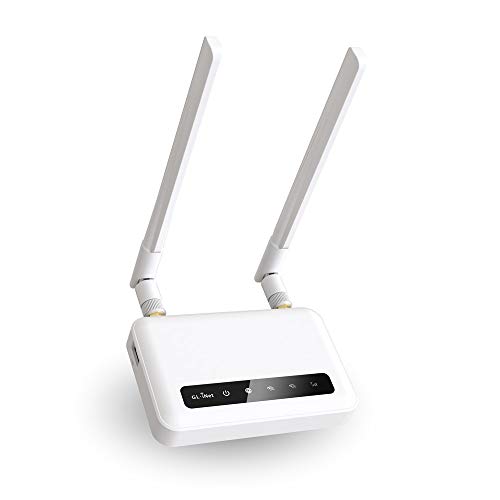
GL.iNet GL-X750V2 Spitz — Travel and VPN pick
The Spitz comes from a different tribe: GL.iNet builds routers for people who move — motorhomes, boats, site cabins, digital nomads — and who regard a VPN as standard equipment rather than an advanced topic. The X750V2 pairs a Cat6 modem, which aggregates bands for meaningfully better speeds than the Cat4 picks, with dual-band AC Wi-Fi, in a compact unit that runs happily from vehicle-friendly power. Its OpenWrt-based firmware is the headline: WireGuard and OpenVPN clients built in, so the whole van or cabin can ride behind one tunnel, plus a level of configurability the mainstream brands reserve for their business lines.
Fieldcraft details fill the specification in ways that reveal the design brief. External antenna connectors accept the roof aerials that vehicle installations depend on. USB tethering and repeater modes give it fallback personalities when a site offers wired or wireless internet of its own. The interface remains approachable despite the depth — GL.iNet’s own layer sits over the OpenWrt engine room, and casual owners never need to visit the engine room at all.
Its audience is narrower and knows itself. A static rural household gains less from the travel talents and may prefer the Huawei’s home-router manners below; the Spitz’s Wi-Fi, while dual-band, is built for a cabin’s radius rather than a farmhouse’s. But for the moving life — or the static life that thinks like it, with VPNs, failovers and tinkering — this is the most capable and configurable 4G router in the guide, and its enthusiast community documents every conceivable installation in public.
- 4G LTE Cat6 modem with band aggregation
- Dual-band AC750 Wi-Fi
- OpenWrt-based firmware with WireGuard and OpenVPN
- External antenna connectors for vehicle aerials
- USB tethering and repeater fallback modes
Strengths
- Cat6 speeds with the deepest software in this guide
- Built for vehicles and moving installations
- VPN for the whole network, configured once
Trade-offs
- Wi-Fi radius suits cabins and vans, not large houses
- Depth of settings can daunt absolute beginners
- Home users pay for travel talents they may not use
Best for: motorhomes, boats, site cabins and VPN-first users wanting Cat6 speed. Not suited for: large static homes needing wide Wi-Fi coverage.
One scenario flatters it uniquely: the worker whose office is wherever the vehicle is parked. The Spitz wakes with the ignition circuit, joins the strongest configured network — its own SIM first, a site’s Wi-Fi as backup — and presents the same network name and VPN tunnel in every location, so the laptop neither knows nor cares that the office moved forty miles overnight. That continuity is a professional tool disguised as a small plastic box.
Security is the other half of its professional case. A vehicle or cabin network built on campsite and marina Wi-Fi is a network built on strangers’ infrastructure, and the Spitz’s habit of wrapping everything in its owner’s VPN by default converts that exposure into a non-event. GL.iNet also ships firmware updates at a cadence the mainstream brands rarely match, and for a router that lives its life on untrusted networks, that patching rhythm is not a nicety — it is the product working as designed.

Netgear Nighthawk M6 — 5G step-up hotspot
The label comes first, as promised: the Nighthawk M6 is a 5G device, not a 4G router, and it sits in this guide as the deliberate step-up for buyers whose area has 5G coverage and whose budget can follow. It is also a hotspot rather than a home router — a battery-powered unit with Wi-Fi 6E on board, a touchscreen, and the ability to run untethered for a working day or to sit plugged in at home, where an Ethernet connection (via its port or a dock arrangement) lets it feed a conventional router and serve as the house’s connection.
Judged as the step-up, its virtues are real. 5G where available is not a marginal gain over 4G but a generational one, and the M6’s modem also falls back to strong 4G with wide band aggregation where 5G has not arrived, so it is rarely the slowest link in any chain. For the professional whose connectivity is income — the consultant, the site engineer, the trader at a kitchen table — it is simultaneously the travel router, the backup connection and, in 5G postcodes, a legitimate main connection.
The terms are equally real. It costs flagship money, its battery is a consumable that always-on home use will age, and a hotspot’s Wi-Fi is designed for a room and a team rather than a whole house’s worth of walls. Buyers wanting a permanent home installation should pair it with a proper router and treat the M6 as the modem-with-benefits, or choose the home-router picks above. As the ceiling of what mobile broadband currently does in a pocket, though, nothing else in this guide is close.
- 5G modem with fast 4G fallback and aggregation
- Wi-Fi 6E hotspot for nearby devices
- Rechargeable battery for untethered use
- Ethernet tethering to feed a home router
- Touchscreen interface and travel-ready build
Strengths
- 5G step-up performance where coverage exists
- Travel, backup and home roles in one device
- Strong 4G behaviour where 5G has not reached
Trade-offs
- It is a 5G hotspot, not a 4G home router — a different product class
- Flagship pricing and a battery that ages in always-on use
- Hotspot Wi-Fi covers a room, not a house
Best for: 5G-covered professionals wanting one device for travel, backup and home. Not suited for: buyers seeking a simple, permanent 4G home router.
A note on honesty in this category: 5G coverage maps are optimistic documents, drawn by the organisations selling the service. Before paying the step-up premium, verify with a 5G phone at your own window, at your own working hours. Where the signal is real, the M6 justifies itself within a week; where it is cartography, the Cat6 and Cat7 picks below and above will serve you better for far less, and the M6’s premium buys a radio band your street does not broadcast.
Used at home, the sensible pattern is to let the M6 be the modem and something else be the house: Ethernet into a proper router or mesh kit, the hotspot’s own Wi-Fi reserved for travel days. Configured that way its battery rests on a charger as a built-in power-cut backup — when the mains fail, the connection simply continues, which has made it a quiet favourite among home workers whose employers’ tolerance for offline afternoons is limited. Few devices in this guide wear as many hats without dropping one.
Netgear LM1200 — Prose-only modem
Read the badge carefully: the LM1200 is not a router. It has no Wi-Fi, creates no network, and hands out no addresses to a houseful of devices. It is an LTE modem — a bridge that takes a SIM and presents an Ethernet connection, designed to plug into the WAN port of a router you already own. It appears in this guide, without a purchase link, because it is constantly mistaken for a router by hurried buyers, and the distinction is the most useful thing we can give you: if your plan is “this box alone will internet my house”, the LM1200 will disappoint you on day one.
Judged as the thing it actually is, it is rather good. As a failover modem it gives an existing home or small-office router a mobile second life: fixed line dies, the router fails over to the LM1200’s 4G, the house stays online. As a primary modem for a rural setup it pairs gracefully with a strong router or mesh system of your choosing, letting each device do its own job — the modem talks to the tower, the router runs the house — which is how networking was architected before combo boxes blurred the drawing.
That two-box honesty has a cost in shelf space, power sockets and setup steps, and buyers who want one box should return to the routers above. But buyers who already own a good router and want 4G as its partner — for backup, or as the main feed — will find the LM1200 the cleanest tool for the job. Buy it as a modem, with a router beside it, and it is excellent. Buy it as a router and no review can save the afternoon that follows.
- LTE modem only — no Wi-Fi, no routing
- SIM slot with Ethernet output to a router’s WAN port
- Designed for failover and bring-your-own-router setups
- Compact, low-power, wall-friendly design
- Covered in prose only in this guide
Strengths
- The cleanest way to add 4G to an existing router
- Excellent automatic failover partner
- Lets a strong mesh or router keep running the house
Trade-offs
- Useless alone — a separate router is mandatory
- Two boxes, two power supplies, more setup
- Cat4-class speeds suit backup more than heroics
Best for: owners of a good router wanting 4G backup or a modem-only feed. Not suited for: anyone expecting a standalone home network from one box.
The LM1200 also teaches the category’s vocabulary better than any glossary. Once a buyer understands why this device is not a router — that modems translate and routers organise, and a home needs both jobs done by something — the rest of this guide reads itself. Keep that sentence in mind on every listing page in this market, where the two words are used interchangeably by sellers who know better.
Small businesses are its natural constituency: the café whose card terminal and guest Wi-Fi ride on a proper router, with the LM1200 standing by to keep the tills alive when the street’s broadband has its monthly incident. In that setting the modem’s boring virtues — stability, invisibility, a connection that simply resumes — are worth more than any headline speed, and its price makes the redundancy an easy signature on the expense form.
Huawei B535 — Prose-only home router
The B535 is what a 4G router looks like when a company designs it as a home appliance first: a clean upright box that belongs on a shelf, a Cat7 modem inside that aggregates bands for speeds comfortably beyond the Cat4 picks, a set of proper Ethernet ports including WAN/LAN flexibility, and sockets on the back for external LTE antennas when the windowsill signal needs help. In markets where it is widely sold through carriers, it became the default home SIM router for good reason — it behaves like broadband, not like a gadget.
Its manners distinguish it from the travel tribe. Wi-Fi is dual-band AC, sized for a flat or modest house; the management app is domestic and unthreatening; the whole object assumes it will be installed once by a non-specialist and then ignored for years. For a rural family graduating from a Cat4 starter, or a small household whose fixed-line options are theoretical, the B535 class of machine — Cat7, Ethernet-equipped, antenna-ready — is the natural destination, and we describe it in prose because our verified pool does not currently carry its listing.
Caveats belong to its ecosystem rather than its engineering. Availability and carrier bundling vary sharply by country, firmware features differ between carrier and retail versions, and buyers should confirm the exact variant’s band support against their network before purchase. None of that diminishes the design; it merely means the B535 rewards a careful listing read. As the representative of the home-first Cat7 school, it closes this guide’s argument: match the router’s category and antenna story to your signal, and mobile broadband stops feeling like a compromise.
- 4G LTE Cat7 modem with band aggregation
- Dual-band AC Wi-Fi for flats and modest homes
- Multiple Ethernet ports with WAN/LAN flexibility
- External antenna sockets for weak-signal sites
- Covered in prose only in this guide
Strengths
- Cat7 speeds in a genuinely domestic design
- Antenna sockets preserve the weak-signal upgrade path
- Ethernet depth suits real home device mixes
Trade-offs
- Availability and variants differ by market and carrier
- No purchase link in this guide
- Firmware depth is domestic rather than enthusiast-grade
Best for: households wanting a home-first Cat7 SIM router with antenna options. Not suited for: buyers needing a verified link here, or vehicle installations.
Its wider lesson is about graduation paths. Many households enter this category through a Cat4 experiment, learn their signal’s truth, and then choose their permanent machine with knowledge no review can give them — their own mast, their own walls, their own evenings. The B535 exists for that second, informed purchase, and buyers arriving at it with a month of local data behind them rarely choose wrong again.
Its Ethernet depth deserves a final emphasis, because it is where home SIM routers separate from hotspot thinking. A television, a desktop, a network printer and a games console wired directly into the B535 never touch Wi-Fi at all, which leaves its dual-band radios free for the devices that genuinely move. Households migrating from fixed broadband — where everything grew up wired — find that continuity comforting, and the network behaves like the one it replaced rather than like a compromise wearing its clothes.
What Does the Data Plan Really Cost a Household Each Month?
The hardware in this guide is the small print of 4G economics; the plan is the headline. A household that streams television nightly, games, works and backs up photographs can move a startling amount of data in a month, and mobile plans price that appetite in ways fixed broadband mostly stopped doing years ago. Before romanticising the SIM life, audit a month of your current usage — most fixed routers and provider accounts can show it — and price that month honestly on the mobile plans available at your address, including what happens after any fair-use threshold is crossed.
The traps are standardised enough to list. “Unlimited” plans that deprioritise your traffic after a set amount, so the evening peak slows first and worst. Speed caps applied to router or hotspot use that do not apply to the same SIM in a phone. Roaming-flavoured terms on plans sold cheaply through resellers, which can vanish or degrade without notice. And contract lengths that outlast the mast’s current generosity. None of these make 4G broadband a bad idea — for many addresses it remains the only good idea — but they make the plan, not the router, the document to read twice.
The households that make the economics sing tend to share a habit: they treat the mobile connection as infrastructure with a meter, and set the house rules accordingly. Large game and system updates scheduled overnight, streaming quality capped sensibly on the television, cloud backups told to mind their manners — small disciplines that keep a family inside a plan’s generous zone indefinitely. A 4G router with per-device traffic visibility, as several picks here offer, turns those disciplines from suspicion into bookkeeping.
How Much Difference Does an Outdoor Aerial Really Make?
At a strong-signal address, almost none — which is why this section is addressed to the other addresses, the ones this category mostly exists for. A router’s bundled antennas work inside a building that is actively absorbing and reflecting the signal they need: walls, foil-backed insulation, metal roofs and modern glazing all take their tax before the modem hears a word. Moving the listening point outside that shell, with an aerial on a pole or a gable aimed at the mast, removes the tax entirely. The improvement is routinely the difference between a connection that apologises and one that simply works, and it is available only on routers with the sockets to accept it.
Two aerial philosophies compete, and choosing between them is local knowledge again. A directional aerial points at one mast and hears it loudly while ignoring the rest of the world — ideal for the fixed rural house with line of sight to a known tower. An omnidirectional aerial listens in every direction at lower gain — the right tool for vehicles, boats and homes unsure which mast serves them, or where the serving mast changes. The picks in this guide divide along exactly this line: the home routers’ sockets suit the fixed directional installation, while the Spitz’s connectors were born for the moving omnidirectional one.
Cable discipline completes the picture, because the cable between aerial and router spends signal as it runs. Keep the run short, use the low-loss cable the aerial maker specifies, and mount the router as near the aerial’s entry point as the house allows rather than dragging a long tail of coax to a prettier shelf. Owners who respect those three sentences routinely double what their address delivers; owners who treat the aerial as a magic wand on a long string conclude, wrongly, that aerials do not work.
How Do the Six Picks Compare on Modem Class and Role?
| Pick | Modem | Role | Antenna story |
|---|---|---|---|
| TL-MR150 | 4G Cat4 | Home router + failover | Detachable, upgradeable |
| TL-MR100 | 4G Cat4 | Starter / backup router | Fixed |
| GL-X750V2 | 4G Cat6 | Travel / vehicle router | External connectors |
| Nighthawk M6 | 5G (step-up) | Battery hotspot | Internal, travel design |
| LM1200 | 4G modem | Modem only — needs a router | Compact unit |
| Huawei B535 | 4G Cat7 | Home router | External sockets |
Notice also what the table refuses to do: rank a modem against a router, or a hotspot against a home appliance, as though they were rivals. They are tools for different jobs that happen to share a SIM slot, and the most common failure in this market is not buying a bad tool but buying a good one for the wrong job. Read the role column first, the modem column second, and let price argue only between machines that do the same work.
The role column is the one to shop by. Speed classes can be compared on paper in seconds, but buying a hotspot for a farmhouse, or a modem for a home with no router, is the kind of error no specification can rescue — and the kind this table exists to prevent.
What Should You Check Before Putting a Home on 4G?
Start with the signal, measured properly: not the bars on a phone in the garden, but a data SIM in a phone placed where the router would live, tested at the hours your household actually uses the internet. Evening congestion on a popular mast can halve what a midday test promised, and the honest number is the evening one. Check which carrier’s mast actually serves your valley or street — neighbours are the best database ever compiled on this question — and confirm the router you favour supports that carrier’s main bands.
While you are in research mode, look up whether your address sits in any announced network-upgrade programme. Carriers periodically refarm spectrum and add bands to rural masts, and a household that knows an upgrade is scheduled for spring can rationally buy the Cat6 machine now and watch its speeds improve without touching it. Conversely, a mast rumoured for decommissioning argues for the flexible, aerial-ready picks that can re-aim at a different tower. Local knowledge, again, is the specification that never appears on a box.
While you are gathering local knowledge, ask the neighbours one more question: which mast, and does it ever go down? A serving mast with a generator-backed reputation is worth a carrier choice by itself, and streets develop folklore about these things that no coverage map will ever print. The router decision takes an afternoon; the carrier decision is the one you will live with, and it deserves the shoe leather.
Then read the plan as a contract, because it is one. Data allowances, fair-use thresholds, deprioritisation after a set amount, and any clause about router or tethering use decide the real monthly cost of SIM broadband more than the hardware does. Households streaming nightly should model their usage honestly for a month before committing; the router is the cheap part of this lifestyle, and the plan is the rent.
Finally, plan the installation like the infrastructure it is: the router or its aerial near the best signal, Ethernet to the stationary heavy devices, and a power socket that is not behind the television. Mobile broadband forgives many things, but it will not forgive being installed in the worst room of the house out of tidiness.
Add one more check that experience has taught this category’s veterans: the upload direction. Mobile connections are asymmetric in a way that surprises people whose work involves sending — video calls, cloud drives, camera uploads, a small business’s nightly backup. Test the upload at the evening peak specifically, because a connection that downloads handsomely and uploads miserably will fail a working household in ways the headline speed never warned about. The aggregation in Cat6 and Cat7 modems helps here too, which is one more reason the category ladder matters beyond the download figure.
Add one more check that experience has taught this category’s veterans: the upload direction. Mobile connections are asymmetric in a way that surprises people whose work involves sending — video calls, cloud drives, camera uploads, a small business’s nightly backup. Test the upload at the evening peak specifically, because a connection that downloads handsomely and uploads miserably will fail a working household in ways the headline speed never warned about. The aggregation in Cat6 and Cat7 modems helps here too, which is one more reason the category ladder matters beyond the download figure.
How Do You Set Up a 4G Router Without the Usual Tears?
Insert the SIM before powering on, in the size and orientation the tray demands — more failed installations are born here than anywhere else in this guide. Power up near the chosen window, give the modem several unhurried minutes to register, and check the router’s status page rather than a speed test: you are looking for the carrier name, the band in use and a signal quality reading, which together tell you whether the placement deserves to survive. Then set the APN only if the carrier requires it; most auto-configure, and typing a confident wrong APN over a working automatic one is a classic own goal.
With the connection alive, do the household chores: rename the Wi-Fi to the name your devices already trust if this router replaces another, set a proper admin password, and update the firmware while the setup is fresh in your mind. Test at the evening peak before declaring victory, move the router a metre in each direction if the numbers disappoint — mobile signal is that local — and only then fix the aerial or the shelf. A 4G installation is a negotiation with a tower you cannot see; patience is the entire technique.
Write down what worked. The band the modem chose, the window it sits in, the APN if one was needed, the admin password you set — a single page in a drawer turns next year’s troubleshooting, or a replacement router’s setup, from archaeology into transcription. Mobile broadband setups are unusually dependent on local, unrepeatable discoveries; the households that document theirs are the ones whose internet survives a hardware failure with an hour’s work instead of a week’s rediscovery.
What Mistakes Do 4G Router Buyers Keep Making?
The champion mistake is buying a modem and expecting a router — the LM1200’s section above exists because of it — followed closely by buying a hotspot for a whole house and blaming its Wi-Fi for the laws of physics. Third is ignoring the plan: unlimited in the headline, throttled in the footnote, and the household’s streaming habit discovers the footnote in week two. Fourth is antenna fatalism, the belief that the signal is what it is, when an outdoor aerial on the right router routinely transforms the worst addresses in this market.
Fifth, buyers test at noon and sign for the year. Mobile networks are shared infrastructure with a rush hour like any other, and the only measurement that matters is the one taken when your household and everyone else’s are all home at once. Test in the evening, on the actual SIM class you intend to keep, before the return window closes.
Final Recommendation
For the classic rural home, the TL-MR150’s antenna flexibility and failover manners make it the default answer, with the TL-MR100 as the inexpensive experiment or backup that teaches you your own signal. The GL-X750V2 owns the moving life and the VPN-first mindset, the Huawei B535 represents the home-first Cat7 graduation, and the LM1200 — a modem, never a router — is the clean partner for an existing network. The Nighthawk M6 waits, clearly labelled, for the buyer whose street genuinely has 5G and whose work justifies the step-up. A SIM slot is a small thing to build a household’s internet on, but matched honestly to signal, plan and role, these six machines prove every day that the fixed line is a preference, not a law.
Frequently Asked Questions
Can a 4G router replace home broadband entirely?
For many households, yes — provided the signal is decent and the plan’s data terms fit your usage. Streaming-heavy homes should model a month’s data honestly before cancelling a fixed line. The households happiest with the switch tend to be those whose fixed alternative was poor to begin with; a 4G connection that beats a wheezing rural copper line is not a compromise at all, but an upgrade that happens to arrive by air.
What is the difference between Cat4, Cat6 and Cat7?
The category describes how many bands the modem can combine and how wide a channel it can use. Higher categories pull more speed from the same mast — Cat6 and Cat7 commonly deliver a multiple of Cat4 speeds at the same address. The gain is largest exactly where it is needed most, at marginal addresses where a single band is thin: aggregation lets the modem add two modest bands into one workable connection, which is why the category ladder matters more in the countryside than in the city centre.
Do I need a special SIM for a 4G router?
Usually an ordinary data SIM works, but check the plan’s terms: some carriers restrict router use or deprioritise it. A SIM sold for broadband use is the safest match. If you are testing the idea, a one-month rolling plan on the carrier your neighbours recommend is the lowest-risk start — the router keeps its value whatever the experiment concludes, and a drawer SIM on a rival network doubles as the household’s emergency connection afterwards.
Will an outdoor antenna really help?
At weak-signal addresses it is often the single biggest upgrade available — provided your router has the sockets for it, which is why the antenna column in our comparison table matters. Start with placement before purchase: a router moved to the right window with its bundled antennas frequently gains more than a careless aerial installation ever will, and the aerial money is best spent after the free improvements are exhausted.
Is the Nighthawk M6 a 4G router?
No. It is a 5G battery hotspot, included here as a clearly labelled step-up. It works superbly with 4G networks too, but it is a different product class at a different price, and the guide treats it that way throughout.
Can I keep my existing router and just add 4G?
Yes — that is exactly the LM1200’s job. As a modem-only bridge it feeds your current router a mobile connection for failover or primary use, and your home network’s settings never change. It is the one route in this guide that adds 4G without asking you to reconfigure a single device, which is why businesses with carefully built networks choose it over replacing a router they already trust.
Related Guides
Explore further with our guides to the best routers for rural homes, the best travel routers and the best 1gbps fiber routers.
Related guide: Best Tenda Routers
Related guide: Best Belkin Routers



[…] going with our guides to the best 10g routers, the best 1gbps fiber routers and the best mesh Wi-Fi […]