Key takeaways
- Workstation motherboards for Pro Tools: PCIe lanes for HDX, native Thunderbolt, ECC memory, low DPC latency, quiet fans and 10 GbE networking explained.
What's inside
- Start with the session, not the socket
- PCIe lane planning for HDX, accelerators and graphics
- Bifurcation, sharing tables and the traps in the manual
- Thunderbolt for audio interfaces: native ports versus add-in cards
- Memory: capacity for libraries, channels and error correction
- DPC latency: the number that decides whether audio glitches
- BIOS settings and build discipline for a stable studio machine
- Storage: session drives, library drives and archives
- Legacy hardware: HD and TDM cards, and the PCI question
- Form factors: ATX, E-ATX and quiet studio enclosures
- Networking: shared storage, Dante and AES67 headroom
- Chipset generations and socket longevity on both platforms
- Quiet operation: fan control, chipset cooling and coil noise
- Rear panel, internal headers and everyday practicality
- Check prices on Amazon
- Putting it together: three build patterns
As an Amazon Associate I earn from qualifying purchases. This post may contain affiliate links at no extra cost to you.
A motherboard for a Pro Tools workstation is not chosen the way a board for a general office machine or a gaming rig is chosen. The digital audio workstation does not forgive brief interruptions. A game can drop a frame and recover without anyone noticing. A recording session cannot. When a driver holds the processor for too long, when a storage device stalls at the wrong moment, or when a peripheral wakes from a deep sleep state in the middle of a take, the result is a click in the audio, a playback engine error, or a stopped transport with a room full of musicians waiting. Every choice in this guide flows from that single fact: real-time audio rewards boring, well-documented, generously connected boards, and it punishes boards that trade expansion room or driver quality for decorative lighting and headline clock speeds.
Pro Tools itself comes in tiers that place very different demands on hardware. The standard software version relies on the host processor for mixing, plug-in processing and virtual instruments, and it talks to an audio interface over USB or Thunderbolt. Pro Tools HDX systems add dedicated digital signal processing on PCIe cards, offloading mixer and plug-in work to hardware that Avid designs for predictable, low-latency performance. Pro Tools HD Native systems use a PCIe card or a Thunderbolt chassis purely as a high-bandwidth, low-latency bridge to Avid interfaces, with processing still on the host. A board that suits a songwriter running the standard version on a USB interface may have nowhere to put an HDX card, no Thunderbolt port for a modern interface, and too few memory slots for a large orchestral template. Start by naming the tier, the interface and the cards the machine must hold today, then add the cards it might hold in three years, because a studio board is normally expected to serve through several software generations.
Start with the session, not the socket
Write down the largest session the machine must run comfortably. Track count matters less than plug-in load and instrument load. A 96-track rock mix at 96 kHz with two or three processor-heavy plug-ins per track draws far more from the host than a 24-track voice session at 48 kHz. Sample-based instruments change the picture again: a full orchestral template with strings, brass, woodwind, percussion and choirs loaded and ready can occupy tens of gigabytes of memory before a single note plays, and composers who work to picture often keep several such templates for different projects. The hardware buffer size is the third variable. Tracking through plug-ins at a 64-sample buffer at 48 kHz leaves the system roughly one and a third milliseconds to fill each buffer, which is a demanding, latency-sensitive workload. Mixing at a 1024-sample buffer is far more forgiving. A board and processor combination that feels effortless while mixing may still glitch while tracking, so judge candidates against the tracking workload if the room records through the software.
Sample rate deserves a line in the plan as well. Moving a session from 48 kHz to 96 kHz doubles the audio data rate and roughly doubles the per-plug-in processing cost for many effects, while halving the time each buffer represents. Studios that record at 192 kHz for classical or archival work place an even heavier load on storage throughput and processor scheduling. None of this is handled by the motherboard alone, but the board decides how many fast storage devices, how much memory and how many accelerator cards can work at once without stealing bandwidth from each other, and that is why board selection comes before processor selection in a serious build.
Finally, consider the room. A workstation in a machine room with long cable runs to the control room can tolerate fans and coil noise that a workstation under the desk in a small overdub studio cannot. A board bought for a rackmount chassis in a separate room can prioritise expansion above all else. A board bought for a tower beside the mix position must offer fine-grained fan control and enough headers to run large, slow fans. The sections that follow take each subsystem in turn: expansion lanes, Thunderbolt, memory, interrupt latency, storage, legacy support, physical size, networking, platform generations and quiet running.
PCIe lane planning for HDX, accelerators and graphics
Peripheral Component Interconnect Express lanes are the shared currency of a workstation board, and Pro Tools systems spend them faster than most buyers expect. A single HDX card occupies a PCIe slot and uses an x4 electrical connection in most configurations, and a fully expanded HDX system can hold three HDX cards in one machine. Add a graphics card that wants an x16 connection, one or two NVMe drives that each want x4, a network card for 10 gigabit Ethernet at x4 or x8, and possibly a Universal Audio or similar DSP accelerator card, and the lane budget of a consumer platform is spent several times over. The processor and chipset together supply a fixed pool of lanes. Mainstream desktop processors typically provide around twenty usable lanes from the processor itself, with the chipset adding more lanes that share a narrower uplink back to the processor. Workstation and high-end desktop platforms provide far more processor lanes, often forty-eight or more, which is the single strongest argument for those platforms in an HDX room.
The distinction between processor lanes and chipset lanes matters for audio. Devices wired to processor lanes talk to the processor over a short, dedicated path. Devices wired through the chipset share the chipset uplink, commonly the equivalent of an x4 or x8 link depending on generation, with every other chipset device: extra NVMe drives, SATA ports, USB controllers and network chips. An HDX card or a low-latency interface bridge belongs on processor lanes where possible. Session drives usually perform acceptably through the chipset, because audio streaming is sequential and modest compared with benchmark transfers, but a sample library drive that must deliver thousands of small reads per second during a dense orchestral passage deserves a processor-lane slot when one is free. Read the lane diagram in the board manual, not the marketing summary. Manufacturers publish a block diagram showing exactly which slots connect to the processor and which connect through the chipset, and that diagram is the most useful page in the whole document.
Slot spacing is a physical lane problem of a different kind. HDX cards are full-length cards. Many graphics cards are two or three slots thick and long enough to cover the slot below them. A board whose x16 slots sit close together may offer three slots on paper and room for only two cards in practice once a wide graphics card is fitted. For a Pro Tools machine, the graphics requirement is modest: the software needs a competent display card for one, two or three monitors, not a flagship gaming card. Choosing a slim, single-slot or compact dual-slot graphics card preserves the neighbouring slot for an HDX card or an accelerator, and it reduces heat inside the chassis. Boards aimed at workstations often space the main slots with this exact problem in mind, leaving a gap slot between the primary graphics position and the next full-length position.
For readers comparing boards at the other end of the budget scale, our guide to best 100 dollar motherboards shows how quickly lane counts and slot counts shrink on entry boards, and why those boards suit a small native setup rather than a card-based HDX rig.
Bifurcation, sharing tables and the traps in the manual
Lane sharing is where workstation builds most often go wrong. Many boards share lanes between slots and storage connectors. Fit an NVMe drive in the second M.2 connector and the second PCIe slot may drop from x8 to x4, or stop working entirely. Fit a card in a particular slot and two SATA ports may switch off. Populate a third M.2 connector and the graphics slot may fall from x16 to x8. None of these behaviours is a defect; they are how a fixed lane pool is divided. The defect is in planning that ignores them. Every serious board manual contains a sharing table listing what changes when each connector is populated. Work through that table with the intended card list in hand before ordering, and write the resulting configuration down: which slot holds which card, at what width, and which connectors must stay empty to keep it that way.
Bifurcation is the related feature that splits one physical slot into several narrower logical connections, for example dividing an x16 slot into x4/x4/x4/x4 for a carrier card holding four NVMe drives, or into x8/x8 for two devices on a riser. Bifurcation support depends on the processor, the board wiring and a BIOS setting, and it is far more common on workstation platforms than on gaming boards. For a sample library server inside the workstation, a bifurcated carrier can hold a large, fast library array without consuming extra slots. The trap is assuming bifurcation is available on every slot: often only the primary processor slot supports it, which is also the slot the graphics card wants. Decide early whether the graphics card or the storage carrier gets that slot, and remember that a graphics card for Pro Tools work loses very little at x8 on current generations, which can free the other half of a split slot for storage.
Generation speed changes the arithmetic too. A PCIe 5.0 x4 connection carries roughly the same bandwidth as a PCIe 4.0 x8 connection, and a PCIe 4.0 x4 connection matches a PCIe 3.0 x8. HDX cards are PCIe 2.0-era devices with modest bandwidth needs; they run happily in slots wired at lower generations and narrower widths, provided the slot is physically long enough or open-ended to accept the card. That tolerance is useful: it lets the builder reserve the fast, wide, processor-direct slots for graphics and NVMe storage, and place HDX cards in chipset slots where their latency behaviour has been verified by other studios. The caution is mechanical. A closed x4 slot will not accept an x8 or x16-length card edge unless the card itself is x4, so check both the electrical width and the physical length of every slot against every card.
Power delivery to the slots is a quieter detail. A fully loaded board with three DSP cards, a graphics card and several drives draws meaningful current through the slot power pins. Workstation boards reinforce the primary slots with metal shielding and sometimes add a supplementary power connector for multi-card loads. In a tower that will run long sessions in a warm room, that reinforcement and the extra power feed are worth having, because intermittent slot power problems present as random card dropouts that look exactly like driver faults and can consume days of fault-finding.
Thunderbolt for audio interfaces: native ports versus add-in cards
Thunderbolt has become the default connection for high-end audio interfaces, control surfaces and expansion chassis, and the way a motherboard provides it matters more than the version number printed on the box. A native Thunderbolt port is wired into the board design with its controller, its display routing and its power delivery planned from the start. An add-in card occupies a PCIe slot, connects to a Thunderbolt header on the board with a small cable, often needs a DisplayPort loop-through cable for video, and only works in a specific slot on a specific list of boards. Both approaches can work well. They fail in different ways, and a studio that depends on the port every day should understand the difference before choosing.
Native implementations, found on many workstation and creator boards and on most recent high-end desktop boards from both processor makers, tend to wake reliably from sleep, enumerate interfaces in a consistent order, and survive BIOS updates without losing the port. The controller may be built into the processor platform itself on newer generations, which shortens the data path further. Thunderbolt 4 ports guarantee a defined feature set including display output and a minimum data rate for PCIe tunnelling, while Thunderbolt 3 ports vary more between implementations. Thunderbolt 5 raises the ceiling again, with much higher headline bandwidth and better display support, which matters for a workstation that also drives high-resolution monitors through the same dock, though an audio interface alone will never approach even Thunderbolt 3 throughput. For audio, stability and hot-plug behaviour matter far more than headline speed: an interface that reconnects cleanly after the machine wakes, and that keeps its clock source and driver state through a reboot, is worth more than a faster port that needs a cable reseat each morning.
Add-in cards exist because many otherwise excellent workstation boards ship without Thunderbolt. A card from the board manufacturer, matched to the board model and BIOS version, is the only safe route. Cards and headers are not interchangeable between brands, and often not between board generations from the same brand. The card consumes a slot and lanes that an HDX build may need, and the header cable plus DisplayPort loop add two more connections that can work loose in a rack that gets moved. Studios that rely on an add-in card should record the exact BIOS version and card firmware that produced a stable system, keep a spare card if the interface is mission-critical, and treat BIOS updates as a scheduled maintenance task with time reserved to re-check the port afterwards, rather than as a casual click.
Cable discipline matters as much as the port. Thunderbolt copper cables are short by design; passive cables rated for full speed are limited to well under a metre at the highest rates, and longer runs need active cables or an optical solution with its own compromises. A workstation layout that places the interface on the desk and the tower under it usually fits within a short cable. A layout that places the tower in a machine room may not, which is one reason networked audio and HD Native hardware in the machine room remain common in larger facilities. Check the interface maker list of qualified boards and Thunderbolt implementations as well. Avid and interface manufacturers publish compatibility notes for Pro Tools systems, and a board that appears on those lists has already survived someone else’s fault-finding.
Memory: capacity for libraries, channels and error correction
Memory is the subsystem where Pro Tools users most often under-buy. The software itself, the operating system and a modest plug-in set fit comfortably in 32 gigabytes. A serious sample library workflow does not. Orchestral libraries stream samples from disk but keep attack portions and recently used samples in memory, and composers who load a full template in advance, rather than loading instruments track by track, routinely plan for 64 or 128 gigabytes. Large piano, drum and choir libraries add their own appetite. Video in the session, a browser with reference material, and a notation program open beside the session all draw from the same pool. When memory runs short, the operating system pages to disk, and paging during playback is a reliable source of stutters that no buffer setting can cure. Buy capacity for the template, not for the average session, and leave one upgrade path open: a board with four slots filled as two modules can grow; a board with all slots filled cannot without removing modules.
Channel count shapes memory bandwidth. Dual-channel operation is standard on mainstream platforms and adequate for most native Pro Tools work. Quad-channel operation on workstation platforms feeds more data to more cores at once, which helps when many instruments stream simultaneously and when large mixes with heavy plug-in chains run at high sample rates. The practical rule is to populate channels evenly with matched modules. A quad-channel board with two modules fitted runs as a dual-channel board with extra empty slots. A dual-channel board with one module runs in single-channel mode and can lose a large share of its memory bandwidth, a mistake that still appears in prebuilt machines. Use the board maker recommended slot order, which is usually the second slot from the processor first for a single module, and matched pairs in the marked slots for two modules.
Error-correcting code memory, ECC, detects and corrects single-bit errors in stored data. For a render farm or a server it is close to mandatory. For an audio workstation the argument is about long, unattended work: overnight bounces, archival transfers and mastering sessions where a silent memory error could corrupt a file that nobody checks until the client does. ECC support depends on the processor, the board and the modules together, and it is a defining feature of workstation platforms. Some mainstream processors support ECC only when the board maker enables it, and the board specification must say so explicitly; a board that accepts ECC modules physically may still run them without correction active. Studios that deliver masters and archives from the same machine should treat verified ECC support as a genuine selection criterion. Studios that track and mix with constant listening can reasonably choose non-ECC memory and spend the difference on capacity, since a larger pool of ordinary memory prevents more audible problems than correction alone.
Speed and timings matter less for audio than capacity and stability. Very fast memory profiles push the memory controller and can reduce stability at full capacity, especially with four large modules fitted. A workstation that must not crash during a session should run memory at a conservative, manufacturer-listed speed for the fitted capacity, even if the modules carry a faster rating. Stability testing with a dedicated memory diagnostic, run for several hours before the machine enters service, belongs in every studio build plan, because marginal memory produces exactly the random, unrepeatable faults that are hardest to trace in a DAW.
Platform generations change the memory answer over time, and our comparison of best 12th gen motherboards shows an earlier transition point where buyers had to choose between two memory standards on otherwise similar boards, a choice that still affects upgrade paths for machines built in that period.
DPC latency: the number that decides whether audio glitches
Deferred Procedure Call latency, usually shortened to DPC latency, measures how long driver code waits before the processor can service it, and how long individual driver routines hold the processor once they run. Real-time audio is a chain of deadlines. The interface delivers a buffer of audio, the driver and the Pro Tools engine must process it and return the next buffer before the hardware finishes playing the current one, and any driver that monopolises a core beyond that window starves the chain. The symptom is familiar to every DAW user: clicks, pops, distortion bursts or a full playback stop, often with processor meters showing modest average load. Average load is the wrong meter. A single badly behaved driver routine lasting two milliseconds can ruin a buffer at low latency while the overall processor graph looks calm.
The usual offenders are well known. Wireless networking drivers, Bluetooth stacks, RGB lighting controllers, hardware monitoring utilities, aggressive storage drivers and some graphics driver components all appear repeatedly in studio fault-finding notes. Chipset drivers from the board or processor maker set the baseline behaviour for storage, USB and power management, which is why the board maker driver page and the processor maker chipset package should be installed deliberately, in a known version, rather than left to whatever the operating system fetched on first boot. A studio machine benefits from a frozen driver set: once a combination proves stable at the working buffer size, record the versions, keep the installers, and change one driver at a time with a rollback plan.
Power management is the other half of DPC behaviour. Modern processors change clock speed and enter sleep states many times per second. Deep core sleep states save power and heat, but waking a core takes time, and a core that wakes late can miss an audio deadline. BIOS settings for core parking, package sleep states and PCIe link power management all influence this. Studio build guides commonly recommend limiting the deepest sleep states, setting a minimum processor state in the operating system power plan, and disabling link state power management for slots holding audio hardware. These settings trade a modest amount of power and heat for consistency, which is the right trade in a room where a ruined take costs more than electricity. Apply them one at a time and note the effect, because a board that is stable with full power management enabled is quieter and cooler, and blanket advice copied from a forum may solve nothing on a given board while adding fan noise.
Measuring matters more than folklore. Latency monitoring tools report the highest driver execution times on the running system and name the drivers responsible. Run such a tool on the finished machine, idle and under a representative session, for at least twenty minutes, because the worst offenders are often scheduled tasks that fire at intervals: a network scan, a cloud sync check, an update service. A board with excellent hardware can still ship with a bundled utility that polls sensors every few seconds and spikes latency each time. Uninstalling bundled extras, disabling unused onboard devices such as wireless and Bluetooth in BIOS when they are not needed, and keeping the studio machine free of unrelated software are board-level decisions in effect, because the board maker chose which devices and utilities to include.
BIOS settings and build discipline for a stable studio machine
A workstation board exposes far more firmware settings than a mainstream board, and a Pro Tools build should treat the BIOS as part of the instrument. Record the shipped BIOS version, update once before the machine enters service if the maker lists fixes for memory, Thunderbolt or PCIe behaviour, and then leave the firmware alone unless a specific problem demands a change. Inside the settings, the studio-relevant items repeat across brands: memory profile selection, fan curves, sleep state limits, PCIe slot generation locks, bifurcation choices, onboard device switches and boot order. Locking a slot to a fixed PCIe generation can cure a card that negotiates unreliably at a newer rate, a known pattern with older DSP and interface cards in very new boards. Disabling unused controllers, such as a second network chip, a wireless module or a legacy serial header, removes their drivers from the latency picture entirely.
Spread spectrum, processor boost behaviour and voltage settings belong to the same discipline. Automatic overclocking features aimed at gamers raise heat and can push a marginal memory configuration into occasional errors. A studio machine should run the processor at its specified stock behaviour, with boost enabled as designed but without motherboard vendor enhancements that raise power limits beyond the processor specification. The performance difference in a mix is negligible; the stability difference over an eight-hour session in a warm control room is not. Similarly,Resizable BAR and similar graphics features are harmless for audio but irrelevant to it, and each optional feature enabled is one more variable when fault-finding. Keep the configuration plain, documented and reproducible.
Storage: session drives, library drives and archives
A Pro Tools workstation wants at least three storage roles kept apart. The system drive holds the operating system, the application and plug-in installations. The session drive holds active projects and their audio files, written and read constantly during tracking and mixing. The library drive holds sample content, read heavily and written rarely. Archives hold finished work and can live on slower, larger media. Separating the roles means a library scan or an archive copy never competes with a live recording, and it means a failed session drive does not take the system with it. The motherboard decides how gracefully those roles fit: how many M.2 connectors it provides, at what generation and lane source, how many SATA ports remain available when the M.2 connectors are populated, and whether a PCIe slot remains for an additional storage controller.
NVMe drives differ in ways that matter to audio. Sustained write performance during a long multitrack recording is modest by drive standards, so almost any reputable NVMe drive handles tracking. Library streaming is the harder load: thousands of small, random reads with low latency, repeated for hours. Drives with strong random-read performance and consistent behaviour when nearly full suit library duty. Heat is the hidden variable. An M.2 drive under a graphics card or beneath a decorative cover with no airflow can throttle during a long session, and throttling shows up as instruments that stutter only in dense passages. Boards that place M.2 connectors in open air, supply proper heatsinks with thermal pads that actually contact the drive, and expose drive temperature sensors earn their keep. Fit the heatsink, check temperatures under a real session load, and leave the plastic film off the thermal pad, a small error that appears in studio builds more often than anyone admits.
SATA has not disappeared from the studio. Large hard drives remain the economical home for session archives, backup targets and delivered-project storage, and SATA solid-state drives serve well for secondary libraries. Count the SATA ports after the sharing table has had its say, because on many boards two ports vanish when a particular M.2 connector is used. A board that lists eight SATA ports and delivers six in the intended configuration may still be fine, but the archive plan should be written against six. RAID belongs in this discussion with a caution: onboard RAID for a mirrored archive pair is convenient, yet a hardware RAID card or a proper network storage system with its own redundancy usually serves a facility better, and any RAID arrangement still needs a separate backup, since mirroring copies deletions and corruption as faithfully as it copies audio.
External storage behaviour matters too. USB ports on the board serve session transfer drives, licence keys, control surfaces and backup drives. Boards differ in how many USB controllers they carry and which ports share a controller. A backup job running to a USB drive on the same controller as a USB audio interface can disturb the interface on some systems, so interface and bulk-transfer devices belong on different controllers where the board allows it, another detail the block diagram reveals. For a look at how display-era boards balanced storage and graphics for a specific card generation, see best 2080 ti compatible motherboards, which covers several boards whose slot layouts are still instructive for workstation planning.
Legacy hardware: HD and TDM cards, and the PCI question
Studios keep hardware a long time. A room built around older Pro Tools HD hardware with TDM processing cards faces a hard fact: those cards use the original PCI connector, not PCIe, and native PCI slots have vanished from modern boards. A small number of industrial and workstation boards still offer a PCI slot, usually provided through a bridge chip on the PCIe bus. Such a slot can keep an older card working in some configurations, but compatibility is specific and fragile. Avid ended support for TDM systems many software generations ago, operating systems have dropped drivers the old cards need, and a bridged slot adds latency and enumeration quirks. The honest advice for most readers is that a TDM rig belongs on a period-correct machine, maintained as a complete frozen system with its own spare parts, while new investment goes to HDX, HD Native or a native setup. Keeping one legacy machine able to open old sessions for remix or archive work is a common and sensible facility pattern.
HDX and HD Native PCIe cards are a different case: they remain current products with current driver support, and the lane and slot guidance earlier in this guide is written around them. Older PCIe peripherals such as FireWire cards for legacy interfaces sit between the two cases. A PCIe FireWire card with a Texas Instruments chipset remains the recognised route for interfaces from that era, and it needs a free x1 slot and a driver-friendly operating system. When a studio must run such an interface, reserve the slot and verify the card and driver combination before the board is chosen, because a board whose small slots are all covered by a wide graphics card has no home for it. Legacy support is therefore a slot-count and slot-position question as much as a chipset question.
Form factors: ATX, E-ATX and quiet studio enclosures
Board size decides which enclosures the build can use and how much expansion survives the choice. ATX remains the sweet spot for most Pro Tools workstations: seven expansion slots in the standard layout, room for four memory modules on mainstream platforms and more on workstation platforms, and compatibility with the widest range of quiet tower enclosures. Extended ATX boards add width, usually to carry more memory slots, more M.2 connectors or a second processor socket on server-derived designs. That width excludes many otherwise excellent quiet enclosures, crowds the cable routing channels, and can place the board edge hard against drive cages. Choose E-ATX when the memory or slot count genuinely requires it, and confirm the exact board dimensions against the enclosure maker stated maximum, because E-ATX is a loose label covering several widths rather than one strict standard.
Smaller boards have a place in native setups. A micro-ATX board with a good Thunderbolt implementation, two M.2 connectors and 64 gigabytes of memory support makes a compact, quiet tracking machine for a songwriter room, provided no HDX card is planned. The moment a card-based system is even a possibility, the small board becomes a dead end, and the cost of replacing board, and sometimes enclosure and power supply, exceeds the saving. Rackmount builds add their own constraints: a 4U enclosure accepts ATX boards and full-height cards with room for quiet, large fans, while shallower rack enclosures can foul full-length HDX cards, so card length and enclosure depth must be checked together. Horizontal rack mounting also changes airflow direction, which interacts with the fan planning covered later in this guide.
Networking: shared storage, Dante and AES67 headroom
A single-room workstation can treat networking as an afterthought. A facility cannot. Shared storage over Ethernet lets several rooms open the same session library, networked audio protocols move dozens or hundreds of channels over structured cabling, and remote collaboration tools move session copies in and out all day. The board network controller decides how much of that the machine does well. A 2.5 gigabit controller is now common on workstation and creator boards and is a sensible minimum for a machine that pulls sessions from a network store. A 10 gigabit controller, still a workstation-board feature or an add-in card, suits rooms that stream sessions directly from shared storage, move large sample libraries between machines, or run high channel counts of networked audio from the same machine.
Controller brand and driver quality matter as much as speed. Some budget network controllers lean heavily on the host processor and show poor behaviour under sustained small-packet loads, exactly the load networked audio creates. Dante and AES67 traffic is a stream of small, time-sensitive packets whose timing is governed by Precision Time Protocol clocks across the network. The workstation does not need a special board for Dante, since Audinate software and hardware handle the protocol, but it does need a network port whose driver behaves predictably, and many facilities dedicate a separate network port and a separate physical network to audio traffic, away from office traffic, licence servers and internet browsing. A board with two wired ports makes that separation clean: one port for the facility network, one for the audio network, each with its own switch and addressing. Wireless networking has no place in that path; disable it on machines that carry live audio over Ethernet.
For readers who also maintain a small stereo monitoring or transfer setup beside the main rig, our notes on best 2 channel stereo sound cards cover the simpler end of the audio hardware range and the driver behaviour to expect there.
Chipset generations and socket longevity on both platforms
Intel workstation and desktop platforms change sockets frequently, while AMD has historically kept sockets in service longer, and that difference shapes upgrade economics for a studio. On the Intel side, recent mainstream generations moved through the LGA 1700 socket for the 600 and 700 series chipsets, then to LGA 1851 for the following generation, while the workstation line built around Xeon W processors uses larger sockets and chipsets such as the W790 family with far higher lane and memory counts. A board on a socket at the end of its life can still be an excellent purchase if the fitted processor will serve for the machine whole life, which in a studio is often five years or more. Buy the combination for what it does on delivery day, not for a promised upgrade, unless the maker has a documented record of supporting later processors on that socket.
On the AMD side, the AM5 socket succeeded the long-lived AM4 platform, and AMD stated an intention to support AM5 across several processor generations, following the pattern that made AM4 boards unusually durable investments. The X670, B650 and later X870 and B850 chipset families share the socket while differing in lane counts, USB provision and board quality. Threadripper and Threadripper PRO platforms occupy the workstation tier, with the TRX50 and WRX90 chipsets offering the lane counts, memory channels and ECC support that multi-card HDX and large-template composing rigs can use fully. The price step to those platforms is large, and for a native Pro Tools system without HDX cards it is usually unnecessary; for a room that will hold three HDX cards, a 10 gigabit card and four NVMe drives, it is the platform class where everything fits without sharing compromises.
Chipset choice within a generation is a feature decision. Higher chipsets add chipset lanes, more high-speed USB ports, more SATA ports and support for processor overclocking that a studio will not use. Lower chipsets trim those counts. For audio, the meaningful differences are the number of M.2 connectors wired at full speed, the presence of Thunderbolt or a header for it, the network controller fitted and the quality of the board built around the chipset: power delivery stages, board layers and slot reinforcement tend to track the chipset tier. A mid-tier chipset on a well-built board from a maker with a strong driver record often serves a studio better than a flagship chipset on a board festooned with lighting controllers and bundled utilities that fight the latency budget.
Socket longevity also affects spare planning. A facility that standardises on a board should buy spares while the platform is current: one spare board, a set of memory modules and a power supply cover most failures. Once a socket is retired, replacement boards become scarce and expensive on the used market, and a failed board can force an unplanned platform change with new memory and possibly a new processor. That lifecycle cost rarely appears in purchase comparisons, yet it is one of the strongest reasons studios favour platforms with long support windows and boards from makers who keep BIOS and driver downloads available for many years.
Quiet operation: fan control, chipset cooling and coil noise
A workstation in the control room competes with the quietest material it records. Fan noise at the mix position masks low-level detail, annoys clients and tires engineers over long sessions. The motherboard controls the fans, so its fan provision is an acoustic specification, not a convenience feature. Look for at least five or six fan headers on a tower build, with both pulse-width modulation and voltage control modes, per-header curves set in BIOS, and a choice of temperature sources so that a fan can respond to processor, board or graphics temperature as appropriate. Headers rated for higher current suit splitter cables and the larger fans used in rack enclosures. A board whose fan control lives only in a Windows utility is a liability, because the utility adds background load and the curves vanish if the utility is removed for latency reasons. BIOS-level curves that persist without software are the studio standard.
Fanless chipset designs have returned on many modern boards, after a period when tiny chipset fans were common on high-end models. A small chipset fan is often the highest-pitched sound in the machine and the hardest to replace, since its size is non-standard. Boards that cool the chipset with a substantial passive heatsink, sometimes linked by a heat pipe to the voltage regulator heatsinks, remove that failure point entirely. Where a chipset fan is present, check whether its curve can be set independently and whether it can stop at idle. Voltage regulator cooling matters under sustained mixing loads: a board with modest heatsinks can throttle the processor during a long bounce in a warm room, which shows up as a machine that is fast in short tests and slow in real work. Workstation boards generally fit serious regulator heatsinks as a matter of course, one more reason they suit studio duty.
Coil whine, the audible buzz from inductors under changing load, varies between individual boards of the same model and is difficult to predict from specifications. It tends to appear at high frame rates in graphics work and during certain power state transitions rather than during steady audio work. A board that whines in a given build sometimes quietens with a different power supply, since the interaction is between the two. Studios buying for a quiet room should purchase from retailers with straightforward returns, assemble the machine early in the return window, and listen at the intended working position with the room quiet before committing. Acoustic treatment of the machine itself, with a solid-panel enclosure, large slow fans and drives mounted on isolators, completes what the board starts.
Rear panel, internal headers and everyday practicality
The rear panel of a studio board gets used harder than most. Interfaces, control surfaces, monitor controllers, licence keys, external drives, MIDI hardware and sync devices all compete for USB ports. Count the ports, then check their controllers and speeds. A board offering many ports on one shared controller can still bottleneck when several high-bandwidth devices run together. USB-C ports serve modern interfaces and fast transfer drives; a front-panel USB-C header matters if the enclosure provides the port, and many workstation enclosures now do. Legacy USB 2.0 ports remain genuinely useful for licence keys and control surfaces that neither need nor benefit from faster connections, and keeping such devices off the high-speed controllers is tidy engineering.
Audio outputs on the board itself are mostly irrelevant to a Pro Tools room, since monitoring runs through the interface, but they serve for system sounds, video playback checks and emergency troubleshooting when the interface is disconnected. A board without onboard audio, found on some server-derived workstation models, is perfectly workable in a studio and removes one more driver. Display outputs matter in a different way: a processor with integrated graphics plus board display outputs can run the monitors without a discrete card, freeing a slot and lanes for HDX hardware and removing a fan from the enclosure. For a dedicated HDX machine, integrated graphics is one of the most valuable features a platform can offer, provided the board exposes enough display outputs for the room monitor layout and the integrated graphics drivers are kept current.
Diagnostic aids separate workstation boards from the rest in daily use. A two-digit debug display that shows progress codes during boot, onboard power and reset buttons for bench work, a clear-CMOS button on the rear panel and dual BIOS chips all shorten fault-finding. A studio engineer is often the technician as well, and a board that can say why it stopped, and recover from a bad setting without opening the enclosure and hunting for a jumper, saves billable hours across its life. Flashback features that update BIOS from a USB stick without a processor fitted also help when a board must accept a newer processor during a repair.
Check prices on Amazon
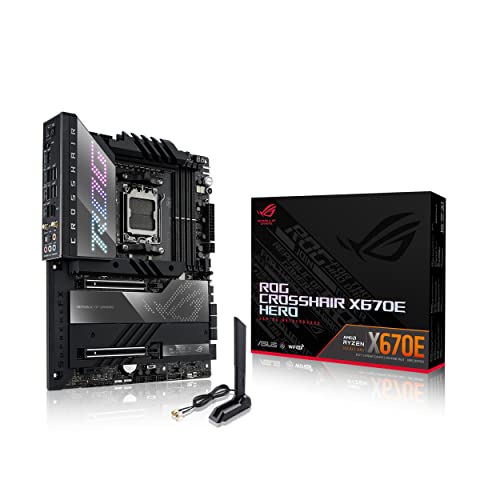
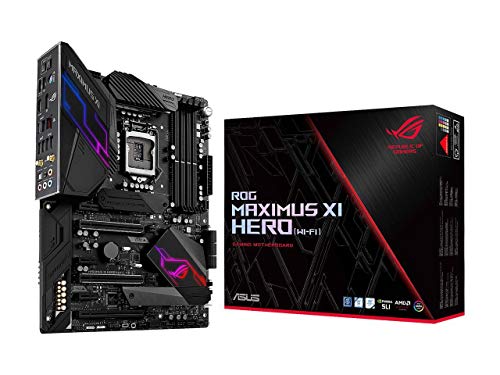
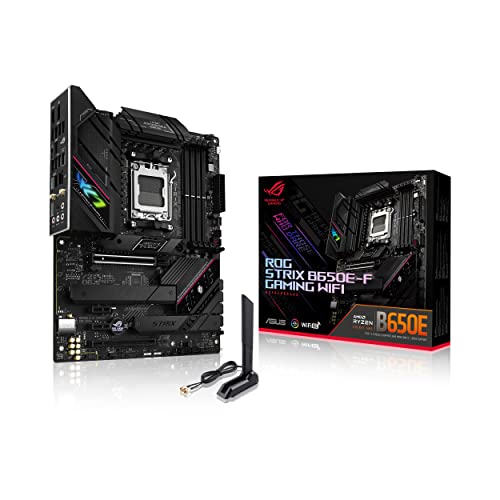
Live listings for the shortlist in this guide are pulled from Amazon below, so prices and availability are always current at the moment you look.
Putting it together: three build patterns
A native tracking and mixing machine for a project studio centres on a mainstream or creator board with native Thunderbolt, two or three M.2 connectors, four memory slots loaded to 64 gigabytes, a 2.5 gigabit network port and excellent fan control. No HDX card competes for lanes, so a mainstream platform lane budget is sufficient, and the money saved against a workstation platform buys memory capacity, quiet cooling and a better interface. Choose the board for its Thunderbolt record and its driver reputation, fit a compact graphics card or use integrated graphics, and keep one M.2 connector and one slot free for the inevitable addition.
An HDX room machine belongs on a workstation platform. The lane budget must hold the HDX cards at their required widths, graphics, at least two NVMe drives on processor lanes, and a 10 gigabit network card if shared storage or networked audio runs from the same machine. ECC memory at 128 gigabytes covers large templates and long unattended bounces. Dual wired network ports separate facility and audio traffic. The board should come from the interface and software maker qualified lists where possible, and the whole configuration should be frozen once proven, with a written build sheet and spare parts on the shelf.
A composing machine for media work reverses some priorities. HDX hardware may be absent, but memory capacity and library storage dominate: 128 or 256 gigabytes on a quad-channel or better platform, several NVMe drives for libraries with room to grow, and graphics capable of driving three or four monitors for score, picture and mixer views. Thunderbolt serves the interface, networking serves sample library distribution from a server, and quiet running matters because composing rooms are listening rooms. A workstation board earns its place here through memory slots and storage provision rather than card slots.
One more discipline closes the build: commissioning. Assemble the machine, run memory diagnostics overnight, measure DPC behaviour idle and under load, record a long multitrack session to the intended session drive while a library streams and a backup target is attached, and leave the machine playing a dense session for several hours before it meets a client. Faults found in commissioning cost an afternoon. The same faults found in a session cost a client. Motherboard choice cannot guarantee a fault-free machine, but the boards described in this guide, chosen with the checks above, give a Pro Tools system the expansion room, the driver behaviour and the quiet manners that professional rooms depend on.
Studios change slowly, and a good board choice respects that pace, leaving slots, lanes and memory room for the interface, card or library that has not been bought yet. As an Amazon Associate, this site earns from qualifying purchases. That relationship does not change the order of the checks above, and a board that fails the lane table or the latency measurement does not earn a place in a studio on the strength of any commission.
Choose the board that leaves your busiest session boringly uneventful, and the room will thank you every working day.