What's inside
As an Amazon Associate I earn from qualifying purchases. This post may contain affiliate links at no extra cost to you.
A stock screener is a tool that filters thousands of stocks down to a short list, and a monitor is the screen that shows it, so the best stock screening monitors are the displays that let a trader see a screener, a chart and a watchlist at the same time, without switching windows, without squinting, and without missing a move. A monitor that is too small will hide the data, a monitor that is too low resolution will blur the numbers, and a monitor that is too narrow will force the trader to scroll, while a wide, high-resolution monitor will show the whole picture, and this guide covers six monitors that suit stock screening, from the Dell UltraSharp U2723QE that is the standard 27-inch 4K display to the Samsung Odyssey G9 that is the ultrawide that replaces two screens.
The reason a monitor matters for stock screening is the density of the data, because a screener shows a table with dozens of columns, a chart shows a price history with indicators, and a watchlist shows a list of symbols with prices, and all three need to be visible at once, so the trader can scan the screener, check the chart, and watch the list, without losing the thread. A 27-inch 4K monitor can show a screener and a chart side by side, with the text sharp and readable, while a 34-inch ultrawide can show a screener, a chart and a watchlist in three columns, and a 49-inch super ultrawide can show a screener, two charts and a news feed, all at once, and the buying guide explains how to choose the size, the resolution and the layout.
The six monitors in this guide cover the whole trading range, from the Dell UltraSharp U2723QE that suits a single-screen desk to the Samsung Odyssey G9 that suits a multi-screen desk, and each one is judged on the same things: size, resolution, text clarity, and whether it can show a screener and a chart side by side without scrolling. A 4K monitor is the right choice for a trader who wants sharp text, an ultrawide is the right choice for a trader who wants more columns, and a super ultrawide is the right choice for a trader who wants to replace two monitors with one, and the buying guide at the end explains how to choose between them, how to set up the layout, and how to keep the eyes comfortable during a long session.
The monitors in this guide are all displays that a trader can buy, set up and use for stock screening, with the screener on one side, the chart on the other, and the watchlist in the middle, which is the layout that the guide explains. A monitor is not a substitute for a good screener, and a good screener is not a substitute for a good strategy, but a monitor that shows the data clearly will make the screener easier to use, and a screener that is easy to use will be used more, and a trader who uses the screener more will find more opportunities, which is the reason the monitor matters.
Quick picks: best stock screening monitors
| # | Product | Where to buy |
|---|---|---|
| 1 | Dell UltraSharp U2723QE | Check on Amazon |
| 2 | Samsung Odyssey G9 | Check on Amazon |
| 3 | ASUS ProArt PA279CV | Check on Amazon |
| 4 | Dell UltraSharp U4021QW | Check on Amazon |
| 5 | BenQ PD2705U | Check on Amazon |
Quick Comparison
| Product | Key Specs | Best For |
|---|---|---|
| Dell UltraSharp U2723QE | 27-inch 4K IPS, 3840×2160, USB-C hub | Best overall stock screening monitor |
| LG 34WN80C-B | 34-inch ultrawide, 3440×1440, IPS, USB-C | Best ultrawide monitor for stock screening |
| Samsung Odyssey G9 | 49-inch super ultrawide, 5120×1440, 240Hz | Best super ultrawide for stock screening |
| ASUS ProArt PA279CV | 27-inch 4K IPS, 3840×2160, colour accurate | Best budget 4K monitor for stock screening |
| Dell UltraSharp U4021QW | 40-inch 5K2K ultrawide, 5120×2160, IPS | Best large monitor for stock screening |
| BenQ PD2705U | 27-inch 4K IPS, 3840×2160, eye care | Best eye-care monitor for stock screening |

Dell UltraSharp U2723QE
The Dell UltraSharp U2723QE is the best overall stock screening monitor in this guide, and it is the monitor that traders reach for first, because Dell built the U2723QE as a 27-inch 4K IPS display with a 3840 by 2160 resolution, a USB-C hub, and a colour accuracy that is good enough for any trading desk. The U2723QE is the monitor for a trader who wants a single screen that can show a screener and a chart side by side, with the text sharp and readable, and it is the reason it is the best overall in this guide.
The resolution is the reason the U2723QE is the standard, with a 4K panel that shows four times as many pixels as a 1080p display, which means the text is sharp, the numbers are crisp, and the screener table can show more columns without scrolling, while the IPS panel gives a wide viewing angle, so the colours do not shift when the trader leans back. The U2723QE has a USB-C hub that connects a laptop with a single cable, with power, video and data, which keeps the desk tidy, and it has a stand that adjusts in height, tilt and rotation, so the monitor can be positioned at eye level, which is the position that is comfortable for a long session.
The practical details are built for a trading desk. The U2723QE is a 27-inch monitor, which is the size that fits on most desks, and it has a thin bezel, so two monitors can sit side by side with a minimal gap, and it has a matte screen that reduces glare, which is important under office lighting. The U2723QE is the monitor that a trader buys when the goal is a single 4K screen that can show a screener and a chart, and it is the monitor that proves a 27-inch 4K display is the sweet spot for stock screening.
The trade-offs are that the U2723QE is a 60Hz monitor, so it is not a gaming display, although a trader does not need a high refresh rate, because a screener does not move quickly. The U2723QE is also more expensive than a 1080p monitor, although it is cheaper than a larger 4K display, and it is the right price for a trader who wants a sharp screen. But as a stock screening monitor, the U2723QE is the best in this guide, and it fits a trader with a single screen, a home office, and anyone who wants the standard 4K monitor for screening.
Check price on Amazon: Dell UltraSharp U2723QE
LG 34WN80C-B
The LG 34WN80C-B is the best ultrawide monitor for stock screening in this guide, and it is the monitor to choose when the trader wants more columns, because LG built the 34WN80C-B as a 34-inch ultrawide IPS display with a 3440 by 1440 resolution, a USB-C connection, and a wide screen that can show a screener, a chart and a watchlist in three columns, without scrolling. The 34WN80C-B is the monitor for a trader who wants a single screen that replaces two, and it is the reason it is the best ultrawide in this guide.
The width is the reason the 34WN80C-B is the standard ultrawide, with a 21:9 aspect ratio that gives a third more horizontal space than a 16:9 monitor, which means the screener can be wider, the chart can be larger, and the watchlist can be visible at the same time, without switching windows. The 34WN80C-B has a USB-C connection that connects a laptop with a single cable, with power and video, which keeps the desk tidy, and it has an IPS panel that gives a wide viewing angle, so the colours do not shift when the trader leans back. The 34WN80C-B is the monitor that a trader buys when the goal is a single wide screen that can show three panels at once, and it is the monitor that proves an ultrawide can replace two monitors.
The practical details are good for a trading desk. The 34WN80C-B is a 34-inch monitor, which is wide enough to show three columns, and it has a stand that adjusts in height and tilt, so the monitor can be positioned at eye level, and it has a matte screen that reduces glare. The 34WN80C-B is the monitor that a trader buys when the desk has room for a wide screen, and the goal is to see more data at once, and it is the monitor that is the most recommended ultrawide for stock screening.
The trade-offs are that the 34WN80C-B has a 1440p vertical resolution, so the text is less sharp than on a 4K monitor, although it is sharper than on a 1080p display, and it is a 60Hz monitor, so it is not a gaming display. The 34WN80C-B is also wider than a 27-inch monitor, so it needs a larger desk, although that is its advantage. But as an ultrawide monitor for stock screening, the 34WN80C-B is the best in this guide, and it fits a trader who wants more columns, a home office with a wide desk, and anyone who wants a single screen that replaces two.

Samsung Odyssey G9
The Samsung Odyssey G9 is the best super ultrawide monitor for stock screening in this guide, and it is the monitor to choose when the trader wants to replace two monitors with one, because Samsung built the G9 as a 49-inch super ultrawide display with a 5120 by 1440 resolution, a 240Hz refresh rate, and a curved screen that wraps around the trader, with enough space for a screener, two charts and a news feed, all at once. The G9 is the monitor for a trader who wants the widest screen, and it is the reason it is the best super ultrawide in this guide.
The width is the reason the G9 is the standard super ultrawide, with a 32:9 aspect ratio that is the same as two 27-inch monitors side by side, which means the screener can be on the left, a chart in the middle, a second chart on the right, and a news feed at the edge, all visible without switching windows. The G9 has a 240Hz refresh rate, which is more than a trader needs, although it makes the mouse movement smooth, and it has a curved screen that reduces the distance from the eye to the edge, which makes the screen more comfortable to read. The G9 is the monitor that a trader buys when the goal is a single screen that replaces a multi-monitor setup, and it is the monitor that proves a super ultrawide can be a trading desk on its own.
The practical details are built for a trading desk. The G9 is a 49-inch monitor, which is very wide, and it has a stand that adjusts in height and tilt, although a monitor arm is better for a screen this large, and it has a VA panel that gives a high contrast, so the text is clear against a dark background. The G9 is the monitor that a trader buys when the desk is large, the budget is generous, and the goal is to see everything at once, and it is the monitor that is the most impressive screen in this guide.
The trade-offs are that the G9 is a very wide monitor, so it needs a large desk and a strong arm, and it is more expensive than a 27-inch 4K display, although it replaces two monitors, which offsets the cost. The G9 has a VA panel, so the viewing angle is narrower than an IPS panel, although the curve compensates, because the screen wraps around the trader. But as a super ultrawide monitor for stock screening, the G9 is the best in this guide, and it fits a trader with a large desk, a professional setup, and anyone who wants the widest screen available.
Check price on Amazon: Samsung Odyssey G9
ASUS ProArt PA279CV
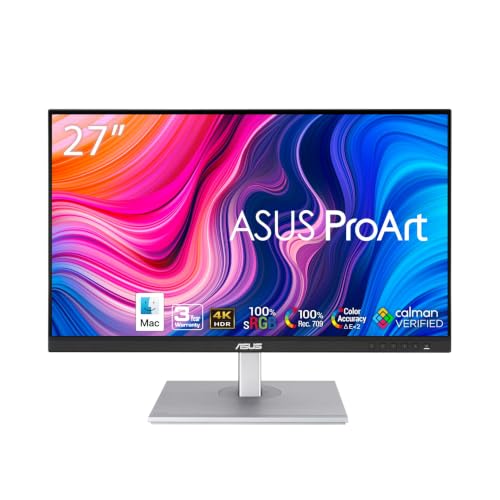
The ASUS ProArt PA279CV is the best budget 4K monitor for stock screening in this guide, and it is the monitor to choose when the budget is tight and the screen still has to be 4K, because ASUS built the PA279CV as a 27-inch 4K IPS display with a 3840 by 2160 resolution, a colour accuracy that is good enough for any trading desk, and a price that is lower than the Dell U2723QE. The PA279CV is the monitor for a trader on a budget, and it is the reason it is the best budget 4K option in this guide.
The resolution is the reason the PA279CV is the standard budget 4K monitor, with a 4K panel that shows the text sharply, the numbers crisply, and the screener table with more columns, while the IPS panel gives a wide viewing angle, so the colours do not shift. The PA279CV has a USB-C connection that connects a laptop with a single cable, with power and video, which keeps the desk tidy, and it has a stand that adjusts in height, tilt and rotation, so the monitor can be positioned at eye level. The PA279CV is the monitor that a trader buys when the goal is a 4K screen on a budget, and it is the monitor that proves a budget 4K display can still be sharp.
The practical details are good for a budget monitor. The PA279CV is a 27-inch monitor, which fits on most desks, and it has a thin bezel, so two monitors can sit side by side, and it has a matte screen that reduces glare. The PA279CV is the monitor that a trader buys when the budget is the limiting factor, and the goal is still a sharp 4K screen, and it is the monitor that is the best value for a 4K display.
The trade-offs are that the PA279CV is a budget monitor, so the USB-C hub is simpler than the Dell U2723QE, and the stand is less refined, although it works. The PA279CV is also a 60Hz monitor, so it is not a gaming display, although a trader does not need a high refresh rate. But as a budget 4K monitor for stock screening, the PA279CV is the best in this guide, and it fits a trader on a budget, a student, and anyone who wants a 4K screen for the lowest price.
Check price on Amazon: ASUS ProArt PA279CV

Dell UltraSharp U4021QW
The Dell UltraSharp U4021QW is the best large monitor for stock screening in this guide, and it is the monitor to choose when the trader wants the largest screen, because Dell built the U4021QW as a 40-inch 5K2K ultrawide IPS display with a 5120 by 2160 resolution, a USB-C hub, and a screen that is large enough to show a screener, two charts and a watchlist, all at once, with the text sharp and readable. The U4021QW is the monitor for a trader who wants a single large screen, and it is the reason it is the best large option in this guide.
The size is the reason the U4021QW is the standard large monitor, with a 40-inch panel that is the largest in this guide, and a 5K2K resolution that gives more pixels than a 4K display, which means the text is sharper, the screener can show more columns, and the charts can be larger, without scrolling. The U4021QW has a USB-C hub that connects a laptop with a single cable, with power, video and data, which keeps the desk tidy, and it has a Thunderbolt connection for a fast laptop, and it has a stand that adjusts in height and tilt, so the monitor can be positioned at eye level. The U4021QW is the monitor that a trader buys when the goal is a single large screen that can show everything, and it is the monitor that proves a large ultrawide can replace a multi-monitor setup.
The practical details are built for a professional trading desk. The U4021QW is a 40-inch monitor, which is very large, and it has a thin bezel, so it can sit on a wide desk, and it has a matte screen that reduces glare. The U4021QW is the monitor that a trader buys when the desk is large, the budget is generous, and the goal is to see everything on one screen, and it is the monitor that is the most impressive large screen in this guide.
The trade-offs are that the U4021QW is a very large monitor, so it needs a large desk and a strong arm, and it is the most expensive monitor in this guide, although it replaces two or three monitors, which offsets the cost. The U4021QW is also a 60Hz monitor, so it is not a gaming display, although a trader does not need a high refresh rate. But as a large monitor for stock screening, the U4021QW is the best in this guide, and it fits a trader with a large desk, a professional setup, and anyone who wants the largest screen available.
Check price on Amazon: Dell UltraSharp U4021QW

BenQ PD2705U
The BenQ PD2705U is the best eye-care monitor for stock screening in this guide, and it is the monitor to choose when the trader spends long hours in front of the screen, because BenQ built the PD2705U as a 27-inch 4K IPS display with a 3840 by 2160 resolution, a low blue light mode, a flicker-free backlight, and a brightness intelligence feature that adjusts the brightness to the room. The PD2705U is the monitor for a trader who wants to protect the eyes, and it is the reason it is the best eye-care option in this guide.
The eye care is the reason the PD2705U is the standard for long sessions, with a low blue light mode that reduces the blue light that causes eye strain, a flicker-free backlight that does not flicker at low brightness, and a brightness intelligence feature that adjusts the brightness to the ambient light, so the screen is never too bright or too dim. The PD2705U has a 4K panel that shows the text sharply, and an IPS panel that gives a wide viewing angle, and it has a USB-C connection that connects a laptop with a single cable, with power and video. The PD2705U is the monitor that a trader buys when the goal is a screen that is comfortable for a ten-hour session, and it is the monitor that proves eye care matters as much as resolution.
The practical details are built for a long trading day. The PD2705U is a 27-inch monitor, which fits on most desks, and it has a stand that adjusts in height, tilt and rotation, so the monitor can be positioned at eye level, and it has a matte screen that reduces glare. The PD2705U is the monitor that a trader buys when the eyes are the limiting factor, and the goal is a screen that can be looked at all day, and it is the monitor that is the most comfortable screen in this guide.
The trade-offs are that the PD2705U is a 60Hz monitor, so it is not a gaming display, although a trader does not need a high refresh rate, and it is more expensive than a basic 4K monitor, although the eye-care features are worth it for a trader who works long hours. But as an eye-care monitor for stock screening, the PD2705U is the best in this guide, and it fits a trader who works long hours, a home office with bright light, and anyone who wants a screen that is easy on the eyes.
Check price on Amazon: BenQ PD2705U
Buying Guide
Choose the resolution first, then the size
A stock screening monitor should be chosen by resolution first, because a 4K monitor shows the text sharply, a 1440p monitor shows it less sharply, and a 1080p monitor shows it blurry, and a trader who reads numbers all day needs a sharp screen, so a 4K monitor is the right choice for a 27-inch display, and a 1440p monitor is the right choice for a 34-inch ultrawide, while a 1080p monitor is not enough for stock screening. Once the resolution is chosen, the size should be chosen, with a 27-inch monitor fitting on most desks, a 34-inch ultrawide fitting on a wide desk, and a 49-inch super ultrawide fitting on a large desk, and a trader who is unsure should buy a 27-inch 4K monitor first, because it is the standard, and it can be supplemented with a second monitor later.
An ultrawide replaces two monitors, not one
An ultrawide monitor is not a wider version of a 16:9 monitor, it is a replacement for two monitors, because a 34-inch ultrawide has the width of two 27-inch monitors side by side, with no bezel in the middle, and a 49-inch super ultrawide has the width of two 27-inch monitors, with a single screen, so a trader who buys an ultrawide should think of it as a multi-monitor setup, with the screener on the left, the chart in the middle, and the watchlist on the right, rather than as a single large window. A trader who uses an ultrawide as a single window will waste the space, and a trader who uses it as three windows will see more data, and the window management software that comes with the monitor should be used to split the screen into zones.
Put the monitor at eye level, and the eyes will last the day
A monitor that is too low will cause neck pain, and a monitor that is too high will cause eye strain, so the monitor should be positioned with the top of the screen at eye level, and the screen at arm's length, with the trader sitting upright, and a monitor arm is the best way to achieve this, because it lets the monitor be positioned exactly, with the height, tilt and rotation all adjustable. A monitor that is positioned correctly will be comfortable for a ten-hour session, and a monitor that is not will cause pain within a week, so the position should be checked on the first day, and adjusted until it is comfortable, because the eyes are the trader's most important tool.
Use a matte screen, and avoid glare
A glossy screen reflects the light from a window or a lamp, and the reflection will obscure the numbers, while a matte screen diffuses the light, and the numbers will be readable in any light, so a stock screening monitor should have a matte screen, and the desk should be positioned so the window is to the side, not behind the trader, because a window behind the trader will reflect in the screen, and a window in front of the trader will cause glare. A monitor with a matte screen is the right choice for a trading desk, and a monitor with a glossy screen is the wrong choice, because the numbers have to be readable, and glare makes them unreadable.
Two monitors are better than one, when the desk allows it
A single monitor can show a screener and a chart, but two monitors can show a screener, a chart, a watchlist and a news feed, all at once, without switching windows, so a trader with a desk that has room for two monitors should buy two, with the screener on one and the chart on the other, and a trader with a desk that has room for only one should buy a wide monitor, such as an ultrawide or a super ultrawide, which is the same as two monitors on one screen. A trader who starts with one monitor should plan to add a second later, because the second monitor is the upgrade that makes the biggest difference to the workflow, after the first monitor itself.
Test the layout for a week, and adjust the windows
A stock screening layout should be tested for a week, with the screener, the chart and the watchlist in different positions, because the best layout is the one that the trader uses without thinking, and a layout that requires scrolling, switching or searching is a layout that should be changed. Set the windows up, use them for a week, and note which windows are used most, which are ignored, and which need more space, then adjust the layout, because a layout that is tuned to the trader is better than a layout that is copied from a guide. A trader who tunes the layout will work faster, and a trader who does not will work slower, and the monitor is the tool that makes the layout possible.
Frequently Asked Questions
What is the best monitor for stock screening?
The Dell UltraSharp U2723QE is the best overall monitor for stock screening, because its 27-inch 4K IPS panel shows the text sharply, the numbers crisply, and the screener table with more columns, while its USB-C hub keeps the desk tidy. The LG 34WN80C-B is the best ultrawide, because it can show a screener, a chart and a watchlist in three columns, and the Samsung Odyssey G9 is the best super ultrawide, because it replaces two monitors with one. The right choice depends on the desk size, the budget, and whether the trader wants one screen or two.
Is a 4K monitor worth it for stock screening?
Yes, because a 4K monitor shows the text sharply, the numbers crisply, and the screener table with more columns, while a 1080p monitor shows the text blurry, and a trader who reads numbers all day needs a sharp screen. A 4K monitor is the right choice for a 27-inch display, and a 1440p monitor is the right choice for a 34-inch ultrawide, while a 1080p monitor is not enough for stock screening, because the text will be blurry and the numbers will be hard to read. A 4K monitor is the upgrade that makes the biggest difference to readability, after the monitor itself.
Should I buy an ultrawide or two monitors for trading?
An ultrawide is the right choice when the desk has room for one wide screen, and the trader wants a single screen with no bezel in the middle, because a 34-inch ultrawide has the width of two 27-inch monitors, with no gap, while two monitors are the right choice when the desk has room for two screens, and the trader wants to separate the screener and the chart onto different displays, with one for the data and one for the analysis. A trader who is unsure should buy a 27-inch 4K monitor first, because it is the standard, and it can be supplemented with a second monitor later, while a trader who knows they want a wide screen should buy an ultrawide.
How many monitors do I need for stock screening?
One monitor is enough to start, with a screener and a chart side by side, and two monitors are better, with a screener on one and a chart on the other, while three monitors are the most that most traders need, with a screener, a chart and a news feed, all visible at once. A trader who starts with one monitor should plan to add a second later, because the second monitor is the upgrade that makes the biggest difference to the workflow, and a trader who has three monitors should check that they are all being used, because a monitor that is ignored is a monitor that should be removed.
Does refresh rate matter for stock screening?
No, because a screener does not move quickly, and a chart updates slowly, so a 60Hz monitor is enough for stock screening, and a 144Hz or 240Hz monitor is a waste of money for a trader, although it makes the mouse movement smoother. A trader who also plays games should buy a high refresh rate monitor, because it will be better for gaming, but a trader who only screens stocks should buy a 60Hz monitor, and spend the money on a higher resolution, a larger screen, or a second monitor, because those make a bigger difference to the workflow.
What size monitor is best for a trading desk?
A 27-inch 4K monitor is the best size for most trading desks, because it fits on a standard desk, it shows a screener and a chart side by side, and the text is sharp, while a 34-inch ultrawide is the best size for a trader who wants more columns, because it can show a screener, a chart and a watchlist in three columns, and a 49-inch super ultrawide is the best size for a trader who wants to replace two monitors with one. A trader who is unsure should buy a 27-inch 4K monitor first, because it is the standard size, and it can be supplemented with a second monitor later, while a trader with a large desk should consider an ultrawide, because it shows more data at once.
Conclusion
The best stock screening monitor is the monitor that shows the screener, the chart and the watchlist at the same time, with the text sharp and readable, and in this guide the Dell UltraSharp U2723QE is the best overall choice, because it is the standard 27-inch 4K display. The LG 34WN80C-B is the best ultrawide, the Samsung Odyssey G9 is the best super ultrawide, the ASUS ProArt PA279CV is the best budget 4K monitor, the Dell UltraSharp U4021QW is the best large monitor, and the BenQ PD2705U is the best eye-care monitor. Choose the resolution first, put the monitor at eye level, use a matte screen, and test the layout for a week, because a monitor that shows the data clearly will make the screener easier to use, and a screener that is easy to use will be used more.