What's inside
- Key Takeaways
- Quick Picks
- How We Chose These Picks
- Why Does 512GB Hit the Market’s Sweet Spot?
- Which Markings Actually Matter at This Capacity?
- Which 512GB-Class Cards Earned a Detailed Look?
- How Long Will a 512GB Card Serve? Lifespan and Rotation
- What Does It Cost to Fill Half a Terabyte? Time, Readers and Workflow
- How Fast Is Fast Enough? Matching the Card to the Device
- How Do the Six 512GB Cards Compare Head to Head?
- How Do You Get a New 512GB Card Working at Its Best?
- What About Full-Size Cameras and the Adapter Question?
- What Mistakes Do Buyers of This Class Keep Making?
- Final Recommendation
- Frequently Asked Questions
- Related Guides
As an Amazon Associate I earn from qualifying purchases. This post may contain affiliate links at no extra cost to you.
widgetverdict.com is reader-supported. When you buy through links on our site, we may earn an affiliate commission.
Where to buy: all six cards below carry verified Amazon links — this is the most competitive tier in flash memory, and every major brand’s genuine entry could be confirmed in our pool.
First, a small act of translation: nobody sells a 500GB card. The tier shoppers mean when they search for the best 500gb sd cards is the 512GB class — the capacity the industry actually manufactures, sitting exactly between the cramped 256GB tier and the flagship-priced 1TB tier. It is, not coincidentally, the sweet spot of the entire microSD market right now: big enough to end card-swapping in drones, action cameras, handheld consoles and phones, priced at a fraction per gigabyte of the terabyte cards, and contested by every serious brand with multiple product lines. Choice here is genuinely wide, which makes it the tier where guidance earns its keep.
These are microSD cards — the format the capacity war is fought in — and all six arrive with full-size adapters for the devices that need them. Within the class, the real divisions are not capacity but intent: V30-certified capture cards for cameras that write hard, A2-rated cards for devices that run apps and games from storage, and one honest storage-class card for libraries that mostly sit and serve. The six picks below span those intents across SanDisk, Samsung and Lexar, every one of them title-verified, so the figures attached to each are the manufacturer’s own for that exact card.
One clarification before the picks: although this guide’s keyword says “sd cards,” the class it names is fought in microSD, and every pick below is a microSD card with a full-size adapter in the box. That is not a bait-and-switch — it is where the manufacturers concentrate this capacity, and the adapter makes the same card native to both slot shapes. Buyers who specifically need a native full-size card should know that market is thinner and pricier at 512GB, and that nothing about an adapted flagship’s classes changes in the larger slot.
Key Takeaways
- The “500GB” tier is really the 512GB class — the capacity point where price, size and competition align best in microSD.
- All six picks here are verified and linked; this is the one capacity where every major brand fields a genuine contender.
- V30 is the marking that matters for 4K capture; A2 matters for handhelds and phones running apps from the card.
- SanDisk’s newest Extreme generation posts the strongest verified figures in the class; Samsung counters with two strong lines of its own.
- The Ultra-tier card is the value play for storage-heavy, write-light work — and the wrong card for a drone.
- Usable capacity is always less than the printed number, and at 512GB the gap is large enough to plan around.
Quick Picks
| Card | Badge | What it is for |
|---|---|---|
| SanDisk 512GB Extreme microSDXC | Best overall in the class | The newest Extreme generation posts the strongest verified read and write figures here and carries V30 and A2 together. |
| SanDisk 512GB Extreme Pro microSDXC | Best proven flagship | The established Pro flagship with fast transfers and bundled data-rescue software in its listing. |
| Samsung PRO Plus 512GB microSDXC | Best Samsung for capture and consoles | Samsung’s top microSD line, V30 and A2, aimed squarely at action cameras, drones and game consoles. |
| Samsung EVO Plus 512GB microSDXC | Best all-round value | The EVO balance of speed and price that has made the line the default upgrade for phones and tablets. |
| Lexar 512GB Blue microSDXC | Best third-brand contender | Lexar’s Blue line brings full V30 and A2 markings at this capacity for buyers beyond the big two. |
| SanDisk 512GB Ultra microSDXC | Best for bulk storage | The A1 storage-class card for media libraries and archives that read far more than they write. |
How We Chose These Picks
Verification was the entry ticket, not the ranking: every card in this guide was confirmed against our pool by its full manufacturer title — capacity, line, class markings and quoted figures — before it could be considered, which at this competitive tier still left more genuine contenders than slots. We then built the six to cover the class’s real intents rather than its spec-sheet podium. Two slots went to capture-grade flagships, because 512GB is where serious drone and action-camera work now lives; two to the great all-round lines most buyers actually purchase; one to a third brand, because a two-brand guide misrepresents this market; and one to the storage class, because a large share of 512GB cards are bought to hold libraries, not to record them.
Within each intent we weighed sustained-write credentials above peak read numbers, since filling half a terabyte exposes the difference, and we treated quoted figures as ceilings rather than expectations — a card quoting up to 200MB/s transfers will do so only behind a reader and host that can feed it. Warranty and ecosystem counted too: adapter included, rescue software where offered, and the depth of each brand’s retail presence, because a card this size is a multi-year commitment and the maker’s support is part of the product.
A note on what we did not do: we did not import rankings from smaller capacities. Lines change character as they scale — a maker’s 128GB hero can be an afterthought at 512GB, and a line designed for this tier from the start, like the newest Extreme, shows it. Every judgement below is about the 512GB card in the hand, not the reputation of its siblings, because capacity tiers in flash memory are closer to separate products than to sizes of the same shoe.
Why Does 512GB Hit the Market’s Sweet Spot?
Capacity pricing in flash memory is not linear, and 512GB sits at the kink in the curve. Below it, each doubling is cheap; above it, the 1TB tier’s density challenges push cost per gigabyte sharply upward. The result is that a 512GB card typically offers the lowest cost per gigabyte of any tier that still feels unlimited in daily use — and “feels unlimited” is doing real work in that sentence. Half a terabyte swallows a handheld’s entire game library, a drone season’s footage between offloads, or a phone’s media life with the camera roll set to its highest quality, and it does so without the mid-trip card Tetris that defines the 128GB and 256GB experience.
Competition compounds the value. Because this is the tier where volume lives, every brand fights here with its freshest silicon and its sharpest pricing; the newest Extreme generation in this guide posts figures that would have been flagship fantasy two cycles ago, precisely because 512GB is where SanDisk expects the fight to be. Buyers at 1TB get scarcity and premiums; buyers at 512GB get a price war. Choosing this tier is not settling — it is standing where the market’s energy is.
The one planning note is arithmetic: a 512GB card formats to roughly 476GB of usable space, because manufacturers count in decimal and operating systems in binary. Budget your library against the smaller number and the card will never surprise you; the missing gigabytes are a units conversion, not a defect, and every brand plays by the same convention.
The sweet spot has one more dimension: time. A 512GB card bought today will still be a sensible size several device generations from now, because content growth — larger games, richer video — is matched by the card’s sheer headroom starting from a high base. The 256GB card bought two cycles ago already feels tight in a modern handheld; the 512GB card bought in the same week does not. Buying at the kink of the price curve is also buying at the kink of the obsolescence curve, and the second saving dwarfs the first.
There is a behavioural dividend, too: a card that never fills changes how its owner shoots and keeps. Photographers stop deleting in the field — a practice that has destroyed more good frames than any equipment failure — and families stop curating their memories by storage triage. Abundance, honestly purchased at the market’s sweet spot, turns out to be a feature with artistic consequences, which is not a sentence anyone expected to write about a memory card.
Which Markings Actually Matter at This Capacity?
At 512GB, three markings carry the meaning. V30 certifies a minimum sustained write of 30MB/s — the guarantee 4K video consumes — and separates capture cards from storage cards more honestly than any headline figure. U3, its companion, certifies the same floor under the UHS speed-class system. A2 certifies application performance: minimum random read and write IOPS at levels that make game loading and app behaviour from the card feel native rather than tolerated, provided the host implements A2’s command queueing. A card carrying V30 and A2 together — four of the six here do — is a card genuinely cleared for both halves of modern microSD work.
Read figures, by contrast, are ceilings measured in ideal conditions. The newest Extreme’s verified listing quotes up to 245MB/s read and up to 170MB/s write, numbers that depend on SanDisk’s proprietary reader technology and a willing host; through a generic reader the same card will transfer far more modestly, and that is normal, not a fault. Treat headline reads as a ranking hint between cards of the same generation, and the class markings as the contract. The contract is what your camera cashes in at 4K, mid-flight, with no second take available.
One more quiet distinction: endurance. None of the six picks is an endurance-rated card, because this guide is about the general class; cards built for dashcam and security overwrite loops are a separate product family with different NAND and warranties. A 512GB general card in a camera that records your journeys is correctly used; the same card looping in a parking-mode dashcam is being spent on the wrong job.
And a word about the A-classes in this tier, since four picks carry A2 and one carries A1: the difference is real but hostage to the host. A console or phone that implements A2’s queueing will show the A2 cards a genuine edge in loading behaviour; a host that does not will treat them as excellent A1 cards. Nobody should pay the A2 premium for a device that cannot cash it, and nobody should fear the Ultra’s A1 in a tablet — in that host, A1 is not the lesser spec, it is the whole spec, delivered.
The practical upshot for shoppers comparing spec sheets across this guide: treat A2 as a bonus that certain hosts unlock, V30 as a contract that every capture host cashes, and read ceilings as tiebreakers between cards that already satisfy the first two tests. That ordering — contract, bonus, tiebreaker — will steer a buyer correctly through this tier and, frankly, through every other tier in the store.
Which 512GB-Class Cards Earned a Detailed Look?

SanDisk 512GB Extreme microSDXC — Best overall in the class
The newest Extreme generation arrives with the strongest verified figures in this guide — up to 245MB/s read and up to 170MB/s write in its listing — and, just as importantly, the full modern marking set: UHS-I, U3, V30, A2. Numbers like those reframe what the class is for. Writes at that ceiling mean a drone’s buffer is a formality, a burst sequence clears before the next subject arrives, and a hundred-gigabyte game install is a coffee break rather than an evening. The card is explicitly positioned by its maker for action cameras, drones and Android devices, and for once the positioning undersells nothing.
The honest asterisk is the reader. Peak figures at this level lean on the maker’s high-speed reader ecosystem; through ordinary readers and slots, expect excellent rather than astronomical transfers. But headroom is never wasted on a capture card — it is what keeps sustained performance stable as the card fills and ages — and the V30 floor beneath the marketing is the guarantee your footage actually relies on. If the budget reaches one card in this guide without negotiation, this is the card the negotiation ends with.
Its arrival also rearranges the tier beneath it: a generation ago, figures like these lived exclusively at 1TB flagship prices, and their migration to 512GB is the clearest evidence for this guide’s sweet-spot thesis. The buyer is not purchasing a compromise card with good marketing; they are purchasing last cycle’s flagship performance at this cycle’s volume price. Cards like this are why the advice to buy the tier where the market fights hardest is not folk wisdom but arithmetic wearing a trench coat.
- Capacity: 512GB microSDXC, UHS-I, adapter included
- Verified listing figures: up to 245MB/s read, up to 170MB/s write
- Classes: U3, V30, A2, Class 10
- Positioning: action cameras, drones, Android devices
- Note: peak figures assume a high-speed reader
Strengths
- Strongest verified speed profile in the entire class.
- V30 and A2 together cover capture and app workloads fully.
- Headroom keeps performance steady as the card fills.
Trade-offs
- Top figures need the maker’s fast reader to appear.
- Newest-generation pricing sits above the proven flagships.
- Over-specified for pure library storage duty.
Best for: drone pilots, action-camera shooters and anyone who wants the class’s ceiling in one purchase. Not suited for: buyers whose card will only ever hold a media library.

SanDisk 512GB Extreme Pro microSDXC — Best proven flagship
Before the new Extreme reset the podium, this was the flagship — and it remains the pick for buyers who prefer the proven generation. Its verified listing quotes transfer speeds up to 200MB/s with A2, V30 and U3 markings, and adds a detail the newer card’s listing does not emphasise: RescuePRO Deluxe data-recovery software bundled with the card. For shooters whose footage is income, that bundle is not a trinket; it is the difference between a corrupted card being a catastrophe and being an afternoon’s recovery work.
In capture, the Pro’s V30 certification does the same guaranteed work as its sibling’s — the class floor is the class floor, whichever flagship carries it. Where the newer Extreme pulls ahead is ceiling: transfers and giant writes. Where the Pro answers is maturity: a longer field history, wider reader compatibility at its quoted speeds, and pricing that often softens as the newer generation takes the spotlight. Choosing between the two SanDisks is the class’s happiest problem, and it is honestly settled by the day’s prices and whether the rescue software matters to your workflow.
There is a maturity argument that deserves air: this card’s generation has been in the field long enough for its failure modes to be known, documented and — where they existed — addressed in production. Newer silicon is faster and stranger; proven silicon is a known country. Professional buyers, who price risk rather than specifications, often choose the known country deliberately. Nothing about that choice is nostalgia. It is the same reasoning that keeps last year’s flagship phone in a thousand business pockets, applied to the small black rectangle the year’s footage depends on.
- Size: 512GB microSDXC on the UHS-I bus, adapter in the box
- Listing figure (verified): up to 200MB/s transfer
- Classes: U3, V30, A2, Class 10
- Bundle: RescuePRO Deluxe recovery software in listing
- Positioning: proven flagship for phones, action cameras, drones
Strengths
- Flagship classes with a long, documented field record.
- Bundled recovery software is genuinely valuable insurance.
- Often priced kindly as the newer generation leads.
Trade-offs
- Lower ceilings than the newest Extreme generation.
- Peak transfers still assume a capable reader.
- Two SanDisk flagships in one guide demand a price check between them.
Best for: working shooters who value the recovery bundle and a proven flagship. Not suited for: buyers chasing the absolute highest transfer ceilings.
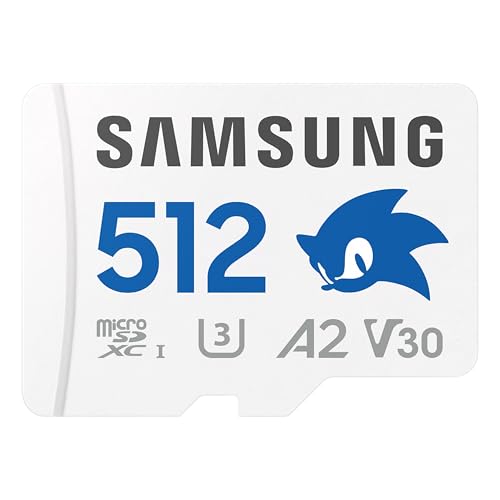
Samsung PRO Plus 512GB microSDXC — Best Samsung for capture and consoles
Samsung’s top microSD line makes its 512GB case with up to 180MB/s read in its verified listing and the pairing console and camera owners actually need: U3, V30 and A2. Samsung explicitly aims this card at Nintendo Switch, Steam Deck, GoPro and DJI hardware in its listing, and that aim is well judged — those are the devices where a half-terabyte card works hardest, loading games from storage and swallowing 4K footage in the same week. Samsung’s NAND and controller are its own, designed together, and the line’s reputation for consistent sustained behaviour is the quiet reason it anchors so many kits.
Against the SanDisk flagships it trades a little ceiling for Samsung’s ecosystem virtues: broad availability, an adapter in the box, and the confidence of the world’s largest memory maker standing behind the warranty. For a Switch or Deck owner, the A2 rating is the operative line — game loads from this card feel like the console’s native storage on a good day — while the V30 floor covers the GoPro it will inevitably be borrowed by. If your devices lean Samsung or your loyalties do, this is the class’s co-flagship, not its consolation prize.
The console case deserves one more sentence, because it is where this card most often lands: a Switch or Deck library at this capacity stops being a rotation and becomes a collection, and the PRO Plus’s A2 behaviour keeps that collection feeling like internal storage rather than an annex. Owners who have lived with a smaller card’s uninstall-and-redownload shuffle describe the change in the vocabulary of housing — the library moved from a bedsit to a house. Samsung built this card for exactly that move, and priced it like it expects the comparison with SanDisk to be made.
- Size and format: 512GB microSDXC, UHS-I, ships with adapter
- Maker’s verified figure: up to 180MB/s read
- Classes: V30 and A2 over a U3, Class 10 base
- Positioning: Switch, Steam Deck, GoPro, DJI, tablets
- Maker: Samsung’s own NAND and controller
Strengths
- Full capture and app classes from the top Samsung line.
- Explicitly aimed at the consoles and cameras that use this tier.
- Sustained-behaviour reputation across the line’s history.
Trade-offs
- Read ceiling below the newest SanDisk Extreme.
- Themed special editions of this card circulate; check the listing.
- Write ceilings are class-assured rather than headline-led.
Best for: console gamers and Samsung loyalists who also shoot action footage. Not suited for: transfer-speed absolutists, who should take the new Extreme.

Samsung EVO Plus 512GB microSDXC — Best all-round value
The EVO Plus is the card most people in this class actually buy, and the reasons are structural: Samsung’s volume line pairs up to 160MB/s read in its verified listing with U3 speed class, at the pricing that undercuts the flagships while keeping the Samsung badge and warranty. For the phone owner expanding storage, the tablet carrying a film library, or the console that needs capacity more than it needs ceiling, this is the balanced point of the entire tier — the card against which “is the upgrade worth it?” is measured.
Its honest boundary is the same as every volume line’s: the flagship markings above it exist for a reason. Sustained-write certification and app-class ratings sit a step below the PRO Plus, so a buyer whose card will record 4K daily or host a competitive game library should step up within Samsung’s own range rather than ask the EVO to be a PRO. But judged on its own brief — dependable, capacious, keenly priced Samsung storage — it has no real rival in this guide, and its presence is why the flagships must justify themselves rather than merely exist.
Its natural habitat deserves precision: the EVO Plus is the card of the second screen and the family device — the tablet loaded for a long flight, the phone whose owner shoots everything and deletes nothing, the console in the living room rather than the tournament bag. In those lives its specification is not the budget option but the correct one, sized to appetites that are large but not extreme. Guides love flagships because flagships are interesting; households run on cards like this one, and a guide that forgets it has forgotten its readers.
- Format: 512GB microSDXC (UHS-I), full-size adapter bundled
- Verified figure from listing: up to 160MB/s read
- Classes: U3, Class 10
- Positioning: phones, tablets, consoles, everyday cameras
- Maker: Samsung’s volume line
Strengths
- The class’s balance point of brand, speed and price.
- U3 class covers Full HD and light 4K duties honestly.
- Samsung warranty and availability behind a volume price.
Trade-offs
- A step below the flagships in certified sustained behaviour.
- Not the console card for the most demanding libraries.
- Popularity makes it a counterfeiter’s favourite costume.
Best for: mainstream phone, tablet and console expansion at sensible money. Not suited for: daily 4K capture or flagship-grade game loading.

Lexar 512GB Blue microSDXC — Best third-brand contender
A guide to this class with only two brands would be a disservice, and Lexar’s Blue line is why: its verified listing for the 512GB card quotes up to 160MB/s read with the full working set of markings — U3, V30 and A2 — in a card aimed at Full HD and 4K recording and high-speed transfers. On paper that is flagship paperwork from the third brand, and Lexar’s long history in flash — photographers have trusted its professional lines for decades — gives the paper a credible signature.
The Blue line’s role here is the credible alternative: for buyers who have had a SanDisk or Samsung card die at a bad moment and sworn off the brand, for those who find Lexar priced under the flagships on the day, and for anyone who simply prefers not to concentrate every device they own on one maker’s media. Its adapter is included, its classes are genuine, and its presence disciplines the big two’s pricing across the whole tier. That is a pick earning its slot on merit, not variety for variety’s sake.
Lexar’s longer game is worth watching for buyers who standardise: the company has been rebuilding its consumer range with intent, and the Blue line’s paperwork at this capacity reads like a deliberate challenge to the duopoly rather than a me-too listing. A third credible maker disciplines everyone’s pricing and gives the market somewhere to go when one giant’s line stumbles. Buying the Blue is therefore both a card purchase and a small vote for a healthier shelf — and unlike most votes, this one also records your holiday in 4K.
- Format: 512GB microSDXC (UHS-I) with adapter
- Listing figure (verified): up to 160MB/s read
- Classes: Class 10 with U3, V30 and A2 ratings
- Positioning: Full HD and 4K recording, fast transfers
- Maker: Lexar’s Blue line
Strengths
- Full V30 and A2 paperwork from outside the big two.
- Heritage flash brand with professional-line history.
- Frequently the keenest-priced fully-classed card here.
Trade-offs
- Read ceiling matches the value lines, not the flagships.
- Smaller community knowledge base than SanDisk or Samsung.
- Verify the exact listing; Lexar’s range has many near-names.
Best for: buyers wanting a fully-classed card beyond the two biggest brands. Not suited for: those who prize the deepest field documentation above all.

SanDisk 512GB Ultra microSDXC — Best for bulk storage
Every class needs its honest workhorse, and the Ultra is this one’s: up to 150MB/s read in its verified listing, A1 app class, U1 speed class, and a positioning its maker states without blush — Android smartphones, tablets and mirrorless-style cameras used for storage rather than sustained capture. For the film library on a tablet, the music archive in a phone, the photo collection that lives on the card and visits the computer monthly, this card delivers half a terabyte of SanDisk dependability without charging for certifications the workload will never invoke.
The discipline, as with every storage-tier card, is lane-keeping. U1 is not V30: this card makes no sustained-write promise suitable for 4K recording, and pressing it into drone or action-camera service invites the dropped frames and corrupted clips that give the whole category a bad name among the careless. Kept to its brief it is the class’s value anchor — and its A1 rating even gives phone apps and casual games a liveliness the pure archive cards of older generations never offered.
One more honest scenario: the Ultra is the card to buy two of. At its tier’s pricing, a matched pair — one in the tablet, one holding the backup copy of the same library — delivers a resilience that a single flagship cannot, for less than the flagship costs. Libraries fail by loss and corruption far more often than by slowness, and the Ultra’s economics are the first in this guide that make the backup card a casual decision rather than a project. For archive duty, that may be the most valuable specification on this entire page.
- Size: 512GB microSDXC, UHS-I interface, adapter included
- Maker’s verified figure: up to 150MB/s read
- Classes: U1, A1, Class 10
- Positioning: Android phones, tablets, media libraries
- Note: storage class — not a 4K capture card
Strengths
- Half a terabyte of top-brand storage without flagship pricing.
- Respectable read speed keeps library browsing snappy.
- A1 rating livens phone app and media behaviour.
Trade-offs
- U1 write class is not certified for 4K capture.
- App performance a step below the A2 cards.
- Tempting to misuse in cameras; resist the temptation.
Best for: media libraries, archives and phone or tablet expansion. Not suited for: drones, action cameras or any sustained-write workload.
How Long Will a 512GB Card Serve? Lifespan and Rotation
Flash memory wears by writing, and a large card wears slowly for a simple reason: its controller spreads writes across half a terabyte of cells, so any given cell is touched rarely in ordinary service. A 512GB card in a camera or console is therefore more likely to be lost, outgrown or retired with a device than worn out — a pleasant inversion of the small-card era, when heavy shooters could feel a card ageing. Lifespan anxiety at this tier should be redirected from the NAND to the logistics: contacts, adapters, and the owner’s backup habits are the realistic failure points.
Rotation still earns its keep for working shooters. Two cards alternated across shoots halve each card’s write load, guarantee a formatted spare is always in the bag, and create the natural moment — the swap — at which offloading happens. The tier’s pricing makes the second card a rounding error next to the bodies and lenses it serves, which is why professionals treat cards as plural by default and why this guide’s value picks make such natural understudies to its flagships.
Retirement, when it comes, should be a decision rather than a discovery: a card that produces one unexplained error has given its notice, and at this capacity the correct response is to copy everything off, verify the copy, and demote the card to non-critical duty or recycle it. The archive it carried is worth a thousand cards; sentiment about the plastic is the most expensive emotion in storage.
One more lifespan factor is environmental rather than electronic: cards live in pockets, gloveboxes and camera bags, and heat is their slow enemy. A card stored in a hot car ages faster than one kept in a drawer, whatever its class. The tier’s cards are built sturdily — the makers publish the usual litany of water, temperature and shock resistance for these lines — but sturdy is not immortal, and cool, dry, labelled storage is the final free upgrade available to every pick in this guide.
What Does It Cost to Fill Half a Terabyte? Time, Readers and Workflow
Capacity is bought once; filling and emptying it is paid for in time, forever. A full 512GB card moved through a slow reader at twenty megabytes per second is a seven-hour errand; through a good UHS-I reader on a fast port, the same card empties in a fraction of that. The card’s ceiling figure is therefore only the first term of the equation — the reader, the port and the computer’s storage all take their cuts — and buyers of this tier should budget the chain, not just the card. The flagship picks reward a proper reader; the storage picks forgive a modest one.
Workflow shape matters as much as raw pace. Shooters who offload incrementally — a card never more than a third full — live in a different time economy from archivists who fill a card completely before touching it. The first group should buy class and not obsess over ceilings; the second should buy the chain’s speed as seriously as the card’s, because their bottleneck is a weekly seven-hour copy they will resent into mistakes. Resented backups are skipped backups, and skipped backups are how libraries die.
There is a quieter cost: verification. A card this size deserves a full write-and-verify test on arrival, and at 512GB that test is measured in hours, not minutes. Run it overnight, once, and the card’s integrity is settled for its working life. Owners who skip it to save an evening are borrowing certainty from a future that charges interest at the worst moments.
How Fast Is Fast Enough? Matching the Card to the Device
Device by device, the class resolves into simple answers. A modern drone or action camera wants V30 first and capacity second: the Extreme pair and their V30 peers are its menu, sized by how long it flies between offloads. A handheld console wants A2 first: the PRO Plus, the flagships and the Lexar Blue are its menu, sized by the library’s ambition. A phone or tablet wants capacity and A-class behaviour in balance, which is the EVO Plus’s home ground and the Ultra’s at the largest sizes. A camera with a full-size slot wants any of the six through the bundled adapter, with V30 if it records 4K.
The mismatches are equally simple, and they are where money is wasted in this tier. A storage card in a drone, an A2 premium paid to a host that cannot queue, a flagship bought to hold a music library — each is a fine card in a job that cannot perceive its virtues. The tier’s abundance tempts buyers to shop by superlative; the devices reward shopping by requirement. Write down the device’s actual demand — sustained write, random access, or mere room — and the six below sort themselves into a shortlist of two without further help.
Future-proofing deserves its sceptical paragraph. Cards do not receive updates, and next year’s devices will not unlock new behaviour in this year’s silicon; what you buy is what the card will ever be. But capacity is the one future-proofing that works, because libraries only grow, and a card bought a tier above today’s need is a card that skips next year’s replacement entirely. Speed dates; room endures.
A worked example may help the undecided. A console owner with a growing library, a phone that shoots the family’s video and a drone flown monthly has three different demands living in one wallet — and this tier answers all three without a flagship anywhere: the PRO Plus in the console, the EVO Plus in the phone, and the drone borrowing either flagship-class card on flight days. The example generalises: in a healthy tier, the correct purchase is usually a portfolio, and 512GB is the capacity at which portfolios become affordable.
Notice what the example quietly assumes: that the buyer checked each device’s ceiling before shopping. Most current devices accept 512GB without blinking, but the SDXC-era boundary still catches older hardware, and a half-terabyte card in a host capped lower is an expensive paperweight until it finds a modern home. The manual’s maximum-capacity line is the cheapest research in the category — thirty seconds that protect the entire purchase.
That check complete, this tier asks nothing else exotic of its buyers — no formatting rituals, no exotic interfaces, no lottery of existence like the terabyte shelf presents. It is the most ordinary large purchase in flash memory, and its ordinariness is the final recommendation: when a market’s fiercest competition, deepest stock and sanest pricing all gather at one capacity, the wise buyer simply stands there with everyone else and chooses by workload.
How Do the Six 512GB Cards Compare Head to Head?
| Card | Verified read ceiling | Class highlights | Natural home |
|---|---|---|---|
| SanDisk Extreme (new) | Up to 245MB/s | V30, A2, up to 170MB/s write | Drones and action cameras at full pace |
| SanDisk Extreme Pro | Up to 200MB/s | V30, A2, recovery software | Proven flagship shooting |
| Samsung PRO Plus | Up to 180MB/s | V30, A2 | Consoles plus action cameras |
| Samsung EVO Plus | Up to 160MB/s | U3 | Phones, tablets, everyday expansion |
| Lexar Blue | Up to 160MB/s | V30, A2 | Fully-classed third-brand duty |
| SanDisk Ultra | Up to 150MB/s | A1, U1 | Libraries and archives |
The table’s story is how narrow the honest gaps are: four of the six carry genuine capture or near-capture credentials, and the class’s decision is mostly about which ceiling your workload touches. Capture daily and the flagships earn their money; store mostly and the Ultra keeps it. The EVO Plus and Lexar Blue sit between, priced to make the flagship question a real one — which is the sign of a healthy tier.
One pattern in the table is worth pausing on: the read ceilings cluster between 150MB/s and 245MB/s, a narrower band than the marketing suggests, while the class markings — the actual contracts — separate the six into capture cards, all-rounders and storage. A buyer who reads only the first column sees a photo finish; a buyer who reads the third column sees three different products wearing similar numbers. The third column is the guide.
How Do You Get a New 512GB Card Working at Its Best?
Format the card in the device that will use it, once, before first real work — cameras, drones and consoles each lay out the file system as they prefer, and in-device formatting prevents the subtle directory quirks that computer formatting can introduce. Then verify before you trust: copy a large known file set onto the card, fill it past halfway, and read the files back, or run a dedicated capacity-verification utility. Genuine 512GB cards are less counterfeited than terabyte cards, but the habit costs little and catches the fakes that do circulate.
For transfers, remember the chain is only as fast as its slowest link: the card’s ceiling assumes a reader and port that can match it, so pair a flagship card with a quality UHS-I reader on a fast port and treat built-in laptop slots with suspicion. In consoles, expect the system to want its own formatting and setup pass — follow it rather than pre-loading the card on a computer. And whatever the device, keep the adapter somewhere findable; at this capacity the card will inevitably be asked to visit a full-size slot.
Backups deserve their sentence in a setup section, because a card this size tempts its owner to treat it as the archive. It is not one. The correct mental model is a working space with a twin: whatever lives on the card and cannot be re-created should exist somewhere else as well, and the larger the card, the more that discipline matters, because the loss scales with the capacity. Set the backup habit on day one, while the card is empty and the habit is free.
Labelling completes the setup: a fine marker or a labelled case noting the card’s capacity, purchase season and primary device turns a drawer of identical black slivers into a fleet with a memory. At 512GB the contents are far too large to identify by sampling, and the card that cannot be identified will eventually be formatted by someone who guessed wrong. Thirty seconds of labelling is the cheapest data protection in this entire guide.
What About Full-Size Cameras and the Adapter Question?
Every pick in this guide is a microSD card with a full-size adapter, which raises the honest question of whether adapted microSD belongs in a mirrorless camera or DSLR at all. The electrical answer is yes: the adapter is a passive bridge, the card’s classes and behaviour carry through it unchanged, and manufacturers sell these bundles precisely for that use. Dedicated full-size SD cards at 512GB exist but form a thinner, pricier market, which is why this capacity’s centre of gravity sits in microSD regardless of the slot it serves.
The practical caveats are about contacts and confidence. An adapter adds an interface, and in a camera that lives outdoors — dust, moisture, vibration — one more interface is one more place for an intermittent fault to rent a room. Professionals who shoot once-in-a-lifetime work on full-size bodies often prefer native cards for that reason alone, and their caution is rational. For everyone else — the hybrid shooter, the second body, the travel kit — the adapted flagships here are entirely legitimate tools, provided the adapter seats cleanly and the card was verified before the trip.
One discipline covers both worlds: whatever the slot, format the card in the camera that will use it, and let the camera’s own file system be the card’s home. Cameras are fussier landlords than phones, and the in-camera format is the cheapest compatibility insurance in photography — at this capacity, as at every other.
And if the camera offers two slots, this tier enables the professional pattern at consumer prices: one flagship writing the primary copy, a second card — an Ultra is fine — mirroring or overflowing in the other slot. Dual-slot insurance used to be a capacity luxury; at 512GB economics, it is simply a habit waiting to be adopted by anyone whose photographs have ever made them nervous.
What Mistakes Do Buyers of This Class Keep Making?
The commonest is buying on the read figure alone and discovering the write class at the worst moment — a card that reads like a flagship and writes like a storage card is a storage card, and the V30 marking, not the megabyte headline, is the capture contract. The second is capacity surprise: planning a library to the printed 512GB and meeting the roughly 476GB that formatting actually yields. Neither number is a lie; they are different units, and planning against the smaller one ends the disappointment.
The third mistake is endurance confusion — running a general card in a dashcam’s infinite overwrite loop and blaming the brand when it fades early. The fourth is false economy at the reader: pairing a 245MB/s card with a bargain reader and concluding the card underdelivers. And the fifth is the eternal one: the implausibly cheap listing. At this tier the genuine cards are competitively priced enough that a too-cheap offer is not a bargain but a biography of a fake.
The sixth mistake is subtler: assuming the card that arrives is the card that was listed. Marketplace listings for popular models attract variant confusion — a smaller capacity in the same packaging line, a different generation under a familiar name — and the defence is the thirty-second check this guide models throughout: match the delivered card’s full title and markings against the listing you bought, before the return window becomes a memory. At 512GB the genuine article is identifiable to the letter; let it be identified.
Final Recommendation
Let the workload sign the cheque. Capture-first buyers should take the new SanDisk Extreme and its class-leading ceilings, with the Extreme Pro as the proven alternative when its recovery bundle or its price appeals, and Samsung’s PRO Plus as the co-flagship for console-heavy kits. Everyone else can relax a tier: the EVO Plus for balanced everyday expansion, the Lexar Blue for a fully-classed third brand, and the Ultra when the card’s destiny is a library. Half a terabyte is where this market fights hardest for you — buy the intent, not the headline, and the tier will treat you well for years.
If the decision still feels crowded, reduce it to the two questions that decide every real purchase in this class: does the device write hard, and does the library live large? Write hard and live large is the newest Extreme’s home address. Live large without writing hard is the Ultra’s. Everything between those poles is a negotiation the EVO Plus and the Lexar Blue were built to settle — and all six answers are genuine cards, which at the end of the research is the only mistake-proofing that matters.
Frequently Asked Questions
Is there really no such thing as a 500GB SD card?
Correct — the manufactured capacity is 512GB, which is the tier every “500GB” search actually means. Cards are made in powers-of-two capacities, and 512GB is the one in this neighbourhood; after formatting, expect roughly 476GB of usable space due to the decimal-versus-binary counting difference.
Are these full-size SD cards or microSD cards?
This class is fought in microSD — that is where the brands concentrate their 512GB lines — and every pick here includes a full-size adapter, so the same card serves microSD devices directly and SD-slot devices through the adapter. Dedicated full-size 512GB SD cards exist but are a far thinner market.
Which of these cards is right for a Nintendo Switch or Steam Deck?
The A2-rated cards: Samsung PRO Plus, either SanDisk flagship, or the Lexar Blue. A2’s random-access certification is what game loading feels. The Ultra’s A1 rating still works respectably for casual libraries, while the EVO Plus suits capacity-first expansion.
Do I need V30 for 4K video at this capacity?
Yes — V30 is the certified sustained-write floor that 4K recording consumes, and capacity does not change that requirement. Four picks here carry it. The Ultra and its U1 class are storage cards; asking them to record 4K is the classic mismatch this guide warns against.
Why does my 512GB card show less space than advertised?
Manufacturers count a gigabyte as a billion bytes; your device counts in binary gibibytes, so the same card reports roughly 476GB. Every brand uses the same convention, so the gap is universal rather than a defect in your particular card.
Can I use one of these cards in a dashcam?
It will function, but general cards are not endurance-rated for endless overwrite loops and will wear out sooner. Dashcams and security cameras deserve the endurance product family; these six are for capture, consoles, phones and storage.
Is 512GB overkill for a phone?
For a light user, yes — the card will retire with most of its space unworn. For anyone shooting high-resolution video, keeping large offline libraries or holding a phone for many years, it is the size that ends storage management as a hobby. Judge by your current card’s fullness and growth rate, not by the shelf’s maximum.
Can these cards record 8K or high-frame-rate video?
That depends on the camera’s bitrate for those modes, which can exceed what UHS-I media sustains regardless of class markings. For mainstream 4K the V30 picks here are certified and sufficient; for a camera’s most extreme modes, its maker’s recommended-media list is the authority, and it names flagship UHS-I cards of exactly this kind.
Should I buy one 512GB card or two 256GB cards?
One card keeps libraries whole and consoles happy; two cards spread risk and often cost less in total. Shooters who cannot reshoot should lean toward the pair or mirror religiously; gamers and media keepers usually prefer the single half-terabyte. The workload decides, as it does everywhere in this class.
How long does it take to fill or empty a 512GB card?
At a camera’s 4K bitrates, filling is measured in days of shooting rather than hours; emptying depends on your reader and port, from well under an hour behind a fast reader to several hours behind a slow one. The card is rarely the bottleneck in either direction — the chain around it is.
Related Guides
Round out your storage shelf with best 1TB micro SD cards for maximum capacity, best micro SD cards for action cameras and drones and best A1 rated micro SD cards for phones.


