What's inside
- Key Takeaways
- Where to Buy
- Quick Picks
- How the Picks Were Chosen
- Detailed Reviews
- Comparison Table
- How to Choose a Consumer-Grade Printer
- The First Month: From Downloads to Designs
- Filament: The Consumable That Decides Your Results
- Printing Safely in a Family Home
- What the Titles Will Not Tell You
- Common Mistakes
- Frequently Asked Questions
- Final Recommendation
As an Amazon Associate I earn from qualifying purchases. This post may contain affiliate links at no extra cost to you.
[SITE_DOMAIN] is reader-supported. When you buy through links on our site, we may earn an affiliate commission at no extra cost to you. Prices and availability change; check the Amazon listing for the current details.
A printer earns the label consumer-grade not by being small or simple, but by behaving like the other appliances in the house: it calibrates itself, it explains itself through an app, and it produces a decent result on the first evening rather than the fourth weekend. The best consumer grade 3d printers below were chosen on exactly that standard. Every one of the six arrives ready to use or fully assembled, every one automates the calibration steps that used to define the hobby’s learning curve, and most plug into a model library that lets a new owner print something worth keeping before learning any design software at all.
That framing matters because this is not a bargain hunt. Nothing in these pages ranks the machines by cheapness, and several of them carry engineering — CoreXY motion systems, 350°C nozzles, input shaping — that would have been exotic in a workshop machine not long ago. The consumer question is different: how much of the machine’s intelligence is spent on the owner’s behalf? A printer that compensates its own flow rate, levels its own bed, and whispers at a stated 48 decibels or less is spending its intelligence on the household. A printer that hands the owner the same results through open, upgradeable hardware is spending it on the owner’s future. Both are legitimate; they suit different homes.
Two ecosystems dominate the selection, with a third voice dissenting. Bambu Lab’s pair opens the guide, built around the MakerWorld model library and full-auto calibration. ELEGOO’s Centauri pair brings multicolour CoreXY speed and app control. FLASHFORGE’s Adventurer 5M is the quick-change specialist, and the Prusa MK4S closes the list as the open-source counterweight — fully assembled, professionally capable, and designed to be upgraded rather than replaced. Read the six as six philosophies of what a household machine should be.
Key Takeaways
- Calibration has left the building: full-auto calibration, one-click leveling, and active flow compensation appear across this lineup, and manual bed tramming appears nowhere.
- Model libraries are the new front door — MakerWorld and Nexprint both aim to make the first successful print a download, not a design project.
- Quiet is now a stated specification: both Bambu Lab picks carry a ≤48 dB figure in their titles, which is living-room language, not workshop language.
- Multicolour has gone mainstream in the consumer tier, with the two Centauri Combo machines printing in four colours from the box.
- The Prusa MK4S is the deliberate exception to every trend above: open-source, upgradeable, and aimed at owners who want to understand the machine they own.
Where to Buy
- Bambu Lab A1 — Check price on Amazon
- Bambu Lab A1 mini with LED Lamp Kit — Check price on Amazon
- ELEGOO Centauri 2 Combo — Check price on Amazon
- ELEGOO Centauri Carbon 2 Combo — Check price on Amazon
- FLASHFORGE Adventurer 5M — Check price on Amazon
- Original Prusa MK4S — Check price on Amazon
Quick Picks
| Pick | Best for | Platform | Standout figure | Check |
|---|---|---|---|---|
| Bambu Lab A1 | A first family printer that calibrates itself | FDM, ready to use | Full-auto calibration; ≤48 dB stated | Check price on Amazon |
| Bambu Lab A1 mini with LED Lamp Kit | A compact starter for a desk or a child’s room | FDM, ready to use | LED lamp kit bundled; ≤48 dB stated | Check price on Amazon |
| ELEGOO Centauri 2 Combo | Four-colour prints with app control | CoreXY FDM combo | 500mm/s; 350°C nozzle | Check price on Amazon |
| ELEGOO Centauri Carbon 2 Combo | Multicolour on a full 256mm cube | CoreXY FDM combo | 500mm/s; 256 × 256 × 256mm | Check price on Amazon |
| FLASHFORGE Adventurer 5M | Fast single-colour work with quick nozzle swaps | All-metal CoreXY FDM | 600mm/s max travel; 220 × 220 × 220mm | Check price on Amazon |
| Original Prusa MK4S | An assembled, open-source machine to grow with | FDM, fully assembled | Input shaping; upgradeable design | Check price on Amazon |
How the Picks Were Chosen
The selection began with a hard filter: a consumer machine must arrive ready. Kits that take an evening of assembly, however excellent, belong to a different guide, so every pick here is described in its own title as ready to use or fully assembled. The second filter was automation with names attached. Vague promises of friendliness were ignored; the titles had to state the mechanism — full-auto calibration, active flow rate compensation, one-click auto leveling, input shaping — because a named mechanism can be verified, compared, and held to account when a review unit misbehaves.
The third filter was the ecosystem around the machine. A household printer lives or dies on what happens in its second month, when the novelty prints are done: is there a library of models worth making, an app that keeps the machine reachable, a path from downloading to designing? MakerWorld and Nexprint both answer that question from inside these titles. The Prusa answers it differently, with an open design and a maker community, and it earned its place as the control group — the machine that proves the consumer tier can still mean ownership in the full sense. Households whose ambitions already include mixing materials inside one print should also read the comparison of the best multi-material 3d printers, since two of the ecosystems below extend in that direction.
Noise and supervision shaped the final cut. A stated ≤48 dB figure on both Bambu Lab picks signals design intent aimed at shared living space, and app-based remote control on the Centauri line signals the same. Machines that demanded a dedicated workshop to be tolerable were left to other guides, however strong their specifications.
Detailed Reviews

Bambu Lab A1
Best for: a household’s first printer, where the machine must succeed in front of an audience of children and sceptical partners on day one.
Not suited for: printing engineering parts that need a stated high-temperature nozzle figure — the title leads with calibration and quiet instead.
- Type: ready-to-use FDM 3D printer
- Audience stated in title: beginners and kids
- Ecosystem: MakerWorld model library, described as a beginner-friendly ecosystem
- Calibration: full-auto calibration
- Flow control: active flow rate compensation
- Noise: ≤48 dB, described as quiet
- Not stated in the listing title — verify with the manufacturer documentation
The A1’s title reads like a checklist of everything that used to go wrong. Full-auto calibration answers the bed that was never quite level. Active flow rate compensation answers the filament that extruded a little too much or too little as it warmed. The MakerWorld library answers the empty first evening, when a new owner has a machine and no model. Even the audience is named outright — beginners and kids — which tells you the design brief was a household, not a workbench. This is the appliance end of 3D printing, executed seriously.
The ≤48 dB figure deserves a moment, because decibel claims are where marketing usually goes vague. A stated ceiling in the title gives the claim a shape: this machine was engineered to run in rooms where people also talk, watch, and sleep nearby. Quiet is not a luxury feature in a family home; it is the difference between a printer that lives on the kitchen sideboard and one exiled to the garage, and exile is where household printers go to be forgotten. The A1’s whole specification argues for staying in the room.
What the appliance framing costs is transparency. A machine that compensates its own flow rate is making decisions the owner does not see, and owners who want to learn the craft deeply may find the A1 teaches results faster than it teaches reasons. That is a fair trade for its stated audience, and the guide’s closing pick exists for the opposite preference. For the family that wants objects — plant pots, game pieces, replacement clips, school projects — more than it wants a new hobby’s inner workings, the A1’s priorities are correctly ordered.
There is also a rhythm argument. Ready-to-use means the first print happens the day the box opens, while motivation is at its peak, and full-auto calibration means the tenth print starts as easily as the first. Household technology survives on exactly that rhythm; every removed ritual is a week added to the machine’s working life in the home.
It is worth pausing on the kids claim, since the title makes it and parents will test it. A printer aimed at young users succeeds or fails on supervision economics: how much adult attention each print consumes. Auto calibration and a forgiving library lower that cost per print to something a busy household can afford, which is what makes the A1 a plausible family machine rather than a parent’s second job. The remaining adult duties are real — hot parts, small parts, sensible project choices — but they are the duties of oversight, not of operation, and that distinction is the A1’s whole design thesis.
Strengths
- Full-auto calibration plus active flow compensation remove the two most common beginner failure modes.
- The stated ≤48 dB noise ceiling suits shared living space rather than a workshop.
- MakerWorld gives first-time owners a model library from the first evening.
Trade-offs
- The title states no build volume, so capacity comparisons need the manufacturer’s documentation.
- No nozzle temperature is claimed, leaving high-temperature material ambitions unaddressed by the listing.
- The appliance approach hides decisions that craft-minded owners may want to make themselves.
Households sold on the self-calibrating pitch should read the A1’s own page for the calibration description in the maker’s words — it sits at Check price on Amazon.

Bambu Lab A1 mini with LED Lamp Kit
Best for: a compact starter printer for a study desk or a young maker’s bedroom, with a lamp kit that turns early prints into a finished object.
Not suited for: large single-piece models — the mini format is the point of the machine, and the title promises compactness over capacity.
- Type: ready-to-use FDM 3D printer, bundled with an LED lamp kit
- Audience stated in title: beginners
- Ecosystem: MakerWorld model library, described as a beginner-friendly ecosystem
- Calibration: full-auto calibration
- Flow control: active flow rate compensation
- Noise: ≤48 dB, described as quiet
- Not stated in the listing title — verify with the manufacturer documentation
The A1 mini takes the A1’s entire argument — auto calibration, flow compensation, the MakerWorld library, the stated quiet — and shrinks the stage it performs on. The interesting addition is the bundle: an LED lamp kit in the box is a small stroke of consumer insight, because it guarantees that one of the first things the machine makes is a lamp, an object with a function and a place in the room. First prints shape a household’s opinion of a printer more than any specification does, and a glowing lamp argues the machine’s case every evening it stays switched on.
Compactness cuts both ways, and the honest reading is that the mini is a deliberate trade. Smaller format means a smaller footprint on a desk that also holds homework, a laptop, and the lamp the printer made. It also means large models become sectional work — printed in pieces and joined — or simply out of scope. For the audience the title names, that scope is usually fine: the early repertoire of household printing is keychains, figures, desk organisers, brackets, and gifts, nearly all of which live comfortably at compact scale.
The shared DNA with the A1 matters for ownership. The same ecosystem, the same calibration behaviour, and the same quiet figure mean the mini is not a lesser machine wearing a smaller badge; it is the same philosophy at a different size, and a family adding the full-size A1 later will find one learning curve serving both. Families deciding between the two are really deciding about desk space and model size, not about capability philosophy.
Consider also who the mini is for in practice: the younger maker whose room is the workshop, the student in a small flat, the parent who wants the printer visible and supervised rather than installed somewhere remote. In each case the compact body and the ≤48 dB claim are not compromises — they are the features that make the arrangement work at all.
The lamp kit also hints at how Bambu Lab thinks about the mini’s social life. A printer bought for a young maker succeeds when the household sees results it values, and a lamp is a result with a plug: it lights a desk, it was made by the machine on that desk, and it quietly justifies the desk space the printer occupies. Manufacturers of starter machines have bundled sample prints for years; bundling a small lighting project instead shows an understanding that the second audience for a child’s printer is the adults who share the house with it.
Strengths
- The full A1 automation package — auto calibration and flow compensation — in a compact body.
- The bundled LED lamp kit guarantees an early print with a real function in the home.
- A stated ≤48 dB figure suits bedrooms and study desks.
Trade-offs
- The title states no build volume, and the mini format plainly caps single-piece model size.
- No high-temperature capability is claimed for engineering materials.
- The lamp kit bundle suits beginners; owners with their own project list may not need it.
The bundle’s contents are spelled out on the mini’s listing, lamp kit included, so confirm the pairing there before ordering — the page is Check price on Amazon.

ELEGOO Centauri 2 Combo
Best for: colour-hungry household printing — toys, signage, game pieces — with the machine run from a phone as much as from its own screen.
Not suited for: single-colour utility printing where the four-colour combo hardware would sit idle most of the year.
- Type: 3D printer combo for multicolour printing
- Motion: CoreXY, 500mm/s high-speed
- Colour: 4-colour printing
- Leveling: auto leveling
- Nozzle: 350°C
- Ecosystem: Nexprint model hub
- Control: remote control with app
- Not stated in the listing title — verify with the manufacturer documentation
The Centauri 2 Combo is the point where this guide’s consumer story meets its speed story. A 500mm/s CoreXY platform is workshop-grade motion, yet the title wraps it in household language: beginner-friendly, a model hub called Nexprint, remote control through an app. The four-colour printing is the headline a family will actually feel. Colour changes a printed object from a prototype of a thing into the thing itself — the game piece in team colours, the name sign in two tones, the toy that does not need painting to look finished.
The 350°C nozzle is the specification that separates this machine from pure toy territory. That temperature class opens the door to filaments well beyond the everyday, which means the Centauri can begin as a colour printer for the family’s projects and still have headroom when someone’s ambitions turn to stronger, more heat-tolerant parts. Consumer machines are often criticised for being outgrown; a hotend with this ceiling is a direct answer, stated in the title rather than implied.
App control deserves its consumer framing too. Remote control through a phone suits how households actually print: start a job from the sofa, check it from the kitchen, and keep the machine itself in the room where its noise and footprint fit best. Combined with auto leveling, the picture is a printer operated more like a smart appliance than a machine tool — which is precisely the category this guide is judging.
There is a social dimension to colour worth naming: colour prints are the ones that leave the house. They become gifts, classroom exhibits, and team mascots, because they look finished without a paint session that many households will never schedule. A machine that produces presentable objects directly widens the circle of people the printer serves, and for a family machine that circle is the real specification. The Combo designation means the colour system is part of the purchase rather than a later project, and that completeness matters for the audience. A family faced with researching, ordering, and fitting a separate colour unit has been handed homework; a family unboxing a combo has been handed a capability. The Centauri 2 Combo’s title promises the second experience, with the Nexprint hub standing behind it to supply models that use the colours.
Strengths
- Four-colour printing arrives as a complete combo rather than an upgrade project.
- The 350°C nozzle gives the machine material headroom beyond beginner filaments.
- App remote control plus the Nexprint hub fit household printing habits.
Trade-offs
- The title states no build volume, so model capacity needs confirmation from documentation.
- Multicolour printing inherently spends filament on colour changes, a cost single-colour work avoids.
- No noise figure is stated, unlike the two Bambu Lab picks.
Colour is a claim best inspected on the manufacturer’s own listing, where the combo contents and the app description sit together — find them at Check price on Amazon.
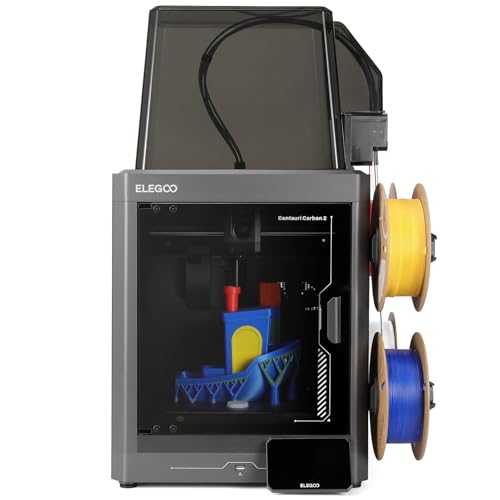
ELEGOO Centauri Carbon 2 Combo
Best for: multicolour printing at full cube scale — 256mm in every direction — where the Centauri 2’s unstated capacity would be a gamble.
Not suited for: a small desk already crowded by a monitor and a lamp; a 256mm-cube CoreXY machine claims real estate.
- Type: 3D printer combo for multicolour printing
- Motion: CoreXY, 500mm/s high-speed
- Leveling: 1-click auto leveling
- Nozzle: 350°C
- Ecosystem: Nexprint model hub
- Build volume: 256 × 256 × 256mm
- Not stated in the listing title — verify with the manufacturer documentation
The Carbon 2 Combo answers the question its sibling leaves open. Where the Centauri 2’s title is silent on build volume, this one states the full cube: 256 × 256 × 256mm, a working envelope that covers the great majority of household and hobby models in a single piece — storage boxes that are actually useful, helmets in sections of two rather than six, board-game terrain that arrives whole. Everything else in the formula carries over: the 500mm/s CoreXY motion, the 350°C nozzle, the Nexprint hub, and multicolour printing as a combo.
The leveling language shifts slightly and tellingly: 1-click auto leveling. The consumer promise is in the numeral — one action between the owner and a calibrated machine. Set beside the Bambu Lab picks’ full-auto calibration, it shows two brands converging on the same insight from different directions: the bed-leveling ritual, once the hobby’s rite of passage, is now simply a feature bullet, and machines compete on how completely they can make it disappear.
Choosing between the two Centauris is therefore mostly a question of evidence and scale. The Carbon states its volume and the plainer Centauri does not; the Carbon’s cube is a known quantity for planning shelf space and model size. Households printing large, colourful centrepieces — the cosplay piece, the classroom display, the holiday decoration that recurs every year — will use the cube. Households printing small and often may never test its edges, and for them the decision rests on the rest of the package rather than the envelope.
The Carbon name also signals where ELEGOO aims this model in its own range: a step up in presence, the flagship of its consumer pair. That positioning shows in the completeness of the title — speed, temperature, volume, leveling, hub, all stated. In a guide that rewards titles for saying what a machine is, the Carbon 2 Combo’s listing is the most forthcoming of the six.
Strengths
- A fully stated 256mm-cube build volume removes the capacity guesswork its sibling leaves.
- Four-colour combo printing pairs with a 350°C nozzle for both looks and material range.
- 1-click auto leveling states the consumer promise in its simplest form.
Trade-offs
- The full-cube CoreXY body needs dedicated desk or bench space.
- No app control is claimed in this title, though the Nexprint hub is named.
- No noise figure is stated for shared-room placement decisions.
Because the Carbon’s case rests on stated dimensions, verify the cube and the combo contents against the listing itself — the manufacturer’s page is at Check price on Amazon.

FLASHFORGE Adventurer 5M
Best for: fast, single-colour household production — replacement parts, organisers, school projects — where a nozzle swap in seconds keeps the machine versatile.
Not suited for: colour work out of the box; the title describes a single-extruder machine with no combo system attached.
- Motion: all-metal CoreXY
- Speed: 600mm/s max travel
- Leveling: one-click auto leveling
- Extruder: 280°C direct drive
- Nozzle: 3-second nozzle swap
- Build volume: 220 × 220 × 220mm
- Audience stated in title: beginner-friendly
- Not stated in the listing title — verify with the manufacturer documentation
The Adventurer 5M is the pragmatist of this lineup. Its title spends no words on libraries or apps; instead it lists working hardware — an all-metal CoreXY frame, 600mm/s max travel, a 280°C direct-drive extruder, one-click leveling, and a fully stated 220mm cube of build volume. The specification it leads with emotionally is the 3-second nozzle swap, a tiny number with large household consequences: nozzles are wear parts and experiment parts at once, and a machine that changes one in three seconds turns a maintenance dread into a shrug, and a clogged evening into a brief pause.
Direct drive deserves its sentence. An extruder mounted at the hotend pushes filament with a short, controlled path, which behaves well with flexible materials and responds crisply to the flow changes fast printing demands. Paired with 280°C, the 5M covers the everyday material range and a margin beyond it, without pretending to the 350°C class of the Centauri pair. The 600mm/s figure is stated as max travel — movement speed rather than a promise that every layer lands at that pace — and reading it honestly still leaves a fast machine, since travel speed governs how much of a print’s life is spent moving rather than waiting.
The beginner-friendly label sits interestingly on this hardware. Nothing about an all-metal CoreXY is dumbed down; the friendliness is in the leveling and the nozzle system, the two places beginners historically suffered. FLASHFORGE’s bet is that a household can handle a real machine if the machine handles its own two worst rituals. It is a different philosophy from Bambu Lab’s ecosystem embrace — tools rather than garden — and some households will prefer it for exactly that reason.
Ownership maths also favour the 5M’s candour. A stated build volume, a stated extruder temperature, a stated swap time: the title behaves like a spec sheet, which makes the machine easy to plan around and easy to compare. In a category where vagueness is common, that plainness is itself a consumer feature.
The nozzle swap deserves one more angle, because it changes how owners experiment. Different nozzle diameters trade detail against speed — fine nozzles for small, crisp work, wider ones for fast, strong, chunky parts — and on most machines that experiment costs tools, heat, and twenty careful minutes, so it rarely happens. A three-second swap collapses the cost to curiosity’s natural size. Households that discover this will find the 5M quietly becomes two machines: a detail printer on weekdays and a rapid prototyper when a big, simple part is needed by morning.
Strengths
- The 3-second nozzle swap turns a wear part into a trivial, tool-light routine.
- A fully stated 220mm cube and 280°C direct drive make capability easy to plan around.
- All-metal CoreXY construction with 600mm/s max travel is serious hardware in a beginner-labelled machine.
Trade-offs
- No multicolour system appears in the title, so colour work needs a different pick.
- No model library or app ecosystem is claimed in the listing.
- The 280°C ceiling sits below the Centauri pair’s 350°C for high-temperature materials.
The nozzle-swap claim is the detail to interrogate on the 5M’s own page, where the mechanism is described — give it a read at Check price on Amazon.

Original Prusa MK4S
Best for: keeping one assembled machine running for years at home — printing professionally while staying repairable, documented, and upgradeable.
Not suited for: colour-combo printing or app-first operation; the title promises openness and print quality, not an ecosystem of downloads.
- Type: fully assembled FDM desktop 3D printer
- Speed technology: input shaping
- Print quality: described in the title as professional
- Design: open-source, upgradeable
- Audience stated in title: makers and pros
- Not stated in the listing title — verify with the manufacturer documentation
Every other pick in this guide asks for trust: trust the calibration, trust the library, trust the app. The MK4S asks for something older-fashioned — it offers evidence. Fully assembled by its maker, built on an open-source design, and explicitly upgradeable, it is the machine in this lineup whose inner life is published rather than sealed. Input shaping is its speed technology, the technique of cancelling the vibrations that fast motion excites, and the title pairs it with a plain claim of professional print quality aimed at makers and pros. The consumer here is not a beginner being protected from the machine; it is an owner being respected by it.
The upgradeable design changes the economics of ownership across years. Sealed appliances are replaced when their generation passes; an open machine is revised — a new extruder here, a firmware generation there — and the owner’s knowledge compounds instead of expiring. That is why the MK4S sits comfortably in a consumer guide despite its professional framing: for a keep-it-for-years household, this is the sustainable purchase, the one whose tenth year is planned rather than hoped for.
It is equally honest about what it does not promise. No colour combo, no named model library, no decibel figure, no app appears in the title. Owners supply their own models or find them in the open community, run the machine directly, and take responsibility for the craft the other picks automate. In the right home that is not a gap; it is the hobby itself, and the MK4S’s presence in this guide is a reminder that consumer-grade describes who a machine serves, not how little it asks.
Input shaping, the one performance technology the title does name, rewards a short explanation. Fast toolhead motion excites vibration in the frame, and vibration prints as ripples on walls — the faster the machine, the more visible the ringing. Input shaping measures that vibration and cancels it in the motion commands, letting speed and surface quality coexist. It is the same physics the fast CoreXY machines must manage by their own means, and its presence on the MK4S signals that Prusa intends this assembled machine to run at modern pace, not at the stately tempo its open design might suggest.
There is a teaching dimension as well. A young maker growing up with an open machine learns how printing works, because the machine’s design is a document that can be read. Households choosing a printer partly as an education — and many do, whether they say so or not — will weigh that heavily against ecosystems that hide the mechanism in exchange for ease.
Strengths
- Open-source, upgradeable design supports a decade-scale ownership plan.
- Fully assembled arrival pairs with input shaping for fast, professional-quality results.
- The maker’s documentation culture makes repairs and modifications a guided activity.
Trade-offs
- No build volume, temperature, or noise figure is stated in the title.
- No multicolour system or model library is claimed in the listing.
- The owner takes on more of the craft that the other picks automate away.
Prusa’s own listing states the assembled configuration and the upgradeable design in full — the page to consult is Check price on Amazon.
Comparison Table
| Pick | Motion | Colour | Leveling | Stated volume |
|---|---|---|---|---|
| Bambu Lab A1 | FDM, ready to use | Single | Full-auto calibration | — |
| Bambu Lab A1 mini with LED Lamp Kit | FDM, ready to use | Single | Full-auto calibration | — |
| ELEGOO Centauri 2 Combo | CoreXY, 500mm/s | 4-colour combo | Auto leveling | — |
| ELEGOO Centauri Carbon 2 Combo | CoreXY, 500mm/s | Multicolour combo | 1-click auto leveling | 256 × 256 × 256mm |
| FLASHFORGE Adventurer 5M | All-metal CoreXY, 600mm/s travel | Single | One-click auto leveling | 220 × 220 × 220mm |
| Original Prusa MK4S | FDM with input shaping | Single | — | — |
The dashes in that table are information, not absence. Three of these manufacturers state their build volumes and three do not, and a household comparing machines should treat an unstated volume as a question to carry to the manufacturer’s documentation — never as a number to assume from a sibling model. What the stated columns show clearly is convergence: every brand here has automated leveling in some dialect, and the real separation between the picks is philosophy — ecosystem, colour, openness — rather than basic competence.
How to Choose a Consumer-Grade Printer
Who will actually press print in your house?
Name the operators before the machine. If children will print with supervision, the ecosystem picks — a library of ready models, calibration that needs no judgement, a machine quiet enough for the room it sits in — carry the day, and the two Bambu Lab machines speak that language most fluently. If the operator is an adult who enjoys mechanism, the Prusa’s openness becomes a feature rather than a chore. If several people will print casually and nobody wants to become the household’s printer technician, weigh automation heaviest of all: every ritual a machine absorbs is a person who keeps printing.
How much colour does your printing really use?
Colour is the most seductive specification in this guide and the easiest to overbuy. Look at the objects you genuinely intend to make. Toys, gifts, signage, and game components glow in four colours; brackets, organisers, jigs, and replacement parts are monochrome by nature. The Centauri combos make colour effortless but spend filament on every change, while the single-colour machines print their narrower repertoire without waste or waiting. A household split down the middle might reasonably start single-colour and let a year of real printing argue the case for colour with evidence.
When does build volume start to matter?
Later than the marketing suggests, and then suddenly. Most household printing — the first hundred objects in a typical home — fits in modest envelopes, which is why compact machines thrive. Volume starts to matter when projects turn architectural: storage that must match a shelf, cosplay that must match a body, terrain that must match a table. When that day approaches, the step up is not within this guide’s compact tier but toward the band covered by the best mid-sized 3d printers, where 250mm-to-350mm envelopes are the whole subject. Buy for the year you are in; the upgrade path exists when the work demands it.
What should the machine sit on, and next to what?
A consumer printer lives on furniture, so plan the furniture. It needs a stable surface that does not wobble, power within reach, and enough clearance for its moving parts and its owner’s hands. Noise decides the room: a stated ≤48 dB machine can share a living space, while an unstated noise figure should be assumed workshop-grade until proven otherwise. Keep filament dry and nearby, leave room for finished prints to accumulate — they will — and put the machine where it will be seen. Visible printers get used; exiled printers become storage.
Open ecosystem or open source — which openness do you mean?
Two different promises hide behind the word open in this guide. The ecosystem machines are open at the top: open libraries, open model sharing, an open door to other people’s designs, with the machine itself managed by its maker. The Prusa is open at the bottom: open design, open documentation, open upgrade paths, with the model supply left to the owner’s initiative. Households that want to consume printing choose the first; households that want to comprehend it choose the second. Confusing the two is the one genuinely expensive mistake in this category, because each machine delivers its own kind of openness beautifully and the other kind barely at all.
The First Month: From Downloads to Designs
Week one belongs to the library. Print the models the ecosystem offers — the lamp from the kit, the benchmark trinkets, the organiser someone else designed — and let the machine prove itself on known-good files. This is not a failure of creativity; it is calibration of expectations, and it teaches the household what the printer does well before anyone’s own design is at stake. Week two is for personalisation: names on things, sizes adjusted, colours chosen. Scaling a downloaded model and watching it fit teaches more slicer judgment than a week of tutorials.
By week four, most households meet their first original need — the broken clip, the missing knob, the bracket nothing on earth sells — and that is the moment the printer stops being entertainment and becomes infrastructure. Simple design tools handle such parts readily, and the libraries’ remix culture means a near-miss model usually exists to adapt. Owners who reach this stage rarely go back; the machine has joined the household’s problem-solving kit, alongside the drill and the sewing box, and its cost accounting changes from price per print to problems solved per month.
Filament: The Consumable That Decides Your Results
Owners shop for printers and then live with filament, and the second relationship matters more day to day. The everyday material for household printing is PLA: forgiving, low-warp, and content at modest temperatures, which is why every ecosystem’s library quietly assumes it. PETG steps up for parts that need toughness or warmth resistance — the bracket near a radiator, the outdoor fixture — and flexible filaments reward the direct-drive machines that can feed them without drama. The temperature ceilings in these titles are best read as a map of that menu: 280°C on the Adventurer 5M covers the household range with margin, 350°C on the Centauri pair reaches into materials a family may only meet years later, and the titles that state no ceiling ask you to check the documentation before planning exotic spools.
Storage is the unglamorous half of filament craft. Spools absorb moisture from room air, and damp filament announces itself with popping, stringing, and surfaces that look tired for no obvious reason. Sealed boxes or bags with desiccant are the whole secret, plus a habit of suspecting the spool before the machine when quality drifts. Colour strategy matters in multicolour homes: a combo machine spends filament at every change, flushing the previous colour clear, so small colourful prints carry a hidden material tax that grows with the number of colours per layer. None of this should discourage colour printing — it should budget it, the way a household budgets ink for a photo printer it actually enjoys using.
Finally, buy filament like a household buys anything consumable: a small stock of the colours and materials in constant use, bought steadily, rather than a rainbow bought once and left to age on a shelf. The printers in this guide will sit ready for years; the filament beside them should be fresh enough to deserve them.
Printing Safely in a Family Home
A household printer is a heated tool, and it should be run with the same calm respect as a stove: supervised while hot, especially with children nearby, and given clearance from curtains, paper, and clutter. Hotends in this guide reach 350°C on the Centauri pair — treat that figure as a safety specification as much as a capability one. Teach young makers the two rules that cover most accidents: never touch the nozzle end, and let parts cool before prying them off the plate. Finished prints should cool fully before small children handle fresh-off-the-bed pieces with delicate edges.
Placement helps as much as rules do. A printer inside an enclosure runs quieter, keeps curious fingers and pets at a distance, and contains the warmth some materials want — households that decide enclosure is a requirement rather than an accessory will find the dedicated machines compared in our guide to the best inclosed 3d printers, where chambers, filtration, and heated air are the entire subject. Ventilation is the other household consideration: everyday filaments are comparatively mild, but a window or a room that is not a bedroom remains the sensible default for any machine that melts plastic for hours.
What the Titles Will Not Tell You
Read the six titles in this guide side by side and a pattern emerges: each brand states what it is proudest of and leaves the rest to documentation. Bambu Lab states noise and calibration but no build volume. ELEGOO states speed and temperature on both Centauris, volume on only one. FLASHFORGE states nearly everything except its ecosystem. Prusa states philosophy and leaves figures to its own site. None of this is deceit — a title is a shop window, not a manual — but it does mean the diligent household finishes its research in the manufacturers’ documentation, checking the unstated figures that matter to its own plans: exact envelopes, supported materials, and the physical footprint with doors, screens, and filament paths accounted for.
The second thing titles cannot convey is feel: how a machine sounds at midnight through a bedroom wall, how its app behaves on a tired phone, how its parts availability looks in three years. Some of that is knowable from owner communities, which every one of these brands maintains in some form, and some is only knowable by living with the machine. This is the honest limit of any buying guide, and it is why the recommendations here lean on philosophy as much as specification. Specifications can be matched by next year’s rival model; a machine whose way of working suits your household keeps suiting it, and the companies behind these six have each placed a clear, different bet on what that way of working should be.
Common Mistakes
Buying the biggest envelope for the smallest workload. A large machine on a desk crowded by its own size gets used less, not more. Match the footprint to the room and the models to the household’s real first year, and let success argue for scale later.
Judging the machine by its first failed print. First failures are usually file, filament, or placement problems wearing the printer’s face. Run a known library model on fresh filament before concluding anything; the ecosystems in this guide exist partly to make that test fair.
Leaving filament out in the room for months. Filament drinks moisture from the air and prints worse for it — stringy, weak, and rough. Store spools sealed with desiccant, and suspect the filament before the machine when quality fades gradually.
Printing unsupervised in a child’s bedroom from day one. Even quiet, well-mannered machines are heated tools. Earn the arrangement gradually: supervised prints, cooled parts, clear rules, and a placement everyone in the house understands.
Never moving past the library. Downloads are the on-ramp, not the destination. Households that stall there eventually run out of other people’s ideas; the first small design of your own — however plain — is what converts a gadget into a capability.
Frequently Asked Questions
Do I need to learn design software to own one of these?
Not at first, and possibly not ever. MakerWorld and Nexprint exist so that ownership can begin with downloading, and a large share of household printing stays there happily. Design software becomes relevant when the household’s needs turn specific — the part that must fit exactly, the gift that must carry a name in a particular way — and by then the machine has usually earned enough trust to make learning feel worthwhile.
What does full-auto calibration actually replace?
It replaces the manual ritual of setting the bed’s height and level by hand, checking extrusion behaviour, and compensating for flow variation — the cluster of setup tasks that historically decided whether a first print succeeded. On the Bambu Lab picks it arrives as full-auto calibration with active flow rate compensation; on the ELEGOO and FLASHFORGE picks the equivalent promise is one-click auto leveling. The dialects differ; the removed chore is the same.
How fast are these machines in real terms?
The titles state 500mm/s for the Centauri pair and 600mm/s max travel for the Adventurer 5M, and those figures describe motion capability rather than a guarantee for every layer. In household terms, the practical effect is that ordinary objects finish in hours rather than across days, and evening-sized projects fit inside an evening. Speed also interacts with quality systems like input shaping on the Prusa, which exists to keep fast motion from printing its own vibrations into the surface.
Which of these suits a classroom or a club?
Shared settings reward the same traits as families, amplified: automation that survives many operators, a library that supplies curriculum-ready models, and noise low enough for a room where people also talk. The self-calibrating ecosystem machines fit that brief most directly, while the Prusa suits a club whose purpose includes teaching the technology itself. Supervision arrangements matter more than the badge on the machine.
What ongoing costs should a household expect?
Filament is the main consumable, bought by the spool and spent by the gram, with multicolour printing spending extra on colour changes. Nozzles wear and are replaced — trivially on the Adventurer 5M, by design — and build plates eventually refresh. None of the six picks hides an unusual running cost in its title; the honest budget line is filament, because a well-liked printer consumes more of it than its owners predicted.
Can one of these printers pay for itself?
In the narrow sense, sometimes: households that print replacement parts, custom organisers, and gifts instead of buying them can tally real savings across a year, especially once design skills turn broken household items into printable files. In the wider sense the question misleads, because most owners value the machine the way they value a good drill — not by invoice but by the problems that stop being problems. Judge it by use after six months; a printer still printing weekly has paid its way in either currency.
Final Recommendation
A word about timing, because households often ask whether to wait for next year’s models. This category moves quickly, and next year will certainly bring faster, quieter, cleverer machines — it always does. But the six printers here have each crossed the threshold that matters: they calibrate themselves, they print well on the first evening, and they connect to living ecosystems of models and parts. A machine bought now prints for the whole year the hypothetical one is being waited for, and the skills and library a household builds transfer forward when an upgrade eventually earns its place. In a mature-enough category, waiting is the expensive option.
Decide what kind of object your household wants the printer to be. If it should be an appliance — quiet, self-calibrating, fed by a library — the Bambu Lab A1 is the full-size expression and the A1 mini its compact twin, lamp kit and all. If it should be a colour machine with room to grow, the Centauri 2 Combo brings the app and the 350°C hotend, while the Centauri Carbon 2 Combo states the full cube for those who plan by dimensions. If it should be a tool — honest hardware, a three-second nozzle swap, no garden walls — the Adventurer 5M is the pick. And if it should be a possession in the old sense, open and upgradeable and yours to understand, the Prusa MK4S stands alone here. The right machine is the one whose philosophy your household will still be enjoying when the novelty has worn off and the printing has simply become part of how the house works.


