What's inside
- Where to Buy
- Key Takeaways
- Quick Picks
- How We Chose These Picks
- Comparison
- How to Choose a Dual Extruder 3D Printer
- IDEX, Toolheads or a Shared Carriage: Which Mechanism Fits Your Bench?
- Are Soluble Supports Worth a Second Extruder on Their Own?
- How Much Bench and Budget Does a Second Extrusion Path Really Consume?
- Common Mistakes When Buying a Dual Extruder Printer
- Final Recommendation
- Frequently Asked Questions
- Related Guides
As an Amazon Associate I earn from qualifying purchases. This post may contain affiliate links at no extra cost to you.
[SITE_DOMAIN] is reader-supported. When you buy through links on our site, we may earn an affiliate commission.
Where to Buy
Six machines anchor this guide, and each one reaches Amazon through its own listing. The Raise3D E2 is the independent dual extruder design most buyers picture first, so its page is the natural starting point for checking the current figure. Beside it sits the Raise3D Pro2 Plus, a fully enclosed dual extruder machine from the same maker aimed at taller work. The Olaprin T300D Pro approaches two-colour printing with independent dual holders and a multicolour brief. Buyers who think in toolheads rather than extruders should open the Original Prusa XL 2-Toolhead listing, where the dual tool system and large-format CoreXY frame are the whole proposition. The FLASHFORGE Creator 5 Pro pushes further still with four toolheads and a heated chamber. Finally, the Robox Dual Extruder 3D Printer represents an older, simpler take on the category, and its page is worth a careful read precisely because its title promises so little.
Finding the best dual extruder 3d printers begins with admitting that the phrase covers three genuinely different mechanisms, and only two of them deserve the name. In a true dual extruder machine, two separate extrusion paths exist: either two independent carriages ride the same rail, as in an IDEX layout, or two complete toolheads park at the side of the frame and swap places on the gantry. A third arrangement, two extruders mounted on one shared carriage, also appears below, and it works, though both nozzles travel together everywhere the print goes. What does not belong here at all is the single-nozzle filament switcher, where one hotend purges material through a waste block every time the colour changes. Those machines dominate ordinary search results for this keyword, and every one of them was set aside during selection, because a buyer who searched for two extruders should not be sold one nozzle and a purge tower.
The practical stakes of that distinction show up in soluble supports and clean two-colour work. A second genuine extrusion path can carry a support material that dissolves or breaks away cleanly, leaving overhangs smooth instead of scarred. It can also park one material while the other prints, which keeps a dark filament from bleeding into a pale one at the seam. Toolhead systems extend the same logic to more materials with almost no purge waste, since each head keeps its own nozzle. Keep those three mechanisms separate in your mind while reading the reviews, because the right choice depends less on the badge and more on which mechanical arrangement matches the parts on your bench.
One more framing note before the picks themselves. Listing titles in this category vary wildly in how much they disclose. Two of the machines below arrive with titles dense enough to fill a spec sheet, while two others say almost nothing beyond the words dual extruder. This guide reports only what each title states. Where a title stays silent about build volume, speed or enclosure, the spec box records that silence in plain words rather than borrowing figures from a manufacturer page the listing itself never mentioned.
Key Takeaways
- IDEX and toolchanging machines are the true dual-path designs here; single-nozzle filament switchers were excluded from this guide entirely.
- The Raise3D E2 is the clearest IDEX expression in the set, with auto bed leveling, video-assisted offset calibration and filament run-out sensors named in its title.
- The Prusa XL 2-Toolhead and FLASHFORGE Creator 5 Pro swap whole toolheads, which sidesteps most purge waste when changing materials.
- The Raise3D Pro2 Plus and Robox carry two extruders on shared motion, a simpler and older arrangement with different trade-offs.
- Several titles omit build volume and speed entirely, and those gaps are recorded honestly in each spec box.
- Soluble or breakaway supports, not colour alone, are the strongest reason to pay for a second extrusion path.
Quick Picks
| Pick | Badge | Why it earns a place |
|---|---|---|
| Raise3D E2 | True IDEX | Independent dual extruders with auto bed leveling, video-assisted offset calibration and run-out sensors. |
| Raise3D Pro2 Plus | Enclosed twin extruder | Dual extruder in a fully enclosed frame from the same engineering-led maker. |
| Olaprin T300D Pro | Dual-colour specialist | Independent dual holders aimed at complex multicolour models at high speed. |
| Original Prusa XL 2-Toolhead | Toolchanger, large format | Dual tool system on a large-format CoreXY frame built for advanced prototyping. |
| FLASHFORGE Creator 5 Pro | Four toolheads, heated chamber | Enclosed CoreXY at 600mm/s with a 65°C chamber and HEPA 13 filtration. |
| Robox Dual Extruder 3D Printer | Early dual extruder design | A high-definition dual extruder machine from an earlier generation of the category. |
How We Chose These Picks
Selection started with a mechanical audit rather than a feature count. Each candidate had to offer two real extrusion paths: independent carriages, swappable toolheads, or at minimum two extruders feeding the print. Machines whose second colour arrived by swapping filament through one nozzle were removed, however polished their listings looked, because the mechanism contradicts the search that brought you here. That single rule reshaped the field more than any other, and it is why this guide holds six machines instead of the dozen a looser definition would allow.
Calibration support formed the second pass. Two extrusion paths double the alignment burden: the second nozzle must land exactly where the software believes it sits, in height as well as in plan position. Titles that name a calibration aid, such as the video-assisted offset calibration on the Raise3D E2, earned credit for acknowledging that burden openly. Titles silent on calibration were not punished, but their reviews note the silence, because a new owner will meet the offset question on the first two-colour print regardless of what the listing chose to mention.
Enclosure and chamber control came third, since dual-material work often pairs a structural filament with a support filament that dislikes draughts. The Pro2 Plus states a fully enclosed frame, the Creator 5 Pro goes further with a heated chamber figure in its title, and the Prusa XL title leaves enclosure unstated. Those differences are reported as printed, and the comparison table keeps them visible side by side so a reader printing engineering filaments can weight them properly.
Finally, the set was balanced across eras and architectures on purpose. An early dual extruder design like the Robox belongs in a guide like this as a reference point: it shows what the category looked like before IDEX and toolchangers matured, and it disciplines the newer machines by contrast. A reader who finishes all six reviews should understand not just which machine to buy, but which mechanism they are buying into and what that mechanism asks of them in setup time.

Raise3D E2 — True IDEX
The E2 is the machine this category is named after. IDEX stands for independent dual extruders: two complete print heads ride the gantry on separate carriages, each able to move without dragging the other along. When one head prints, the other parks clear of the part, which removes the ooze marks and colour contamination that plague shared-carriage designs. The arrangement also unlocks duplication modes on IDEX machines generally, where both heads print the same part simultaneously, though the title here does not claim a specific mode list, so this review sticks to what the listing names.
What the title does name is a thoughtful calibration and safety set. Auto bed leveling handles the first-layer foundation. Video-assisted offset calibration tackles the harder problem unique to dual extrusion, teaching the machine exactly where the second nozzle sits relative to the first, with camera guidance instead of trial-and-error test prints. Power loss recovery protects long jobs from a brief outage, and filament run-out sensors watch both spools, pausing rather than air-printing when a roll ends mid-part. Read together, those four features describe a machine designed around the failure modes that actually ruin dual-material prints.
Who it suits is the prototyping desk that prints functional parts in two materials: a rigid body with a flexible hinge, or a complex housing held up by supports that wash or snap away. The independent carriages keep dissimilar materials honest, and the sensor set lowers the supervision burden on overnight runs. If your interest in a second extruder begins and ends with the IDEX mechanism itself, open the E2 listing and check price on Amazon there, because that page carries the current terms for the configuration you would actually receive.
- Extrusion system: IDEX (Independent Dual Extruders)
- Bed leveling: Auto Bed Leveling
- Calibration: Video-Assisted Offset Calibration
- Recovery: Power Loss Recovery
- Sensors: Filament Run-Out Sensors
- Build volume: Not stated in the listing title — verify with the manufacturer documentation
Strengths
- Independent carriages keep the idle nozzle parked away from the part, so two-colour seams stay clean.
- Video-assisted offset calibration addresses the alignment task that defines dual extruder ownership.
- Run-out sensors on the filament path guard long dual-material jobs against an empty spool.
Trade-offs
- The title states no build volume, so envelope checks depend on documentation beyond the listing.
- Two carriages mean two nozzles to maintain, level and eventually replace.
- The title names no enclosure, which matters for warp-prone engineering filaments.
Best for: a prototyping bench printing two-material functional parts where the second nozzle must park clear of the work. Not suited for: an open-frame listing whose title never confirms an enclosure for draught-sensitive engineering filament work.
Living with an IDEX machine rewards one habit above all: recalibrate offsets after any nozzle swap, however careful you were with the wrench. The video assistance shortens that chore, but it cannot abolish it, and the owners who enjoy these machines are the ones who treat offset checks as routine rather than as repairs. Budget bench space for two spools feeding independently, and keep the parked head’s nozzle clean, because a carbonised idle nozzle is the one flaw the parking system cannot hide.
Material pairing is where the E2 layout earns its keep in daily use. A common professional pattern pairs a dimensionally stable body material with a support material chosen purely for how it leaves: either dissolving in water or snapping away with minimal witness marks. Because the support head parks between layers, its nozzle arrives at the interface clean, and interfaces are exactly where support quality is decided. Colour work benefits differently. Two colours of the same filament family can alternate across a tall print without the parked colour weeping into the active one during long layer times, which is when shared-carriage machines most often betray faint streaks on pale walls. Owners who print signage, instrument panels or two-tone enclosures will notice that cleanliness immediately, while owners printing single-material parts will simply enjoy a second loaded spool that removes the unload ritual between jobs of different colours.
Desk planning deserves a sentence too. An IDEX gantry carries two carriages, so the machine’s working width serves motion as well as parts, and the bench should be arranged with both spool paths in mind rather than treating the second feed as an afterthought. Feed both spools from the same side if your space allows it, keep the run-out sensors’ cables dressed away from the gantry’s travel, and the machine’s daily rhythm settles into something unremarkable, which is the highest compliment a production tool can earn.
There is a quieter benefit to the layout that owners mention after a few months: job separation. With two materials permanently loaded, the machine stops being a single-purpose device reset between projects and becomes two overlapping tools. A long single-colour job can run on one head while the other stands ready for a quick two-colour commission, and the mental cost of switching work falls away. That flexibility does not appear in any title in this guide, because it is a property of the mechanism rather than a feature a listing can bullet. It is, however, the reason many IDEX owners resist returning to single-extruder machines even for simple work: the second path changes how the bench thinks, not merely what it can print.

Raise3D Pro2 Plus — Enclosed twin extruder
The Pro2 Plus approaches dual extrusion from an older and simpler direction: two extruders working from a shared motion system inside a fully enclosed frame. The enclosure is the headline here, and it is stated plainly in the title. A sealed cabinet steadies the air around the part, which helps tall prints resist the layer splits that appear when a draught cools one wall faster than the opposite wall. The Plus name signals the larger sibling in its line, though the title gives no dimensions, so this review does not invent an envelope figure.
That terse title is itself information. Raise3D sells this machine to engineering users who already know the platform, and the listing spends no words on speeds, volumes or sensor lists. A buyer comparing spec boxes will find this one full of recorded silences, and should read them correctly: absence from the title is not absence from the machine, but it does mean the listing alone cannot confirm a detail. Anyone shortlisting the Pro2 Plus for a specific filament or a specific part size needs the manufacturer documentation open in a second tab before ordering.
Who it suits is the workshop that prints tall, enclosure-friendly parts in two materials and values a sealed chamber over the parking elegance of IDEX. Because both extruders share the motion system, the mechanical picture is simpler, with fewer independent axes to align. Readers who print enclosures, ducts and housings that stand high on the bed will understand the appeal immediately. If the enclosed frame is what your filament shelf has been asking for, the Pro2 Plus listing on Amazon is where its present-day price and configuration details live.
- Extrusion system: Dual Extruder
- Frame: Fully Enclosed
- Manufacturer line: Pro2 Plus (model 101017001 in the title)
- Bed leveling: Not stated in the listing title — verify with the manufacturer documentation
- Build volume: Not stated in the listing title — verify with the manufacturer documentation
- Print speed: Not stated in the listing title — verify with the manufacturer documentation
Strengths
- A fully enclosed frame steadies chamber air for tall, warp-prone parts.
- Dual extrusion on shared motion keeps the mechanism simpler than independent carriages.
- It comes from the same engineering-focused maker as the E2, with a professional brief.
Trade-offs
- Shared motion means the second nozzle travels over the part rather than parking aside.
- The title confirms almost nothing beyond extrusion count and enclosure.
- Buyers must consult outside documentation for volume, speed and sensor details.
Best for: a workshop printing tall two-material parts that benefit from a sealed, fully enclosed frame. Not suited for: purchase decisions that need build volume confirmed by the listing itself, because this title prints no dimensions at all.
Ownership of a big enclosed machine is mostly about heat discipline. Let the chamber warm through before judging first-layer behaviour on a tall job, and resist opening the door mid-print to admire progress, since each opening dumps the stable air the enclosure exists to protect. Two extruders on shared motion also ask for tidy retraction settings on the idle side; a small ooze from the resting nozzle has nowhere to hide when that nozzle crosses the part on every pass.
Consider who shares the room with a machine like this. A fully enclosed frame contains noise and fumes better than open gantries, which matters in studios where the printer runs beside desks rather than in a separate workshop. The enclosure also changes maintenance access: belts, extruders and motion parts live behind panels, so routine checks take a little longer to begin and a little less time to finish, since the interior stays cleaner. Workshops that already run enclosed machines for single-material work will find the Pro2 Plus a natural extension of habits they have, rather than a new discipline to learn. Workshops arriving from open-frame printers should expect the first week to feel slower, and the first month of tall prints to feel noticeably calmer.

Olaprin T300D Pro — Dual-colour specialist
The T300D Pro states its ambition directly: complex multicolour models, printed at high speed, from a dual extruder layout with independent dual holders. The holder wording matters. Independent holders suggest each material keeps its own feed path ready, rather than sharing a single channel that must purge between colours. For decorative and display work, where a model may swap colours hundreds of times across a long print, that readiness is the difference between crisp boundaries and muddy transitions.
Precision is the other word the title leans on, and multicolour work is exactly where precision shows. A two-colour print misregisters every swap if the second path sits even slightly off its expected position, producing outlines that drift like a misprinted comic. The Pro framing and the emphasis on exceptional precision speak to that registration problem. What the title does not provide is equally notable: no build volume, no numeric speed, no enclosure statement. High speed here is a claim of character, not a figure a buyer can chart against the 600mm/s printed by the FLASHFORGE title further down this guide.
Who it suits is the maker whose dual extrusion interest is primarily visual: signage, character models, branded desk objects and gifts where two colours must meet cleanly along a designed edge. The independent holders suit frequent swapping better than a shared channel would. Sellers of printed goods at craft scale may also recognise the appeal of a machine pitched squarely at multicolour output. If that describes your shelf, visit the T300D Pro page on Amazon to check price on Amazon against the multicolour workload you have planned.
- Extrusion system: Dual Extruder
- Material handling: Independent Dual Liner Holders (title wording)
- Intended work: Complex Multicolor Models
- Speed character: High Speed Dual Color printing
- Build volume: Not stated in the listing title — verify with the manufacturer documentation
- Enclosure: Not stated in the listing title — verify with the manufacturer documentation
Strengths
- Independent dual holders keep both materials ready for frequent colour changes.
- The title aims the machine squarely at complex multicolour models rather than generic printing.
- Precision is foregrounded, which is the quality two-colour registration depends on.
Trade-offs
- No numeric speed appears in the title, so high speed cannot be compared figure to figure.
- No build volume is printed, leaving model size checks to outside documentation.
- The title names no enclosure for temperature-sensitive materials.
Best for: a maker producing complex two-colour display models where both materials must stay ready for constant swaps. Not suited for: print-farm bench planning that requires a stated build volume in the listing, since the title omits dimensions.
Multicolour printing rewards planning at the slicing stage more than any other style in this guide. Assign the lighter colour to the path you trust most for fine detail, group colour changes by layer where the design allows it, and the swap count falls dramatically. Owners who treat the slicer as part of the machine, rather than a formality before it, get the clean results the title promises; owners who slice carelessly will blame the hardware for boundaries that were decided in software.
There is a commercial angle worth naming for sellers. Multicolour models are the printed goods customers most often photograph, share and reorder, because colour reads as craft even to buyers who know nothing about layer lines. A machine aimed at that work, with both materials held ready, shortens the path from a downloaded design to a sellable object. The discipline it demands in return is colour management of a humble kind: keep the two loaded colours genuinely complementary to the designs you sell, because a dual-colour machine loaded with whatever spools were nearest produces inventory that looks accidental. Makers who curate two or three house colour pairings find the T300D Pro’s proposition easier to turn into a recognisable product line.
Original Prusa XL 2-Toolhead — Toolchanger, large format
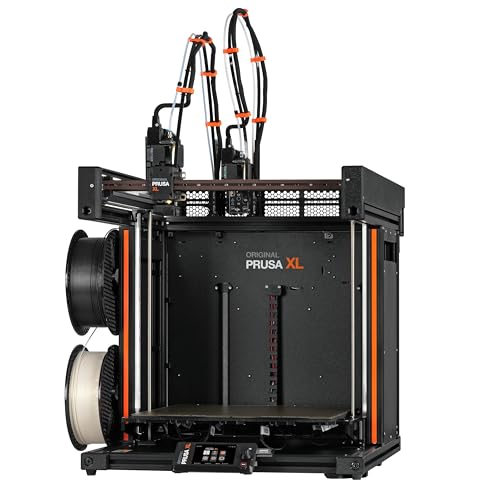
The Prusa XL reframes the whole question. Instead of two extruders, it carries two complete toolheads on a large-format CoreXY frame, docking the head it is not using and collecting the one it needs. Each toolhead keeps its own nozzle, its own filament path and its own temperature story, so a material change is a physical swap rather than a purge. The title calls this a dual tool system for multi-material work and advanced prototyping, and the high-speed industrial performance language places the machine at the professional end of this guide.
Toolchanging changes the waste maths that dominates single-nozzle multi-material printing. A filament switcher pushes a tower of purged plastic beside every colourful model; a toolchanger mostly avoids that tower, because nothing needs flushing when the incoming head has carried only its own material. The trade is mechanical complexity: a docking system must pick and park heads thousands of times without a fumble. Prusa’s title leans into the professional framing rather than hobbyist language, which matches a platform sold as a system that can grow, though expansion claims beyond the two fitted toolheads belong to documentation, not to this listing title.
Who it suits is the prototyping studio whose parts are large, multi-material and billable: fixtures with rigid and flexible zones, housings with embedded colour, presentation models that must look finished. The large-format frame matters as much as the tool system, because multi-material work on small machines often shrinks to trinkets. Studios weighing the XL against the IDEX E2 above are really choosing between parked carriages and parked toolheads. For that comparison at today’s terms, the XL listing on Amazon is the page to open, since configuration choices there decide what arrives.
- Extrusion system: 2-Toolhead (dual tool system)
- Motion: Large-Format CoreXY
- Application: Multi-Material printing, Advanced Prototyping
- Performance character: High-Speed Industrial Performance
- Build volume figures: Not stated in the listing title — verify with the manufacturer documentation
- Enclosure: Not stated in the listing title — verify with the manufacturer documentation
Strengths
- Swappable toolheads change material without purging one nozzle clean of the previous filament.
- Large-format CoreXY motion suits big multi-material prototypes, not just desktop trinkets.
- Each head keeps its own nozzle, so dissimilar materials never share a melt zone.
Trade-offs
- The docking mechanism adds mechanical complexity that simpler dual extruders avoid.
- The title prints no build dimensions despite the large-format description.
- Professional positioning implies a professional commitment in setup and upkeep.
Best for: a prototyping studio printing large multi-material parts where each material deserves its own dedicated toolhead. Not suited for: the simplest possible two-colour setup, because a docking toolchanger carries moving parts a fixed dual extruder never has.
Running a toolchanger well is a cleanliness discipline. Docking contacts and parked heads must stay free of stray filament whiskers, because the swap happens unattended hundreds of times per job. Keep a small brush by the machine, clear the parking area whenever you unload a spool, and the choreography stays invisible. Owners who skip that housekeeping meet the one failure mode this architecture cannot route around: a head that fails to seat cleanly at collection time.
The workflow around the machine changes with scale. Large-format multi-material parts generate large slicing decisions: support strategy across a big footprint, material assignment per region, and print sequencing that respects how long a parked head can wait before its next layer. Studios tend to standardise two or three proven material pairings and build templates around them, rather than improvising combinations per job. That standardisation is where the XL’s professional framing pays off, because repeatable pairings turn the tool system into a known quantity on a quote sheet. A studio can promise a client a rigid shell with a flexible seal, printed as one part, and know from its own template history what the job costs in hours. That predictability, more than raw speed, is what separates a prototyping platform from a hobby machine with extra hardware.

FLASHFORGE Creator 5 Pro — Four toolheads, heated chamber
The Creator 5 Pro outnumbers everything else in this guide: four toolheads in an enclosed CoreXY machine running at a stated 600mm/s. The title pairs that count with two engineering credentials rarely seen beside it, a heated chamber reaching 65°C and HEPA 13 filtration. A heated chamber is not a luxury at this level; engineering filaments warp because printed layers cool unevenly, and actively holding the chamber temperature attacks that cause directly rather than merely sheltering the part from draughts the way a passive enclosure does.
Near-zero purge waste is the other claim doing real work in this title. With four heads each dedicated to its own material, colour and support changes happen by swapping heads, so the purge tower that trails single-nozzle multicolour printing largely disappears. The title quantifies the ambition with a 5X faster printing claim, which a buyer should read as a comparison the maker asserts rather than a benchmark this guide can verify. Still, the architecture supports the direction of the claim: time lost to purging and priming is time this design mostly does not spend.
Who it suits is the small production desk printing engineering parts in several materials: a bracket in a stiff filament, its supports in a release material, and colour-coded variants queued behind it. The filtration also suits shared indoor spaces where engineering filaments are unwelcome guests. Readers whose material shelf includes the demanding end of the filament catalogue will find this title speaking their language more directly than any other here. To see how the Creator 5 Pro is configured and priced today, its Amazon page is the authoritative stop.
- Toolheads: 4-Toolhead Multi-Color system
- Frame: Enclosed, CoreXY
- Chamber: 65°C Heated Chamber for Engineering Filaments
- Top speed stated: 600mm/s
- Waste claim: Near-Zero Purge Waste
- Filtration: HEPA 13 Filtration
Strengths
- Four dedicated toolheads give each material its own nozzle and nearly eliminate purge waste.
- An actively heated 65°C chamber addresses warping at its cause for engineering filaments.
- HEPA 13 filtration suits shared rooms where engineering materials print for hours.
Trade-offs
- Four toolheads multiply the nozzles, paths and parts an owner must maintain.
- The title gives no build volume despite the engineering brief.
- The 5X speed claim is a maker comparison, not a figure a buyer can audit from the listing.
Best for: a production-minded desk running engineering filaments in several materials under one enclosed, filtered roof. Not suited for: a hobby corner that prints a single spool of basic filament at a time, because four toolheads and a heated chamber solve problems that bench never meets.
A heated chamber changes how a printing day is scheduled. Warm-up becomes part of the job, the way preheating an oven is part of baking, and prints started in a cold chamber behave differently from prints started at temperature. Plan the first engineering job of the day with that soak in mind. The filtration asks for its own small routine too: note when the filter was fitted, because a saturated filter fails silently while the fan keeps humming.
Four toolheads also change how a small operation thinks about queueing. Instead of dedicating a machine to a material, the operator dedicates heads: one for the house structural filament, one for supports, and two for the colours or specialty materials the week’s orders demand. Changeover between jobs shrinks to a slicing decision rather than a hardware session. That is a genuinely different operating model from everything else in this guide, and it suits benches where several short engineering jobs arrive each week. Benches with one long job per week gain less, because the queueing advantage never gets a queue to work on. Read your own order book before deciding whether four heads are a capability or a decoration in your workshop.

Robox Dual Extruder 3D Printer — Early dual extruder design
The Robox closes the guide as a reference point from an earlier generation. Its title is the shortest here by a wide margin: dual extruder, high definition, and nothing else a spec box can honestly use. That brevity reflects its era. The Robox arrived when a second extruder was itself a headline feature, before IDEX carriages and toolchangers reset expectations, and when high definition was a claim a listing could make without printing a single number beside it.
Judged within that era, the concept was sound: two extrusion paths in a desktop machine aimed at users who wanted more than single-material printing. Judged against the five machines above it, the listing asks a modern buyer to do heavy lifting. No leveling system is named, no calibration aid, no enclosure, no volume, no speed. None of that proves the hardware lacks those things; it proves the listing cannot confirm them. A buyer in 2026 comparing this page against the E2’s feature-dense title is seeing a decade of category development compressed into two product descriptions.
Who it suits, honestly framed, is the tinkerer who enjoys older platforms and understands exactly what an early dual extruder design involves: more manual calibration, more patience, and spares research before purchase rather than after a breakdown. Collectors of desktop printing history may also value it as a working artefact of the moment dual extrusion reached home benches. Everyone else should treat it as the guide’s baseline. If that tinkering brief genuinely fits your bench, read the Robox listing on Amazon closely and check price on Amazon there with the spares question already answered to your satisfaction.
- Extrusion system: Dual Extruder
- Definition claim: High Definition (title wording)
- Bed leveling: Not stated in the listing title — verify with the manufacturer documentation
- Build volume: Not stated in the listing title — verify with the manufacturer documentation
- Enclosure: Not stated in the listing title — verify with the manufacturer documentation
- Print speed: Not stated in the listing title — verify with the manufacturer documentation
Strengths
- Two genuine extrusion paths in a desktop machine from the category’s earlier generation.
- A simple proposition, free of the layered software ecosystems newer machines assume.
- Useful as a hands-on reference for how dual extrusion began at home scale.
Trade-offs
- The title confirms no leveling, calibration, enclosure or volume details whatsoever.
- An older platform means spares and support research falls on the buyer.
- Manual calibration expectations exceed anything the toolhead machines above demand.
Best for: a tinkerer deliberately choosing an early dual extruder platform and happy to calibrate by hand. Not suited for: any purchase that needs a specification confirmed in advance, because this listing title states nothing beyond dual extrusion and a definition claim.
Older machines reward owners who document their own machines. Keep a notebook of the settings that produced your best two-colour result, photograph the extruder assembly before any disassembly, and source wear parts while they remain findable rather than after a failure. That self-reliance is part of the purchase with a platform of this vintage, and the buyers who thrive with one treat it as a feature of the hobby rather than a defect of the listing.
There is also a teaching value in a machine of this generation that newer platforms quietly removed. Modern printers hide their calibration behind automation, which is convenient until something drifts and the owner has no mental model of what the automation was doing. An early dual extruder teaches offsets, retraction and temperature interplay directly, because nothing stands between the owner and the consequences of each setting. Hobbyists who intend to maintain printers for years, or to graduate to building their own, can treat the Robox as tuition. Hobbyists who simply want finished parts on a schedule should read that same paragraph as a warning and choose accordingly.
Comparison
| Pick | Mechanism | Enclosure | Standout title claim |
|---|---|---|---|
| Raise3D E2 | IDEX independent dual extruders | Not stated in the listing title | Video-assisted offset calibration |
| Raise3D Pro2 Plus | Dual extruder, shared motion | Fully enclosed | Enclosed engineering frame |
| Olaprin T300D Pro | Dual extruder, independent holders | Not stated in the listing title | Complex multicolour models |
| Original Prusa XL 2-Toolhead | 2 toolheads, toolchanging | Not stated in the listing title | Large-format CoreXY |
| FLASHFORGE Creator 5 Pro | 4 toolheads, toolchanging | Enclosed, 65°C heated chamber | 600mm/s, HEPA 13 filtration |
| Robox | Dual extruder, early design | Not stated in the listing title | High definition claim |
How to Choose a Dual Extruder 3D Printer
Begin with the material pairing, not the machine. Write down the two filaments you genuinely expect to combine: a structural material with a soluble support, a rigid body with a flexible hinge, or two colours of the same family. That pairing decides the mechanism. Colour-only work tolerates shared motion and rewards ready dual holders. Support work rewards independent parking, because a support nozzle hovering over the part all day will eventually mark it. Multi-material engineering work rewards toolheads, where each material keeps its own melt zone entirely.
Next, count your tolerance for calibration. Every extra extrusion path must be taught its position, and the teaching repeats after nozzle changes. Machines that name a calibration aid in the title are telling you the maker expects this chore and has shortened it. Machines silent on the subject hand the chore to you whole. Neither is automatically wrong, but a buyer who prints twice a month and a buyer who prints daily should answer the tolerance question differently, and honestly.
Then examine the air around the part. Open frames print undemanding filaments happily and fail warp-prone ones mysteriously. A passive enclosure steadies the air; an actively heated chamber controls it. If your material pairing includes engineering filaments, weight the Pro2 Plus enclosure and the Creator 5 Pro heated chamber heavily, and treat titles silent on enclosure as a question to resolve in documentation before money moves.
Finally, price the whole system in time rather than features. Purge towers consume filament and minutes on switcher designs; toolchangers consume maintenance attention; IDEX consumes calibration care. The cheapest dual extrusion is the one whose costs land in the currency you have spare. A hobbyist rich in evenings can absorb manual calibration. A studio billing by the part cannot, and should buy the mechanism that spends the least of the day on anything except printing.
Support expectations belong in the same calculation. A dual-path machine has more firmware behaviour, more slicer profiles and more wear parts than its single-extruder sibling, so the maker’s documentation quality and parts availability shape ownership as surely as the hardware does. Before ordering, look for evidence that nozzles, feed gears and sensor parts for your chosen model can be obtained without drama, and that the slicer profiles for two-material work are published rather than rumoured. Listings rarely say any of this, which is precisely why it belongs on a buyer’s checklist: the questions a title cannot answer are the ones to settle before the box arrives, not during the first failed two-colour print.
Software deserves the last word in this section, because dual extrusion lives or dies in the slicer. Prime towers, wipe sequences, support interface layers and per-material temperatures are all software decisions executed by hardware. A buyer upgrading from a single-extruder machine should expect a learning week with any pick in this guide, spent printing small two-material test pieces and adjusting one variable at a time. That week is not a defect of the category; it is the category. Machines differ in how much guidance they offer during it, and the titles that name calibration aids are signalling exactly that guidance.
IDEX, Toolheads or a Shared Carriage: Which Mechanism Fits Your Bench?
IDEX earns its following through independence. Two carriages mean the idle head waits offstage, clean and cool, and some IDEX workflows duplicate or mirror parts with both heads printing at once. The cost is a gantry carrying double hardware and an offset relationship that must be maintained. Toolheads push independence further, parking whole extruders and swapping them, which scales gracefully to four materials on the Creator 5 Pro but introduces docking mechanics. A shared carriage, as on the Pro2 Plus and the Robox, is the simplest picture: two extruders, one motion system, no choreography, and an idle nozzle that always travels with the work. Choose by failure mode. If ooze marks ruin your parts, buy parking. If mechanical complexity worries you more than cosmetic marks, shared motion remains defensible.
Are Soluble Supports Worth a Second Extruder on Their Own?
For organic shapes, internal channels and delicate overhangs, yes, and this is the argument that survives even if you never print a second colour. Supports printed in the same material as the part must be torn away, and the tearing scars the surface it held. A second path carrying a breakaway or soluble support material changes removal from surgery to housekeeping. The catch is discipline: soluble materials are often moisture-sensitive and demand dry storage, and the support interface settings still decide how clean the release feels. Buyers whose parts are mostly flat-bottomed boxes gain little here. Buyers printing miniatures, ducts or anatomical forms gain the single largest quality jump a second extruder offers.
The economics reinforce the quality argument over time. A part ruined at support removal wastes the entire print, including the hours it occupied the machine. As parts grow larger and print times stretch past a working day, the cost of one torn surface stops being a nuisance and becomes the dominant risk in the job. A second extrusion path carrying a release material insures against that risk on every layer. Studios that quote work professionally tend to discover this arithmetic quickly, which is why support strategy, rather than colour, so often justifies the dual-path purchase in workshops that initially shopped for prettier models.
How Much Bench and Budget Does a Second Extrusion Path Really Consume?
More than the product photographs suggest, and planning for it separates satisfied owners from disappointed ones. Two paths want two spools mounted with clean, untangled feed routes, ideally two dry boxes, and a small stock of spare nozzles in pairs rather than singles. The bench footprint grows sideways, because spool holders and dry storage rarely stack neatly above a moving gantry. Budget follows the same pattern: the second path consumes its own tips, its own bowden or feed wear parts, and its own share of every calibration session. None of this is hidden cost in a dishonest sense; it is simply the standing expense of a mechanism with twice the melt zones. Buyers who plan bench and budget for two paths from the start report the machines as liberating. Buyers who planned for one path and a free bonus report the same machines as demanding. The hardware did not change between those two accounts.
Common Mistakes When Buying a Dual Extruder Printer
Confusing a filament switcher with a dual extruder tops the list, because the listings rarely volunteer the distinction. If one nozzle handles every material, you are buying purges, waste towers and colour bleed at layer changes, whatever the headline says. Check for two nozzles, two carriages or two toolheads before anything else. A related trap is assuming dual extrusion doubles speed. It does not; on shared-motion machines it can slow a print, and only specific IDEX duplication modes turn the second head into throughput.
Skipping the calibration question is the quieter error. Buyers compare build volumes and top speeds, then discover at home that second-nozzle alignment decides whether two-colour prints delight or disappoint. Read the title for a calibration aid, and if none is named, budget your first weekend accordingly. Storage mistakes follow close behind: two open spools absorb moisture twice as fast in practice, because both sit out during long jobs. Dry boxes for the pair you run most are not accessories; they are part of the machine’s real cost.
Finally, buyers routinely overbuy toolheads and underbuy enclosure, or the reverse. Four toolheads cannot rescue an engineering filament printing in cold, draughty air, and a heated chamber cannot give a single-nozzle machine clean material changes. Match the purchase to the failure you actually expect: warping, contamination, waste or alignment. The mechanism that addresses your dominant failure is the right one, even when a neighbouring listing carries a longer feature list.
Final Recommendation
Most buyers who arrived here with two-material ambitions should start at the Raise3D E2, because its IDEX layout is the category’s reference mechanism and its title names the calibration and sensing support that dual extrusion genuinely needs. Studios printing large multi-material prototypes should step up to the Prusa XL 2-Toolhead, while engineering desks with demanding filaments and several materials in rotation will find the FLASHFORGE Creator 5 Pro’s heated chamber and four toolheads aimed precisely at them. The Pro2 Plus serves enclosed, tall-part work, the Olaprin serves colour-first makers, and the Robox serves tinkerers who know exactly what an early platform asks. Whichever route you take, buy the mechanism whose daily chores you will actually perform, because a second extrusion path rewards the owner who maintains it and quietly taxes the owner who does not. Two honest paths, honestly parked, will teach your bench more than any headline speed figure ever will.
Frequently Asked Questions
Is a dual extruder printer the same as a dual nozzle printer?
Usually the terms overlap, but the mechanism underneath matters more than the label. Two nozzles may sit on independent carriages, on one shared carriage, or on separate toolheads that swap places during the print. Only the listing’s description of the motion system tells you which arrangement you are buying.
What is IDEX in plain language?
IDEX means independent dual extruders: two complete print heads on separate carriages sharing one gantry rail. The head that is not printing parks to the side, which keeps it from oozing onto the part and can allow both heads to print at once in duplication-style modes.
Do toolhead printers waste less filament than filament-switching printers?
Yes, substantially. A switching design must purge the previous material out of a shared nozzle at every change, building a waste tower. A toolchanger swaps to a head that has only ever carried its own material, so the purge largely disappears; the Creator 5 Pro title claims near-zero purge waste on exactly this basis.
Can a dual extruder machine print supports that wash away?
That is one of its strongest uses, provided the second path carries a soluble or breakaway support material and the machine keeps that path calibrated. The guide’s picks differ in how their titles describe this work, so confirm material compatibility in the documentation for the specific machine you choose.
Why do some listings in this guide state so few specifications?
Because listing titles vary. Some makers print a dense feature list; others, like the Pro2 Plus and Robox listings here, state little beyond the extrusion system. This guide reports title contents faithfully and marks each unstated specification rather than filling gaps from outside sources.
Does a second extruder make a printer twice as fast?
No. On shared-motion designs the second extruder adds capability, not speed, and changeovers can lengthen a job. Independent carriages can duplicate a part with both heads in specific IDEX workflows, which is a throughput feature of that mechanism rather than a general property of owning two extruders.
Related Guides
Dual extrusion is one branch of a wider bench, and the neighbouring guides cover the others. Newcomers who want a gentler on-ramp should read our guide to the best 3D printers for hobbyists, where single-extruder machines carry the day. Builders whose parts must be worn rather than shelved will find their sizing questions answered in the best 3D printers for cosplay, organised around large build volumes. And readers drawn to fine detail over filament will want the best 3D printers for dental models, where resin machines take over.


