What's inside
- Where to Buy
- Key Takeaways
- Quick Picks
- How the picks were chosen
- Comparison table
- How to choose the best long term 3d printers for the years ahead?
- Kit route or assembled route: the MK4S question in full
- What actually wears out, and what to stock against it
- When capability becomes the lifespan: heat, chambers, and headroom
- Common mistakes
- Frequently Asked Questions
- Final recommendation
As an Amazon Associate I earn from qualifying purchases. This post may contain affiliate links at no extra cost to you.
[SITE_DOMAIN] is reader-supported. When you buy through links on our site, we may earn an affiliate commission at no extra cost to you. Prices and availability change; check the Amazon listing for the current details.
Where to Buy
Original Prusa MK4S Assembled — Check price on Amazon
Original Prusa MK4S Kit — Check price on Amazon
Bambu Lab P1S — Check price on Amazon
QIDI Max4 Combo — Check price on Amazon
FLASHFORGE AD5M — Check price on Amazon
Original Prusa CORE One+ Kit — Check price on Amazon
Most printer reviews are written in the honeymoon tense, and the best long term 3d printers deserve a different grammar entirely: the tense of year three, when the warranty conversation is over, the first nozzle has been replaced twice, the build surface carries the ghosts of a thousand patiently finished parts, and the machine either still earns its bench space or has quietly become a shelf for filament boxes. Long-term ownership is a distinct discipline from first-week performance. A printer can dazzle in its first month and still age badly — proprietary parts that vanish from catalogues, firmware that stops evolving, a frame that loosens into inaccuracy, a maker whose support documentation thins to a contact form. Conversely, a machine that asks more of its owner at the start can repay that effort for a decade, because every hour invested in understanding it compounds.
This guide therefore judges six machines by the evidence of endurance their listings can actually support. Two Prusa listings anchor the set, and they are deliberately the same model in two costumes: the MK4S fully assembled, and the MK4S as a self-assembly kit. They are not duplicates; they are two different ownership contracts for one design, and the long-term reader should treat them as the kit route and the assembled route, clearly labelled, because the choice between them shapes years of maintenance confidence. Around them stand Bambu Lab’s enclosed P1S, the ecosystem play; QIDI’s large, hot Max4 Combo, the capability play; Flashforge’s AD5M, the maintainable compact; and Prusa’s CORE One+ Kit, the enclosed CoreXY offered to owners who build first and print for years after.
A note on evidence before the reviews begin. Nobody can verify a ten-year lifespan from a listing, and this guide does not pretend otherwise. What a listing can show are the preconditions of longevity: an open-source upgradeable design that invites repair, a kit format that teaches the owner every assembly, an enclosed frame built from metal rather than optimism, a quick-swap nozzle that turns the commonest wear event into seconds of work, a heated chamber and high-temperature nozzle that postpone the day a growing project list outruns the machine. Those preconditions are what the six reviews weigh, alongside the honest counterweights — ecosystems that can close, chambers that complicate cooling, and kits that demand a builder’s patience before the first print exists.
Key Takeaways
- Longevity is mostly decided before purchase: upgradeable designs, available documentation, and wear parts that swap quickly matter more than first-week print quality.
- The MK4S appears twice on purpose — assembled and kit are two listings of one model, and the long-term difference between them is the owner’s knowledge, not the hardware.
- The QIDI Max4 Combo states the largest build volume and the hottest hardware in this set, a 370-degree nozzle with a 65-degree heated chamber, which postpones capability obsolescence.
- Quick-swap nozzles on the Flashforge AD5M and easy-maintenance design turn the most frequent wear event into the cheapest one.
- Enclosed machines protect prints and mechanisms alike, but an ecosystem’s openness decides whether year-five repairs are a download or a dead end.
- A kit is a long-term instrument: the build hours buy diagnostic skill that pays out at every future fault.
Quick Picks
| Pick | Badge | Why it earns its place |
|---|---|---|
| Original Prusa MK4S Assembled | The Assembled Route | Prusa’s open, upgradeable design delivered factory built, with input shaping and professional print quality. |
| Original Prusa MK4S Kit | The Kit Route | The same MK4S design as a self-assembly kit, converting the build into a permanent maintenance education. |
| Bambu Lab P1S | The Ecosystem Standard | Enclosed CoreXY, ready to use, backed by the MakerWorld library and a beginner-friendly ecosystem. |
| QIDI Max4 Combo | The Big Hot Box | A 390x390x340mm volume, 370-degree nozzle, and 65-degree heated chamber for years of growing projects. |
| FLASHFORGE AD5M | The Maintainable Compact | All-metal CoreXY, fully automatic calibration, and an easy-maintenance quick-swap nozzle at 220 millimetres cubed. |
| Original Prusa CORE One+ Kit | The Enclosed Kit | Prusa’s enclosed CoreXY as a DIY kit, nozzle and filament included, for home and business use. |
How the picks were chosen
The selection test for this guide was a single question applied without mercy: what in this listing will still be true, useful, or repairable in five years? Speed claims failed the test almost by definition, because motion ceilings date quickly and say nothing about endurance. What passed were structural facts. An open-source upgradeable design is a promise that the machine’s future is not hostage to one product cycle. A kit listing is a promise that the owner will know the machine’s anatomy. A heated chamber and a high-temperature nozzle are promises that the material menu will not become the reason for replacement. A quick-swap nozzle is a promise about the cost of the commonest repair. Each pick carries at least one such structural promise in its title, stated by the maker in public, where promises are hardest to walk back.
The two MK4S listings were kept side by side deliberately, because collapsing them into one entry would hide the most instructive comparison in desktop printing. Same design, same input shaping, same open-source upgradeable philosophy — the only variable is who assembles the machine and what that assembly teaches. Long-term ownership research, in forums and in repair logs, returns to this variable constantly: owners who built their machines diagnose them faster, fear them less, and keep them longer. The assembled route is not the lesser choice; it is the choice for owners whose time is worth more than the education, or whose work begins on a deadline. But a long-term guide that failed to put the two contracts next to each other would be dodging its own subject.
Capability headroom was the second axis. Machines are replaced for two reasons: they break, or they are outgrown. The Max4 Combo’s large volume and hot, chambered build space attack the second reason directly, since a printer that already handles big parts and engineering-leaning materials leaves fewer projects on the far side of its limits. The CORE One+ Kit attacks the same reason from the enclosure side, giving a kit builder a fully enclosed CoreXY whose ceiling sits well above starter machines. The P1S and the AD5M accept smaller envelopes and answer with ecosystem depth and maintenance ease respectively — legitimate long-term strategies, because a machine that is pleasant to live with is a machine that stays plugged in.
What was excluded matters too. No machine appears here on reputation alone; every claim in the reviews traces to a title. No lifespan in years is asserted for any pick, because listings do not contain lifespans and inventing one would be a disservice dressed as expertise. Where a title is silent — and several are silent on exactly the specifications a long-term buyer covets — the reviews say so and point to the manufacturer’s documentation, which is where durable answers about parts, consumables, and support horizons properly live.
There is a temptation, in a guide about endurance, to crown the most overbuilt machine and be done. The set resists that temptation on purpose, because overbuilding is only one of the four longevity strategies on display, and for many owners it is the wrong one. A machine can survive by being repairable, by being maintainable, by being supported, or by being capacious — and each survival strategy fails in its own characteristic way when matched to the wrong owner. The repairable machine fails in the hands of an owner who never opens it. The capacious machine fails in a room too small to house it happily. The maintainable machine fails when its owner secretly wanted engineering materials all along. The supported machine fails when its maker’s priorities drift away from its owner’s. Reading the six reviews as four strategies rather than six contestants is the fastest way to a decision that still looks wise in five years, which is the only verdict this guide is ultimately interested in earning.
One more piece of method deserves daylight: the guide treats the owner’s growing competence as a specification. Specifications are usually properties of machines, but across a long life the most consequential variable is a property of the person — how much they understand, how willingly they maintain, how accurately they diagnose. Two of the six listings sell that competence directly, in kit form. Two more protect the owner from needing it, through automation and ecosystem support. The remaining two reduce how often it is tested, through maintenance design and capability headroom. A buyer who knows their own trajectory — rising skill, steady skill, or cheerfully outsourced skill — can read every review in this guide as a prediction about their own future, which is a more useful prediction than any benchmark could offer.

Original Prusa MK4S Assembled — The Assembled Route
Badge: The Assembled Route — the open design without the build weekend
- Assembly state: fully assembled
- Design philosophy: open-source upgradeable design
- Motion refinement: input shaping
- Print quality positioning: professional print quality
- Audience: makers and professionals
- Kit alternative: the same model is also listed as a self-assembly kit, reviewed next
Label this route plainly first, because the whole comparison depends on it: this listing is the MK4S assembled — built, tested, and shipped by Prusa — and the next pick is the identical design sold as a kit. Choosing between them is not choosing between two printers. It is choosing between two relationships with one printer. The assembled route buys time and certainty: the machine arrives with its assembly quality guaranteed by the maker, its input shaping ready to keep fast prints clean, and its professional print quality available from the first week rather than after a build weekend. For a professional whose printer is a tool of trade, or a maker whose projects queue up faster than their evenings, that certainty is a rational purchase rather than a shortcut.
The long-term case for the assembled MK4S rests on the same foundation as the kit’s: the open-source upgradeable design named in the title. Openness is a longevity technology. It means the machine’s documentation, firmware philosophy, and upgrade path are public goods rather than trade secrets, so knowledge about the printer accumulates in the open — in guides, in community repairs, in the maker’s own upgrade offerings that let an existing machine absorb improvements instead of being replaced by them. An owner of an upgradeable machine is not betting that the printer is perfect; they are betting that its imperfections and its ageing will both be addressable, which is the bet that actually pays out across years of ownership.
The honest reservation about the assembled route is the knowledge gap it leaves. An owner who never built the machine meets its first mechanical fault as a stranger, where the kit builder meets it as an old acquaintance. Prusa’s documentation culture narrows that gap considerably — the open design means the information exists for any owner willing to read — but willingness is doing real work in that sentence. The assembled MK4S also shares the platform’s open-frame character: no enclosure is claimed in the title, so the chamber-dependent materials remain outside its native territory, and owners who later chase those materials will add solutions or add a second machine. Judged as a long-term instrument, though, the assembled route is the lowest-friction way to own one of the most repairable designs in desktop printing, and for many owners low friction is exactly what keeps a machine in service for years.
Strengths
- Factory assembly delivers the open, upgradeable design with zero build risk.
- Input shaping protects surface quality as speeds rise, year after year.
- Public documentation and upgrade culture make future repairs addressable.
Trade-offs
- Skipping the build leaves the owner’s mechanical knowledge to grow more slowly.
- The open frame claims no chamber for temperature-sensitive materials.
- Owners pay for assembly they might have enjoyed performing themselves.
Best for: seeking Prusa’s upgradeable open design in service immediately, with assembly handled by the maker.
Not suited for: seeking the diagnostic education that only building the machine from parts provides.
Factory assembly is the headline of this listing, and a Check price on Amazon visit confirms the fully assembled specification before any bench decisions are made.

Original Prusa MK4S Kit — The Kit Route
Badge: The Kit Route — the same MK4S, assembled by the person who will maintain it
- Assembly state: self-assembly printer kit
- Design philosophy: open-source upgradeable design
- Motion refinement: input shaping
- Calibration: automatic calibration
- Positioning: high-speed DIY professional FDM printer
- Assembled alternative: the same model is also listed fully assembled, reviewed above
Now the other contract, labelled just as plainly: this listing is the MK4S kit route — the same high-speed, input-shaped, open-source design as the assembled machine above, delivered as parts for the owner to build. In a long-term guide, the kit is not the budget footnote to the real product. It is arguably the most serious longevity instrument in the entire set, because its first product is not a printed object but an educated owner. Every frame extrusion handled, every belt tensioned, every connector seated during the build becomes a map the owner carries into every future maintenance event. When a noise appears in year two, the kit builder has a suspect list drawn from personal knowledge; when a part wears in year four, replacing it is a familiar procedure rather than an expedition.
The title supports this reading with two quiet phrases. Automatic calibration means the finished build true-ups itself, forgiving the small imperfections of a first-time assembly and giving the builder a machine that starts honest. The open-source upgradeable design means the build is not a one-time event but the first chapter of an ongoing relationship: upgrades arrive as things the owner can fit, because fitting things is a skill the kit has already taught. There is also a subtler dividend — a builder who has assembled a printer maintains it on schedule almost by instinct, the way a person who has cooked a dish from scratch seasons it better thereafter. Maintenance is where long-term machines are actually made, and the kit manufactures the maintainer.
The costs are real and should be stated without romance. The build consumes hours — an evening is optimistic, a weekend is honest — and those hours arrive before the first print, which delays gratification in a hobby already rich in delayed gratification. Assembly errors are possible, and while calibration forgives much, a builder must still follow instructions with care rather than enthusiasm alone. The kit also asks for a workspace, patience, and a temperament that reads a long manual as an invitation. Owners who know they lack that temperament serve themselves better with the assembled listing above; the worst long-term outcome in this guide is a half-built kit in a cupboard, which prints nothing at all. But for the right owner, the kit route converts the MK4S from a product into a practice, and practices outlast products.
Strengths
- The build teaches the machine’s anatomy, compounding into faster diagnosis for years.
- Automatic calibration forgives first-build imperfections and starts the machine honestly.
- The upgradeable open design rewards exactly the skills the kit teaches.
Trade-offs
- Assembly takes real hours before the first print can exist.
- Build errors are the owner’s to find, even with calibration’s help.
- The route fails completely for owners who will not finish the build.
Best for: seeking a machine whose assembly doubles as a permanent maintenance education.
Not suited for: seeking a printer that works on the day it arrives, with no build weekend available.
Before committing a weekend, builders should study the self-assembly scope where it is spelled out: Check price on Amazon.

Bambu Lab P1S — The Ecosystem Standard
Badge: The Ecosystem Standard — enclosed, ready, and surrounded by a library
- Assembly state: ready-to-use FDM printer
- Architecture: enclosed CoreXY
- Performance positioning: high speed and precision printing
- Ecosystem: beginner-friendly ecosystem with MakerWorld model library
- Colour system: not bundled in this listing
- Build volume: Not stated in the listing title – verify with the manufacturer documentation
The P1S represents the opposite longevity strategy from Prusa’s, and a long-term guide should present it fairly: instead of betting on the owner’s growing skill, it bets on the ecosystem’s continuing support. The listing’s own words make the case — an enclosed CoreXY machine, ready to use, high speed and precision printing, and a beginner-friendly ecosystem wrapped around the MakerWorld model library. The library is the underappreciated longevity asset here. A printer’s useful life is partly a function of how easily its owner finds worthwhile things to print, with profiles that work; a living library keeps that pipeline full for years, long after the initial project list is exhausted. Machines fall out of use more often from idea starvation than from mechanical death, and the P1S’s ecosystem is engineered against exactly that failure.
The enclosure contributes its own quiet durability benefits. A closed CoreXY box keeps dust off belts and rails, steadies the thermal environment that layer adhesion depends on, and contains the moving parts away from curious hands and workshop clutter. Ready-to-use delivery means the machine’s early life is spent printing rather than being assembled, and the platform’s maturity — this is a design with an enormous installed base and a deep well of shared profiles and fixes — means that most problems an owner will ever meet have already been met, documented, and solved by somebody else. In long-term ownership, that collective experience functions like a spare-parts catalogue for knowledge.
The counterweight is control. An ecosystem strategy means the machine’s future is written substantially by its maker: profiles, features, and parts flow through channels the owner does not govern. For owners who experience that as relief, the P1S is the most liveable machine in this guide. For owners who experience it as a fence, the Prusas above exist. Note also what this listing is not: it is the P1S without the combo bundle, so multicolour printing arrives as a later accessory decision, and the title leaves build volume unstated, which large-part planners should resolve in the manufacturer’s documentation. Neither point diminishes the core proposition — a mature, enclosed, ecosystem-carried machine whose long-term bet is that being easy to live with is what keeps a printer alive.
Strengths
- The MakerWorld library keeps worthwhile projects flowing for years of ownership.
- The enclosed CoreXY design shelters the mechanism and steadies print conditions.
- A huge shared base of profiles and fixes shortens every future troubleshooting session.
Trade-offs
- The ecosystem’s direction is set by the maker rather than the owner.
- No colour system is bundled in this particular listing.
- Build volume is absent from the title and needs a documentation check.
Best for: seeking long service from a mature enclosed ecosystem rather than from personal mechanical mastery.
Not suited for: seeking an open platform whose firmware and parts future the owner personally directs.
Interested owners will find the enclosed CoreXY specification in full on the product page — Check price on Amazon — alongside the ecosystem description that carries this machine’s long-term case.
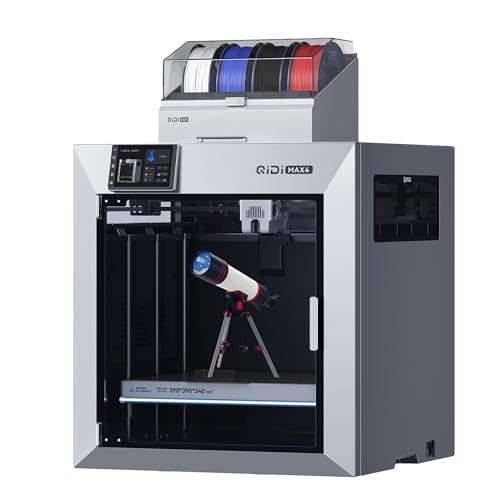
QIDI Max4 Combo — The Big Hot Box
Badge: The Big Hot Box — size and temperature bought years in advance
- Build volume: 390x390x340mm
- Chamber: 65°C heated chamber
- Nozzle: 370°C nozzle
- Motion: dual Z lead screws, maximum 800mm/s high speed
- Calibration: auto-leveling
- Supervision: AI camera
- Extras: Polar Cooler optional, multi-materials, combo bundle
Machines are retired for being outgrown more often than for breaking, and the Max4 Combo is engineered against that specific fate. Start with the envelope: 390 by 390 by 340 millimetres is a build volume that swallows the large functional parts, full-size prototypes, and batch layouts that send owners of compact machines shopping for a second, bigger printer. Then the thermal hardware: a 370-degree nozzle paired with a 65-degree heated chamber is the combination that engineering-leaning filaments ask for, because hot air around the part is what keeps large, temperature-sensitive prints from warping themselves off the plate. Buying that headroom in advance is a long-term strategy in its purest form — the machine’s ceiling sits far enough above today’s projects that tomorrow’s ambitions arrive to find room waiting.
The supporting details reinforce the theme of a machine built to be kept. Dual Z lead screws lift the gantry in disciplined parallel, the sort of structural choice whose value compounds across thousands of layer changes. Auto-leveling keeps the big bed honest, which matters more as build plates grow, since a large plate multiplies every levelling error across a wider first layer. The AI camera watches long jobs — and large prints are long jobs — so a failure at hour fourteen is discovered by the machine rather than by the owner the next morning. The combo format adds multi-material convenience, and the optional Polar Cooler named in the title hints at a platform with accessories still being developed around it, another small signal of a product line with a future.
Scale carries its own honest costs. A machine of this volume occupies serious bench or floor space, heats a serious chamber, and asks its owner to think about ventilation and placement with more care than a desktop compact demands. The 800mm/s figure is a maximum speed claim, to be read as motion headroom rather than a promise about finished prints. And a large, hot, enclosed machine is simply more machine — more to clean, more to keep calibrated, more consequential when a long print fails near the end. Owners whose projects genuinely stay small will carry that overhead for capacity they never use. But for the owner whose project list keeps growing — bigger parts, tougher materials, longer runs — the Max4 Combo is the pick in this guide least likely to be replaced for reasons of capability, and that is a long-term virtue of the first rank.
Strengths
- The large build volume postpones the outgrown-printer replacement by years.
- A 370-degree nozzle and 65-degree chamber open the engineering-leaning material menu.
- Dual Z lead screws and an AI camera suit the long, large prints the machine invites.
Trade-offs
- The footprint and chamber demand deliberate placement and ventilation planning.
- Maximum speed is a ceiling claim, not a finished-print guarantee.
- Small-project owners carry capacity overhead they may never exercise.
Best for: seeking a large, hot, enclosed machine whose capability ceiling stays ahead of a growing project list.
Not suited for: seeking a compact desktop printer for occasional small parts in a tight room.
Before a bench is cleared for a machine of this size, its thermal and volume specification rewards a careful read: Check price on Amazon.

FLASHFORGE AD5M — The Maintainable Compact
Badge: The Maintainable Compact — the commonest repair reduced to seconds
- Calibration: fully auto calibration with 1-click operation
- Speed: maximum 600mm/s speed
- Structure: all-metal CoreXY structure
- Maintenance: easy-maintenance quick-swap nozzle
- Print size: 220x220x220mm
- Positioning: precise printing
The AD5M’s long-term argument is written in its maintenance line. Most printers do not die dramatic deaths; they fade through accumulated small frictions — a nozzle that clogs and takes an hour of heated disassembly to change, a calibration routine tedious enough that owners skip it until quality visibly suffers, small annoyances that compound until the machine is quietly avoided. Flashforge’s title attacks that fade directly: an easy-maintenance quick-swap nozzle turns the most frequent wear event in filament printing into a brief, tool-light task, and fully auto calibration with one-click operation removes the second friction, the setup ritual. A machine whose routine care is nearly effortless gets its routine care done, and that mundane truth is the engine of most long service lives.
The structure underneath supports the same story. An all-metal CoreXY frame is the rigid foundation that keeps motion honest across years of direction changes, and the 220-millimetre build volume — shared with its Adventurer sibling — covers the everyday majority of parts while keeping the machine compact enough to live where it will actually be used. The 600mm/s maximum speed is a ceiling, as always, but on a rigid metal frame it indicates headroom rather than bravado. Precise printing is the title’s closing claim, and in long-term terms precision is partly a maintenance outcome: a machine that is easy to calibrate and quick to service holds its accuracy because its owner keeps it in tune, the way a well-kept bicycle stays fast.
The limits are the familiar compact ones, stated plainly. The build volume excludes single-piece large work, and no heated chamber or high-temperature figure appears in the title, so the engineering-material frontier belongs to other picks in this guide. The AD5M’s bet is different: that most owners’ printing lives are made of small-to-medium parts in everyday materials, and that for those lives the winning machine is the one still printing crisply in year four because nothing about owning it ever became a chore. Owners who recognise their own project lists in that description will find this the most honestly matched pick in the set; owners already dreaming in engineering polymers should look at the chambered machines and accept their overhead with open eyes.
Strengths
- The quick-swap nozzle makes the commonest wear repair nearly effortless.
- Fully automatic one-click calibration keeps the machine in tune without ritual.
- The all-metal CoreXY structure gives years of motion a rigid foundation.
Trade-offs
- The 220-millimetre volume rules out single-piece large-format work.
- No chamber or high-temperature figure is claimed in the title.
- Maximum speed describes headroom rather than everyday finished-print pace.
Best for: seeking a compact CoreXY machine whose upkeep stays effortless across years of everyday printing.
Not suited for: seeking a heated chamber and high-temperature hardware for engineering filaments.
Maintenance-minded owners can examine the quick-swap arrangement in detail here: Check price on Amazon.

Original Prusa CORE One+ Kit — The Enclosed Kit
Badge: The Enclosed Kit — Prusa’s chambered CoreXY, built by its owner
- Assembly state: DIY enclosed CoreXY printer kit
- Enclosure: fully enclosed
- Speed positioning: high-speed CoreXY
- Included: nozzle and filament included
- Audience: home and business, professional and beginner friendly
- Design family: Original Prusa
The CORE One+ Kit closes the set by combining the two strategies the earlier picks kept separate: it is a kit, so it teaches its owner the machine, and it is a fully enclosed CoreXY, so the machine it teaches is a chambered, high-speed platform rather than an open-frame starter. That combination has a particular long-term logic. Enclosed machines are ordinarily the hardest to learn from, because their mechanisms live behind panels; a builder who has assembled the enclosure understands what is behind every panel before the first print begins. The result is an owner equipped for years of enclosed printing — steadier temperatures for demanding materials, a tidier and quieter presence in a home or business setting — with the diagnostic confidence that kit builders carry, applied to a machine class that usually demands a technician’s visit for its mysteries.
The title’s small print supports the ownership story. Nozzle and filament included means the finished build can print immediately, a thoughtful detail that turns the end of assembly into a first success rather than a shopping trip. The home-and-business framing signals a machine intended for duty in shared and working environments, not a fragile hobby toy. And the Prusa name carries the platform context established by the MK4S picks: a maker whose designs are documented in public and whose product philosophy treats the owner’s competence as an asset. A kit from such a maker is a curriculum as much as a product, and curricula age well because knowledge does not wear out.
The cautions mirror the MK4S kit’s, sharpened by complexity. An enclosed CoreXY is a more intricate build than an open bedslinger — more panels, more alignment, more patience — and the hours required are correspondingly longer, with the same absolute condition attached: an unfinished kit prints nothing. Beginners are addressed in the title as welcome, and Prusa’s instructions have a strong reputation, but a first-time builder should still budget the build as a project in its own right rather than a prelude squeezed into an evening. For the owner who completes it, though, the CORE One+ Kit may be the most complete long-term proposition here: enclosure headroom for materials, CoreXY pace, and an owner’s education fitted at the factory of their own workbench.
Strengths
- The kit build teaches an enclosed CoreXY’s anatomy before its panels ever hide it.
- The fully enclosed chamber extends the material range beyond open-frame machines.
- Included nozzle and filament turn the finished build into an immediate first print.
Trade-offs
- An enclosed CoreXY kit is the most intricate build in this guide.
- The assembly hours are longer than the open-frame kit’s.
- An unfinished build delivers no printing at all until completed.
Best for: seeking an enclosed, high-speed machine whose construction doubles as its owner’s training.
Not suited for: seeking enclosed printing without any assembly project standing in the way.
The kit’s scope and inclusions are set out on its listing, where prospective builders can Check price on Amazon before clearing the workbench.
Comparison table
| Machine | Route or strategy | Longevity asset in the title | Ceiling to note |
|---|---|---|---|
| Prusa MK4S Assembled | Assembled route | Open-source upgradeable design | No enclosure claimed |
| Prusa MK4S Kit | Kit route | Self-assembly education plus upgradeable design | Build hours before first print |
| Bambu Lab P1S | Ecosystem route | MakerWorld library and enclosed CoreXY | Maker-directed ecosystem |
| QIDI Max4 Combo | Capability route | 390x390x340mm volume, 370°C nozzle, 65°C chamber | Large footprint and overhead |
| FLASHFORGE AD5M | Maintenance route | Quick-swap nozzle, fully auto calibration | 220mm build volume |
| Prusa CORE One+ Kit | Enclosed kit route | Fully enclosed CoreXY built by its owner | Most intricate build in the set |
How to choose the best long term 3d printers for the years ahead?
Begin by predicting the failure that would retire the machine, because each pick in this guide is armoured against a different one. If the fear is a broken part with no replacement and no documentation, the Prusa listings answer with openness. If the fear is outgrowing the machine — bigger parts, hotter materials — the Max4 Combo answers with volume and temperature. If the fear is the slow fade of neglected maintenance, the AD5M answers with a nozzle that swaps in moments and calibration that asks one click. If the fear is running out of worthwhile things to print, the P1S answers with a library. Naming the fear first turns a vague wish for durability into a concrete specification, and the shortlist usually resolves itself once the specification is honest.
Then weigh the human side of the contract. Kit routes convert money into knowledge; assembled and ecosystem routes convert money into time. Both conversions are respectable, and the right one depends on which currency the owner holds more of. A workshop billing hours to clients should rarely build its tools. A hobbyist whose evenings are the hobby should rarely skip the build, because the build is part of the pleasure and all of the education. It is also worth looking one step beyond the desktop machine itself: owners graduating toward multi-material work will eventually study designs with independent toolheads, and our guide to iDEX 3D Printers maps that territory, including the toolchanger machines that grew out of the IDEX idea.
Finally, plan the machine’s environment as part of its lifespan. A level, rigid surface; dry filament storage; a small stock of the wear parts the design consumes — nozzles above all; and a notebook or file where settings, faults, and fixes accumulate. None of that appears in any listing title, and all of it decides whether the title’s promises get the years they deserve. The best long-term purchase is a good machine plus a modest system for living with it.
Kit route or assembled route: the MK4S question in full
Because the same design appears in this guide as both a kit and an assembled machine, the comparison deserves a section of its own. The hardware destination is identical: input shaping, automatic calibration on the kit listing, professional positioning, and the open-source upgradeable design. What differs is the distribution of effort across the machine’s life. The kit front-loads effort into one build and then discounts every future intervention, because the owner’s hands already know the territory. The assembled route charges nothing upfront and prices each future repair at the going rate of learning under pressure, softened by documentation. Over a long enough life, the kit’s arithmetic usually wins on effort alone — but only for owners who finish the build and who actually perform their own maintenance. An owner who would send any fault to a service anyway gains nothing from the education and should take the assembled machine without a flicker of guilt. The routes are labelled clearly in the reviews above precisely so this decision can be made on temperament and circumstance, not on a mistaken belief that one listing is a lesser printer.
There is one more scenario worth naming, because it occurs constantly in real households and workshops: the shared machine. When a printer serves a family, a classroom, or a small team, the kit-versus-assembled question gains a second dimension — who becomes the machine’s keeper? A kit build often creates that keeper naturally, since the builder becomes the person others consult, and a machine with a keeper gets maintained. An assembled or ecosystem machine distributes the keeper’s duties into automation and documentation, which suits groups where no single person wants the role. Neither arrangement is superior in the abstract, but a group that buys without deciding who keeps the machine usually discovers the answer by neglect, somewhere around the second clogged nozzle. Decide the keeper while deciding the route, and the long-term prospects of either choice improve at once.
What actually wears out, and what to stock against it
Filament printers wear in predictable places, and a long-term owner stocks for the predictions rather than the surprises. Nozzles erode, especially with abrasive filaments, and they clog at the least convenient hours; the quick-swap designs in this guide exist because this is the wear event every owner meets. Build surfaces lose their grip gradually and then suddenly. Belts stretch and want tensioning. Fans accumulate dust and noise. Filament pathways — tubes, gears, couplers — polish themselves into slackness over thousands of loading cycles. None of these events is a machine failure in the dramatic sense; each is a consumable reaching its horizon, and the difference between a printer that lasts and one that languishes is usually whether its owner treats these horizons as scheduled maintenance or as betrayals. The professional end of this thinking — uptime as a discipline, spares as policy — is developed further in our guide to professional 3D Printers, where small-batch production makes the cost of every idle hour explicit.
Stocking strategy deserves one refinement: stock depth should follow failure consequence, not failure probability alone. A spare nozzle is cheap insurance against the most likely interruption. A spare build surface insures the second most likely. Beyond those, the calculus shifts toward documentation — knowing the part number, the source, and the replacement procedure for the items that wear slowly, so that when one finally reaches its horizon the delay is days of shipping rather than weeks of research. Owners of the open designs in this guide hold an advantage here, because their machines’ anatomies are public documents; owners of ecosystem machines hold a different advantage, a maker’s supply chain organised on their behalf. Either way, the owners who fare worst are those who discover a wear item’s existence at the moment it fails, on the evening a deadline print was due. Long-term ownership is largely the art of meeting one’s machine’s needs slightly before the machine announces them.
When capability becomes the lifespan: heat, chambers, and headroom
The quietest reason printers get replaced is that their owners’ ambitions cross a thermal border the machine cannot follow them over. A part that must survive a hot car interior, a bracket that belongs near an engine, a prototype in a material chosen for chemical resistance — each step up the material ladder asks for more nozzle temperature, a warmer and steadier chamber, and cooling discipline that open desktop machines cannot offer. The Max4 Combo’s stated figures speak directly to that border, and the PEEK frontier beyond it is instructive: our guide to pEEK 3D Printers examines what the most demanding common polymer requires and where even hot desktop machines reach their ceiling. The long-term lesson is not that every buyer should purchase the hottest machine available; it is that a buyer should locate their ambitions on the temperature map before choosing, because a machine bought one rung below the work will be replaced by the machine that should have been bought first, and the pair together always costs more than the right one alone.
There is a second, gentler form of headroom that rarely appears in comparisons: project-size headroom in the owner’s imagination. A printer with a generous build volume changes which ideas get attempted, because the mental tax of splitting a model into printable pieces quietly discourages large thinking. Owners of capacious machines design bigger brackets, print fixtures in one piece instead of three, and say yes to projects that a smaller bed would have vetoed at the sketch stage. Over years, that encouragement compounds into a different portfolio of work — and a machine that keeps expanding its owner’s ambitions is, by the only definition that matters, not being outgrown. The same logic applies in miniature to the compact picks: their volumes veto the largest ideas, but their ease keeps the everyday ideas flowing, and a steady flow of finished everyday objects is its own form of longevity. Headroom, in the end, is not a dimension. It is the distance between what the machine permits and what the owner dreams, and the wisest purchase keeps that distance positive for as many years as possible.
Common mistakes
The classic long-term mistake is buying the honeymoon: choosing by first-week print quality and launch features while ignoring parts, documentation, and wear design — the things year three is made of. The second is the mirror error, buying industrial-scale headroom for a hobby that stays small, then resenting the footprint and overhead until the machine is avoided. Third is neglecting consumables until they fail mid-print: nozzles, build surfaces, and belts all announce their horizons in advance, and owners who stock one spare of each convert emergencies into errands. Fourth is storing filament in open room air for months and diagnosing the resulting quality fade as machine ageing. Fifth is treating firmware and profiles as set-and-forget; ecosystems and open platforms both evolve, and an owner who never updates eventually owns a machine frozen out of its own improvements. The last mistake is sentimental: keeping a printer that no longer fits the work, purely because it was first. Long-term thinking honours a machine by using it fully, maintaining it honestly, and replacing it when the work — not the marketing — says so. A related trap catches careful buyers at the very start: researching a purchase for so long that the research itself becomes the hobby, while benches stay empty and projects stay hypothetical. The six machines here were chosen so that a decision made this week, on the evidence in their titles, remains defensible for years; beyond a certain point, further comparison yields less value than the first year of printing would have taught for free.
Frequently Asked Questions
Is the MK4S kit the same printer as the MK4S assembled?
Yes in design, no in experience. The two listings in this guide are the same model sold two ways: fully assembled by the maker, or as a self-assembly kit. The destination hardware, input shaping, and open-source upgradeable design are shared. What differs is who performs the assembly and what the owner learns from it, which is why the reviews label them clearly as the assembled route and the kit route.
What matters more for longevity, build quality or parts availability?
Parts availability, by a nose — because build quality decides how often parts are needed, while availability decides whether the machine survives being needed at all. The strongest long-term propositions combine both: rigid, well-made mechanisms wrapped in documentation and upgrade paths that keep wear items obtainable and replaceable years into ownership.
Does an enclosure extend a printer’s working life?
Indirectly, yes. An enclosure steadies the printing environment, which improves consistency for demanding materials, and it shelters belts, rails, and electronics from dust and casual knocks. It does not stop wear, and it adds its own cleaning and cooling considerations, but a sheltered mechanism in a stable thermal environment generally ages more gracefully than an exposed one in a chaotic workshop.
How often do nozzles and other wear parts actually need attention?
It depends on materials and hours more than on calendar time. Abrasive filaments erode nozzles quickly; gentle materials can run a nozzle for a very long service. The practical answer is inspection rather than schedule: when extrusion quality changes, the nozzle is the first suspect, which is why the quick-swap designs in this guide matter — they make the inspection-and-replacement cycle cheap enough to perform at the first suspicion instead of the last.
Is a bigger, hotter machine always the safer long-term buy?
No. Headroom only pays when the work grows into it. A large chambered machine that spends its life printing small everyday parts delivers its overhead daily and its advantage never. The safer buy is the machine one honest step above the owner’s real project list — enough ceiling to grow into, not so much machine that daily life with it becomes a burden.
What records should a long-term owner keep?
A simple log repays itself many times over: filament types and any that misbehaved, nozzle changes, calibration notes, faults and their fixes, and the profiles that produced the best results for repeat jobs. When a fault recurs — and in a long life, faults recur — the log turns troubleshooting from archaeology into lookup, and it is the cheapest longevity upgrade any owner in this guide can make.
Should a first printer be bought with a five-year horizon in mind?
With a light touch, yes. A first-time owner cannot predict their fifth year accurately, and over-buying against an imagined future is its own waste. But the structural questions in this guide cost nothing to ask at any level: is the design documented, are the wear parts replaceable, does the maker support the platform openly? A starter machine that answers those questions well — and several picks here are deliberately approachable — leaves the door open to a long relationship without demanding that a beginner commit to one on faith.
Final recommendation
Choose the route before the machine. Owners who will maintain their own printer and enjoy doing so should take a kit route — the MK4S Kit for the classic open design, the CORE One+ Kit for an enclosed CoreXY education. Owners who print for work or for others should take the assembled MK4S and let its open design carry the years while the maker carries the build. The P1S suits owners who trust a mature ecosystem to keep the ideas and profiles flowing, the AD5M suits owners whose discipline is maintenance made effortless, and the Max4 Combo suits owners whose projects keep outgrowing smaller machines and who would rather buy the ceiling once. Every route in this guide ends at a printer that can plausibly be printing half a decade from now, provided its owner meets it halfway with dry filament, stocked wear parts, a kept logbook, and the occasional unhurried, honest hour of scheduled maintenance; the surest sign of having chosen well will be a machine so woven into the work that replacing it feels less like an upgrade than like retiring a colleague.
Whichever route is chosen, the first month deserves a deliberate ritual: assemble or unbox slowly, run every calibration the machine offers, print one demanding test object and keep it, dated, on a shelf. That object becomes the machine’s birth certificate and its future diagnostic baseline — the print that later prints are compared against when something feels subtly wrong in year three. Owners who keep that small tradition, and the logbook habit described in the questions above, give any of these six machines the conditions under which long service stops being a hope and becomes the ordinary, expected outcome of a well-kept tool.


