What's inside
- Key Takeaways
- Quick Picks
- How We Chose These Picks
- Comparison
- Will a Dorm Printer Survive the Campus Network?
- How Much Printing Does a Degree Actually Involve?
- What Etiquette Does a Shared Room Impose on Printing?
- How Should Ink Be Budgeted Across a Four-Year Degree?
- What Happens to a Dorm Printer Over the Summer?
- Shared Printer or Solo Printer: Which Dorm Arrangement Works?
- How Do You Print From a Phone Without Losing Your Mind?
- What Should a Student Do in the Printer’s First Week?
- How Loud and Slow Is Too Loud and Slow in a Dorm?
- Why Does the Scanner Earn Its Shelf Space Every Semester?
- How Should a Graduating Student Judge Whether the Printer Earned Its Place?
- What Paper Should a Dorm Printer Be Fed?
- How Does a Dorm Printer Fit a Student’s Sustainability Conscience?
- Common Mistakes
- Final Recommendation
- Frequently Asked Questions
- Related Guides
As an Amazon Associate I earn from qualifying purchases. This post may contain affiliate links at no extra cost to you.
widgetverdict.com is reader-supported. When you buy through links on our site, we may earn an affiliate commission.
The best college dorm room printers are bought under constraints no ordinary home-office guide understands: a desk the size of a cafeteria tray, a roommate sleeping barely four feet away, a campus Wi-Fi network with strong opinions about what may join it, and a workload of essays, problem sets, lab printouts and the occasional boarding pass. The six picks below were chosen strictly inside those constraints, and nothing was admitted for talents a dorm cannot use. Four are compact inkjet all-in-ones from HP and Canon that print, scan and copy from a footprint a dorm desk can spare. One is a thermal portable that prints documents without any ink at all — with a significant limitation stated in full below, because it changes what the machine is actually for. And one is HP’s battery-powered mobile printer, built for students whose desk is wherever they happen to be sitting that day. Footprint, noise, ink economics and network temperament matter more here than any speed figure, and each pick below is judged against those four tests before anything else is said about it.
An honest preface saves money: many students need no printer at all, because campus libraries print cheaply and professors accept digital submission. The case for owning one is the bleak 1 a.m. deadline, the professor who still demands actual paper, the internship application that needs a signature scanned tonight, not tomorrow. If those moments are rare in your course, the library wins and this guide happily loses the sale. If they arrive with the regularity of rain in November — and for students in paper-heavy disciplines, law, history and the form-generating sciences among them, they do — then a printer stops being a gadget and becomes part of the degree’s basic equipment, as unremarkable and as necessary as a good lamp. If they are weekly, read on — and note that linked names lead to Amazon, where you can check price on Amazon; the running cost that actually matters, ink across four years, is discussed per machine rather than hidden.
Key Takeaways
- HP’s DeskJet 3755 is the footprint champion: a compact all-in-one with wireless printing and Alexa support that fits desks other printers would evict.
- Canon’s PIXMA MG3620 is the budget inkjet all-rounder, a wireless all-in-one with mobile and tablet printing in a plain black box.
- HP’s DeskJet 2855e and DeskJet 2923 are near-identical mainstream all-in-ones — buy whichever listing suits on the day; the reviews below treat them as the pair they are.
- The LABEER thermal printer uses no ink and prints documents on thermal paper only: no colour, no photographs, and a per-page paper cost that replaces the ink bill.
- HP’s OfficeJet 200 is the battery-powered outlier — a mobile inkjet with its battery included, for printing in libraries, labs and trains.
- Scanning matters more than students expect: application forms, signed documents and ID copies are the surprise workload of college life, arriving unannounced in every semester of a degree.
Quick Picks
| Pick | Badge | Why it earns its place |
|---|---|---|
| HP DeskJet 3755 | The desk-space saver | A compact wireless all-in-one with Instant Ink and Alexa support, finished in Seagrass. |
| Canon PIXMA MG3620 | The budget all-rounder | A wireless colour all-in-one with mobile and tablet printing for everyday coursework. |
| HP DeskJet 2855e | The current mainstream choice | A wireless all-in-one for colour documents with mobile compatibility and easy home printing. |
| HP DeskJet 2923 | The twin alternative | The same mainstream all-in-one formula — wireless print, scan and copy for colour documents. |
| LABEER Thermal Printer | The inkless document machine | A portable thermal printer for letter documents on thermal paper — no ink, no colour. |
| HP OfficeJet 200 | The battery-powered traveller | A mobile inkjet with battery included for printing away from any desk. |
How We Chose These Picks
Dorm selection filters differ from family ones, so the shortlist was built from the room outward. Size came first: every inkjet here is a compact all-in-one class machine, because a dorm desk holds a laptop, a lamp and a textbook before it holds a printer. All-in-one functions came second, because the scanning of forms, IDs and signed pages is the workload students never predict and constantly meet. Wireless printing from phones and laptops was a baseline expectation, stated in every title here. Two deliberate outliers stretch the category’s edges: the LABEER thermal, which abolishes ink at the cost of colour and paper freedom, and the OfficeJet 200, which abolishes the desk itself. Both are included with their trade-offs printed large, because for particular students each is the only correct answer.
Ink economics were weighed with a student’s cash flow in mind. Cartridge inkjets are cheap to buy and metered ever after; subscription ink programmes, where a listing mentions them, smooth that metering into a monthly habit. No prices or per-page figures are quoted in this guide — they shift, and the listings carry the current truth — but each review names the ink system its machine commits you to, because a four-year degree is long enough for the cheap printer to become the expensive one.
One more filter deserves naming: survivability. Dorm machines are moved yearly, knocked by textbooks, borrowed by neighbours and stored badly over summers. Established, inexpensive models survive that life socially if not always mechanically — a broken budget printer in year three is a shrug and a replacement, while a broken premium machine is a grievance. Several picks here were chosen partly because losing them would not ruin anyone’s semester, which is a legitimate engineering criterion in a building where furniture is treated as a contact sport.
Specification restraint applies here as everywhere in this series: speeds, capacities and resolutions appear only where a listing title states them, and most of these titles state almost none. The reviews therefore judge what dorm life actually tests — footprint, temperament, ink system, functions — and send readers to the listings for the fine numbers, rather than dressing guesses as data.

HP DeskJet 3755 — The desk-space saver
The DeskJet 3755’s design brief can be read off a dorm desk: it is a compact all-in-one — print, scan and copy in the DeskJet manner — that occupies the footprint of a hardback textbook rather than a briefcase. HP has sold this machine for years on exactly that proposition, and the title adds the modern trimmings: wireless printing, Instant Ink readiness and Alexa support, in a Seagrass accent finish that at least pretends the machine is furniture. For a student whose desk is also a dining table, vanity and workshop, compactness is not a feature among others; it is the feature that decides whether a printer can live in the room at all.
Its scanning deserves a dorm-specific note. Compact all-in-ones of this class typically scan by feeding the sheet through rather than laying it on a flat glass bed, which handles loose pages beautifully — the form, the signed sheet, the single chapter — and handles bound books and thick items poorly. A student whose coursework involves scanning textbook spreads should register that distinction now rather than during midterms; a student scanning documents, which is most of them, will never notice. Instant Ink, HP’s subscription ink model, suits the student cash-flow pattern: printing is bursty, deadlines cluster, and a cartridge that empties the night before a deadline is a rite of passage nobody needs twice. A subscription that watches levels and ships ahead converts that risk into a monthly line item — worth weighing against pay-as-you-go cartridges with honest eyes about your own page counts.
Temperament completes the picture. Small inkjets are not fast, and this one’s virtues are size and sufficiency rather than pace; a thirty-page thesis chapter will take its time, and colour photographs are a treat it performs adequately rather than brilliantly. But dorm printing is overwhelmingly short documents at inconvenient hours, and for that workload a compact, wireless, always-present machine beats a theoretically finer printer stored in a closet. The 3755 is the guide’s default recommendation for the standard dorm room, and its longevity on the market is the market agreeing.
Storage and travel complete its dorm case. A machine this size goes home for the summer in a tote rather than a car boot, fits the under-bed box economy of student storage, and survives the annual room shuffle that larger hardware dreads. Students change rooms yearly and universities change buildings occasionally; the printer that moves like a kettle rather than a wardrobe is the printer still owned in the final year. Small virtues, compounding annually, are how a modest machine becomes the correct one.
- Form per listing title: compact all-in-one wireless printer
- Ink programme per title: Instant Ink ready
- Voice support per title: works with Alexa
- Finish per title: Seagrass accent (J9V92A)
- Speed and capacity: not stated in listing title
Strengths
- The smallest commitment of desk space in this line-up.
- Print, scan and copy cover the full surprise workload of student administration.
- Subscription ink option removes the deadline-night empty-cartridge disaster.
Trade-offs
- Sheet-fed scanning suits loose pages, not bound books or thick originals.
- Pace is leisurely on long documents; plan thesis printing accordingly.
- Cartridge economics still apply outside the subscription route.
Best for: students in standard dorm rooms printing documents and scanning forms weekly.
Not suited for: heavy book-scanning coursework or high-volume society printing.
Canon PIXMA MG3620 — The budget all-rounder
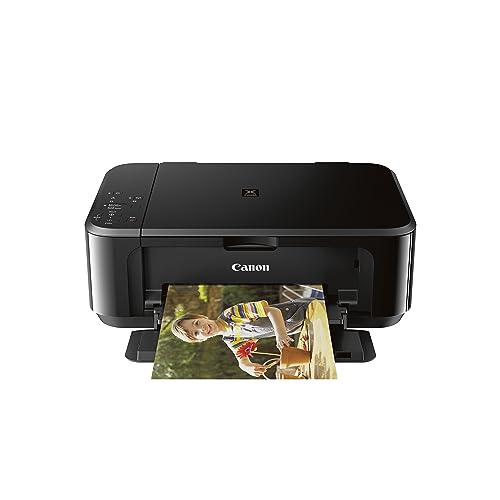
The MG3620 is the printer equivalent of the reliable second-hand bicycle: an established wireless colour all-in-one, in black, with mobile and tablet printing, that has carried cohorts of students through degrees without ever being the interesting part of their lives. Canon’s PIXMA line aims it at exactly the dorm workload — essays and handouts in black, the occasional colour page for a presentation or a poster, scans of documents, copies of notes — and its longevity in the market means its behaviour, its ink appetite and its quirks are known quantities rather than launch-day promises. For a buyer whose budget is real and whose needs are ordinary, known quantities are worth more than novelty.
Mobile and tablet printing, named in the title, is the feature students actually use. Coursework now lives on phones and tablets as much as laptops — the PDF annotated on a tablet, the form photographed and needing a paper twin — and a printer that accepts jobs from those devices without a computer intermediary fits the way students actually work at midnight. As an all-in-one it scans and copies in the conventional manner, giving it the administrative completeness dorm life demands: the internship form, the housing document, the ID copy for a new job.
Its compromises are the class compromises, stated plainly. Cartridge ink over four years will cost more than the machine did — the standard inkjet bargain — and students printing heavily should do that arithmetic before the first semester rather than during the third. Pace and paper handling are everyday-grade: fine for a ten-page essay, tedious for a society’s hundred programmes. And as an established model it lacks the newest subscription-ink framing of its HP rivals, which some students will count as simplicity and others as a missing safety net. Within the ordinary, though, the MG3620 remains the budget answer that generations of dorm rooms have already stress-tested.
That generational record carries a practical dividend: hand-me-down knowledge. An MG3620 bought this year enters a world where seniors, siblings and forum archives already know its cartridge numbers, its reset dances and its paper preferences. When something blinks at midnight, the answer exists and is findable in minutes. Newer machines may be objectively finer in ways a dorm cannot detect; the Canon’s fineness is social, and in a building full of first-time printer owners, social fineness resolves more crises than specification ever will.
- Class per listing title: wireless all-in-one colour inkjet
- Printing sources per title: mobile and tablet printing supported
- Colour per title: black finish
- Functions: print, scan, copy (all-in-one)
- Speed and capacity: not stated in listing title
Strengths
- An established model whose costs and behaviour hold no surprises.
- Full all-in-one functions for the administrative side of student life.
- Phone and tablet printing matches how coursework actually circulates.
Trade-offs
- Cartridge costs across a degree will exceed the purchase price comfortably.
- Everyday pace makes long or bulk jobs a planning exercise.
- No subscription-ink framing in the title for deadline-proof ink supply.
Best for: budget-conscious students with ordinary document workloads and a laptop-plus-phone life.
Not suited for: heavy printers whose four-year cartridge bill would sting.
HP DeskJet 2855e — The current mainstream choice
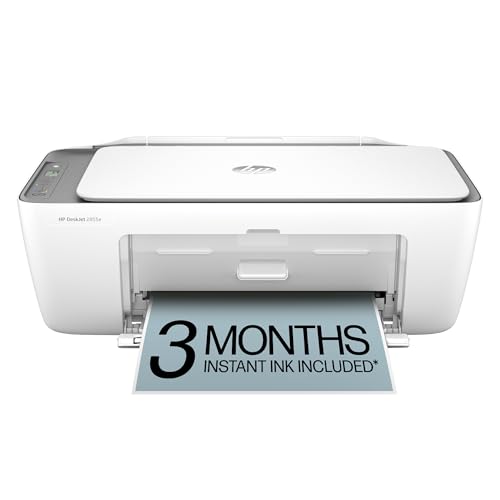
The DeskJet 2855e is HP’s current-generation answer to the most ordinary printing brief in the world, and its title reads like that brief written back: a colour inkjet, wireless, all-in-one, promising easy home printing, colour documents, mobile compatibility and print, scan and copy, positioned for ideal home use. A dorm room is a small home with worse furniture, so the fit is direct. This is the machine for the student who wants the modern default — set it up from a phone, print from anything, scan the form, forget the machine exists between jobs — and who values that forgettability over any specialist talent.
Judged against its stablemate below, honesty requires a sentence this guide will not dodge: the 2855e and the DeskJet 2923 present near-identical propositions in their titles, and nothing in either title gives a reviewer a factual basis for ranking one above the other. They are the same mainstream formula in two listings. The practical advice is therefore unglamorous — treat them as twins, compare the two listings’ current terms when you buy, and let availability and the day’s offer decide. Any roundup that manufactures a dramatic difference between them is inventing, and students on budgets deserve better than invention.
What the formula itself offers deserves its due. Wireless all-in-one completeness at this level is genuinely sufficient for a degree’s document life: essays, readings, tickets, forms, the occasional colour handout. The compromises are equally formulaic — cartridge ink metering every page, compact-machine pace, paper handling sized for documents rather than card — and they are the right compromises for a student whose printing is measured in pages per week. Buy the 2855e (or its twin) when the goal is a printer that behaves like a utility: present, wireless, unremarkable, and cheap to stop thinking about.
A word about setup day, because this class lives or dies by it. The current mainstream machines assume a phone, an app and fifteen unhurried minutes; students who perform that ritual on a quiet afternoon in the first week own a working printer all year. Students who postpone it until the first deadline own a networking seminar scheduled by panic. The 2855e’s “easy home printing” promise is real but conditional on that small investment of timing — make it early, test it with a real document, and file the machine under solved problems before the term begins asking harder questions.
- Class per listing title: colour inkjet, wireless, all-in-one
- Functions per title: print, scan and copy
- Positioning per title: easy home printing; colour documents; mobile compatibility
- Relation to DeskJet 2923: near-identical mainstream formula
- Speed and capacity: not stated in listing title
Strengths
- The current mainstream formula: phone-first setup and printing from anything.
- Complete all-in-one functions for documents, forms and handouts.
- A utility temperament — present when needed, invisible otherwise.
Trade-offs
- Indistinguishable on title evidence from its DeskJet 2923 twin.
- Cartridge metering applies to every page across the degree.
- Compact pace and document-grade paper handling cap ambitious jobs.
Best for: students wanting the modern default all-in-one with zero research overhead.
Not suited for: buyers who need a stated, differentiating specification to choose by.

HP DeskJet 2923 — The twin alternative
Everything the previous review said about the mainstream formula applies here, because the DeskJet 2923’s title recites the same commitments almost word for word: colour inkjet, wireless, all-in-one, easy home printing, colour documents, mobile compatibility, print, scan and copy, ideal home use. Rather than counterfeit a distinction, this review takes the twin’s existence itself as the subject — because for a student buyer, a duplicated formula is genuinely useful information. It means the mainstream dorm printer is a commodity: two listings, one proposition, and a decision that can be made on the listings’ current terms without fear of choosing the “wrong” machine.
There is a second, subtler benefit to a formula sold at this scale. Machines in this class are bought by the million, which means their ink is stocked everywhere, their setup quirks are documented in a thousand student forums, and the campus IT helpdesk has seen your exact problem before — usually this semester. A student troubleshooting alone at midnight is better served by that ocean of shared experience than by a rarer machine’s marginal specification advantage. Commodity status is a support feature, and in a dorm it may be the most valuable feature of all.
The class limits remain the class limits, and they bear repeating in the twin’s own review so no reader mistakes repetition for oversight: cartridge ink will out-cost the hardware across a degree, pace is sized for documents rather than dissertations in one sitting, and paper handling is for paper — card and photo ambitions should look at the craft guide in this series instead. The 2923 makes no claim beyond its formula and keeps every claim its formula makes. For a great many dorm rooms, that is the whole requirement, honestly met.
Parents buying for a first-year student are this machine’s quiet second audience, and its formula suits them too: a known quantity, set up over a video call, printing essays by the weekend, with no exotic failure modes to debug from another time zone. The gift-ability of a mainstream all-in-one is easy to underrate from inside a comparison table. It is the printer equivalent of a warm coat — unglamorous, correctly sized, and appreciated precisely on the worst nights of the year.
- Class per listing title: colour inkjet, wireless, all-in-one
- Functions per title: print, scan and copy
- Positioning per title: easy home printing; colour documents; mobile compatibility
- Relation to DeskJet 2855e: near-identical mainstream formula
- Speed and capacity: not stated in listing title
Strengths
- The same proven mainstream formula, giving buyers a genuine second listing to compare.
- Commodity scale means ink, help and shared fixes are everywhere.
- Complete document functions for coursework and administration.
Trade-offs
- No title-stated feature separates it from the 2855e — choice rests on listing terms.
- Cartridge economics accumulate across four academic years.
- Document-grade pace and feeding only; specialty media need another machine.
Best for: students happy to buy the mainstream formula on whichever listing terms suit.
Not suited for: anyone seeking a distinctive capability rather than a dependable default.

LABEER Thermal Printer — The inkless document machine
Now for the machine that breaks the category’s rules, with its limits stated first and largest: the LABEER is a thermal printer. It uses no ink because it prints by heating specially coated thermal paper, which means three hard boundaries. It prints documents only — essays, notes, forms, readings — in monochrome; there is no colour, ever, and no photographs worth the name. It prints only on thermal paper, in the US Letter, A4 and A5 sizes its title states, so ordinary paper is useless to it. And its running cost is not ink but that thermal paper itself, bought in packs, which replaces the cartridge bill rather than abolishing the concept of a bill. A student who understands and accepts those three boundaries gains something remarkable in return; a student who misses them has bought an expensive misunderstanding.
What the accepting student gains is freedom from the inkjet condition entirely. No cartridges to empty at midnight, no nozzles to clog across a summer break, no ink subscription to manage. The machine is portable in the true sense — a compact traveller for the library, a study room, a train home — printing from phones, laptops and PCs as its title describes, at a size that disappears into a bag. For the document-only student — the law reader, the essayist, the note-taker whose printing is text from January to June — thermal printing gives up nothing that workload ever asks for. It is the workload, exactly matched, with the inkjet’s entire maintenance class deleted.
Two further honesties belong in this review. Thermal prints are heat-sensitive by nature: a page left on a sunny windowsill or against a radiator can darken or fade, so archival keeping — the essay you want in ten years — is not thermal’s promise; print the keepsake copy on the library’s laser. And the paper economics reward arithmetic before purchase: price your expected pages per term in thermal paper against the inkjet alternative’s cartridges, because the answer flips with volume. Low-to-moderate document volume favours thermal’s simplicity; heavy volume can make its paper the dearer diet. Know your number, then choose.
Study habits give the thermal machine one more constituency: the annotator. Students who print readings to mark them up by hand — underlining, margin notes, the whole analogue ritual — generate monochrome pages by the hundred and scan none of them back. For that workflow the LABEER’s output is not a reduced version of printing; it is the exact artefact the studying requires, produced without an ink economy hovering over every chapter. If your degree is read with a pen in hand, this odd little machine may be the most honest fit in the guide.
- Technology per listing title: thermal, portable, inkless
- Paper per title: US Letter, A4, A5 thermal paper
- Sources per title: iPhone, Android, laptop, PC mobile printing
- Colour: none — thermal monochrome documents only
- Functions: print only — no scan or copy
Strengths
- No ink, no cartridges, no clogging across holidays — an entire failure class removed.
- Genuinely portable for library, study-room and travel printing.
- Instant, quiet document output matched to text-heavy courses.
Trade-offs
- Thermal paper only, at a per-page cost that replaces the ink bill.
- No colour and no photographs — documents are the entire repertoire.
- Prints are heat-sensitive; long-term archival copies belong on a laser.
Best for: text-only students who print documents moderately and move around campus.
Not suited for: colour coursework, photo printing, or documents meant to be archived.

HP OfficeJet 200 — The battery-powered traveller
The OfficeJet 200 answers a question none of its five companions asks: not “what fits on the desk?” but “what if there is no desk?” Its title states the proposition plainly — a mobile inkjet printer, wireless, with battery included, positioned for business, travel and remote work, and lightweight printing on the go. HP built this machine for professionals who print contracts in cars and presentations in hotel rooms; the student it suits is the one whose college life has the same shape — the competitor travelling to case competitions and conferences, the researcher moving between labs and field sites, the student whose “dorm room” is a rotation of libraries, group-project corners and trains home.
Battery printing changes the social geometry of shared spaces. The library table, the empty classroom, the department common room all become print stations without a hunt for the one free socket near a wall of occupied ones, and a page can be produced at the moment it is needed rather than queued for a trip back to the room. As an inkjet it prints proper documents in colour — unlike the thermal machine, presentations, charts and colour handouts are within its repertoire — and its mobile-business engineering makes it sturdier company than a home inkjet asked to travel.
The costs of that freedom are equally clear. There is no scanner or copier: the administrative workload of forms and IDs needs a phone-scanning app or a campus machine as its partner. Mobile hardware prices above the desk-bound class, so a student who will print in one room all degree is paying for journeys never taken. And ink remains cartridge ink, with travel merely relocating the metering. The OfficeJet 200 is therefore the guide’s specialist recommendation: wrong for the median dorm room, unrivalled for the student whose education happens in motion.
Debate, moot court and business-case teams illustrate the niche perfectly: printed exhibits, judges’ copies and revised briefs produced in hotel corridors and borrowed classrooms, on a schedule set by a competition rather than a campus. For those students the battery is not a convenience but the difference between carrying a print shop and begging one. The same logic extends to the student journalist printing releases at events and the teaching assistant working across three buildings. Motion is a real curriculum for a minority — and minorities with deadlines are exactly who specialist machines exist for.
- Class per listing title: mobile inkjet printer, wireless
- Power per title: battery included
- Positioning per title: business, travel and remote work; lightweight on-the-go printing
- Functions: print only — no scan or copy
- Speed and capacity: not stated in listing title
Strengths
- Battery operation prints anywhere, independent of sockets and desks.
- Full colour inkjet output, including charts and presentation pages.
- Travel-grade build for a life lived across libraries, labs and trains.
Trade-offs
- No scanning or copying for the form-heavy side of student admin.
- Mobile pricing exceeds desk-bound machines of similar output.
- Cartridge ink economics travel with it.
Best for: travelling students — competitors, researchers and conference-goers who print in motion.
Not suited for: desk-bound students, who would pay for mobility they never use.
Comparison
| Pick | Print technology | Scan / copy | Defining trait from title |
|---|---|---|---|
| HP DeskJet 3755 | Inkjet | Yes | Compact all-in-one; Instant Ink |
| Canon PIXMA MG3620 | Inkjet | Yes | Mobile and tablet printing |
| HP DeskJet 2855e | Inkjet | Yes | Mainstream wireless all-in-one |
| HP DeskJet 2923 | Inkjet | Yes | Mainstream wireless all-in-one |
| LABEER Thermal Printer | Thermal (inkless) | No | Portable; thermal paper only |
| HP OfficeJet 200 | Inkjet | No | Battery included; mobile |
Will a Dorm Printer Survive the Campus Network?
Campus Wi-Fi is the hidden examination every dorm printer sits. University networks often isolate devices from each other, require browser-based sign-ins a printer cannot perform, or route residents through registration portals — and a printer that printed happily at home can become unreachable in a dorm for reasons that have nothing to do with its quality. The defences are mundane: check the university’s guidance for personal printers before buying, since many IT departments publish exactly this; keep the USB cable the machine came with, because a direct cable is the diplomacy-free fallback that always works; and consider printing from a phone hotspot for the occasional job if the network forbids the printer outright. None of the listings here can promise campus compatibility — no printer can — so the student’s real specification is the university’s own documentation, read before the box is opened rather than after.
How Much Printing Does a Degree Actually Involve?
Less than parents fear and more than students predict, in a distinctive pattern: long silences, then a landslide. Seminar readings trickle weekly; then submission week arrives with drafts, appendices and forms all due together, usually at hours when the library queue is longest. That pattern is the true argument for owning a compact machine — not volume, but timing. It also explains why ink subscriptions and ready-to-print reliability matter more than speed in this category: the printer that matters is the one that works at 1 a.m. after three idle weeks. Students can estimate their own pattern honestly from one term’s syllabus — count the paper submissions, the form deadlines, the courses still demanding hard copy — and size the purchase to that count rather than to a generic fear of being caught without.
What Etiquette Does a Shared Room Impose on Printing?
A dorm printer is a roommate-relations device. Printing at 3 a.m. beside a sleeping roommate is a negotiation, not a right, and compact inkjets — while far quieter than the lasers of the library — still announce themselves. The workable norms are simple: batch noisy jobs into waking hours where deadlines allow, warn before the unavoidable late run, and let the printer’s output tray be a shared resource in both directions — a roommate’s occasional page is cheap goodwill. Students in single rooms skip this section’s diplomacy and should instead consider their neighbours through the wall, a constituency with strong opinions and thin plasterboard. Machines that print quickly and quietly enough to be forgettable earn their keep socially as well as academically. The etiquette cuts both ways, of course: the printer’s owner acquires obligations along with the asset, and the roommate who tolerates a deadline-week chorus has earned the occasional page, the borrowed scan and a share of the good snacks. Dorm printing, handled with that reciprocity, becomes one of the small systems by which a shared room turns into a functioning household rather than a waiting room for graduation.
How Should Ink Be Budgeted Across a Four-Year Degree?
Think of ink as tuition’s smallest recurring fee and plan it like one. The cartridge machines in this guide — all four all-in-ones and the OfficeJet 200 — will each consume several times their purchase price in ink across a degree at moderate use; that is the inkjet business model, not a defect, and it argues for two habits. First, match cartridge size to honesty: high-yield cartridges, where a model offers them, punish procrastination less than standard ones. Second, never let the spare run out — a spare cartridge on the shelf, bought calmly at a fair price, is the difference between a deadline met and a midnight expedition. Subscription programmes exist to automate exactly that discipline, converting it into a monthly amount a student budget can absorb; students whose printing is spiky often find the subscription’s predictability worth more than its arithmetic.
The thermal machine reframes the same lesson: its paper is its ink, and the budgeting habit transfers — keep a spare pack, know your pages per term, and reorder before the landslide week rather than during it. Every technology in this guide meters something; the successful student is simply the one who knows what their machine meters and stocks it in advance.
What Happens to a Dorm Printer Over the Summer?
Three months of storage is an inkjet’s quiet hazard: ink dries in nozzles, and a machine that printed faithfully in May can greet September with streaks. The mitigations are simple and worth the five minutes — run a cleaning cycle before the break ends rather than after the first ruined essay, store the machine somewhere temperate rather than a baking storage unit, and print a test page in the first week back while problems are still cheap. Students who store printers with family or friends should say the quiet part aloud: the machine needs a page or two monthly to stay healthy, or a cleaning budget in September. The thermal machine, having no ink, skips this entire paragraph of life — one more of its narrow, genuine virtues — while battery machines like the OfficeJet 200 prefer storage with the battery neither full nor empty and a charge on return.
Shared Printer or Solo Printer: Which Dorm Arrangement Works?
Roommates pooling money for one better printer is a September idea that deserves a fair hearing and a written agreement. The hearing: pooling lifts the budget into a class with cheaper ink habits, and one machine uses less aggregate desk than two. The agreement needs three clauses — whose desk hosts it, how ink and paper are split when one roommate prints a thesis and the other prints boarding passes, and who owns the machine in May. Friendships survive printing; they strain over unpriced assumptions about printing. Students who skip the pooling route and buy solo gain simplicity and portability between rooms and years, at the cost of duplicating a modest machine. Neither answer is wrong; the wrong answer is pooling without the conversation, because the conversation is the entire cost of the arrangement.
Solo buyers should also consider the building’s informal economy: a printer in a corridor of printerless rooms becomes a small social asset, and its owner trades pages for goodwill, snacks and future favours at a rate no economist would fault. That economy argues for a machine whose ink the owner can afford to be generous with — one more quiet point in favour of subscription ink or an established budget model over anything exotic.
How Do You Print From a Phone Without Losing Your Mind?
Phone printing fails in dorms for boring reasons: the printer asleep, the phone on a different network band, the document in an app that hides its share sheet. The reliable ritual is short. Wake the printer first and confirm its little screen or light says ready. Open the document in the app that owns it — the PDF reader for PDFs, the photos app for images — and use that app’s own share or print command rather than a screenshot workaround, which destroys quality. Send one page as a test when the job matters, because paper size mismatches announce themselves on page one at the cost of one sheet instead of thirty. Students who build that thirty-second ritual stop experiencing phone printing as weather and start experiencing it as plumbing: unglamorous, predictable, and simply there when the deadline is.
What Should a Student Do in the Printer’s First Week?
Four small ceremonies convert a boxed printer into infrastructure. Set it up on a calm day, not deadline eve, and complete every firmware prompt while patience is plentiful. Print a real document of each kind the term will demand — an essay page, a colour slide, a scanned-and-reprinted form — and keep the results; they are the baseline against which every later “is it fading?” question is answered. Stock the consumable shelf the same week: spare ink or thermal paper, a ream of decent paper, and the USB cable coiled where it can be found in the dark. Finally, save the campus print shop’s location and prices in the phone anyway, because the mature printing strategy has a backup, and knowing it exists turns a machine failure from a crisis into a walk.
Students who perform those ceremonies rarely think about printing again until the machine needs ink — which is precisely the relationship a degree requires from its tools. The printer should be the least interesting object in the room, and the first week is when that boringness is installed.
How Loud and Slow Is Too Loud and Slow in a Dorm?
Numbers would be convenient here, and the listings do not provide them — no decibel or speed figures are stated in these titles, so none are quoted. The usable test is comparative and social rather than numeric. Compact inkjets as a class murmur and shuffle rather than roar; a roommate who sleeps through a kettle will sleep through an essay. Long jobs are the real imposition, because duration multiplies presence: a two-minute handout is beneath notice, while a forty-minute thesis chapter is a concert. Students can manage the social side with scheduling, and the practical side by printing long work in sections across the day rather than in one midnight sitting. If your course routinely demands hundred-page outputs at deadline, be honest that no dorm machine is the right tool — that is the library laser’s natural prey, and building your workflow around it is wisdom rather than surrender.
Why Does the Scanner Earn Its Shelf Space Every Semester?
Ask a final-year student what their printer actually did for four years and the answer surprises freshmen: it scanned. The signed housing form photographed badly and needing a clean copy; the passport page for the study-abroad office; the handwritten derivation a professor wanted uploaded as a legible PDF; the receipt for the department reimbursement. College administration runs on documents that begin on paper and must become files, and they arrive on their own schedule, indifferent to library hours. An all-in-one on the desk converts each of those errands from a trip into a minute. That is why four of this guide’s six picks carry scanners, why the two print-only specialists are recommended only to students whose lives supply scanning elsewhere, and why “I never scan anything” should be treated as a prediction no first-year is qualified to make.
How Should a Graduating Student Judge Whether the Printer Earned Its Place?
By the nights, not the pages. A dorm printer justifies itself in a handful of moments per term — the deadline met because the machine was four feet away, the form scanned at an hour when every office was shut, the boarding pass produced while the taxi waited. Those moments are worth more than the machine’s entire paper output priced as a commodity, which is why the library comparison, though arithmetically sound, misses the point of ownership. Students deciding whether to repeat the purchase for a first apartment should count their own remembered rescues honestly: if the count is zero, the library was your printer all along and the desk can stay clear; if the count is five, buy the successor without a flicker of guilt and let the arithmetic argue with somebody else.
What Paper Should a Dorm Printer Be Fed?
One ream of decent everyday paper, bought before term starts, covers ninety percent of a degree: essays, drafts, forms and handouts all live happily on standard stock, and consistency spares the machine the mood swings of whatever paper was cheapest that week. Keep a tiny second stock for the exceptions — a few sheets of heavier paper for the title page or the poster, photo paper only if photographs are genuinely printed — because a dorm shelf groaning with five paper types belongs to an optimism the room cannot store. Store the ream flat and dry; a dorm’s humidity and a windowsill’s sunlight both reach paper left in the open, and curled, damp sheets feed like they have objections. Finally, recycle the misprints into draft stock openly rather than re-feeding printed sheets through the machine, which risks jams and double-sided confusion at the exact moment a deadline is watching.
How Does a Dorm Printer Fit a Student’s Sustainability Conscience?
Printing less is the headline, and the honest version is printing deliberately: drafts on screen, final copies on paper, double-sided where a course allows it, and the library’s industrial machines for the hundred-page reader rather than a compact inkjet sighing through it. Cartridges and thermal paper both carry a footprint, which is one more argument for matching the machine to real volume — the lightest-impact printer is the one whose consumables are fully used rather than half-expired in a drawer. When a machine does retire, campus e-waste collections exist precisely for it; a printer in a landfill is a poor final page for a degree that taught critical thinking. None of this requires guilt — it requires the same pattern-matching the rest of this guide teaches: know your volume, stock what you use, and waste neither paper nor panic.
Common Mistakes
Bringing a full-size home-office printer to a dorm is the classic September error — it fits nowhere, dominates the desk, and gets exiled to a closet by October, where it prints nothing. A second error is buying on purchase price alone and discovering cartridge economics across four years, one deadline-priced emergency cartridge at a time. Third, assuming the campus network will simply accept the printer, unboxing it on move-in day and meeting device isolation with a essay due. Fourth, buying the thermal machine for a course that turns out to need colour diagrams — its limits are printed plainly in this guide and in its title, and they are absolute. Finally, forgetting the scanner: students who buy print-only machines for coursework alone meet the signed-form workload by November, and improvise badly.
Two quieter mistakes complete the picture. The first is discarding the box and packaging in September, then attempting a June move with a printer wrapped in a hoodie — keep the box if storage allows, because printers travel best in the moulding designed for them. The second is registering every account, subscription and warranty prompt during a distracted setup and then being unable to say, a year later, what the machine is subscribed to or how to cancel it; five minutes of notes in the first week — accounts, cartridge numbers, subscription status — is the cheapest documentation a student will ever produce, and the only kind nobody else can produce for them.
Final Recommendation
For the standard dorm room, start with the DeskJet 3755: the smallest footprint, complete functions and an ink-subscription escape hatch make it the default that fits the most degrees. The PIXMA MG3620 is the budget alternative with a long track record, and the DeskJet 2855e and 2923 twins are the current mainstream default — choose between those two on the listings’ terms on the day, without agonising, because the machines are formula-identical where it matters. Choose the LABEER thermal only with its boundaries fully accepted — documents, monochrome, thermal paper — and it will repay a text-heavy, mobile student by deleting ink from their life. Choose the OfficeJet 200 when your education genuinely travels. Check price on Amazon for the finalist, and check your university’s printer guidance in the same sitting.
Whichever machine arrives, give it the calm first week described in this guide — setup, test pages, stocked spares, a saved backup plan — and it will repay you in the only currency dorm printing really trades in: deadlines that stop being emergencies.
Frequently Asked Questions
Do I really need my own printer at college?
Only your syllabus can answer. If your courses submit digitally and the library is near, campus printing is cheaper than ownership. If paper submissions, signed forms and late-night deadlines recur weekly, a compact machine pays for itself in avoided queues and panic — the pattern of your term matters more than the total page count.
Can these printers connect to dorm Wi-Fi?
All the inkjets here are wireless, but campus networks vary: some isolate devices or require sign-ins printers cannot perform. Read your university’s personal-printer guidance before buying, and keep a USB cable as the universal fallback — a direct connection sidesteps every network policy ever written.
Is the thermal printer cheaper to run than an inkjet?
It trades one bill for another: no ink or cartridges, but every page consumes thermal paper bought in packs. At low-to-moderate document volumes the simplicity usually wins; at heavy volumes, thermal paper can cost more than an inkjet’s ink. Price your own expected pages per term both ways before deciding.
Which pick is best for scanning documents?
Any of the four all-in-ones — the DeskJet 3755, MG3620, 2855e or 2923 — since scanning is built into their brief. Note the 3755’s sheet-fed style suits loose pages rather than bound books. The LABEER and OfficeJet 200 print only; pair them with a phone scanning app for the occasional form.
How do I stop the printer waking my roommate?
Print long jobs before quiet hours, keep the machine’s beeps and alerts off where its settings allow, and place it on a mat or folded towel that absorbs the desk’s drum effect. Most conflict is about timing rather than volume, and most timing is negotiable a day ahead — the roommate who was warned about a midnight deadline run rarely begrudges it.
What if my printer will not join the dorm network at all?
Use the cable without shame: a USB connection is faster to troubleshoot than any network negotiation and asks nothing of campus IT. Alternatively, print through a phone hotspot for occasional jobs, or keep the library as the network printer of last resort. A printer used by cable for four years beats a wireless printer argued with for four years, every single term.
Can I share the printer with my roommate fairly?
Yes, with the three-clause agreement described in this guide: hosting, consumable splitting and end-of-year ownership, settled before the first cartridge. Most friction comes from unpriced assumptions, not from printing itself — settle the ink split especially, because usage between roommates is never as equal as September imagines.
What about printing photographs for my wall?
The inkjets here print acceptable photos for dorm walls and gifts, with the Canon and HP photo-capable models doing the pleasant work. The thermal machine cannot print photographs at all — that boundary is absolute. Serious photo printing belongs to the photo-printer guides in this series rather than to any dorm pick.
Related Guides
Volume printing for student societies shades into high-volume printers for small businesses, and garment projects for those same societies live in t-shirt transfer printer picks. Readers equipping a whole study space may also browse camera picks for astrophotography for the society’s other creative kit.


