What's inside
- Key Takeaways
- Quick Picks
- How We Chose These Picks
- Where Do the Six Cards Stand on Bus, Class, and Published Figures?
- Why Does the Second Row of Contacts Change Everything?
- Which Video Class Does Your Most Demanding Mode Require?
- What Goes Wrong When Speed Is Bought by the Biggest Number?
- How Does a Burst Actually Drain Through a Card?
- What Does an Offload Session Look Like at These Speeds?
- When Does It Make Sense to Run Two Speed Tiers in One Kit?
- How Should Speed Cards Be Retired, Rotated, and Replaced?
- What Will the Next Body Upgrade Do to Today’s Card Purchase?
- Why Do Two Identical Cards Sometimes Benchmark Differently?
- Final Recommendation
- Frequently Asked Questions
- Related Guides
As an Amazon Associate I earn from qualifying purchases. This post may contain affiliate links at no extra cost to you.
widgetverdict.com is reader-supported. When you buy through links on our site, we may earn an affiliate commission.
Speed in an SD card is not one number, and the hunt for the best high speed sd cards goes wrong the moment a buyer treats it as one. There is the speed at which a card absorbs a burst or a video stream inside the camera, the speed at which it surrenders finished files to a computer, and the bus that connects card to device, which caps both. The six full-size SD cards in this guide sit at the fast end of the current market and divide cleanly into two tribes: UHS-II cards, with a second row of contacts and video classes up to V90, built for the most demanding cameras in production; and the fastest UHS-I cards, which push the older bus to its published limits and serve the far larger population of UHS-I bodies. Knowing which tribe your camera belongs to is worth more than any figure printed on any packet here.
Every speed in this guide is quoted exactly as its listing states it, and the listings use the language of maximums: up to 300MB/s, up to 250MB/s. Those are published ceilings under favourable conditions, reached with the right reader, the right bus, and large sequential transfers. They are not sustained guarantees, and they are not what a card delivers inside a camera whose slot speaks an older dialect. This guide will repeat that distinction until it becomes reflexive, because the single most common disappointment in this category is a UHS-II flagship bought for a UHS-I camera, delivering UHS-I behaviour at a UHS-II price, through no fault of its own.
The cast reflects the market’s real summit. SanDisk fields both the fastest UHS-I card here, publishing up to 250MB/s read figures at two capacities, and a UHS-II card publishing up to 300MB/s read and up to 210MB/s write with a V60 rating and a 6K designation. Lexar fields its Professional 2000x line at two capacities, V90-rated with a stated 300MB/s read figure and an 8K designation, plus its SILVER PRO, a V60 UHS-II card stating 280MB/s read. Between them, these six cards cover every rational reason to pay for speed: burst depth, high-bitrate video, rapid offloads on a deadline, and future-proofing for a body upgrade already planned.
Read the guide in the order your decision actually runs. First the bus question, because it gates everything. Then the video class, because it certifies the recording floor. Then the published maximums, in their proper place as workflow accelerators. The picks are arranged to teach that order as they go, beginning with the fastest UHS-I card, the one most readers with current cameras should examine first.
Key Takeaways
- UHS-II cards need UHS-II slots and readers to reach their published figures; in UHS-I gear they fall back to UHS-I behaviour.
- SanDisk’s UHS-II Extreme PRO publishes up to 300MB/s read and up to 210MB/s write, with a V60 rating and 6K designation.
- Lexar’s 2000x cards carry V90, the highest video class here, with a stated 300MB/s read figure at both 128GB and 256GB.
- The fastest UHS-I picks publish up to 250MB/s read — 120MB/s write stated at 128GB, 170MB/s write stated at 256GB.
- V60 and V90 certify sustained write floors of 60MB/s and 90MB/s, the figures high-bitrate video modes actually depend on.
- Buy the bus your camera has today, unless a specific body upgrade is already scheduled.
Quick Picks
| Pick | Badge | Why it is here |
|---|---|---|
| SanDisk Extreme PRO SD 128GB | Fastest UHS-I at 128GB | Up to 250MB/s read and 120MB/s write published for the bus most cameras actually have. |
| SanDisk Extreme PRO SD UHS-II 128GB | The UHS-II all-rounder | Up to 300MB/s read, 210MB/s write, V60, and a 6K designation for demanding bodies. |
| Lexar Professional 2000x SD 256GB | V90 capacity flagship | The highest video class in this guide with a stated 300MB/s read figure and 256GB aboard. |
| Lexar SILVER PRO SD 128GB | UHS-II value lane | 280MB/s stated read with V60 certification, aimed at Canon, Sony, and Nikon shooters. |
| SanDisk Extreme PRO SD 256GB | Fastest UHS-I at 256GB | Up to 250MB/s read and 170MB/s write published, doubling the 128GB card’s room. |
| Lexar Professional 2000x SD 128GB | V90 at 128GB | The 2000x line’s full V90 specification at the smaller of its two capacities here. |
How We Chose These Picks
Admission required a listing that publishes serious speed evidence: either a UHS-II bus with its higher video classes, or UHS-I figures at the top of what that bus’s listings claim. Cards whose speed story rested on class markings alone, however good, belong to a different guide. Within the qualifiers, the set was balanced deliberately across the bus divide, three UHS-II and three counting the SILVER PRO — in fact three UHS-II designs across four listings, since the Lexar 2000x appears at two capacities — against SanDisk’s two UHS-I flagships, so that both tribes are represented at more than one capacity and the comparison between them can be made with real products at matched sizes.
Claims were recorded with their grammar intact. SanDisk’s listings say “up to” before both read and write figures, and this guide preserves that wording in every summary, because the difference between a maximum and a guarantee is the difference between a fast offload on a good day and a recording floor a camera can stake a take on. Lexar’s listings state read figures without the “up to” prefix in their titles and state no write maximums at all for the 2000x pair; the guide therefore leans on their V90 and V60 certifications when discussing in-camera behaviour, which is what those certifications exist to certify. No figure has been transferred between listings, capacities, or brands anywhere in what follows.

SanDisk Extreme PRO SD 128GB — Fastest UHS-I at 128GB
Begin with the card that serves the largest number of fast-card buyers: SanDisk’s 128GB Extreme PRO on the UHS-I bus, publishing up to 250MB/s read speeds and up to 120MB/s write speeds, with V30, U3, and C10 classes, 4K UHD and Full HD designations, and backup and transfer support through the SanDisk app. The read figure deserves its usual footnote — figures beyond the standard UHS-I rate rely on SanDisk’s proprietary signalling and a compatible reader — but even discounted, this is a card engineered to empty quickly. The published write maximum of up to 120MB/s is the more interesting number for photographers, since it speaks, as a best case, to how rapidly the card can absorb what a burst-heavy body sends it.
Who is this card for, precisely? The owner of a capable UHS-I body — still the majority of serious cameras in daily use — who shoots bursts, records 4K within the V30 floor, and offloads under time pressure. Sports parents, wedding second shooters, and working enthusiasts all live in that description. For them, a UHS-II card would be money spent on a bus their camera cannot use, while this card’s published figures address both halves of their actual day: absorbing work in the field and surrendering it quickly at night. The 128GB capacity is the balanced size for that pattern, holding a long event without concentrating an entire week in one slot.
Its honest limits are the bus’s limits. In a UHS-II body it will behave as a UHS-I card, because that is what it is, and owners planning a body upgrade within the card’s working life should weigh the UHS-II picks below instead. Its V30 certification, while entirely sufficient for the 4K modes its listing claims, sits below the V60 and V90 floors of the UHS-II tribe, so cameras with high-bitrate modes that specify those classes are not this card’s territory. Within its territory, though, it is close to a complete answer, and its app-supported backup path adds a laptop-free transfer option that travel shooters increasingly rely on. Check the listing for current details, and check price on Amazon there, before deciding between this and its 256GB sibling.
- Format: full-size SD, UHS-I
- Capacity: 128GB
- Read speed: up to 250MB/s stated in listing
- Write speed: up to 120MB/s stated in listing
- Speed classes stated: V30, U3, C10
- Extra stated: backup and transfer with the SanDisk app
Strengths
- The strongest published figures available to the huge installed base of UHS-I cameras.
- Both read and write maximums are published, informing both halves of the workflow.
- 128GB suits full event days without over-concentrating material.
Trade-offs
- Top read figures need a compatible reader to appear in real transfers.
- V30 floor is below the high-bitrate classes some newer bodies specify.
- A UHS-II body cannot extract more from it than UHS-I behaviour.
Best for: UHS-I body owners shooting bursts and 4K who offload on a deadline.
Not suited for: cameras whose high-bitrate video modes specify V60 or V90 media.
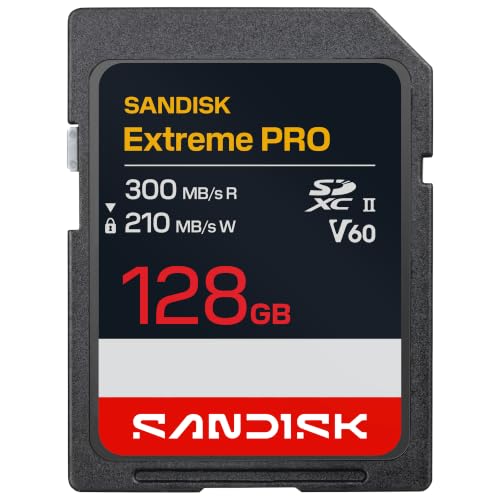
SanDisk Extreme PRO SD UHS-II 128GB — The UHS-II all-rounder
SanDisk’s UHS-II entry publishes the most complete speed statement in this guide: up to 300MB/s read speeds and up to 210MB/s write speeds, a V60 rating with U3 and C10, designations for 6K and 4K UHD, an explicit aim at prosumers and professionals, and RescuePRO software named in the listing. Hold the components apart, because they answer different questions. The V60 class certifies a sustained write floor of 60MB/s, double V30’s floor, and that certification is what a high-bitrate video mode actually consults. The up-to-210MB/s write maximum describes best-case absorption, relevant to burst clearing. The up-to-300MB/s read maximum describes offload pace through a UHS-II reader. A buyer who can say which of the three numbers their work depends on has understood this card, and this category.
The 6K designation signals the intended territory: cameras recording beyond 4K, or at 4K bitrates that trouble lesser media, plus stills bodies whose burst rates fill buffers faster than V30 cards clear them. At 128GB, the card suits a day of such work with disciplined offloads, and its positioning for prosumers as well as professionals is accurate — this is the tier where a serious enthusiast with a UHS-II body and demanding modes belongs, not a luxury purchase. RescuePRO’s presence in the listing adds a recovery-software dimension to the purchase; recovery tools are a remedy rather than a promise, but their inclusion reflects the professional context SanDisk expects this card to work in.
Against the Lexar 2000x cards, the SanDisk’s argument is the published write maximum and the V60 balance of speed and cost position; the Lexars counter with V90 certification. Against its own UHS-I sibling, the argument is the bus itself, available only to bodies and readers that speak UHS-II. The fallback rule applies with full force: seat this card in a UHS-I camera and it behaves as a UHS-I card, its second row of contacts unemployed. That is not a flaw in the card but a property of the standard, and it is why this guide insists on the body check before the card choice, every time, without exception.
- Format: full-size SD, UHS-II
- Capacity: 128GB
- Read speed: up to 300MB/s stated in listing
- Write speed: up to 210MB/s stated in listing
- Speed classes stated: V60, U3, C10
- Extra stated: 6K and 4K UHD designations; RescuePRO
Strengths
- Complete published speed picture: read maximum, write maximum, and a V60 floor.
- V60 certification doubles the sustained floor available to high-bitrate recording.
- Recovery software named in the listing suits professional working contexts.
Trade-offs
- Every advantage requires UHS-II hardware at both camera and reader ends.
- V90-specified recording modes remain above this card’s certified class.
- 128GB is consumed quickly by the very modes the card is bought for.
Best for: UHS-II body owners recording high-bitrate 4K or 6K and shooting deep bursts.
Not suited for: UHS-I camera owners, who would pay for a bus they cannot use.

Lexar Professional 2000x SD 256GB — V90 capacity flagship
The 2000x line is Lexar’s professional summit, and at 256GB it pairs the guide’s highest video class with serious capacity. The listing states a 300MB/s read figure, an 8K designation, V90 and U3 classes on the UHS-II bus, compatibility with DSLR and cinema-quality video cameras, and backwards compatibility with UHS-I devices. V90 is the headline that matters most: it certifies sustained writing at 90MB/s or better under the class’s conditions, the floor that the most demanding recording modes in consumer and cinema cameras specify. Where the SanDisk UHS-II card publishes a higher write maximum, the Lexar certifies a higher write floor, and for a recording that cannot be allowed to stop, the floor is the figure with consequences.
Cinema work explains the capacity. High-bitrate recording consumes storage at a pace stills shooters find startling, and a 256GB card is what a half-day of such material looks like before offload discipline even enters the discussion. The stated 300MB/s read figure serves the other end of that workflow, where a quarter terabyte must move to a drive between setups or before a location wraps. The explicit mention of DSLR and cinema cameras, rather than photography alone, positions the card accurately: this is media for moving images first, with stills excellence as a by-product of the same sustained-write engineering.
The backwards-compatibility note in the listing deserves its plain reading: the card functions in UHS-I devices at UHS-I behaviour. That is a convenience for mixed kits, not a reason for a UHS-I owner to buy V90 media. For the UHS-II owner, the decision between this card and its 128GB sibling later in the guide is purely about how much high-bitrate material accumulates between offloads, since the listings state identical speed and class figures for both. Choose the capacity that matches your longest unbroken recording session, with margin, and let the identical specification make the choice feel as simple as it is.
- Format: full-size SD, UHS-II
- Capacity: 256GB
- Read speed: 300MB/s stated in listing
- Write speed: not stated in listing title; V90 certifies the sustained floor
- Speed classes stated: V90, U3
- Extra stated: 8K designation; backwards compatible with UHS-I devices
Strengths
- V90 is the highest sustained-write certification available in this guide.
- 256GB matches the appetite of high-bitrate and cinema recording days.
- A stated 300MB/s read figure keeps very large offloads practical.
Trade-offs
- No write maximum is published, so burst behaviour rests on the class certification.
- Full value demands UHS-II cameras and readers throughout the chain.
- Capacity and class both overshoot what stills-only shooters can use.
Best for: cinema and high-bitrate video work on UHS-II bodies, plus deep-burst stills.
Not suited for: stills photographers whose bodies and modes never leave V30 territory.

Lexar SILVER PRO SD 128GB — UHS-II value lane
Lexar’s SILVER PRO occupies the sensible middle of the UHS-II world: a stated 280MB/s read figure, a 4K designation, V60 and U3 classes on the UHS-II bus, and compatibility named for Canon, Sony, and Nikon cameras, aimed at professional photographers, videographers, and enthusiasts. The V60 certification matches the SanDisk UHS-II card’s sustained floor, which means the recording modes that specify V60 are equally available here. The stated read figure sits twenty megabytes per second below the guide’s 300MB/s listings, a difference that translates into seconds across a 128GB offload — real, but rarely decisive — while the card’s position in Lexar’s range typically makes it the gentler purchase, a relationship you should confirm on the listing rather than take from any guide.
The brand-name compatibility line is worth more than it appears. UHS-II adoption has been uneven across camera makers and generations, and a listing that names the three big full-frame ecosystems is speaking to owners who are unsure whether their body has the second row of pins. The answer still lives in your camera’s manual — no card listing can certify your slot — but the SILVER PRO is plainly designed for the mainstream of UHS-II bodies rather than for cinema exotica, and its 128GB capacity matches that mainstream’s daily pattern of bursts, 4K recording, and nightly offloads.
Two cards can share a capacity and still promise very different things, and the 2000x alongside this one proves exactly that point clearly. If your camera’s most demanding recording mode specifies V60, the SILVER PRO certifies exactly that floor and the extra class of the 2000x buys insurance rather than capability. If a mode specifies V90, the SILVER PRO is simply not the card, whatever its other virtues. That discipline — read the mode’s requirement, buy the class it names, spend the difference elsewhere — is the most valuable habit this category teaches, and the SILVER PRO exists for the large group of shooters whose honest requirement is V60.
- Format: full-size SD, UHS-II
- Capacity: 128GB
- Read speed: 280MB/s stated in listing
- Write speed: not stated in listing title; V60 certifies the sustained floor
- Speed classes stated: V60, U3
- Video designation stated: 4K
Strengths
- V60 certification covers the high-bitrate modes most UHS-II owners actually use.
- A stated 280MB/s read figure keeps offloads close to the guide’s fastest.
- Positioned for mainstream Canon, Sony, and Nikon UHS-II bodies.
Trade-offs
- No published write maximum to inform burst expectations.
- V90-specified modes are beyond its certification.
- Its advantages vanish entirely in a UHS-I slot.
Best for: UHS-II owners whose demanding modes specify V60 and whose days end with an offload.
Not suited for: cinema modes that name V90 media in their requirements.

SanDisk Extreme PRO SD 256GB — Fastest UHS-I at 256GB
The 256GB version of SanDisk’s UHS-I flagship keeps the up-to-250MB/s read figure of its 128GB sibling and raises the published write maximum to up to 170MB/s, with the same V30, U3, and C10 classes, the same 4K UHD and Full HD designations, and the same SanDisk app backup support. That raised write figure is the detail to notice. Two cards in one family, at two capacities, publish different write maximums, which is precisely why this guide quotes listings individually instead of describing families once. A buyer comparing the pair on the read figure alone would miss the difference that matters more in the camera.
Capacity doubles the working pattern described for the smaller card. A 256GB UHS-I flagship suits the shooter whose days are long and whose offload happens once, at the end, through a reader that can use the card’s faster signalling: the wedding principal photographer, the tournament shooter, the travel videographer on UHS-I bodies. The published write maximum speaks to burst absorption across that long day, while the V30 floor continues to certify the recording behaviour underneath it. Nothing about the larger card changes the bus rules; it remains a UHS-I card, with a UHS-I ceiling in foreign slots and full value only through compatible readers.
Between this card and the 128GB sibling, the deciding questions are how much material a day produces and whether the write maximum’s difference aligns with your burst habits. Between this card and the UHS-II tribe, the deciding question remains the body you own. It is entirely coherent to buy this card today for a UHS-I body and UHS-II media later for its successor; cards are consumables with working lives, and matching each purchase to the equipment in hand beats paying repeatedly for a future that keeps receding. Check the current listing before ordering, since family line-ups at these capacities are revised more often than their names suggest.
- Format: full-size SD, UHS-I
- Capacity: 256GB
- Read speed: up to 250MB/s stated in listing
- Write speed: up to 170MB/s stated in listing
- Speed classes stated: V30, U3, C10
- Extra stated: backup and transfer with the SanDisk app
Strengths
- The highest published write maximum among this guide’s UHS-I cards.
- 256GB supports full professional days on UHS-I bodies with one evening offload.
- App-supported backup suits laptop-free travel workflows.
Trade-offs
- Maximum read figures still depend on a compatible reader.
- V30 certification is the ceiling for specified recording modes.
- A week of material on one card demands a serious backup routine.
Best for: principal shooters on UHS-I bodies with long days and single evening offloads.
Not suited for: bodies whose specified recording classes start at V60.

Lexar Professional 2000x SD 128GB — V90 at 128GB
The 128GB 2000x carries the identical specification statement as its 256GB sibling: a stated 300MB/s read figure, 8K designation, V90 and U3 classes, UHS-II bus, DSLR and cinema camera compatibility, and backwards compatibility with UHS-I devices. That identity is itself the information. Lexar is telling buyers that capacity in this line is a pure size decision, with no performance tier hidden inside it, which is more transparency than many families offer. The V90 certification, certifying a 90MB/s sustained write floor, does the same work here as in the larger card: it qualifies this media for the recording modes that name V90 in their requirements, the most demanding class of modes in the consumer and cinema market.
Why choose 128GB of V90 media? Because high-bitrate work is often session-based rather than day-based. A cinema shooter working in controlled setups offloads between scenes; a hybrid shooter may need V90 only for specific modes used an hour at a time; a stills photographer with a flagship body may want certified burst headroom without buying capacity that mostly holds archives. In each pattern, the smaller card delivers the line’s full certified behaviour in the quantity actually consumed, and pairs naturally with a second identical card for rotation. Two 128GB cards also restore the failure boundary that one 256GB card gives up, a consideration professionals weigh heavily when the material is commissioned.
The same cautions from the larger sibling apply unaltered: no write maximum is published, so burst expectations rest on certification and reputation; the card’s value is locked inside UHS-II hardware; and its specification overshoots stills-only needs by design. What the 128GB card adds to the guide is proof that the summit of the speed market is not reserved for the largest capacities. Buyers whose requirement is genuinely V90 can meet it at the size their workflow consumes, and that is the correct shape for a professional purchase: the class the mode demands, the capacity the session consumes, nothing purchased twice.
- Format: full-size SD, UHS-II
- Capacity: 128GB
- Read speed: 300MB/s stated in listing
- Write speed: not stated in listing title; V90 certifies the sustained floor
- Speed classes stated: V90, U3
- Extra stated: 8K designation; backwards compatible with UHS-I devices
Strengths
- Full V90 certification at a session-sized capacity.
- Specification identical to the 256GB version makes the size choice clean.
- Pairs naturally as a matched two-card rotation for commissioned work.
Trade-offs
- High-bitrate sessions can fill 128GB faster than newcomers expect.
- No published write maximum accompanies the class certification.
- Entirely dependent on UHS-II hardware for its value.
Best for: session-based cinema work and V90-specified modes with regular offloads.
Not suited for: all-day high-bitrate recording without an offload point.
Where Do the Six Cards Stand on Bus, Class, and Published Figures?
| Card | Bus | Stated read | Stated write | Video class |
|---|---|---|---|---|
| SanDisk Extreme PRO 128GB | UHS-I | Up to 250MB/s | Up to 120MB/s | V30 |
| SanDisk Extreme PRO UHS-II 128GB | UHS-II | Up to 300MB/s | Up to 210MB/s | V60 |
| Lexar 2000x 256GB | UHS-II | 300MB/s | Not stated in listing | V90 |
| Lexar SILVER PRO 128GB | UHS-II | 280MB/s | Not stated in listing | V60 |
| SanDisk Extreme PRO 256GB | UHS-I | Up to 250MB/s | Up to 170MB/s | V30 |
| Lexar 2000x 128GB | UHS-II | 300MB/s | Not stated in listing | V90 |
The table’s most instructive column is the one full of absences. Two makers at the top of the market publish write maximums; one does not, relying on video-class certification instead. Neither approach is evasive, but they are not interchangeable, and a spreadsheet that silently filled the gaps would be lying to its reader. What can be compared cleanly is the certified floor, which climbs V30 to V60 to V90 across the set, and the bus, which divides the set into two populations that only overlap inside UHS-II slots. Everything else is a maximum, quoted with its grammar, useful for ranking offload expectations within a bus and meaningless across one.
Notice also what capacity does and does not do in this table. Within the Lexar 2000x line it changes nothing but size. Within SanDisk’s UHS-I line it changes the published write maximum. A buyer who assumed either pattern applied to both families would misread half the table, which is the practical argument for the listing-by-listing method this guide uses everywhere: in a market where family names stay fixed while specifications drift between capacities and generations, the listing in front of you is the only specification that is certainly about the card in your hand.
Why Does the Second Row of Contacts Change Everything?
A UHS-I card communicates through a single row of contacts, one lane of data whose practical ceiling the fastest listings in this guide approach with proprietary help. UHS-II adds a second row, providing additional lanes that lift the bus ceiling dramatically and let cards publish figures like the up-to-300MB/s reads and up-to-210MB/s writes seen here. The catch is architectural: both ends of the connection must have the second row. A UHS-II card in a UHS-I camera uses only the first row and behaves accordingly; a UHS-II card in a UHS-I reader offloads at UHS-I pace no matter what its packet promises. The standard was designed for graceful fallback, and graceful fallback is exactly what an uninformed buyer experiences as a fast card that mysteriously is not.
The buying consequence is a chain audit. Before paying for UHS-II media, confirm the camera body’s slot, then the reader, then even the cable and port on the computer if offload speed is part of the justification, because a chain moves at its slowest link. Photographers are often surprised to find their body qualifies while their reader, bought years earlier, silently caps every transfer. The reader is usually the cheapest link to upgrade and the most commonly forgotten. Conversely, a UHS-I body owner should feel no pressure from this section at all: the two SanDisk UHS-I flagships in this guide exist precisely because that installed base is enormous and well served.
Which Video Class Does Your Most Demanding Mode Require?
Camera manuals specify media requirements mode by mode, and the pattern is consistent: as bitrate climbs, the required video class climbs with it, from V30 for mainstream 4K through V60 for high-bitrate 4K and beyond, to V90 for the most demanding modes some bodies offer. The requirement is not advisory. A card below the specified class may refuse to start the mode, stop mid-recording, or produce files with errors, and none of those outcomes announce themselves in advance during stills shooting, which is why mode requirements must be read rather than discovered. Find the highest class named anywhere in your manual’s media table; that number, not your typical shooting, sets your card’s floor, because the day you finally use that mode is the day the floor is tested.
Headroom has a price curve worth understanding. Each class step costs more per gigabyte than the last, and the step from V60 to V90 is the steepest in this guide. That pricing reflects genuinely more demanding sustained-write engineering, and it is worth paying when a mode requires it or when burst behaviour at the highest level is a professional necessity. It is not worth paying as a vague gesture toward quality. A V30 card from a serious maker is not a worse card than a V90 card; it is a card certified for a different job. Matching class to requirement, with one step of headroom for a planned body upgrade at most, is the allocation that leaves money for the second card every professional kit needs anyway.
What Goes Wrong When Speed Is Bought by the Biggest Number?
The signature failure is the bus mismatch already described: a flagship UHS-II card in a UHS-I body, bought on a 300MB/s headline, delivering ordinary transfers while its owner blames the brand. A close relative is the reader mismatch, where the body qualifies, the card qualifies, and a years-old reader quietly caps the celebration. The third failure is subtler: buying read speed to fix a write problem. A photographer whose bursts stall needs sustained write behaviour and buffer relief, which live in the video class and the write figures, not in the read maximum printed largest on the packet. Treating the biggest number as the product is the root error from which all three failures grow.
Counterfeit flagships are the fourth failure, and they concentrate exactly here, because high-speed cards carry high prices that make fakes profitable. A counterfeit may report full capacity while holding a fraction, and its sustained behaviour will disgrace its printed class the first time a real mode is attempted. Buy through reputable listings, verify a new card by filling it completely and recording your camera’s most demanding mode for a sustained test, and treat a flagship at a fraction of its usual street position as a warning rather than a bargain. Speed this specialised is never accidentally cheap.
How Does a Burst Actually Drain Through a Card?
Understanding why sustained behaviour outranks maximums requires a clear picture of a burst’s plumbing. When the shutter opens repeatedly, frames land first in the camera’s internal buffer, a pool of fast memory that absorbs the initial sequence at full camera speed regardless of the card. The card’s job begins immediately but matters progressively: as the buffer drains onto the card, room returns for new frames, and the rate of that draining is governed by the card’s sustained write behaviour in partnership with the body’s own interface. A card with a high certified floor and strong sustained performance empties the buffer quickly, restoring full burst depth within seconds. A card that writes in strong gusts and weak lulls produces the familiar experience of a camera that shoots brilliantly, stutters, recovers partially, and stutters again, even though its packet advertised a heroic maximum.
This is why two cards can share a video class and still feel different, and why the published write maximums in SanDisk’s listings, while not sustained guarantees, are not meaningless either: they indicate the engineering headroom the maker built toward. It is also why burst testing belongs in the commissioning routine for any speed purchase. Shoot your longest realistic sequence, note how the camera behaves at the depth where your old card faltered, and compare honestly. The result is specific to your body, your file settings, and your card, which makes it more valuable than any laboratory figure, because the laboratory did not test your combination. Professionals keep such notes per body and per card, and over seasons those notes become a private database no review can replicate.
File settings bend the results more than newcomers expect. Compressed RAW formats reduce the per-frame burden and let a given card sustain longer effective bursts, while uncompressed formats and simultaneous JPEG recording increase it. A shooter who finds a V60 card insufficient at uncompressed settings may find the same card entirely adequate with a saner file choice, at no cost to the delivered work. Card buying and camera configuration are one decision wearing two hats, and the cheapest speed upgrade in this entire guide is sometimes a menu setting rather than a purchase.
What Does an Offload Session Look Like at These Speeds?
Put the published read figures into a working scene. A 256GB card returning from a high-bitrate day carries a transfer that, even at brisk real-world rates, occupies a meaningful block of an evening; at the throttled pace of a mismatched reader it can stretch toward the night. The arithmetic scales linearly and unforgivingly, which is why deadline professions — news, sport, events with same-night delivery — treat the reader chain as equipment rather than accessory. Their method is worth copying at any scale: offload begins the moment shooting ends, verification follows before any card is formatted, and the card returns to the bag only after the files exist in two places. Speed figures serve that method by shrinking the window in which a tired person might shortcut it.
There is a second, quieter offload pattern that high read figures serve: the incremental transfer. Hybrid shooters increasingly pull selects during the day, between sessions, moving a few gigabytes at a time to a tablet for review or delivery. Here the card’s read behaviour through whatever reader or adapter is at hand shapes whether the habit sticks; a sluggish chain teaches avoidance, and the selects wait until evening, and sometimes until they matter less. The SanDisk UHS-I flagships’ app-supported transfer path speaks to this pattern directly, acknowledging that the modern offload often ends at a phone rather than a workstation. Whichever pattern is yours, the lesson is the same: measure your chain end to end once, with real files and a stopwatch, and let that measurement, not a packet, tell you what your speed purchase achieved.
When Does It Make Sense to Run Two Speed Tiers in One Kit?
Mixed kits are usually described as a compromise, but for many shooters they are the rational optimum. A flagship body with a UHS-II slot and a second body without one cannot share one card tier sensibly: the UHS-II cards waste their premium in the older body, and UHS-I cards waste the flagship’s slot. Running the SanDisk UHS-I flagships in the older body and V60 or V90 media in the flagship matches each purchase to the hardware that can honour it, and the total outlay is frequently lower than standardising upward. The discipline required is labelling, because the tiers look similar at midnight in a dark venue, and seating a UHS-I card in the flagship before its most demanding mode is the kind of error mixed kits invite. Numbered cards and a case layout that separates tiers by row are the standard defences.
The other rational mixture is by role rather than by body: flagship media for the modes that demand it, capacious UHS-I media for the long, undemanding recording that fills most hours. A hybrid creator might run V90 for the cinema mode used an hour a day and a 256GB UHS-I flagship for interviews and general work, gaining certified performance exactly where the manual demands it and capacity where hours accumulate. This pattern respects the truth that speed classes are requirements, not virtues, and it directs the budget toward the constraint that actually binds. Kits built this way look untidy in a spreadsheet and perform beautifully in the field, which is the correct order of priorities.
How Should Speed Cards Be Retired, Rotated, and Replaced?
High-speed media leads a harder life than its price suggests: it is written at full rate by demanding bodies, filled deeper than casual cards, and trusted with commissioned work. Rotation is the first defence, spreading wear across two or three cards rather than concentrating a season in one, and it doubles as the failure boundary discussed throughout this guide. Number each card, log its purchase date and primary body, and alternate assignments so usage evens out. The second defence is a retirement rule set in advance: a card that has served several heavy seasons, or that produces a single unexplained error, leaves front-line duty permanently, demoted to a reader-side life of transfers and backups or retired outright. At these prices the temptation is to extract full value, but the arithmetic of commissioned work runs the other way — one lost recording costs more than a decade of early retirements.
Replacement buying benefits from the same listing discipline used throughout this guide. Successor cards wearing familiar family names arrive with revised figures regularly, and the card you reorder by name may not be the card you own. Read the new listing as a stranger: bus, class, published maximums, capacity. That habit also protects against the opposite error, dismissing a revised card that has quietly improved. Speed media evolves faster than the bodies it serves, and a kit reviewed annually against current listings stays matched to its cameras instead of drifting into a museum of almost-right specifications. Keep the retired cards’ numbers in the log with their retirement dates; when a question arises about an old shoot, knowing exactly which physical card held it has settled more than one anxious evening.
What Will the Next Body Upgrade Do to Today’s Card Purchase?
Cards and bodies age on different clocks. A body is commonly replaced in three to five years; a good card can serve across two bodies, which tempts buyers to purchase tomorrow’s bus today. The temptation deserves a fair hearing and a firm limit. If a UHS-II body is genuinely scheduled within the card’s expected service, buying UHS-II media now costs little, because the cards will run in fallback mode meanwhile and reach full value on arrival. If the upgrade is a hope rather than a plan, the same purchase strands money in an unemployed second row of contacts for years, while UHS-I flagships bought for the body in hand deliver their full published value every single day. The honest question is not whether you will ever own a faster body, but whether its arrival date is written anywhere outside your imagination.
There is a subtler future-proofing that does work regardless of timing: buying the video class one step above today’s requirement when the price gap is small. Classes remain meaningful across bus generations in a way maximums do not, and a card certified beyond your current modes will satisfy a future body’s mainstream modes even if its flagship modes demand more. Treat that as insurance with a defined payout, priced accordingly, and refuse the grander version of the argument that ends with V90 media in a V30 life. Speed buying rewards precision about the present and modest, specific provision for the future; it punishes, with remarkable consistency, purchases made for a photographer the buyer has not yet become.
Why Do Two Identical Cards Sometimes Benchmark Differently?
Owners who test carefully occasionally find that two cards of the same model, bought months apart, transfer at measurably different rates, and conclude that one must be faulty or fake. Sometimes that conclusion is right, which is why the full-capacity verification test matters. But legitimate variation exists as well: makers revise controllers and NAND sources within a model’s life without changing its name or its certified classes, because the certifications, not the internal recipe, are the product’s public contract. A card is obliged to meet its V60 floor; it is not obliged to match a sibling’s maximums. This is the final reason this guide anchors its advice to classes and treats maximums as expectations rather than entitlements. The contract survives revisions; the recipe does not, and buyers who understand which of the two they actually purchased stop being surprised by a market that has always worked this way.
One practical corollary follows for teams. When several shooters share a pool of fast media, standardise on one card per bus tier and buy the pool at one time from one reputable listing, so the pool’s behaviour is uniform and any outlier card is immediately visible as an outlier. Mixed vintages of the same model are manageable for a solo shooter who knows their history; in a shared pool they become folklore, with shooters swearing by or against individual cards nobody can identify. Numbered cards, a simple sign-out habit, and a shared note of each card’s test results convert that folklore into a system, and systems are what let a team trust its media on the days when trust is the whole assignment.
And when the pool grows, resist the urge to grade cards by anecdote after a single shoot. One slow offload can be a cable, a port, a nearly full card, or a computer busy with something else; the stopwatch test with real files, repeated once, separates the card from its circumstances. Fast media attracts strong opinions because its failures are felt at deadline moments, and strong opinions make poor maintenance records. The log, as ever, is the antidote: dates, bodies, test results, retirements, written down while the details are still boring enough to be true.
Keep that log beside the cards rather than in a notebook across the room, because the moment a card’s history is needed is always the moment when nobody will walk across the room for it. A line of tape on the card case, a note in the phone that travels with the kit, a shared document the whole team can open from the venue — the medium matters far less than the proximity. Storage discipline succeeds or fails on friction, and every step removed between a question and its answer is a question that will actually get answered in the field, under pressure, at the hour when the answer decides whether a card goes into a camera or into the discard pocket for good, without hesitation, second-guessing, or the quiet hope that a doubtful card might behave better on the assignment that matters most, which is, of course, precisely the assignment on which doubtful equipment chooses to stop being doubtful and starts being simply broken, in front of everyone, without any remaining ambiguity whatsoever, at the exact moment when no spare, no workaround, and no apology can recover what was lost or explain, to anyone who trusted the team, why a known risk was carried into the field unaddressed when a two-minute check would have removed it.
Final Recommendation
Let the body decide first. Owners of UHS-I cameras should choose between SanDisk’s two flagships by capacity and burst habit: the 128GB with its up-to-120MB/s published write figure for event patterns, the 256GB with up to 170MB/s for longer days and single offloads. Owners of UHS-II bodies should read their manual’s highest specified class and buy exactly that tier: the SILVER PRO or SanDisk’s UHS-II card where V60 is specified, the 2000x at 128GB or 256GB where V90 is named. Pair whichever card you choose with a reader that honours its bus, test it at your most demanding mode before paid work, and buy the second card sooner than feels necessary. Speed bought this way — bus first, class second, maximums third — is speed you will actually experience.
Frequently Asked Questions
Will a UHS-II card make a UHS-I camera faster?
No. The card falls back to UHS-I behaviour in a UHS-I slot, because the second row of contacts has nothing to connect to. Its video class certification still describes its sustained floor, but the bus-dependent maximums will not appear. UHS-I owners are better served by the fastest UHS-I cards in this guide, bought at UHS-I prices.
Is V90 necessary for 4K recording?
Only where a camera’s high-bitrate mode specifies it. Mainstream 4K modes commonly specify V30, and higher-bitrate variants V60. The requirement lives in your manual’s media table, mode by mode. Buying V90 for a body whose modes top out at V30 purchases certification your camera will never consult.
Why do the Lexar listings publish no write speed?
Lexar’s 2000x listings state a read figure and rest their in-camera case on video-class certification: V90 certifies a sustained write floor of 90MB/s. A certified floor and a published maximum are different kinds of evidence, and for recording reliability the floor is arguably the more relevant one. Burst behaviour beyond the floor cannot be compared on paper between these listings and SanDisk’s.
How much difference does a UHS-II reader make?
It is the difference between the bus existing and not existing at the desk. A UHS-II card in a UHS-I reader offloads at UHS-I pace regardless of its published figures. If offload speed forms part of your reason for buying UHS-II media, budget for the reader in the same purchase and verify the whole chain with a timed transfer of real files.
Are the fastest cards worth it for stills alone?
They can be, for two reasons: sustained write behaviour influences how quickly a flagship body’s buffer recovers during long bursts, and read speed shortens large offloads. A stills shooter whose bursts are short and whose offloads are leisurely will feel neither benefit and should buy capacity or a second card instead. The case for speed in stills is real but specific.
What test should a new high-speed card pass before a paid job?
Fill it completely and verify the data, record a sustained clip in your camera’s most demanding mode, shoot your longest realistic burst sequence, and time a full offload through your actual reader. That sequence exercises capacity honesty, sustained writing, burst absorption, and the transfer chain — the four things you are paying for — inside your own equipment, where the results actually apply.
Related Guides
Speed is one axis of card buying; size is another, and the 64GB micro SD cards guide works through the capacity most small devices use. The curious history of a size the market abandoned is told in the 200GB micro SD cards guide, and shooters weighing small cards for camera duty should read the micro SD cards for mirrorless cameras guide, where sustained writing matters more than any headline figure.


