What's inside
- Key Takeaways
- Quick Picks
- How We Chose These Picks
- How Do the Six Cards Differ Once the Label Is Read Properly?
- What Do the C, U, and V Markings Actually Certify?
- Which Capacity Matches a Shooting Pattern, Rather Than a Guess?
- What Mistakes Do Buyers Make When the Packet Says Class 10?
- Final Recommendation
- How Does Each Card Behave Across a Full Working Month?
- Why Does Sustained Writing Matter More Than Any Number on the Packet?
- How Should a Card Kit Be Organised Once You Own Several Sizes?
- What Should You Check During the First Week With a New Card?
- Frequently Asked Questions
- Related Guides
As an Amazon Associate I earn from qualifying purchases. This post may contain affiliate links at no extra cost to you.
widgetverdict.com is reader-supported. When you buy through links on our site, we may earn an affiliate commission.
Search for the best class 10 sd cards today and you will find a label that has quietly outlived its own meaning. Class 10 was once the fast end of the SD Association’s speed system, a guarantee that a card could sustain at least ten megabytes per second of sequential writing. Modern cameras ask for far more than that floor, and the six full-size SD cards gathered here all clear it by a wide margin: every pick in this guide carries U3 and V30 markings alongside the familiar C10 circle, which means each one is certified for sustained writing at thirty megabytes per second or better, three times the Class 10 promise. The interesting question is no longer whether a card is Class 10. It is what sits on top of that old baseline, and how much of it your camera can actually use.
That shift matters because card shopping still runs on the oldest, simplest number on the packet. A buyer upgrading from an ageing card sees Class 10 printed large, assumes the job is done, and only later discovers that burst depth, 4K recording reliability, and offload time are governed by entirely different markings. This guide therefore treats Class 10 as the entry ticket rather than the destination. Each pick below is a full-size SDXC or SDHC card from SanDisk or Lexar, sold for cameras rather than phones, and each one earns its place through a different combination of capacity, stated transfer speeds, and video class. Two capacities repeat across brands, which is deliberate: comparing a 64GB SanDisk against a 64GB Lexar teaches more than a ladder of unrelated sizes.
One discipline runs through every section that follows. Transfer figures are quoted exactly as each listing states them, as maximum published speeds, because that is what they are. A card advertised with read speeds up to a given figure will reach that figure only with a cooperative reader, large sequential files, and a card in good health. Sustained write behaviour during a long video take or a rapid burst is a different measurement, and it is the V30 rating, not the headline read number, that speaks to it. Where a listing gives no transfer figure at all, this guide says so plainly instead of borrowing a number from a sibling product, because sibling products in these ranges frequently differ.
Capacity is the other axis of the choice, and it runs from 32GB to 512GB here. Thirty-two gigabytes remains a rational size for a second body, a travel backup, or a camera that shoots JPEG-heavy stills, while 512GB suits a week of 4K recording without a laptop nearby. The middle capacities, 64GB through 256GB, are where most photographers will land, and this guide gives them the most attention. Read the label lesson first if the markings confuse you; the picks will make considerably more sense afterwards, and so will every card you ever buy after them.
Key Takeaways
- Class 10 certifies only a 10MB/s sustained write floor; all six picks here also carry U3 and V30, tripling that guaranteed floor to 30MB/s.
- The C, U, and V markings answer different questions: C is the legacy class, U is the UHS-era minimum write, and V is the video class tied to sustained recording.
- Lexar’s SILVER cards state a 225MB/s maximum read figure, while the Silver Plus 64GB is the rare pick here that also publishes a write figure, 150MB/s.
- SanDisk’s 512GB Extreme PRO states the highest published figures in this guide, up to 250MB/s reading and up to 170MB/s writing, over a UHS-I bus.
- The 32GB Extreme PRO is a reminder that small capacities still make sense as spares, with published figures of up to 100MB/s read and 90MB/s write.
- Buy on the V rating and your camera’s requirements first, then capacity, then headline read speed, in that order.
Quick Picks
| Pick | Badge | Why it is here |
|---|---|---|
| SanDisk Extreme PRO SDXC 64GB | The reference card | C10, U3, and V30 in a mainstream 64GB size from the line most camera bags already contain. |
| Lexar SILVER SD 128GB | Fast-reading 128GB | A stated 225MB/s maximum read speed with V30 and U3 at the capacity many shooters pick first. |
| Lexar Silver Plus SD 64GB | Published write speed | 205MB/s read and 150MB/s write figures both stated, a combination few UHS-I listings offer. |
| SanDisk Extreme PRO SDXC 32GB | The compact spare | Up to 100MB/s read and 90MB/s write in a small card suited to backup duty and lighter shooting. |
| Lexar SILVER SD 256GB | Room to keep shooting | The SILVER line’s 225MB/s stated read figure stretched across 256GB for long recording days. |
| SanDisk Extreme PRO SD 512GB | The capacity flagship | Up to 250MB/s read and 170MB/s write published figures with half a terabyte in one slot. |
How We Chose These Picks
Eligibility began with the label itself: a pick had to be a full-size SD card, not a microSD in an adapter, and its listing had to state Class 10 explicitly or carry the cluster of markings that includes it. From there the filter tightened around video class, because a guide framed by an old stills-era label owes readers cards that also satisfy modern recording. Every survivor carries V30, which aligns the whole set with 4K recording requirements as the listings themselves claim, and U3, the UHS speed class that matches that video floor. Cards that were merely Class 10, with nothing above it, were left out on purpose; recommending them in 2026 would teach exactly the shopping habit this guide argues against.
Brand spread was the second consideration. SanDisk’s Extreme PRO and Lexar’s SILVER families dominate this corner of the market, and including both lets the guide compare two philosophies at matched capacities: SanDisk leans on a long-established pro line whose larger cards publish both read and write figures, while Lexar’s SILVER range leads with a high stated read figure and its Silver Plus variant publishes a write figure as well. Capacities were spread deliberately from 32GB to 512GB so that the capacity argument could be made with real products rather than abstractions. Finally, each listing was read for what it does not say. One pick below publishes no transfer speeds at all, and it stayed in the guide because its speed classes still certify the behaviour that matters most, which is itself a useful lesson.

SanDisk Extreme PRO SDXC 64GB — The reference card
Start with the card against which the rest of this guide is quietly measured. The 64GB Extreme PRO’s listing is strikingly restrained: it states the format, the capacity, the UHS-I bus, and the trio of C10, U3, and V30 classes, plus a 4K UHD designation, and then stops. No read figure, no write figure. In a market where rival packets shout three-digit speeds, that restraint could look like a gap, yet it also clarifies what a buyer is actually guaranteed. The classes are certifications with defined minimums. V30 promises sustained sequential writing of at least 30MB/s, which is the behaviour a 4K video mode depends on from the first second of a clip to the last, and U3 certifies the same floor under the UHS testing regime. A photographer whose camera records 4K and shoots bursts in RAW is, on paper, covered by those promises even without a headline number.
Sixty-four gigabytes is the size at which this balance makes the most sense for a first serious card. It holds a long day of stills for most shooters, several substantial 4K clips, and it remains small enough that losing or damaging it does not erase an entire trip. Pairing two 64GB cards and rotating them is a working method many event photographers prefer over one enormous card, because the rotation forces a natural backup rhythm at every swap. This SanDisk fits that method neatly: same line, same classes, predictable behaviour in either slot of a dual-slot body. Owners of older Extreme PRO cards will find the markings familiar, which is not a criticism; consistency across generations is precisely why the line became a default.
Where does it sit against the Lexar Silver Plus at the same capacity, which publishes 205MB/s read and 150MB/s write figures? The honest answer is that the two listings make different kinds of claims. Lexar publishes maximums; SanDisk, in this particular listing, publishes certifications. A buyer who offloads through a fast reader every evening may value the stated maximums. A buyer who cares most about a guaranteed recording floor may value the classes. Neither listing lets you conclude that one card sustains writes faster than the other, and any guide claiming otherwise from these titles alone would be inventing data. Check the current listing before ordering, and check price on Amazon there, since street pricing between these two families moves often.
- Format: full-size SDXC, UHS-I
- Capacity: 64GB
- Speed classes stated: C10, U3, V30
- Video designation stated: 4K UHD
- Read/write figures: not stated in listing title
Strengths
- The full C10, U3, V30 certification stack covers stills bursts and 4K recording floors without ambiguity.
- 64GB supports a two-card rotation habit that spreads risk across a shooting day.
- The Extreme PRO line’s long presence means wide familiarity among rental houses and second shooters.
Trade-offs
- No published transfer figures in the listing, so offload speed cannot be compared on paper.
- UHS-I bus caps real-world transfers below what UHS-II cards and readers can reach.
- Buyers wanting one card for a full week of video will outgrow 64GB quickly.
Best for: photographers building a matched pair of dependable 64GB cards for a main camera body.
Not suited for: a solo card strategy on long 4K trips far from a laptop or backup drive.

Lexar SILVER SD 128GB — Fast-reading 128GB
Lexar takes the opposite approach to the SanDisk above: the SILVER 128GB leads with a number. Its listing states a 225MB/s read figure, alongside 4K support, V30, U3, and the UHS-I bus, and names Canon, Sony, and Nikon cameras as its intended company. Read that number correctly. It is a maximum read figure, describing how quickly finished files can move off the card under favourable conditions, typically through a good UHS-I reader with large sequential files. It says nothing directly about how fast the card absorbs a burst in-camera, which is governed by sustained write behaviour and certified, at its floor, by the V30 class. Buyers who conflate the two numbers end up puzzled when a card with a huge read figure still slows a burst; the two figures measure different journeys.
At 128GB, this card lands in the capacity band that suits a hybrid shooter best. A full day mixing stills and 4K clips fits comfortably, with headroom for the unplanned interview or the extra set at a concert. The stated read figure earns its keep at the end of that day, when a hundred-plus gigabytes move to a drive; even if real transfers land below the published maximum, a card engineered to read quickly shortens the least enjoyable part of the workflow. Lexar positions the SILVER range at photographers, videographers, and enthusiasts, and the 128GB size is the clearest expression of that pitch: large enough for serious work, not so large that a single failure becomes a catastrophe.
Compatibility deserves a sentence of its own because the listing names three camera brands. A UHS-I card works in UHS-II slots as well, running at UHS-I speeds, so this card is not excluded from newer bodies; it simply will not unlock their second row of pins. For owners of UHS-I bodies, which still make up a large share of cameras in daily use, that distinction is academic. What matters is that the V30 floor matches 4K recording demands as Lexar claims them, and that the capacity and read figure suit a card that lives in the camera for days at a time and then empties quickly at a desk.
- Format: full-size SD, UHS-I
- Capacity: 128GB
- Read speed: 225MB/s stated in listing
- Write speed: not stated in listing title
- Speed classes stated: V30, U3
- Video designation stated: 4K
Strengths
- A high stated read figure targets the offload bottleneck that ends every long shoot.
- 128GB balances stills and 4K video without concentrating an entire project on one card.
- V30 and U3 certifications cover the sustained-write floor that recording actually needs.
Trade-offs
- No write figure is published in the listing, so burst performance rests on the class floor alone.
- UHS-II bodies cannot use their faster bus mode with this card.
- The read maximum assumes a capable reader; an old USB reader will hide the benefit.
Best for: hybrid shooters on UHS-I bodies who empty a full card to a drive most evenings.
Not suited for: UHS-II camera owners determined to use their slot’s fastest transfer mode.
Lexar Silver Plus SD 64GB — Published write speed
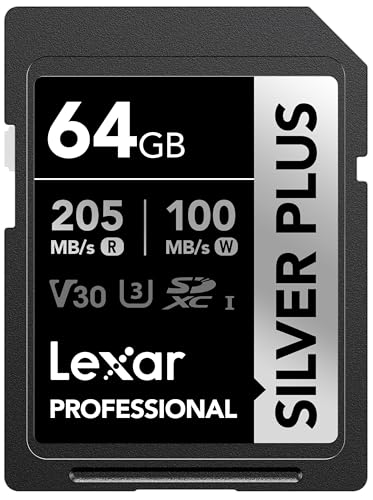
The Silver Plus 64GB does something quietly unusual for a UHS-I listing: it publishes both sides of the transfer story. Lexar states 205MB/s read speed and 150MB/s write speed for this card, framing it for photography, 4K video, and data storage, with a V30 rating on the packet. A published write maximum is not the same thing as a sustained write guarantee, and this guide will not dress it up as one, but it is still more information than most listings in this class volunteer. It signals that the card was engineered with in-camera absorption in mind, not merely fast emptying afterwards, and it gives burst shooters a figure to weigh instead of a shrug.
Consider what that means for a sports or wildlife photographer working in 64GB increments. Bursts fill buffers; buffers empty onto the card; the card’s write behaviour decides how soon the camera feels responsive again. A high published write figure does not promise the buffer clears at that rate for a hundred frames, yet across a long morning it correlates with a card that keeps the pipeline moving. The V30 certification underneath supplies the floor for video, so the same card can roll 4K between bursts without a swap. Few 64GB cards in this guide make that dual case as explicitly as this one does on its own listing.
Against its SILVER sibling at 128GB, the Silver Plus trades capacity for that published write figure and a slightly lower stated read figure, 205MB/s against 225MB/s. Which trade is right depends on the shape of your shooting. Video-heavy days favour capacity; burst-heavy stills favour write behaviour. Against the SanDisk Extreme PRO 64GB, the contrast is informational: Lexar publishes maximums, SanDisk’s listing publishes classes. A buyer who reads listings carefully is better served by either approach than by a card that publishes neither, and this guide’s insistence on quoting only what listings state is precisely what makes the comparison visible.
- Format: full-size SDXC, UHS-I
- Capacity: 64GB
- Read speed: 205MB/s stated in listing
- Write speed: 150MB/s stated in listing
- Speed class stated: V30
- Stated uses: photography, 4K video, data storage
Strengths
- Both read and write maximums are published, which is rare transparency at this tier.
- The stated write figure speaks directly to burst shooters’ main frustration.
- V30 certification keeps 4K recording covered on the same card.
Trade-offs
- 64GB fills quickly when bursts and 4K clips share a day.
- The stated read figure sits slightly below the SILVER line’s 225MB/s.
- Published write maximums still are not sustained-write guarantees across a full card.
Best for: burst-driven stills photographers who also roll occasional 4K clips on the same card.
Not suited for: videographers whose recording days routinely exceed what 64GB can hold.

SanDisk Extreme PRO SDXC 32GB — The compact spare
Every camera bag needs a card whose job is to exist when the main card fails, fills, or gets left in a reader at home. The 32GB Extreme PRO is built for that role, and its listing is refreshingly specific for a small card: up to 100MB/s read speeds and up to 90MB/s write speeds, with V30, U3, and C10 classes and a 4K UHD designation, compatible with cameras and camcorders. Those published figures are lower than the big cards in this guide, and that is fine. A spare card’s virtues are reliability and readiness, not records. What matters is that its classes match the main cards here, so swapping it in mid-shoot does not force a change of recording settings or a drop in video quality.
Thirty-two gigabytes also retains a niche as a primary card for particular habits. JPEG shooters, documentary photographers working in short sessions, and anyone handing a camera to a second shooter for a defined assignment can treat 32GB as a natural chapter size: one card per outing, per subject, per client. Archiving by card is an old discipline that small capacities enforce automatically. The up-to-90MB/s published write figure is comfortably above the V30 floor the card also carries, which hints at headroom for bursts even if, as always, the maximum is a best-case figure rather than a promise across the whole surface.
There is a generational note worth making. This listing’s model code and figures belong to an earlier Extreme PRO formulation than the 512GB card later in this guide, whose published figures reach up to 250MB/s read. Same family name, different eras, different numbers. That is exactly why this guide quotes each listing separately instead of describing the family once. A buyer assembling a mixed kit of spares and mains should expect the spare to be slower at the desk, plan offloads accordingly, and value it for what it is: insurance that happens to record 4K properly while it waits for its moment.
- Format: full-size SD (SDHC family size), UHS-I
- Capacity: 32GB
- Read speed: up to 100MB/s stated in listing
- Write speed: up to 90MB/s stated in listing
- Speed classes stated: V30, U3, C10
- Video designation stated: 4K UHD
Strengths
- Classes match the larger picks, so it substitutes without changing camera settings.
- Both read and write maximums are published despite the small capacity.
- Small size enforces tidy per-session archiving for organised shooters.
Trade-offs
- Published figures trail the larger, newer cards in this guide by a wide margin.
- 32GB is genuinely restrictive for 4K video as anything but an emergency card.
- Per-gigabyte value usually favours larger capacities in the same family.
Best for: a bag spare, a second body, or one-card-per-session stills work.
Not suited for: a primary video card on any shoot longer than a short clip list.

Lexar SILVER SD 256GB — Room to keep shooting
Double the 128GB SILVER and the character of the card changes even though the listing’s headline figures do not. The 256GB SILVER states the same 225MB/s read figure, the same V30 and U3 classes, the same 4K designation and UHS-I bus, and names the same Canon, Sony, and Nikon audience. What changes is the working method the capacity invites. A 256GB card can hold a multi-day trip’s stills or a serious amount of 4K footage, which suits travellers who shoot all day and back up opportunistically rather than nightly. It also raises the stakes of discipline: the longer a card stays in service between offloads, the more irreplaceable material it accumulates, and the more a nightly backup habit matters.
For wedding and event teams, this size has a specific appeal. A second shooter can work an entire long day on one card, hand it over at the end, and keep the chain of custody simple. The stated read figure helps again at handover, since a quarter terabyte is a meaningful transfer even at brisk speeds. In-camera, the V30 floor remains the operative promise for recording, unchanged by capacity. Buyers sometimes assume a bigger card in the same line writes faster; the listing gives no basis for that assumption here, and this guide will not supply one. Same classes, same stated read figure, more room: that is the whole, honest proposition.
Choosing between this card and the 512GB SanDisk below is a study in priorities. The SanDisk publishes both read and write figures and doubles the capacity again, at what is typically a different price tier, though you should check price on Amazon rather than trust any guide’s memory of tiers. The Lexar’s case rests on the SILVER line’s stated read speed and a capacity that already exceeds most single-project needs. Photographers who split work across two bodies often prefer two cards of this size, one per body, over a single giant card shared between them, and that instinct is sound: it keeps each body’s material separate and halves the exposure if one card is lost.
- Format: full-size SD, UHS-I
- Capacity: 256GB
- Read speed: 225MB/s stated in listing
- Write speed: not stated in listing title
- Speed classes stated: V30, U3
- Video designation stated: 4K
Strengths
- 256GB covers multi-day stills trips or long event days without a swap.
- The line’s 225MB/s stated read figure keeps big offloads manageable.
- Identical classes to the 128GB version make mixed kits predictable.
Trade-offs
- More material accumulates between backups, raising the cost of any failure.
- No write figure is published, as with the smaller SILVER.
- UHS-I transfer ceilings apply regardless of capacity.
Best for: event second shooters and travellers who offload every night or two.
Not suited for: a backup routine best described as “eventually” — capacity magnifies that risk.

SanDisk Extreme PRO SD 512GB — The capacity flagship
The largest card in this guide is also its most forthcoming on paper. SanDisk’s 512GB Extreme PRO publishes up to 250MB/s read speeds and up to 170MB/s write speeds over UHS-I, with V30, U3, and C10 classes, 4K UHD and Full HD designations, and a mention of backup and transfer through the SanDisk app. Those are the strongest published figures in this set, and they arrive attached to half a terabyte of capacity. The combination defines a particular user: someone whose recording days are long, whose stills are numerous, and whose offload sessions benefit from every increment of read speed a UHS-I card can offer. Documentary videographers working away from base for a week are the obvious example.
UHS-I deserves emphasis here because the figures invite a misunderstanding. Reaching up to 250MB/s on a UHS-I card relies on proprietary signalling that only compatible SanDisk readers fully exploit; in a generic reader or an older camera, transfers will be slower. The listing’s numbers are maximums under the right conditions, not a bus standard. In-camera, meanwhile, the camera’s own slot dictates the ceiling, and the V30 certification remains the guaranteed floor for recording. None of this diminishes the card. It simply means the buyer should pair it with a reader that can use its speed, otherwise part of what they paid for stays locked in the packet.
The app mention is easy to overlook and worth a moment. SanDisk positions backup and transfer support through its own app with this card, which suits phone-and-tablet workflows where a laptop is absent. For a travel shooter clearing space nightly to a phone-attached drive, that ecosystem support can matter as much as raw figures. Against the 256GB Lexar, this card doubles capacity and publishes a write figure the Lexar lacks; against its own 64GB sibling, it shows how far the family has travelled between generations. It is the pick for buyers who have already decided that one big, fast, well-specified card beats a rotation, and who back up with corresponding seriousness.
- Format: full-size SD, UHS-I
- Capacity: 512GB
- Read speed: up to 250MB/s stated in listing
- Write speed: up to 170MB/s stated in listing
- Speed classes stated: V30, U3, C10
- Extra stated: backup and transfer with the SanDisk app
Strengths
- Highest published read and write figures in this guide, at the largest capacity.
- Half a terabyte ends mid-trip card management for most recording patterns.
- App-supported backup suits laptop-free travel workflows.
Trade-offs
- Top transfer figures need a compatible reader to materialise.
- A single card holding a week of work concentrates risk severely.
- Still a UHS-I card, so UHS-II slots cannot use their fastest mode.
Best for: documentary and travel videographers running long days on one card with nightly backups.
Not suited for: casual shooters, for whom the capacity and speed both exceed any plausible need.
How Do the Six Cards Differ Once the Label Is Read Properly?
| Card | Capacity | Stated read | Stated write | Classes |
|---|---|---|---|---|
| SanDisk Extreme PRO 64GB | 64GB | Not stated in listing | Not stated in listing | C10, U3, V30 |
| Lexar SILVER 128GB | 128GB | 225MB/s | Not stated in listing | U3, V30 |
| Lexar Silver Plus 64GB | 64GB | 205MB/s | 150MB/s | V30 |
| SanDisk Extreme PRO 32GB | 32GB | Up to 100MB/s | Up to 90MB/s | C10, U3, V30 |
| Lexar SILVER 256GB | 256GB | 225MB/s | Not stated in listing | U3, V30 |
| SanDisk Extreme PRO 512GB | 512GB | Up to 250MB/s | Up to 170MB/s | C10, U3, V30 |
Read down the classes column and the table looks monotonous, which is the point: the certification floor is uniform across the guide, so differentiation lives in capacities and in which maximums each maker chose to publish. Read across the 64GB row pair and you see the guide’s central contrast in miniature. Lexar publishes two maximums for the Silver Plus; SanDisk publishes none for its 64GB card, relying on the class stack. Neither approach is dishonest, but they reward different reading habits, and a buyer comparing across brands has to hold both kinds of claim in mind at once without converting one into the other.
The capacity ladder tells its own story. Figures climb with size in the SanDisk family, from up to 100MB/s read at 32GB to up to 250MB/s at 512GB, reflecting different generations and tiers wearing one family name. Lexar’s SILVER pair holds its stated read figure constant across 128GB and 256GB, presenting capacity as a pure size choice. If your workflow empties cards nightly, the smaller sizes in each line are rational; if it empties weekly, the ladder’s top rungs earn their place. What the table cannot show is sustained behaviour deep into a card’s capacity, which no listing here quantifies, and which is why the V30 floor, identical everywhere, remains the safest shared assumption.
What Do the C, U, and V Markings Actually Certify?
The C number is the original Speed Class, defined in megabytes per second of minimum sustained sequential write: Class 10 means ten. It dates from an era when cards served standard-definition video and modest stills, and it survives on packets largely because cameras and buyers still recognise it. The U number arrived with the UHS bus and repeats the same idea in tens: U1 certifies 10MB/s, U3 certifies 30MB/s. The V numbers, the Video Speed Class, extend the scale upward for recording: V10, V30, V60, V90, each certifying that many megabytes per second of sustained writing under video-oriented testing. When a packet shows C10, U3, and V30 together, it is stating the same 30MB/s floor twice and the old 10MB/s floor once, a redundancy that confuses buyers into thinking three separate virtues are on offer.
Why does the floor matter more than the maximum? Because recording is unforgiving in a way that file copying is not. A camera writing a 4K stream cannot pause while the card catches up; if sustained writing dips below the stream’s demand, the recording stops or the file corrupts. The V class exists to certify that the dip does not happen under the class’s conditions. Burst stills are a softer version of the same physics: the buffer absorbs the first frames, then the card’s sustained behaviour decides how quickly the camera recovers. Maximum read speed, the number printed largest, governs none of this. It governs the journey home to your drive, which matters for workflow but never saved a recording.
Two further markings deserve decoding because they appear across the wider SD market even though this guide’s listings lean on C, U, and V. The A classes, A1 and A2, rate application performance for running apps from a card, relevant to phones and handheld consoles rather than cameras. The bus marking, UHS-I or UHS-II, describes the electrical interface and its ceiling, not a guarantee; a UHS-II card in a UHS-I camera behaves as a UHS-I card. Learn to read a packet in the order V, U, bus, capacity, and the marketing order (biggest number first) loses its power over the decision.
Which Capacity Matches a Shooting Pattern, Rather Than a Guess?
Capacity advice usually fails because it starts from the card instead of the day. Start from the day. Estimate your longest realistic shooting day in gigabytes: a RAW still from a modern body commonly occupies tens of megabytes, so a thousand-frame day is a substantial fraction of 64GB before video enters the picture, while 4K recording consumes gigabytes by the minute at higher bitrates. Then double the estimate, because the day you underestimate is the day the card fills during the one unrepeatable moment. That doubled figure is your minimum sensible capacity, and the picks here map onto it cleanly: 32GB for deliberate short sessions, 64GB for ordinary stills days, 128GB and 256GB for hybrid and event work, 512GB for video-led weeks.
There is a second, quieter capacity question: one card or two? Two 64GB cards cost roughly the discipline of swapping and gain you a failure boundary; one 128GB card gains you uninterrupted flow and loses that boundary. Dual-slot bodies soften the dilemma by mirroring, at the price of halving usable space. Travellers without laptops often prefer fewer, larger cards because every swap is a chance to lose a small object in an unfamiliar place. Studio shooters tethered or near a desk prefer the rotation. Neither answer is a personality test; match the strategy to where your backups physically happen, and let capacity follow strategy rather than the reverse.
One last capacity consideration belongs to video shooters who record long, unbroken takes: interviews, ceremonies, performances. A long take concentrates risk differently from a day of short clips, because a card fault late in the take endangers the whole recording rather than one clip among many. For that pattern, the sensible ceiling is the largest capacity that still gets fully backed up the same evening, and the sensible floor is a card whose V30 certification you have personally watched hold a full-length test recording at your camera’s highest bitrate. Several cards in this guide qualify on paper; the test converts paper into knowledge. Shooters who run that test once per new card, and log the result, stop having opinions about brands and start having data about their own kit, which is the point at which card buying stops being a recurring anxiety and becomes a solved, almost boring part of preparation.
What Mistakes Do Buyers Make When the Packet Says Class 10?
Treating Class 10 as a quality mark is the founding error this whole guide exists to correct. Class 10 certifies a floor that contemporary 4K cameras exceed by design; a card that is only Class 10, with no U3 or V30 beside it, can be a genuinely poor choice for recording even though its packet sounds reassuring. The second error is shopping by read speed alone, then blaming the camera when bursts stall. Read speed empties cards; sustained write behaviour fills them, and only the classes certify the filling. A third error follows naturally: assuming every card in a famous family performs alike, when the 32GB and 512GB Extreme PRO listings in this very guide publish figures two and a half times apart.
Capacity errors run in both directions. Buying the largest card as a substitute for a backup system concentrates a project’s entire value in one fragile object, while buying too small invites the mid-ceremony swap and the pocketed card that goes through the wash. Counterfeit risk is the final mistake, and it is a purchasing-channel error rather than a specification error: unusually cheap branded cards from unfamiliar sellers are a persistent problem in this market, so buy through reputable listings, test a new card by filling it completely before trusting it with paid work, and format cards in the camera that will use them, every time, as a matter of routine hygiene.
It is worth stating plainly why this guide did not simply crown the card with the largest published numbers. A buying decision built on one maximum collapses the moment a reader, a camera, or a shooting pattern changes, whereas a decision built on certified floors, honest capacities, and a defined job for each card survives those changes intact. The numbers matter, and they are quoted throughout; they are simply seated in their proper place, behind the classes and ahead of the anecdotes, where they can inform a choice without pretending to be the whole of it.
Final Recommendation
For most readers, the decision resolves into a short sequence. If you shoot stills with occasional 4K and want the most informative listing at a mainstream size, the Lexar Silver Plus 64GB publishes both transfer maximums and carries V30. If you prefer the established SanDisk line at the same size and are comfortable buying on certifications, the Extreme PRO 64GB is the reference choice. Hybrid shooters should step to the SILVER 128GB or 256GB depending on how often they offload, and the documentary-minded should take the 512GB Extreme PRO with a compatible reader and a strict nightly backup rule. Keep the 32GB Extreme PRO in the bag regardless; spares are cheap wisdom. Whichever you choose, you are buying far more than Class 10, and now you can prove it from the packet.
How Does Each Card Behave Across a Full Working Month?
Specifications describe a card on its first day. Working photographers live with cards across months of fill-and-format cycles, and behaviour over that span is where the six picks separate in ways a packet cannot show. The Extreme PRO 64GB settles into rotation duty gracefully because its class stack leaves nothing to configure: it goes into whichever body needs a card, records at the same certified floor, and comes out at night without a decision attached. Owners who run a pair of them describe the dullest possible experience, which in storage media is the highest praise available. Its lack of published transfer figures matters least in this pattern, because nightly offloads of 64GB are short with any competent reader.
The SILVER 128GB encourages a different rhythm. Its stated read figure makes it the card you reach for when the offload itself is the schedule problem, such as a tournament day with matches back to back and a desk session measured in minutes. Over a month, that speed shapes habit: you stop dreading the transfer, so you do it more often, so the card rarely sits full of unbacked-up work. Storage products that improve behaviour indirectly are underrated, and this is the SILVER’s quiet argument. Its 256GB sibling extends the same logic to longer intervals, and the honest caution from earlier bears repeating in monthly terms: the convenience of infrequent offloads must be matched by deliberate backups, or the card becomes a single point of failure holding weeks of material.
The Silver Plus 64GB earns its monthly reputation among burst shooters, the photographers most sensitive to how a card absorbs work rather than how it surrenders it. Across a season of sport, the published write figure translates into a camera that feels ready again sooner after each sequence, and that feeling compounds over hundreds of sequences. It is the pick most likely to be bought in multiples by one person for one specific job, rather than as a general-purpose card. The 32GB Extreme PRO, by contrast, spends most of its month in a bag pocket, and its value concentrates into the two or three moments a year when it saves a shoot outright; judging it by utilisation would miss the point of insurance entirely.
The 512GB Extreme PRO lives the most specialised month of the six. On a documentary production it may hold an entire location’s material, travelling in the camera by day and being mirrored to two drives by night, a routine its published read figure genuinely shortens. Its app-supported backup path suits the same pattern when the production’s base is a vehicle rather than an office. What a month with this card teaches is procedural rather than technical: label it, log it, and never let it become the only copy of anything overnight. Capacity this large rewards productions with systems and punishes improvisation, and that, more than any figure on its packet, is the dividing line between the buyers who love it and those who should choose two smaller cards instead.
Why Does Sustained Writing Matter More Than Any Number on the Packet?
Flash memory writes in a pattern that marketing figures politely ignore. A fresh, empty card writing one enormous file sequentially is the fastest scenario that exists, and it is the scenario maximum figures describe. Real cards write thousands of mixed files, fill gradually, and manage internal housekeeping as free space shrinks and previously written blocks are recycled. Sustained write behaviour is the measure of the card under those unglamorous conditions, held steady over time, and it is the behaviour the speed classes were invented to certify. When a listing states V30, it is claiming that even while doing that housekeeping, the card keeps sequential writing at or above thirty megabytes per second under the class’s test conditions.
This is also why two cards with identical class markings can feel different in a camera without either listing being wrong. The class certifies a floor, not a ceiling, and says nothing about how far above the floor a card cruises or how gracefully it behaves near full. Manufacturers tune controllers and choose NAND grades to hit price and performance targets the packet never itemises. The practical response is not cynicism but method: buy cards whose classes clear your camera’s demands with headroom, test each new card by filling it, and keep notes on which individual cards your bodies like. Experienced shooters have done this for decades, through CompactFlash and every format since, because the underlying truth has never changed: storage is a trust relationship with a specific physical object, not with a specification sheet.
Read speed deserves its defence before this section closes, because this guide has spent pages subordinating it. Offload time is real working time, multiplied by every shooting day in a career, and a card that empties at twice the speed returns hours across a season. The SILVER line’s stated 225MB/s figure and the big SanDisk’s up-to-250MB/s figure are therefore worth money to busy professionals, provided the reader and computer can honour them. The argument here has never been that read speed is unimportant. It is that read speed is the second question, asked after the recording floor is certified, because a fast-emptying card that stopped a recording has failed at the only moment that could not be repeated.
How Should a Card Kit Be Organised Once You Own Several Sizes?
Mixed kits like the one this guide assembles, spanning 32GB spares to a 512GB flagship, fail or succeed on organisation rather than specifications. The working system most professionals converge on has four elements. First, every card gets a number, written on its label with a fine marker, and that number is how the card is referred to in logs and conversation, because “the Lexar” stops identifying anything once you own three. Second, cards travel in a hard case with a strict orientation code: label up means empty and formatted, label down means it holds material that has not been backed up. That single habit has prevented more losses than any technology in this guide, because it makes a card’s state visible from across a room in bad light at the end of a long day.
Third, formatting happens in the camera, at the start of the card’s next assignment, never on the computer and never in a different body than the one about to use it. In-camera formatting aligns the file system with that body’s expectations and doubles as a final checkpoint: the act of formatting card four is the moment you confirm card four was actually offloaded. Fourth, retirement is planned rather than discovered. Cards accumulate write cycles and physical wear on their contacts, and a card that has served several heavy seasons should be demoted to low-stakes duty before it fails, not after. The 32GB spare in this guide is a natural final posting for an ageing card whose replacement has already joined the main rotation.
Where do the six picks slot into such a system? The two 64GB cards form the everyday rotation for a stills-led practice, numbered as a pair and swapped at natural breaks. The SILVER pair serves the hybrid bodies, with the 256GB reserved for the longest days. The 512GB SanDisk is logged like equipment rather than consumable, signed out to a production and signed back in. The spare lives in the case’s last slot, formatted, tested twice a year, and otherwise ignored. None of this requires buying all six; it requires deciding, for whichever cards you do own, what each one’s job is before the day it matters. A card with a defined job gets handled correctly by tired people at midnight, and tired people at midnight are who storage systems are really designed for.
What Should You Check During the First Week With a New Card?
Begin with the full-capacity test already described in the questions below: fill the card, verify the files, and confirm the capacity is honest before any real work touches it. Then shoot your camera’s most demanding video mode for a sustained clip, not a five-second sample, because short tests cannot reveal a card whose sustained behaviour fades as it warms or fills. Follow with a deliberate burst sequence in RAW, watching how the camera’s recovery feels compared with your previous card; you are calibrating expectations, not chasing a verdict. Finish the week by timing one real offload through your actual reader and noting the figure beside the card’s number in your log. That small archive of observations, repeated for each new card, turns future purchases from guesswork into comparisons against your own evidence, which is the only benchmark that ever matched your equipment, your reader, and your habits exactly.
Frequently Asked Questions
Is Class 10 fast enough for 4K video?
Class 10 alone certifies only 10MB/s of sustained writing, which many 4K modes exceed. What makes the cards in this guide suitable for 4K, as their listings claim, is the V30 rating certifying a 30MB/s sustained floor. Judge 4K suitability by the V number, never by the C number alone.
Why do some listings publish no read or write speed?
Some makers lead with certifications rather than maximums for particular models, as SanDisk does for the 64GB Extreme PRO here. The classes still guarantee minimum sustained behaviour. A missing maximum is missing information about best-case transfers, not evidence of a slow card, and it should be weighed as exactly that.
Will a UHS-I card work in a UHS-II camera?
Yes. UHS-II slots accept UHS-I cards and run them at UHS-I behaviour. You lose the faster bus mode a UHS-II card would unlock, but recording classes such as V30 continue to certify the same floor. Many working photographers run UHS-I cards in UHS-II bodies without any practical problem for 4K work.
Does a bigger card in the same family write faster?
Not by virtue of capacity alone. In this guide, SanDisk’s published figures do rise across its sizes because the cards belong to different generations and tiers, while Lexar’s SILVER pair holds its stated read figure constant across two capacities. Read each listing on its own terms instead of extrapolating from a sibling.
How should a new card be prepared before a paid shoot?
Fill it completely with test files or footage and verify the material reads back, which exposes counterfeit and faulty cards whose real capacity is smaller than printed. Then format it in the camera that will use it, shoot a short test including your highest-bitrate video mode, and only then trust it with work that cannot be repeated.
What reader should these cards be paired with?
A UHS-I reader from a reputable maker is the baseline, and owners of the 512GB Extreme PRO should confirm their reader supports SanDisk’s faster UHS-I signalling if they want transfers approaching the published maximums. An ageing reader can halve real offload speeds regardless of the card, making the reader the cheapest bottleneck to fix.
Related Guides
Speed classes are only one branch of card buying; endurance for continuous recording is another, and our high endurance micro SD cards guide covers cards built for dash cams and security cameras. If outright pace is your priority, the high speed SD cards roundup moves up to UHS-II flagships, and for the small-format side of the shelf, the 64GB micro SD cards guide applies the same label-reading discipline at the capacity most phones and action cameras use.


