What's inside
- Key Takeaways
- Quick Picks
- How We Chose These Picks
- Why Do ASUS Routers Keep Appearing in VPN Conversations?
- Which ASUS Model Matches Your House?
- How Do the Six ASUS Models Stack Up on Paper?
- What Should You Verify on Your Chosen Model Before Ordering?
- How Do You Set Up an ASUS Router as Your VPN Endpoint?
- What Mistakes Do Buyers Make Inside a Single Brand’s Range?
- How Does AiMesh Change the VPN Picture?
- What Does Living With One Brand’s VPN Firmware Teach You?
- What Happens to Guests, Children and Gadgets on a Tunnelled ASUS Network?
- Final Recommendation
- Frequently Asked Questions
- Related Guides
As an Amazon Associate I earn from qualifying purchases. This post may contain affiliate links at no extra cost to you.
widgetverdict.com is reader-supported. When you buy through links on our site, we may earn an affiliate commission.
Where to buy: the six ASUS models below are each linked to the Amazon listing whose title we checked, so the port counts and speed classes quoted in this guide are the ones attached to the exact model you would be ordering.
Shopping the best asus vpn routers is really shopping one firmware family at six different hardware tiers. ASUS has spent years folding VPN behaviour into its mainstream router line rather than treating it as a business add-on, and the result is a range where a compact dual-band box and a tri-band flagship share a recognisable vocabulary: VPN support stated in the listing, mesh compatibility through AiMesh, security features that the titles describe as subscription-free, and parental controls that do not disappear behind a paywall. The differences that matter are in the wired port maps, the radio packages and how much simultaneous load each processor tier was built to shoulder.
Two ASUS firmware ideas deserve plain-English explanations before the products, because they shape how these routers get used. VPN Fusion is ASUS’s name for running VPN connections alongside ordinary traffic with per-device assignment — the television goes through one tunnel, a games console through another or none, the work laptop stays direct. Instant Guard, named in one listing below, is the opposite direction made simple: a phone app that wraps your connection back to your home router when you are on untrusted public Wi-Fi. Both are firmware-level features whose exact menus and protocol options vary by model and firmware revision, so treat them as capabilities to confirm on your chosen model’s documentation rather than guarantees stamped identically on all six boxes.
What follows ranks the six by the households they serve: a dual-WAN all-rounder, a gaming-leaning 10G model, the port-rich BE88U, a Wi-Fi 6 value with Instant Guard in its title, a coverage-sized BE55, and a tri-band BE9700 flagship. Every title below states VPN support in words — that was the entry ticket for this list.
Key Takeaways
- All six picks state VPN support in their listing titles; the real separation is ports, radios and household size.
- VPN Fusion-style per-device routing is the ASUS feature that matters most in mixed households — confirm it on your model’s firmware pages.
- Instant Guard appears by name on the RT-AX3000S and serves the dial-home direction from a phone.
- AiMesh compatibility across the range means a second ASUS unit can extend coverage without replacing your VPN endpoint.
- Dual-WAN appears on the RT-BE58U and RT-BE9700 for homes where a second line guards the first.
- The RT-BE88U is the wired outlier: two 10G connections, one of them SFP+, plus eight further ports.
Quick Picks
| Pick | Badge | Why it earns its place |
|---|---|---|
| ASUS RT-BE58U WiFi 7 Router | Dual-WAN all-rounder | Wi-Fi 7 at 3.6 Gbps with dual-WAN, mesh and VPN support, one 2.5G port and four gigabit ports. |
| ASUS RT-BE86U WiFi 7 Gaming Router | 10G gaming-leaning pick | A 10G WAN port, 6.8 Gbps Wi-Fi 7 and four 2.5G ports on the model ASUS aims at gamers. |
| ASUS RT-BE88U WiFi 7 Router | Port-rich wired flagship | Two 10G connections including SFP+, four 2.5G and four gigabit ports for the deepest wired bench here. |
| ASUS RT-AX3000S Dual Band WiFi 6 Router | Instant Guard value | Wi-Fi 6 with built-in VPN and Instant Guard named in the title, plus AiMesh for later expansion. |
| ASUS RT-BE55 WiFi 7 Router | Coverage-sized Wi-Fi 7 | 3.6 Gbps Wi-Fi 7 rated for 2,000 square feet, with VPN support and a 2.5G port at a calmer tier. |
| ASUS RT-BE9700 WiFi 7 Router | Tri-band flagship | 9.7 Gbps across three bands including 6 GHz, dual WAN and four 2.5G ports for large, busy homes. |
How We Chose These Picks
The documentary filter came first, as it should for this keyword: each model’s listing title had to commit to VPN support in plain language, and all six here do — some with the words “VPN support”, one with “Built-in VPN” and Instant Guard, one with “Mesh + VPN Compatible”. Models from the same catalogue whose titles stayed silent were not smuggled in on the strength of the brand, because a guide about a feature should be built from products that advertise the feature.
Within that filter, the six places were spread across the range’s genuine fault lines. There are two 3.6 Gbps dual-band Wi-Fi 7 models that differ mainly in WAN arrangement and coverage rating; a gaming-positioned unit with a 10G port; a wired-heavy unit with SFP+; the Wi-Fi 6 holdout whose title leads with Instant Guard; and the tri-band flagship. That spread lets a reader self-select by infrastructure — how many wired devices, how fast the broadband, how large the home — instead of by vague notions of good, better and best.
We also weighted the ownership story ASUS tells in its own titles: subscription-free network security appears again and again, and it matters in a VPN conversation because several rival ecosystems charge monthly for the security layer that sits beside the tunnel. Parental controls are likewise listed as included. None of that replaces checking the firmware documentation for the exact VPN protocols and client counts your model supports, but it does describe a range whose maker expects these features to be used rather than upsold.
A word about what this list deliberately excludes, since the ASUS catalogue is wide. Travel-format ASUS hardware belongs to the travel guides on this site, where its natural rivals live; business rackmount thinking belongs elsewhere entirely; and older Wi-Fi 6 flagships, however fondly remembered, were passed over in favour of the current range a buyer can actually order new today. Six places is a discipline as much as a limit — it forces the guide to defend every seat at the table.
Why Do ASUS Routers Keep Appearing in VPN Conversations?
Part of the answer is longevity. ASUS has shipped VPN client and server functions in its consumer firmware for many product generations, so the knowledge base around it — the maker’s own help pages, the community’s accumulated answers — is deeper than for brands that added a tunnel toggle last year. When a provider changes its configuration format or a protocol needs a settings tweak, the odds that someone has already documented the fix for an ASUS box are simply better.
The other part is architectural. AiMesh means the VPN endpoint and the coverage layer are not locked together: the router holding your tunnels can remain the network’s brain while satellite units spread Wi-Fi through a difficult house, and when the endpoint is eventually upgraded, the satellites can often stay. VPN Fusion’s per-device thinking fits how households actually behave — nobody wants the doorbell camera and the work laptop following the same exit policy — and Instant Guard acknowledges that the person most exposed to hostile networks is usually the one holding a phone in an airport, not the house itself. Exact availability of each named feature is model- and firmware-dependent, which is why the detailed sections below keep returning to the titles: what each listing itself promises is the floor of what you should expect.
There is a resale and hand-me-down dimension too, rarely mentioned in buying guides. A router whose VPN features are documented, current and comprehensible holds its usefulness when it moves to a second life — a child’s first flat, a relative’s spare room, a small business’s backup shelf. ASUS units tend to make that journey well because the next owner inherits the same public documentation and interface logic the first owner learned. When you eventually upgrade within the range, the old box’s tunnel can even serve as the far end of a site-to-site link to its replacement, which is a graceful retirement for any piece of network gear.
Which ASUS Model Matches Your House?
The six detailed sections follow the Quick Picks order. Port counts are quoted from the listings throughout, because on this page the wired map is destiny: it decides what your NAS, desktop and second WAN can do long after the wireless novelty fades.

ASUS RT-BE58U WiFi 7 Router — Dual-WAN all-rounder
The RT-BE58U leads this list because its title describes the most balanced brief: Wi-Fi 7 at 3.6 Gbps, dual-WAN, mesh compatibility and VPN support, over a port map of one 2.5G and four gigabit connections. Dual-WAN is the feature households underrate until the first outage — a second line, whether a cheap cable plan or a 4G/5G feed, can carry the home when the main connection fails, and for a homeworker whose VPN tunnel is the office, that failover is the difference between a blip and a lost day.
As a VPN endpoint the BE58U is the sensible centre of the ASUS range: modern radios, a multi-gig port for the one device that needs it most, and the family’s shared firmware vocabulary of security and parental controls included rather than subscribed. It will not win a port-count contest against the BE88U below, nor should it — its job is to be the router a normal house buys once and stops thinking about, tunnels included.
Placement thinking is simple here. One 2.5G port means choosing its tenant: the NAS if local transfers rule your evenings, the desktop if the tunnelled work machine deserves the fast lane, or the uplink if a switch distributes the rest. Gigabit ports handle televisions, consoles and printers without complaint, and AiMesh leaves the door open to a satellite if a far bedroom later complains.
One ownership note applies across this whole list but lands hardest on the mid-range models: ASUS’s app and web interface are where you will live when adjusting tunnels, and the family resemblance between models means skills transfer. Learn the BE58U’s menus this year and a future BE9700 will feel like the same house with extra rooms. That continuity is a soft benefit no specification table captures, yet it is often the reason households stay inside one maker’s range for a decade — the VPN profiles, the device names, the household rules all carry their logic from one box to the next.
- Wireless: Wi-Fi 7 dual-band, 3.6 Gbps class
- WAN: dual-WAN stated in the listing title
- VPN: promised in the title in plain words
- Wired: one 2.5G port, four 1G ports
- Also in title: triple-level network security, parental controls included, mesh compatible
Strengths
- Dual-WAN failover protects the tunnel-dependent homeworker from single-line outages.
- The port map covers a typical wired household with one multi-gig lane in reserve.
- Security and parental controls are listed as included, matching the range’s no-subscription pitch.
Trade-offs
- A single 2.5G port forces a choice about which wired device gets the fast lane.
- Dual-band radios leave the 6 GHz band to the tri-band flagship below.
- Homes with many wired devices will outgrow five ports and need a switch.
Best for: a mainstream household that wants Wi-Fi 7, VPN duty and a second-WAN safety net in one unremarkable-looking box.
Not suited for: a wired-heavy home studio, where the BE88U’s ten-port bench is the honest answer.

ASUS RT-BE86U WiFi 7 Gaming Router — 10G gaming-leaning pick
ASUS labels the RT-BE86U a gaming router, and its title backs the label with a 10G WAN port, 6.8 Gbps Wi-Fi 7 and four 2.5G ports — but strip the word “gaming” away and what remains is simply the most WAN-forward model in this list’s middle tier. A 10G internet port matters to a small and growing group: households on multi-gig fibre whose provider hardware can actually feed it. For them, every other pick here except the BE88U would strand part of the plan at the door.
The VPN angle is written into the title as “Mesh VPN Compatible” with VPN support listed among the features, and in a gaming household the tunnel’s job is usually specific: reaching game servers in another region, or protecting a streamer’s connection, while the rest of the house’s traffic stays direct. That per-device split is exactly the pattern ASUS’s firmware family is known for organising, though the exact menus remain a model-level detail to confirm. Four 2.5G ports mean the gaming PC, a console and a NAS can all sit wired while the tunnel decisions happen above them.
There is a cooling and placement footnote: routers built around 10G ports and gaming traffic tend to live on desks rather than in cupboards, near the machines they serve. That is no bad thing for a tunnel endpoint either — accessible hardware gets its firmware updated, and its status lights actually get read when something feels slow.
Think carefully about which traffic the tunnel should carry in a gaming house, because the naive answer — everything — usually disappoints. Game traffic itself often wants the shortest physical path, not a detour through another region’s endpoint, unless the point is specifically to reach servers hosted there. The smarter pattern tunnels the streamer’s broadcast machine or the household’s televisions and leaves the competitive PC direct, or vice versa when a title’s servers demand it. A router at this tier gives you the per-device controls to run that pattern; the BE86U’s contribution is making sure the wired and WAN side never becomes the bottleneck while you do.
- Wireless: Wi-Fi 7, 6.8 Gbps class
- WAN: one 10G port
- VPN: the title lists support and mesh VPN compatibility
- Wired: one 10G port, four 2.5G ports
- Title also lists: subscription-free network security, parental controls included
Strengths
- The 10G WAN port removes the ceiling for multi-gig fibre households.
- Four 2.5G LAN ports wire the whole gaming-and-media bench without a switch.
- Gaming positioning brings traffic-prioritisation thinking that tunnelled play benefits from.
Trade-offs
- On a gigabit-or-slower plan, the 10G port is expensive headroom you cannot use yet.
- Dual-band design again leaves 6 GHz to the tri-band flagship.
- Its talents overlap the BE88U’s; wired-count buyers may prefer that model’s deeper bench.
Best for: a gaming household on fast fibre that wants its play, its streaming and its selective tunnelling on one capable router.
Not suited for: a quiet two-person flat on ordinary broadband, which would be paying for a WAN port it cannot feed.

ASUS RT-BE88U WiFi 7 Router — Port-rich wired flagship
Count the BE88U’s connections from its title: two 10G ports — one of them an SFP+ cage — plus four 2.5G and four gigabit ports. Ten wired connections is not a router specification so much as a small switch’s, and it reframes who this model is for: the home whose network lives on cable. Media servers, workstations, a NAS doing off-site backup through a tunnel, consoles that never touch Wi-Fi — the BE88U wires all of it directly and still has the SFP+ option for a fibre or DAC link to another switch or a server.
For VPN purposes that wired depth changes the experience in a way radio figures never will. Tunnel traffic concentrates on exactly these machines — the backup job, the remote-work desktop, the server you dial home to reach — and each of them sitting on a fast, uncongested port means the tunnel’s ceiling is set by the processor and the protocol, not by a shared radio band full of phones. VPN support is stated in the title, mesh compatibility is there for coverage, and the security layer is again listed as subscription-free.
The honest caveat is physical: this is a router that wants a shelf, a patch panel mentality and probably a labelled cable or two. Buyers whose network is three phones and a television will find its bench absurd. Buyers who have ever priced a separate 10G switch will find the arithmetic of combining both jobs into one ASUS box considerably more interesting.
There is a subtle VPN dividend in that SFP+ cage. A home server or NAS linked by fibre or a direct-attach cable sits on a private, electrically quiet run to the router, which suits a machine that is both the tunnel’s busiest local client and the target of every dial-home session. When you connect back from a hotel at midnight, the last hop to your files crosses that deliberate link rather than a daisy-chain of consumer switches. It is an enthusiast’s detail, certainly — but the BE88U is an enthusiast’s router, and its details cohere.
- Wireless: Wi-Fi 7, up to 7.2 Gbps class
- VPN: confirmed in the title
- Wired: two 10G ports (one SFP+), four 2.5G ports, four 1G ports
- Mesh: AiMesh-compatible positioning in the title
- Further title notes: subscription-free network security, parental controls included
Strengths
- The deepest wired map in this guide — ten ports across three speed tiers.
- SFP+ adds fibre and DAC flexibility that pure RJ45 routers cannot offer.
- Wired-first design keeps tunnelled machines off congested radio bands entirely.
Trade-offs
- Most households will never populate ten ports; the surplus is wasted money for them.
- SFP+ modules or cables are separate purchases the port itself does not include.
- Its size and cable count demand a deliberate network corner, not a TV-stand afterthought.
Best for: a wired-first home or small studio whose NAS, servers and workstations all deserve fast ports and tunnel access.
Not suited for: a wireless-only household, which would be buying a switch it never plugs anything into.

ASUS RT-AX3000S Dual Band WiFi 6 Router — Instant Guard value
The RT-AX3000S is the Wi-Fi 6 representative, and its title leads with the feature this guide cares about most in the dial-home direction: Instant Guard, alongside “Built-in VPN” in plain words. Instant Guard’s proposition, as ASUS presents the feature across its line, is a one-tap secure connection from your phone back to your home router when you join an untrusted network — the café, the hotel, the airport — so your traffic rides home through your own encrypted path instead of the venue’s open air. Availability and setup details are firmware matters, but the listing puts the name in the headline, which is where buying decisions get made.
Around that headline sits a sensible value package: dual-band Wi-Fi 6 in the AX3000 class, AiMesh compatibility so the box can start alone and gain satellites later, and parental control scheduling named in the title — a family-relevant detail, since the same household that wants a parent dialling home securely often wants the children’s devices on a schedule. As a client-side tunnel endpoint for ordinary streaming and browsing loads, a Wi-Fi 6 model of this class is entirely adequate; what you give up against the Wi-Fi 7 picks is radio headroom and the multi-gig port story, not the VPN concept itself.
This is also the natural recommendation for ASUS-curious buyers who want the firmware family’s habits — the interface, the app, the mesh path — at the gentlest commitment in the range. If the experiment delights, AiMesh means the BE58U or BE9700 can later take over as the main unit and this router can retire to satellite duty rather than a drawer.
Grandparents and spare-room networks deserve a mention in this model’s favour. A modest ASUS that a family member can be talked through over the phone — the app is familiar, the Instant Guard flow is short, the parental scheduling is legible — has a real-world value that spec comparisons flatten. Install it at a relative’s home and your own dial-in help sessions get easier too, because the interface on their end resembles the one on yours. Not every router purchase is for the buyer’s own house, and this is the pick here most naturally given away.
- Wireless: Wi-Fi 6 dual-band, AX3000 class
- VPN: built-in VPN stated in the listing title; Instant Guard named
- Mesh: AiMesh compatible
- Family angle in title: parental control scheduling
- Positioning: extendable router in the title’s own words
Strengths
- Instant Guard in the headline serves travellers who want their traffic routed home.
- AiMesh gives the cheapest seat in this list a genuine growth path.
- Wi-Fi 6 hardware keeps the purchase modest while the VPN roles stay complete.
Trade-offs
- Radio class and ports trail every Wi-Fi 7 pick here for local speed.
- Heavy whole-home client tunnelling will lean harder on its processor tier.
- Buyers wanting 2.5G wired lanes should start at the BE55 or BE58U instead.
Best for: a family or frequent traveller who wants ASUS’s dial-home story and mesh future at the range’s entry tier.
Not suited for: a multi-gig household, which will bump into this model’s ceilings on several fronts at once.
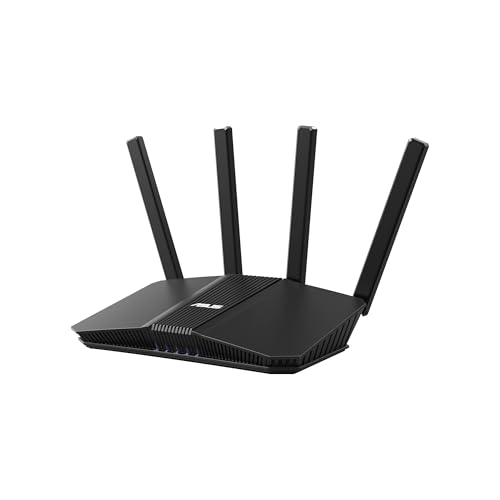
ASUS RT-BE55 WiFi 7 Router — Coverage-sized Wi-Fi 7
The RT-BE55’s title makes a coverage promise its siblings mostly avoid: 2,000 square feet, attached to a 3.6 Gbps Wi-Fi 7 package with VPN support, one 2.5G port and four gigabit ports. Read it as the BE58U’s close relative tuned for the single-router house — the place that needs one box to cover the whole floor plan credibly and will never install a second WAN line. Where the BE58U spends its budget on dual-WAN flexibility, the BE55 spends its pitch on reach.
Coverage figures from any maker are laboratory courtesies rather than guarantees — wall materials and floor plans vote louder than antennas — but the positioning still tells you something true: this is the model ASUS expects to stand alone in a mid-sized home. As a VPN endpoint it carries the same family firmware story, with the title’s triple-level security and included parental controls, and its single 2.5G port invites the same one-tenant decision as the BE58U’s: give it to the machine whose traffic matters most, most likely the wired desktop or the NAS.
For renters especially, the BE55’s shape makes sense. A single self-contained router that covers the flat, tunnels the television and asks for no mesh satellites, no second WAN and no switch is a complete answer that packs into one box when the lease ends. The upgrade path remains AiMesh if a later home is larger — the family resemblance across this list is a genuine ownership benefit rather than a marketing line.
Placement advice for a coverage-led router sounds obvious and is ignored constantly: centre of the home, up off the floor, away from the microwave and the fish tank. A tunnel endpoint adds one wrinkle — it should also sit somewhere its Ethernet run to the busiest wired device stays short and sane, because the BE55’s single 2.5G port does its best work over a tidy cable, not a fifty-foot coil behind a sofa. Spend ten minutes with a tape measure before the router arrives and the coverage figure in the title stands a fair chance of resembling your reality.
- Wireless: Wi-Fi 7, 3.6 Gbps class
- VPN: named in the title
- Stated coverage: up to 2,000 sq. ft.
- Wired: one 2.5G port, four 1G ports
- Extras in title: triple-level network security, parental controls included, mesh compatible
Strengths
- Coverage-led positioning suits the one-router mid-sized home precisely.
- Wi-Fi 7 radios with VPN support at a calmer tier than the flagships.
- A 2.5G port keeps one wired lane ready for a faster broadband upgrade.
Trade-offs
- No dual-WAN, so the failover story belongs to the BE58U and BE9700.
- Coverage claims still bow to brick walls and awkward floor plans.
- One multi-gig port is a ration in a home with several wired performance machines.
Best for: a mid-sized home or rental that wants one Wi-Fi 7 router to cover everything and tunnel what matters.
Not suited for: a sprawling or thick-walled house, which should budget for AiMesh satellites from the start.

ASUS RT-BE9700 WiFi 7 Router — Tri-band flagship
The RT-BE9700 tops the range on this page: tri-band Wi-Fi 7 with a 6 GHz band, 9.7 Gbps of aggregate wireless, coverage rated to 2,500 square feet, dual WAN and four 2.5G ports, with VPN support stated in the title. The 6 GHz band is the structural difference from everything above it in this list — a wide, clean lane that Wi-Fi 7 clients can use locally while the tunnelled traffic rides the other bands, so a house full of devices stops tripping over its own encryption.
Dual WAN at this tier serves a different master than at the BE58U’s: not just failover, but aggregation thinking for homes whose work and play both depend on the connection staying fast, not merely alive. Four 2.5G ports wire the core bench, and the flagship processor tier is the one best placed in this list to carry whole-home client tunnelling alongside a busy radio load — the combination that exposes weaker hardware. If your household’s plan is “everything through the tunnel, all the time, and nobody notices”, this is the ASUS on the page specced for that ambition.
Restraint is the counter-argument, and it deserves its sentence: a flagship’s premium buys nothing for a household whose devices are mostly Wi-Fi 6 phones and whose broadband is ordinary. The BE9700 is for the home that has already felt a lesser router’s limits — in coverage, in wired lanes, or in tunnel load — and can name the limit it is paying to remove.
Consider the household calendar this flagship is really built for: two adults on video calls through the morning, one of them tunnelled into an employer’s network; a teenager’s console updating a huge game at lunch; the television streaming through a provider tunnel in the evening while a NAS pushes an off-site backup through another. Each load alone is ordinary. Stacked, they are exactly the afternoons that make mid-range routers feel mysteriously tired. The BE9700’s pitch is that bandwidth — radio, wired and processing alike — stops being the thing the family negotiates about.
- Wireless: Wi-Fi 7 tri-band with 6 GHz, 9.7 Gbps aggregate
- WAN: dual WAN stated in the listing title
- VPN: included per the title wording
- Stated coverage: up to 2,500 sq. ft.
- Wired: four 2.5G ports
- Ownership notes in title: security without a subscription, parental controls in the box
Strengths
- The 6 GHz band separates local flagship traffic from tunnelled bands cleanly.
- Dual WAN plus four 2.5G ports give the fullest infrastructure story here.
- The processor tier best matches whole-home, always-on client tunnelling ambitions.
Trade-offs
- Flagship pricing is unjustifiable for homes whose devices cannot use 6 GHz yet.
- No 10G port, so multi-gig fibre purists should look at the BE86U or BE88U.
- Its coverage rating still cannot repeal thick walls; big homes may add satellites anyway.
Best for: a large, device-dense home that tunnels heavily and wants the range’s fullest radio and WAN package.
Not suited for: a modest household, where the BE55 delivers the same VPN concept with far less surplus hardware.
How Do the Six ASUS Models Stack Up on Paper?
| Model | Wireless | Fastest wired port | Port count from title | Headline extra |
|---|---|---|---|---|
| RT-BE58U | Wi-Fi 7, 3.6 Gbps | 2.5G | 1 x 2.5G, 4 x 1G | Dual-WAN |
| RT-BE86U | Wi-Fi 7, 6.8 Gbps | 10G | 1 x 10G, 4 x 2.5G | Gaming positioning |
| RT-BE88U | Wi-Fi 7, 7.2 Gbps | 10G plus SFP+ | 2 x 10G, 4 x 2.5G, 4 x 1G | Ten-port wired bench |
| RT-AX3000S | Wi-Fi 6, AX3000 | Gigabit class | Not enumerated in title | Instant Guard |
| RT-BE55 | Wi-Fi 7, 3.6 Gbps | 2.5G | 1 x 2.5G, 4 x 1G | 2,000 sq. ft. coverage rating |
| RT-BE9700 | Wi-Fi 7 tri-band, 9.7 Gbps | 2.5G | 4 x 2.5G | 6 GHz band, dual WAN |
The table exposes the range’s logic at a glance: ASUS sells the same firmware family wrapped around six different infrastructure bets. Two models bet on a single 2.5G lane for ordinary homes, two bet on 10G for the wired ambitious, one bets on tri-band radio abundance, and one bets that price plus Instant Guard beats radio class. Your broadband speed and your wired device count pick the row; the VPN concept, stated in every title, stays constant down the column.
What Should You Verify on Your Chosen Model Before Ordering?
Three checks, all on the maker’s own documentation for the exact model, will prevent nearly every disappointment this category produces. First, the protocol list: which client protocols and which server protocols the current firmware offers, since “VPN support” in a title is a category, not a menu. If your provider or your employer dictates a protocol, match it by name. Second, the per-device routing story: whether the model’s firmware offers the Fusion-style assignment that lets some devices bypass the tunnel, because mixed households discover within a week that all-or-nothing tunnelling breaks something somebody loves.
A fourth check concerns the second WAN, for the two models that offer it: what will the failover actually be? A spare line only insures you if it is genuinely independent — a second feed from the same provider, entering the house in the same duct, fails in the same storm. The strongest pairings mix technologies, such as fibre plus a mobile-data feed, and the time to discover what your address can receive is before the router arrives, while the decision can still shape which model you order.
Third, the inbound question, if you plan to dial home: whether your internet connection gives you a reachable public address. Instant Guard and the server functions assume your router can be found from outside; behind carrier-grade NAT that assumption fails no matter which of the six you buy, and the fix — requesting a public address from the provider — is a phone call, not a purchase. While you are checking, confirm the AiMesh direction too: any of these can anchor a mesh, and satellites added later should be chosen from the compatible lists ASUS publishes, so a coverage fix never forces a VPN re-think.
How Do You Set Up an ASUS Router as Your VPN Endpoint?
Begin unglamorous: place the router, wire the laptop, update the firmware. ASUS pushes meaningful VPN refinements through firmware more often than most owners realise, and configuring a tunnel on stale software invites quirks that were fixed releases ago. Back up the fresh configuration once the plain network works — internet up, Wi-Fi named, passwords changed from defaults — because that file is the floor you can always return to.
Configure the client side next if you subscribe to a provider: import the provider’s configuration or keys in the VPN section of the interface, assign one test device to the tunnel, and verify from that device that its apparent location matches the chosen endpoint and that local services still behave. Widen the assignment device by device, keeping the work machine and the printer in whichever lane your household’s rules dictate. If your model offers multiple simultaneous client profiles, resist filling them all on day one; two well-understood tunnels beat five mysterious ones.
While the client list is still short, do the housekeeping that future troubleshooting depends on: rename every connected device in the interface from its factory gibberish to the name your household uses. “Living-room television”, “Marta’s laptop”, “the printer that jams” — these labels are what per-device VPN assignment is made of, and an evening spent naming things now prevents the classic error of tunnelling the wrong machine because two phones shared an identical model string. ASUS’s client list makes this easy; the discipline to do it before the list grows to forty entries is the owner’s contribution.
Set up the home-server direction last, and if your model carries Instant Guard, use the app flow for the phones while reserving full server configuration for laptops that need network-level access. Test from a phone on cellular data with Wi-Fi disabled — the only honest outside view — and create individual credentials per person. Finish by writing the setup down: which devices tunnel, which stay direct, where the backup file lives. ASUS’s interface will outlast your memory of a Tuesday-evening configuration session.
What Mistakes Do Buyers Make Inside a Single Brand’s Range?
The first is assuming the range is a ladder where each step is simply better. The BE88U is not a better BE55; it is a different bet, on cables over coverage. Buying by ladder logic lands port-rich routers in wireless households and tri-band flagships in flats, and the returns process inherits the confusion. Choose by the constraint you actually have — ports, WAN speed, coverage, or price — and the range’s structure becomes a kindness rather than a maze.
The second mistake is treating a title’s “VPN support” as the end of research rather than the beginning. The title earns the model a place on this page; the documentation decides whether its protocols, client counts and per-device rules match your provider and your household. Third, buyers forget the far end of the dial-home dream: a server is only useful if the connection is reachable, so the CGNAT check belongs before the purchase, not after a frustrating weekend. Fourth, people mesh carelessly — adding a satellite from an incompatible line or placing it where the backhaul is weak — and then blame the VPN for slowness that is really a coverage problem wearing a tunnel’s clothes.
How Does AiMesh Change the VPN Picture?
Mesh systems confuse VPN shoppers because the marketing shows three identical pucks while the networking reality is a hierarchy: one main router thinks, the satellites repeat. Every tunnel in an AiMesh home — the provider client covering the televisions, the server accepting your phone from abroad — is configured and terminated on the main unit. That is why this guide treats the choice of main unit as the entire VPN decision and the satellites as a coverage detail to be settled later, possibly years later, without revisiting the tunnel setup at all.
The practical dividend shows up on upgrade day. A household that starts with the RT-AX3000S, adds a satellite for a garden office, and eventually promotes a BE9700 to main-unit duty keeps its device assignments, its household rules and its hard-won familiarity through each step, because the satellites simply follow the new brain. Compare that with ecosystems where replacing the router orphans the mesh nodes, and the ASUS approach reads less like a feature and more like an insurance policy on your own configuration work.
There is one caution to carry into any mesh plan: satellite placement decides backhaul quality, and backhaul quality decides how tunnelled traffic from far rooms actually feels. A satellite perched at the very edge of coverage, relaying through a weak link, will make a perfectly good VPN feel sluggish for the devices behind it. Place satellites halfway to the problem room rather than inside it, test the tunnelled television from the far sofa before declaring the install finished, and remember that an Ethernet-wired satellite — possible with the port-rich models here — removes the question entirely.
What Does Living With One Brand’s VPN Firmware Teach You?
A year with any of these six teaches the same pleasant lesson: VPN stops being an event and becomes a setting. The households that abandon router VPNs rarely do so because the cryptography failed; they abandon because changing an endpoint took eleven taps, or because one device’s exception required a forum post to discover. ASUS’s long habitation of this feature — visible in the way its titles treat VPN as a headline rather than a footnote — tends to produce interfaces where the common jobs are near the surface: add a profile, assign a device, glance at what is connected.
The corollary is worth stating plainly, because brand loyalty should never outrun evidence. A single-brand shortlist like this one is a tool for buyers who have already decided the firmware family suits them, or who own AiMesh satellites that argue for staying. It is not a claim that rival ecosystems lack merit — the umbrella guide on this site puts ASUS beside GL.iNet, TP-Link, Cudy and pcWRT precisely because the wider field is strong. Read this page for depth within one family, and the umbrella page for breadth across families, and let the two correct each other.
One last practical habit separates happy ASUS VPN households from frustrated ones: update the firmware on a schedule you choose, not on the day something breaks. Feature names like Fusion and Instant Guard evolve between revisions, menus move a level, and a calm Sunday update with a configuration backup at hand is a different experience from a midnight update with a work call at nine. The routers will remind you updates exist; the discipline of when to accept them is yours.
What Happens to Guests, Children and Gadgets on a Tunnelled ASUS Network?
Guest access is where household VPN policies meet social reality. A visitor’s laptop joined to your main network inherits whatever exit policy you have built, which may delight a privacy-minded friend and confuse a relative whose banking app suddenly believes they have emigrated. ASUS’s guest-network tools exist for exactly this social layer: give guests their own SSID with its own rules — typically direct internet, no access to your local machines — and the household’s tunnel arrangements stop being a topic of dinner conversation. Decide the guest policy when you set the router up, not when the first visitor is standing in the hallway asking for the password.
Children’s devices raise the mirror-image question. Parental controls are listed as included across this range, and scheduling plus filtering combine naturally with per-device VPN assignment: the family tablet can be both time-boxed and tunnelled while the parents’ machines follow other rules. The honest caution is that no router feature substitutes for knowing which services your children actually use; the controls shape access, they do not curate childhood. Set them, review them occasionally, and expect the settings to need renegotiation as the children grow — the interface makes that renegotiation easy, which is the feature’s real value.
Smart-home gadgets, finally, are the devices most often broken by enthusiastic tunnelling and least often considered. Doorbells, cameras and voice assistants expect to reach their clouds by the shortest path and can behave oddly when their apparent country changes. The per-device assignment philosophy running through this whole guide is the answer: leave the gadgets direct unless you have a specific reason otherwise, tunnel the screens and the computers, and keep a written list of which is which. When something misbehaves months later, that list turns a mystery into a thirty-second settings change.
Final Recommendation
Start at the centre and move only with a reason. The RT-BE58U is the default recommendation: Wi-Fi 7, dual-WAN insurance, a 2.5G lane and VPN support in a package sized for ordinary houses. Move to the RT-BE55 if a single router must stretch across a mid-sized floor plan, and to the RT-AX3000S if Instant Guard’s dial-home simplicity and the entry price matter more than radio class. The wired ambitious have two clear doors — the RT-BE86U for its 10G WAN and gaming brief, the RT-BE88U for the deepest port bench in the range — while the RT-BE9700 crowns the list for large homes that tunnel everything and want a 6 GHz lane besides. Readers weighing tunnels tuned specifically for play will find the overlapping models examined from that angle in our roundup of best gaming routers with vpn, and those who like the ASUS approach but need it pocket-sized should continue to the best portable vpn routers shortlist. Pick the ASUS whose infrastructure bet matches your house, verify its protocol list in the maker’s pages, and the family’s firmware will quietly handle the rest.
Frequently Asked Questions
What is VPN Fusion, and do all six models have it?
VPN Fusion is ASUS’s name for running VPN connections with per-device assignment, so different devices can use different tunnels or none. It is a firmware feature whose presence and exact shape vary across models and firmware versions — the listings here promise VPN support, not a uniform feature grid — so confirm Fusion specifically on the documentation page of the model you are buying if per-device routing is central to your plan. The household pattern it enables, television tunnelled and work laptop direct, is the main reason buyers seek it out.
How does Instant Guard differ from a normal VPN server?
Think of Instant Guard as the dial-home direction packaged for phones: an app-driven way to wrap your connection back to your ASUS router when you are on public Wi-Fi, without hand-configuring a server profile. A conventional server setup offers broader control — per-user credentials, protocol choice, network-level access for laptops — at the cost of more setup. The RT-AX3000S names Instant Guard in its title; on other models, check whether the feature is listed for that unit before counting on the app experience.
Can an AiMesh satellite be the VPN endpoint instead of the main router?
In an AiMesh system the main router is the network’s brain, and VPN client and server duties live on it; satellites extend coverage and take their direction from the main unit. That architecture is actually a benefit — your tunnels stay configured in one place while coverage grows — but it means the model you choose as the main unit is the VPN decision, and satellites should be picked for radios and placement rather than tunnel features.
How long should an ASUS VPN router stay in service?
Plan on the firmware, not the hardware, setting the horizon. The radios and ports in the Wi-Fi 7 models will remain useful for years; what ends a router’s front-line life is the maker ceasing security updates for it. ASUS’s mainstream range has historically been supported respectably, but check the support status of any specific model before a hand-me-down second life, and retire a unit from VPN endpoint duty — where security is the entire point — once its updates stop, even if it soldiers on as a satellite.
Do these routers need a subscription for their security features?
The listings repeatedly describe the network security layer as subscription-free and the parental controls as included, which is one of the range’s consistent pitches. Your VPN provider subscription, if you use client mode with a commercial provider, is a separate thing that no router includes. Server use — dialling into your own home — needs no subscription at all, on ASUS or anywhere else.
Can I use different ASUS models together in one AiMesh network?
Generally yes — AiMesh is designed to mix compatible ASUS routers, with the most capable unit best placed as the main router since it carries the VPN duties and the processing load. That mix-and-match quality is why this guide is comfortable recommending an entry model now and a flagship later: the first purchase is not wasted when the second arrives. Check the compatibility notes for your specific pair on ASUS’s support pages, since very old units eventually fall off the supported lists.
Which of the six is best for a home office?
It depends on the office’s shape. A single homeworker on fast fibre with several wired machines fits the RT-BE86U or RT-BE88U, whose ports keep calls and transfers off the air. An office whose terror is the line going down fits the dual-WAN RT-BE58U or RT-BE9700. An office that is mostly one laptop and a phone fits the RT-AX3000S, with Instant Guard covering the travel days.
Related Guides
ASUS also makes the smallest door into this whole subject: a travel router from the same family appears among the pocket units we tested for hotel and airport duty. If your VPN problem is really a one-room, one-trip problem, the best small travel routers guide covers that scale directly, including where the ASUS travel model sits against its GL.iNet and TP-Link rivals and what its USB-C power story means for a carry-on.
Whichever direction you read next, keep one document beside you: a single page noting your provider, your connection type, whether your home address is publicly reachable, and which of your devices must never be tunnelled. That page, written once, converts every shortlist — this one included — from a catalogue into a decision, and it will still be the most useful networking document you own when the next router generation arrives and the comparisons begin again. Tape a copy inside the network cupboard door, where the person troubleshooting at midnight — very possibly you, in slippers, holding a phone torch — will actually find it.
Related guide: Best Asus Wireless Routers


