What's inside
- Key Takeaways
- Quick Picks
- How We Chose These Picks
- What Actually Decides Whether a SIM Router Works at Your Address?
- Which of the Six Serves Your Kind of Off-Grid?
- How Do the Six Compare on Cellular Facts?
- What Should You Check Before a SIM Router Becomes Your Only Internet?
- How Do You Install a Cellular Router for the Best Signal?
- What Mistakes Do Buyers Make in the SIM Router Category?
- What Does a Month of Cellular Home Internet Actually Feel Like?
- How Should Businesses Treat a SIM Router Differently From Homes?
- Final Recommendation
- Frequently Asked Questions
- Related Guides
As an Amazon Associate I earn from qualifying purchases. This post may contain affiliate links at no extra cost to you.
widgetverdict.com is reader-supported. When you buy through links on our site, we may earn an affiliate commission.
Where to buy: each cellular router below links to the Amazon listing whose title we verified for that model, because in this category the difference between a bargain and a paperweight is usually printed in the title’s fine print.
The best routers with sim card slot answer a question fixed-line broadband cannot: what serves the internet where no cable arrives, where the cable is dreadful, or where the cable must never be the only path? A router with a genuine SIM slot and a built-in cellular modem is a self-contained internet connection — feed it a data SIM and it behaves like any other router, serving Wi-Fi and Ethernet to a house, a van, a site cabin or a shop, with no phone tethering gymnastics and no dongle dangling from a USB port. That built-in quality is the entry ticket for this list, and it is worth stating plainly because the market blurs it: a travel router that tethers a phone is a fine thing, but it is a different thing, and it lives in a different guide.
Two warnings belong at the top of any honest treatment of this category, because they decide purchases more than any speed figure. The first is compatibility: a cellular router only works where its modem’s bands overlap your carrier’s network, and the only reliable check is the maker’s own band list against your carrier — a discipline this guide repeats rather than apologising for. The second is geography printed in titles: one pick below states outright that it is not for use in the USA, and another is certified for North America only. Cellular hardware is regional in a way Wi-Fi never is, and the titles here are unusually candid about it. Read them as part of the product.
The six picks divide by generation and by job: a 4G value router with fast-Ethernet ports, a dual-SIM 5G flagship from the same maker, a carrier-certified 5G unit with eSIM failover, GL.iNet’s dual-SIM 4G traveller, an outdoor waterproof CPE with that stark regional warning, and a 5G gateway certified across the three big US carriers. Between them they cover the cabin, the RV, the rural house, the business failover shelf and the camera on a pole.
Key Takeaways
- A real SIM slot with a built-in modem is the entry ticket here — phone-tethering travel routers are a different category.
- Band compatibility is the purchase: check the maker’s band list against your carrier before anything else.
- Dual-SIM models from Cudy and GL.iNet exist for failover and for two-carrier households, not for doubling speed.
- Carrier certifications named in titles — T-Mobile, AT&T, Verizon, US Cellular — are the strongest compatibility evidence available.
- One pick states “Not for USA” in its own title; regional honesty in this category is a feature to reward.
- 5G models carry AX3000 Wi-Fi 6 as the local standard; the 4G value pick’s 100M ports are its real ceiling.
Quick Picks
| Pick | Badge | Why it earns its place |
|---|---|---|
| Cudy 4G AC1200 Wi-Fi 5 Router with SIM Slot LT500 | 4G value with VPN in title | AC1200 wireless, a nano SIM slot and both VPN server and client roles stated in the listing. |
| Cudy 5G AX3000 Wi-Fi 6 Router with Dual SIM Slots P5 | Dual-SIM 5G flagship | Two nano SIM slots, 5G SA/NSA and four gigabit ports under AX3000 Wi-Fi 6. |
| Hitron D60 5G Cellular Router with Sim Card Slot | Certified 5G with eSIM | Certified with T-Mobile, AT&T and US Cellular, with nano SIM plus eSIM for dual failover. |
| GL.iNet GL-X2000 Spitz Plus 4G LTE Dual-SIM Router | Dual-SIM 4G traveller | CAT 12 LTE, Wi-Fi 6, detachable antennas and OpenWrt VPN for homes, RVs and road trips. |
| KuWFi Outdoor 4G LTE CPE Router | Waterproof outdoor CPE | A weatherproof SIM router for cameras and outdoor coverage — with a title that excludes the USA. |
| G530 5G NR AX3000 WiFi 6 Router with SIM Card Slot | Triple-carrier 5G gateway | Certified for AT&T, T-Mobile and Verizon, with dual-WAN failover and high-gain antennas. |
How We Chose These Picks
The first filter was mechanical and non-negotiable: the listing had to describe a router with a SIM slot and its own cellular modem. USB-dongle arrangements, phone-tethering travel routers and Wi-Fi-only routers with optimistic category placement were all excluded, however good they are at their own jobs. What remains is a small, serious shelf — which is the truth about this category, and this guide prefers a small true shelf to a padded one.
The second filter was documentary honesty. Preference went to titles that state their cellular facts in checkable words: the modem class, the SIM format, the carriers certified, the regions served or excluded. A title that prints “Not for USA” is, paradoxically, a title to trust — it means the maker would rather lose a sale than mislead a buyer — and a title that names its certifications gives the buyer something to verify rather than something to hope.
Third, the six places were spread across the jobs this hardware actually does: primary internet for off-grid and rural homes, failover for businesses that cannot go dark, mobile internet for RVs and road life, and outdoor coverage for cameras and yards. Generation was treated as a job attribute rather than a ranking — 4G remains the right answer in plenty of postcodes, and the list refuses to pretend otherwise just because 5G wears the newer badge.
What Actually Decides Whether a SIM Router Works at Your Address?
Three things, in order: the carrier’s coverage where the router will live, the overlap between the modem’s bands and that carrier’s bands, and the antenna’s view of the tower. Coverage maps flatter everyone; the practical test is a phone on the same carrier, at the router’s intended spot, at the hour you will actually work. If the phone struggles there, no router on this page will perform magic — though a router with proper antennas and a better position, higher and nearer a window, will consistently out-perform the phone it replaces, because it was designed to sit still and listen rather than to be a telephone.
Band overlap is the check buyers skip and regret. Carriers run their networks on different slices of spectrum in different regions, and a modem missing your local slice will connect weakly, slowly, or not at all — while working perfectly for a reviewer two states away. This is why the guide will not print band lists from memory: they are model- and region-specific, they change, and the maker’s current documentation is the only safe source. Match the maker’s list to your carrier, in writing, before the purchase. The certified models below shorten that errand — a certification is the carrier’s own confirmation — but even then, your local tower’s bands are the final authority.
The data plan is the third leg, and it is a reading task rather than a technical one. Router use consumes data like a household, because it is one; plans designed for a phone’s appetite can throttle, deprioritise or object to router use in their terms. The households happiest with cellular internet are the ones who chose a plan meant for routers or hotspots, read its fair-use language, and sized it to a month of real life — video calls, streaming, updates and all — rather than to an optimistic guess.
There is a fourth, quieter factor that experience teaches: the tower’s calendar. Agricultural areas surge at harvest, tourist towns surge in August, stadium districts surge on match days, and a connection that tests beautifully on a quiet Tuesday may labour on the Saturday that matters to you. If your use has a peak that coincides with the neighbourhood’s — a holiday let, a match-day business, a harvest office — test then, or ask neighbours on the same carrier how the network behaves at the surge. Local knowledge is a specification no datasheet carries, and in this category it is often the decisive one.
Which of the Six Serves Your Kind of Off-Grid?
The detailed sections follow the Quick Picks order. Carrier and region statements are quoted from the titles throughout, because in this category the fine print is the product.
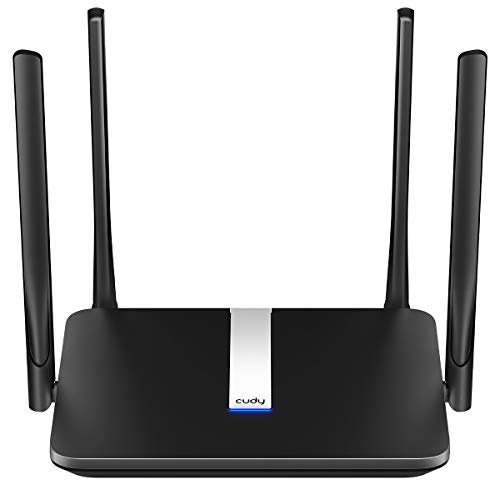
Cudy 4G AC1200 Wi-Fi 5 Router with SIM Slot LT500 — 4G value with VPN in title
The LT500 is the category’s sensible door: a 4G LTE router with AC1200 dual-band Wi-Fi 5 — 867 plus 300 Mbps in the title’s figures — a nano SIM slot, app and cloud control, and a VPN position stated with unusual completeness for the price tier, “Multiple VPN Server & Client”. For a cabin, a rental between fixed-line installations, or a small household whose local 4G is strong and whose needs are ordinary, this is the whole idea in one modest box: insert SIM, power on, have a network.
The honest ceiling is printed in the same title, and this guide will underline it rather than hide it: four 100M ports. Fast Ethernet caps wired transfers at a level a 4G connection can approach on a good day, which means the ports are rarely the bottleneck for internet traffic — but they will be the bottleneck for local transfers between wired machines, and they mark the LT500 as internet equipment rather than network infrastructure. Buyers who understand that distinction will be happy; buyers who discover it while copying files between two wired PCs will not blame the guide.
As a failover router it also makes a quiet case: a business or home office whose main connection is fixed-line can keep the LT500 and a modest data SIM as the insurance policy, its VPN client and server roles letting remote access survive the outage too. Insurance is the right frame for much of this category, and the LT500 is its most affordable honest form here.
Grandparents’ houses and holiday lets are this model’s quiet stronghold. A property that sits empty for weeks and hosts a family for one needs internet that wakes up with the SIM and asks nothing of its guests — no provider router to reboot in the right order, no engineer visit to schedule around. The LT500, cloud-managed from the owner’s phone in another city, is that arrangement at its simplest: arrive, and the house is online; leave, and it ticks over on a modest plan, keeping the heating monitor and the camera company.
- Cellular: 4G LTE, nano SIM slot
- Wireless: Wi-Fi 5 AC1200, 867 + 300 Mbps
- VPN: multiple VPN server and client, per title
- Wired: four 100M ports
- Control: app and cloud control
Strengths
- The complete SIM-router idea — modem, slot, VPN both ways — at the value end.
- App and cloud control suit a router installed somewhere you are not.
- An honest failover or cabin primary for ordinary household loads.
Trade-offs
- 100M ports cap local wired transfers regardless of the cellular speed.
- Wi-Fi 5 radios trail the AX3000 picks for local wireless pace.
- 4G only — addresses with strong 5G should weigh the newer models.
Best for: cabins, stopgap homes and failover shelves that need a real SIM router without flagship spending.
Not suited for: a wired-heavy home whose local transfers would live behind those 100M ports.

Cudy 5G AX3000 Wi-Fi 6 Router with Dual SIM Slots P5 — Dual-SIM 5G flagship
The P5 is Cudy’s flagship statement in this category: 5G SA and NSA, two nano SIM slots, a Release 16 modem with a 3.4 Gbps download figure in the title — the modem’s capability, quoted as the title quotes it — AX3000 Wi-Fi 6 at 2,402 plus 574 Mbps, four gigabit ports, mesh support, multiple VPN and app plus cloud control. Every line of that is a deliberate contrast with the LT500 above it: where the value pick rations, the flagship provides, and the wired ports in particular grow up into gigabit, as a primary router’s should.
Dual SIM deserves a clear explanation, because buyers routinely misread it as a speed feature. Two slots serve two other purposes: failover, where the second carrier’s SIM takes over when the first network fails or throttles; and choice, where a household or a travelling worker carries two carriers because coverage maps lie differently in different valleys. The router does not bond the two into one faster pipe as a matter of course; it keeps a second door unlocked. For a rural business, that second door is the difference between an outage and an anecdote.
As a primary internet source for a home beyond fixed-line reach, the P5 is the most complete single-box answer in this list — provided, as always in this category, that the band check against your carrier passes and your local 5G is real rather than cartographic. Verify first; then this is the one to build the house’s network on.
Consider the working farm or the rural workshop as this flagship’s defining scene: card payments in the office, cameras on the yard, a house full of family traffic in the evening, and a fixed-line quote that arrived with too many zeros to discuss. A dual-SIM 5G router turns that scene from a connectivity apology into a normal modern premises — and when one carrier schedules tower maintenance on market day, the second SIM is already in the slot, already configured, already boring. Boring, in business connectivity, is the highest available praise.
- Cellular: 5G SA/NSA, Release 16, dual nano SIM slots
- Wireless: Wi-Fi 6 AX3000, 2,402 + 574 Mbps
- VPN: multiple VPN stated in the title
- Wired: four gigabit ports
- Extras in title: mesh support, app and cloud control
Strengths
- Dual SIM gives genuine two-carrier resilience for homes and businesses off the fixed grid.
- Gigabit ports and AX3000 wireless make it a real primary router, not a stopgap.
- The fullest Cudy feature set in the category, cloud control included.
Trade-offs
- Flagship hardware is wasted where local 5G is weak or absent.
- Two SIMs mean two plans to manage; the resilience is not free to run.
- Band verification against your carrier remains the buyer’s homework, as everywhere here.
Best for: a rural home or business making cellular its primary internet, with a second carrier as insurance.
Not suited for: a postcode where 4G is the only real signal; the LT500 or Spitz Plus will serve it for less.
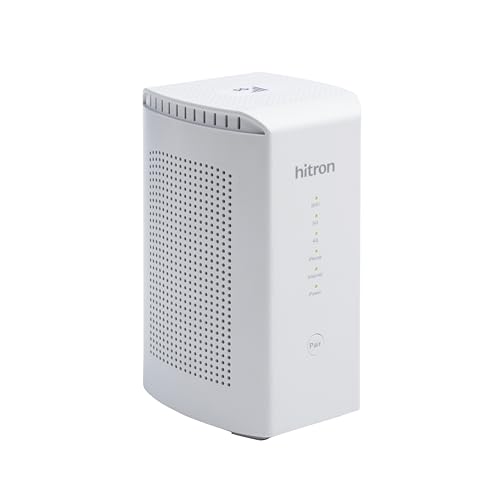
Hitron D60 5G Cellular Router with Sim Card Slot — Certified 5G with eSIM
The Hitron D60’s title leads with the evidence this category runs on: certified with T-Mobile, AT&T and US Cellular. Certification is the carrier’s own stamp that the device belongs on its network, and for US buyers it converts the band-compatibility essay into a much shorter question — is your carrier on the list, and is its signal real at your address? Around that stamp sits an AX3000 Wi-Fi 6 router with mesh Wi-Fi positioning, a nano SIM slot, and the feature that makes the D60 distinctive here: eSIM alongside the physical slot, providing what the title calls dual failover capability.
eSIM changes the failover pattern’s practicality. A second carrier can be provisioned digitally rather than by posting a plastic card to a remote property, which suits exactly the installations cellular routers serve — the rental managed from another state, the site office, the relative’s house you administer by phone. Physical SIM for the primary carrier, eSIM for the understudy, and the router keeps a second network warm without a site visit.
On VPN the title is silent, so the spec box records that in the required form; buyers who need tunnel features should verify them in Hitron’s documentation or look at the Cudy and GL.iNet picks, whose titles promise VPN outright. The D60’s case rests on certification and failover elegance, and for a US buyer on one of its three carriers, that case is strong precisely because it is narrow.
Hitron’s background is worth a sentence for buyers who equate unfamiliar names with risk: the company is an established maker of carrier-grade broadband equipment, the sort of hardware providers themselves deploy, and the D60 carries that lineage into the retail SIM shelf. A buyer choosing between a certified unit from a carrier-equipment maker and a feature-listed unit from a consumer brand is choosing between two kinds of reassurance — the carrier’s stamp and the maker’s menu — and for a remote installation that must simply work, the stamp has a way of winning.
- Cellular: 5G, nano SIM plus eSIM for dual failover
- Certifications in title: T-Mobile, AT&T, US Cellular
- Wireless: Wi-Fi 6 AX3000, mesh Wi-Fi positioning
- VPN: Not stated in the listing title — verify with the maker’s documentation
- Model: D60 5G in the title
Strengths
- Named carrier certifications shorten the compatibility question for US buyers.
- eSIM failover can be provisioned remotely — ideal for distant installations.
- Mesh positioning lets coverage grow around the cellular anchor.
Trade-offs
- Certification list is US-specific; other regions must look elsewhere in this list.
- VPN is not promised in the title, so tunnel buyers have homework.
- Buyers outside its three carriers gain nothing from its headline evidence.
Best for: a US household or remote property on T-Mobile, AT&T or US Cellular that wants certified 5G with graceful failover.
Not suited for: buyers on other carriers or other continents, for whom the certification list is someone else’s good news.

GL.iNet GL-X2000 Spitz Plus 4G LTE Dual-SIM Router — Dual-SIM 4G traveller
The Spitz Plus is the traveller’s entry in a list of mostly stationary boxes, and its title tells that story in itinerary language: 4G LTE CAT 12, Wi-Fi 6, detachable antennas, dual-SIM, T-Mobile and AT&T IoT certification, OpenWrt VPN — for home, RV, road trips and offices. CAT 12 is a mature, capable LTE class; detachable antennas are the detail RV and rural users care about, because they allow the antenna to move to where the signal is — a roof, a window, a mast — rather than wherever the router happens to sit.
GL.iNet’s presence changes the software conversation. The same OpenWrt-based firmware habits as the maker’s travel line apply here at home-router scale: VPN tooling treated as a headline, an interface travellers already know, and dual-SIM failover for the two-carrier life that road-based households actually live. The title’s “NA Only” note is the regional honesty this guide keeps praising — this unit is built and certified for North America, and buyers elsewhere should choose a regional sibling rather than import a mismatch.
Choose the Spitz Plus when the installation moves, or when the antenna question dominates — the signal is up there, on the roof, and the router must be able to reach for it. Stationary homes with strong indoor signal can save the detachable-antenna premium; homes at the edge of coverage will find it the whole ballgame.
The road-trip pattern deserves one more detail, because it is where dual-SIM thinking stops being abstract. Coverage along a route is a patchwork — one carrier strong in the plains, another in the hills — and a router that can prefer whichever SIM is currently winning turns a journey’s connectivity from a lottery into a managed resource. Add the maker’s travel-router firmware habits, and the Spitz Plus becomes less a router than a vehicle system: mounted, antennaed, configured once, and expected to work in three states by Friday.
- Cellular: 4G LTE CAT 12, dual-SIM, North America only per title
- Certifications in title: T-Mobile and AT&T IoT certified
- Wireless: Wi-Fi 6
- VPN: OpenWrt VPN in the title
- Antennas: detachable
- Stated uses in title: home, RV, road trips, offices
Strengths
- Detachable antennas let the installation chase signal to roofs and windows.
- Dual-SIM plus GL.iNet’s VPN firmware suits the two-carrier travelling life.
- Named IoT certifications give its carrier story documentary weight.
Trade-offs
- North America only — the title itself fences its market.
- 4G class in a list where 5G models exist for strong-5G addresses.
- External antenna upgrades, if needed, are separate purchases.
Best for: RV and rural households in North America that need dual-SIM resilience and antennas that can go hunting for signal.
Not suited for: buyers outside North America, or addresses where 5G is strong and 4G would be a self-imposed ceiling.

KuWFi Outdoor 4G LTE CPE Router — Waterproof outdoor CPE
The KuWFi is the specialist: an outdoor 4G LTE CPE — customer-premises equipment, in the trade’s language — rated at 150 Mbps on a CAT 4 modem, waterproof, with two antennas, designed to work with IP cameras and to give outside Wi-Fi coverage. Its natural installations are the ones indoor routers cannot serve: the barn, the gate, the yard, the remote camera that needs a network where no building’s router reaches. Mounted outside, it also enjoys the antenna advantage in its purest form — the modem lives where the signal lives, outdoors, rather than behind walls.
Then there is the sentence in its title that this guide will not soften: “Only Work with SIM Card Mode Not for USA”. The maker states plainly that this unit is not for the United States market — a band and regional matter — and the correct response from a US reader is to close the tab and choose another pick, while readers in the regions it serves can weigh it on its outdoor merits. Its inclusion here is deliberate: a category guide that hid the regional warning would be failing at its only job, and the KuWFi’s candour is the standard its rivals should be held to.
On VPN the title is again silent, recorded as such below; this is coverage hardware, bought to put a SIM-powered network on a pole or a wall, and judged on weather, antennas and the honesty of its regional label.
For its intended regions, picture the installations it serves: a vineyard’s weather station and cameras at the end of a long field, a construction gate on a site with no buildings yet, a village house whose yard needs coverage the indoor router cannot throw through stone walls. In each case the alternative is trenching cable or accepting darkness, and a waterproof SIM box on a pole dissolves the dilemma for the price of a data plan. That is a genuinely different product from everything else on this page, and it is judged here as what it is — regional infrastructure, honestly labelled.
- Cellular: 4G LTE CAT 4, 150 Mbps class, SIM card mode
- Region: not for USA, per the title’s own words
- Form: waterproof outdoor CPE, two antennas
- VPN: Not stated in the listing title — verify with the maker’s documentation
- Stated uses in title: IP cameras, outside Wi-Fi coverage
Strengths
- Weatherproof outdoor mounting puts modem and antennas where the signal is strongest.
- Purpose-built for camera and yard coverage that indoor routers cannot reach.
- The title’s regional candour is a model of honest listing writing.
Trade-offs
- Explicitly not for the USA — most readers of this guide must skip it on those grounds alone.
- CAT 4 pace is the list’s floor, suited to cameras and coverage rather than households.
- Outdoor installation means ladders, mounting and weather-sealed cabling to plan.
Best for: a non-US installation needing SIM-powered outdoor coverage for cameras or a yard network.
Not suited for: any address in the United States — the title forbids it, and this guide repeats the prohibition rather than burying it.

G530 5G NR AX3000 WiFi 6 Router with SIM Card Slot — Triple-carrier 5G gateway
The G530 closes the list with the broadest US compatibility claim available here: a 5G NR router with a SIM card slot, AX3000 Wi-Fi 6, optimised high-gain antennas, dual-WAN failover — and certification for AT&T, T-Mobile and Verizon, all three national carriers in one title. For a US buyer, that breadth dissolves the commonest version of the compatibility problem: whichever of the big three reaches your address best, the gateway is documented to belong on its network.
Dual-WAN failover is the second half of its brief, and it frames the G530’s natural home: the installation that already has, or will have, a fixed line, and wants cellular as the standing understudy — or the reverse, cellular primary with a modest fixed line behind it. High-gain antennas serve the primary-cellular version of that story, pulling a usable signal from the marginal positions where gateways earn their keep: the farmhouse window, the site office, the shop at the edge of town.
Its title does not name VPN, so the spec box records the silence and tunnel-first buyers should do the documentation check or choose a Cudy or GL.iNet pick whose title promises it. The G530’s argument is compatibility breadth plus failover, and for a US household tired of carrier-specific hardware roulette, that argument needs no decoration.
Small retail is the G530’s natural portrait: a shop whose card terminal, cameras and till system cannot go dark when the street’s fixed line is dug up for the third time this year. A triple-certified gateway lets the owner choose the carrier by the signal in that specific parade of shops — tested with phones in a lunch hour — rather than by whichever brand of router happened to support one network. Failover then guards the till, and the whole arrangement costs less than one Saturday morning of refused cards.
- Cellular: 5G NR, SIM card slot
- Certifications in title: AT&T, T-Mobile and Verizon certified
- Wireless: Wi-Fi 6 AX3000
- WAN: dual-WAN failover
- VPN: Not stated in the listing title — verify with the maker’s documentation
- Antennas: optimised high-gain design per title
Strengths
- All three big US carriers certified — the broadest compatibility evidence in this list.
- Dual-WAN failover suits the primary-plus-understudy installation pattern.
- High-gain antennas serve marginal-signal addresses where gateways prove themselves.
Trade-offs
- VPN is not promised in the title; tunnel buyers have a verification errand.
- Certification breadth is US value; other regions should weigh the regional picks.
- Dual-WAN value only materialises if a second connection actually exists.
Best for: a US home or small business that wants one 5G gateway documented for whichever big carrier serves it best.
Not suited for: a buyer whose first requirement is a title-promised VPN feature set.
How Do the Six Compare on Cellular Facts?
| Pick | Cellular | SIM arrangement | Compatibility evidence in title | Local wireless |
|---|---|---|---|---|
| Cudy LT500 | 4G LTE | Single nano SIM | General 4G positioning | Wi-Fi 5 AC1200 |
| Cudy P5 | 5G SA/NSA | Dual nano SIM | Release 16 modem stated | Wi-Fi 6 AX3000 |
| Hitron D60 | 5G | Nano SIM plus eSIM | T-Mobile, AT&T, US Cellular certified | Wi-Fi 6 AX3000 |
| GL.iNet Spitz Plus | 4G CAT 12 | Dual-SIM | T-Mobile and AT&T IoT certified; NA only | Wi-Fi 6 |
| KuWFi Outdoor CPE | 4G CAT 4 | SIM card mode | Not for USA, stated in title | Outdoor coverage |
| G530 | 5G NR | SIM card slot | AT&T, T-Mobile, Verizon certified | Wi-Fi 6 AX3000 |
The compatibility column is this table’s reason to exist. Two models carry named US certifications across multiple carriers, one carries an IoT certification for North America, one fences itself out of the USA entirely, and the two Cudy models rest on their modem specifications, which the buyer must match to a carrier the old-fashioned way. None of these positions is shameful; what would be shameful is a guide pretending they are interchangeable. Choose your row by the evidence your carrier and your postcode can actually use.
One pattern in the table deserves to be drawn out, because it predicts satisfaction better than any single specification: the picks whose titles do the buyer’s homework — naming carriers, naming regions, naming exclusions — are the picks whose ownership tends to be calm. That is not a coincidence. A maker precise in a listing is usually precise in a band list, a manual and a firmware changelog, and in a category where the product’s success is decided by paperwork as much as by hardware, precision is the feature underneath all the other features.
What Should You Check Before a SIM Router Becomes Your Only Internet?
Run the phone test honestly: your carrier’s SIM, in a phone, at the exact spot the router will occupy, at working hours and at the evening peak. Note not just whether it connects but whether it holds a video call without dissolving. If the spot fails, plan the antenna answer before buying — a window position, an external antenna on the models that accept one, or in the KuWFi’s regional case, an outdoor mount. The router’s placement is a decision you make once and live with daily; make it with data.
Read the plan’s terms with a lawyer’s squint. Router and hotspot plans differ from phone plans in throttling thresholds, deprioritisation behaviour and permitted-device language, and the cheapest SIM in the drawer is often cheap because its terms forbid the use you are planning. A household that streams through a throttled plan has not saved money; it has bought a slower month. Where two carriers reach you, the dual-SIM picks turn this from a dilemma into a portfolio — primary on one, understudy on the other, each plan sized to its role.
Budget a thought for the SIM’s own lifecycle, too. Prepaid and seasonal plans lapse; a failover SIM that expired in March is a story you tell in the outage of October. Put the renewal dates — both SIMs, where two live — in the same calendar that holds the smoke-alarm batteries and the boiler service, and test the understudy path on the same day each year by forcing the failover on purpose. Insurance that is never rehearsed is a hope wearing a policy’s clothes.
Finally, rehearse the failure. If this router is a business’s lifeline or a home’s only pipe, decide now what the household does during a carrier outage: the second SIM, the fixed line behind a dual-WAN model, or simply an evening of board games. Failover features only help the installations that configured them before the storm, which is why this guide treats the second-SIM and second-WAN picks as insurance products and judges them on the honesty of their paperwork.
How Do You Install a Cellular Router for the Best Signal?
Height and windows are the whole art’s first chapter. Cellular signal arrives from towers, not from the sky, and it weakens through walls — especially foil-backed insulation and metal cladding, which turn some modern buildings into polite Faraday cages. Start the router high, near the window facing your carrier’s tower if you know it, and walk the house with the router’s own signal readouts rather than guessing: the difference between two windows in the same room can be the difference between a connection and a lifestyle.
Antennas are the second chapter. Keep the supplied antennas upright and separated as the maker intends; on detachable-antenna models like the Spitz Plus, consider the external run to a roof or loft position, observing the cable discipline the maker specifies, because a long lossy cable can donate back the gain the position won. Outdoor CPE thinking — the KuWFi pattern — is the logical end of this chapter: when the building itself is the obstacle, put the modem outside the building.
Security placement deserves a line alongside signal placement, because a cellular router is often installed in places a home router never sees — a site cabin, a shop counter, a rented hall. The admin password change matters doubly where strangers walk past the hardware; the SIM itself is a small valuable, and a router whose slot is accessible to anyone passing is a plan waiting to be borrowed. None of the picks here can solve physical access for you, but a lockable cabinet and a changed password solve most of it between them.
Wire the important machines once the wireless position is settled. A cellular router’s Ethernet ports serve the work computer and the television with a steadiness no signal fluctuation can disturb, and on the gigabit-ported picks that wired core can grow into a small switch-fed network indistinguishable from a fixed-line installation — which is, in the end, the category’s whole promise: internet that arrives by air and behaves like it arrived by wire.
What Mistakes Do Buyers Make in the SIM Router Category?
The expensive classic is buying on modem generation and discovering band reality afterwards: a 5G router where the local tower speaks a band the modem lacks is a 4G router with better marketing, and a router whose bands miss your carrier entirely is furniture. The maker’s band list against your carrier — before purchase, in writing — is the whole vaccine. The second mistake is its cousin: ignoring the region printed in the title, as the KuWFi’s exclusion and the Spitz Plus’s NA-only note both warn in plain language.
Third, buyers feed a household through a phone plan and meet its terms the hard way, mid-month, at dial-up pace. Fourth, they place the router where the furniture wants it rather than where the signal is, then review the category as a disappointment. Fifth, dual-SIM buyers expect bonded speed and meet failover reality — two doors are for resilience, and resilience, correctly understood, is the more valuable gift. Sixth, and most quietly, households forget that a cellular primary connection makes the router a utility: it deserves the firmware updates, the changed admin password and the occasional client-list glance that any internet-facing box deserves, only more so, because everything depends on it.
A seventh mistake, small in the telling and large in the living, is forgetting the humans at the far end of a remote installation. The relative whose house you connected, the tenant in the property you manage, the staff in the site cabin — each will one day face a dark router and a blinking light they cannot interpret. A laminated card beside the unit — what it is, what the lights should look like, which number to call before touching anything — converts their panic into a phone call, and your careful installation into a system that survives being looked after by other people. Infrastructure is a social arrangement as much as a technical one, and the card is where the two meet.
What Does a Month of Cellular Home Internet Actually Feel Like?
Week one is revelation: the house has internet where the maps said it could not, and every device behaves as if a cable arrived. Week two is calibration — the router migrates to the window that tests best, the work computer gets its Ethernet run, the household learns which hours the tower breathes hardest. By week four the connection has become what all good infrastructure becomes: unremarkable. The bills are a plan rather than a line rental, the outages are a carrier’s rather than a cable’s, and the household’s mental model quietly updates — internet is a service the house subscribes to, not a wire it is chained by.
The households that struggle past month one almost always trace the trouble to the two homework items this guide keeps assigning: a plan whose terms met a household’s appetite and lost, or a placement chosen by furniture rather than signal. Both are fixable in an afternoon once diagnosed, and both are cheaper to prevent than to cure. That is why this category’s buying advice sounds repetitive — bands, terms, placement — because the category’s failures are repetitive, and they are all standing in the same three places.
How Should Businesses Treat a SIM Router Differently From Homes?
A business installation adds three disciplines a home can improvise. The first is documentation: which carrier, which plan, which bands were verified, where the router and its antennas live, and who holds the account — written down, because the person who installed it will not be the person troubleshooting it in eighteen months. The second is monitoring: cloud and app control, which several picks here offer, turns a remote site’s connectivity from a rumour into a dashboard, and a failover event from a surprise invoice into a logged incident. The third is spares thinking: a second SIM already in the slot is the cheapest spare part in all of networking, and a business that runs on cellular should treat an unpopulated second slot the way it would treat an untested backup.
Compliance gets a sentence of its own. Payment terminals, cameras and remote access all carry obligations that vary by trade, and a cellular path does not dilute any of them; if anything, the router’s VPN and firewall configuration deserves more care when the connection is the business’s front door. The picks here with stated VPN roles give that configuration a documented starting point. None of this requires an IT department — it requires an hour of setup honesty, once, which is the same bargain this whole category offers households, written in a slightly more formal hand.
Final Recommendation
Match the pick to the postcode and the paperwork, in that order. Where 5G is real and two carriers compete, the Cudy P5 is the flagship answer — dual SIM, gigabit ports, AX3000 wireless — while US buyers who want the compatibility question pre-answered should choose between the Hitron D60’s three-carrier certification with eSIM failover and the G530’s triple-carrier breadth with dual-WAN. The Spitz Plus owns the moving and marginal-signal cases in North America, antennas up; the LT500 remains the honest value for 4G country, cabins and failover shelves; and the KuWFi serves its outdoor niche in the regions its title permits, which pointedly exclude the USA. If the home end of your network also needs its tunnels in order, the umbrella guide to best routers that support vpn covers the fixed-line side of the same discipline, and readers standardising on one maker’s firmware will find the best asus vpn routers roundup a useful contrast. Gamers whose matches ride a cellular connection — more common every year, and better than its reputation — should read the best gaming routers with vpn guide for the policy thinking that keeps play smooth on any pipe. Check the bands, respect the regions, place it high by a window — and a SIM in a slot becomes the most liberating internet connection a house can have.
Frequently Asked Questions
Can a SIM router fully replace fixed-line broadband for a household?
Where the carrier’s signal is strong and the plan is sized for household use, yes — thousands of rural homes, RVs and site offices already live this way, and the AX3000-class picks here serve Wi-Fi and Ethernet indistinguishably from a fixed-line router. The honest limits are the plan’s data terms and the tower’s evening load, not the router. Run the phone test at peak hours, read the plan’s throttling language, and the answer for your address will be an observation rather than a hope.
What is the difference between dual SIM and dual-WAN failover?
Dual SIM keeps two cellular carriers available inside one modem — the second SIM is the understudy when the first carrier fails or fades. Dual-WAN failover keeps two separate connections available to the router, typically cellular plus a fixed line. They solve the same fear at different layers, and an installation can use both: the G530’s dual-WAN pairs a SIM with a wire, while the P5’s and Spitz Plus’s second SIM pairs two carriers. Choose by which failure you have actually met — carrier trouble, or wire trouble.
Why does one pick say “Not for USA” — can I use it anyway with a US SIM?
The title’s exclusion reflects the modem’s band and regional design: a unit built for other markets’ spectrum may connect weakly, partially or not at all on US carriers, and its certification status differs as well. The maker’s warning is the product telling you its limits in advance, and the correct response is to choose a model built and certified for your market — this list offers several. Treat regional labels in this category as specifications, not suggestions.
Do I need a special data plan, or will my phone SIM work?
A phone SIM will often connect, which is not the same as being the right tool. Carriers distinguish phone plans from hotspot and router plans in their terms, throttling and deprioritisation, and household-scale use through a phone plan can breach those terms or simply run miserably. The durable arrangement is a plan sold for routers or hotspots, sized to a real month of household traffic. Read the terms before the SIM goes in, not after the first throttled weekend.
How much data does a household on a SIM router actually use?
More than phone habits suggest, because a household’s devices update, back up and stream at full size once a real router invites them to. Video calls for work, a television’s evening streaming, phones uploading photo libraries overnight — the honest way to size a plan is a month of observation on your current connection’s usage counters, then a margin for the devices that will newly join. Underestimating is the category’s commonest budgeting error, and it announces itself in the month’s final week, at throttled pace, during somebody’s meeting.
Can I take a SIM router abroad or use a foreign SIM in it?
Physically, travellers do it constantly; successfully, it depends on the same two checks as at home — the modem’s bands against the visited carrier’s network, and the plan’s roaming terms. Regional models complicate the picture in both directions: the Spitz Plus is built for North America, the KuWFi pointedly not for the USA, and each will behave abroad exactly as its band list says rather than as its owner hopes. For a long stay abroad, the local-market model plus a local SIM is almost always the wiser purchase; for a short trip, a home-region router on a roaming plan keeps the arrangement to one known quantity.
Will a VPN work over a cellular router?
Yes — a tunnel is traffic, and cellular routers carry it like any other connection. The Cudy picks and the Spitz Plus promise VPN roles in their titles; the certified gateways’ titles are silent on the subject, so verify there before relying on it. One cellular wrinkle deserves note: many carriers place connections behind carrier-grade NAT, which complicates the server direction — dialling into your home from outside — while leaving client tunnelling, the common case, unaffected. If dial-home matters, ask your carrier about a public address option.
Related Guides
Cellular is one answer to the unreliable-network problem; the venue network is another. Travellers who split their lives between SIM-powered bases and hotel-powered trips will find the two halves of their connectivity in these pages — this guide for the slot and the signal, and the travel guides for the bubble and the portal — and the wisest installations increasingly use both, a SIM router at the base and a pocket router on the road, each configured before it is needed.
Whichever combination you build, the principle that survives every configuration is the one this guide opened with: the slot is the liberation, and the paperwork is the price. Pay the paperwork gladly — bands checked, terms read, regions respected — and the little tray that clicks into the side of a router becomes the most consequential slot in the house — the one that decides whether the house is connected to the world or merely near it.
Keep one artefact from this purchase whatever you choose: the note you made during the band check — carrier, bands, plan, and where the router finally sat. That scrap of homework is the installation’s birth certificate. It will answer the next owner’s questions, the support call’s first five minutes, and your own memory in three years when the second SIM needs renewing and nobody can remember which carrier lives in which slot. Photograph it, file it with the property’s documents, and let the router’s second owner — even if that is only future you, standing on a chair by the window unit — inherit a system instead of a mystery.


