What's inside
- Key Takeaways
- Quick Picks
- How Did We Choose the Best Data Center Hard Drives?
- Why Does the New-Versus-Renewed Question Dominate This Category?
- The Six Drives, Examined One by One
- How Do the Six Enterprise Drives Compare on Paper?
- What Should You Check Before a Bare Enterprise Drive Goes in the Rack?
- How Do Capacity Tiers Change Array Design?
- What Do Power and Cooling Do to the Density Argument?
- Why Did Helium Matter, and Where Does EAMR Fit?
- How Should a Drive Fleet Be Monitored Once It Is Live?
- What Does a Sensible Refresh Cycle Look Like?
- JBOD, Hardware RAID or Software-Defined: Does the Drive Choice Change?
- What Happens When a Bare Drive Arrives Dead or Dies Young?
- How Does Vibration Become the Hidden Variable in Dense Shelves?
- Where Does the Homelab Fit Into Enterprise Buying?
- How Do You Read an Enterprise Listing Like a Buyer, Not a Tourist?
- What Buying Mistakes Haunt Enterprise Storage?
- How Should a Small Team Standardise Its Drive Buying?
- Final Recommendation
- Frequently Asked Questions
- Related Guides
As an Amazon Associate I earn from qualifying purchases. This post may contain affiliate links at no extra cost to you.
widgetverdict.com is reader-supported. When you buy through links on our site, we may earn an affiliate commission.
Where to buy: the six drives below link to Amazon listings under their full product names, and every one of them is a new drive — a point that needs making before anything else in this category, for reasons the next paragraph explains.
Here is the honest problem with shopping for enterprise storage: most of the data center shelf at retail is not new. It is thick with renewed, refurbished and pulled-from-service drives — disks that spent years spinning in someone else’s rack before being wiped, relabelled and resold at tempting prices. Some of those listings say so plainly; others make you dig. That is why this guide to the best data center hard drives exists in its particular form: the six picks below are the comparatively rare verified new listings, current enterprise models you can buy as bare drives and slot into your own servers, storage shelves and homelab racks with a known history of exactly zero previous owners.
The range spans two different buying philosophies. At one end sit the capacity flagships — Western Digital’s Ultrastar line at twenty, twenty-two and twenty-six terabytes, bought by people building dense storage nodes where every bay must earn its rack space. At the other end sit the workhorses: Seagate’s Exos 7E8 at six terabytes and Exos X10 at ten, plus Synology’s HAT5320 enterprise drive at four terabytes for buyers inside that ecosystem. What unites them is duty class. These are CMR-based, continuously rated enterprise disks, built to be written hard, in arrays, for years — a different species from the desktop drive that merely shares their shape.
Key Takeaways
- Most enterprise listings at retail are renewed or pulled drives; all six picks here are verified new listings, which is the entire premise of the shortlist.
- Capacity per bay is the data center metric that matters: the 26TB Ultrastar HC590 exists for shelves where drive count, not drive price, is the constraint.
- Every pick is a 3.5-inch SATA drive, so they suit storage servers and JBOD shelves built around SATA backplanes rather than SAS-only chassis.
- The Exos 7E8 and Exos X10 are the array workhorses — 7200 RPM, CMR recording and 512e formatting for broad controller compatibility.
- The Synology HAT5320 is the ecosystem pick: an enterprise drive sold to teams that prefer the drive and the NAS vendor to be the same company.
- Buying bare enterprise drives means owning the integration yourself — caddies, backplane compatibility, formatting and spares planning are your job now.
Quick Picks
| Pick | Badge | Why it earns its place |
|---|---|---|
| Seagate Exos 7E8 6TB Enterprise HDD (ST6000NM021A) | The array workhorse | CMR, 7200 RPM and 512e SATA formatting in the classic enterprise capacity tier for general storage arrays. |
| Synology HAT5320 Enterprise Series 4TB | The ecosystem drive | Synology’s own enterprise-series SATA drive for buyers standardising on that vendor’s hardware and support. |
| WD Ultrastar DC HC590 26TB (0F65672) | The density flagship | Twenty-six terabytes in a single 3.5-inch bay for storage nodes where shelf density rules every decision. |
| WD Ultrastar HC570 22TB (WUH722222ALE6L4) | The proven big bay | Twenty-two terabytes at 7200 RPM from the Ultrastar line’s established high-capacity generation. |
| Western Digital Ultrastar 20TB Energy-Assisted (WUH722020CLE6L4) | The EAMR twenty | Twenty terabytes using energy-assisted magnetic recording, for dense shelves that stop one tier below the flagships. |
| Seagate Exos X10 10TB (ST10000NM0126) | The ten-terabyte standard | A helium-generation Exos at the capacity where cost per bay and capacity per drive balance for many arrays. |
How Did We Choose the Best Data Center Hard Drives?
The selection began with the new-versus-renewed sieve described above, and it eliminated most of the shelf. Listings for pulled drives, renewed stock and marketplace mysteries were set aside regardless of how attractive the capacity looked, because a data center drive’s value is inseparable from its history: an enterprise disk’s remaining life is a budget already partly spent by whoever ran it first. What survived were current-production enterprise models, sold new, with full model numbers stated so the buyer can verify exactly which drive, firmware family and format is being bought.
The second consideration was spread across the two ways these drives are actually bought. Some readers are filling a storage node and think in terabytes per rack unit; others are replacing or expanding a working array and think in matching tiers and controller compatibility. The six picks therefore run from four to twenty-six terabytes and across all three manufacturers who matter in this class, with the shared ground rules of 3.5-inch SATA fitment and conventional magnetic recording where the listing states it. No SAS drives appear, deliberately: the audience buying bare drives one or six at a time from Amazon is overwhelmingly building on SATA backplanes, and pretending otherwise would fill the list with drives many readers cannot plug in.
Why Does the New-Versus-Renewed Question Dominate This Category?
Enterprise drives lead hard first lives. A disk that spent five years in a hyperscale rack has written and read at a duty level no home workload approaches, and it has done so in heat, vibration and company that were all within specification but relentlessly continuous. When such a drive is pulled, wiped and resold as renewed, it may still work — many do, for a while — but the buyer is purchasing the tail end of a service life whose best years belonged to somebody else, usually without any honest account of how much of that life remains. The price difference between renewed and new is real, and for a throwaway scratch array it may even be rational. For storage you intend to trust, it is a false economy dressed as a bargain.
There is a subtler trap for the unwary: listings that blur the line, using enterprise model names and stock photography while the condition hides in a dropdown or a footnote. The defence is boring and effective. Read the condition field as carefully as the capacity, check the full model number against the manufacturer’s own documentation, and treat any listing that will not state plainly whether the drive is new as a listing that has answered the question. Every pick in this guide passed that scrutiny at the time of checking, which is precisely the work the guide exists to do.
The Six Drives, Examined One by One

Seagate Exos 7E8 6TB Enterprise HDD (ST6000NM021A) — The array workhorse
The Exos 7E8 line is Seagate’s bread-and-butter enterprise range, and the 6TB ST6000NM021A shows the formula plainly: conventional magnetic recording, a 7200 RPM spindle, a 128MB cache and 512e SATA formatting, in a drive sold explicitly for enterprise and data center duty. Six terabytes is no longer a headline capacity, and that is the point. This is the tier that fills general-purpose arrays, file servers and backup targets where the workload is broad rather than extreme and where matching an existing fleet’s behaviour matters more than chasing density records.
The 512e format deserves its sentence, because it decides compatibility in older estates. Drives formatted with 512-byte emulation talk happily to legacy controllers, older RAID firmware and operating systems that never learned to handle native 4K sectors, which makes the 7E8 an easy citizen in mixed-age infrastructure. Buyers standardising a small fleet will also appreciate that this is a drive with a long production history behind it: its failure behaviour, its noise, its power appetite are all known quantities in a way a freshly launched flagship’s are not. In data center buying, boring is a compliment, and the 7E8 has earned it.
- Capacity: 6TB
- Recording: CMR
- Interface: SATA 6 Gb/s, 512e format
- Spindle speed: 7200 RPM
- Cache: 128MB
- Model: ST6000NM021A
Strengths
- A known-quantity enterprise model with a long track record in general arrays.
- 512e formatting keeps older controllers and RAID firmware comfortable.
- CMR recording gives predictable behaviour under sustained array writes.
Trade-offs
- Six terabytes per bay is modest where shelf density is the priority.
- The 128MB cache is half what the ten-terabyte Exos below carries.
- Generalist tuning means it is nobody’s specialist: not the densest, not the cheapest tier to run.
Best for: administrators filling or matching general enterprise arrays who value proven behaviour over density. Not suited for: new high-density storage nodes, where the Ultrastar flagships below put four times the capacity in the same bay.

Synology HAT5320 Enterprise Series 4TB — The ecosystem drive
Synology sells this drive into a very specific anxiety: the moment a third-party disk misbehaves inside a Synology enclosure and the owner wonders whether support will blame the drive, the enclosure or the combination. The HAT5320 removes that argument by being the vendor’s own enterprise-series disk — a 3.5-inch SATA III drive at four terabytes, positioned for Synology’s business systems and validated within that ecosystem. Four terabytes is the smallest capacity in this guide, and the buyers considering it are not chasing density; they are chasing a support conversation with only one company in it.
That logic is easy to mock and hard to refute. In a business NAS holding accounts data or a design studio’s live projects, the value of a drive is dominated by what happens on the day it fails, and a vendor who supplied both box and disk has nowhere to point. Outside the Synology world the HAT5320 is simply a competent enterprise SATA drive with no special claim on your money, which is why it sits in this list as an ecosystem pick rather than a general recommendation. Judge it by where it will live: inside a Synology rack it has a clear argument; inside a generic server, the Exos and Ultrastar models either side of it argue harder.
- Capacity: 4TB
- Series: HAT5320 Enterprise Series
- Interface: SATA III
- Form factor: 3.5-inch internal
Strengths
- Vendor-matched to Synology systems, ending drive-versus-enclosure support disputes.
- Enterprise-series positioning rather than desktop stock in a business enclosure.
- A sensible capacity for mirrored pairs in small business NAS deployments.
Trade-offs
- The smallest capacity here, at a price logic driven by ecosystem rather than terabytes.
- Its core argument evaporates outside Synology hardware.
- Four terabytes per bay fills quickly in media or backup-heavy service.
Best for: Synology business systems where single-vendor accountability is worth more than raw capacity. Not suited for: generic servers and dense shelves, where its ecosystem premium buys nothing.
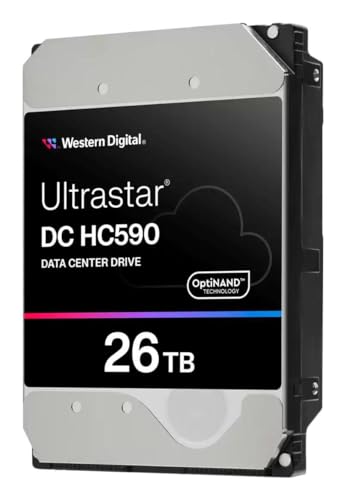
WD Ultrastar DC HC590 26TB (0F65672) — The density flagship
Twenty-six terabytes in one 3.5-inch bay changes the arithmetic of an entire shelf. A storage node that would have needed four bays of six-terabyte drives now holds the same data in a single slot, and the freed bays become future expansion rather than present compromise. The Ultrastar DC HC590 is Western Digital’s current density flagship in this class, sold under the data center line that descends from the old HGST Ultrastar heritage, and it is bought by people for whom the scarce resource is not money but rack space, bay count and the power and cooling that follow each populated slot.
Buying at this tier carries obligations the smaller drives forgive. A 26TB drive takes a long time to fill, a long time to copy and — in a redundant array — a long time to rebuild onto a replacement, during which the array works harder and any second failure hurts more. Density flagships therefore belong in systems with genuine redundancy, monitored health and a spare on the shelf, not in a lone enclosure hoping for the best. The buyers who should choose the HC590 know their bay count is fixed and their data growth is not; for everyone else, it is a magnificent answer to a question they do not have. As a bare-drive purchase it also rewards patience in handling: at this capacity, treat the drive like the archive it is about to become.
- Capacity: 26TB
- Line: Ultrastar DC HC590
- Form factor: 3.5-inch internal
- Model: 0F65672
Strengths
- The highest capacity in this guide, transforming per-bay density.
- Ultrastar data center lineage aimed at continuous enterprise duty.
- Fewer, larger drives can simplify a shelf’s power and cooling story.
Trade-offs
- Rebuild and copy times at 26TB stretch into long, exposed windows.
- Concentrating this much data per disk raises the stakes of each failure.
- Demands a system with real redundancy and a cold spare to make sense.
Best for: dense storage nodes and media archives where bays, not budget, are the binding constraint. Not suited for: small single-enclosure setups without redundancy, monitoring or a spare.

WD Ultrastar HC570 22TB (WUH722222ALE6L4) — The proven big bay
The HC570 generation put twenty-two terabytes into the Ultrastar line before the HC590 stretched the ceiling further, and that seniority is its selling point. This is the high-capacity tier with time served: a 7200 RPM enterprise drive whose behaviour in arrays, backplanes and rebuilds is documented by years of other people’s deployments. Buyers who flinch at being first with a flagship — a rational flinch where storage is concerned — land here, taking nearly the density of the newest model with the comfort of a thoroughly understood one.
Twenty-two terabytes also sits at a pragmatic point in the copy-and-rebuild equation. It is large enough to consolidate shelves that were built from sixes and eights, yet each drive’s contents can still be evacuated to a spare in a maintenance window that fits inside a working day rather than a weekend. For a growing archive, a backup target or a media server that has outgrown its second shelf, the HC570 is the upgrade that feels like consolidation rather than experimentation. Match it in pairs or shelves of its own kind, keep one spare, and it will quietly become the least interesting part of your infrastructure — the highest praise storage can earn.
- Capacity: 22TB
- Line: Ultrastar HC570
- Spindle speed: 7200 RPM
- Form factor: 3.5-inch internal
- Model: WUH722222ALE6L4
Strengths
- Flagship-class density from a generation with years of field history.
- 7200 RPM enterprise tuning for array duty rather than archival sleep.
- Consolidates older small-drive shelves dramatically.
Trade-offs
- Still a long rebuild when an array slot has to be repopulated.
- One generation behind the capacity ceiling the HC590 now sets.
- Needs the same redundancy discipline as any very large drive.
Best for: shelf builders who value near-flagship density with a proven service record behind it. Not suited for: maximum-density builds where the extra four terabytes per bay of the HC590 decide the shelf design.
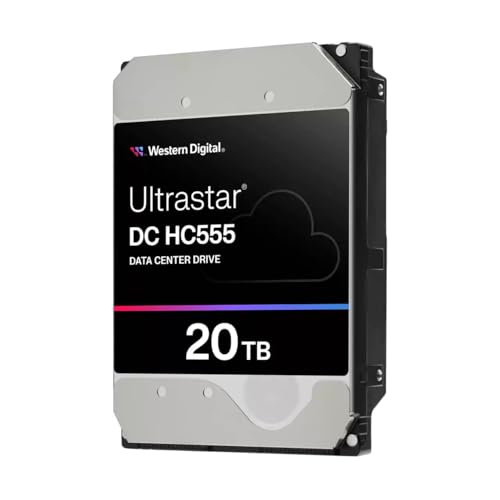
Western Digital Ultrastar 20TB Energy-Assisted (WUH722020CLE6L4) — The EAMR twenty
This twenty-terabyte Ultrastar is interesting for the technology in its name: energy-assisted magnetic recording, in which a small energy input at the write head lets the drive lay down tighter, denser tracks than conventional recording alone allows at this scale. EAMR is one of the industry’s answers to the question of how spinning disks keep growing without changing size, and its presence here matters because it is how this drive reaches twenty terabytes while remaining, from the backplane’s point of view, an ordinary 3.5-inch SATA internal drive that slots into the same shelves as everything else in this guide.
In buying terms the 20TB model is the considered middle of the Ultrastar trio: a clear step beyond the ten and twelve-terabyte generation many shelves still run, without the flagship pricing posture of the twenty-two and twenty-six. For an archive tier, a backup node or a content library whose growth is steady rather than explosive, twenty terabytes per bay is frequently the point where the shelf stops needing attention for years. As with its larger siblings, it belongs in a system with redundancy and monitoring; energy assistance improves how the drive writes, not what happens if any single disk in an unprotected set gives up.
- Capacity: 20TB
- Recording: Energy-Assisted Magnetic Recording (EAMR)
- Interface: SATA
- Form factor: 3.5-inch internal
- Model: WUH722020CLE6L4
Strengths
- EAMR delivers twenty terabytes in a standard bay and interface.
- The balanced tier of the Ultrastar range for archive and backup nodes.
- Enterprise line built for continuous duty in multi-drive shelves.
Trade-offs
- Gives away capacity per bay to both larger Ultrastar siblings.
- Long evacuation times if a shelf must be drained in a hurry.
- Over-specified for a light-duty home server that sleeps at night.
Best for: archive, backup and library shelves that need a big, calm step up in density. Not suited for: buyers chasing the absolute ceiling per bay, who should look at the HC590 first.

Seagate Exos X10 10TB (ST10000NM0126) — The ten-terabyte standard
The Exos X10 generation was Seagate’s helium-sealed step into double-digit capacities, and the ST10000NM0126 remains a telling purchase: ten terabytes, 7200 RPM, a 256MB cache and 512e SATA formatting in an enterprise drive that many existing arrays were literally built around. Helium inside the enclosure lets the platters spin with less turbulence and drag than air-filled designs, which is how this class of drive reached ten terabytes in the standard height while keeping enterprise manners. For buyers expanding or repairing an estate of similar drives, that lineage is the argument — a replacement that behaves exactly like the disks already in the shelf.
Judged as a fresh purchase rather than a fleet match, the X10 occupies the sensible centre of this guide. It doubles the 7E8’s capacity with a larger cache, stays in the broadly compatible 512e format, and avoids the rebuild-window extremes of the twenty-terabyte class. A small storage server built from X10s in a redundant set is a thoroughly defensible design even now, particularly where the data is warm rather than archival — virtualisation hosts, departmental file service, backup staging. Buy it as a known quantity, in matched sets, with the usual spare on the shelf, and it will do the least glamorous job in computing exactly as specified.
- Capacity: 10TB
- Interface: SATA 6 Gb/s, 512e format
- Spindle speed: 7200 RPM
- Cache: 256MB
- Form factor: 3.5-inch enterprise
- Model: ST10000NM0126
Strengths
- A fleet-proven ten-terabyte standard that many arrays were designed around.
- 256MB cache, the largest among the Seagate picks here.
- 512e formatting for easy citizenship in older storage estates.
Trade-offs
- An earlier generation than the Ultrastar flagships it shares this list with.
- Ten terabytes per bay is half the density the big Ultrastars now offer.
- Most compelling as a fleet match; greenfield buyers should compare the newer tiers closely.
Best for: expanding or maintaining Exos-based arrays and building balanced mid-density servers. Not suited for: greenfield density-first nodes, where the Ultrastar models double its capacity per bay.
How Do the Six Enterprise Drives Compare on Paper?
| Drive | Capacity | Spindle | Defining trait |
|---|---|---|---|
| Seagate Exos 7E8 ST6000NM021A | 6TB | 7200 RPM | CMR workhorse, 512e, 128MB cache |
| Synology HAT5320 | 4TB | Enterprise series | Vendor-matched Synology drive |
| WD Ultrastar DC HC590 | 26TB | Data center line | Maximum density per bay |
| WD Ultrastar HC570 | 22TB | 7200 RPM | Proven flagship generation |
| WD Ultrastar WUH722020CLE6L4 | 20TB | EAMR | Energy-assisted recording |
| Seagate Exos X10 ST10000NM0126 | 10TB | 7200 RPM | Helium-generation fleet standard |
The table exposes the category’s real shape: this is not six versions of one drive but two product families answering different scarcities. The Exos pair and the Synology drive answer a scarcity of certainty — known behaviour, known compatibility, a known vendor. The Ultrastar trio answers a scarcity of bays. A buyer who understands which scarcity governs their shelf will find the decision almost makes itself, and a buyer who has not worked it out yet should do that thinking before comparing model numbers, because no specification in the table can rescue a shelf designed around the wrong constraint.
What Should You Check Before a Bare Enterprise Drive Goes in the Rack?
Start at the backplane. Confirm the shelf is SATA rather than SAS-only, and confirm the caddy or tray your chassis uses actually fits a standard 3.5-inch drive — most do, but proprietary carriers in branded servers can turn a five-minute swap into a parts order. Check the controller’s maximum supported drive size, because older RAID firmware can have ceilings that modern capacities sail past, and check the sector format it expects: the 512e drives in this guide are the forgiving choice for mixed estates, which is one reason they anchor the list.
Then think about the drive’s first week, not its first hour. A new enterprise disk should be introduced to an array deliberately: monitored during its first rebuild or initialisation, watched through its first full write cycle, and only then trusted as a peer. Keep the packaging and paperwork until that probation is over, register the drive, and log its serial number and install date in whatever passes for your asset record — even if that is a spreadsheet on the same shelf it serves. Finally, buy the spare at the same time as the set. A cold spare bought with the fleet is guaranteed to match; a spare bought in a panic three years later is a research project conducted while an array is degraded.
How Do Capacity Tiers Change Array Design?
Drive size quietly dictates almost everything about a storage system built around it. Small drives mean many spindles: more parallel performance, faster rebuilds, finer-grained failure domains — and more power, more heat, more bays consumed and more individual chances that something, somewhere, is always failing. Large drives invert every term of that bargain. A shelf of 26TB disks is calm, dense and power-sipping per terabyte, but each rebuild is a marathon, each failure removes a city rather than a street, and the array’s total throughput rests on fewer actuators working harder.
Neither extreme is correct in the abstract, which is why this guide deliberately keeps both ends in view. The working rule is to match tier to data temperature. Hot data that many users touch all day rewards more, smaller spindles and the parallelism they bring; the six and ten-terabyte Exos models live there. Cold and warm data — archives, backups, media libraries, anything read rarely and written in streams — rewards density, and the Ultrastar tier earns its keep. Most real shelves end up mixed, with a fast tier and a fat tier quietly doing different jobs, and the honest skill in data center buying is recognising which of your data is which before the drives are ordered.
What Do Power and Cooling Do to the Density Argument?
Every populated bay costs more than its drive. It costs the electricity the disk draws every hour of its life, the cooling needed to remove that energy as heat, and a share of the power supply and UPS capacity standing behind the shelf. This is where very large drives quietly win arguments that never appear on the invoice: holding a petabyte on forty 26TB disks instead of one hundred and seventy 6TB disks removes more than a hundred spinning motors from the power bill and the thermal load alike, and it removes the shelves, backplanes and ports those motors would have needed. Facilities people think in watts per terabyte the way buyers think in price per terabyte, and the Ultrastar end of this guide exists because, at scale, the watts usually win.
The smaller tiers have their own efficiency story, though. A modest array of 7E8s serving a small business draws little in absolute terms, and its drives are individually cheap to replace, so the total cost of ownership over a five-year life can favour the workhorses once the flagship’s purchase price and the cost of its longer, riskier rebuild windows are honestly counted. The mistake is to run either calculation in isolation — capacity cost without power, or power without failure economics. A spreadsheet with four columns — purchase, watts, rebuild exposure and spares — settles in an afternoon what months of spec-sheet browsing cannot, and it is the document every drive order in this category should have to survive before it is placed.
Why Did Helium Matter, and Where Does EAMR Fit?
Spinning disks spent decades as air-filled boxes, and air turned out to be a real engineering limit: at high platter counts the turbulence of ordinary air buffets the stack, forcing thicker platters, wider spacing and more drive power to push through it. Sealing the enclosure with helium — far thinner than air — calmed that turbulence, let manufacturers stack more, thinner platters in the same 3.5-inch height, and cut the energy needed to keep them turning. The Exos X10 in this guide belongs to that helium generation, and the technology’s success is why double-digit capacities became ordinary rather than exotic.
Energy-assisted recording attacks the other side of the problem. Instead of fitting more platters, it writes each platter more densely, using a brief energy input at the write head to make tiny, tightly packed magnetic regions writable that would otherwise resist the head’s field. The twenty-terabyte Ultrastar here carries that approach in its name, and the flagship tiers above it exist because platter-count engineering and write-density engineering compounded. For the buyer, the practical lesson is reassuring: none of this changes the drive’s outward behaviour. The SATA connector, the bay, the controller conversation are all unchanged — the exotic physics stays sealed inside the box, which is exactly where a storage administrator wants it.
How Should a Drive Fleet Be Monitored Once It Is Live?
Enterprise drives report on themselves constantly through their self-monitoring data, and the shelves that age gracefully are the ones where somebody — or something — is listening. At minimum, a monitoring setup should watch for the slow drifts rather than waiting for the binary failure: reallocated sectors creeping upward, pending sectors appearing, temperatures trending hotter month over month as a fan ages or a filter clogs. Any one of those readings, caught early, converts an emergency into a scheduled swap during business hours, with the array rebuilt calmly onto the shelf spare while the tired drive is still alive enough to be copied from.
The discipline matters more than the tooling. A weekly automated report that lands in an inbox nobody reads is theatre; a monthly ten-minute review of a simple dashboard is engineering. Log each drive’s serial number, install date and bay position when it goes in, because the alert that says a disk is fading is only useful if you can walk to the rack and put your hand on the right tray. And rehearse the replacement once, on a healthy drive, in a quiet week: the team that has practised a swap performs it calmly at the worst moment, while the team improvising one at midnight learns its backplane’s quirks at the least forgiving possible time.
What Does a Sensible Refresh Cycle Look Like?
Storage fleets rarely die all at once; they fade drive by drive, and the estates that handle this well treat replacement as a rhythm rather than a series of surprises. A common pattern is to retire drives by age and duty rather than by failure, cycling the oldest tier out during planned maintenance and cascading still-healthy disks down to less critical shelves — backup targets, test systems, cold storage — where their remaining life is spent at gentler duty. The drives in this guide, bought new with their histories known, fit that rhythm perfectly: the purchase records, serial logs and monitoring history that accumulate around them are what make a cascade decision informed rather than hopeful.
Refresh timing is also where capacity strategy gets revisited honestly. A shelf designed around six-terabyte drives does not have to be refreshed with six-terabyte drives; the annual review is the moment to ask whether the data has grown into the next tier, whether the workload’s temperature has changed, and whether the standard model should step up from the Exos tier to an Ultrastar tier or the reverse. What the review should not do is chase every new launch. Storage rewards consistency, and the fleet that changes its standard only on evidence — measured rebuild times, measured failure behaviour, measured growth — will out-serve the fleet rebuilt around each year’s headline capacity.
JBOD, Hardware RAID or Software-Defined: Does the Drive Choice Change?
The same six drives behave as three different purchases depending on the architecture above them. In a JBOD shelf, where each disk is presented to the host individually and software handles everything, the drive is the whole story — its firmware, its error behaviour and its monitoring data are all directly visible, and fleet standardisation pays off immediately because every disk is managed as itself. Under a hardware RAID controller, the drives become partly invisible by design: the controller intermediates, presents its own abstractions and sometimes sulks at disks whose firmware it does not recognise, which is one more reason the proven, long-production models in this guide are safe citizens in older estates.
Software-defined storage — the world of pooled, self-healing systems that treat drives as replaceable cells — changes the buying emphasis again. These platforms care less about any individual disk’s heroics and more about uniformity, predictable failure behaviour and capacity per watt, because the software assumes drives will die and plans around it. In that world the very large Ultrastar tiers are natural citizens, and so is ruthless standardisation: a pool of identical drives fails, heals and rebalances in ways the operators can model, while a pool of whatever was on offer that month behaves like a committee. Whichever architecture you run, the conclusion rhymes — buy drives as a fleet, with a spare, on a standard — and the architectures differ only in how harshly they punish buyers who improvise.
What Happens When a Bare Drive Arrives Dead or Dies Young?
It happens, and the buyers who cope best decided their process before the parcel arrived. Test each new drive on arrival — power it, let the shelf or a bench enclosure enumerate it, run the manufacturer’s own diagnostic long test if time allows, and record the serial against the order — because a drive that fails in its first week is a returns conversation, while a drive that fails in its first year is a warranty one, and the paperwork for each lives in different places. Keep the anti-static bag and the box until the drive has survived its probation in the array; returns in original packaging move faster and argue less.
For a drive that dies in service, the sequence is operational before it is commercial: the array’s redundancy and the shelf spare carry the data first, and only then does the failed unit become an RMA. Before it leaves the building, weigh what is on it. A genuinely dead drive cannot be wiped, and enterprise data has a habit of being worth more than the warranty credit; many organisations destroy failed disks on site for exactly that reason and treat the lost warranty as an insurance premium. Home and small-team buyers face the same trade at smaller scale, and there is no universally right answer — only an answer that should be chosen deliberately, in advance, rather than discovered in a returns form.
How Does Vibration Become the Hidden Variable in Dense Shelves?
A single drive on a desk lives a mechanically quiet life. Twenty-four drives in a shelf live in each other’s weather: every seek and spin sends small vibrations through the shared chassis, and a disk trying to hold its heads over tracks measured in nanometres feels its neighbours’ activity as a constant tremor. Enterprise drives are engineered for this environment in a way desktop drives are not — it is a large part of what the enterprise premium actually purchases — and it is why a desktop disk that benchmarks beautifully alone can sulk, slow and error in a populated shelf while the enterprise models around it carry on unruffled.
The practical consequences are mundane but real. Populate shelves evenly rather than clustering drives at one end, keep every tray’s screws and latches properly seated so each disk is coupled to the chassis as the designers intended, and be suspicious when a whole shelf’s performance dips after any mechanical change — a loose tray or a replaced fan can degrade every drive in the box while each drive individually tests healthy. When buyers in this category say a model is proven, this is a large part of what they mean: not just that it works, but that it works at position fourteen of twenty-four, surrounded by its peers, in August, for the fourth consecutive year.
Where Does the Homelab Fit Into Enterprise Buying?
A growing share of bare enterprise drives are bought not by facilities teams but by homelab builders, media archivists and small studios whose shelves live in spare rooms rather than machine rooms. The enterprise case translates surprisingly well to that world. A home storage server that runs continuously, holds the only copy of a family’s photo archive or a creator’s project history, and sits in a warm cupboard is, in duty terms, a tiny data center with worse cooling — and it benefits from exactly the same medicine: new drives of known history, a redundant layout, a matched spare, and monitoring that someone actually reads.
Two homelab-specific cautions deserve air. The first is noise: enterprise drives are built for rooms full of other machines, not for the corner of a bedroom, and a shelf of them under load has an acoustic presence that desktop drives never prepared you for. Site the shelf accordingly, or accept the smaller tiers and quieter shelves as the price of domestic peace. The second is power behaviour: enterprise disks typically spin up decisively and stay spun, drawing their full appetite around the clock, which suits a lab on mains power and punishes any romantic notion of running the shelf from a small battery system. Neither caution is a reason to buy lesser drives for serious home storage; both are reasons to buy them with your eyes open, the way the rest of this guide has argued from its first paragraph.
There is also a genuine pleasure in this tier that the spec sheets undersell. Enterprise drives are the last storage products still built with an almost old-fashioned sense of obligation: heavy, plainly labelled, documented to the level of individual model numbers, and intended to be managed by professionals who keep records. A homelab shelf built from them teaches its owner the real disciplines of storage — logging, sparing, monitoring, rehearsing — better than any course, because the hardware takes the exercise seriously. Buyers who start there rarely go back to treating storage as an afterthought, and their data tends to outlive their servers, which is the entire point.
How Do You Read an Enterprise Listing Like a Buyer, Not a Tourist?
Enterprise listings reward a particular reading order. Start with the full model number — ST6000NM021A, WUH722222ALE6L4, 0F65672 — and treat it as the drive’s true name, because the marketing line above it is written for search engines while the model number is written for the factory. Every character of that string encodes something: capacity, interface, format, generation. A listing that hides or garbles the model number is telling you, in advance, how the rest of the transaction will go. Cross-check the number against the manufacturer’s documentation, where the same string resolves to a datasheet with the drive’s real specifications, and let any mismatch between listing and datasheet end the conversation.
Next, read the condition field with a lawyer’s suspicion, then the seller’s identity with a realist’s. A new drive sold by a traceable retailer with a returns process is a different object from the same model offered by an anonymous storefront at an impossible discount, even if the photographs are identical. Then check the unglamorous details that decide installation day: whether a caddy is included or assumed, whether the drive ships as a bare unit in an anti-static bag — normal for this class — and what the seller’s dead-on-arrival process looks like. None of this is thrilling, and all of it is the difference between the professional purchase this category expects and the gamble it punishes.
Finally, price the drive as part of its set, never as a singleton. The unit cost is one line; the spare is another; the caddy, the cable, the shelf slot and the eventual replacement are all part of the same decision. Buyers who internalise that arithmetic stop being surprised by enterprise storage, and start sounding like the people this equipment was designed for — which, not coincidentally, is also when the equipment starts lasting as long as its reputation promises.
What Buying Mistakes Haunt Enterprise Storage?
The renewed-drive trap leads the list, and it has already had its section. Behind it comes mixing: adding one much larger drive to an array of smaller ones and discovering the array uses only the smallest member’s worth of every disk, stranding the extra terabytes until the whole set is upgraded. Third is the forgotten spare — a redundant array without a shelf spare is a countdown timer, not a safety net. Fourth, buyers fixate on the drive and ignore the caddy, the backplane firmware and the controller ceiling, then blame the disk for an integration problem. Fifth, and most quietly expensive, is buying density for data that turns out to be hot, and discovering that a shelf of enormous drives cannot serve a busy workload’s parallel demands. Every one of these mistakes is a planning error rather than a product defect, which is why the planning sections of this guide are longer than the shopping ones.
How Should a Small Team Standardise Its Drive Buying?
Pick a tier per role and defend it. One model for the hot tier, one for the archive tier, one spare of each on the shelf, and a written note of which backplanes and controllers each has been proven in. Standardisation feels dull next to chasing each generation’s flagship, but it converts every future failure into a routine swap instead of a fresh evaluation, and it means the team’s hard-won knowledge — this model’s rebuild time, that model’s quirks with a particular controller — compounds instead of expiring. Revisit the standard once a year, when there is no emergency, and change it only when a new tier offers a step change rather than a spec-sheet blush. The fleets that age well are not the ones with the newest drives; they are the ones where every purchasing decision was made before it was urgent.
Final Recommendation
Decide your scarcity first. If bays are the constraint, the Ultrastar ladder is your shortlist: the 20TB EAMR model as the balanced step, the HC570 for proven flagship density, the HC590 when nothing less than the ceiling will do. If certainty is the constraint, the Exos 7E8 and X10 remain the fleet administrator’s friends, and Synology shops should at least price the HAT5320’s single-vendor comfort before dismissing it. Whatever you choose, choose it new, in matched sets, with a spare beside it — because a data center drive is never really bought for the day it arrives, but for the degraded, inconvenient day, years from now, when it is the only thing standing between an array and an apology.
Frequently Asked Questions
Are renewed enterprise drives ever a sensible buy?
For disposable workloads — a scratch array, a test bench, a system whose data exists elsewhere — a cheap renewed drive can be a rational gamble. For storage you would grieve, no: the discount is payment for an unknown amount of consumed service life, and this guide’s six picks exist precisely because verified new listings are findable with patience. The renewed market also has a subtler cost that rarely gets mentioned — it poisons your own records. A fleet built from drives of unknown age and unknown prior duty cannot be monitored against any meaningful baseline, because nobody knows what normal looks like for a disk whose first five years are a rumour, and that uncertainty follows every alert it ever raises.
Why are there no SAS drives in this shortlist?
Because the readers buying bare drives individually are overwhelmingly building on SATA backplanes in storage servers, NAS shelves and homelab racks. SAS is a fine interface with its own ecosystem of controllers and chassis, but a SAS drive in a SATA shelf is a paperweight, and the list stays where its audience can actually plug things in.
What does 512e mean, and should I care?
It describes the drive’s sector format: physically modern, logically presenting the 512-byte sectors that older controllers, firmware and operating systems expect, so a shelf can be upgraded drive by drive, over months, without a flag day on which every disk and every controller setting changes at once. If your storage estate includes anything elderly, 512e drives like the two Exos picks are the low-friction choice; in an all-modern shelf the question rarely arises.
How many spare drives should a shelf keep?
One cold spare per drive model in service is the working minimum for anything that matters, bought at the same time as the fleet so it is guaranteed to match in model, format and behaviour when the degraded array’s clock starts ticking and nobody has the patience for a compatibility investigation conducted against a countdown. Larger estates scale that by failure expectations, but zero spares is the only genuinely wrong answer for a redundant array.
Is a bigger drive always better value per terabyte?
Often on the invoice, not always in the system. Very large drives lengthen rebuilds, concentrate failure impact and can strand capacity in arrays of mixed sizes. The right tier is the one whose rebuild window and failure domain your design can tolerate, which is a systems question wearing a shopping costume.
How long should an enterprise drive stay in front-line service?
There is no universal retirement birthday, because duty varies so widely between shelves, but the estates that age well share a habit: they decide retirement by evidence — age combined with the drive’s own monitoring history and the criticality of its role — rather than running every disk until it fails in production. A drive approaching the fleet’s chosen age limit in a hot, busy array is a refresh candidate; the same drive, healthy on its reports, can cascade to backup or archive duty and serve usefully for years more. The purchase records you keep from day one are what make that judgement possible, which is why this guide keeps returning to the unglamorous paperwork.
Can these drives serve in a home server or large NAS?
Yes — the boundary between a small data center shelf and an ambitious home server is mostly vocabulary, a rackmount case in a spare room being, for the drive inside it, indistinguishable from a shelf in a facility across town: the same continuous duty, the same vibration from neighbouring disks, the same slow accumulation of heat and hours that decides how long the hardware serves and how gracefully it eventually asks to be replaced. The same rules apply at kitchen-table scale: buy new, match the set, keep a spare, and respect the rebuild maths at the larger capacities.
Related Guides
Bare enterprise drives are the raw material; the guides that follow are about what happens once they are asked to work as a team. Anyone arranging these disks into a parity set should continue with best hard drives for RAID 5 storage, where recording method and rebuild behaviour take centre stage, and the companion shortlist of best hard drives for server RAID looks at the same enterprise and NAS crossover drives from the array operator’s side of the bench. Finally, owners keeping an older network-attached system alive will find the replacement-drive thinking in best hard drives for ReadyNAS a useful change of scale, from the rack back down to the single enclosure.


