What's inside
- Key Takeaways
- Quick Picks
- How Did We Assemble a Roundup Around a Discontinued Idea?
- What Does Buying a Discontinued Wireless Drive Actually Mean in Practice?
- How Do the Modern Alternatives Divide the Job?
- What Speeds Should You Actually Expect When Storage Goes Wireless?
- How Does Battery Life Shape These Products?
- What About Security on a Drive That Broadcasts Itself?
- How Do You Build a Wireless Storage Routine That Survives Coming Home?
- Which Households Get the Most From Each Mechanism?
- How Do Six Very Different Products Compare on One Honest Table?
- What Goes Wrong When People Shop This Category?
- Final Recommendation
- Frequently Asked Questions
- Related Guides
As an Amazon Associate I earn from qualifying purchases. This post may contain affiliate links at no extra cost to you.
widgetverdict.com is reader-supported. When you buy through links on our site, we may earn an affiliate commission.
Where to buy: the listings below are a deliberately mixed shelf — three discontinued wireless drives that survive as remaining stock, and three current products that solve the same problem by different means — so read each pick’s introduction before its price catches your eye, and treat any listing that blurs the discontinued facts as a listing to leave.
Start with the truth about this category, because the best wireless hard drives for extra storage are mostly a memory — a good memory, fondly held, but a memory all the same. A decade ago, to the delight of everyone who travelled with a tablet, the major makers sold portable drives with Wi-Fi built in: plug nothing in, connect your phone or tablet to the drive’s own wireless network, and stream or back up across the room, the car or the hotel suite. Those product lines — Seagate’s Wireless Plus and Wireless Mobile, WD’s My Passport Wireless family — have all been discontinued, and what remains on sale is remaining stock and old listings, kept alive by sellers long after the makers moved on. The need never went away; phones still fill up, tablets still travel without ports to spare, and camera rolls still outgrow every storage tier the phone makers sell. But the honest guide to this category in the present day is a guide to a discontinued idea, its surviving examples, and the different-shaped products that now answer the same need.
So this roundup does two jobs, and it keeps them visibly separate from its first table to its final recommendation. For the three genuine wireless drives, it explains what they were, what buying one now actually means in daily use — ageing companion apps, software support that ended with the product line, batteries that have sat in warehouses for years — and who might still rationally buy one, and on what terms, with what verifications performed first and what expectations set aside before the order is placed. For the three modern alternatives, it names precisely what each one is instead of borrowing the wireless-drive label for products that never claimed it: a travel router that shares USB storage over Wi-Fi, a portable NAS with Wi-Fi 6 that ships without its SSD, and a phone-first drive that works through its maker’s app over a cable it does not apologise for. Extra storage without a cable was the dream; these six listings are the real menu, and this guide’s job is to make sure the menu’s descriptions match the dishes.
Every pick is described by what its listing states, and the discontinued status of the classics is treated as a headline fact, not a footnote. If you buy one, buy it with both eyes open, the app already tested, and a plan for where its contents will live when its software era finally closes for good.
Key Takeaways
- The three true wireless drives here — Seagate Wireless Plus, Seagate Wireless Mobile and WD My Passport Wireless SSD — are discontinued product lines; listings represent remaining stock, and their companion apps and support belong to an earlier era.
- The modern answers are not wireless drives in the old sense: the NewQ Filehub is a Wi-Fi bridge for USB storage you supply, the STATIONPC PocketCloud is a portable NAS sold without an SSD, and the iDiskk is a cabled drive that works through a phone app.
- Capacities run from 500GB to 2TB among the drives themselves; the PocketCloud’s 8TB figure is a ceiling for an SSD you buy separately, not storage in the box.
- App dependence is the category’s fault line: any pick that needs a companion app inherits that app’s lifespan, which for discontinued lines is a real risk to plan around.
- For a phone that is simply full, the cabled iDiskk route is the most current and least fragile answer in this guide.
- Buy the classics for their specific trick — a self-contained Wi-Fi drive — only if you accept vintage software as part of the deal.
- Wireless is for daily convenience; cables are for the great copies. Every pick here rewards owners who use each for its proper job.
- Give the product a home job, not just a travel job, or it will retire to a drawer within the season.
Quick Picks
| Pick | Badge | Why it earns its seat |
|---|---|---|
| Seagate Wireless Plus 1TB Portable Drive | The Classic, Discontinued | The original 1TB Wi-Fi drive concept, still listed — with all the vintage-software caveats that implies. |
| Seagate Wireless Mobile 500GB Portable Drive | The Smaller Classic | 500GB of the same built-in Wi-Fi idea in a pocketable form, from the same discontinued era. |
| WD My Passport Wireless SSD 500GB | The Fast Classic | A solid-state wireless drive rated up to 390 MB/s in its listing — the most advanced of the discontinued three. |
| iDiskk 2TB Portable Drive for iPhone and Android | The Current Phone Answer | 2TB of phone-first storage with one-click auto backup through its required app, per the listing. |
| NewQ Filehub AC750 Travel Router and Card Reader | The Wi-Fi Bridge | Turns a USB drive or SD card you already own into wirelessly reachable storage. |
| STATIONPC PocketCloud PA100 Portable NAS | The Modern Portable NAS | Wi-Fi 6 personal NAS with room for an M.2 SSD you supply — sold diskless, per its listing. |
How Did We Assemble a Roundup Around a Discontinued Idea?
We began by refusing to pretend. A guide that presented three discontinued drives and three modern alternatives as six interchangeable “wireless hard drives” would be lying in its structure before it lied in any sentence. So the picks are grouped by what they actually are, and each pick’s section opens with its true nature: classic wireless drive, phone drive, Wi-Fi bridge, portable NAS. The badges in the table above carry the same honesty — two of them say “discontinued” in so many words.
Within the classics, we ordered by the shape of the remaining opportunity. The Wireless Plus is the fullest expression of the idea; the Wireless Mobile is its smaller sibling; the WD is the concept’s final, solid-state evolution and the only classic whose listing quotes a speed. Among the modern three, the ordering runs from simplest to most ambitious: a cabled phone drive, a bridge for storage you own, a pocket NAS that begins a small ecosystem.
Specifications come only from the listings, as everywhere in this guide’s family. Where a classic’s listing is terse — and the Wireless Mobile’s is very terse — the spec box records the silence rather than reconstructing the product from memory of its era.
We also weighed a factor no table captures: remaining-stock reality. A discontinued product’s listing can persist long after the stock behind it thins, and sellers of remaining units vary in how they describe condition. That is why the pick sections keep returning to arrival-day verification — battery test, app test, capacity check — because with vintage electronics, the individual unit in your hand matters more than the model line’s reputation, however golden that reputation was.
What Does Buying a Discontinued Wireless Drive Actually Mean in Practice?
It means buying hardware whose ecosystem has ended. The drive itself will still spin, still broadcast its network, still serve files — mechanical and electronic functions do not expire with a product line. What expired is everything around it: the companion app may no longer be updated for current phone operating systems, may have vanished from an app store, or may work today with no promise about next year’s phone update. Cloud integrations the drive once advertised may point at services that have changed or closed. Firmware updates have stopped, which also means security fixes have stopped — a real consideration for a device whose entire job is broadcasting a network.
There are rational buyers for this bargain. The traveller who wants a self-contained movie library for a car’s worth of tablets, on hardware whose app they have already tested on their phone. The photographer reviving a period workflow. The tinkerer who values a hackable, self-contained box precisely because no corporation maintains it anymore. What unites them is that they buy the drive as it is, having verified the app story on their own devices first — that verification, before purchase, is the single most important step in this entire guide, and the FAQ below repeats it.
Everyone else — which is most people searching this phrase today — is better served by the modern three, and this guide’s structure is designed to walk them there without embarrassment. Wanting storage your phone can reach without a cable is a reasonable want. The industry simply answers it differently now.
One more practical wrinkle belongs in this section: returns and warranties on discontinued stock are their own landscape. The maker’s warranty on a line ended years ago may be honoured, shortened or effectively historical depending on the seller and the region, and the listing page — not this guide — is where the current terms live. Read them before purchase with the same care you give the app check; on vintage hardware, the seller’s return window is often the only warranty that will ever matter, and it should be long enough to contain your arrival-day tests.
How Do the Modern Alternatives Divide the Job?
Three different answers, for three different versions of the problem. If the problem is “my phone is full and I want my photos somewhere safe”, the answer is a phone-first drive with automatic backup — the iDiskk’s entire pitch. If the problem is “I already own storage and want it reachable wirelessly”, the answer is a bridge — the NewQ Filehub makes an existing USB drive or SD card visible over Wi-Fi, which is the wireless-drive experience reconstructed from parts. If the problem is “I want my own small cloud that travels”, the answer is the PocketCloud: a genuine portable NAS, with an app, Wi-Fi 6 and room to grow — at the price of supplying its storage yourself.
Notice what all three share that the classics cannot offer: a living product. Apps that are maintained, listings that reflect current stock, makers who still answer. In a category defined by software as much as hardware, that liveliness is not a bonus feature. It is close to the whole product.
There is a cost dimension to the division as well, and it cuts against first impressions. The classics look like single purchases but carry hidden follow-on risk — a dead battery or a vanished app converts them into ordinary cabled drives, at which point their premium over an ordinary drive was spent on a feature that expired. The modern three price their mechanisms plainly: the bridge is cheap because the storage is yours, the NAS is dear because the ceiling is high, and the phone drive sits between. Total cost of ownership, in this category, is mostly the cost of surprises — and the modern products hold fewer of them.

Seagate Wireless Plus 1TB Portable Drive — The Classic, Discontinued
Here is the product that defined the category: a 1TB portable hard drive with built-in Wi-Fi, model STCK1000100, designed to be its own hotspot — connect a phone, tablet or laptop to the drive’s wireless network and browse, stream and back up without a cable or an internet connection. In its day it was the elegant answer to the sealed phone and the portless tablet, and a terabyte was serious room for a travelling media library.
Today the honest description adds a second paragraph. The Wireless Plus line is discontinued; this listing is remaining stock of a product from another software era. Its companion-app experience belongs to that era, and whether the app still installs and behaves on your current phone is a question to answer before purchase, on your actual device, not from the listing’s promises. The battery inside has also lived its warehouse years, and a portable drive whose battery fades becomes a much less portable drive.
Who should still buy it? The buyer who has verified the app works on their phone, wants the self-contained trick no modern pick reproduces exactly — one box, its own network, a terabyte of media, no accounts — and accepts vintage software as the price. That buyer exists, and for them this listing is a small time capsule that still functions. Everyone else should read on.
There is one more constituency for this listing worth addressing directly: the gift-buyer and the inheritor. These drives surface in second-hand listings, in drawers, in the hands of relatives who found “the Wi-Fi hard drive” and want to press it back into service. The same rules apply, kinder but unchanged — test the app before trusting it, treat the battery as an unknown, and never let it hold the only copy of the family photographs it was probably bought to carry.
- Capacity: 1TB
- Wireless: built-in Wi-Fi, per the listing title
- Model: STCK1000100
- Form factor: portable hard drive
- Product status: a discontinued line — this listing represents remaining stock, and software support reflects the product’s era
- Transfer speeds and battery figures: the listing title states neither, so none are quoted here
Strengths
- The genuine article: storage and its own Wi-Fi network in one self-contained box.
- A full terabyte for media libraries, the classic use case.
- No accounts or cloud involved in its basic operation.
Trade-offs
- Discontinued: companion app and firmware belong to an earlier software era.
- Battery age in remaining stock is an unknown the listing cannot answer.
- No current support path if the app stops working on a future phone update.
Best for: a buyer who has tested the app on their own phone and wants the self-contained wireless drive experience as it was designed. Not suited for: anyone who needs the app guaranteed to work on next year’s phone — that guarantee no longer exists for this line.

Seagate Wireless Mobile 500GB Portable Drive — The Smaller Classic
The Wireless Mobile is the Wireless Plus idea at half the size: 500GB of portable storage, model STDC500400, in the blue finish its listing names, from the same discontinued Seagate wireless family. Its listing title is the tersest in this guide — it does not even spell out the Wi-Fi in words — so this section is built on the product’s identity as the listing presents it: a portable drive from the wireless line, in a 500GB pocket format.
Five hundred gigabytes frames its honest use. It is a photo-and-documents companion rather than a media vault: a trip’s worth of phone photos, a working set of files, a modest film selection for one traveller rather than a car’s worth. In its era that was the point — the Mobile was the everyday-carry sibling, priced and sized below the Plus. Today the same discontinued caveats apply with the same force: verify the app on your phone before money moves, and treat the battery’s condition as part of the gamble remaining stock always carries.
Between the two Seagate classics, the choice is purely about the library. If the self-contained wireless concept is what you are buying, buy the capacity your media actually needs; the Plus above doubles this drive’s room. The Mobile’s case is for the lighter traveller who values the smaller commitment and whose wireless-storage needs were always modest.
Its colour deserves its single sentence: the listing specifies blue, which in remaining-stock listings can matter more than it should — sellers sometimes mix variants, so confirm the unit and capacity on arrival against the order. Small diligence, but this whole category now runs on small diligences.
- Capacity: 500GB
- Model: STDC500400
- Colour named in title: blue
- Form factor: portable hard drive storage
- Wireless details: the listing title does not elaborate them — the drive belongs to Seagate’s wireless line, and its current app situation should be verified before purchase
- Product status: a discontinued line, sold as remaining stock
Strengths
- The wireless-drive concept in its most pocketable, lowest-commitment form.
- 500GB covers photo offload and documents for a light traveller.
- Same self-contained, account-free operating idea as its larger sibling.
Trade-offs
- All the discontinued-line caveats apply: ageing app, ageing battery, no support path.
- The listing itself is sparse, leaving key questions to pre-purchase verification.
- Half the Plus’s capacity makes it a poor media library for groups.
Best for: a light traveller who has verified the app and wants a small self-contained wireless store. Not suited for: a family media library, where its capacity and its vintage both argue for the modern picks below.

WD My Passport Wireless SSD 500GB — The Fast Classic
WD’s entry was the concept’s last evolution: a wireless drive built on solid-state storage. Its listing states 500GB, Wi-Fi with USB 3.0, and speeds up to 390 MB/s — figures that made it the photographer’s favourite of the wireless era, because card offload and preview at a shoot are exactly the jobs where a spinning drive’s pace and fragility hurt. Solid-state also meant no moving parts to fear in a camera bag, a virtue the two Seagate classics cannot claim.
It shares their fate, though, and this guide will not soften it: the My Passport Wireless line is discontinued, and this listing is remaining stock of a finished product family. The speed figure in its title describes the hardware’s capability over its wired connection class; the software that orchestrates the wireless experience belongs to the product’s era, with the same app-verification homework as the Seagates and the same absence of a future support path.
Its rational buyer is the most specific of the three classics: a photographer whose workflow was built around this device, who has confirmed the app still serves their phone and cards, and who wants a replacement or a second unit while stock exists. For that buyer, nothing modern in this guide replicates the exact trick — card in, files safe, previews on the phone, no laptop. For everyone else, it is a beautifully engineered answer to a question the market has since rephrased.
Field photographers evaluating it should weigh one more era-specific detail: the card-offload workflow runs through the app, so the app check is not a formality but the product. A unit whose app fails on your phone is a 500GB USB SSD with a story attached — usable, but not the device its listing describes, and not worth a wireless premium.
- Capacity: 500GB
- Storage type: SSD, per the listing title
- Connectivity named in title: Wi-Fi and USB 3.0
- Speed stated in title: up to 390 MB/s
- Model: WDBAMJ5000AGY-NESN
- Product status: a discontinued line; remaining stock, with software support from the product’s era
Strengths
- Solid-state speed and shock tolerance the spinning classics cannot match.
- The only classic whose listing quotes a transfer figure.
- A photographer’s field-offload workflow in one self-contained unit.
Trade-offs
- Discontinued, with the same app-era and support caveats as the Seagates.
- 500GB is small for video-heavy field work.
- Its premium-era positioning means remaining stock rarely reads as a bargain.
Best for: a photographer whose established field workflow runs on this exact device and who has verified its app on current gear. Not suited for: a new buyer building a fresh workflow — start with the living products below instead.

iDiskk 2TB Portable Drive for iPhone and Android — The Current Phone Answer
Now for the present day. The iDiskk is a 2TB portable drive built for phones first: its listing describes an Apple-certified external drive for iPhone and Android, plug and play for iPad, Mac and PC, with a free iDiskk app required for iPhone and iPad use and one-click auto backup of your data. Note the architecture, because it is the modern answer in miniature — the drive connects by cable, and the “wireless” feeling comes from software: plug in, the app opens, the backup runs itself.
Two terabytes is the largest capacity among the actual drives in this guide, and it fits the job precisely. The modern phone crisis is not streaming; it is the camera roll — years of photographs and 4K video that outgrew the phone’s fixed storage. A drive that automatically backs that up on connection, then frees the owner to delete from the phone with confidence, solves the crisis in one gesture. The certification named in the listing matters here too: phone accessories live or die by the phone maker’s blessing, and this one states it.
The app requirement deserves the same clear eyes applied to the classics, with a crucial difference: this product is current, so its app is a living one. Still, the discipline holds — your photographs will live behind that app’s file management on the phone side, so spend ten minutes with the free app before the drive arrives and confirm the relationship suits you. On computers, the listing promises plain plug-and-play, which keeps an escape hatch open: the drive is not a hostage to its app everywhere, only on the phones where the app is the interface.
One habit makes this pick pay for itself: plug in on a schedule tied to charging. The drive that lives beside the phone charger gets used weekly without a decision ever being made, and a backup that happens weekly is worth a shelf of backup intentions. The camera roll crisis is rarely a technology problem; it is a rhythm problem, and this product is built to become a rhythm.
- Capacity: 2TB
- Audience named in title: iPhone and Android phones; iPad, Mac and PC
- Certification named in title: Apple certified (printed “App-le Certified” in the listing)
- App: free iDiskk app required for iPhone and iPad use, per the listing title
- Backup feature named in title: one-click auto backup
- Connection style: plug and play — this is a cabled drive with an app, not a Wi-Fi drive
Strengths
- The largest phone-first capacity here, aimed squarely at the camera-roll problem.
- One-click auto backup removes the discipline problem from phone storage.
- A current, certified product with a living app behind it.
Trade-offs
- It is not wireless; the cable is part of the deal.
- Phone-side use runs through the maker’s app, which is a dependency to accept knowingly.
- Its talents are phone-shaped; as a general computer drive it is capable but unremarkable.
Best for: a phone owner whose camera roll has outgrown the handset and who wants backup to happen automatically on connection. Not suited for: anyone whose requirement is literally no cable — read the bridge and NAS picks below, or accept the classics’ caveats.
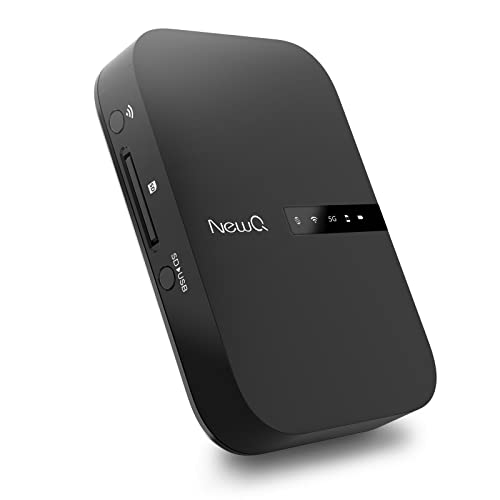
NewQ Filehub AC750 Travel Router and Card Reader — The Wi-Fi Bridge
The Filehub is the cleverest object in this guide, and the most misdescribed by the category’s name. It is not a drive at all. Its listing describes an AC750 travel router that is also a portable hard drive and SD card reader, a mini Wi-Fi range extender, and a way to access external hard drives and USB storage wirelessly to back up photos and files from an iPhone. In plain terms: plug in a USB drive or insert a card you already own, and the Filehub puts that storage on a Wi-Fi network your devices can reach.
That architecture flips the category’s economics. The classics bundled storage and wireless into one ageing box; the Filehub sells only the wireless half, letting the storage half be any drive you own — including a large modern one, replaced whenever you like. A photographer’s card offload, a family’s shared travel drive, a hotel-room network with the media library attached: the Filehub serves all of them, and when its storage fills, you unplug the drive, not the concept.
Its limits follow from the same architecture. Speeds are those of a travel router of its class, not a wired connection, and the listing makes its case on versatility rather than velocity. It also asks slightly more of its owner: you are assembling a small system — router, drive, network — rather than opening one box. For travellers who already carry storage, that assembly is five minutes well spent; for buyers who wanted a drive, it is a reminder to read headings carefully, which is why this guide labels it a bridge in every mention.
Travellers should note the compounding trick: one Filehub, one capacious USB drive, and a hotel room becomes a small media centre — the drive’s library on the room’s devices, the router improving on the hotel’s network, the day’s photographs backing themselves up to the attached storage in the background. No other pick in this guide multiplies itself across a trip in quite that way.
- Product type: AC750 travel router with storage sharing — no storage is built in
- Storage inputs named in title: external hard drive and USB storage devices, SD cards
- Wireless roles named in title: portable drive access over Wi-Fi, mini Wi-Fi range extender
- Phone use named in title: backup of photos and files from iPhone
- Capacity: none of its own — determined by the drive or card you attach
- Travel design: built for travel use, per the listing title
Strengths
- Makes storage you already own reachable over Wi-Fi, in the spirit of the classics.
- Storage can be upgraded by swapping the attached drive, never the whole concept.
- Doubles as a travel router and range extender, earning its bag space twice.
Trade-offs
- It stores nothing alone; a drive or card must join it.
- Wireless speeds of its class trail a direct cable for large transfers.
- It is a small system to assemble, not a single-box product.
Best for: a traveller who already owns USB storage and wants it reachable from phones and tablets without cables. Open the box expecting a drive and you will be disappointed: the AC750 Filehub only bridges storage you already own to your phone over Wi-Fi.

STATIONPC PocketCloud PA100 Portable NAS — The Modern Portable NAS
The PocketCloud is where the category’s idea grew up. Its listing describes a portable NAS for beginners and personal users with a 4-core CPU, Wi-Fi 6, M.2 NVMe and SD card slots, capacity up to 8TB, an LCD display, app control and outdoor use — and, in the same breath, the words that define it honestly: diskless, no SSD. The 8TB is a ceiling for the M.2 drive you buy and install yourself, not storage in the box, and this guide quotes it only with that explanation attached.
What you are buying is a tiny, self-contained cloud: a device that holds your files, serves them over modern Wi-Fi 6 to your phones and computers through its app, shows its status on its own little screen, and travels. Where the classics were drives that learned networking, this is a small server that happens to be portable — the same destination the category was always heading toward, rebuilt with current parts and a living software story. The SD slot nods at the photographers the WD classic served; the app control nods at everyone the iDiskk serves.
The commitment is correspondingly larger. You must choose and buy an M.2 NVMe SSD for it, install it, and accept NAS-style setup rather than plug-and-play. Total cost is the unit plus the drive, and the honest comparison is against the other picks’ totals, not their stickers. For the buyer who wants a personal cloud that fits in a jacket and grows to serious capacity, that commitment buys the most capable and most current answer in this guide. For the buyer who wanted a cable-free drive by Friday, it is a project wearing a product’s clothes — know which buyer you are.
Choose its SSD with the same care as the unit itself: the PocketCloud’s ceiling is 8TB, but most personal clouds live happily far below it, and the money difference between a modest SSD and a maximal one can fund the second copy this guide keeps recommending. A 2TB PocketCloud with its contents duplicated beats an 8TB one standing alone, in this category as in every other.
- Product type: portable NAS — sold diskless with no SSD included, per the listing title
- Processor named in title: 4-core CPU
- Wireless named in title: Wi-Fi 6
- Storage slots named in title: M.2 NVMe and SD card
- Capacity: up to 8TB — the ceiling for an SSD you supply, not built-in storage
- Interface features named in title: LCD display and app control; designed for outdoor use
Strengths
- The most current architecture here: Wi-Fi 6, an app-driven NAS experience, room to grow.
- Capacity scales with the SSD you choose, up to the stated 8TB ceiling.
- SD slot plus NAS features serve both field offload and home-cloud duties.
Trade-offs
- It arrives without storage; the SSD is a separate, necessary purchase.
- NAS setup asks more of a beginner than a plug-and-play drive does.
- The working total — unit plus SSD — is the real price of admission.
Best for: a buyer who wants a pocket personal cloud with modern Wi-Fi and upgradeable storage, and is happy installing an SSD. Not suited for: anyone who needs storage working out of the box — this unit’s box contains potential, not terabytes.
What Speeds Should You Actually Expect When Storage Goes Wireless?
Wireless storage is a convenience technology wearing a storage product’s clothes, and its speeds should be judged by the jobs it was designed for: streaming a film to a tablet, browsing a photo library, copying a day’s shooting off a card, backing up a phone overnight. For those jobs, the classics in their era and the Filehub today are adequate, because the files move at the pace of watching and browsing rather than the pace of a progress bar you are staring at.
Where wireless disappoints is bulk movement: the first great copy of a two-terabyte library, the migration of a whole archive. Those jobs belong on a cable wherever the product offers one, and the honest workflow for every pick in this guide is the same — big transfers wired, daily life wireless. The WD classic’s listing makes the point numerically: its up-to-390 MB/s figure describes its wired-class capability, and no Wi-Fi of its era carried files at anything like that pace. Buyers who internalise that division will be happy with whichever pick they choose; buyers who expect wireless to behave like a cable will be disappointed by all six, equally and unfairly.
The PocketCloud’s Wi-Fi 6 is the one genuinely modern radio in the guide, and it narrows the gap for households whose phones and computers also speak the current standard. Even there, the NAS’s deeper appeal is not raw pace but simultaneity: several devices, one library, no cable choreography. Judge it as a server, not as a wire.
How Does Battery Life Shape These Products?
Every wireless classic in this guide carries a battery, because a drive that creates its own network must power both the storage and the radio. That battery is the products’ quiet expiry date. Batteries age in warehouses as surely as in backpacks, and a discontinued drive bought today brings a battery that has spent years at whatever charge the factory left — sometimes serviceable, sometimes a shadow of its specification, never knowable from the listing. A wireless drive whose battery fades does not die outright; it becomes a drive that works near a wall socket, which dissolves the product’s entire premise.
The modern picks dodge this trap by design, and the difference is worth naming. The iDiskk draws its world through a cable. The Filehub expects to be powered as the little router it is. The PocketCloud is a current product whose battery — where its design uses one — starts its life when you buy it, not years before. None of this makes the classics unusable; it makes their inspection on arrival a real step. Charge a classic fully, run it untethered through a film or a backup, and learn its true endurance while returns are still simple.
What About Security on a Drive That Broadcasts Itself?
A wireless drive is a small network you carry into the world, and it deserves the same hygiene as any network. Change its default password — the classics shipped with widely known defaults, and a drive streaming your photographs in a café is only as private as that password. Keep its use local: the self-contained network is a feature precisely because it need not touch the internet, and bridging it carelessly into other networks dissolves that isolation.
The discontinued status sharpens the point. A living product receives security fixes; a finished one does not, and any flaw discovered in its era’s firmware remains discovered forever. For a media library on a road trip, that risk is modest and manageable. For sensitive documents, it argues for the modern picks or for plain cabled drives — and it is one more reason this guide keeps the classics in the “media and memories” lane rather than recommending them for records.
The PocketCloud, as a true NAS, asks for the fuller discipline: strong account passwords, updates applied when its maker offers them, and thought given to which of its features face outward. Its app will guide the setup; the judgement about what to expose remains yours, as it does for every cloud, pocket-sized or otherwise.
How Do You Build a Wireless Storage Routine That Survives Coming Home?
Most wireless storage dies the same death: it dazzles on the trip and dissolves into a drawer by the following month, because the routine was the trip. The products that survive are the ones given a home job as well as a travel job. The Filehub that served the hotel room can serve the house as the photo-offload point by the door. The PocketCloud that travelled can sit on the desk as the household’s small cloud, still travelling when asked. The iDiskk beside the charger never had a trip-only existence to lose. Decide each product’s home job before buying it, and the purchase becomes infrastructure instead of souvenir.
The routine itself needs three small disciplines. First, one direction of truth: files move from device to storage promptly, and deletions on the phone happen only after the storage copy is verified — the whole point of the exercise is that the copy is real. Second, a naming habit: dated folders per trip or per month, so the library explains itself without an app to interpret it. Third, an escape route: the irreplaceable material eventually also lands somewhere that owes nothing to any of these products — a computer, an archive drive, a cloud account — because every pick in this guide, classic or modern, is a convenience layer, and convenience layers are where copies live, not where they should be born.
Kept that way, wireless storage earns its place permanently: not as the archive, not as the only backup, but as the frictionless front door through which files reach the archive and the backup without anyone having to be disciplined at the end of a long travel day. That is a modest role, and it is the role these products were always best at.
Which Households Get the Most From Each Mechanism?
It helps to people-watch this category for a moment, because each mechanism has a natural owner. The family that road-trips with a tablet per child is the classics’ original congregation — and today, the Filehub feeding a drive of films recreates their setup with living parts. The solo traveller whose phone is their camera, office and diary is the iDiskk’s person: one cable at the hotel, everything safe by morning. The photographer splits two ways — the one loyal to a field workflow the WD classic perfected, and the one ready to build the PocketCloud version of the same discipline with current software.
The household that gains most of all may be the one that has not yet had its storage scare. A phone lost with a year of unbacked photographs is the founding trauma of this entire category, and every mechanism here exists to prevent its sequel. Whichever pick prevents it in your house — the automatic one, ideally, since trauma prevention should not depend on memory — is the right pick, and the finer distinctions between bridges and clouds are refinement. Buy the mechanism your household will actually use weekly, because in this category, used beats elegant by a distance no specification can close.
How Do Six Very Different Products Compare on One Honest Table?
| Pick | What it actually is | Storage as sold | Status |
|---|---|---|---|
| Seagate Wireless Plus | Hard drive with built-in Wi-Fi | 1TB included | Discontinued line, remaining stock |
| Seagate Wireless Mobile | Hard drive with built-in Wi-Fi | 500GB included | Discontinued line, remaining stock |
| WD My Passport Wireless SSD | SSD with built-in Wi-Fi | 500GB included | Discontinued line, remaining stock |
| iDiskk | Cabled phone drive with app backup | 2TB included | Current product |
| NewQ Filehub | Wi-Fi bridge for your own USB storage | None — brings wireless to your drive | Current product |
| STATIONPC PocketCloud | Portable NAS, Wi-Fi 6 | None — SSD bought separately, up to 8TB | Current product |
Read the second column first; it is the column the category’s name tries to hide. Only three rows are wireless drives in the original sense, and all three are discontinued. The current products answer the same human problem — my files, reachable from my phone, without a computer in between — with three different mechanisms: an app and a cable, a bridge, a pocket server. Choosing among the six is really choosing a mechanism, and then a relationship with software old or new.
What Goes Wrong When People Shop This Category?
Buying a classic without testing its app. The hardware will work; the question is whether its era’s app still runs on your phone. Install and explore the companion app before purchasing any discontinued pick — it costs ten minutes and decides the whole purchase.
Reading “up to 8TB” as storage included. The PocketCloud’s figure is a ceiling for an SSD you supply. It ships diskless, as its listing states, and a buyer who misses that sentence receives a beautifully made empty box.
Expecting the Filehub to be a drive. It is a bridge. Without a USB drive or SD card attached, it stores nothing — its genius is making your existing storage wireless, which requires the existing storage.
Assuming wireless means fast. The classics’ Wi-Fi and the Filehub’s travel-router class are convenience technologies. For a multi-hundred-gigabyte transfer, a cable — where the product offers one — remains the adult choice, and the WD classic’s quoted speed belongs to its wired class.
Storing the only copy on an app-dependent drive. Any pick whose access runs through an app inherits that app’s lifespan. Keep a second copy of the irreplaceable material somewhere boring and app-free.
Judging a vintage drive by its first hour. Remaining-stock batteries and apps both reveal themselves over days, not minutes — a drive that performs beautifully on arrival evening may show its battery’s true age by the third. Buy from sellers with real return windows, and run the full ceremony of tests inside that window rather than after it closes.
Final Recommendation
Decide first whether you are buying history or buying a tool. As tools, the modern three win on every practical axis: the iDiskk 2TB for the phone-backup problem most searchers actually have, the NewQ Filehub for wireless access to storage already owned, and the STATIONPC PocketCloud for a genuine pocket cloud — bought with its SSD budgeted and its diskless nature understood. As history, the classics remain genuinely charming and genuinely usable for buyers who verify the app first and accept vintage software as the terms of the deal: the Wireless Plus for the full original experience, the Wireless Mobile for its smaller version, and the WD Wireless SSD for the photographer’s field workflow it was perfecting when the era ended. The best wireless hard drives for extra storage, in the end, are the ones whose true nature you understood before you paid — and now you do.
One closing piece of housekeeping for whichever you choose: on the day it arrives, perform the boring ceremony this category demands. Update what can be updated, change every default password, run one complete backup or offload from your actual phone, and confirm the files open from a second device. Twenty minutes of ceremony converts a hopeful purchase into a known quantity, and in a category built on ageing apps and separate SSDs and bridges, known quantities are the entire game.
Frequently Asked Questions
Are wireless hard drives still made?
The classic form — a portable drive broadcasting its own Wi-Fi network, from a major storage brand — has been discontinued by the makers who defined it, which is why three of this guide’s six picks are remaining stock. The need is now served differently: phone drives with backup apps, bridges that add Wi-Fi to ordinary USB storage, and portable NAS devices with current wireless standards. If a listing presents a major-brand wireless drive as a current product, treat that framing with suspicion and check the line’s status before buying.
How do I check whether a discontinued drive’s app still works?
Before purchasing, find the maker’s companion app in your phone’s app store and install it. An app that no longer exists there is your answer. If it installs, open it and explore — many apps include a demo or device-search mode that reveals whether the software still functions on your operating system version. Read the app’s most recent reviews with dates in mind, since they chronicle exactly the compatibility decay you are trying to predict. Only then order the drive, from a seller whose return policy covers the possibility that your specific phone refuses to cooperate.
Can these products work without internet access?
The classics were designed for exactly that: they create their own local network, and streaming or copying within it needs no internet at all — the aeroplane and the road trip were their home turf. The Filehub likewise creates a local network for its attached storage. The PocketCloud’s local serving works on its own network too, while its cloud-style features naturally depend on the network it joins. The iDiskk sidesteps the question: a cable needs no network of any kind.
Which pick is best for backing up an iPhone?
The iDiskk, and it is not close: it is the only pick designed phone-first, with the required app and one-click auto backup named in its listing, and 2TB sized for a camera roll’s growth. The PocketCloud can also receive phone backups through its app, with more setup and more capability beyond backup. The classics could do this job in their era; today, entrusting a current phone’s only backup routine to a discontinued app is a risk this guide does not recommend taking.
Is the PocketCloud’s 8TB capacity worth the extra setup?
If your horizon is years and your library is large, the arithmetic can favour it: one pocket device whose storage grows with the SSD market, serving every device you own over Wi-Fi 6. If your need is this month’s phone overflow, the setup and the separate SSD purchase are friction without payoff, and the iDiskk answers the same need in an evening. The PocketCloud rewards the buyer building a small system; it punishes the buyer shopping for an appliance.
Can a wireless drive stream to several devices at once?
That was the classics’ party trick — one drive, a carload of tablets, each watching its own film — and within the modest bandwidth of their era’s Wi-Fi it worked for standard media. The modern equivalents divide the labour: the Filehub serves its attached storage to the devices on its network, and the PocketCloud, as a NAS, is designed for several simultaneous users from the start. In all cases, expectations should scale with the era of the radio: one or two streams comfortably, a household of simultaneous viewers belongs on the home network and the NAS.
What happens to my files if the companion app disappears?
The files remain on the drive; what disappears is the convenient door. Most of these products also present themselves to a computer over a cable or a network share, which becomes the remaining door — slower to reach, but real. This is why the guide insists on the escape-route habit: material that also exists in an app-free location never depends on any company’s software decisions. Before buying any app-dependent pick, identify its cable or network fallback and confirm you could live with it; if the fallback is acceptable, the app is a convenience, and if it is not, the app is a landlord.
Related Guides
Wireless storage usually sits between two larger decisions — the home cloud it imitates and the archive it should feed — so these guides complete the triangle: Best Hard Drives for Personal Cloud, Best Archival Hard Drives, and Best Bulk Storage Hard Drives.


