What's inside
- Key Takeaways
- Quick Picks
- How Did We Choose Wired Routers for a Latency Problem?
- What Actually Happens Inside a Bloated Buffer?
- Who Suffers Most — Gamers, Callers or Uploaders?
- fq_codel or CAKE: What Is the Difference That Matters at Home?
- Why Are There No Wi-Fi Routers in This Guide?
- Where Else Does Bufferbloat Hide — Modem, Provider or Wi-Fi?
- The Six Wired Picks, From Four Ports to Ten
- How Much Router Does a Fast Line Actually Need for Shaping?
- Reading the Six as a Ladder of Wired Ambition
- How Do You Configure Shaping Without Strangling Your Speed?
- How Do You Test for Bufferbloat Before Spending Anything?
- What Do Buyers Get Wrong About Bufferbloat?
- Final Recommendation
- Frequently Asked Questions
- Related Guides
As an Amazon Associate I earn from qualifying purchases. This post may contain affiliate links at no extra cost to you.
widgetverdict.com is reader-supported. When you buy through links on our site, we may earn an affiliate commission.
Where to buy: all six products below are wired routers sold through their Amazon listings, and none of them contains a radio — so budget and plan for the access points or existing Wi-Fi system that will sit behind whichever one you choose.
Bufferbloat is the specific misery of a connection that tests fast and feels slow: the video call that turns to soup the moment someone uploads photos, the game whose ping triples when a cloud backup wakes, the page that hangs while a speed test in the next tab boasts. The best routers to handle bufferbloat are therefore not the fastest routers but the ones that manage queues intelligently — and that distinction shapes this entire guide. Every pick below is a wired router, five from Ubiquiti’s EdgeRouter line and one from TP-Link’s Omada range, because serious queue management has historically lived in this wired, prosumer tier rather than in the glossy all-in-one Wi-Fi boxes most homes buy.
The mechanism has a name you should know before the picks: SQM, Smart Queue Management. When any device on your network sends more traffic than the connection can carry, the excess waits in buffers — queues — inside modems and routers. Old-fashioned buffers are large and dumb: they hold everything in arrival order, so a voice packet from your call can sit behind a wall of upload packets, arriving hundreds of milliseconds late. SQM replaces that with algorithms — fq_codel and CAKE are the two best known — that share the link fairly between flows and signal senders to slow down early, keeping latency low even while the connection is saturated. The price of this discipline, as general networking knowledge rather than any one product’s claim, is typically a small slice of peak throughput: shaping traffic a few percent below the line’s maximum — often in the region of five to ten percent — is what gives the algorithms room to work.
Now the honesty paragraph this category demands. Most of the EdgeRouter listings in our pool do not print the letters “SQM” anywhere in their titles, and this guide will not pretend otherwise: each pick’s spec list states, in its own wording, that SQM specifics are not stated in the listing title and must be verified against the manufacturer’s documentation for that model and firmware. That is not a dismissal of these routers — the EdgeRouter line’s queue-management capabilities are the reason it anchors this category, and EdgeOS is where a buyer goes to configure them — but a listing title is evidence of a particular kind, and we attribute only what the evidence shows. Buy the router whose platform supports the queue discipline you intend to run, then verify the exact feature path in the maker’s documentation before you rely on it.
Key Takeaways
- Bufferbloat is latency under load: big, dumb buffers delay interactive traffic behind bulk traffic, and queue management — not raw speed — is the cure.
- SQM algorithms such as fq_codel and CAKE keep latency low under saturation, at the general-knowledge cost of shaping a few percent below peak line speed.
- All six picks are wired routers with no Wi-Fi inside; each one pairs with access points or an existing wireless system.
- The EdgeRouter titles in our pool do not state SQM details — every spec list below says so in its own words and points to manufacturer documentation.
- Port count is the practical divider in this line: from the 4-port EdgeRouter X to the 10-port, PoE-feeding EdgeRouter 12P.
- The TP-Link ER605 adds multi-WAN and Omada SDN management, a different philosophy from Ubiquiti’s per-device EdgeOS.
Quick Picks
| Pick | Badge | Why it earns its place |
|---|---|---|
| Ubiquiti EdgeRouter X (ER-X) | The compact starting point | A 4-port gigabit wired router, the smallest and simplest seat for EdgeOS queue management in a home. |
| Ubiquiti EdgeRouter 4 (ER-4) | The quiet step up | A wired EdgeRouter for households that want more routing headroom than the ER-X class offers. |
| Ubiquiti EdgeRouter 12P (ER-12P) | Ports and PoE for a wired house | Ten gigabit ports with 24V PoE on the RJ45 ports plus two SFP ports, per its title. |
| Ubiquiti EdgeRouter Pro 8 (ERPro-8) | The rack-minded veteran | Eight ports plus two SFP in the Pro line, for networks that outgrew a desktop box. |
| Ubiquiti EdgeRouter PoE (ERPoe-5) | Five ports that power things | A 5-port router with Power over Ethernet, aimed at feeding access points and cameras from the router itself. |
| TP-Link ER605 Wired Gigabit VPN Router | The multi-WAN manager | Up to three WAN Ethernet ports plus a USB WAN, load balancing and Omada SDN integration per its title. |
How Did We Choose Wired Routers for a Latency Problem?
By following the queue. Bufferbloat lives at the point where your network meets the internet — the router’s WAN side — so the picks had to be devices that own that boundary seriously: wired routers from platforms known for configurable queue management, sized from a small home’s needs to a small business’s. Five EdgeRouters span that range because the EdgeOS platform is where this class of buyer has traditionally gone to shape traffic, and the ER605 represents the alternative ecosystem, TP-Link’s Omada, with multi-WAN load balancing as its own answer to a strained connection.
The evidence discipline for this guide is stricter than usual, and deliberately so. Titles in this pool are terse — several are little more than a model name and a port count — so the spec lists lean on exactly what each title states and flag the rest. SQM is discussed as a mechanism in the explanatory sections, where general knowledge belongs, and is never printed as a per-model specification the title did not provide. Port counts, PoE support, SFP cages and WAN arrangements, by contrast, are stated in the titles and are quoted from them. If your purchase hinges on one model’s exact queue features, the manufacturer’s documentation for that model is the deciding document — the pick sections tell you so, each in different words, because it is the most important sentence in this guide.
What Actually Happens Inside a Bloated Buffer?
Picture your upload link as a single-lane bridge and your traffic as vehicles of wildly different urgency. The image is worth keeping in mind whenever a household member asks why the expensive connection feels cheap at the worst moments: nothing about the bridge is broken, and nothing about the vehicles is misbehaving — the queue at the entrance is simply managed by nobody, and unmanaged queues always serve the bulkiest traffic first because the bulkiest traffic arrives in the longest convoys. A cloud backup is a convoy of lorries; a video call is a stream of ambulances. Without queue management, every vehicle joins one first-come queue at the bridge entrance. The lorries arrived in bulk, so the ambulance waits behind all of them — not because the bridge is slow, but because the queue is long and perfectly fair in the worst way. Your speed test, meanwhile, measures how fast lorries cross an empty bridge at 3 a.m., which is why it reports triumph while your call dissolves.
SQM changes the queuing, not the bridge. Fair-queueing algorithms give each flow — roughly, each conversation — its own small queue and serve them in rotation, so the ambulance flow is never stuck behind the whole convoy; the CoDel family adds a sense of time, dropping or marking packets that have waited too long so senders ease off before the queue becomes a traffic jam; CAKE wraps these ideas in a single, carefully tuned shaper that also handles the peculiarities of home connections gracefully. The shaper must sit slightly below the link’s true capacity to control the queue at all — the origin of the small peak-speed trade discussed in the introduction — because a queue can only be managed by the device that is the bottleneck, and shaping makes your router that device on purpose.
Who Suffers Most — Gamers, Callers or Uploaders?
Different households meet bufferbloat in different costumes, and naming yours helps size the cure. The gamer meets it as rubber-banding and shots that register late, appearing precisely when the household is busiest — the game itself uses little bandwidth, so its misery is pure queue delay, and it is often the first complaint a family hears. The video caller meets it as robotic voices and frozen faces during the working day, triggered by anything in the house that uploads: photo sync is the classic assassin, filling the thin upload direction for twenty minutes after a phone joins the Wi-Fi. The uploader — the photographer, the video editor, the household running backups — meets it as everything else in the house slowing while their work flows, and feels guilty about a problem that is actually the queue’s fault, not theirs.
All three are the same queue wearing different hours of the day, which is why a single shaped boundary fixes a whole family’s unrelated complaints at once — and why households often describe the change as the internet “feeling new” rather than faster. It is also why the testing advice in this guide insists on load: each sufferer’s trigger is a different bulk flow, so the honest test reproduces your household’s own trigger, not a generic one. A gaming house tests during a download; a working house tests during an upload; a backup-heavy house tests at the backup’s scheduled hour, which is usually the hour everyone already hates.
fq_codel or CAKE: What Is the Difference That Matters at Home?
Both algorithms answer the same disease with related medicine, and a home buyer mainly needs their temperaments. fq_codel — fair queueing plus controlled delay — separates traffic into flows and serves them in rotation while watching how long each packet has waited, discarding or signalling when a flow’s packets linger too long. It is comparatively light to run, widely available across router platforms, and for years it was the default prescription: set the shaped rate, choose fq_codel, and most home bufferbloat simply stops being a daily experience.
CAKE — Common Applications Kept Enhanced — is the younger, more thorough design: a single integrated shaper that combines fair queueing with careful handling of the home connection’s quirks, including the overhead of common broadband technologies and a gentler treatment of bulk versus sparse traffic. Administrators often describe CAKE as the set-and-forget option that needs less tuning to behave well, at the cost of more processing per packet — which circles back to this guide’s recurring theme of headroom: the faster your line, the more the router’s processor matters when CAKE is doing arithmetic on every packet at full rate. Neither choice is wrong for a home; the platform documentation for the model you buy will tell you which of the two its firmware offers, and that availability — not internet folklore — should settle the question.
Why Are There No Wi-Fi Routers in This Guide?
Because the honest answer to bufferbloat has usually been a platform, not a product category, and the platforms with mature, configurable SQM grew up wired. Consumer all-in-one routers have improved — some now advertise queue features — but the buyer who searches this exact phrase is typically the buyer who has already discovered that their glossy router’s settings do not include the controls they need. The wired-router-plus-access-points architecture also ages better: the router that manages your queues can serve for years while Wi-Fi generations rotate through the access points behind it, each upgrade leaving your carefully tuned traffic shaping untouched.
The architecture asks two things of you. First, a home for the wired half of the network: a shelf or cupboard where the modem, the router and a switch can live, with cables to wherever the access points sit. Second, comfort with configuration. EdgeOS and Omada are not hostile, but they are administrator’s tools; the buyer who wants the network to disappear entirely should know that this guide’s cure involves a settings page, a measured line rate and an evening of setup. That evening is the real price of admission here, and it is paid once. In exchange, the household gains something the all-in-one world rarely offers: a network whose behaviour it can explain. When every part — boundary, queue, access points — has a name and a job, the next problem, whatever it is, gets diagnosed in minutes instead of being solved by buying another box.
Where Else Does Bufferbloat Hide — Modem, Provider or Wi-Fi?
Your router is the queue you can control, but intellectual honesty requires mapping the queues you cannot. The modem or fibre terminal in front of the router has buffers of its own; shaping at your router works precisely by ensuring the queue forms at your device instead of inside the modem, which is why the shaped rate must sit below the line’s true delivery. Further upstream, the provider’s equipment queues traffic too, mostly on the download side, and no home router fully governs that — though a well-shaped upload still transforms the interactive feel of most home connections, because the home’s own uploads are the usual trigger.
Wi-Fi adds a local echo of the same problem. A distant device on a weak signal retransmits and waits, and a busy wireless network can feel bloated even with a perfectly shaped WAN — which is why this guide’s architecture places access points thoughtfully behind the wired router instead of expecting the queue cure to fix radio geography. Diagnose in order: shape the WAN first, since it is the highest-leverage queue; then look at Wi-Fi placement if latency still sags in particular rooms. Households that reverse the order spend money on radios while the real queue, at the boundary, keeps its old habits.
The Six Wired Picks, From Four Ports to Ten

Ubiquiti EdgeRouter X (ER-X) — The small box that starts the cure
The EdgeRouter X is where most home bufferbloat projects begin: a compact 4-port gigabit router running EdgeOS, small enough to sit on the modem’s shelf and inexpensive in spirit — a tool bought to do one job properly. In a typical home deployment it takes the WAN connection, applies the household’s queue management at that boundary, and hands clean, shaped traffic to a switch or a Wi-Fi system behind it. Four ports sound sparse until the architecture is understood: one for the internet, one for the main switch or access point, and the rest are rarely missed in a house whose devices are wireless anyway.
There is a deployment pattern that suits it particularly well, worth picturing before the bigger models seduce you: modem on the shelf, ER-X beside it owning the WAN, one cable to the Wi-Fi system the household already likes, and the shaping configured on the first evening with the household’s measured rates. Nothing else changes — no new network name, no re-joined devices, no weekend of upheaval — yet the calls steady and the games calm down, because the only point in the network that was misbehaving has been given a manager. Minimal interventions that work are underrated in home networking, and the ER-X is the minimal intervention in this category.
Its limits are the honest limits of a small, older design.
Households with fast connections and heavy simultaneous shaping should think about processing headroom — queue management is arithmetic performed on every packet, and a gigabit line under full shape is real work for a compact router’s processor; the maker’s documentation for the ER-X is where its throughput-with-features figures live, and this guide points you there rather than guessing. For the far more common case — a connection in the low hundreds of megabits whose latency collapses under load — the ER-X class of device is precisely the medicine, which is why it has been the default recommendation in this niche for years.
- Form: wired router — no Wi-Fi radios; pair with access points
- Ports: 4-port gigabit, per the title (ER-X)
- Platform: EdgeOS (Ubiquiti EdgeRouter line)
- SQM specifics: the ER-X listing title carries no queue-management details at all — the exact SQM options for this model belong to Ubiquiti’s EdgeOS documentation, which you should consult before purchase
- Best role: single-WAN home connection shaped at the boundary
Strengths
- The smallest, simplest seat for EdgeOS in a home network cupboard.
- Gigabit ports suit the wired boundary role without wasted hardware.
- A vast community of EdgeOS configuration knowledge surrounds this model.
Trade-offs
- Four ports assume a switch or Wi-Fi system behind it from day one.
- Shaping very fast lines at full rate asks a lot of its compact processor.
- No Wi-Fi inside — the wireless half of the house is a separate purchase.
Best for: a home whose connection speed is modest but whose latency under load is miserable. Not suited for: a multi-gigabit household expecting full-rate shaping — its compact 4-port class was designed before such lines were common, so verify throughput figures in the maker’s documentation.
The EdgeRouter X listing is the starting point; the EdgeOS documentation linked from Ubiquiti’s site carries the queue detail.

Ubiquiti EdgeRouter 4 (ER-4) — Headroom for a busier boundary
The EdgeRouter 4 occupies the step above the X in the line’s logic: still a wired EdgeOS router, still a desktop-class box, but aimed at households and small sites whose boundary traffic is heavier — faster lines, more simultaneous flows, a home that is also an office. Its title is the tersest in this pool, offering little beyond the model and the fact that it is a wired Ethernet router, and this section respects that terseness: the ER-4’s case rests on its position in the EdgeRouter family and the platform it runs, not on specifications its listing does not print.
There is a recognisable household that belongs to this model: the connection is fast, the working day runs two video calls deep, a home server syncs through the afternoon, and the ER-X-class experiment — perhaps borrowed, perhaps read about — proved the queue cure works but left its owner wanting margin for the line’s full rate. The ER-4 is the considered step for that household, bought not for a feature list but for the absence of a ceiling: the shaping keeps up at the hours when the boundary is busiest, and the administrator stops thinking about the router’s processor entirely, which is the correct amount of thought to give a boundary device.
Buyers step up to this class for margin.
Queue management under load is a per-packet discipline, and the household that shapes a fast connection while two people work, a server syncs and a console downloads is buying processor headroom as much as ports. The ER-4 is also a natural fit where the ER-X’s port layout feels tight for a boundary that must serve a switch, a server and a failover experiment at once. As with every EdgeRouter here, the deciding document for exact queue features and rated throughput is Ubiquiti’s own documentation for the model — the listing will sell you the box, but the manual is what tells you the box does your specific job.
- Form: wired router — no Wi-Fi radios; pair with access points
- Platform: EdgeOS (Ubiquiti EdgeRouter line)
- Ports and throughput: the ER-4’s listing title is minimal and does not enumerate its port layout — confirm the current hardware specification in Ubiquiti’s documentation before designing a cabinet around it
- SQM specifics: queue-management particulars for the ER-4 are not something its listing title addresses; treat the maker’s EdgeOS guides as the source of truth for what this model configures
- Best role: a busier home or small-site boundary needing more headroom than the ER-X class
Strengths
- A step up in routing headroom for faster lines under full shaping.
- Same EdgeOS platform, so skills and configurations carry over from the ER-X.
- Suits a boundary that also feeds servers and a small office.
Trade-offs
- The sparse listing means specification homework is unavoidable before ordering.
- Still no Wi-Fi; the wireless network remains a separate system to buy and place.
- Its extra headroom is wasted on a slow line with one user.
Best for: a fast home connection with several simultaneous heavy users at the boundary. Expect to work from Ubiquiti’s own documentation rather than the sales page, because this listing’s title amounts to little more than the product’s name and colour.
Pair the EdgeRouter 4 listing with Ubiquiti’s model documentation when planning the upgrade from an ER-X-class box.
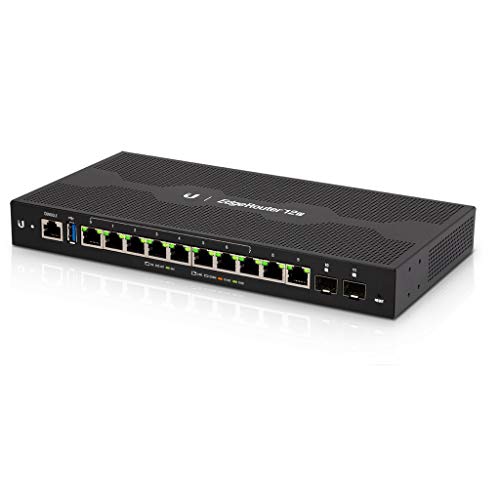
Ubiquiti EdgeRouter 12P (ER-12P) — Ten ports and power for the wired house
The EdgeRouter 12P is the maximalist of the line: a 10-port gigabit router whose title specifies 24V PoE support on its RJ45 ports and two SFP ports besides. Read that specification as a wired house’s manifesto. The PoE ports can power access points and cameras directly from the router, collapsing the usual nest of injectors and wall warts in the network cupboard; the port count swallows a switch’s worth of wired devices — desktops, servers, a NAS, the television’s cable — without an extra box; and the SFP ports open the door to fibre or DAC links toward another switch or a fast server, the connections a growing home lab eventually wants.
For the bufferbloat brief specifically, the 12P is the same EdgeOS queue platform wearing a much larger coat, and the coat is the point: households arrive at this model when the boundary router has become the house’s wired heart, not merely its internet gatekeeper. The discipline it demands is planning — PoE budgets, which ports feed which rooms, what the SFP cages will carry — and its size assumes a cabinet or rack corner rather than a modem shelf. A small flat buying it for queue management alone is purchasing a great deal of unneeded copper; a wired house with PoE access points will wonder how it managed without it.
- Form: wired router — no Wi-Fi radios; it powers and feeds the access points instead
- Ports: 10-port gigabit, per the title
- PoE: 24V PoE support on the RJ45 ports, per the title
- Uplinks: 2 SFP ports, per the title
- SQM specifics: nothing in the 12P’s listing title speaks to Smart Queue Management — the model’s queue configuration lives in the EdgeOS documentation, and that is where a buyer should confirm the feature set before relying on it
Strengths
- PoE on the router’s own ports removes a nest of injectors for access points and cameras.
- Ten gigabit ports can absorb a small switch’s entire job.
- SFP ports give the wired core a fibre growth path.
Trade-offs
- Physically and administratively more router than a small home can use.
- 24V PoE is Ubiquiti’s passive standard — check powered devices match it before plugging in.
- Its queue value is identical in kind to the smaller EdgeRouters; you pay for ports and power.
Best for: a thoroughly wired house or home lab whose access points want PoE from the core. Not suited for: a two-room flat — ten ports and router-grade PoE would sit idle behind a television, and the ER-X class answers the same queue problem in a quarter of the cabinet.
The EdgeRouter 12P listing itemises the PoE arrangement across its ten ports.
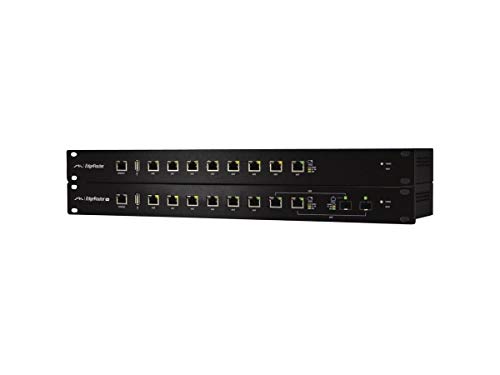
Ubiquiti EdgeRouter Pro 8 (ERPro-8) — The Pro-line veteran
The EdgeRouter Pro 8 comes from the line’s professional branch: eight ports plus two SFP, per its title, in a router built for the small-business and serious-home tier where the boundary device is expected to run for years without attention. Its presence in this guide is about that expectation. A household whose network has grown organs — a home business, a server or two, tenants or family in a second unit sharing the connection — needs the queue discipline applied by hardware with ports and headroom to spare, and the Pro 8 is the EdgeOS answer at that scale.
Age is part of its honest description: the Pro line is a veteran design, and a buyer should weigh its maturity as both parties would — proven, documented and understood by a decade of administrators, while lacking whatever the newest silicon elsewhere has learned. For the queue-management brief, maturity is mostly virtue: the configuration you need is the configuration thousands of networks already run. The SFP pair suits a fibre handoff or a fast link to a core switch, and the eight ports cover a small site’s wired skeleton without a switch purchase on day one. Verify, as with its siblings, the model’s exact documented feature set before purchase; the title promises ports and pedigree, and those are what this section claims for it.
- Form: wired router — no Wi-Fi radios; a boundary and core device
- Ports: 8 ports plus 2 SFP, per the title (ERPro-8)
- Platform: EdgeOS, Pro line
- SQM specifics: the Pro 8’s listing title is silent about queue management — Ubiquiti’s documentation for the EdgeRouter Pro family is the reference for the SQM configuration this model supports, not the sales page
- Best role: small-business or large-home boundary with servers and multiple wired segments
Strengths
- Eight ports plus SFP cover a small site’s wired skeleton in one unit.
- A decade of administrative knowledge surrounds the Pro platform.
- Built for the always-on, rarely-touched life of infrastructure.
Trade-offs
- A veteran design; the newest routing silicon lives elsewhere in the market.
- Oversized for an ordinary home’s boundary in every dimension.
- Assumes an administrator comfortable in EdgeOS from the first evening.
Best for: a home business or multi-unit property whose connection is shared infrastructure. Not suited for: a single household’s simple line — eight ports, SFP cages and Pro-line administration answer problems a smaller EdgeRouter solves at a fraction of the commitment.
The EdgeRouter Pro 8 listing confirms the port and SFP arrangement for cabinet planning.

Ubiquiti EdgeRouter PoE (ERPoe-5) — Five ports that feed the access points
The EdgeRouter PoE — the ERPoe-5 — is the 5-port member of the family whose title leads with its distinguishing gift: Power over Ethernet. In the wired-router-plus-access-points architecture this guide recommends, that gift is pointed directly at the wireless half of the house. Ceiling and wall access points want power where no socket lives; a router that supplies it over the same cable that carries their data removes the injector clutter and makes tidy, professional placements — the hallway ceiling, the stairwell wall — electrically trivial. Five ports is a small count, but in this design the router is a power station and boundary in one: WAN in, a couple of PoE-fed access points out, a port for a switch if the wired family grows.
Its queue story is the family story — EdgeOS at the boundary — and its vintage deserves the same honesty as the Pro 8’s: this is a long-serving design, bought for a specific trick, not for novelty. Check the PoE standard and budget in the manufacturer’s documentation against the access points you intend to feed, because PoE variants are a compatibility subject in their own right and the title’s promise is general rather than itemised. Households whose access points already have power, or whose layout needs no powered placements, will find the plain ER-X answers the same brief with less to verify.
- Form: wired router — no Wi-Fi radios; it powers the access points that provide Wi-Fi
- Ports: 5-port, per the title
- Distinguishing feature: Power over Ethernet, per the title (ERPoe-5)
- SQM specifics: you will search the ERPoe-5’s listing title in vain for queue-management detail — the EdgeOS documentation for this model carries the SQM story, and a careful buyer reads it there before ordering
- Best role: boundary router for a home whose access points sit where sockets do not
Strengths
- PoE from the router makes ceiling access-point placements clean and simple.
- Five ports match the boundary-plus-two-APs shape of many real homes.
- The same EdgeOS queue platform as the rest of the family.
Trade-offs
- PoE variant and budget must be matched to your access points in the documentation.
- Five ports fill quickly if the wired household grows.
- A long-serving design, bought for its trick rather than its novelty.
Best for: a home placing powered access points on ceilings or stairwell walls. Not suited for: a layout whose access points already sit beside power sockets — the PoE premium buys a capability that would never be plugged into anything.
Check your access points’ power requirements against the EdgeRouter PoE listing and the model’s documentation.

TP-Link ER605 Wired Gigabit VPN Router — The Omada multi-WAN alternative
The ER605 is the dissenting philosophy in this guide: a wired gigabit VPN router from TP-Link’s Omada world, whose title promises up to three WAN Ethernet ports plus one USB WAN, an SPI firewall, SMB-router positioning, Omada SDN integration, load balancing and lightning protection. Its answer to a strained connection is partly different from the EdgeRouters’: where Ubiquiti’s pitch is queue craft on one line, the ER605 also offers more line — multiple WAN connections balanced across the household or business, so a saturated link gains a sibling. For a small business with two mediocre connections available, that arithmetic can matter as much as shaping.
Picture the small business it suits: a workshop with a mediocre business line and a consumer line from a second provider, a till and booking system that must never go down, and staff Wi-Fi that can borrow whichever connection is healthier. The ER605’s load balancing turns those two underwhelming lines into one serviceable whole, and its failover behaviour — moving traffic when a line dies — is the business-grade version of the continuity the home picks in this batch pursue by other means. Bufferbloat thinking still applies to such a network, but it shares the stage with availability, and for that business availability is the louder problem.
Omada SDN integration is the other half of its identity:
the ER605 is designed to be managed as part of a TP-Link Omada network — switches and access points under one controller — which suits a buyer already building in that ecosystem and wants the boundary router inside the same management pane. Its queue story must be stated with this guide’s usual precision: the title speaks of load balance and firewalling, not of SQM by name, so a buyer whose brief is specifically fq_codel or CAKE-style shaping should verify the current Omada documentation for what the platform offers rather than assume parity with EdgeOS. As a multi-WAN SMB boundary, though, it is a coherent, modern alternative with a different set of strengths.
- Form: wired gigabit VPN router — no Wi-Fi radios; Omada access points complete the system
- WAN: up to 3 WAN Ethernet ports plus 1 USB WAN, per the title
- Named features: SPI firewall, load balance, lightning protection
- Management: Omada SDN integrated, per the title
- SQM specifics: the ER605’s title talks about load balancing rather than Smart Queue Management — what queue controls the Omada platform exposes for this model is a question for TP-Link’s current documentation, and this guide does not fill that silence with EdgeOS assumptions
Strengths
- Multi-WAN with load balancing attacks congestion from the capacity side.
- Omada integration unifies management for TP-Link switch and AP owners.
- An SPI firewall and SMB positioning suit small-business boundaries.
Trade-offs
- Its title’s congestion answer is balancing, not named SQM — shaping-first buyers must verify.
- Full value assumes the Omada ecosystem around it.
- A USB WAN is a convenience path, not a substitute for a real second line.
Best for: a small business or home with two internet connections to balance, inside the Omada ecosystem. Not suited for: a single-line household whose whole brief is SQM tuning — the EdgeRouter platform’s documentation speaks that language more directly than this listing does.
The ER605 listing lays out the multi-WAN port arrangement for dual-line planning.
How Much Router Does a Fast Line Actually Need for Shaping?
Shaping is arithmetic, and arithmetic has a rate. Every packet that crosses the boundary must be classified, queued and scheduled, and at gigabit speeds that is a million small decisions a second. This is the technical fact beneath this guide’s ladder of models: the ER-X class delights on connections in the low hundreds of megabits, while a household shaping a near-gigabit line in both directions should be reading the documentation’s throughput-with-queuing figures for the larger EdgeRouters with genuine care. The honest metric is never the box’s routing speed with features off; it is the rate at which it can shape, which the manufacturers publish in their documentation and which this guide therefore keeps pointing you toward.
There is a pragmatic middle path for fast-line households: shape the direction that bloats. On most asymmetric connections the upload is both the thinnest and the worst-behaved direction, and shaping upload alone — leaving download unshaped or lightly shaped — captures most of the cure at a fraction of the processing cost. Many households run exactly this compromise for years without feeling short-changed, because their download queue, governed by a fat modern pipe, rarely fills. Decide with your before-picture test figures: the direction whose loaded latency explodes is the direction that earns the shaper’s full attention and the hardware budget that follows it.
Reading the Six as a Ladder of Wired Ambition
| Pick | Ports per title | Distinguishing hardware | Platform | SQM in title? |
|---|---|---|---|---|
| EdgeRouter X (ER-X) | 4 gigabit | Compact desktop form | EdgeOS | Not stated — see documentation |
| EdgeRouter 4 (ER-4) | Not enumerated in title | Step-up boundary class | EdgeOS | Not stated — see documentation |
| EdgeRouter 12P (ER-12P) | 10 gigabit + 2 SFP | 24V PoE on RJ45 ports | EdgeOS | Not stated — see documentation |
| EdgeRouter Pro 8 (ERPro-8) | 8 + 2 SFP | Pro-line build | EdgeOS | Not stated — see documentation |
| EdgeRouter PoE (ERPoe-5) | 5 | Power over Ethernet | EdgeOS | Not stated — see documentation |
| TP-Link ER605 | Gigabit; up to 3 WAN + USB WAN | Load balance, SPI firewall | Omada SDN | Not stated — see documentation |
The last column is this guide in miniature: uniform honesty about what the listings claim, with the platforms — EdgeOS and Omada — carrying the queue-management conversation in their documentation rather than in their titles. Choose the platform whose documented queue tools match your plan, then choose the port count that matches your cabinet. Notice, too, what the ladder is not: it is not a ranking of queue quality, since the platform is shared across the five EdgeRouters and the differences are ports, power and processing margin. A household that buys the 12P expecting a better cure than the ER-X has misunderstood the range; a household that buys it for ten ports and PoE has understood it perfectly. That distinction — platform first, hardware second — is the habit this entire category rewards, and it survives every future model refresh on both sides of the table.
How Do You Configure Shaping Without Strangling Your Speed?
Measure first, on a quiet network, with a wired device: run several speed tests at a calm hour and note the honest download and upload figures your line actually delivers, which are usually a little below the plan’s headline. Then set the shaper’s limits a few percent under those measured figures — the general practice in the SQM world is to sacrifice a small slice of peak, commonly in the five-to-ten-percent region, so the router rather than the modem owns the queue. Upload deserves the most care on asymmetric connections, because the thin upload direction is where home bufferbloat usually lives: a single photo backup can fill it entirely.
Test under load, not in peace. Start a large upload, then make a call and play an online game; the shaped network should feel almost boring — slightly lower peak numbers, dramatically steadier latency. If the call still dissolves, lower the shaped limits a step and retest; if everything feels perfect, resist raising them, because the headroom you are tempted to reclaim is precisely the headroom doing the work. Write down the final figures. A shaped network is a tuned instrument, and the note in the drawer is what lets you restore it after a reset or a firmware adventure.
One refinement separates a good tune from a great one: revisit the shaped rates when anything upstream changes. A new internet plan, a provider upgrade in the street, even a modem swap alters the line’s true delivery, and a shaper still tuned to the old figures either wastes the new capacity or — worse — sits above the new bottleneck and stops owning the queue. The five-minute retest from the earlier section, run after any provider change, keeps the cure calibrated for the connection you actually have rather than the one you had when you set it up.
How Do You Test for Bufferbloat Before Spending Anything?
The home test takes ten minutes and no equipment beyond what you own. First, on a wired connection, note your ordinary latency at rest — a simple continuous ping to a familiar address will show a calm baseline. Second, start the largest upload you can arrange: a cloud backup, a big file to a storage service, a speed test’s upload phase. Third, watch the same ping during the upload. If the baseline was a steady low figure and the loaded figure leaps into the hundreds of milliseconds with wild swings, you have taken bufferbloat’s portrait. Repeat with a large download running to see the other direction’s behaviour.
Do the test at the hour your household actually suffers, because an empty house at noon can hide what a full house at eight reveals. And record the numbers — baseline, loaded download, loaded upload — somewhere durable. Those three figures are your before-picture: they size the problem, they tell you which direction bloats worst, and after the new router is shaped they become the after-picture that proves whether the cure worked. Buyers who skip the portrait often fix the wrong direction or cannot tell a cure from a placebo.
What Do Buyers Get Wrong About Bufferbloat?
Buying a faster plan to cure latency. A bigger pipe with the same dumb buffers bloats at a higher speed. The queue is the disease; bandwidth is not the medicine.
Expecting the listing title to certify SQM. In this pool it does not — for any pick. The manufacturer’s documentation is the certifying document, and skipping it is how a buyer ends up with the wrong platform.
Shaping to the plan’s advertised rate. Advertised rates are ceilings, not deliveries. Shape to measured figures, a few percent under, or the modem’s buffer keeps the queue and the bloat.
Forgetting the Wi-Fi half of the house. Every pick here is wired. A household that unboxes an EdgeRouter expecting a network name to appear has bought half a system — access points are the other half.
Testing only in quiet hours. Bufferbloat is a load phenomenon. A network validated at midnight and never at the evening peak has not been validated at all.
Final Recommendation
For most homes, begin where the category begins: the EdgeRouter X, a small wired box that puts EdgeOS queue management at your boundary for the least commitment, paired with whatever Wi-Fi you already own behind it. There is a discipline worth stating alongside the recommendation: resist upgrading within the line until the before-and-after test figures say the small box is the limit, because the ladder of EdgeRouters is climbed with evidence or not at all — ports and PoE justify the climb, curiosity does not, and a well-tuned ER-X on a modest line is a finished network, not a starter draft of one. Step up to the ER-4 class when the line is fast and the household’s simultaneous load is heavy; choose the ERPoe-5 when your access points need power from the router, the 12P when the wired house has outgrown a switch’s worth of ports, and the Pro 8 when the connection is small-business infrastructure. Take the ER605 instead when two internet lines and the Omada ecosystem describe your situation better than single-line shaping does. In every case, do the unglamorous homework this guide keeps assigning: read the model’s documentation for its queue features, measure your real line rate, shape a few percent under it, and test under load. Bufferbloat is one of the few network problems that is genuinely curable — and the cure is a queue, configured once, by someone who understood what they were buying.
Frequently Asked Questions
How do I know if my problem is really bufferbloat?
The signature is latency that collapses under load while headline speeds test well: calls and games suffer exactly when uploads, backups or big downloads run. Test by starting a large upload and then pinging or calling — if responsiveness falls apart only while the link is busy, the queue is your problem, and this guide’s category of router is the addressed cure. One refinement is worth adding: run the same test wired and then over Wi-Fi. If the wired test is clean and only the wireless one collapses, your queue may be innocent and your radio geography guilty — the distinction decides whether the money goes to a router from this guide or to access-point placement behind the router you already own.
Does SQM slow my connection down?
By design, a little at the peak: shaping works by capping the router slightly below the line’s maximum — general practice puts the sacrifice in the region of five to ten percent — so the router owns the queue. In exchange, latency under load improves dramatically. Most households experience the trade as the connection getting faster, because the number that drops is one they rarely used and the number that improves is one they feel constantly. If the trade still stings, shape only the direction that bloats — usually upload — and leave the other direction’s peak untouched; a half-shaped connection captures most of the cure.
Why do the spec lists keep saying SQM is not in the titles?
Because it is not, and this guide attributes only what its evidence shows. The EdgeRouter listings in our pool state ports and models; the queue-management capabilities live in the EdgeOS platform and its documentation. That is where a buyer confirms fq_codel, CAKE or the platform’s own smart-queue implementation for the specific model — before purchase, not after.
Can I keep my existing Wi-Fi router with one of these?
Usually, yes — set the old router to access-point mode if it offers one, and let the wired router own the internet boundary and the queues. That arrangement is the standard deployment for every pick here, and it is why a household does not need to discard working Wi-Fi hardware to fix a latency problem that lives at the WAN edge.
Is the ER605 a bufferbloat router or something else?
Its title presents it as a multi-WAN VPN router with load balancing and Omada management — a capacity-side answer to strained connections, and a coherent SMB boundary. A buyer whose brief is specifically SQM-style shaping should verify the Omada platform’s current queue features in TP-Link’s documentation, since the ER605’s own title does not claim them.
Will a wired router from this guide work with my mesh Wi-Fi system?
Generally yes: the mesh’s main unit connects to the wired router by Ethernet and can usually be set to access-point or bridge mode so the EdgeRouter or ER605 owns routing and queues. That arrangement preserves your mesh investment while moving the intelligence to the boundary, which is where bufferbloat lives. Check your mesh system’s mode options before purchase, since a mesh that insists on being the router complicates the architecture.
Related Guides
Queueing is only one corner of home networking; the wider picture lives in the best WiFi 6E mesh routers, the best routers for multifloor homes and the best routers for remote work.


