Our Top Picks
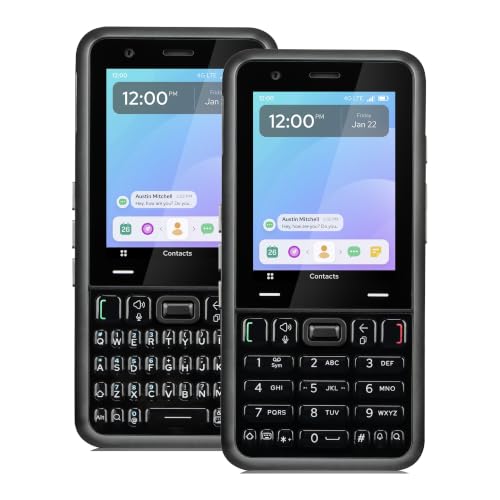 Keyphone Hybrid 4G LTE Unlocked Phone with Physical5.1 × 2.4 × 0.5 in7 x 4 x 3 inches0.35 poundsCheck on Amazon

What's inside
- Why a hardware keyboard still matters
- The main forms a QWERTY Android phone takes
- Who genuinely benefits, and who probably will not
- Judging key feel without a shop floor
- Screen compromises you should expect
- Software age is the category’s biggest risk
- Network bands and support checks that cannot be skipped
- Battery life, charging, and the reality of older cells
- Build quality, hinges, and buying used or old stock
- Typing experience in real applications
- Layout languages, symbols, and learning a new board
- Cameras, media, and other honest trade-offs
- Privacy, focus, and the case for a calmer handset
- Accessories and carrying habits that complete the setup
- A practical shortlist method before you spend anything
- Long-term ownership and knowing when to move on
- Comparing a keyboard phone against a small touchscreen rival
- Questions worth asking other owners
- Making the final decision with clear eyes
- Ergonomics over a full working day
- Travel behaviour and life away from home
- Check prices on Amazon
- A note on children, shared devices, and spare handsets
As an Amazon Associate I earn from qualifying purchases. This post may contain affiliate links at no extra cost to you.
A physical keyboard changes the way a phone feels in daily use. Instead of tapping glass and watching autocorrect guess at your meaning, you press a real key, feel a small click, and know the letter landed. For people who write long messages, answer email on trains, draft notes in meetings, or simply dislike typing on a flat screen, that certainty is the whole point. Android phones with QWERTY keypads are rare now, yet the niche survives because touchscreens never fully replaced the speed and confidence that come from memorised key positions and genuine tactile feedback.
This guide treats the category honestly. You will not find dozens of fresh flagships competing for your attention, because mainstream makers abandoned hardware keyboards years ago. What remains is a small, interesting mix of slider designs, candybar handsets with keys below the screen, keyboard attachments, rugged communicators, and older stock still circulating through specialist sellers. Choosing well means understanding which of those forms fits your hands, your apps, and your network, rather than chasing a specification sheet that was never the reason anyone bought one of these devices.
Why a hardware keyboard still matters
Muscle memory is the strongest argument. After a few weeks with a fixed layout, your thumbs learn where every letter lives, and typing stops being a visual task. You can keep your eyes on the conversation, the platform sign, or the person speaking while your fingers finish a sentence underneath. Touch typists who grew up with messaging phones often describe glass keyboards as tiring precisely because every keystroke demands attention. A keypad removes that demand and returns typing to the background, where routine communication belongs.
Accuracy follows from the same design. Each key occupies its own space, separated by a ridge, a dome, or a sculpted edge, so a thumb that lands slightly off centre still tends to press the intended character. On glass, a near miss becomes a wrong letter and a correction cycle. Writers who produce long passages on the move notice the difference quickly: fewer interruptions, fewer deleted words, and far less dependence on prediction engines that struggle with names, technical vocabulary, mixed languages, and deliberate abbreviations.
Shortcuts are the quiet advantage nobody mentions in adverts. A hardware keyboard can launch apps from key combinations, scroll pages with the space bar, select text with shift and directional movement, and trigger actions inside email clients that were built around keyboard control. For people who triage inboxes, annotate documents, or work through messaging queues, those combinations shave seconds repeatedly across a day. The savings feel modest in a single moment and substantial by evening, especially when the alternative involves repeated tapping through layered touch menus.
There is also a matter of temperament. Some owners want a phone that encourages writing and discourages endless scrolling. A smaller screen paired with a keyboard sends a clear signal about purpose: this device exists for messages, notes, calls, and reading, not for immersive video sessions. Readers comparing focused handsets sometimes also look at best 4 inch android phones because compact dimensions and deliberate use often travel together, even though a small touchscreen solves a different problem than a physical keypad does.
The main forms a QWERTY Android phone takes
The slider hides its keyboard beneath the display and reveals it with a sideways or downward push. Closed, the handset behaves like an ordinary touchscreen phone with a full-size viewing area. Open, it becomes a miniature writing desk, usually in landscape orientation, with the screen propped above two rows of thumbs. Sliders protect keys from pocket wear and keep the device compact when closed, but the moving mechanism adds thickness, and a hinge that loosens over time can make the whole phone feel tired long before its electronics fail.
The candybar layout puts a permanent keyboard beneath a smaller, usually portrait screen. Nothing moves, nothing hides, and the keys are ready the instant you pick the phone up. That immediacy suits messengers who fire off short replies all day. The compromise is obvious: the display shrinks to make room, so maps, photographs, and web pages feel cramped. Candybar owners accept that trade willingly because their priority is text entry, and they often keep a tablet or laptop nearby for anything that genuinely needs a large canvas.
Keyboard cases and clip-on accessories form a third route. A standard Android phone gains a sliding or snap-on keypad, sometimes connecting over Bluetooth, sometimes through a wired interface. This approach lets you keep a modern processor, current software, and proper network support while adding tactile typing when you want it. The weaknesses are bulk, charging discipline when the accessory carries its own battery, and fit: a case designed for one handset rarely suits another, so upgrading the phone may mean replacing the keyboard as well.
Rugged communicators occupy a smaller corner still. Built for warehouses, field service, surveying, and delivery work, they pair sealed bodies with real keys that respond through gloves. Their screens and cameras rarely impress, yet their keyboards survive drops, dust, and rain that would finish a fashion handset. If your interest in physical keys comes from work rather than nostalgia, this group deserves attention, because durability and key feel were engineered together instead of one being sacrificed for the other.
Who genuinely benefits, and who probably will not
Heavy writers benefit most obviously. Journalists filing from events, support staff answering tickets between site visits, community managers replying across several accounts, and anyone whose job lives inside email will feel the keyboard earning its keep within days. The benefit compounds when messages are long, addresses and order details must be exact, or the writer switches languages often enough that predictive text becomes a hindrance rather than a help. For these users, key travel and layout matter more than benchmark scores.
People with certain accessibility needs may also find real keys easier than glass. A defined edge gives the fingertip something to locate without looking, and a deliberate press reduces accidental input from tremor or reduced sensation. That said, small keys demand their own dexterity, and tightly packed layouts can frustrate larger hands. Anyone buying for accessibility reasons should handle a device first if possible, or choose a seller with a sensible returns window, because comfort here is personal and cannot be settled by reading a feature list.
Video-first users, by contrast, usually regret the compromise. If your phone is primarily a screen for streaming, games, and photography, a keyboard steals space, adds weight, and brings an older display panel along for the ride. The same applies to people who rely on the newest camera processing or who play demanding games; QWERTY models seldom lead in those areas. Readers whose viewing habits dominate may prefer exploring best all screen android phones instead, where the entire face of the handset is given over to display and nothing is held back for keys.
There is a middle group worth naming: the two-device carriers. Some owners keep a mainstream phone for media and photography and carry a keyboard handset for writing, travel, or focused weekends. Splitting roles lets each device be good at one thing. The cost is managing two chargers, two sets of notifications, and possibly two service plans, although a dual SIM arrangement or a shared hotspot can soften that burden. For writers who travel light, one well-chosen communicator still beats a bag of compromises.
Judging key feel without a shop floor
Key travel describes how far a key moves when pressed. Deeper travel gives a satisfying confirmation and helps fingers rest on the surface without triggering input, while shallow travel keeps a handset thin but can feel vague. Dome switches beneath many phone keypads produce a crisp snap when they collapse, and that snap matters more than raw depth on such a small scale. When reading owner reports, look for descriptions of consistency across the board, because a keyboard with lively outer keys and mushy central keys will annoy you every time you reach for common letters.
Key size and spacing decide whether thumbs collide. Designers working in a narrow body must squeeze a full alphabet, a space bar, and modifier keys into a strip only a few centimetres wide. Sculpted caps, staggered rows, and slightly domed centres all help thumbs distinguish neighbours by touch. A fretted layout, where thin rails separate rows, gives another reference point. If you have broad thumbs, prioritise width above almost everything else; a slightly larger handset with breathing room between keys will out-type a slimmer rival no matter how elegant the smaller model looks in photographs.
Backlighting sounds trivial until you type in a dim train carriage or answer a message during a night flight. Even, legible illumination across every character makes the keyboard usable without tilting the phone toward a light source. Check whether brightness adjusts automatically or manually, and whether the light bleeds so strongly around key edges that contrast actually falls. Symbols printed as secondary legends deserve the same scrutiny, because punctuation hidden in pale ink will slow you down whenever you write anything more formal than a chat reply.
The space bar and modifier keys carry disproportionate weight in real typing. A wide, stable space bar prevents missed word boundaries, while well-placed shift, alt, and symbol keys decide how gracefully you handle capitalisation, numbers, and punctuation. Some layouts require a function press for every digit, which quickly becomes tiresome when writing addresses or reference codes. Others provide a dedicated number row at the cost of smaller letter keys. Neither answer is universally correct; your writing habits should arbitrate, and a week of typical messages tells you which characters you actually use most.
Screen compromises you should expect
A keyboard consumes volume, and designers repay that volume somewhere. Usually the display pays. Expect smaller panels, lower resolutions than similarly priced touchscreen models, and bezels that look generous by current standards. For reading messages, documents, and articles, a modest screen remains perfectly serviceable, particularly when the keyboard handles scrolling elegantly. Problems arise with spreadsheets, detailed maps, photo editing, and websites that assume a wide viewport, where constant zooming turns simple tasks into chores.
Orientation shapes the experience too. Sliders typically write in landscape, giving a wide, short reading window that suits email and chat threads. Candybar models write in portrait, showing more of a conversation but narrowing each line. Writers who draft structured documents often prefer landscape because headings and paragraphs resemble a page. Chat-heavy users may favour portrait because one-handed replies feel natural. People cross-shopping dimensions sometimes browse best 146mm android phones to understand how overall handset height changes pocket fit and reach, which is relevant when a keyboard already dictates much of the body shape.
Touch still matters even on a keyboard phone. You will tap links, pinch maps, confirm dialogs, and navigate apps that never anticipated hardware keys. A responsive touchscreen with accurate calibration remains essential, and a dull or laggy panel undermines the entire device. Pay attention to outdoor visibility as well, since field writers and travellers often compose in bright conditions. A keyboard removes the need to see the keys, but you still need to read the words appearing above them.
Some models add a trackpad, an optical nub, or a clickable dome among the keys for cursor control. Precise text editing benefits enormously: placing a cursor inside a misspelled word by touch alone can be fiddly, while a small pointing surface lets you nudge it exactly where it belongs. If your writing involves heavy editing rather than fresh composition, treat cursor control as a headline feature. Selecting, copying, and rearranging passages is where keyboard phones either shine as productivity tools or reveal themselves as simple messaging toys.
Software age is the category’s biggest risk
Because so few QWERTY models are current, many run older Android releases. An old operating system is not automatically unusable, but it carries consequences you should weigh before purchase. Banking and workplace apps may refuse to install, security patches may have ended, and modern features such as granular permissions or current accessibility services might be absent. A handset intended for sensitive work should meet your organisation’s minimum software requirements, and a personal device handling payments deserves similar caution.
Ask direct questions before buying. Which Android version ships installed, and has the maker published any update commitment? Does the handset receive security patches at all, or was it abandoned at launch? Can the bootloader situation or an enterprise lock restrict what you install? Sellers of older stock sometimes describe a phone as new because it is sealed, yet sealed and supported are different things. A bargain that cannot run your essential applications is not a bargain, however delightful its keyboard feels during the first afternoon.
App compatibility extends beyond the operating system itself. Some keyboard phones have unusual screen ratios or low resolutions that cause awkward scaling in particular apps. Others lack sensors that certain software expects. Community forums for a specific model often maintain lists of what works and what misbehaves, and those lived reports are worth more than generic assurances. Messaging, email, note-taking, and two-factor authentication deserve individual confirmation, since those are the tools a communicator must never fail at.
There is a lighter way to live with older software: keep the keyboard phone focused. Use it for communication and writing, avoid storing sensitive material unnecessarily, and handle banking or administration on a supported device. This compartmental approach suits the two-device carriers mentioned earlier and reduces exposure without discarding a tool that still writes beautifully. It does require discipline about account sign-ins and downloads, so be honest with yourself about whether you will maintain that separation once convenience starts tempting you.
Network bands and support checks that cannot be skipped
A keyboard phone bought from another region may light up, connect to Wi-Fi, and still fail at the one job a phone must do. Mobile bands differ by country and carrier, and older or imported handsets often lack the frequencies a local network now depends on. Before purchase, list the bands your carrier uses for voice and data in the places you actually travel, then compare them line by line with the exact variant on offer. A model name alone proves nothing, because regional versions sharing a name can carry different radios.
Voice calling deserves separate attention. Many networks have retired older circuit-switched services and route calls over data connections, which requires the handset to support that calling method on your carrier specifically. A device can show a healthy data signal while calls fail or fall back unpredictably. Ask the seller, check the maker’s variant documentation, and search owner reports mentioning your carrier by name. If nobody can confirm working calls, treat the phone as a messaging companion rather than your primary line until you have tested it yourself with a return route available.
Also verify the SIM format, whether a second line can run alongside the first, and how the phone behaves when travelling between coverage areas. Some older communicators handle network handover slowly, clinging to a weakening signal while a modern handset would have switched. For a writer working across a city that may be a minor irritation; for someone driving between towns it can mean missed calls at exactly the wrong moments. Network behaviour rarely appears in nostalgic reviews, yet it shapes everyday satisfaction more than nostalgic reviewers tend to admit.
Finally, confirm that emergency calling, carrier messaging features, and any workplace verification tools you depend on function on the device. Two-factor codes delivered by text usually arrive without drama, but app-based verification tied to current security standards can stumble on outdated software. Test your essential sign-ins during the return window rather than discovering a locked account weeks later. A keyboard phone should simplify communication, and a weekend of deliberate checking is what keeps that promise intact.
Battery life, charging, and the reality of older cells
Small screens sip power, and keyboard phones often last impressively long between charges when new. Age complicates that story. A sealed handset manufactured years ago may hold a battery that has been slowly degrading on a shelf, while a removable cell can at least be replaced if a trustworthy supply exists. Ask about battery health where the device can report it, and be sceptical of endurance claims copied from launch-era reviews. Your first week should include a realistic test: a full day of messaging, calls, navigation checks, and reading, noted honestly against your old phone.
Charging standards on older models may feel slow beside current expectations, and proprietary or ageing connectors add friction. A micro connector that only inserts one way, a cradle that must travel with you, or a port worn loose by previous use can turn a charming device into a nightly ritual of cable wiggling. Inspect the port, buy a quality cable from a reputable maker, and consider whether wireless charging accessories exist for your chosen route. None of this is glamorous, yet reliable charging decides whether a phone earns a permanent place in your routine.
Removable batteries offer a genuine lifestyle advantage when genuine replacements remain available. Field workers, festival travellers, and reporters covering long events can swap a fresh cell in seconds instead of hunting for a socket. Weigh that against water resistance, which removable backs usually compromise. Also check standby drain rather than only screen-on time, because a communicator spends most of its life waiting for messages. A phone that quietly empties itself overnight fails at readiness, no matter how efficiently it types at noon.
Build quality, hinges, and buying used or old stock
Moving parts invite inspection. A slider should travel smoothly, stop firmly, and show no sideways wobble when open. Keys should respond evenly across the board, with no letter requiring a second, harder press. On a candybar handset, examine the key mat for cracks between rows, shiny wear on the space bar, and legends rubbing away. These details predict your daily experience far better than a pristine rear panel, because sellers polish what photographs well and overlook what thumbs will judge.
Ask for photographs taken for you rather than catalogue images, ideally showing the keyboard under angled light, the open hinge from the side, and the screen displaying a plain white page where dead patches and discolouration reveal themselves. Confirm which accessories are included, whether the charger is original, and how the device was stored. Honest sellers answer plainly. Vague replies about condition, or a refusal to show the keyboard closely, should end the conversation regardless of how tempting the asking terms appear.
Warranty arrangements in this niche are often thin. Specialist importers may offer short cover of their own, community projects may support hardware on a best-effort basis, and old stock may carry no meaningful protection at all. Read what is actually promised about dead-on-arrival units, hinge failures, and battery defects. Keep your purchase records, photograph the device on arrival, and run your checks promptly while any return window remains open. Enthusiasm for a rare handset should never outrun ordinary consumer prudence.
Think about repairability before you need it. Are replacement key mats, batteries, or hinge parts still obtainable? Does a local repair shop recognise the model, or would every fault mean international postage and a long wait? A slightly less beloved model with surviving parts can be the wiser long-term companion. Keyboard phones are bought to be kept, and keeping one depends on the unglamorous ecosystem of spares, screws, and someone willing to fit them.
Typing experience in real applications
Email is where these handsets justify themselves most completely. A good client lets you move between messages, archive, reply, and search without lifting your thumbs. Look for keyboard navigation inside your preferred applications rather than assuming Android handles everything uniformly. Some apps respond beautifully to directional keys and shortcuts; others ignore them and demand touch for every action. Your shortlist of essential software should be tested one by one, because a single clumsy app you open forty times daily can sour an otherwise excellent device.
Messaging presents a friendlier picture, since most chat applications revolve around a text field and a send action. Hardware keys make longer, more considered replies comfortable, and many owners notice their messages becoming fuller sentences rather than compressed fragments. Voice notes still have their place, but a keyboard restores the option of silent, precise communication in shared spaces. If you manage group conversations for work or community roles, the ability to answer thoughtfully without dictating aloud in public is worth more than it first sounds.
Note-taking and drafting reward the keyboard in a different way. Ideas captured while walking, waiting, or listening tend to be longer and better formed when typing costs little effort. Pair the handset with a notes application that synchronises reliably and exports cleanly, so drafts begun on the phone can continue on a computer without reformatting battles. Writers comparing handset sizes for pocket drafting sometimes also consider best 6 inch android phones as a reference point for how much reading room a larger touchscreen returns, which helps clarify whether the keyboard trade truly suits their habits.
Web browsing is the weakest everyday task. Pages designed for large touchscreens can feel crowded, forms occasionally fight with hardware key input, and scrolling strategies vary between browsers. A keyboard phone can handle lookups, reading, and account checks comfortably enough, yet nobody should buy one expecting browsing to lead the experience. Treat the browser as a supporting tool, lean on dedicated apps and text-first services, and the compromise stays proportionate.
Layout languages, symbols, and learning a new board
Not every QWERTY board is arranged identically. Regional variants move punctuation, swap certain letters, or print additional characters for local languages. A layout that looks familiar in a photograph can feel foreign under your thumbs when the question mark migrates or an accented character hides behind an unfamiliar combination. If you write in more than one language, confirm that each language you need is genuinely supported, including dictionary behaviour, long-press characters, and a sensible way to switch between them mid-sentence without diving into settings.
Give yourself an honest adjustment period. Experienced touchscreen typists often feel slower during the first days on hardware keys, because years of glass habits must be unlearned. Speed returns as positions settle into memory, and accuracy usually improves before pace does. Short daily writing exercises help: transcribe a paragraph, compose your longest messages on the new board, and resist retreating to the old phone for anything except genuine necessities. Most people who persist for a fortnight stop thinking about individual keys entirely, which is precisely the state the design promises.
Customisation can ease the transition. Many Android keyboard layers allow remapping, programmable keys, or shortcut phrases triggered by combinations. A key that opens your notes, marks a message, or inserts a frequently typed address becomes part of your personal workflow quickly. Be careful, though, not to customise so aggressively that the layout becomes unusable after a reset or replacement. Keep a written note of changes you depend on, stored somewhere other than the phone itself.
Consider also how the keyboard behaves in landscape applications, games that accept text chat, and remote desktop tools if you use them. Modifier keys sometimes behave differently inside remote sessions, and a combination that works locally may be captured by the host system. People who administer servers or write code from a phone should test brackets, pipes, and other symbols carefully, because a layout that hides programming punctuation behind awkward chords will frustrate within a single session. For prose writers the standard arrangement is ample; for technical users the symbol layer is the product.
Cameras, media, and other honest trade-offs
Photography is rarely a strength here. Sensors tend to be modest, processing is older, and low-light results lag behind mainstream handsets. A keyboard phone can still document whiteboards, receipts, labels, and daytime scenes adequately, which covers the practical photography many professionals actually need. If family photography or content creation matters to you, plan to carry another camera or accept that this handset plays a supporting role. Pretending otherwise leads to disappointment that has nothing to do with the keyboard itself.
Audio follows a similar pattern. Speakers are usually tuned for calls and alerts rather than music, and headphone output quality varies widely between models. Check whether a standard audio jack survives on the design you favour, since several niche handsets kept it long after mainstream makers removed theirs. For podcast listeners and call-heavy users, clear voice reproduction matters more than bass. Test call quality at both ends, because a microphone that flatters the owner while muffling them for listeners is a hidden defect no specification list will confess.
Storage and performance deserve a calm assessment. A communicator does not need flagship muscle, but it does need enough headroom that typing never waits on the processor. Lag between a key press and a character appearing destroys the central pleasure of the device, so responsiveness in the text field is a genuine performance test. Try typing quickly in a long document, switching between several open conversations, and searching a large inbox. If the handset stays composed through that ordinary storm, its modest specifications are sufficient for the role.
Positioning services and sensors affect travel use. A phone guiding you between meetings should lock onto satellites promptly and hold a fix in city streets. Older assisted positioning data can go stale when a device has been offline, making the first fix slow until it refreshes. Compass behaviour matters for walking directions, while a missing gyroscope mainly troubles augmented reality and some games. None of these gaps is fatal for a writing tool, yet each one narrows the situations where the phone can serve as your only device.
Privacy, focus, and the case for a calmer handset
Some buyers arrive at this category seeking relief from the attention economy rather than faster typing. A smaller screen and a writing-first design naturally reduce video binges, image-heavy feeds, and the idle unlocking habit. The phone becomes something you reach for with intent: answer the message, capture the note, make the call, put it down. That behavioural shift is difficult to quantify, but owners frequently cite it as the benefit they would least surrender, ahead even of the keys that drew them in originally.
Focus should not be confused with deprivation. Email, messaging, calendars, reading, maps, and music all remain available; they simply stop competing with a giant luminous canvas engineered to hold your gaze. Families sometimes choose a keyboard handset for a teenager for related reasons, valuing communication without an immersive entertainment machine in every pocket. In that setting, durability, contact controls, and clear expectations about supported applications matter more than typing romance, and the purchase should be discussed as the practical tool it is.
Privacy considerations cut both ways. An older system may lack current protections, yet a focused device also tends to accumulate fewer applications, fewer trackers, and less personal media. You can strengthen the position by installing only what you need, reviewing permissions carefully, encrypting the device where supported, and keeping sensitive accounts behind strong authentication on a supported companion. A simple handset used deliberately can present a smaller target than a flagship crowded with forgotten sign-ins, provided its basic security posture still meets your needs.
There is a social dimension as well. Typing on visible keys during a conversation reads differently from staring into a glowing slab; the device looks like a tool being used briefly rather than a portal swallowing attention. In meetings, interviews, and family settings, that perception can matter. The keyboard makes the interaction legible: you are writing something down, then you are done. Owners who value that clarity often describe the handset as restoring manners that touchscreen habits quietly eroded.
Accessories and carrying habits that complete the setup
A case for a slider must respect the mechanism, which rules out many generic shells. Look for protection designed for the exact model, test that the sliding action stays free, and check that the case edges do not intrude on the outer key columns. Candybar handsets are easier to protect, though a poorly fitted cover that creeps over key edges will spoil typing. A thin, well-cut case and a screen protector usually serve better than bulky armour, unless your work genuinely involves drops onto concrete.
Desktop habits deserve a thought. Writers who use the phone as a primary drafting tool may appreciate a small stand that holds the open handset at a comfortable angle for reading incoming messages, paired with the understanding that long documents still migrate to a computer eventually. Some owners pair a full-size wireless keyboard for desk sessions, which sounds redundant until you realise the phone has become the hub for messages and notes. The built-in board handles the street; the desk setup handles the marathon.
Charging spares and travel organisation matter more for niche hardware because replacements cannot be bought on every corner. Keep a second cable in your bag, photograph your accessory set so borrowed items are recognisable, and label proprietary chargers clearly at home. If the battery is removable and you carry a spare, store it in a protective case rather than loose among keys and coins. Small disciplines like these are the unromantic foundation that lets an unusual phone remain dependable year after year.
Consider a lanyard point, a belt holster, or a pocket strategy if the handset is thick. Sliders and rugged communicators occupy more space than the slim slabs pockets are now cut for. Women’s clothing, in particular, often offers pockets too shallow for a chunky communicator, making a crossbody pouch or bag organiser the realistic answer. Handling these logistics before purchase prevents the classic outcome where a beloved device stays home because carrying it is awkward, and a phone left at home helps nobody.
A practical shortlist method before you spend anything
Begin by writing down the five applications you cannot live without and the three tasks you perform most each day. Then decide which keyboard form suits those tasks, rather than starting from whichever rare model happens to be listed this week. Scarcity creates urgency, and urgency is a poor adviser. A clear requirements list lets you walk away from a beautiful handset that fails your email client, your carrier, or your language needs, and walking away is a skill this niche demands regularly.
Next, verify the unglamorous facts in order: network compatibility with your carrier, software version and support status, battery condition and replacement options, and the seller’s return terms. Only after those gates are passed should key feel, design, and charm decide between surviving candidates. This ordering feels backwards to enthusiasts, who want to start with the keyboard, but it prevents the common heartbreak of falling for a board attached to a phone that cannot join your network or run your banking software.
When the device arrives, run a structured first week. Test calls in several locations, type your longest typical messages, install and sign into every essential application, and check standby drain across two nights. Photograph any cosmetic issues immediately and keep packaging until the return window closes. If something fails, act promptly and politely with your evidence in order. If everything passes, invest the second week in learning shortcuts and layout until typing becomes unconscious, because that fluency is the reward the whole purchase was chasing.
Finally, set expectations with the people around you. Colleagues may not know the handset, some group chats may involve media the small screen handles modestly, and certain shared workflows may assume applications your device runs poorly. A brief explanation and a reliable alternative route for those exceptions prevent friction. Most owners find that once the phone proves itself by answering promptly and accurately, nobody cares that it looks different. Reliability is the only novelty that lasts.
Long-term ownership and knowing when to move on
Every niche device eventually meets the service it cannot run or the network change it cannot follow. Planning for that day is part of buying wisely. Keep your messages, notes, and contacts synchronised through accounts that migrate easily, export local data periodically, and avoid building your whole digital life inside an application exclusive to one fragile handset. The keyboard is a pleasure; your information is the asset. Treat the hardware as a replaceable terminal for data that lives safely beyond it.
Signs that the end is approaching include essential applications dropping support, batteries becoming unavailable or unreliable, and call quality suffering as networks evolve. At that point, options include retiring the handset to writing and offline duties, moving to a keyboard accessory on a current phone, or joining the waiting lists and community projects that periodically attempt to revive the category. Each path preserves something of the experience, and none requires pretending that unsupported hardware remains a safe primary phone.
Community knowledge becomes precious as official support fades. Owner forums, repair guides, and archived firmware discussions can extend a device’s useful life considerably, provided you approach unofficial modifications cautiously and back up before experimenting. Respect the difference between a hobby handset you can afford to tinker with and a working phone your livelihood depends on. For the latter, stability wins over curiosity every time, and updates should be deliberate, tested, and reversible where possible.
Resale and responsible disposal close the loop. A well-kept keyboard phone with honest documentation of battery condition and faults will find an appreciative next owner in this small community. Wipe accounts thoroughly, remove memory cards, and describe defects plainly. Devices beyond use should go through proper electronics recycling so their materials are handled safely. Passing a working communicator along keeps a scarce category alive a little longer, which is a fitting final service from an owner who enjoyed it.
Comparing a keyboard phone against a small touchscreen rival
The fairest comparison is not against a flagship but against the compact touchscreen phone you would otherwise carry. Put both through your actual morning: answer overnight messages, check the calendar, navigate to an appointment, draft a note in a queue, and handle a call in a noisy street. The keyboard handset will win the writing segments and lose the visual ones, and the proportions of your morning decide the verdict. People whose mornings are mostly reading may discover the touchscreen was never their problem.
Weight and thickness deserve the same practical test. A slider carried in a jacket pocket may vanish from awareness, while the same device in a shirt pocket pulls and announces itself constantly. Try the carrying method you genuinely use, with the case fitted, for a full day rather than a moment in a shop. Comfort compounds across months. A slightly heavier phone you carry happily beats a lighter design that migrates to a bag, because a communicator separated from its owner communicates nothing at all.
Cost of ownership extends beyond the purchase. Factor in a spare battery or its replacement, a fitted case, possibly a second charger for work, and the eventual repair that niche hardware makes pricier. Against that, set the longer service life that comes from buying a tool matched to a stable habit; writers do not change how they write every year. A handset kept contentedly for several seasons can represent better value than a mainstream phone replaced out of restlessness, provided support realities were faced honestly at the start.
Questions worth asking other owners
Owner communities know the faults that reviews missed. Ask how the hinge feels after a year, whether keys have begun double-registering, and which applications broke after updates. Ask about call quality on specific carriers, battery behaviour in cold weather, and whether replacement parts promised by sellers actually arrived when needed. Phrase questions around duration and specifics; enthusiasm in the first week is universal, while month nine separates durable satisfaction from novelty that quietly wore off.
Pay special attention to reports about software workarounds. If owners routinely describe disabling services, sideloading patched applications, or tolerating daily reboots, decide whether that maintenance burden fits your temperament. Some people enjoy coaxing unusual hardware along and treat it as a hobby. Others need an appliance. Both positions are legitimate, but confusing one for the other leads to resentment toward a device that only ever behaved as its community documented.
Also ask what former owners moved to when they left. Their answers map the realistic exit routes and reveal which compromises eventually mattered most. If departures cluster around one cause, such as application support ending, weigh that cause heavily even if your current needs dodge it. Needs drift toward the mainstream over time: a new employer, a new bank, a new family obligation. Buying with the community’s hindsight in view is the closest thing this category offers to a crystal ball.
Making the final decision with clear eyes
Choose the keyboard phone when writing dominates your mobile life, when you have verified carrier support in person rather than on paper, and when the software situation fits the sensitivity of your work. Choose it also when a calmer, purpose-led handset appeals to you as a lifestyle rather than a gadget. In those circumstances the trade-offs stop feeling like sacrifices and start reading as the price of a tool shaped correctly, which is a very different emotional experience across years of ownership.
Walk away when photography, gaming, or the newest applications sit at the centre of your phone use, when your carrier cannot be confirmed, or when the only available units show hinge wear and tired batteries. Another opportunity will surface in this small market eventually, and patience is cheaper than a drawer-bound mistake. The category rewards deliberate buyers and punishes impulse, because every unit is somebody’s discontinued experiment as well as somebody else’s perfect communicator.
Set a personal review date a month after purchase. By then the layout will be memorised, the shortcuts habitual, and the compromises fully exposed. Judge the phone on messages written comfortably, calls completed reliably, and how often you reached for another device in frustration. That honest audit, recorded while the experience is fresh, will guide your next move in the category far better than any launch review written by someone who typed on the handset for an afternoon.
Ergonomics over a full working day
Comfort reveals itself slowly. A keyboard that delights during a five-minute demonstration may cramp your hands across an hour of continuous replies, particularly if the handset forces thumbs to stretch toward a distant centre or grips too narrowly for stable support. Alternate hands during long sessions, notice whether your wrists stay neutral, and pay attention to the lower edge of the device digging into palms when open. Small ergonomic frictions repeat thousands of times, so treat any ache noticed during the trial period as information rather than something your body will simply forgive.
Grip texture matters outdoors and in transit. A smooth, glossy back combined with an open slider can feel precarious on a moving bus, while a matte finish or subtle contouring lets you type one-handed briefly when the other hand holds a rail. One-handed typing on a full keyboard is always limited, yet short confirmations and single-word replies should still be manageable. Practise those micro-interactions during evaluation, because daily life is built from them more than from long, seated drafting sessions at a tidy desk.
Eye strain forms the other half of ergonomics. A modest display showing dense email threads may demand larger text settings, which then reduce how much context fits on screen. Find the size that lets you read without leaning in, and check that your essential applications respect that setting gracefully instead of truncating labels or overlapping buttons. A communicator should leave you fresher at day’s end, not trading thumb fatigue for squinting. If both improve together, you have found the rare alignment this category can offer at its best.
Travel behaviour and life away from home
Travellers gain distinctive advantages from a writing-focused handset. Drafting messages during flights, replying through long rail journeys, and capturing observations without unfolding a laptop all suit the form. Offline behaviour becomes important: notes and email should queue gracefully when coverage drops, and maps you may need should be stored ahead where the application permits. Test aeroplane mode transitions and reconnection behaviour before a real trip, because a phone that sulks after losing signal will do so at the least convenient border crossing imaginable.
Regional keyboard legends can help or hinder abroad. A handset bought for one market may print characters another traveller considers essential, while software layouts can usually be switched even when printed legends cannot. If you regularly correspond across borders, verify that addresses, station names, and local vocabulary enter smoothly without fighting the dictionary. Turning off prediction for a secondary language is sometimes wiser than letting it mangle every third word, and many experienced multilingual typists prefer raw, predictable input over clever assistance.
Charging while travelling circles back to connector discipline. Carry the correct cable in hand luggage, keep a small power reserve for delays, and avoid relying on hotel televisions or borrowed adapters of unknown quality. A keyboard phone that survives a three-day trip on modest charging is a genuine travel asset, since its restrained screen and focused role sip energy. That endurance, paired with effortless typing, explains why some correspondents refuse to surrender these handsets long after sleeker devices have courted them.
Check prices on Amazon
Live listings for the shortlist in this guide are pulled from Amazon below, so prices and availability are always current at the moment you look.


A note on children, shared devices, and spare handsets
Families sometimes keep a keyboard handset as a shared spare for trips, festivals, or the inevitable week when a primary phone is being repaired. In that role its limitations shrink and its virtues sharpen: calls work, messages fly, and nobody mourns a modest camera. Label its charger, keep the sign-ins documented for the household, and rehearse the handover before an emergency forces it. A spare that nobody can unlock or charge is furniture, whereas a prepared communicator quietly rescues plans, preserves contact with travelling relatives, and earns its drawer space many times over across a single chaotic year of family life, school runs, and unexpected journeys.
One last habit separates satisfied owners from disappointed ones: they review their own usage honestly each season. Notification patterns shift, employers change tools, and family messaging moves between applications without asking permission. A five-minute audit of which programs you opened most, which frustrated you, and which the keyboard genuinely accelerated keeps the handset aligned with real life. Adjust shortcuts, retire clutter, and update your recovery information while everything still works calmly, rather than during the frantic morning when a forgotten password or a broken charger turns a small oversight into a missed departure.
Keep the original packaging and purchase paperwork together in one drawer, because niche handsets change hands through community sales where documentation travels with the device and reassures the next careful owner considerably.
When the keys finally fall silent under your thumbs at the end of a long writing day, a good QWERTY handset feels less like a relic and more like a quiet promise kept.