What's inside
- Key Takeaways
- Quick Picks
- How We Chose These Picks
- What Can a Router Actually Fix on a Satellite Connection — and What Can It Never Fix?
- Why Does Bypass Mode Matter So Much Behind a Satellite Terminal?
- How Should Nodes Be Placed in a Rural Home and Its Outbuildings?
- How Do You Share a Limited Satellite Pipe Fairly Among a Household?
- Which Mesh Systems Earn Their Place Behind a Satellite Terminal?
- How Do Starlink, Viasat and HughesNet Change What the Router Must Do?
- How Do You Set Up a Mesh Behind a Satellite Terminal, Step by Step?
- Why Do Power and Weather Deserve a Paragraph in a Router Guide?
- How Do You Troubleshoot a Satellite Home Network Without Blaming the Sky for Everything?
- What About Gaming and Video Calls on Satellite — Can the Router Help at All?
- How Does Construction Type Change the Node Count a Satellite Home Needs?
- What Monthly Rhythm Keeps a Satellite Household Inside Its Data Policy?
- Putting the Six Satellite-Friendly Mesh Systems Next to Each Other
- What Mistakes Do Satellite Households Make When Buying a Router?
- Final Recommendation
- Frequently Asked Questions
- Related Guides
As an Amazon Associate I earn from qualifying purchases. This post may contain affiliate links at no extra cost to you.
widgetverdict.com is reader-supported. When you buy through links on our site, we may earn an affiliate commission.
Where to buy: each mesh system in this guide links to its checked Amazon listing at every mention; satellite households should order only after confirming which terminal or gateway their provider installed, because the router’s job changes slightly depending on the box it will sit behind.
The best routers for satellite internet exede — Exede being the service now sold under the Viasat name, alongside HughesNet’s geostationary offerings and Starlink’s low-orbit constellation — begin with a truth that saves households money: the router is not the slow part. Satellite internet’s defining limits, the long signal journey to orbit and back and the plan’s own throughput ceiling, are set by physics and by the provider, and no router in this guide or anywhere else repeals them. What a good router or mesh system does control is everything on your side of the terminal: how evenly the house is covered, how fairly the household’s devices share a connection that must be shared carefully, and whether the family blames the sky for problems that were actually born in the hallway.
That is why every pick here is a mesh system rather than a single proud router. Satellite households skew rural, and rural homes skew sprawling — long single-storey layouts, outbuildings, thick walls, a terminal installed wherever the dish’s cable could enter. A mesh kit’s nodes spread the provider’s modest pipe across that geography without wasting it, and the six systems below span the sensible range: WiFi 7 kits for households that will keep them through several terminal upgrades, a WiFi 6E system with a 6GHz band, and honest WiFi 6 and AC-class kits for homes whose satellite plan is slow enough that yesterday’s radios are not the bottleneck.
Set expectations in the right order. A geostationary connection from Viasat or HughesNet carries latency measured in hundreds of milliseconds because the signal climbs tens of thousands of kilometres and returns; video calls feel it, fast-twitch gaming suffers from it, and streaming — which buffers ahead — mostly forgives it. Starlink’s orbit is far lower and its latency far kinder, but its speeds still vary by cell, hour and plan. In all three cases the router’s contribution is identical: distribute what arrives, waste none of it on dead zones and double routing, and keep the household’s own network from becoming a second, unnecessary problem stacked on top of the sky’s.
Key Takeaways
- No router improves satellite latency or plan speed — those belong to the orbit and the provider; a router governs coverage and fairness inside the home.
- Put the provider’s terminal or gateway into bypass or bridge mode where the provider allows it, so your mesh is the only router and double-NAT problems never start.
- Mesh suits satellite homes because rural floor plans sprawl; nodes spread a modest pipe evenly instead of shouting it from one corner.
- Match the kit to the plan: a slow legacy satellite plan gains nothing from WiFi 7 radios, while a Starlink household may keep a WiFi 7 kit through years of terminal changes.
- Coverage and speed figures in these listings are manufacturer claims for the local network, not predictions about your satellite service.
- Wired backhaul between nodes, where a kit supports it, protects scarce satellite bandwidth from being spent on node-to-node chatter.
Quick Picks
| Pick | Badge | Why it earns its place |
|---|---|---|
| TP-Link Deco XE75 (3-Pack) | The 6GHz mesh | WiFi 6E tri-band mesh with a 6GHz lane and AI-driven management for busy satellite homes. |
| NETGEAR Orbi 370 (4-Pack) | The WiFi 7 spread | WiFi 7 mesh framed for up to 8,000 sq. ft. with a 2.5 Gig port for the terminal feed. |
| TP-Link Deco 7 BE5000 (3-Pack) | The wired-backhaul WiFi 7 kit | Dual-band WiFi 7 with two 2.5G ports per the listing and wired backhaul for cabled homes. |
| Amazon eero 6+ (3-Pack) | The set-and-forget kit | Simple mesh rated by its maker for internet plans up to a gigabit — headroom any satellite plan fits inside. |
| TP-Link Deco S4 (3-Pack) | The honest budget mesh | AC1900 mesh with gigabit ports for slow plans where the pipe, not the radio, is the limit. |
| Tenda Nova MX12 (3-Pack) | The wide-claim value kit | WiFi 6 mesh claiming up to 7,000 sq. ft. with VPN and parental controls in the listing. |
How We Chose These Picks
The pool was built around how satellite homes actually upgrade. The provider’s own supplied router — often a modem-router combination bolted to the terminal — is the thing being replaced or bypassed, and the replacement that serves rural geography best is mesh, so standalone routers were set aside and the original satellite kits’ own routers were excluded entirely: the Starlink kit’s router is part of that system, not a separate purchase, and this guide is about the separate purchase. Each candidate then had to state its essential hardware plainly in its listing: pack size, band layout, port speeds, and the maker’s coverage framing.
Two judgements ordered the six. First, proportionality — satellite plans range from genuinely slow legacy tiers to Starlink’s comparatively brisk service, so the list deliberately spans from the Deco S4’s AC-class radios, which a slow plan cannot saturate, to WiFi 7 kits bought as long-lived infrastructure. Second, backhaul and ports — because satellite bandwidth is the household’s scarcest resource, kits whose listings support wired backhaul or carry multi-gig ports earned credit for not wasting the pipe on avoidable wireless relaying. Coverage figures throughout are the manufacturers’ own, quoted as claims, and readers in ordinary broadband homes with similar sprawl may find the placement logic in Best Wireless Routers for an Apartment a useful small-scale counterpoint — though apartment problems are density problems, and satellite problems are distance problems.
What Can a Router Actually Fix on a Satellite Connection — and What Can It Never Fix?
Draw the boundary precisely and disappointment becomes rare. On the provider’s side of the boundary sit latency, plan throughput, data policy and weather fade. Geostationary latency is the time light itself needs for the round trip to orbit; a router adds a millisecond or two of local handling, an amount too small to notice beside the sky’s contribution. When a Viasat or HughesNet evening slows under neighbourhood load on the satellite beam, that congestion is equally beyond any home hardware. Rain fade, dish alignment and terminal health belong to the provider’s domain too.
On your side of the boundary sits everything the household actually complains about at kitchen-table level: the bedroom where video will not hold, the office corner where calls break up, the smart television buffering despite a healthy speed test beside the terminal. Those are distribution failures, and distribution is entirely the router’s department. A mesh system fixes them by moving the radio closer to the life. Fairness also lives on your side: a household member’s cloud backup saturating the uplink is a local scheduling problem with local solutions. The mature satellite household learns to ask, of any network complaint, which side of the terminal it was born on — and spends money only on the side it owns.
Why Does Bypass Mode Matter So Much Behind a Satellite Terminal?
Satellite services typically deliver a terminal or gateway that already routes: it assigns addresses, runs a firewall and often broadcasts its own WiFi. Bolting your new mesh behind it in default mode stacks router upon router. The consequences have names — double NAT, conflicting address ranges, a guest network that behaves oddly — and symptoms that masquerade as satellite problems: game consoles reporting restrictive network types, video calls failing in ways that look like latency, devices vanishing from each other’s view. The household blames the sky; the fault is in the cupboard, in the argument between two boxes both insisting on being in charge.
The remedy, where the provider supports it, is bypass or bridge mode on the provider’s equipment, which demotes the terminal to a pure modem and hands routing authority to your mesh alone. Starlink’s router offers a bypass mode for exactly this arrangement; Viasat and HughesNet gateways vary by model and plan, and their support documentation or helpline is the authority for your specific box — ask before ordering if you can, because the answer shapes setup day. Where bypass is impossible, the fallback is to disable the gateway’s own WiFi so the airwaves carry one network, and to accept the stacked routing with the mesh configured as the household’s single wireless authority. Either way, the principle is one network, one ruler.
How Should Nodes Be Placed in a Rural Home and Its Outbuildings?
Rural placement rewards a different instinct from urban placement. Distances are longer, walls may be thicker, and the terminal’s entry point is dictated by the dish’s sightline rather than by the home’s centre — often an exterior wall at the building’s end. Treat the main node as anchored near that entry, then walk the mesh outward in hops the radios can comfortably make: each satellite node belongs where it still receives a strong signal from its neighbour, typically mid-way toward the rooms it serves, elevated and in open air. A node placed inside the dead zone it was meant to cure merely repeats a whisper.
Outbuildings — the workshop, the barn office, the guest cabin — stretch the pattern. A node in the main house aimed at a node in the outbuilding’s nearest window can bridge a yard surprisingly well when the path is line-of-sight, but every wall and metal roof taxes the hop, and distances beyond a comfortable hop call for a buried or aerial Ethernet run and a wired node at the far end, which is why kits supporting wired backhaul earned their places below. However the link is made, test it at the satellite household’s real peak — the evening hour when the provider’s beam is busiest — because a marginal node link and a congested beam compound each other cruelly, and the household will experience the product of the two, not the sum.
How Do You Share a Limited Satellite Pipe Fairly Among a Household?
Satellite plans, especially legacy geostationary ones, pair modest speeds with data policies that reward restraint, so the household’s internal manners matter more than on unlimited fibre. The router’s contribution is scheduling and separation. Large, postponable transfers — system updates, cloud backups, game downloads — belong in the small hours, set once in each device’s own settings and forgotten. Streaming quality is the second lever: a television streaming at maximum resolution can consume a legacy plan’s whole evening capacity, while a step down in resolution is invisible on smaller screens and merciful to everyone else. Several of the mesh systems below include parental controls or household management in their listings, which double as fairness tools: the children’s devices can be scheduled, paused at homework time, and kept from discovering auto-updating game libraries at 7 p.m.
Guest arrangements deserve a sentence in homes that host often. A guest network keeps visitors’ devices off the household’s inner circle and, on kits that support it, lets you treat guest traffic as the first thing to slow when the pipe tightens. None of this requires vigilance once configured; it requires one deliberate afternoon of setup, which is the best investment a satellite household can make after the mesh itself. Households whose networking ambitions run further — segmented networks for a workshop full of experiments, for instance — will find the next dialect of that conversation in Best Routers for Home Labs.
Which Mesh Systems Earn Their Place Behind a Satellite Terminal?

TP-Link Deco XE75 (3-Pack) — The 6GHz mesh
The Deco XE75 is a WiFi 6E tri-band mesh system in the AXE5400 class, sold as a three-pack, with a listing that claims coverage up to 7,200 sq. ft. and names AI-driven management, a 6GHz band and WPA3 security. For a satellite household, its most interesting feature is that 6GHz band — not because the satellite pipe needs it, since no satellite plan approaches filling it, but because a dedicated, short-range, uncongested lane lets the home’s newest devices talk to each other and to a local server or NAS at full local speed regardless of what the sky is doing. Local life — printing, file moves, media streamed from a home library — should never be taxed by the connection’s orbital limits, and a tri-band mesh keeps local traffic rich while the internet stays modest.
The AI-driven framing in TP-Link’s listing refers to the system managing roaming and band decisions itself, steering devices between nodes as they move through the house; on a satellite connection that smoothness has a particular value, because a device clinging to a distant node wastes the household’s scarcest resource re-trying weak transmissions. Three nodes at the claimed spread suit the classic long rural floor plan, and the system’s positioning — an Engadget commendation is quoted in the listing — reflects its standing as a mainstream recommendation. It is the kit for the satellite household that also lives a modern local-network life.
- Configuration: three-pack tri-band WiFi 6E mesh, AXE5400 class
- Claimed coverage: up to 7,200 sq. ft. — manufacturer figure
- Bands: includes a 6GHz band per the listing title
- Management: AI-driven roaming and WPA3 named in the title
- Role: replaces router and extender as one system
Strengths
- The 6GHz band keeps local device-to-device traffic fast despite a modest satellite pipe.
- Self-managing roaming suits households that want no network administration hobby.
- Three nodes at a wide claimed spread fit long, single-storey rural layouts.
Trade-offs
- WiFi 6E capability is partly wasted if the household’s devices predate 6GHz.
- Its class costs more than a slow legacy plan can ever justify on internet grounds alone.
- Node spacing still obeys the strong-hop rule; the claimed area assumes sensible placement.
Best for: a Starlink or busy Viasat household with modern devices and a lively local network. Not suited for: a minimal legacy-plan cabin whose two devices sit in one room — the Deco S4 below covers that life for far less.
Satellite homes with new laptops and phones should read the Deco XE75’s listing for its 6GHz arrangement first.

NETGEAR Orbi 370 (4-Pack) — The WiFi 7 spread
The Orbi 370 brings WiFi 7 to the satellite question: a dual-band mesh system whose listing claims up to 8,000 sq. ft. of coverage, up to 5 Gbps of local wireless class, a 70-device framing and a 2.5 Gig port, packaged as a router with satellite extenders. The WiFi 7 standard will outlive several satellite terminals, which is the honest way to value it here — as infrastructure. Satellite households replace terminals when providers change technology or plans, and a mesh bought once, well, should not need replacing in sympathy. The 2.5 Gig port is similarly forward-leaning: no satellite plan needs it today, but it removes the port as a future bottleneck whatever the next terminal delivers.
Dual-band WiFi 7 deserves a clarification, since shoppers may assume WiFi 7 implies a 6GHz band. This Orbi’s listing states dual-band plainly, so its WiFi 7 benefits arrive through the standard’s efficiency and channel improvements on the classic bands rather than through a third lane. For a satellite household that trade is defensible: the pipe is the limit, the classic bands carry it with room to spare, and the claimed coverage — the widest in this guide, as a manufacturer figure — addresses the rural problem that actually binds, which is distance. Households should simply buy it knowing which WiFi 7 they are getting.
- Configuration: WiFi 7 mesh, router plus satellite extenders per the listing
- Claimed coverage: up to 8,000 sq. ft. — manufacturer figure
- Local wireless class: up to 5 Gbps per the listing — a local-network figure, not a satellite speed
- Ports: 2.5 Gig port stated in the title
- Claimed device framing: 70 devices, manufacturer figure
Strengths
- The widest claimed coverage here suits the largest rural spreads and annexes.
- WiFi 7 infrastructure will survive several generations of satellite terminal.
- A 2.5 Gig port future-proofs the terminal feed against faster future plans.
Trade-offs
- Dual-band design means no 6GHz lane for the newest devices.
- Its capability tier is ambitious for slow legacy geostationary plans.
- Four units need four sensible, powered positions along the home’s spine.
Best for: a large rural property on Starlink planning to keep its mesh for many years. Not suited for: a small homestead on a slow legacy plan, where most of this kit’s headroom would never be touched.
Big properties should examine the Orbi 370’s listing with a floor-plan sketch in hand, counting node positions as they read.

TP-Link Deco 7 BE5000 (3-Pack) — The wired-backhaul WiFi 7 kit
The Deco 7 — the listing’s BE25 three-pack — is a dual-band WiFi 7 mesh in the BE5000 class claiming up to 6,600 sq. ft., and its decisive detail for satellite homes is wired backhaul through two 2.5G ports. On a connection where every megabit is rationed by orbit, the wireless chatter between mesh nodes is a tax the household pays in its scarcest currency; cabling the nodes together abolishes that tax, leaving the radios to serve devices only. Rural homes under renovation, or with a workshop already wired to the house, are exactly the buildings that can exploit this, and for them the Deco 7’s architecture is the most satellite-literate in the guide.
The listing also names VPN support, MLO, AI-roaming and TP-Link’s HomeShield, a bundle aimed at managed households. MLO — multi-link operation, a WiFi 7 technique letting compatible devices use more than one link — improves local resilience rather than satellite speed, and should be valued as such. Taken together, this is the kit for the satellite household that thinks like a network owner: cables where cables are possible, modern radios where they are not, and management features to keep the pipe shared fairly. Its dual-band layout repeats the Orbi’s trade — no 6GHz lane — in exchange for its port and backhaul strength.
- Configuration: three-pack dual-band WiFi 7 mesh, BE5000 class (Deco BE25)
- Claimed coverage: up to 6,600 sq. ft. — manufacturer figure
- Ports: two 2.5G ports with wired backhaul stated in the title
- Features named in title: VPN, MLO, AI-roaming, HomeShield
- Local wireless class: 5 Gbps, 4-stream, per the listing
Strengths
- Wired backhaul stops scarce satellite bandwidth being spent on node-to-node relaying.
- Two 2.5G ports give the terminal feed and the backhaul room simultaneously.
- WiFi 7 with MLO hardens local links for compatible devices.
Trade-offs
- Exploiting its best feature requires cable runs some finished homes cannot accept.
- Dual-band again means the 6GHz lane is absent.
- Feature-rich management asks for a setup afternoon to configure thoughtfully.
Best for: a cabled rural home on any satellite service that wants its pipe spent only on devices. Not suited for: a rental homestead where no cable may be run and nodes must relay wirelessly by necessity.
If your house already carries Ethernet, the Deco 7’s listing describes the backhaul arrangement your satellite pipe will thank you for.

Amazon eero 6+ (3-Pack) — The set-and-forget kit
The eero 6+ three-pack is the mesh for households whose ideal network administrator is nobody. Its listing frames it plainly: support for internet plans up to a gigabit, coverage up to 4,500 sq. ft., connection for 75 or more devices. That plan framing is quietly perfect for satellite shoppers, because every satellite plan on the market fits beneath a gigabit with room to spare — the eero’s ceiling will never be the household’s problem, and its design energy has gone instead into simplicity of setup and management through its app. For the large population of satellite customers who chose rural life partly to escape fiddling with technology, that priority order is correct.
Three nodes at the claimed 4,500 sq. ft. suit the mid-sized rural home — a bungalow and its immediate rooms rather than a compound — and the 75-device framing covers a modern herd of phones, televisions, cameras and gadgets without strain. What the eero asks in exchange for its simplicity is a measure of trust in its automated choices: households that enjoy manual channels, elaborate segmentation or exotic configurations will find their dialect spoken elsewhere in this guide and beyond it, in territory like Best Internet Firewall Routers. For everyone else, the eero’s bargain — a network that simply works, maintained by an app that explains itself — is the most humane offer here.
- Configuration: three-pack mesh system
- Plan framing: supports internet plans up to a gigabit, per the listing
- Claimed coverage: up to 4,500 sq. ft. — manufacturer figure
- Claimed device framing: 75+ devices, manufacturer figure
- Management style: app-led, automation-first
Strengths
- Setup and upkeep are the simplest here, suiting non-technical households.
- Its gigabit plan ceiling exceeds every satellite plan’s demands comfortably.
- Three nodes cover the classic mid-sized rural bungalow evenly.
Trade-offs
- Tinkerers get limited manual control compared with the TP-Link systems.
- Claimed coverage is the second-narrowest here, so large compounds should look wider.
- Its WiFi generation trails the WiFi 7 kits for long-horizon infrastructure buying.
Best for: a satellite household that wants the network installed, working and forgotten. Not suited for: a hands-on owner who wants manual channels, VLAN experiments and granular control.
Households allergic to network settings should start at the eero 6+ listing and only complicate their lives with a named reason.
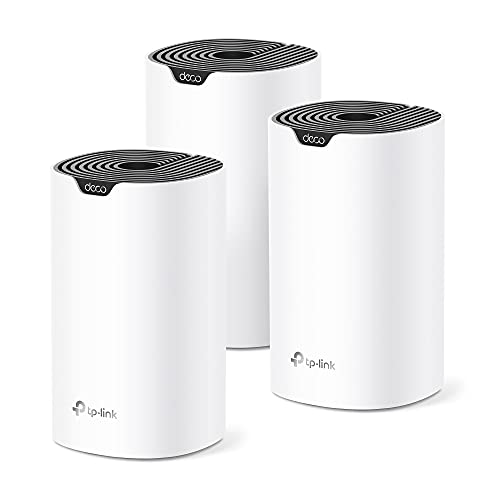
TP-Link Deco S4 (3-Pack) — The honest budget mesh
The Deco S4 is the guide’s exercise in proportionality. An AC1900 mesh three-pack claiming up to 5,500 sq. ft., with gigabit ports and Alexa compatibility in its listing, it belongs to the previous WiFi era — and behind a slow satellite plan, that era is not a limitation. A legacy geostationary plan delivering modest speeds cannot come close to saturating AC-class radios across a house; the bottleneck is in the sky, and spending flagship money to widen a pipe that is narrow at its source buys only local-network speed the household may never use. The S4’s honesty is that it prices itself for the connection it will actually serve.
Its claimed coverage is, on paper, generous for its tier — a manufacturer figure, to be discounted like all of them, but the three-node architecture genuinely suits the long rural bungalow whose owner is tired of the provider router’s single-room kingdom. Gigabit ports matter here in a specific way: the wired link between the terminal and the main node, and any wired backhaul the house allows, runs at gigabit rather than the older fast-Ethernet ceiling that still haunts budget networking gear. For the cabin, the farmhouse on a legacy plan, or the household testing whether mesh solves its problem before investing further, the S4 is the rational first step.
- Configuration: three-pack AC1900 mesh system
- Claimed coverage: up to 5,500 sq. ft. — manufacturer figure
- Ports: gigabit ports stated in the title
- Role: replaces router and extender as one system
- Extras in title: works with Alexa
Strengths
- Its tier matches slow satellite plans without a wasted flagship premium.
- Three nodes still solve the rural distribution problem properly.
- Gigabit ports keep the terminal feed and any wired links unthrottled.
Trade-offs
- AC-class radios age fastest here; a Starlink upgrade may outgrow it.
- Local device-to-device speeds are the most modest in the guide.
- No multi-gig or WiFi 7 headroom for households whose plans improve.
Best for: a legacy Viasat or HughesNet household whose plan speed makes modern radios unnecessary. Not suited for: a Starlink home with a growing local network of new devices — start at the XE75 or Deco 7 instead.
Legacy-plan households should read the Deco S4’s listing as the proportionate option before pricing anything faster.

Tenda Nova MX12 (3-Pack) — The wide-claim value kit
Tenda’s Nova MX12 three-pack is a WiFi 6 mesh in the AX3000 class whose listing claims up to 7,000 sq. ft. and 2,976 Mbps of local wireless, with EasyMesh compatibility, gigabit ports, VPN and parental controls named. That coverage claim is the boldest value statement in the guide — a manufacturer figure to be read with the usual discount, particularly since claimed areas across brands are not measured on one standard — but even heavily discounted, a three-node WiFi 6 system at a value tier is a serious offer for the sprawling farmhouse whose satellite budget has already absorbed a dish, a terminal and an installation.
The parental controls and VPN support in the listing lift the MX12 above bare-bones budget kits: the satellite household’s fairness problems — scheduling the children’s devices, pausing the herd at dinner, keeping a work call sacred — are management problems, and this kit arrives with management tools. EasyMesh compatibility hints at interoperability with other EasyMesh gear, a flexibility worth noting for households expanding in stages. What the value tier asks in return is humility about simultaneity: a very busy, device-thick Starlink household streaming locally and remotely at once will find the XE75’s tri-band composure worth its premium. For the wide, quiet house, the MX12’s arithmetic is hard to argue with.
- Configuration: three-pack WiFi 6 mesh, AX3000 class
- Claimed coverage: up to 7,000 sq. ft. — manufacturer figure, the widest value claim here
- Local wireless figure: 2,976 Mbps per the listing
- Ports: gigabit ports stated in the title
- Features named in title: EasyMesh, VPN, parental controls
Strengths
- A wide claimed spread at a value tier suits budget-stretched farmhouses.
- Parental controls and VPN support answer real satellite-household management needs.
- WiFi 6 radios are modern enough for any current satellite plan.
Trade-offs
- Coverage claims at value tiers deserve the guide’s steepest discount.
- Gigabit ports cap wired backhaul below the Deco 7’s multi-gig arrangement.
- Very busy households will feel its simultaneity ceiling before the tri-band kits’.
Best for: a wide, quiet rural home balancing coverage against a careful budget. Not suited for: a dense Starlink household running many simultaneous streams and a busy local network.
Wide homes on careful budgets should compare the Nova MX12’s listing against the S4’s before deciding which value story fits.
How Do Starlink, Viasat and HughesNet Change What the Router Must Do?
The three services place the same router in three slightly different worlds. Geostationary services — Viasat, the former Exede, and HughesNet — deliver steadier, slower connections with high latency and, on many plans, data policies that make the household’s internal discipline a first-order concern; the router’s fairness tools, scheduling and parental controls carry unusual weight there, which is why kits naming those features earned attention in this guide. Starlink’s low-orbit service behaves more like terrestrial broadband with weather sensitivity: lower latency that makes video calls and even casual gaming viable, higher and more variable speeds, and a terminal ecosystem designed around an optional bypass mode that invites exactly the mesh upgrade this guide describes.
The practical consequence is a difference in buying horizon. A household on a legacy geostationary plan should proportion the mesh to that plan — the Deco S4 and Nova MX12 sections explain the arithmetic — because the connection’s ceiling is fixed by the service, not by the home. A Starlink household, by contrast, may reasonably buy infrastructure ahead of the service: speeds improve as the constellation and plans evolve, terminals get replaced, and a WiFi 7 kit bought today will still be the right side of those changes in five years. The router does not care which logo is on the dish; the household’s plans for the next few years should decide which tier of router stands behind it.
How Do You Set Up a Mesh Behind a Satellite Terminal, Step by Step?
Begin with the terminal, not the mesh. Note your current network name and password, since reusing them lets the household’s devices migrate without re-pairing. Check the provider gateway’s settings for bypass or bridge mode — in the Starlink app the toggle is a deliberate, labelled choice; on Viasat and HughesNet gateways the option varies by model, and the provider’s documentation for your exact box is the authority. If bypass exists, enable it only when the mesh is ready to take over, since the gateway’s WiFi and routing stop at that moment.
Then place the main mesh node beside the terminal and run the kit’s setup with the network name and password you preserved. Update the system’s firmware before adding satellite nodes; updates on a satellite connection are themselves heavy downloads, so start them and let them finish patiently rather than stacking them behind a houseful of reconnecting devices. Add nodes one at a time, walking each to its planned position — mid-way toward the rooms it serves, elevated, in open air — and confirm through the kit’s app that its link back is reported strong before adding the next. Finally, walk the whole home at the evening peak with a video call or stream running, and adjust the weakest node’s position by a room or a shelf before concluding anything about the kit. One afternoon, in that order, is the difference between a mesh that feels miraculous and one that feels haunted.
Why Do Power and Weather Deserve a Paragraph in a Router Guide?
Because satellite households are disproportionately rural, and rural power and weather behave differently. The connection’s chain — dish, terminal, mesh — is only as resilient as its least protected link, and a brief power flicker that a city household never notices can drop a satellite terminal into a long reacquisition while the mesh reboots around it. A modest uninterruptible power supply under the terminal and main node is the least glamorous and most effective upgrade many satellite homes ever make: it carries the chain through flickers, keeps calls alive through blinks, and turns storm evenings from network archaeology into mere weather. No pick in this guide includes one, because it is not a router — but the guide would be negligent not to name it.
Weather acts on the satellite leg itself through rain fade, most severely on geostationary services during heavy downpours. The router’s role in a fade is simply to be blameless: a household that has separated its local network’s health from the sky’s moods — by testing locally, by keeping the mesh well placed — can recognise a fade as a fade, wait it out, and avoid the destructive ritual of rebooting healthy equipment. Local media, local files and local printing keep working through a fade on a well-built mesh, which is another quiet argument for the tri-band and wired-backhaul architectures above: the home’s internal life need not stop every time the sky does.
How Do You Troubleshoot a Satellite Home Network Without Blaming the Sky for Everything?
Keep one diagnostic habit and most mysteries dissolve: test locally before testing globally. If a video will not play, first ask whether devices can reach each other and the router — a phone beside the main node, a file moved between two computers, the printer’s obedience. Local success with global failure points upward, at the terminal, the dish or the provider’s beam, and the correct tools are patience and the provider’s status channels. Local failure points at your own network, where the causes are finite and fixable: a node that lost its link, a device clinging to a far node, a firmware update half-finished during a storm.
Work the local list in order of likelihood. Check each node’s reported link strength in the kit’s app and reposition the weakest by a room. Power-cycle in the proper sequence — terminal first, then the main node, then satellites — allowing each to settle fully before the next, because a mesh rebooted in a heap can take longer to organise itself than the fault it was meant to cure. Review what changed: satellite households are often their own culprits, a new metal appliance, a node moved for dusting, a relative’s device running a heroic backup. The discipline is unglamorous and nearly infallible, and it preserves the household’s credibility for the day the fault genuinely is in the sky and the provider needs persuading.
What About Gaming and Video Calls on Satellite — Can the Router Help at All?
Within the boundary drawn earlier, yes, at the margins that are actually yours. A mesh cannot shorten the orbit, but it can stop a marginal connection being made worse by a weak local link: a console or laptop placed on a strong node, ideally wired into that node’s Ethernet port, removes local jitter and retransmissions from a call or a match that has no spare tolerance for them. Fairness settings matter here too — a video call competing with a sibling’s download on a geostationary plan is a scheduling problem the household can solve, and several kits above carry the controls to solve it once and permanently.
Set the household’s expectations with the same honesty. Turn-based and slower-paced games play acceptably on geostationary connections; fast competitive titles will always feel the orbit, and no purchase in this guide changes that sentence. Video calls on Viasat or HughesNet work when the local side is tidy and the plan’s hour is kind, and they work markedly better on Starlink. The router’s promise is narrower and keepable: your home will add nothing to the sky’s difficulties. Households that internalise that promise stop shopping for miracles and start enjoying the connection they actually have, which is the real destination of this entire guide.
How Does Construction Type Change the Node Count a Satellite Home Needs?
Claimed coverage figures assume a generic house that nobody actually owns, so translate them through your own walls. Timber-framed homes with plasterboard interiors are the kindest environment in rural building: signals pass with modest losses, hops can be long, and a three-pack genuinely roams across a large single storey. Brick and stone interiors tax every hop; log construction sits between the two; and metal — roofs, siding, the foil-backed insulation of modern energy-efficient builds — is the great devourer, capable of turning a claimed figure into a third of itself. A household in a metal-roofed, foil-wrapped new build should plan node positions room by room rather than by any number printed on a box, and should prize the kits that allow wired backhaul, because cable does not care about foil.
Multi-building properties deserve their own arithmetic. Each separate structure is effectively a new house attached to the network by one link, and that link — a wireless hop across a yard or a buried cable — deserves the household’s best engineering, since every device in the outbuilding inherits its quality. The pattern that works is a node at the main house’s nearest window facing a node at the outbuilding’s nearest window, tested at the evening peak, with a cable run as the honourable fallback when the hop will not hold. Satellite households are accustomed to infrastructure thinking — the dish itself taught them that placement is destiny — and the mesh rewards exactly the same patience.
What Monthly Rhythm Keeps a Satellite Household Inside Its Data Policy?
Households on metered satellite plans develop, usually by scar tissue, a monthly rhythm worth adopting deliberately instead. The heavy, schedulable downloads — operating-system updates for every computer, game-library installs, cloud photo backups — are gathered into the plan’s most forgiving hours, which many geostationary plans treat generously in the small hours of the night; each device’s own settings can hold that schedule without weekly attention. Streaming defaults are set once per service, at the resolution the household’s screens can actually display, so no television silently drinks the month at a quality nobody can see. And the mesh app’s usage view, where the kit provides one, gets a monthly glance — not as surveillance, but as the household’s early-warning instrument, since the device quietly consuming a third of the policy is almost always a surprise, and surprises found in week one are cheap while surprises found in week four are not.
None of this requires austerity; it requires that the household’s generosity be a decision rather than an accident. Guests are told the house rule kindly — downloads at night, streams at the set quality — and the guest network exists to make the rule enforceable without awkwardness. The satellite connection then does what it was bought to do: keep a rural household fully participant in modern life, at a pace set by the sky but organised, fairly and calmly, by the people under the roof.
Putting the Six Satellite-Friendly Mesh Systems Next to Each Other
| System | Generation and class | Claimed coverage (maker’s figure) | Detail that matters behind a terminal |
|---|---|---|---|
| TP-Link Deco XE75 (3-Pack) | WiFi 6E tri-band, AXE5400 | Up to 7,200 sq. ft. | 6GHz band keeps local traffic off the satellite pipe’s shoulders |
| NETGEAR Orbi 370 (4-Pack) | WiFi 7 dual-band | Up to 8,000 sq. ft. | 2.5 Gig port future-proofs the terminal feed |
| TP-Link Deco 7 BE5000 (3-Pack) | WiFi 7 dual-band, BE5000 | Up to 6,600 sq. ft. | Wired backhaul over two 2.5G ports spares satellite bandwidth |
| Amazon eero 6+ (3-Pack) | WiFi 6-class mesh | Up to 4,500 sq. ft. | Framed for plans up to a gigabit — beyond every satellite tier |
| TP-Link Deco S4 (3-Pack) | AC1900 mesh | Up to 5,500 sq. ft. | Gigabit ports match slow plans without waste |
| Tenda Nova MX12 (3-Pack) | WiFi 6, AX3000 | Up to 7,000 sq. ft. | Parental controls and VPN at a value tier |
Compare these systems on the rightmost column before the coverage column. Satellite ownership is a long negotiation with scarcity, and each kit’s distinctive detail — a spare band, a future-proof port, a wired backhaul, a management suite — is a different answer to that negotiation. The coverage figures, all manufacturer claims under differing assumptions, should be the last tiebreaker rather than the first headline.
What Mistakes Do Satellite Households Make When Buying a Router?
Buying a router to cure latency is the founding error: the delay is the orbit’s, and the household that expects a mesh kit to make a geostationary connection feel like fibre will be disappointed by physics, not by the kit. The second error is leaving the provider’s gateway routing and broadcasting alongside the new mesh, manufacturing double-NAT mysteries that get blamed on the satellite. Third comes node placement by optimism — satellites installed in the dead rooms themselves, or spaced by the claimed coverage figure divided by hope, instead of by the strong-hop rule.
A fourth mistake is ignoring the household’s data manners after the hardware arrives: the new mesh distributes the pipe so well that everyone streams at maximum quality simultaneously, and the month’s data policy is exhausted by the second week. And a fifth, subtler error is oversizing the kit to the claim — buying for 8,000 claimed square feet to cover a 2,000-square-foot house, then crowding nodes so closely that the network trips over its own generosity. Satellite homes reward proportion in all things: the right kit, the right mode, the right resolution on the television.
Final Recommendation
Choose by the life behind your terminal. If the house is cabled or being renovated, the Deco 7’s wired backhaul makes it the most satellite-literate purchase here. If the household runs modern devices and a busy local network, the Deco XE75’s 6GHz band earns its place; if the property is vast and the mesh is a decade-long decision, the Orbi 370’s spread and WiFi 7 framing argue for it. The eero 6+ serves households that want the subject closed, the Deco S4 serves slow plans with dignity, and the Nova MX12 serves wide homes on careful budgets. Whichever kit lands on the doorstep, set the terminal to bypass where you can, place nodes by the strong-hop rule, and schedule the household’s heavy downloads for the small hours — do those three things, and your satellite connection will feel like the best version of itself, which is all any router has ever honestly offered.
Frequently Asked Questions
Will a better router reduce my satellite latency?
No. Latency on Viasat and HughesNet is dominated by the geostationary round trip, and on Starlink by its own orbital path and network routing. A router contributes a negligible local amount. What a mesh improves is coverage, fairness and local speed — the parts of the experience households most often mislabel as latency.
Is Exede different from Viasat when choosing a router?
Exede was the service’s earlier name; Viasat is the current brand for the same geostationary offering. From the router’s perspective nothing changes: the mesh sits behind the provider’s gateway either way, and the bypass-mode guidance in this guide applies to both names.
Can I use one of these mesh systems with Starlink?
Yes — that is one of the main use cases. Starlink’s own router can be placed in bypass mode so a mesh system becomes the home’s network authority, which is the arrangement Starlink households choose when the supplied router cannot cover the property.
How many nodes does a rural home actually need?
Start with the pack as sold and place nodes by the strong-hop rule, then judge by the evening test in the rooms that matter. Long single-storey homes often use all three nodes of a three-pack in a line; compact homes may find the third node surplus, in which case it can serve an outbuilding rather than crowding the house.
Does wired backhaul really matter on a slow connection?
It matters more, not less. Wireless backhaul spends the same scarce capacity your devices are competing for, while a cable moves node traffic off the air entirely. On an unlimited fibre line the difference is a luxury; on a rationed satellite pipe it is stewardship.
Should I keep the provider’s WiFi switched on as a backup?
Switch it off. Two broadcasting networks in one house split devices between them, confuse roaming and recreate the double-routing problems this guide warns against. If the mesh ever fails, the gateway’s WiFi can be re-enabled in minutes as a temporary measure.
What happens to this mesh if fibre or fixed wireless reaches my road?
It simply changes masters. A mesh system is agnostic about what feeds its main node: unplug the satellite terminal, connect the new service’s terminal or modem, and the household’s network — names, passwords, node positions, device pairings — carries on untouched. This is a genuine argument for buying the mesh tier you respect rather than the cheapest that survives the satellite years, because rural connectivity is changing quickly and the home network is the layer most likely to survive the change.
Can I take a mesh node to a barn or workshop without a cable?
Often, yes, if the wireless hop is short, line-of-sight and tested at the evening peak, as the construction section above describes. Position both nodes at facing windows, keep metal clutter out of the path, and judge the link by a week of real use rather than a hopeful first hour. If the hop proves unreliable, a cable run converts the same node to wired backhaul and ends the experiment honourably.
Do these systems work during a power cut?
Only while something powers them. The mesh, the terminal and the dish’s electronics all need electricity, which is why the guide recommends a small uninterruptible supply under the terminal and main node: it bridges flickers and short cuts, and keeps the household’s calls and messages alive long enough for most rural interruptions to pass.
Is a mesh system overkill for a small cabin on satellite?
A full three-pack may be, and the honest answer is to use fewer nodes rather than a different technology: most of these systems run happily with the main node plus one satellite, and the spare node can wait in its box against a future move or an outbuilding project. What even a cabin gains from the mesh architecture is the management layer — one app, one network name, clean roaming between the two nodes — which the provider’s own router rarely matches.
Related Guides
For the small-home end of the coverage conversation, see Best Wireless Routers for an Apartment. Readers segmenting a rural network for a workshop or studio should continue to Best Routers for Home Labs. And households that want a dedicated security appliance mindset at the network’s edge will find it in Best Internet Firewall Routers.


