What's inside
- Key Takeaways
- Quick Picks
- How We Chose These Picks
- Comparison: The Six Machines Side by Side
- What Makes a Screen Trustworthy for Colour Work?
- How Should You Organise Media So a Smaller Drive Survives a Project?
- How Much Memory Does a Timeline Actually Use?
- How Do You Turn a 15-Inch Editing Laptop Into a Desk Studio?
- What Changes When the Work Is Photography First and Video Second?
- What Should an Editor Spend on After the Laptop Itself?
- How Loud, Hot and Heavy Is Editing Life on Each Machine?
- What Are the Common Mistakes When Buying an Editing Laptop?
- Final Recommendation
- Frequently Asked Questions
- Related Guides
As an Amazon Associate I earn from qualifying purchases. This post may contain affiliate links at no extra cost to you.
widgetverdict.com is reader-supported. When you buy through links on our site, we may earn an affiliate commission.
Each linked machine below leads to its Amazon listing, where you can check price on Amazon and confirm the full specification in the title — this guide prints only what those titles state. Editing is the workload that separates laptops most cruelly, because it punishes a weak screen, a thin memory figure and a hot chassis all at once, and the best 15 inch editing laptops are the ones that refuse to be weak in any of the three. Four machines here carry verified listings; two further names are handled in prose because their lines have wound down or their configurations rotate too much for one title to anchor.
Start with the screen, because editors live on it. A panel for editing must do two jobs: show colour truthfully enough that a grade survives the journey to a client’s phone, and show enough of the timeline that scrubbing does not feel like reading through a letterbox. OLED and AMOLED panels earn their place in this guide by covering wide colour gamuts with deep, true blacks, and two of the linked picks carry them. The two that do not — a plain FHD ASUS and Apple’s Liquid Retina — make different bargains, and their sections explain what each bargain costs and what it buys.
Then the silicon. Editing performance is really two performances: timeline behaviour, which is about sustained responsiveness while effects, proxies and previews compete for the machine, and export behaviour, which is about raw throughput when a deadline is doing the asking. Chips with strong media engines and many cores flatter the second; memory flatters the first. Every linked pick here carries at least 16GB, and one carries 32GB, because an editor who has watched a machine swap to disk mid-timeline does not need the lesson twice.
Size honesty matters in this guide and is stated where it bites. The class is “15-inch” as buyers use the term, and the MacBook Air’s screen measures 15.3 inches while Samsung’s entry is a 16-inch machine — the largest here — included because its verified listing is the Galaxy Book5 Pro 360 configuration editors actually cross-shop, and flagged in its badge, spec box and analysis rather than rounded down in silence. Everything else is a true 15.6-inch panel.
What follows answers the editor’s questions in order: which screen can be trusted for colour, how much memory a timeline really eats, whether a fanless machine can edit, how to organise media so a 512GB drive survives a project, and which of these machines belongs to a colourist, a wedding videographer, a YouTuber or a photographer who cuts occasionally.
One further admission test deserves stating, because it shaped the prose list: an editing laptop must still be a going concern. A machine whose maker has ended the line can be a fine purchase — two are discussed below — but it cannot be a linked recommendation in a guide that readers will follow for months, because its listings decay while the guide stands. Currency is a quality in a buying guide just as support is a quality in a laptop, and the linked four are the machines an editor can buy today, at a stated specification, with a future in front of them.
Key Takeaways
- Two linked picks carry OLED-family panels — the Vivobook S 15’s 3K 120Hz OLED and the Galaxy Book5 Pro 360’s 3K AMOLED touchscreen — and they are the colour-led choices for grading work.
- The Galaxy Book5 Pro 360 is a 16-inch machine with 32GB of memory and 1TB of storage; its size is stated openly wherever it appears in this guide.
- The MacBook Air 15 edits silently on its M5 chip with a 15.3-inch Liquid Retina screen, trading sustained-load headroom for total quiet and portability.
- The Vivobook 15 pairs the strongest conventional processor here, a Core i9-13900H, with a plain FHD panel — power first, colour judgement delegated to an external monitor.
- Every linked pick carries 16GB of memory or more and at least 512GB of storage; editing punishes figures below either line.
- The XPS 15 and the Zenbook Pro 15 OLED are covered in prose: both lines have wound down, and their remaining listings rotate too much to anchor figures to.
Quick Picks
| Pick | Badge | Why it is here |
|---|---|---|
| ASUS Vivobook S 15 OLED | Best Colour-First Editing Pick | A 15.6-inch 3K 120Hz OLED screen over a 12-core Snapdragon X Elite with 16GB and 1TB — the panel leads, the rest keeps up. |
| Samsung Galaxy Book5 Pro 360 | Best Convertible — 16-Inch, Stated Plainly | A 3K AMOLED touchscreen that folds flat, with a Core Ultra 7, 32GB of memory and 1TB of storage for heavy timelines. |
| Apple MacBook Air 15 (M5) | Best Silent Editor | Fanless M5 performance, a 15.3-inch Liquid Retina display and 16GB of unified memory for editors who cut anywhere. |
| ASUS Vivobook 15 (Core i9) | Best Raw-Throughput Pick | A Core i9-13900H with 16GB and a 1TB SSD doing the heavy lifting, behind an honest FHD panel. |
| Dell XPS 15 (9530) | Prose Pick — The Retiring Standard | The creator laptop that defined this class for years, now leaving the market; buy it knowingly, per listing. |
| ASUS Zenbook Pro 15 OLED | Prose Pick — Discontinued Creator Line | A colour-led creator model whose line has ended; remaining stock is a per-listing judgement. |
How We Chose These Picks
A listing title stating the screen size and type, the processor, the memory and the storage — the four facts an editor cannot shop without — was the price of admission to the linked group. Models whose titles left any of them unstated, or whose lines have ended and left only rotating residue behind, were moved to prose rather than guessed into the table. That is why two famous creator names appear without links: the guide’s loyalty is to verifiable specification, not to reputation.
Ranking weighed the screen first, because editing is the one mainstream workload where the panel is a professional instrument rather than a window. Colour breadth and black depth came before resolution, and resolution before refresh rate — a grading decision made on a narrow-gamut panel is a guess exported to every screen the work will ever meet. Processing came second, read as two numbers rather than one: core count and platform for timeline behaviour, and the chip’s media hardware for exports. Memory and storage were treated as gates rather than scores: 16GB and 512GB as the entry figures, with credit for the picks that clear them by more.
Thermal honesty ran through the assessment. A 15-inch chassis editing video is a machine working at its limits for minutes at a time, and thin designs pay for their elegance in sustained performance. The guide does not hide that exchange: the fanless pick is recommended for what silence and portability give its owner, with its ceiling described, and the conventionally cooled machines are recommended for the opposite reason. An editor who knows which side of that trade their work sits on can choose from this shortlist in one reading.
Platform received the same plain treatment. One linked pick runs a Snapdragon X Elite — an ARM platform whose editing-software story is good and improving for headline applications but still a question to ask about older plugins and niche tools — and its section says so where the fact belongs, next to the machine, rather than in a footnote. Another runs macOS, with everything that implies for software the buyer already owns. Editing is a software-led purchase; the hardware shortlist is only honest if it keeps saying so.

ASUS Vivobook S 15 OLED — Best Colour-First Editing Pick
Begin with the panel, because this machine does. The Vivobook S 15’s listing leads with a 15.6-inch 3K 120Hz OLED display, and for an editor that single line outranks everything below it: OLED’s per-pixel light control delivers the true blacks and wide colour that grading decisions depend on, the 3K resolution keeps timeline text and preview detail crisp at editing distance, and the 120Hz refresh makes scrubbing feel like handling film rather than paging through stills. Behind the screen sits a Snapdragon X Elite X1E-78-100, a 12-core processor, with 16GB of memory and a 1TB SSD, running Windows 11 Home in a Cool Silver chassis badged as a Copilot+ PC.
The Snapdragon platform is this pick’s one genuine question, and it deserves a direct answer rather than a caveat in small print. Windows on ARM runs the headline editing applications natively or in capable emulation, and the platform’s media hardware makes exports brisk; where friction still appears is at the edges — older plugins, specialist utilities, capture hardware drivers written for Intel machines. An editor whose toolchain is the mainstream one will likely never meet the friction. An editor with a beloved legacy plugin should test it before committing, and the guide’s verdict below is written with exactly that fork in mind.
For timeline work, the specification is well judged. Sixteen gigabytes is the memory figure this guide treats as the editing floor, and the Vivobook meets it; the 1TB drive is the comfortable figure, holding a current project’s media locally instead of exiling it to externals; and the platform’s efficiency keeps the chassis cool and quiet through long sessions, which matters more in a small studio than specifications admit. Photographers who cut video occasionally, YouTubers grading in a wide-gamut timeline, and anyone whose deliverable is colour judged by clients — this is the pick built around your actual bottleneck, which was never processing. It was trust in the screen.
- Screen: 15.6-inch 3K OLED, 120Hz
- Processor: Snapdragon X Elite X1E-78-100, 12-core
- Memory: 16GB RAM
- Storage: 1TB SSD
- System: Windows 11 Home; Copilot+ PC
- Colour: Cool Silver
Strengths
- The strongest colour instrument among the linked picks: OLED breadth and blacks with 3K sharpness.
- 1TB of storage holds project media locally, where editing wants it.
- An efficient 12-core platform that stays cool and quiet through long sessions.
Trade-offs
- The ARM platform asks a compatibility question of older plugins and niche capture hardware.
- 16GB of memory is the editing floor, not headroom; very large timelines belong on the 32GB pick.
- Windows 11 Home, not Pro, for buyers whose studio network expects Pro features.
Best for: a colour-led editor — grader, photographer-videographer, or creator — whose mainstream toolchain runs happily on the Snapdragon platform.
Not suited for: an editor dependent on legacy x86 plugins or specialist capture drivers that have not made the ARM journey.

Samsung Galaxy Book5 Pro 360 — Best Convertible — 16-Inch, Stated Plainly
The size first, because this guide does not round: the verified listing for this pick is a 16-inch machine. Samsung’s Galaxy Book5 Pro 360, in the configuration its title describes, carries a 16-inch 3K AMOLED touchscreen, an Intel Core Ultra 7 258V processor, 32GB of memory and a 1TB SSD, running Windows 11 Pro. It sits in a 15-inch guide because it is the Galaxy Book configuration editors cross-shop against true 15.6-inch machines, and because its folding, pen-friendly form does something none of the 15.6-inch picks do. Buyers for whom 16 inches is simply too much machine should take the fact from this paragraph and move on with the guide’s blessing.
For everyone else, the specification reads like an editor’s letter to Santa. The AMOLED panel matches the Vivobook’s colour argument with touch and a 360-degree hinge added: fold it flat to cull a shoot with a pen, tent it to review a cut with a client, and grade on it in laptop mode with the confidence that AMOLED blacks and breadth give. The 32GB of memory is the figure that separates heavy timelines from ordinary ones — multicam sequences, stacked effects and a browser full of client feedback stop negotiating with the machine — and the Core Ultra 7 platform brings modern media hardware and efficiency to the work.
Windows 11 Pro completes a specification with no thin line in it, and the 2025 vintage means support and accessories are current. The costs are the convertible’s eternal ones: a hinge mechanism is a moving part a slab laptop does not have, a touchscreen invites fingerprints onto a screen you judge colour with (keep the microfibre closer than the coffee), and a 16-inch footprint fills bags designed around smaller machines. None of that dents the central fact: as a single device for shooting-adjacent review, retouching, grading and client presentation, this is the most complete editing instrument in the guide, wearing its one deviation — size — in the open.
- Screen: 16-inch 3K AMOLED touchscreen, 360-degree convertible (size stated plainly: this is a 16-inch machine)
- Processor: Intel Core Ultra 7 258V
- Memory: 32GB RAM
- Storage: 1TB SSD
- System: Windows 11 Pro; 2025 model
- Colour: Gray
Strengths
- 32GB of memory and 1TB of storage: the heaviest timeline figures in this guide.
- AMOLED colour with touch and a folding hinge — culling, retouch and review in one device.
- Windows 11 Pro and a current-generation Intel platform with modern media hardware.
Trade-offs
- It is a 16-inch laptop in a 15-inch guide; buyers with a strict size limit should choose elsewhere here.
- A convertible hinge and touchscreen add moving parts and smudge management to colour work.
- The fullest specification here generally prices accordingly; check price on Amazon against the field.
Best for: one machine covering ingest review, pen-based culling and retouch, grading and client presentation, with memory to spare.
Not suited for: a buyer whose bag, desk or airline tray sets a hard 15.6-inch ceiling.

Apple MacBook Air 15 (M5) — Best Silent Editor
The MacBook Air 15 makes its editing case on a paradox: the machine with no fan is the one many editors reach for first. Its listing describes the 2026 model with an M5 chip, a 15.3-inch Liquid Retina display, 16GB of unified memory and a 512GB SSD, with a 12MP Center Stage camera, Touch ID and Wi-Fi 7, in Midnight. Apple’s silicon carries dedicated media engines that make the formats editors actually shoot — the codecs from modern cameras and phones — play and export with an ease that raw core counts never predicted, and it does so in total silence, in a chassis that slips into a camera bag’s laptop sleeve and disappears.
The Liquid Retina screen is not an OLED, and this guide scores panels honestly: its blacks are the very good blacks of a fine LCD rather than OLED’s absolute ones. What it offers instead is Apple’s factory colour discipline — a wide-gamut panel whose accuracy out of the box is the reason so much client work is approved on Apple screens — and brightness that holds up in the bright rooms where location editing happens. For the large population of editors whose deliverables are judged on phones and laptops rather than cinema screens, that combination has proven itself in production for years.
The limits are architectural and should be bought knowingly. Sixteen gigabytes of unified memory is shared between the system and graphics, so enormous timelines and heavy effects stacks will page to the (very fast) SSD sooner than on the 32GB Samsung; the 512GB drive asks for the external-media discipline the how-to section below describes; and a fanless chassis, asked to export at full tilt through a hot afternoon, will pace itself rather than roar. Editors whose work is interviews, events, travel films and social output — the majority of paid cutting — live comfortably inside those limits and gain silence, weightlessness and battery endurance that the rest of this guide cannot offer.
- Screen: 15.3-inch Liquid Retina display
- Processor: Apple M5 chip
- Memory: 16GB unified memory
- Storage: 512GB SSD
- Camera: 12MP Center Stage; Touch ID; Wi-Fi 7
- Colour: Midnight; 2026 model
Strengths
- Media-engine performance that makes camera codecs feel light, with zero fan noise.
- Factory colour discipline and a bright, wide-gamut panel trusted for client approvals.
- The most portable machine here — an editing studio that fits a camera bag.
Trade-offs
- 512GB of storage demands an external-media workflow from the first project.
- Unified 16GB is shared with graphics; the heaviest timelines will feel it before the 32GB pick does.
- Fanless design paces itself under sustained export loads in warm conditions.
Best for: a travelling or location editor cutting interviews, events and online content who values silence and portability as professional features.
Not suited for: an editor whose daily work is long-form, effects-heavy timelines that need memory and storage headroom above all.
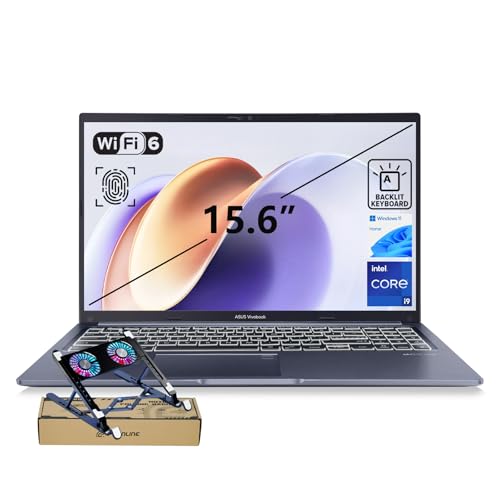
ASUS Vivobook 15 (Core i9) — Best Raw-Throughput Pick
ASUS sells two machines into this guide with the same surname and opposite philosophies, and confusing them would be a disservice. This Vivobook 15 is the conventional one: a 15.6-inch FHD screen, an Intel Core i9-13900H processor, 16GB of memory and a 1TB SSD, with a backlit keyboard, fingerprint reader, physical webcam shield and Wi-Fi 6, running Windows 11 Home. No OLED, no touchscreen, no convertible theatre — the budget went to the processor and the drive, and its section will judge it on exactly those terms.
The i9-13900H is a high-wattage performance chip of a proven generation, and in editing terms that translates to timeline muscle and export throughput that the efficiency-led picks cannot match when the machine is plugged in and allowed to work. Multicore rendering, transcoding batches, noise reduction passes — the unglamorous bulk work of editing — moves at the pace this processor sets, and the 1TB SSD keeps a project’s media and cache on fast internal storage while it happens. For an editor whose bottleneck is a render queue rather than a colour decision, this is the most honest machine in the guide: it never pretends the screen is its strength.
Because the screen is not. A plain FHD panel of mainstream specification is a fine window onto a timeline and a poor instrument for grading; colours judged on it will drift on better screens. The professional pattern for a machine like this is equally plain: cut and render on the laptop, judge colour on a calibrated external monitor at the desk — a workflow the guide’s buying sections describe in detail. Bought as a throughput engine inside that pattern, the Vivobook 15 is shrewd. Bought as a grading instrument, it is the wrong pick, and its verdict says so in terms.
- Screen: 15.6-inch FHD
- Processor: Intel Core i9-13900H
- Memory: 16GB RAM
- Storage: 1TB SSD
- Extras: backlit keyboard, fingerprint reader, physical webcam shield, Wi-Fi 6
- System: Windows 11 Home; bundled accessory package noted in the listing
Strengths
- The strongest conventional processor here, built for rendering and transcoding throughput.
- 1TB of internal storage keeps media and cache local during heavy projects.
- Everyday completeness: backlit keys, fingerprint sign-in and a physical camera shield.
Trade-offs
- The FHD panel is a timeline window, not a grading instrument; colour work needs an external monitor.
- A high-wattage chip in a mainstream chassis will use its fans under load — audible in quiet rooms.
- Windows 11 Home rather than Pro.
Best for: an editor whose pain is render and export time, working at a desk where a calibrated monitor handles colour judgement.
Not suited for: a colourist grading on the laptop screen itself, who should take the OLED Vivobook S 15 instead.
Dell XPS 15 (9530) — Prose Pick — The Retiring Standard
For years, “creator laptop” and the XPS 15 were nearly synonyms: a slim aluminium 15.6-inch machine with strong processors, dedicated graphics options and an OLED screen option that colour workers adopted early. It appears in this guide without a link because Dell has wound the line down in favour of newer designs, and what remains on sale is a shifting residue of configurations — different chips, panels and memory figures under similar names — that no single verified title can honestly summarise. Attaching figures to it would break the rule every linked pick here was held to.
Covered in prose, its buying logic is still worth stating, because shoppers will meet it in searches and deserve a framework. Judge any individual XPS 15 listing by the same gates this guide applies elsewhere: the exact processor and graphics named, 16GB of memory as the floor, the panel type stated in words — the OLED builds and the plain builds are different instruments wearing one name — and storage you can verify. A well-specified unit, knowingly bought, remains a capable editing machine; the model’s thermals were always its talking point, so a unit with a documented history is worth more than a mystery.
The deeper caution is about time. A discontinued line means accessories, batteries and parts follow the curve of a shrinking installed base, and software support follows the maker’s schedule for a retired model. None of that forbids the purchase — editors keep tools for years — but it prices the purchase correctly: the XPS 15 is now a connoisseur’s used-market decision, not a default recommendation, and this guide treats it with the respect and the distance that status deserves.
- Status: line wound down by the maker; remaining listings rotate (described in prose, no figures claimed)
- Screen: 15.6-inch class; panel type varies by build — OLED and non-OLED units both exist
- Processor: varies by build — read the exact chip from the individual listing
- Memory: varies by build — hold any unit to the 16GB editing floor
- Storage: varies by build — verify the figure on the specific listing
- Buying route: per-listing verification of every figure before paying
Strengths
- A proven creator design with a long record in professional editing work.
- OLED-equipped builds remain genuine colour instruments when verified individually.
- A large, knowledgeable owner community for a model sold in volume for years.
Trade-offs
- No stable verified listing: every figure must be confirmed on the individual unit.
- A retired line means parts and accessory supply will only shrink from here.
- Thermal behaviour under sustained load was always this design’s compromise.
Best for: an experienced buyer who finds a well-documented, OLED-equipped unit and can verify its specification personally.
Not suited for: a purchase that must be a current, supported platform with a predictable specification.
ASUS Zenbook Pro 15 OLED — Prose Pick — Discontinued Creator Line
The Zenbook Pro 15 OLED was ASUS’s colour-led answer in this class: a premium 15.6-inch creator machine built around an OLED panel, with the fit and finish of the Zenbook line and features aimed at photographers and video editors rather than gamers. Like the XPS above, it is covered without a link because ASUS has ended the line; remaining stock surfaces in inconsistent configurations, and this guide will not print figures it cannot tie to a verified title.
Its prose treatment carries a different lesson from the Dell’s. The Zenbook Pro’s appeal was always the integration — screen, build and creator details in one slim object — so a second-hand or leftover unit should be judged as a whole object rather than a specification: panel condition matters most, because an OLED screen is both the point of the machine and the component whose history is hardest to verify, followed by battery health and the exact memory figure of the unit in front of you. A careful buyer inspects those three things in that order and lets the rest of the specification be whatever the individual listing honestly states.
Why include a discontinued machine in a buying guide at all? Because searches for editing laptops surface it constantly, priced to tempt, and a reader deserves to know what it was, why it has no link here, and how to judge it if they pursue it anyway. That is the prose picks’ job across this guide: not to sell the machine, but to keep the reader informed in the part of the market where listings cannot be pre-verified.
- Status: line discontinued by the maker; leftover stock varies (described in prose, no figures claimed)
- Screen: 15.6-inch OLED class — panel condition is the first thing to verify on any unit
- Processor: varies by unit — confirm from the individual listing
- Memory: varies by unit — hold it to the 16GB editing floor
- Storage: varies by unit — verify before paying
- Buying route: inspect panel, battery and memory figure in that order
Strengths
- A genuinely colour-led creator design from a premium line.
- Slim, well-finished hardware that carried professional work comfortably.
- Still surfaces at tempting prices as leftover stock clears.
Trade-offs
- Discontinued: support, parts and accessories follow a shrinking curve.
- The OLED panel’s individual history is the hardest thing to verify before buying.
- No verified title means no figures in this guide can be promised for it.
Best for: a colour-led buyer who finds a clean, documented unit and inspects the panel and battery before committing.
Not suited for: a purchase depending on a current line’s support and a specification guaranteed in advance.
Comparison: The Six Machines Side by Side
| Pick | Screen | Processor | Memory / Storage | Editing identity |
|---|---|---|---|---|
| Vivobook S 15 OLED | 15.6-inch 3K OLED, 120Hz | Snapdragon X Elite, 12-core | 16GB / 1TB | Grade and cut on one trusted panel; check legacy plugin support before ordering. |
| Galaxy Book5 Pro 360 | 16-inch 3K AMOLED touch | Core Ultra 7 258V | 32GB / 1TB | The heavy-timeline convertible; confirm the 16-inch footprint fits your bag and desk. |
| MacBook Air 15 (M5) | 15.3-inch Liquid Retina | Apple M5 | 16GB unified / 512GB | Silent location cutting; plan the external-drive media routine from day one. |
| Vivobook 15 (Core i9) | 15.6-inch FHD | Core i9-13900H | 16GB / 1TB | Render throughput at a desk; pair it with a calibrated monitor for colour calls. |
| XPS 15 (9530) (prose) | 15.6-inch, panel varies by build | Varies by build | Varies by build | The retiring standard; verify the individual unit’s panel type above all else. |
| Zenbook Pro 15 OLED (prose) | 15.6-inch OLED class | Varies by unit | Varies by unit | The discontinued colour play; inspect the specific panel’s condition in person where possible. |
What Makes a Screen Trustworthy for Colour Work?
An editing screen earns trust through three properties, and marketing names are not among them. The first is gamut: the range of colours the panel can physically show. Editing timelines are graded for screens that follow wide colour standards, so a panel that cannot display those colours forces the editor to guess at exactly the saturated tones — product colours, skin under stage light, a client’s brand palette — where guesses are most expensive. OLED and AMOLED panels, like the two linked here, are built wide by nature. The second property is black depth, because shadow detail lives there: a panel that lifts blacks to grey hides crushed detail in dark scenes until a better screen reveals it to the client first.
The third property is consistency: a panel should show the same colour at the edges as at the centre, at working brightness as at full brightness, this month as last. This is where factory calibration and panel quality separate professional instruments from specifications. Apple’s Liquid Retina built its editing reputation on consistency rather than on gamut headlines, and the OLED picks earn theirs on breadth and depth; both routes can be trusted, and the guide’s per-pick sections say which route each machine takes. What cannot be trusted is a panel whose listing will not describe it — the plain FHD screen on the i9 Vivobook is honestly described and honestly scored, as a window rather than an instrument.
Whatever the panel, two habits protect the work. Edit at a consistent brightness in consistent room light, because the eye adapts to the room and grades relative to it; and proof every important deliverable on a second, ordinary screen — a phone, a television, a client’s laptop — because that is where the audience lives. The best editing laptop in this guide narrows the gap between the grading screen and the audience’s screens; the proofing habit closes what remains of it.
How Should You Organise Media So a Smaller Drive Survives a Project?
Storage discipline decides whether a 512GB machine feels cramped or choreographed, and editors who work on laptops professionally treat it as part of the craft. The pattern that works: original camera media lives on an external drive or card archive, never solely on the laptop; the current project’s working files — proxies, renders, the timeline itself — live on the internal drive where speed matters; finished projects are exported, archived externally and cleared. Under that pattern even the MacBook Air’s 512GB stops being a constraint and becomes a filing rule, and the 1TB picks simply gain slack.
Proxies deserve a special word, because they reconcile small drives with big cameras. A proxy workflow edits lightweight stand-ins for heavy original footage, relinking to the originals only for export — which means the internal drive holds the light copies, the timeline flies, and the machine’s processor stops wrestling codecs it was never sized for. Every linked pick here handles a proxy workflow comfortably, including the fanless Air, and for many editors adopting proxies matters more than the difference between any two machines in this guide.
Cache is the silent tenant. Editing applications accumulate preview and cache files that can swallow a drive across a long project, and the fix is administrative, not financial: point the cache at a known folder, cap its size in the application’s settings, and purge it when a project closes. Do that, keep the internal drive below the fullness where SSDs slow down, and the storage figure in a spec box returns to being what it should be — a planning number, not a recurring emergency.
How Much Memory Does a Timeline Actually Use?
Memory consumption in editing is set by the timeline’s ambitions, not by the application’s minimum requirements. A single-camera interview cut with titles and a music bed is a light meal. Add multicam angles that must play simultaneously, effects that render in memory, a second application holding the script and a browser holding the client’s feedback, and the meal becomes a banquet. Sixteen gigabytes — the floor across the linked picks — feeds the first kind of work indefinitely and the second kind with occasional paging to a fast SSD, which modern machines disguise well until they suddenly do not.
Thirty-two gigabytes, the Galaxy Book5 Pro 360’s figure, changes the texture rather than the possibility: everything the editor opens stays open, previews hold, and the machine stops making small decisions on the editor’s behalf. Editors who know their timelines are heavy — wedding films with three cameras, commercial work with layered effects, long-form projects that live open for weeks — should read that figure as the pick’s headline. Editors whose work is single-camera and deadline-shaped will find 16GB honest service, especially paired with proxies, and can spend the difference on the screen instead. Neither answer is wrong; matching the figure to the timeline is the whole skill.
How Do You Turn a 15-Inch Editing Laptop Into a Desk Studio?
Most of these machines will live two lives: mobile cutting tool and desk workstation. Setting up the second life well multiplies what the first can do. The anchor is the external monitor, and its role differs by pick. For the Vivobook 15 with its plain FHD panel, the desk monitor is the colour instrument — a calibrated wide-gamut display that the laptop drives while its own screen holds the timeline. For the OLED and AMOLED picks, the external monitor is a second opinion: bigger, shared with a client on the sofa, proofing the grade at television distance. For the MacBook Air, it is simply more room, with the laptop’s own screen already trusted for colour.
Connection discipline keeps the setup honest. Drive the monitor at its native resolution from the laptop’s best output, set the colour profile deliberately rather than accepting whatever the operating system guessed, and match the two screens’ brightness before judging anything split across them. Editors who skip those three steps own two screens that disagree, and disagreement at the desk is worse than one modest screen, because it manufactures doubt about work that may be fine. A docking arrangement that carries power, display and storage down one cable also protects the laptop’s ports from the daily plugging that wears them — a small, unglamorous longevity decision.
Storage completes the desk. The external archive described in the media section lives here permanently connected, backed up on a schedule the editor does not have to remember, so that plugging in at the desk quietly performs the project’s housekeeping. Under that arrangement the laptop’s internal drive — whether 512GB or 1TB — holds only what the current project needs, the cache stays capped, and the machine that travels is the same machine that renders at the desk, with no migration ritual between its two lives.
What Changes When the Work Is Photography First and Video Second?
A large share of buyers reading an editing guide are photographers who cut video occasionally, and their priorities reorder this shortlist in instructive ways. Still photography is a single-frame discipline: the screen’s colour truth matters exactly as much, memory pressure arrives in bursts when large raw files stack up in an editing session, and export throughput means batch-processing a wedding’s worth of images rather than rendering a timeline. Judged that way, the OLED Vivobook S 15 and the AMOLED Galaxy Book strengthen — the Samsung’s pen and folding screen suit retouching posture particularly well — while the i9 Vivobook’s render muscle matters less and its plain panel matters more, because a photographer has no timeline to excuse it.
Card ingestion becomes a headline feature for this reader. A day’s shoot arrives on memory cards, and the laptop that ingests, culls and backs up fastest at the kitchen table wins the evening. Every machine here ingests competently over USB; the differences are in the culling experience — screen quality for judging sharpness and colour at 100 percent, memory for holding a catalogue and an editor open together — and in the discipline of copying to two destinations before any card is formatted. That last habit is not a specification and cannot be bought, and it has saved more professional work than any processor in this guide.
The photographer-editor should also weigh the catalogue’s future. Photo libraries grow in one direction, and a machine bought for this work should be chosen with its storage system — internal figure plus the external archive routine — sized for the library’s next three years, not its last shoot. On that measure the 1TB picks buy genuine calm, and the 512GB MacBook asks its owner to be systematic from the first import. Systematic is achievable; the guide simply insists the buyer choose it knowingly rather than discover it at a full drive in the middle of a season.
What Should an Editor Spend on After the Laptop Itself?
The laptop is the largest purchase in an editing setup and not the only one that matters. A colour-led external monitor transforms the desk-bound picks and second-guesses the portable ones; a fast external drive is the archive every media routine in this guide assumes; a card reader worthy of the cards’ speed returns its cost in evenings saved across a single season. None of these is an upsell — each is a component of the system the laptop’s specification quietly presupposes, and a buyer comparing two machines should compare them as systems: the cheaper laptop plus the monitor its screen requires can cost more, in money and in compromises, than the dearer laptop whose panel needed no help.
Software belongs in the same arithmetic. Editing applications are subscriptions or licences that follow the platform, and a platform switch — to macOS, or to ARM Windows — can carry real migration cost in licences, plugins and retraining of the hands. The guide raises this not to discourage switching, which sometimes is exactly right, but to make the comparison honest: the machine’s price is the entry fee, and the platform’s ecosystem is the membership. Buyers who total both numbers before choosing rarely regret the platform they land on.
How Loud, Hot and Heavy Is Editing Life on Each Machine?
Specifications describe a laptop at rest; editing describes it at work, and the working character of these machines differs as much as their panels. The MacBook Air is the extreme of one philosophy: no fan, no noise, a chassis that warms evenly and asks nothing of a microphone in the room — a genuine production feature for editors who record voiceover anywhere near their cutting position. The conventionally cooled Windows machines take the opposite bargain, spending noise to buy sustained speed, and among them the high-wattage Vivobook 15 will make its fans heard during exports while the efficiency-led platforms stay comparatively discreet.
Heat expresses itself in a second way editors feel: through the keyboard deck during long sessions, and through performance pacing on warm days. A machine cutting on a desk with its vents clear behaves like the specification promises; the same machine rendering on a bed in August becomes a different, slower product. None of the picks here is fragile about this — all are designed for sustained work — but the buyer who edits in hot rooms, on location, or on laps should weight the efficient platforms and the fanless design more heavily than benchmark tables suggest.
Weight closes the triangle. These are 15-inch-class machines and none is a burden, but the difference between the Air’s camera-bag presence and a fully specified convertible with its adapter is the difference between a laptop that comes to every shoot and one that comes to most. Editors buy capability and then live with logistics; the honest guide prices both, which is why portability appears in this guide’s verdicts as a professional feature rather than a lifestyle garnish.
What Are the Common Mistakes When Buying an Editing Laptop?
Buying the processor and guessing at the screen is the error this guide is organised against. Export speed is visible in every advertisement, while gamut is visible only in the work — usually on the client’s screen, at the worst moment. An editor’s money should reach the panel first, the memory second and the processor third, and the shortlist above is ranked in roughly that order for a reason.
Ignoring the software platform question runs it close. A laptop is the editing applications and plugins it can run, and two picks here ask platform questions — the Snapdragon’s ARM compatibility at the edges, the MacBook’s macOS ecosystem — that must be answered with the buyer’s actual toolchain, not with general reassurance. List the applications and plugins your income depends on, confirm each one against the platform, and only then compare hardware. That five-minute checklist is the purchase done in the right order: software confirmed first, hardware compared second.
Underestimating storage behaviour is the third mistake. Buyers read 512GB as a capacity and forget it is also a speed: SSDs slow as they fill, caches grow without asking, and camera media expands to occupy whatever space a project plan leaves unguarded. The media routine in this guide — originals external, working files internal, cache capped — costs nothing and converts any of these machines’ drives from a countdown into a system.
The final mistake is editing in uncontrolled light and blaming the laptop. A trustworthy panel graded against a sunlit window or a yellow kitchen lamp will produce work that looks wrong everywhere else. Consistent room light, consistent screen brightness and a second-screen proof are habits, not purchases, and they improve output on every machine in this guide more than any upgrade on offer.
There is a temptation, reading editing guides, to shop for the largest project you can imagine rather than the work you actually deliver. Resist it in both directions: the editor cutting daily for clients should not buy for a hypothetical colour suite, and the hobbyist cutting family films should not be shamed out of a screen they will enjoy every single session. The shortlist is deliberately wide because editing lives are wide; the right pick is the one whose strengths map onto your Tuesdays, not onto an imagined premiere.
Final Recommendation
Choose by bottleneck. If colour judgement is your bottleneck — and for most paid editing it is — the Vivobook S 15 OLED is the guide’s first recommendation, with the Galaxy Book5 Pro 360 as the step up for editors who also need 32GB of memory, pen-based review and a folding screen, at the stated cost of a 16-inch footprint. If your bottleneck is silence and mobility, the MacBook Air 15 edits real work in total quiet and asks only for media discipline in return. If your bottleneck is a render queue at a desk with a proper monitor, the Vivobook 15’s Core i9 is the honest engine for it. The two prose picks remain worth a knowledgeable buyer’s attention on the used and leftover market, judged unit by unit. Match the machine to the constraint you actually feel at 11pm before a deadline, and this shortlist will not steer you wrong. Keep the panel honest, the media organised and the cache capped, and the machine will repay the discipline daily, in every timeline you open and every export you ship, on deadline, without drama or doubt, ever again, anywhere you happen to be working that week.
Frequently Asked Questions
Can a fanless laptop really edit video?
Yes, within its design’s honest limits. The MacBook Air’s M5 chip carries media hardware that makes common camera codecs play and export efficiently without a fan, and interview, event and online content — the bulk of paid cutting — sits comfortably inside that envelope, especially with proxies. What a fanless chassis cannot do is sustain maximum output indefinitely in warm conditions; it paces itself instead. Editors rendering long, effects-heavy timelines daily should take a cooled machine; editors cutting real work on location will rarely meet the ceiling.
Is OLED or a high-quality LCD better for editing?
They excel at different halves of trust. OLED and AMOLED panels show wider colour and true blacks, which exposes shadow detail and saturation honestly; a disciplined LCD like Apple’s Liquid Retina counters with consistency and brightness behaviour that professionals have approved client work on for years. Either can be a grading instrument. What cannot is an unspecified mainstream panel, which is why the guide scores the i9 Vivobook’s screen as a timeline window and routes its colour judgement to an external monitor.
How much storage do I need for editing?
Enough for one project’s working files plus the application’s cache, with originals archived externally: in practice 512GB serves a disciplined editor and 1TB serves an undisciplined one, which is why this guide praises the 1TB picks and teaches the routine that makes 512GB work. The deciding factor is rarely the figure itself; it is whether the editor runs a media system or lets the drive become the system.
Does the Snapdragon X Elite run editing software properly?
The headline applications run natively or in capable emulation on Windows on ARM, and the platform’s media hardware makes it a genuinely quick editing chip. The residual risk lives at the edges: older plugins, niche utilities and some capture-hardware drivers written for Intel machines. The guide’s advice is procedural — list the exact tools your income depends on, confirm each against the platform, and let that checklist, not general opinion, decide whether the Vivobook S 15 is your pick.
Should I prioritise a better screen or a faster processor?
The screen, for most editors, and it is not close. A faster processor shortens exports you can schedule; a trustworthy screen improves every decision you make while cutting, and wrong colour decisions are discovered by clients. The exception is the editor whose working day is dominated by render queues and transcoding batches — that reader exists, and the Core i9 Vivobook 15 is in this guide for them, paired with an external monitor for colour.
Why are two famous creator laptops only covered in prose?
Because their lines have ended or their listings rotate, so no single verified title states a specification this guide can stand behind. The XPS 15 and Zenbook Pro 15 OLED were excellent editing machines and can still be bought well, unit by unit, by a buyer who verifies the panel type, memory and storage on the specific machine in front of them. The prose sections exist to give that buyer the framework; the links are reserved for specifications the guide could verify in full.
Related Guides
Editors assembling a wider shortlist may also want our guide to the best 15-inch laptops for students for a second machine that travels to campus, our roundup of the best 15-inch laptops MSI makes if gaming-grade cooling is on the table, and our shortlist of the best 15 laptops for engineers where certified graphics enter the conversation.


