What's inside
- Where to Buy
- Key Takeaways
- Quick Picks
- How We Chose These Picks
- Comparison
- How to Choose a Display Monitor With Speakers
- How Much Speaker Power Does a Desk Actually Need?
- Can Monitor Speakers Carry a Whole Working Day?
- What Should You Check When a Title Only Says Built-In Speakers?
- Common Mistakes When Buying a Monitor With Speakers
- Final Recommendation
- Frequently Asked Questions
- Related Guides
As an Amazon Associate I earn from qualifying purchases. This post may contain affiliate links at no extra cost to you.
[SITE_DOMAIN] is reader-supported. When you buy through links on our site, we may earn an affiliate commission.
Where to Buy
Six screens with their own sound are gathered here, each sold on Amazon and each linked to its listing. The Dell S2725DSM leads on paper — QHD resolution and a stated speaker wattage — so open its Amazon page and check price on Amazon first if your desk is a calls-and-documents desk. Its FHD sibling, the Dell S2725HSM, keeps the same speakers and stand at a lower resolution, and its listing shows the saving that trade represents. The Amazon Basics 27-inch is the plain-spoken option whose page carries the current figure, while the Sceptre 27-inch Prime Gaming aims at players who still want sound without a headset. The HP Series 3 Pro 27-inch prints its wattage and its height adjustment in the title, and the LG UltraGear 27G414B closes the list as the gaming panel whose Amazon page is worth a look before any sale weekend ends.
A monitor with speakers is bought for the sounds a desk makes every day: the join chime of a video call, a training video played over lunch, a podcast while the inbox empties, the alert tone of a timer. The best display monitors with speakers are not trying to replace a hi-fi or a soundbar, and judging them by that standard misses their purpose. Their job is to make a screen self-sufficient — picture and intelligible sound from one box, one cable for video, no extra hardware competing for the small territory in front of the keyboard.
One distinction runs through this whole guide and deserves stating before the reviews: only three of these six titles print a speaker wattage. Both Dell models state 2 x 3W, and the HP states 2 x 2W. The Amazon Basics, the Sceptre and the LG titles say built-in speakers and stop there, so their spec boxes record the wattage with the standard not-stated wording. That silence does not make those speakers bad; it makes them unquantified, and a buyer whose room is large or noisy should treat a printed wattage as the safer evidence. Wattage is not loudness in any simple sense, but between two otherwise equal screens, the one whose maker commits to a number is the one making a checkable claim.
Everything else follows the usual discipline of this site. Specifications come from listing titles only, model codes are printed so the exact variant can be matched at checkout, and the screens divide naturally into three pairs: the two Dells, office twins separated by resolution; the Amazon Basics and HP, the straightforward FHD work screens; and the Sceptre and LG, gaming panels that happen to speak. Read for the pair that matches the desk, then settle the argument inside the pair.
Key Takeaways
- Only the two Dell picks and the HP print speaker wattage in their titles: 2 x 3W for each Dell, 2 x 2W for the HP.
- The Dell S2725DSM is the sole QHD panel here; the other five are FHD designs.
- Four of the six run at 144Hz, and the remaining two at 100Hz, so even the office picks scroll smoothly.
- Full height, tilt, pivot and swivel adjustment is stated only for the two Dells; the HP states height adjustment alone.
- The Sceptre carries the widest colour claim of the FHD group at 100% sRGB, with FreeSync named in its title.
Quick Picks
| Pick | Badge | Why it earns a place |
|---|---|---|
| Dell S2725DSM | Calls-and-documents flagship | QHD at 144Hz, 2 x 3W speakers and a fully adjustable stand in Ash White. |
| Dell S2725HSM | The same desk, FHD | Identical speakers and stand language to its sibling, at 1920 x 1080 and 144Hz. |
| Amazon Basics 27″ Monitor | Plain and self-sufficient | FHD IPS at 100Hz with built-in speakers, USB ports and VESA compatibility. |
| Sceptre 27″ Prime Gaming | Gaming sound without a headset | 100Hz, 1ms, 100% sRGB and FreeSync, with speakers and two HDMI inputs. |
| HP Series 3 Pro 27″ | Office clarity, printed wattage | FHD IPS with stated 2 x 2W speakers, height adjustment and flicker-free backlighting. |
| LG UltraGear 27G414B | Fast panel, built-in voice | 1080p at 144Hz with HDR10, FreeSync and G-Sync language, plus a built-in speaker. |
How We Chose These Picks
The first filter was the obvious one, applied strictly: the listing title had to claim speakers. Plenty of well-regarded 27-inch monitors were cut at that gate, because a guide about screens with sound cannot smuggle in silent panels on the strength of their pictures. Six survivors remained, all 27-inch, which is itself a finding — the speaker-equipped class has settled at the size where a screen is big enough to anchor a desk and small enough to ship with modest audio hardware inside.
The second pass graded the evidence, not the audio. Titles that print a wattage give a buyer something to compare and a maker something to be held to, so the Dells and the HP earn an evidence premium in these reviews. Titles that merely assert speakers are reported exactly that way. This is not snobbery about numbers; it is the same rule applied everywhere on this site, that a claim a reader can verify outranks a claim a reader must take on faith.
Picture quality formed the third pass, and it spread the six across the real market. One QHD panel for text-heavy work, five FHD panels dividing into office and gaming temperaments, refresh from 100Hz to 144Hz, and colour claims from unstated to a full 100% sRGB. A shortlist of six near-identical FHD office screens would have been easier to write and useless to read; the spread here means the right answer genuinely changes with the desk.
Stand adjustment closed the selection, because a screen with speakers is usually the only screen on its desk, aimed at one chair for years. The Dells state the full four-way adjustment, the HP states height, the LG states tilt and height, and the Amazon Basics and Sceptre titles are silent on the subject — a silence the reviews record rather than excuse, since a fixed stand at the wrong height quietly taxes every call and document that follows.

Dell S2725DSM — Calls-and-documents flagship
Dell’s S2725DSM is what happens when an office monitor refuses to specialise narrowly. The title states a 27-inch QHD panel at 2560 x 1440, refreshing at 144Hz with 1ms response language, driven over HDMI and DisplayPort 1.4, with AMD FreeSync for the hours when the desk turns playful. QHD at 27 inches is the sweet spot for document work — text gains the crispness that FHD at this size cannot quite deliver, without the scaling negotiations of a 4K panel — and 144Hz, once a gaming extravagance, turns out to be a document feature too, because scrolling a long contract or a tall spreadsheet at that rate is visibly calmer.
The audio claim is the headline for this guide’s purposes: 2 x 3W speakers, printed in the title, the strongest stated wattage among the six. Three watts per channel will not fill a hall, but at desk distance, aimed at a seated listener, it is the tier where voices in a call sound present rather than telephonic and where a video’s narration needs no leaning in. Paired with the stand — height, tilt, pivot and swivel all stated — the Dell can be aimed like the instrument it is: screen squared to the chair, speakers firing at the listener rather than at the wall behind the desk. The finish is Ash White, a small thing that matters in bright rooms where a black slab dominates.
Who takes this one? The professional whose day is calls threaded through documents, the home worker equipping a permanent desk, the buyer who wants one screen to serve for years without a speaker purchase trailing behind it. Pivot, the ability to rotate the panel tall, deserves its sentence: long documents, code and chat columns all read naturally in portrait, and a stand that pivots turns one monitor into two different tools across a single day. Few buyers use it weekly; those who do, defend it fiercely.
The cautions are modest and specific. The title names HDMI and DisplayPort only, so a USB-C laptop joins through an adapter or a dock rather than a single elegant lead. And a buyer in a large, echoing room who expects the speakers to serve an audience of six around a table is asking desktop audio to do a meeting-room job; the wattage is honest, and its arena is the desk.
- Size and resolution: 27-inch QHD, 2560 x 1440
- Refresh rate: 144Hz, 1ms
- Speakers: 2 x 3W
- Inputs: HDMI, DisplayPort 1.4
- Adaptive sync: AMD FreeSync
- Stand: height, tilt, pivot and swivel adjustable
- Finish: Ash White
Strengths
- QHD sharpness for text, unique in this line-up, with 144Hz motion on top.
- The joint-strongest stated speakers here, at 2 x 3W.
- A four-way adjustable stand, including pivot for portrait documents.
Trade-offs
- No USB-C input is named in the title.
- Panel technology is not stated in the listing title.
- Desktop speakers serve one listener well and a roomful poorly, this pair included.
Best for: a permanent home-office desk built around calls and documents, where QHD text and stated 2 x 3W speakers earn their keep daily. Not suited for: single-cable USB-C laptop setups, because the title lists HDMI and DisplayPort 1.4 only.
There is also a longevity angle specific to this model, though not the kind brochures mean. A QHD panel with a full stand and stated speakers has no obvious successor itch: resolution, ergonomics and audio are all answered in one purchase, so the upgrade pressure that pushes buyers back into the market simply never builds. Owners of such screens tend to replace them for reasons of room or role rather than deficiency, and a desk that stops churning its equipment settles into the kind of familiarity that makes work faster in ways no specification captures.
Set the Dell up as an audio instrument, not just a picture. In the first call, sit at the normal working distance, set volume once at the operating system level and leave the monitor’s own control at a fixed point, so joining a meeting never becomes a two-device negotiation. Then test the pivot on the longest document of the week; if portrait reading clicks, the stand has paid for itself, and if it does not, nothing is lost — the screen simply returns to landscape with its speakers still aimed correctly.
A word about the room these screens enter. A monitor with speakers collapses two purchases into one footprint, which changes the desk’s geography: no speaker cabinets flanking the panel, no amplifier, no second power strip position negotiated. In small rooms — the box-room office, the dorm desk, the kitchen counter — that reclaimed territory is often worth more than the audio itself, and it explains why this category keeps growing even though dedicated speakers outplay every entry in it. The six below should be judged partly as furniture decisions, because that is how they will be lived with.

Dell S2725HSM — The same desk, FHD
Sibling products are often a muddle; this one is a clean experiment. The S2725HSM shares its brother’s 27-inch frame, its 144Hz refresh, its 1ms language, its 2 x 3W speakers, its AMD FreeSync and its four-way stand in Ash White — and changes exactly one headline figure, resolution, stepping down to FHD at 1920 x 1080. Connectivity narrows in step: the title names HDMI, where the QHD model names HDMI and DisplayPort 1.4. Everything else a buyer might agonise over has been held constant by Dell itself, which makes the choice between them the purest in this guide.
So the question is simply what FHD at 27 inches feels like, and at ordinary seating distances it holds up well for most people, while feeling soft to some. Interface elements render larger, which eyes that dislike small text will welcome; video, calls and casual games look entirely at home. The softness appears in sustained reading — small fonts, dense spreadsheets, code — where the QHD sibling draws letterforms the FHD panel approximates. A buyer whose day is video-first will never notice the difference. A buyer whose day is text-first will notice it every hour, and should read this review as a signpost pointing one model up the range.
The HSM suits the second desk, the family computer, the office fleet purchase where one specification must serve many chairs, and the gamer-worker whose screen time leans toward motion rather than documents. Its speakers and stand are not the compromised versions buyers might expect at the lower resolution — they are the same claims, printed the same way, which is exactly why this model survives in a guide that grades evidence. A lesser maker would have cut the audio to match the panel; Dell kept both, and the review records the fact with approval.
One planning note follows from the input list. With HDMI named alone in the title, a desktop tower and a laptop cannot both expect a premium connection without swapping or switching hardware. Desks with a single machine will never care. Desks with two should either step up to the QHD model’s DisplayPort as well, or accept the ritual of the shared cable with open eyes.
- Size and resolution: 27-inch FHD, 1920 x 1080
- Refresh rate: 144Hz, 1ms
- Speakers: 2 x 3W
- Inputs: HDMI
- Adaptive sync: AMD FreeSync
- Stand: height, tilt, pivot and swivel adjustable
- Finish: Ash White
- Panel technology: Not stated in the listing title — verify with the manufacturer documentation
Strengths
- Full 2 x 3W speakers and the four-way stand survive the step down in resolution.
- 144Hz motion matches the QHD sibling exactly.
- Larger default text at FHD suits readers who dislike small interface fonts.
Trade-offs
- FHD at 27 inches softens dense text and fine spreadsheet work.
- Only HDMI is named in the title, limiting multi-machine desks.
- DisplayPort is absent from the title where the QHD model states it.
Best for: a video-and-calls desk, a family computer or a second workstation that wants the Dell speakers and stand without the QHD panel. Not suited for: text-heavy professionals reading small fonts all day, because 1920 x 1080 across 27 inches cannot match the QHD model’s letterform clarity.
Households with several readers at one desk will appreciate a trait the spec box cannot show: FHD’s larger default text is kinder to the widest range of eyes, from a teenager’s homework to a grandparent’s video call with the family. The HSM is frequently the screen nobody complains about, which in a shared home is a higher honour than it sounds. Enthusiasts will always find its ceiling; families mostly find its floor reassuringly high, and its speakers mean the call with relatives needs no extra hardware hunted out of a drawer.
Judge this screen with the material it will actually show. Put a video call, a film trailer and the household’s ordinary documents on it in the first evening, in that order, and resist testing it with the one giant spreadsheet that belongs to the other Dell’s territory. Most households discover the FHD panel is not a compromise at all but a match; the discovery is only possible when the test is honest about the workload rather than borrowed from a reviewer’s benchmark suite.

Amazon Basics 27″ Monitor — Plain and self-sufficient
Amazon’s own label takes a different rhetorical approach from the Dells: no wattage, no response-time flourish, just a 27-inch FHD 1080p panel at 100Hz on IPS technology, with built-in speakers, VESA compatibility and USB ports, in black. There is a candour to that brevity worth respecting, and also a limit to it. The speakers exist — the title says so — but their power is unstated, so this guide treats the audio as a presence rather than a quantity. For the buyer whose sound needs are calls, clips and system alerts at ordinary desk distance, presence is frequently the whole requirement, and this screen is built precisely for that buyer.
The IPS panel deserves its sentence, because it is the only panel technology stated among the office picks here besides the HP’s. IPS behaviour — colour and brightness that hold up when the viewer is off to one side — matters on a shared desk, a kitchen counter screen or any seat that is not a perfectly centred office chair. The 100Hz refresh keeps everyday motion smooth, and VESA compatibility means the screen can leave its stand for an arm whenever the desk evolves, a small promise about the future that fixed proprietary mounts do not make. USB ports in the title add a further practical note: peripherals can live at the screen rather than at a tower under the desk.
Suits the straightforward equipping of a room: the spare-room workstation, the student desk, the relative’s computer corner that must simply work when visited twice a year. This is the pick least interested in impressing anyone and most interested in being unpacked, connected and forgotten, with sound available from the first minute and no separate speaker purchase trailing the order. Its black, frameless-agnostic plainness is a feature in rooms where the screen should disappear into the furniture.
The limits follow from the title’s brevity. Stand adjustment is not stated, so height will be whatever the supplied stand gives, plus books or an arm if the chair disagrees. Speaker wattage is not stated, so a noisy open-plan room is a gamble the printed-wattage picks handle better. And gaming credentials stop at 100Hz with no sync branding named — enough for casual play, not a specialist’s instrument.
- Size and resolution: 27-inch FHD 1080p
- Panel: IPS
- Refresh rate: 100Hz
- Speakers: built-in — wattage: Not stated in the listing title — verify with the manufacturer documentation
- Mounting: VESA compatible
- Extras: USB ports
- Stand adjustment: Not stated in the listing title — verify with the manufacturer documentation
Strengths
- IPS panel stated in the title, suiting off-centre and shared seating.
- VESA compatibility keeps future arm and wall options open.
- Speakers and USB ports make it a genuinely self-sufficient single purchase.
Trade-offs
- Speaker wattage is unstated, so loudness in a big room is unquantified.
- No stand adjustment is claimed in the title.
- No adaptive sync branding is named for gaming use.
Best for: a set-and-forget desk in a spare room or family corner that needs sound, picture and ports from one uncomplicated box. Not suited for: noisy open-plan offices, because the title gives no speaker wattage to judge audibility against ambient sound.
Consider the Amazon Basics as the control group of this guide: it shows what the category offers when every flourish is stripped away and only the essentials remain — a decent IPS picture, a smooth-enough refresh, ports, a mount standard and sound that simply exists. Measured against that baseline, every premium elsewhere on this page has to justify itself in audible or visible terms. Several do. But buyers who discover, reading this far, that the baseline already describes their entire requirement list have found their screen, and it is this one.
First-day routine for this one is deliberately dull, and that is the compliment it wants. Connect it, set the refresh to 100Hz in the display settings, join one call to confirm the speakers carry a voice clearly at working distance, and then stop configuring. Screens of this class earn their reputation across uneventful years; a buyer who finds nothing to adjust after the first evening has understood the product exactly as its maker intended.

Sceptre 27″ Prime Gaming — Gaming sound without a headset
Headsets are gaming’s default audio and also its quiet tyranny: hours of pressure, one ear always half-removed for the doorbell, a microphone boom in every sip of coffee. The Sceptre E275W-FW100T, a 2025 Prime Gaming model, offers the alternative of simply letting the screen speak. Its title lists a 27-inch panel at 100Hz with 1ms response language, DisplayPort and two HDMI inputs, 100% sRGB colour, AMD FreeSync and built-in speakers, wrapped in a frameless, eye-care design in Machine Black. That is a complete little gaming station in one box, aimed at the player whose sessions are social, interrupted and shared with a room.
The colour figure deserves attention first, because 100% sRGB is the strongest gamut claim among the FHD picks here and it broadens the screen beyond games: streamed video, photo sorting and the creative dabbling most gaming desks also host all benefit. FreeSync, named outright, handles the variable frame rates of real gameplay, and the dual HDMI inputs mean a console and a PC can both stay connected — the classic two-machine gaming desk — while DisplayPort serves the PC at its best. Eye-care framing in the title suits the long evening session, where the speakers’ real gift is letting the player hear the game and the household at the same time.
Who is it for? The casual-to-regular player in a bedroom or shared flat, the parent whose gaming happens after bedtime at modest volume in an open room, the desk that hosts a console beside the PC. The wattage silence applies here as it did to the Amazon Basics: the title asserts speakers without quantifying them, so expectations should be set at call-and-game clarity at desk distance, not at cinematic swell. Players chasing competitive audio cues — footsteps placed in space — remain headset people, and this review will not pretend otherwise.
Stand information is likewise absent from the title, and the frameless design that looks so clean in photographs offers no clue about height. Budget a shelf, a stand riser or an arm into the plan if the chair and desk heights are already known to quarrel, and the Sceptre’s value survives intact; ignore the question and the screen may spend its life at a neck-testing angle.
- Size: 27-inch
- Resolution: Not stated in the listing title — verify with the manufacturer documentation
- Refresh rate: 100Hz, 1ms
- Colour: 100% sRGB
- Adaptive sync: AMD FreeSync
- Inputs: DisplayPort, HDMI x2
- Speakers: built-in — wattage: Not stated in the listing title — verify with the manufacturer documentation
- Design: frameless, eye care, Machine Black, 2025 series E275W-FW100T
Strengths
- 100% sRGB is the widest stated gamut among the FHD picks in this guide.
- Two HDMI inputs plus DisplayPort fit the PC-and-console desk exactly.
- Built-in speakers free casual sessions from headset pressure and isolation.
Trade-offs
- The title does not print a numeric resolution, which buyers must confirm on the listing.
- Speaker wattage is unstated.
- Stand adjustments are not described in the title.
Best for: a PC-and-console gaming corner where sessions are social and a headset is not always welcome. Not suited for: competitive players who locate opponents by sound, because monitor speakers cannot deliver the spatial audio that role demands.
The Sceptre also illustrates a quiet truth about gaming audio: most of it is not cinematic. Menu music, dialogue, interface clicks, the ambient wash of a strategy title — the everyday soundscape of play sits comfortably within monitor speakers’ reach, and only the set-piece moments of big productions strain them. A player whose library leans toward indies, strategy and older titles may find the built-in pair covers nine evenings in ten, with the headset reserved for the tenth. That ratio, honestly assessed, is how this screen should be bought.
Test the speakers with the household, not alone. Play at the volume of an ordinary evening while someone reads in the same room, and find the level where the game is present and the room is still habitable; that negotiated setting is where this screen will live, and discovering it in week one prevents the slow resentment that builds when a purchase keeps disturbing people it was never tested around. Then leave the headset on its hook for casual sessions and notice how much lighter the evenings feel.
HP Series 3 Pro 27″ — Office clarity, printed wattage
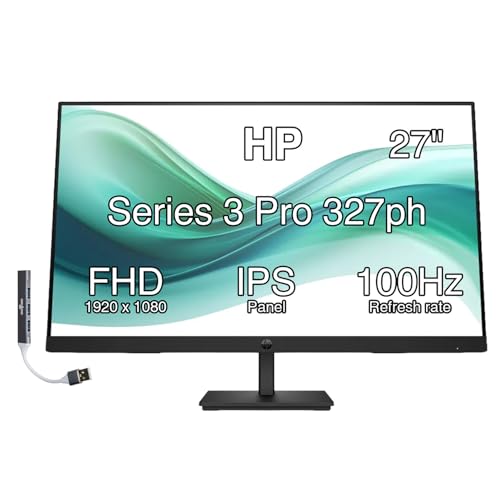
HP’s Series 3 Pro is the office traditionalist of the six, and its title reads like a procurement officer wrote it: a 27-inch FHD IPS monitor with 5ms response time and anti-glare coating, built-in 2 x 2W speakers, height adjustment, flicker-free backlighting, a 100mm VESA mount, HDMI and a bundled Dockztorm USB port expander, in black. Nearly every clause answers a question a workplace buyer actually asks. Anti-glare for the window-lit office, flicker-free for the eight-hour day, VESA for the standard arm, height adjustment for the shared hot-desk — the list is unglamorous and exactly right.
The speakers sit a step below the Dells on paper, 2 x 2W against 2 x 3W, and this guide reports that plainly rather than smoothing it over. In practice the difference at desk distance is smaller than the numbers suggest — voice clarity depends on more than raw watts — but a buyer equipping a large or noisy room should take the Dells’ stronger claim seriously, while a buyer in a quiet study will likely never push either set past half volume. What the HP guarantees is the same evidentiary standard: a number, in print, that the maker can be held to.
The IPS panel and anti-glare pairing suits the screen to real offices rather than showroom ones: light from the side, a colleague standing at the shoulder, a chair that is not always the same chair. The 5ms response figure is the slowest in this guide and entirely adequate for documents, calls and video; only a committed gamer will find it plain, and that reader has the Sceptre and LG reviews waiting below. Height adjustment without stated tilt, pivot or swivel is the one ergonomic partial credit — enough for the crucial eye-level setting, short of the Dells’ full repertoire.
Suits the employed professional equipping a home office to a workplace standard, the small business buying several identical screens, and the hot-desk household where different family members need the height changed in seconds. The bundled USB port expander in the title is a small, telling inclusion: this product expects to be the hub of a working desk, not merely its window.
- Size and resolution: 27-inch FHD
- Panel: IPS, anti-glare
- Response time: 5ms
- Speakers: built-in 2 x 2W
- Stand: height adjustable
- Backlight: flicker free
- Mounting: VESA 100mm
- Inputs: HDMI, with Dockztorm USB port expander
Strengths
- A printed 2 x 2W speaker specification, verifiable like the Dells’ claims.
- Anti-glare IPS and flicker-free backlighting suit window-lit, all-day offices.
- Height adjustment plus a 100mm VESA mount covers both stand and arm setups.
Trade-offs
- Speaker wattage trails the two Dells by a watt per channel.
- 5ms response is the plainest figure here for fast gaming.
- Tilt, pivot and swivel are not stated alongside the height adjustment.
Best for: a workplace-standard home office or small-business fleet where anti-glare, flicker-free light and printed speaker wattage matter. Not suited for: fast-paced gaming as the primary use, because the title’s 5ms response and office feature set aim at documents and calls first.
Employers buying in twos and threes should note the fleet virtues hiding in this title: a standard VESA pattern, a stated stand behaviour, a printed speaker specification and an anti-glare surface mean any unit can replace any other without the desk changing character. Consistency is a feature that never appears in consumer reviews because individuals buy one screen, but the Series 3 Pro is plainly designed by people who expect it to be bought by the dozen, and home buyers inherit that discipline as reliability.
Put the HP through an office day rather than a demo reel: morning call at the adjusted height, a bright midday hour against the window light to judge the anti-glare coating, an afternoon of documents to feel the flicker-free claim in the only way it can be felt — by nothing aching at five o’clock. Screens bought for work should be reviewed by the body’s end-of-day report, and this one is specified to pass exactly that review.

LG UltraGear 27G414B — Fast panel, built-in voice
LG’s UltraGear badge signals gaming first, and the 27G414B-B keeps that promise in its title: a 27-inch IPS panel at 1080p, 144Hz with 1ms response, carrying both G-Sync and FreeSync language, HDR10, and a tilt-and-height stand. Then, almost as an aside, the title adds a built-in speaker — singular in the wording, unquantified in wattage. That modesty defines the product’s honest place in this guide: it is the fastest, most game-serious screen here that can still speak for itself on a call, rather than a speaker-led monitor that happens to game.
The dual sync claims matter to the two tribes of gaming PC owners, since a title naming both FreeSync and G-Sync compatibility speaks to AMD and NVIDIA households without forcing either to gamble. HDR10 widens the streamed-video appeal, LG Switch and Reader Mode — both named in the title — betray the line’s double life, offering window management and softened reading light on the same panel that runs 144Hz at night. IPS, stated outright, keeps colours honest at the off-angles of a shared room, which gaming panels do not always bother to do.
Suits the player whose desk is one screen deep: competitive-leaning games in the evening, ordinary work and calls in the day, no desk space or patience for separate speakers. The built-in speaker covers the daytime duties — call voices, video sound, alerts — at desk distance, and the evening’s serious sessions can still route to a headset when spatial audio matters. That division of labour is not a compromise so much as a schedule, and many real desks run on exactly it.
The cautions mirror the Sceptre’s with one addition. Wattage is unstated, so room-filling volume is unproven; the title’s speaker wording is singular, so stereo width should not be assumed; and HDMI plus DisplayPort are the stated inputs, with no USB-C for the laptop-cable minimalists. Buyers who need the speaker to be the headline should look back up the page to the Dells; buyers who need the panel to be the headline will find this LG waiting patiently at the bottom of it.
- Size and resolution: 27-inch IPS, Full HD 1920 x 1080
- Refresh rate: 144Hz, 1ms
- Adaptive sync: G-Sync and FreeSync named in title
- HDR: HDR10
- Speaker: built-in — wattage: Not stated in the listing title — verify with the manufacturer documentation
- Software: LG Switch, Reader Mode
- Inputs: HDMI, DisplayPort
- Stand: tilt and height adjustable
Strengths
- 144Hz IPS with both sync families named suits either graphics-card household.
- A height-adjustable stand, rare among the gaming picks here.
- Reader Mode and LG Switch give the gaming panel a genuine daytime personality.
Trade-offs
- The speaker’s wattage is unstated and its wording in the title is singular.
- FHD resolution is the ceiling, where the Dell sibling offers QHD.
- No USB-C input is named in the title.
Best for: a one-screen gaming desk that also takes daytime calls, where 144Hz IPS performance leads and the built-in speaker covers communication duty. Not suited for: a desk whose main requirement is music and film sound, because the title quantifies neither the speaker’s power nor its configuration.
One more consideration belongs to shared flats and thin walls. A headset seals a player in; monitor speakers at modest volume keep a session social and keep its volume honest, because sound that others can hear is sound its owner naturally moderates. Several households will read that as the LG’s most civilised trait. It will not trouble the neighbours, it will not hide the doorbell, and it leaves the late session compatible with a sleeping household in a way that a pumped-up external system rarely manages.
Divide the first week’s testing by the panel’s two personalities. By day, run calls through the built-in speaker at the height-adjusted position and confirm voices stay clear at half volume; by night, verify the 144Hz output in the graphics settings and play the fastest title in the library. A screen that passes both examinations has earned the single-screen desk, and the buyer can stop shopping for the separate speakers that were pencilled into the original plan.
Comparison
| Pick | Resolution | Refresh | Speakers | Notable from title |
|---|---|---|---|---|
| Dell S2725DSM | 27″ QHD 2560 x 1440 | 144Hz | 2 x 3W | Full four-way stand, DisplayPort 1.4 |
| Dell S2725HSM | 27″ FHD 1920 x 1080 | 144Hz | 2 x 3W | Full four-way stand, HDMI |
| Amazon Basics 27″ | 27″ FHD 1080p IPS | 100Hz | Built-in, wattage not stated in the listing title | VESA compatible, USB ports |
| Sceptre 27″ Prime | 27″, resolution not stated in the listing title | 100Hz | Built-in, wattage not stated in the listing title | 100% sRGB, HDMI x2, FreeSync |
| HP Series 3 Pro | 27″ FHD IPS | Not stated in the listing title | Built-in 2 x 2W | Anti-glare, height adjustable, VESA 100mm |
| LG UltraGear 27G414B | 27″ FHD 1920 x 1080 IPS | 144Hz | Built-in, wattage not stated in the listing title | HDR10, G-Sync and FreeSync, height stand |
The table divides cleanly into evidence and assertion. Three rows print a wattage and three rows print a promise, and a reader in a quiet room may happily choose from either half, while a reader in a noisy one should stay with the printed numbers. Resolution draws the second line: one QHD screen for the text workers, five FHD screens for everyone else. Refresh, unusually for a monitor guide, draws almost no line at all — even the slowest panels here run at 100Hz, so motion smoothness is the one thing no buyer in this set has to trade away.
Notice what the table cannot tell you: how any of these speakers actually sound. Titles give wattage, presence and nothing else — no frequency figures, no driver sizes — and this guide declines to invent a sonic ranking from three numbers and three silences. The honest use of the table is shortlisting; the honest test of the sound is the first call on the first day, inside the return window, at the desk where the screen will live.
How to Choose a Display Monitor With Speakers
Start by naming the sounds. A desk’s audio diet usually divides into voice — calls, meetings, narration — and everything else: music, film, games. Voice is merciful; it lives in a narrow frequency band and stays intelligible through modest hardware, which is why every screen here can serve a calls desk. Everything else is where expectations must be managed. A buyer whose evenings are films and records should treat monitor speakers as the daytime system and keep a separate answer for the night, whichever pick they choose.
Next, grade the evidence the way these reviews did. A printed wattage — 2 x 3W on the Dells, 2 x 2W on the HP — is a commitment; the words built-in speakers alone are an assertion. Neither guarantees pleasure, but only the first can be compared, shortlisted and questioned. In a small, quiet room the difference may never be heard. In a kitchen-office with a extractor fan and a road outside, the printed number is the safer bet, and paying for the evidence is rational rather than fussy.
Then choose the picture independently, because the screen will be looked at ten hours for every hour it is listened to. QHD if the day is text, FHD if it is video and calls; IPS where the seat is shared or off-centre, which the Amazon Basics, HP and LG titles all state; 144Hz where games share the desk, 100Hz where they do not. Buyers who reverse this order — speakers first, picture second — end up with a screen that sounds adequate and looks wrong for years, the most expensive kind of bargain.
Ergonomics and inputs close the decision. Height adjustment is the stand feature that matters most, stated by the HP, the LG and both Dells; pivot is a bonus for document readers; VESA compatibility, claimed by the Amazon Basics and the HP, insures the purchase against future desks. Count the machines to be connected and match the inputs — dual HDMI for the PC-and-console desk, DisplayPort for the serious PC, and an adapter plan wherever a USB-C laptop meets a screen whose title names none.
How Much Speaker Power Does a Desk Actually Need?
Less than buyers fear, because distance does most of the work. A listener sits roughly an arm’s length from a monitor’s speakers, and at that range even the HP’s stated 2 x 2W produces clear, present voice without strain; the Dells’ 2 x 3W adds headroom for a bigger room or a noisier one. What wattage cannot buy at any figure found in monitor titles is bass and breadth — the physical size of the enclosure forbids it — so the buyer’s real question is not how much power, but how far the sound must travel and what it must compete with on the way.
A practical test exists for readers who already own any screen with speakers: play a spoken-word recording at the volume used for calls, then walk to the far side of the room. If the voice stays intelligible, the room is an easy acoustic and any pick here will serve. If it dissolves, the room is asking for the strongest stated wattage in the guide, or for the external speakers this category was never meant to replace.
Can Monitor Speakers Carry a Whole Working Day?
For the voice-led day most home workers actually live, yes. Calls, huddles, training videos, voice notes and the occasional news clip all sit inside the narrow band that modest monitor speakers reproduce faithfully, and the convenience compounds: no speaker to knock, no second volume control, no cable across the desk’s working surface. The day that defeats them is the exceptional one — a film afternoon, a music-heavy evening, a call with six people gathered around one screen in a echoing room — and the mature setup treats those as occasions for the headset or the living-room system rather than as verdicts on the monitor.
The failure mode to avoid is subtler: buying a screen whose speakers were never tested because the first week was spent admiring the picture. Run one real call on day one, at the real distance, with the room’s real noises running. Two minutes of honesty then is worth more than any wattage printed in any title, including the ones this guide has praised for printing it.
What Should You Check When a Title Only Says Built-In Speakers?
Three things, in order. First, the rest of the title: a maker who specifies everything else precisely — resolution, refresh, colour, inputs — and leaves only the audio vague is probably shipping ordinary speakers in a good monitor, which is a respectable product. Second, the return window: unquantified audio is a legitimate reason to test promptly and decide inside it. Third, the desk’s fallback: if the laptop’s own speakers or an existing headset already covers calls acceptably, the monitor’s unquantified pair is a bonus rather than a dependency, and the purchase can proceed on the strength of its picture with a calm mind.
Before the mistakes, one encouragement: this category rewards the buyer who tests early. Every uncertainty in these six products — an unstated wattage, an unprinted resolution, an undescribed stand — is answerable within a single day of ownership, at the actual desk, with the actual material. Order with the intention of auditioning, keep the packaging until the audition is done, and the small silences in the titles stop being risks and become mere appointments. The screens were shortlisted to survive that scrutiny; the sections below assume it happens.
Common Mistakes When Buying a Monitor With Speakers
Expecting cinema is the founding mistake of this category. Buyers read the word speakers, imagine the soundbar under the television, and feel cheated by a product that never promised that experience. Monitor speakers are instruments of clarity at close range. Judged on that duty they range from adequate to genuinely good; judged on film-night immersion they all fail together, the strongest wattage in this guide included, and the disappointment says more about the expectation than the hardware.
Skipping the wattage line is the second mistake, and its mirror image — worshipping it — is the third. The number matters as evidence and as rough headroom; it does not describe tone, clarity or how the speakers are aimed. A 2 x 3W pair firing at a wall can serve a listener worse than a 2 x 2W pair firing at their ears, which is why stand adjustment and desk position appear in these reviews beside the audio claims rather than in a separate, lesser section.
Placement errors finish the list. A screen pushed hard against a wall, speakers firing into a shelf, a monitor arm that points the panel at the ceiling’s reflection of the listener — each quietly taxes sound that was modest to begin with. Centre the screen on the chair, give its rear a little breathing room where the design needs it, and set one fixed volume relationship between computer and monitor so every call starts at the same sane level. Most speaker complaints in this category are placement complaints wearing a disguise.
Final Recommendation
The Dell S2725DSM is the complete answer for the working desk: QHD text, 144Hz motion, the joint-strongest stated speakers and a stand that adjusts every way a day can ask. Its FHD sibling, the S2725HSM, is the same answer for video-led days and shared family desks. The HP Series 3 Pro serves the traditional office with anti-glare discipline and its own printed wattage, while the Amazon Basics is the honest, unadorned choice for a room that simply needs a screen that can speak. Players should take the LG UltraGear for speed with a daytime voice, or the Sceptre for its colour claim and console-friendly inputs. Buy the evidence where the room demands it, buy the picture everywhere — and let the first call, not the first film, be the audition.
Frequently Asked Questions
Are 2 x 3W speakers loud enough for video calls?
Yes, at desk distance, which is the distance they are designed for. A seated listener an arm’s length away hears clear, present voice from the Dells’ stated 2 x 3W pair without straining, and the HP’s 2 x 2W serves the same duty in a quiet room. The limits appear when the audience grows or the room does — a group gathered around the screen, or a noisy open-plan space, asks more than monitor audio of any wattage found in these titles.
Which of these monitors is best for text and documents?
The Dell S2725DSM, and the reason is arithmetic: its QHD panel places 2560 x 1440 pixels on the same 27 inches where the others place 1920 x 1080, so letterforms and spreadsheet grids render with visibly finer edges. Its 144Hz refresh keeps long scrolling calm, and its pivot stand turns the panel tall for the longest documents. Text-first buyers should start there and only step down to the FHD models if video dominates their day.
Do the gaming monitors here work for office calls too?
Both do, with different emphases. The LG UltraGear pairs its 144Hz panel with a height-adjustable stand and Reader Mode, making it the more office-capable of the two during the day. The Sceptre counters with 100% sRGB colour and dual HDMI inputs for the console desk. Neither prints a speaker wattage, so both should be tested on a real call in the first week while the return window is open.
What does VESA compatible mean for a desk setup?
It means the screen can leave its supplied stand and mount to a standard arm or wall bracket — the HP specifies a 100mm pattern, and the Amazon Basics claims VESA compatibility in its title. For a speaker monitor this matters twice: an arm frees the desk surface the speakers were bought to keep clear, and it lets the panel be aimed precisely at the listener’s seat, which improves modest audio more than most settings do.
Should I still buy separate speakers with one of these monitors?
Only if the desk’s evenings demand it. For calls, video and alerts, the built-in speakers in this guide remove the need entirely, and most buyers who test them honestly on day one retire the idea. Music and film devotees will still prefer a dedicated system for those hours — a preference about pleasure, not adequacy — and the sensible order is to live with the monitor’s own sound for a fortnight before spending anything.
Related Guides
Sound is one axis of a working desk; the neighbouring guides cover the others. Readers whose screen must split its life between spreadsheets and games should continue to the shortlist of the best monitors for office work and gaming on a single dual-purpose desk, where refresh and ergonomics share the lead. Those whose hours go to colour-critical applications will find their field in our roundup of the best monitors for Adobe Creative Suite, ranked by gamut and calibration. And widescreen devotees who want their audio wrapped in a broader canvas should finish with the best ultrawide FreeSync gaming monitors for wide, fast, single-screen setups.