What's inside
- Where to Buy
- Key Takeaways
- Quick Picks
- How We Chose These Picks
- Comparison
- How to Choose a Curved IPS Monitor
- Why Are Curved IPS Monitors So Rare?
- What Do You Give Up Choosing Certified IPS Over the VA Flagships?
- How Can You Verify a Panel Claim Before You Buy?
- What Does IPS Consistency Actually Look Like at a Desk?
- Should You Wait for More Curved IPS Models to Arrive?
- Common Mistakes When Buying a Curved IPS Monitor
- Final Recommendation
- Frequently Asked Questions
- Related Guides
As an Amazon Associate I earn from qualifying purchases. This post may contain affiliate links at no extra cost to you.
widgetverdict.com is reader-supported. When you buy through links on our site, we may earn an affiliate commission.
Where to Buy
Three picks in this guide carry Amazon links, because three picks are the ones their titles actually certify as IPS. The LG 34U650A-B leads them — see the current price on Amazon on its listing. The LG 34U530A-W is the Full HD sibling, and its page shows today’s figure. The Deco Gear 40-inch Nano IPS is the wide flagship of the three; verify its price on the listing before comparing. The remaining three reviews — an LG whose title stays silent on panel type, and the Alienware and Samsung VA flagships — are presented without purchase links on purpose, as the reference points an honest IPS shopper should weigh before spending.
Anyone searching for the best curved ips monitors deserves the correction before the catalogue, so here it is in the first breath: curved IPS monitors barely exist. Curved glass is manufactured overwhelmingly as VA, and of the six screens in this guide, exactly three have listing titles that claim IPS or Nano IPS at all — two from LG and one from Deco Gear. Those three are the linked picks below. The other three reviews are here because real shoppers meet them on the same search page: one is an LG ultrawide whose title never mentions its panel, and two are the VA gaming flagships that most curved-monitor buyers actually take home. They are presented as prose-only references, without purchase links, so the guide’s links never pretend to certify something a title does not say.
Why does the distinction deserve this much ceremony? Because panel type is the one specification a buyer cannot verify by looking at a photograph, and the one most often smuggled in by association — a brand known for IPS flat panels launches a curved model, and the assumption travels with the logo. This guide refuses the smuggling. If a title says IPS, the review says IPS and links the listing. If a title is silent, the review says silent, in the spec box, in the standard wording, and the pick earns its place by honesty about what it is instead.
The three certified picks share a profile worth noticing: all are ultrawide, all are work-first, and none chases gaming ceilings. The curved IPS market, such as it is, lives at the desk where colour behaviour and viewing consistency across a wide canvas matter more than frame rates — design-adjacent work, photography, documents that must look the same at the edges as at the centre. Readers whose evenings are competitive games will find the VA flagships reviewed below more exciting, and this guide will not pretend otherwise; it will simply insist they be chosen as VA, knowingly, for VA’s own considerable virtues.
Key Takeaways
- Only three titles claim IPS or Nano IPS: the LG 34U650A-B, the LG 34U530A-W and the Deco Gear 40 — those are the three linked picks.
- The LG 34U640B-B is prose-only because its title never names a panel type; it is this guide’s standing example of a title-silent specification.
- The Alienware AW3425DWM and Samsung Odyssey G9 are included prose-only as the VA flagships curved shoppers actually cross-shop.
- The Deco Gear is the resolution leader: a 40-inch Nano IPS panel at 5120×2160 and 120Hz with 65W USB-C charging.
- Both linked LG models pair IPS with USB-C — 96W of power delivery on the WQHD model, the strongest laptop offer in the guide.
- Curve radius is stated only in the Alienware’s title — 1500R; every other title here leaves the radius to the listing page.
Quick Picks
| Pick | Badge | Why it earns a place |
|---|---|---|
| LG 34U650A-B UltraWide IPS Curved Monitor | Certified IPS, WQHD | IPS stated in the title, 3440×1440 at 100Hz, USB-C PD 96W and a full ergonomic stand. |
| LG 34U530A-W UltraWide IPS Monitor | Certified IPS, Full HD | IPS stated in the title at 2560×1080, with DisplayHDR400 and USB-C for lighter laptops. |
| Deco Gear 40 Curved 5K2K Nano IPS Monitor | Nano IPS flagship | 5120×2160 at 120Hz, Nano IPS in the title, 65W USB-C and built-in speakers. |
| LG 34U640B-B UltraWide Curved Monitor | Prose-only: title-silent panel | A 144Hz WQHD ultrawide whose title never names its panel — included as the honesty case study. |
| Alienware 34 Curved Gaming Monitor AW3425DWM | Prose-only: VA flagship | 180Hz, a 1500R curve and AdaptiveSync — the gaming screen IPS shoppers cross-shop most. |
| Samsung 49-inch Odyssey G9 (G91F) | Prose-only: VA flagship | DQHD across 32:9 at 144Hz — the two-monitor replacement, presented without a link. |
How We Chose These Picks
Certification, not enthusiasm, was this guide’s selection rule. A pick could be linked only if its own listing title claimed IPS or Nano IPS, and the search that followed was sobering: across the curved ultrawide market, the titles that make that claim can be counted on one hand. Three survived verification. Rather than pad the guide with near-misses wearing IPS language they had not earned, the remaining three slots were given to the screens an IPS shopper genuinely needs to understand — clearly labelled, clearly unlinked.
Those three prose-only slots were allocated by shopper behaviour, not by specification. The LG 34U640B-B takes the first because it is the trap: a well-regarded LG ultrawide, from the brand most associated with IPS, whose title simply never says the word — the exact purchase an assumption makes on a tired evening. The Alienware and the Odyssey G9 take the other two because they are the destination: when curved IPS shoppers discover how thin the certified field is, these are the VA flagships the market offers instead, and a guide that refused to discuss them would abandon its reader at the precise moment of decision.
Every specification below comes from the listing title of the exact model. That rule produces this guide’s most distinctive spec boxes: panel-type lines that say IPS where a title says IPS, and the standard not-stated sentence where it does not. It also produces an unusual honesty about curvature itself — the LG 34U530A-W’s title, readers will notice, never uses the word curved either, and its review records that silence too, rather than letting the guide’s own title do the claiming on the manufacturer’s behalf.
Judged as a set, the six describe the real market’s shape: a small certified IPS shelf for work-first buyers, a silent middle where assumptions breed, and a VA flagship tier that wins most actual purchases on speed, contrast and spectacle. The guide’s job is not to wish that shape different. It is to make sure nobody buys across its borders by accident.

LG 34U650A-B UltraWide IPS Curved Monitor — Certified IPS, WQHD
Here is what a certified curved IPS purchase actually looks like. LG’s title says it in so many words — 34-inch UltraWide IPS, WQHD, curved — and then builds the work desk around the claim: a 3440 x 1440 grid in 21:9, a 100Hz refresh rate, HDR10, sRGB 99% (Typ.) coverage, a built-in speaker, and a connection set of HDMI, DisplayPort and USB Type-C with PD 96W. That charging figure is the strongest in this guide and one of the strongest on any ultrawide: ninety-six watts will feed large laptops that lesser docks leave hungry, through the same cable that carries the picture.
The stand completes the professional brief — tilt, height and swivel all named in the title, a trio most gaming panels in our other guides never assemble. For a screen whose buyer is purchasing panel behaviour across a wide canvas, those adjustments are not garnish: IPS consistency is a property of viewing angle, and a stand that lets the panel be squared to the chair is what delivers the technology’s promise at the edges of a 34-inch frame. Set this screen dead ahead, at the right height, and the picture at the corners is the picture at the centre, which is the entire reason the IPS shopper came.
The gaming brief is modest and should be owned as such. One hundred hertz is fluid for strategy, racing and cinematic titles, and inadequate as a competitive proposition beside the 180Hz and 240Hz VA screens elsewhere in our guides. No sync technology is named in the title. Buyers whose evenings are esports should read the prose-only Alienware review below with clear eyes; buyers whose days are colour-sensitive work and whose evenings are films will find this LG’s priorities arranged exactly like their own.
The title’s one silence is the curve radius — a figure LG prints on some siblings and withholds here — so the spec box records it in the standard wording, and radius-first shoppers can confirm it on the listing page against the model code. It is a small gap in an otherwise admirably complete title, and it does not touch the certification that earns this pick its link: the panel is IPS because LG says so, in print, where a buyer can hold them to it.
Suits the colour-aware professional best: the designer, photographer or analyst whose laptop is their livelihood and whose wide canvas must behave identically corner to corner. It is also the natural upgrade for the owner of a smaller IPS desk screen who wants the ultrawide shape without surrendering the technology they trust. In a guide built around a correction, this is the pick the correction exists to protect — the real thing, certified, complete with the cable that charges the machine that feeds it.
- Size and resolution: 34 inches, WQHD 3440 x 1440, 21:9
- Panel type: IPS (stated in the listing title)
- Refresh rate: 100Hz
- HDR and colour: HDR10, sRGB 99% (Typ.)
- USB-C: USB Type-C PD 96W
- Inputs: HDMI, DisplayPort, USB Type-C
- Audio: built-in speaker
- Stand: tilt, height, swivel
- Curve radius: Not stated in the listing title — verify with the manufacturer documentation
Strengths
- IPS is certified in the title — the claim this whole guide is built on.
- USB-C PD 96W charges even large laptops through one cable.
- Tilt, height and swivel are all named in the title.
Trade-offs
- 100Hz is a work rate, not a competitive gaming rate.
- Radius of curve goes unstated in the title.
- The title is silent on sync technology.
Best for: a colour-aware laptop professional who needs IPS certified in writing. Not suited for: a competitive gaming desk, because 100Hz with no named sync technology leaves the VA flagships’ rates unchallenged.
LG 34U530A-W UltraWide IPS Monitor — Certified IPS, Full HD
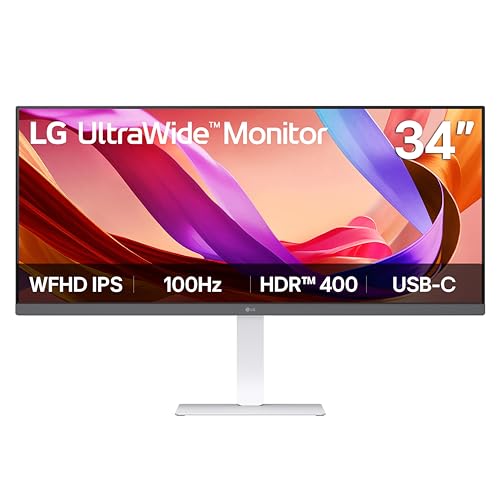
The second certified pick is the first one’s lighter sibling, and its title requires the most careful reading in this guide. LG claims IPS outright — 34-inch UltraWide IPS, FHD, 100Hz, DisplayHDR400, USB-C — on a 2560×1080 grid in 21:9, with sRGB 99% (Typ.), a built-in speaker, LG Switch layout software, and the same tilt, height and swivel stand as its WQHD brother. What the title never says is the word curved. This guide includes the monitor among curved IPS picks on the strength of its family and format, but the review records the silence plainly: curvature, for this model, is a listing-page confirmation, not a title claim, and the spec box below says exactly that.
The Full HD ultrawide grid is the deliberate trade. Stretching 2560 pixels across 34 inches produces a coarse pitch — text is large and soft-edged rather than fine — and in exchange the screen asks almost nothing of the computer driving it. Integrated laptop graphics hold this grid effortlessly, video fills it without scaling strain, and the whole package suits the worker whose ultrawide ambition is about width and window layout rather than density: two documents side by side, each the size of a sheet of paper, on a screen that never makes the laptop’s fan audible.
DisplayHDR400 gives streamed content a modest brightness credential the WQHD sibling’s HDR10 billing parallels, and the white finish — the W in the model code — marks this as the pick for bright rooms and light-coloured desks, a small aesthetic fact that matters more in real homes than any gamut figure. USB-C is present without a stated wattage in the title, so laptop owners should confirm the charging figure on the listing page; the port’s presence is certified, its power is a detail.
Suits the width-first worker best: the writer, administrator or researcher whose day is two documents and a browser, whose laptop is modest, and who wants certified IPS behaviour without paying for pixels they will never resolve. Readers who live in fine text should step up to the WQHD LG above — the grid difference is the whole ballgame at this size — and readers who need the curve itself certified in the title should note that neither LG prints a radius, while this one does not print the bend at all.
There is a gentleness to this pick’s whole proposition that deserves respect rather than condescension. Not every ultrawide buyer is chasing density; some are chasing calm — a wide, consistent, easy screen that makes a small laptop feel like a workstation and a long document feel like a desk rather than a keyhole. For that buyer, the 34U530A-W’s combination of certified IPS, full ergonomic stand and undemanding grid is not the budget version of anything. It is the correct version of what they described.
- Size and resolution: 34 inches, FHD 2560 x 1080, 21:9
- Panel type: IPS (stated in the listing title)
- Refresh rate: 100Hz
- HDR and colour: DisplayHDR400, sRGB 99% (Typ.)
- Inputs: HDMI, DisplayPort, USB Type-C
- Audio: built-in speaker
- Features: LG Switch
- Stand: tilt, height, swivel
- Curvature: Not stated in the listing title — verify with the manufacturer documentation
Strengths
- IPS is certified in the title at the gentlest price tier in this guide.
- The undemanding grid runs beautifully on modest laptop graphics.
- A full ergonomic stand matches the WQHD model’s furniture.
Trade-offs
- 2560×1080 across 34 inches is visibly coarse for fine text.
- The title does not state that the panel is curved.
- USB-C charging wattage is not printed in the listing title.
Best for: a width-first worker on a modest laptop who wants certified IPS and two-document width. Not suited for: a fine-text professional, because the Full HD ultrawide grid cannot give them the density the WQHD model above was built for.

Deco Gear 40 Curved 5K2K Nano IPS Monitor — Nano IPS flagship
Deco Gear’s 40-inch entry is the certified field’s flagship, and its title spends its words like a manifesto: Curved, 5K2K, Nano IPS — the enhanced IPS variant — on a 5120×2160 ultrawide grid in 21:9, at a 120Hz refresh rate, with 65W USB-C power delivery, HDR, Adaptive Sync and built-in speakers, for work, as the title’s final phrase insists. Every element an IPS shopper could ask a title to certify is present in this one, including the two the LG pair omit: an explicit curved claim and a sync technology.
The grid is the same WUHD canvas as the Samsung in our 4K guide — 2160 pixels tall, stretched wide — and at 40 inches it gives the IPS professional something no other certified pick can: ultrawide width at a density where text and photographs both hold their detail. Timelines, DAW sessions, grading-adjacent work and three-window research all fit on one panel whose colour behaviour stays consistent to its edges, which is the precise intersection of width and trustworthiness that this entire category exists to serve. The 120Hz rate, generous for a work panel, keeps window movement liquid and casual games respectable.
USB-C at 65W covers most laptops fully and the largest ones partially under peak load — a step below the LG WQHD model’s 96W, and the one figure on which the flagship concedes to its smaller rival. The title likewise leaves the curve radius unstated, joining every other certified pick in that silence, so the spec box records it and radius-led shoppers know their errand. HDR is claimed without a tier, a vagueness the review notes rather than repairs.
Suits the wide-canvas professional best: the editor, analyst or creator whose work genuinely spans 21:9 and whose panel loyalty is to IPS behaviour rather than to a brand. Against the LG 34U650A-B, the exchange is width and rate against charging wattage and a bigger name’s support bench — a real decision, argued on stated figures, which is all this guide ever asks a purchase to be. For the reader who arrived wanting the most curved IPS monitor that titles can certify, the search ends here, at forty inches.
Ownership at this size carries the usual furniture terms — a deep desk, a centred chair, light under control — plus one specific to the technology: an IPS panel’s consistency rewards the viewer who sits where the stand can be adjusted to put them, square and centred, for years. The Deco Gear’s buyer is purchasing a decade of looking at wide, trustworthy colour. Judged on that horizon rather than on any single figure, its flagship claim is the most defensible in this guide.
- Size and resolution: 40 inches, 5K2K 5120×2160, 21:9
- Panel type: Nano IPS (stated in the listing title)
- Refresh rate: 120Hz
- Sync: Adaptive Sync
- HDR: HDR (tier not specified in the listing title)
- USB-C: 65W USB-C PD
- Audio: built-in speakers
- Curve radius: Not stated in the listing title — verify with the manufacturer documentation
Strengths
- Nano IPS is certified in the title on the guide’s widest canvas.
- 5120×2160 gives ultrawide width at UHD-class fineness.
- Adaptive Sync is named — the only certified pick that names one.
Trade-offs
- USB-C charging at 65W trails the LG WQHD model’s 96W.
- The HDR claim carries no tier in the listing title.
- Forty inches demands a deep desk and a centred seat.
Best for: a wide-canvas professional who wants the largest certified Nano IPS screen in the field. Not suited for: an owner of a large workstation laptop needing full charging from the monitor, because 65W trails the 96W the LG above delivers.
LG 34U640B-B UltraWide Curved Monitor — Prose-only: the title-silent panel
This review exists to be read twice: once for the monitor, and once for the lesson. The monitor, on its title’s evidence, is an attractive ultrawide — 34 inches, WQHD at 3440 x 1440 in 21:9, a 144Hz refresh rate with FreeSync Premium, HDR10, Reader Mode, and a full connection set of HDMI, DisplayPort and USB Type-C with PD 65W, on a tilt and height adjustable stand. Nothing in that sentence is a criticism. It is faster than both certified LG picks above, and a buyer who chose it for its stated figures would own a fine screen.
The lesson is the sentence the title never writes. Nowhere does it name a panel type. An IPS shopper meeting this listing in the wild — LG branding, ultrawide format, a family resemblance to the certified models — could reasonably assume the panel they came for, and nothing in the title would correct them. This guide declines to correct them either, in the opposite direction: the panel is not called VA here, because the title does not say that. It is recorded as what it demonstrably is — unstated — and the pick is prose-only for exactly that reason. Certification is the currency of this guide, and this listing does not mint it.
Why include an uncertified pick at all? Because shoppers will meet it, and a guide that omitted it would leave the meeting unchaperoned. Read with clear eyes, the 34U640B-B is a legitimate alternative: forty-four extra hertz over the certified WQHD LG, FreeSync Premium named where its sibling names nothing, the same USB-C convenience at a lower wattage. A buyer who weighs those stated virtues against the unstated panel and chooses the speed has made a defensible purchase. A buyer who chooses it believing the panel was certified has made an accident, and the difference between those two buyers is this review’s entire reason for existing.
Practical guidance follows from the framing. If the panel type matters enough to have brought you to an IPS guide, the certified picks above are your purchase and this one is your reference. If the stated figures matter more, confirm the panel on the listing page or the manufacturer’s documentation before ordering — the information exists, it simply does not live in the title — and then buy with the fact in hand rather than the assumption in its place.
No purchase link accompanies this review, by design. The guide’s links are its certifications, and extending one here would blur the line the whole page is drawn to keep bright. The monitor deserves its audience; it simply has to find them through its own stated merits, which are considerable, rather than through an implication its manufacturer never printed.
- Size and resolution: 34 inches, WQHD 3440 x 1440, 21:9
- Refresh rate: 144Hz
- Sync: FreeSync Premium
- HDR: HDR10
- Inputs: HDMI, DisplayPort, USB Type-C PD 65W
- Features: Reader Mode
- Stand: tilt, height adjustable
- Panel type: Not stated in the listing title — verify with the manufacturer documentation
Strengths
- 144Hz outruns both certified LG picks in this guide.
- FreeSync Premium is named in the title.
- USB-C 65W and an adjustable stand complete a work-ready package.
Trade-offs
- The panel type is not stated anywhere in the listing title.
- It cannot be recommended as an IPS monitor on this evidence.
- USB-C charging at 65W trails the certified WQHD model’s 96W.
Best for: a speed-leaning ultrawide buyer who will verify the panel type on the listing page before ordering. Not suited for: an IPS shopper who needs the certification in the title itself, because this listing never makes the claim they came to buy.
Alienware 34 Curved Gaming Monitor AW3425DWM — Prose-only: the VA flagship shoppers cross-shop
Meet the destination. When curved IPS shoppers finish discovering how thin the certified shelf is, the Alienware AW3425DWM is one of the two screens the market puts in front of them instead — and on its stated merits, it is easy to see why the market wins so often. The title offers a 34-inch WQHD display at 180Hz with a 1ms claim, a stated 1500R curve — the only radius printed anywhere in this guide — plus AMD FreeSync Premium and VESA AdaptiveSync. It is a gaming flagship’s specification, complete and confident, aimed at a desk where frames outrank everything.
The framing in this guide is deliberate: the Alienware is presented as a VA-class flagship, because that is the role it plays in the curved market and the honest context for an IPS shopper weighing it. Its own title, to be precise, does not print a panel type either — so the spec box below records the panel line with the standard wording, and the review’s claim is the narrower, defensible one: this is the gaming alternative, not an IPS product, and it should be bought as the former. What VA-class curved flagships offer in exchange for the IPS certification is considerable — gaming rates the certified shelf never reaches, and the deep native contrast that makes dark game scenes a showcase rather than a compromise.
Against the certified picks, the exchange rate is stark. The Alienware doubles the LG WQHD model’s refresh rate and names two sync technologies where the LG names none; the LG answers with a certified panel, USB-C charging at 96W and an ergonomic stand for eight-hour days. Neither screen is the other’s failure. They are answers to different questions that happen to share a size and a search results page, and the shopper’s task is to notice which question is actually theirs before the cart decides for them.
Suits the gaming desk that wandered into an IPS search by accident or by hope. If your evenings are competitive and cinematic games, your chair is centred, and your work tolerates a gaming panel’s priorities, this Alienware — bought knowingly, as the VA-class flagship it is — will serve you better than a certified IPS screen bought resentfully for a specification your hours never use. The guide’s only insistence is the knowingly.
No link accompanies this review, for the same reason as the LG above: links here are certifications, and this pick’s considerable virtues are gaming virtues, not IPS ones. Readers who decide in its favour will find it easily enough by its model code, AW3425DWM, and should verify the full current title at that point — Alienware revises this line, and a sibling with a stated VA panel appears in our 34-inch guide for readers who want the flagship with its panel printed.
- Size and class: 34 inches, WQHD
- Refresh rate: 180Hz
- Response: 1ms
- Curve radius: 1500R
- Sync: AMD FreeSync Premium, VESA AdaptiveSync
- Panel type: Not stated in the listing title — verify with the manufacturer documentation
- Numeric resolution: Not stated in the listing title — verify with the manufacturer documentation
Strengths
- 180Hz doubles the certified picks’ refresh rates.
- The 1500R radius is stated — unique among these six titles.
- Two sync technologies are named in the title.
Trade-offs
- It is not an IPS monitor and is not presented as one.
- No USB-C charging is claimed in the listing title.
- Its gaming priorities override the work-desk brief.
Best for: a gaming-first desk cross-shopping from an IPS search, buying it knowingly as a VA-class flagship. Not suited for: a colour professional whose requirement is a certified IPS panel, because no reading of this title supplies that certification.
Samsung 49-inch Odyssey G9 (G91F) — Prose-only: the two-monitor replacement
The second destination needs no introduction to anyone who has priced a dream desk: forty-nine inches of DQHD in a 32:9 frame, the canvas of two 27-inch QHD monitors fused without a bezel, running at 144Hz with DisplayHDR 600 and AMD FreeSync Premium Pro on an ergonomic stand, model LS49FG910ENXZA. The Odyssey G9 appears in this guide for the same reason as the Alienware — it is what the curved market offers the disappointed IPS shopper at the flagship counter — and it is presented, like its companion, without a purchase link and without a syllable of IPS implication.
Its proposition is spectacle with a productivity alibi, and both halves are real. Racing and flight simulation fill a 32:9 wrap like nothing else sold for a desk; a trading layout, a video timeline or a three-project workspace spreads across the same canvas at the office hour. Against that, the honest debits: a deep and sturdy desk is a prerequisite rather than a preference, consoles and 16:9 video sit in the centre of a very wide frame, and the title states neither a numeric resolution nor a curve radius, leaving both to the listing page in the spec box below.
For the IPS shopper specifically, the G9 is the test of what the search was really for. If the underlying desire was width, immersion and a single seamless canvas, this Samsung answers it more completely than any certified pick in the guide, and buying it knowingly — as the VA-class flagship it is — is a coherent ending to the search. If the underlying requirement was panel behaviour for colour-critical work, the G9 does not answer it at any size, and the Deco Gear’s forty certified inches are the honest destination. The guide cannot make that determination for its reader; it can only refuse to blur it.
Suits the dedicated rig and the maximalist workstation, in a room arranged around one chair. It does not suit a shallow desk, a shared screen, or a buyer whose IPS requirement was professional rather than preferential. Within its brief it remains what it was in our wider curved guide, where it appears as a linked pick on its own gaming merits: the most dramatic legal way to put a curve on a desk, offered here as context, deliberately unlinked, so that the IPS certification this page trades in is never spent on it by mistake.
Readers who choose it should carry one habit from this guide into the transaction: order by the full model code, LS49FG910ENXZA, because the G9 family spans generations with meaningfully different panels, and the flagship’s name is a dynasty rather than a product. The same discipline that separates certified IPS from assumed IPS separates the G9 you researched from the G9 that might otherwise arrive.
- Size and format: 49 inches, 32:9 ultra-wide
- Resolution class: DQHD
- Refresh rate: 144Hz
- HDR and sync: DisplayHDR 600, AMD FreeSync Premium Pro
- Stand: ergonomic stand
- Model code: LS49FG910ENXZA, 2025
- Panel type: Not stated in the listing title — verify with the manufacturer documentation
- Curve radius: Not stated in the listing title — verify with the manufacturer documentation
Strengths
- One seamless canvas replaces two monitors and their bezel.
- 144Hz with FreeSync Premium Pro keeps the huge frame fluid.
- DisplayHDR 600 is a genuine flagship HDR tier.
Trade-offs
- It is not an IPS monitor and is not presented as one.
- The footprint demands a deep, sturdy, single-chair desk.
- Numeric resolution and curve radius are unstated in the title.
Best for: a simulator rig or maximalist workstation that came to IPS by hope and stays for the canvas, bought knowingly. Not suited for: colour-critical professional work requiring a certified IPS panel, which this flagship does not claim to be at any size.
Comparison
| Pick | Status | Panel per title | Grid | Refresh |
|---|---|---|---|---|
| LG 34U650A-B | Linked | IPS | 3440×1440 | 100Hz |
| LG 34U530A-W | Linked | IPS | 2560×1080 | 100Hz |
| Deco Gear 40 | Linked | Nano IPS | 5120×2160 | 120Hz |
| LG 34U640B-B | Prose-only | Not stated in the listing title | 3440×1440 | 144Hz |
| Alienware AW3425DWM | Prose-only | Not stated in the listing title | WQHD | 180Hz |
| Samsung Odyssey G9 G91F | Prose-only | Not stated in the listing title | DQHD, 32:9 | 144Hz |
Read the status column first, because it is the guide’s thesis in miniature: three certifications, three references, and a refresh column that climbs as certification falls away. That inverse relationship is the curved market’s actual shape in 2026. Speed lives on the VA side of the fence; certified IPS lives on the work side; and the shopper’s real decision is which side of the fence their hours are spent on.
The panel column is kept brutally literal for the same reason. Three titles make the claim, three do not, and no amount of brand association changes which is which. A comparison table that filled the gaps with the panels these monitors are rumoured to carry would be more convenient and less true, and convenience is how IPS assumptions get purchased.
How to Choose a Curved IPS Monitor
Start by interrogating the requirement itself. IPS matters professionally when colour and brightness must stay consistent across a wide screen and at its edges — design, photography, video work, any desk where the corners of the canvas carry information the centre must match. It matters much less for documents, browsing and games, where the VA flagships’ contrast and speed arguably serve better. Buyers who can name the work that needs IPS will choose well from the certified three; buyers who cannot may discover their requirement was a preference, and preferences can be traded for 180Hz with a clear conscience.
Second, buy the certification, not the association. The rule that built this guide is the rule to shop by: the word IPS, or Nano IPS, printed in the title of the exact listing in the cart. Brand reputation, sibling models and a previous generation’s specification are not transferable, as the prose-only LG in this guide demonstrates — a fine monitor whose title simply never makes the claim its family name invites you to assume.
Third, choose within the certified shelf by grid and cable. The Deco Gear’s 5120×2160 is the wide, fine canvas; the LG WQHD model is the balanced professional with the strongest charging in the guide at 96W; the LG Full HD model is the width-first, laptop-gentle option whose coarse grid suits documents at reading size rather than fine detail. All three are work screens. None pretends to a gaming ceiling, and the buyer whose evenings outrank their days should let the prose-only flagships make their case instead.
Finish with the desk audit every ultrawide demands: depth for the arc, a centred chair, a stand adjusted so the panel squares to your eyes — IPS consistency is delivered by position as much as by panel — and light controlled so the wide glass does not collect the room. A certified panel installed carelessly performs like an uncertified one; the certification buys the potential, and the setup redeems it.
Why Are Curved IPS Monitors So Rare?
Manufacturing economics, mostly. Curved panels are produced at scale as VA, whose native contrast flatters the gaming market that buys most curved glass, while IPS production has concentrated on the flat professional screens where its buyers already shop. The result is a curved IPS shelf that is real but thin — this guide found three titles willing to certify the claim — and a large penumbra of curved monitors whose panel type is simply never stated, because the market for them does not ask.
The rarity has a practical consequence beyond scarcity: it makes the certified few easy to recommend and the uncertified many easy to mis-sell. Any retailer page, roundup or badge that sprinkles IPS language across curved monitors wholesale is describing a market that does not exist. The defence is the one this guide models — title by title, claim by claim — and it takes a shopper about ninety seconds per monitor to apply.
What Do You Give Up Choosing Certified IPS Over the VA Flagships?
Speed, principally. The certified shelf tops out at 120Hz, while the VA flagships in this guide’s wider family run to 180Hz and beyond, and competitive players will feel that gap as the whole story. Contrast is the second concession: VA’s native depth in dark scenes is the technology’s birthright, and films and games with night in them show it. Price-tier breadth is the third — the VA curved market offers a screen at nearly every budget, while certified curved IPS offers three work-first models and a take-it-or-leave-it shrug.
What you receive in exchange is the thing you came for: colour and brightness that hold together across a forty-inch arc and at its edges, viewing behaviour that forgives the small shifts of a working day, and a purchase whose central claim is printed where it can be enforced. Whether the exchange is wise depends entirely on the hours the screen will serve — which is why this guide presents the flagships fairly, in prose, rather than pretending the trade does not exist. Readers who choose VA after reading both sides have used the guide exactly as intended.
How Can You Verify a Panel Claim Before You Buy?
Begin with the title of the exact listing, which is where enforceable claims live, and treat every other source as commentary. If the title is silent, the manufacturer’s documentation for the full model code is the next authority — not a sibling model’s page, not a review of a previous year, not the brand’s general reputation. Where the documentation and the title disagree, believe the more specific document and ask the seller, in writing, before the order.
After delivery, the verification continues cheaply. Check the model code on the panel against the code you ordered, confirm the resolution and refresh in the operating system and the panel’s menu, and view a colour gradient and a grey ramp from your working seat: the consistency across the screen is the property you paid for, and it is visible in the first evening if it is there. Keep the packaging until the checks are done. Certification got the monitor into this guide; verification is how it earns its desk.
What Does IPS Consistency Actually Look Like at a Desk?
Test it the way the work will. Put a mid-grey document, a colour photograph and a video call on the screen at once, then lean — left, right, back — the way a person actually moves across an eight-hour day. On a certified IPS panel the greys stay grey and the photograph’s corners keep their exposure as you move; the picture is stubborn. That stubbornness, unglamorous as it sounds, is the entire product: the colleague who leans in beside you sees your screen’s colours, not a shifted suggestion of them, and the proof you approved at the centre is the proof that prints.
The curve adds a wrinkle worth understanding. On a flat wide panel, the edges are angled away from a centred viewer, which is where consistency is traditionally lost; the arc turns those edges back toward the chair, so a curved IPS screen defends its corners twice — once by panel, once by geometry. That is the genuine, narrow case for this rare category, and it is why the three certified picks are all wide work screens rather than gaming panels: the buyer they serve reads the edges of the canvas for a living, and reads them all day.
Should You Wait for More Curved IPS Models to Arrive?
The category has been “about to expand” for years, and the structural reasons it has not — VA’s manufacturing scale in curved glass, IPS demand concentrated on flat professional screens — are not the kind that dissolve in a product cycle. A buyer with a genuine requirement today should buy from the certified three rather than lend their desk to a rumour. The three are not placeholders; they are complete work instruments whose only collective sin is that there are not more of them.
Waiting has one legitimate form: if your current screen serves and your requirement is a specification none of the three meets — a smaller size, a gaming rate with certification — then the honest position is to keep the current screen and revisit the shelf yearly, applying the same title test each time. What waiting should never mean is buying an uncertified panel now on the theory that the category owes you an IPS one later. Purchases made on that theory are how the prose-only section of this guide gets its readers.
Common Mistakes When Buying a Curved IPS Monitor
Assuming the brand implies the panel. The prose-only LG in this guide is the standing warning: a famous IPS name on an ultrawide whose title never claims IPS. Read the title, not the logo.
Paying the IPS premium for hours that do not need it. Documents, browsing and films do not exercise the consistency IPS certifies. If the work cannot name its need, the VA flagships’ speed may serve the desk better.
Refusing the VA flagships on principle. The opposite error: rejecting excellent gaming screens because a search began with IPS. Chosen knowingly, the Alienware and the Odyssey are legitimate endings to this search.
Skipping the stand adjustment. IPS consistency is positional. A certified panel left tilted and off-centre performs like a lesser one; the ergonomic stands on the LG picks exist to be used.
Trusting a roundup that certifies everything. If a guide calls every curved monitor IPS, it has not read the titles. The certified shelf is three models here, and any longer list owes you its evidence.
Final Recommendation
For the professional who came with a genuine IPS requirement, the LG 34U650A-B is the balanced buy: certified panel, WQHD fineness, the strongest USB-C charging in the guide and a full ergonomic stand. Step up to the Deco Gear when the canvas itself is the requirement — forty Nano IPS inches at 5120×2160 is the widest certified ground available — and step down to the LG 34U530A-W when width matters more than density and the laptop is modest. Those three, and only those three, are this guide’s recommendations, because they are the three whose titles certify the thing being shopped for.
And if the reading has changed the requirement — if the Alienware’s speed or the Odyssey’s canvas now looks like the truer description of your desk — buy those knowingly, as the VA flagships they are, and do not let anyone call the purchase a compromise: the only bad curved monitor in this entire guide is the one bought under a belief its own title never stated, and leaving here without that belief, whichever screen you choose, is the outcome the correction at the top was written to produce.
One closing observation about what this guide could not do, offered because it generalises beyond monitors. Every category has a version of the curved IPS problem: a specification shoppers search for, assume, and pay premiums toward, which the actual products state far less often than the language around them suggests. The defence is always the same unglamorous procedure — read the exact title, believe only what it prints, and let the absence of a claim be information rather than an invitation to fill it with hope. Six monitors were enough to teach it here; it will serve on every shelf after this one.
Frequently Asked Questions
Are there any curved IPS gaming monitors?
On the evidence of listing titles, the certified curved IPS shelf is work-first: the fastest certified pick here runs 120Hz, and none names a gaming sync pedigree beyond the Deco Gear’s Adaptive Sync. High-refresh curved gaming is VA territory in the current market, which is why this guide reviews the Alienware flagship in prose — as the honest alternative, not as an IPS product.
Is Nano IPS different from IPS?
Nano IPS is LG’s enhanced variant of the technology, marketed on wider colour performance, and the Deco Gear’s title claims it by name. For buying purposes it sits inside the IPS family this guide certifies — the claim is printed, specific and enforceable — while ordinary IPS claims, like the two LG models here, remain the shelf’s foundation.
Why does the LG 34U640B-B have no purchase link?
Because its title never states a panel type, and this guide’s links function as certifications of the IPS claim the page is about. The monitor is reviewed fairly in prose — it is faster than the certified LG picks — and readers who verify its panel through the manufacturer’s documentation can buy it with facts in hand. The missing link is the guide keeping its one promise: never to imply a claim a title does not make.
Can a VA curved monitor still be good for photo work?
For casual and hobby editing, the wide-gamut VA flagships in our other guides serve perfectly well, and their contrast flatters finished images. For work where edge-to-edge consistency is the deliverable, the certified IPS picks here are the safer instruments. The deciding question is whether the corners of the screen carry information your clients will judge — if they do, buy the certification.
How do I know a listing really is the model reviewed?
Match the full model code — 34U650A-B, 34U530A-W, the Deco Gear’s full title — character for character between the review, the listing and the cart. Curved monitor families reuse names across variants and years, and panel claims attach to exact models, not families. Ninety seconds of matching is the cheapest insurance in this category.
Do the certified IPS picks work for gaming at all?
Yes, within their rates: strategy, racing, simulation and cinematic titles play beautifully at 100 to 120Hz, and the Deco Gear names Adaptive Sync for the purpose. What they will not do is compete — twitch shooters at tournament seriousness belong on the VA flagships’ 180Hz-and-above territory. Judge them as work screens that game gracefully, and they will never disappoint; judge them as gaming screens that certify IPS, and the category will seem broken when it is merely honest.
What size desk does a 40-inch curved IPS monitor need?
Depth before width: the Deco Gear’s canvas wants roughly an arm-and-a-half of viewing distance and a desk deep enough to provide it, with the chair centred and the panel squared to it. On shallower furniture, the 34-inch LG pair deliver the same certification in a footprint ordinary rooms already own — one more reason the guide treats the three as a shelf to choose from, not a ladder to climb.
Related Guides
Readers ready to leave the IPS question and shop the wider curve should start with the best curved gaming monitors under 200 dollars, where the budget VA shelf lives, and then give the photographs those screens display somewhere to go with the best dedicated photo printers for serious home printing. Those printing at home in smaller formats will finish the set with the best portable photo printers for phone photographs — three guides that, like this one, separate what a title certifies from what a shopper merely hopes.
Related guides
- Best 17 Laptops: The Complete Tier-by-Tier Guide to Big-Screen Machines
- Best 4K Monitors for MacBook Pro: USB-C Panels With Real Power Delivery
- Best Routers for Remote Work: VPN Gateways, Travel Routers and Home Wi-Fi That Holds a Call
- Best Acer Laptops for School: Six Picks for Pupils, Backpacks and Homework