What's inside
- Key Takeaways
- Quick Picks
- How We Chose These Picks
- What Do You Actually Give Up at Tenda’s End of the Market?
- Should a Bigger Home Buy a Mesh Kit or One Stronger Router?
- What Does OpenWRT Support on the BE7200 Actually Mean for a Buyer?
- Which Tenda Routers Hold Up Under a Model-by-Model Look?
- How Should You Spend the First Evening With a Tenda Router or Mesh Kit?
- What Do Tenda’s Coverage and Device Figures Really Promise?
- How Do Tenda’s Single Routers and Mesh Kits Divide the Money Differently?
- What Should Gamers and Streamers Expect From Routers at This Level?
- When Should a Tenda Owner Upgrade the Router Instead of Adding to It?
- What Should You Check Before Blaming a Tenda Router for a Slow Evening?
- How Long Should a Value Router Be Kept Before It Owes You a Replacement?
- Which Tenda Suits Renters, Students and Other Temporary Homes?
- Tenda’s Six, Compared in One Table
- Which Tenda Buying Mistakes Show Up Again and Again?
- Final Recommendation
- Frequently Asked Questions
- Related Guides
As an Amazon Associate I earn from qualifying purchases. This post may contain affiliate links at no extra cost to you.
widgetverdict.com is reader-supported. When you buy through links on our site, we may earn an affiliate commission.
Where to buy: Tenda’s range sells through the big online marketplaces and value electronics retailers, and each model below links to the Amazon listing checked for this guide; because Tenda reuses similar names across generations, confirm the exact model code in the listing — AC6, AC8, RX2L Pro, BE12Pro, MW6, MX12 — before ordering, since those codes, not the headline class, are what you are actually buying.
Looking for the best tenda routers means shopping at the end of the market where value is the entire proposition. Tenda does not sell prestige, and its listings do not pretend otherwise: they sell dual-band coverage for ordinary homes, mesh kits that undercut the famous names, and — in the newest model here — a WiFi 7 router with a feature list that would look ambitious on a machine costing far more. The six picks below span that whole arc, from a WiFi 5 router with 100-megabit ports that still suits a small flat on a slow line, to an AX3000 mesh system claiming 5,000 sq. ft. of coverage. The discipline this guide applies is simple: judge each Tenda against the job its price tier implies, and say plainly where the savings show.
Where the savings show is predictable once you know the brand. Port speeds are the first place — one pick here still ships with 100 Mbps Ethernet, which is a genuine ceiling, not a footnote. App polish and long-term firmware attention are the second. Radio sophistication is the third: Tenda’s WiFi 5 and early WiFi 6 hardware does the fundamentals honestly without the refinements of flagship platforms. None of that makes these routers bad purchases. It makes them purchases to aim carefully, at households whose needs sit comfortably inside the limits, which is a larger group of households than the premium brands’ marketing suggests.
The range also contains a genuine surprise worth flagging at the start. The Tenda BE7200’s listing claims dual 2.5G ports, a quad-core CPU, multi-link operation, VPN support, a private IoT network and OpenWRT support — a checklist that belongs to the enthusiast tier — from the market’s value champion. Whether that combination suits your home is a question the detailed review takes seriously, because a feature list and a finished product are different things, and this guide’s job is to weigh both.
Key Takeaways
- Tenda’s proposition is value: honest fundamentals at the market’s lower tiers, with the savings visible mainly in port speeds and platform polish.
- The Nova MW6 three-pack remains the budget mesh reference here, claiming coverage for 4-6 bedroom houses over gigabit dual-band links.
- The Nova MX12 steps mesh up to WiFi 6 AX3000, claiming 5,000 sq. ft. and 160+ devices across a two-pack with three gigabit ports per unit.
- The BE7200 (BE12Pro) is the range’s WiFi 7 leap: dual 2.5G ports, quad-core CPU, MLO, VPN and OpenWRT support in its listing.
- The RX2L Pro brings WiFi 6 AX1500 with four gigabit ports and WPA3 to a vertical, space-saving design.
- The AC6’s 100 Mbps ports cap it at slower internet plans — a real limit this guide states openly rather than burying.
Quick Picks
| Pick | Badge | Why it earns its place |
|---|---|---|
| Tenda AC1200 Smart WiFi Router (AC6) | The rock-bottom staple | Dual-band AC1200 with app control, guest WiFi and parental controls for small homes on slower plans. |
| Tenda BE7200 WiFi 7 Router (BE12Pro) | The value WiFi 7 leap | Dual-band WiFi 7 with two 2.5G ports, quad-core CPU, MLO, VPN and OpenWRT support. |
| Tenda Nova MW6 Mesh System (3-Pack) | The budget mesh classic | AC1200 whole-home mesh claiming 4-6 bedroom coverage with gigabit ports, replacing router plus extender. |
| Tenda Nova MX12 AX3000 Mesh System (2-Pack) | The WiFi 6 mesh step | AX3000 mesh claiming 5,000 sq. ft. and 160+ devices, with three gigabit ports per unit and auto-backhaul. |
| Tenda RX2L Pro (AX1500) | The tidy WiFi 6 single | AX1500 WiFi 6 in a vertical design with four gigabit ports, VPN support and WPA3. |
| Tenda AC1200 Dual Band Gigabit Router (AC8) | The gigabit WiFi 5 veteran | AC1200 with gigabit WAN/LAN ports, four 6dBi antennas, MU-MIMO and beamforming. |
How We Chose These Picks
The shortlist was built by role, because Tenda’s catalogue overlaps itself generously. Two of the six are mesh systems and four are single routers, and within the singles we kept both WiFi 5 veterans — the AC6 and AC8 — because they answer different questions: the AC6 is the cheapest defensible way to put dual-band WiFi into a small home on a slow plan, while the AC8’s gigabit ports make it the WiFi 5 pick for faster lines and wired devices. The RX2L Pro represents the sensible WiFi 6 mainstream, and the BE7200 represents the brand’s new ambition. Cutting any one of those four would have left a real household unaddressed, which is the test every pick had to pass.
Two judgements shaped the ordering. First, port honesty outranks radio class in this tier: a router whose Ethernet ports cap the internet plan it serves is mis-sold at any wireless speed, so port speeds are stated in every review and in the comparison table, not footnoted. Second, mesh claims are read as construction-dependent estimates — Tenda’s coverage figures, like every maker’s, assume friendly walls, and the reviews translate them into house shapes rather than repeating them as promises. Readers whose homes need deep administrative control rather than value coverage should compare the philosophy in Best TP-Link Routers, where the mainstream range spends more to govern more.
A note on the two generations of mesh in this guide, because shoppers often ask why both survive the cut. The MW6 and MX12 are not really rivals: they are the same idea priced for two different device fleets. A house whose screens and laptops are WiFi 5 vintage gains nothing measurable from WiFi 6 nodes except future-proofing it may never cash in, while a house already collecting WiFi 6 devices wastes their radios on AC1200 nodes. The device fleet, inventoried honestly, chooses between them more reliably than any coverage figure.
What Do You Actually Give Up at Tenda’s End of the Market?
Three things, in descending order of importance. The first is wired speed at the bottom of the range: the AC6’s four 100 Mbps Fast Ethernet ports were unremarkable when the model was young and are a hard ceiling now, capping both a faster internet plan and local transfers at a tenth of gigabit pace. The second is platform refinement — the app experience, the granularity of parental controls, the speed and ceremony of firmware updates — where value brands invest less than the majors, and where the difference shows up as small frictions rather than failures. The third is radio headroom: beamforming and MU-MIMO appear in these listings, and they work, but the antenna designs and processing budgets are built to a price.
Set against that is what you do not give up. Dual-band WiFi that covers a normal home, guest networks, parental controls, IPv6, access-point modes — the fundamentals of a respectable network are all present in these listings, because the fundamentals have become inexpensive to manufacture. The honest framing is that Tenda sells yesterday’s refinements at today’s value prices, and for a household whose demands are streaming, calls, browsing and a scattering of gadgets, yesterday’s refinements are indistinguishable from today’s. The buyers who should not shop here are those whose plan speeds, wired estates or administrative ambitions press against the ceilings named above.
Should a Bigger Home Buy a Mesh Kit or One Stronger Router?
Tenda’s catalogue forces this question more directly than most, because its two Nova systems sit beside single routers at overlapping money. The geometry argument is the same one this site makes everywhere: a single router radiates from one point and weakens through every wall, so long, L-shaped, multi-floor or masonry homes defeat placement no matter the antenna count, while compact open homes are served best by one box and a clear conscience. The MW6 three-pack exists for the first geometry at the gentlest money in this guide, spreading three AC1200 nodes so each relays from a position of strength. The MX12 two-pack serves the same geometry with WiFi 6 radios, more claimed area and more ports per unit for homes that also wire things.
Backhaul is the word to understand before choosing between them. It names the traffic between nodes, and when it shares the bands with client traffic — the default in wireless mesh — busy homes feel the sharing at peak hours. The MX12’s listing names auto-backhaul among its features, and both systems reward the household that can wire even one node to the main unit, freeing its radios entirely for clients. If your home has any Ethernet cabling at all, spend it on the node farthest from the router; that single cable does more for a mesh system’s evening performance than any setting in the app.
What Does OpenWRT Support on the BE7200 Actually Mean for a Buyer?
It means the router’s owner is not limited to the firmware it shipped with. OpenWRT is a community-built, open-source router operating system, and a listing that states support for it is inviting experienced users to replace the stock software with a platform offering deep configurability, a vast package ecosystem and update rhythms governed by the community rather than by a value brand’s release calendar. For the enthusiast who already knows they want that — custom firewall rules, unusual VPN arrangements, fine-grained traffic control on inexpensive hardware — the BE7200’s combination of WiFi 7 radios, dual 2.5G ports and an open door is a genuinely rare offering at this end of the market.
For everyone else, the correct reading is narrower. OpenWRT support is an option, not an obligation, and the stock firmware remains the supported path for ordinary households; flashing alternative firmware is a hobbyist act that demands care, backups and a tolerance for evenings spent in documentation. Buy the BE7200 for its hardware and its stock feature list — MLO, VPN, the private IoT network — and treat the open door as a long-term insurance policy: if the maker’s firmware attention ever wanders, the hardware need not be orphaned with it. That insurance logic, at this price tier, is quietly one of the strongest arguments in this entire guide.
Which Tenda Routers Hold Up Under a Model-by-Model Look?

Tenda AC1200 Smart WiFi Router (AC6) — The rock-bottom staple
The AC6 is the router at the very bottom of this guide, and its review must begin with the number that defines it: four 100 Mbps Fast Ethernet ports, stated plainly in its listing. That ceiling means any internet plan faster than roughly a hundred megabits is rationed at the router, and any wired transfer between two computers crawls by modern standards. Why, then, does it earn a place at all? Because a real household exists for whom none of that binds — a small flat on a modest plan, streaming to one television, browsing on two phones, with nothing wired except perhaps the TV box — and for that household the AC6’s dual-band AC1200 WiFi, app-based setup, guest network, access-point mode, IPv6 and parental controls are the whole checklist, delivered at the market’s floor.
Its secondary talents deserve mention because they extend its honest uses. Access-point mode lets an AC6 become a WiFi extension behind a better router, which is a respectable second life for the hardware when a household upgrades. The smart app framing matters at this tier, where the owner is least likely to enjoy a desktop admin panel. But the purchase must be made with the ceiling understood: this is a router for a plan and a home that fit inside 100 Mbps wired, bought knowingly. Anyone whose plan has already passed that speed should step directly to the AC8 or RX2L Pro and never look back.
- Wireless class: AC1200 dual-band WiFi 5, per the listing title
- Wired ports: 4 × 100 Mbps Fast Ethernet — a hard ceiling, stated in the title
- Management: smart app control named
- Features in title: guest WiFi, access point mode, IPv6, parental controls
- Model code: AC6
Strengths
- Covers the small-home fundamentals — dual-band WiFi, guest network, parental controls — at the range’s floor.
- Access-point mode gives it a useful second life after a future upgrade.
- App-led setup suits owners who will never open a desktop admin page.
Trade-offs
- 100 Mbps ports cap any faster internet plan and all wired transfers.
- WiFi 5 radios are two generations behind the newest devices.
- Its capacity is the first here to feel crowded in a gadget-heavy home.
Best for: a small flat on a sub-100-megabit plan with almost nothing wired, needing dual-band WiFi done cheaply and simply. Not suited for: any household whose plan exceeds its ports — that reader should start at the AC8 and treat this model as a warning about reading port speeds.
If your plan and your flat both fit its ceiling, the AC6’s listing is the shortest route to a working network in this guide; measure both before ordering.

Tenda BE7200 WiFi 7 Router (BE12Pro) — The value WiFi 7 leap
The BE7200 — model code BE12Pro — is the most surprising listing in this guide: a dual-band WiFi 7 router with two 2.5G ports, a quad-core CPU, multi-link operation, VPN support, a private IoT network, OpenWRT support and positioning for home and business use, from the brand synonymous with budget hardware. Read as a hardware proposition, it out-punches its tier comprehensively. The dual 2.5G ports alone separate it from value rivals still shipping gigabit, and MLO brings the signature WiFi 7 behaviour — a client holding links across bands for steadier connections — to a price neighbourhood that was not supposed to have it yet.
The mature way to buy it is to separate its two halves. The hardware half — radios, ports, processor — is verifiable from the listing and genuinely strong. The software half is where value brands historically economise, and where a buyer should set expectations: run the stock firmware as an ordinary household would, lean on the private IoT network for the gadget estate, and let the OpenWRT door stand as the long-term guarantee that the hardware’s fate is not tied to one maker’s update calendar. Judged that way, the BE7200 is less a gamble than it first appears: the floor is a well-specified WiFi 7 router, and the ceiling, for owners who tinker, is considerably higher.
- Wireless class: BE7200 dual-band WiFi 7, per the listing title
- Wired ports: 2 × 2.5G ports stated
- Processor: quad-core CPU, as stated
- WiFi 7 behaviour: MLO named in the title
- Features in title: VPN, private IoT network, OpenWRT support
- Model code: BE12Pro; positioned for home and business use
Strengths
- Dual 2.5G ports and a quad-core CPU are hardware this tier rarely offers together.
- MLO delivers WiFi 7’s steadiness benefit without waiting for flagship prices to fall.
- OpenWRT support insures the hardware against the maker’s future firmware attention.
Trade-offs
- Dual-band only — no 6GHz band despite the WiFi 7 badge.
- Stock software polish is where value brands historically spend least; expect competence over luxury.
- Its business positioning should not be read as enterprise management depth.
Best for: a value-minded household or tinkerer’s home wanting WiFi 7 hardware, multi-gig ports and an open firmware future. Not suited for: a household demanding the full 6GHz WiFi 7 experience today — that requirement leads to tri-band models from the mainstream ranges.
Hardware-first shoppers should read the BE7200’s listing twice — once for the ports and radios, once for the OpenWRT line — because both halves matter.
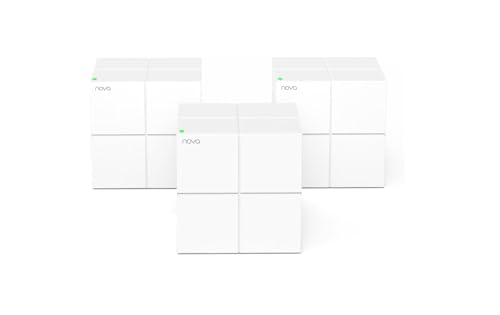
Tenda Nova MW6 Mesh System (3-Pack) — The budget mesh classic
The Nova MW6 is the kit that taught a generation of larger homes that mesh need not cost like furniture. Its listing promises a three-pack AC1200 whole-home system covering houses of four to six bedrooms, with gigabit dual-band networking, designed to replace a router and an extender outright. That last phrase is the kit’s real pitch: the households it serves are usually nursing a main router plus a temperamental extender, two networks with two names and a dead zone between them, and the MW6 replaces the whole arrangement with one name, one system and coverage distributed across three positions instead of shouted from one.
Its limits are the honest arithmetic of its generation and tier. AC1200 dual-band nodes share their bands between clients and backhaul, so a house full of simultaneous streams will feel the sharing at peak hours in a way WiFi 6 mesh does not. The claimed coverage assumes the nodes are placed within strong reach of each other, which in a six-bedroom house demands the halfway discipline described earlier, not optimistic spacing. Within those limits, the MW6 remains the gentlest-priced route in this guide to a big house with no dead rooms, and its gigabit ports — a detail budget kits sometimes skimp on — keep its nodes respectable when wired.
- System: AC1200 whole-home mesh, 3-pack, per the listing title
- Claimed coverage: houses of 4-6 bedrooms, manufacturer framing
- Wired: gigabit dual-band networking stated
- Role: replaces a wireless router and a WiFi extender, as stated
- Model: Nova MW6
Strengths
- Three nodes end the router-plus-extender patchwork with one unified network name.
- Gigabit ports keep nodes useful wired, where some budget kits quietly economise.
- Its coverage-per-cost proposition remains the gentlest in this guide for big houses.
Trade-offs
- Dual-band AC1200 backhaul sharing shows at busy evening peaks.
- WiFi 5-generation radios serve older devices better than the newest ones.
- Six-bedroom coverage assumes disciplined node placement, not optimistic spacing.
Best for: a larger, older-device household replacing a router-and-extender patchwork on a strict budget. Not suited for: a WiFi 6 household with heavy simultaneous streaming — the MX12 below is this kit’s own successor for that home.
Count your bedrooms and your dead zones before reading the MW6’s listing; if both numbers are real, this kit was designed around your floor plan.

Tenda Nova MX12 AX3000 Mesh System (2-Pack) — The WiFi 6 mesh step
The Nova MX12 is what the MW6’s satisfied owners should buy when the household modernises. Its listing describes an AX3000 WiFi 6 mesh system in a two-pack claiming 5,000 sq. ft. of coverage and support for more than 160 devices, with three gigabit ports on each unit and auto-backhaul among its named features. The two-pack format is itself a statement about the radios: WiFi 6 nodes with stronger individual reach cover the same house with fewer units, and the ports-per-unit figure matters more than it first appears, because a node with three gigabit sockets can anchor a television, a console and a work laptop in the room it serves instead of merely perfuming it with WiFi.
The 160-device claim should be read as an architectural statement rather than a challenge: the system is built for the gadget estate era, where the count includes plugs, bulbs, sensors and appliances that sip bandwidth. Auto-backhaul — the system choosing and managing how nodes talk to each other — removes the one configuration idea that intimidates mesh newcomers. The remaining discipline is placement, as always, and the willingness to wire a node if the house offers cabling. For the larger home that has outgrown WiFi 5, the MX12 is this guide’s most complete Tenda answer, and the comparison with the MW6 is really a question about the devices you own today.
- System: AX3000 mesh WiFi 6, 2-pack, per the listing title
- Claimed coverage: 5,000 sq. ft., manufacturer figure
- Device claim: 160+ devices, manufacturer figure
- Wired: 3 gigabit ports per unit stated
- Backhaul: auto-backhaul support named
- Model: Nova MX12
Strengths
- WiFi 6 nodes cover a large home with two units where WiFi 5 needed three.
- Three gigabit ports per node turn each node into a room’s wired hub.
- Auto-backhaul removes mesh’s most intimidating idea from the setup entirely.
Trade-offs
- Two nodes leave less placement flexibility than a three-pack in awkward floor plans.
- Gigabit ports cap node-to-node wired backhaul at gigabit pace.
- Its coverage claim, like all such figures, assumes friendly construction.
Best for: a larger modern household wanting WiFi 6 mesh with wired hubs in the rooms the nodes serve. Not suited for: a sprawling house with dead zones at three separate extremes — a three-node arrangement, starting with the MW6’s format, fits that geometry better.
Larger homes should compare the MX12’s ports-per-unit line against rival kits carefully; it is the specification that decides how useful each node is after setup day.

Tenda RX2L Pro (AX1500) — The tidy WiFi 6 single
The RX2L Pro is Tenda’s answer for the ordinary modern flat or small house, and its design makes the first argument: a vertical tower that takes a sliver of shelf instead of a dinner plate of it. The listing states an AX1500 WiFi 6 router with four gigabit Ethernet ports, long-range coverage positioning, VPN support, WPA3, easy setup and parental controls. That is the complete mainstream checklist without ornament — no port is slower than gigabit, the security standard is current, and the VPN line opens both remote access and routed privacy for households that want either.
Its class figure, AX1500, is the range’s modest WiFi 6 tier, and the review should be plain about what that means: this is a router for households whose wireless life is broad rather than deep — many devices doing modest things, one television streaming, calls and browsing layered over the top. A house that regularly moves huge files wirelessly or hosts several simultaneous heavy streams should look at the BE7200’s stronger hardware. But for the flat whose current pain is an ageing WiFi 5 box and a shelf that cannot spare the space, the RX2L Pro’s combination of footprint, ports and current security is the most proportionate purchase in this guide.
- Wireless class: AX1500 WiFi 6, dual-band, per the listing title
- Wired ports: 4 gigabit Ethernet ports stated
- Design: vertical form, as stated in the title
- Security: WPA3 named
- Features in title: VPN support, easy setup, parental controls
- Model: RX2L Pro
Strengths
- Four gigabit ports avoid the port-speed trap that catches this guide’s cheapest pick.
- The vertical design suits shelves and flats where a wide router cannot live.
- WPA3 and VPN support keep its security story current for its tier.
Trade-offs
- AX1500 class capacity is the modest end of WiFi 6.
- No multi-gig port, so plans above gigabit are rationed at the WAN.
- Single-unit coverage still obeys the geometry of the flat it serves.
Best for: a flat or small house upgrading from WiFi 5, with a wired television or console and limited shelf space. Not suited for: a multi-gig plan household moving large files wirelessly — the BE7200’s hardware answers that brief inside this same brand.
Measure your shelf and count your wired devices, then read the RX2L Pro’s listing; for the right flat, the fit is unusually exact.

Tenda AC1200 Dual Band Gigabit Router (AC8) — The gigabit WiFi 5 veteran
The AC8 is the WiFi 5 pick for households whose wired life disqualifies the AC6. Its listing states an AC1200 dual-band router with three WAN/LAN gigabit ports, four 6dBi antennas, MU-MIMO, beamforming, easy setup, guest WiFi, access-point mode and IPv6 — a specification from the era when gigabit ports and tall antennas were how a value router proved seriousness. The 6dBi antenna figure deserves translation: higher-gain antennas shape the signal flatter and farther across a single floor, which suits bungalows and wide flats better than tall houses, where the energy spread thin over storeys serves no floor particularly well.
Age is the honest counterweight. This is a long-serving design from deep in the WiFi 5 period, and a buyer should weigh remaining firmware attention accordingly, checking the listing’s current details before ordering. Its rational buyer is specific: a home on a gigabit-or-slower plan with several wired devices, a preference for proven over novel, and no WiFi 6 devices yet demanding service. For that buyer the AC8 delivers the era’s fundamentals with the port speed the AC6 lacks. Everyone else is better served stepping to the RX2L Pro, whose WiFi 6 radios and WPA3 cost little more in the life of a router.
- Wireless class: AC1200 dual-band WiFi 5, per the listing title
- Wired ports: 3 × WAN/LAN gigabit ports stated
- Antennas: 4 × 6dBi antennas, as stated
- Radio features: MU-MIMO and beamforming named
- Features in title: easy setup, guest WiFi, AP mode, IPv6
- Model: AC8
Strengths
- Gigabit ports serve faster plans and wired devices the AC6 cannot.
- High-gain antennas suit wide, single-floor homes particularly well.
- A long-proven design whose behaviour holds no surprises.
Trade-offs
- WiFi 5 radios leave WiFi 6 devices running below their ceilings.
- Its design age makes remaining firmware attention a question to verify.
- Three shared WAN/LAN ports is a leaner wired count than the RX2L Pro’s four.
Best for: a single-floor home with several wired devices on a gigabit-or-slower plan, buying proven over new. Not suited for: a household already collecting WiFi 6 devices — the RX2L Pro serves that fleet at the same desk for years longer.
Wired households on a budget should read the AC8’s port line first and its radio line second; that is the order this veteran would want to be judged in.
How Should You Spend the First Evening With a Tenda Router or Mesh Kit?
Begin with the same trick this site recommends for every brand: set the new network’s name and password to match the old one exactly, and most of the household’s devices will rejoin while you are still reading the app. Then update the firmware before configuring anything else — value routers ship with whatever software was current when the box was sealed, and the update is the cheapest reliability available. For mesh owners, the evening’s real work is placement: put the main unit where the line enters, the second node roughly halfway toward the weakest room while it still shows a strong connection to the main unit, and the third by the same rule, then walk the house at the busiest hour with a phone and adjust by metres, not by rooms. A node moved from behind a bookcase to on top of it can transform a bedroom.
Finish with the settings households postpone and later regret skipping. Turn on the guest network and make it the password visitors receive, so the main password stops circulating. Set the parental controls while the children’s devices are freshly listed and easy to identify. On the BE7200, move the smart gadgets onto the private IoT network during the same session, while re-pairing is a novelty rather than a chore. And write the admin password somewhere safer than the router’s underside. None of this requires expertise; it requires only doing it on the first evening, when the device list is short and the household is watching.
What Do Tenda’s Coverage and Device Figures Really Promise?
They promise an architecture, not an outcome, and reading them that way makes them useful. When the MX12 claims 5,000 sq. ft., the maker is describing the area two well-placed nodes can serve in favourable construction — open studs, ordinary doors, no foil-backed insulation or stone interior walls. A Victorian terrace with brick internals may halve the effective figure; a modern open-plan house may approach it. The MW6’s four-to-six-bedroom framing is the same estimate expressed in estate-agent units. Neither figure is dishonest, but both are measurements of the maker’s test house, and your house gets a vote.
Device counts work identically. The MX12’s 160-plus figure counts connections, and connections are cheap: a smart home accumulates them in dozens of sipping gadgets that ask almost nothing of the network. What a device count cannot tell you is simultaneous weight — how the system behaves when four heavy streams, two calls and a game download coincide — which is governed by band capacity and backhaul, the subjects of the mesh section above. Read the counts as reassurance that your gadget estate will not exhaust the address book, and judge evening performance by radios and placement instead.
How Do Tenda’s Single Routers and Mesh Kits Divide the Money Differently?
A single router spends the whole budget in one place: stronger radios at one point, a full set of ports on one back panel, one machine to place well. A mesh kit divides the same money into geography: weaker individual radios at several points, ports scattered room by room, and a system whose intelligence is mostly about cooperation. Neither division is superior in the abstract, which is why this guide keeps returning to floor plans. The household that misjudges the division buys twice — first the flagship single router that cannot reach the study, then the mesh kit that could have been bought initially — and the double purchase is the most expensive outcome in the value tier, where the entire point was to spend once.
There is also a middle path inside this very range: start with a single router whose job is the wired core and the busy rooms, and let a later node answer the one room that complains. Tenda’s singles do not all promise mesh expansion in their listings, so that path must be planned around a specific model’s stated features rather than assumed — the discipline of reading listings literally, which this guide applies to ports, applies to expansion claims too. Households that know from the outset that administration matters more than coverage-per-cost should step outside the value tier entirely and examine Best Synology Routers, where the spending logic inverts: software first, radios second.
What Should Gamers and Streamers Expect From Routers at This Level?
Expect competence, and calibrate the rest. A wired console connected to an RX2L Pro or AC8 will game as well as the household’s internet line allows, because the router’s contribution to a wired session is mostly to stay out of the way — and these routers do. Wireless gaming is where the tier’s limits appear: no dedicated gaming traffic machinery is promised in these listings, so a wireless player sharing a busy dual-band network with three streams will occasionally feel the crowd. The fixes are placement and wiring before they are purchasing — a console moved within clear sight of the router, or cabled to a mesh node’s gigabit port, gains more than a tier step would.
Streaming asks even less and gets it reliably. A 4K stream is a modest, steady demand, and every pick here except the port-capped AC6 can feed several of them across a normal home while ordinary life continues on the same network. The households that outgrow this tier are not the ones with more televisions; they are the ones adding simultaneous weight of different kinds — a work call’s sensitivity to jitter layered over downloads, uploads and streams at the same hour. That layered moment is a capacity and traffic-management problem, and it is the honest trigger for stepping up a tier, inside this brand to the BE7200’s stronger hardware or beyond it to the mainstream ranges.
When Should a Tenda Owner Upgrade the Router Instead of Adding to It?
Three signals say the base unit, not the geography, is the constraint. The first is the port signal: the plan has been upgraded past the router’s Ethernet ceiling, as AC6 owners discover, and no placement or node can cure a ration imposed at the front door. The second is the crowd signal: the rooms nearest the router — where signal is strongest — are themselves congested at peak hours, which indicts radio capacity rather than reach. The third is the support signal: the model has aged beyond its maker’s firmware attention, and a router that no longer receives security updates should be retired from gate duty however cheerfully it still routes.
Against those, the signals that argue for adding rather than replacing are equally clear. If the network is fast and calm near the router and fails only at distance, the base is innocent and geography is guilty — a mesh kit, or a node where the system allows one, is the proportionate spend. If one new device class has arrived — a WiFi 6 laptop fleet, say — while the rest of the house is content, a single modern router at the centre may serve better than a whole new mesh. Diagnose by standing next to the router at the worst hour and running the household’s hardest task: the result sorts nearly every upgrade question in this tier into its correct half.
What Should You Check Before Blaming a Tenda Router for a Slow Evening?
Work the suspects in order of likelihood, because at this tier the router is often innocent. First, stand beside the router and repeat the failing task; if it flies there, the network’s core is healthy and the problem is distance, walls or the far device’s own radio. Second, test wired if the device allows it, which separates the internet line from the wireless story in a single step. Third, check whether the slowdown keeps office hours with the household — congestion at peak times points to capacity or to one greedy device, and the app’s client list will usually name the glutton: a cloud backup, a console downloading a game the size of a film library, a camera uploading to a distant server. Fourth, reboot the router and the modem in that order’s reverse — modem first, router second — and give each a full minute before judging.
Only after those four should the router itself stand accused, and the accusation should be specific. A router that has begun dropping all connections at once, that runs hot in open air, or whose admin page itself crawls is describing hardware age, not configuration. A router whose maker has ended firmware support is describing a calendar, not a fault. Both descriptions end in replacement, and this guide’s six are arranged so the replacement can be chosen by the ceiling that actually failed — ports, radios, coverage or support — rather than by whichever model is discounted that week.
How Long Should a Value Router Be Kept Before It Owes You a Replacement?
Keep it while three conditions hold, and retire it when any one fails. It must still receive security firmware from its maker, however leisurely the rhythm. It must still cover the house as the house is actually used — a router that was adequate before the garden office and the second working parent may be innocent hardware in a guilty floor plan, which is a mesh question, not a replacement question. And its ceilings — ports, radio generation, capacity — must still clear the household’s demands with a little headroom. A value router meeting all three is not a compromise; it is a finished purchase, and replacing it early buys specifications the household will never invoice.
The arithmetic of the tier rewards this patience. Because the initial outlay is small, a Tenda that serves four or five years has delivered networking at a monthly cost that flagship hardware cannot approach even across a longer life — provided the support condition holds, since an unsupported router’s true cost is risk, which does not appear in the arithmetic until it does. When replacement time comes, the household’s own history is the best buying guide: the ceiling that failed names the next model’s first requirement, and the sections above translate each ceiling — the AC6’s ports, the MW6’s backhaul, the AC8’s generation — into its successor inside the same range.
Which Tenda Suits Renters, Students and Other Temporary Homes?
Temporary households have a distinct brief: the network must be cheap, quick to establish, forbidden from requiring holes in walls, and easy to carry to the next address. The RX2L Pro fits that brief most completely — a vertical footprint that survives any shelf, four gigabit ports for the television and console that anchor a rental’s evenings, and WiFi 6 radios that will still be respectable at the next two addresses. The AC6 fits the narrower version of the brief, a single-occupancy flat on a basic plan, where its port ceiling never binds and its price leaves the deposit intact. Both set up through an app, both pack into a moving box without antenna anxiety — the RX2L Pro’s integrated design travels particularly well — and both can follow their owners into a larger home as access points or stopgaps while a permanent system is chosen.
What temporary households should not buy is a mesh kit sized for a house they do not yet live in, or a flagship whose value assumes a five-year tenancy at one address. The renter’s correct extravagance is the opposite: one proportionate router, bought once, moved often, and retired without ceremony when a permanent home finally justifies a permanent system. On that arithmetic the value tier is not a compromise at all — it is the only tier whose prices were designed for lives in motion.
Tenda’s Six, Compared in One Table
| Model | Type | Wireless class | Wired ports from the title | Claimed coverage / devices |
|---|---|---|---|---|
| Tenda AC1200 Smart WiFi Router (AC6) | Single router | AC1200 WiFi 5 | 4 × 100 Mbps | Not stated in the listing title |
| Tenda BE7200 WiFi 7 Router (BE12Pro) | Single router | BE7200 WiFi 7 | 2 × 2.5G | Not stated in the listing title |
| Tenda Nova MW6 Mesh System (3-Pack) | Mesh, 3 nodes | AC1200 WiFi 5 | Gigabit | 4-6 bedroom houses |
| Tenda Nova MX12 AX3000 Mesh System (2-Pack) | Mesh, 2 nodes | AX3000 WiFi 6 | 3 × gigabit per unit | 5,000 sq. ft. / 160+ devices |
| Tenda RX2L Pro (AX1500) | Single router | AX1500 WiFi 6 | 4 × gigabit | Not stated in the listing title |
| Tenda AC1200 Dual Band Gigabit Router (AC8) | Single router | AC1200 WiFi 5 | 3 × gigabit WAN/LAN | Not stated in the listing title |
The port column is this table’s conscience. It contains the guide’s cheapest pick capped at 100 Mbps and its WiFi 7 pick offering dual 2.5G — a twenty-five-fold spread in wired speed inside one brand’s six models — which is why the reviews insisted on ports before radios at every step. Choose the row whose port line your plan and desk can live with for years, then let the wireless column arbitrate between the survivors.
Which Tenda Buying Mistakes Show Up Again and Again?
The costliest is buying the AC6 for a fast plan, seduced by the AC1200 badge while the 100 Mbps ports wait quietly in the specification to ration the connection — the badge describes the radios, the ports describe the truth, and both are printed in the same listing. The second is spacing mesh nodes by hope: placing an MW6 or MX12 node inside the dead room it was bought to cure, where it relays weakness faithfully, instead of at the halfway point where its own link is strong. The third is comparing mesh kits by claimed area alone, as if the maker’s test house were a standard unit of housing.
Two more mistakes are specific to value brands. Buyers sometimes expect flagship firmware attention — frequent feature updates, elaborate apps — at Tenda prices, and feel misled by a gap the price had already announced; the BE7200’s OpenWRT support is the one deliberate escape hatch from that bargain. And households often leave a value router’s default admin password and automatic updates unattended, which matters more, not less, when the platform’s own support rhythm is leisurely. Set the password, enable updates, and a value router’s ownership story becomes uneventful — the highest praise a network can earn. Readers weighing a used mainstream router against a new Tenda will find the legacy side of that comparison in Best Belkin Routers.
Final Recommendation
Match the Tenda to the ceiling you can live under. Small flats on slow plans can buy the AC6 knowingly; wired WiFi 5 homes should take the AC8’s gigabit ports instead. The RX2L Pro is the proportionate WiFi 6 answer for ordinary flats, the BE7200 is the range’s genuine overachiever for hardware-hungry and tinkering households, and the two Nova kits divide the larger-home question by generation — MW6 for value coverage of older fleets, MX12 for WiFi 6 homes with rooms that also wire things. If one model must stand for the range, we choose the MX12: it solves the problem most Tenda shoppers actually have — a bigger home, a modern device count, a finite budget — with the fewest apologies attached.
Frequently Asked Questions
Can I mix an MW6 node with an MX12 system?
Assume not unless Tenda’s documentation for both systems says otherwise. Mesh families are usually managed within their own generation, and the two Nova lines differ in radio standard and system software. Plan a mesh purchase as one system from one family, and expand within that family while units remain available.
Is the AC6 fast enough for streaming television?
For one or two streams on a plan within its port ceiling, yes — a high-definition stream asks far less of a network than the AC1200 radios can supply. The constraint arrives with plan speed and simultaneity, not with a single television: a household streaming in three rooms while a console downloads should start at the AC8 or above.
What does flashing OpenWRT onto the BE7200 involve, honestly?
It involves following the OpenWRT project’s device documentation carefully, backing up the stock configuration first, and accepting that support for the process comes from the community rather than from Tenda’s help desk. It is a well-trodden path for supported hardware, but it is a hobbyist path; ordinary households should run the stock firmware and simply value the option’s existence.
How many MW6 or MX12 nodes can one system grow to?
Both families are designed to accept additional nodes beyond the packs sold here, with the practical limit set by the house rather than the box — beyond three or four nodes, placement and backhaul discipline matter more than count. Confirm the current stated maximum in Tenda’s documentation for your exact model before planning a very large system.
Will a Tenda mesh kit work with my existing router?
Mesh kits of this kind generally expect to become the network, replacing the old router rather than assisting it, though access-point arrangements exist in parts of the range. The cleaner household outcome is one system governing one network name; keeping the old router in the chain usually imports double-NAT quirks that value hardware is least equipped to explain.
Should I choose the RX2L Pro or step up to the BE7200?
Decide by plan and by temperament. A sub-gigabit plan and a household that wants the network to disappear argue for the RX2L Pro. A multi-gig plan, WiFi 7 devices arriving, or any interest in the OpenWRT option argues for the BE7200, whose ports alone justify the step for a wired desk.
Do Tenda routers receive regular firmware updates?
They receive them on the maker’s schedule, which at the value end of the market is typically less frequent than the majors’ — another reason the setup advice in this guide stresses enabling automatic updates where offered and checking manually a few times a year. The BE7200’s stated OpenWRT support is the range’s exception, giving its owners a community-governed alternative path.
Can a Tenda router work as a simple access point behind another router?
Access-point mode is named in the listings of both WiFi 5 singles here, the AC6 and the AC8, which makes them tidy second-life hardware behind a newer main router. Confirm the mode in the specific model’s documentation at setup time, and give the access point a fixed position within strong wired or wireless reach of the main unit.
Are Tenda’s parental controls enough for a family with young children?
For the household’s first line of defence, yes: the listings across this range name parental controls, and the practical toolkit — pausing devices, scheduling access, filtering categories — covers the conversations most families actually have with a network. Parents who want per-child profiles that follow a person across every device, with reporting to match, are asking for the deeper platforms examined in the Synology guide; the honest difference is depth of administration, not presence or absence of control.
Related Guides
Shoppers ready to spend more for deeper platforms should continue to Best TP-Link Routers. Those who want administrative control above all will prefer Best Synology Routers. And for the story of an older mainstream range still circulating, see Best Belkin Routers.


