What's inside
- Key Takeaways
- Quick Picks
- How We Chose These Picks
- Why Did Belkin Leave Routers, and What Does That Mean for a Buyer Today?
- What Can a WiFi 4 or WiFi 5 Belkin Still Do Well in a Modern Home?
- How Should You Vet a Used or Old-Stock Belkin Before Paying for It?
- Which Legacy Belkin Models Deserve a Place, and in What Roles?
- How Should a Legacy Belkin Be Set Up in a Secondary Role, Step by Step?
- How Does a Legacy Belkin Behave With Phones and Laptops Built Years After It?
- Which Homes Should Walk Away From This Entire Guide?
- Why Do Listings for These Routers Read So Confusingly?
- How Long Can a Legacy Belkin Reasonably Stay in Service?
- What Is the Kindest First Job for a Legacy Belkin in a Modern Home?
- How Should You Price a Legacy Belkin Against the Alternatives?
- How Do Belkin’s Legacy Models Compare With Each Other — and With a Modern Budget Router?
- What Mistakes Do Buyers of Legacy Belkin Routers Keep Making?
- Final Recommendation
- Frequently Asked Questions
- Related Guides
As an Amazon Associate I earn from qualifying purchases. This post may contain affiliate links at no extra cost to you.
widgetverdict.com is reader-supported. When you buy through links on our site, we may earn an affiliate commission.
Where to buy: Belkin routers today are found as remaining retail stock, marketplace listings and second-hand sales rather than through a current product line, and each model below links to the Amazon listing checked for this guide; check a listing’s seller and condition notes with unusual care, because with discontinued hardware the difference between sealed old stock and a tired used unit matters more than the model badge.
This guide to the best belkin routers has to begin with the fact that shapes everything after it: Belkin has left the consumer router market. There is no current Belkin line, no Belkin WiFi 6 router and certainly no Belkin WiFi 7 router — any listing or article claiming otherwise should be distrusted on sight. What remains on sale is the brand’s legacy catalogue: WiFi 4 (802.11n) and WiFi 5 (802.11ac) machines from the years when Belkin’s N and AC routers sat in every electronics aisle, still circulating as old stock and used hardware at prices that can look like bargains. This guide covers those six models honestly — what each one was, what it can still do, and the narrow set of jobs for which buying one remains defensible.
Honesty also requires the counterweight, stated once here and applied throughout. A router is the guard at a home network’s gate, and a discontinued router no longer receives the security firmware that keeps a guard awake. That single fact disqualifies legacy hardware from one role — the primary router of a busy, device-rich, work-from-home household — regardless of how cheaply it can be bought. The defensible roles are narrower and real: a light-duty network for a handful of devices, a secondary access point behind a modern main router, a travel or workshop spare, a stopgap. The reviews below grade each model against those roles rather than against modern flagships it was never built to fight.
Read this way, the six models separate cleanly. The two AC machines — the AC1600 DB and the AC1000 DB — are the only ones whose radios belong to the WiFi 5 generation, and they carry gigabit ports to match. The four N machines descend through the WiFi 4 era from the dual-band N600 DB down to the single-band N150, each step trading capability for a lower second-hand price. None of them will be the best router in any absolute sense; the question this guide answers is which of them is the least compromised for the specific light duties that remain.
One scope note completes the introduction. Belkin also sold extenders, adapters and networking accessories in the same years, and some listings bundle them with routers in ways that flatter the bundle. This guide grades the six routers alone; a bundled extender from the same era inherits the same vintage and should be valued as a period accessory, not as evidence that the router at the bundle’s heart is any younger than this guide says it is.
Key Takeaways
- Belkin has exited the consumer router market: every model still on sale is legacy WiFi 4 or WiFi 5 hardware, and no WiFi 6 or WiFi 7 Belkin router exists.
- Discontinued routers no longer receive security firmware, which rules them out as the primary router for a busy modern household — this guide grades them for light and secondary duties instead.
- The AC1600 DB (F9K1119) is the strongest legacy pick, with dual-band AC WiFi and gigabit ports.
- The AC1000 DB pairs dual-band AC WiFi with gigabit in an earlier-generation design.
- The N600 DB is the best of the WiFi 4 machines — dual-band N, where its N450 and N300 siblings trim bands or speed.
- The N150 is a single-band 802.11n relic with MultiBeam antenna technology, suitable only for the lightest stopgap duties.
Quick Picks
| Pick | Badge | Why it earns its place |
|---|---|---|
| Belkin N600 DB | The best WiFi 4 survivor | Dual-band N+ wireless from Belkin’s strongest 802.11n generation, for light networks and secondary duty. |
| Belkin N450 DB | The dual-band step down | Dual-band N+ at a lower speed class than the N600, for undemanding rooms and spares. |
| Belkin N300 (F9K1002) | The basic single-band box | A straightforward Wireless N router for the smallest, lightest networks. |
| Belkin AC1600 DB (F9K1119) | The legacy range-topper | Dual-band AC gigabit WiFi — the closest a Belkin comes to a modern-feeling router. |
| Belkin N150 | The stopgap relic | Single-band 802.11 b/g/n with MultiBeam, for emergency and tinkering use only. |
| Belkin AC1000 DB | The earlier AC option | Dual-band AC wireless with gigabit, a generation behind the AC1600 in refinement. |
How We Chose These Picks
Selection in a discontinued range works differently from selection in a living one. There was no question of finding the newest models; instead we mapped what actually circulates — the Belkin routers a shopper will genuinely encounter as old stock or used listings — and kept the six that between them cover the range’s meaningful steps: two AC machines, the dual-band N pair, the basic N300 and the N150 floor. Each had to represent a distinct point on the capability ladder, because in the second-hand market the shopper’s real decision is which rung of a fixed, ageing ladder justifies its asking price.
Three grading rules then applied, and they are stricter than a normal guide’s. First, no model is recommended for a duty its security status forbids: primary-router service for a busy modern home is excluded for all six, and each review names the duties that remain. Second, wired ports and band count outrank headline class, because in legacy hardware those are the limits a light network will actually feel. Third, condition is treated as part of the product: a sealed old-stock unit and a five-owner used unit are different purchases wearing the same name, and the reviews say what to check. Readers who conclude — reasonably — that they need a current router after all will find the modern budget tier honestly covered in Best Tenda Routers.
Why Did Belkin Leave Routers, and What Does That Mean for a Buyer Today?
Belkin built its networking name in the WiFi 4 and early WiFi 5 years, when its N+ and AC routers were default purchases in big-box stores. The market then moved — toward mesh systems, toward app-governed platforms, toward a handful of brands investing heavily in each new standard — and Belkin’s parent company steered the brand toward its other strengths in accessories, power and connectivity, while its router line wound down and the associated networking stable changed hands. The practical result for a buyer is a catalogue frozen in time: the models in this guide are the end of the line, not the middle of one, and nothing in a listing’s cheerful wording changes that.
Frozen catalogues have three consequences worth internalising. Support horizons have closed: firmware for these models belongs to their era, and no new security updates should be expected, which is why this guide fences them out of primary duty for serious households. Software ecosystems have moved on: the setup apps and services these routers were designed around may be diminished or gone, so configuration should be expected through the classic browser admin page, which — to be fair — still works and asks nothing of any cloud. And the market itself is a mixture of sealed old stock, refurbished units and plain used hardware, so the seller and the condition grade are specifications as real as any radio figure. Buy with those three consequences priced in, and a legacy Belkin can be a rational purchase; buy ignoring them, and even a cheap one is expensive.
What Can a WiFi 4 or WiFi 5 Belkin Still Do Well in a Modern Home?
More than the generational labels suggest, provided the duties are chosen with discipline. A dual-band N router still delivers perfectly serviceable browsing, email, music streaming and standard-definition video to a small number of devices in a small space — the workload of a guest room, a workshop, a holiday let or a single occupant on a modest broadband line. The AC machines go further: an AC1600 DB can stream high-definition video, serve a handful of WiFi 5 laptops at their native standard and anchor a light household network whose plan speed sits within its gigabit ports. Vintage hardware serving vintage-appropriate workloads is not a compromise at all; it is simply matching.
The secondary roles may be the strongest case of all. Behind a modern main router, a legacy Belkin in access-point or bridge-style duty can carry a garden room, a garage or a far corner for the undemanding devices there, while the main router — current, patched, capable — keeps guard at the gate and governs the serious traffic. A spare N300 in a drawer is also a household’s simplest safeguard against the evening a main router dies mid-week: twenty minutes of stopgap service beats two days of no network at all. What these machines should not be asked to do is stand alone between a modern family — work laptops, banking, a doorbell, thirty gadgets — and the internet. That job description expired with their firmware.
How Should You Vet a Used or Old-Stock Belkin Before Paying for It?
Condition is the specification, so inspect like it. Prefer sealed or manufacturer-refurbished stock from a seller who states the condition plainly, and treat listings vague about condition as used whatever they imply. On arrival, or before purchase where possible, verify the exact model code on the unit’s label — F9K1119, F9K1002 and their siblings — because Belkin’s similar names and shells make mislabelling common in second-hand channels. Confirm the power supply is the correct Belkin unit; a wrong-voltage substitute is the quiet killer of old networking hardware. Then, before the router touches your network, factory-reset it, set a fresh admin password of your own, and configure it wired, from a computer, checking that its admin pages respond crisply — a unit that struggles to serve its own settings pages is telling you about its health.
Two further checks separate a sound survivor from a tired one. Heat is the first: these fanless designs run warm, but a unit that becomes hot in open air, or that drops connections as it warms, is a unit at the end of its life, and no price makes it a bargain. The second is a soak test — run the router for a full day under the household’s ordinary light load before retiring the packaging or the returns window, because legacy hardware faults are overwhelmingly thermal and intermittent rather than instant. Finally, keep expectations filed correctly: even a perfect specimen is a legacy device with a closed support horizon, bought for the fenced duties this guide describes. Readers deciding between a used Belkin and a new budget router should weigh the modern alternative in Best TP-Link Routers, where even the entry model carries current firmware and a living platform.
Which Legacy Belkin Models Deserve a Place, and in What Roles?

Belkin N600 DB — The best WiFi 4 survivor
The N600 DB was the strong end of Belkin’s dual-band N+ line, and its listing’s phrasing — Wireless Dual-Band N+ Router, Latest Generation — is a small time capsule: the latest generation it names is 802.11n, the WiFi 4 standard that preceded everything in a modern store. Within that era, this was a serious machine. Dual-band operation lets it split a light household between 2.4GHz reach and the cleaner 5GHz band, which remains the single most valuable feature a legacy router can own, because band choice is what separates a watchable stream from a buffering one when a neighbour’s network crowds the lower band.
Its modern roles follow from that strength. As the router for a genuinely light network — a single occupant, a guest annexe, a workshop with a radio’s worth of devices — an N600 DB in verified condition still does honest work on a modest broadband line. As a secondary access point behind a modern router, its dual-band radios cover a far corner better than any single-band survivor. What it must not do is guard a busy household alone: its firmware era has closed, and its WiFi 4 ceilings will ration any plan or device fleet with modern ambitions. Priced as the relic it is, it is the N-series pick; priced near a new budget router, it is a history lesson with a power supply.
- Wireless: dual-band N+ (802.11n / WiFi 4 generation), per the listing title
- Positioning in title: “Latest Generation” — of the N era; read as period wording
- Band layout: dual-band, the key legacy virtue
- Sensible roles: light standalone networks, secondary access-point duty
- Support status: discontinued line; no new security firmware should be expected
Strengths
- Dual-band radios give a light network the band choice that matters most in crowded air.
- The strongest of Belkin’s N generation, so its ceilings are the last in its class to bind.
- Simple, browser-configured operation with no dependence on a living app ecosystem.
Trade-offs
- WiFi 4 radios cap every modern device at yesterday’s speeds.
- A closed firmware horizon fences it out of primary duty for serious households.
- Second-hand condition varies enormously between listings wearing the same name.
Best for: a light secondary network or access-point duty where dual-band coverage is wanted at relic prices. Not suited for: a family’s main router in a work-from-home house — that gate needs a current, patched machine, whatever the saving.
If you buy one N-series Belkin, the N600 DB’s listing is the one to hunt — in sealed or verified condition, at a price that admits what it is.

Belkin N450 DB — The dual-band step down
The N450 DB sits one rung below its N600 sibling: a dual-band N+ router in a lower speed class, from the same generation and the same design language. The step down is written in the class number — the aggregate wireless ceiling is lower — and in daily light duty the difference is narrower than the badges suggest, because a handful of devices browsing and streaming in standard definition will not find either ceiling. What the N450 keeps, crucially, is the dual-band layout, and in the legacy market that layout is worth more than the class gap: the 5GHz band remains available for the television or the laptop while 2.4GHz handles the rest.
Its rational buyer is therefore the one who finds it meaningfully cheaper than an N600 in comparable condition and whose duties are firmly in the light category — a spare-room network, a rental’s basic provision, a backup unit for the drawer. Where the price gap closes, the N600’s headroom is the better buy, because legacy hardware is bought once and its ceilings are permanent. Like every model here, it carries the closed-support caveat, and its reviews should be read with the same condition discipline: verify the unit, reset it, password it, soak-test it. Within those fences, the N450 DB is a perfectly respectable second choice in a market where second choices are the entire stock.
- Wireless: dual-band N+ (802.11n / WiFi 4 generation), per the listing title
- Class position: a step below the N600 DB in aggregate wireless class
- Band layout: dual-band, retained from the stronger sibling
- Sensible roles: light networks, spare and stopgap duty
- Support status: discontinued line; no new security firmware should be expected
Strengths
- Keeps the dual-band layout that does the real work in a light network.
- Often circulates cheaper than the N600 while covering the same light duties.
- Undemanding setup through the classic browser interface.
Trade-offs
- A lower class ceiling than the N600, felt when several devices stream at once.
- The same closed firmware horizon as every legacy model here.
- Its value evaporates if priced close to its stronger sibling.
Best for: a firmly light network bought at a clear saving against the N600 in equal condition. Not suited for: a household expecting several simultaneous streams to behave — that load belongs to the AC machines below, or to a modern router entirely.
Compare the N450 DB’s listing price against the N600’s on the same day; this model’s whole case lives in that gap.

Belkin N300 (F9K1002) — The basic single-band box
The N300, model F9K1002, is Belkin’s basic Wireless N router: a single-band 2.4GHz machine from the heart of the WiFi 4 era, built to put a small home online at the lowest sensible cost of its day. Single-band is its defining limit and should be understood precisely — every device it serves shares the one band that microwaves, neighbours and Bluetooth also inhabit, so its real-world performance depends heavily on how crowded the local air is. In a detached house or a quiet street, an N300 still serves a few devices adequately. In a dense apartment block, the same hardware can feel tired at peak hours through no fault of its own.
That makes its modern roles the narrowest of the dual-purpose picks: a stopgap while a main router is replaced, a dedicated light network for a garage or shed, a learning machine for a student of networking, or service for a single undemanding room. The F9K1002 code matters when shopping, because Belkin sold several similar-looking N300 variants across the years and second-hand listings blur them; the label on the unit is the truth. Bought for a few coins in verified working order, it is a useful drawer spare. Bought as a plan for a family’s main network, it is the wrong tool in a way no price can fix.
- Wireless: Wireless N (802.11n / WiFi 4 generation), single-band, per the listing title
- Model code: F9K1002 — verify on the unit’s label
- Band layout: 2.4GHz only; no 5GHz band
- Sensible roles: stopgap, outbuilding and single-room light duty
- Support status: discontinued line; no new security firmware should be expected
Strengths
- The simplest possible router: one band, basic setup, nothing to misconfigure elaborately.
- Circulates at true spare-part prices in the second-hand market.
- Adequate for a handful of light devices where the air is uncrowded.
Trade-offs
- Single-band operation leaves it exposed to 2.4GHz congestion in dense housing.
- Its capacity ceiling is the lowest among this guide’s dual-purpose picks.
- Variant confusion in used listings makes label-checking essential.
Best for: a stopgap or outbuilding network for a few light devices, bought cheaply and verified carefully. Not suited for: an apartment block’s main network, where its only band is the neighbourhood’s busiest road.
Hunt the F9K1002 code on the label, not the N300 name on the box, when you read a listing for this model.

Belkin AC1600 DB (F9K1119) — The legacy range-topper
The AC1600 DB, model F9K1119, is the strongest router Belkin’s consumer line produced in this catalogue: a dual-band AC gigabit Wi-Fi router, which places its radios in the WiFi 5 generation and its wired ports at gigabit. That combination matters because it removes the two ceilings that bind the N machines. WiFi 5 devices — which still constitute a large share of the laptops, phones and televisions in real homes — connect to it at their native standard rather than a generation down, and its gigabit ports carry a modern broadband plan’s full speed to the wired devices. Of the six models here, this is the only one that can anchor a light modern household without the network itself being the apology.
The caveat is the one this guide applies everywhere, and it is about time rather than capability: the AC1600 DB’s firmware belongs to its era, and no ongoing security development should be expected. A small, light household that understands that horizon — few devices, modest sensitivity, a plan within gigabit — can still defend this purchase, particularly in sealed old-stock condition. A household with work laptops, smart locks and a NAS should not, at any price, because the guard’s alertness matters more than the gate’s width. Within the legacy market, though, the hierarchy is clear: if a Belkin is to be bought for real standalone duty, this is the Belkin.
- Wireless: dual-band AC (WiFi 5 generation), per the listing title
- Wired: gigabit ports stated in the title
- Model code: F9K1119 — verify on the unit’s label
- Position in range: the strongest legacy model in this guide
- Support status: discontinued line; no new security firmware should be expected
Strengths
- WiFi 5 radios serve the large installed base of AC devices at their native standard.
- Gigabit ports avoid rationing a modern plan at the router.
- The only legacy pick here that anchors a light modern household credibly.
Trade-offs
- Its support horizon has closed like the rest of the line’s.
- WiFi 6 and 7 devices connect a generation or two below their ceilings.
- Good sealed specimens are scarcer, and priced accordingly, in the legacy market.
Best for: a small, light household determined to buy Belkin, wanting the strongest and most modern-feeling model the line ever made. Not suited for: a security-sensitive home with many smart devices — its closed firmware era, not its radios, is the disqualifier there.
Read the AC1600 DB’s listing for condition first and code second; a verified F9K1119 in sealed stock is the legacy market’s best prize.
Belkin N150 — The stopgap relic
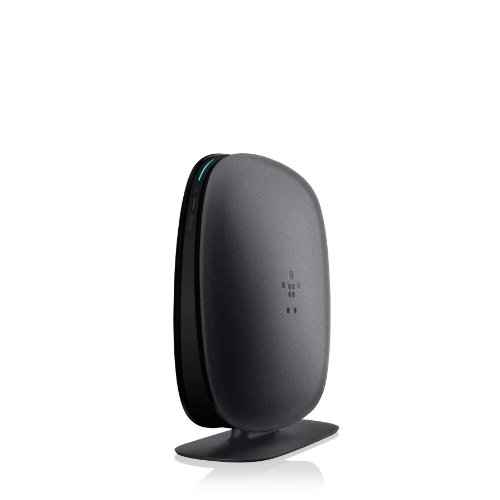
The N150 is the floor of this guide and, in truth, of the whole legacy market: a single-band Wireless N router with MultiBeam technology, explicitly an IEEE 802.11 b/g/n device — a listing that reaches back through three wireless generations in one line. MultiBeam was Belkin’s name for its antenna arrangement of the period, aimed at steadier coverage from a small box, and in its day the N150 put countless first apartments and dorm rooms online. Its day, however, is unmistakably past: the N150 class is the slowest tier of WiFi 4, on the single crowded band, with processing to match.
Why does it appear in this guide at all? Because readers will meet it constantly at near-giveaway prices and deserve a clear verdict rather than silence. The verdict is narrow. As an emergency stopgap for a night or a week, as a tinkering subject, or as a dedicated link for one or two trivial devices in an uncrowded setting, a working N150 is harmless and occasionally handy. As anything resembling a household router — even a light one — it is outclassed by the N300 above it and by every modern budget model, and its closed support era makes the same point a third time. Buy it as a curiosity or a spare of last resort, with the price of a coffee, or do not buy it at all.
- Wireless: single-band 802.11 b/g/n (WiFi 4 floor), per the listing title
- Antenna feature: MultiBeam technology named in the title
- Band layout: 2.4GHz only
- Sensible roles: emergency stopgap, tinkering, trivial single-device duty
- Support status: discontinued line; no new security firmware should be expected
Strengths
- Circulates at the lowest prices in the entire legacy market.
- Small, simple and adequate for a night of emergency connectivity.
- A harmless way to learn router configuration on real hardware.
Trade-offs
- The slowest wireless class in this guide, on the most congested band.
- Even light multi-device households will find its ceiling within an evening.
- Its age makes tired specimens common; condition vetting is everything.
Best for: an emergency spare or a hobbyist’s bench, bought for almost nothing and expected to do almost nothing. Not suited for: any household’s standing network, however small — the N300 and N450 above exist precisely one rung up from this floor.
Treat the N150’s listing as a museum label with a price attached; buy only if the price matches the museum-piece framing.
Belkin AC1000 DB — The earlier AC option
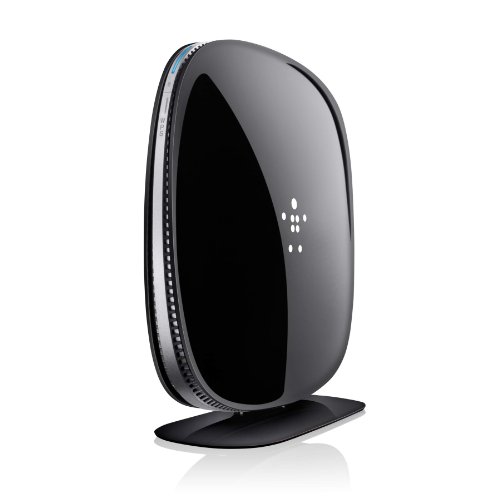
The AC1000 DB is the AC1600’s elder sibling: a dual-band wireless AC router with gigabit, from the first wave of Belkin’s WiFi 5 line. The family resemblance is the point — dual-band AC radios and gigabit wired ports put it in the same modern-adjacent class as the range-topper, a full generation above the N machines — while the lower class figure marks its radios as the earlier, leaner implementation. For a household of WiFi 5 devices doing ordinary things, that gap shows up mainly at the margins: several simultaneous heavy streams, or a large file crossing the house wirelessly, will find the AC1000’s ceiling first.
Its place in a buying decision is therefore comparative. Against the N machines, it is a clear step up in both radio generation and wired speed, and worth a clear premium over them. Against the AC1600 DB, it is the value play: if a verified AC1000 circulates meaningfully cheaper than a verified AC1600, a light household loses little by taking it. The shared caveat applies with the same force — a closed firmware horizon that fences it out of primary duty for security-sensitive, device-rich homes. Judged inside the legacy market’s own logic, the AC1000 DB is the sensible middle: modern enough to feel normal, old enough to be priced like the relic it honestly is.
- Wireless: dual-band AC (WiFi 5 generation), per the listing title
- Wired: gigabit stated in the title
- Position in range: the earlier AC model, a class below the AC1600 DB
- Sensible roles: light standalone duty, secondary service in AC households
- Support status: discontinued line; no new security firmware should be expected
Strengths
- Dual-band AC radios serve WiFi 5 devices natively, unlike every N model here.
- Gigabit ports keep a modern plan unrationed at the router.
- Often the value point of the AC pair when the AC1600’s price climbs.
Trade-offs
- A leaner AC implementation than the AC1600, felt under simultaneous heavy load.
- The line’s closed support horizon applies in full.
- As the older AC design, tired used specimens outnumber fresh ones.
Best for: a light WiFi 5 household choosing between the two AC Belkins on price, in verified condition. Not suited for: a busy multi-stream household that will find its ceiling nightly — that load argues for the AC1600 at minimum, and honestly for a current router.
Price the AC1000 DB’s listing against the AC1600’s before deciding; this model’s case is written in the difference.
How Should a Legacy Belkin Be Set Up in a Secondary Role, Step by Step?
The safest useful life for most of these machines is behind a modern main router, and the setup order matters. Begin with the Belkin disconnected from everything except one computer, wired. Factory-reset it, log into its browser admin page, and set your own admin password before anything else — a second-hand router should never spend a minute on your network carrying a stranger’s credentials. Next, give it a fixed address inside your main network’s range but outside the main router’s automatic assignment pool, so the two machines never argue over addresses. Then turn off the Belkin’s own routing duties where its firmware allows — its DHCP server above all — because a network with two address-givers is a network with intermittent mysteries.
Only then join it to the system. Run a cable from the main router to the Belkin where the floor plan allows, since a wired access point is a strictly better citizen than a wirelessly repeating one, and place it at the edge of the main router’s comfortable reach rather than beyond it. Give its wireless the same network name and password as the main system so devices can move between the two without ceremony, choosing the dual-band models for this duty whenever the choice exists — the N600 DB’s 5GHz band keeps the far room’s television off the crowded lower band. Finally, soak-test the arrangement for a day, walking the boundary between the two coverage areas with a phone on a call, and adjust the Belkin’s position by metres until the handover stops being an event. Done in this order, a ten-year-old router becomes a tidy extension of a modern network instead of a second, weaker kingdom.
How Does a Legacy Belkin Behave With Phones and Laptops Built Years After It?
Politely, and at the older machine’s pace. Wireless standards are backward-compatible by design, so a current phone connects to an N600 DB without complaint — it simply negotiates the best language both ends speak, which is WiFi 4, and leaves its own newer abilities unused. An AC Belkin narrows that gap for the large fleet of WiFi 5 devices, which is most of what many homes still own, but a WiFi 6 laptop on an AC1600 DB is a modern car on an older road: perfectly driveable, visibly below its cruising speed on local transfers, and entirely dependent on the road’s condition at the busy hour.
Two practical consequences follow. The first is that a legacy Belkin disappoints most in the tasks buyers test first — a speed test beside the router on a fast plan — and least in the tasks households actually perform all evening, which are streams, calls and browsing well inside its ceilings. The second is subtler: modern devices increasingly expect modern network manners, from current security modes to efficient band steering, and an old router’s blunter manners can show up as a gadget that pairs reluctantly or a phone that clings to the wrong band. None of this makes legacy hardware unusable; it makes it a considered match for households whose device fleet is of a similar vintage, and a false economy for households whose fleet is new.
Which Homes Should Walk Away From This Entire Guide?
Three households should close this guide and buy a current router, and naming them is part of the guide’s honesty. The first works from home with anything sensitive — client data, company systems, a household business — because that home’s router is professional infrastructure and must run living firmware. The second is the smart home proper: dozens of gadgets, cameras, locks and speakers, where the router’s guest and IoT arrangements need modern segmentation and the device count alone would crowd WiFi 4 air. The third is any household on a fast modern plan with new devices, where a legacy router would ration the connection and the fleet simultaneously, converting a bargain into a bottleneck with a power supply.
There is a fourth, quieter case: the household that simply does not want to think about any of this. Legacy hardware asks for vetting, resetting, soak-testing and an informed acceptance of its limits — an hour of thought, once. A household that would rather pay a little more to skip that hour is not being lazy; it is pricing its own time correctly, and the modern budget tier exists for exactly that temperament. This guide’s Belkins are for the deliberate buyer: the one furnishing a light second network, stocking a spare drawer, or covering a workshop, who reads the fences around these machines and finds their own need comfortably inside them.
Why Do Listings for These Routers Read So Confusingly?
Because the legacy market stacks three vocabularies on top of each other. The first is the period marketing preserved on the boxes — “Latest Generation”, “high speed”, class numbers like N600 and AC1600 that summed theoretical band rates in the era’s customary way — which was optimistic then and is actively misleading now unless translated into standards and bands. The second is the second-hand seller’s vocabulary, where “like new”, “refurbished” and “tested” carry no standard meanings and vary from the meticulous to the fictional between listings. The third is the platform’s own categorisation, which files discontinued hardware beside current products as if the shelf were timeless.
The translation discipline is always the same. Convert every claim into the three facts that cannot be spun: the wireless standard (n or ac), the band layout (single or dual), and the port speed where stated (gigabit on the two AC models here). Convert every condition claim into evidence: a stated grade, a returns window, a seller with a history. And convert every price into a comparison against the living alternative — a new budget router’s price is the ceiling above which no legacy purchase in this guide makes sense, however flattering the listing’s adjectives. A shopper who performs those three conversions can read the legacy market safely; a shopper who reads the adjectives will eventually buy one.
How Long Can a Legacy Belkin Reasonably Stay in Service?
In a fenced role, longer than its critics assume — the hardware itself often outlives its relevance, and a lightly loaded N600 covering a workshop can run for years without drama. The retirement triggers are therefore not age but events. Retire the unit when its role creeps: the workshop network that quietly became the network a business runs on has changed jobs without changing guards, and that is the moment to promote a modern router into the role. Retire it when its health changes — heat, drops, an admin page that crawls — because legacy hardware rarely warns twice. And retire it when the main network it supports is upgraded around it in ways that strand it, such as a household moving wholesale to devices whose expectations the old box can no longer meet politely.
Retirement, when it comes, deserves the same discipline as purchase. Factory-reset the unit before it leaves the house, because a router carries your network’s name, password and configuration in its memory, and a sold or donated Belkin should not arrive at its next home as a diary of yours. Remove it from any list of trusted devices on the main router. Then let it go to electronics recycling rather than a drawer of honour — the drawer spare role belongs to the youngest legacy unit a household owns, and keeping three generations of spares is hoarding wearing a prudent disguise. The machine served its era; a clean ending is part of using it well.
What Is the Kindest First Job for a Legacy Belkin in a Modern Home?
Give it the room the main network likes least. Every house has one: the garden office at the end of a long signal path, the garage where a single smart opener and a workbench laptop live, the guest room whose occupants need browsing rather than bandwidth. A legacy Belkin placed there — wired back to the main router if the cabling allows, configured by the secondary-role routine in this guide — turns the main network’s weakest geography into a solved problem at near-zero cost, while the modern router keeps the household’s serious traffic under current guard. The job suits the hardware’s ceilings, flatters its remaining strengths, and keeps it far from duties its era disqualifies it from.
Judge the experiment after a week of ordinary life, not on setup evening. If the far room’s occupants stop mentioning the network, the legacy unit has earned its shelf. If complaints merely move — from no signal to slow signal, from drops to buffering — the room’s problem was capacity rather than coverage, and the honest answer is a modern access point or a mesh node, with the Belkin returning to the spare drawer it also serves honourably. Legacy hardware rewards households that assign it by evidence; it punishes only the households that assign it by hope.
How Should You Price a Legacy Belkin Against the Alternatives?
Use two ceilings and one floor. The first ceiling is the price of a new budget router from a living line: the moment a legacy Belkin’s asking price approaches it, the comparison collapses, because the new machine wins on radios, ports, warranty and firmware simultaneously. The second ceiling is internal to the range: an N machine should never cost what an AC machine costs in equal condition, and an N150 should cost a fraction of an N600, because the capability ladder in this guide is fixed and known — a seller pricing against it is pricing against the buyer’s ignorance. The floor is the stopgap value: a verified working unit, however humble, is worth something as insurance against a dead-router evening, and that something is small, definite and not a reason to stretch for a higher rung than the duty needs.
Condition moves a unit within those bounds more than model does. A sealed AC1600 in its box can fairly sit near the top of the legacy range; the same model, third-hand and unboxed, belongs near the bottom, and a listing that will not state condition has answered the question. Shipping deserves a thought too: heavy old routers at giveaway prices become ordinary purchases once postage is added, and the local listing you can inspect beats the distant bargain you cannot. Price the whole transaction — money, risk, returns window — and the legacy market becomes legible.
How Do Belkin’s Legacy Models Compare With Each Other — and With a Modern Budget Router?
| Model | Generation | Bands | Wired headline from the title | Honest modern role |
|---|---|---|---|---|
| Belkin N600 DB | WiFi 4 (802.11n) | Dual-band | Not stated in the listing title | Light network, access-point duty |
| Belkin N450 DB | WiFi 4 (802.11n) | Dual-band | Not stated in the listing title | Light network, spare duty |
| Belkin N300 (F9K1002) | WiFi 4 (802.11n) | Single-band | Not stated in the listing title | Stopgap, outbuilding duty |
| Belkin AC1600 DB (F9K1119) | WiFi 5 (802.11ac) | Dual-band | Gigabit | Light standalone household |
| Belkin N150 | WiFi 4 (802.11 b/g/n) | Single-band | Not stated in the listing title | Emergency stopgap only |
| Belkin AC1000 DB | WiFi 5 (802.11ac) | Dual-band | Gigabit | Light standalone, value AC pick |
The table’s last column is the one no legacy listing will print, and it is the column to buy by. Notice what it never says: main router for a modern family. A current budget router from a living line — even an inexpensive one — brings two things no Belkin here can offer at any price, namely radios from the current generations and a maker still issuing security firmware. The Belkins win only where those two things do not bind: light loads, secondary positions, spare drawers. That is a real territory, and this guide has mapped it carefully, but it is a territory with fences.
What Mistakes Do Buyers of Legacy Belkin Routers Keep Making?
The first is believing a listing’s period language. “Latest Generation” on an N600 DB box means the latest generation of a standard two generations old; “high speed” on an N150 means high for its decade. Read the standard — n, ac — and the band layout, and let the adjectives go. The second mistake is deploying a legacy unit as a busy home’s main router because it was cheap, then discovering the cost in the currency that matters: an unpatched guard, WiFi 4 ceilings, and evenings spent troubleshooting hardware that owes nobody anything. The third is skipping the reset: a used router arrives carrying its previous owner’s configuration, passwords and occasionally their remote-access settings, and plugging it straight in is the networking equivalent of moving into a house without changing the locks.
Two quieter errors complete the set. Buyers chase the wrong variant — paying AC money for an N machine in a similar shell — because they shopped the name instead of the model code on the label. And they forget the soak test, retiring the returns window before the unit has survived a warm day under load, which is when tired legacy hardware confesses. Every one of these mistakes is avoidable with the vetting routine in this guide, and avoiding them is the difference between a shrewd legacy purchase and a false economy. Readers who want the same honesty applied to a living, administrated platform will find it in Best Synology Routers.
Final Recommendation
Buy a legacy Belkin only for a fenced duty, and buy the highest rung your duty justifies. For a light standalone household set on the brand, the AC1600 DB is the one defensible choice, with the AC1000 DB as its value alternative; for secondary and spare roles, the dual-band N600 DB and N450 DB cover corners and drawers respectably; the N300 is a stopgap and the N150 a curiosity. Every other reader — every busy, device-rich, security-conscious household — should take this guide’s recurring hint and buy a current router from a living line, where the same money buys modern radios and a maker still standing guard. The Belkins in this guide were good machines. Honour them by using them only where good old machines belong.
Frequently Asked Questions
Is it safe to use a Belkin router as my main home router today?
For a busy modern household, we would not recommend it, and the reason is support rather than speed: these models no longer receive security firmware, and the main router is the one device that must stay patched. A very light household that understands the horizon sometimes accepts the trade; a house with work laptops, banking and many smart devices should not.
Does Belkin make a WiFi 6 or WiFi 7 router I should buy instead?
No. Belkin left the consumer router market before those standards arrived in its line, and no genuine Belkin WiFi 6 or WiFi 7 router exists. A listing claiming one is mislabelled, counterfeit or confused, and should be avoided precisely because it claims the impossible.
Can I use an old Belkin as an access point behind my new router?
That is one of the best remaining uses for the dual-band models. Configure the Belkin with a fixed address on your network, disable its own routing and DHCP duties where its firmware allows, give it the same network name and password as the main system, and place it where the main router fades. The modern router keeps guard at the gate while the Belkin covers the corner.
How can I tell whether a used Belkin listing is the model it claims?
Trust the label, not the headline. Ask for or inspect the model code printed on the unit itself — F9K1119 for the AC1600 DB, F9K1002 for the N300 reviewed here — and the hardware version where shown. Belkin reused names across variants and years, and second-hand listings blur them constantly.
What should I do first when a second-hand Belkin arrives?
Factory-reset it before it touches your network, then set your own admin password, configure it over a wired connection, and run it for a full warm day under light load before depending on it. The reset clears the previous owner’s configuration and any remote-access settings they left behind; the soak test reveals the thermal faults that legacy hardware hides when cold.
Which is the better buy, a used AC1600 DB or a new budget router?
For a light household offered a sealed, verified AC1600 at a true legacy price, the Belkin is defensible. In almost every other comparison — similar money, uncertain condition, a busy home — the new budget router wins on the two things that compound over years: current radios and living firmware support. Price and condition, honestly weighed, decide it.
My Belkin still works fine — why does this guide keep warning me?
Because working and guarded are different properties. Your Belkin can route cheerfully for years while its security firmware stays frozen in its era, and for light or secondary duties this guide blesses exactly that service. The warnings exist for one specific job — standing alone between a busy, sensitive modern household and the internet — where a frozen guard is the wrong tool however healthy the hardware feels.
Can a Belkin router handle a modern fibre broadband connection?
The two AC models carry gigabit ports, so the wired side of a fibre line up to gigabit speed passes through them without rationing; the N models’ ceilings depend on their ports and radios and will ration a fast line well before the line itself tires. The deeper question is the recurring one — not whether the legacy box can carry the speed, but whether a frozen-firmware machine should stand at the gate of a fast, busy, modern connection. For light households the AC pair remain defensible; for everyone else, the line deserves a current guard.
Related Guides
For a current budget range with living support, read Best Tenda Routers. For the mainstream modern catalogue, see Best TP-Link Routers. And for deep network control on a current platform, Best Synology Routers is the guide to read next.


