What's inside
- Key Takeaways
- Quick Picks
- How We Chose These Picks
- What Does D-Link’s Mixed-Era Catalogue Mean for a Buyer?
- How Do Voice Control and Smart Features Fit a Router, Honestly?
- Should a Larger Home Choose the COVR Kit or the R95?
- Which D-Link Routers Hold Up Under a Model-by-Model Look?
- How Should You Set Up a D-Link Router or COVR System on the First Evening?
- When Is a DIR-Generation Router Still the Smart Buy?
- How Should a Modern D-Link Handle a House Full of Smart Gadgets?
- What Should You Check Before Blaming a D-Link Router for a Bad Evening?
- Which D-Link Fits Each Kind of Home, Honestly Assigned?
- How Long Should a Router From Each Era Be Expected to Serve?
- What Does the Third Band Buy in Each of This Catalogue’s Eras?
- What Happens When a Household Outgrows Its D-Link’s Era?
- How Do D-Link’s Eras Sit Side by Side?
- What Mistakes Do D-Link Shoppers Most Often Make?
- Final Recommendation
- Frequently Asked Questions
- Related Guides
As an Amazon Associate I earn from qualifying purchases. This post may contain affiliate links at no extra cost to you.
widgetverdict.com is reader-supported. When you buy through links on our site, we may earn an affiliate commission.
Where to buy: D-Link’s routers sell through the big online marketplaces and electronics retailers, and each model below links to the Amazon listing checked for this guide; because this catalogue spans a decade of naming habits, confirm the exact model code — DIR-3040, DIR-2640, DIR-1950, DIR-813, R95, COVR-X1862 — since D-Link’s DIR numbers, not its class badges, are what distinguish one machine from another.
Choosing among the best dlink routers means reading a catalogue that contains several eras of networking at once. D-Link is one of the industry’s founding names, and its current listings run from the R95 — a sculptured tri-band WiFi 7 machine with a 2.5-gigabit port — back through WiFi 6 mesh kits and a shelf of WiFi 5 DIR routers, to the little DIR-813, an AC750 design from the years when dual-band itself was the upgrade. The six picks below were chosen to represent that whole span honestly: the modern flagship, the mesh system, the strongest of the WiFi 5 generation, and the budget survivors, each graded against the job its era and price imply rather than against a standard none of them share.
The discipline matters because D-Link’s naming will not help you. The class figures — AC750, AC2600, AC3000, BE9500 — follow the industry custom of summing theoretical band rates, and they make a WiFi 5 router from one year sound adjacent to a WiFi 7 router from another, when the machines differ in standard, software and support horizon all at once. Read the standard first, the band layout second and the ports third, and the catalogue sorts itself. Read the class number alone and you will buy the wrong decade with confidence.
Support horizons deserve the same clear-eyed treatment, applied unevenly because the catalogue is uneven. The R95 and the COVR system are current products with a living platform behind them. The DIR machines are mature designs whose value lies in their proven behaviour and their prices, and whose remaining firmware attention should be verified rather than assumed. This guide states that distinction wherever it bites, because a router’s future support is part of its specification — the invisible part, and often the decisive one.
Key Takeaways
- D-Link’s catalogue spans WiFi 5, WiFi 6 mesh and WiFi 7; the standard and the model code matter more than the class badge.
- The R95 is the current flagship: tri-band WiFi 7, a 2.5 GbE port, self-optimizing mesh behaviour and parental controls.
- The COVR AX1800 two-pack is the whole-home answer, claiming up to 4,500 sq. ft. with voice control and parental controls.
- The DIR-3040 is the strongest WiFi 5 pick — tri-band AC3000 with MU-MIMO and mesh-smart positioning.
- The DIR-2640 and DIR-1950 form the WiFi 5 mainstream, with the DIR-813 as the budget survivor for the lightest duties.
- The WiFi 5 DIR models are mature designs: buy them for proven behaviour and price, and verify remaining support before relying on it.
Quick Picks
| Pick | Badge | Why it earns its place |
|---|---|---|
| D-Link DIR-3040 (AC3000) | The WiFi 5 tri-band peak | Tri-band AC3000 mesh-smart router with MU-MIMO, voice control and gigabit ports for gaming and streaming homes. |
| D-Link DIR-813 (AC750) | The budget survivor | A compact dual-band AC750 router for the smallest, lightest networks and spare duty. |
| D-Link DIR-2640 (AC2600) | The smart mesh mainstream | AC2600 smart router with mesh positioning for ordinary family homes. |
| D-Link DIR-1950 | The four-antenna workhorse | 802.11ac router with four external antennas, four network ports and a gigabit broadband port. |
| D-Link R95 (BE9500) | The WiFi 7 flagship | Tri-band WiFi 7 with sculptured-wing design, 2.5 GbE, self-optimizing mesh and parental controls. |
| D-Link COVR AX1800 Mesh System (2-Pack) | The whole-home mesh kit | WiFi 6 mesh claiming 4,500 sq. ft. with voice control and enhanced parental controls across two units. |
How We Chose These Picks
The shortlist began by era, because in this catalogue era is destiny. We required one representative of the current platform — the R95 carries that flag alone, as the only WiFi 7 model — one mesh system for the larger-home question, and then the WiFi 5 field was graded among itself: the tri-band DIR-3040 at its peak, the DIR-2640 and DIR-1950 as its two mainstream shapes, and the DIR-813 kept deliberately as the floor, because a guide that hides a brand’s cheapest circulating model fails the readers most likely to meet it. Each pick had to own a distinct rung; near-duplicates were cut even when their listings were plentiful.
Two grading rules ran across all six. First, every claim is read from the listing itself — where a title is spare, as the DIR-2640’s and DIR-813’s are, the review says what the title supports and declines to decorate the machine with features its own maker did not print. Second, maturity is graded as a trade, not a verdict: the DIR models’ proven behaviour and prices are real virtues, and their support horizons are real limits, and a reader deserves both facts in the same paragraph. Readers who want the newest standards across an entire range rather than at its peak will find that shape in Best TP-Link Routers.
What Does D-Link’s Mixed-Era Catalogue Mean for a Buyer?
It means the brand rewards literate shoppers and taxes careless ones more than most. The literate shopper gains genuine choice: a current WiFi 7 flagship for the household that wants the newest standard from a founding name, a WiFi 6 mesh kit for the larger home, and a ladder of WiFi 5 machines whose prices have fallen to spare-part territory while their behaviour remains known and documented across a decade of ownership. The careless shopper, reading class numbers as a league table, can pay WiFi 6 money for a WiFi 5 machine or expect a budget AC750 to perform like the AC3000 whose badge looks similar at thumbnail size.
There is also a quieter benefit to a long catalogue: knowledge. Every DIR model here has been owned, reviewed, troubleshot and documented by years of users, so a buyer inherits an enormous public record of each machine’s habits — which firmware behaviour to expect, which settings matter, which quirks are normal. A brand-new model from any maker arrives with no such record. For the mature picks, that record is part of the product, and this guide leans on it in spirit: these are known machines, and known machines hold few surprises for the households whose needs fit inside them.
How Do Voice Control and Smart Features Fit a Router, Honestly?
Voice control appears across this catalogue — the DIR-3040 and the COVR system both name it, with Alexa and Google Assistant in the COVR’s listing — and it deserves a sober paragraph rather than either hype or mockery. In practice it means a small set of spoken conveniences: asking the household assistant about the network, toggling the guest network for visitors, pausing a child’s access without opening an app. None of these changes what the router is; all of them lower the friction of the three commands families actually repeat. The feature earns its place as a courtesy, and should be weighted as one — a reason to prefer a model you already like, never a reason to choose one.
The more substantive smart layer is the parental-control and management tooling named on the modern picks. The R95’s listing names parental controls, the COVR system names enhanced parental controls, and those phrases describe the machinery modern households actually use weekly: profiles per child, schedules, pausing and filtering, administered from a phone. When comparing the modern pair against the DIR generation, that layer — current, app-based, maintained — is as real a difference as the wireless standard, and for families it may be the difference that matters most often.
Should a Larger Home Choose the COVR Kit or the R95?
Geometry decides, as it does in every range this site covers. The R95 is one powerful tri-band unit: placed centrally in a compact or moderately sized home, its radios and its self-optimizing mesh behaviour — the listing’s phrase for the machine’s ability to manage its own connections and to cooperate with compatible companions — serve the whole house from one position, and its 2.5 GbE port feeds a fast wired core no mesh node here matches. The COVR two-pack divides its strength across two positions, which is the correct architecture for long, multi-floor or masonry homes where any single position, however powerful, leaves a far room shouting through walls.
The tie-breakers are wired and temporal. A home with a NAS and a multi-gig plan gets more from the R95’s port than from a second node it does not need. A home whose dead room has survived every placement experiment needs the COVR’s geography, not a stronger shout. And a home unsure of its geometry should start with the single unit in the best central position, live through a week of evenings, and let evidence — a specific failing room, not a general anxiety — argue for distribution. D-Link sells both shapes because houses come in both shapes; the mistake is buying the shape before measuring the house. Households whose ambitions run to administrative depth rather than coverage will find their comparison in Best Synology Routers.
Which D-Link Routers Hold Up Under a Model-by-Model Look?

D-Link DIR-3040 (AC3000) — The WiFi 5 tri-band peak
The DIR-3040 is the WiFi 5 generation’s fullest expression in this catalogue: a tri-band AC3000 mesh-smart router with MU-MIMO, voice control and gigabit ports, positioned by its listing for gaming and mesh duty. The third band is its substance. In a dual-band WiFi 5 home, one busy 5GHz band carries every laptop, phone and stream; the DIR-3040’s tri-band layout gives the household a second 5GHz road, which in the WiFi 5 era was the single most effective capacity upgrade a family could buy. MU-MIMO supports the same story, letting the router converse with several devices in the same instant rather than in strict rotation.
Its mesh-smart positioning makes it the DIR generation’s bridge to the modern pair: it can anchor a home that may later distribute coverage, rather than standing as a dead-end purchase. The honest ceiling is its standard — WiFi 5 devices are served natively and beautifully, WiFi 6 and 7 devices visit a generation or two down, and no firmware will change that arithmetic. A household whose fleet is WiFi 5 vintage, whose plan sits within gigabit, and whose evenings are a genuine multi-device crowd is this machine’s exact reader, and for that reader it remains a stronger purchase than a lean WiFi 6 model with fewer bands.
- Wireless class: AC3000 tri-band WiFi 5, per the listing title
- Radio feature: MU-MIMO named in the title
- Smart features: voice control named; mesh-smart positioning
- Wired: gigabit class, per the listing’s gaming/mesh framing
- Positioning in title: smart internet router for gaming and mesh homes
Strengths
- The second 5GHz band is real capacity for a WiFi 5 household’s evening crowd.
- MU-MIMO keeps simultaneous conversations with several devices orderly.
- Mesh-smart positioning leaves a distribution path open later.
Trade-offs
- WiFi 5 radios serve newer devices below their own ceilings.
- As a mature design, its remaining support horizon should be verified, not assumed.
- Its tri-band premium is wasted on a small, light household.
Best for: a WiFi 5 household with a genuine simultaneous crowd and a gigabit plan. Not suited for: a household whose next devices will all speak WiFi 7 — the R95 below is this catalogue’s answer to that future.
Count your household’s simultaneous streams before reading the DIR-3040’s listing; if the count is high and the fleet is WiFi 5, its third band is the argument.

D-Link DIR-813 (AC750) — The budget survivor
The DIR-813 is the catalogue’s floor: an AC750 dual-band router whose listing says almost nothing beyond its name and class, and that spareness is itself the review’s starting point. AC750 was the entry tier of the WiFi 5 era — a modest 5GHz band paired with the 2.4GHz workhorse — and the DIR-813 was built to put a small home or a single room online at the era’s gentlest price. A decade’s perspective makes its honest roles clear: a stopgap, a spare, a dedicated light network for an outbuilding or a single undemanding room, or service for one occupant whose network life is browsing and standard-definition streaming.
Anything beyond those roles asks the machine to be what it is not. Its class ceiling arrives quickly in a multi-device household, its era’s firmware attention is a closed chapter that buyers should treat as finished, and its price advantage over modern budget routers has narrowed to the point where the comparison must be made consciously: a current entry-level router from a living line brings newer radios and living support for money in the same neighbourhood. The DIR-813 earns its place in this guide because it still circulates and still works — and because readers meeting it deserve the plain statement of where its usefulness ends.
- Wireless class: AC750 dual-band WiFi 5, per the listing title
- Band layout: dual-band — the era’s entry configuration
- Listing detail: minimal; features beyond class and bands are not stated in the title
- Sensible roles: stopgap, spare, single-room light duty
- Support status: mature legacy design; treat firmware attention as finished
Strengths
- Dual-band WiFi at the catalogue’s gentlest tier, for the lightest networks.
- A small, simple machine whose setup asks nothing elaborate of anyone.
- Proven, widely documented behaviour across a decade of ownership.
Trade-offs
- The lowest capacity ceiling in this guide, found quickly by busy households.
- Its support era has closed; it should not guard a serious household alone.
- Modern budget routers have narrowed its price excuse considerably.
Best for: a stopgap or single-room light network bought knowingly at a true budget price. Not suited for: a family’s main router in any modern sense — every other pick in this guide, and most current budget rivals, outclass it for that duty.
Read the DIR-813’s listing for price and condition only; the machine’s capabilities are fully described by its class, and its class is the floor.

D-Link DIR-2640 (AC2600) — The smart mesh mainstream
The DIR-2640 occupies the WiFi 5 mainstream: an AC2600 smart router with mesh positioning, per its listing, aimed at the ordinary family home of its generation. AC2600 was the class where WiFi 5 stopped being an upgrade and became the default — enough dual-band capacity for a house of laptops, phones and televisions doing ordinary things simultaneously — and the smart, mesh framing in its title places the DIR-2640 in D-Link’s effort to make that mainstream machine cooperate in a wider system rather than stand alone. For a household whose fleet and plan still live comfortably inside WiFi 5, that combination remains coherent.
The listing’s brevity disciplines the review: beyond class, smart positioning and mesh intent, the title does not enumerate ports or features, so a buyer should confirm the wired details and the current support picture from the full listing and D-Link’s documentation before ordering. What can be said from the class and the era is that the DIR-2640’s natural rival is its own sibling — the tri-band DIR-3040 trades blows on capacity, while the DIR-2640 answers with the mainstream’s simpler dual-band shape. Households expecting one box, moderate crowds and no drama are its readers; households with a genuine third-band crowd should step up within the family.
- Wireless class: AC2600 WiFi 5, per the listing title
- Positioning in title: smart router with mesh intent
- Listing detail: ports and further features not stated in the title — verify in the full listing
- Role: mainstream single-router duty for WiFi 5 households
- Support status: mature design; verify the current picture before purchase
Strengths
- AC2600 class capacity covers the ordinary family’s simultaneous life.
- Mesh positioning keeps a distribution path open within the brand.
- A known, documented machine from the WiFi 5 mainstream’s heart.
Trade-offs
- Dual-band only, so the DIR-3040’s third band out-carries it at peak crowds.
- The spare listing leaves wired details to be confirmed by the buyer.
- WiFi 5 ceilings apply to every newer device in the house.
Best for: an ordinary WiFi 5 family wanting one mainstream router with a mesh path open. Not suited for: a heavy simultaneous crowd that will find a dual-band ceiling nightly — that household is the DIR-3040’s reason to exist.
Open the DIR-2640’s full listing for its port panel before ordering; the title promises the class, and the panel decides the desk.
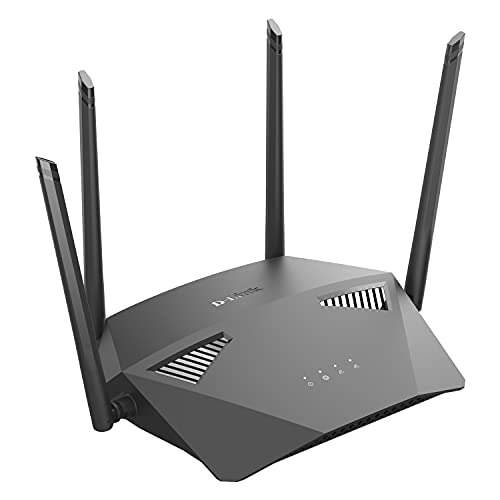
D-Link DIR-1950 — The four-antenna workhorse
The DIR-1950’s listing is the most old-school document in this guide, and there is pleasure in reading it: an IEEE 802.11ac Ethernet wireless router, 2.40 GHz ISM band and 5 GHz UNII band, four external antennas, a stated wireless speed of 237.50 MB/s, four network ports and one broadband port, gigabit. Translated from its engineering dialect, that is a dual-band WiFi 5 router with a full wired complement — four LAN ports for the desk and a gigabit WAN for the line — and four adjustable external antennas of the kind owners of its era aimed by hand and swore by. The MB/s figure, roughly the era’s AC1900-class aggregate expressed in bytes, is a period piece in itself.
Its modern case rests on that wired completeness and mechanical honesty. A household with several wired devices — a desktop, a console, a television, a printer — is served by the DIR-1950’s four ports without a switch, and external antennas give a patient owner one more placement variable than sealed designs allow. Against it stand its generation’s usual limits: WiFi 5 radios, a mature support picture to verify, and none of the current app-era management layer the modern pair enjoy. It is the pick for a wired-leaning household that values a full back panel and known behaviour over novelty, and it should be bought in that spirit.
- Wireless: IEEE 802.11ac dual-band (2.40 GHz ISM / 5 GHz UNII), per the listing title
- Stated wireless speed: 237.50 MB/s, the listing’s period figure
- Antennas: 4 external antennas, as stated
- Wired ports: 4 network ports plus 1 broadband port, gigabit class
- Role: wired-leaning WiFi 5 workhorse
Strengths
- Four network ports serve a wired desk completely, with no switch required.
- Adjustable external antennas give placement one more honest variable.
- Its listing states its hardware plainly, in the era’s engineering language.
Trade-offs
- WiFi 5 radios and a mature support horizon, as with its DIR siblings.
- No current-generation app management layer is promised in its listing.
- Its period specification style demands translation by the modern buyer.
Best for: a wired-leaning household wanting a full port panel and adjustable antennas on proven WiFi 5 hardware. Not suited for: a household expecting the router to be managed from a phone with modern parental tooling — the COVR system and R95 carry that layer in this catalogue.
Wired households should read the DIR-1950’s port line twice; in a guide full of radios, its back panel is its biography.

D-Link R95 (BE9500) — The WiFi 7 flagship
The R95 is D-Link’s present tense: a tri-band WiFi 7 smart router in the BE9500 class whose listing leads with design — a sculptured-wing form intended to be seen rather than hidden — and backs it with a 2.5 GbE port, self-optimizing mesh behaviour, multi-gig positioning, parental controls and readiness for Alexa and Google voice assistants. The tri-band layout gives WiFi 7 clients the 6GHz band’s wide, quiet channels while the household’s older bands absorb the long tail, and the 2.5 GbE port ensures the wired side is not the ceiling when a multi-gig plan or a fast NAS arrives at the desk.
Self-optimizing mesh is the phrase to understand, because it describes this flagship’s second job. Beyond serving as a single powerful unit, the R95 is designed to cooperate — managing its connections intelligently and extending with compatible companions when a floor plan argues for distribution — which converts the usual flagship gamble into a staged decision: one unit now, evidence later, expansion if a room files a complaint. Add the current parental-control layer and the living platform behind it, and the R95 is the D-Link for households that want the founding name’s newest answer rather than its back catalogue. Its premium over the DIR generation buys exactly that: the current standard, the current software and a support horizon that is open rather than historical.
- Wireless class: tri-band BE9500 WiFi 7, per the listing title
- Wired: 2.5 GbE port stated; multi-gig positioning
- Design: sculptured-wing form, as stated
- Mesh: self-optimizing mesh behaviour named
- Family and voice: parental controls; Alexa and Google readiness named
- Model: R95
Strengths
- Tri-band WiFi 7 with 6GHz serves the newest devices at their native standard.
- The 2.5 GbE port keeps multi-gig plans and fast wired cores unrationed.
- Self-optimizing mesh behaviour turns coverage expansion into a staged decision.
Trade-offs
- Its premium is wasted on a household whose devices are all WiFi 5 vintage.
- One 2.5 GbE headline port still leaves the rest of a large wired estate to a switch.
- A single unit obeys geometry; sprawling homes still need the COVR’s distribution.
Best for: a modern household wanting D-Link’s current flagship — WiFi 7 radios, a multi-gig port and a living platform. Not suited for: a WiFi 5 household counting value, whose fleet cannot use the bands it would be paying for — the DIR-3040 serves that fleet at its native standard.
Read the R95’s listing with your plan speed and your newest device’s standard in hand; it is the one D-Link here that asks about your future rather than your past.

D-Link COVR AX1800 Mesh System (2-Pack) — The whole-home mesh kit
The COVR AX1800 system — model COVR-X1862 — is D-Link’s whole-home answer in the WiFi 6 generation: a two-pack mesh claiming up to 4,500 sq. ft. of coverage, with voice control through Amazon Alexa and Google Assistant and enhanced parental controls, per its listing. Two WiFi 6 units divide a larger home between them, and the system’s intelligence is cooperative — one network name, one set of parental rules, coverage that follows the floor plan rather than radiating from wherever the line happens to enter. For the long, L-shaped or two-storey house that defeats single routers of every brand, this is the catalogue’s correct shape.
The claimed area deserves the usual translation: 4,500 sq. ft. is the maker’s figure for favourable construction, and masonry, foil-backed insulation and sprawling single-storey layouts will tax it — which is why the two units’ placement matters more than the number, each within strong reach of the other and neither inside the dead room it serves. The enhanced parental controls and voice conveniences place the COVR in the modern pair of this guide, with a living platform beneath them. Households whose geometry is compact should save the distribution money and buy the R95’s stronger single position; households whose geometry is the problem should buy this, and place it like they mean it.
- System: whole-home mesh WiFi 6, 2-pack, per the listing title
- Wireless class: AX1800
- Claimed coverage: up to 4,500 sq. ft., manufacturer figure
- Smart features: voice control with Amazon Alexa and Google Assistant; enhanced parental controls
- Model code: COVR-X1862
Strengths
- Two distributed WiFi 6 units solve the geometry single routers cannot.
- One network name and one parental rulebook govern the whole house.
- Voice control covers the small repeated commands families actually use.
Trade-offs
- AX1800 class capacity per unit is the mainstream tier, not the flagship’s.
- Coverage claims assume friendly construction and disciplined placement.
- Compact homes pay for distribution they will never need.
Best for: a larger or awkwardly shaped home wanting one WiFi 6 network with modern parental controls throughout. Not suited for: a compact flat with a fast wired desk — the R95’s single strong position and 2.5 GbE port serve that life better.
Walk your floor plan before reading the COVR’s listing; if two positions suggest themselves naturally, this system was drawn for your house.
How Should You Set Up a D-Link Router or COVR System on the First Evening?
Begin with the trick that saves every household an evening: reuse the old network’s name and password exactly, and most devices will rejoin the new D-Link while you are still reading its app. Then accept the firmware update the setup offers before configuring anything — on the modern pair especially, the platform’s current state is part of what you bought, and configuring first and updating second risks redoing the careful work. Place a single router centrally and visibly; the R95’s sculptured design is an instruction as much as a style, since a flagship sealed in a cabinet beneath a television performs like a much cheaper machine that happens to be warm. For the COVR pair, place the main unit where the line enters and the second at the halfway point toward the weakest room, while its link to the main unit still reads strong.
Walk the house at the busiest hour before declaring the installation finished. Note the rooms where a phone’s signal thins, adjust positions by metres rather than by rooms, and only then build the household layer: the guest network that visitors will actually receive, the parental profiles on the modern pair while the children’s devices are freshly listed and easy to identify, and a fresh admin password stored somewhere safer than the router’s underside. Leave the conveniences — voice control, schedules, experiments — for the following week, one at a time. A network set up in that order is understood by its owner, and an understood network is the kind that stays fast.
When Is a DIR-Generation Router Still the Smart Buy?
When three conditions coincide. The household’s device fleet is WiFi 5 vintage or older, so the DIR radios serve everything at its native standard and nothing is rationed by the router’s generation. The internet plan sits within gigabit, which every DIR pick here except the little AC750 handles without strain at the wired side. And the buyer’s expectations are calibrated to a mature platform: proven behaviour, a decade of public documentation, and a support picture verified in advance rather than discovered later. A household meeting all three can buy a DIR-3040 or DIR-1950 with the same clear conscience as any purchase in this guide, and will likely get years of uneventful service from it.
The conditions fail instructively, each in its own direction. A fleet that has quietly become WiFi 6 — two new laptops, a current phone — fails the first condition and promotes the COVR or R95. A plan upgraded past gigabit fails the second and points at the R95’s 2.5 GbE port. A household that wants the router’s maker actively minding the platform fails the third and should buy current or not at all. Naming the conditions protects both kinds of reader: the WiFi 5 household from overspending on standards it cannot use, and the modern household from underspending into a generation it has already left.
How Should a Modern D-Link Handle a House Full of Smart Gadgets?
By separation, using the tools the modern pair advertise. The guest network is the first wall: visitors’ phones get internet and nothing else, and the main password stops circulating through the neighbourhood’s address books. The second wall is habit rather than feature — the smart television, plugs and cameras belong on the network arrangement the parental and management layer can see and schedule, because a gadget estate that is visible is a gadget estate that can be governed: paused at night, noticed when it misbehaves, and kept out of the work laptop’s neighbourhood. The R95 and COVR interfaces are built for exactly this administration from a phone, which is the practical difference between a modern platform and a DIR-era one, whose owners govern through a browser page with a fraction of the ceremony.
None of this requires paranoia; it requires the one evening of arrangement that a new router makes natural, when the device list is short and every gadget must rejoin anyway. Households migrating to the modern pair should treat that forced rejoining as the opportunity it is: reconnect the serious devices first, the gadgets second with intention, and the children’s devices together with their profiles, so the network’s social order is designed once rather than accreted for years. The DIR generation can participate in this order as secondary hardware behind a modern anchor; it should not be asked to design it.
What Should You Check Before Blaming a D-Link Router for a Bad Evening?
The suspects, in order. Stand beside the router and repeat the failing task: if it flies there, the core is healthy and the problem is distance, walls or the far device’s own radio — a placement verdict, not a hardware one, and on a COVR system it usually means the second unit sits one room too far from the first. Test the same task wired, which separates the internet line from the wireless story in a single step. Check the hour: a network that fails only when the whole household is home is describing capacity or one greedy device, and the client list will name the glutton — a backup, a console update, a camera uploading to a distant cloud. Then reboot in the right order, line equipment first and router second, giving each a full minute.
Only after those four should the router stand accused, and the accusation should fit its era. A DIR model that has begun dropping every connection at once, or running hot in open air, is describing age, and its replacement should be chosen by the era logic of this guide rather than by whichever badge is discounted that week. A modern unit with one misbehaving feature is describing configuration, and the fix is subtraction — disable the last convenience added and watch an evening pass. Diagnosis before spending is the cheapest feature in networking, and it is available on every model in this guide for free.
Which D-Link Fits Each Kind of Home, Honestly Assigned?
Run the six past five common households and the catalogue’s logic sharpens. The modern flat — new phones, a WiFi 6 laptop or two, a television and a shelf that must hold the router visibly — is the R95’s natural home, with its design doing social work its DIR ancestors never attempted. The larger family house with dead rooms and a children’s fleet to govern belongs to the COVR pair, whose distributed coverage and single parental rulebook answer the two complaints such houses actually file. The wired-leaning household — desktop, console, television and printer all cabled, wireless as a convenience — is the DIR-1950’s remaining kingdom, where its four network ports matter more than its radios’ generation. The WiFi 5 family home with a genuine evening crowd belongs to the DIR-3040, whose third band was built for exactly that crowd in exactly that era. And the single room, the spare drawer and the stopgap belong to the DIR-813 and DIR-2640, in that order of lightness.
Notice what the exercise reveals: only two of the five households are modern, yet they are the two most households now resemble, which is why this guide’s recommendation weights the R95 and COVR so heavily despite the DIR generation’s numerical majority in the catalogue. The DIR picks are not filler — each has a household above that it serves better than the modern pair would at its price — but their households are a shrinking archipelago, and a buyer should confirm they live on it before buying the boat.
How Long Should a Router From Each Era Be Expected to Serve?
Judge by support and by fit rather than by survival, because routers routinely outlive their usefulness while still switching on. The R95 and COVR system, as current products, should be bought expecting a full service life: years in which their standards remain the household’s present tense and their platforms stay maintained. The DIR generation should be bought with a shorter, deliberate horizon — the remaining years of a WiFi 5 household’s natural life — and priced accordingly; a DIR model bought cheaply for three good years is a better purchase than a DIR model bought dearly for a hoped-for seven. The DIR-813’s horizon is the shortest of all and should be measured in the duty it was bought for: the stopgap season, the single room’s tenancy, the spare’s wait in the drawer.
The retirement triggers are consistent across eras. Retire a unit when its support picture closes beneath the role it holds, when its ceilings begin rationing the plan or the fleet it serves, or when its health changes — heat, drops, an admin interface that crawls. Promote its replacement by the same era logic used to buy it: the household’s current standard, the floor plan’s geometry, the desk’s wired weight. A D-Link bought by those rules at any rung of this catalogue is a defensible purchase; a D-Link bought by badge arithmetic is how households end up owning the wrong decade.
What Does the Third Band Buy in Each of This Catalogue’s Eras?
Two of the six picks are tri-band, a generation apart, and comparing what the third band means in each is the fastest way to understand the catalogue’s whole span. In the DIR-3040, the third band is a second 5GHz road: it doubles the room available to WiFi 5’s busiest band, so a crowd of laptops, phones and streams divides across two highways instead of queueing on one. In the R95, the third band is a different frequency altogether — 6GHz, a band the WiFi 5 era could not touch — offering not just more room but emptier room, with wide channels and no legacy devices slowing the traffic. Same shelf label, “tri-band”; entirely different purchases. The DIR-3040’s band relieves a crowd of its own era, while the R95’s band gives the newest devices a road of their own and pushes the crowd problem years into the future.
The buying translation is direct. A household whose crowd is WiFi 5 vintage gains from the DIR-3040’s arrangement everything a third band can give it, at a legacy price. A household whose crowd includes WiFi 6E or 7 devices gains from the R95’s arrangement something the older machine structurally cannot offer, at a flagship price. And a household with no crowd at all gains from neither, and should let the dual-band picks — or the COVR’s distributed dual-band-per-unit arrangement — absorb its budget instead. Bands are capacity, and capacity should be bought against a counted crowd, never against a feared one.
What Happens When a Household Outgrows Its D-Link’s Era?
It promotes the old machine rather than discarding it, if the household is wise. A DIR-3040 retired from main duty by an R95’s arrival becomes a capable access point for a far corner or an outbuilding, serving the undemanding devices there while the flagship governs the gate. A DIR-1950’s full port panel makes it a tidy wired annexe for a desk that outgrew the main router’s sockets. Even the DIR-813 has its afterlife as the drawer spare whose twenty minutes of service, on the evening a main router dies, justify every coin it cost. The catalogue’s eras, bought in sequence across a decade, form a household’s networking archaeology — each layer still useful in the role its successor freed it for.
The one discipline the promotion path requires is honesty about roles: the retired machine takes the light duties, never the gate. A household that upgrades its anchor and then quietly lets the old router keep guarding a sensitive corner has performed the upgrade and declined its benefit. Assign the afterlife deliberately, reset and reconfigure the old unit for its new station, and the eras coexist as this guide intends — the present at the centre, the past at the edges, each doing the work its years allow.
How Do D-Link’s Eras Sit Side by Side?
| Model | Standard | Class / layout | Wired headline from the title | Defining role |
|---|---|---|---|---|
| D-Link DIR-3040 (AC3000) | WiFi 5 | AC3000 tri-band | Gigabit class | WiFi 5 capacity peak |
| D-Link DIR-813 (AC750) | WiFi 5 | AC750 dual-band | Not stated in the listing title | Budget floor and spare |
| D-Link DIR-2640 (AC2600) | WiFi 5 | AC2600 dual-band | Not stated in the listing title | Smart mesh mainstream |
| D-Link DIR-1950 | WiFi 5 | 802.11ac dual-band | 4 network ports + 1 broadband, gigabit | Wired workhorse |
| D-Link R95 (BE9500) | WiFi 7 | BE9500 tri-band | 2.5 GbE port | Current flagship |
| D-Link COVR AX1800 Mesh System (2-Pack) | WiFi 6 | AX1800 mesh, 2 units | Not stated in the listing title | Whole-home distribution |
Read down the standard column and the catalogue’s story tells itself: four machines from one era, then the two modern shapes — a flagship and a kit — that the current household should choose between first. The WiFi 5 rows are not mistakes in the catalogue; they are its long tail, priced for the households and secondary duties whose fleets still match them. The buying error this table exists to prevent is chronological confusion: paying across eras as if the class badges formed one ladder, when in fact there are two ladders — an old one, fully mapped, and a new one with two rungs.
What Mistakes Do D-Link Shoppers Most Often Make?
The first is badge arithmetic: assuming an AC3000 must outrank an AX1800 because 3000 exceeds 1800, when the numbers sum different bands under different standards and the AX machine is a generation newer with a mesh system around it. Compare standards, then bands, then ports — in that order — and the badges can be ignored entirely. The second mistake is buying a mature DIR model while assuming a current support relationship; these are proven machines with historical platforms, and the buyer who verifies the support picture first is the buyer who will not feel misled. The third is placing the COVR’s second unit inside the dead room it was bought to cure, the eternal mesh error, instead of at the halfway point where its own link to the main unit is strong.
Two quieter errors complete the set. Shoppers sometimes buy the R95 for a sprawling house and judge WiFi 7 by a flagship shouting from a corner cupboard — placement defeats flagships of every brand, and the COVR exists for that geometry. And households occasionally enable voice control, guest networks and every parental feature on the first evening, then blame the platform for complexity they chose; set the modern pair up plainly, live a week, and add one convenience at a time. Readers who want a range where every model is current-generation should compare the differently shaped catalogue in Best Tenda Routers, whose newest machines reach WiFi 7 from the value end.
Final Recommendation
Start with the era, and the model follows. Modern households should choose between the catalogue’s two current shapes: the R95 for one strong central position with a multi-gig port and WiFi 7 radios, the COVR two-pack for a floor plan that needs distribution and one parental rulebook throughout. WiFi 5 households buying inside the DIR generation should take the tri-band DIR-3040 for real crowds, the DIR-2640 for the mainstream, the DIR-1950 for a wired desk, and the DIR-813 only for the lightest duties at the floor price. If one model must stand for D-Link today, it is the R95 — the founding name’s current flagship, designed to be seen, built for the newest devices, and honest about the decade of catalogue standing behind it.
Frequently Asked Questions
Can the DIR models join the COVR mesh system?
Do not assume cross-era mixing. The DIR-3040 and DIR-2640 carry mesh positioning from their own generation’s programme, and the COVR system is its own WiFi 6 family; treat each as a system within its line unless D-Link’s documentation for the exact models states a pairing. Mesh purchases age best when the whole system comes from one family bought at one time.
Is the R95 worth it if all my devices are WiFi 5?
Only as a runway purchase. Your current devices will connect at WiFi 5 behaviour, so the felt upgrade today is the platform, the parental layer and the port; the radios pay off as WiFi 6 and 7 devices arrive. A household replacing routers rarely can defend that; a household buying strictly for today’s fleet should take the DIR-3040 and bank the difference.
What does the DIR-1950’s 237.50 MB/s figure mean in modern terms?
It is the era’s aggregate wireless rate expressed in megabytes rather than megabits — multiply by eight and you land in the AC1900-class neighbourhood, the sum of both bands’ theoretical maxima under laboratory conditions. Like every such figure in this guide, it describes the radio layout’s shape, not a speed any single device will see.
How many devices can the COVR two-pack really handle?
Its listing does not print a device count, so the honest answer is architectural: an AX1800 WiFi 6 system across two units comfortably serves a modern household’s mix of heavy and sipping devices, with the practical limit set by simultaneous heavy demand rather than by the address book of gadgets. Households with extraordinary simultaneous crowds should judge the R95’s tri-band capacity or a larger mesh arrangement instead.
Should I worry about support for the DIR generation?
Worry is the wrong word; verify is the right one. These are mature designs whose platforms are historical, so check D-Link’s current support pages for your exact model before assigning it a security-critical role. For light duties and WiFi 5 households, a verified picture plus sensible placement makes them rational purchases; for a busy, sensitive household’s main gate, the modern pair exist precisely to remove the question.
Does voice control work without a separate smart speaker?
The listings name readiness for Amazon Alexa and Google Assistant ecosystems, which in practice means the commands run through those assistants’ own apps or speakers rather than through a microphone in the router. Treat it as a convenience layer over the network you already chose, and confirm the current skill or action availability for your model at setup time.
Can I use a DIR router as an access point behind an R95 or COVR system?
As secondary coverage for undemanding devices, that is a reasonable second life: configure the DIR unit with a fixed address, disable its own address-assigning duties where its firmware allows, and let the modern anchor govern the network. Keep the serious and sensitive traffic on the modern system, and treat the DIR’s corner as light-duty territory, which is the role this guide assigns the whole generation.
Are the DIR routers still sold new, or only second-hand?
Both channels exist for mature models — remaining retail stock in some regions and a deep second-hand market everywhere — which is why this guide keeps returning to condition and verification. A sealed unit from a stated seller and a third-hand unit are different purchases wearing one name; price them differently, reset any used unit before it touches your network, and let the returns window survive a day of warm, ordinary use.
Which D-Link should I buy if I am replacing a dead router tonight?
Buy the era your household already lives in, from stock you can verify today: WiFi 5 households take the DIR-3040 or DIR-2640 and are back online within the hour; modern households take the R95, or the COVR pair if the dead router’s house was already too big for one box. An emergency is the worst moment to change generations, because every device in the house must renegotiate its expectations at once — replace like with like tonight, and plan any era jump for a calm weekend.
Related Guides
For a fully current mainstream range, continue to Best TP-Link Routers. For administrative depth on a current platform, see Best Synology Routers. And for WiFi 7 arriving from the value end of the market, Best Tenda Routers completes the picture.
Related guides
- Best 3.0 Qualcomm Quick Chargers: QC 3.0 Adapters That Still Earn Their Outlet
- Best Time Machine Compatible Hard Drives: Mac-Ready and Reformatted Picks
- Best 3D Mechanical Engineering Laptops: Certified Workstations for CAD and Simulation
- Best Tattoo Printers: Thermal Stencil Machines for Clean, Lasting Transfers


