What's inside
- Key Takeaways
- Quick Picks
- How We Chose These Picks
- Comparison Table
- Is a 17-Inch Laptop Too Big for Business Travel?
- How Do You Choose Between 15.6 and 16 Inches?
- What Screen Resolution Is Worth Paying for at This Size?
- How Should You Set Up a Large Laptop as a Desktop Replacement?
- What Battery Life Should You Honestly Expect at 15 to 17 Inches?
- How Do Large Screens Change Video Meetings and Presentations?
- Common Mistakes When Buying a Large-Screen Business Laptop
- What Should You Verify on the Listing Before Ordering a Large Business Laptop?
- How Do Warranty and Support Differ Across These Six Brands’ Lines?
- Which of These Machines Suits Which Department?
- How Does a Big Laptop Change Collaboration in a Small Office?
- What Accessories Complete a Large-Screen Laptop Setup?
- How Long Will a 15-to-17-Inch Business Laptop Stay Useful?
- Final Recommendation
- Frequently Asked Questions
- Related Guides
As an Amazon Associate I earn from qualifying purchases. This post may contain affiliate links at no extra cost to you.
widgetverdict.com is reader-supported. When you buy through links on our site, we may earn an affiliate commission.
There is a particular groan that escapes a spreadsheet analyst at 4 p.m. when the fourteenth column disappears off the right edge of a 13-inch screen. The search for the best 15 to 17 inch business laptops begins in that moment. Bigger panels buy back columns, rows and sanity; the historical cost was a bag heavy enough to qualify as gym equipment. This generation breaks that bargain in interesting ways, and this guide sorts the current contenders into six full reviews covering the whole 15-to-17-inch span, from fleet-priced 15.6-inch workhorses to a 17-inch machine lighter than the laptop it might replace.
Where to buy: each pick below links to an Amazon listing verified against the site’s product records on 2026-11-25, with processor, screen size and memory matched to the seller’s description before a link was earned. Large-screen business laptops suffer more configuration drift than most categories — a model name can cover integrated or discrete graphics, two resolutions and three generations of chip — so read the spec box under every review and check price on Amazon when you are ready to order, rather than trusting any figure printed elsewhere.
Who should even consider this size class? Anyone whose work is visibly wider than it is tall: finance models, project timelines, code with a preview pane, design canvases, two documents that must be read together. Also anyone whose eyes have started negotiating with small text. The trade is footprint — these machines need bigger bags and more desk — and this guide weighs that trade honestly for each pick instead of pretending a 17-inch laptop is just a 14-inch one but better.
Skim readers should head straight for the comparison table; everyone else will find the size-by-size reasoning in the sections after the reviews, including the two questions that decide most purchases in this class: whether a 17-inch machine can honestly travel, and whether a workstation’s graphics premium matches the software on your desk.
Key Takeaways
- The LG gram 17 delivers the largest screen here at a weight that embarrasses 14-inch rivals.
- Dell’s Latitude 5540 with its vPro processor is the fleet manager’s large-screen default.
- The Latitude 5550 updates that formula with Core Ultra efficiency for quieter, cooler offices.
- HP’s ProBook 450 G10 brings a 15.6-inch business screen to the tightest budgets in this guide.
- Lenovo’s ThinkPad P1 Gen 7 is the power option, carrying professional RTX graphics for CAD and simulation.
- Dell’s Precision 3591 gives engineering teams a certified workstation at a mid-fleet price point.
Quick Picks
| Pick | Badge | Why it makes the cut |
|---|---|---|
| LG gram 17 | Best 17-inch overall | WQXGA screen, Lunar Lake endurance and a chassis lighter than most 14-inch laptops. |
| Dell Latitude 5540 | Best fleet 15-inch | vPro management, proven durability and the support network large rollouts depend on. |
| Dell Latitude 5550 | Best efficient 15-inch | Core Ultra 5 platform that runs cool and quiet through long office days. |
| HP ProBook 450 G10 | Best budget 15-inch | Business essentials — security, ports, serviceability — at an entry fleet price. |
| Lenovo ThinkPad P1 Gen 7 | Best 16-inch powerhouse | Professional RTX 3000 Ada graphics in a slim mobile-workstation chassis. |
| Dell Precision 3591 | Best value workstation | ISV-certified engineering performance without flagship workstation pricing. |
How We Chose These Picks
The long list began with every 15-, 15.6-, 16- and 17-inch laptop sold through business channels by the major vendors, then applied three filters. First, the screen had to justify the size: low-resolution panels that waste a big chassis were cut, because a 17-inch display at 1080p shows no more spreadsheet than a sharp 14-inch panel does — it merely shows it larger. Second, the machine needed business-grade support options, security silicon and a keyboard with a sane layout; numeric pads were welcomed where fitted but never required. Third, a listing had to verify cleanly through the site’s Creators API records dated 2026-11-25, with the configuration in our spec boxes taken from that verification.
Weight received unusual attention, because the spread within this size class is enormous — the lightest and heaviest picks in this guide differ by more than a kilogram, which is the difference between a laptop that travels and one that merely relocates. Battery expectations were set by role: a desk-anchored workstation that leaves its dock twice a month is judged differently from a 17-inch traveller. Graphics capability split the field into two honest sub-classes, general business and workstation, and the reviews below keep that split visible rather than ranking a CAD machine against a documents machine as if they competed.
Ergonomics research also shaped the shortlist. Neck strain from small screens pushed down at desk height is the silent productivity tax of the compact-laptop era, and larger panels mitigate it by raising content into a more natural sightline — provided the owner uses a stand for long sessions, a point the setup section below develops. A guide that recommended big screens without that caveat would be selling the benefit and hiding the instruction manual.
Ordering reflects breadth of recommendation. The gram 17 leads because it serves the widest range of large-screen buyers; the two Latitudes follow as the fleet defaults in older and newer silicon; the ProBook holds the budget gate; and the two workstations close the list for readers whose software — SolidWorks, Revit, heavy simulation — makes professional graphics a requirement rather than a luxury.

LG gram 17 — Best 17-inch overall
Heft the gram 17 one-handed and your brain files a brief protest: something this size is not supposed to weigh this little. LG’s magnesium-alloy shell puts a 17-inch laptop at roughly the mass of a hardback novel, and that single fact rewrites who can consider a 17-inch machine. Consultants who present from client sites, analysts who hot-desk, managers who carry their office between floors — all of them previously ruled out this screen size on weight grounds, and all of them should reconsider.
The display earns the footprint. The verified listing specifies a WQXGA touch panel at 2560×1600 in a 16:10 shape, which parks two full documents side by side or spreads a budget model across forty visible columns. Colour performance suits presentation and light design work, and the matte-leaning finish keeps ceiling lights from staging a comeback across your charts. A numeric pad sits beside the keyboard for the data-entry crowd, and key travel, while shallower than a ThinkPad’s, supports long writing sessions without complaint.
Intel’s Core Ultra 9 288V, the Lunar Lake flagship in this listing, prioritises efficiency in a way that flatters a big laptop. The battery is large, the chip sips, and the combination delivers working days that stretch past the evening commute. Performance targets the real business load — office suites, browser farms, video calls, moderate data work — and handles it without fan drama. Nobody should buy this machine to render video all day, and LG does not pretend otherwise.
Ports defy the thin chassis: Thunderbolt, USB-A, HDMI and a card reader all made the cut, so the adapter pouch can retire. The webcam covers meetings competently and the speakers fill a small room for a call. Where the gram asks for compromise is rigidity — the lid and base flex more than a Latitude’s when handled roughly — and in enterprise support depth, where LG’s network remains smaller than the big three’s. Small teams and individual buyers will rarely feel either limit; a five-hundred-seat rollout should weigh the second one carefully.
Consider also the desk question. A 17-inch laptop plus its power supply still occupies less desk than a 14-inch laptop plus the external monitor it forces you to buy, and it carries the whole arrangement to another room in one trip. For home workers whose “office” is a kitchen table cleared twice a day, that portability of the complete setup is the gram’s quietest advantage.
Ownership reports from gram owners follow a pattern worth trusting: the first week is spent telling colleagues how light it is, and every week after is spent forgetting the subject entirely, which is the highest praise a tool can earn. Battery anxiety fades, the big screen becomes the assumed default, and smaller laptops start to feel like compromises rather than conveniences. Machines that restructure habits this thoroughly are rare in any category, and rarer still at 17 inches.
- Display: 17-inch WQXGA (2560×1600) touch, 16:10
- Chip: Intel Core Ultra 9 288V
- Weight class: lightest in this guide by a wide margin
- Ports: Thunderbolt 4, USB-A, HDMI, microSD
Strengths
- Enormous sharp screen at travel-friendly weight
- Battery life outlasts most smaller rivals
- Port selection needs no dongle drawer
Trade-offs
- Shell flex exceeds fleet-grade machines
- Not built for sustained rendering workloads
- Enterprise service network is the smallest here
Best for: spreadsheet-heavy professionals and presenters who move between desks and sites.
Not suited for: heavy compute users or huge fleets needing deep on-site service.

Dell Latitude 5540 — Best fleet 15-inch
Some laptops win reviews; the Latitude 5540 wins standardisation committees. Dell’s 15.6-inch fleet staple combines a processor with full vPro management — the verified listing runs Intel’s Core i7-1370P vPro — with the durability testing, global warranty options and spare-parts pipeline that let an IT department deploy five hundred units and sleep at night. Excitement is not the product here. Absence of drama is the product.
The 15.6-inch format brings practical gifts smaller machines cannot offer. A full numeric pad serves finance and data-entry staff. The larger chassis breathes better, so the i7’s performance arrives without the fan urgency of a thin 14-inch body trying the same tricks. The keyboard deck stays spacious, with a centred feel that long-form writers appreciate, and the display’s anti-glare finish suits the fluorescent reality of most offices better than glossy consumer panels do.
Connectivity covers the whole corporate bingo card: Thunderbolt for the modern dock, HDMI for the ageing meeting-room screen, USB-A for the peripherals that refuse to die, and network options for offices still wired at the desk. Dell’s management tooling images and updates the fleet centrally, and the security stack — TPM, fingerprint options, BIOS-level protections — satisfies compliance questionnaires without exotic add-ons.
Age is the honest caveat. The 5540’s 13th-generation Intel platform predates the Core Ultra efficiency gains of its 5550 sibling reviewed below, so battery life is good rather than remarkable and the silicon lacks the newer AI acceleration blocks. Pricing, however, has settled accordingly, and fleets that value proven platforms over fresh silicon will find the arithmetic friendly. For a rollout planned this quarter with a three-to-four-year life, the 5540 remains a defensible, low-risk standard.
Resale and parts tell the long story. Latitudes flood the refurbished market because they survive, and that same ecosystem guarantees batteries, keyboards and screens years from now. A business standardising on the 5540 buys into a maintenance future that is already stocked and priced, which is worth more than a benchmark point or two.
There is also a human-resources angle fleets quietly value: handing a new hire a current-generation-looking, full-size machine with a proper keyboard signals that the company equips people seriously. The 5540’s size gives new starters a screen they can grow into, and its proven platform means the helpdesk already knows every quirk it will ever present. Institutional knowledge is a feature, even if it never appears in a brochure.
- Display: 15.6-inch FHD anti-glare class panel
- Chip: Intel Core i7-1370P with vPro
- Keyboard: full layout with numeric pad
- Ports: Thunderbolt 4, USB-A, HDMI, Ethernet options
Strengths
- vPro fleet management fully present
- Roomy keyboard and numeric pad
- Support and parts ecosystem is deep
Trade-offs
- Older platform trails Core Ultra efficiency
- Heavier than the gram by a wide margin
- Design is corporate to a fault
Best for: IT departments rolling out a 15-inch standard across many seats.
Not suited for: travellers counting grams or buyers wanting the newest silicon.
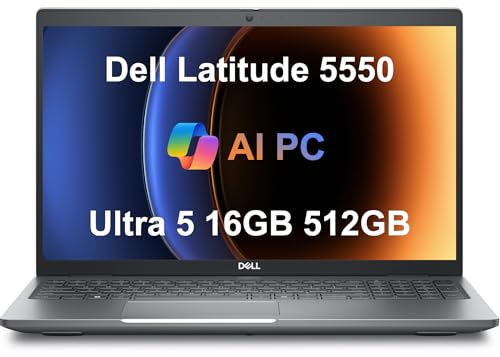
Dell Latitude 5550 — Best efficient 15-inch
Think of the 5550 as the 5540 after a semester of self-improvement. The verified listing runs Intel’s Core Ultra 5 125U, which trades a little peak speed for markedly cooler, quieter and longer-running behaviour — the traits office workers actually experience between 9 and 5. In an open-plan room full of these machines, the ambient fan hum of the older generation simply is not there.
The 15.6-inch chassis keeps everything fleet buyers liked about the formula: numeric pad, generous port mix, serviceable internals and Dell’s deployment tooling. Battery life steps forward thanks to the Ultra platform’s efficiency cores and smarter power management, stretching the unplugged day for staff who drift between meeting rooms. The integrated graphics handle multi-monitor desk setups and business visualisation without drama, reserving the workstation picks below for readers with genuinely graphical workloads.
Choosing between the two Latitudes in this guide is really a choice about buying philosophy. The 5550 costs more per seat today and returns the difference through endurance, quieter offices and a longer useful life on current software. The 5540 wins on immediate price and platform maturity. Neither answer is wrong; they are answers for different budget conversations, and Dell clearly intends both to coexist in the catalogue for exactly that reason.
Daily qualities hold up well. The keyboard remains comfortable across long reports, the touchpad is sized for the big chassis rather than borrowed from a smaller sibling, and the webcam handles the meeting load without embarrassing anyone. Weight stays firmly in desk-and-commute territory rather than travel-light territory — this is a machine carried between home and office, not around an airport all week — and judged by that role it is honestly specified and fairly priced.
One more fleet consideration favours the newer platform: driver and firmware support windows run from the launch date, so a 5550 bought today stays inside Dell’s active support envelope longer than its predecessor. Over a four-year deployment that difference decides whether the final year feels maintained or merely tolerated.
Staff reaction is the other dividend. Employees issued the 5550 notice the quiet first, then the battery, then — weeks later — the fact that nothing has gone wrong. Equipment that exits the user’s awareness is doing its job perfectly. IT managers chasing ticket-reduction targets should read that sentence twice, because a fleet that generates no conversation generates no tickets either, and the 5550 is engineered precisely for that silence.
- Display: 15.6-inch FHD anti-glare class panel
- Chip: Intel Core Ultra 5 125U
- Keyboard: full layout with numeric pad
- Ports: Thunderbolt 4, USB-A, HDMI
Strengths
- Cool, quiet running suits shared offices
- Battery improvement over the 5540 is real
- Same fleet virtues, newer support window
Trade-offs
- Ultra 5 trails H-series chips in bursts
- Still a substantial carry for daily travel
- Costs more per seat than its sibling
Best for: offices standardising on 15-inch machines for the next four years.
Not suited for: heavy compute roles or strict minimum-price tenders.

HP ProBook 450 G10 — Best budget 15-inch
Budgets are not a moral failing, and the ProBook 450 G10 exists for organisations that need a proper business laptop at a price the finance department approves without a second meeting. The verified listing pairs a 15.6-inch display with Intel’s Core i5-1335U, a combination aimed squarely at the office mainstream: documents, email, browser-based everything, video calls and the occasional spreadsheet with ambitions.
HP keeps the business essentials intact at this tier, which is the ProBook’s whole argument. The security basics are present, the chassis is built to a commercial standard rather than a consumer one, and the internals remain accessible for memory and storage service — a trait that vanishes quickly as laptops get cheaper, and one that decides whether a year-three upgrade costs a component or a whole machine. Ports cover the office without adapters, including the HDMI and USB-A connections meeting rooms still demand.
The compromises are visible and fair. The display is a workmanlike panel rather than a colour showcase; the chassis uses more plastic than an EliteBook; the speakers and webcam cover meetings without elevating them. None of these flaws touches the core job. Staff moving from ageing consumer laptops will experience the ProBook as faster, sturdier and easier to live with in every respect that matters at work.
For growing companies, the ProBook’s quiet virtue is dignity at scale. Issuing forty identical, supportable, warranty-backed machines — rather than a lottery of whatever consumer model was on sale — changes how a business feels to its own staff. The 450 G10 is the cheapest machine in this guide that lets a company make that statement, and it makes it at 15.6 inches, where the extra screen softens every other compromise on the list.
Resale value and parts availability also behave like a business line should. ProBooks populate the refurbished channel in volume, which keeps replacement batteries and screens findable and affordable long after launch. Total cost over four years, rather than the invoice in month one, is where this machine quietly beats the consumer bargains it is usually compared against.
One deployment tip specific to this tier: spend the small surplus on memory rather than processor upgrades. The i5 in the verified listing handles office workloads comfortably, while extra memory is what keeps a three-year-old machine feeling responsive as browser-based tools grow heavier. HP’s accessible chassis makes that upgrade a screwdriver job in year two if the budget cannot stretch today, and that flexibility is exactly what a budget pick should offer.
- Display: 15.6-inch FHD class panel
- Chip: Intel Core i5-1335U
- Memory/storage: serviceable internals for upgrades
- Ports: USB-C, USB-A, HDMI, audio jack
Strengths
- Lowest entry price among these picks
- Upgradeable internals stretch its life
- Business build and warranty, not consumer
Trade-offs
- Display and speakers are merely adequate
- i5 chip caps demanding workloads
- More plastic in the construction
Best for: small businesses and departments equipping many staff on a firm budget.
Not suited for: design, engineering or other graphics-led work.

Lenovo ThinkPad P1 Gen 7 — Best 16-inch powerhouse
Somewhere between the fleet laptops above and a full desktop workstation sits the machine engineers actually ask for by name. The ThinkPad P1 Gen 7 wraps professional graphics — the verified listing centres on NVIDIA’s RTX 3000 Ada generation GPU — inside a 16-inch chassis slim enough to commute with. A naming note matters here, and this guide will repeat it in the workstation companion article: NVIDIA retired the Quadro brand years ago, folding its professional line into the RTX naming, so the RTX 3000 Ada in this laptop is the direct descendant of the cards older buyers still call Quadro.
That GPU changes what the laptop is for. CAD assemblies rotate smoothly, simulation previews stop being coffee breaks, and GPU-accelerated data tools finish while the meeting is still in session. The 16-inch display gives that work room, with high-resolution options in the range that keep fine geometry legible. Lenovo pairs the graphics with workstation-class processors and cooling that accepts sustained loads as a job description rather than an insult.
ThinkPad fundamentals survive the power. The keyboard keeps its depth and layout, the chassis meets the line’s durability standards, and ISV certifications cover the professional applications whose vendors otherwise shrug at support calls. For an engineering consultancy, that certification line on the spec sheet is not decoration; it is the difference between a vendor solving your crash and a vendor blaming your hardware.
Costs arrive in three currencies: money, weight and battery. The P1 commands workstation pricing, carries like a workstation, and treats its battery as a bridge between desks rather than a day’s supply. Fans announce heavy renders honestly. Buyers whose work is documents and calls should save all three currencies and choose from the picks above; buyers whose software invoices arrive by the seat will find the P1 the cheapest machine in this guide, measured in billable hours recovered.
Configuration discipline matters more here than anywhere else in the guide. Memory and storage choices should be specced for the largest project the machine will meet in year three, because workstation workloads grow greedier faster than office ones. The verified listing’s specification suits mid-to-large assembly work; teams pushing beyond that should step to tower workstations rather than asking any laptop to be a render farm.
Mobility changes the workstation conversation in one more way: the P1 lets a senior engineer carry the certified machine to the client site, the factory floor or the witness stand of a design review, instead of describing screenshots of work happening elsewhere. Consultancies report that this portability wins arguments — rotating the actual model in the actual meeting ends debates that slide decks prolong. Hardware that shortens meetings pays for itself in a currency finance departments rarely model.
- Display: 16-inch high-resolution options
- Graphics: NVIDIA RTX 3000 Ada professional GPU
- Certification: ISV-certified for major CAD/engineering apps
- Keyboard: full ThinkPad layout and depth
Strengths
- Professional graphics in a portable chassis
- Certified for engineering software stacks
- ThinkPad keyboard and durability intact
Trade-offs
- Workstation pricing throughout
- Battery is a bridge, not a workday
- Fans are audible under render loads
Best for: engineers, architects and data scientists who bill by the hour.
Not suited for: office-document roles or buyers chasing all-day battery.

Dell Precision 3591 — Best value workstation
Engineering managers face a recurring arithmetic problem: workstation laptops are expensive, junior engineers are numerous, and both facts arrive in the same budget meeting. The Precision 3591 is Dell’s answer — a 15.6-inch mobile workstation carrying the verified listing’s Intel Core Ultra 7 165H and professional graphics options, certified for the major engineering applications, at a price tier that lets a department equip the whole team rather than anointing two senior staff.
Certification is the word to underline. Precision machines are tested against the software stacks engineering firms actually run, and Dell’s support organisation treats a CAD crash on a certified configuration as its problem to solve. That relationship, more than any benchmark gap, separates a workstation from a gaming laptop wearing a suit. The 3591 also inherits the Latitude-adjacent virtues of its platform: fleet tooling, global warranty options and parts availability that outlasts the product cycle.
The 15.6-inch format suits the work. Models and drawings get legible room, the numeric pad speeds parameter entry, and the chassis has the thermal volume to sustain loads that throttle slimmer machines. Nobody will mistake it for a travel laptop — it is built for the commute-and-dock pattern, with the battery covering meetings and site visits rather than full days — and its styling announces “engineering department” in every room it enters.
Against the P1 above, the trade is polish for price. The Precision’s display options and chassis finish sit a tier lower, and Lenovo’s machine carries the stronger graphics configuration in this guide. Against doing nothing — asking engineers to run professional software on uncertified office laptops — the 3591 is not a compromise at all. It is the correction.
Deployment notes: standardise the graphics configuration across the team, because mixed GPU tiers inside one department produce the worst support tickets in engineering IT — the model that opens on one desk and crawls on another. The 3591’s price makes that standardisation affordable, which may be its most valuable specification of all.
Training departments quietly benefit too. A standardised Precision fleet means tutorials, templates and troubleshooting guides written once apply to every seat, and a junior engineer’s machine behaves identically to the mentor’s across the desk. Software settings, graphics drivers and dock behaviour all match. That uniformity is invisible when it works and priceless when a deadline compresses, which is precisely when mismatched hardware chooses to become interesting.
- Display: 15.6-inch FHD class panel, brighter options in range
- Chip: Intel Core Ultra 7 165H
- Graphics: professional NVIDIA options, ISV-certified
- Keyboard: full layout with numeric pad
Strengths
- Certified workstation at a team-friendly price
- Thermal headroom for sustained loads
- Dell fleet and support ecosystem behind it
Trade-offs
- Heavy, desk-oriented design
- Finish and display a tier below the P1
- Battery covers meetings, not days
Best for: engineering departments equipping whole teams with certified hardware.
Not suited for: frequent flyers or style-led buyers.
Comparison Table
| Pick | Screen | Chip / GPU | Standout trait |
|---|---|---|---|
| LG gram 17 | 17″ WQXGA touch | Ultra 9 288V | Biggest screen, lightest body |
| Dell Latitude 5540 | 15.6″ FHD | i7-1370P vPro | Fleet-proven platform |
| Dell Latitude 5550 | 15.6″ FHD | Ultra 5 125U | Cool and quiet efficiency |
| HP ProBook 450 G10 | 15.6″ FHD | i5-1335U | Lowest business-grade price |
| ThinkPad P1 Gen 7 | 16″ high-res | RTX 3000 Ada | Professional graphics power |
| Dell Precision 3591 | 15.6″ FHD | Ultra 7 165H + pro GPU | Certified team workstation |
Is a 17-Inch Laptop Too Big for Business Travel?
Footprint and weight are separate questions, and the gram 17 exists to prove it. A 17-inch machine needs a larger bag and more tray-table diplomacy on aircraft; that part is physics. But weight — the factor that actually injures shoulders and tempers — now varies so widely within the class that quoting a size tells you little. Judge the specific machine: weigh the laptop, charger and bag together, carry the combination around the office for a day, and let your shoulder vote.
Desk workers face a friendlier calculation. A 17-inch laptop can replace a 14-inch laptop plus external monitor entirely, reclaiming desk depth and deleting a cable nest. For home offices assembled and dismantled daily, the single-device setup wins on tidiness alone. The honest summary: 17 inches is too big for a weekly flyer’s carry-on strategy and perfectly sized for almost everyone else’s working day.
How Do You Choose Between 15.6 and 16 Inches?
The two sizes look similar on a spec sheet and feel different at a desk. Traditional 15.6-inch models, like the Latitudes and the ProBook here, use 16:9 panels and usually include numeric pads, suiting data entry and legacy software layouts. The newer 16-inch class, represented by the P1, adopts taller 16:10 screens that show more rows of a document or timeline, and the extra vertical space is the difference people notice most after a week.
Bag fit is the practical tiebreaker. Many laptop compartments cut off at 15.6 inches, and a 16-inch workstation may demand a new bag — a small cost, but one to discover before the machine arrives, not at the airport. Measure the compartment, check the machine’s actual dimensions rather than its marketing size, and remember that workstation chargers are larger too.
What Screen Resolution Is Worth Paying for at This Size?
At 15.6 inches, full HD remains serviceable for office work, though text sharpness addicts will prefer higher. At 17 inches, the calculus flips: 1080p spreads the same pixels across a much larger area, and the gram 17’s WQXGA panel is the correct specification for the size. Resolution also interacts with scaling — a very sharp panel lets you run more content at comfortable sizes, which is the entire point of buying a big screen.
Brightness and finish matter as much as pixel counts. Office lighting punishes glossy, dim panels regardless of resolution. Every pick in this guide uses business-appropriate anti-glare displays; if your work involves colour judgement, step up within the range to the higher-coverage options rather than switching categories.
How Should You Set Up a Large Laptop as a Desktop Replacement?
Begin with ergonomics, because a big laptop tempts owners into bad posture for longer hours. The screen’s top edge should sit near eye level, which on a desk usually means a stand or a stack of something sturdy, paired with an external keyboard and mouse so the elevated screen does not drag your wrists up with it. Configured this way, a 15-to-17-inch machine becomes a genuinely comfortable primary workstation rather than a compromise tolerated between docks.
Connect through a single Thunderbolt dock where possible, sized for the machine’s power draw — workstation picks need docks that deliver full wattage, or the battery quietly drains during heavy work despite being “plugged in”. Add the external monitor only if the role demands it; many owners discover the large internal panel plus a laptop stand covers their real needs, and the saved monitor money funds the memory upgrade that matters more.
Cable discipline finishes the job. Route the dock cable so the laptop can be lifted away in one motion, keep the charger that travels in the bag rather than behind the desk, and label both. The desktop-replacement dream dies in small frustrations — a machine trapped by its own cables stays on the desk, and a laptop that never travels was an expensive desktop all along.
What Battery Life Should You Honestly Expect at 15 to 17 Inches?
Expect a spread, and distrust any single number printed on a box. The efficiency-led machines in this guide — the gram 17 above all, and the Latitude 5550 among the fleet models — deliver full working days for document, browser and meeting loads. The older-platform 5540 and the ProBook cover a normal office day with less margin. The two workstations should be planned as desk machines whose batteries serve meetings, site visits and the train home, not as all-day unplugged tools.
Screen brightness is the lever owners control most. Dropping a large panel from maximum to a comfortable indoor level can add an hour or more, and at 17 inches the difference between those settings is barely visible in an office. Teach staff that one habit and the fleet’s battery complaints fall by half, whatever models the company bought.
Battery care extends the story across years. Machines that live docked should use their vendor’s charge-limiting setting where offered, holding the battery near eighty percent to slow wear, and every laptop benefits from one full unplugged day a month to keep its gauge honest. Big laptops are bought for three-to-four-year service; the battery is the component most likely to object, and these habits answer the objection in advance.
How Do Large Screens Change Video Meetings and Presentations?
Presenters gain the most. A 17-inch screen shares content while keeping the speaker’s notes, chat and participant grid visible — a juggling act that collapses on a 13-inch display into frantic window switching the audience can hear in the presenter’s voice. Client-facing staff report calmer calls simply because everything they need stays on one surface.
Camera placement needs one adjustment: on a raised stand, the webcam may sit above eye level, which flatters nobody. Angle the lid slightly or accept the elevation; the image remains professional either way, and every pick here positions its camera in the top bezel where it belongs, rather than the keyboard-deck angles that plagued earlier large laptops.
Audio follows screen size more than buyers expect. Larger chassis give speakers room, and the gram and the workstations in particular fill a small meeting room without a separate speaker puck. For teams that huddle around one machine for hybrid calls, that acoustic headroom is a real feature, not a spec-sheet garnish.
Common Mistakes When Buying a Large-Screen Business Laptop
Bag denial leads the list: ordering a 17-inch machine for a team issued with 15-inch bags, then acting surprised. Second comes resolution neglect — paying for a huge chassis and feeding it a panel that shows no more information than a 14-inch screen. Third, buyers forget the charger, which on workstation models is a substantial brick that belongs in the weight budget from the start.
Docking surprises follow closely. A big laptop driving two external monitors plus its own panel needs a dock with adequate bandwidth and power delivery; reusing the weakest dock in the building guarantees flicker complaints blamed on the innocent laptop. Finally, do not buy workstation graphics for staff whose heaviest graphical load is a slide transition. The money saved equips another hire.
What Should You Verify on the Listing Before Ordering a Large Business Laptop?
Configuration drift is the tax on careless ordering in this category, so verify five fields against the listing every time. Screen resolution first: the same model name may hide a dim entry panel and the sharp one this guide reviewed. Processor second, including the vPro designation where fleet management depends on it — a missing “vPro” in the listing title has derailed more rollouts than any hardware fault. Memory third, because soldered configurations cannot be corrected after delivery.
Storage and graphics complete the check. Confirm the SSD capacity in the actual listing rather than the series description, and on workstation models confirm the exact GPU, since professional graphics tiers share marketing language while differing enormously in capability. The picks in this guide were verified on 2026-11-25 against the site’s records, but listings rotate stock, and a thirty-second re-check at ordering protects a four-year decision.
Warranty selection happens on the same screen and deserves the same attention. Business buyers should confirm on-site service is attached before checkout rather than assuming the line’s reputation includes it; consumer-tier warranty defaults sneak into carts constantly. Screenshot the final configuration for the asset register. Future you, auditing the fleet in year three, will be grateful.
How Do Warranty and Support Differ Across These Six Brands’ Lines?
Dell, Lenovo and HP operate the deepest business support networks in this guide, with on-site next-business-day service available across most regions and parts pipelines measured in decades. That depth is a genuine product feature for fleets: the cost of a dead laptop is dominated by the days it spends travelling to a depot, not by the repair itself. The Precision and ThinkPad workstation lines add support staff who understand professional software, which changes the quality of the conversation when something breaks mid-project.
LG’s gram line plays by slightly different rules. Its consumer-heritage support has improved and suits individuals and small teams well, but a company standardising hundreds of seats should confirm local service arrangements before committing. None of this diminishes the gram as a machine; it simply assigns it to the buyers its support model fits.
Whichever brand wins, register the machines on arrival, record serial numbers in the asset register and set calendar reminders for warranty expiry. The number of fleets that discover an expired warranty during a breakdown, on a machine nobody registered, is one of IT’s oldest jokes — and it stops being funny at exactly the wrong moment.
Which of These Machines Suits Which Department?
Finance and accounting should start at the numeric pad and work backwards: the Latitude pair and the ProBook all serve number-heavy days, with the choice among them set by budget and platform age rather than capability. Give the department’s heaviest modeller the gram 17 if travel enters the picture, because its screen shows the whole model and its weight forgives the commute.
Sales and consulting staff, who present in rooms they do not control, benefit from the gram’s screen and battery most, with the Latitude 5550 as the fleet-standard alternative when the company buys through Dell. Their machines must connect to unknown projectors without ceremony, which is why the port selection on both picks matters more than another benchmark point.
Engineering divides cleanly in two. Senior staff carrying client work belong on the P1 Gen 7; the wider team belongs on Precision 3591s, standardised to one graphics configuration. IT and operations, finally, should buy the machines they can support best — which, given the depth of the Latitude ecosystem, usually means the 5550 — because the fleet’s total cost is set by support hours more than by any purchase price in this guide.
Small companies wearing every hat at once should pick the machine that offends nobody: the Latitude 5550 for a Dell-leaning shop, the gram 17 for a team that travels, the ProBook when the budget speaks first. There is no universal winner at this size, only a correct match between a department’s week and a machine’s strengths.
How Does a Big Laptop Change Collaboration in a Small Office?
Shared-screen work is where large laptops quietly outperform their spec sheets. Two people reviewing a contract on a 17-inch display both read the text without leaning into each other’s space; three people around a gram 17 can follow a dashboard that would be illegible on a compact panel. Offices without a meeting-room screen — which is most small offices — end up using the biggest laptop present as the presentation surface, and the machines in this guide are ready for that role.
The etiquette improves too. A presenter working from a large screen stops apologising for small text, stops zooming mid-sentence, and keeps eye contact with the room instead of hunting through windows. Clients notice the calm even when they never identify its source. For consultancies and sales teams, that composure is part of the product being sold.
Hybrid calls benefit in a different way: the large panel holds the video grid, the shared document and the presenter’s notes simultaneously, so the person running the meeting stops choosing which one to sacrifice. Anyone who has presented while blind to the chat understands the value immediately. Size, used this way, is not indulgence; it is meeting infrastructure that happens to have a keyboard attached.
What Accessories Complete a Large-Screen Laptop Setup?
Three accessories earn their money immediately. A stand that lifts the big panel to eye level converts the laptop into a healthy primary display, and costs less than one physiotherapy session. A full-size wireless keyboard and mouse complete the posture fix, letting the elevated screen sit at reading distance while your hands stay at elbow height. And a dock with honest power delivery turns arrival at the desk into a one-cable ritual instead of a four-cable negotiation.
Two more belong in the travel kit. A padded sleeve sized to the actual machine protects the larger lid area that backpack compartments expose, and a compact high-wattage USB-C charger — bought as a spare, kept in the bag — ends the nightly ritual of unplugging the desk setup. Owners of the gram can skip the spare, since its charger is already small; workstation owners should treat the spare as mandatory, because a forgotten Precision brick cannot be replaced at an airport shop.
Skip the decorative extras. Laptop skins, novelty stands and third-party “cooling pads” of unknown quality add cost and clutter without changing the working day. The five items above, chosen well, complete a large laptop’s ecosystem for its entire service life.
How Long Will a 15-to-17-Inch Business Laptop Stay Useful?
Four years is the planning horizon for the general picks, and the larger chassis quietly help: bigger bodies run cooler, and heat is the slow enemy of every component. The workstations can serve longer in viewing and markup roles after their heavy years end, cascading down the department in a way that flatters their higher purchase price. Plan that cascade at purchase and the P1’s cost per year becomes competitive with machines half its price.
Two decisions at ordering decide most of the lifespan story. Memory should be specced for the final year’s software, not the first, and storage should leave thirty percent headroom after the owner’s real files land. Machines in this guide with accessible internals forgive an underspecced order; sealed ones do not, so the configuration conversation deserves the same seriousness as the model conversation.
Battery replacement is the mid-life event to budget. A fresh battery in year three restores the property staff actually miss, at a fraction of replacement cost, and every vendor represented here sells the part through normal channels. Fleets that schedule that swap in advance report the curious result that four-year-old laptops stop generating upgrade pressure — the machines feel new again because, in the way that matters daily, they are.
Final Recommendation
For most readers drawn to this size class, the LG gram 17 is the revelation worth buying: the biggest screen in the guide attached to the lightest body, with battery life that embarrasses smaller machines. Fleets should standardise on the Latitude 5550 for new purchases — or the 5540 where its settled pricing wins the tender — while the ProBook 450 G10 covers budget-bound departments without embarrassment. Engineering teams should shortlist the P1 Gen 7 for senior staff and the Precision 3591 for the wider team. Whichever name reaches the purchase order, verify the exact configuration on the listing first; at this size, the details are the product.
If a single sentence must carry the whole guide, it is this: buy the screen your work actually needs, then choose the lightest, best-supported machine that provides it. The six reviews above exist to make that second step easy, and the questions answered along the way — resolution, docks, batteries, bags — are the ones owners wish they had asked before the boxes arrived. Ask them now, and the big laptop on your desk will feel like an upgrade every single day of its four-year life.
Buyers still hovering between this class and a compact machine should run one honest test: borrow the largest laptop available in the office for two working days and do your real job on it, meetings, commute and all. Most people know their answer by the second afternoon — either the extra columns and rows have become indispensable, or the footprint has become a daily irritation. Both answers are correct, for different owners, and no review can substitute for the experiment. When the answer comes back in favour of size, the six machines above are where the purchase should begin and, in most cases, where it should end.
Frequently Asked Questions
Does a bigger screen drain the battery faster?
Panel size draws power, but chip efficiency and battery capacity matter more. The gram 17 pairs the largest screen here with one of the longest runtimes, because its Lunar Lake processor sips and its battery is generous. Judge endurance per model, not per inch.
Are numeric pads worth insisting on?
For finance, data entry and engineering parameter work, absolutely — the pad measurably speeds number-heavy days. For writers and managers, it mainly shifts the keyboard off-centre, which some typists dislike. Let the role decide, not the catalogue photo.
Can these laptops replace a desktop and monitor?
The 16- and 17-inch picks genuinely can for most office roles, especially paired with a dock for desk peripherals. Workstation users running multi-monitor simulation setups will still want external displays, which every pick here supports through Thunderbolt docking.
Is the older Latitude 5540 still a safe purchase?
Yes, for fleets valuing platform maturity and current pricing over the newest efficiency gains. Its vPro management, parts pipeline and support window remain fully business-grade; the 5550 simply runs cooler and longer on the newer silicon.
Do I need a workstation for occasional CAD viewing?
Viewing and light markup run acceptably on the general picks’ integrated graphics. The workstations earn their price when models are edited, assemblies grow large or render times bill by the hour. Match the machine to the heaviest weekly task, not the heaviest imaginable one.
Should a remote worker choose 17 inches over a monitor?
If the workspace moves — kitchen table today, spare room tomorrow — the 17-inch laptop wins, because the whole office packs into one bag. If the desk is permanent, a smaller laptop plus a large monitor costs less and upgrades independently. The deciding factor is whether your office has a fixed address.
Will a 15.6-inch laptop fit under an airline seat and on a tray?
Under the seat, yes, in any bag designed for the size. On the tray, a 15.6-inch machine fits but leaves no room for a drink, and a 17-inch model overhangs enough that many travellers work at an angle or wait for a table at the gate. Frequent flyers should weigh that reality; occasional travellers can ignore it.
How much heavier is a workstation than a general business laptop here?
Noticeably — the Precision 3591 and P1 Gen 7 carry larger cooling systems, bigger chargers and, on the Dell, a full numeric-pad chassis. Budget the charger in the comparison: workstation power bricks can weigh as much as an ultraportable’s entire power kit. The gram 17 sits at the opposite extreme, lighter than several 14-inch machines.
What bag size should I buy for a 17-inch laptop?
Choose a bag rated for 17-inch machines and confirm the laptop compartment’s internal dimensions against the laptop’s actual measurements. Charger and mouse space should be separate pockets, so the machine is not sharing its compartment with a power brick.
Related Guides
Readers still deciding on size should browse the full list of the best 15 business laptops, explore pen-equipped alternatives in our affordable 2-in-1 business laptop roundup, and read the naming history in our guide to affordable business laptops with NVIDIA professional graphics before committing.



[…] narrowing a fleet purchase further should compare the large-screen specialists in our guide to 15-to-17-inch business laptops, weigh the convertible options in our roundup of affordable 2-in-1 business laptops, and check […]