What's inside
- Key Takeaways
- Quick Picks
- How We Chose These Picks
- What Does the Camera Actually See of Your Desk?
- Where Do the Mic, the Camera and the Second Screen Go?
- How Does a Streaming Desk Grow With the Channel?
- How Do You Light a Face at a Streaming Desk?
- What Does a Streaming Desk Need to Get Right About Audio?
- Console, PC or Both: How Does the Source Change the Desk?
- The Six Streaming Desks, Reviewed One by One
- Streaming Desks Head to Head: What Fits Inside the Camera Frame?
- How Do You Rehearse a New Streaming Desk Before Going Live?
- What Mistakes Do Streaming Desk Buyers Keep Making?
- Final Recommendation
- Frequently Asked Questions
- Related Guides
As an Amazon Associate I earn from qualifying purchases. This post may contain affiliate links at no extra cost to you.
**[widgetverdict.com] is reader-supported. When you buy through links on our site, we may earn an affiliate commission.**
Where to buy: the six desks reviewed here are all sold on Amazon, with each pick’s name linking to its listing from the Quick Picks table and again from its full review. Streaming desks should be measured twice — once for the room, and once for the camera: sit where you will sit, frame the shot you will broadcast, and check the desk’s width against what the lens actually sees before ordering.
The best streaming desks are chosen from two chairs at once: the one you sit in, and the invisible one your audience sits in, on the other side of the camera. From your chair, a streaming desk is a workstation — screens, keyboard, the stream deck and mixer, the mic on its arm. From the audience’s chair, the same desk is a set: the strip of surface the lens can see, the background it frames, the glow or clutter that reads as production value or its absence. Desks that serve streaming well are designed, consciously or not, for both chairs. Desks that serve it badly are gaming desks photographed at an angle the camera will never use.
The six picks below are mostly compact, and that is honest to how streaming actually lives: in bedrooms, in corners, in the spare room that is also three other rooms. Two are L-shaped designs around 53 inches and beyond that split the performance surface from the gear surface. The rest are 39- to 40-inch desks for small rooms, plus one 63-inch L for streamers whose setup has outgrown the corner it started in. Nearly all carry LED light and surface power, because a streamer’s desk is a small broadcast plant — camera, lights, mic, screens, the machine itself — and plants need power and a look.
One truth before the picks, from everyone who has ever watched a stream back: the audience sees less of your desk than you fear and notices more of it than you expect. They will not see the drawer organisation. They will see the cable crossing the frame, the screen’s glow on your face, the shelf behind your shoulder that makes the room look like a place. Choose the desk that makes that narrow visible strip look intentional, and keeps everything the camera cannot see within your hands’ reach.
Key Takeaways
- A streaming desk is a workstation from your chair and a set from the camera’s; the best picks here serve both views.
- The ODK 53-inch L splits the layout across two wings, with shelves, LED, outlets, a headset hook and a gear bag.
- The PRAISUN’s pegboard is the streamer’s storage idea of the guide: mics, headphones and controllers on the wall, in frame and in reach.
- The Korfile, DurayLoly and Lufeiya, all around 40 inches, are bedroom-scale desks with monitor stands and surface power.
- The Huuger’s 63-inch L and thicker 0.95-inch desktop suit a grown setup with arms, mounts and multiple screens.
- Surface power is close to mandatory for streaming: camera, lights, mic and screens all plug into the same small plant.
Quick Picks
| Pick | Badge | Why it earns its place |
|---|---|---|
| ODK 53 Inch L-Shaped Gaming Desk with Shelves | Best streaming corner | Shelves, LED, outlets, a headset hook and a gear bag across a reversible 53-inch L. |
| Korfile 40 Inch Gaming Desk with LED | Best small-room L | A reversible 40-inch corner desk with LED, power, storage shelves and a monitor stand in carbon fibre black. |
| PRAISUN L-Shaped Gaming Desk with LED | Best gear organisation | LED, outlets, shelves, a storage bag and a pegboard that puts gear on the wall, visible and reachable. |
| DurayLoly 39.3 Inch Gaming Desk | Best tiny desk with a stand | An adjustable monitor stand, fabric drawer, CPU stand, power and LED in the smallest footprint here. |
| Huuger 63 Inch L-Shaped Desk | Best grown-up setup | Sixty-three reversible inches with a thicker 0.95-inch desktop, metal frame and power outlets. |
| Lufeiya 40 Inch Gaming Desk with LED | Best starter desk | LED, power outlets, a monitor stand and a USB charging station in a 40-inch teen-and-study friendly desk. |
How We Chose These Picks
The camera’s view came first in the judging, because it is the criterion ordinary desk guides never apply. We asked of each desk: what does the lens see? A monitor stand that lifts the screens gives the frame a composed back line; shelves and a pegboard give the shoulders of the shot something intentional to hold; LED light, present on five of the six, gives the set its colour signature. Desks whose visible strip would be a bare wall and a cable were scored down no matter how pleasant they are to sit at.
The streamer’s hands came second. Streaming is live, which means everything must be reachable without leaving the frame or breaking the sentence: the headset on its hook, the controller in its bag, the mic’s mute, the second keyboard, the water that cannot be knocked into the mixer. Hooks, bags, shelves and drawers were all scored as reach systems, and their placement — beside the chair, not behind the screens — mattered as much as their existence.
Power came third, and it is nearly a threshold requirement in this category. A streaming plant draws camera, key light, mic interface, screens, console or PC and chargers from one small area, and desks with built-in outlets, like the ODK, PRAISUN, Huuger and Lufeiya, turn that into one cable to the wall. The Korfile and DurayLoly carry outlets too, per their titles’ emphasis on powered setups — check the listing for the exact arrangement. Surface area was the final score, judged by streaming’s real load: two screens is the working standard, a laptop joins for chat on many desks, and the surface must hold that array without the performance area shrinking to a placemat.
We did not score raw gaming styling for its own sake, and we kept one deliberately plain large desk — the Huuger — in the field for streamers whose brand is the game or the guest, not the glow. A category guide that only serves one aesthetic serves most streamers badly.
A last judging consideration was the room behind the purchase: streaming desks live where their owners sleep, study and host, and a desk that can only be a set will be resented by the life around it. We favoured designs whose second life — homework desk, work desk, ordinary furniture at noon — is as credible as their broadcast life, which is why the field includes a plainly finished large desk alongside the lit ones. The stream is a few hours of the day; the desk is all of it.
What Does the Camera Actually See of Your Desk?
Less than you think, and higher than you think. A webcam at its usual perch frames a band: the desk’s back edge, the bottom of the screens, your hands’ territory at the front, and behind your shoulders, whatever the room offers. The surface’s middle — where most desk clutter actually lives — is largely invisible, hidden behind your own silhouette. This is liberating and dangerous in equal measure: liberating, because the desk need not be tidy, only composed in the band; dangerous, because the band includes things owners forget are visible, like the cable run along the back edge and the shelf at shoulder height that the whole audience can read like a bookshelf in an interview.
Shelves and pegboards, which the ODK and PRAISUN carry, are the streamer’s answer to the band: they put intentional objects — the headset, the boxed games, the plant that every set needs — exactly where the camera looks, and they lift storage off the surface the performance needs. A monitor stand works the same trick from below, raising the screens so their backs and the glow behind them compose the frame’s top edge. When you compare the picks, compare their bands: what will the strip behind and above you look like at midnight, mid-stream, when nobody is posing?
The light in the band matters as much as the objects. LED strips on these desks wash the wall behind the screens, which the camera reads as depth and production value; they also bounce a colour onto the streamer’s face and shoulders, which can flatter or haunt depending on the hue’s mercy. Set the colour for the camera, not for the room: preview the shot, adjust until your skin looks like skin, and save that setting as the stream default. The playing-with-colours hour is for after the broadcast.
Where Do the Mic, the Camera and the Second Screen Go?
The camera’s home is the least negotiable: centred on you, at eye level, which in practice means on the main screen’s top edge or on a small tripod behind it. Every desk here accommodates that; what differs is what the placement costs. On a compact 40-inch desk, the camera’s screen is also the game’s screen, and the arrangement is intimate and simple. On the L-shaped desks, a dedicated screen position for the camera lets the game take the main wing while chat, alerts and the call live on the return, in the streamer’s peripheral vision where they belong.
The microphone is the placement that separates considered setups from accidental ones. A mic on a boom arm wants a clamp point at the desk’s edge and a swing path that brings it to your mouth without crossing the camera’s frame or the keyboard’s airspace. Thicker desktops, like the Huuger’s stated 0.95-inch top, take clamps with the confidence thinner tops cannot offer; smaller desks ask you to plan the arm’s side carefully, because a 40-inch desk has exactly one good clamp point and the monitor stand may already want it. Decide the mic’s home before the desk arrives, and measure its swing against the screens’ positions on paper.
The second screen’s job in streaming is service, not display: chat, moderation tools, the streaming software’s dashboard, the game on one screen and everything else on the other. It can sit lower, smaller and further to the side than a productivity second screen, which is why the compact desks here get away with their widths — the Korfile’s and Lufeiya’s monitor stands lift a main screen while a laptop or small display serves at the side. Streamers whose second screen is a full second monitor for co-op or dual-PC setups should step up to the ODK’s 53 inches or the Huuger’s 63, where the service screen stops taxing the performance surface.
How Does a Streaming Desk Grow With the Channel?
Every streaming setup is a draft. The first year adds a better mic; the second, a second screen or a console; the third, lights that no longer fit where the desk lamp lived. A desk survives that growth if it has three kinds of slack: surface slack, for the gear that has not been bought yet; power slack, outlets and USB that are not all spoken for on day one; and storage slack, somewhere for the retired gear to go that is not the performance surface. The picks were read for slack as much as for fit — the ODK’s shelves, the PRAISUN’s pegboard, the Huuger’s sheer width are all slack in different currencies.
The pegboard deserves a special word as a growth system, because walls scale when surfaces cannot. A pegboard absorbs hooks, shelves and holders in whatever arrangement this month’s gear demands, and rearranges in an afternoon when the gear changes. For a bedroom streamer whose desk cannot grow — the 40-inch class is a hard ceiling — the wall above it is the only expansion territory there is, and the PRAISUN is the one pick that builds that territory into the desk itself.
Growth also has a direction: toward the camera. As channels mature, the set matters more, and the desks that age best are the ones whose visible band can be re-dressed — shelves restyled, LED re-coloured, a backdrop added — without the workstation underneath being rebuilt. Buy the desk for the stream you have; keep it for the set it can become.
How Do You Light a Face at a Streaming Desk?
The desk’s own LED is backdrop lighting; your face needs its own arrangement, and the desk’s shape decides how easy that arrangement is. A key light belongs in front of you and above the camera’s line, angled down at the face — on a compact desk that usually means a small panel on a mini tripod behind the main screen, or a light bar mounted on the screen itself, because the surface has no spare corner for a stand. The L-shaped desks relax this: the return wing can hold a light stand at its far end, out of the performance area and at a flattering distance, which is one of the quieter reasons the ODK’s shape suits streamers beyond its size.
Fill and balance matter more than brightness. A single hard light carves shadows the camera exaggerates; the desk’s glow behind you, a lamp bounced off a wall beside you, or the room’s softened ceiling light can fill those shadows at no cost. Test on the actual camera, in the actual evening light, because phone previews flatter and webcams confess. The goal is a face that looks like the room’s best version of itself, not a interrogation portrait — and it is achievable at every desk size in this guide with one deliberate light and the desk’s own glow as the supporting act.
Colour discipline completes the picture. The desk’s LED, the key light and the room’s bulbs each have a colour temperature, and the camera can only white-balance for one world at a time. Choose the world: set the key light as the face’s truth, tune the desk’s glow to a colour that complements rather than competes — or mute it during talk-heavy segments — and keep the combination saved as your stream scene. Streamers who skip this step spend their broadcasts faintly green or heroically orange, and no desk, however well chosen, can rescue a colour war it did not start.
What Does a Streaming Desk Need to Get Right About Audio?
Audio is the half of streaming the audience forgives least, and the desk is its first instrument. A microphone close to the mouth and far from the keyboard is the whole game: boom arms achieve it, desk stands approximate it, and the desk’s own layout decides which is possible. Compact desks push the mic toward stands and small arms clamped at the back corner; the Huuger’s thick desktop and wide span give a full arm its confident home. Whichever the mount, the mic should live where it can be swung in and out of position in one motion, because a mic that is effort to deploy will be skipped on tired days, and the audience hears the difference instantly.
The desk’s surface is also a sounding board, literally. Keyboard strikes, mug placements and palm thumps travel through a desktop to a mic that shares it, which is why streamers decouple what they can: the mic on an arm rather than a stand on the surface, the keyboard on a mat, the tower — whose fans the mic would otherwise interview — on a stand or the floor rather than the desktop. Several picks here carry CPU stands or floor-friendly layouts that serve exactly this separation, and they were scored for it: a quiet recording is partly a furniture decision.
Monitoring completes the audio chain at the desk. Headphones on a hook — the ODK provides one — stay in reach and off the surface; the interface or mixer belongs at the hand’s side, where its mute and gain are touchable mid-sentence without a lean that the camera reads as panic. Arrange those two objects deliberately on day one and the desk’s audio geography is set for the channel’s life: voice close, noise far, controls nearer than the water glass.
Console, PC or Both: How Does the Source Change the Desk?
A PC-only streamer lives in one ecosystem: the machine, its screens, its peripherals, all within the desk’s own gravity. A console streamer adds a second sun — the console wants the television’s or the capture card’s input, the controller wants a charging home, and the seating often wants to lean back further than a desk chair’s posture, which argues for surface depth and a desk edge that does not fence the knees. The compact desks here serve console streaming kindly, because a console setup’s surface load is light: one screen, the console on a stand or shelf, the controller in a bag or on the pegboard the PRAISUN provides.
The dual-source setup — PC for the broadcast, console for the game, or two PCs for the serious — is where desks earn or lose their streaming name. Two machines mean two power draws, a capture path between them, and a switching discipline that must be touchable mid-stream: the mixer, the capture remote, the second keyboard. That load wants width or wings, which is why the ODK’s two territories and the Huuger’s 63 inches anchor this guide’s upper end. A 40-inch desk can host a dual-source setup the way a studio flat hosts a dinner party — bravely, and with everything in the hallway.
Whichever the source, one desk habit serves all three: keep the broadcast machine’s controls — the streaming PC, the interface, the scene switcher — on the same side as your dominant hand, and let the game live wherever it fits. Streams fail in the reaching, not in the rendering, and a desk arranged by reach rather than by symmetry is the through-line of every pick in this guide.
Guests change the source question into a seating question. A co-stream, an interview or a couch-versus-desk format asks the desk for a second territory — somewhere a guest’s laptop, mic and water can live inside the frame’s logic rather than balanced at its edge. The L-shapes answer with their return wing, the Huuger with sheer span, and the compact desks answer honestly that the guest sits outside the setup, on a chair with a small table, which many successful streams do without apology. Plan the guest’s geography before the guest arrives, because improvisation reads on camera as exactly what it is.
The Six Streaming Desks, Reviewed One by One

ODK 53 Inch L-Shaped Gaming Desk with Shelves — Best streaming corner
The ODK is the most naturally streaming-shaped desk in this guide: a reversible 53-inch L whose two wings divide the streamer’s two jobs without being asked. The main wing performs — screens, keyboard, the game — while the return hosts the service layer: the laptop with chat, the mixer, the shelf stack of gear. LED light and power outlets are built in, a hook takes the headset the moment the stream ends, and a bag swallows the gear that has no daily home. In a corner, which is where bedroom streamers live, the two walls behind the L become the set’s backdrop, and the glow has somewhere to pool.
The shelves are the detail streamers should linger on. They sit in the camera’s band, at shoulder height’s neighbourhood, holding the visible evidence of a personality — and they hold it off the surface, which keeps the performance area as wide as the desk’s full width rather than the width minus storage. A corner streamer’s eternal problem is that the corner is small; the ODK’s answer is to store vertically and in the return, and to perform on the wing. That division, more than any single feature, is what a streaming desk is for.
The reversible build matters because corners and cameras disagree about handedness: the wing the room offers may not be the wing the light wants, and a desk that can mirror itself lets you put the screens against the wall the window does not strike. The compromises are the L class’s own — one user, a measured corner, a black gaming finish that the set must either embrace or dress. For the corner streamer, this is the complete answer in one box.
- Overall size: 53 inches, L-shaped, reversible
- Lighting and power: LED, power outlets
- Storage: shelves, gear bag, headset hook
- Finish: black
- Aimed at: corner streaming and home office
Strengths
- Two wings divide performance from service gear naturally.
- Shelves compose the camera’s backdrop while clearing the surface.
- Hook and bag give live gear a reach-fast home.
Trade-offs
- Corner placement must be measured and committed at assembly.
- No monitor stand is named; screens sit at their own height.
- Black gaming styling must be dressed to soften on camera.
Best for: a corner streamer running a game screen plus a service laptop. Not suited for: a mid-room desk position with no corner to wrap.

Korfile 40 Inch Gaming Desk with LED — Best small-room L
Forty inches of L is a bold piece of geometry, and the Korfile makes it work for the smallest streaming rooms. The corner wrap gives a tiny desk two territories — the screens in the angle, the service gear on the return — while LED light, a power outlet, storage shelves and a monitor stand cover the plant’s needs, all in a carbon fibre black finish. For the streamer whose room is a bedroom first and a studio in the hours after midnight, this desk is the difference between a setup that fits the life and one that evicts it.
The monitor stand is doing quiet heavy lifting here: at 40 inches, surface is the scarcest resource in the room, and lifting the screen returns the strip beneath it to the keyboard, the stream deck or the notebook of ideas that every streamer keeps and never admits to. The shelves take the visible-band duty, holding the headset and the boxed favourites where the camera can see them. The reversible layout lets the return sit on the side the door and window allow, which in small rooms is rarely a choice the furniture usually offers.
Be honest about the ceiling: this is a one-screen-plus-laptop desk, and a streamer whose setup grows to two full monitors will outgrow it, at which point the Huuger below is the natural graduation. The carbon fibre finish is also a commitment to the gaming look, on camera and off. But as a first streaming desk for a small room — complete, powered, lit and corner-shaped — the Korfile asks for nothing else to be bought, and that completeness is rare at its size.
- Overall size: 40 inches, L-shaped, reversible
- Lighting and power: LED, power outlet
- Screen provision: monitor stand
- Storage: storage shelves
- Finish: carbon fibre black
Strengths
- Two territories at a size that fits a bedroom corner.
- Monitor stand returns scarce surface to the performance.
- Complete plant: light, power, shelves and stand in one purchase.
Trade-offs
- One main screen plus a laptop is its honest ceiling.
- Carbon fibre livery commits the room to the gaming look.
- Storage is shelf-scale; bulky gear lives elsewhere.
Best for: a new streamer in a small bedroom with a corner to claim. Not suited for: a dual-monitor, dual-PC setup that needs width from day one.

PRAISUN L-Shaped Gaming Desk with LED — Best gear organisation
The PRAISUN’s pegboard is the single most streamer-literate feature in this guide. A pegboard above an L-shaped desk — with LED lights, power outlets, storage shelves and a bag completing the specification — turns the wall in the camera’s band into a gear wall: headphones on a hook, controllers in a row, the mic’s accessories, the boxed collection, all visible, all reachable, all off the surface. Streamers accumulate small gear the way anglers accumulate lures, and the pegboard is the only storage here designed for exactly that accumulation’s size and shape.
The L underneath plays the familiar two-territory game, performance on one wing and service on the return, with the reversible build letting the layout follow the room. The shelves and bag handle the gear that does not hang, and the outlets keep the plant’s wiring to one wall cable. On camera, the pegboard does double duty that no other pick matches: it is simultaneously the organisation system and the set, a backdrop that says this person streams, arranged in whatever order this month’s games demand and rearranged in an afternoon when the channel’s taste changes.
The costs are a wall’s commitment and a look. A pegboard is a visual statement with holes in it; rooms that want calm will find it busy, and the gear it displays must be kept presentable because it is, literally, on display. Renters should check what the board’s mounting asks of the wall behind. For the gear-rich streamer in a work-from-home room, though — the listing’s own stated audience — this desk organises the hobby’s whole material life in the one place the camera and the hands both visit.
- Shape: L-shaped, reversible
- Defining feature: pegboard for gear
- Lighting and power: LED lights, power outlets
- Storage: storage shelves, storage bag
- Finish: black
Strengths
- Pegboard stores the small-gear sprawl in reach and in frame.
- The set and the storage are the same object, saving a small room twice.
- L layout keeps service gear on its own wing.
Trade-offs
- A pegboard backdrop is busy; calm rooms should look elsewhere.
- Displayed gear must stay presentable, because it is the set.
- Wall mounting deserves a renter’s caution before ordering.
Best for: a gear-rich streamer whose backdrop should prove it. Not suited for: a minimalist setup that wants the wall behind the streamer empty.

DurayLoly 39.3 Inch Gaming Desk — Best tiny desk with a stand
The DurayLoly is the smallest desk in this guide at 39.3 inches, and its specification is a small miracle of priorities: a power outlet, LED lights, an adjustable monitor stand, a fabric drawer and a CPU stand, aimed at bedrooms and small spaces. The adjustable stand is the headline for streamers, because camera geometry lives and dies by screen height — the camera sits on the screen, the screen’s height sets the camera’s angle, and an adjustable stand lets a small desk tune that angle without a stack of books performing the duty badly.
The CPU stand matters at this size more than at any other: a tower on the floor beside a 39-inch desk eats the footwell and the cable slack together, while a tower on its stand, within the desk’s own footprint, keeps the plant compact and the floor clear for the chair’s casters. The fabric drawer takes the streamer’s small wreckage — cables, the spare mic, the capture dongle — and the LED gives the tiny set its signature. This is a desk for the streamer whose entire studio is one corner of one room, designed by someone who measured that corner.
The boundaries are arithmetic. One screen, one streamer, a laptop at a push; the surface will not host a dual-PC arrangement or a sprawling audio mixer, and the drawer is a pocket, not a cupboard. Streamers starting out — students, first-channel hopefuls, the bedroom broadcaster with a good mic and a small room — will find it complete. Streamers already running two screens should start at the ODK and read this review as a description of their past.
- Overall size: 39.3 inches
- Screen provision: adjustable monitor stand
- Power and light: power outlet, LED lights
- Storage: fabric drawer, CPU stand
- Finish: black
Strengths
- Adjustable stand tunes the camera’s angle on a tiny desk.
- CPU stand keeps a small footprint’s floor and footwell clear.
- Complete plant — power, light, drawer — at the smallest size here.
Trade-offs
- One screen is the honest load; growth means a new desk.
- Drawer storage is pocket-scale.
- No shelves for the camera-band backdrop; the wall must dress itself.
Best for: a first-channel streamer in a bedroom corner with one good screen. Not suited for: a two-screen or dual-PC rig that needs surface before style.
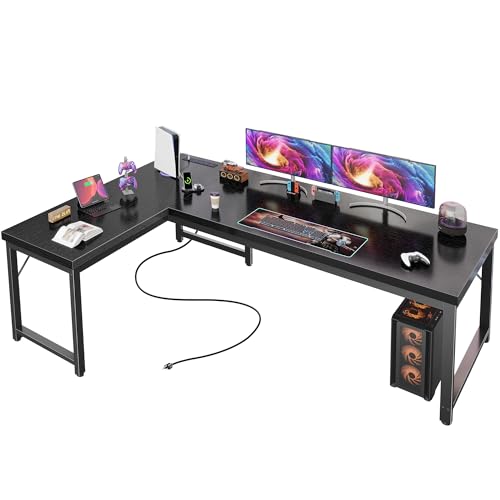
Huuger 63 Inch L-Shaped Desk — Best grown-up setup
The Huuger is the desk streaming setups grow into. Sixty-three reversible inches on a metal frame, a desktop the listing specifies at 0.95 inches thick — a number streamers should care about, because boom arms, camera mounts and monitor arms all clamp, and clamps trust thick tops — with power outlets at the surface and a black finish that disappears behind the gear it carries. No LED is named in its title, and that restraint is its identity: this is the streaming desk for the channel whose production value lives in the game, the guest and the conversation rather than in the glow.
Size changes what streaming feels like from the chair. Two full screens stop negotiating; the mic arm swings without clearing obstacles; the mixer, the stream deck and the keyboard hold their positions across weeks instead of being re-staged nightly; a co-streamer or a guest can sit at the return with a laptop and be part of the furniture rather than a visitor to it. The reversible L lets that arrangement mirror to the room’s light, and the metal frame keeps a heavily loaded, clamp-festooned top from developing the tremor that cameras amplify mercilessly — a wobbling desk on stream reads as an earthquake in miniature.
The costs are the large desk’s eternal pair: the corner must be measured and meant, and the assembly is a project with a friend-shaped component. Streamers whose brand is the lit aesthetic should take the ODK or PRAISUN and their built-in glow, adding a light strip to the Huuger only if its plainness starts to feel like a missed opportunity. For the established channel in a room that can take it, this is the surface the rest of the guide’s desks are rehearsals for. Coders who stream their work will recognise the same virtues judged from the keyboard’s side in Best Coding Desks.
- Overall size: 63 inches, L-shaped, reversible
- Desktop: 0.95 inch thickness, per the listing title
- Frame: metal frame
- Power: power outlets
- Finish: black
Strengths
- Thick desktop takes mic arms and mounts with confidence.
- Width ends the nightly re-staging of a grown setup.
- Metal frame keeps a loaded top calm on camera.
Trade-offs
- No LED is named in the title; the glow must be added or forgone.
- Needs a measured corner and a substantial assembly.
- No shelves or stand are named; organisation is the owner’s system.
Best for: an established streamer with arms, mounts and two full screens. Not suited for: a small bedroom corner that needs a complete kit in one compact box.

Lufeiya 40 Inch Gaming Desk with LED — Best starter desk
The Lufeiya is the friendly end of streaming: a 40-inch desk with LED lights, power outlets, a monitor stand and a charging station with a USB port, pitched by its maker at teens and study desks as much as at gamers. That pitch is precisely its streaming virtue. Most channels start as a bedroom hobby at a desk that also does homework, and the Lufeiya serves both lives without making the room choose — the stand lifts the screen to a camera-friendly height, the glow signs the set after dark, and the charging station keeps the phone, which is half of a young streamer’s production kit, alive at the surface.
The charging station deserves its moment, because phones in streaming are cameras, chat screens, remote controls and audience all at once, and a phone dying mid-stream is a small production emergency. Outlets plus USB at the desk means the phone lives plugged in without stealing the power strip’s last socket from the console. The monitor stand returns its strip of surface to the keyboard, and the 40-inch width keeps the whole plant inside a bedroom’s spare wall.
Its ceiling is the starter class’s own: one screen on the stand, modest gear, growth that will eventually argue for the ODK’s wings or the Huuger’s span. The teen-and-study framing also means its styling aims young, which older streamers may find they outgrow aesthetically before they outgrow it physically. As a first desk that streams tonight and studies tomorrow, though, it is the most welcoming purchase in this guide — and households whose desk must also run the printer for homework can compare the family layouts in Best Computer Desks with a Printer Shelf.
- Overall size: 40 inches
- Lighting and power: LED lights, power outlets
- Screen provision: monitor stand
- Extras: charging station with USB port
- Finish: black
Strengths
- Charging station keeps the phone — camera, chat, remote — alive at the desk.
- Monitor stand sets a camera-friendly screen height at a small size.
- Serves study and streaming lives in one bedroom footprint.
Trade-offs
- One-screen ceiling; a growing channel will graduate from it.
- Youth-aimed styling may age faster than the desk.
- No shelves or drawers are named for gear storage.
Best for: a young or first-time streamer whose desk also does homework. Not suited for: a two-screen production with a mixer and a guest.
Streaming Desks Head to Head: What Fits Inside the Camera Frame?
| Pick | Size | What the camera sees | Gear homes | Power |
|---|---|---|---|---|
| ODK | 53 in L | Shelves and glow in the corner | Shelves, bag, headset hook | Outlets, LED |
| Korfile | 40 in L | Raised screen, shelves | Storage shelves | Outlet, LED |
| PRAISUN | L-shaped | A pegboard of gear as backdrop | Pegboard, shelves, bag | Outlets, LED |
| DurayLoly | 39.3 in | Screen at a tuned height | Fabric drawer, CPU stand | Outlet, LED |
| Huuger | 63 in L | A plain, wide, gear-led set | Owner’s own system | Outlets |
| Lufeiya | 40 in | Raised screen with a glow | Charging station for devices | Outlets, USB, LED |
Shop the third column if the stream is the point: the PRAISUN’s pegboard is a ready-made backdrop, the ODK’s shelves compose a corner, the small desks offer a raised screen and a glow, and the Huuger offers a blank wide canvas for a set you design yourself. Then check the fourth column against your gear’s actual count — headsets, controllers, mics and spares all need a home the hands can find mid-sentence, and the desks differ more there than anywhere else. Streamers running a genuine two-monitor production should also weigh the screen-first geometry in Best Dual Monitor Computer Desks before settling on a compact streaming desk.
Read that table once more from the audience’s chair, because the third column is the one your viewers will grade without knowing it. Every desk here offers the camera something — a shelf line, a pegboard, a tuned screen height, a wide calm canvas — and the differences are of flavour rather than kind. The streamer’s real choice is therefore the fourth column: where the gear sleeps between its moments. Pick the desk whose answer matches your gear’s actual census, and the frame will take care of itself.
How Do You Rehearse a New Streaming Desk Before Going Live?
Rehearse the desk, not just the content. Sit in the finished setup and run a private recording of ten unscripted minutes: talk, play, reach for everything you would reach for live, mute and unmute, take a sip, read the chat. Then watch it back with the sound up and a notebook open. The recording will find what your eyes in the room could not — the cable in frame, the mic’s shadow, the drawer you cannot open without rolling the chair into the camera’s view, the glow setting that turns your face the colour of a traffic light.
Fix in the order the audience notices: frame first, then sound, then reach. Frame fixes are placement — a shelf dressed, a cable rerouted, the camera raised an inch on its screen. Sound fixes are separation — the mic swung closer, the tower moved off the shared surface, the keyboard given its mat. Reach fixes are geography — the hook, bag or drawer reassigned to the objects your hands actually sought during the rehearsal, rather than the objects a tidy mind assigned there in advance. One rehearsal usually surfaces a dozen such corrections, and every one of them is cheaper before the first broadcast than after it.
Then lock the setup down, literally and administratively. Photograph the desk from the chair and from the camera; note the glow scene, the mic’s position and the chair’s height somewhere you will find them after the desk is inevitably disturbed by cleaning, guests or curiosity. A streaming desk’s worst enemy is drift — the slow migration of every object from its tested place — and a photographed baseline turns restoration from an afternoon of re-guessing into ten minutes of putting things back where the evidence says they belong.
What Mistakes Do Streaming Desk Buyers Keep Making?
The first is setting up for the chair and never checking the camera. Desks get arranged by feel, the stream starts, and the audience’s first view includes the cable crossing the frame and the laundry basket at shoulder height. Frame the shot before the setup is final, sit in it, record a minute, and watch it back with a stranger’s eyes; the desk’s visible band is a design surface and should be treated as one.
The second is clamping the mic arm wherever it fits rather than where it swings. An arm that crosses the camera’s frame or fights the monitor stand will be re-clamped monthly and resented weekly. Plan the clamp point — favouring a thick desktop where the choice exists — and the swing path, before the gear goes on. The third mistake is under-powering the plant: streamers add a light, a camera and a console across a year and discover the wall socket situation at the worst moment, mid-upgrade. Desks with outlets and USB buy headroom; desks without them need a proper strip from day one, mounted, not trailing.
The fourth is buying the desk for the channel’s current size and no further. A setup that will obviously grow — the second screen is already being saved for — deserves the desk with slack, even if this month’s gear rattles around on it. Desks are the least replaceable part of a streaming setup mid-season; screens and mics swap in an evening, but the furniture anchors the room.
Final Recommendation
Start with the ODK if you stream from a corner: its wings, shelves and glow divide the two jobs of a streaming desk better than anything else here. Take the PRAISUN when gear is your abundance and your backdrop, the Korfile or DurayLoly when the room is small and the channel is young, the Lufeiya when the desk must study by day, and the Huuger when the setup has already grown up and needs a thick, wide, calm surface under its clamps.
Whichever desk you choose, do the camera test before the first broadcast and the reach test during it: everything you touch mid-stream should be findable without looking, and everything the audience sees should look like it was placed there on purpose. A streaming desk earns its name in that double act — invisible competence from your chair, quiet intention from theirs.
Above all, remember the proportion the audience taught every streamer who ever watched their own recording back: they came for the person and the play, and the desk’s job is to never give them a reason to think about the desk. Buy the one whose frame flatters you, whose reach serves you and whose glow signs the set — then forget it exists, on camera and off, which is the highest state a streaming desk can reach.
Frequently Asked Questions
How big a desk does a streamer actually need?
One screen, a mic and a console fit honestly on the 40-inch class here, especially with a monitor stand returning surface. Two full screens, a mixer or a dual-PC setup move the answer to the ODK’s 53 inches or the Huuger’s 63. Measure your array’s width, add the mic arm’s territory, and let that sum — not the room’s hopes — choose the size.
Is LED lighting on a desk useful for streaming, or just decoration?
Useful, in a specific way: it washes the wall behind the screens, which the camera reads as depth and production value, and it tints the set with the channel’s colour. It does not replace a key light for your face — no desk glow lights a person well — so budget the face light separately and let the desk’s LED do the backdrop’s work.
Where should a microphone arm clamp on a small desk?
At the back corner of the surface, on the side opposite the mouse, with a swing that brings the mic to your mouth without crossing the camera’s view of your face. On compact desks that point competes with the monitor stand, so plan both together. A thicker desktop, like the Huuger’s stated 0.95-inch top, holds a clamp more confidently than a thin one.
Can a streaming desk double as a work desk?
Most of these are sold as gaming and home office desks and do both lives readily — the L-shapes especially, with the service wing becoming the work wing. The streaming-specific features cost the work life nothing: a pegboard organises office gear as happily as controllers, and surface power is surface power. The Lufeiya is explicitly pitched at study as well as play.
How do I power a streaming plant when the desk has no outlets built in?
Mount a surge strip under the back edge and route the plant’s permanent cables along it, keeping the daily cables — a travelling laptop, a phone — loose at the front. The streaming plant has more cables than most, so the discipline matters more: bundle by permanence, label the strip’s sockets, and leave slack at every device that ever moves.
Do I need a corner desk to stream well?
No — a corner is an advantage, not a requirement. Corners give a streamer two walls of backdrop, a natural screen angle and a defined set in a small room, which is why the L-shaped picks feature strongly here. A straight desk against one wall streams perfectly well with a dressed shelf or a plain backdrop behind the chair; the DurayLoly and Lufeiya in this guide are straight-desk proofs. Choose the corner when the room offers one and the desk fits it, not as a streaming tax.
Can I run a stream from a 40-inch desk?
Yes — thousands of channels do — provided the array is honest: one main screen, a laptop or small display for chat, a mic on a stand or short arm, and the console or PC parked on a stand or the floor. The Korfile, DurayLoly and Lufeiya here are all built to that scale and carry the power and light the plant needs. What 40 inches will not forgive is sprawl: a second full monitor, a large mixer and a guest. Streamers planning those should start at the ODK’s 53 inches.
How much should a beginner spend on a streaming desk?
Spend on completeness before size. A beginner’s channel dies of friction — the mic stored in a box, the camera re-aimed nightly — far more often than of small surfaces, so a compact desk that carries its own power, light and gear homes, like the Korfile, DurayLoly or Lufeiya here, serves a first year better than a wide bare surface that organises nothing. Graduate to width when the gear census, not the ambition, demands it; the Huuger’s review describes the desk that graduation looks like.
Do I need a green screen behind a streaming desk?
Only if your format needs one — virtual backgrounds and scene overlays are a creative choice, not a streaming requirement, and many channels prefer a real, dressed backdrop because it reads as a place rather than an effect. The desks here lean toward the real-backdrop school: shelves, a pegboard and a glow compose a set that needs no chroma key. If you do use a screen, the corner placements in this guide give it two walls to tension against, and the compact desks keep the chair-to-screen distance workable in small rooms.
Related Guides
Streamers whose desk also runs the household’s paper can compare the family-first layouts in Best Computer Desks with a Printer Shelf. Those who code what they stream will find the session-first judging in Best Coding Desks. And when the second screen becomes a full production monitor, Best Dual Monitor Computer Desks covers the width and depth that move requires.


