What's inside
- Where to Buy
- Key Takeaways
- Quick Picks
- How We Chose These Picks
- Comparison
- How to Choose a Reference Monitor for Video Production
- What Is the Difference Between a Production Monitor and a Grading Reference?
- Does a Studio Still Need SDI in an HDMI World?
- When Does a Rackmount Monitor Beat a Desk Monitor?
- Common Mistakes When Buying Reference Monitors for Production
- Final Recommendation
- Frequently Asked Questions
- Related Guides
As an Amazon Associate I earn from qualifying purchases. This post may contain affiliate links at no extra cost to you.
[SITE_DOMAIN] is reader-supported. When you buy through links on our site, we may earn an affiliate commission.
Where to Buy
Production monitors are bought by working studios rather than browsed by hobbyists, and Amazon lists all six in this guide. The SEETEC ATEM156 opens the set as the switcher director’s quad-view screen, so check price on Amazon on its page if a live multi-camera desk is the destination. Three SEETEC studio panels follow in ascending size — the SEETEC P173-9HSD at 17.3 inches, the SEETEC P215-9HSD at 21.5, and the SEETEC P238-9HSD at 23.8 with a tally light in its title. The FEELWORLD 15.6 Inch 4K Broadcast Monitor is the high-resolution field option with quad split display, and the FEELWORLD D101 PLUS-H closes the set as the dual-screen rackmount unit for installed galleries.
This guide begins with a correction, because the search that brought most readers here rests on a premise the market does not support. True mastering reference monitors — the BVM-class displays against which broadcast masters are certified — are not sold as consumer listings on Amazon; they move through broadcast dealers, facility integrators and hire companies, at prices and through channels this page cannot show you. The desktop grading reference class, the ColorEdge type of colour-managed panel, is covered in this site’s professional monitors guide. What can honestly be gathered under the heading of best reference monitors video editing shoppers can actually buy here is the working layer beneath the mastering tier: broadcast and production monitors with SDI connections, quad-view switching, tally lights and rackmount forms — the screens that directors, vision mixers and studio engineers use as their reference for what is being captured and transmitted, live, while it still matters.
That distinction — desktop grading versus field and studio production — organises everything below. A grading reference judges colour in a finished file, in a dark room, against a delivery specification. A production reference judges the signal itself: is camera three framed, is the switcher output clean, is the tally right, is focus holding on the presenter. The six titles here are production instruments to a one. Four are SEETEC broadcast panels built around 3G-SDI and 4K HDMI, one is FEELWORLD’s 4K quad-split director’s monitor, and one is a dual 10.1-inch rackmount pair for the gallery wall. None of them prints a colour gamut figure, because that is not the axis this class is bought on — and this guide will not invent grading credentials for them.
What the titles do print is a production vocabulary: quad view, focus assist, 3G-SDI inputs and outputs, tally lights, rackmount height in rack units, screen sizes from a dual 10.1-inch pair to a 23.8-inch studio panel. Buyers should read the reviews in that vocabulary. The questions are not about Delta E; they are about how many sources the desk must watch, whether the room is a studio, a gallery or a field, and whether the monitor lives on a desk, in a rack or on a director’s cart.
Key Takeaways
- Mastering-grade BVM-class reference monitors are not consumer Amazon listings; this guide covers the buyable broadcast and production layer below them.
- Four SEETEC panels form the studio core, all built around 3G-SDI with 4K HDMI, in sizes from 15.6 to 23.8 inches.
- Quad view appears in the SEETEC ATEM156 and FEELWORLD 4K156 titles — the feature that lets one screen watch four sources.
- The FEELWORLD D101 PLUS-H is a dual 10.1-inch monitor in a 4RU rackmount form for installed galleries.
- No title here prints a colour gamut or calibration claim; these are signal-reference tools, not grading references.
Quick Picks
| Pick | Badge | Why it earns a place |
|---|---|---|
| SEETEC ATEM156 | The switcher director’s quad view | 15.6-inch broadcast monitor with four HDMI inputs and outputs, quad view and focus assist. |
| SEETEC P173-9HSD | The portable studio panel | 17.3-inch IPS Full HD with 3G-SDI and 4K HDMI for studio and field directing. |
| SEETEC P238-9HSD | The big studio wall panel | 23.8-inch IPS Full HD with 3G-SDI, 4K HDMI loop and a three-colour tally light. |
| SEETEC P215-9HSD | The legacy-friendly desktop | 21.5-inch IPS Full HD with 3G-SDI, HDMI, AV and YPbPr for mixed-age studios. |
| FEELWORLD 15.6 Inch 4K Broadcast Monitor | 4K quad split in the field | 15.6-inch UHD IPS with four 4K HDMI inputs in quad split, 3G-SDI, VGA and DVI. |
| FEELWORLD D101 PLUS-H | The rackmount pair | Dual 10.1-inch monitors in a 4RU rackmount chassis for galleries and OB installs. |
How We Chose These Picks
The gate was a production signal path. Every pick here accepts the connections a working studio actually runs — 3G-SDI on five of the six titles, multiple HDMI inputs with outputs for looping onward, legacy AV and component on one — because a production monitor that cannot take the desk’s signals is furniture. Consumer HDMI-only screens, however sharp, were excluded; the SDI BNC world is what separates this class from the rest of this site’s monitor guides.
Forms were balanced deliberately across the ways production monitoring is actually done. A director at a switcher needs quad view on a cart-sized screen. A studio engineer needs a large wall panel with a tally light. A gallery needs rackmount pairs that install once and stay. A field director needs a portable panel that travels. The six picks map one to each of those posts, with the SEETEC size ladder — 17.3, 21.5, 23.8 inches — covering the studio wall at three scales.
Monitoring features named in the titles were the third filter: quad view and focus assist on the director’s models, tally on the big studio panel, quad split on the FEELWORLD. These are the tools that make a screen a reference for production decisions rather than a television — the director calls the shot from the quad view, the engineer trusts the tally, the focus puller works from the assist. Titles that offered only a screen and a resolution were passed over.
Finally, the guide kept its honesty rule under the most pressure this category applies. It would be commercially convenient to dress these panels in grading language — to imply colour authority their titles never claim. Instead, every spec box records the absence of gamut and calibration claims in the standard words, and the introduction’s correction stands at the front where it belongs. Readers who need a mastering reference now know where such things are actually sold; readers who need production monitoring get a guide written in the right vocabulary.

SEETEC ATEM156 — The switcher director’s quad view
The ATEM156 is built for one specific chair: the director’s seat in front of a small switcher. Its title describes a 15.6-inch director broadcast monitor with a stated 250-nit brightness, four HDMI inputs and four HDMI outputs, quad view and focus assist, aimed explicitly at ATEM Mini and GoStream switchers and mixers for studio television production, live streaming and directing. The quad view is the product: four camera sources on one 15.6-inch screen, watched simultaneously, so the director’s eye never leaves the desk to compare separate monitors before calling the next shot.
The ATEM naming tells buyers exactly which ecosystem this serves. The generation of compact HDMI switchers named in the title built the modern small-studio and streaming workflow — four cameras, one mixer, one director — and this monitor is that workflow’s missing multiviewer surface. Four inputs with four outputs also let each source loop onward to recorders or additional screens, so the ATEM156 can sit at the centre of the signal chain rather than merely at its end. Focus assist serves the camera operators’ world from the same screen, sharpening the director’s judgement of whether a shot is usable before it is taken to air.
Brightness is the figure to read soberly: 250 nits, printed in the title, is a studio figure — entirely adequate for the controlled light of a production desk, modest for a sunlit field. The review credits it as such. This is an indoor instrument for a desk with a switcher on it, and its 15.6-inch size is chosen for the cart and the compact gallery rather than the wall. Studios running SDI cameras should note the title’s HDMI emphasis and read the SEETEC panels below before assuming compatibility.
Suits the streaming studio director, the small television production desk, the house-of-worship and events team running a four-camera HDMI switcher, and the solo producer who directs and mixes from one chair. Its reference role is real but specific: it is the reference for what the switcher is doing, frame by frame, in the only tense live production has — the present.
- Size: 15.6-inch
- Brightness: 250 nits stated
- Inputs and outputs: 4 HDMI in, 4 HDMI out
- Features: quad view, focus assist
- Ecosystem: ATEM Mini and GoStream switchers named
- Role: director broadcast monitor for studio production and live streaming
- Resolution: Not stated in the listing title — verify with the manufacturer documentation
- SDI connection: Not stated in the listing title — verify with the manufacturer documentation
Strengths
- Quad view puts four switcher sources on one director’s screen.
- Four HDMI outputs let every source loop onward to recorders.
- Focus assist supports shot usability calls from the desk.
Trade-offs
- 250-nit brightness is a studio figure, not a daylight field figure.
- The title emphasises HDMI; SDI camera chains are not addressed.
- 15.6 inches is a cart size, small for a gallery wall.
Best for: a director running a four-camera HDMI switcher in a studio or streaming desk who needs quad view and looped outputs. Not suited for: an outdoor field production in bright daylight, because the title’s stated 250-nit brightness is specified for controlled studio light.
The ATEM156 also teaches the category’s central lesson in miniature. Its value has nothing to do with colour science and everything to do with attention: one screen, four sources, zero head-turning between the moment a shot becomes available and the moment it is taken. Live direction is a perishable skill measured in fractions of seconds, and a monitor that conserves the director’s attention is a reference in the only sense live work recognises — the surface the decisions are actually made from.
Studios assembling this desk should wire it as a system from the start: switcher outputs into the quad view, loops out to the recorders, the programme feed given its own larger screen if the room allows. The ATEM156 is the multiview heart of that system, and planning the chain around it — rather than bolting it onto a chain built for other monitors — is what turns a collection of small-studio gear into a production desk.
One clarification belongs at the front of the reviews, because readers arriving from the grading guides will feel its absence. Nothing in the six spec boxes below contains a colour gamut line with a number in it. That is not an oversight in the panels or in the reviewing; it is the shape of the production class, where the published specification is the signal path and the monitoring feature set. Readers who need those colour numbers are holding the wrong guide — deliberately so, since the introduction’s correction exists to route them to the professional monitors guide before they spend production money on a grading question, or grading money on a production one.
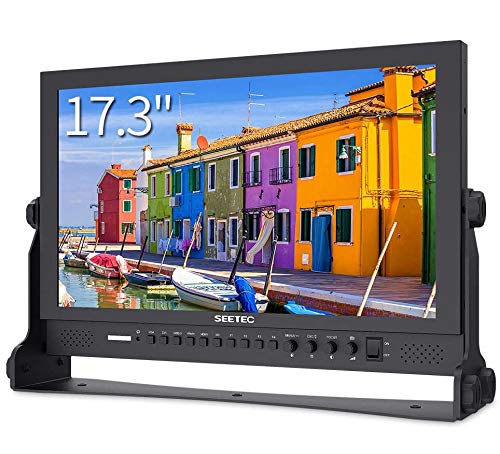
SEETEC P173-9HSD — The portable studio panel
The P173-9HSD is the studio engineer’s portable: a 17.3-inch broadcast studio video monitor with an IPS Full HD 8-bit panel at 1920×1080, 3G-SDI and 4K HDMI connections, aimed by its title at professional live events, post production, directing and film camera field work. The 9HSD suffix is SEETEC’s signal-path signature across this guide — SDI plus HDMI — and here it arrives in the size class that travels: large enough to judge framing and focus from a director’s chair, small enough to live in a case between the studio and the location.
3G-SDI is the clause that admits this panel to professional rooms. SDI is the broadcast world’s signal standard — locking BNC connectors, long cable runs, no handshake negotiations — and a monitor that speaks it can be dropped into any studio, outside broadcast or rental chain without adapters or prayers. The 4K HDMI input covers the modern camera and switcher outputs alongside. An 8-bit IPS panel at Full HD is the honest production specification: the desk is judging framing, focus, exposure and signal integrity, and Full HD at 17.3 inches shows all four at working distance.
The title’s spread of destinations — live event, post production, director, field — describes the panel’s real career in a working facility: it is the screen that goes where the job is. In the studio it is the engineer’s confidence monitor; on location it is the director’s; in post it is the client-facing playback screen that proves the signal chain. Monitors in this class earn their keep through versatility across posts rather than supremacy at one, and the P173’s specification is balanced exactly for that life.
Suits the small facility buying its first SDI-capable reference for production, the freelance director who carries a monitor between gigs, and the live-event team needing a trustworthy screen at the mixing position. Buyers needing quad view should look at the ATEM156 or the FEELWORLD; buyers needing a wall-sized studio panel should continue to the 23.8-inch SEETEC below. This one is the traveller of the family.
- Size and resolution: 17.3-inch, Full HD 1920×1080
- Panel: IPS, 8-bit
- Connections: 3G-SDI, 4K HDMI
- Role: broadcast studio video monitor for live events, post production, directing and field work
- Quad view: Not stated in the listing title — verify with the manufacturer documentation
- Tally light: Not stated in the listing title — verify with the manufacturer documentation
- Colour gamut: Not stated in the listing title — verify with the manufacturer documentation
Strengths
- 3G-SDI admits the panel to professional signal chains without adapters.
- A 17.3-inch format balances judging size against portability.
- 4K HDMI input covers modern camera and switcher outputs.
Trade-offs
- Full HD resolution is a production spec, below the 4K FEELWORLD here.
- No quad view or tally is claimed in the title.
- No colour or calibration claim is made for grading use.
Best for: a small facility or freelance director needing a portable SDI and HDMI production monitor across studio and field posts. Not suited for: a director who must watch four sources at once, because this title claims no quad view.
Portability in this class has a hidden specification: the case is part of the product’s working life, and a panel that travels weekly should be judged partly on how it packs, powers and mounts in unfamiliar rooms. The P173’s size class is the industry’s travelling standard precisely because it fits the cases, carts and video villages that already exist. Buyers building a location kit should confirm the mounting and power arrangements on the listing against the rest of their chain — the unglamorous details that decide whether a field day starts with monitoring or with improvisation.
In the studio, give this panel the engineer’s seat rather than the client’s. Its job is confidence — the quiet certainty that what is being recorded and transmitted is what the cameras are seeing — and confidence monitors are placed where the person responsible for the signal sits. Client impressions are served by larger, dumber screens; the P173’s SDI literacy would be wasted on an audience that cannot read it.
The SEETEC ladder’s middle and top rungs also illustrate a facility’s growth path. A young studio typically monitors on whatever screen it owns; a maturing one standardises on a family whose signal paths match across sizes, so any panel can cover any post in an emergency. The 17.3, 21.5 and 23.8 share the 9HSD path for exactly that reason, and a buyer choosing between them is really choosing which post to professionalise first — the travelling kit, the engineering desk or the gallery wall — with the others able to follow later without re-cabling the building’s habits.

SEETEC P238-9HSD — The big studio wall panel
The P238-9HSD is the studio wall’s anchor: a 23.8-inch broadcast LCD monitor with an IPS Full HD panel at 1920×1080, 3G-SDI and 4K HDMI input and output, and a three-colour tally light. Size and tally together define its post. At nearly 24 inches it is the panel a whole gallery can read — the programme or preview reference that the director, producer and engineer share — and the tally light is the studio’s oldest communication device: the coloured border that tells everyone in the room, and the talent through the glass, which source is live and which is next.
Tally deserves its paragraph, because buyers outside studio culture underestimate it. In a live gallery, attention is the scarcest resource, and a three-colour tally system compresses the switcher’s state into a glance — live, preview, and the third state the desk assigns. A monitor with tally built in joins the studio’s nervous system rather than merely displaying its output; it is the difference between a screen the room watches and a screen the room works with. The P238’s title leads its feature list with that integration, correctly.
The signal path repeats the family pattern — 3G-SDI for the broadcast chain, 4K HDMI in and out for the modern sources, with the output looping the feed onward to the next device in the wall. Full HD at this size is the production standard for shared viewing: the gallery reads framing, graphics and tally state, not pixel detail, and the panel’s IPS base keeps the image consistent for the several chairs angled toward it. No colour claims are made, and none are needed for the post it fills.
Suits the studio gallery, the training facility teaching live production, the broadcast-adjacent house whose wall needs one authoritative shared screen. Its size argues against the field case and the small cart; its tally argues for any room where more than one person directs their attention by the switcher’s state. Among the SEETEC ladder, this is the panel the room is built around.
- Size and resolution: 23.8-inch, Full HD 1920×1080
- Panel: IPS LCD
- Connections: 3G-SDI, 4K HDMI input and output
- Features: three-colour tally light
- Role: broadcast studio monitor
- Quad view: Not stated in the listing title — verify with the manufacturer documentation
- Colour gamut: Not stated in the listing title — verify with the manufacturer documentation
- Brightness: Not stated in the listing title — verify with the manufacturer documentation
Strengths
- A three-colour tally light integrates the panel into the studio’s workflow.
- 23.8 inches gives a whole gallery one shared, readable reference.
- SDI plus looping 4K HDMI fits the broadcast signal chain.
Trade-offs
- Full HD at 23.8 inches is for shared reading, not fine detail.
- Its size rules out the field case and the compact cart.
- No quad view is claimed for multi-source directing.
Best for: a studio gallery needing one large shared production reference with tally integration. Not suited for: a location director’s portable kit, because a 23.8-inch wall panel does not travel like the 17.3-inch class.
Wall panels shape studio behaviour in ways their buyers rarely anticipate. Once a gallery has one authoritative screen, arguments about what went to air end at the wall; the shared reference becomes the room’s memory of the transmission. That social function is why the size and the tally matter more than any panel statistic — the P238 is bought to be believed collectively, by a room of people whose jobs depend on agreeing about what the audience just saw.
Install it as infrastructure, not furniture: sight lines checked from every gallery chair, the tally behaviour tested against the switcher’s states before the first live day, the looped output feeding the recorder or stream encoder it will serve for years. A wall reference installed casually gets worked around; installed deliberately, it becomes the fixed point the whole gallery’s practice quietly organises itself around.

SEETEC P215-9HSD — The legacy-friendly desktop
The P215-9HSD occupies the ladder’s middle rung with the family’s most catholic input list: a 21.5-inch IPS Full HD 1920×1080 desktop broadcast studio monitor with 3G-SDI, HDMI, AV and YPbPr connections. The legacy inputs are the story. Working studios are museums of functioning equipment — a component-era playback deck, a composite source that nobody has budgeted to replace, an archive machine with one job left — and a monitor that accepts AV and YPbPr alongside SDI and HDMI is the screen that lets a mixed-age facility see all of its own signals on one desk.
Desktop is the title’s own word for its form, and it matters: at 21.5 inches this is the panel for the engineer’s desk or the small control position, larger than the travelling 17.3 and more placeable than the wall-sized 23.8. The 9HSD signal signature repeats — SDI and HDMI at its core — so it belongs to the same chain as its siblings and can substitute for them at a smaller post. A facility standardising on this family gains interchangeable monitors across its rooms, which is an operational virtue purchasing departments understand immediately.
No tally and no quad view are claimed, so its reference role is the single-source confidence post: the screen that confirms what one chain is doing, in a room where the switching state is known from elsewhere. Ingest, QC of incoming feeds, archive playback and the edit suite’s broadcast-output check are its natural duties — the unglamorous verification work on which a facility’s output quality actually rests.
Suits the mixed-age studio, the ingest and archive desk, and the small facility that wants the family’s SDI literacy in a desktop size. Buyers whose rooms are purely modern should weigh whether the legacy inputs earn their place against the larger P238; buyers with even one component or composite source still in service already know the answer.
- Size and resolution: 21.5-inch, Full HD 1920×1080
- Panel: IPS
- Connections: 3G-SDI, HDMI, AV, YPbPr
- Form: desktop broadcast studio monitor
- Tally light: Not stated in the listing title — verify with the manufacturer documentation
- Quad view: Not stated in the listing title — verify with the manufacturer documentation
- Colour gamut: Not stated in the listing title — verify with the manufacturer documentation
Strengths
- AV and YPbPr inputs keep legacy studio sources visible on one desk.
- 3G-SDI and HDMI keep it interchangeable with the family’s other posts.
- A 21.5-inch desktop size fits the engineer’s and ingest desks.
Trade-offs
- No tally or quad view is claimed for gallery directing.
- Full HD resolution is a production, not an inspection, specification.
- Legacy inputs are dead weight in a purely modern facility.
Best for: a mixed-age studio’s ingest, archive or engineering desk that must monitor SDI, HDMI and legacy sources on one panel. Not suited for: a live gallery director, because this title claims neither tally integration nor quad view.
Legacy support is a form of institutional honesty that deserves respect. Facilities do not replace working chains on a marketing cycle; they replace them when the work demands it, and in the long interval between, somebody must still watch the old deck’s output. A monitor family that spans from that composite source to the 4K HDMI chain — as this SEETEC ladder does, with the P215 as its bridge — lets a facility modernise at its own pace without ever losing sight of a signal it is still responsible for.
Practical placement follows from the input list: put the P215 where the sources converge. Ingest bays, machine rooms with a viewing desk, the archive transfer suite — anywhere cables from three decades meet — are its home ground. Facilities should resist scattering it as a general spare; a bridge monitor earns its keep at the junction it was built for, and junctions, once found, tend to stay busy for years.
Shared screens also change how a gallery talks. Directors develop a shorthand pointed at the wall — the wide, the close, the graphic — that only works when everyone is literally looking at the same picture at the same size. The P238’s contribution to a facility is therefore partly linguistic: it gives the room a common visual reference for its own conversation. Facilities that have worked with mismatched personal screens underestimate that benefit until the first production run from a shared wall, after which they rarely go back.
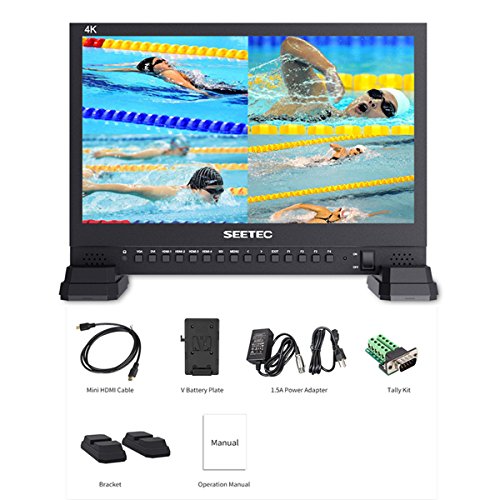
FEELWORLD 15.6 Inch 4K Broadcast Monitor — 4K quad split in the field
FEELWORLD’s 4K156-9HSD is the resolution outlier of this guide and proud of it: a 15.6-inch 4K broadcast director monitor with an IPS UHD panel at 3840×2160, four 4K HDMI inputs arranged in a quad split display, 3G-SDI, VGA and DVI, aimed at professional live events, post production, directing and film camera field work. Where the SEETEC studio panels settle at Full HD, this one carries a full UHD grid into the director’s 15.6-inch format — and combines it with the quad split that the ATEM156 offers at lower resolution, plus the SDI path the ATEM156’s title omits.
The combination is the review’s headline: quad view, 4K, and SDI in one portable panel. A director can watch four sources in the split and take any one of them full-screen at UHD to check focus and detail — the two judgements of field directing, coverage and sharpness, served by a single screen. The input list spans the working world’s eras, from VGA and DVI for the presentation and legacy chain to 3G-SDI for the broadcast one, making the panel a plausible universal spare for facilities whose sources vary by the day.
Post production appears in its title alongside the field roles, and the 4K grid explains why: of all six picks, this is the only one that can display a UHD programme at full resolution, so the edit suite’s output check and the finishing review can happen on it in a way the Full HD studio panels cannot match. It remains a production monitor — no colour claims are printed, and grading sign-off does not move here — but as a signal and detail reference it is the sharpest tool in the guide.
Suits the field director who checks focus at UHD, the facility wanting one portable panel that accepts every chain it owns, and the small post house needing a 4K-capable production screen. Studios building a fixed gallery wall should take the SEETEC 23.8 and its tally; directors whose world is the four-camera HDMI switcher alone can save with the ATEM156. This FEELWORLD is the maximalist’s portable.
- Size and resolution: 15.6-inch, UHD 3840×2160
- Panel: IPS
- Connections: 4 x 4K HDMI, 3G-SDI, VGA, DVI
- Features: quad split display
- Role: broadcast director monitor for live events, post production and field work
- Model: 4K156-9HSD
- Tally light: Not stated in the listing title — verify with the manufacturer documentation
- Colour gamut: Not stated in the listing title — verify with the manufacturer documentation
Strengths
- The only UHD panel in the guide, for full-resolution output checks.
- Quad split plus 3G-SDI covers directing and broadcast chains together.
- VGA and DVI inputs make it a universal spare across studio eras.
Trade-offs
- 15.6 inches is small for a fixed gallery’s shared reference.
- No tally light is claimed for studio integration.
- No colour or calibration claim supports grading use.
Best for: a field director or small post house needing quad view and a true 4K display in one portable production monitor. Not suited for: a fixed studio gallery as its main shared screen, because a 15.6-inch panel cannot serve a room the way the 23.8-inch class does.
Quad split at 4K raises a practical point about source discipline. Four UHD sources divided across one panel are each shown at reduced size in the split — the director reads framing and state there, then punches a single source full-screen for detail. That two-step rhythm is the professional way to work a multiviewer, and this panel’s resolution makes the second step genuinely informative rather than ceremonial. Directors new to quad workflows should rehearse the rhythm before a live day; the panel rewards the rehearsed.
As a facility spare, its breadth is its argument. The monitor that can be sent to any room, any chain, any era of source — and return a trustworthy picture — quietly becomes the most-used screen in the building. Buyers should weigh that utility honestly against the fixed-post specialists here: a gallery needs its tally wall, a switcher desk its quad HDMI heart, but the building as a whole needs one panel that never says no to a signal, and this is that panel.

FEELWORLD D101 PLUS-H — The rackmount pair
The D101 PLUS-H closes the guide in a different physical language altogether: a dual 10.1-inch monitor built into a 4RU rackmount chassis. Its title is the briefest in the set — a product name and a form — so this review credits what the form itself declares and records the rest as unstated: two 10.1-inch screens, side by side, occupying four rack units of a standard equipment rack, built for the installed gallery, the outside broadcast truck and the machine-room wall where monitors are infrastructure rather than furniture.
Rackmount monitoring answers a different question from the desk and field panels above. The gallery’s problem is not one perfect screen but permanent visibility: programme and preview, the two feeds whose states must never be out of sight, installed where the rack already lives and powered with everything else. A dual unit in 4RU delivers that pair in the space a single larger monitor’s shelf would waste, with both screens at a fixed, known position in the engineer’s sight line. In an OB truck, where every rack unit is argued over, the density is the entire proposition.
Because the title documents so little, the buying process matters more here than anywhere else in the guide: inputs, resolution and signal compatibility must be confirmed from the manufacturer’s documentation against the rack’s actual chains before the unit is specified. That is the normal discipline of installed equipment — racks are planned on paper, in rack units and cable schedules — and this pick belongs to buyers who already work that way. Facilities planning a gallery build should treat the listing as a pointer to the documentation, not as the specification itself.
Suits the gallery builder, the OB truck integrator, and the facility whose programme and preview feeds need a permanent installed home. It is not a desk monitor, not a field panel and not a director’s quad view; it is the pair of eyes the rack itself grows. Bought into a planned rack, it disappears into the infrastructure for a decade — the highest compliment installed equipment can earn.
- Form: dual monitor, rackmount
- Screen size: 2 x 10.1-inch
- Rack height: 4RU
- Model: D101 PLUS-H
- Resolution: Not stated in the listing title — verify with the manufacturer documentation
- Connections: Not stated in the listing title — verify with the manufacturer documentation
- Colour gamut: Not stated in the listing title — verify with the manufacturer documentation
- Tally light: Not stated in the listing title — verify with the manufacturer documentation
Strengths
- Two permanent monitoring feeds in only 4RU of rack space.
- An installed form suits galleries and OB trucks that desks cannot.
- A dual programme and preview pair matches the gallery’s core need.
Trade-offs
- The title documents almost nothing; specification requires the manufacturer documentation.
- 10.1-inch screens serve state-checking, not detailed judgement.
- A rackmount chassis is useless to a desk-based production.
Best for: a gallery or OB truck build that needs programme and preview monitoring installed permanently in a rack. Not suited for: a desktop production desk, because a 4RU rackmount chassis has no desk form at all.
Rack planning rewards the same evidence discipline as the rest of this guide, applied to dimensions and cables instead of colour. Four rack units is a claim that can be measured with a tape; the signal path is a claim that must be read in documentation. Integrators should schedule both checks before the rack is populated, because a dual monitor discovered incompatible after the build is not a return — it is a hole in the gallery’s sight line and a delay in the whole installation.
There is a fitting symmetry in ending the guide here. The introduction corrected the fantasy of the mastering monitor bought like a television; the rackmount pair is the opposite pole of the same truth — monitoring as planned infrastructure, specified from documents, installed once and trusted for years. Between those poles sits the whole honest market this guide has tried to map: production references, bought by professionals, for the posts where live work is actually judged.
Power and mounting, the two least glamorous lines of any production specification, decide more field days than resolution ever will. A monitor that matches the kit’s existing batteries or the studio’s existing rails integrates silently; one that demands a new power ecosystem or a bespoke bracket taxes every setup. The titles here are largely silent on those details, which is why the reviews keep returning buyers to the listing and the manufacturer documentation for the exact model — in production, the unglamorous specification is the one that cancels the shoot when it is wrong.
Comparison
| Pick | Size / Resolution | Signal path from title | Production feature | Post it serves |
|---|---|---|---|---|
| SEETEC ATEM156 | 15.6″ / Not stated in the listing title | 4 HDMI in, 4 HDMI out | Quad view, focus assist | Switcher director’s desk |
| SEETEC P173-9HSD | 17.3″ / Full HD | 3G-SDI, 4K HDMI | Not stated in the listing title | Portable studio and field |
| SEETEC P238-9HSD | 23.8″ / Full HD | 3G-SDI, 4K HDMI in and out | Three-colour tally light | Studio gallery wall |
| SEETEC P215-9HSD | 21.5″ / Full HD | 3G-SDI, HDMI, AV, YPbPr | Legacy input set | Ingest and engineering desk |
| FEELWORLD 4K156-9HSD | 15.6″ / UHD 4K | 4 x 4K HDMI, 3G-SDI, VGA, DVI | Quad split display | Field directing, post checks |
| FEELWORLD D101 PLUS-H | 2 x 10.1″ / Not stated in the listing title | Not stated in the listing title | Dual rackmount form, 4RU | Installed gallery and OB rack |
The table reads as a staffing chart rather than a ranking: each row is a post in a production, and the correct purchase is the row whose post is vacant. Signal paths divide the set into the HDMI-switcher world, the SDI broadcast world and the legacy-bridging world; a facility should locate its own chains in that column first, because a monitor that cannot accept the house signal cannot fill any post at all.
Resolution, so dominant in this site’s other monitor guides, is deliberately quiet here — Full HD across the studio ladder, one UHD outlier, two titles silent. Production monitoring judges framing, focus, state and signal integrity, and it judges them at the speed of live work. Buyers arriving from the grading world should let that reordering of priorities settle before spending: in this class, a tally light can be worth more than a million extra pixels.
How to Choose a Reference Monitor for Video Production
Name the post before the panel. Production monitoring is a set of distinct jobs — directing a switcher, engineering a studio, checking a field shoot, feeding a gallery rack — and each job has a monitor shaped for it in this guide. A purchase that begins with size or price and wanders toward a post usually ends with a screen adapted to its job by accessories and apologies. Begin with the chair the monitor will serve, and the shortlist shortens itself.
Audit the signal chain on paper. List every source the post must display, with its connector: SDI cameras, HDMI switcher outputs, a legacy deck, a computer feed. Match the list against the titles’ printed inputs — 3G-SDI on the SEETEC studio line and the FEELWORLD 4K, the ATEM156’s HDMI bank, the P215’s legacy set — and treat any source left unmatched as a converter cost or a disqualification. In production, compatibility is not a detail; it is the product.
Choose the monitoring features the post actually uses. Quad view for the directing chair, tally for the shared gallery screen, rackmount density for the installed pair, portability for the field. Features outside the post’s practice — a quad view nobody watches, a tally no switcher drives — are weight and cost without function. The titles here are refreshingly specific about their features, which makes this matching exercise unusually straightforward.
Finally, keep the grading boundary bright. None of these panels is a colour-grading reference, and a facility that needs one should buy it from the professional and ColorEdge-class guides, through the channels that sell mastering equipment. The production reference and the grading reference are partners in a facility, not substitutes — one watches the signal being made, the other judges the file being finished — and confusing their roles is how both jobs end up done badly on a single screen.
What Is the Difference Between a Production Monitor and a Grading Reference?
They answer to different moments in the work’s life. The production monitor serves the present tense: the live signal, the framing, the focus, the switcher’s state, judged while correction is still possible. The grading reference serves the finished tense: the completed file’s colour, judged against a delivery specification in controlled light. Their specifications diverge accordingly — SDI paths, tally and quad view on one side; gamut, calibration architecture and verification on the other. A facility doing serious work needs both kinds of trust, and should be suspicious of any single screen claiming to be both at once.
Does a Studio Still Need SDI in an HDMI World?
Wherever the studio’s cameras, switchers or recorders are broadcast equipment, yes — SDI remains that world’s native signal, with locking connectors and cable runs HDMI cannot match. The small-studio HDMI ecosystem is real and growing, and the ATEM156 serves it directly; but the moment a facility integrates professional cameras or a broadcast chain, the SDI inputs on the SEETEC and FEELWORLD panels become the price of admission. The audit is simple: read the connectors on the equipment already owned, and let them, not fashion, decide.
When Does a Rackmount Monitor Beat a Desk Monitor?
When the monitoring is permanent and paired. A gallery that must always see programme and preview gains nothing from two desk screens that drift, get borrowed and get switched off; the D101 PLUS-H’s dual 10.1-inch pair in 4RU is installed once, powered with the rack and present for every transmission. Desk monitors win wherever the post moves, the sources change or the judging is detailed. The dividing line is whether the monitoring is a fixture of the room or a tool of the day — fixtures belong in racks.
Common Mistakes When Buying Reference Monitors for Production
Shopping for a mastering monitor on a consumer marketplace is the mistake this guide opened by correcting. The BVM class is real, essential and sold elsewhere; a buyer who expects to find it here will either overpay for a badge or underbuy for the job. Name the layer the facility actually needs — production reference or grading reference — and shop in the channel that sells that layer, with this guide serving the production side honestly.
Buying a production monitor on grading criteria is the mirror error. A colourist’s checklist — gamut percentages, Delta E, LUT architecture — applied to this class produces paralysis, because these titles print none of it, by design. The production checklist is signal path, post, features and form. Buyers who grade on the desktop and monitor in the studio need both checklists, kept in separate columns, for two separate purchases.
Forgetting the loop is the practical trap. Production chains are chains: the monitor that cannot pass its signal onward — to a recorder, a stream encoder, a second screen — forces splitters and workarounds into a path that should be clean. The titles here that print outputs alongside inputs, the ATEM156’s four HDMI outs and the P238’s looping connections, are describing professional manners. Count the outputs before checkout, while the chain is still a drawing.
Final Recommendation
Directors at HDMI switchers should take the SEETEC ATEM156 and its quad view. Studio galleries should build around the SEETEC P238-9HSD and its tally light, with the P215-9HSD at the ingest desk and the P173-9HSD as the travelling panel. Field directors and small post houses should take the FEELWORLD 4K156-9HSD, the one UHD quad-split tool here. Gallery and truck builders should install the FEELWORLD D101 PLUS-H pair. And every reader should keep the introduction’s correction attached to the purchase: these are production references, bought for the signal — the grading reference lives in another guide, and the mastering reference lives in another market entirely.
My own facility money, equipping a small studio from empty, goes first to the P238 for the wall and the ATEM156 for the desk — the two posts whose absence is felt in the first live hour — with the rackmount pair scheduled into the gallery build rather than improvised after it.
Frequently Asked Questions
Can any of these monitors be used for colour grading?
Not as a grading reference. None of the six titles prints a gamut figure, a calibration architecture or a verification claim, and grading sign-off should rest on panels that do — the professional monitors guide on this site covers that class, and true mastering displays are sold through broadcast dealers. These production monitors can certainly display a grade for review, but the decision itself belongs on a colour-managed screen.
What does a tally light actually do?
It shows the switcher’s state on the monitor’s frame — conventionally one colour for the source that is live, another for the source selected as next — so the director, the engineer and the talent can read the transmission’s status at a glance. The SEETEC P238-9HSD prints a three-colour tally in its title. In a live gallery it is the difference between a screen that displays the programme and a screen that participates in making it.
Why are most of these monitors Full HD when 4K exists?
Because production monitoring judges framing, focus, state and signal integrity at working distance and live speed, and Full HD serves all four while keeping multi-source chains affordable and robust. The FEELWORLD 4K156-9HSD serves the posts where full-resolution checking matters — focus verification and UHD output checks. Resolution in this class follows the post’s actual judgement, not the deliverable’s marketing.
What should I verify before specifying the rackmount FEELWORLD?
Everything its brief title omits: the input types against the rack’s chains, the resolution, and the power arrangement, all from the manufacturer’s documentation for the exact D101 PLUS-H model. Rack equipment is planned on paper — rack units, cable schedules, signal paths — and a dual monitor discovered incompatible after installation leaves a hole in the gallery’s sight line. The 4RU size and dual 10.1-inch format are the claims the title itself makes.
Is a quad-view monitor a substitute for four separate monitors?
For directing, it is better than a substitute: one screen holds all four sources in a single field of view, so the director’s attention never travels between displays before a call. Separate monitors retain advantages in size per source and in failure isolation, which is why large galleries combine both — a quad or multiview for the director, dedicated screens for programme and preview. The ATEM156 and the FEELWORLD quad split serve the director’s pattern directly.
Facilities should label every monitor with its post and its signal path on a card taped to the back — a humble habit that ends the borrowed-screen chaos of busy production weeks, and quietly teaches new engineers the building’s whole monitoring plan the first time they go looking for a spare.
Related Guides
The grading side of the facility is covered in our guide to professional video editing monitors with hardware calibration. Suites whose screens must also serve the gaming and streaming desk should read the monitors built for video editing and gaming together. And the production office’s other perennial purchase is mapped in our guide to business printers for printing envelopes.


