What's inside
- Where to Buy
- Introduction
- Key Takeaways
- Quick Picks
- How We Chose These Picks
- Comparison Table
- How to Choose a Color Label Printer for a Small Business
- Why Do So Many Label Printers Print Only in Black?
- Roll or Sheet: Which Media System Fits a Growing Brand?
- What Should a First Label Run Check Before the Full Print?
- Common Mistakes in Colour Label Buying
- Final Recommendation
- Frequently Asked Questions
- Related Guides
As an Amazon Associate I earn from qualifying purchases. This post may contain affiliate links at no extra cost to you.
[SITE_DOMAIN] is reader-supported. When you buy through links on our site, we may earn an affiliate commission.
Where to Buy
True colour label printing is a narrow shelf, so the listings below reward reading in full rather than skimming. Primera’s LX500 states a 4800 DPI resolution and a built-in cutter in its title — the vocabulary of a dedicated label press. Epson’s ColorWorks CW-4000 in its matte version with auto cutter comes from the other established name in this niche. The QL-E100 argues its case with a built-in touchscreen and bundled design software. Liene’s PixCut S1 and Cricut’s StickerPix Print approach labels from the sticker and craft side, on pre-cut media rather than rolls. Each listing states its media system somewhere in its text, and that system — roll inkjet against sheet dye-sub against pre-cut sticker stock — decides more about your working life than any other line, so find it before the price catches your eye.
Introduction
A correction has to come first, because the search for the best printers for small business color labels usually begins from a false premise. Most of the machines sold under label-printer language — the shipping label printers on every marketplace desk, the handheld makers, the thermal workhorses — print in one colour only: black, laid down by heat on coated stock. They are excellent machines and they cannot print your jam jar’s red strawberry, your candle brand’s sage green, or any colour at all. Genuine colour label printing exists in far fewer forms, and this guide is organised around the real ones: roll-fed inkjet label presses that print full colour onto label rolls and cut them to length, and desktop dye-sublimation sticker machines that print full colour onto pre-cut sheets. Five linked picks cover those two families, and a sixth entry describes the step-up class of roll-fed inkjet presses in prose for businesses outgrowing the desktop tier.
That correction is not pedantry; it is money. A small business that orders a monochrome thermal printer expecting colour discovers the mistake with a shelf of unusable labels and a product launch approaching. A business that understands the two real families can ask the deciding questions immediately. Do your labels need to be arbitrary sizes cut from a roll, run after run, at the lowest cost per label your volumes allow? That is the inkjet roll family: Primera’s LX500, Epson’s ColorWorks CW-4000 and the QL-E100 below. Or are your labels really stickers — short runs, playful shapes, craft and gift products — where pre-cut media and an integrated cutter matter more than roll economics? That is the dye-sub family: Liene’s PixCut S1 and Cricut’s StickerPix Print.
Evidence discipline in this niche matters more than most, because label printing lives on consumables. A printer is a commitment to a media system — a roll format, an ink set, a sticker sheet — and the titles below state those systems unevenly. The LX500 prints its resolution and cutter in the title. The Epson states matte inkjet and an auto cutter and little else. The sticker machines state their print technology and resolution where they state anything. Where a title is silent on a working figure — roll width, speed, ink capacity — the spec boxes record the silence and the reviews discuss the role, because in label printing a guessed roll width is a storeroom of unusable stock.
Key Takeaways
- Most label printers sold to small businesses are monochrome thermal machines; genuine colour label printing comes from roll-fed inkjet presses and dye-sublimation sticker machines only.
- Primera’s LX500 and Epson’s ColorWorks CW-4000 are the established roll-fed inkjet names here, both with cutters stated in their titles.
- The QL-E100 is the touchscreen-led roll inkjet alternative, printing from stored memory, a USB stick or a Windows computer per its title.
- Liene’s PixCut S1 and Cricut’s StickerPix Print print colour onto pre-cut sticker media — a different workflow from rolls, suited to craft and short-run sticker labels.
- A sixth, prose-only entry covers the step-up class of roll-fed inkjet colour label presses for businesses whose label volume outgrows desktop machines.
- Media system decides ownership cost: roll width, ink format and sticker sheet supply matter more than the printer’s headline price.
Quick Picks
| Pick | Badge | Why it earns a place |
|---|---|---|
| Primera LX500 Color Label Printer | The dedicated roll press | Colour label printer with a stated 4800 DPI and built-in cutter, built for product labels on rolls. |
| Epson ColorWorks CW-4000 | The matte inkjet workhorse | Matte inkjet colour label printer with auto cutter from Epson’s ColorWorks line. |
| QL-E100 Color Label Printer | The touchscreen roll alternative | Full colour label printer with built-in touchscreen, auto-cutter and free design software, printing from memory, USB stick or Windows PC. |
| Liene PixCut S1 | The sticker maker with a cutter | Colour sticker printer and cutting machine using thermal dye-sublimation at a stated 300 DPI, with AI auto-cutting. |
| Cricut StickerPix Print | The phone-first sticker route | Photo and sticker printer for iPhone with pre-cut sticker and photo paper included in an essential bundle. |
| Roll-fed inkjet color label presses (step-up class) | The volume upgrade path | Prose-only entry: the larger roll-fed inkjet class for businesses whose label runs outgrow desktop presses. |
How We Chose These Picks
The selection began with the premise correction and let it do the excluding. Monochrome thermal machines, however excellent, were left to the guides that cover them honestly as monochrome machines; nothing here wears a colour claim it cannot cash. What remained sorted into the two real families, and the picks were chosen to give each family a fair hearing: three roll-fed inkjet machines spanning the established names and a touchscreen-led alternative, and two dye-sublimation sticker machines spanning a cutter-integrated maker and a phone-first bundle. A prose-only sixth entry covers the step-up press class, because businesses researching this category frequently discover their volumes belong a tier up, and a guide that pretends the desktop tier is the whole market would fail them at the exact moment their orders grow.
Within the roll family, the deciding traits are the ones the titles state: cutting, because a label press without a cutter hands the user a second machine or a pair of scissors; media handling, because rolls define the working rhythm; and the software path, because labels are designed before they are printed and a bundled design tool shortens the road from idea to shelf. Within the sticker family, the deciding traits are the pre-cut media system and the cutting integration, since a sticker workflow lives or dies on whether shapes come out clean without a separate device.
Running-cost honesty governed the writing throughout. Label printing is a consumables business wearing a hardware costume: ink sets, roll stock and sticker sheets are bought forever, while the printer is bought once. No title here states a cost per label, and this guide invents none; instead each review names the consumable commitment its machine implies, so a reader can price a season of labels beside the machine before deciding. That arithmetic, done early, is the difference between a label programme that funds itself and one that quietly eats the margin it was bought to protect.
Primera LX500 Color Label Printer — The dedicated roll press
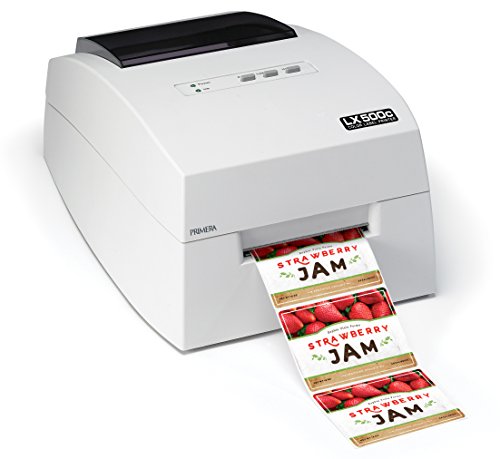
Primera builds label printers the way other makers build product lines: labels are the whole business, and the LX500 is its desktop colour press for small producers. The title states the two facts a label buyer most needs from a headline — a 4800 DPI print resolution and a built-in cutter — and both deserve unpacking. Resolution on a label is not a vanity figure: labels carry small type, ingredient lists, barcodes and logos at sizes where coarseness shows immediately, and a high stated DPI is the difference between a jar that reads as professionally produced and one that reads as homemade in the unflattering sense. The built-in cutter matters just as much, because roll printing without cutting produces a ribbon of labels that still needs separating, and a press that prints and cuts delivers finished labels at the pace a packing bench actually works.
The LX500’s natural owner is the small producer whose labels are the brand: the food maker whose jars sit beside national brands, the cosmetics blender whose bottles sell on shelf appeal, the brewery or roaster whose runs are short and whose designs change with the season. Roll-fed inkjet suits that owner precisely — print the run the week requires, in the design this season uses, without a print shop’s minimum order or a warehouse of pre-printed stock ageing in the corner. Colour quality on product labels is a commercial argument, not an aesthetic one: the label is the advertisement the product carries into every kitchen it enters.
Ownership questions belong to the listing and Primera’s documentation rather than to this title: the roll widths the machine accepts, the ink cartridge format and yield, and the label stocks whose surfaces take inkjet colour properly — matte and gloss media behave differently under ink, and the wrong stock pairing dulls exactly the colour the machine was bought for. Buyers should also think honestly about run length: a desktop press rewards runs in the dozens and hundreds, while a business printing thousands of identical labels daily belongs in the step-up class described later in this guide. For the producer in the dozens-to-hundreds band, though, the LX500 is the reference machine of this category. Open its listing, check the current price on Amazon, and price a starter set of rolls and ink beside it before the first design is finalised.
A workflow note for first-time label press owners: design for the cutter and the roll from the start. Label dimensions are set by the stock loaded and the cut length chosen, so artwork built at arbitrary sizes wastes media at the edges of every run. Producers who standardise two or three label sizes across their whole range — one for jars, one for bottles, one for boxes — find their stock buying simpler, their changeovers faster and their shelves calmer. The machine enables that discipline; it cannot impose it, and the producers who thrive with a desktop press are the ones who treat label sizes as a system rather than a series of improvisations.
Shelf context sharpens the case further. A small producer’s label does not sit alone; it sits between competitors whose labels were printed by industrial presses at enormous runs, and the customer’s hand reaches in the half second after the eye lands. Desktop inkjet at a stated high resolution has quietly closed most of that visual gap, which is why this category exists at all: the jar printed in the back room can now hold its own in that half second. What the machine cannot supply is the design itself, and producers should budget as much honesty for their artwork as for their hardware — a strong label printed well beats a weak label printed beautifully, every market day of the week.
- Class per listing title: colour label printer, roll-fed inkjet class
- Resolution per title: 4800 DPI
- Cutter per title: built-in cutter
- Model reference per title: 74275
- Maximum roll width: Not stated in the listing title — verify with the manufacturer documentation
- Print speed: Not stated in the listing title — verify with the manufacturer documentation
Strengths
- A stated 4800 DPI suits labels carrying small type, barcodes and detailed logos.
- The built-in cutter delivers finished labels without a second device.
- A dedicated label press from a maker whose whole range is label printing.
Trade-offs
- Roll width and ink yield are unstated in the title, so stock planning needs the documentation.
- Desktop scale suits runs in the hundreds, not thousands of identical labels daily.
- Inkjet colour demands correctly matched label stock; the wrong surface dulls output.
Best for: small food, cosmetics and craft producers printing branded product labels in runs of dozens to hundreds.
Not suited for: a business printing thousands of identical labels every day, which belongs in the step-up press class below.

Epson ColorWorks CW-4000 — The matte inkjet workhorse
Epson’s ColorWorks line is the other established name in colour label printing, and the CW-4000 listing here specifies the matte configuration with an auto cutter. That single adjective, matte, carries the review. Matte label output is the working finish of serious product labelling: it reads without glare under shop lighting, it takes the printed look of letterpress and craft production that gloss cannot imitate, and it suits the food, beverage and natural-products brands whose shelves dominate this market. A buyer whose brand language is gloss and shine should register the configuration in this title and check the listing for how this model is offered, because finish is not a setting a label press changes casually — it is a property of the ink and media system the machine is built around.
The auto cutter places the CW-4000 in the same working rhythm as the Primera: print a run from a roll, receive finished labels, apply them. Epson’s presence in this niche also brings an ecosystem argument — ColorWorks is a line rather than a single model, so a business starting at this tier is buying into a family with larger siblings, shared media knowledge and a documentation culture written for production users. For a growing producer, that continuity matters: the operator habits, stock relationships and design templates built at this level travel upward if the business later steps up within the line.
The title is otherwise terse — no resolution figure, no roll width, no speed — so the specification work belongs to the listing and Epson’s documentation, where a production buyer will want the media range, the ink system details and the duty expectations in writing before committing a label programme to the machine. Buyers should also confirm which software paths the machine supports for their design workflow, since label design software is the daily interface of a label operation and a mismatch there is felt every single run. For producers committed to a matte finish and a roll workflow, with volumes in the working hundreds, the CW-4000 is the sober professional choice in this guide. Read its listing in full, check the current price on Amazon, and compare its documented media range against the label sizes your products actually wear.
One production habit separates businesses that love their label press from businesses that tolerate it: proof on the real stock, at the real size, under the shop’s real light. Matte inkjet colour shifts subtly between media batches and finishes, and a thirty-second proof at the start of a run is cheaper than a roll of labels in a colour the brand manager rejects. The CW-4000’s class of machine rewards that discipline with consistency across a season; it cannot substitute for it. Build the proof into the run sheet and the machine’s steadiness becomes the least interesting thing about your labelling, which is exactly what production equipment should be.
Matte deserves one more consideration, because it interacts with the product’s life after labelling. Matte labels forgive handling: fingerprints show less, scuffs read as texture rather than damage, and a jar that travels from market stall to kitchen shelf keeps its composure. For food and natural products, whose packaging is handled constantly and photographed often, that forgiveness is a working property, not a style preference. Buyers weighing the CW-4000 against a gloss alternative should handle sample labels on their own products for a week before deciding; the finish that survives the week is the finish the brand should standardise on, and standardising early is what turns a label printer from a gadget into a system.
- Class per listing title: inkjet colour label printer, ColorWorks line
- Finish per title: matte configuration
- Cutter per title: auto cutter
- Resolution: Not stated in the listing title — verify with the manufacturer documentation
- Maximum roll width: Not stated in the listing title — verify with the manufacturer documentation
- Print speed: Not stated in the listing title — verify with the manufacturer documentation
Strengths
- Matte output suits craft, food and natural-product branding that gloss cannot imitate.
- Auto cutter keeps the print-and-apply rhythm in one machine.
- Part of an established colour label line with larger siblings for growing producers.
Trade-offs
- The matte configuration is a commitment; gloss-led brands should check the listing carefully.
- The title states no resolution, width or speed figures for planning.
- Production buyers must extract the full media and ink specification from documentation.
Best for: producers whose brand finish is matte and whose label runs are steady hundreds on roll stock.
Not suited for: brands built on high-gloss label presentation, since this listing specifies the matte configuration.
QL-E100 Color Label Printer — The touchscreen roll alternative
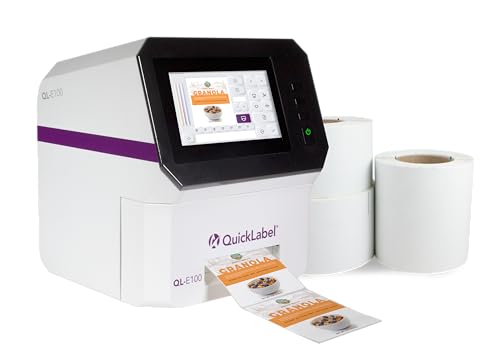
The QL-E100’s title argues for a different kind of convenience: a full colour label printer with a built-in touchscreen and auto-cutter, free design software, and the ability to print professional-quality labels on inkjet label rolls from stored memory, a USB stick or a Windows computer. Each clause maps to a real friction in small-business labelling. The touchscreen means the machine can be operated at the packing bench without a dedicated computer session for every run. Stored memory and USB-stick printing mean repeat labels — the standard product line, the address and ingredient standards — live at the machine, callable by whoever is packing, rather than inside one person’s laptop. The bundled design software removes the first software purchase from a new label programme’s budget.
That combination sketches its owner clearly: a small business where labelling is a bench task shared among staff, not a design-studio ritual performed by one specialist. Bakeries and delis printing daily specials and date labels, workshops labelling parts and products, retailers producing shelf and product labels in-house — operations where the person printing is rarely the person who designed, and where a touchscreen and stored designs flatten the training curve to nearly nothing. The inkjet roll foundation keeps it in the true colour family: this is full colour on rolls with an auto-cutter, the same media logic as the Primera and Epson, wearing a more appliance-like interface.
The cautions are about depth rather than direction. A Windows computer is the stated design path, so a business standardised on other systems should confirm its workflow against the listing before ordering. No resolution, roll width or speed figure appears in the title, so the production specification — how wide, how fast, which stocks — belongs to the listing and documentation, and a buyer with demanding label sizes should extract those numbers before falling for the interface. Brand depth also differs from the two established names above: the support and media ecosystem around a newer entrant is a fair question to ask on the listing. For the bench-shared, touchscreen-friendly operation, though, the QL-E100 makes the most approachable case in the roll family. Go to its listing, check the current price on Amazon, and verify the roll width against your largest label before it joins the bench.
Think about who touches the machine across a week, because that is where this design earns or loses its keep. In a specialist workflow, a computer-driven press is fine; in a shared-bench workflow, every run that requires finding the right laptop, the right file and the right person is a run that gets postponed, batched badly or printed wrong. Stored designs plus a touchscreen collapse that chain into a walk-up task, and walk-up tasks get done at the moment they are needed — the date label printed when the tray is filled, not at the end of the day from memory. Businesses recognising their own afternoons in that description should weigh the interface as heavily as any specification in this guide.
- Class per listing title: full colour label printer on inkjet label rolls
- Interface per title: built-in touchscreen
- Cutter per title: auto-cutter
- Print sources per title: stored memory, USB stick or Windows computer
- Software per title: free design software included
- Maximum roll width: Not stated in the listing title — verify with the manufacturer documentation
Strengths
- Touchscreen plus stored designs makes labelling a walk-up bench task.
- Auto-cutter and roll media keep it in the true colour label family.
- Bundled design software removes a first purchase from a new label programme.
Trade-offs
- The stated computer path is Windows, which other-standardised businesses must check.
- No resolution, width or speed figure is stated for production planning.
- A newer name carries a thinner media and support ecosystem than the established lines.
Best for: small operations where several staff print labels at a shared bench from stored designs.
Not suited for: a business whose label design workflow is standardised on non-Windows systems without checking compatibility first.

Liene PixCut S1 — The sticker maker with a cutter
The PixCut S1 crosses the border between the guide’s two families, and its title says so: a colour sticker printer and cutting machine, an all-in-one sticker maker for crafts, custom labels and gifts, using thermal dye-sublimation at a stated 300 DPI with precise AI auto-cutting. Dye-sublimation is the photographic printing technology — continuous-tone colour, the same family as the pocket photo printers reviewed on this site — and on sticker media it produces the vivid, photo-rich stickers that inkjet label rolls rarely attempt. The integrated cutting is the second half of the proposition: stickers live by their shapes, and a machine that prints and then cuts the shape in the same workflow removes the separate cutting device that sticker sellers otherwise buy, learn and maintain.
Its owner is the sticker-led small business: the Etsy seller whose product is the sticker pack itself, the café labelling jars with illustrated seals, the event business producing custom favours, the brand whose packaging closes with a printed sticker rather than a printed box. For those owners, labels are short runs of many designs rather than long runs of one, and pre-cut or sheet media with automatic cutting matches that rhythm better than a roll press optimised for repetition. The stated 300 DPI should be read in dye-sub terms — continuous tone renders photographs and gradients smoothly at figures that would look coarse from an inkjet — while small text remains the roll presses’ territory, a distinction the reviews in this guide keep honest.
Media economics define the ownership: sticker sheets and dye-sub consumables are bought per sheet rather than per roll, so cost per sticker at volume will not chase a roll press down, and a business whose sticker volume explodes should expect to graduate toward roll printing for its standard designs while keeping a machine like this for the creative short runs. Buyers should confirm the media sizes and the cutting area on the listing, since neither is stated in the title, and should think about which of their designs are truly stickers — decorative, shaped, photo-led — against which are working labels carrying ingredients and barcodes. For the sticker-first business, the PixCut S1 is the most complete single box in this guide. Visit its listing, check the current price on Amazon, and price its media for your busiest month before ordering.
The creative workflow deserves a sentence of its own. Sticker businesses iterate: a design sells, a variant follows, a seasonal set appears, and the machine that prints and cuts a test sheet in minutes turns that iteration from a print-shop negotiation into an afternoon’s play. That speed of experiment is a commercial asset for sellers whose market rewards novelty, and it is the deepest reason a dye-sub sticker maker belongs in a business guide rather than a craft corner. Keep the working labels on the roll press if you run both; let this machine do what it was imagined for, and it will pay for its shelf in designs tested cheaply.
Consider also where sticker printing sits in a product range’s economics. A sticker is often the highest-margin printed object a small brand sells: the media cost is modest, the design carries the value, and the customer is buying the artwork as much as the object. A machine that prints and cuts those objects in-house captures that margin whole, without a print supplier’s minimums dictating which designs may exist. Sellers whose catalogues live on fresh designs will feel that freedom in their release calendar — a sticker set can respond to a moment within days — and that responsiveness, more than any specification, is the PixCut S1’s commercial argument.
- Class per listing title: colour sticker printer and cutting machine
- Print technology per title: thermal dye-sublimation
- Resolution per title: 300 DPI
- Cutting per title: precise AI auto-cutting
- Positioning per title: DIY crafts, custom labels and gifts
- Media sizes: Not stated in the listing title — verify with the manufacturer documentation
Strengths
- Print and cut in one machine removes a second device from the sticker workflow.
- Dye-sublimation colour flatters photographic and illustrated sticker designs.
- Short runs of many designs suit its rhythm better than roll repetition.
Trade-offs
- Sheet media economics lose to rolls as identical-label volume grows.
- Fine small text on ingredient labels is the roll inkjet family’s strength, not this one’s.
- Media sizes and cutting area must be confirmed on the listing.
Best for: sticker-led sellers and brands producing short runs of many illustrated, shaped designs.
Not suited for: a producer printing long runs of one text-heavy product label, where a roll press is the correct tool.

Cricut StickerPix Print — The phone-first sticker route
Cricut arrives in this guide from the craft ecosystem its name dominates, and the StickerPix Print is its phone-first sticker proposition: a photo printer for iPhone and sticker maker, an all-in-one photo, label and sticker machine, sold as an essential bundle in sea green with pre-cut sticker and photo paper included. The bundle is the honest headline. A buyer receives a working system on day one — machine plus the media it eats — which suits the way craft-led businesses actually start: not with a media specification spreadsheet, but with a product idea and a weekend. Pre-cut media removes the cutting question entirely for standard shapes, trading the PixCut’s shape freedom for simplicity.
The iPhone-led workflow defines the machine’s temperament. Design and printing live in the phone the owner already carries, which suits sellers who photograph their products, design their stickers and run their shops from the same device. In a Cricut household the machine also joins an existing ecosystem of tools and habits, and that familiarity is a genuine feature for the craft business whose cutting machine already sits on the same bench. What this route does not pretend to be is a production label press: nothing in the title speaks of rolls, cutters for arbitrary lengths or production software, and a business whose labels are working product labels — ingredients, weights, barcodes, compliance text — should be looking at the roll family above, full stop.
Buyers should verify the ongoing media story on the listing: which pre-cut sticker and photo papers the machine uses, in what sizes, and how the bundle’s included stock translates into a monthly media budget once the shop is selling. Phone-platform scope deserves the same check — the title names iPhone, so a household or business standardised elsewhere should confirm its options before ordering. For the craft seller whose stickers are decorative, whose design tool is a phone and whose volumes are bundles and market stalls, the StickerPix is the gentlest entry into colour label work in this guide. Open its listing, check the current price on Amazon for the bundle, and count the included media against your first month’s planned products.
There is also a gift and event dimension the title names and business buyers should not dismiss. Custom stickers and photo prints for events — weddings, parties, corporate gifts — are a real micro-business category, and a portable phone-led machine that arrives with its media included is close to a business in a box for that niche. The operator prints at the event or from the stall, the product is personal by definition, and the volumes per design are tiny while the margin per sheet is healthy. Judged as a production press it looks small; judged as an event business’s entire print department, its proportions are exactly right, and that reframing is the fairest way to read its place in this guide.
- Class per listing title: photo printer and sticker maker for iPhone
- Functions per title: photo, label and sticker machine in one
- Media per title: pre-cut sticker and photo paper included in bundle
- Colour of unit per title: sea green, essential bundle
- Roll printing: Not stated in the listing title — verify with the manufacturer documentation
- Print resolution: Not stated in the listing title — verify with the manufacturer documentation
Strengths
- The bundle includes media, so the system works from the first day.
- Phone-first workflow matches sellers who run their shop from an iPhone.
- Joins the Cricut ecosystem many craft businesses already own and know.
Trade-offs
- Pre-cut media fixes shapes and sizes rather than cutting arbitrary lengths.
- The title names iPhone, so other platforms must verify their route on the listing.
- Not a production label press for text-heavy, compliance-led product labels.
Best for: craft and event sellers producing decorative stickers and photo products from a phone in short runs.
Not suited for: a producer whose labels carry ingredient lists, weights and barcodes across long identical runs.
Roll-fed inkjet color label presses (step-up class) — The volume upgrade path
Every desktop press in this guide has a ceiling, and honest buying means knowing where it is. When a business’s label runs stretch from hundreds into thousands, when the same designs repeat weekly at production pace, and when the packing line rather than the packing bench sets the rhythm, the correct machine is a class up: the larger roll-fed inkjet colour label presses, the step-up tier above the desktop units sold by the established label makers. This entry is deliberately prose-only and deliberately free of model numbers, because the right step-up machine depends on a specification conversation — roll width, throughput, ink system, finishing — that should happen against a producer’s real volumes and documented requirements, not against a name dropped into a roundup.
What defines the class can still be described usefully. Step-up presses keep the desktop family’s logic — full colour inkjet onto label rolls — and scale every part of it: wider rolls, larger ink supplies that lower the cost per label as volume climbs, faster throughput for repeat runs, and finishing options that cut, rewind and prepare rolls for applicators rather than for hands. The economics invert the desktop calculation: the machine costs more and the label costs less, and the crossover point is a monthly label count a business can measure from its own order book. Producers approaching that count should also expect the buying process to change character — demonstrations, media trials on their own artwork, service arrangements — because at this tier the press is production equipment, bought the way production equipment is bought.
Who should not climb? A business whose growth is in design variety rather than run length gains little: the step-up class monetises repetition, and a catalogue of two hundred designs in runs of fifty is still desktop work, merely busy desktop work. The trigger for stepping up is narrower and more specific — a small set of designs whose runs keep lengthening, a packing operation waiting on labels, a cost per label that volume has made embarrassing. When two of those three are true, the conversation with the established makers about their larger presses is due, and the desktop machine that taught the business its labelling discipline retires to short runs and specials with honour. No link is offered for this class here, by design: take your counted volumes and your label sizes to the makers’ own channels and let the specification process do its work.
One discipline travels upward unchanged, and it is worth stating for businesses on the step-up threshold: the label system matters more than the label machine. Sizes standardised, artwork built to the stock, brand colours proofed per media batch, barcodes verified by scanner — those habits, formed on a desktop press, are what make a production press profitable rather than merely fast. Businesses that skip the habits at desktop scale discover that a faster machine produces their inconsistencies at greater speed and cost. The step-up class rewards the disciplined and exposes the improvised, which is a final reason this guide describes the class in prose and sends its readers in with their systems already in order.
- Class: roll-fed inkjet colour label presses above the desktop tier
- Defining traits: wider rolls, larger ink supplies, production throughput, roll finishing options
- Buying route: specification process with the makers, against counted monthly label volumes
- Individual models: not named here — selection depends on roll width, throughput and finishing requirements
- Cost logic: higher machine cost exchanged for lower cost per label at sustained volume
Strengths
- Cost per label falls as volume climbs, which is the whole point of the tier.
- Production throughput and roll finishing serve applicators and packing lines.
- Keeps the roll inkjet workflow and media knowledge a business already built.
Trade-offs
- Capital cost is production-equipment territory, unjustifiable at desktop volumes.
- Monetises repetition, so design-led variety gains little from the climb.
- Demands a specification and service conversation rather than a simple order.
Best for: producers whose few core designs now run in thousands with a packing operation waiting on labels.
Not suited for: businesses whose growth is in design variety at short run lengths, where desktop presses remain correct.
Comparison Table
| Pick | Colour route | Media system | Cutting stated in title |
|---|---|---|---|
| Primera LX500 | Inkjet, 4800 DPI stated | Label rolls | Built-in cutter |
| Epson ColorWorks CW-4000 | Inkjet, matte configuration | Label rolls | Auto cutter |
| QL-E100 | Inkjet, full colour | Inkjet label rolls | Auto-cutter |
| Liene PixCut S1 | Thermal dye-sublimation, 300 DPI stated | Sticker sheets | AI auto-cutting |
| Cricut StickerPix Print | Colour photo and sticker printing | Pre-cut sticker and photo paper | Not stated in the listing title |
| Roll-fed inkjet presses (step-up class) | Inkjet, production class | Wider label rolls | Roll finishing options by specification |
How to Choose a Color Label Printer for a Small Business
Start by naming what your labels actually are, in the least romantic terms available. A working product label — ingredients, weight, barcode, your logo in colour, repeated identically across a production run — belongs to the roll inkjet family, and the choice inside that family turns on finish, interface and ecosystem: matte discipline from Epson, the dedicated press pedigree of Primera, the walk-up touchscreen logic of the QL-E100. A decorative sticker — illustrated, shaped, photographic, different every week — belongs to the dye-sub family, where the PixCut S1 cuts its own shapes and the Cricut bundle starts a phone-led shop from a single box. Businesses with both needs are common, and the honest answer for them is often one machine from each family rather than a compromise that serves neither.
Then run the consumables arithmetic before admiring any hardware. Estimate your monthly label count by design, price the rolls or sheets and ink that count consumes for each finalist, and compare the season’s media bill beside the machine’s price. In this category the media bill wins every argument over a year, and it also exposes the step-up question early: if the counted volume already embarrasses desktop economics, the prose-only class above is your real shortlist and the desktop machines are a detour. Finally, proof before you commit a range: print your actual artwork, at actual size, on the actual stock, and stick it on the actual product. A label is judged on a curved jar under shop light, not on a screen, and every machine in this guide will forgive a buyer who checked — and expose one who assumed.
Ink and media compatibility is the technical thread running under every paragraph of this guide, and it deserves one plain statement. Inkjet label colour only performs on stock coated to receive it; uncoated or thermal stock under an inkjet produces dull, smearing output that no printer setting can rescue, and the same logic binds dye-sub machines to their own media families. Every finalist’s listing and documentation should therefore be read for its media specification before a single roll or sheet pack is ordered, and the first order should be small, whatever the bulk discount says. Businesses learn their true media in the first month of production; the ones that stocked a warehouse on day one learn it surrounded by evidence.
Why Do So Many Label Printers Print Only in Black?
Because the dominant label jobs in business are informational rather than decorative, and thermal printing serves them brilliantly: a shipping label, a barcode, a shelf edge needs legibility and speed, not colour, and heat on coated stock delivers both with no ink to buy or dry out. Colour entered labelling through branding rather than logistics — the moment small producers began selling on shelf appeal, the label became a marketing surface and monochrome stopped being enough. That history explains the market’s shape: a vast thermal monochrome majority serving logistics, and a small colour minority, represented here, serving brands. Knowing which side of that line your labels live on is the entire first step of buying correctly.
Roll or Sheet: Which Media System Fits a Growing Brand?
Rolls reward repetition and punish variety; sheets reward variety and punish repetition. A roll press prints a design hundreds of times at the lowest cost per label, but every design change is a media decision and short runs waste setup attention. Sheet and pre-cut systems print a handful of one design as happily as a hundred, which suits sticker packs, seasonal variants and event work, at a higher cost per piece that volume eventually exposes. Growing brands usually feel the answer in their order book: when a few core designs begin outselling the long tail of experiments, rolls take over the core while sheets keep the experiments — the two-family pattern this guide’s shortlist was built to make possible.
What Should a First Label Run Check Before the Full Print?
Legibility at arm’s length, first: the smallest type on the label, read on the product, under the light where it will be sold. Colour truth, second: brand colours printed on the actual stock, since matte and gloss media render the same file differently enough to matter. Adhesion and finish, third: the label on the real jar, bottle or box, through a night in the fridge or a day in the sun if that is the product’s life. And the barcode, always: scanned with a real scanner, not admired. A first run treated as a test — a short roll, a single sheet batch, examined without mercy — costs a little media and saves the embarrassment of a full run discovered wanting by a customer.
Common Mistakes in Colour Label Buying
Buying a monochrome thermal printer while expecting colour remains the category’s signature disaster, and it happens because marketplace language blurs the two families shamelessly. A second error follows close behind: falling for a printer’s headline and never pricing its media, so the machine that looked affordable reveals its true cost in the third month of rolls or sheets. Designers sabotage good machines by building artwork at sizes the stock does not come in, wasting media on every run’s edges. Businesses also outgrow machines in the wrong direction — buying a production press for variety work, or strangling a hit product’s growth on a desktop press long after its runs demanded the step-up class. And beneath them all sits the quietest mistake: never proofing on the real product, so the label’s colour, adhesion and legibility are discovered by customers instead of by the maker.
Final Recommendation
Let the label itself choose the family. Working product labels in repeat runs belong on a roll inkjet press: the Primera LX500 for the dedicated desktop press with a stated resolution and cutter, the Epson ColorWorks CW-4000 where a matte finish is the brand’s language, the QL-E100 where shared-bench staff need a touchscreen and stored designs. Decorative stickers belong on dye-sub: the Liene PixCut S1 when shapes must be cut in-house, the Cricut StickerPix bundle when a phone-led craft shop wants to start from one box. And when the order book says the runs have outgrown every desktop in this guide, believe it, and take your counted volumes to the step-up class. A label is the smallest advertisement a business owns; the producers who print it well are the ones who bought the machine their labels — not the marketplace’s vocabulary — described.
A final word on sequencing the purchase: buy the machine and a deliberately small media basket together, run the proofing discipline this guide describes for a fortnight of real orders, and only then commit to bulk stock. That sequence feels slower than ordering everything at once, and it is faster in the only sense that matters — it reaches a calm, repeatable label system without a storeroom of wrong rolls standing as tuition. Small businesses rarely lack ambition; what they lack is spare cash for avoidable lessons, and label printing punishes haste in exactly that currency.
Frequently Asked Questions
Can a normal shipping label printer print in colour?
No. Shipping label printers are direct thermal machines that print black on coated stock, and no setting changes that. Colour labels require one of the two families in this guide: roll-fed inkjet presses for product labels, or dye-sublimation machines for stickers and photo-led labels.
Which family is cheaper per label?
Roll-fed inkjet, once runs lengthen, because roll stock and ink spread their cost across hundreds of labels. Sheet and pre-cut sticker media cost more per piece but waste nothing on short runs of changing designs, so the cheaper system depends on your run lengths rather than on a universal answer.
Do these machines print barcodes well enough to scan?
Barcode quality is a resolution and media question. The Primera LX500’s stated 4800 DPI is aimed squarely at crisp small marks, and any finalist should be proofed with a real scanner on your actual stock before a range is committed, because a barcode that will not scan is worse than no barcode.
What label sizes can these machines handle?
The roll presses are bounded by their maximum roll width and the sticker machines by their sheet sizes, and most titles here do not state those figures. Extract them from the listing and documentation and compare them against your largest label before ordering — a press narrower than your label is a storeroom problem, not a printer.
When should a business step up to a production label press?
When a small set of designs runs in thousands, when packing waits on labels, and when the cost per label at desktop economics has become a visible line in the product’s margin. Two of those three signals together mean the step-up class described in this guide deserves a specification conversation.
Can I print waterproof labels on these machines?
Water resistance in labelling is mostly a media property: synthetic label stocks shed water that paper stocks absorb, and the ink system must be matched to the synthetic surface. None of the titles here makes a waterproof claim, so a business labelling chilled, wet or outdoor products should choose its stock from the manufacturer’s documented media range and test labelled products in their real conditions before committing a range.
Related Guides
The portable end of labelling — the monochrome machines this guide deliberately corrected away from — is covered properly in our handheld label printer guide for home and workshop organisation. Businesses standardising their wider print fleet should also read our enterprise network printer comparison for the office machines around the label bench. And for the products themselves once labelled and photographed, our pocket photo printer guide covers the small colour printers behind packshots and inserts.