What's inside
- Where to Buy
- Key Takeaways
- Quick Picks
- How We Chose These Picks
- Comparison
- How to Choose a Canon Professional Photo Printer
- Dye or Pigment Ink: Which Belongs on Your Paper Shelf?
- Is 13 Inches Enough, or Will You Outgrow It Within a Year?
- Why Does This Guide Leave One Class Without a Link?
- Photo Printing Errors That Cost Real Paper
- Final Recommendation
- Frequently Asked Questions
- Related Guides
As an Amazon Associate I earn from qualifying purchases. This post may contain affiliate links at no extra cost to you.
[SITE_DOMAIN] is reader-supported. When you buy through links on our site, we may earn an affiliate commission.
Where to Buy
Professional photo printers are bought slowly, and Amazon listings for this Canon family reward a slow read. The current 13-inch dye machine is the Canon PIXMA PRO-200S, whose own page carries the live figure for the model in the black finish its title names. Pigment devotees start one shelf up at the Canon imagePROGRAF PRO-310, while the wide-format argument lives at the Canon imagePROGRAF PRO-1100 listing. Two earlier generations remain on sale — the Canon PIXMA PRO-100 and the Canon PIXMA PRO-10 — and their pages are where their remaining stock is priced. The PRO-1000 class discussed at the end has no listing linked here at all, for reasons its review explains.
Photographers searching for the best canon pixma pro printers are chasing a particular pleasure: a print that leaves the machine looking like the photograph felt. Canon professional line has served that chase for years, first under the PIXMA PRO name and now partly under the imagePROGRAF banner, and this guide gathers the six machines that define the family today — five with live listings to examine, and one larger class discussed in prose because no clean current listing supports linking it honestly.
The family divides along two axes that matter more than any other. The first is format: three machines print at 13 inches wide, one flagship reaches 17 inches, and the prose-only class sits at that larger scale too. The second is ink chemistry: dye ink, named in the PRO-200S title as an 8-colour system, against pigment ink, named in the PRO-310 title as a 9-colour system. Dye and pigment behave differently on glossy and matte papers and age differently on a wall, so the reviews treat chemistry as a first-class decision rather than a footnote.
Evidence discipline matters unusually in this category, because two of the five linked titles — the veteran PRO-100 and PRO-10 — say almost nothing beyond the words professional photo printer. Their reviews therefore describe their family position honestly while their spec boxes record, in the standard sentence, what those titles leave unstated. Nothing in this guide upgrades a silent title into a specification, however well a model may be remembered from its era.
A word about what professional means in these names, because the word does heavy lifting in this family. It signals printers built around photographs rather than documents: multi-colour ink systems instead of four, paper paths that accept thick fine-art stock, and formats wider than an office page. It does not signal speed, and photographers arriving from office machines should recalibrate — these are deliberate instruments, judged by the sheet that comes out finished, not by the minute that produced it.
Key Takeaways
- Two linked machines state a 13-inch format in their titles: the PIXMA PRO-200S (8-colour dye ink) and the imagePROGRAF PRO-310 (9-colour pigment ink). The veteran PIXMA PRO-100 and PRO-10 titles state no format at all.
- The imagePROGRAF PRO-1100 is the 17-inch linked flagship; the PRO-1000 class at the same width is covered prose-only because no clean current listing was verified for it.
- Ink chemistry splits the current pair: dye in the PRO-200S title, pigment in the PRO-310 title.
- Both current 13-inch models state a 3-inch colour LCD in their titles; the veteran titles state almost no specifications at all.
- Every linked model here is a wireless inkjet photo printer where its title says so; the two veteran titles leave even connectivity unstated.
Quick Picks
| Pick | Badge | Why it earns a place |
|---|---|---|
| Canon PIXMA PRO-200S | Current 13-inch dye printer | A 13-inch wireless photo printer with an 8-colour dye ink system and a 3-inch colour LCD. |
| Canon imagePROGRAF PRO-310 | 13-inch pigment for matte papers | A 13-inch wireless photo printer with a 9-colour pigment ink system and a 3-inch colour LCD. |
| Canon imagePROGRAF PRO-1100 | 17-inch wide flagship | A 17-inch professional wireless inkjet photo printer, the widest linked machine here. |
| Canon PIXMA PRO-100 | Veteran 13-inch generation | An earlier-generation PIXMA PRO professional photo printer, listed with a title of five words. |
| Canon PIXMA PRO-10 | Veteran pigment generation | The pigment-side veteran of the PIXMA PRO line, under an equally brief title. |
| Canon imagePROGRAF PRO-1000 class | The 17-inch class above, in prose | The larger professional class at 17 inches, discussed without a link because no clean current listing was verified. |
How We Chose These Picks
The net was cast over one family only: Canon professional photo printers, PIXMA PRO by name or imagePROGRAF PRO by its successor branding. Consumer PIXMA machines, however good, live in a different guide, because the professional line is defined by wide-format feeding, multi-colour ink systems and papers that consumer trays cannot take. Keeping the boundary at the family line keeps every comparison inside this guide honest.
Currency was weighed openly rather than hidden. Two listings here are current-generation machines with detailed titles; two are veterans whose titles have shrunk to a name and a claim; one is a wide flagship. A photographer deserves to see that spread labelled plainly, because the right purchase differs completely between a printer bought for its present ecosystem and one bought as a known quantity from a mature era.
Ink evidence was taken strictly from titles. Where a title names a colour count and a chemistry, the review builds on it. Where a title names neither — the veterans, and the PRO-1100 on chemistry — the spec box says so in the standard sentence and the prose discusses the model in terms of format and family position instead. No ink set has been reconstructed from memory or from a neighbouring model.
The prose-only slot was a deliberate editorial act. The 17-inch class above the PRO-1100 is part of any honest map of this family, yet no verified clean listing for it stood in the current pool, so it is discussed as a class, with its role explained and no purchase link attached. A guide that links only what it can stand behind earns the right to be believed about the five machines it does link.

Canon PIXMA PRO-200S — Current 13-inch dye printer
The PIXMA PRO-200S is the current centre of gravity in this family: a 13-inch professional wireless inkjet whose title names its 8-colour dye ink system and its 3-inch colour LCD in one breath. For the photographer printing at home on glossy and luster papers — the surfaces where dye ink has always sung — this is the machine Canon presently intends you to buy, and its specification reads like a summary of what the class has learned.
Dye chemistry deserves a plain explanation, because it decides this model fitness more than any other line. Dye inks soak into coated photo papers and produce the saturated, glossy finish that suits portraits, travel work and anything destined for a frame behind glass. The 8-colour count in the title signals a gamut built for photographs rather than documents. Photographers whose work lives on matte fine-art papers should read the pigment review below before deciding, because chemistry loyalty is the one choice in this guide that cannot be revised later by buying different paper alone.
The colour LCD is a small feature with daily consequences. A screen on the printer turns ink checks, paper settings and network chores into tasks done standing at the machine rather than through a driver expedition on the computer. In a home studio where the printer shares space with everything else, that self-sufficiency keeps the machine approachable for the rest of the household too.
Thirteen inches is the format where home photo printing becomes serious without becoming furniture. A print at that width carries a photograph across a room; it mats and frames to a size galleries recognise, yet the printer still sits on a desk rather than demanding a stand and a dedicated corner. The PRO-200S occupies that sweet spot in its current generation, which is why it opens this guide as the default recommendation for most photographers.
Wireless in a photo printer earns its keep differently from wireless in an office machine. The photograph begins on a computer, often a laptop that migrates around the house, and a printer that can be reached from the sofa-side editing chair gets used for the small test prints that make the big ones succeed. Proofing is the hidden workload of serious printing, and a reachable printer turns proofing from a project into a habit.
Judge this model against your paper shelf, not against an abstract rival. If the shelf holds glossy, luster and baryta-style photo papers, the dye system is at home. If it holds cotton matte papers bought for their texture, keep reading — the next review exists for that shelf, and choosing chemistry against your own paper stock is the most expensive mistake available in this category.
- Format stated in title: 13 inches
- Ink system stated in title: 8-colour dye ink
- Display stated in title: 3-inch colour LCD
- Connectivity: wireless
- Class: professional inkjet photo printer
- Finish: black
- Paper handling detail: Not stated in the listing title — verify with the manufacturer documentation
Strengths
- Current-generation 13-inch format with dye ink for glossy photo work.
- An 8-colour system is named in the title.
- A 3-inch colour LCD makes the machine self-sufficient at the desk.
Trade-offs
- Dye chemistry is not the matte fine-art specialist here.
- Thirteen inches is its ceiling; panorama ambitions need the 17-inch class.
- Paper handling specifics are not stated in the title.
Best for: a photographer printing glossy and luster work at 13 inches for frames, gifts and portfolio pages. Not suited for: printing wider than 13 inches, because the format in this title stops at that width.
Begin ownership with paper honesty: load the paper you actually shoot for, run the alignment and a familiar image, and judge the printer on a photograph whose tones you know by heart rather than on a test page. Keep the first satisfactory print as your reference copy for future comparisons. When the time comes to order, the PRO-200S page is where to check price on Amazon for this dye model, confirming the 8-colour wording in the title before the machine joins the studio.

Canon imagePROGRAF PRO-310 — 13-inch pigment for matte papers
The imagePROGRAF PRO-310 answers the other half of the chemistry question. Its title names a 9-colour pigment ink system inside the same 13-inch, wireless, LCD-equipped shape as its dye sibling, and that near-twin specification is what makes the comparison so instructive: Canon offers the format twice, once for each ink religion, and asks the photographer to choose by paper and by purpose rather than by size or screen.
Pigment ink sits on the paper surface rather than soaking in, a behaviour that matte and fine-art papers reward with deep, textured blacks and a surface that looks printed rather than glazed. Pigment is also the chemistry associated with display longevity, the prints intended to hang for years in real light. Photographers selling prints, exhibiting matte work or printing a family archive meant to outlast fashions will feel the pull of this model, and the 9-colour count in the title — one more than the dye machine — underlines its serious intent.
The shared furniture matters too. Wireless keeps the proofing habit alive from wherever editing happens, and the 3-inch colour LCD gives the machine the same stand-alone manners as its sibling: ink, paper and network managed at the printer. A studio choosing between the two current 13-inch Canons is therefore choosing ink, purely and simply, which is the cleanest decision this category offers.
Matte printing has a temperament worth understanding before purchase. A pigment print on cotton paper rewards patience: the surface is delicate when fresh, the blacks deepen as it dries, and the finished object feels closer to a gallery piece than to a photograph from a kiosk. Photographers who love that object will forgive pigment its slower, more deliberate character. Photographers who want glossy brilliance straight from the tray should let the dye model have them, without a backward glance.
The PRO-310 also marks where the family name changed. imagePROGRAF branding, long Canon wide-format professional line, now sits on a 13-inch desktop machine, which tells buyers the company regards this class as part of its professional continuum rather than as an enthusiast sideline. That positioning matters for ecosystem confidence: papers, profiles and support tend to follow the professional badge, and a printer is a decade-long relationship with exactly those things.
Consider, finally, the mixed shelf. Many photographers print glossy for clients and matte for themselves, and dream of one machine fluent in both. Each chemistry has a home surface and an away surface, and honest buying means choosing the chemistry whose home surface matches the work that matters most, then accepting competent rather than magical results on the other. The PRO-310 is the matte-first answer, stated in its own title.
- Format stated in title: 13 inches
- Ink system stated in title: 9-colour pigment ink
- Display stated in title: 3-inch colour LCD
- Connectivity: wireless
- Class: professional inkjet photo printer
- Finish: black
- Paper handling detail: Not stated in the listing title — verify with the manufacturer documentation
Strengths
- Pigment chemistry serves matte and fine-art papers at 13 inches.
- A 9-colour system is named in the title.
- The colour LCD and wireless match its dye sibling convenience.
Trade-offs
- Glossy devotees will prefer the dye model surface.
- Thirteen inches remains the width ceiling.
- It shares the family silence on detailed paper handling in the title.
Best for: a photographer printing matte and fine-art work at 13 inches for exhibition, sale or a long-kept archive. Not suited for: a studio whose signature surface is high-gloss, because pigment ink home ground is the matte paper shelf.
Start this machine on the paper that justifies it: a matte sheet you trust, a black-rich image, and the patience to let the print dry before judging its blacks. Keep that first print as the studio reference for the model. To compare the pigment route fairly, look at the PRO-310 listing and check price on Amazon beside the dye machine figure, so the chemistry decision is made with both numbers honestly in view.

Canon imagePROGRAF PRO-1100 — 17-inch wide flagship
The imagePROGRAF PRO-1100 widens the conversation to 17 inches, and its title is as terse as the veterans: a format, the words professional wireless inkjet photo printer, and nothing else. That brevity forces an honest review. What can be said from evidence is that this is Canon current wide-format entry in the family, wireless, aimed at photographers whose prints have outgrown the 13-inch ceiling. What cannot be said from its title — ink count, chemistry, screen — the spec box records as unstated, and buyers should treat the listing page as required reading rather than optional homework.
Seventeen inches changes what a home studio can offer. A print at that width, matted, becomes the large framed piece above a mantel or the exhibition print that no longer needs outsourcing. Photographers who have been sending their biggest work to a lab — and paying lab prices while surrendering control of the final surface — are the audience for this step up. The machine also changes the room: wide printers are furniture, with a footprint and a paper path that need planning rather than a spare corner.
Within this guide the PRO-1100 is the ceiling of the linked range. Above it sits only the prose-only class discussed last, which shares its width. A photographer deciding at this altitude is deciding about ambition and space, not about screens or ink counts, and should weigh the lab bills of the last two years as the truest evidence of whether the width will be used or merely admired.
Wide printing teaches economy quickly. A failed 17-inch print wastes real paper and real ink, so owners of wide machines develop the proofing discipline that 13-inch owners can postpone: small test prints, soft-proofing on a calibrated screen, and a final check of the file at full size before the big sheet is committed. The PRO-1100 rewards that discipline with prints no smaller machine in the family can physically produce, which is the whole of its argument.
The wireless claim in its title deserves a practical note at this size. A wide printer rarely lives beside the editing desk; it lives where its footprint fits, sometimes in another room. Wireless reach is what makes that separation workable, letting the studio layout follow the furniture rather than the cable. Check the signal at the intended spot with the same care given to a laser printer network, because a wide machine exiled beyond the network is an expensive ornament.
Buyers should also think in paper rolls and sheets at this width — in questions, not assumptions. The title does not describe its feeding arrangements, so the listing page must answer whether the machine takes the media your work requires, in the sizes your frames demand. That single verification, done before purchase, separates a flagship that transforms a practice from a flagship that merely occupies it.
- Format stated in title: 17 inches
- Class: professional inkjet photo printer
- Connectivity: wireless
- Ink system: Not stated in the listing title — verify with the manufacturer documentation
- Display: Not stated in the listing title — verify with the manufacturer documentation
Strengths
- Seventeen-inch width is the widest linked format here.
- Current imagePROGRAF professional branding.
- Wireless allows placement where the footprint fits.
Trade-offs
- Its title states no ink count or chemistry.
- The footprint is furniture-scale, not desk-corner scale.
- Wide prints make proofing discipline essential.
Best for: a photographer whose largest work has been going to a lab and who has the room for a 17-inch machine. Not suited for: a desk corner measuring under the width of a 17-inch paper path, because this format needs planned space, not a spare shelf.
Measure twice before this machine ships: the shelf, the door it must pass through, and the clearance its paper path needs behind it. Then read the listing page end to end, since its title leaves ink and media questions open by design. When the room and the evidence agree, check price on Amazon on the PRO-1100 page itself, and treat the figure as the price of bringing your largest prints home for good.
Canon PIXMA PRO-100 — Veteran 13-inch generation
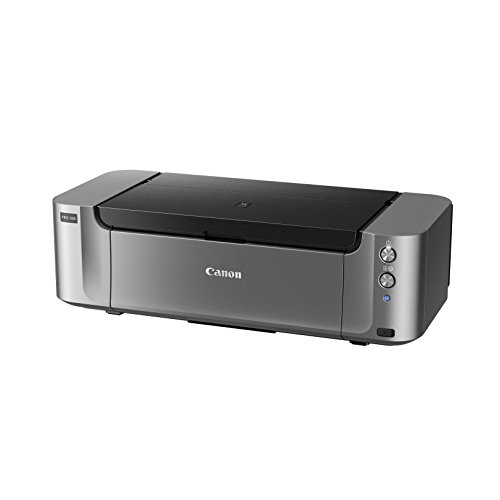
The PIXMA PRO-100 arrives with the shortest title in this guide: Canon PIXMA PRO-100 Professional Photo Printer. Five words of substance, no format, no ink count, no connectivity, no screen. This review will not pretend otherwise. The model is an earlier generation of the PIXMA PRO line, long a fixture of home photo printing, and it remains listed for buyers who know the machine by reputation and want that known quantity rather than the current redesign.
What can be said honestly from family position is this: the PRO-100 belongs to the dye-ink side of the family tree by lineage, as the predecessor generation to the current dye machine reviewed first — but lineage is context, not a title claim, and the spec box below records its ink system as unstated by its own title. Buyers for whom that distinction matters should verify the full specification on the listing page, where the detail this guide refuses to invent is properly published.
Why include a veteran at all? Because mature machines carry mature ecosystems: profiles, papers and community knowledge accumulated over years, and a price position that current models rarely occupy. A photographer entering serious home printing through a known, documented machine makes a defensible choice — provided the choice is made knowingly, with the generation gap in full view, which is how this guide presents it.
There is a real pleasure in buying the machine the internet has already debugged. Every paper quirk, every driver setting and every maintenance routine for a long-lived model has been discovered, documented and argued about by thousands of owners, and a new buyer inherits that library free. For a first serious printer, that inheritance can outweigh a newer badge, particularly when the photographer budget is honestly finite and paper and framing also compete for it.
The counterweight is time. A veteran design belongs to the era of its making, and the conveniences the current titles advertise — colour screens, modern wireless manners — should not be assumed where a title does not claim them. Buy the PRO-100 for what its generation demonstrably is, verify the specifics on its listing, and it will not disappoint; buy it as a disguised current model and it will feel like one long correction.
Stock awareness also belongs in a veteran purchase. Listings for mature machines can shift between new, remaining and marketplace supply, so the condition wording on the listing page deserves the same slow reading as the specification. A photographer who checks condition, seller and returns before ordering converts the veteran gamble into a veteran bargain, which is the only form in which this guide recommends one.
- Class: professional photo printer
- Family position: earlier PIXMA PRO generation
- Format: Not stated in the listing title — verify with the manufacturer documentation
- Ink system: Not stated in the listing title — verify with the manufacturer documentation
Strengths
- A known, mature generation with a deep owner knowledge base.
- PIXMA PRO lineage on the dye side of the family tree.
- Still listed for buyers who want that specific machine.
Trade-offs
- Its title states no format, ink, screen or connectivity.
- It belongs to an earlier design era than the PRO-200S.
- Listing condition and supply need careful reading.
Best for: a photographer who knows this generation by reputation and values its mature ecosystem and documentation. Not suited for: a purchase that requires specifications confirmed in the title itself, because this listing title confirms almost none of them.
Approach this purchase as research first and shopping second: read the full listing, confirm the specification lines this guide leaves open, and check the condition wording twice. Owners who do that homework report the satisfaction of a machine with no surprises left in it. The PRO-100 page is where to check price on Amazon once the research convinces you, matching the model name exactly, since its PRO-10 sibling sits one listing away.
Canon PIXMA PRO-10 — Veteran pigment generation
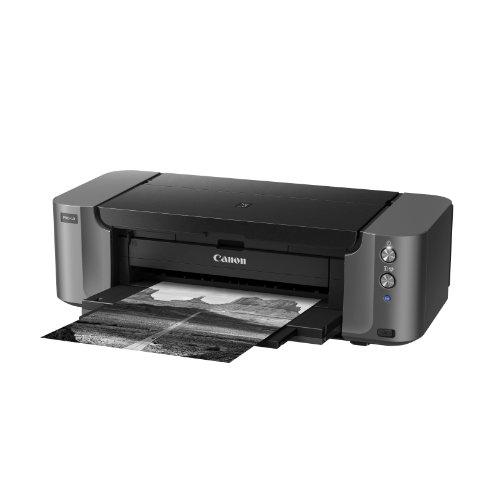
The PIXMA PRO-10 mirrors its sibling position on the other side of the chemistry divide: an earlier-generation PIXMA PRO machine associated by lineage with the pigment side of the family, presented under a title every bit as brief — Canon PIXMA PRO-10 Professional Photo Printer, and nothing more. As with the PRO-100, the spec box records what the title omits, and the review discusses position rather than pretending to numbers it does not have.
The pairing of the two veterans is the most instructive comparison in the guide. Two machines, one family, one era, divided by ink chemistry — exactly the division the current PRO-200S and PRO-310 reproduce a generation later. A photographer who understands why both veterans existed understands the current range instantly: Canon has always sold this format in two chemistries because papers and purposes genuinely split that way, and no generation has managed to merge them into one machine.
For the matte and fine-art photographer on a careful budget, the PRO-10 listing is therefore worth a serious look, with the same veteran cautions as its sibling: verify the specification and the condition on the listing page, expect the manners of its era, and value the deep pool of owner knowledge that a long-lived model accumulates. Bought with open eyes, it is the pigment route into this family at veteran terms.
Pigment ownership has a rhythm that veteran machines teach well. Prints come off the printer needing drying time and gentle handling, and the photographer learns to plan a printing session the way darkroom workers once planned an evening: paper ready, files proofed, no rushing the surface. A mature machine suits that rhythm, because nothing about the work at this level rewards hurry, and the PRO-10 generation was built by and for people who accepted the pace.
The ecosystem point bears repeating on the pigment side. Fine-art paper profiles and community settings for a long-lived pigment machine are a genuine asset, sparing a new owner the expensive month of test sheets that an unknown printer demands. A photographer moving into matte printing can spend that saved month making pictures instead of calibration charts, which is the correct allocation of a life.
Set against the current PRO-310, the veteran case is purely economic and temperamental: a known machine, at veteran terms, against a current design whose title states its 9-colour pigment system and colour screen outright. Neither answer is wrong. The wrong answer is buying the veteran while imagining the current machine specifications, which is why this guide keeps the two titles side by side and lets the evidence argue.
- Class: professional photo printer
- Family position: earlier PIXMA PRO generation, pigment side by lineage
- Format: Not stated in the listing title — verify with the manufacturer documentation
- Ink system: Not stated in the listing title — verify with the manufacturer documentation
Strengths
- The pigment-side veteran of a well-documented generation.
- A budget route into matte and fine-art family printing.
- Deep owner knowledge for papers and profiles.
Trade-offs
- Its title states no format, ink count, screen or connectivity.
- Era manners rather than current-generation conveniences.
- Condition and supply on the listing need verification.
Best for: a matte-paper photographer entering the family through a documented veteran at careful-budget terms. Not suited for: a buyer expecting a colour LCD and current wireless manners confirmed in writing, because this title confirms neither.
Give this listing the slowest read of the five: specification, condition, seller and returns, in that order, before the cart. Photographers who confirm those four things tend to be delighted by veteran pigment machines; those who skip them tend to write the angry reviews. When the reading satisfies you, the PRO-10 page carries its current figure; read it there, keeping its name distinct from the PRO-100 beside it — the two veterans differ by one character and one chemistry.
Canon imagePROGRAF PRO-1000 class — The 17-inch class above, in prose
The final entry is a class rather than a linked product: the imagePROGRAF PRO-1000 class, the 17-inch professional tier that has stood at the top of this family. It appears in this guide without a purchase link, deliberately. No clean current listing for it stood verified in the pool this guide draws from, and a buying guide earns its credibility by linking only what it can stand behind. Readers deserve the map to include the summit even when the guide cannot sell them the climb.
What the class represents, in family terms, is the fullest expression of the wide professional idea: 17-inch printing aimed at photographers and studios for whom the format is a working tool — exhibition pieces, client deliverables, portfolio prints at a scale that changes how a photograph is received. It shares its width with the linked PRO-1100, and the practical difference between them is a matter for current listing evidence this guide does not have, which is precisely why no comparison of specifications is attempted here.
Treat this entry as a signpost. A photographer whose ambitions point at this tier should research the current range directly with Canon, verify which models are presently sold and supported, and return to the linked PRO-1100 review for the wide-format arguments that hold regardless of badge. The guide would rather send that reader away informed and unlinked than attach their purchase to a listing it could not verify.
There is a wider lesson in this prose-only slot that applies to every category on this site. Listings churn: models are renamed, replaced, bundled and withdrawn, and a guide frozen around whatever happened to be linkable in one season misleads by the next. Naming the class honestly, and explaining why it carries no link, keeps the map true even as the market moves underneath it — and gives returning readers a reason to trust the five links that do appear.
For working photographers, the class also frames an economic question that survives any particular model: at what point does owning the wide tier beat the lab? The answer is arithmetic — lab invoices per year against machine, ink and paper — plus one intangible, control over the final object. Studios that print their largest work weekly usually cross the line; photographers who print large twice a year usually should not, whatever the badge at the top of the range.
If your research into this class leads you back to a linked purchase, let it be the PRO-1100 with its evidence in front of you, or a successor whose listing you have read with the same discipline this guide applies: format from the title, ink from the title, and silence treated as a question rather than filled in from hope.
- Class: professional wide-format photo printer class
- Format class: 17 inches
- Purchase link: none in this guide
Strengths
- Completes the family map at its widest tier.
- Explained honestly instead of linked without verification.
- Frames the own-versus-lab question for large prints.
Trade-offs
- No verified listing means no purchase route from this guide.
- No specifications can be quoted for it here.
- Current availability must be researched directly.
Best for: a photographer researching the top tier of the family before committing to any wide machine. Not suited for: an immediate purchase, because this entry intentionally carries no link and no verified listing.
Use this entry as the start of research rather than the end of it. Check Canon current professional range, note which 17-inch models are actively sold, and read their listings with the title discipline practised throughout this guide. If a listing earns your trust there, it will do so on evidence — the same standard that kept this class in prose.
Comparison
| Pick | Format from title | Ink from title | Display from title |
|---|---|---|---|
| Canon PIXMA PRO-200S | 13 inches | 8-colour dye | 3-inch colour LCD |
| Canon imagePROGRAF PRO-310 | 13 inches | 9-colour pigment | 3-inch colour LCD |
| Canon imagePROGRAF PRO-1100 | 17 inches | Not stated in the listing title | Not stated in the listing title |
| Canon PIXMA PRO-100 | Not stated in the listing title | Not stated in the listing title | Not stated in the listing title |
| Canon PIXMA PRO-10 | Not stated in the listing title | Not stated in the listing title | Not stated in the listing title |
| Canon imagePROGRAF PRO-1000 class | 17-inch class | Not stated in the listing title | Not stated in the listing title |
The table is deliberately full of honest gaps. Two current machines fill every column from their own titles; the flagship fills its format and falls silent; the veterans fill nothing but their names. A comparison that invented the missing cells would look more useful and be less true, and photographers — who judge prints by what is actually on the paper — deserve the same standard from a table.
Chemistry and format remain the two decisions the table can settle. Dye at 13 inches, pigment at 13 inches, width at 17: fix those two coordinates from your paper shelf and your largest frame, and the family resolves into a single name. Everything after that is verification on a listing page, which is quick work once the coordinates are known.
How to Choose a Canon Professional Photo Printer
Choose the paper before the printer. Spread your last year of prints — or the prints you wish you had made — across a table and sort them by surface. Glossy and luster dominance points at dye; matte and fine-art dominance points at pigment; a shelf genuinely split down the middle points at whichever surface carries the work you care about most, because every machine in this family has a home surface and an away surface, and honesty about the home surface is the whole decision.
Choose the width from the largest frame you actually hang. Thirteen inches serves the great majority of home photography, matted into frames that fill domestic walls. Seventeen inches serves exhibition ambition and the largest home pieces, at the cost of furniture-scale hardware and more expensive mistakes. Measure the wall and the desk before measuring your ambition; both measurements are data, and the smaller one is usually the truthful one.
Choose the generation with your eyes open. The current pair state their ink systems, screens and wireless in their titles and carry the present ecosystem. The veterans carry documentation, community knowledge and veteran terms, under titles that state almost nothing. Neither route is a compromise when chosen deliberately; both become compromises when a buyer confuses one for the other, which the side-by-side titles in this guide exist to prevent.
Budget for the system, not the box. A professional photo printer consumes paper and ink at a rate that surprises photographers arriving from office printing, and the finest machine in this guide will sit idle in a studio that cannot feed it. Price the first season of paper honestly alongside the printer, keep a reserve for the test prints every new paper demands, and the machine will be used the way its makers hoped.
Finally, plan the proofing habit. Serious printing is iterative: small proofs, adjustments, then the final sheet. A printer placed where the editing happens gets proofed on; a printer exiled to a cold room gets used only for finals, and finals without proofs are where expensive paper goes to be recycled. Put the machine within the workflow, physically and on the network, and its cost per successful print falls every month.
Ink budgeting deserves the same honesty as paper budgeting. A multi-colour professional system replaces cartridges individually as colours deplete, and real printing depletes them unevenly — skies drink one channel, portraits another, monochrome work a third set entirely. Owners who watch the first months pattern learn their own consumption signature and stock accordingly, instead of discovering an empty channel on the morning of a framed-print deadline. The printers in this guide all live inside that reality; the calm studios are simply the ones that planned for it.
Think, too, about where finished prints will live. A printer purchase is secretly a framing, storage and wall purchase in disguise: flat storage for large sheets, sleeves for the archive, frames for the pieces that succeed. Studios that plan the afterlife of their prints print more bravely, because a finished sheet has a destination instead of becoming clutter. The machine is the middle of the practice, not the end of it.
Colour management is the quiet skill that separates satisfied owners from frustrated ones in this entire family. A calibrated screen, the correct paper profile selected for each sheet, and driver settings that let the profile do its work will improve output more than any difference between the machines gathered here. New owners should budget an unglamorous first weekend for exactly that setup, printing one familiar image on one trusted paper until the print and the screen agree. Every month after that weekend is cheaper, calmer and better printed because of it.
Dye or Pigment Ink: Which Belongs on Your Paper Shelf?
Dye belongs on coated, glossy life: portraits with skin that glows, travel photographs full of saturated colour, prints destined for frames behind glass where its surface disappears into the image. The PRO-200S states its 8-colour dye system outright, and its home is the photo paper shelf most home photographers actually own.
Pigment belongs on matte and fine-art papers, where its surface-sitting behaviour yields the deep, textured blacks and the archival intentions that exhibitions and sales demand. The PRO-310 states its 9-colour pigment system just as plainly. The choice is not a quality ladder; it is a paper loyalty, and photographers who try to climb it instead of choosing it end up dissatisfied with two excellent machines in succession.
One practical tiebreaker hides in the frame. Prints behind glass forgive dye its theoretical weaknesses and flatter its gloss; prints hung bare, handled or sold as objects reward pigment surface character. Decide where the finished work will live — behind glass, in a portfolio box, on a gallery wall unglazed — and the chemistry argument often settles itself without another word about ink.
Is 13 Inches Enough, or Will You Outgrow It Within a Year?
For most home photographers, 13 inches is not a waypoint but a destination. Matted and framed, a print at that width commands a domestic wall, and the great majority of photographs are never honestly improved by being larger. The photographers who outgrow it are identifiable in advance: they already send large work to a lab, already exhibit, already have the wall measured. Ambition with evidence behind it justifies the 17-inch step; ambition as a mood rarely survives the first paper order.
There is also a discipline argument for starting at 13. Wide printing multiplies the cost of every mistake, and the proofing habits that protect a budget are learned cheapest at the smaller width. A photographer who masters the 13-inch craft owns skills that transfer upward intact if the wide day ever comes — and owns, in the meantime, a wall full of finished work rather than a fund saved toward a bigger machine.
Room arithmetic deserves a vote as well. A 17-inch machine needs not only its own footprint but the working space around it: room to load a large sheet without bending it, room for the finished print to emerge and rest flat. Kitchens and spare rooms have hosted wide printers happily, yet always by measurement rather than by hope. Let the tape measure speak before the ambition does.
Ownership patterns confirm the point from the other side. Studios rarely report a 13-inch printer sitting idle for want of width; they report paper drawers full of finished work and walls that filled faster than expected. The constraint that actually binds home printing is time and attention, not inches — and a machine matched to the room and the routine gets the time, while an oversized flagship in a cramped studio quietly gets avoided.
Why Does This Guide Leave One Class Without a Link?
Because a link is a promise. Each linked machine in this guide stands on a verified listing whose title could be quoted and checked; the PRO-1000 class had no such listing in the current pool, so it is discussed as a class, with its role on the family map explained and its absence from the shops stated plainly. The alternative — linking whatever listing resembled it — would spend reader trust that the other five entries worked to earn.
The habit generalises to all buying research. When a guide links everything it mentions, the links mean nothing; when it links only what it verified, each link is information. Readers should hold every buying guide, this one included, to that standard, and should treat an honestly unlinked entry as a sign of care rather than a gap in the work.
The unlinked entry also protects the linked ones. A reader who sees a guide decline a link it could not verify learns that the remaining links were chosen rather than merely available, and that knowledge changes how every other entry in the guide is read. Trust, in buying advice, is a compound asset: it is earned in the places where a guide accepts less, and spent in the places where it asks the reader to act.
Photo Printing Errors That Cost Real Paper
Choosing ink chemistry by fashion instead of by paper. Dye and pigment each have a home surface. A photographer who buys pigment for a glossy practice, or dye for a matte one, will spend a season blaming profiles for what was a chemistry decision made on the first day.
Reading specifications into a silent title. The veteran listings here state almost nothing, and the flagship states only its format. Any ink count or screen attributed to them from memory or from a sibling model is a guess wearing a uniform; the listing page is the only authority.
Confusing the PRO-100 and PRO-10 at checkout. One character separates the dye-side veteran from the pigment-side veteran. On a late-night order, that character is the entire purchase, and it deserves a second look before payment.
Skipping proofs on expensive paper. A 17-inch sheet is the wrong place to discover a colour cast. Small proofs on the same paper family cost little and save the sheets that matter, a discipline wide-format owners learn either cheaply or expensively.
Exiling the printer from the workflow. A professional printer in a distant, cold, offline corner produces few prints and many excuses. Placement within reach of the editing desk, on a healthy network signal, decides whether the machine becomes a practice or a monument.
Final Recommendation
Most photographers should begin with the current 13-inch pair and let their paper shelf decide: the PRO-200S for glossy and luster work, the PRO-310 for matte and fine-art intentions. Step up to the PRO-1100 when lab bills for large prints have already proven the width will be used, consider the two veterans knowingly for their documented ecosystems, and treat the PRO-1000 class as research territory until a listing earns a link.
Whichever Canon takes the studio shelf, judge it after a month of real printing — proofs, failures, one great framed piece — rather than on unboxing day; a professional photo printer is not an appliance but a practice, and the machine that disappears into that practice, leaving only the prints behind, is the one this guide hopes you have chosen.
Buy the chemistry your paper shelf votes for, in the width your walls can prove, and the rest of this family argument resolves into a single name on a listing page.
Start with one paper, one profile and one beloved image, prove the chain from screen to sheet on that single combination until it sings, and let the practice grow outward from a single print you are genuinely proud to hang in the room where you will see it every day.
Frequently Asked Questions
What is the difference between the PRO-200S and the PRO-310?
Ink chemistry, stated in their own titles: the PRO-200S runs an 8-colour dye system and the PRO-310 a 9-colour pigment system, in otherwise similar 13-inch wireless bodies with 3-inch colour LCDs. Dye suits glossy photo papers; pigment suits matte and fine-art papers.
Why is the PRO-1000 class not linked?
No clean current listing for that class stood verified in the pool behind this guide, so it is covered in prose to complete the family map without attaching a purchase to an unverified listing. Its role and the own-versus-lab question are discussed in its entry.
Are the PRO-100 and PRO-10 current models?
They are earlier-generation PIXMA PRO machines whose listings remain live under very brief titles. This guide presents them as veterans: documented and known, but from an earlier design era than the PRO-200S and PRO-310, with specifications to verify on their listing pages.
Does the PRO-1100 use dye or pigment ink?
Its title does not say. The title states a 17-inch professional wireless inkjet photo printer and nothing about its ink system, so buyers should confirm the ink details on the listing page before purchase rather than assuming either chemistry.
Which model suits matte fine-art paper best?
Between the current machines, the PRO-310, whose title names a 9-colour pigment system — pigment being the chemistry at home on matte and fine-art surfaces. The veteran PRO-10 occupies the pigment side of its generation for buyers choosing that route.
Related Guides
A photo printer rarely works alone in a studio, and the neighbouring guides cover the machines that share its desk. Everyday document work belongs to a different tribe entirely, surveyed in Best Canon Inkjet Printers. And readers whose studio desk also handles the household paper load will find its other half in Best Brother Inkjet Printers.