What's inside
- Where to Buy
- Key Takeaways
- Quick Picks
- How We Chose These Picks
- Comparison
- How to Choose a Beginner Real Estate Camera
- How Wide Does a Lens Need to Be for Listing Photographs?
- Do You Need a Virtual Tour Rig as a Beginner?
- Why Does This Guide Refuse to Link the Cheapest Cameras?
- What Should a Beginner’s First Listing Shoot Actually Look Like?
- Common Mistakes When Choosing a First Listing Camera
- Final Recommendation
- Frequently Asked Questions
- Related Guides
As an Amazon Associate I earn from qualifying purchases. This post may contain affiliate links at no extra cost to you.
[SITE_DOMAIN] is reader-supported. When you buy through links on our site, we may earn an affiliate commission.
Where to Buy
Four of the six routes below end at an Amazon listing, and each linked name in this paragraph opens the page where its current figure and bundle details live. The established starter body is the Sony a6400 with its 16-50mm kit lens, while the Panasonic Lumix G100 with 12-32mm lens offers a smaller Micro Four Thirds alternative. The Asteroom 360 real estate kit is not a camera at all but a virtual-tour rig, listed here because listings work increasingly demands one. Canon’s newer entry is the Canon EOS R50 V, sold as a body only. The remaining two slots — unbranded compact cameras and the phone-plus-clip-on-lens route — carry no links, for reasons their reviews explain in full.
Real estate photography punishes beginners in a specific way: the rooms are wide, the light is mixed, and the client judges the work on a phone screen within seconds. Shoppers hunting for the best beginner real estate cameras usually discover that the camera body is only half the purchase. A lens wide enough to hold a small bedroom in one frame matters more than sensor bragging rights, and a tripod matters more than either, because listing photos are shot slowly, level and bracketed rather than grabbed. This guide therefore judges each pick as a listing-photo system — body, lens situation and working method together — instead of as an isolated specification.
An honesty point belongs up front, because it shapes two of the reviews. Kit lenses in this class rarely state an equivalent field of view in their listing titles, and neither the Sony nor the Panasonic title prints the wide-end equivalence that decides whether a tight bathroom fits in one frame. Where a title is silent on that figure, the spec boxes below say so with the standard wording rather than converting focal lengths on the reader’s behalf. What the titles do establish — sensor format, lens included or not, stabilisation, video claims — is reported exactly as printed.
The set is also deliberately mixed in kind. Two interchangeable-lens cameras anchor it, one virtual-tour rig addresses the 3D-tour side of modern listings, one newer Canon body serves beginners who also shoot video walkthroughs, and two prose-only slots cover the routes agents ask about most: the very cheap unbranded compact and the phone already in their pocket. Six different answers, because “beginner” in real estate covers everyone from a new agent photographing their own listings to a hobbyist building a side business.
Delivery shapes the judging more than beginners expect. Listing photographs are compressed by portals, viewed on phones and judged in comparison grids beside competing properties, so consistency across a set matters more than any single heroic frame. A camera system that produces the same level, bright look in house after house is worth more than a technically dazzling body whose results wander with its operator’s mood. Keep that delivery reality in mind through every review below: the question is never which camera can take one great photograph, but which one a beginner can trust to take thirty good ones before lunch.
Key Takeaways
- Only four picks carry Amazon links; the unbranded compact class and the phone-plus-clip-on route are covered as prose-only warnings and alternatives.
- The Sony a6400 and Panasonic G100 both include a kit zoom in their titles — 16-50mm and 12-32mm respectively — while the Canon EOS R50 V is a body-only listing.
- Neither kit-lens title states an equivalent wide-end field of view, so both spec boxes record that figure as unstated.
- The Asteroom kit is a virtual-tour rig of tripod, rotator and fisheye lens; its title notes the phone case is not included.
- Stabilisation is stated only for the G100, whose title claims 5-axis hybrid image stabilisation.
Quick Picks
| Pick | Badge | Why it earns a place |
|---|---|---|
| Sony a6400 with 16-50mm lens | Proven starter body | APS-C, Real-Time Eye AF, 4K video and a flip screen in a mature E-mount system. |
| Panasonic Lumix G100 | Compact MFT route | 12-32mm kit lens, 5-axis hybrid stabilisation and tracking microphone for walkthroughs. |
| Asteroom 360 Real Estate Kit | Virtual-tour rig | Tripod, rotator and fisheye lens built for 3D tour capture rather than stills. |
| Canon EOS R50 V | Newer Canon body | 24.2MP APS-C body-only listing aimed at creators who also film. |
| Unbranded 4K and 5K compact cameras | Prose-only warning | A class sold on resolution claims that listing work cannot rely on. |
| Smartphone plus clip-on wide lens | Prose-only alternative | The zero-new-body route, with honest limits for paid listing work. |
How We Chose These Picks
The first filter was beginner reality. A camera earns a place here only if a new listing photographer can produce level, bright, wide room photographs with it in the first month, without a shelf of accessories standing between the purchase and the first usable shoot. That rule favoured kits with a lens in the box, systems with deep used markets, and designs whose titles promise the features listing work actually consumes: wide coverage, dependable autofocus and screens that help compose in awkward corners.
The second filter was the lens situation, stated plainly. Real estate is a wide-angle discipline, so each review separates what the title confirms — a kit zoom’s printed range, a body-only listing’s missing lens — from what it leaves unsaid. The Canon’s body-only status is not hidden in fine print here; it is treated as the central fact of that pick, because a beginner who spends the whole budget on a body and discovers the lens is extra has been failed by the guide, not by the camera.
Virtual tours earned a seat because listing packages increasingly bundle them, and the Asteroom kit is the rare product whose title describes exactly that job: a rotator, a tripod and a fisheye lens for 360 capture. It is framed throughout as a rig that works with a phone, not as a camera, and its title’s own caveat — the phone case is purchased separately — is repeated in its review rather than smoothed over.
The two prose-only slots exist because beginners genuinely ask about them. Unbranded compacts advertising enormous resolution numbers crowd the search results for this keyword, and agents reasonably wonder whether the phone in their pocket suffices. Both questions deserve full reviews with honest verdicts; neither deserves a purchase link from this guide. Links are reserved for products whose titles make claims a beginner can verify and rely on.
Experience level was calibrated deliberately. Nothing in this set requires a photography background to operate, yet nothing in it is a toy that a growing side business would discard by spring. The two kits can be run entirely on intelligent automatic exposure while the beginner learns composition, then taken manual as bracketing and flash work enter the routine. A first camera that teaches without punishing is worth more to a beginner than a technically superior body whose complexity delays the first paid shoot by a month.
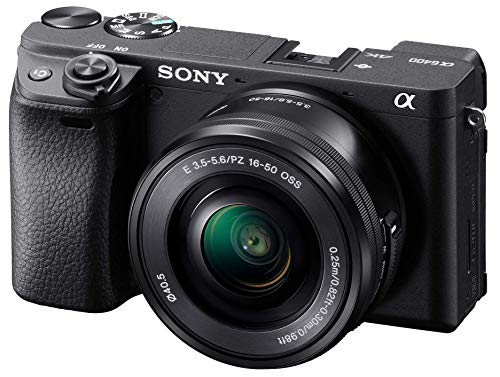
Sony a6400 with 16-50mm lens — Proven starter body
The a6400 is the conservative answer to the beginner question, and in listing work conservative is a compliment. Sony’s title describes a compact APS-C interchangeable-lens camera with Real-Time Eye Autofocus, 4K video, a flip screen and the 16-50mm kit lens in the box, on the E mount. APS-C is the sensor size that built modern listing photography’s middle class: large enough for clean interiors at sensible sensitivities, small enough that the bodies and lenses stay portable and the used market stays deep. A beginner buying into E mount is buying into years of lenses that will outlast this body.
The kit lens deserves the honest paragraph. Its printed range begins at 16mm, and the title does not state an equivalent field of view, so this guide will not convert it for you. What can be said from the title is that a lens is included, that it zooms, and that a beginner can shoot their first listings the day the box arrives. Most a6400 owners in this line of work eventually add a wider dedicated lens, and the health of the E-mount ecosystem — the title confirms E-mount compatibility — is precisely what makes that upgrade path painless later.
Features named in the title map onto listing days in practical ways. The flip screen helps compose from low tripod positions and from the corners where room photographs are actually made. The 4K video claim covers the walkthrough clips that listing packages increasingly bundle with stills. Real-Time Eye AF sounds like a portrait feature, and it is, yet the same subject-detection confidence steadies the camera’s behaviour when a beginner is concentrating on keeping verticals vertical instead of nursing a focus point.
Who it suits is the beginner who wants the default recommendation: a mature system, a lens included, and a body that will not be the reason a shoot fails. It also suits agents planning to hand the camera to different team members, since the a6400’s operating logic is widely known and widely taught. If the a6400 is your frontrunner, confirm on its Amazon listing which accessories ride in the box, because kit contents in this long-running line vary by bundle.
- Sensor: APS-C (stated in title)
- Lens included: 16-50mm kit lens
- Autofocus claim: Real-Time Eye Auto Focus
- Video: 4K stated in the title
- Screen: flip screen
- Mount: E mount
- Equivalent wide-end field of view: Not stated in the listing title — verify with the manufacturer documentation
- Stabilisation: Not stated in the listing title — verify with the manufacturer documentation
Strengths
- A kit lens is included, so the first listing shoot needs no second purchase.
- The E-mount system gives the deepest upgrade path in this guide.
- Flip screen and 4K video cover stills and walkthrough clips together.
Trade-offs
- The kit lens’s equivalent wide-end coverage is not stated in the title.
- Stabilisation is not claimed in the listing title.
- Serious listing work will eventually argue for a wider dedicated lens.
Best for: a beginner who wants the proven APS-C starter with a lens in the box and a system that grows for years. Not suited for: a listing shoot that needs the widest possible room coverage from the kit lens alone, because the title never states an equivalent field of view to promise it.
Working method matters more than the body in the first month. Put the a6400 on a tripod at chest height, level it until the door frames stand straight, and shoot each room from two corners rather than one. Bracket exposures in mixed window light and blend the frames your software offers; the camera’s job is to make that routine repeatable, and its maturity shows in how little it interrupts the routine. Beginners who build the tripod habit first find this Sony disappears into the work, which is the strongest endorsement a listing camera can earn.
There is a resale and handover angle to the a6400 that beginners undervalue. Because the model is so widely owned, its menus, quirks and best settings are documented in more tutorials than a new agent could watch in a month, and a colleague can pick the camera up mid-season and be productive within an hour. For a small agency where equipment is shared and staff rotate, that common knowledge is worth real money. The newest body in a range rarely offers it; the proven one always does.

Panasonic Lumix G100 — Compact MFT route
The G100 approaches the beginner problem from the direction of size. Panasonic’s title describes a Micro Four Thirds mirrorless camera for photo and video with a 12-32mm lens included, 5-axis hybrid image stabilisation, and a built-in microphone with tracking. Micro Four Thirds bodies and lenses run smaller than their APS-C counterparts, and for an agent carrying a camera kit alongside paperwork, a lockbox key and a tape measure, a smaller bag is a genuine working advantage rather than a spec-sheet footnote.
The 12-32mm kit lens is the listing-relevant line. As with the Sony, the title prints a focal range without an equivalent field of view, and the spec box records that silence. Micro Four Thirds focal lengths read differently from APS-C ones, which is exactly why this guide refuses to convert on the reader’s behalf; the manufacturer documentation is where the equivalence belongs. What the title does establish is the same essential fact as the Sony kit: a zoom lens is in the box and the first shoot can happen immediately.
Stabilisation is where the G100’s title out-speaks its rival. Five-axis hybrid image stabilisation is claimed outright, and while listing stills belong on a tripod, stabilisation rescues the handheld establishing shots, the staircase transitions and the video walkthroughs where a tripod cannot go. The tracking microphone claim points the same direction: this camera was designed with moving, talking creators in mind, and listing video — the agent narrating a walkthrough — is squarely that use case wearing a different hat.
Who it suits is the beginner whose listing work leans toward video and solo operation, and whose carrying comfort matters because the camera travels to every appointment. It also suits smaller hands and smaller bags more generally. When you open the G100’s Amazon page, check the current bundle and the lens included against the title, since this model has appeared in more than one kit configuration during its life.
- Sensor system: Micro Four Thirds
- Lens included: 12-32mm
- Stabilisation: 5-axis hybrid I.S. stated in the title
- Audio: built-in microphone with tracking
- Video: 4K stated in the title
- Model code: DC-G100DKK9
- Equivalent wide-end field of view: Not stated in the listing title — verify with the manufacturer documentation
Strengths
- Stabilisation is claimed in the title, unlike the Sony kit.
- The Micro Four Thirds kit is the most portable full system here.
- The tracking microphone serves narrated walkthrough video directly.
Trade-offs
- The smaller sensor format asks more of high-sensitivity performance in dim rooms.
- Equivalent wide-end coverage is not stated in the title.
- The lens ecosystem, while mature, is smaller than Sony’s E mount.
Best for: a solo agent who shoots stills and narrated walkthroughs in one visit and carries the kit all day. Not suited for: a beginner whose listings are dominated by very dark interiors shot handheld, because listing stills at that point belong on a tripod regardless of stabilisation claims.
The G100 rewards a particular workflow: arrive, walk the property once with the camera recording a stabilised tour, then return with the tripod for the composed stills. The microphone’s tracking claim makes the narration pass practical without extra audio gear, and the small body never becomes the reason a room was skipped. Owners who lean into that two-pass rhythm find the Panasonic covers a modern listing package — stills, tour, narration — with less luggage than any rival in this guide.
One caution belongs with the praise: the Micro Four Thirds format’s smaller sensor means its lenses and bodies obey different arithmetic from the APS-C kits, and beginners cross-shopping specifications between systems should compare finished results rather than raw numbers. Take the G100 into the dimmest room you regularly shoot, work at the sensitivities that room demands, and judge the files at the sizes listing portals actually display. Judged at delivery size rather than at pixel-peeping magnification, this little Panasonic holds its ground with a composure that surprises people who dismissed it by format alone.

Asteroom 360 Real Estate Kit — Virtual-tour rig
This pick needs its framing stated before anything else: the Asteroom kit is not a camera. Its title describes a 3D virtual tour real estate kit whose gear includes a tripod, a digital camera rotator and a fisheye camera lens, with the phone case explicitly not included and purchased separately. In other words, this is the rotating rig that turns a phone into a 360-degree tour capture device, sold for the virtual-tour line item that now appears in listing packages beside the still photographs.
Judged as a rig, the component list is coherent. The tripod holds the rotation point steady, the rotator turns the capture device through its positions with repeatable spacing, and the fisheye lens widens the phone’s view so each stop of the rotation gathers a generous slice of the room. Virtual tours live or die on that repeatability: evenly spaced, level captures stitch cleanly, while hand-turned panoramas wobble into the warped doorways that make viewers seasick. A dedicated rotator is the difference between a tour and a novelty.
The title’s caveat deserves the emphasis Asteroom itself gives it. The phone case is not included, and the kit’s usefulness depends on the case that matches your phone, so the true starting cost is the kit plus that case. The title also makes no claim about the tour software or hosting side of the workflow, and this review will not invent one; tours are a service pipeline as much as a capture device, and the listing page and Asteroom’s own materials are where the current arrangement should be confirmed.
Who it suits is the agent or photographer whose clients have begun asking for 3D tours by name, and who wants a purpose-built capture rig rather than a general 360 camera pressed into service. It complements the stills cameras in this guide rather than replacing them — no listing package is tours alone. Before ordering the Asteroom kit from Amazon, confirm the case requirement for your exact phone model, because that accessory decides whether the rig works on arrival day.
- Type: virtual-tour capture rig (not a camera)
- Included per title: tripod, digital camera rotator, fisheye cam lens
- Not included per title: phone case, purchased separately
- Capture device: your smartphone (case-dependent)
- Tour software and hosting: Not stated in the listing title — verify with the manufacturer documentation
- Compatibility list: Not stated in the listing title — verify with the manufacturer documentation
Strengths
- Purpose-built for 3D virtual tours, the add-on clients increasingly request.
- The rotator gives the even, level captures that stitch cleanly.
- Tripod and fisheye lens are included in the kit per the title.
Trade-offs
- The required phone case is a separate purchase, stated in the title.
- It produces tours, not the still photographs a listing also needs.
- Software and hosting arrangements are not described in the title.
Best for: an agent adding 3D tours to a listing package who wants repeatable, level captures from a dedicated rotator. Not suited for: a buyer expecting a self-contained camera, because this kit is a rig that works around your phone and needs its matching case.
Tour craft is mostly placement discipline. Put the rotator where a visitor would naturally stand, keep its height consistent from room to room, and clear the small clutter that 360 capture exposes from every angle at once — a stills photographer can hide a messy corner behind the frame edge, but a tour has no frame edge. Run one practice tour of your own home before the first client property, learn where the stitching strains, and the Asteroom will feel like a professional tool rather than an experiment.
There is a client-management side to tours that beginners should price in. A virtual tour exposes everything, including the rooms the seller hoped to skip, so agree the tour’s scope before the visit and walk the property with fresh eyes for the objects a rotating lens will find: paperwork on counters, family photographs, the hallway cupboard that never quite closes. Stills forgive selective framing; tours reward preparation. Agents who build that preparation into their listing appointment find the Asteroom’s tours sell the home instead of auditing it.
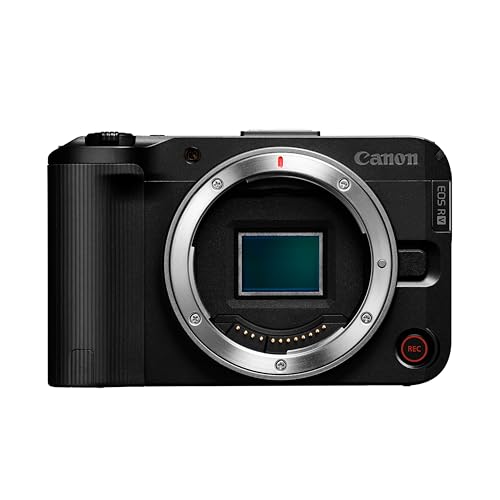
Canon EOS R50 V — Newer Canon body
The R50 V is the newest thinking in this guide, and its title needs careful reading. Canon describes a mirrorless camera, body only, with an APS-C sensor of 24.2 megapixels, fast autofocus, and a vlogging and live streaming orientation for content creators. The words body only carry the review’s central fact: no lens is included in this listing, so a beginner’s real starting point is this body plus a wide lens bought alongside it. Any budget comparison against the Sony and Panasonic kits above must add that lens before the numbers mean anything.
The title also contains a phrase worth pausing on: ultra-wide zoom appears in its wording even though the listing is for a body alone. Read charitably, the phrase gestures at the lens class the camera is meant to pair with; read literally, it describes something not in the box. This guide reports the phrase as printed, flags the tension openly, and advises treating the lens as a separate, essential purchase. Beginners deserve that clarity more than they deserve a tidy paragraph.
What the body itself offers a listing beginner is a current Canon platform: 24.2 megapixels is ample resolution for listing delivery, where images are viewed on screens and portals rather than printed at gallery sizes, and fast autofocus matters when the same camera doubles for family and travel duty between shoots. The vlogging and streaming emphasis translates into screens and controls arranged for self-presented video, which serves the agent who records market updates and walkthrough introductions as part of the same job.
Who it suits is the beginner who prefers Canon’s handling and colour, who also creates video content, and who is willing to choose a first lens deliberately rather than accept a kit’s default. Chosen well, that first wide lens can be better than either kit zoom here; chosen carelessly, the body sits idle while the budget recovers. If you go this route, price the R50 V on Amazon together with the wide lens you intend to pair with it, and judge the combined figure against the two kits.
- Sensor: APS-C, 24.2 megapixels
- Lens included: none — body only per title
- Autofocus: fast autofocus stated in the title
- Orientation: vlogging and live streaming kit positioning
- Title wording: “Ultra-Wide Zoom” appears in the title despite the body-only listing
- Stabilisation: Not stated in the listing title — verify with the manufacturer documentation
- Video resolution: Not stated in the listing title — verify with the manufacturer documentation
Strengths
- 24.2MP APS-C resolution exceeds listing delivery requirements comfortably.
- A current Canon platform with fast autofocus stated in the title.
- Creator-oriented design serves walkthroughs and market-update videos.
Trade-offs
- Body only: a wide lens is a mandatory second purchase.
- The title’s ultra-wide zoom wording does not put a lens in the box.
- Video resolution and stabilisation are not stated in the title.
Best for: a Canon-leaning beginner who also films content and wants to choose a first wide lens deliberately. Not suited for: a buyer with a fixed total budget who needs to shoot a listing this weekend, because the body alone cannot take a single room photograph.
The deliberate-lens path has one more advantage worth naming: it skips the kit-lens compromise entirely. A beginner who starts with a genuinely wide prime or a wide zoom chosen for interiors will not outgrow the lens in the first year, which is the usual fate of kit glass in this discipline. Spend the research hour on that pairing before the body ships, confirm the mount matches, and the R50 V becomes the most considered purchase in this guide rather than the most confusing one.
Unbranded 4K and 5K compact cameras — Prose-only warning
This slot carries no link, and the absence is the review’s first point. Search results for beginner cameras are crowded with unbranded compact cameras advertising 4K or 5K video and very high megapixel counts at prices far below the named brands in this guide. Those headline numbers deserve deep suspicion. Resolution claims on this class of product are frequently achieved through interpolation rather than through a sensor of the stated size, lens quality is rarely described in verifiable terms, and the titles offer no mount system, no stabilisation standard and no manufacturer documentation trail a buyer can check.
Real estate work exposes the weaknesses cruelly. Listing photographs need a genuinely wide lens, honest low-light behaviour in rooms lit by a single window, and colour that does not turn warm interior lighting into a yellow fog. An unbranded compact with a narrow fixed lens and an interpolated sensor fails the first test before the others are even reached, and the failure appears in the listing, where clients and buyers see it. The money saved against a used named-brand body is small; the credibility spent is not.
There is also a working-life argument. Listing photography is a routine repeated weekly, and equipment for routines must be boringly reliable: batteries that exist, chargers that can be replaced, files that open in standard software. Unbranded compacts routinely stumble on exactly those unglamorous points. When a camera fails the morning of a shoot, the listing waits, the seller notices, and the photographer learns why professionals buy systems rather than specifications.
None of this makes such a camera useless for every purpose. As a child’s first camera or a festival throwaway, the stakes match the price. For paid listing work, this guide’s position is plain: skip the class entirely, and put the same money toward a used body from a named system or toward the kit cameras reviewed above. A warning, clearly labelled, serves beginners better than a link ever would here.
- Type: unbranded compact camera class, no verified listing
- Resolution claims: advertised 4K/5K figures not verifiable from manufacturer documentation
- Lens: typically fixed, width not stated in verifiable terms
- System support: no interchangeable-lens mount or documented accessory ecosystem
- Recommendation: not linked from this guide
Strengths
- The class is cheap enough to treat as disposable for casual use.
- Point-and-shoot simplicity asks nothing of the operator.
- Availability is constant across online marketplaces.
Trade-offs
- Headline resolution claims cannot be verified against documentation.
- Fixed lenses are rarely wide enough for small-room listing work.
- Batteries, support and file behaviour are unreliable for weekly routines.
Best for: casual snapshots where the output carries no professional weight. Not suited for: paid listing photography in any form, because unverifiable sensors and narrow fixed lenses cannot hold a small room or a mixed-light interior to a client’s standard.
If a camera of this class already sits in your drawer, the honest use for it is practice: learn composition, levelling and corner selection with a tool whose results you will not deliver. The skills transfer completely to a real system later. What should never transfer is the output — the moment a photograph represents a client’s property, the equipment behind it needs a name, a lens and a track record.
Smartphone plus clip-on wide lens — Prose-only alternative
The second prose-only slot is the route every agent has already considered: keep the phone, clip a wide lens over it, and spend nothing on a camera body. The attraction is real. Modern phones apply computational corrections that flatter interiors, their screens are the best viewfinders most beginners have ever used, and the results upload straight into the listing workflow. For an agent photographing their own modest listings in good daylight, this route produces presentable work today, with no learning curve beyond levelling and light.
The clip-on lens is the weak joint in the system. Phone cameras are already wide, and the rooms that defeat them are the small bathrooms and narrow kitchens where a clip-on’s edges soften, its corners stretch, and its alignment over the phone’s lens decides whether the frame is merely wide or visibly warped. Listing photographs live at their edges — door frames, ceiling lines, the junction of two walls — which is precisely where clip-on optics are least trustworthy. The distortion is not a character quirk; clients read it as carelessness.
There are also ceiling problems that no clip-on fixes. Phones struggle to bracket and blend exposures with the control a listing photographer needs when a bright window shares a wall with a dim corner, and their small sensors lean on processing that can smear the fine textures — wood grain, tile, fabric — that sell a room’s quality. None of this is fatal for casual listings, and all of it becomes visible the moment the work is compared with a competitor’s dedicated-camera photographs of a similar property.
This guide’s verdict is therefore conditional rather than dismissive. Start with the phone if the alternative is not starting at all; skip the expensive clip-on accessories, which cost real money without removing the route’s core limits; and move to one of the linked systems when listing photography becomes a service you sell rather than a chore you survive. The phone is a fine first rung. It is a poor place to build a business.
- Type: existing smartphone with optional clip-on wide lens
- Camera body cost: none, if the phone is already owned
- Wide coverage: clip-on dependent, edges prone to softness and warping
- Exposure control: limited bracketing compared with dedicated cameras
- Recommendation: acceptable starting point, not linked from this guide
Strengths
- No body purchase; the workflow uploads straight into listing portals.
- Computational processing flatters ordinary interiors in daylight.
- The learning curve is nearly zero for composition basics.
Trade-offs
- Clip-on optics soften and warp exactly where room photos are judged.
- Mixed window light exceeds the phone’s blending control.
- Fine interior textures smear under aggressive processing.
Best for: an agent photographing their own well-lit listings while saving toward a real system. Not suited for: paid photography for other agents or premium listings, because edge warping and limited exposure control show against dedicated-camera competition.
A practical halfway step exists for phone shooters: buy the tripod before any lens. A level phone on a tripod, shooting from consistent corner positions with exposure locked, closes much of the visible gap between phone and camera for ordinary rooms. The remaining gap — width, mixed light, texture — is what the linked cameras in this guide exist to close, and recognising that boundary is what turns the phone route from a compromise into a plan.
Comparison
| Pick | System | Lens situation | Stabilisation (per title) | Role |
|---|---|---|---|---|
| Sony a6400 | APS-C, E mount | 16-50mm kit included | Not stated in the listing title | Stills-first starter system |
| Panasonic Lumix G100 | Micro Four Thirds | 12-32mm kit included | 5-axis hybrid I.S. | Stills and walkthrough video |
| Asteroom 360 Kit | Phone-based rig | Fisheye lens included | Not stated in the listing title | 3D virtual tours |
| Canon EOS R50 V | APS-C, 24.2MP | Body only | Not stated in the listing title | Body for a chosen wide lens |
| Unbranded compacts | Fixed-lens class | Fixed, unverifiable | Not stated in the listing title | Not recommended for listings |
| Phone plus clip-on | Smartphone | Clip-on accessory | Phone-dependent | Starting point only |
The table’s most important column is the lens situation, because it is where beginner budgets quietly succeed or fail. Two picks arrive ready to shoot, one arrives as a body awaiting its essential partner, one is a rig rather than a camera, and two are routes rather than products. A reader who understands which row describes their own plan has done most of the choosing already.
Notice, too, how little of the table concerns megapixels. Listing images are delivered to portals and phones, and every dedicated sensor here exceeds that requirement. Width, light and level decide listing quality; the comparison is arranged to keep those factors in front of the reader and the vanity numbers behind them.
How to Choose a Beginner Real Estate Camera
Begin with the rooms, not the camera. Walk your typical listing and measure the smallest space you must photograph whole — usually a bathroom or a small bedroom — because that room sets the width requirement every candidate must meet. Then read each title for what it confirms about the lens: included kit zooms on the Sony and Panasonic, no lens at all on the Canon, a fisheye on the tour rig. Where equivalence figures are missing from titles, as they are here, the manufacturer documentation and a test in a real room settle the question.
Budget as a system. The camera decision drags a tripod behind it — listing stills are level, tripod work — and in the Canon’s case a lens as well. The Asteroom adds its phone case. A beginner who prices the full kit before choosing will sometimes find the apparently cheaper body is the dearer system, and that discovery belongs at the comparison stage, not at the first shoot. Include a second battery in that arithmetic; listing days are long and properties do not provide charging breaks.
Decide how much video your market expects. In some areas a listing package is stills alone; in others, a narrated walkthrough and a 3D tour are becoming the baseline that wins the instruction. Video expectations push toward the G100’s stabilisation and microphone or toward adding the Asteroom rig; stills-only practices can optimise purely for the composed photograph. Let your local competitors’ listings, not national trends, set that expectation.
Finally, weigh the upgrade path against the starting price. The Sony and Canon bodies sit inside lens systems a photographer can grow within for a decade; the Panasonic’s Micro Four Thirds system is smaller but genuinely long-lived; the phone route has no path at all, which is fine for a season and limiting for a business. Beginners rarely stay beginners, and the kindest camera purchase is the one that does not need replacing when the beginner improves.
Light deserves its own paragraph in the choosing, because interiors are a lighting problem wearing a camera problem’s clothes. Rooms lit by one north-facing window will test any sensor, and the honest tools are exposure bracketing, a tripod that permits slow shutter speeds, and the discipline to shoot when the light is kindest. No camera in this guide — and no camera at any price a beginner should pay — repeals those facts. Choose the body whose handling encourages the bracketing-and-tripod routine, and the light problem shrinks to a scheduling problem.
Second-hand markets complete the picture. Both the Sony and Panasonic systems have deep used pools, which let a beginner buy the body new and the eventual wider lens used, or the reverse. That flexibility is a real economic feature of mature systems, and it is wholly absent from the unbranded class, whose products have no resale identity at all. A camera that can be sold funds its own successor; a camera that cannot is a sunk cost wearing a lens.
How Wide Does a Lens Need to Be for Listing Photographs?
Wide enough to hold the smallest room from its doorway or corner without amputating the features that explain the space — a bathroom’s full suite, a bedroom’s bed and window together. In practice that pushes listing photographers toward the wide end of whatever system they choose, and it is why the kit lenses’ unstated equivalence figures matter enough for this guide to flag twice. A zoom that begins merely moderately wide will photograph most rooms well and the smallest rooms badly, and listings are judged by their worst room.
Width has a cost that beginners should expect: the wider the view, the more vertical lines lean when the camera tilts, and the more the room’s edges stretch. The discipline that tames both is mechanical, not optical — a level camera at a consistent height, which is why the tripod recurs throughout this guide. A slightly less wide lens held perfectly level will out-photograph a wider lens tilted in a hurry, every single time.
Do You Need a Virtual Tour Rig as a Beginner?
Only if your market asks for one. Virtual tours have moved from luxury add-on to expected line item in many areas, and the Asteroom kit exists for exactly that shift, but a beginner whose local listings sell happily with strong stills gains nothing by splitting a small budget across two disciplines at once. Sequence the purchases: master the stills first, since every package includes them, then add the tour rig when a client requests a tour or a competitor’s tours start winning instructions you wanted.
When the moment does come, the rig’s virtues are practical. Repeatable rotation, a level capture point and a workflow built for property tours beat improvising with a general camera. The Asteroom’s title is admirably plain about its contents and its missing phone case, and a beginner should hold every competing tour product to the same standard of plainness before spending.
Why Does This Guide Refuse to Link the Cheapest Cameras?
Because a link from a buying guide is a recommendation, and the unbranded compact class cannot carry one honestly. Its titles advertise resolution figures that no manufacturer documentation verifies, its lenses are not described in terms a buyer can test, and its working reliability is unknown where a professional routine needs certainty. Recommending such a camera for paid listing work would trade the reader’s money and credibility for a headline number.
The phone route is treated differently — discussed respectfully, bounded honestly, and left unlinked because there is no single product to link. That distinction is the guide’s method in miniature: link what can be verified, describe what can be used, and warn plainly about what should be avoided. Beginners are ill-served by guides that pretend every search result deserves equal confidence.
What Should a Beginner’s First Listing Shoot Actually Look Like?
Arrive before the light turns difficult, walk the property once without the camera, and decide the order of rooms by where the daylight is strongest. Open curtains fully, switch on every light, and accept the mixed colour temperatures as the honest look of a lived-in home rather than fighting them room by room. Set the tripod at a consistent height — most listing photographers settle near chest level — and work from the corners that show both the room’s size and its connection to the next space.
Shoot each main room from two positions, keep the camera level enough that door frames stand vertical without software rescue, and bracket exposures where a bright window shares the frame with a dim corner. Check the first frames on the camera screen at full magnification before moving on; discovering a tilted, dark set after leaving the property is the beginner’s most expensive lesson, and it is entirely avoidable. The cameras in this guide all support that routine comfortably, which is another way of saying the routine matters more than the body.
Finish with the details that listings are actually sold on: the kitchen’s worktop run in one honest frame, the bathroom’s full suite without a warped mirror, the garden from the doorway the buyer will stand in. A beginner who delivers level, bright, complete coverage of an ordinary house has already out-photographed most of the competition, whatever badge the camera wears.
Common Mistakes When Choosing a First Listing Camera
Spending the whole budget on a body. The Canon in this guide is body only, and every route needs a tripod. Price the system — body, lens, support, battery — before admiring any single component.
Trusting a megapixel headline. Unbranded compacts advertise enormous counts that documentation cannot verify, while listing delivery needs only a fraction of the resolution the named cameras here provide.
Shooting rooms handheld and tilted. Leaning verticals announce amateur work faster than any other flaw. A level tripod at a steady height is the cheapest quality upgrade in this entire discipline.
Judging width by the biggest room. Large rooms flatter every lens. The smallest bathroom in your territory is the test that decides whether a kit is wide enough.
Buying the tour rig before the stills are solid. Every listing package includes photographs; tours are an addition. Sequence the skills and the spending in that order.
Final Recommendation
Most beginners should start with a kit that shoots on day one: the Sony a6400 for the deepest system and the proven starter path, or the Panasonic G100 when walkthrough video, stabilisation and a smaller bag matter more. The Canon R50 V is the deliberate buyer’s choice — an excellent body whose true price includes the wide lens it requires. Add the Asteroom rig when your market starts asking for tours, treat the phone as a bridge rather than a destination, and leave unbranded compacts to purposes where their output carries no client’s name.
Above all, remember that listing photographs are a routine before they are an art: level, wide, bright and repeatable will win more instructions than any specification in this guide — so buy the camera that makes that routine easiest to keep, and then go and photograph a hundred ordinary rooms with it.
Frequently Asked Questions
Can a beginner really start with a smartphone?
Yes, for well-lit listings photographed level from a tripod, and this guide treats that route seriously. Its limits appear in small rooms, mixed window light and paid work for clients, which is where the dedicated systems here take over.
Which kit lens is wider, the Sony 16-50mm or the Panasonic 12-32mm?
The two systems use different sensor formats, so the printed numbers are not directly comparable, and neither title states an equivalent field of view. This guide records both as unstated; the manufacturer documentation gives the equivalence for each system.
Does the Canon R50 V come with a lens?
No. Its title states body only, despite also containing the phrase ultra-wide zoom. Budget for a wide lens as a separate, essential purchase alongside the body.
What else does the Asteroom kit need before it can work?
Its title states that the phone case is not included and is purchased separately, and the kit works around your smartphone. Tour software and hosting arrangements are not described in the title and should be confirmed before buying.
Is 4K video necessary for listing work?
Portals and buyers view walkthroughs on phones, so 4K is headroom rather than a requirement. The Sony and Panasonic titles both claim 4K; lighting, steadiness and narration quality will decide how professional a walkthrough feels long before resolution does.
How much should a beginner budget beyond the camera?
At minimum a tripod, a second battery and, for the Canon, a lens; for the Asteroom route, the phone case its title excludes. Pricing the whole system first prevents the common failure of an excellent body sitting unused for want of its partners.
Should a beginner learn on automatic or manual settings?
Start with the camera’s intelligent automatic exposure for composition practice, then move to manual control for the bracketed sequences that mixed window light demands. Every dedicated system in this guide supports both stages, which is part of why they suit beginners better than a fixed compact.
Related Guides
Beginners whose interests wander beyond property will find neighbouring shelves worth browsing. Pocketable travel cameras get their hearing in our guide to the best compact cameras with viewfinder and zoom, for concerts and city breaks. The night sky has its own demanding discipline in the best astro imaging cameras, where cooled sensors replace kit lenses as the obsession. And the camera that guards the driveway rather than photographing the house is covered in our roundup of the best dash cams with front and rear cameras.


