What's inside
- Where to Buy
- Key Takeaways
- Quick Picks
- How We Chose These Picks
- Comparison
- How to Choose a Resin Printer in the Post-DLP Market
- DLP Versus LCD: What Actually Changed When Projectors Left?
- Does an Acrylic Cover Actually Matter on a Resin Printer?
- Common Mistakes When Buying a Resin Printer Today
- Final Recommendation
- Frequently Asked Questions
- Related Guides
As an Amazon Associate I earn from qualifying purchases. This post may contain affiliate links at no extra cost to you.
[SITE_DOMAIN] is reader-supported. When you buy through links on our site, we may earn an affiliate commission.
Where to Buy
The six machines below each sell through their own Amazon listing. The UniFormation GK3 Ultra is the large-format entry, a 13.5-inch class machine with automated resin heating and feeding, and its page opens the set. The HeyGears Reflex leans on automation of a different kind, with a heated tray and resin level detection. Elegoo’s Mars 5 Ultra 9K is the compact desktop representative. The Anycubic Photon Mono 4 Ultra pairs a COB light source with the fastest stated speed in this guide. The ANYCUBIC Photon P1 14K brings a ball screw and a wide resin compatibility claim. And the Elegoo Saturn 4 Ultra 16K returns as the heated-tank mainstream option.
Honesty requires this guide to correct its own title before recommending anything. A buyer searching for the best dlp acrylic 3d printers is usually picturing a specific technology, DLP, where a projector throws an entire layer’s image at the vat at once. True DLP machines have nearly disappeared from current listings. The resin printers actually on sale today, including every machine below, are LCD machines, also called MSLA, where a monochrome screen masks ultraviolet light layer by layer. Many of them wear tinted acrylic covers that block ambient UV and contain the resin smell, which is where the second word of the search comes from. So this guide covers what the search is really shopping for in the current market: modern LCD resin printers, several under acrylic covers, judged on the merits a DLP buyer cared about, detail, even curing and clean engineering.
That correction is not a bait and switch; it is the market describing itself. DLP’s virtues were real, a projected image with no screen pixels and very even light, and the best LCD machines have spent years closing the gap with high-resolution mono screens, COB light sources and collimation tricks. Meanwhile DLP hardware retreated to industrial price tiers and specialist niches. A buyer who insists on a true projector today is shopping a different, far more expensive shelf. A buyer who wants fine resin detail on a desk is shopping the six machines below, whether the search phrase knew it or not.
One more framing note concerns the acrylic half of the keyword. Covers in this class vary: full enclosures, flip-up lids, simple lift-off shells, usually tinted to filter ultraviolet. Listings do not always state the cover material, and where a title below stays silent about its cover, the spec box records the silence rather than dressing the machine in acrylic it never claimed. The reviews concentrate on what titles do state: screen, light source, precision figures, heating, detection systems and build size.
Key Takeaways
- True DLP projection printers have nearly vanished from current listings; every machine here is an LCD/MSLA resin printer, which is what the market now sells at this level.
- The HeyGears Reflex states a precision figure, 33 μm, the kind of measurable claim this guide weights most heavily.
- The UniFormation GK3 Ultra is the large-format outlier with an 11.8 × 6.3 × 11.8 inch build volume and automated resin heating and feeding.
- COB light sources appear on the Photon Mono 4 Ultra’s title, chasing the even illumination DLP was loved for.
- Stated speeds range from the Photon Mono 4 Ultra’s 120mm/h to compact machines that print no speed at all.
- Acrylic covers are common in this class but not always stated in titles, and unstated covers are recorded as such.
Quick Picks
| Pick | Badge | Why it earns a place |
|---|---|---|
| UniFormation GK3 Ultra | Large-format LCD | 13.5-inch 16K class with automatic resin heating and feeding across an 11.8-inch-wide plate. |
| HeyGears Reflex | Stated 33 μm precision | Auto heated tray, automated resin level detection and a printed precision figure. |
| Elegoo Mars 5 Ultra 9K | Compact desktop | 7-inch 9K mono LCD with smart automatic leveling and Wi-Fi transfer. |
| Anycubic Photon Mono 4 Ultra | Fast COB machine | 10K mono screen, COB light source and a stated 120mm/h print speed. |
| ANYCUBIC Photon P1 14K | Ball screw platform | 14K class with auto-leveling, LighTurbo 4.0 and an 8000cps resin compatibility claim. |
| Elegoo Saturn 4 Ultra 16K | Heated tank mainstream | 10-inch 16K mono LCD, smart tank heating at 30 °C and a flip-up lid. |
How We Chose These Picks
Technology honesty came before everything. Candidates were checked against the premise this guide opens with: no machine below is a DLP projector machine, and none is described as one anywhere in the article. Within the LCD class that actually exists, selection then chased the qualities DLP buyers historically wanted. Even, well-controlled light matters most, which is why COB light source claims and precision figures were read closely, and why screen resolution alone never earned a place by itself.
Stated precision formed the second pass. Most titles in this class print a K-class for the screen and stop there. The Reflex prints 33 μm instead, a claim about the printed artefact rather than the panel, and the guide treats that difference as significant. Other titles offer mechanical evidence, a ball screw on the P1 14K, or process evidence, heating and detection systems that keep output consistent. Each review names the kind of evidence its machine presents, so a buyer can compare like with like instead of comparing adjectives.
Size spread came third, deliberately. Resin buyers divide into desktop model makers and large-format producers, and a guide serving only one tribe would mislead the other. The GK3 Ultra’s 11.8-inch width anchors the large end; the Mars 5 Ultra and Photon Mono 4 Ultra share a compact plate class near six inches; the Saturn and P1 occupy the middle. That spread also exposes a truth about the category: precision claims do not scale with size, and the smallest machines here carry some of the most specific engineering language.
Finally, automation and detection were weighed as the category’s current frontier. Resin level detection, intelligent detection, automatic feeding and heated trays all attack the same enemy, the failed or drifting print discovered hours too late. DLP-era machines rarely offered any of it. A buyer upgrading from an older projector machine will find the modern LCD class less exotic in its light engine and far more attentive in its supervision, and the reviews below keep score of that trade machine by machine.
UniFormation GK3 Ultra — Large-format LCD
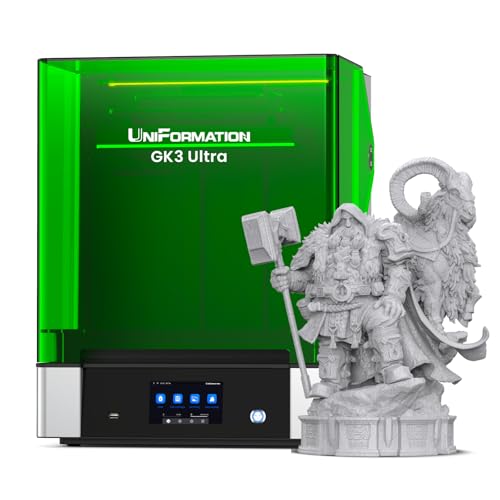
The GK3 Ultra scales the modern resin formula up. Its title states a 13.5-inch large build volume machine in the 16K class, with automatic resin heating and feeding, across a build volume of 11.8 × 6.3 × 11.8 inches. That width, nearly double the compact machines in this guide, changes the production maths entirely: full plates of parts, large single pieces that smaller vats must refuse, and batch work where the plate itself is the unit of planning. The title’s own phrase, reliable large-format printing, identifies the machine’s brief precisely, because large resin prints fail expensively when anything drifts.
Heating and feeding are the reliability systems doing that work. A big vat holds a great deal of resin, and resin at inconsistent temperature across a long, wide print is a dimensional risk the Ultra answers with automatic heating. Auto feeding keeps the vat level supplied through the longest jobs, the ones where a manual top-up means opening the cover, disturbing the environment and risking the print at its most vulnerable height. Together they describe a machine meant to be loaded, closed and trusted, which is the working definition of production equipment in this category.
Who it suits is the producer: the small studio printing large resin pieces or full plates daily, the workshop whose resin work has outgrown desktop vats, the seller whose inventory is made of prints. It asks for space and resin inventory in return, since a vat this size is a commitment of material before the first layer cures. If your resin work has genuinely reached large-format scale, the GK3 Ultra listing on Amazon is where to check price on Amazon and confirm the delivered configuration.
- Class: 13.5-Inch Large Build Volume, 16K Resin Printer (LCD/MSLA)
- Resin handling: Automatic resin heating and feeding
- Build volume: 11.8 × 6.3 × 11.8 inch
- Intended work: large-format printing
- XY precision figure: Not stated in the listing title — verify with the manufacturer documentation
- Cover material: Not stated in the listing title — verify with the manufacturer documentation
Strengths
- An 11.8-inch-wide plate enables large pieces and true batch production.
- Automatic heating and feeding protect the long prints large format depends on.
- A 16K class screen keeps detail credible even as the plate grows.
Trade-offs
- No XY precision figure is printed, so detail is graded by screen class alone.
- A vat of this size commits significant resin before any print begins.
- The footprint and weight class exceed what a casual desktop corner offers.
Best for: a producer printing large resin pieces or full plates where automated heating and feeding guard long jobs. Not suited for: a small desk printing occasional miniatures, because an 11.8-inch-wide build volume and its resin inventory vastly exceed that workload.
Large-format resin ownership teaches respect for the release film and the peel forces that scale with plate area. Wide prints peel harder, supports work harder, and orientation choices that a small machine forgives become structural decisions. Owners who thrive with a machine like the Ultra plan supports generously, angle large faces thoughtfully and treat the first print of any new geometry as an experiment with an audience of one. The automation handles temperature and resin supply; the geometry judgement remains gloriously human, and the machine’s size makes that judgement worth developing properly.
Economics follow the same scale. A failed compact print wastes an evening’s resin; a failed full-width plate wastes a meaningful slice of a material budget, which is why the Ultra’s supervision systems matter commercially and not just technically. Producers tend to standardise two or three proven resins on a machine like this and resist novelty, because every new resin restarts the learning the automation was bought to conclude. Boring reliability, at this size, is a business model.
Room planning deserves equal honesty. A machine of this class wants a level, load-bearing surface, headroom for its cover to open, ventilation sized for the resin volumes involved and a wash station that can swallow the largest pieces the plate can produce. Producers who retrofit a spare room around those needs report the familiar dividend: the printer stops competing with the rest of the workshop for air, space and attention. The Ultra’s automation reduces supervision, but it cannot reduce physics, and the buyers who respect the physics in advance are the ones whose large-format work becomes routine fastest.

HeyGears Reflex — Stated 33 μm precision
The Reflex is the machine in this guide that speaks most like an instrument. Its title calls it a smart AI powered LCD printer, and then does something refreshingly concrete: it states 33 μm precision. Around that figure sit an auto heated tray, automated resin level detection, commercial-grade detail restoration and a worry-free printing promise. For a buyer arriving from the DLP world, where precision language was the whole conversation, a printed micron figure is the dialect that matters, and the Reflex is fluent in it.
Resin level detection deserves unpacking, because it addresses the most humiliating failure in resin printing: the vat quietly running dry or low mid-print, discovered when the plate rises on a half-finished piece. A machine that watches its own resin level converts that failure into a notification. The auto heated tray plays the consistency role this guide keeps returning to, holding the resin’s environment steady so exposure behaviour does not wander with the room. Detail restoration, the title’s own phrase, describes the maker’s processing ambition for fine features; this guide reports the phrase as a claim of intent rather than a measured result.
Who it suits is the detail-led commercial user the title names: small studios and sellers whose resin output is judged closely, in the hand and under a camera. The automation story suits teams who cannot spare a person to babysit vats. If a stated precision figure and self-monitoring resin handling match your standard of evidence, open the Reflex listing on Amazon and review its current price and package there.
- Class: LCD Printer (MSLA), Smart AI Powered
- Precision stated: 33 μm
- Heating: Auto Heated Tray
- Monitoring: Automated Resin Level Detection
- Detail claim: Commercial-Grade Detail Restoration
- Build volume: Not stated in the listing title — verify with the manufacturer documentation
Strengths
- A printed 33 μm precision figure gives buyers a measurable claim to test.
- Automated resin level detection removes the classic dry-vat failure.
- A heated tray holds the resin environment steady across a working day.
Trade-offs
- No build volume appears in the title, leaving plate planning to documentation.
- AI and detail-restoration language is maker phrasing that buyers cannot audit from a listing.
- The screen class behind the precision figure is not printed.
Best for: a commercial detail producer who buys on a stated micron figure and wants the machine watching its own resin level. Not suited for: large-piece planning that requires the build volume confirmed by the listing, because this title omits dimensions entirely.
The supervision features change the emotional texture of resin printing more than any specification suggests. Resin work traditionally involves a low background anxiety, the walk past the machine to peer through the cover, the sniff for trouble, the mental arithmetic about remaining resin. A machine that monitors its level and holds its temperature invites its owner to spend that attention on design and finishing instead. Studios notice the difference in their day before they notice it in their failure statistics, and both ledgers eventually agree.
A note on the precision figure’s proper use: treat 33 μm as the machine’s promise to be verified, not as a description of every print it will ever make. Resin choice, exposure tuning, orientation and post-cure all push real-world results around the headline number. Owners who run a calibration print on arrival and record the outcome own a fact; owners who quote the title at their customers own a hope. The Reflex invites the first kind of ownership by printing the number at all, and that invitation is its most professional quality.
The commercial framing in the title points at a specific daily reality worth describing. A studio selling printed detail lives on turnaround promises, and its printer’s worst behaviour is not slowness but surprise: the dry vat, the cold morning drift, the plate that failed silently at hour three. Level detection and a heated tray are aimed at surprise itself. A buyer evaluating the Reflex for business use should therefore read its feature list as an insurance schedule rather than a gadget list, and judge the premium accordingly. Insurance always looks expensive until the first claim, and in resin production the first claim usually arrives within the month.

Elegoo Mars 5 Ultra 9K — Compact desktop
The Mars 5 Ultra represents the compact end of the modern LCD class: a 7-inch 9K mono LCD, smart automatic leveling, intelligent detection, Wi-Fi transfer and a printing size of 6.04 × 3.06 × 6.49 inches. This plate class is the traditional home of tabletop miniatures, jewellery-scale models, dental-scale work and prototypes, the detailed small world where resin printing first proved itself. The Mars name carries a long lineage in that world, and the Ultra suffix here is supported by the detection and leveling language rather than by size.
Smart automatic leveling matters disproportionately on a small machine, because compact printers are often bought by people who print occasionally and never develop a feel for manual plate adjustment. A machine that levels itself keeps the occasional user’s tenth print as reliable as their first. Intelligent detection extends the same philosophy to the print itself, watching for the failures small machines suffer quietly. Wi-Fi transfer removes the USB-stick shuffle that once defined resin workflow, a small convenience that changes how often a machine gets used for a quick idea.
Who it suits is the desktop detail maker: miniatures painters, small-model producers, prototypers and anyone whose resin ambitions fit inside six inches. It also suits the DLP-curious buyer making a first resin purchase, because the class’s current mainstream lives at exactly this size and the cost of learning is lowest here. If a compact, self-levelling machine is the right scale for your bench, the Mars 5 Ultra page on Amazon carries its live price.
- Screen: 7-inch 9K Mono LCD
- Leveling: Smart Automatic Leveling
- Monitoring: Intelligent Detection
- Transfer: Wi-Fi Transfer
- Printing size: 6.04 × 3.06 × 6.49 inch
- Heating: Not stated in the listing title — verify with the manufacturer documentation
Strengths
- Smart auto leveling keeps occasional users printing reliably without manual plate craft.
- Intelligent detection watches the print so the owner does not have to.
- Wi-Fi transfer modernises the small-resin workflow end to end.
Trade-offs
- The 6.04-inch width is a hard ceiling for larger resin ambitions.
- No heating system is named for cold-room consistency.
- A 9K class screen trails the 14K and 16K badges elsewhere in this guide.
Best for: a desktop maker printing miniatures and small models who wants leveling and detection handled automatically. Not suited for: a producer whose pieces exceed six inches in width, because the stated plate cannot contain them in any orientation worth printing.
Compact resin machines reward a particular workflow virtue: frequency. A small plate that starts quickly and levels itself gets used for the quick test, the gift, the replacement part and the experiment, and that frequency is how a maker’s skill compounds. Owners of big machines sometimes ration their prints; owners of a Mars-class machine print on impulse and learn on volume. The detection systems support that rhythm by making an unattended quick print a reasonable risk rather than a gamble, and Wi-Fi removes the last scrap of friction from starting one.
There is a finishing advantage to smallness too. A six-inch plate’s output washes and cures in compact stations that share the desk with the printer, keeping the entire resin process, with its smells and liquids, inside one managed corner. For a home maker, that containment is often the difference between a hobby the household tolerates and one it campaigns against. The Mars format has survived many generations precisely because it respects the desk it lives on.
Small machines also serve as the category’s teaching instrument. A new resin printer owner learns exposure, supports and post-processing on a plate where mistakes cost grams, and the Mars class has onboarded more makers than every large machine combined. The Ultra’s automatic leveling and detection shorten that education by removing its two most discouraging early failures, the unlevelled plate and the unnoticed mid-print problem. A beginner who survives the first month tends to stay in the hobby for years, and this machine’s design reads like a deliberate attempt to get its owner through that month with enthusiasm intact.

Anycubic Photon Mono 4 Ultra — Fast COB machine
The Photon Mono 4 Ultra shares the compact plate class of the Mars, 6.04 × 3.42 × 6.49 inches, and differentiates itself with light and speed. Its title states a 7-inch HD mono screen in the 10K class, a COB light source, intelligent detection and a print speed of 120mm/h, the fastest figure printed anywhere in this guide. The COB source is the detail a DLP refugee should notice first: chip-on-board light engines are used to throw even, powerful illumination through the screen, pursuing the uniform curing that made projector machines beloved.
Speed in resin printing is a Z-axis story, the rate at which cured height accumulates, and 120mm/h is a brisk claim for the class. It depends on layer heights and resin behaviour in practice, so this guide reports it as the title’s figure rather than a guaranteed pace for every model. Even discounted sensibly, a fast compact machine changes the shape of a working day: a morning’s design can be a physical object by lunch, and iteration, the true engine of quality, accelerates. Intelligent detection stands guard over that pace, because a fast failure is still a failure.
Who it suits is the iterative maker: product prototypers refining a part through versions, model makers who print, inspect and reprint in one session, and small producers whose pieces are small and whose deadlines are not. If your resin work values turnaround over plate size, visit the Photon Mono 4 Ultra listing on Amazon to check price on Amazon against that workflow.
- Screen: 7-inch HD Mono Screen, 10K class
- Light source: COB Light Source
- Print speed stated: 120mm/h
- Monitoring: Intelligent Detection
- Printing size: 6.04 × 3.42 × 6.49 inches
- Heating: Not stated in the listing title — verify with the manufacturer documentation
Strengths
- A COB light source pursues the even curing DLP buyers historically prized.
- The stated 120mm/h is the fastest speed figure in this guide.
- Intelligent detection supervises a pace that would otherwise need watching.
Trade-offs
- Realised speed depends on layer height and resin, so the figure is a ceiling, not a promise.
- The compact plate caps piece size at the six-inch class.
- No heating is claimed, leaving temperature consistency to the room.
Best for: an iterative prototyper who wants COB-lit detail at the fastest stated pace in the compact class. Not suited for: models wider than the 6.04-inch plate, because no orientation rescues a piece the vat cannot hold.
Working quickly in resin imposes its own discipline. Fast printing consumes resin, screens and release film at a pace that surprises owners arriving from slower machines, so consumables should be stocked ahead of the appetite. The reward is a design loop tight enough to change habits: makers stop hoarding certainty before printing, because the print itself has become the cheapest way to check an idea. That shift, from printing as manufacturing to printing as thinking, is the deepest change the modern compact class offers, and this machine’s title is built around enabling it.
Light quality deserves the last word in this review. Even illumination is invisible when it works, showing up only as models that cure identically in the plate’s corners and its centre. Uneven light announces itself as the opposite: one corner’s fine detail perpetually softer than the rest, a mystery owners misdiagnose as resin or settings for months. A COB engine is a maker’s attempt to delete that mystery at the source. Buyers comparing compact machines should weigh that engineering intent heavily, because it touches every layer the machine will ever print.
There is a comparison hiding inside this guide that the Photon Mono 4 Ultra forces into the open: it shares its plate dimensions almost exactly with the Mars 5 Ultra, yet the two titles argue for their machines in completely different vocabularies, one through light and speed, the other through leveling and detection. That is a healthy sign for buyers. It means the compact class has matured past a single specification race into genuine design philosophies, and a purchaser can choose the philosophy that matches their own failure history. Owners burned by uneven curing should follow the COB argument; owners burned by setup friction should follow the automation argument. Both are standing in the same six inches of resin.

ANYCUBIC Photon P1 14K — Ball screw platform
The Photon P1 14K builds its case from the Z-axis outward. Its title states auto-leveling, a stability ball screw, 14K precision language, the LighTurbo 4.0 light system, compatibility with 8000cps resin in the title’s wording, and a large build size of 8.78×4.96×9.05 inches. That is the mid-to-large plate class, and the mechanical story underneath it is the most conservative in this guide: a ball screw is mature, low-play engineering, the kind of component chosen when repeatability over years matters more than novelty this season.
The resin compatibility figure needs careful reading. The title prints 8000cps, a viscosity-related number in the maker’s own framing, and this guide reports it as printed without translating it into promises. Its plain meaning for a buyer is that the machine is designed to handle a wide span of resin behaviours, including the thick, filled, engineering-style resins that weaker lift mechanisms struggle to peel and reposition. Paired with the ball screw, the picture is of a platform built to move heavy, sticky layers with composure, which is precisely the mechanical situation large resin plates create.
Who it suits is the production-minded maker stepping up from the compact class: larger models, fuller plates, tougher resins, on a Z-axis built for the long term. Auto-leveling keeps the bigger plate honest without manual ritual. If that combination of size and mechanical seriousness is your next step, the Photon P1 14K page on Amazon is where its current price and configuration live.
- Class: 14K Resin Printer (LCD/MSLA)
- Z-axis: Stability Ball Screw
- Leveling: Auto-Leveling
- Light system: LighTurbo 4.0
- Resin compatibility stated: 8000cps Resin Compatible
- Build size: 8.78×4.96×9.05in
Strengths
- A ball screw Z-axis is production-grade repeatability engineering.
- An 8.78-inch-wide plate steps decisively beyond the compact class.
- Wide resin compatibility suits filled and engineering-style materials.
Trade-offs
- No XY micron figure is printed, so 14K remains a screen-class claim.
- No heating system is named in the title.
- The 8000cps figure is maker framing that buyers must interpret through documentation.
Best for: a producer moving up to larger plates and tougher resins on a ball-screw platform built for years of service. Not suited for: purchasing standards that demand a stated micron-level precision figure in the listing, because this title offers a K-class and a viscosity number instead.
Mid-large resin plates occupy a sweet spot in workshop economics. They are big enough for serious batch work and single large models, yet small enough that a failed plate stings rather than wounds. Owners in this class often become the most productive resin printers in their circle, because the machine invites daily use without demanding the ceremony of the very large format. The P1’s specification reads like it was written for that citizen: capable plate, serious axis, broad resin appetite, automatic leveling, and no theatrical claims beyond a light-system name.
Maintenance thinking belongs in this review because ball screws reward it visibly. Keep the axis clean, keep its lubrication as the maker directs, and the motion stays as precise in year three as in week one. Neglect it, and the finest Z engineering in the guide degrades into the same wobble as a cheap lead screw. The bargain is fair and old-fashioned: the machine supplies the precision, the owner supplies the care, and models come out dimensionally boring in the best possible way.
The P1’s position between the compact pair and the GK3 Ultra deserves a direct sentence, because many buyers will stand exactly there. It offers roughly half again the compact plate width without asking for the Ultra’s room, resin inventory or production ceremony. For a growing studio, that middle step is often the correct purchase made at the correct time, and the ball screw means the step does not need to be repeated when volume grows further. Equipment bought in the right order compounds; equipment bought by skipping steps tends to be bought twice.

Elegoo Saturn 4 Ultra 16K — Heated tank mainstream
The Saturn 4 Ultra closes this guide as it opened the dental one, but the lens here is different: within the post-DLP landscape, it represents the mainstream perfected. A 10-inch 16K mono LCD, smart tank heating at a stated 30 °C, a flip-up lid and a printing size of 8.33 × 4.66 × 8.66 inches. Where older projector machines asked owners to accept fixed optics and expensive lamps, the modern Saturn formula offers a big screen, thermal control and a lid designed around the rhythm of swapping plates all day.
The heated tank is the feature that most separates this generation from the DLP era in daily life. Projector machines worried about lamp heat; LCD machines worry about resin cold. Holding the tank at a stated temperature steadies viscosity and curing behaviour from the first print of a winter morning to the last of a summer evening. The flip-up lid complements that steadiness ergonomically, staying attached and out of the way instead of becoming a dripping object in search of a safe surface, a small mercy anyone who has run a resin bench will recognise instantly.
Who it suits is the buyer who wants the current class’s reference machine: large enough for serious plates, heated for consistency, and backed by the deepest pool of community experience in this guide. It suits the DLP upgrader especially, because it answers the old technology’s virtues, even curing and fine detail, with modern supervision added. To confirm how the Saturn 4 Ultra is priced and bundled today, its Amazon listing is the authoritative page.
- Screen: 10-inch 16K Mono LCD
- Heating: Smart Tank Heating at 30 °C
- Lid: Flip-up Lid
- Printing size: 8.33 × 4.66 × 8.66 Inches
- Light source type: Not stated in the listing title — verify with the manufacturer documentation
- Cover material: Not stated in the listing title — verify with the manufacturer documentation
Strengths
- A numbered 30 °C tank temperature makes the consistency claim testable.
- The flip-up lid respects the plate-swap rhythm of daily resin production.
- A 16K mono screen on a widely owned platform brings deep shared knowledge.
Trade-offs
- The light source type behind the screen is not stated in the title.
- No automatic resin feeding is claimed for the longest full-plate jobs.
- At 8.66 inches, its height is the lowest among this guide’s larger machines.
Best for: a mainstream producer who wants heated-tank consistency and a 16K plate from the category’s most familiar line. Not suited for: a buyer printing the tallest resin pieces in this guide’s range, because the GK3 Ultra offers over three more inches of stated height.
A mainstream machine’s deepest advantage never appears in its title: answers. When a print misbehaves at midnight, the owner of a widely sold platform searches a symptom and finds a crowd that has met it before, with settings, photographs and fixes. That crowd is a genuine component of the product, and it appreciably lowers the risk of the first year of ownership. Niche machines may out-spec the Saturn on a chosen axis; few out-answer it. Buyers who know their own troubleshooting temperament should price that crowd honestly.
The Saturn also illustrates where the class is heading. Screens will keep gaining pixels, but the features that changed daily life in this generation were thermal control, lids that respect workflow and detection that watches the print. A buyer choosing today is really choosing which supervision suite they want standing between their resin and a wasted weekend. On that measure, the Saturn’s heated, lidded, mainstream proposition is the safe pair of hands in this guide, and safe hands finish more prints than brilliant ones.
For the DLP upgrader specifically, one adjustment of expectation is worth making in advance. The old projector machine’s relationship with its owner was optical: lamps, mirrors and focus. The Saturn’s relationship is thermal and procedural: warm the tank, trust the screen, keep the workflow tidy. Owners who make that mental migration once tend to stop missing the projector within a month, because the modern machine returns something the old one never offered, which is an evening genuinely off duty while a plate prints. Detail brought them to resin; supervision is what the new class adds to detail, and it is the addition this entire guide keeps circling back to.
Comparison
| Pick | Class / Screen (title) | Build size (title) | Standout claim |
|---|---|---|---|
| UniFormation GK3 Ultra | 13.5-inch, 16K LCD | 11.8 × 6.3 × 11.8 in | Automatic resin heating and feeding |
| HeyGears Reflex | LCD, AI powered | Not stated in the listing title | 33 μm precision, resin level detection |
| Elegoo Mars 5 Ultra 9K | 7-inch 9K mono LCD | 6.04 × 3.06 × 6.49 in | Smart automatic leveling, Wi-Fi |
| Anycubic Photon Mono 4 Ultra | 7-inch 10K mono LCD, COB | 6.04 × 3.42 × 6.49 in | 120mm/h stated speed |
| ANYCUBIC Photon P1 14K | 14K LCD, LighTurbo 4.0 | 8.78 × 4.96 × 9.05 in | Ball screw, 8000cps resin claim |
| Elegoo Saturn 4 Ultra 16K | 10-inch 16K mono LCD | 8.33 × 4.66 × 8.66 in | Tank heating at 30 °C |
How to Choose a Resin Printer in the Post-DLP Market
Accept the landscape first. The machine you are buying is an LCD printer, whatever the search phrase said, so compare LCD machines against each other rather than against a remembered projector ideal. The comparison that matters runs across four axes: the light engine’s evenness, the screen’s real detail, the Z-axis mechanics, and the supervision systems that guard long prints. A machine strong on all four will out-print a machine with a bigger badge and weaker supervision every working week of the year.
Weigh stated figures over stated adjectives. A precision claim in microns, a tank temperature in degrees and a speed in millimetres per hour can all be tested by an owner with basic instruments, and makers who print them accept that audit. Adjectives like ultra and pro cannot be tested, and a title dense with them but empty of numbers is telling you how it wishes to be judged. This guide’s spec boxes quietly reveal which listings offered numbers and which offered weather, and a careful buyer will read them that way.
Support and spares form the quiet fourth axis. A resin printer’s life includes screens, films, vats and the occasional pump or sensor, and a machine whose parts channel is healthy will still be printing when a marginally finer rival waits on a component. Titles cannot print that future, so the buyer’s own diligence must: check that the maker sells the consumables openly and that the model is current enough to be supported. In a class moving this fast, a machine from a living product line is worth a small specification sacrifice elsewhere, because the line, not the listing, is what an owner actually lives with.
Size the plate to the work you already do, not the work you daydream about. Compact six-inch machines cover the overwhelming majority of resin objects in the world, and they do it with cheaper consumables and faster turnaround. Large plates earn their resin inventory only when large pieces or batch production are weekly realities. The GK3 Ultra and the Mars 5 Ultra are both excellent answers, to questions a buyer should ask in the mirror before asking a search engine.
Finally, budget the ecosystem around the machine: wash and cure capacity matched to the plate, resin in the quantities the vat implies, replacement screens and release films treated as scheduled consumables, and ventilation for the room. Resin printing’s costs are famously back-loaded, arriving after the exciting purchase. A buyer who funds the whole system enjoys the modern class’s real virtues from the first week. A buyer who funds only the printer meets those virtues later, one emergency order at a time.
Judge the cover and enclosure story with the same budget realism. Listings in this class rarely state cover materials, as this guide’s spec boxes show, so a buyer set on a particular enclosure style should verify construction through the maker’s documentation rather than assuming the keyword’s acrylic promise. What can be judged from titles is how the cover is handled: attached and flip-up, as on the Saturn, or unspecified. In daily production that handling detail outearns the material question, because a cover is opened hundreds of times for every once it is admired.
DLP Versus LCD: What Actually Changed When Projectors Left?
Three things, in descending order of importance. First, the light source became a consumable screen instead of a projector, which made fine detail dramatically cheaper and put replacement economics in the owner’s hands. Second, pixel structure became real: an LCD masks light through a grid, so XY detail is set by that grid in a way a projected image never was, which is why micron figures and screen classes dominate modern listings. Third, supervision arrived. Detection, heating and feeding systems, scattered across these six titles, exist because modern machines are expected to print unattended for hours, a duty the projector era largely spared its hardware. What did not change is the resin, the post-processing, or the premium on even light. The modern class wins on cost, detail per coin and watchfulness; it concedes only the projector’s elegant, grid-free image, and for nearly every desk that trade closed years ago.
One honest footnote belongs to the specialists. True DLP survives in industrial and dedicated professional niches where its economics still close, and a buyer whose work genuinely belongs there should shop that shelf deliberately rather than drifting into it from a desktop search. The disappearance this guide describes is a desktop disappearance. Naming the boundary protects both audiences: desktop buyers stop chasing a ghost, and professional buyers stop being told a desktop LCD is its equivalent. Technologies rarely die; they retreat to the price tier where their virtues remain worth their costs, and DLP’s retreat simply happened to empty the shelf this keyword searches.
Does an Acrylic Cover Actually Matter on a Resin Printer?
Yes, in three practical ways, though it is the least technical component on the machine. The tinted cover blocks ambient ultraviolet that would slowly skin the resin surface in a sunlit room, it contains the resin smell that otherwise colonises a workspace, and it keeps dust and curious fingers out of an open vat of liquid photopolymer. What it does not do is affect print quality directly, which is why this guide refuses to treat cover material as a precision feature. Buyers should confirm a cover exists and opens conveniently, the flip-up pattern being the ergonomic high point here, and then return their attention to light, mechanics and heat, where print quality is actually decided.
Placement interacts with the cover in a way worth one paragraph. A resin printer beside a bright window leans on its cover’s tinting every sunny afternoon, while the same printer in a dim interior room barely needs the tint at all. Sellers’ photographs always show the sunny studio; owners should plan for their own room’s light instead. The cover also decides how the machine ages socially within a household: a closed, tidy resin station reads as furniture, while an open vat reads as a chemistry experiment, and that perception quietly governs how much printing a shared home will happily host across a year.
Common Mistakes When Buying a Resin Printer Today
Shopping for a technology that has left the shelf leads the list. Buyers who hold out for a true desktop DLP machine at LCD prices will search long and buy late, while the LCD class quietly delivers the detail they wanted. Read current listings for what they are. A related error is comparing K-classes as if they were accuracy scores, then feeling cheated when a 16K badge and a 9K badge produce similar models. Screen class is one ingredient; light evenness, Z mechanics and resin behaviour share the credit for every finished piece.
Ignoring the room is the second family of mistakes. Resin printing wants ventilation, a stable temperature and a wash-and-cure station sized to the plate, and a buyer who plans only the printer inherits a smelly, improvised workflow that discourages use. Consumables amnesia follows: screens and release films wear out on a schedule, and a machine whose spares were never budgeted becomes a shelf ornament at its first screen failure. Price the year’s consumables before the machine, and the hobby stays solvent.
Finally, buyers chase the largest plate for occasional large ideas and pay the large-plate tax on every ordinary print: more resin committed, longer cleaning, pricier films. The compact machines in this guide exist because most resin objects are small, and the honest census of your own print history is a better guide than ambition. Buy the plate your last twenty prints needed, and let the twenty-first, if it truly grows, justify the upgrade.
A subtler mistake deserves the closing spot: assuming detection systems retire the owner’s judgement. Intelligent detection and resin level monitoring catch the failures they were designed to catch, and they are genuinely valuable, but they do not level a plate, choose an exposure or notice that a resin has been sitting open for a season. Owners who treat supervision as a substitute for craft eventually meet the failure that lives outside the sensors’ remit. Owners who treat it as a safety net beneath good craft get the modern class at its best, which is the combination every title in this guide is reaching for in its own vocabulary.
Final Recommendation
Enter this market with clear eyes and it rewards you: the modern LCD class delivers detail the old projector machines charged fortunes for, wrapped in supervision they never offered. For most buyers, the Elegoo Saturn 4 Ultra’s heated tank and mainstream polish make it the reference choice, while the HeyGears Reflex serves those who buy on a stated micron figure and self-monitoring. The Photon Mono 4 Ultra is the fast, COB-lit compact for iterative work, the Mars 5 Ultra its self-levelling desktop sibling, the Photon P1 14K the ball-screw step up, and the GK3 Ultra the large-format producer’s machine. Whichever you choose, write its first calibration results in a notebook you will actually keep, because the second year of ownership is governed by what the first week measured. Spend one calibration afternoon verifying whichever claim persuaded you, a micron figure, a tank temperature or an even-curing promise, and the machine stops being a listing and becomes a known quantity on your bench. The projector is gone from the shelf, and in its place stands a better bargain: buy the light, the axis and the supervision, and let the acronym go with good grace.
Frequently Asked Questions
Is any printer in this guide actually a DLP printer?
No. Every machine here is an LCD/MSLA resin printer, because true DLP projection models have nearly disappeared from current listings at this level. The guide states this openly rather than letting the keyword imply otherwise, and judges the LCD machines on the detail and consistency a DLP buyer was looking for.
What does MSLA mean?
MSLA stands for masked stereolithography: an LCD screen masks ultraviolet light from below, curing one whole layer’s shape at a time through the transparent areas. It is the technology behind every pick in this guide and behind most desktop resin printers sold today, from compact desktop units to large-format production machines in workshops.
Why do listings emphasise K numbers like 9K, 14K and 16K?
Those figures describe the LCD screen’s resolution class. They correlate with potential detail but do not guarantee finished accuracy, which also depends on light evenness, Z-axis mechanics and resin behaviour. Stated micron figures, like the Reflex’s 33 μm, describe the intended output more directly.
What is a COB light source and why does it matter?
COB means chip-on-board, a light engine design used to produce strong, even illumination through the LCD. Even light cures a layer uniformly across the plate, so models at the edges match models at the centre. The Photon Mono 4 Ultra’s title names a COB source explicitly.
Do I still need wash and cure equipment with these printers?
Yes. Every resin print leaves the vat coated in uncured resin and only partly hardened, so washing and a full post-cure are part of the process regardless of the printer. Budget and bench space for those stations belong in any purchase decision in this category.
How long does an LCD screen last on a resin printer?
Screens are consumables with a working life measured in printing hours, and mono screens of the kind listed here are built to be replaced by the owner when output eventually softens. Exact life varies with use and settings, and none of these titles states a figure, so treat screen replacement as a scheduled cost of the class rather than a defect of any particular machine.
Related Guides
Resin printing’s neighbouring questions are covered by two companion guides. Readers whose interest is precision model production should read our guide to the best 3D printers for dental models, where these LCD machines are judged on model accuracy alone. And makers balancing resin against filament for a general bench will find the wider picture in the best 3D printers for hobbyists, covering both technologies side by side.


