What's inside
- Where to Buy
- Key Takeaways
- Quick Picks
- How We Chose These Picks
- Comparison Table
- How to Choose a Workgroup Multifunction Laser Printer
- What Does a Monthly Page Ceiling Actually Tell You?
- How Should a Team Set Up Scanning So People Actually Use It?
- Colour Governance on a Shared Laser: What Works?
- Common Mistakes When Buying a Workgroup Multifunction Laser
- Final Recommendation
- Frequently Asked Questions
- Related Guides
As an Amazon Associate I earn from qualifying purchases. This post may contain affiliate links at no extra cost to you.
[SITE_DOMAIN] is reader-supported. When you buy through links on our site, we may earn an affiliate commission.
Where to Buy
Six Amazon listings, six laser multifunction machines, and each linked name below opens the configuration its review is built on. Canon fields half the set: the Canon Color imageCLASS MF753Cdw II, a colour duplex all-in-one stating 35 pages per minute and a three-year limited warranty; the Canon imageCLASS MF465dw II, a monochrome four-function machine at a stated 42 pages per minute with expandable paper capacity; and the Canon imageCLASS D1620, a white-finished monochrome multifunction at 45 pages per minute with an automatic document feeder. Brother contributes the set’s volume flagship, the Brother MFC-L6915DW, stating 52 pages per minute and a monthly ceiling of up to 160,000 pages in its title. HP’s entry is the HP Color LaserJet Pro 3304fdw, a wireless colour all-in-one for the home office end of the workgroup world, and Xerox closes with the Xerox C303a, a colour machine at a stated 32 pages per minute with high-yield toner and a touchscreen, aimed at hybrid and small-business teams.
The workgroup multifunction laser is the office’s paper department compressed into one cabinet: print, scan, copy and usually fax, riding on a laser engine built for collective volume. Teams shopping for the best workgroup multifunction laser printers are not buying a printer with extras; they are hiring a single device to receive the organisation’s paper, digitise it, duplicate it and send it back out, all day, for everyone. This guide’s six machines all accept that job description — every one is a laser, every one is multifunction — and they divide instead on the questions that separate a good department from a bottleneck: colour against monochrome, stated speed, feeder and capacity candour, and the warranty standing behind the whole arrangement.
Speed candour is unusually good in this set, and it deserves celebrating before it is used. Five of the six titles publish a figure: 32, 35, 42, 45 and 52 pages per minute, a ladder a buyer can actually climb. Only HP’s 3304fdw withholds its number, and its review marks that line as unstated in the usual way. One title goes further than speed and publishes a monthly volume ceiling — Brother’s up to 160,000 pages — which is the closest any listing here comes to a duty-cycle promise, and it is quoted exactly as stated, as a ceiling, not as a recommendation to live at it.
Colour splits the set three and three. Canon’s MF753Cdw II, HP’s 3304fdw and Xerox’s C303a print colour for the workgroups whose documents carry charts, covers and brand; Canon’s MF465dw II and D1620 and Brother’s L6915DW print monochrome for the larger world of text, forms and records. Neither camp is the serious one and the other the compromise — they are answers to different paper diets, and the reviews score each machine against its own diet rather than against a universal ideal.
Fax, that supposedly retired technology, appears in title after title here, and its persistence is information: institutions in law, medicine, property and government still transact by fax, and workgroup machines keep the modem because their buyers keep needing it. If your organisation has genuinely never sent one, treat the fax lines in these titles as neutral. If it sends three a week to the same agency, treat them as load-bearing.
Key Takeaways
- All six picks are laser multifunction machines — no inkjet belongs in this category, and none appears.
- Five titles state their speed: Xerox at 32 ppm, Canon’s colour MF753Cdw II at 35, the MF465dw II at 42, the D1620 at 45 and Brother’s MFC-L6915DW at 52.
- Brother’s title alone publishes a monthly ceiling — up to 160,000 pages — alongside 1200 x 1200 dpi print resolution.
- Colour and monochrome split the set evenly, three machines each, mapping to client-facing documents against text-and-forms workloads.
- Two Canon models state a three-year limited warranty in their titles, a ownership detail worth weighing beside speed.
- HP’s Color LaserJet Pro 3304fdw is the home-office-scaled entry and the only title here without a stated speed figure.
Quick Picks
| Pick | Badge | Why it earns a place |
|---|---|---|
| Canon Color imageCLASS MF753Cdw II | Colour all-rounder with warranty | Colour duplex laser printing with scanner, copier, fax and feeder at 35 ppm, backed by a stated three-year limited warranty. |
| Canon imageCLASS MF465dw II | Monochrome four-function pace | Print, copy, scan and fax at a stated 42 ppm, with expandable paper capacity for growing teams. |
| Canon imageCLASS D1620 | Feeder-equipped monochrome veteran | 45 ppm monochrome multifunction printing with an automatic document feeder and a three-year limited warranty, in white. |
| Brother MFC-L6915DW | Volume flagship | 52 ppm monochrome printing at 1200 x 1200 dpi, four functions, and a stated monthly ceiling up to 160,000 pages. |
| HP Color LaserJet Pro 3304fdw | Home-office colour compact | Wireless colour laser printing, scanning, copying and faxing with mobile compatibility, sized for home office teams. |
| Xerox C303a | Hybrid-team colour machine | Colour print, scan, copy and fax at 32 ppm, with high-yield toner, wireless setup and a touchscreen. |
How We Chose These Picks
The admission gate was definitional: a laser engine and a multifunction brief, both stated in the listing title. That single rule produced a set with no borderline members — six machines that print, scan and copy at minimum, on toner, for shared workloads. Within the gate, the picks were spread across the category’s real axes: three colour and three monochrome, speeds from a stated 32 to a stated 52 pages per minute, and four makers — Canon, Brother, HP and Xerox — whose workgroup lineages give a buyer genuine alternatives in service, toner and temperament.
Specification lists quote titles and only titles. The Brother’s monthly ceiling is reported because its title states it; no other machine is assigned a duty figure, because no other title offers one. The HP’s missing speed is marked as unstated rather than estimated. Warranty lines appear where titles state them — Canon, twice — and are not extrapolated to machines whose listings stay silent.
One judgement call deserves airing: the HP 3304fdw’s title positions it for home office use, a step below the departmental scale of the Brother flagship. It stays in the set deliberately. Workgroup is a function, not a floor size, and a five-person business running its whole paper life through one colour laser is a workgroup by any honest definition. Its review scores it at its own scale rather than pretending it contests the L6915DW’s volume crown.

Canon Color imageCLASS MF753Cdw II — Colour all-rounder with warranty
Canon’s MF753Cdw II is the most completely specified colour machine in this set. Its title assembles the whole workgroup brief in one breath: all-in-one colour duplex laser printing, wireless connection, scanner, copier and fax, an auto document feeder, mobile readiness, a stated 35 pages per minute, positioning for home and office — and a three-year limited warranty, the detail that separates a confident listing from a hopeful one. A maker does not attach three years to a machine it expects to apologise for, and an office manager reading titles professionally learns to weigh that line heavily.
Thirty-five pages per minute in colour is the pace of a department that prints client material in-house: the proposal with its charts, the training pack with its covers, the property brochure run before the open house. Duplex colour as a stated capability keeps the paper budget attached to that ambition. The feeder completes the circuit on the input side, turning stacks of signed, stapled-history paperwork into scans without a human page-turner, which is where multifunction machines earn their floor space in practices that still receive half their documents on paper.
Mobile readiness is the title’s nod to how offices actually work now — documents arriving on phones, visitors printing from tablets, the partner sending the amended schedule from a train. Wireless plus mobile readiness means the machine joins that traffic without an IT project. Taken together, the MF753Cdw II’s title describes the colour workgroup default: nothing missing, nothing exotic, a warranty standing behind the assembly. Departments that want colour multifunction without a research project will find this listing the easiest in the set to say yes to, and that ease is itself a product feature Canon has engineered deliberately.
- Functions: Print, scan, copy and fax — all-in-one, as its title states
- Print speed: 35 ppm stated
- Warranty: 3-year limited warranty stated
- Document feeder: Auto document feeder stated
- Connectivity: Wireless, mobile ready
Strengths
- A stated three-year warranty backs the whole four-function package.
- Colour duplex printing serves client-facing documents directly.
- Feeder plus fax covers the paper that still arrives on paper.
Trade-offs
- Colour toner discipline is required to keep running costs sane.
- Its 35 ppm trails the monochrome specialists in this set.
- Home-and-office positioning spans two scales; very large departments should check capacity in Canon’s documentation.
Best for: a department printing colour documents and digitising paperwork daily. Not suited for: a monochrome-only back office counting toner.
Departments wanting the colour default can find the MF753Cdw II on Amazon, where the three-year warranty terms sit beside the price.
The warranty deserves one more paragraph, because its value is operational rather than sentimental. A multifunction machine is a single point of failure for four office functions; when it stops, printing, scanning, copying and faxing stop together, and the office discovers its dependence in public. A three-year limited warranty converts that dependence from a gamble into a managed risk — the repair path exists, the terms are written, the administrator can plan around them. Offices comparing this Canon against faster monochrome rivals should price that risk honestly: a few pages per minute of pace, against years of covered dependence, is a trade many departments will take with both eyes open.
Colour governance, as ever, is the owner’s half of the bargain. Set monochrome defaults for internal work, release colour deliberately for the documents that leave the building, and the MF753Cdw II’s four toners behave like a budget rather than a leak.
Canon imageCLASS MF465dw II — Monochrome four-function pace
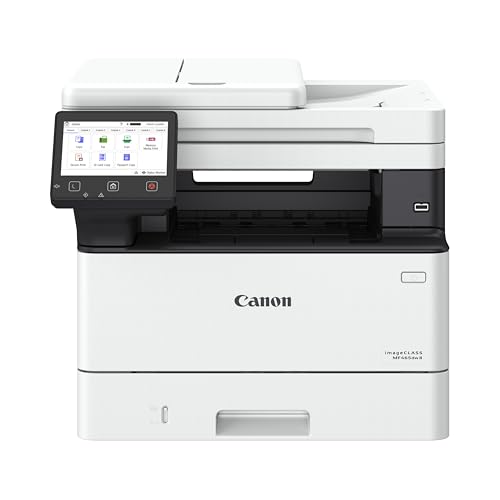
The MF465dw II is Canon’s monochrome counterpoint: a wireless duplex laser printer — in the title’s own ordering — with print, copy, scan and fax, expandable paper capacity, and a stated 42 pages per minute. That expandable capacity phrase is the listing’s most workgroup-literate detail. It acknowledges that a team’s volume grows, and that the correct machine is the one whose paper handling can grow with it through added capacity rather than being replaced at the first busy year. Offices buying for the team they will be in two years, not only the team they are, should underline that phrase.
Forty-two pages per minute of monochrome is the pace of records work: case files, invoices, statements, the long text documents that form most organisations’ actual paper diet. Duplex as a stated standard halves the sheet count of that diet automatically. Four functions on one wireless machine means the department’s paper circuit — in through the scanner, out through the printer, copied at the glass, faxed to the agency — runs through a single address on the network, learnable by every new starter in one induction tour.
Against its colour sibling, the MF465dw II trades the chart-and-cover world for economy and pace: one toner to stock, a faster stated speed, running costs that stay proportionate to text. Against the D1620 below, it offers the newer II designation and the expandable capacity story against the older machine’s stated feeder and warranty. That three-way Canon comparison is this guide in miniature — the maker has segmented its own line so precisely that the buyer’s real task is naming their workload accurately, after which the correct Canon largely names itself.
- Functions: Print, copy, scan and fax stated in the title
- Print speed: 42 ppm stated
- Paper capacity: Expandable paper capacity stated
- Duplex: Duplex laser printing stated
- Connectivity: Wireless stated
Strengths
- Expandable capacity lets the machine grow with the team.
- A stated 42 ppm suits records-heavy monochrome workloads.
- Four functions on one wireless address simplify the office map.
Trade-offs
- No colour output for client-facing documents.
- No feeder is explicitly claimed in the title — confirm in Canon’s documentation if feeder work dominates.
- No warranty term is stated in the listing.
Best for: a growing team printing monochrome records at volume. Not suited for: colour proposal and brochure production.
Growing teams will find the MF465dw II on Amazon; its expandable capacity options are detailed on the listing for planners thinking two years ahead.
Expandable capacity changes the purchase conversation in a way worth spelling out. Most printer purchases are quietly bets on the future: buy for today’s volume and replace early, or buy for tomorrow’s and overpay now. A machine whose paper capacity expands by configuration lets the bet be hedged — start at the capacity the current team needs, add depth when the headcount justifies it. For a workgroup whose growth is real but unscheduled, that hedge may be worth more than a few pages per minute of engine speed, and it is a sophistication buyers rarely find stated in a title at all.
The monochrome discipline completes the picture. One toner, one drum ecosystem, one behaviour for the whole department to learn — the MF465dw II is built for offices that measure their printing in boxes and want the measurement to stay boring.

Canon imageCLASS D1620 — Feeder-equipped monochrome veteran
The D1620 is the established name in Canon’s half of this set: a monochrome duplex wireless laser printer, multifunction with scanner and copier, an automatic document feeder, a three-year limited warranty and a stated 45 pages per minute — finished, unusually and rather cheerfully, in white. That is a complete workgroup sentence, and its completeness reflects the model’s maturity: this is a machine whose listing has had years to learn exactly what buyers ask, and it answers feeder, warranty and speed in the title where rivals make you dig.
Forty-five pages per minute edges its newer sibling’s stated pace, and the feeder gives the D1620 the input-side hardware that digitising workloads live on. Picture the records room’s reality: a banker’s box of two-sided forms, a deadline, and one machine. The feeder is the difference between that box being an afternoon and being a week. Duplex printing handles the output side of the same office — the long reports that should never consume single-sided stock — and wireless connection lets the machine sit in the records room where the boxes are, rather than beside a network point where they are not.
The white finish is not a joke detail. Offices are furnished, and a machine that must live in a client-facing area or a bright modern workspace wears its colour daily; Canon offering the D1620 in white acknowledges that workgroup hardware has a visual life as well as a mechanical one. Beneath the finish, the three-year warranty repeats the MF753Cdw II’s confidence signal in monochrome form. Buyers choosing between the two Canons with warranties are really choosing colour against pace-and-feeder, which is a workload question, and this guide’s comparison table lays the two side by side for exactly that decision.
- Print speed: 45 ppm stated in the title
- Functions: Multifunction with scanner and copier stated
- Document feeder: Automatic document feeder stated
- Warranty: 3-year limited warranty stated
- Finish: White, per the title
Strengths
- Feeder, warranty and speed all stated — a complete listing.
- 45 ppm monochrome pace suits records and digitising rooms.
- Wireless placement frees the machine to live where the paper is.
Trade-offs
- Monochrome only, like its records-room brief demands.
- An established design may trail newer models in interface fittings — check the listing’s detail sections.
- Fax is not named in the title, unlike several rivals here.
Best for: a records-heavy office digitising stacks of two-sided forms. Not suited for: colour client documents.
Records rooms can find the D1620 on Amazon in its white finish, feeder and warranty terms spelled out on the listing.
Maturity, in workgroup hardware, is a feature with a mechanism behind it: a model that has served for years has a known toner market, a documented behaviour under every paper an office will feed it, and an administrator community that has already met its quirks. The D1620’s listing reads the way it does because thousands of offices have asked it the same questions. A department that values that predictability over the newest interface will find the premium it pays is negative — the veteran is often the calmest purchase in the set, and calm is a workgroup virtue.
One caution completes the veteran’s portrait: fax goes unnamed in its title while the function lists of rivals proclaim it. Offices for whom fax is load-bearing should confirm the D1620’s fax position in Canon’s documentation before shortlisting it, rather than assuming a multifunction machine of its era must include the modem.

Brother MFC-L6915DW — Volume flagship
Brother’s MFC-L6915DW states the boldest numbers in this set, and it states them in a rush: wireless laser multifunction, monochrome, copier, fax, printer and scanner, 52 ppm mono print, 1200 x 1200 dpi print resolution, automatic duplex print — and up to 160,000 pages monthly. That final figure is the only monthly ceiling published by any title in this guide, and it reframes the machine: this is not a printer for a workgroup, it is a printer for a workload, sized for departments whose monthly output is counted in tens of thousands and whose downtime is measured in other people’s missed deadlines.
Read the ceiling responsibly. Up to 160,000 pages monthly describes the top of the machine’s design envelope, the figure engineers validate against — not a quota a wise office aims to hit every month, any more than a car’s top speed is its cruising recommendation. Its real information is comparative and structural: a machine validated at that ceiling carries margins — in its paper path, its fuser, its duty components — that a machine validated at a tenth of it does not. Offices printing thirty or fifty thousand pages a month should hear the figure as headroom, and headroom is what keeps a fleet calm in the worst month of the year.
The supporting figures hold up their end. Fifty-two pages per minute is the fastest stated pace here; 1200 x 1200 dpi keeps small print, forms and barcodes crisp at that pace; automatic duplex halves the paper bill of the whole torrent; and the four-function set means the same cabinet that prints the flood also scans the incoming paper that causes it. Wireless connection on a machine of this scale suits departments that rearrange, though an office running it at serious volume should consider its network placement with the same care as its floor placement — a flagship deserves infrastructure, not improvisation.
- Print speed: 52 ppm mono stated in the title
- Monthly ceiling: Up to 160,000 pages monthly stated
- Resolution: 1200 x 1200 dpi print stated
- Functions: Copier, fax, printer and scanner stated
- Duplex: Automatic duplex print stated
Strengths
- The set’s fastest stated pace with a published monthly ceiling.
- High resolution keeps forms and small print legible at volume.
- Four functions consolidate a department’s whole paper circuit.
Trade-offs
- Monochrome only — colour work needs a companion machine.
- Its capacity is surplus, and costlier, for small teams.
- Running it near its ceiling demands disciplined toner and paper logistics.
Best for: a high-volume department printing tens of thousands of pages monthly. Not suited for: a five-person office with gentle output.
High-volume departments will find the MFC-L6915DW on Amazon, its 52 ppm pace and monthly ceiling headlining the listing.
Volume at this scale turns consumables into logistics, and the flagship’s owners should plan like it. Toner for a machine printing five figures of pages monthly is a standing arrangement, not a purchase; paper arrives by the pallet-minded order, not the ream; and the administrator watches the machine’s counters the way a facilities manager watches a boiler — routinely, against expectations, with intervention scheduled before symptoms. None of that is a criticism of the Brother. It is the operating manual of the class it leads, and departments graduating to this class should budget the management attention alongside the machine.
There is also a consolidation argument at this volume. One flagship multifunction, properly governed, can absorb the work of several ageing desk machines whose combined toner shelves, quirks and failures cost more than the flagship’s lease on the floor. The L6915DW’s title — every function, the fastest pace, the published ceiling — reads like a consolidation proposal because, for the right department, that is exactly what it is.

HP Color LaserJet Pro 3304fdw — Home-office colour compact
HP’s Color LaserJet Pro 3304fdw scales the multifunction laser idea down to the home office without surrendering any of its functions. Its title lists the full set — colour laser printing, wireless connection, all-in-one status, print, scan, copy and fax — with mobile compatibility and a home office brief for colour documents. In a set of departmental machines, it is the pick for the five-person business, the distributed team’s hub home, the practice run from a converted spare room: places that are workgroups in function and households in geography.
Colour at this scale has a specific job. The home-office business sends out the same client-facing material as a department — proposals, invoices with brand, certificates, menus, price lists — and a colour laser produces it dry, consistent and ready to hand over, without a trip to a print shop or the household inkjet’s negotiation with glossy stock. Mobile compatibility matches how such businesses actually run: the document lives on a phone until the moment it needs to be paper. Wireless everything suits rooms that were never wired for an office, which is the defining condition of the home office itself.
The title’s silence is speed — the only unstated pace in this set — and the specification list marks it in the standard way. Small teams rarely live or die by pages per minute; their printing arrives in bursts between other work, and the machine’s readiness matters more than its sprint. Even so, a buyer comparing the HP against the Canon colour machine’s stated 35 ppm should pull HP’s documented figure and compare knowingly. The 3304fdw’s case rests on fit rather than figures: full functions, colour, wireless, at the scale of a room rather than a floor.
- Functions: Print, scan, copy and fax — all-in-one, as its title states
- Print technology: Colour laser
- Connectivity: Wireless with mobile compatibility stated
- Positioning: Home office use, per the title
- Print speed: Not stated in the listing title — verify with the manufacturer documentation
Strengths
- The full four-function set at home-office scale.
- Colour laser output for client documents without a print shop.
- Wireless and mobile operation suit unwired rooms.
Trade-offs
- Speed must be confirmed in HP’s documentation.
- Departmental volumes will outgrow its brief.
- Colour toner economy needs the usual default discipline.
Best for: a small business running its whole paper life from a home office. Not suited for: departmental monthly volumes.
Home-office teams will find the 3304fdw on Amazon under HP’s Color LaserJet Pro banner, mobile compatibility stated on the listing.
The home-office workgroup has one dynamic no department shares: the machine serves business hours and household hours from the same tray. School forms at breakfast, client proposals by ten, a scanned passport at noon, the community newsletter on Sunday. A colour multifunction laser absorbs that mixed traffic with a steadiness domestic inkjets rarely manage, and its owners tend to describe it in the language of relief — one machine, finally, that simply handles the house’s paper. That relief is the 3304fdw’s actual product, and its specifications are best read as the engineering behind it.
Placement in a home deserves the usual sentence, doubled: the machine needs a surface of its own, ventilation, and a position where its working sounds do not share a wall with a sleeping child. Home offices forgive many things; a laser’s fan at midnight is not among them.

Xerox C303a — Hybrid-team colour machine
Xerox closes the set with the C303a, a wireless colour laser all-in-one whose title speaks directly to the moment: print, scan, copy and fax, a stated 32 pages per minute, high-yield toner, wireless setup, a touchscreen, and an explicit brief — hybrid and small businesses. That last phrase is the most contemporary positioning in the set. The hybrid team’s office is part headquarters, part kitchen tables, and its central machine must be generous to the people in the room and reachable by the people who are not; a wireless colour multifunction with a touchscreen is precisely that shape.
High-yield toner is the title’s economic headline, and it deserves the prominence. Colour laser running costs are the standard objection to machines like this, and high-yield cartridges answer it at the level of the cost per page rather than the price per box: fewer replacements, longer intervals, a toner shelf that turns over slowly. For a small business without an office manager, that interval is also an attention saving — the machine simply stops asking for things as often, which in a hybrid team, where the person nearest the printer changes daily, is worth real money in avoided confusion.
The touchscreen completes the walk-up story: copying, scanning to destinations and faxing handled at the machine by whoever is in the office that day, without a hunt for the one laptop with the right software. At 32 ppm the C303a is the set’s gentlest stated pace, and its review will not inflate that into a virtue it is not — departments with a genuine flood should look at the Brother. For the hybrid team’s actual traffic — bursts of client colour, steady scanning, the meeting pack at four o’clock — 32 ppm colour with high-yield toner is a coherent, honest specification, and Xerox’s copier heritage stands behind the multifunction half of it.
- Functions: Print, scan, copy and fax stated in the title
- Print speed: 32 ppm stated
- Toner: High-yield toner stated
- Interface: Touchscreen stated
- Positioning: Hybrid and small businesses, per the title
Strengths
- High-yield toner stretches intervals and steadies colour costs.
- A touchscreen suits rotating hybrid staff at walk-up jobs.
- Full four functions with wireless setup for flexible offices.
Trade-offs
- The gentlest stated speed in this set.
- Colour discipline still required despite the high-yield economy.
- Very high monthly volumes belong with the Brother flagship.
Best for: a hybrid small business printing colour in bursts with rotating staff. Not suited for: maximum-volume monochrome departments.
Hybrid teams will find the C303a on Amazon, where its high-yield toner programme is set out beside the machine’s price.
Xerox’s presence in a workgroup guide carries a historical rhyme worth one paragraph. The company effectively invented the office copier’s modern form, and its multifunction machines inherit a design culture built around the walk-up user — the person with a stack of paper and no training. The C303a’s touchscreen-forward, wireless-setup title reads like that culture speaking in current vocabulary. Small businesses whose staff rotates through the office will feel the benefit in the only metric that matters for shared machines: jobs completed without anyone having to ask how.
Setup simplicity, also claimed in the title’s wireless setup phrase, compounds the same advantage. A hybrid office has no IT department to schedule; a machine that joins the network and announces itself in an afternoon, rather than after a ticket, respects the organisation it serves. Judge the C303a as that organisation’s machine — colour-capable, toner-frugal, kind to strangers — and its specification stops looking gentle and starts looking aimed.
Comparison Table
| Pick | Colour | Stated speed | Standout trait |
|---|---|---|---|
| Canon Color imageCLASS MF753Cdw II | Colour | 35 ppm | Feeder plus a stated 3-year limited warranty |
| Canon imageCLASS MF465dw II | Monochrome | 42 ppm | Expandable paper capacity |
| Canon imageCLASS D1620 | Monochrome | 45 ppm | Feeder and warranty stated, white finish |
| Brother MFC-L6915DW | Monochrome | 52 ppm | Monthly ceiling up to 160,000 pages stated |
| HP Color LaserJet Pro 3304fdw | Colour | Title gives no figure | Home-office scale with mobile compatibility |
| Xerox C303a | Colour | 32 ppm | High-yield toner and touchscreen |
How to Choose a Workgroup Multifunction Laser Printer
Let the paper diet decide colour first, because it is the one decision that cannot be configured away later. A department whose output is text, forms and records buys monochrome and banks the savings in speed and toner simplicity — the MF465dw II, D1620 and L6915DW divide that world by capacity ambition. A team whose documents carry colour into clients’ hands buys colour and governs it — the MF753Cdw II, 3304fdw and C303a divide that world by scale. Trying to make one machine be both bargains is how offices end up with a colour machine printing monochrome at colour costs.
Volume comes second, and it should be estimated from counters or invoices, not from feelings. A few thousand pages a month is home-office and small-team territory, served honestly by every machine here. Tens of thousands a month is flagship territory, where the Brother’s published ceiling and fastest pace stop being bragging and start being the specification. The worst workgroup purchases are volume mismatches in either direction — the flagship idling in a five-person office, the compact drowning in a department — and both are visible in advance to a manager counting a month’s paper before shopping.
Feeder and warranty close the decision. If the office digitises stacks, the feeder is not an accessory but the job itself, and the titles that state one — Canon’s colour machine and the D1620 — deserve their head start. If the machine will be a single point of failure for four functions, the stated three-year warranties deserve theirs. Speed, the figure buyers ask about first, honestly ranks fourth: within this set’s stated ladder, every rung serves a real office, and the differences matter less than diet, volume and input hardware.
Departmental routines give these specifications their meaning, so picture the multifunction’s working day honestly. It begins with the overnight print queue clearing before the first coffee, absorbs the morning’s scanning as signed paper arrives, spends midday on the unglamorous copy jobs nobody logs, and peaks twice — the meeting-pack hour and the end-of-day dispatch, when print, scan and fax traffic collide. A machine specified only for its engine speed survives the peaks and fails the collisions; a machine chosen for its feeder, its capacity and its network manners survives both. That is why this guide reads titles for breadth before pace, and why the listings that state feeders and warranties earn their prominence here.
Consumables strategy at this level deserves its own discipline. Four-function lasers consume toner, and colour machines consume four toners at four different rates dictated by the office’s documents. The mature arrangement is a shelf with one full set in reserve, a named owner, and a monthly counter reading that turns toner from a surprise into a schedule. High-yield options, where a maker offers them, lengthen every interval in that system; standard-yield cartridges in a busy department shorten them into a recurring errand. Either way, the system matters more than the cartridge — offices with a toner shelf and an owner simply do not have the Friday-afternoon outage that offices without them consider normal.
What Does a Monthly Page Ceiling Actually Tell You?
A monthly ceiling — Brother’s up to 160,000 pages is this set’s only stated example — is an engineering validation figure: the volume the machine’s paper path, fuser and duty components were tested to survive in a month. It is not a target, a quota or a promise that running at the ceiling is wise. Prudent fleet managers treat ceilings the way prudent drivers treat a speedometer’s top number, as the boundary of the design rather than its recommendation, and they size machines so the worst real month sits comfortably inside it.
The figure’s practical use is comparative and protective. Comparative, because a machine validated at a high ceiling carries structural margins a low-ceiling machine lacks, even at identical monthly volumes — the flagship printing thirty thousand pages is cruising where a lesser machine is straining. Protective, because an office that knows its own monthly count can refuse, on evidence, any machine whose ceiling its December would breach. Only one title in this set publishes the number, which is itself information: buyers for whom ceilings matter should pull the equivalent figures for the other five from manufacturer documentation and complete the table before deciding.
How Should a Team Set Up Scanning So People Actually Use It?
Multifunction machines fail socially at the scanner more than anywhere else, because scanning has destinations, and destinations must be designed. The setup that works is embarrassingly concrete: a small number of named destinations — the shared drive’s inbox, the accounts folder, the archive — configured at installation, labelled in words the team uses, and tested with a real document while the administrator is still standing there. A scanner with twelve cryptic destinations is a scanner the team will photograph documents around, using their phones, within a month.
Defaults do the rest. Set the standard scan to the format the office’s systems actually consume, at a resolution that keeps text crisp without making files enormous, with duplex engaged on machines and originals that support it. Name files at the machine where the interface allows it, or enforce a naming habit at the destination folder. None of this appears in any listing title, and all of it decides whether the multifunction’s second function earns its keep — which is why this guide treats setup as part of the product, and why the touchscreen and feeder machines in this set deserve credit for making the designed path the easy path.
Security on a multifunction machine deserves the same concreteness as its scanning setup. This device stores images of the office’s most sensitive paper — contracts, personnel records, medical and legal correspondence — and sits on the network with an address of its own. The installation hour should therefore include the administrator password, the stored-job settings, and a decision about which destinations scans may reach. None of the titles in this set headlines security, which makes it the buyer’s homework rather than the maker’s promise; Brother’s workgroup sibling in the companion guide advertises advanced security features outright, and departments with audit obligations should compare that posture deliberately before choosing between the two guides’ machines.
Training, once again, is the multiplier. A multifunction’s feeder, duplex scanner and destination list only save the office time if the office knows them, and a fifteen-minute induction — load the feeder like this, choose the destination like that, collect confidential jobs immediately — outperforms any specification in this guide over the machine’s life. Put the induction in the installation budget beside the destinations and defaults, and the four-function cabinet will be used as four functions rather than as a printer with a complicated lid.
Colour Governance on a Shared Laser: What Works?
The colour machines in this set — Canon’s MF753Cdw II, HP’s 3304fdw, Xerox’s C303a — share one management truth: colour costs are a policy outcome, not a machine property. The policy that works is default-based. Monochrome and duplex as the fleet standard, colour released by choosing it deliberately in the driver, and the machine’s own counters reviewed monthly so the policy’s effect is visible. Offices that govern this way routinely find their colour spend lands almost entirely on documents that deserved it.
High-yield toner, the Xerox title’s headline, is the supply-side half of the same discipline: longer intervals between cartridges, a lower cost rhythm per page, fewer emergency purchases at retail urgency. Pair high-yield supply with governed defaults and a colour multifunction’s running costs become a planned line rather than a monthly surprise — the condition under which colour stops being a finance argument and becomes what it should be, a documents decision.
One human rule completes the system: the person who prints the client pack in colour should never have to apologise for it. Governance exists to protect deliberate colour by eliminating accidental colour, and teams that understand that distinction stop policing each other and start policing the defaults, which is where the money was leaking all along.
Common Mistakes When Buying a Workgroup Multifunction Laser
Treating the monthly ceiling as a monthly target is the error this set’s flagship invites, and it wears machines out on schedule. A ceiling is headroom. Offices that buy the L6915DW for its ceiling and then run a sensible fraction of it will own a calm machine for years; offices that read the figure as permission to consolidate three departments onto one cabinet will meet the service engineer on a first-name basis.
Buying colour for a monochrome diet — or starving a colour diet with a monochrome machine — is the symmetrical error, and it is made by shopping the department’s aspirations instead of its paper. Pull a month’s actual output, sort it by whether colour carried information or merely decoration, and let that ratio choose the camp. The six machines here split three and three precisely because real offices do.
Neglecting the scanner’s setup finishes the trio, as the section above argues: a multifunction machine whose destinations were never designed becomes a printer with an expensive lid. Budget the installation hour — destinations, defaults, a test document, a named owner — as part of the purchase price, and the machine the office uses will be the machine the office bought.
Final Recommendation
For departmental monochrome volume, the Brother MFC-L6915DW stands alone here — fastest stated pace, published monthly ceiling, four full functions. For monochrome teams still growing into their volume, Canon’s MF465dw II and its expandable capacity make the patient choice, while records rooms digitising paper should take the D1620’s feeder and warranty. Colour departments should default to the MF753Cdw II’s complete, warranty-backed brief; hybrid small businesses to the Xerox C303a’s high-yield economy; and home-office workgroups to HP’s 3304fdw, sized for their rooms. Match diet, then volume, then feeder — and the multifunction cabinet becomes the quiet centre of the office’s paper life.
Finally, keep the retirement in view from the first day, because multifunction machines accumulate an office’s memory. When any of these six eventually leaves service, its stored scans, address books and settings leave with it unless the administrator clears them — a five-minute task that belongs in the same checklist as the asset register entry made at installation. Departments that document their machines at arrival retire them cleanly; departments that do not, eventually hold a corridor of retired cabinets nobody dares to recycle. It is a small, telling difference between an office that manages its paper department and one that merely owns it.
Placement physics complete the practical picture. A multifunction cabinet needs a surface that does not flex under its working weight, clearance above for the feeder’s lid and the documents standing in it, and a network position — wired point or strong wireless — worthy of the traffic it will carry. It also needs to stand where the paper is: a scanner exiled to a distant corner teaches the team to photograph documents with their phones instead, quietly defeating the digitising strategy the machine was bought to serve. Walk the office’s paper for a day before choosing the spot; the right corner announces itself in the traffic.
And give the machine a name the team can say in a sentence. Print dialogues fill with near-identical model strings, and half of all misdirected jobs are really naming failures. A multifunction called Reception-Colour or Records-Laser is found instantly, chosen correctly, and blamed accurately when it jams — which, in a shared office, is a form of kindness to everyone including the machine.
One more scenario is worth rehearsing before the decision hardens: the audit, the inspection, the due-diligence week — whatever your sector calls the days when every record must be findable. In that week the multifunction machine stops being furniture and becomes the office’s memory made visible, scanning the archive box, printing the bundle, faxing the confirmation. Departments discover then whether their machine’s feeder, pace and destinations were specified for the worst week or the average one. Average-week specifications are cheaper every other week of the year; worst-week specifications are the reason the worst week ends on time. Neither answer is wrong, but the choice should be made knowingly, in the calm, rather than discovered in the storm.
Keep a one-page operating card taped inside the supply cupboard door: toner part numbers, the paper the trays expect, the owner’s name, the service route. It reads like a triviality until the day the regular owner is on holiday and the machine stops mid-bundle — when it becomes the most valuable page the office owns. Multifunction machines reward that kind of small, written kindness disproportionately, because their failures are never private; they are always, by design, the whole department’s.
Read the counters together once a quarter — print against scan, colour against monochrome — and the fleet’s next decision makes itself: the figures will show which function the office truly lives on, which is the function the next machine must never compromise. That quarterly habit, ten minutes with a notebook, is the difference between an office that buys its paper department deliberately and one that replaces it in a panic. Every machine in this guide will keep those counters faithfully; the discipline of reading them is the owner’s contribution, and it compounds like interest.
When the choice narrows to two finalists, let the team that will live with the machine spend ten minutes with each candidate’s documentation — the feeder’s stated original sizes, the tray’s expansion path, the warranty’s actual terms. Workgroup purchases fail on those unglamorous lines far more often than on engine speed, and ten minutes of reading is the cheapest consultation in the entire procurement. The machine that survives that reading with your workload intact is, almost always, the machine to buy.
Install it on a quiet day, run the test bundle, file the first page with the date on its back — and let the department’s new centre get on with the unglamorous work of never being discussed again.
That silence, in the end, is the verdict every machine in this set is auditioning for: to be the office’s paper department so completely that nobody remembers choosing it. Buy for the worst week’s diet and volume, set it up like infrastructure, and the silence usually follows within a month.
Frequently Asked Questions
What functions should a workgroup multifunction laser include?
Print, scan and copy are the core; fax joins them on five of these six titles and remains load-bearing for offices dealing with legal, medical and government counterparties. Judge fax by your own counterparties, not by fashion.
How do the stated speeds in this set compare?
They form an honest ladder: 32 ppm for the Xerox C303a, 35 for Canon’s colour MF753Cdw II, 42 for the MF465dw II, 45 for the D1620 and 52 for Brother’s MFC-L6915DW. HP’s 3304fdw publishes no figure in its title, so its pace belongs to a documentation check.
Does a 160,000-page monthly ceiling mean I should print that much?
No. It is the validated top of the Brother’s design envelope — headroom that signals structural margin. Size your machine so your busiest real month sits comfortably below its ceiling, and treat the figure as comparison evidence, not as a quota.
Colour or monochrome for a mixed office?
Sort a month’s real output first. If colour carries information in client-facing documents regularly, buy colour and govern the defaults; if colour is decoration on internal paper, buy monochrome and let a smaller colour device elsewhere handle the exceptions.
Why do two listings emphasise warranty?
Because a multifunction machine is four functions sharing one point of failure. Canon states a three-year limited warranty on the MF753Cdw II and the D1620, converting that dependence into a managed risk — a legitimate deciding factor beside speed.
Related Guides
For the opposite end of the printing scale — photographs from a pocket, with no ink at all — see ZINK printers for instant pocket photographs. Desk setups beside these machines are covered in 1440p monitors at 144 Hz, and larger rooms pair well with 27-inch monitors running at 144 Hz.