What's inside
- Key Takeaways
- Where to Buy
- Quick Picks
- How the Picks Were Chosen
- Detailed Reviews
- Comparison Table
- How to Choose a Resin Printer
- Setting Up the Wash-and-Cure Corner
- Reading Exposure Tests Without Guessing
- Supports, Orientation, and Peel Forces
- Film, Resin Storage, and the Consumable Perimeter
- Common Mistakes
- Frequently Asked Questions
- Final Recommendation
As an Amazon Associate I earn from qualifying purchases. This post may contain affiliate links at no extra cost to you.
[SITE_DOMAIN] is reader-supported. When you buy through links on our site, we may earn an affiliate commission at no extra cost to you. Prices and availability change; check the Amazon listing for the current details.
Resin printing rewards patience and punishes guesswork, and the best resin sla printers are the ones that make the fiddly parts — leveling, exposure, temperature — behave the same way on the fiftieth print as on the first. The six machines gathered here all cure liquid resin under a monochrome LCD screen, yet they split into two clear families. Three carry plates around six inches wide and suit a desk corner. Three carry plates past eight inches and suit a shelf of their own, bigger batches of parts, and taller models that would otherwise need splitting and gluing.
Screen resolution headlines every listing in this category, running from 9K on the smallest ELEGOO here to 16K on the largest, and those numbers do matter for miniature faces, dental models, and engraved lettering. They are not the whole story, though. Light source design decides how evenly that resolution reaches the corners of the plate. Tank heating decides whether a cold room ruins a January print. Leveling systems decide how much of your evening goes to setup and how much goes to painting what came off the plate. This guide weighs those working details pick by pick, because a resin printer is a small chemical workshop as much as it is a display with a motor.
One boundary before the picks: resin itself, FEP film, gloves, and wash-and-cure stations are consumables and accessories, and they appear in these pages as prose guidance only. The picks are printers. Everything a printer needs around it — ventilation, a curing light, a safe place for uncured parts — gets its own section further down, because choosing the machine without planning its surroundings is how good hardware ends up boxed in a garage.
Key Takeaways
- Plate size divides this lineup more honestly than resolution does: the three smaller machines print one miniature army at a time, while the three larger ones print that army plus its cavalry in a single run.
- Heating appears on three of the six picks — as smart tank heating, dynamic heating, or plain tank heating — and it is the feature cold workshops will feel most.
- Leveling help ranges from smart automatic systems to a ball-screw Z-axis built for stability, and each approach removes a different kind of first-layer failure.
- Speed claims in resin are stated in millimetres per hour of Z travel, and the spread here runs from 70mm/h to 170mm/h, which changes overnight printing arithmetic considerably.
- Every pick cures through a monochrome LCD; what differs is the light engine behind it, from a stable LighTurbo source to a COB design to a high-contrast amber screen.
Where to Buy
- Anycubic Photon Mono 4 — Check price on Amazon
- ELEGOO Mars 5 Ultra — Check price on Amazon
- ELEGOO Saturn 4 Ultra 16K — Check price on Amazon
- Anycubic Photon Mono M7 Pro — Check price on Amazon
- HeyGears Reflex RS Turbo — Check price on Amazon
- Anycubic Photon P1 — Check price on Amazon
Quick Picks
| Pick | Best for | Platform | Screen / Build size | Check |
|---|---|---|---|---|
| Anycubic Photon Mono 4 | A first resin desk beside the painting bench | Masked LCD resin | 7-inch 10K screen; 6.04 × 3.42 × 6.49 in | Check price on Amazon |
| ELEGOO Mars 5 Ultra | Hands-off leveling on a compact plate | Masked LCD resin | 7-inch 9K screen; 6.04 × 3.06 × 6.49 in | Check price on Amazon |
| ELEGOO Saturn 4 Ultra 16K | Large plates of miniatures in one run | Masked LCD resin | 10-inch 16K screen; 8.33 × 4.66 × 8.66 in | Check price on Amazon |
| Anycubic Photon Mono M7 Pro | Fast tall prints on a heated tank | Masked LCD resin | 10.1-inch screen, 14K class; 8.77 × 4.96 × 9.05 in | Check price on Amazon |
| HeyGears Reflex RS Turbo | A tuned, plug-and-play premium workflow | Masked LCD resin | High-contrast amber screen; 8.7 × 4.8 × 9.0 in | Check price on Amazon |
| Anycubic Photon P1 | Stability-first printing on a large plate | Masked LCD resin | 14K class screen; 8.78 × 4.96 × 9.05 in | Check price on Amazon |
How the Picks Were Chosen
Six printers made the cut from a wider shelf of resin machines, and the filter was practical rather than numerical. Every pick had to expose its core facts in its own listing title — screen, build volume, leveling approach, heating where fitted — because a buying decision built on stated facts survives contact with the delivery box. Machines whose titles hid the build volume or left the screen class vague were set aside, however loudly their marketing shouted elsewhere. What remained was a spread: two brands with deep benches in this category, one premium outsider, three plate sizes in effect, and three distinct answers to the leveling question.
Resolution was treated as a threshold, not a leaderboard. Once a screen passes the point where layer lines vanish under primer at normal viewing distance, extra pixels buy their keep on specific work — jewellery masters, dental arches, thirty-two-millimetre faces — rather than on everything. That is why a 9K machine sits comfortably in this company: its leveling and detection systems serve the prints most people actually run. Readers weighing resin against filament for a first machine altogether will find the filament side of that decision mapped in our roundup of the best consumer-grade 3d printers, where the ecosystem questions come first and the chemistry never appears.
Heating earned unusual weight in the selection because resin viscosity is temperature-sensitive and most hobby rooms are not laboratories. A tank that holds its warmth turns a marginal winter resin into a reliable one, and three picks here heat in some form. The final filter was workflow honesty: printers that promised automatic help had to name the mechanism — smart leveling, intelligent detection, a ball screw — rather than gesture at ease in general terms.
Two plate classes run through the selection, and naming them plainly helps the reviews make sense. The Mars class — the Mono 4 and the Mars 5 Ultra — carries plates near six inches wide and heights near six and a half, dimensions that suit single figures, small units, jewellery and dental work, and the desk corners most people actually have. The Saturn class — the Saturn 4 Ultra, the M7 Pro, the Reflex RS Turbo, and the Photon P1 — carries plates past eight inches wide and heights near nine, dimensions that suit production runs, display pieces, and workshops where the printer is furniture rather than accessory. Neither class is the upgrade of the other. They are answers to different workloads, and the reviews below judge each machine inside its own class first.
Detailed Reviews

Anycubic Photon Mono 4
Best for: a first resin printer parked next to the miniature painting desk, printing infantry squads and busts at a scale where a 10K screen earns its keep.
Not suited for: terrain boards and full helmet shells — the 6.04-inch plate width turns those into multi-part gluing projects.
- Screen: 7-inch 10K mono LCD
- Light source: LighTurbo, described in the listing as a stable light source
- Print speed: 70mm/h
- Build volume: 6.04 × 3.42 × 6.49 inches
- Not stated in the listing title — verify with the manufacturer documentation
The Photon Mono 4 is the straightforward machine in this group: a 10K screen over a modest plate, a named light source, and a stated speed, with nothing in the title pretending to be a laboratory instrument. That plainness is its charm. A 7-inch 10K panel packs its pixels tightly across a small area, so the XY detail available for a miniature’s face, a ring’s prongs, or the lettering on a nameplate is genuinely fine, and the smaller plate means less resin sitting in the tank ageing between sessions. For the painter who prints a squad on Friday and paints it across the weekend, the proportions feel right-sized rather than cut down.
The LighTurbo source is billed as stable, and stability is the quality that matters most in a light engine: exposure that drifts between the first layer and the four-hundredth shows up as soft detail on tall prints. At 70mm/h the Mono 4 is the slowest machine here by its own stated figure, which in practice means overnight jobs rather than evening jobs for anything tall. Treat that as a scheduling fact, not a flaw — a 6.49-inch-tall print run while you sleep asks nothing of your attention, and resin printing rewards the unhurried in other ways too, since slower lifts are often kinder to delicate supports.
What the title does not offer is equally informative. No heating is claimed, no automatic leveling is claimed, and no detection system is claimed, so the ownership picture is manual and honest: you level the plate yourself, you keep the room reasonably warm, and you learn the exposure test prints that every resin printer eventually teaches. Many long-term hobbyists prefer exactly that apprenticeship, because the skills transfer to every machine that follows.
Think of the workload in plates per week. A Mono 4 plate holds a respectable squad or a handful of larger pieces, and at the stated pace a tall plate is an overnight run — which suits a rhythm of print, wash, cure, paint, repeat across a week. The small tank also disciplines resin buying: standard bottles turn over before they age, and swapping colours or formulations costs a filter-and-pour rather than a major decanting operation. Owners printing for a game group, where the same squad appears on several tables, will feel the plate size first; owners printing one-off display pieces at modest scale may never feel it at all.
Strengths
- 10K resolution concentrated on a 7-inch screen gives very fine XY detail for miniatures and small masters.
- Compact build volume keeps the resin inventory in the tank small and turnover quick.
- A named, stability-focused light source addresses exposure evenness directly.
Trade-offs
- 70mm/h is the lowest stated speed in this lineup, so tall prints are overnight commitments.
- The 6.04 × 3.42 inch plate fills quickly when a whole unit of models prints at once.
- No heating or automatic leveling appears in the title, so setup and room temperature stay manual concerns.
If the Mono 4’s compact, high-resolution formula matches the corner of the desk you have in mind, the listing carrying the 7-inch 10K configuration is the one to open — Check price on Amazon.
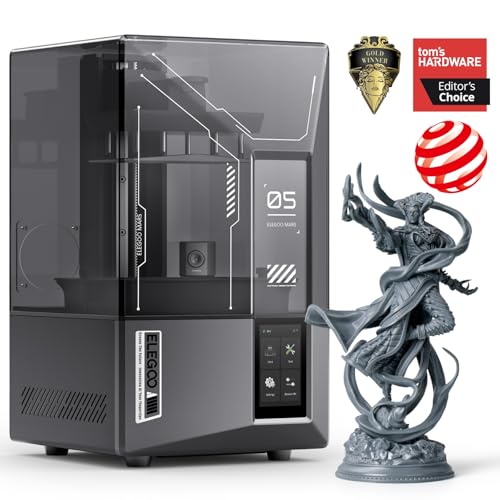
ELEGOO Mars 5 Ultra
Best for: printing miniatures and dental-style models on a compact plate while the machine handles leveling and watches the print itself.
Not suited for: wide scenic pieces or full plates of large-scale figures — at 6.04 × 3.06 inches the plate is the narrowest here.
- Screen: 7-inch 9K mono LCD
- Leveling: smart automatic leveling
- Monitoring: intelligent detection
- Connectivity: Wi-Fi transfer
- Build size: 6.04 × 3.06 × 6.49 inches
- Not stated in the listing title — verify with the manufacturer documentation
The Mars 5 Ultra takes the opposite bet from the Mono 4: one step down in headline resolution, several steps up in automation. Smart automatic leveling removes the single most common beginner failure — a plate set a fraction off, discovered three hours later as a pancake of cured resin on the film. Intelligent detection watches the print in progress, and Wi-Fi transfer removes the USB-stick shuffle between computer and printer that quietly discourages people from printing at all. Taken together, the title describes a machine designed to shrink the distance between deciding to print something and holding it.
The 9K screen deserves a fair reading. Spread across seven inches, 9K still resolves detail well below what paint and primer reveal at tabletop distance, and the prints this machine will mostly make — gaming miniatures, prototypes of small parts, study models — live exactly in that range. Where the smaller number might show is in extreme close-up work: jewellery masters examined under magnification, or faces at very small scales where every pixel row is a brush decision. For those, this guide’s larger and sharper picks exist. For the broad middle of resin work, the Mars trades a slice of theoretical sharpness for a working day with fewer rituals.
Its plate is the narrowest of the six at 3.06 inches deep, which shapes what fits: single figures, small vehicles, and parts oriented diagonally behave well, while wide bases may need splitting. Height matches the Mono 4 at 6.49 inches, so tall single pieces are equally feasible. The overall picture is a desktop appliance in the best sense — compact, self-monitoring, and content to be operated from the same network as everything else in the room.
The detection system changes failure economics in a way worth picturing. The classic resin disaster is a print that detaches early and spends hours curing a floating raft against the film, discovered at bedtime. A machine that watches its own work and flags trouble converts that disaster into an interrupted afternoon. Combined with leveling that sets itself, the Mars 5 Ultra asks its owner to be good at exactly two things: supporting models sensibly in the slicer, and keeping the wash corner stocked. Those are learnable in a weekend, which is precisely the point of the design.
Strengths
- Smart automatic leveling removes the most failure-prone manual step in resin setup.
- Intelligent detection plus Wi-Fi transfer make unattended and remote-started prints practical.
- The compact footprint suits a desk corner or a shelf in a shared room.
Trade-offs
- 9K is the lowest screen class here, which matters for magnification-level detail work.
- The 3.06-inch plate depth is the tightest fit for wide bases and scenic pieces.
- No tank heating is stated, so cold-room printing still depends on room temperature.
Read the Mars 5 Ultra’s listing closely for its leveling and detection description if those systems are what draw you — the configuration with Wi-Fi transfer included is at Check price on Amazon.

ELEGOO Saturn 4 Ultra 16K
Best for: filling a 10-inch plate with a whole unit of miniatures, or printing display-scale figures that need 16K detail across a wide area.
Not suited for: a cramped desk that also holds a wash station and curing box — the 8.33 × 4.66 inch plate implies a machine with real shelf presence.
- Screen: 10-inch 16K mono LCD
- Lid: flip-up lid design
- Heating: smart tank heating at 30 °C
- Build size: 8.33 × 4.66 × 8.66 inches
- Not stated in the listing title — verify with the manufacturer documentation
The Saturn 4 Ultra 16K is where this lineup crosses from desktop accessory to production tool. A 16K screen stretched across ten inches keeps pixel size small even as the plate grows, which is the hard trick in large resin machines: area and detail usually trade against each other, and here the title claims both. A full plate of infantry, a cavalry unit beside them, or a single display figure with room for its base all fit inside 8.33 × 4.66 inches, and the 8.66-inch height swallows busts and terrain spires that the compact machines would split.
Smart tank heating at 30 °C is the second headline, and for many workshops it will matter more than the resolution. Resin that sits at a held temperature flows and cures predictably; resin in a cold garage thickens, clings, and fails in ways that look like exposure problems. Holding the tank at a stated 30 degrees removes a whole category of seasonal troubleshooting. The flip-up lid rounds out the practical picture — on a machine this size, a lid that hinges rather than lifts clear saves both shelf depth and the daily annoyance of finding somewhere to put a dripping cover.
Ownership scales with the plate, it should be said. A full Saturn plate consumes more resin per run, failed prints cost more when they happen, and washing a plate-load of models is a longer session at the sink. None of that argues against the machine; it argues for matching it to a workload that uses the area. A printer of mostly single small figures will find the plate under-filled and the resin turnover slow, while a printer of units, batches, and big centrepiece models will feel the size as pure relief.
There is also a quality argument for the big plate that has nothing to do with quantity. Large single pieces — a torso, a dragon’s wing, a building facade — print without seams, and seams are where resin models go to look homemade: filling, sanding, and hiding a join across a detailed surface is skilled, slow work. A plate that swallows the piece whole deletes that labour entirely. The 16K screen then protects the bargain, because a large piece printed at coarse XY resolution trades seam labour for surface labour instead. The Saturn’s proposition is that you should not have to choose which kind of finishing work to avoid.
Strengths
- 16K across a 10-inch screen preserves fine detail at production-plate scale.
- Smart tank heating at a stated 30 °C stabilises resin behaviour in cool rooms.
- The flip-up lid suits shelves where a lift-off cover has nowhere to go.
Trade-offs
- Full plates consume resin quickly, so per-run material cost is the highest here alongside the other large machines.
- The footprint demands dedicated shelf space plus room for washing large parts.
- Small single prints under-use the plate and slow resin turnover in the tank.
The Saturn 4 Ultra 16K’s own page lays out the heated-tank arrangement and the flip-up lid in full — examine that configuration at Check price on Amazon before deciding the plate size fits your shelf.

Anycubic Photon Mono M7 Pro
Best for: tall prints turned around quickly — cosplay pieces, spires, and long prototypes — on a large heated plate.
Not suited for: squeezing onto a narrow bookshelf; the 8.77 × 4.96 inch plate belongs to the large-format end of this guide.
- Screen: 10.1-inch mono LCD, 14K class
- Light source: COB LighTurbo 3.0
- Print speed: 170mm/h fast printing
- Heating: dynamic heating function
- Build volume: 8.77 × 4.96 × 9.05 inches
- Not stated in the listing title — verify with the manufacturer documentation
Speed is the M7 Pro’s opening argument, stated plainly as 170mm/h — more than double the Mono 4’s figure in this same guide — and height is where that argument lands. A nine-inch-tall print is an exercise in Z travel; halving the hours on tall work changes what is worth attempting on a weeknight. The build volume backs the claim with substance: 8.77 × 4.96 inches of plate and 9.05 inches of height, the tallest envelope here, wrapped around a 14K-class 10.1-inch screen lit by a COB LighTurbo 3.0 source.
The dynamic heating function pairs sensibly with the speed. Resin that flows well separates from the film cleanly at pace; resin that has gone thick in a cold room resists, and resistance at speed is where prints tear from supports. A heating system described as dynamic suggests the machine manages temperature as a variable rather than a fixed setting, which suits long prints that begin in a cool evening room and finish in a warmer morning one. None of this removes the need for sensible supports and orientation — physics keeps its vote — but it stacks conditions in the printer’s favour.
Consider the M7 Pro the throughput pick of the large machines. Against the Saturn’s higher resolution it offers a faster stated pace and a slightly larger envelope; against the P1 below it offers heating and the COB light source. Its natural home is a workshop that prints big things often — prop pieces, architectural models, production masters — where hours saved per print compound across a month into whole extra projects.
Speed interacts with supports in a way new owners underestimate. Faster lift and retract cycles raise the peel forces each layer must survive, so the M7 Pro rewards careful orientation and generously attached supports on heavy sections — the engineering bargain is that the machine supplies pace and warmth while the slicer work supplies prudence. Owners coming from slow machines often find their old support habits still serve, because habits formed under gentle conditions carry margin. Owners who treat the speed figure as permission to under-support tall, heavy prints will meet the failure the machine cannot prevent: a part that leaves its supports mid-print and cures against the film.
Strengths
- 170mm/h is the fastest stated print speed in this lineup by a wide margin.
- The 9.05-inch build height is the tallest envelope of the six picks.
- Dynamic heating supports the speed claim by keeping resin flowing in cool rooms.
Trade-offs
- 14K class resolution sits below the Saturn’s 16K for magnification-level surface detail.
- Large plate plus tall Z travel means long prints still consume serious resin volumes.
- No automatic leveling is named in the title, so plate setup remains a manual skill.
Speed claims deserve a look at the exact listing wording, and the M7 Pro’s page states its 170mm/h figure and heating arrangement directly — read it at Check price on Amazon.

HeyGears Reflex RS Turbo
Best for: a workshop that values tuned profiles and a plug-and-play routine over chasing the highest resolution number on the box.
Not suited for: comparing screens by pixel count alone — the title sells contrast and workflow, and states no K-class resolution figure at all.
- Screen: high-contrast amber screen
- Z-axis: precision Z-axis
- Workflow: plug-and-play, with pre-tuned profiles
- Leveling: auto leveling
- Heating: tank heating
- Build size: 8.7 × 4.8 × 9.0 inches
- Not stated in the listing title — verify with the manufacturer documentation
The Reflex RS Turbo is the outsider in this company, and its title reads like a deliberate refusal to play the numbers game the other five are playing. No K figure appears anywhere. Instead the listing leads with a high-contrast amber screen — contrast being the property that decides how sharply each layer’s edges are drawn, since stray light through the mask softens fine features — and then stacks workflow claims: precision Z-axis, plug-and-play operation, pre-tuned profiles, auto leveling, tank heating. It is a pitch aimed at people who have owned resin printers before and know exactly which frustrations they are paying to remove.
Pre-tuned profiles deserve emphasis because exposure calibration is the hidden tax on every new resin a printer buys. A profile library maintained for the machine shifts that work from the owner’s evenings to the manufacturer’s testing, and combined with auto leveling and tank heating it sketches a ownership experience where the variables are managed centrally. The build size, 8.7 × 4.8 × 9.0 inches, places the Reflex squarely in the large class alongside the Saturn and the two big Anycubic machines, so the convenience does not cost plate area.
The honest caveat is verification. Because the title withholds a resolution class, the detail ceiling of the amber screen cannot be settled from the listing alone, and the spec box above records that silence plainly. Printers whose work lives or dies on stated pixel counts should weigh that gap. Printers whose work lives on reliability — batches of parts that must simply come out right, repeatedly — may find the trade attractive, since contrast, Z precision, and thermal stability are the unglamorous properties that production printing actually runs on.
The amber screen itself deserves a plain explanation. In masked resin printing, the screen blocks light where a layer should stay liquid and passes it where the layer should cure; the sharper that boundary, the crisper the feature. Contrast is the measure of how completely the blocked areas truly block. A high-contrast screen leaks less stray light into fine gaps — the space between a miniature’s fingers, the counters in engraved lettering — and less leakage means detail that survives without being flooded by its own illumination. It is a different route to sharpness than raw pixel count, and on subjects full of narrow negative spaces it can be the more relevant one.
Strengths
- High-contrast amber screen targets edge sharpness through light control rather than pixel count.
- Pre-tuned profiles plus auto leveling and tank heating form the most complete workflow package here.
- Large 8.7 × 4.8 × 9.0 inch envelope matches the biggest plates in this guide.
Trade-offs
- No resolution class is stated in the title, so detail claims rest on contrast rather than a K figure.
- The plug-and-play pitch suits owners who accept the manufacturer’s profiles as their starting point.
- As the outsider brand here, its accessory and community ecosystem is a separate research task.
Because the Reflex RS Turbo’s case rests on its profile and workflow description, its listing repays a full read before any comparison shopping — start at Check price on Amazon.

Anycubic Photon P1
Best for: large, tall prints where Z stability across a nine-inch column decides whether fine detail survives to the top layer.
Not suited for: a first-ever resin printer on a tight desk — the 8.78 × 4.96 inch plate and ball-screw build aim at committed large-format work.
- Resolution class: 14K precision
- Light source: LighTurbo 4.0
- Z-axis: stability ball screw
- Leveling: auto-leveling
- Resin compatibility: 8000cps resin compatible
- Build size: 8.78 × 4.96 × 9.05 inches
- Not stated in the listing title — verify with the manufacturer documentation
The Photon P1 closes the lineup with a mechanical argument. Its title names a stability ball screw for the Z-axis — the component that lifts the plate thousands of times per print — alongside 14K precision, the LighTurbo 4.0 light source, and auto-leveling. Ball screws are the grown-up answer to Z wobble: the faint horizontal banding that appears on tall prints when a lesser lift mechanism wanders. On a machine offering 9.05 inches of height, that stability is not decoration; the taller the column of cured layers, the more any lift inconsistency has room to announce itself.
The 8000cps resin compatibility figure is the other distinctive claim. Viscosity ratings describe how thick a resin the machine is built to handle, and a high stated ceiling widens the menu of materials the printer can work with, including thicker formulations that thinner-rated machines struggle to separate and settle. Paired with the largest plate footprint here by a hair — 8.78 × 4.96 inches — the P1 reads as Anycubic’s capacity flagship: the most resin, the tallest prints, the broadest material tolerance in its family.
Set against its sibling the M7 Pro, the P1 trades the stated 170mm/h speed and dynamic heating for the ball screw and the viscosity ceiling; the titles do not claim heating for the P1, so cold-room behaviour leans on resin choice and room conditions. That is a clean, legible trade, and it maps onto two kinds of large-format work: fast turnover of tall pieces on one side, maximum stability and material range on the other.
Banding, the fault the ball screw exists to prevent, is worth recognising on sight: faint, regular horizontal lines stacked up a tall print like the rings of a tree, invisible under primer on rough subjects and glaring on smooth ones — a car body, a vase, a helmet shell. It originates in tiny inconsistencies of lift height, layer after layer, which is why no exposure setting cures it and why a mechanical answer is the real answer. If your large prints are smooth-surfaced and tall, the P1’s specification speaks directly to your most likely complaint; if they are textured and organic, the same money buys speed or resolution elsewhere in this lineup, and the ball screw becomes insurance rather than necessity.
Strengths
- The stability ball screw directly addresses Z banding on tall prints.
- 8000cps resin compatibility states the widest material-viscosity tolerance in this guide.
- Auto-leveling plus the joint-largest plate make big prints easier to start and finish.
Trade-offs
- No heating function is claimed in the title, unlike three other picks here.
- No print-speed figure is stated, so throughput comparisons rest on other evidence.
- The large envelope and tall Z travel ask for dedicated space and generous resin stock.
The P1’s listing is the place to confirm the ball-screw specification and the viscosity rating in the manufacturer’s own words — that page is at Check price on Amazon.
Comparison Table
| Pick | Screen | Build size (in) | Heating | Leveling |
|---|---|---|---|---|
| Anycubic Photon Mono 4 | 7-inch 10K | 6.04 × 3.42 × 6.49 | — | — |
| ELEGOO Mars 5 Ultra | 7-inch 9K | 6.04 × 3.06 × 6.49 | — | Smart automatic |
| ELEGOO Saturn 4 Ultra 16K | 10-inch 16K | 8.33 × 4.66 × 8.66 | Smart tank heating, 30 °C | — |
| Anycubic Photon Mono M7 Pro | 10.1-inch, 14K class | 8.77 × 4.96 × 9.05 | Dynamic heating | — |
| HeyGears Reflex RS Turbo | Amber, high contrast | 8.7 × 4.8 × 9.0 | Tank heating | Auto leveling |
| Anycubic Photon P1 | 14K class | 8.78 × 4.96 × 9.05 | — | Auto-leveling |
Read across the rows and the lineup’s logic shows itself. The two compact machines divide on philosophy: one trusts the owner’s hands, the other automates them away. The four large machines divide on priority: resolution on the Saturn, pace on the M7 Pro, workflow polish on the Reflex, mechanical stability on the P1. Heating appears exactly where the manufacturers expect cold rooms and long runs, and leveling help appears everywhere except the two machines whose titles leave setup to the owner. No row dominates the table, which is the sign of a healthy category — each pick is the best answer to a different question, and the sections that follow are organised around finding which question is yours.
How to Choose a Resin Printer
Which plate size matches the models you actually print?
Start with the largest single piece you print regularly, not the largest you can imagine. A plate around six inches wide covers individual miniatures, jewellery masters, dental models, and small functional parts with room to spare, and it keeps resin turnover brisk. Step up to the eight-inch class when whole units print together, when display figures arrive as single files, or when splitting models has become a chore you resent. Every step up in plate size multiplies resin inventory, wash volume, and the cost of a failed run, so the right size is the smallest one that fits your ordinary work — with the Saturn-class machines waiting for the moment ordinary work outgrows it.
How much resolution does your subject really need?
Resolution pays where surfaces are examined closely: faces at small scales, engraved text, filigree, the stipple on a creature’s skin. It pays much less on smooth mechanical parts, terrain, and anything destined for heavy priming and dry-brushing. Read the K figures in this guide as a ladder — 9K on a small screen is already fine; 16K across a large screen is finer still over a wider area — and spend the difference on the features your failure history actually complains about. Most failed resin prints die from supports, exposure, or temperature, not from a shortage of pixels.
Does your room need a heated tank?
Resin thickens as it cools, and thick resin separates reluctantly, settles slowly, and cures unevenly. If the printer will live in a heated room year-round, heating is a comfort. If it will live in a garage, a basement, or a room that cools overnight, a heated tank — smart heating at a stated 30 °C on the Saturn, dynamic heating on the M7 Pro, tank heating on the Reflex — moves from comfort to infrastructure. Judge by January, not by the week the machine arrives.
What will you print when one material is not enough?
Resin machines print one resin at a time; multi-part colour or mixed-material objects come from printing pieces separately and assembling them. If your ambitions run toward genuinely mixed materials inside a single print — rigid bodies with flexible joints, dissolvable supports under delicate spans — that is filament territory, and the machines built for it are compared in our guide to the best multi-material 3d printers, where the toolhead-versus-filament-switching argument gets its own full treatment.
Which automation genuinely saves time?
Rank the conveniences by the failures they prevent. Leveling systems — smart automatic on the Mars 5 Ultra, auto-leveling on the Reflex and the P1 — remove the most common setup error and pay out on every single print. Detection systems pay out rarely but enormously, on the day a print detaches early. Wi-Fi transfer pays out in small change constantly, removing friction from every job. Heating pays out seasonally and completely, converting months of marginal printing into reliable printing. A machine holding several of these is not merely easier; it fails less often in the specific ways that make owners abandon the hobby, and that is the honest frame for every automation claim in the titles above.
Setting Up the Wash-and-Cure Corner
A resin printer is one third of a workstation. The other two thirds are washing — removing uncured resin from finished parts — and curing, the final UV exposure that brings parts to full hardness and safe handling. Neither step is optional, and neither needs exotic equipment: a sealable container for wash liquid, a curing light or a sunny windowsill used carefully, nitrile gloves, and a tray that catches drips will carry a beginner through months of printing. What the corner does need is to exist before the printer arrives, in a ventilated spot away from food preparation, with a plan for where uncured resin and contaminated wash liquid go. Disposal rules vary by locality; uncured resin should be fully cured before it enters household waste, and wash liquid should never reach a drain untreated.
Size that corner using the same ladder as the printers. Compact machines produce parts that wash in a jam jar; the large plates in this guide produce parts that need a tub. Filament printers in the mid band make a useful comparison for total footprint planning, since the machines reviewed among the best mid-sized 3d printers occupy roughly the bench depth a large resin printer plus its wash tub will claim. Measure the whole workstation, not the printer alone, and leave elbow room for the gloved, two-handed work of lifting a dripping plate.
Reading Exposure Tests Without Guessing
Every new resin earns a calibration print: a small test piece designed to reveal over- and under-exposure in its fine features. Run it before the first real model, read it under good light, and adjust exposure in small steps. Under-exposed prints lose delicate features and delaminate; over-exposed prints swell, closing holes and fattening detail. The test takes a fraction of the resin a failed full plate wastes, and its lessons transfer between machines — a printer with pre-tuned profiles shortens this ritual, but no profile knows the exact resin in your tank at your room’s temperature. Keep notes per resin: brand, colour, exposure that worked, room conditions. Three months later, those notes are the difference between a library and a pile of anecdotes.
Layer height is the quieter half of calibration. Thinner layers render smoother curves and gentler stair-stepping on sloped surfaces, at the cost of more layers and longer prints; thicker layers trade a little surface refinement for pace. Miniature painters tend to live at the fine end because brushwork reveals steps; makers of brackets and enclosures tend to live at the fast end because fit matters more than finish. Neither setting rescues a wrong exposure — calibration order is exposure first, layer height second, speed last, and changing one variable at a time is what keeps the notes meaningful.
Supports, Orientation, and Peel Forces
Every resin layer cures against the tank film and then peels away as the plate lifts, and that peel is the central physical event of this printing method. A wide, flat section peels hard; a narrow cross-section peels gently. Orientation is how the owner negotiates with that fact: tilting a model spreads each layer’s area, reduces the force trying to tear the part from its supports, and moves support contact points to faces that will not be looked at. The slicer’s automatic supports are a starting draft, never the finished plan — islands, the sections that begin mid-air, each need a support of their own, and heavy sections need supports that look almost excessive until the first under-supported failure teaches why.
Hollowing belongs in the same conversation. A solid large print is heavy, expensive in resin, and peels with enormous force; a hollowed shell with drain holes prints faster, costs less, and survives its own manufacture. The holes matter twice: uncured resin must escape before washing, and pressure equalises through them during printing. Place them where they will not be seen, size them generously, and remember that a hollow print that traps resin is worse than a solid one. These skills — orientation, support judgment, hollowing — are the craft layer of resin printing, and they transfer unchanged between every machine in this guide, which is why experienced owners weigh them more heavily than any single specification when a print fails.
Film, Resin Storage, and the Consumable Perimeter
The transparent film at the bottom of the resin tank is a consumable with a memory: every print peels from it, every careless spatula nicks it, and its condition quietly governs print quality. Cloudy film scatters light and softens detail; a punctured film leaks resin onto the screen below, which is the most expensive accident in the hobby. Build three habits. Inspect the film under light whenever the tank empties. Never pry a failed print off the film with metal — flex and press from beneath, or drain and lift with patience. Keep a spare film on the shelf before the first one fails, because a printer waiting on a consumable delivery teaches the lesson at the worst time.
Resin storage is the other quiet discipline. Bottles live upright, sealed, away from sunlight and temperature extremes, and each bottle earns a note of when it was opened. Resin poured back from the tank goes through a filter to catch cured flecks, because one fleck pressed between plate and film can crack a screen. Shake new bottles thoroughly — pigments settle — and stir tank resin gently before a print after any pause longer than a day. None of this is glamorous, and all of it is the difference between a machine that prints on demand and one that prints after an hour of archaeology.
Common Mistakes
Printing in a cold room and blaming the resin. Thick, cold resin fails in ways that mimic underexposure, and owners chase settings for weeks when the room was the variable all along. Warm the space, choose a heated-tank machine, or accept seasonal limits — but identify the real cause first.
Skipping the exposure test on a new resin. Each formulation cures at its own pace, and yesterday’s perfect setting can swell today’s detail shut. One small calibration piece per new bottle is cheap insurance against a plate of ruined miniatures.
Treating supports as an afterthought. Most resin failures are support failures: islands left floating, heavy sections held by wisps, peel forces concentrated on one delicate strut. Orient the part to spread forces, support every island, and remember the printer can only cure what stays attached.
Letting resin sit in the tank for weeks. Resin separates and ages in the open tank, and the film beneath it suffers. Stir gently before printing after a pause, filter resin back into its bottle during long gaps, and inspect the film for clouding or punctures on a schedule rather than after a leak.
Washing and curing on autopilot. Under-washed parts stay tacky and attract dust forever; over-cured parts grow brittle. Time both steps for the resin in hand, and handle every part as contaminated until its final cure is complete.
Frequently Asked Questions
Is a 16K screen noticeably sharper than a 10K screen?
On the subjects that reward it — small faces, engraved lettering, fine surface texture viewed closely — yes, the extra pixels resolve detail the smaller count smooths over. On smooth parts, terrain, and heavily painted models, the difference largely disappears under primer. Screen size matters alongside the count: 16K spread over ten inches and 10K over seven inches are closer in pixel size than the headline numbers suggest, which is why this guide weighs plate and pixel together.
How long does a resin print take?
Resin print time is governed by height, not by how full the plate is — a plate of twenty miniatures takes about as long as one miniature of the same height. Stated speeds in this guide run from 70mm/h to 170mm/h of Z travel, so a four-inch-tall print spans roughly from under an hour at the fast end to well over two hours at the slow end, before washing and curing add their share.
Can resin printers make functional parts?
Yes, within the limits of the resin chosen. Standard resins are comparatively brittle; tougher formulations exist for clips, brackets, and prototypes that must flex or take a screw. The machine’s contribution is accuracy — a dimensionally true part in a modest resin outperforms a sloppy part in a strong one — and the P1’s stated tolerance for high-viscosity resins widens the material menu on that front.
What does the printer not include that I still need?
Plan on resin itself, nitrile gloves, a washing container and wash liquid, a curing light source, paper towels and a drip tray, plus replacement film for the tank floor over time. None of these are picks in this guide — they are the consumable perimeter of the hobby, and budgeting for them up front prevents the common surprise of a printer that arrives before its workstation exists.
How loud and messy is resin printing, honestly?
The printing itself is quiet — a fan and a slow lift motor. The mess lives in the handling: uncured resin is a sticky liquid that demands gloves, a tray, and a routine. Owners who build the wash-and-cure corner first and treat every transfer as a two-handed job report a tidy hobby; owners who improvise report resin on everything they own.
How often will I replace parts on a resin printer?
The tank film is the routine consumable, replaced when clouding, scratches, or a puncture demand it — frequency follows how carefully failed prints are removed. The screen itself is a long-life component under normal use, and its worst enemy is leaked resin curing against it, which is another reason film discipline matters. Beyond those, ownership is mostly liquids and gloves: budget attention for the film, and the rest of the machine asks little.
Where should a resin printer live in the house?
Somewhere ventilated, level, and away from food and sleeping areas, with the wash corner beside it and a surface that tolerates drips. A spare room bench, a garage worktop in a mild climate, or a utility space all serve; a bedroom desk is the choice owners most often revise. Machines with heated tanks widen the map a little by forgiving cooler rooms, but ventilation and separation from living space remain the owner’s responsibility on every pick here.
Final Recommendation
One last consideration cuts across every pick: the printer is the durable part of a resin setup, and the habits around it decide satisfaction more than any specification in these titles. A mid-range machine in a well-run corner — warm resin, fresh film, calibrated exposures, a washing routine that never gets improvised — out-prints a flagship in a chaotic one, month after month. So read the six reviews above as descriptions of partnerships: each machine brings its stated strengths, and each asks for specific things in return, whether that is manual leveling skill, shelf space, resin turnover, or trust in its profiles. The right choice is the partnership whose demands you will still be happily meeting in six months.
Match the machine to the plate you will actually fill. For a first resin desk printing miniatures and small masters, the Photon Mono 4’s concentrated 10K detail and the Mars 5 Ultra’s automatic leveling are the two honest starting points — one manual and sharp, one assisted and calm. For plates that earn their area, the Saturn 4 Ultra 16K pairs the finest screen here with a heated tank, the M7 Pro trades a step of resolution for the fastest stated pace and the tallest envelope, the Reflex RS Turbo bets on contrast and tuned profiles, and the Photon P1 stands on mechanical stability and material range. Choose by your room, your workload, and your tolerance for ritual — and let the first bottle of resin you finish, not the first you open, tell you whether the choice was right.


