What's inside
- Where to Buy
- Key Takeaways
- Quick Picks
- How the picks were chosen
- Comparison table
- How to choose the best professional 3d printers for production work?
- One line, three rungs: reading the Raise3D ladder like a buyer
- Chambers, filtration, and the professional environment
- From filament machines to production cells
- Common mistakes
- Frequently Asked Questions
- Final recommendation
As an Amazon Associate I earn from qualifying purchases. This post may contain affiliate links at no extra cost to you.
[SITE_DOMAIN] is reader-supported. When you buy through links on our site, we may earn an affiliate commission at no extra cost to you. Prices and availability change; check the Amazon listing for the current details.
Where to Buy
Raise3D Pro3 Plus HS — Check price on Amazon
Raise3D Pro3 HS — Check price on Amazon
Raise3D Pro3 — Check price on Amazon
UltiMaker S5 — Check price on Amazon
Bambu Lab X1E Combo — Check price on Amazon
Flashforge Creator 5 Pro Industrial — Check price on Amazon
The best professional 3d printers are not simply faster hobby machines with sterner marketing; they are tools bought against a different accounting. A hobby printer that fails costs an evening. A professional printer that fails costs a deadline, a client’s patience, or a production slot that a small business had already sold. That difference reorganises every priority: reliability outranks novelty, repeatability outranks peak speed, a second extruder for support material outranks a colourful demo print, and the maker’s identity — its documentation, its product-line stability, its seriousness about business users — becomes a specification in its own right. This guide reads six listings through that accounting, and it treats their titles with professional scepticism, because several of these titles are remarkably terse for machines sold at professional intent.
The set divides into three families. Raise3D contributes a trio from one product line — the Pro3, the Pro3 HS, and the Pro3 Plus HS, all dual extruder machines per their titles — which lets this guide do something unusual: compare a standard model, its high-speed revision, and its larger Plus variant within a single maker’s logic. UltiMaker’s S5 appears as the platform pick, a name that carries an installed base in engineering offices and education rather than a paragraph of claims; its listing title is literally just the model name, and the review treats that terseness honestly. Bambu Lab’s X1E Combo brings the managed-ecosystem approach to professional and engineering work, with active chamber heating and AI print detection stated outright. Flashforge’s Creator 5 Pro Industrial closes the set with the most specification-forward title of the six: a heated chamber, filtration, four independent extruders, and a stated build volume.
A word about the keyword that likely brought many readers here: it sometimes arrives carrying a stray legacy fragment, a leftover number from an old listing cycle. Ignore it. This is a current professional roundup, written from current listings, and nothing in it depends on the year a search query was first typed. What matters is the work: small-batch production, functional prototyping, jigs and fixtures, and the steady output of parts that other people’s schedules depend on. The six machines below were chosen because their makers address that work directly — and because, between them, they map the real choices a professional buyer faces: one maker deeply, or several philosophies broadly; dual extruders everywhere, but chambers, ecosystems, and platforms distributed very unevenly.
Key Takeaways
- Professional printing is an accounting discipline: uptime, repeatability, and support strategy matter more than headline speed.
- Three picks form one maker’s ladder — Raise3D Pro3, Pro3 HS, and Pro3 Plus HS — all dual extruder machines, letting buyers compare standard, high-speed, and Plus variants inside one product line.
- Every pick except the UltiMaker S5 states dual extruders, multiple extruders, or a combo material system; professional work assumes a second material path for supports.
- The X1E Combo and the Creator 5 Pro Industrial state active or heated chambers; the Raise3D and UltiMaker titles are silent on chambers, which buyers must resolve in documentation.
- The UltiMaker S5 listing title is only its name — the platform pick rests on the model’s role in professional environments, not on title claims.
- Several titles here are terse to a fault; this guide reports what each title states and flags the silences instead of borrowing specifications from sibling models.
Quick Picks
| Pick | Badge | Why it earns its place |
|---|---|---|
| Raise3D Pro3 Plus HS | The Plus-Size Speed Flagship | The top of Raise3D’s ladder: dual extruder, high-speed revision, Plus format. |
| Raise3D Pro3 HS | The High-Speed Workhorse | The Pro3 formula revised for speed, keeping the dual extruder professional core. |
| Raise3D Pro3 | The Line’s Foundation | The standard dual extruder Pro3 against which its HS siblings are measured. |
| UltiMaker S5 | The Platform Pick | A professional platform name with a deep installed base in engineering and education. |
| Bambu Lab X1E Combo | The Managed Engineering Combo | AMS combo, active chamber heating, and AI print detection aimed at professional work. |
| Flashforge Creator 5 Pro Industrial | The Specification-Forward Industrial | Four independent extruders, a 65-degree active chamber, and HEPA13 filtration in one title. |
How the picks were chosen
Selection began with the buyer’s actual shortlist logic rather than with specifications. Professional purchasers tend to arrive by one of three doors: they standardise on a maker’s line and choose the rung; they buy a platform with an ecosystem of materials and service behind it; or they buy a stated capability — a chamber, a filtration system, a multi-extruder array — that a job requires. The six picks stock all three doors. The Raise3D trio serves the first door with unusual completeness, because having the standard, high-speed, and Plus variants in one guide exposes how a single line segments its own market. The S5 serves the second door. The X1E Combo and the Creator 5 Pro Industrial serve the third, with their capabilities stated in their titles rather than implied by their badges.
Dual extrusion was treated as near-table-stakes, and the titles bear that out: the Raise3D machines state it directly, the Flashforge states four independent extruders, and the Bambu Lab combo carries its material system in the bundle. The reasoning is practical. Professional parts lean on supports, and supports lean on a second material path — whether that is a second filament for breakaway or soluble strategies, or simply a second nozzle keeping a support material permanently ready. A single-extruder machine can serve professional purposes, and many do, but a guide to workhorse machines is entitled to start from the configuration production work asks for most.
Evidence discipline needed reinforcing with this set, because the titles vary wildly in generosity. The Flashforge title is a specification sheet in miniature. The Raise3D titles give a model, a speed designation, and a mechanism. The UltiMaker title gives a name and nothing else. The temptation in such company is to level the field from general knowledge — to lend the terse listings the specifications their product families are known for. This guide refuses. Each review below works only from what its listing states, says plainly where a title is silent, and directs the buyer to the manufacturer’s documentation for the figures a professional purchase genuinely requires: build dimensions, temperatures, and the rest. A professional reader, of all readers, will recognise that discipline as the useful kind of honesty.
Finally, the guide weighed product-line signals. A maker selling a standard model, a speed revision, and a Plus variant simultaneously is a maker maintaining a line — and line maintenance is a professional virtue, because it predicts parts, knowledge, and upgrade logic persisting across the machine’s service life. A platform name like UltiMaker’s carries the same signal at greater scale. Even the terseness of some titles reads, in this light, as a professional dialect: these are machines sold to buyers who are expected to consult documentation, request quotations, and specify carefully — which is precisely the behaviour the reviews below keep recommending.
One further criterion separated the professional set from the merely powerful: whether the machine’s proposition survives contact with a calendar. Enthusiast machines are often bought for a project; professional machines are bought for a quarter, a year, a contract. That horizon rewards boring excellences — a material system that stays loaded, a chamber that holds its temperature in February as in June, a detection system that earns trust across a hundred overnight runs — and it punishes fragile brilliance. Every review below therefore asks the calendar question in some form: not how the machine performs on its best day, but how its particular bundle of systems behaves on the two hundredth ordinary day, when the operator is busy, the deadline is real, and the machine is expected to be the least interesting part of the process. The picks that made this guide are the ones whose titles give a credible answer to that unglamorous question.

Raise3D Pro3 Plus HS — The Plus-Size Speed Flagship
Badge: The Plus-Size Speed Flagship — the top rung of one maker’s ladder
- Model line: Raise3D Pro3 family
- Variant: Plus HS (High Speed)
- Extruders: dual extruder
- Build volume: Not stated in the listing title – verify with the manufacturer documentation
Read this listing as the top of a ladder, because that is how its maker built the line and how professional buyers should read it. The Pro3 Plus HS combines three designations, each carrying a decision. Pro3 names the platform — Raise3D’s dual extruder professional line. Plus names the larger variant of that platform, the rung for buyers whose parts outgrew the standard frame. HS, spelled out in the title as High Speed, names the revision generation, the maker’s answer to the industry’s pace race. A buyer choosing this listing is therefore making a coherent statement: the work is dual-material, the parts are large, and the schedule is impatient. Few listings in this guide compress so much positioning into so few words, and the compression itself is a professional dialect — Raise3D titles assume a buyer who will open the documentation for dimensions and temperatures rather than a browser tab full of marketing.
The dual extruder core deserves emphasis because it is the line’s constant: standard, HS, and Plus all carry it, which tells a buyer that Raise3D treats two-material capability as the professional baseline rather than an upgrade. In production terms that baseline buys support strategy — the freedom to design parts around a second material’s behaviour instead of around a single material’s limitations — and it buys workflow, since a support or secondary material stays loaded and ready instead of being swapped in per job. Layer the Plus format over that baseline and the machine addresses the classic small-batch problem: batches are economical when the build area holds many parts or the part is genuinely big, and a Plus-class frame is the difference between a batch that fits a shift and a batch that sprawls across a week of babysat restarts.
The HS designation invites the professional’s characteristic scepticism, which this review shares and channels rather than dismisses. High-speed revisions across the industry have taught buyers to ask what the speed costs — in surface quality, in material range, in the profiles that actually unlock it — and a listing title cannot answer those questions. What the title does establish is intent: the maker revised its professional line for pace without abandoning the dual extruder foundation, which suggests the revision was engineered into the platform rather than marketed onto it. The remaining verification belongs to documentation and, for serious production, to a test part on the buyer’s own geometry. Judged on positioning, the Pro3 Plus HS is the guide’s clearest statement of the standardise-on-a-line strategy at full stretch: one maker’s logic, at its largest and fastest expression in this set.
Strengths
- The Plus variant serves large parts and economical batch layouts.
- Dual extrusion is the platform baseline, keeping support strategy always available.
- The HS revision brings the line’s pace generation to its largest frame.
Trade-offs
- The title states no build volume, so Plus sizing must be confirmed in documentation.
- No chamber specification appears in the title for engineering-material planning.
- The speed revision’s real-world terms require documentation and test parts to verify.
Best for: seeking the largest, fastest expression of a single dual-extruder professional line for batch work.
Not suited for: seeking chamber and dimension figures confirmed inside the listing title itself.
Production planners should confirm the Plus dimensions in the maker’s documentation, starting from the listing: Check price on Amazon.

Raise3D Pro3 HS — The High-Speed Workhorse
Badge: The High-Speed Workhorse — the standard frame at the faster generation
- Generation: HS, the high-speed revision of the Pro3
- Extrusion: dual extruder configuration
- Family: Raise3D Pro3 line, standard format
- Working dimensions: Not stated in the listing title – verify with the manufacturer documentation
If the Plus HS is the ladder’s top, the Pro3 HS is its sensible middle — the standard-format machine wearing the high-speed revision, and for many professional buyers the rung where the line’s value concentrates. The reasoning runs through workload shape. Most small-batch production is not made of enormous parts; it is made of many ordinary parts on repeating schedules, where the currency is turnaround. A standard frame keeps footprint, handling, and batch logistics proportionate, while the HS generation addresses the schedule directly. Dual extrusion rides along as the line’s baseline, so the support strategies and two-material workflows of the platform remain fully available at this rung. A buyer who standardises here is betting that pace per part, repeated daily, outearns the occasional large part that would have justified the Plus — a bet that production logs usually vindicate.
There is also a fleet logic to this rung that a single-machine review can miss. Professional users rarely own one printer for long; they own a row. A standard-format HS machine is the natural unit of such a row — identical units, identical profiles, output that scales by addition rather than by heroics. Standardising on the middle rung keeps every unit interchangeable, so a failed job moves to a sibling machine without re-slicing drama, and a surge in orders is answered by another identical box rather than a new learning curve. The Pro3 HS’s positioning — the current speed generation of a maintained professional line, in its standard size — reads, in fleet terms, like a deliberate invitation to exactly that strategy, and small manufacturers building a print cell piece by piece will recognise the invitation as addressed to them.
The cautions are the family’s shared ones, undiminished at this rung. The title is a model, a speed badge, and a mechanism; dimensions, temperatures, chamber behaviour, and the profiles that govern the HS promise all live in documentation the buyer must actually read. The high-speed claim itself deserves the test-part treatment: professional pace is the pace at which the buyer’s own parts, in the buyer’s own materials, hold their tolerances and surfaces, and no title can certify that. And buyers whose parts are already large should not let this rung’s sense talk them out of the Plus above; a standard frame asked to print oversize work in sections is a false economy that production schedules punish weekly. Within its honest borders, the Pro3 HS is the line’s workhorse in the truest sense — the configuration most production days will actually be made of.
Strengths
- The standard format suits the many-ordinary-parts shape of most batch work.
- HS generation pace addresses turnaround, the currency of repeating schedules.
- Identical-rung standardisation makes the model a natural fleet unit.
Trade-offs
- Dimensions and thermal figures are absent from the title by design.
- Large-part work belongs to the Plus rung, not to this frame.
- The speed promise needs verification on the buyer’s own geometry.
Best for: seeking a standard-format, high-speed dual extruder unit around which a small fleet can standardise.
Not suited for: seeking the Plus frame’s capacity for genuinely large single parts.
Fleet builders can start their standardisation homework at the listing itself — Check price on Amazon — and continue in the maker’s documentation.

Raise3D Pro3 — The Line’s Foundation
Badge: The Line’s Foundation — the original dual extruder statement
- Model line: Raise3D Pro3 family
- Variant: standard Pro3
- Extruders: dual extruder
- Speed designation: no HS badge in this listing’s title
Every ladder has a first rung, and the original Pro3 is this line’s: a dual extruder professional machine without the high-speed badge its siblings wear. Its presence in the guide is not nostalgia. The standard model is the reference against which the HS revision’s value must be proved, and for a meaningful class of professional work it remains the rational purchase outright. Consider what the HS badge buys: pace. Now consider the workloads where pace is not the binding constraint — overnight prototype runs that finish by morning at any reasonable speed, low-volume production where the machine waits for orders more than orders wait for the machine, development work where iteration quality matters more than iteration velocity. For those workloads, the foundation model delivers the platform’s essential professional asset, dual extrusion, without paying for a speed generation the schedule will never cash in.
The standard model also carries a subtler professional virtue: maturity within its own line. A platform’s first expression accumulates the deepest well of profiles, fixes, and shared operating knowledge, because it has served the longest and the widest. When a fault appears at an inconvenient hour, the probability that another owner has documented that exact fault is a real operational asset, and it is highest on the foundation model. Buyers standardising a small operation on the Pro3 are buying into that accumulated knowledge as surely as into the hardware, and the HS siblings’ existence does not erode it — revisions validate a platform more than they orphan it, provided the maker maintains the line, which the simultaneous sale of all three rungs suggests Raise3D is doing.
Honesty about the foundation rung requires its limits in the same breath. A buyer whose schedule is genuinely pace-bound will feel the missing HS generation daily, and retrofitting speed is not a thing printers accept gracefully; choosing the standard model to save against a speed need that already exists is the classic false economy of capital equipment. The title, again, states a mechanism and a name and leaves every figure to documentation, so the verification burden sits where it sits for the whole family. And the guide’s own comparison cuts both ways: with two HS siblings in the same set, the standard Pro3 must justify itself on workload fit rather than on novelty, which it does — for the patient, the overnight, and the development-shaped workloads that make up more of professional printing than the speed marketing ever admits.
Strengths
- Dual extrusion delivers the platform’s professional baseline without a speed premium.
- The foundation model carries the line’s deepest well of shared operating knowledge.
- Patient and overnight workloads gain nothing from pace they never use.
Trade-offs
- Pace-bound schedules will feel the absent HS generation every day.
- Every working figure requires the manufacturer’s documentation to confirm.
- Buyers may outgrow the standard rung sooner than its HS siblings.
Best for: seeking dual-extruder professional capability for workloads where turnaround is not the binding constraint.
Not suited for: seeking the line’s high-speed generation for schedule-critical batch production.
Development-focused workshops can examine the foundation rung where it is listed: Check price on Amazon.
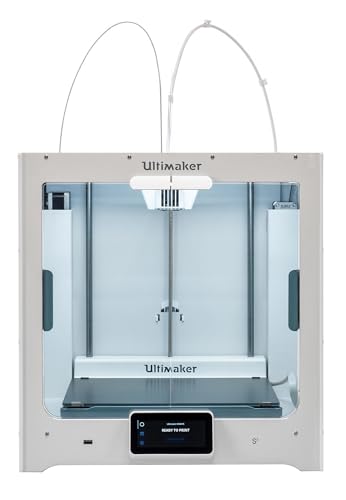
UltiMaker S5 — The Platform Pick
Badge: The Platform Pick — the name is the specification’s first line
- Model: UltiMaker S5
- Listing title content: the model name alone — no mechanism, dimension, or temperature claims are stated in the title
- Positioning in this guide: the established professional platform option
This review begins with the most honest sentence in the guide: the listing title for the UltiMaker S5 contains nothing but the machine’s name. No extruder count, no dimensions, no temperatures, no speed. A lesser guide would fill that silence from the model’s reputation, and the reputation is considerable — the S5 name has spent years in engineering offices, design studios, schools, and service bureaus as the sort of machine organisations buy when printing is infrastructure rather than experiment. But this site’s discipline is that a listing promises only what it states, so the S5’s review must do something more interesting than recite borrowed specifications: it must explain what a buyer is actually purchasing when the product on offer is a platform rather than a feature list, and why that purchase can be the most professional one in this entire set.
A platform purchase buys an ecosystem’s accumulated decisions. Around a machine like the S5 there exists a world the title does not mention and the buyer must verify in documentation: manufacturer materials with tuned profiles, a software pipeline maintained as a product in its own right, service and parts channels organised for institutions, and a user base concentrated in exactly the professional settings this guide addresses. The operational value of that world appears on the bad days — when a profile for an engineering material already exists and has been refined by thousands of prints, when a replacement part is a catalogue item rather than a research project, when a new employee can be trained on documentation written for organisations. Feature lists age in a product cycle; platforms age in decades, and the S5’s continued presence as a current listing is itself the platform argument made visible.
The counterweights are the mirror image of the virtues. A platform’s value lives outside the box, so a buyer who will not use the ecosystem — who prints one material, alone, on a standalone schedule — is paying for infrastructure that will mostly stand idle, and one of the more self-contained picks in this guide may serve better. The title’s silence also imposes the guide’s heaviest verification burden: literally every working figure a professional requires must be confirmed in the manufacturer’s documentation before this machine can be specified into a workflow, and a buyer unwilling to do that homework should not buy a machine whose listing assumes they will. Finally, platform generations turn over, and a prudent buyer confirms the model’s current support horizon as part of that same documentation pass. None of this diminishes the S5’s role here. It is the pick for buyers who think institutionally — who are purchasing not a printer but a printing capability, with all the surrounding apparatus that phrase implies.
Strengths
- An established platform brings materials, software, and service infrastructure around the machine.
- Institutional adoption means training and operational knowledge are widely shared.
- The model’s longevity as a current listing signals a maintained product line.
Trade-offs
- The title states no specifications at all, imposing a full documentation pass.
- Solo users with simple needs may pay for ecosystem they never exercise.
- Platform value depends on the maker’s continuing support, which buyers should confirm.
Best for: seeking a professional printing platform whose surrounding ecosystem carries materials, software, and service.
Not suited for: seeking a machine whose key figures can be confirmed from the listing title alone.
Institutional buyers will want the documentation open alongside the listing: Check price on Amazon.

Bambu Lab X1E Combo — The Managed Engineering Combo
Badge: The Managed Engineering Combo — chamber heat and a watchdog, bundled
- Bundle: X1E printer with AMS
- Architecture: CoreXY high-speed
- Supervision: AI print detection
- Chamber: active chamber heating
- Positioning: ideal for professional and engineering work, per the title
The X1E Combo is Bambu Lab’s consumer-honed formula re-aimed at the professional buyer, and its title names the two upgrades that re-aiming required. The first is active chamber heating. Where passive enclosures merely trap the heat a print generates, an actively heated chamber sets and holds a temperature, which is what engineering materials with warping tempers actually ask for — consistency across a tall part and across a long print, not warmth that fades with the weather in the room. The second is AI print detection, the supervised machine’s answer to the professional’s oldest fear: the failure that begins at hour two of an unattended overnight run and is discovered at hour nine, wearing a deadline. A machine that watches its own work and reacts turns those silent losses into interrupted jobs, and across a year of production that difference is measured in saved schedules rather than in features.
The combo format completes the positioning. The AMS in the box gives the machine its multi-material path from day one — support strategies and colour where the work wants them — inside the managed ecosystem that made the maker’s name: profiles, library, and behaviour curated as one system. For a professional buyer, that management is the actual product being weighed. A small engineering firm does not employ a printer whisperer; it employs engineers whose hours are billable, and a machine that compresses setup, calibration, and file preparation into a supervised flow is buying those hours back. The CoreXY pace underneath serves the same accounting — throughput without drama — and the title’s own closing phrase, ideal for professional and engineering, is for once a claim the preceding specifications genuinely support.
The trade-offs are the ecosystem’s standing ones, sharpened by professional stakes. A managed platform means the machine’s future behaviour is substantially the maker’s to decide, and a business standardising on it should do so with the same clear eyes it would apply to any vendor dependency. Active chamber heating also raises the operational questions heat always raises — placement, ventilation, and material handling discipline — which a professional setting must answer as policy rather than as improvisation. And the title, while generous, still omits dimensions and temperature figures, so specification into a workflow requires the documentation pass this guide recommends for every pick. Weighed whole, the X1E Combo is the set’s most complete managed proposition: chamber, supervision, material system, and pace in one bundle, aimed squarely at engineering work that cannot spare attention.
Strengths
- Active chamber heating holds temperatures that engineering materials demand.
- AI print detection protects unattended and overnight production runs.
- The AMS bundle completes the multi-material workflow from the first day.
Trade-offs
- The managed ecosystem concentrates control with the maker.
- Chamber heat requires deliberate placement and ventilation policy.
- Working dimensions and temperatures still require documentation.
Best for: seeking supervised, chamber-heated engineering printing inside a managed combo bundle.
Not suited for: seeking an open platform whose behaviour a business can direct entirely itself.
Engineering teams can review the active chamber and detection claims where they are stated: Check price on Amazon.

Flashforge Creator 5 Pro Industrial — The Specification-Forward Industrial
Badge: The Specification-Forward Industrial — chamber, filtration, four extruders
- Extruders: 4-extruder independent system
- Chamber: 65°C active heated chamber
- Filtration: HEPA13 air filtration
- Speed: 600mm/s high-speed printing
- Build volume: stated in the title as 256mm³ build volume
- Positioning: industrial variant of the Creator 5 Pro line
After several listings that made this guide work for its supper, the Creator 5 Pro Industrial arrives with the most forthcoming title in the set — a specification sheet wearing a name tag. Four-extruder independent system. A 65-degree active heated chamber. HEPA13 air filtration. High-speed printing at a stated 600mm/s. A build volume figure printed in the title itself. The word Industrial in the model name is, for once, cashed out by the lines that follow it: this is the Creator platform re-specified for environments where parts are functional, materials are engineering-leaning, and the machine shares air with people who are doing other work. Buyers who have read the preceding reviews will feel the relief of a listing that answers questions before they are asked, and that relief is itself diagnostic — it marks the difference between consumer marketing, which teases, and industrial specification, which commits.
Each stated system earns its place in a production reading. Four independent extruders deliver the multi-material family’s core asset — no purge-driven waste, materials kept in their own hardware, supports in a dedicated material — at a depth that suits batch work in several materials. The active chamber at a stated 65 degrees gives those materials the thermal environment engineering filaments ask for, holding temperature by design rather than by trapped luck. HEPA13 filtration addresses the occupational side of the same work: long prints in occupied workshops and studios, where air management is part of a machine’s professional manners. Together the three systems describe a machine intended to run long, hot, multi-material jobs in human company — a recognisable industrial profile, stated in industrial language.
The cautions are narrower here but real. The build volume is stated in the title in a compact form — 256mm³ — that a careful buyer should still confirm against the manufacturer’s documentation for the working dimensions in each axis, since batch planning lives and dies by axis measurements rather than by volume shorthand. The 600mm/s figure carries the family’s usual interpretation as a motion ceiling, not a finished-print schedule. And a machine this specified is a machine with systems to maintain: four extruders, a chamber, and a filtration path each bring their own service rhythms, which a professional setting should schedule rather than discover. None of that blurs the pick’s identity. For buyers whose work is multi-material, engineering-leaning, and conducted in shared air, this listing states the most complete case in the guide — and states it, refreshingly, in the title.
Strengths
- Four independent extruders remove purge waste from multi-material production.
- The 65-degree active chamber supports engineering-leaning materials by design.
- HEPA13 filtration suits long runs in occupied workshops and studios.
Trade-offs
- The title’s volume shorthand still needs axis dimensions from documentation.
- Four extruders plus chamber and filtration multiply scheduled maintenance.
- The speed figure is a ceiling claim rather than a production schedule.
Best for: seeking an industrially specified multi-extruder machine with active chamber heat and filtration for shared spaces.
Not suited for: seeking a simple single-material printer whose maintenance fits on an index card.
Workshop managers will appreciate that this listing states its case up front: Check price on Amazon.
Comparison table
| Machine | Material system as listed | Chamber as listed | Defining claim |
|---|---|---|---|
| Raise3D Pro3 Plus HS | Dual extruder | Not stated in title | Plus variant, high-speed generation |
| Raise3D Pro3 HS | Dual extruder | Title silent | Standard format, high-speed generation |
| Raise3D Pro3 | Dual extruder | Title silent | The line’s foundation model |
| UltiMaker S5 | Title silent | Title silent | Platform name only |
| Bambu Lab X1E Combo | AMS combo | Active chamber heating | AI print detection |
| Flashforge Creator 5 Pro Industrial | 4-extruder independent system | 65°C active heated chamber | HEPA13 filtration |
How to choose the best professional 3d printers for production work?
Choose by failure cost. Write down what a ruined overnight run actually costs the operation — in material, in schedule, in client confidence — and the shortlist reorganises itself around supervision and reliability rather than around speed badges. Buyers whose failures are cheap can shop the Raise3D ladder by workload shape: standard Pro3 for patient and development work, Pro3 HS for turnaround-bound batches, Pro3 Plus HS when parts or batch layouts outgrow the standard frame. Buyers whose failures are expensive should weight the X1E Combo’s detection and the Industrial’s specified systems heavily, because in their accounting a watched machine is worth more than a marginally faster unwatched one.
Then choose by material ambition, stated thermally. Professional work that stays in everyday filaments asks little of chambers; work that climbs toward engineering polymers asks for held temperatures and, at the frontier, for the specialised hardware examined in our guide to pEEK 3D Printers, where the most demanding common polymer sets requirements beyond this entire set. Between those poles, the X1E’s active chamber heating and the Industrial’s stated 65-degree chamber are the picks whose titles commit to thermal help, while the Raise3D and UltiMaker listings leave the question to documentation — which a professional buyer should treat as a genuine step in the purchase, not a formality.
Finally, choose by organisational shape. A solo practitioner buys a machine; a growing firm buys a standard. Standardising on one rung of one line — the fleet logic discussed in the Pro3 HS review — compounds profiles, spares, and training into an asset. Buying a platform like the S5 purchases a different compounding, in materials and service infrastructure. Either compounding beats the scattered alternative, a shelf of unrelated machines each with its own rituals. And whatever the choice, dimensional honesty governs the parts that result: the measurement-minded companion to this guide is our survey of precise 3D Printers, where accuracy is treated as a system property rather than a slogan.
One line, three rungs: reading the Raise3D ladder like a buyer
The unusual presence of three models from a single line in one guide deserves a direct synthesis, because it mirrors how professional standardisation actually happens. A buyer does not really choose among Pro3, Pro3 HS, and Pro3 Plus HS in the abstract; they choose a centre of gravity for an operation. Standardise low, on the foundation model, and the operation optimises for economy and accumulated knowledge, accepting pace as it comes. Standardise in the middle, on the HS, and the operation optimises for turnaround per unit of floor space, the metric most small-batch work actually lives by. Standardise high, on the Plus HS, and the operation optimises for part size and batch area, betting that large work is the growth direction. Mixed fleets exist — a Plus for the big work, HS units for the flow — and the line’s shared dual extruder foundation makes mixing cheaper in training and profiles than mixing brands would be. The ladder, read this way, is not three products competing; it is one product strategy offering three answers to the question of what an operation expects to become.
There is a discipline that makes any rung of the ladder pay, and it is worth stating for buyers new to standardisation: freeze the workflow before scaling it. One machine, one material set, one slicing profile library, tuned until the output is boringly predictable — then replicate. Operations that buy three machines before the first one’s profiles are settled own three separate experiments and call it a fleet. The Raise3D family’s shared foundation is valuable precisely because it lets the frozen workflow travel across rungs: the support strategy learned on the standard model remains valid on the HS, and the Plus inherits the same material logic at a larger scale. That portability is the quiet economic engine of a product line, and it is invisible in any single listing’s title — which is why this guide has treated the line, and not only the machines, as the thing being reviewed.
Chambers, filtration, and the professional environment
Two listings in this set make the printing environment itself a headline — active chamber heating on the X1E, a stated 65-degree active chamber plus HEPA13 filtration on the Industrial — and their emphasis marks a genuine divide in professional practice. A chamber is not a luxury enclosure; it is process control. Held temperatures stabilise layer adhesion across tall parts, widen the material menu toward the engineering shelf, and make a print’s outcome less hostage to the room’s weather. Filtration is the same thinking applied to the humans: long prints in occupied space are an air-quality question, and a maker who filters is a maker designing for workplaces rather than for garages. Buyers speccing machines for shared studios, offices, and classrooms should treat these lines in a title as first-order criteria, while buyers with a ventilated dedicated workshop may fairly rank them below extruder count and frame size. The environment a machine creates is part of the machine; professional buyers, who must answer for that environment to colleagues and sometimes to policy, cannot afford to treat it as garnish.
The environment argument extends one step further, to the building itself. A professional machine on a production schedule is a small appliance with opinions: it wants stable power, a surface that does not transmit the building’s vibrations, filament stored at controlled humidity, and a network or workflow connection that fits the operation’s habits. None of that appears in any title in this guide, and all of it belongs in a professional purchase plan, because the difference between a machine that performs in a showroom and one that performs in a particular studio is usually the studio’s preparation rather than the machine’s specification. The operations that get the most from machines like these treat installation as commissioning — a deliberate act with a checklist — and the guide’s repeated insistence on documentation is partly an insistence on that mindset: the manual is where a maker explains what environment the machine expects, and professional buyers read it before the crate arrives, not after the first warped batch.
From filament machines to production cells
It is worth remembering what family these professional machines belong to. Every pick here is a filament machine — the same fused filament principle as the desktop printers in our guide to fFF 3D Printers — professionalised by degrees: dual and multiple extruders for material strategy, chambers for process control, detection for supervision, platforms for support. That continuity is good news for buyers graduating from desktop machines, because the craft transfers: slicing judgement, material knowledge, and maintenance habits all carry upward, and the professional tier mostly adds discipline around them rather than replacing them. The graduation is real but it is a graduation, not a rebirth — which is why this guide has insisted throughout on reading professional listings with the same title-first scepticism that serves a first-time buyer, merely with higher stakes attached to every silence.
The production cell, once formed, develops its own quiet economics that a buyer should anticipate. Utilisation becomes the governing number: a machine printing twenty hours a day amortises its cost and its floor space at a rate no specification sheet can match, while a machine printing two hours a week is an expensive ornament regardless of its pedigree. That is why the reviews keep returning to workload shape — the stream of ordinary parts, the overnight prototype, the batch that must finish as one run — because utilisation is workload shape measured over time. Professional buyers who forecast their utilisation honestly, even roughly, choose better machines than buyers who forecast their ambitions, and the forecast needs nothing more exotic than last quarter’s job list and the discipline to believe it.
Common mistakes
The professional buyer’s signature mistake is purchasing peak capability for average work — the largest frame, the deepest extruder count — then running a workload of modest parts whose economics the big machine quietly taxes in footprint, warm-up, and handling. The second is the reverse false economy: saving against a chamber or a supervision feature that the failure log will demand within the year, at retrofit prices that dwarf the original difference. Third is skipping the documentation pass on terse listings; several titles in this guide state almost nothing, and a purchase order written from a title alone is a gamble wearing a procedure’s clothes. Fourth is neglecting the support-material strategy until the first impossible overhang arrives, when the dual and multi-extruder choices made months earlier suddenly reveal their worth. Fifth is treating the first machine as the whole decision, when professional printing is really a standardisation decision — profiles, spares, training, and fleet logic compound from the first unit onward. The last mistake is measuring a professional machine by its launch-week impressions instead of by its second-year service record, which is the only record the operation will actually live with. A companion error, quieter but just as costly, is leaving the machine’s purchase disconnected from the operation’s material stores: professional extruders fed on damp, bargain, or inconsistent filament will produce amateur results on an industrial schedule, and the post-mortem will blame the hardware for a stores problem. Stock material with the same seriousness as the machine was specced, rotate it, dry it, and record which spools served which contracts; in production, traceability is not bureaucracy but the difference between a fault that is found once and a fault that is found monthly.
Frequently Asked Questions
What makes a 3D printer professional rather than enthusiast-grade?
Less any single feature than a pattern of priorities: dual or multiple extruders for material and support strategy, process control through chambers, supervision for unattended runs, and a maker whose line, documentation, and service posture assume the machine earns money. The listings in this guide show the pattern in different proportions — the Raise3D line through its dual extruder ladder, the X1E through chamber and detection, the Industrial through its stated systems, the S5 through platform infrastructure.
Why do three picks come from the same Raise3D line?
Because professional buyers often standardise on one maker and choose a rung, and the Pro3 family offers that decision in its purest form: a standard model, a high-speed revision, and a larger Plus variant of the high-speed revision, all sharing the dual extruder foundation. Comparing within one line exposes how the maker segments pace and size, which is exactly the comparison a standardising buyer performs.
Is dual extrusion necessary for professional work?
Not strictly necessary, but close to foundational for the work this guide addresses. A second extruder keeps a support or secondary material permanently ready, which changes both the geometries that can be attempted and the rhythm of a production day. Every pick here except the title-silent S5 states a dual, multiple, or combo material system, which reflects how thoroughly professional practice has adopted the configuration.
What should be verified in documentation before buying from a terse listing?
Everything the title omits that the workflow depends on: build dimensions per axis, nozzle and chamber temperatures, material compatibility, and the support horizon for parts and service. The S5’s title is only a name and the Raise3D titles are nearly as spare, so for those picks the documentation pass is not diligence theatre — it is the specification process itself, and skipping it means buying an unknown machine at a professional price of commitment.
Does AI print detection replace operator attention?
No; it reallocates it. Detection systems like the X1E’s catch the failures they are built to recognise — the detached part, the extrusion fault — and convert silent overnight losses into paused jobs and alerts. They do not judge part quality, negotiate deadlines, or notice that the wrong file was loaded. Professional operations treat detection as a watchman, valuable precisely because human attention is then spent on judgement rather than on staring at a build plate.
Which pick suits a shared studio or office environment?
On stated specifications, the Creator 5 Pro Industrial makes the most explicit case: HEPA13 filtration for the air, an active heated chamber for process control, and four independent extruders for the work itself. The X1E Combo is the other environment-conscious pick, pairing its active chamber with detection suited to machines that run while the room does other things. In both cases, placement and ventilation remain the operator’s policy decisions, not the machine’s.
How should a small business choose between one large machine and several standard ones?
By asking where the queue forms. If the work is a stream of ordinary parts on repeating schedules, several standard units — the fleet logic of the Pro3 HS review — usually outproduce one large machine, because they parallelise the queue and forgive a single unit’s downtime. If the work includes parts that only a large frame can hold, or batches that must complete as single runs, the Plus-class machine earns its floor space. Many mature operations end with both shapes, sequenced by which constraint bit first.
Final recommendation
Match the machine to the operation’s shape. Standardise on the Raise3D ladder when one maker’s logic should govern the fleet — the Pro3 for patient and development-shaped work, the Pro3 HS as the fleet’s turnaround unit, the Pro3 Plus HS where size and pace must coincide. Choose the UltiMaker S5 when the purchase is really an institution’s printing capability, ecosystem and all, and budget the documentation diligence its terse listing demands. Choose the X1E Combo when engineering work needs a held chamber temperature and a watched print inside a managed bundle. Choose the Creator 5 Pro Industrial when the work is multi-material, engineering-leaning, and conducted in shared air, and a title that states its systems outright is worth rewarding. Professional printing rewards buyers who specify like engineers and verify like auditors; do both, and any of these six will repay the operation in the only currency that matters — parts, on schedule, again and again, through quarters where the machine is expected to be infrastructure rather than news. That expectation, unglamorous as it sounds, is the highest compliment a professional tool can earn, and it is earned in documentation read, profiles frozen, spares stocked, and schedules kept — the whole patient apparatus this guide has tried to make visible behind six deceptively short listing titles.
One final habit separates operations that thrive with machines like these from operations that merely own them: review the fleet against the job list every quarter. Workloads drift — a development contract becomes a production contract, a sideline product becomes the main line — and a machine set chosen for last year’s shape quietly taxes this year’s. The ladder, platform, and capability choices in this guide are all revisable, and the buyers who revise them deliberately, on evidence from their own queues, are the ones whose printers stay professional in the only sense that counts: matched to the work, every working day.


